Computer Science 9618/23 — October/November 2025
Cambridge AS Level · Fundamental Problem-solving and Programming Skills · worked solutions for every part, with the mark scheme
Topics Programming · Data Types and Structures · Algorithm Design and Problem-solving · Software Development
A user requires a program that implements complex data encryption to a recognised international standard. A programmer has started the design of the program.
The programmer decides to use a library routine to provide part of the solution. One reason for this is that library routines may perform functions that the programmer is unable to program themselves.
State three other benefits of using library routines in the development of the program.
1 ................................................................................................................................................
2 ................................................................................................................................................
3 ................................................................................................................................................
Answer
- Saves development time because the code does not need to be written from scratch.
- Library routines are already tested/debugged, so they are less likely to contain errors.
- They are often well-documented and maintained, making programs easier to maintain.
Saves development time; already tested/debugged so fewer errors; well-documented/maintained so easier to maintain.
Background Concept
A library routine is a pre-written piece of code that a programmer can use instead of creating that functionality themselves. Libraries are useful because they provide routines that are already available, usually standardised, and often written by experienced developers.
In programming, reuse is important. If a routine already exists and is suitable, using it can improve efficiency in development and reduce the amount of new code that needs to be created.
Understanding the Question
The question already gives one benefit: a library routine may perform a function the programmer cannot write themselves. You must not repeat that idea. Instead, you need three different benefits of using library routines while developing this encryption program.
So the task is pure theory recall: list three valid advantages other than the one already stated.
Approach
Think about what happens when code is reused instead of written from scratch:
- development is faster
- reliability is better because the code is already tested
- support such as documentation and maintenance is usually better
Any three distinct benefits along these lines are suitable.
Step-by-Step Reasoning
A good first point is about time. If a routine is already available, the programmer does not need to design and code that part from the beginning. That reduces development time.
A strong second point is about correctness. Library routines are usually used by many people and have already been tested and debugged. That means they are less likely to contain errors than brand-new code written under exam conditions or time pressure.
A good third point is about maintenance and support. Many library routines come with documentation, version updates, and sometimes vendor support. That makes them easier to understand, use correctly, and maintain in the future.
These are all different from the given point about the programmer being unable to write the routine themselves.
Key Takeaways
- Library routines save time because code is reused.
- Pre-tested code is usually more reliable.
- Standard library code is often easier to maintain because it is documented and supported.
Common Mistakes
- Repeating the benefit already given in the question. That would not gain credit.
- Giving the same idea twice, such as "saves time" and "faster to develop" as separate points.
- Writing vague answers like "it is better" without saying why it is better.
Things to Be Careful About
- Make sure each benefit is distinct.
- Keep answers specific to software development benefits, not general comments about encryption.
- Short, clear statements are enough; long explanations are not needed in the exam.
The programmer has identified a different part of the algorithm that would be appropriate to implement as a subroutine (a procedure or a function); no suitable library routine exists for this part.
State two reasons why the programmer may decide to use a subroutine.
1 ........................................................................................................................................
2 ........................................................................................................................................
Answer
- A subroutine can be called whenever needed, so repeated code only has to be written once.
- It breaks the program into smaller modules, making it easier to test, debug and maintain.
Repeated code is written once and reused; the program is split into smaller modules so testing/debugging/maintenance is easier.
Background Concept
A subroutine is a named block of code that performs a particular task. In this syllabus, subroutines are usually procedures or functions. A procedure carries out an action, while a function returns a value.
Subroutines are a key part of modular design. Instead of writing one large block of code, a programmer decomposes the problem into smaller tasks, each handled by its own module.
Understanding the Question
The question says there is a part of the algorithm that is suitable for a subroutine and that no library routine exists for it. You are asked for two reasons why the programmer may still choose a subroutine.
So this is not about library routines anymore. It is about why procedures/functions are useful in program design.
Approach
Think of the two biggest advantages of subroutines:
- reuse of code
- modular structure
These lead directly to common exam answers such as less repetition, easier debugging, easier testing, easier maintenance, and improved readability.
Step-by-Step Reasoning
The first reason is reuse. If the same task is needed more than once, placing it in a subroutine means the code is written once and then called whenever needed. This avoids duplication.
The second reason is modularity. A large program is easier to manage when split into smaller named sections. Each section can be developed and checked separately. That makes testing simpler, debugging more focused, and later maintenance easier.
Other valid reasons often come from the same ideas, for example improving readability or making teamwork easier, but the two above are the clearest standard points.
Key Takeaways
- Subroutines support decomposition of a problem into modules.
- They allow code reuse.
- They make programs easier to test, debug, read and maintain.
Common Mistakes
- Saying only "it makes the program shorter" without explaining reuse or modularity.
- Confusing a subroutine with a library routine.
- Giving two answers that are really the same point, such as "less repetition" and "reuse".
Things to Be Careful About
- The question asks for reasons to use a subroutine, not specifically a function.
- Keep the reasons general and design-focused.
- Make sure the two points are distinct enough to earn separate marks.
A function header in pseudocode is defined as:
FUNCTION Pass2(Count : INTEGER) RETURNS BOOLEAN
Complete the table by describing the terms used in the function header.
The first row has been completed.
| Term | Description |
|---|---|
Pass2 | the name of the function |
Count | |
BOOLEAN |
Answer
| Term | Description |
|---|---|
Pass2 | the name of the function |
Count | the parameter name passed into the function |
BOOLEAN | the data type of the value returned by the function |
See completed table
Background Concept
A function header tells you key information about a function before you even see its body. In CIE pseudocode, a function header normally includes:
- the keyword
FUNCTION - the function name
- any parameter list inside brackets
- the return type after
RETURNS
In FUNCTION Pass2(Count : INTEGER) RETURNS BOOLEAN, the function is named Pass2, it receives one parameter called Count, and it returns a Boolean result.
Understanding the Question
You are given the header and a table of terms. One row is already completed: Pass2 is the name of the function. You must describe the other two terms:
CountBOOLEAN
This means you need to recognise what each part of the header represents.
Approach
Read the function header from left to right:
- inside the brackets is the parameter list
- after
RETURNScomes the type of value returned
So Count must be the parameter name, and BOOLEAN must be the function's return type.
Step-by-Step Reasoning
Look at Count : INTEGER.
The identifier before the colon is the parameter name. That means Count is the name of the parameter passed into the function.
The word after the colon is its type, here INTEGER, but the question does not ask you to describe INTEGER.
Now look at RETURNS BOOLEAN.
Anything after RETURNS tells you the type of value the function sends back to the calling code. Therefore BOOLEAN is the data type of the return value. A Boolean result means the function will return either TRUE or FALSE.
Key Takeaways
- In a function header, items in brackets are parameters.
- The identifier is the parameter name.
- The type after
RETURNSis the return type of the function. - A Boolean return value means
TRUEorFALSE.
Common Mistakes
- Saying
Countis an integer. The term asked about isCount, notINTEGER. - Saying
BOOLEANis a parameter. It is the return type. - Describing
Pass2again instead of the missing terms.
Things to Be Careful About
- Distinguish between a parameter name and a data type.
- In a header,
RETURNSalways refers to the value produced by the function. - Keep the wording precise:
Countis the parameter name, whileBOOLEANis the data type of the returned value.
Variables in the program have example values:
| Variable | Example value |
|---|---|
DoB | 23/6/2011 |
Multiplier | 2.5 |
AddressLine[1] | "35 Lincoln Avenue" |
Complete the table by evaluating each expression using the example values:
| Expression | Evaluates to |
|---|---|
LENGTH(NUM_TO_STR(Multiplier)) | |
MONTH(DoB) > 4 | |
15 + STR_TO_NUM(MID(AddressLine[1], 2, 1)) |
Working
NUM_TO_STR(2.5) gives "2.5", so LENGTH("2.5") = 3
MONTH(23/6/2011) = 6, so 6 > 4 is TRUE
MID("35 Lincoln Avenue", 2, 1) gives "5"
STR_TO_NUM("5") = 5
15 + 5 = 20
Answer
| Expression | Evaluates to |
|---|---|
LENGTH(NUM_TO_STR(Multiplier)) | 3 |
MONTH(DoB) > 4 | TRUE |
15 + STR_TO_NUM(MID(AddressLine[1], 2, 1)) | 20 |
3, TRUE, 20
Background Concept
This question tests evaluation of expressions using built-in functions. A built-in function is a standard routine provided by the language or pseudocode system.
The key functions here are:
NUM_TO_STR(x)converts a number to a stringLENGTH(s)returns the number of characters in a stringMONTH(date)extracts the month number from a dateMID(s, start, length)returns part of a stringSTR_TO_NUM(s)converts a numeric string into a number
In CIE pseudocode, string positions are counted from 1, not 0.
Understanding the Question
You are given three variables and example values:
DoB = 23/6/2011Multiplier = 2.5AddressLine[1] = "35 Lincoln Avenue"
You must substitute those values into each expression and work out the final result exactly.
This is not about writing code. It is about reading each function carefully and evaluating from the inside out.
Approach
For each expression:
- replace the variable with its given value
- evaluate the innermost function first
- continue outward until the whole expression becomes a final value
That is especially important when functions are nested, such as LENGTH(NUM_TO_STR(Multiplier)) and STR_TO_NUM(MID(AddressLine[1], 2, 1)).
Step-by-Step Reasoning
First expression: LENGTH(NUM_TO_STR(Multiplier))
Replace Multiplier with 2.5.
NUM_TO_STR(2.5) converts the number into the string "2.5".
Now apply LENGTH.
The string "2.5" has three characters:
2.5
So the result is 3.
Second expression: MONTH(DoB) > 4
Replace DoB with 23/6/2011.
MONTH(23/6/2011) extracts the month part, which is 6.
Now compare: 6 > 4.
That statement is true, so the expression evaluates to TRUE.
Third expression: 15 + STR_TO_NUM(MID(AddressLine[1], 2, 1))
Replace AddressLine[1] with "35 Lincoln Avenue".
Now evaluate the innermost function:
MID("35 Lincoln Avenue", 2, 1) means start at position 2 and take 1 character.
Because positions start at 1:
- position 1 is
3 - position 2 is
5
So the substring returned is "5".
Next, STR_TO_NUM("5") converts the string into the number 5.
Finally, calculate 15 + 5 = 20.
So the three answers are 3, TRUE, and 20.
Key Takeaways
- Evaluate nested functions from the inside outward.
LENGTHcounts characters in a string, including symbols like the decimal point.MONTHreturns the month number from a date.MIDuses 1-based indexing in CIE pseudocode.STR_TO_NUMchanges a numeric string into a number so arithmetic can be performed.
Common Mistakes
- Forgetting that the decimal point in
"2.5"counts as a character. - Writing
6instead ofTRUEfor the comparisonMONTH(DoB) > 4. - Using 0-based indexing for
MID, which would pick the wrong character. - Forgetting to convert
"5"into the number5before adding to15.
Things to Be Careful About
- Keep strings and numbers separate:
"5"is not the same as5. - For Boolean expressions, give
TRUEorFALSE, not just the extracted value. - Read
MID(string, start, length)carefully: the third value is how many characters to take, not the finishing position. - Use the exact example values given rather than making assumptions about other formats.
A program contains a global 1D array of type STRING containing 65 elements.
An existing text file is used to store the data in the array. Only non-blank elements (those that do not contain an empty string) are written to the text file.
An algorithm will:
- write the first element of the array as a new line in the text file
- continue until all elements have been written, each to a new line of the text file.
Stepwise refinement is applied to the algorithm.
Describe up to six steps for this algorithm that could be used to produce pseudocode.
Do not use pseudocode statements in your answer.
Step 1 .......................................................................................................................................
Step 2 .......................................................................................................................................
Step 3 .......................................................................................................................................
Step 4 .......................................................................................................................................
Step 5 .......................................................................................................................................
Step 6 .......................................................................................................................................
Answer
Step 1 Open the text file ready for writing.
Step 2 Start at the first element of the array.
Step 3 Check whether the current element is blank or non-blank.
Step 4 If it is non-blank, write it to the text file on a new line.
Step 5 Move to the next element and repeat until all 65 elements have been processed.
Step 6 Close the text file.
See explanation
Background Concept
Stepwise refinement means taking a complete problem and breaking it into smaller, clearer actions until each action is simple enough to turn into pseudocode directly. Instead of writing code immediately, you first describe the algorithm at a high level.
For this question, the important ideas are:
- there is a 1D array with 65
STRINGelements - the data must be stored in a text file
- only non-blank elements are written
- each written element must go on its own line
A good refined algorithm usually includes:
- preparation steps, such as opening a file
- processing steps, such as visiting each array element
- decision steps, such as checking whether an element is blank
- finishing steps, such as closing the file
Because the question says not to use pseudocode statements, the answer should be written as plain English actions, not with keywords like IF, FOR, or WHILE.
Understanding the Question
You are not being asked to write the final pseudocode yet. You are being asked to describe sensible intermediate steps that could later be converted into pseudocode.
The given information tells you:
- the array is global, so it already exists
- it has 65 elements, so all 65 positions must be considered
- blank elements contain the empty string and must not be written
- the output file already exists, but it still needs to be opened before writing
- every item written must appear on a separate line
So the algorithm must do more than just loop through the array. It must also make a decision about each element and handle the file correctly.
Approach
A sensible refinement for this task is:
- prepare the file
- begin at the first array element
- inspect the current element
- write it only if it is not blank
- move on and repeat for the rest of the array
- finish by closing the file
This matches the structure of the actual program that would later be written in pseudocode:
- sequence for setup and finish
- iteration for visiting all 65 elements
- selection for deciding whether to write the current value
Step-by-Step Reasoning
A strong answer should describe the task in ordered stages.
Step 1: Open the text file ready for writing
Before any data can be stored, the file must be opened. This is one of the setup actions.
Step 2: Start at the first element of the array
The algorithm needs a way to know which element is currently being processed. In plain English, this can be described as starting at the first element.
Step 3: Check whether the current element is blank or non-blank
This is essential because the question states that only non-blank elements are written to the file. So each element must be tested.
Step 4: If it is non-blank, write it to the text file on a new line
This step explains exactly what happens when the condition is satisfied. The reference to a new line is important because the question says each element must be written on a separate line.
Step 5: Move to the next element and repeat until all 65 elements have been processed
This is the iteration part. The algorithm must continue through the whole array, not stop after the first item. Even blank elements must still be checked, although they are skipped rather than written.
Step 6: Close the text file
After all elements have been processed, the file should be closed properly.
Other wording could still gain marks if it expresses the same logic clearly. For example, “continue until the end of the array” is acceptable if it clearly means all 65 elements are processed.
Key Takeaways
- Stepwise refinement breaks a problem into clear, manageable actions before pseudocode is written.
- A file-processing algorithm usually has setup, processing and finishing stages.
- When only some data items should be written, the algorithm needs a decision step.
- When every array element must be checked, the algorithm needs repetition.
Common Mistakes
- Writing pseudocode instead of describing steps: the question explicitly says not to use pseudocode statements.
- Forgetting the blank-element check: this misses the rule that only non-blank strings are written.
- Not mentioning movement through the array: the algorithm must process all 65 elements, not just the first one.
- Forgetting to close the file: file handling normally includes both opening and closing.
- Saying all elements are written: blank elements should be skipped.
Things to Be Careful About
- Make sure the answer is in plain English, not formal pseudocode.
- Mention that each written item goes on a new line.
- Show that all 65 elements are considered.
- Distinguish between checking an element and writing an element; every element is checked, but only non-blank ones are written.
- Keep the steps in a logical order: open first, process next, close last.
Iteration is one programming construct.
Identify one other programming construct that will be required when the algorithm from part (a) is converted into pseudocode and explain how it is used.
Construct ..................................................................................................................................
Use ...........................................................................................................................................
Answer
- Construct: Selection
- Use: It is used to test whether the current array element contains an empty string. If it is not blank, the element is written to the text file; otherwise it is skipped.
Selection — used to check whether an element is non-blank before writing it to the file.
Background Concept
The three basic programming constructs are:
- sequence: statements happen one after another in order
- selection: the program chooses between alternatives depending on a condition
- iteration: a set of statements is repeated
The question already names iteration, because the algorithm must go through many array elements. The other construct that is clearly needed here is selection, because the program must decide whether each element should be written.
Selection is typically used when a condition is either true or false. In this case, the condition is whether the current array element is blank.
Understanding the Question
The question asks for one programming construct other than iteration and then asks how it is used in this specific algorithm.
The key clue is the sentence:
- only non-blank elements are written to the text file
That means the program cannot write every element automatically. It must check each one first. That checking-and-deciding is selection.
Approach
Look for a place in the algorithm where the program has to make a decision.
Here, for each array element, the algorithm must decide:
- if the element is not empty, write it
- otherwise, do not write it
That is exactly what selection does, so the correct answer is to name selection and explain that it controls whether the current element is written or skipped.
Step-by-Step Reasoning
Why is iteration not enough on its own?
Iteration only lets the program repeat actions for all 65 elements. If the program only had iteration, it would process every element in turn, but it would still need a way to choose whether to write the current one.
That choice is made using selection.
For each element:
- the loop reaches the current array position
- the program checks whether that element is blank
- if it is non-blank, it is written to the file
- if it is blank, nothing is written and the loop continues
So the selection construct is used inside the repeated processing of the array.
Although sequence is also present in any algorithm, it is not the best answer here because the question asks for a construct that will be required, and the blank/non-blank rule makes selection the clear required one.
Key Takeaways
- Use iteration when you must process many items.
- Use selection when you must decide whether an action should happen.
- In array-processing questions, iteration and selection are often used together.
- A condition such as “only non-blank elements” is a strong clue that selection is needed.
Common Mistakes
- Answering sequence: sequence exists in all algorithms, but it does not address the specific need to test for blank values.
- Naming selection without explaining its use: the question needs both the construct and its role.
- Saying selection chooses the next array element: iteration controls movement through the array, not selection.
- Forgetting the empty-string condition: the explanation should refer to blank versus non-blank elements.
Things to Be Careful About
- The construct must be one of the standard programming constructs.
- The explanation should be tied directly to this algorithm, not just a generic definition.
- Make clear that selection is used to decide whether to write or skip the current element.
- Do not confuse the loop that visits all elements with the condition that filters out blank ones.
A program uses a stack to hold up to 30 integer values. The stack is implemented using a global integer variable and a global 1D array.
The array is declared in pseudocode:
DECLARE ThisStack : ARRAY[1:30] OF INTEGER
Stack design notes:
- The global variable
SPacts as a stack pointer.SPcontains the array index of the last value pushed onto the stack. - If the stack is empty, then
SPis assigned the value zero. - The first item added to the stack will be stored in
ThisStack[1] SPis incremented each time an item is added to the stack.
A function Pop() is written to remove an item from ThisStack. The function returns an item of type PopData which is defined in pseudocode:
TYPE PopData
    DECLARE Data : INTEGER
    DECLARE Exists : BOOLEAN
ENDTYPE
The value removed from the stack is assigned to Data and Exists is set to TRUE. If it is not possible to remove a value from the stack, then Exists is set to FALSE
Complete the pseudocode for Pop()
FUNCTION Pop() RETURNS PopData
    DECLARE ThisPop : ...............................................

    IF ............................................... THEN
        PopData.Exists ← ............................................... // Stack is empty
    ELSE
        PopData.Data ← ...............................................
        PopData.Exists ← ...............................................
        SP ← ...............................................
    ENDIF

    RETURN ThisPop
ENDFUNCTION
Answer
FUNCTION Pop() RETURNS PopData
    DECLARE ThisPop : PopData

    IF SP = 0 THEN
        ThisPop.Exists ← FALSE
    ELSE
        ThisPop.Data ← ThisStack[SP]
        ThisPop.Exists ← TRUE
        SP ← SP - 1
    ENDIF

    RETURN ThisPop
ENDFUNCTION
See completed pseudocode
Background Concept
A stack is a last-in, first-out (LIFO) data structure. The most recently added item is the first one removed. Two standard stack operations are:
Push— add an item to the top of the stackPop— remove the item currently at the top of the stack
In an array-based stack, a stack pointer keeps track of the current top position. In this question:
SP = 0means the stack is empty- the first pushed item is stored in
ThisStack[1] - the current top item is always at
ThisStack[SP]
So for a Pop operation:
- Check whether the stack is empty.
- If it is empty, no data can be removed.
- Otherwise, read the top value from
ThisStack[SP]. - Mark that a value exists.
- Decrease
SPby 1, because the top item has been removed.
The function returns a value of type PopData, which is a record with two fields:
Data— the integer that was removedExists— a Boolean telling the caller whether the pop was successful
This is a common design when a function might fail but still needs to return structured information.
Understanding the Question
You are given the design of the stack already:
- the stack is stored in
ThisStack[1:30] SPis global and points to the last item pushedSP = 0means the stack is empty
You are asked to complete the pseudocode for Pop(). That means the function must:
- create a variable of type
PopData - check whether removal is possible
- if not possible, set the
Existsfield toFALSE - if possible, copy the top stack value into
Data, setExiststoTRUE, and moveSPdown by 1 - return the completed record
The key clue is the description of SP: it stores the array index of the last value pushed. That tells you exactly where the top item is found.
Approach
The correct approach is the standard pop pattern for an array-based stack.
- First, declare a local variable to hold the returned record.
- Use
IF SP = 0to test whether the stack is empty. - In the empty case, do not try to access the array, because there is no valid top item.
- In the non-empty case, read the top item from
ThisStack[SP]. - Set the success flag.
- Reduce
SPby 1 so the next item below becomes the new top. - Return the record variable.
This works because the stack pointer always identifies the current top element.
Step-by-Step Reasoning
Start with the declaration:
DECLARE ThisPop : PopData
This creates a local variable called ThisPop that has the two fields Data and Exists.
Next, check for the empty stack condition:
IF SP = 0 THEN
This is the correct test because the question explicitly says that SP is zero when the stack is empty.
If the stack is empty, a pop cannot happen:
ThisPop.Exists ← FALSE
Only the Exists flag needs to show failure. No item can be returned from the stack.
If the stack is not empty, the top item is at index SP:
ThisPop.Data ← ThisStack[SP]
That copies the current top integer into the record being returned.
Since a value was successfully removed, set the flag:
ThisPop.Exists ← TRUE
Then update the stack pointer:
SP ← SP - 1
This is essential. Suppose SP was 5. That means the top item was at ThisStack[5]. After removing it, the new top should be the previous item at ThisStack[4], so SP must become 4.
Finally, return the record:
RETURN ThisPop
That sends both pieces of information back to the caller: the data and whether it existed.
So the finished function is:
FUNCTION Pop() RETURNS PopData
    DECLARE ThisPop : PopData

    IF SP = 0 THEN
        ThisPop.Exists ← FALSE
    ELSE
        ThisPop.Data ← ThisStack[SP]
        ThisPop.Exists ← TRUE
        SP ← SP - 1
    ENDIF

    RETURN ThisPop
ENDFUNCTION
Key Takeaways
- In an array-based stack, the stack pointer tells you where the top item is.
SP = 0is a common way to represent an empty stack when the array starts at index 1.- A
Popoperation must check for empty stack before reading the array. - Successful pop: read top item, set success flag, then decrement
SP. - Returning a record is useful when a function needs to return both data and status.
Common Mistakes
- Using
SP = 1as the empty condition. That is wrong here because the question states empty meansSP = 0. - Accessing
ThisStack[SP]before checking whether the stack is empty. IfSP = 0, that would be an invalid array access. - Forgetting to decrement
SP. Then the item would appear to remain on the stack. - Decrementing
SPbefore readingThisStack[SP]. That would return the wrong item. - Writing
ThisPop.Exists ← TRUEin the empty case. That would falsely claim a successful pop. - Returning the type name
PopDatainstead of the variableThisPop. A function returns a value, not a type definition.
Things to Be Careful About
- Use the correct identifier names from the question:
ThisStack,SP,ThisPop,Data,Exists. - In CIE pseudocode, assignment must use
←, not=. - Arrays here are indexed from 1 to 30, but the empty-stack marker is still 0 because
SPis a pointer value, not an array element. - The order matters in the non-empty branch: copy the value first, then reduce
SP. - Even though only
Existsis essential in the empty case, the returned variable must still be the declared record variableThisPop. - If you are completing dotted lines in an exam, make sure the inserted text matches the surrounding pseudocode structure exactly.
A program contains a global 1D array Data containing 20 elements of type INTEGER
A global string NumString represents a sequence of three-digit numbers, separated by commas. For example:
"101,456,219,754,328"
The string contains at least four three-digit numbers. The total number of three-digit numbers in the string is unknown.
A procedure Store() will:
- extract one three-digit number at a time from
NumString - convert each of the three-digit numbers extracted to an integer and assign this to the next array element, starting from index 1
- end when all three-digit numbers have been stored, or when the array is full.
Complete the pseudocode for Store()
All local variables used must be declared.
PROCEDURE Store()
..........................................................................................................................................................
..........................................................................................................................................................
..........................................................................................................................................................
..........................................................................................................................................................
..........................................................................................................................................................
..........................................................................................................................................................
..........................................................................................................................................................
..........................................................................................................................................................
..........................................................................................................................................................
..........................................................................................................................................................
..........................................................................................................................................................
..........................................................................................................................................................
..........................................................................................................................................................
..........................................................................................................................................................
..........................................................................................................................................................
..........................................................................................................................................................
ENDPROCEDURE
Answer
PROCEDURE Store()
   DECLARE Index, Position : INTEGER
   DECLARE ThisNum : STRING
   Index ← 1
   Position ← 1
   WHILE Position <= LENGTH(NumString) AND Index <= 20
      ThisNum ← MID(NumString, Position, 3)
      Data[Index] ← STR_TO_NUM(ThisNum)
      Index ← Index + 1
      Position ← Position + 4
   ENDWHILE
ENDPROCEDURE
See completed pseudocode
Background Concept
This question is about processing a formatted string and storing the results into a 1D array. The string contains values in a regular pattern: each number is exactly three characters long and each number is separated by a comma. Because the pattern is fixed, we can move through the string in steps of 4 characters: 3 digits, then 1 comma.
A 1D array stores values at numbered positions, and here the question says storage must start at index 1. That means the first extracted number goes into Data[1], the next into Data[2], and so on.
In CIE pseudocode, string handling often uses functions such as:
LENGTH(StringName)to find the number of characters in a stringMID(StringName, StartPosition, NumberOfCharacters)to extract part of a stringSTR_TO_NUM(...)to convert a numeric string such as"101"into the integer101
The loop also needs to stop under either of two conditions:
- all numbers in the string have been processed
- the array is full
That means a pre-condition loop such as WHILE is a good choice, because it checks both conditions before each new extraction.
Understanding the Question
We are given:
- a global array
Datawith 20 integer elements - a global string
NumStringcontaining three-digit numbers separated by commas - an unknown number of values in the string
We must complete Store() so that it:
- extracts one three-digit number at a time
- converts it to an integer
- stores it in the next free array element starting at index 1
- stops when either the end of the string is reached or the array becomes full
The important clues are:
- every value is exactly three digits long
- commas separate the numbers
- the total number of numbers is unknown
- the array only has 20 positions
So the algorithm must not assume a fixed number of loop repetitions. It must work until a condition becomes false.
Approach
The cleanest method is to use two control variables:
Positionto show where the next 3-digit substring starts inNumStringIndexto show where the next integer should be stored inData
Start both at 1.
Then repeat this process:
- take 3 characters from
NumStringstarting atPosition - convert those 3 characters to an integer
- store the integer in
Data[Index] - move
Indexon by 1 - move
Positionon by 4, because we skip past 3 digits and 1 comma
The loop must continue only while:
Positionis still inside the string, andIndexhas not gone beyond 20
That is why the loop condition uses both tests together with AND.
Step-by-Step Reasoning
First, declare the local variables:
IndexandPositionareINTEGERThisNumisSTRING
ThisNum is needed because the extracted 3-character slice is a string before it is converted.
Initialisation:
Index ← 1because the first array position to use isData[1]Position ← 1because the first number starts at the first character of the string
Now consider an example:
NumString = "101,456,219,754,328"
Character positions are:
- 1 to 3:
101 - 4:
, - 5 to 7:
456 - 8:
, - 9 to 11:
219 - and so on
So each time we extract 3 characters, the next number starts 4 places later.
The loop condition is:
WHILE Position <= LENGTH(NumString) AND Index <= 20
Why these two parts?
Position <= LENGTH(NumString)means there is still a starting character available for another numberIndex <= 20means there is still room in the array
Inside the loop:
ThisNum ← MID(NumString, Position, 3)
- extracts exactly 3 characters from the current position
- for the first loop, this gives
"101"
Data[Index] ← STR_TO_NUM(ThisNum)
- converts the string digits into an integer
- stores the result in the array
- first loop stores
101inData[1]
Index ← Index + 1
- moves to the next array element for the next value
Position ← Position + 4
- skips over the 3 digits just used and the comma after them
- from 1 it becomes 5, which is the start of the next number
If we dry run the example:
- start:
Index = 1,Position = 1 - extract
101, store inData[1], thenIndex = 2,Position = 5 - extract
456, store inData[2], thenIndex = 3,Position = 9 - extract
219, store inData[3], thenIndex = 4,Position = 13 - continue until no more numbers remain or
Indexbecomes 21
Notice that the condition uses Index <= 20, not < 20. Since array positions are 1 to 20, position 20 is valid and must still be used.
This gives a complete solution that matches the specification exactly.
Key Takeaways
- When data in a string has a fixed pattern, you can process it using position arithmetic.
- Use
MIDto extract a substring andSTR_TO_NUMto convert numeric text into an integer. - A
WHILEloop is suitable when the number of repetitions is not known in advance. - When storing into an array, always guard against exceeding the highest valid index.
- For structured exam pseudocode, declare all local variables explicitly.
Common Mistakes
- Using
=instead of←for assignment. In CIE pseudocode,←must be used for assignment. - Forgetting to declare
ThisNum,IndexorPosition. The question explicitly requires all local variables to be declared. - Increasing
Positionby 3 instead of 4. That would land on the comma, not the next number. - Using
Index < 20instead ofIndex <= 20. That would leaveData[20]unused. - Storing the substring directly without converting it.
DatacontainsINTEGERvalues, soSTR_TO_NUMis needed. - Using a fixed loop such as
FORwhen the number of values is unknown.
Things to Be Careful About
- The array starts at index 1 in the question, so the first storage location is
Data[1], notData[0]. MID(NumString, Position, 3)must extract exactly 3 characters because every number is three digits long.- The stopping condition must protect both the string access and the array access.
- The question says the string contains at least four numbers, but the algorithm should still work for any number up to the array limit.
- Keep the identifier names exactly as given where relevant:
Data,NumString, andStore(). - In CIE-style pseudocode, loop and selection keywords should be upper case and properly closed with
ENDWHILEandENDPROCEDURE.
A global 1D array Num of integers contains four elements. A program assigns values to these elements as shown:
Num[1] ← 1
Num[2] ← 2
Num[3] ← 5
Num[4] ← 3
A procedure Process() manipulates the values in the array.
The procedure is written in pseudocode:
PROCEDURE Process(Start : INTEGER)
    DECLARE CaseVar, Index, Count : INTEGER

    Index ← Start
    Count ← 0

    WHILE Count <= 20
        CaseVar ← Num[Index]
        CASE OF CaseVar
            1 : Num[Index] ← Num[Index] + Index //clause one
                Index ← Index + 1
                Count ← Count + 1

            2 : Num[Index] ← Num[Index] + Index //clause two
                Index ← Index + 2
                Count ← Count + 2

            3 : Num[Index] ← Num[Index] * 2 //clause three
                Index ← Index + 3
                Count ← Count - 1

            4 : Count ← Count + 4 //clause four
            OTHERWISE : Count ← 20
        ENDCASE

        Index ← (Index MOD 4) + 1
    ENDWHILE
ENDPROCEDURE
Complete the trace table by dry running the procedure when it is called in the statement:
CALL Process(1)
| Index | CaseVar | Count | Num[1] | Num[2] | Num[3] | Num[4] |
|---|---|---|---|---|---|---|
Working
Initial values:
Index ← 1Count ← 0Num = [1, 2, 5, 3]
Dry run:
CaseVar = 1so clause one runs:Num[1] ← 2,Index ← 2,Count ← 1Index ← (2 MOD 4) + 1 = 3CaseVar = 5soOTHERWISEruns:Count ← 20Index ← (3 MOD 4) + 1 = 4CaseVar = 3so clause three runs:Num[4] ← 6,Index ← 7,Count ← 19Index ← (7 MOD 4) + 1 = 4CaseVar = 6soOTHERWISEruns:Count ← 20Index ← (4 MOD 4) + 1 = 1CaseVar = 2so clause two runs:Num[1] ← 3,Index ← 3,Count ← 22Index ← (3 MOD 4) + 1 = 4
Answer
| Index | CaseVar | Count | Num[1] | Num[2] | Num[3] | Num[4] |
|---|---|---|---|---|---|---|
| 1 | 0 | 1 | 2 | 5 | 3 | |
| 2 | 1 | 1 | 2 | |||
| 3 | 5 | 20 | ||||
| 4 | ||||||
| 7 | 3 | 19 | 6 | |||
| 4 | ||||||
| 1 | 6 | 20 | ||||
| 3 | 2 | 22 | 3 | |||
| 4 |
See completed trace table
Background Concept
A trace table is used to dry run an algorithm without executing it on a computer. You follow the pseudocode line by line and record the values of important variables after each significant change. In this question, the key features are:
- a
WHILEloop, so the conditionCount <= 20must be checked before each iteration - a
CASE OFselection, so the value stored inCaseVardetermines which clause runs - a 1D array
Num, soNum[Index]means "look at the element whose position is given byIndex" - modular arithmetic in
Index ← (Index MOD 4) + 1, which wraps the index around the four-element array
The MOD operator gives the remainder after division. For example:
2 MOD 4 = 23 MOD 4 = 34 MOD 4 = 07 MOD 4 = 3
So adding 1 after MOD 4 makes the index cycle through values 1 to 4.
Understanding the Question
You are given the starting contents of the global array:
Num[1] = 1Num[2] = 2Num[3] = 5Num[4] = 3
The procedure is called with CALL Process(1), so the parameter Start is 1. That means Index begins at 1.
You must complete the trace table by following exactly what happens as the procedure runs. The important things to watch are:
- which
CASEclause is chosen from the currentNum[Index] - how
Num[Index]may change - how
Indexchanges twice in each loop iteration: once inside the chosen clause, then again at the end withMOD - how
Countchanges, because it controls when the loop stops
Approach
The safest approach is:
- Write down the initial values of
Index,Count, and the wholeNumarray. - At the start of each loop, find
CaseVar ← Num[Index]. - Choose the correct
CASEclause. - Apply every assignment in that clause in order.
- Then apply the final line
Index ← (Index MOD 4) + 1. - Repeat until
Countbecomes greater than 20.
A common reason students lose marks here is forgetting that the Index is changed inside the clause and then changed again afterwards by the MOD line.
Step-by-Step Reasoning
Start of procedure:
Index ← Start, soIndex = 1Count ← 0Num = [1, 2, 5, 3]
This gives the first row of the trace table.
First loop iteration
Check condition:
Count <= 20gives0 <= 20, so the loop runs.
Set case variable:
CaseVar ← Num[Index] = Num[1] = 1
CaseVar = 1, so clause one runs:
Num[Index] ← Num[Index] + IndexbecomesNum[1] ← 1 + 1 = 2Index ← Index + 1givesIndex = 2Count ← Count + 1givesCount = 1
Now apply the line after the CASE:
Index ← (Index MOD 4) + 1Index ← (2 MOD 4) + 1 = 2 + 1 = 3
Second loop iteration
Check condition:
1 <= 20, so continue.
Set case variable:
CaseVar ← Num[3] = 5
There is no clause for 5, so OTHERWISE runs:
Count ← 20
The array does not change here.
Now update index:
Index ← (3 MOD 4) + 1 = 3 + 1 = 4
Third loop iteration
Check condition:
20 <= 20, so the loop still runs.
Set case variable:
CaseVar ← Num[4] = 3
CaseVar = 3, so clause three runs:
Num[4] ← Num[4] * 2 = 3 * 2 = 6Index ← Index + 3 = 4 + 3 = 7Count ← Count - 1 = 20 - 1 = 19
Now update index:
Index ← (7 MOD 4) + 1 = 3 + 1 = 4
Notice that even though Index temporarily became 7, the final MOD line wraps it back into the 1 to 4 range.
Fourth loop iteration
Check condition:
19 <= 20, so continue.
Set case variable:
CaseVar ← Num[4] = 6
There is no clause for 6, so OTHERWISE runs:
Count ← 20
Update index:
Index ← (4 MOD 4) + 1 = 0 + 1 = 1
Fifth loop iteration
Check condition:
20 <= 20, so continue.
Set case variable:
CaseVar ← Num[1] = 2
CaseVar = 2, so clause two runs:
Num[1] ← Num[1] + Index = 2 + 1 = 3Index ← Index + 2 = 1 + 2 = 3Count ← Count + 2 = 20 + 2 = 22
Update index:
Index ← (3 MOD 4) + 1 = 3 + 1 = 4
Loop ends
Now test the condition again:
22 <= 20is false- the loop stops
So the final trace table entries are exactly those shown in the answer.
Key Takeaways
- In a trace table, follow the pseudocode in the exact order written.
- For a
CASEstatement, the current value of the selector variable decides the clause. - Array elements can change during the trace, so later
CaseVarvalues may be different from the originals. MODis often used to wrap an index around a fixed-size array.- In a
WHILEloop, the condition is checked before each iteration.
Common Mistakes
- Forgetting to update
Num[Index]before changingIndex. The order matters. - Ignoring the final line
Index ← (Index MOD 4) + 1. This causes the later rows to be wrong. - Treating
OTHERWISEas if nothing happens. It does changeCountto 20. - Stopping when
Count = 20. The loop condition isCount <= 20, so 20 still allows one more iteration. - Using the old value of
Num[4]after clause three. Once clause three runs,Num[4]becomes 6.
Things to Be Careful About
- The array is 1-indexed, not 0-indexed.
Indexmay briefly become a value like 7 inside a clause, but the finalMODstatement brings it back into range.CaseVaris taken from the array before any clause code runs in that iteration.Countcan increase or decrease depending on the clause.- In trace tables, examiners often accept blanks for unchanged values, but the changes must appear in the correct rows and columns.
As a reminder, the CASE structure in the pseudocode is:
CASE OF CaseVar
    1 : Num[Index] ← Num[Index] + Index //clause one
        Index ← Index + 1
        Count ← Count + 1

    2 : Num[Index] ← Num[Index] + Index //clause two
        Index ← Index + 2
        Count ← Count + 2

    3 : Num[Index] ← Num[Index] * 2 //clause three
        Index ← Index + 3
        Count ← Count - 1

    4 : Count ← Count + 4 //clause four
    OTHERWISE : Count ← 20
ENDCASE
The CASE structure could be optimised by combining two existing clauses.
Identify the CaseVar values for these two existing clauses.
.....................................................................................................................................
Answer
1and2
1 and 2
Background Concept
Optimising pseudocode means reducing repeated code while keeping exactly the same behaviour. In a CASE OF structure, if two clauses perform the same kind of operations, they can sometimes be merged into one clause.
This is possible when the two cases follow the same pattern and only differ by a value that can be generalised.
Understanding the Question
You are asked to identify which two existing CASE clauses could be combined into one. So you do not need to rewrite the code yet; you only need to spot the two CaseVar values whose clauses are similar enough to merge.
The given clauses are for values 1, 2, 3 and 4, plus OTHERWISE.
Approach
Compare each clause line by line:
- what happens to
Num[Index] - what happens to
Index - what happens to
Count
Look for two clauses with the same structure, not just one matching line.
Step-by-Step Reasoning
Clause for 1:
Num[Index] ← Num[Index] + IndexIndex ← Index + 1Count ← Count + 1
Clause for 2:
Num[Index] ← Num[Index] + IndexIndex ← Index + 2Count ← Count + 2
These are the same pattern:
- both add
IndextoNum[Index] - both increase
Index - both increase
Count - the amount added to
IndexandCountmatches theCaseVarvalue
The other clauses do not match this pattern:
- clause
3multiplies instead of adding - clause
4only changesCount OTHERWISEsetsCountdirectly to 20
So the values that can be combined are 1 and 2.
Key Takeaways
- To optimise a
CASEstatement, look for repeated logic. - Two clauses can be merged when one general rule covers both.
- Here, the values 1 and 2 follow the same structure and only differ by the amount added.
Common Mistakes
- Choosing
2and3because both changeIndexandCount. Their updates are not the same pattern because clause 3 multipliesNum[Index]. - Choosing
3and4because both are short. Similar length does not mean similar logic. - Looking only at the first line of each clause and ignoring the later updates.
Things to Be Careful About
- The question asks for the
CaseVarvalues, not the clause names. - The two clauses must be existing ones, not a new invented pair.
- The reason they combine is that the same rule can be written using
CaseVar.
Write pseudocode for a single clause to replace the two clauses identified in (b) (i).
...........................................................................................................................................
...........................................................................................................................................
.....................................................................................................................................
Answer
1, 2 : Num[Index] ← Num[Index] + Index
       Index ← Index + CaseVar
       Count ← Count + CaseVar
See completed pseudocode
Background Concept
A good optimisation removes duplication. In selection structures such as CASE OF, repeated code can often be replaced by a single more general clause. This improves efficiency of design and makes the code easier to maintain, because if the shared behaviour needs changing, it is changed in one place instead of two.
The important rule is that the new clause must be logically equivalent to the original two clauses.
Understanding the Question
After identifying in part (i) that the matching clauses are for CaseVar = 1 and CaseVar = 2, you now need to write one clause that does the job of both.
That means the new clause must:
- apply when
CaseVaris either 1 or 2 - perform the same array update as before
- increase
Indexby the correct amount - increase
Countby the correct amount
Approach
The key observation is that in both original clauses:
Num[Index]is updated in exactly the same way- the amount added to
Indexis equal to theCaseVarvalue - the amount added to
Countis also equal to theCaseVarvalue
So instead of writing separate lines for +1 and +2, use + CaseVar.
Step-by-Step Reasoning
Original clause for 1:
1 : Num[Index] ← Num[Index] + Index
    Index ← Index + 1
    Count ← Count + 1
Original clause for 2:
2 : Num[Index] ← Num[Index] + Index
    Index ← Index + 2
    Count ← Count + 2
Compare them:
- first line is identical in both clauses
- second line differs only by
1versus2 - third line differs only by
1versus2
Since those amounts match the case value itself, we can generalise them as CaseVar.
That gives:
1, 2 : Num[Index] ← Num[Index] + Index
       Index ← Index + CaseVar
       Count ← Count + CaseVar
Why this works:
- if
CaseVar = 1, thenIndex ← Index + CaseVarbecomesIndex ← Index + 1, andCount ← Count + CaseVarbecomesCount ← Count + 1 - if
CaseVar = 2, then those lines becomeIndex ← Index + 2andCount ← Count + 2
So one clause exactly reproduces both original clauses.
Key Takeaways
- Repeated CASE branches can often be combined by using the selector value in the calculation.
- Good optimisation keeps the behaviour unchanged.
- Generalising repeated constants into a variable is a common pseudocode technique.
Common Mistakes
- Writing only
1 :or only2 :instead of a single clause covering both values. - Keeping
Index ← Index + 1andCount ← Count + 1, which would fail whenCaseVar = 2. - Changing the first line incorrectly to use
CaseVarwhen it is not needed. The shared array update should remainNum[Index] ← Num[Index] + Index. - Writing real programming-language syntax instead of pseudocode.
Things to Be Careful About
- Use valid pseudocode layout for a
CASEclause. CaseVarmust match the identifier already used in the question.- Do not alter the meaning of the original code; the replacement must work for both values 1 and 2 only.
- The question asks for a single clause, not the whole rewritten
CASEstructure.
Students are learning about a simple check digit method for data validation. In this method, a single check digit is appended to the end of an original number to give a new number.
The students are studying a method which:
- calculates the sum of all the digits in the original number
- uses integer division to calculate the remainder when the sum is divided by 10
- uses the remainder as the check digit
- appends the check digit to the original number, creating the new number.
For example:
| original number | 4162 |
| sum of all digits | 4 + 1 + 6 + 2 = 13 |
| remainder when the sum is divided by 10 using integer division | 3 |
| new number | 41623 |
The original number is always at least three digits in length.
When the new number is input, the check digit is used to validate the new number.
A function Generate() is written to take an original number as a parameter and to return the check digit.
Outline a test plan that could be used to fully test function Generate()
Assume that the parameter is valid.
...................................................................................................................................................
...................................................................................................................................................
...................................................................................................................................................
.............................................................................................................................................
Answer
| Test type | Original number | Expected check digit | Reason |
|---|---|---|---|
| Boundary (valid) | 100 | 1 | Smallest valid original number (3 digits) |
| Normal | 123 | 6 | Tests a case where the digit sum is less than 10 |
| Boundary / normal | 190 | 0 | Tests a case where the remainder is 0 |
| Normal | 999 | 7 | Tests a case where the digit sum is greater than 10, so the remainder must be used |
See test plan
Background Concept
A test plan is a set of chosen inputs together with the expected outputs and the reason for choosing each one. In Paper 2, a good test plan usually shows coverage of different categories of data, especially normal data and boundary data. If the question says to assume the parameter is valid, then you do not need erroneous or abnormal inputs.
For this function, the output is a single check digit. The check digit is found by adding all digits of the original number and taking the remainder when that total is divided by 10. So the tests should cover different kinds of totals and the valid size limit given in the question.
Understanding the Question
The function Generate() takes an original number and returns the check digit only. You are asked to outline a test plan to fully test that function.
The key clues are:
- the original number is always valid
- the original number is always at least 3 digits long
- the function returns a check digit from
0to9
So you should not test invalid inputs such as letters or 2-digit numbers. Instead, you should choose valid cases that exercise the important situations in the calculation.
Approach
A sensible full test plan here is to include:
- a valid boundary case at the minimum length
- a normal case where the digit sum is less than 10
- a case where the check digit is
0 - a case where the digit sum is greater than 10, so the remainder idea is definitely being tested
For each test, you should give the original number, work out the expected check digit, and state why that test is useful.
Step-by-Step Reasoning
100 is the smallest valid original number because the question says the original number is at least three digits. Its digit sum is 1 + 0 + 0 = 1, so the expected check digit is 1.
123 is a straightforward normal case. Its digit sum is 1 + 2 + 3 = 6, so the expected check digit is 6. This checks that the function works in a simple case where no wrap-around from dividing by 10 is needed.
190 gives a useful case where the result should be 0. Its digit sum is 1 + 9 + 0 = 10, and the remainder when dividing by 10 is 0. This is worth testing because 0 is an output boundary and is sometimes mishandled.
999 checks a case where the digit sum is greater than 10. The sum is 9 + 9 + 9 = 27, so the expected check digit is 7. This confirms that the function is using the remainder, not the whole total.
Other equivalent valid test plans could also score well, provided they clearly cover the key situations and include expected results.
Key Takeaways
- A test plan should include input, expected output, and reason.
- If the question restricts inputs to valid data, do not waste marks on abnormal cases.
- Good tests cover boundaries and different behaviours of the algorithm, not just random values.
- For this algorithm, important behaviours are minimum valid length, totals below 10, totals above 10, and a remainder of
0.
Common Mistakes
- Giving invalid test data even though the question says the parameter is valid.
- Listing test inputs without the expected check digits.
- Choosing several tests that all behave in the same way, so the function is not fully exercised.
- Forgetting that the minimum valid original number is 3 digits.
- Confusing the check digit with the full new number after appending it.
Things to Be Careful About
- Make sure every expected result is calculated correctly from the sum of digits.
- Use the original number as the test input, not the new number with the check digit already appended.
- Include at least one valid boundary case based on the information in the question.
- A result of
0is important to test because it is a valid check digit and a common edge case.
A function CheckNumber() will take an integer value and return the Boolean value TRUE if the check digit is correct, otherwise return FALSE
Write pseudocode for the function CheckNumber()
Assume that the parameter is valid.
...................................................................................................................................................
...................................................................................................................................................
...................................................................................................................................................
...................................................................................................................................................
...................................................................................................................................................
...................................................................................................................................................
...................................................................................................................................................
...................................................................................................................................................
...................................................................................................................................................
...................................................................................................................................................
...................................................................................................................................................
...................................................................................................................................................
...................................................................................................................................................
...................................................................................................................................................
...................................................................................................................................................
...................................................................................................................................................
...................................................................................................................................................
...................................................................................................................................................
...................................................................................................................................................
...................................................................................................................................................
...................................................................................................................................................
...................................................................................................................................................
...................................................................................................................................................
...................................................................................................................................................
.............................................................................................................................................
Answer
FUNCTION CheckNumber(NewNumber : INTEGER) RETURNS BOOLEAN
   DECLARE OriginalNumber, GivenCheckDigit, CalculatedCheckDigit : INTEGER

   GivenCheckDigit ← NewNumber MOD 10
   OriginalNumber ← NewNumber DIV 10
   CalculatedCheckDigit ← Generate(OriginalNumber)

   IF GivenCheckDigit = CalculatedCheckDigit THEN
      RETURN TRUE
   ELSE
      RETURN FALSE
   ENDIF
ENDFUNCTION
See completed pseudocode
Background Concept
A check digit is an extra digit added to data so that the data can later be checked for correctness. Validation works by separating the stored check digit from the original value, recalculating what the check digit should be, and comparing the two.
In pseudocode, two operators are especially useful here:
MOD 10gives the last digit of an integerDIV 10removes the last digit of an integer
For example, if the new number is 41623:
41623 MOD 10gives3, which is the stored check digit41623 DIV 10gives4162, which is the original number
A function returns a single value. Here, CheckNumber() must return TRUE or FALSE, so it is naturally written as a Boolean function.
Understanding the Question
You are given that a function Generate() already exists and returns the correct check digit for an original number. Your task is to write a second function, CheckNumber(), which takes the full new number, including its appended check digit, and decides whether that final digit is correct.
The question says the input parameter is valid, so you do not need extra validation for data type or length. The important task is the logic:
- separate the final digit from the rest of the number
- generate the correct check digit from the original part
- compare the two digits
- return
TRUEif they match, otherwiseFALSE
Approach
The cleanest method is to reuse Generate() rather than rewriting the digit-summing process inside CheckNumber(). That is good decomposition: one function generates a check digit, and the other function uses it for validation.
So the algorithm is:
- take the last digit as the given check digit
- remove the last digit to recover the original number
- call
Generate()on the original number - compare the calculated check digit with the given one
- return the Boolean result
Step-by-Step Reasoning
Start by declaring the local integer variables needed:
OriginalNumberGivenCheckDigitCalculatedCheckDigit
Next, extract the check digit already stored in the input number:
GivenCheckDigit ← NewNumber MOD 10
This works because the check digit was appended to the end.
Then remove that last digit to recover the original number:
OriginalNumber ← NewNumber DIV 10
Integer division by 10 discards the final digit.
Now calculate what the check digit should be:
CalculatedCheckDigit ← Generate(OriginalNumber)
This reuses the function described earlier in the question.
Finally, compare the two digits:
- if
GivenCheckDigit = CalculatedCheckDigit, returnTRUE - otherwise return
FALSE
Using the example 41623:
GivenCheckDigit ← 41623 MOD 10 = 3OriginalNumber ← 41623 DIV 10 = 4162Generate(4162)returns33 = 3, so the function returnsTRUE
If the number were 41624 instead:
GivenCheckDigit = 4OriginalNumber = 4162Generate(4162) = 34 ≠ 3, so the function returnsFALSE
That is exactly the validation process the question requires.
Key Takeaways
MOD 10is the standard way to get the last digit of an integer.DIV 10is the standard way to remove the last digit.- A Boolean function should return
TRUEorFALSEdirectly from the comparison logic. - Reusing
Generate()is a good example of modular design and decomposition.
Common Mistakes
- Using
DIV 10when you meanMOD 10, or vice versa. - Comparing the full number with the generated check digit instead of comparing just the last digit.
- Recalculating from the full new number without removing the appended check digit first.
- Writing a procedure instead of a function, even though a Boolean value must be returned.
- Using
=for assignment instead of the pseudocode assignment arrow←.
Things to Be Careful About
- The check digit is the final digit only, so it must be extracted before anything else.
- The original number must exclude the check digit before being passed to
Generate(). - Keep the parameter and variable names consistent throughout the pseudocode.
- Because the question assumes a valid parameter, no extra error handling is needed here.
- Use correct CIE pseudocode syntax:
FUNCTION ... RETURNS BOOLEAN, declared variables,IF ... THEN ... ELSE ... ENDIF, and explicitRETURNstatements.
There are several different ways to express an algorithm during the design of a program.
One part of the program contains an algorithm which is represented by a state-transition diagram.
The table shows the inputs, outputs and states for the algorithm:
| Current state | Input | Output | Next state |
|---|---|---|---|
| S1 | A1 | S2 | |
| S2 | A2 | X4 | S3 |
| S3 | A1 | X1 | S3 |
| S3 | A2 | X1 | S3 |
| S3 | A3 | X3 | S4 |
| S3 | A4 | S2 | |
| S4 | A3 | X4 | S5 |
| S4 | A4 | X4 | S5 |
| S4 | A1 | S2 |
Complete the state-transition diagram to represent the information given in the table:
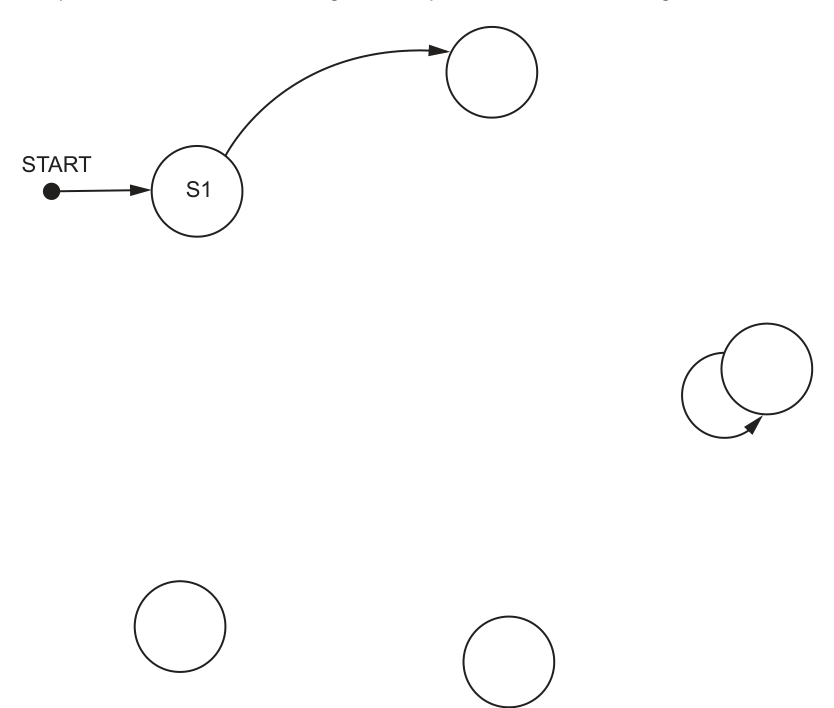
Answer
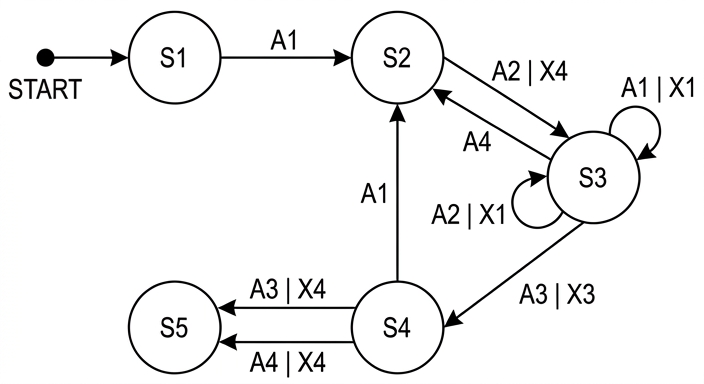
See state-transition diagram
Background Concept
A state-transition diagram shows how a system moves between states when particular inputs occur. Each state is drawn as a circle. A directed arrow shows a change from one state to another. The label on the arrow shows what input causes that transition, and if the system produces an output at the same time, that output is written on the same arrow.
A self-loop means the system stays in the same state after receiving that input. A start arrow shows the state where processing begins.
This is a visual form of the same information held in a state table. So the skill being tested is converting from table form to diagram form without losing any transitions.
Understanding the Question
You are given a transition table with four pieces of information in each row:
- current state
- input
- output
- next state
You must complete the incomplete state-transition diagram so that it matches that table. The positions of some circles and one self-loop are already drawn in the figure, so the task is mainly to place the correct state names on the blank circles and add the missing arrows and labels.
The important clue is that every row in the table represents exactly one transition on the diagram.
Approach
The safest method is:
- identify which blank circles must be
S2,S3,S4andS5 - take each row of the table one at a time
- draw an arrow from the current state to the next state
- label that arrow with the input and, if present, the output
- if current state and next state are the same, draw a self-loop instead of a normal arrow
This avoids missing transitions or attaching a label to the wrong arrow.
Step-by-Step Reasoning
Start with the state already given:
STARTpoints toS1
Now use the rows of the table.
-
S1, inputA1, no output, next stateS2
So draw an arrow fromS1toS2labelledA1. -
S2, inputA2, outputX4, next stateS3
So draw an arrow fromS2toS3labelledA2 | X4. -
S3, inputA1, outputX1, next stateS3
Because the next state is the same as the current state, this is a self-loop onS3, labelledA1 | X1. -
S3, inputA2, outputX1, next stateS3
This is another self-loop onS3, labelledA2 | X1. -
S3, inputA3, outputX3, next stateS4
Draw an arrow fromS3toS4labelledA3 | X3. -
S3, inputA4, no output, next stateS2
Draw an arrow fromS3back toS2labelledA4. -
S4, inputA3, outputX4, next stateS5
Draw an arrow fromS4toS5labelledA3 | X4. -
S4, inputA4, outputX4, next stateS5
Draw another arrow fromS4toS5labelledA4 | X4. -
S4, inputA1, no output, next stateS2
Draw an arrow fromS4toS2labelledA1.
That gives the completed diagram.
Key Takeaways
- A state table and a state-transition diagram contain the same information in different forms.
- Each row in the table becomes one arrow on the diagram.
- If current state equals next state, draw a self-loop.
- Outputs are written on the transition where they occur, not inside the state.
Common Mistakes
- Putting the output inside the state circle instead of on the arrow.
- Forgetting that two different inputs can produce two different self-loops on the same state.
- Reversing an arrow, especially for transitions such as
S3back toS2. - Missing transitions with no output because the output column is blank. A blank output does not mean no arrow.
Things to Be Careful About
- Keep the arrow direction correct: it must go from current state to next state.
- Write labels exactly as input first, then output if there is one, for example
A2 | X4. - Do not invent extra states or extra transitions.
- Make sure both transitions from
S4toS5are shown separately, because they are caused by different inputs.
A structure chart is used to document a different part of the program, made up of five modules.
Program notes:
- module
Setupcalls either moduleRestart, or moduleConfirm - module
Confirmtakes a string as a parameter and returns an integer - module
Modifyhas no parameters and returns a Boolean - module
Updatetakes a string as a parameter - module
Restartrepeatedly calls moduleUpdatefollowed by moduleModify - module
Restarttakes a string as a parameter that is passed by reference.
Draw a structure chart to represent the relationship between the five modules, including all parameters and return values.
Answer
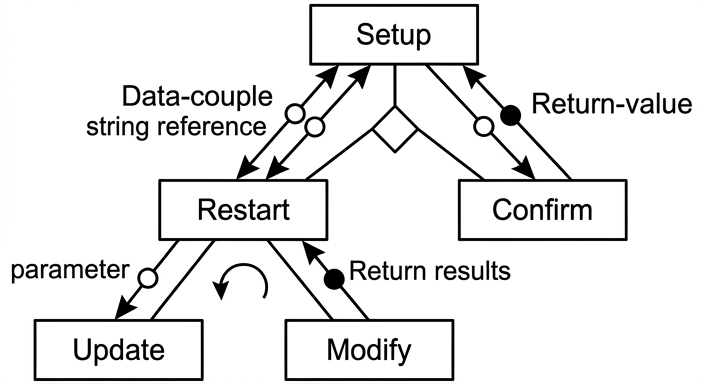
See structure chart
Background Concept
A structure chart shows the modular design of a program. Each box is a module. Lines show which module calls another module. Extra notation is used to show:
- selection: one of several modules is called
- iteration: a module or group of modules is called repeatedly
- parameters: data passed into a module
- return values: data sent back from a module
A parameter passed by reference means the called module can change the original value, so the effect flows back to the calling module. In a structure chart this is usually shown as data moving both ways on that connection.
Understanding the Question
There are five modules:
SetupRestartConfirmUpdateModify
You are told how they are related:
Setupcalls eitherRestartorConfirm, so selection is needed underSetupConfirmtakes a string and returns an integerRestartrepeatedly callsUpdatethenModify, so iteration is needed underRestartUpdatetakes a string parameterModifyreturns a Boolean and has no parametersRestartitself takes a string parameter passed by reference
So the question is not asking for pseudocode. It is asking for the design diagram that shows both control relationships and data flow.
Approach
Start by placing the top-level module, then add its children. After that, add the notation for control structures, and finally add the data couples for parameters and return values.
For this question:
- put
Setupat the top - place
RestartandConfirmbelow it as children - show that only one of those two is chosen with a selection symbol
- place
UpdateandModifyunderRestart - show that
Restartrepeats calls to those two modules with an iteration symbol - add the parameter and return arrows exactly as described in the notes
Step-by-Step Reasoning
Setup is the top box because the notes describe it as the module that calls others.
Since Setup calls either Restart or Confirm, not both at the same time, put a selection symbol beneath Setup and branch from it to those two modules.
Now consider the data flows:
Confirmtakes a string parameter, so draw a parameter arrow fromSetuptoConfirm.Confirmreturns an integer, so draw a return-value arrow fromConfirmback toSetup.
For Restart:
Restarttakes a string parameter passed by reference, so show the parameter connection betweenSetupandRestartas bidirectional data flow.
Now place the children of Restart:
Restartrepeatedly callsUpdatefollowed byModify- so both
UpdateandModifysit belowRestart - and there must be an iteration symbol covering those calls
Then add the data flow for these child modules:
Updatetakes a string parameter, so draw a parameter arrow fromRestarttoUpdateModifyreturns a Boolean, so draw a return-value arrow fromModifyback toRestartModifyhas no parameters, so do not add a parameter arrow intoModify
That produces the required completed structure chart.
Key Takeaways
- A structure chart shows module relationships, not the internal logic of each module.
- Selection means one of several child modules is called.
- Iteration means a child module or set of child modules is called repeatedly.
- Parameters move into a module; return values move back out.
- A by-reference parameter must be shown so that its effect can return to the caller.
Common Mistakes
- Drawing a flowchart instead of a structure chart.
- Forgetting the selection symbol under
Setupand making it look as if bothRestartandConfirmare always called. - Forgetting the iteration symbol under
Restart. - Giving
Modifya parameter even though the notes say it has none. - Missing the return value from
Confirmor fromModify.
Things to Be Careful About
- Keep the hierarchy correct:
Setupat the top,RestartandConfirmbelow it, thenUpdateandModifybelowRestart. - Show
UpdatebeforeModify, because the notes sayUpdateis called followed byModify. - Make sure
Restartis the module with the by-reference string parameter, notConfirm. - Distinguish clearly between a parameter passed in and a value returned back.
A program is being developed to manage student book loans from a college library.
The programmer has defined a record type to define each loan.
The data items are:
| Data item | Data type | Comment |
|---|---|---|
StudentID | STRING | the unique ID of the student who has borrowed the book The first three characters of a StudentID represent a tutor ID. Each student has one tutor. |
BookID | STRING | the unique ID of the book being borrowed |
OnLoan | BOOLEAN | TRUE if the book has not been returned |
The programmer has defined a global array Loan to store 8000 loan records.
There are more elements in the array than books in the library. Unused elements have the StudentID set to an empty string. These may occur anywhere in the array.
The programmer has defined a program module:
| Module | Description |
|---|---|
LoanStatus() | • called with two parameters of type STRING representing a StudentID and a BookID• outputs a message saying whether a given loan has been returned or not • outputs a warning message if a record of the given loan is not found |
Write efficient pseudocode for the module LoanStatus()
Assume that each combination of StudentID and BookID can occur only once.
...................................................................................................................................................
...................................................................................................................................................
...................................................................................................................................................
...................................................................................................................................................
...................................................................................................................................................
...................................................................................................................................................
...................................................................................................................................................
...................................................................................................................................................
...................................................................................................................................................
...................................................................................................................................................
...................................................................................................................................................
...................................................................................................................................................
...................................................................................................................................................
...................................................................................................................................................
...................................................................................................................................................
...................................................................................................................................................
...................................................................................................................................................
...................................................................................................................................................
...................................................................................................................................................
...................................................................................................................................................
...................................................................................................................................................
...................................................................................................................................................
...................................................................................................................................................
...................................................................................................................................................
...................................................................................................................................................
.............................................................................................................................................
Answer
PROCEDURE LoanStatus(BYVAL SearchStudentID : STRING, BYVAL SearchBookID : STRING)
   DECLARE Index : INTEGER
   DECLARE Found : BOOLEAN

   Index ← 1
   Found ← FALSE

   WHILE Index <= 8000 AND Found = FALSE
      IF Loan[Index].StudentID = SearchStudentID AND Loan[Index].BookID = SearchBookID THEN
         Found ← TRUE
         IF Loan[Index].OnLoan = TRUE THEN
            OUTPUT "Not returned"
         ELSE
            OUTPUT "Returned"
         ENDIF
      ENDIF
      Index ← Index + 1
   ENDWHILE

   IF Found = FALSE THEN
      OUTPUT "Warning: loan record not found"
   ENDIF
ENDPROCEDURE
See completed pseudocode
Background Concept
A record stores several related data items together, so here each element of the global array Loan contains a StudentID, a BookID and an OnLoan value. When we need to find one specific record in an unsorted array, the standard method is a linear search: check each element in turn until either the record is found or the end of the array is reached.
This question also tests procedure design. A procedure is used when the module performs an action such as displaying output, rather than returning a value. Because LoanStatus() must output a message, a procedure is the correct choice.
Efficiency matters too. Since the question says each StudentID + BookID combination can occur only once, once that one matching record has been found there is no need to continue searching. That means an efficient solution should stop early.
Understanding the Question
You are given a global array Loan with 8000 loan records. Some array elements are unused, and an unused element has StudentID = "". A key detail is that these unused elements may occur anywhere in the array, not just at the end.
The module LoanStatus() is called with two strings: a StudentID and a BookID. It must:
- search for the loan record with that exact student-book combination
- if found, output whether the book has been returned
- if no such record exists, output a warning message
Because unused elements can appear anywhere, you must not stop just because you find an empty StudentID. The only safe early stop is when the required record itself has been found.
Approach
The best approach is:
- Use a procedure with two string parameters.
- Set up a loop to scan the array from element 1 to element 8000.
- Use a Boolean flag such as
Foundto record whether a match has been located. - At each array element, compare both fields:
Loan[Index].StudentIDLoan[Index].BookID
- If both match, use the
OnLoanfield to decide which message to output. - Set
FoundtoTRUEso the loop ends early. - After the loop, if
Foundis stillFALSE, output the warning.
That gives both correctness and efficiency.
Step-by-Step Reasoning
First, define the procedure header with two string parameters, because the module is called using a student ID and a book ID.
Next, declare local variables:
Indexto move through the arrayFoundto record whether the record has been found
Then initialise them:
Index ← 1because the search starts at the first array elementFound ← FALSEbecause nothing has been found yet
The loop condition is important:
Index <= 8000means do not go past the last elementFound = FALSEmeans keep searching only while no match has been found
So the loop is both safe and efficient.
Inside the loop, check whether the current record matches both search values:
- the
StudentIDmust match the parameterSearchStudentID - the
BookIDmust match the parameterSearchBookID
Both are needed because the loan is identified by the combination of the two values.
If the match is found:
- set
Found ← TRUE - inspect
Loan[Index].OnLoan
Remember the meaning of OnLoan:
TRUEmeans the book has not been returnedFALSEmeans the book has been returned
So the output must reflect that meaning exactly. A common misunderstanding is to reverse it.
After the IF, increment Index. Even if Found has just been set to TRUE, this is still acceptable, because the loop condition is checked next and the loop ends.
Finally, after the loop, check whether Found is still FALSE. If so, no matching record exists anywhere in the array, so output the warning message.
This handles all cases:
- loan found and still on loan
- loan found and returned
- loan record not found at all
Key Takeaways
- Use a procedure when the task is to perform output rather than return a value.
- Search an unsorted array with a linear search.
- Compare all key fields needed to identify a record uniquely.
- Use a Boolean flag to control early exit efficiently.
- Do not assume empty elements are grouped at the end unless the question says so.
Common Mistakes
- Stopping when
StudentID = "": this is wrong because unused records may occur anywhere, so a valid record could still appear later. - Checking only
StudentIDor onlyBookID: this is wrong because the question identifies a loan by the combination of both. - Reversing the meaning of
OnLoan:TRUEmeans not returned, not the other way around. - Writing a function instead of a procedure: the module is specified to output messages, not return a value.
- Forgetting the warning message when no record is found.
Things to Be Careful About
- Use the exact array bound
8000. - Keep the loop condition safe:
Index <= 8000must be checked before accessing the array beyond its limit. - Make sure
Foundis initialised before the loop. - Match the field names correctly:
Loan[Index].StudentID,Loan[Index].BookID,Loan[Index].OnLoan. - Use the assignment arrow
←in pseudocode, not=. - The exact wording of the output message may vary, but the logic must clearly distinguish returned, not returned and not found.
A second module is defined:
| Module | Description |
|---|---|
LoansPerTutor() | • called with a parameter of type STRING representing a tutor ID (as a reminder, the first three characters of a StudentID represent a tutor ID)• returns an integer value representing the number of books currently on loan to students who have the given tutor |
Reminder: unused elements have the StudentID set to an empty string. These may occur anywhere in the array.
Write pseudocode for the module LoansPerTutor()
...................................................................................................................................................
...................................................................................................................................................
...................................................................................................................................................
...................................................................................................................................................
...................................................................................................................................................
...................................................................................................................................................
...................................................................................................................................................
...................................................................................................................................................
...................................................................................................................................................
...................................................................................................................................................
...................................................................................................................................................
...................................................................................................................................................
...................................................................................................................................................
...................................................................................................................................................
...................................................................................................................................................
...................................................................................................................................................
...................................................................................................................................................
...................................................................................................................................................
...............................................................................................................................................
Answer
FUNCTION LoansPerTutor(BYVAL TutorID : STRING) RETURNS INTEGER
   DECLARE Index, Count : INTEGER

   Count ← 0

   FOR Index ← 1 TO 8000
      IF Loan[Index].StudentID <> "" THEN
         IF LEFT(Loan[Index].StudentID, 3) = TutorID AND Loan[Index].OnLoan = TRUE THEN
            Count ← Count + 1
         ENDIF
      ENDIF
   NEXT Index

   RETURN Count
ENDFUNCTION
See completed pseudocode
Background Concept
A function is used when a module must calculate and return a value. Here the required result is an integer: the number of books currently on loan for students with a particular tutor.
This also uses counting through an array. The standard pattern is:
- start a counter at 0
- examine each element
- if the element matches the required condition, increase the counter by 1
- return the final counter value
Because the tutor ID is stored inside the first three characters of StudentID, string handling is needed too. In CIE pseudocode, LEFT(String, n) returns the first n characters of a string.
Understanding the Question
The function LoansPerTutor() receives one string parameter: a tutor ID. It must return how many books are currently on loan to students whose StudentID begins with that tutor ID.
The key conditions are:
- only loans for the given tutor should be counted
- only books currently on loan should be counted, so
OnLoanmust beTRUE - unused array elements must be ignored
- unused elements may appear anywhere, so the whole array must be scanned
Unlike part (a), there is no early exit here, because more than one matching record may exist.
Approach
Use a function because the module returns an integer. Then:
- Declare a counter variable and set it to 0.
- Loop through all 8000 array elements.
- Ignore unused records.
- Extract the first three characters of
StudentIDusingLEFT(..., 3). - If that tutor code matches the parameter and
OnLoan = TRUE, increment the counter. - After the loop, return the counter.
A full scan is necessary because loans for the same tutor can appear anywhere in the array.
Step-by-Step Reasoning
Start with the function header:
- the module name is
LoansPerTutor - it takes one string parameter,
TutorID - it returns an integer value
Then declare local variables:
Indexto move through the arrayCountto store how many matching loans have been found
Initialise Count ← 0, because before searching, no matches have been counted.
Use a FOR loop from 1 to 8000. This is suitable because every element may need to be checked.
Inside the loop, first check whether the record is unused:
Loan[Index].StudentID <> ""
This prevents processing empty records. Even if LEFT("", 3) might simply give an empty string, explicitly skipping unused records makes the logic clearer.
For a used record, apply the two required tests:
LEFT(Loan[Index].StudentID, 3) = TutorID- this checks whether the student belongs to the specified tutor
Loan[Index].OnLoan = TRUE- this checks whether the book has not yet been returned
Only if both are true should the counter increase.
So the counting statement is:
Count ← Count + 1
After the loop finishes, the function returns Count.
The reason a full scan is necessary is that you are not looking for just one record. You are counting all matching current loans across the entire array. Since unused elements can appear anywhere, finding one empty element tells you nothing about later positions.
Key Takeaways
- Use a function when a module must return a value.
- Use a counter pattern to count matching records.
- For embedded codes inside strings, extract the relevant substring before comparing.
- When multiple matches are possible, scan the whole array.
- Ignore unused records explicitly when processing a partly filled array.
Common Mistakes
- Using a procedure instead of a function: this loses the returned integer result.
- Stopping at the first empty
StudentID: this is incorrect because unused elements may occur anywhere. - Forgetting to test
OnLoan = TRUE: that would count returned books as well. - Comparing the whole
StudentIDwith the tutor ID: only the first three characters represent the tutor. - Forgetting to initialise
Countto 0.
Things to Be Careful About
- Use
LEFT(Loan[Index].StudentID, 3)exactly, because the tutor ID is the first three characters. - Scan all 8000 records; there is no valid early exit here.
- Return the counter at the end with
RETURN Count. - Keep the test for unused records separate and clear.
- Preserve the meaning of
OnLoan:TRUEmeans the book is still out on loan.
It is decided to mark as unused all records for book loans that have been returned. The data for these records will first be written to a new text file for archive purposes.
The archive program will automatically generate a meaningful filename each time it is run.
Outline a meaningful format to use for the filename.
...........................................................................................................................................
...........................................................................................................................................
...........................................................................................................................................
Answer
- Use a filename such as
ReturnedLoans_YYYYMMDD_HHMMSS.txt. - This identifies the file contents and includes the date/time so each archive filename is unique.
ReturnedLoans_YYYYMMDD_HHMMSS.txt
Background Concept
When a program creates archive files automatically, the filename should be meaningful. A good filename usually does two things:
- identifies what the file contains
- makes each file unique so one run does not overwrite another
Date and time are commonly included because they are generated automatically and also help sort files into chronological order. A format like YYYYMMDD is especially useful because alphabetical order then matches date order.
Understanding the Question
The program is archiving returned loan records into a new text file. The filename must be generated automatically each time the archive runs. The question asks for a meaningful format, not necessarily one exact filename.
So the answer should show:
- what the archive is for, for example returned loans
- a date and/or time component so each run produces a different filename
- the text-file extension such as
.txt
Approach
Use a descriptive prefix plus a date/time stamp. That gives both meaning and uniqueness.
A strong format is:
- description:
ReturnedLoans - date:
YYYYMMDD - time:
HHMMSS - extension:
.txt
Step-by-Step Reasoning
If the filename were just archive.txt, it would not be very meaningful and each new run could overwrite the previous archive.
Adding a descriptive label such as ReturnedLoans solves the meaning problem, because someone can immediately see what the file contains.
Adding the date means the filename shows when the archive was created.
Adding the time makes it unique even if the archive runs more than once on the same day.
Using a format such as ReturnedLoans_YYYYMMDD_HHMMSS.txt is therefore a good answer because it is:
- descriptive
- automatically generated
- unique
- easy to sort by date/time
Key Takeaways
- Good automatically generated filenames should be meaningful and unique.
- Date/time stamps are a standard way to prevent overwriting old files.
YYYYMMDDis a useful date format for sorting.
Common Mistakes
- Giving only a generic name like
archive.txt: this is not meaningful enough. - Including only the date but no time: multiple runs on the same day could still clash.
- Omitting the file extension.
Things to Be Careful About
- Keep the filename legal for the operating system, so avoid characters that are not allowed.
- Use a consistent date/time format.
- Make sure the filename indicates the content, not just the date.
There is a problem that will need to be overcome before the data items can be written to a text file.
As a reminder, the data items are:
| Data item | Data type | Comment |
|---|---|---|
StudentID | STRING | the unique ID of the student who has borrowed the book The first three characters of a StudentID represent a tutor ID. Each student has one tutor. |
BookID | STRING | the unique ID of the book being borrowed |
OnLoan | BOOLEAN | TRUE if the book has not been returned |
Explain the problem.
...........................................................................................................................................
Answer
- A text file stores characters, but
OnLoanis aBOOLEAN, so it must be converted to text such asTRUE/FALSEbefore it can be written.
BOOLEAN data must be converted to text before writing.
Background Concept
A text file stores data as characters. That means when data is written to a text file, it must be represented as text. String values are already text, but other data types may need conversion first.
A Boolean value is a logical value, not a sequence of text characters by itself. So before writing it to a text file, the program must decide how to represent it, for example as:
TRUE/FALSE1/0Yes/No
Understanding the Question
The record contains:
StudentIDasSTRINGBookIDasSTRINGOnLoanasBOOLEAN
The question asks what problem must be overcome before writing the data items to a text file. The issue is not with the two string fields, because they are already text. The issue is with the Boolean field.
Approach
Identify the field that is not already text, then explain that text files store characters only, so that field must be converted into a text representation first.
Step-by-Step Reasoning
StudentID and BookID can be written directly because they are strings.
OnLoan cannot simply be written as raw Boolean data into a text file, because a text file stores characters.
Therefore, before archiving the record, the program must convert OnLoan into a textual form such as TRUE or FALSE.
That is the problem the question is looking for.
Key Takeaways
- Text files store character data.
- Non-string data may need conversion before writing.
- Boolean values need a chosen text representation when stored in a text file.
Common Mistakes
- Saying there is a problem with all three fields: only
OnLoanis the issue here. - Talking about file size or filename format: that is not what this part is asking.
- Forgetting to mention conversion to text.
Things to Be Careful About
- Focus on the data-type mismatch, not on record structure in general.
- Make it clear that the problem is specifically with
BOOLEANin a text file. - Any sensible textual representation is acceptable, as long as it is stored as characters.
One way of storing the data items in a text file is to store each data item on a separate line.
Identify one benefit and one drawback of this way of storing the data.
Benefit ...............................................................................................................................
...........................................................................................................................................
Drawback ..........................................................................................................................
...........................................................................................................................................
Answer
- Benefit: each item is easy to read back because no separator character is needed between fields.
- Drawback: it uses more lines and more storage, and the program must group every three lines back into one record.
Benefit: easy to parse without delimiters; Drawback: larger file and records must be reconstructed from groups of lines.
Background Concept
When storing structured data in a text file, the programmer must choose a format. Common choices include:
- all fields on one line separated by delimiters such as commas
- fixed-width fields
- one field per line
Each choice has trade-offs. A format that is easy to write or parse may use more space, and a compact format may need extra rules about separators.
Understanding the Question
The proposed method is to store each data item on a separate line. Since each loan record has three data items, one record would occupy three lines in the text file.
The question asks for:
- one benefit of this method
- one drawback of this method
So you need one clear advantage and one clear disadvantage.
Approach
Think about what separate lines make simpler, and what they make worse.
A good benefit is simplicity:
- no delimiter is needed
- each line contains exactly one field
- reading the file back can be straightforward
A good drawback is inefficiency or record reconstruction:
- more line breaks mean more file space used
- the program must know that every three lines belong together as one record
Step-by-Step Reasoning
If each field is on its own line, then the program does not need to worry about separator characters such as commas or tabs. That can be helpful if field values might contain spaces or other symbols, because there is no ambiguity about where one field ends and the next begins.
So a valid benefit is that the data is simple to parse or read back.
However, the file becomes less compact. Instead of storing one record on one line, each record now needs three separate lines, plus line-ending characters. This increases file size.
Also, when reading the file back, the program must reconstruct records by taking lines in groups of three in the correct order.
So a valid drawback is extra storage use or the need to rebuild the record structure from multiple lines.
Key Takeaways
- File format design involves trade-offs between simplicity and efficiency.
- One-field-per-line storage is easy to parse but less compact.
- Structured data in a text file must be reconstructed according to the chosen layout.
Common Mistakes
- Giving two benefits or two drawbacks instead of one of each.
- Writing vague points like "it is good" without saying why.
- Talking about Boolean conversion from part (ii) instead of the line-per-item storage method.
Things to Be Careful About
- Tie your answer directly to the chosen format: one data item per line.
- Make the benefit and drawback distinct.
- If you mention ease of reading, explain that it is because no delimiter is required.
- If you mention a drawback, make clear whether it is extra storage, extra lines, or the need to regroup lines into records.