Computer Science 9618/22 — October/November 2025
Cambridge AS Level · Fundamental Problem-solving and Programming Skills · worked solutions for every part, with the mark scheme
Topics Programming · Algorithm Design and Problem-solving · Data Types and Structures · Software Development
Refer to the insert for the list of pseudocode functions and operators.
The table contains pseudocode examples.
Each example may contain statements that relate to one or more of:
- selection
- iteration (repetition)
- subroutines (procedures or functions).
Complete the table by placing one or more ticks (‘✓’) in each row.
| Pseudocode example | Selection | Iteration | Subroutine |
|---|---|---|---|
IF Status = FALSE THEN FOR Count ← 1 TO 20 CALL Reset(Count) NEXT Count ENDIF | |||
OTHERWISE : Status ← TRUE | |||
WHILE AllDone() = TRUE | |||
30 : NextChar ← 'X' |
Answer
| Pseudocode example | Selection | Iteration | Subroutine |
|---|---|---|---|
IF Status = FALSE THEN FOR Count ← 1 TO 20 CALL Reset(Count) NEXT CountENDIF | ✓ | ✓ | ✓ |
OTHERWISE : Status ← TRUE | ✓ | ||
WHILE AllDone() = TRUE | ✓ | ✓ | |
30 : NextChar ← 'X' | ✓ |
See completed table
Background Concept
This question is about recognising the main programming constructs used in pseudocode.
- Selection means choosing between alternatives depending on a condition. Common signs are
IF ... THEN,ELSE,OTHERWISE, andCASE OFbranches. - Iteration means repetition. Common signs are
FOR ... NEXT,WHILE ... ENDWHILE, andREPEAT ... UNTIL. - Subroutines are reusable named blocks of code. In pseudocode, these appear as procedures and functions. A procedure is often called using
CALL, while a function is usually written as a name followed by brackets and returns a value.
A single piece of pseudocode can contain more than one of these features at the same time.
Understanding the Question
You are given four separate pseudocode examples and must decide which categories apply to each one.
The important clue is that the question says each example may relate to one or more of the listed features. So you must not stop after finding one tick. You need to inspect each row for:
- any selection structure
- any repetition structure
- any procedure or function use
Approach
Read each example from left to right and look for key words:
- Look for
IF,OTHERWISE, or aCASEbranch label such as30 :to identify selection. - Look for
FORorWHILEto identify iteration. - Look for
CALL SomeName(...)or a function call such asAllDone()to identify a subroutine.
Then tick every category that appears in that row.
Step-by-Step Reasoning
Row 1
IF Status = FALSE THEN
FOR Count ← 1 TO 20
CALL Reset(Count)
NEXT Count
ENDIF
This row contains:
IF ... THENandENDIFso it uses selection.FOR Count ← 1 TO 20andNEXT Countso it uses iteration.CALL Reset(Count)so it uses a subroutine.
So this row gets all three ticks.
Row 2
OTHERWISE : Status ← TRUE
OTHERWISE belongs to a selection structure such as CASE OF, so this is selection.
There is no loop and no procedure/function call.
So this row gets selection only.
Row 3
WHILE AllDone() = TRUE
WHILEstarts a loop, so this is iteration.AllDone()is written like a function call because it has brackets and returns a value that is being tested, so it is also a subroutine.
There is no IF or CASE choice here, so it is not selection.
So this row gets iteration and subroutine.
Row 4
30 : NextChar ← 'X'
The 30 : format is a typical branch label inside a CASE OF statement. That means it is part of selection.
There is no repetition and no subroutine call.
So this row gets selection only.
Key Takeaways
- Learn to spot programming constructs from their key words.
- One row of pseudocode can show more than one feature at once.
- A function call such as
AllDone()counts as a subroutine even when it appears inside a condition. - A
CASE OFbranch label such as30 :is still part of a selection structure.
Common Mistakes
- Ticking only one box in the first row: the first row clearly contains selection, iteration, and a subroutine call.
- Missing the function in
AllDone(): brackets usually indicate a function call, so it is a subroutine. - Thinking
30 :is just a number: in pseudocode this style is commonly aCASEoption label, so it belongs to selection. - Treating
OTHERWISEas something separate from selection: it is part of a selection structure.
Things to Be Careful About
- Read the whole row before deciding; do not tick the first feature you notice and move on.
- In Paper 2 pseudocode,
CALLstrongly signals a procedure, but a subroutine can also be a function used inside an expression or condition. - Distinguish between a loop condition and a selection condition:
WHILEis repetition,IFis choice. - Remember that
CASE OFandOTHERWISEare also selection, even without the fullCASEstatement shown.
Complete the table by giving the appropriate data type.
| Variable | Example data value | Data type |
|---|---|---|
Result | 5.42 | |
MonthLetter | "JFMAMJJASOND" | |
Birthday | 15/11/2009 |
Answer
| Variable | Example data value | Data type |
|---|---|---|
Result | 5.42 | REAL |
MonthLetter | "JFMAMJJASOND" | STRING |
Birthday | 15/11/2009 | DATE |
See completed table
Background Concept
A data type tells us what kind of value a variable stores and what operations are valid for it.
Common pseudocode data types include:
- INTEGER: whole numbers only
- REAL: numbers with a fractional part
- STRING: a sequence of characters
- CHAR: a single character
- BOOLEAN:
TRUEorFALSE - DATE: a calendar date value
Recognising the example value usually tells you the data type immediately.
Understanding the Question
You are given a variable name and one example value for each variable. You must identify the most suitable data type for that value.
The task is not asking what the variable name suggests. It is asking what data type matches the actual example value shown.
Approach
For each row:
- Decide whether the value is numeric, text, or a date.
- If it is numeric, decide whether it is whole (
INTEGER) or includes a decimal part (REAL). - If it is text, decide whether it is one character (
CHAR) or several characters (STRING). - If it is written as a calendar date, use
DATE.
Step-by-Step Reasoning
Result = 5.42
This value has a decimal point, so it is not an integer. It is a REAL value.
MonthLetter = "JFMAMJJASOND"
This is a sequence of many characters inside quotation marks. That makes it a STRING.
Birthday = 15/11/2009
This is written as a day, month, and year. It represents a DATE.
Key Takeaways
- Decimal numbers are usually
REAL. - Text inside quotation marks is usually
STRING, unless it is exactly one character and the question expectsCHAR. - Calendar values such as
15/11/2009areDATE.
Common Mistakes
- Writing
INTEGERfor5.42: the decimal part means it must beREAL. - Writing
CHARfor"JFMAMJJASOND": this is many characters, not one. - Treating the date as a string: although it is written with symbols, it represents a date value and functions such as
MONTH(...)work on dates.
Things to Be Careful About
- Do not choose the type from the variable name alone; use the example value.
- A one-character value and a multi-character value are different types if the pseudocode distinguishes
CHARandSTRING. - In this syllabus, date functions such as
MONTH(...)are a strong clue that the stored value isDATE.
Evaluate each expression in the table by using the data values shown in (b).
Write ‘ERROR’ if the expression contains an error.
| Expression | Evaluates to |
|---|---|
INT(Result) + 1 > 6 | |
NUM_TO_STR(LENGTH(MonthLetter)) | |
NUM_TO_STR(Result + "3.2") | |
MID(MonthLetter, MONTH(Birthday) - 2, 1) |
Answer
| Expression | Evaluates to |
|---|---|
INT(Result) + 1 > 6 | FALSE |
NUM_TO_STR(LENGTH(MonthLetter)) | "12" |
NUM_TO_STR(Result + "3.2") | ERROR |
MID(MonthLetter, MONTH(Birthday) - 2, 1) | "S" |
See completed table
Background Concept
This question tests how pseudocode expressions are evaluated using stored values and built-in functions.
Important functions here are:
INT(x): returns the integer part of a real number by removing the fractional part.LENGTH(s): returns the number of characters in a string.NUM_TO_STR(x): converts a numeric value into a string.MONTH(date): returns the month number from a date.MID(s, start, count): returns a substring from strings, beginning at positionstart, forcountcharacters.
It also tests type compatibility. In pseudocode, you cannot add a number and a string directly. That produces an error.
Understanding the Question
You must evaluate each expression using the values from part (b):
Result = 5.42MonthLetter = "JFMAMJJASOND"Birthday = 15/11/2009
If an expression cannot be evaluated correctly because of a type problem, you must write ERROR.
Approach
For each row:
- Substitute the known variable values.
- Apply any functions from the inside outward.
- Check whether the types are valid at each stage.
- Write the final result, or
ERRORif the expression is invalid.
The most important habits here are:
- do the function calls in order
- keep track of whether the result is a number, string, or boolean
- remember that
MIDuses positions in the string
Step-by-Step Reasoning
1. INT(Result) + 1 > 6
Substitute Result = 5.42.
INT(5.42) gives 5.
Then:
Now compare 6 > 6.
That is false, because 6 is not greater than 6.
So the result is FALSE.
2. NUM_TO_STR(LENGTH(MonthLetter))
Substitute MonthLetter = "JFMAMJJASOND".
Count the characters:
- J(1)
- F(2)
- M(3)
- A(4)
- M(5)
- J(6)
- J(7)
- A(8)
- S(9)
- O(10)
- N(11)
- D(12)
So LENGTH(MonthLetter) is 12.
Then NUM_TO_STR(12) converts the number 12 into the string "12".
So the result is "12".
3. NUM_TO_STR(Result + "3.2")
Substitute Result = 5.42.
This becomes:
NUM_TO_STR(5.42 + "3.2")
The problem happens before NUM_TO_STR can be applied. The + operator is trying to add:
5.42, which is a number"3.2", which is a string
That is a type mismatch, so the expression is invalid.
Therefore the answer is ERROR.
4. MID(MonthLetter, MONTH(Birthday) - 2, 1)
Substitute the given values.
MONTH(Birthday) with Birthday = 15/11/2009 gives 11 because the month is November.
Then:
So the expression becomes:
MID(MonthLetter, 9, 1)
Now use MonthLetter = "JFMAMJJASOND".
Using 1-based positions:
- J
- F
- M
- A
- M
- J
- J
- A
- S
- O
- N
- D
Starting at position 9 and taking 1 character gives "S".
So the result is "S".
Key Takeaways
- Evaluate pseudocode expressions one stage at a time.
- Built-in functions may change both the value and the data type.
NUM_TO_STRconverts numbers to strings, but it cannot fix an earlier invalid operation.MIDdepends on the correct character position, so indexing matters.- Comparison expressions such as
6 > 6return boolean values likeTRUEorFALSE.
Common Mistakes
- Writing
TRUEfor the first row:6 > 6is false because the values are equal, not greater. - Forgetting that
NUM_TO_STRreturns a string: the second result should be treated as text, not as a number. - Trying to add
5.42and"3.2": mixed numeric and string addition is an error here. - Using the wrong position in
MID: after calculating11 - 2, you must use position 9, not 11. - Using 0-based indexing for the string: Cambridge pseudocode string functions are normally treated as 1-based in this context.
Things to Be Careful About
- Keep the values from part (b) in mind throughout; this part depends entirely on them.
- Apply nested functions in the right order: for example, do
MONTH(Birthday)before subtracting 2. - Check types before performing an operation. An outer conversion function does not make an invalid inner expression acceptable.
- Use uppercase boolean values exactly as pseudocode expects:
TRUEandFALSE. - Distinguish between a numeric result such as
12and a string result such as"12"when conversion functions are involved.
Data is a global 1D array containing 20 elements of type REAL
An algorithm will:
- input a sequence of real values, one at a time
- assign each value to consecutive array elements, starting from index 1
- end when the value 99.9 is input, or all 20 elements have been assigned (the value 99.9 must not be stored in the array).
Complete the program flowchart to represent the algorithm:
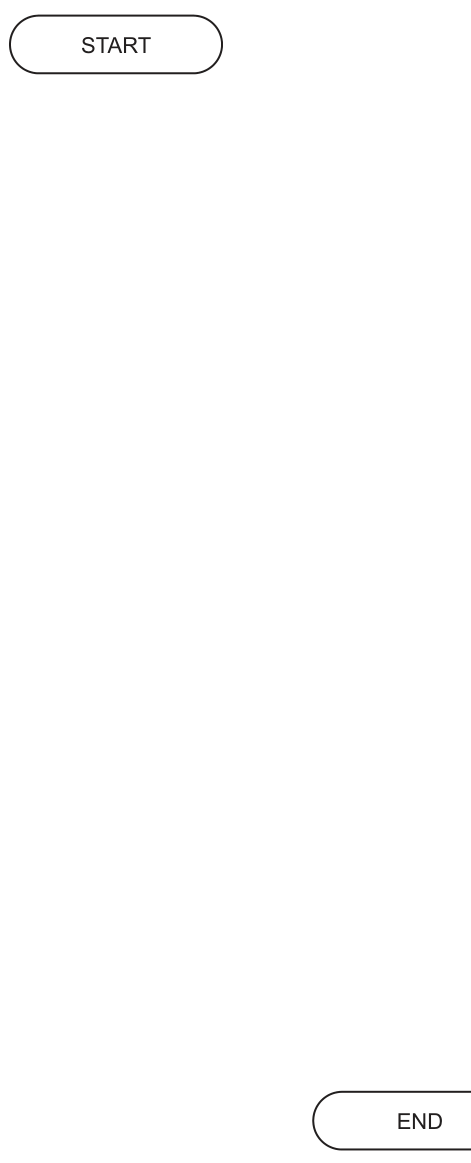
Answer
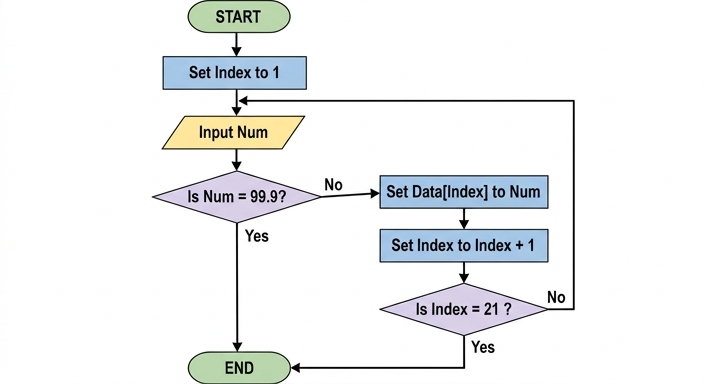
See completed flowchart
Background Concept
A flowchart shows an algorithm using standard symbols and arrows to show control flow. For this syllabus, the important ideas here are:
- Sequence: steps carried out one after another, such as setting a variable or storing a value.
- Selection: a decision with branches, usually shown by a diamond, such as checking whether the input is the sentinel value.
- Iteration: repeating a section of the algorithm until a condition is met.
- Sentinel-controlled input: a special value is used to signal "stop". Here, that sentinel is
99.9. - Array bounds: the array
Datahas 20 elements, and the question says indexing starts at1, so the valid positions are1to20.
The algorithm must store values one after another in Data[1], Data[2], Data[3], and so on. It must stop in either of two situations:
- the user enters
99.9 - all 20 positions have been filled
A key detail is that the sentinel 99.9 must not be stored.
Understanding the Question
The question gives a blank flowchart from START to END and asks you to complete it so it matches the stated algorithm.
From the stem, we know:
Datais a global 1D array with 20 elements- each input is a
REAL - values are stored in consecutive elements starting at index
1 - input continues until either:
99.9is entered, or- the array is full
99.9is not stored
So the flowchart must do four essential jobs:
- set up an index
- input a value
- check whether it is the sentinel before storing it
- stop once the 20th element has been stored
This is why the answer needs both an input loop and at least one decision.
Approach
The safest approach is:
- Set
Indexto1before any input. - Input a number.
- Check
Is Num = 99.9?- If yes, end immediately so the sentinel is not stored.
- If no, store it in
Data[Index].
- Increase
Indexby1. - Check whether
Index = 21.- If yes, that means
Data[20]has just been filled, so stop. - If no, loop back to input the next number.
- If yes, that means
Why 21 and not 20? Because after storing in Data[20], the algorithm increments Index to 21. That is the signal that all 20 valid array positions have already been assigned.
This matches the first marking-scheme flowchart exactly. An alternative accepted version combines the two stopping conditions into one decision, but the separate-decision version follows the specification more directly.
Step-by-Step Reasoning
The completed logic is:
- START
- Set
Indexto1- This prepares the first storage location.
- Input
Num- A new real value is entered.
- Decision:
Is Num = 99.9?- If Yes, go straight to
END. - This is essential because the question explicitly says
99.9must not be stored.
- If Yes, go straight to
- If the answer was No, set
Data[Index]toNum- This stores the input in the current array position.
- Set
IndextoIndex + 1- This moves to the next free array position.
- Decision:
Is Index = 21?- If Yes, go to
END. - If No, loop back to Input
Num.
- If Yes, go to
Why does this work correctly?
- First value goes to
Data[1] - Second value goes to
Data[2] - ...
- Twentieth value goes to
Data[20] - Then
Indexbecomes21 - So the algorithm ends before trying to store into
Data[21], which does not exist
This also handles the sentinel correctly:
- if
99.9is typed at any stage, the first decision sends the flowchart toEND - because that decision comes before the storage box,
99.9is never placed in the array
The accepted completed flowchart is shown here:
A second accepted layout is to use one decision such as Is Num = 99.9 OR Index = 21?, but the separate checks are often easier to reason about in an exam.
Key Takeaways
- A sentinel value must usually be checked before storing data if it must not be stored.
- When arrays are indexed from
1, a 20-element array uses positions1to20. - In flowcharts, repetition is shown by an arrow looping back to an earlier step.
- When the index is incremented after storage, checking for
21is a correct way to detect that 20 items have been stored.
Common Mistakes
- Storing
99.9in the array: this happens if the flowchart stores the value before testing the sentinel. - Starting
Indexat0: the question says storage starts from index1. - Using
Index = 20as the stop test in the wrong place: if you check after incrementing, the correct full-array condition isIndex = 21. - Forgetting to increment
Index: then every new value would overwrite the same array element. - Missing the loop back to input: without this, the algorithm would process only one value.
- Allowing storage into
Data[21]: this is outside the array bounds.
Things to Be Careful About
- Keep the order of the steps correct: input, sentinel check, store, increment, bounds check, repeat.
- The decision text must reflect the question accurately, especially
Num = 99.9andIndex = 21. - Use flowchart symbols properly:
- oval for
STARTandEND - parallelogram for input
- rectangle for assignment/process steps
- diamond for decisions
- oval for
- If you use two separate decisions, the second one must come after incrementing the index.
- If you draw the alternative combined-condition version, it must still prevent invalid storage and must be logically consistent with the mark scheme.
A text file OldFile.txt contains IDs, names and email addresses for members of a club. Three information items are stored for each member and each item is stored on a separate line.
The example shows the information for the first two members in the first six lines of the file:
| Line in file | Information item | Example data |
|---|---|---|
| 1 | member 1 ID | "AB1234" |
| 2 | member 1 name | "Freddie Jones" |
| 3 | member 1 email address | "FreddieJ909@Cambridge.org" |
| 4 | member 2 ID | "BC2345" |
| 5 | member 2 name | "Sue Smith" |
| 6 | member 2 email address | "Sue1024@Cambridge.org" |
The member ID string is always two letters followed by four digits.
The file design is to be changed so that information for each user is stored as a single line of the file, with the character '\' used as a separator between data items.
For example, the single line for member 1 will be:
"AB1234\Freddie Jones\FreddieJ909@Cambridge.org"
An algorithm will produce a new file NewFile.txt from the contents of OldFile.txt
Assume:
LineX,LineYandLineZare of typeSTRINGand are used to store the three items of information for each memberNewStringis a temporary variable of typeSTRINGOldFile.txtexists and contains valid data.
The algorithm to create the new file is expressed in steps.
Complete the following numbered steps:
Step 1 : open the file ..................................... in .....................................
Step 2 : open the file ..................................... in .....................................
Step 3 : read a line from ..................................... and store in .....................................
Step 4 : read a line from ..................................... and store in .....................................
Step 5 : read a line from ..................................... and store in .....................................
Step 6 : set NewString to ...........................................................................................
Step 7 : write NewString to .....................................
Step 8 : repeat from step ..................................... until .....................................
Step 9 : close both files.
Answer
Step 1: open the file OldFile.txt in READ mode
Step 2: open the file NewFile.txt in WRITE mode
Step 3: read a line from OldFile.txt and store in LineX
Step 4: read a line from OldFile.txt and store in LineY
Step 5: read a line from OldFile.txt and store in LineZ
Step 6: set NewString to LineX + '\\' + LineY + '\\' + LineZ
Step 7: write NewString to NewFile.txt
Step 8: repeat from step 3 until EOF(OldFile.txt)
Step 9: close both files.
See completed steps
Background Concept
This is a text-file processing problem. In a text file, data is stored as lines of characters. A common task is to read data from one file, transform its format, and write the transformed data to another file.
Here, each member record in OldFile.txt is stored across three separate lines:
- ID
- name
- email address
The new design stores one complete member record on a single line, so the algorithm must:
- open the original file for reading
- open the new file for writing
- read three related lines at a time
- join them into one string with separators
- write that string to the new file
- repeat until the end of the old file is reached
The key programming ideas are text file handling, sequence of steps, and iteration controlled by end-of-file.
Understanding the Question
You are not being asked to write full pseudocode here. Instead, you must complete the missing words in a sequence of numbered steps.
The stem tells you that each member has exactly three pieces of data, each on a separate line in OldFile.txt. It also tells you that:
LineX,LineYandLineZstore those three linesNewStringis a temporary string- the old file exists and contains valid data
So each pass through the algorithm must read exactly three lines from OldFile.txt, combine them using the \ separator, and write the result to NewFile.txt.
The final step before closing the files must loop back to the first read step, and the loop must stop at end of file.
Approach
The clean way to think about this is as a repeated record conversion:
- one old record = 3 lines
- one new record = 1 line
So the approach is:
- open the input file in
READmode - open the output file in
WRITEmode - read the three lines for one member into the three string variables
- concatenate them with
\between them - write the combined result
- repeat from the first read step until
EOF(OldFile.txt)
Because the data is valid and arranged in groups of three lines, the loop can process one complete member on each repetition.
Step-by-Step Reasoning
Step 1 must name the source file and the correct mode:
OldFile.txtis the file we are reading from- so it must be opened in
READmode
Step 2 must name the destination file and the correct mode:
NewFile.txtis where the transformed data is being written- so it must be opened in
WRITEmode
Steps 3, 4 and 5 read the three lines for one member:
- first line into
LineX - second line into
LineY - third line into
LineZ
All three reads come from the same file: OldFile.txt.
Step 6 builds the new one-line record. The separator required by the question is the backslash character, so the string must be formed as:
- ID
- then
\ - then name
- then
\ - then email
That is why the construction is:
LineX + '\\' + LineY + '\\' + LineZ
Step 7 writes the completed NewString to the output file, which is NewFile.txt.
Step 8 is the loop control. The algorithm has already processed one member, so it must go back to the first read step, which is step 3. The stopping condition is end of file on OldFile.txt, written as EOF(OldFile.txt).
Step 9 closes both files. This is good file-handling practice and is normally expected in exam answers.
Key Takeaways
- When transforming a file, identify the input file, the output file, and the record structure in each.
- Use
READfor the source file andWRITEfor the destination file. - Group related lines correctly when one logical record spans multiple lines.
- Use an EOF-controlled loop for reading text files.
- Concatenate fields with separators when converting to a single-line record format.
Common Mistakes
- Opening
OldFile.txtinWRITEmode orNewFile.txtinREADmode. This reverses the purpose of the files. - Reading from
NewFile.txtinstead ofOldFile.txt. All input must come from the old file. - Writing to
OldFile.txtinstead ofNewFile.txt. That would overwrite the original data. - Repeating from the wrong step, such as step 6 or step 7. The next member must begin by reading the next three lines, so the loop goes back to step 3.
- Forgetting the separator characters when building
NewString. - Using only one separator instead of two. Three fields need two separators between them.
Things to Be Careful About
- The separator is a single backslash character
\, not a forward slash/. EOF(OldFile.txt)must refer to the input file, not the output file.- The order of the fields must stay the same: ID, then name, then email.
- Each member uses exactly three reads because each record in the original design occupies three lines.
- Even though this is written as steps rather than full pseudocode, the logic still has to be complete and precise.
The character '\' has been chosen as a separator.
Explain why this is a suitable character.
...................................................................................................................................................
.............................................................................................................................................
Answer
\is suitable because it does not occur as part of the data items, so it can mark where one item ends and the next begins.
\ is suitable because it does not occur in the data, so it separates the items unambiguously.
Background Concept
When several data items are stored in one line of a text file, a separator character is often used between them. This separator is also called a delimiter.
A good delimiter must be a character that does not appear inside the data itself. If the delimiter can also occur as part of a name, ID or other field, then when the line is read back it becomes ambiguous where one field ends and the next begins.
So the basic rule is:
- delimiter must be distinct from the valid contents of the fields
- then the file can be split reliably into separate items
Understanding the Question
The question asks why the backslash character \ is a suitable separator for the current three fields:
- member ID
- member name
- member email address
This is only worth one mark, so the answer should be short and focused. The important idea is not that backslash looks unusual, but that it allows the data to be separated unambiguously.
Approach
To answer, identify what makes any separator suitable:
- it should not appear inside the real data
- therefore every occurrence of that character can be treated as a boundary between fields
That is exactly the point the examiner is looking for.
Step-by-Step Reasoning
If a line is stored like this:
AB1234\Freddie Jones\FreddieJ909@Cambridge.org
then the program can read from left to right and treat each \ as a boundary.
This works only if \ is not part of the actual stored values. If it does not occur in the data items, then:
- the first
\separates ID from name - the second
\separates name from email
That makes the file easy to parse correctly.
So the suitable-character explanation is:
- it does not occur in the data
- therefore it can be used to separate the data items clearly
Key Takeaways
- A delimiter is only safe if it cannot be confused with real data.
- Good file design makes later extraction simple and reliable.
- For a one-mark explanation, state the core principle directly.
Common Mistakes
- Saying only that
\is "easy to see" or "easy to type". That is not the real reason. - Saying it is suitable because it is "rare". Rare is not enough; the key point is that it must not occur in the stored data.
- Giving a long explanation when one short precise point is enough.
Things to Be Careful About
- The question asks why the character is suitable, not how to write the algorithm.
- The strongest wording is that the separator does not occur in the data, so splitting is unambiguous.
- Avoid vague phrases like "works well" unless you explain why.
Two new information items are to be stored for each member. Both new items are encrypted; they can each contain any character (including '\') and can be of any length up to a maximum of 99 characters.
For example:
| Information item | Example data |
|---|---|
| member 1 ID | "AB1234" |
| member 1 name | "Freddie Jones" |
| member 1 email address | "FreddieJ909@Cambridge.org" |
| member 1 new information 1 | `"En/98&*( |
| member 1 new information 2 | "23\CoboL" |
Explain the additional file design changes needed so that:
- all the information items for each member are stored on a single line of
NewFile.txt - it is possible to extract each information item after the line is read.
Assume the '\' character is not used in any email address.
...................................................................................................................................................
...................................................................................................................................................
...................................................................................................................................................
...................................................................................................................................................
...................................................................................................................................................
...................................................................................................................................................
...................................................................................................................................................
...................................................................................................................................................
.............................................................................................................................................
Answer
- Keep
\as the separator for the first three items, because it will still separate the ID, name and email address. - For each encrypted item, store its length before the data, using a fixed 2-digit length from
00to99. - After reading the line, split out ID, name and email using
\, then read the next 2 digits to get the length of encrypted item 1 and extract that many characters, then read the next 2 digits and extract encrypted item 2. - This works even if the encrypted items contain
\, because their ends are found from the stored lengths, not from a separator.
Store a 2-digit length before each encrypted item, then extract each encrypted field using its length rather than a separator.
Background Concept
A delimiter-based file design works well only when the delimiter character cannot appear inside a field. If a field can contain absolutely any character, then no ordinary separator is safe, because the program cannot tell whether that character is:
- a real separator, or
- just part of the data
That is why unrestricted text or encrypted text is often stored using a length-based format instead of a pure delimiter-based format.
In a length-based design, the file stores:
- either the size of the field before the field data, or
- a fixed field width
Here, fixed width is not a good choice because the encrypted data can contain any character, so padding would be awkward and waste space. Since the maximum length is 99, a very neat solution is to store a 2-digit length before each encrypted item.
Understanding the Question
The original one-line format used \ between fields. That works for ID, name and email. But now two extra encrypted items are added, and each of them:
- can contain any character
- can even contain
\ - can have any length from 0 to 99 characters
So the problem is that \ can no longer safely separate those encrypted items. The question asks what extra file design changes are needed so that:
- all items stay on one line
- each item can still be extracted after reading the line
The clue is the maximum length of 99. That strongly suggests storing each encrypted field length as two digits.
Approach
Use a mixed design:
- keep
\separators where they are still safe - switch to length-based storage for the encrypted items
A sensible structure is:
- ID
\- name
\\- 2-digit length of encrypted item 1
- encrypted item 1
- 2-digit length of encrypted item 2
- encrypted item 2
Once the line is read:
- find the first three fields using
\ - read the next 2 characters as the length of encrypted item 1
- extract exactly that many characters
- read the next 2 characters as the length of encrypted item 2
- extract exactly that many characters
Because the ends of the encrypted fields are determined by length, embedded \ characters do not matter.
Step-by-Step Reasoning
First, ask why the old design fails.
If we tried to store everything using \ separators only, a line might look something like this:
AB1234\Freddie Jones\FreddieJ909@Cambridge.org\En/98&*(|?\\/D7iP\23\CoboL
Now there is a problem: when the program reads a \, it cannot know whether that backslash is:
- a separator between fields, or
- part of the encrypted data itself
So a pure separator-based design is no longer reliable.
The improved design is to prefix each encrypted item with its length.
Because the maximum length is 99, two digits are enough:
00means empty string08means 8 characters15means 15 characters99means maximum length
For the example data, one possible stored line could be described as:
AB1234\Freddie Jones\FreddieJ909@Cambridge.org\15En/98&*(|?\/D7iP0823\CoboL
The exact content of the encrypted data does not matter, because the program does not search for a separator inside those encrypted fields. Instead it does this:
- Read the whole line.
- Extract ID up to the first
\. - Extract name up to the next
\. - Extract email up to the next
\. - Read the next 2 characters and convert them to a number: that is length 1.
- Take exactly that many characters: that is encrypted item 1.
- Read the next 2 characters and convert them to a number: that is length 2.
- Take exactly that many characters: that is encrypted item 2.
This is why the design still allows all information to be stored on one line and later extracted correctly.
Key Takeaways
- Delimiters fail when the delimiter can appear in the data.
- Length-prefixed fields are a standard way to store variable-length data safely.
- A maximum size of 99 naturally suggests a fixed 2-digit length field.
- Mixed file designs are acceptable when some fields are safe for delimiters and others are not.
Common Mistakes
- Saying to keep using
\for the encrypted fields. That does not work because\may appear inside the encrypted data. - Suggesting a different separator character. The question says the encrypted data can contain any character, so no separator is guaranteed safe.
- Forgetting to explain how the data would be extracted after the line is read.
- Giving only "store the lengths" without saying that the lengths must be read first and then used to take that many characters.
- Not noticing that the maximum length is 99, which is why 2 digits are sufficient.
Things to Be Careful About
- The question says
\is not used in any email address, so using\up to the email field is still safe. - The stored length should be fixed width, for example 2 digits, otherwise you create a new ambiguity about where the length ends.
- Do not rely on spaces as padding or separators, because the encrypted text can contain any character.
- The explanation must cover both storage and later extraction, not just one of them.
A quiz has nine questions. There are:
- five easy questions each worth 3 points
- four hard questions each worth 5 points.
At the end of the quiz the points for each correctly answered question are added to give a total score.
A check is made to test that the total score is valid using a 1D array CheckTotal of type BOOLEAN. Each index value of the array represents a possible total score. The corresponding element value is TRUE if the index value represents a valid total score and FALSE otherwise.
The first nine rows of the array are:
| Index value | Element value | Comment |
|---|---|---|
| 0 | TRUE | valid total score (no correct answers) |
| 1 | FALSE | invalid total score |
| 2 | FALSE | invalid total score |
| 3 | TRUE | valid total score (one 3-point question correct) |
| 4 | FALSE | invalid total score |
| 5 | TRUE | valid total score (one 5-point question correct) |
| 6 | TRUE | valid total score (two 3-point questions correct) |
| 7 | FALSE | invalid total score |
| 8 | TRUE | valid total score (one 3-point question and one 5-point question correct) |
For example, a total score of 6 points is valid; the value of the array element at index value 6 is TRUE
Write pseudocode to declare CheckTotal and to set all elements of the array to FALSE
All variables used must be declared.
...................................................................................................................................................
...................................................................................................................................................
...................................................................................................................................................
...................................................................................................................................................
...................................................................................................................................................
...................................................................................................................................................
...................................................................................................................................................
.............................................................................................................................................
Answer
DECLARE CheckTotal : ARRAY[0:35] OF BOOLEAN
DECLARE Index : INTEGER

FOR Index ← 0 TO 35
  CheckTotal[Index] ← FALSE
NEXT Index
See completed pseudocode
Background Concept
A 1D array stores a sequence of elements of the same data type, each accessed by an index. Here, the array is of type BOOLEAN, so each element can store only TRUE or FALSE.
When a question says that each index represents a possible score, the array bounds must cover the full range of scores. In this quiz, the smallest possible score is 0 and the largest possible score is found from all easy and hard questions being correct:
- five easy questions at 3 points each gives 15
- four hard questions at 5 points each gives 20
- maximum total score is 35
So the array needs indices from 0 to 35 inclusive.
Initialisation means setting every element to a known starting value before any other processing happens. A common pattern is to use a count-controlled loop to visit every index and assign the same value.
Understanding the Question
The question asks for two things:
- declare the array
CheckTotal - set every element in it to
FALSE
It also states that all variables used must be declared, so the loop variable must be declared as well.
Because the array index represents a possible score, the declaration must use the correct range. Because all elements must start as FALSE, the answer needs a loop that goes through every index from the lowest to the highest.
Approach
First determine the valid index range. Since totals can go from 0 to 35, declare the array with those bounds.
Then declare an integer loop variable, because the loop must count through each index.
Finally, use a FOR loop from 0 to 35 and assign FALSE to each array element in turn.
Step-by-Step Reasoning
DECLARE CheckTotal : ARRAY[0:35] OF BOOLEAN
- This creates a one-dimensional array called
CheckTotal. BOOLEANis correct because each position must store eitherTRUEorFALSE.0:35is correct because 0 is a possible total score and 35 is the maximum possible total score.
DECLARE Index : INTEGER
- The loop control variable must be declared.
- An integer is needed because array indices are whole numbers.
FOR Index ← 0 TO 35
- The loop starts at 0 because index 0 represents score 0.
- The loop ends at 35 because that is the highest possible score.
- No
STEPis needed because the default is 1, which is exactly what is wanted here.
CheckTotal[Index] ← FALSE
- This sets the current array element to
FALSE. - As the loop runs, every position from
CheckTotal[0]toCheckTotal[35]is set.
NEXT Index
- This completes the count-controlled loop.
After the loop finishes, every element has been initialised to FALSE, ready for the later algorithm to change only the valid totals to TRUE.
Key Takeaways
- Choose array bounds from the full possible range of values being represented.
- For initialising every element in an array, a
FORloop is the standard method. - Always declare the loop variable when the question requires all variables to be declared.
- Use
BOOLEANwhen each array position stores onlyTRUEorFALSE.
Common Mistakes
- Using the wrong upper bound, such as 34 or 36, which makes the array size incorrect.
- Starting the loop at 1 instead of 0, which would leave
CheckTotal[0]uninitialised. - Forgetting to declare the loop variable.
- Declaring the array with the wrong data type, such as
INTEGERinstead ofBOOLEAN. - Using
=instead of the assignment arrow←in pseudocode.
Things to Be Careful About
- The bounds are inclusive, so
ARRAY[0:35]includes both 0 and 35. FOR Index ← 0 TO 35also includes both ends.- Keep the identifier name exactly as given:
CheckTotal. - This is Paper 2 pseudocode, so the answer should be in CIE pseudocode form, not a real programming language.
The pseudocode represents an algorithm to set the appropriate elements of the array to TRUE
Complete the pseudocode:
DECLARE EasyQ, HardQ : INTEGER

FOR EasyQ ← ............................ TO 15 STEP ............................
  FOR HardQ ← 0 TO ............................ STEP ............................
    CheckTotal[.......................................................] ← TRUE
  NEXT HardQ
NEXT EasyQ
Answer
DECLARE EasyQ, HardQ : INTEGER

FOR EasyQ ← 0 TO 15 STEP 3
  FOR HardQ ← 0 TO 20 STEP 5
    CheckTotal[EasyQ + HardQ] ← TRUE
  NEXT HardQ
NEXT EasyQ
See completed pseudocode
Background Concept
This question is about generating all possible totals by combining two independent sets of values.
- Easy questions contribute scores in multiples of 3.
- Hard questions contribute scores in multiples of 5.
Because there are five easy questions, the easy contribution can be:
0, 3, 6, 9, 12, 15
Because there are four hard questions, the hard contribution can be:
0, 5, 10, 15, 20
Any valid total score must be the sum of one value from the easy list and one value from the hard list. A nested loop is the standard way to generate every combination of two sets of values.
Understanding the Question
The array already exists and has been set to FALSE. Now the task is to complete the algorithm so that every valid total score is marked TRUE.
The given pseudocode structure already tells you the intended method:
- an outer loop for easy-question totals
- an inner loop for hard-question totals
- one array assignment using the sum of the two totals
So the missing values are the start, stop and step values for each loop, and the expression used as the array index.
Approach
Work out the separate ranges first.
For easy questions:
- minimum score from easy questions is 0
- maximum is
- values increase by 3 each time
For hard questions:
- minimum score from hard questions is 0
- maximum is
- values increase by 5 each time
Then, for each easy total and each hard total, add them together. That sum is a valid overall score, so set CheckTotal[sum] to TRUE.
Step-by-Step Reasoning
DECLARE EasyQ, HardQ : INTEGER
- These variables hold running totals for the easy and hard parts.
- They are integers because scores are whole numbers.
FOR EasyQ ← 0 TO 15 STEP 3
0is included because a candidate might get no easy questions correct.15is the highest easy score possible.STEP 3is used because each easy question adds 3 points.- So this loop visits
0, 3, 6, 9, 12, 15.
FOR HardQ ← 0 TO 20 STEP 5
0is included because a candidate might get no hard questions correct.20is the highest hard score possible.STEP 5is used because each hard question adds 5 points.- So this loop visits
0, 5, 10, 15, 20.
CheckTotal[EasyQ + HardQ] ← TRUE
- For each pair of values, add the two partial totals.
- That sum is a total score that can actually occur in the quiz.
- So the corresponding array element is marked
TRUE.
For example:
- if
EasyQ = 6andHardQ = 0, thenCheckTotal[6] ← TRUE - if
EasyQ = 3andHardQ = 5, thenCheckTotal[8] ← TRUE - if
EasyQ = 15andHardQ = 20, thenCheckTotal[35] ← TRUE
The nested loop ensures every easy-total/hard-total combination is covered.
NEXT HardQ and NEXT EasyQ
- These complete the inner and outer loops.
- Once finished, every reachable total score has been marked.
Note that some totals may be reached in more than one way. That does not matter: assigning TRUE again causes no problem.
Key Takeaways
- Use nested loops to generate every combination of two independent value sets.
- The
STEPvalue should match the increment pattern in the data. - When an array index represents a value directly, computed totals can be used as the index.
- Initialising all entries to
FALSEfirst makes it easy to mark only the valid ones asTRUE.
Common Mistakes
- Starting the loops at 3 or 5 instead of 0, which would miss valid totals where no questions of that type are correct.
- Using the wrong maximum values, such as 12 or 15 for the hard total.
- Using
STEP 1instead ofSTEP 3orSTEP 5, which would generate impossible subtotals. - Writing
CheckTotal[EasyQ, HardQ]as if it were a 2D array. - Using only one of the variables as the index instead of adding them.
Things to Be Careful About
EasyQandHardQhere represent score totals, not question counts.- The loop bounds are inclusive, so 15 and 20 must both be included.
- The index expression must be
EasyQ + HardQexactly, because the total score is the sum of the easy and hard contributions. - This works correctly because the array has already been declared with bounds up to 35.
The array elements have been assigned the required values.
A module ValidateScore() will take an integer value representing a total score as a parameter. It will return TRUE if the total score is valid, or FALSE if it is not valid.
Describe the algorithm for ValidateScore() using four steps.
Do not use pseudocode in your answer.
Step 1 .......................................................................................................................................
...................................................................................................................................................
Step 2 .......................................................................................................................................
...................................................................................................................................................
Step 3 .......................................................................................................................................
...................................................................................................................................................
Step 4 .......................................................................................................................................
...................................................................................................................................................
Answer
- Receive the total score as the parameter passed to
ValidateScore(). - Check whether the score is outside the range 0 to 35; if it is, return
FALSE. - Use the score as the index value of
CheckTotaland access that array element. - Return the value of that element;
TRUEmeans the score is valid andFALSEmeans it is invalid.
See explanation
Background Concept
A function module is used when a task must return a value. Here, ValidateScore() returns a Boolean result:
TRUEif the total score is validFALSEif the total score is invalid
A lookup table is a very efficient way to validate data. Instead of recalculating whether a score is possible every time, the program stores the answers in an array. Then validation becomes a direct access operation: use the score as the index and read the Boolean value stored there.
However, when using a value as an array index, the value must first be checked to make sure it is within the array bounds. Otherwise, the program could try to access an element that does not exist.
Understanding the Question
The question says the array elements have already been assigned correctly. So ValidateScore() does not need to build the array or compute valid totals itself.
Its only job is to take a score and say whether that score is valid.
The phrase "will take an integer value representing a total score as a parameter" tells you that the score is an input to the module. The phrase "It will return TRUE if the total score is valid, or FALSE if it is not valid" tells you this should behave like a function returning a Boolean result.
The instruction "Do not use pseudocode" means the answer must be written as plain-language steps, not code.
Approach
Use the array as a lookup table.
The algorithm should:
- receive the score
- make sure it is a possible index value for the array
- if it is in range, read the corresponding array element
- return that Boolean value
Including the bounds check is important because the array only covers 0 to 35.
Step-by-Step Reasoning
Step 1: Receive the score parameter.
- The function needs a value to test, so first it accepts the total score passed into
ValidateScore(). - This is the number whose validity is being checked.
Step 2: Check the range.
- The array only has valid indices from 0 to 35.
- If the score is less than 0 or greater than 35, it cannot be a valid total for this quiz.
- Also, using such a value directly as an index would be unsafe.
- So in this case the function should return
FALSEimmediately.
Step 3: Look up the array element.
- If the score is within range, it can safely be used as an index.
- The algorithm accesses
CheckTotal[score]. - That element already stores whether the score is valid.
Step 4: Return the Boolean value found.
- If the element is
TRUE, the score is valid. - If the element is
FALSE, the score is invalid. - The function simply returns that value.
This is an efficient design because array access is direct: the answer is found immediately without testing many possible score combinations each time.
Key Takeaways
- A function is appropriate when a module must return a result.
- Arrays can act as lookup tables for fast validation.
- Always check bounds before using a value as an array index.
- Plain-language algorithm descriptions should still be precise and logically ordered.
Common Mistakes
- Recalculating all possible totals inside
ValidateScore()instead of using the completed array. - Forgetting to check whether the score is between 0 and 35 before indexing the array.
- Saying the module should print the result instead of return it.
- Writing pseudocode even though the question explicitly says not to.
- Describing only three steps, or combining multiple key actions into one vague step.
Things to Be Careful About
ValidateScore()returns a Boolean value; it does not change the array.- The valid index range comes from the maximum quiz total, which is 35.
- A negative score or a score above 35 should be treated as invalid.
- Since the question asks for description, keep the answer in clear English rather than using symbols or code syntax.
A program is developed to satisfy a specific customer requirement.
The project follows a program development life cycle model. This model divides the development process into several different stages.
The table lists some of the development activities.
Complete the table by writing the name of the life cycle stage for each activity:
| Activity | Name of life cycle stage |
|---|---|
| a structure chart is produced | |
| a program is modified to allow it to run on new hardware | |
| the programmer identifies the customer’s requirements | |
| an Integrated Development Environment (IDE) provides context-sensitive help such as ‘auto-complete’ |
Answer
| Activity | Name of life cycle stage |
|---|---|
| a structure chart is produced | Design |
| a program is modified to allow it to run on new hardware | Maintenance |
| the programmer identifies the customer’s requirements | Analysis |
| an Integrated Development Environment (IDE) provides context-sensitive help such as ‘auto-complete’ | Coding |
Design; Maintenance; Analysis; Coding
Background Concept
A program development life cycle breaks software creation into stages so that the work is organised and controlled. Typical stages include analysis, design, coding or implementation, testing, and maintenance.
- Analysis is where the problem is investigated and the customer's requirements are identified.
- Design is where the solution is planned. This may include structure charts, algorithms, pseudocode and data structures.
- Coding is where the programmer writes the actual program.
- Testing checks that the program works correctly.
- Maintenance happens after release, when the program is changed to fix faults or adapt to new conditions such as changed hardware.
A structure chart belongs to planning the solution, so it is part of design. An IDE feature such as auto-complete helps when writing code, so it belongs to coding.
Understanding the Question
The question gives four different development activities and asks for the correct life cycle stage for each one.
You are not being asked to describe the stages in detail. You only need to recognise what kind of work each activity represents:
- planning the program structure
- changing a completed program later
- finding out what the customer wants
- writing code with programming tools
Each activity is a clue to one stage of the life cycle.
Approach
For each row, ask: At what point in software development would this happen?
- If it is about finding out the problem and requirements, it is analysis.
- If it is about planning the solution, it is design.
- If it is about writing the program, it is coding.
- If it is about changing the program after delivery, it is maintenance.
Then match each activity to the best stage.
Step-by-Step Reasoning
-
"a structure chart is produced"
- A structure chart shows how a solution is divided into modules.
- That is part of planning how the program will be built.
- So the correct stage is Design.
-
"a program is modified to allow it to run on new hardware"
- The program already exists and is being changed afterwards.
- This is not analysis, design or initial coding.
- It is work done after release to keep the system usable.
- So the correct stage is Maintenance.
-
"the programmer identifies the customer’s requirements"
- This means finding out what the user needs the system to do.
- That is the main purpose of the Analysis stage.
- So the correct stage is Analysis.
-
"an Integrated Development Environment (IDE) provides context-sensitive help such as auto-complete"
- Auto-complete is a tool used while writing program statements.
- That happens when the programmer is creating the code.
- So the correct stage is Coding.
That gives the four answers: Design, Maintenance, Analysis, Coding.
Key Takeaways
- Analysis is about identifying requirements.
- Design is about planning the solution structure.
- Coding is about writing the program.
- Maintenance is about changing the program after it has been developed.
- Clue words in a question often point directly to the stage: requirements, structure chart, IDE, modify.
Common Mistakes
- Writing testing for the structure chart row. A structure chart is created before testing; it is part of design.
- Writing implementation for the hardware-change row. In life cycle terms, changing software later to suit new hardware is maintenance.
- Confusing analysis with design. Analysis asks what is needed; design decides how it will be built.
- Choosing testing for the IDE row. Auto-complete helps when writing code, not when testing it.
Things to Be Careful About
- Use the life cycle stage name, not a description.
- Read the activity carefully: the wording "modified" suggests the program already exists, which points to maintenance.
- Do not overthink the IDE row: the key clue is that auto-complete helps the programmer write source code.
- Where different schools use slightly different labels, make sure your answer still matches the standard stage meaning expected in the syllabus.
Alpha and beta testing has been completed. The final testing stage is carried out by the customer.
Identify this final testing stage.
.............................................................................................................................................
Answer
- Acceptance testing
Acceptance testing
Background Concept
Software testing can involve different people at different stages.
- Alpha testing is usually done before release in a controlled environment.
- Beta testing is done by selected external users using a near-final version.
- Acceptance testing is the final stage where the customer checks whether the system meets their requirements and is acceptable for use.
The important idea is that acceptance testing focuses on whether the completed system satisfies the customer's needs.
Understanding the Question
The question says alpha and beta testing have already been completed. It then says the final testing stage is carried out by the customer.
So you need the name of the testing stage done by the customer at the end of development.
Approach
Look for the clue words:
- final testing stage
- carried out by the customer
That combination points to acceptance testing.
Step-by-Step Reasoning
- Alpha testing is not correct because that has already happened.
- Beta testing is not correct because that has also already happened.
- The customer performs the final check to decide whether the software is acceptable.
- Therefore the correct answer is Acceptance testing.
Key Takeaways
- Acceptance testing is the customer's final check of the system.
- It is about confirming that the software meets the agreed requirements.
- When a question mentions testing by the customer, acceptance testing is usually the required term.
Common Mistakes
- Writing beta testing because users are involved. Beta testing and acceptance testing are different stages.
- Writing user testing instead of the correct formal term expected by the syllabus.
- Confusing acceptance testing with general testing done by programmers.
Things to Be Careful About
- Use the exact term acceptance testing.
- Do not add unnecessary extra stages if the question asks for one name only.
- Pay attention to who carries out the testing: that is often the key clue in these questions.
A string function Compare() will compare two strings.
The function will:
- take four parameters:
- two strings,
String1andString2 - a character,
Position, to indicate whetherString1will be compared with the start ('s'), or the end ('e') ofString2 - a Boolean,
CaseMatters, to indicate whether an upper case character and lower case character (for example,'A'and'a') are regarded as different (TRUE), or as the same (FALSE)
- two strings,
- return
FALSEifString2has fewer characters thanString1 - return
TRUEif the comparison is true, otherwise returnFALSE
For example:
| Parameter | Return value | |||
|---|---|---|---|---|
| String1 | String2 | CaseMatters | Position | |
"Cat" | "Catalogue" | TRUE | 's' | TRUE |
"CAT" | "Catalogue" | TRUE | 's' | FALSE |
"CAT" | "Catalogue" | FALSE | 's' | TRUE |
"Cat" | "Catalogue" | TRUE | 'e' | FALSE |
"GUE" | "Catalogue" | FALSE | 'e' | TRUE |
"Catalogue" | "Cat" | TRUE | 's' | FALSE |
Write pseudocode for the function Compare()
..........................................................................................................................................................
..........................................................................................................................................................
..........................................................................................................................................................
..........................................................................................................................................................
..........................................................................................................................................................
..........................................................................................................................................................
..........................................................................................................................................................
..........................................................................................................................................................
..........................................................................................................................................................
..........................................................................................................................................................
..........................................................................................................................................................
..........................................................................................................................................................
..........................................................................................................................................................
..........................................................................................................................................................
..........................................................................................................................................................
..........................................................................................................................................................
..........................................................................................................................................................
..........................................................................................................................................................
..........................................................................................................................................................
..........................................................................................................................................................
..........................................................................................................................................................
..........................................................................................................................................................
..........................................................................................................................................................
..........................................................................................................................................................
..........................................................................................................................................................
..........................................................................................................................................................
....................................................................................................................................................
Answer
FUNCTION Compare(BYVAL String1 : STRING, BYVAL String2 : STRING, BYVAL Position : STRING, BYVAL CaseMatters : BOOLEAN) RETURNS BOOLEAN
   DECLARE CompareString : STRING

   IF LENGTH(String2) < LENGTH(String1) THEN
      RETURN FALSE
   ENDIF

   IF CaseMatters = FALSE THEN
      String1 ← TO_UPPER(String1)
      String2 ← TO_UPPER(String2)
   ENDIF

   IF Position = 's' THEN
      CompareString ← LEFT(String2, LENGTH(String1))
   ELSE
      CompareString ← RIGHT(String2, LENGTH(String1))
   ENDIF

   IF CompareString = String1 THEN
      RETURN TRUE
   ELSE
      RETURN FALSE
   ENDIF
ENDFUNCTION
See completed pseudocode
Background Concept
This question is about writing a function in CIE pseudocode that returns a Boolean value. A function is used when the program must send a value back to the point where it was called. Here, that returned value is either TRUE or FALSE.
The key programming ideas involved are:
- Parameters: values passed into the function so it can work on supplied data.
- Selection: using
IF ... THEN ... ELSEto choose between alternatives. - String manipulation: using built-in functions such as
LENGTH(),LEFT(),RIGHT()andTO_UPPER(). - Validation by condition: checking a rule before continuing, such as making sure one string is not shorter than the other.
Relevant built-in string functions here are:
LENGTH(Text)gives the number of characters inText.LEFT(Text, n)gives the firstncharacters.RIGHT(Text, n)gives the lastncharacters.TO_UPPER(Text)converts all letters in the string to upper case.
The CaseMatters parameter controls whether A and a count as different. If case does not matter, both strings should be converted to the same case before comparing them. Converting both to upper case is a standard method.
Understanding the Question
You are asked to write pseudocode for a function called Compare().
It takes four parameters:
String1: the string to look forString2: the string to compare againstPosition: tells you whether to compareString1with the start ofString2('s') or the end ofString2('e')CaseMatters: tells you whether upper/lower case differences should matter
The required behaviour is:
- If
String2is shorter thanString1, returnFALSEimmediately. - If case does not matter, convert both strings to the same case.
- If
Position = 's', compareString1with the first part ofString2. - If
Position = 'e', compareString1with the last part ofString2. - Return
TRUEif they match, otherwiseFALSE.
The examples confirm this interpretation:
"Cat"matches the start of"Catalogue"when case matters."CAT"does not match the start of"Catalogue"if case matters."CAT"does match if case does not matter."GUE"matches the end of"Catalogue"if case does not matter.
So this is really a prefix or suffix comparison, with an optional case-insensitive mode.
Approach
A clean way to solve this is:
- Reject impossible cases first: if
String2is shorter, there is no wayString1can match its start or end. - Standardise case if needed: if
CaseMatters = FALSE, convert both strings usingTO_UPPER(). - Extract the relevant part of
String2:- use
LEFT()if checking the start - use
RIGHT()if checking the end
- use
- Compare the extracted substring with
String1. - Return the Boolean result.
This approach is efficient and readable because it avoids comparing character by character manually when built-in string functions already do the job neatly.
Step-by-Step Reasoning
Let us go through the function structure carefully.
1. Function header
The function must be declared with its name, its parameters and its return type:
FUNCTION Compare(BYVAL String1 : STRING, BYVAL String2 : STRING, BYVAL Position : STRING, BYVAL CaseMatters : BOOLEAN) RETURNS BOOLEAN
FUNCTIONis used because the routine returns a value.BYVALis appropriate because the function only needs to use the parameter values; it does not need to permanently alter the caller's variables.RETURNS BOOLEANis essential because the function must returnTRUEorFALSE.
2. Local variable
A temporary string is useful for storing the part of String2 that will be compared:
DECLARE CompareString : STRING
This makes the final comparison simple and clear.
3. Length check
The question explicitly says to return FALSE if String2 has fewer characters than String1.
IF LENGTH(String2) < LENGTH(String1) THEN
   RETURN FALSE
ENDIF
Why this matters:
- Suppose
String1 = "Catalogue"andString2 = "Cat". String2cannot possibly start or end with a longer string.- So we should stop immediately.
This is also good programming practice because it avoids unnecessary extra work.
4. Case handling
If CaseMatters = FALSE, then A and a should be treated as the same. The usual method is to convert both strings to one common case.
IF CaseMatters = FALSE THEN
   String1 ← TO_UPPER(String1)
   String2 ← TO_UPPER(String2)
ENDIF
Example:
String1 = "CAT"String2 = "Catalogue"
After conversion:
String1 = "CAT"String2 = "CATALOGUE"
Now a direct comparison works correctly.
If CaseMatters = TRUE, this step is skipped, so original letter case is preserved.
5. Choose start or end comparison
The Position parameter tells us which part of String2 to use.
If it is 's', compare the start of String2:
IF Position = 's' THEN
   CompareString ← LEFT(String2, LENGTH(String1))
This extracts exactly as many characters from the left of String2 as the length of String1.
Example:
String1 = "Cat"String2 = "Catalogue"LENGTH(String1) = 3LEFT(String2, 3) = "Cat"
If it is not 's', the intended other valid value is 'e', so compare the end of String2:
ELSE
   CompareString ← RIGHT(String2, LENGTH(String1))
ENDIF
Example:
String1 = "GUE"String2 = "Catalogue"- after case conversion,
String2 = "CATALOGUE" RIGHT(String2, 3) = "GUE"
That matches String1.
6. Final comparison and return
Once the correct substring has been extracted, the final test is straightforward:
IF CompareString = String1 THEN
   RETURN TRUE
ELSE
   RETURN FALSE
ENDIF
This ensures the function returns exactly the required Boolean result.
7. Why this solution is strong
This answer matches the question requirements fully because it:
- takes all four parameters
- checks for the too-short case
- handles both case-sensitive and case-insensitive comparison
- handles both start and end comparison
- returns
TRUEorFALSEcorrectly
It is also concise and uses appropriate built-in string functions rather than writing an unnecessary character-by-character loop.
Key Takeaways
- Use a function when a routine must return a value.
- For case-insensitive comparison, convert both strings to the same case first.
LEFT()andRIGHT()are ideal for checking prefixes and suffixes.- Always handle impossible or invalid cases early, such as a string being too short.
- Good pseudocode should be clear, structured and use the correct CIE conventions.
Common Mistakes
- Forgetting the length check: this misses a requirement stated directly in the question.
- Using
=instead of←for assignment: in CIE pseudocode,←must be used for assignment. - Only converting one string with
TO_UPPER(): then the comparison is still inconsistent. - Comparing all of
String2withString1instead of just the start or end substring. - Using
LEFT(String2, LENGTH(String2))orRIGHT(String2, LENGTH(String2)): this extracts the whole string, not a section matching the length ofString1. - Returning a string such as
"TRUE"instead of the Boolean valueTRUE. - Writing a procedure instead of a function: a procedure does not return a value directly.
Things to Be Careful About
- The parameter named
Positioncontrols where to compare, not which character index to use. - Use the length of
String1when extracting the comparison substring, because that is the string you are trying to match. - Preserve exact CIE pseudocode style:
FUNCTION,DECLARE,IF,ENDIF,RETURN. - The question only defines
's'and'e'; usingELSEfor the second case is acceptable because those are the only intended options. - If you modify
String1andString2inside the function after passing by value, that does not affect the original variables outside the function. - Ensure the function ends with
ENDFUNCTION. - Be consistent with Boolean values: write
TRUEandFALSEin upper case. - If you choose to compare directly with
LEFT(...) = String1orRIGHT(...) = String1instead of storingCompareString, that can also work logically, but the presented version is clearer and easier to mark.
The structure chart shows part of a program design:
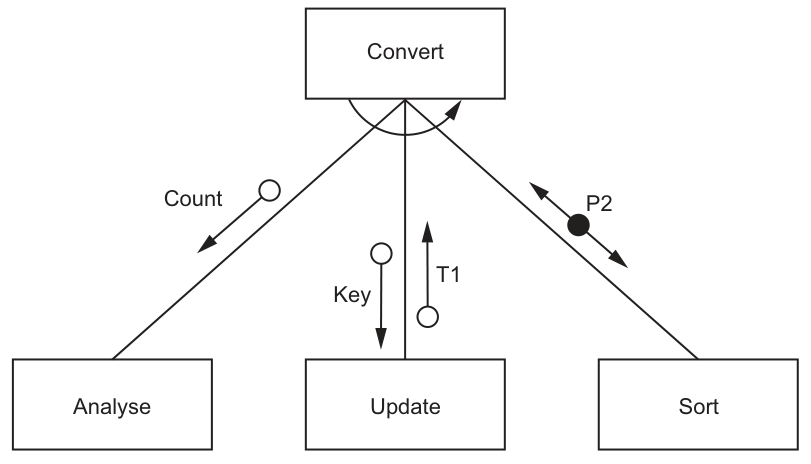
Explain the meaning of the curved arrow symbol in this structure chart.
...................................................................................................................................................
...................................................................................................................................................
...................................................................................................................................................
.............................................................................................................................................
Answer
- The curved arrow shows iteration / repetition.
- The modules connected under the curved arrow are carried out repeatedly in a loop until the required condition is met.
The curved arrow shows iteration: the linked modules are repeated.
Background Concept
A structure chart shows the modular design of a program: which modules call other modules, and what information passes between them.
One of the standard symbols in a structure chart is the curved arrow drawn across a set of module calls. This indicates iteration. In other words, the module or group of modules under that curved line is not performed just once; it is repeated.
This is the design-stage equivalent of using a loop in pseudocode, such as a WHILE, REPEAT ... UNTIL, or FOR loop. The chart does not usually show the exact loop condition in detail, but it does show that repetition is intended.
Understanding the Question
The question asks for the meaning of the curved arrow in Fig. 7.1.
In the diagram, the curved arrow spans the calls from Convert to Analyse, Update, and Sort. So the question is not asking about data being passed, or about which module calls which. It is specifically asking what that curved symbol means in a structure chart.
The key idea you need is that this symbol represents repetition of the modules involved.
Approach
To answer this, identify the standard notation first:
- Recognise the curved arrow as the iteration symbol.
- State what iteration means in program-design terms.
- Link it to this chart by saying the relevant modules are repeated.
For 2 marks, one point is usually for naming the symbol correctly, and one point is for explaining what happens because of it.
Step-by-Step Reasoning
The curved line is drawn beneath Convert and across the three lower module connections.
That tells us the calls to those lower modules are part of a repeated sequence.
So:
Convertdoes not just call these modules once.- It repeats that set of actions.
- The repetition continues until whatever stopping condition the algorithm uses has been satisfied.
A good exam answer therefore includes both of these ideas:
- the name: iteration / repetition
- the meaning: the modules under the curved arrow are repeated in a loop
Key Takeaways
- In a structure chart, a curved arrow indicates iteration.
- Iteration means repeating one module or a group of modules.
- A structure chart shows design intent, not the full loop condition or loop code.
Common Mistakes
- Saying it means sequence only. Sequence just means one thing after another; the curved arrow specifically means repetition.
- Confusing it with selection. A control decision is different from iteration.
- Describing data transfer instead of repetition. The curved arrow is not about parameters; it is about looping.
Things to Be Careful About
- Use the word iteration, repetition, or loop clearly.
- Make sure you refer to the modules under the curved arrow, not the whole chart in general.
- Do not confuse the curved arrow with the open-circle and filled-circle couples, which show data and control information.
The program designer has noted that:
Countis the number of elements in an arrayT1is a value representing the number of elements in an array that have been modifiedKeyis of typeSTRING
Write the pseudocode module headers for analyse, update and sort.
Analyse:
...................................................................................................................................................
...................................................................................................................................................
Update:
...................................................................................................................................................
...................................................................................................................................................
Sort:
...................................................................................................................................................
...................................................................................................................................................
Answer
FUNCTION Analyse() RETURNS INTEGER

FUNCTION Update(BYVAL Key : STRING) RETURNS INTEGER

PROCEDURE Sort()
See completed pseudocode
Background Concept
A structure chart can be used to derive pseudocode module headers.
When turning a structure chart into module headers, you look at:
- which module is called by which other module
- what data is passed into the module
- what data comes back out of the module
- whether the module should be a
PROCEDUREor aFUNCTION
A FUNCTION is appropriate when the module returns a single value. A PROCEDURE is appropriate when the module performs an action and does not return a single value directly.
In CIE pseudocode, a function header is written like:
FUNCTION Name(ParameterList) RETURNS DataType
A procedure header is written like:
PROCEDURE Name(ParameterList)
If a parameter is being supplied to the module as input, it is commonly written as BYVAL. The question also gives type information, so those types must appear in the header where relevant.
Understanding the Question
You are given a structure chart with three sub-modules under Convert:
AnalyseUpdateSort
You are also told:
Countis the number of elements in an arrayT1is the number of elements modifiedKeyis of typeSTRING
From the chart:
AnalysesendsCountback toConvertUpdatereceivesKeyfromConvertand sendsT1back toConvertSortis linked by a control coupleP2, not by a returned data value
So the task is to turn that design information into suitable pseudocode headers.
Approach
Use this method for each module:
- Check whether data goes into the module.
- Check whether one value comes back out.
- If one value comes back, use a
FUNCTIONwith the return type. - If no returned data value is shown, use a
PROCEDURE. - Add any parameter names and types that the question provides.
That gives:
AnalysereturnsCount, so it is best written as a function returningINTEGER.Updatetakes inKey : STRINGand returnsT1, so it is best written as a function returningINTEGER.Sortdoes not return a data value, so it is best written as a procedure.
Step-by-Step Reasoning
1. Analyse
The chart shows an open-circle data couple labelled Count going from Analyse up to Convert.
That means Analyse produces a single data value for the calling module.
The note says Count is the number of elements in an array, so its type is INTEGER.
No input data couple is shown going into Analyse, so no parameter is needed in the header.
Therefore the cleanest header is:
FUNCTION Analyse() RETURNS INTEGER
2. Update
The chart shows:
Keypassed fromConvertdown toUpdateT1passed back fromUpdateup toConvert
So Update has one input and one returned value.
The question explicitly states that Key is of type STRING, so the parameter must be:
BYVAL Key : STRING
T1 is the number of modified elements, so it is an INTEGER return value.
Therefore the header is:
FUNCTION Update(BYVAL Key : STRING) RETURNS INTEGER
3. Sort
The chart shows a control couple P2 from Convert to Sort, but no data value coming back from Sort.
So Sort is acting as an action module rather than a module that returns a single value.
That makes PROCEDURE the appropriate choice.
Hence:
PROCEDURE Sort()
This is the safest header because the question does not provide a type for P2, and the important distinction here is that Sort is not shown returning data.
Key Takeaways
- Use the direction of data couples to work out inputs and outputs.
- A single value returned to the caller is often best represented as a function return value.
- Input items passed into a module should appear as parameters with the correct type.
- If a module performs an action and does not return a value, use a procedure.
Common Mistakes
- Writing all three modules as procedures. That ignores the fact that
AnalyseandUpdateeach send a value back. - Omitting the type of
Key. The question explicitly tells you it isSTRING. - Making
Sorta function. There is no returned data couple fromSortto justify that. - Treating
CountorT1as input parameters to the child modules. The arrows show those values going back toConvert, not into the modules.
Things to Be Careful About
- Read arrow direction carefully. In structure charts, direction matters.
- Distinguish between a data couple and a control couple.
- Match CIE pseudocode style:
FUNCTION ... RETURNS ...andPROCEDURE .... - Keep the identifier names exactly as given:
Analyse,Update,Sort,Key. - Do not invent types that the question does not support. Here, the clearest supported header for
Sortis simply a procedure with no returned value.
A program is being developed to manage student book loans from a college library.
The programmer has defined a record type to define each loan.
The data items are:
| Data item | Data type | Comment |
|---|---|---|
StudentID | STRING | the unique ID of the student who has borrowed the book |
BookID | STRING | the unique ID of the book being borrowed |
OnLoan | BOOLEAN | TRUE if the book has not been returned |
The programmer has defined a global array Loan to store 7000 loan records.
There are more elements in the array than books in the library. Unused elements have the StudentID set to an empty string. These may occur anywhere in the array.
The programmer has defined a program module:
| Module | Description |
|---|---|
CountLoans() | • called with a parameter of type STRING representing a StudentID • counts the number of books currently on loan to the specified student • counts the number of books that the student has already returned • output both counts together with a suitable message |
Write pseudocode for module CountLoans()
...................................................................................................................................................
...................................................................................................................................................
...................................................................................................................................................
...................................................................................................................................................
...................................................................................................................................................
...................................................................................................................................................
...................................................................................................................................................
...................................................................................................................................................
...................................................................................................................................................
...................................................................................................................................................
...................................................................................................................................................
...................................................................................................................................................
...................................................................................................................................................
...................................................................................................................................................
...................................................................................................................................................
...................................................................................................................................................
...................................................................................................................................................
...................................................................................................................................................
...................................................................................................................................................
...................................................................................................................................................
...................................................................................................................................................
.............................................................................................................................................
Answer
PROCEDURE CountLoans(BYVAL WantedStudentID : STRING)
   DECLARE Index, CurrentCount, ReturnedCount : INTEGER
   CurrentCount ← 0
   ReturnedCount ← 0
   FOR Index ← 1 TO 7000
      IF Loan[Index].StudentID = WantedStudentID THEN
         IF Loan[Index].OnLoan = TRUE THEN
            CurrentCount ← CurrentCount + 1
         ELSE
            ReturnedCount ← ReturnedCount + 1
         ENDIF
      ENDIF
   NEXT Index
   OUTPUT "Books currently on loan: ", CurrentCount
   OUTPUT "Books returned: ", ReturnedCount
ENDPROCEDURE
See completed pseudocode
Background Concept
This question is about processing an array of records. A record stores several related fields together, here StudentID, BookID and OnLoan. An array stores many records of the same type, so Loan contains up to 7000 loan records.
When you need to count how many records match some condition, the normal pattern is:
- declare and initialise one or more counters
- loop through every relevant array element
- test whether the record matches the search condition
- if it matches, update the correct counter
- output the totals at the end
Because the array may contain unused elements anywhere, you cannot stop early when you see an empty StudentID. You must still check all 7000 positions.
A procedure is suitable here because the task says to output the counts, not return one single value.
Understanding the Question
The module CountLoans() is given a StudentID. It must examine the global array Loan and work out two separate totals for that one student:
- how many books are still on loan now
- how many books have already been returned
The key clue is the meaning of OnLoan:
TRUEmeans the book has not been returned yetFALSEmeans it has been returned
So the module needs two counters, not one. It is not being asked to count all loans in the system, only those where the record's StudentID matches the parameter passed into the procedure.
Approach
The simplest correct method is a full scan of the array from element 1 to element 7000.
For each element:
- first check whether that record belongs to the required student
- if it does, inspect
OnLoan - if
OnLoanisTRUE, increase the current-loan counter - otherwise, increase the returned-loan counter
At the end, output both counts with suitable labels.
A FOR loop is appropriate because the array size is fixed and known.
Step-by-Step Reasoning
Start by declaring:
Indexto control the loopCurrentCountto count books still on loanReturnedCountto count books already returned
Both counters must start at 0. If you forget this, the totals will be incorrect.
The loop goes from 1 to 7000 because the question states the global array stores 7000 loan records. In CIE pseudocode, this is naturally written as a count-controlled FOR loop.
Inside the loop, the first condition is:
Loan[Index].StudentID = WantedStudentID
This ensures only records for the specified student are considered. If the record belongs to a different student, it is ignored.
If the StudentID matches, a second test is needed on Loan[Index].OnLoan:
- if
TRUE, the book is still out, so incrementCurrentCount - else, the book has been returned, so increment
ReturnedCount
After the loop has checked every record, output both counters with clear messages.
Notice that unused elements do not need any special code. Their StudentID is an empty string, so they simply fail the match test unless the searched-for StudentID were also empty, which would not be a valid real student ID in this context.
Key Takeaways
- Use a full array traversal when unused elements can appear anywhere.
- Use record-field access like
Loan[Index].StudentIDandLoan[Index].OnLoan. - Separate the search condition from the counting condition.
- Initialise counters before the loop and output results after the loop.
Common Mistakes
- Using only one counter instead of two, which misses part of the requirement.
- Counting
OnLoan = FALSEas still on loan. The question explicitly saysTRUEmeans not returned. - Stopping at the first empty
StudentID. That is wrong because unused elements may occur anywhere in the array. - Forgetting to test the
StudentIDbefore changing counters, which would count other students' books. - Writing a function returning one value instead of a procedure that outputs both results.
Things to Be Careful About
- Keep the array bounds correct:
1 TO 7000. - Use
=for comparison and←for assignment. - Match the exact field names and identifier casing from the question.
- Make sure the
ELSEbelongs to theOnLoantest, not theStudentIDtest. - Output both totals, because the question asks for both counts together with a suitable message.
As a reminder, a global array Loan stores 7000 loan records with data items for each loan record:
| Data item | Data type | Comment |
|---|---|---|
StudentID | STRING | the unique ID of the student who has borrowed the book |
BookID | STRING | the unique ID of the book being borrowed |
OnLoan | BOOLEAN | TRUE if the book has not been returned |
A new module is defined:
| Module | Description |
|---|---|
NewLoan() | • called with two parameters of type STRING representing a StudentID and a BookID • searches the array for an unused loan record • if found, updates the loan record and returns TRUE, otherwise returns FALSE |
Write efficient pseudocode for NewLoan()
...................................................................................................................................................
...................................................................................................................................................
...................................................................................................................................................
...................................................................................................................................................
...................................................................................................................................................
...................................................................................................................................................
...................................................................................................................................................
...................................................................................................................................................
...................................................................................................................................................
...................................................................................................................................................
...................................................................................................................................................
...................................................................................................................................................
...................................................................................................................................................
...................................................................................................................................................
...................................................................................................................................................
...................................................................................................................................................
...................................................................................................................................................
...................................................................................................................................................
...................................................................................................................................................
...................................................................................................................................................
...................................................................................................................................................
...................................................................................................................................................
.............................................................................................................................................
Answer
FUNCTION NewLoan(BYVAL NewStudentID : STRING, BYVAL NewBookID : STRING) RETURNS BOOLEAN
   DECLARE Index : INTEGER
   FOR Index ← 1 TO 7000
      IF Loan[Index].StudentID = "" THEN
         Loan[Index].StudentID ← NewStudentID
         Loan[Index].BookID ← NewBookID
         Loan[Index].OnLoan ← TRUE
         RETURN TRUE
      ENDIF
   NEXT Index
   RETURN FALSE
ENDFUNCTION
See completed pseudocode
Background Concept
This question is about adding a new item into an array-based structure that contains used and unused records. The question tells us how to recognise an unused record: its StudentID is an empty string.
When a module must return TRUE or FALSE, it should normally be written as a function returning BOOLEAN. The typical pattern is:
- search for a suitable position
- if found, perform the update and return
TRUE - if the search finishes without success, return
FALSE
Because the task says to write efficient pseudocode, the search should stop as soon as an unused record is found. There is no need to continue scanning the array once insertion has succeeded.
Understanding the Question
NewLoan() is called with two strings:
- a student ID
- a book ID
It must:
- search the
Loanarray for an unused record - if one is found, store the new values in that record
- set
OnLoanso the new loan is marked as active - return
TRUE - if no unused record exists, return
FALSE
The phrase "write efficient pseudocode" is important. It means the solution should avoid unnecessary work. Once an empty slot has been found and updated, the function should finish immediately.
Approach
Use a loop to scan from the start of the array to the end.
For each record:
- check whether
StudentID = "" - if yes, this is an unused record
- store the incoming
StudentIDandBookID - set
OnLoan ← TRUE - return
TRUEimmediately
If the loop completes without finding any unused record, return FALSE.
This is more efficient than using a full scan with a flag and then continuing after a match, because the function stops at the first available slot.
Step-by-Step Reasoning
The module needs to return a Boolean value, so FUNCTION ... RETURNS BOOLEAN is appropriate.
A loop variable such as Index is declared. The search examines each record in turn.
The test for an unused record is:
Loan[Index].StudentID = ""
That comes directly from the stem. There is no need to test BookID or OnLoan because the question defines emptiness using StudentID.
When an unused record is found, three fields must be updated:
Loan[Index].StudentID ← NewStudentIDLoan[Index].BookID ← NewBookIDLoan[Index].OnLoan ← TRUE
That final assignment matters because a brand-new loan means the book has not yet been returned.
After updating the record, RETURN TRUE is used straight away. This is the efficient part: the search ends as soon as success is achieved.
If the loop reaches the end of the array, then every element was already in use. In that case the function returns FALSE.
An alternative correct style would be to use a WHILE loop with a Boolean flag, but an immediate RETURN is shorter and still fully valid.
Key Takeaways
- Use a Boolean function when the module must report success or failure.
- Recognise unused records using the condition given in the stem.
- Update all required fields when inserting a new record.
- For efficiency, stop searching as soon as the first suitable position is found.
Common Mistakes
- Writing a procedure instead of a Boolean function.
- Forgetting to set
OnLoan ← TRUEfor the new record. - Searching for
BookID = ""instead ofStudentID = "", which does not match the specification. - Continuing to scan the array after finding an unused record, which is less efficient.
- Returning
TRUEwithout actually storing the new data.
Things to Be Careful About
- Use the exact empty-string test:
"". - Keep the return values in the correct places:
TRUEwhen inserted,FALSEonly if no slot exists. - The array size is fixed at 7000, so the loop bounds must cover all elements.
- Make sure assignments use
←, not=. - Use the parameter values to fill the record fields, not literal text or the wrong identifiers.
When a book is returned, the loan record will have its OnLoan data set to FALSE
A new procedure Archive() will mark these records as unused after first saving them for future reference.
Explain how these records can be saved for future reference.
...................................................................................................................................................
...................................................................................................................................................
...................................................................................................................................................
.............................................................................................................................................
Answer
- Before marking the record as unused, write the completed loan record to an archive file, for example a text file.
- Append each returned record to this file so the loan history is kept for future reference after the array element is cleared.
Save each returned record to an archive file before clearing it.
Background Concept
When data in an array is going to be deleted or marked unused, it will be lost from that working structure. If the information is still needed later, it should be copied to permanent storage first.
A common method is file handling. An archive file stores old records that are no longer active but may still be needed for reporting, checking history, or auditing. In simple Paper 2 terms, this is often described as writing the record to a text file before removing it from the main array.
Understanding the Question
When a book is returned, its loan record has OnLoan set to FALSE. Later, Archive() will mark such records as unused so those array positions can be reused.
The question asks how to save those records for future reference before this happens. So the essential idea is:
- do not just clear the record
- first copy it somewhere permanent
Approach
The straightforward answer is to store returned-loan records in a separate archive file.
As Archive() finds records with OnLoan = FALSE, it would:
- write the record's details to the archive file
- then clear or mark the array element unused
That preserves the history while freeing space in the active Loan array.
Step-by-Step Reasoning
The main array is for active working data. Once a record is marked unused, its details are effectively removed from that active store.
To keep the history, a second storage location is needed. A file is appropriate because it is persistent and can hold many old records.
Appending is a sensible approach because each returned loan can be added to the end of the archive without overwriting previous history.
After saving the record externally, the program can safely set the element back to the unused state, for example by making StudentID an empty string again.
Key Takeaways
- Archiving means moving old but still valuable data to permanent storage.
- Save data before clearing or reusing its array position.
- A text file is a standard Paper 2 answer for future reference storage.
Common Mistakes
- Saying only "delete the record". That loses the historical information.
- Suggesting the record stays only in the main array. That does not free the element for reuse.
- Forgetting that saving must happen before marking the record unused.
Things to Be Careful About
- The archive must be separate from the active array.
- The saved data should include the loan details, not just a flag.
- Use wording that shows the order clearly: save first, then clear the record.
It is decided to extend the program so that a new module Reminder() will send an email to the student three days before the book is due to be returned.
Outline the changes that will need to be made to the data stored and how this data will be used to generate the reminder email.
Data ..........................................................................................................................................
...................................................................................................................................................
...................................................................................................................................................
...................................................................................................................................................
Use ...........................................................................................................................................
...................................................................................................................................................
...................................................................................................................................................
...................................................................................................................................................
Answer
- Data: add a due date for each loan record and store the student's email address, either in the loan record or in a separate student record linked by
StudentID. - Use: check each active loan and compare the current date with the due date; when it is three days before the due date, use the student's email address and the loan details to generate and send the reminder email.
Add a due date and student email address; compare today's date with the due date and email the student when it is three days before return.
Background Concept
To automate an action such as sending reminders, a program must store all the data needed to decide when to act and who to contact.
Here there are two separate information needs:
- timing data: when is the book due back?
- contact data: where should the reminder be sent?
In data design terms, this means extending the existing stored data. A record structure can be modified by adding extra fields, or some information can be stored in a related record elsewhere and linked using a key such as StudentID.
Understanding the Question
The new module Reminder() must send an email three days before the return date.
That means the current data is not sufficient, because the existing loan record only stores:
StudentIDBookIDOnLoan
There is no due date and no email address. The question asks for two things:
- what extra data needs to be stored
- how that extra data would be used to generate the email
Approach
Add the missing fields needed for the decision and the message:
- a due date for each loan
- an email address for the student, either directly in the loan record or found from a student file/table using
StudentID
Then the reminder process would examine active loans and identify those whose due date is three days away. For those records, the program can prepare and send an email.
Step-by-Step Reasoning
First, think about the timing requirement. "Three days before the book is due" means the program must know the due date. So a date field must be stored for each loan.
Second, think about sending an email. To do that, the program must know the student's email address. This could be:
- stored directly in each loan record, or
- stored once in a separate student record and looked up using
StudentID
When Reminder() runs, it would process loans where OnLoan = TRUE, because returned books do not need reminders.
For each active loan, it compares today's date with the due date. If the due date is three days away, that loan qualifies for a reminder.
The program then uses the student's email address plus details such as the book ID and due date to generate the content of the email.
Key Takeaways
- Automated tasks need the right stored data as well as the right algorithm.
- A due date supports date-based decisions.
- An email address supports communication with the correct student.
- Existing keys such as
StudentIDcan be used to link related data.
Common Mistakes
- Mentioning only a due date but not where the email should be sent.
- Mentioning only an email address but not how the program knows when to send the reminder.
- Forgetting to limit reminders to loans still marked as active.
- Saying the email is sent on the due date rather than three days before.
Things to Be Careful About
- Make clear that the new data must be stored, not just entered temporarily.
- If using a separate student record, state that
StudentIDis used to find the email address. - The comparison should be with the due date and the current date, not with
BookIDor another unrelated field. - Only active loans should be checked for reminders.