Computer Science 9618/21 — October/November 2025
Cambridge AS Level · Fundamental Problem-solving and Programming Skills · worked solutions for every part, with the mark scheme
Topics Programming · Data Types and Structures · Software Development · Algorithm Design and Problem-solving
Refer to the insert for the list of pseudocode functions and operators.
A program is being developed to meet a particular customer requirement.
The program contains these variables:
| Variable | Data type |
|---|---|
| MyChar | CHAR |
| MyString | STRING |
| MyInt | INTEGER |
| MyDOB | DATE |
Complete the table by filling in the gaps using functions and/or operators from the insert.
Each expression must be valid.
| Expression |
|---|
MyString ← 'X' .............................. MyString |
MyChar ← .............................. ("ABCD", ............... ,...............) |
MyString ← .............................. (.............................. (MyDOB)) |
MyInt ← .............................. (.............................. (MyString) / 2) |
Answer
| Expression |
|---|
MyString ← 'X' & MyString |
MyChar ← MID("ABCD", 2, 1) |
MyString ← NUM_TO_STR(DAY(MyDOB)) |
MyInt ← INT(LENGTH(MyString) / 2) |
See completed expressions
Background Concept
This question tests whether you can build valid pseudocode expressions by choosing functions and operators whose input types and output types match the variable being assigned to.
In pseudocode, the assignment must make sense by type:
- a
STRINGvariable must be given a string value - a
CHARvariable must be given a single character - an
INTEGERvariable must be given an integer value - a
DATEvalue can often be processed by date functions such asDAY,MONTHorYEAR
Common built-in functions and operators used here are:
&for string concatenationMID(String, start, length)to extract part of a stringDAY(Date)to extract the day number from a dateNUM_TO_STR(Number)to convert a number into a stringLENGTH(String)to count characters in a stringINT(x)to take the integer part of a numeric value
The key skill is not just knowing the function names, but checking that each whole expression ends with the correct type.
Understanding the Question
You are given four incomplete assignment statements. For each one, you must fill the gaps using functions and/or operators from the insert so that the completed statement is valid.
That means each answer must satisfy two things:
- the syntax must be correct
- the data type on the right-hand side must match the variable on the left-hand side
For example, if the variable is MyInt, the completed expression must evaluate to an integer. If the variable is MyString, the expression must evaluate to a string.
Approach
A reliable way to tackle this kind of question is:
- Look at the variable on the left of
←. - Decide what data type the right-hand side must produce.
- Choose a function or operator from the insert that produces that type.
- If there are nested functions, work from the inside outward.
That is especially important in the third and fourth expressions, where one function feeds into another.
Step-by-Step Reasoning
1. MyString ← 'X' .............................. MyString
MyString is a STRING, so the whole expression on the right must also be a string.
'X' is a character or one-character string, and MyString is already a string. The correct operation is concatenation, written as &.
So:
MyString ← 'X' & MyString
This puts X at the front of the existing string.
2. MyChar ← .............................. ("ABCD", ............... ,...............)
MyChar is a CHAR, so we need a function that extracts exactly one character from a string.
The function shape shown has three arguments, so MID is the natural match:
MID(String, start, length)
If we choose start position 2 and length 1, we extract just the character B.
So:
MyChar ← MID("ABCD", 2, 1)
Any valid one-character extraction using MID would satisfy the type requirement.
3. MyString ← .............................. (.............................. (MyDOB))
MyDOB is a DATE, but MyString must end up as a STRING.
So the inner function should turn the date into a numeric part, and the outer function should convert that number into a string.
A valid choice is:
- inner:
DAY(MyDOB)gives the day number as an integer - outer:
NUM_TO_STR(...)converts that integer to a string
So:
MyString ← NUM_TO_STR(DAY(MyDOB))
This is valid because the final result is a string.
4. MyInt ← .............................. (.............................. (MyString) / 2)
MyInt is an INTEGER, so the whole expression must end as an integer.
The inner function should produce a number from MyString. LENGTH(MyString) does that by returning the number of characters.
Then it is divided by 2. Division may produce a non-integer result, so the outer function must turn it back into an integer. INT(...) does this.
So:
MyInt ← INT(LENGTH(MyString) / 2)
That is valid because INT ensures the assigned value is an integer.
Key Takeaways
- Always check the data type required on the left-hand side.
- Choose functions whose return values match that required type.
- For nested functions, work inside out.
&joins strings,MIDextracts part of a string,LENGTHreturns a number, and conversion functions such asNUM_TO_STRchange type.
Common Mistakes
- Using
+instead of&for string concatenation. In CIE pseudocode, string joining is done with&. - Choosing a function that returns the wrong type, such as assigning
LENGTH(MyString)directly to aSTRINGvariable. - Forgetting the conversion function in
NUM_TO_STR(DAY(MyDOB)), which would otherwise leave an integer being assigned to a string. - Omitting
INT(...)in the final expression, which could leave a non-integer result after division. - Using
MIDwith a length greater than1when assigning to aCHAR.
Things to Be Careful About
- Make sure the completed expression is valid, not just plausible.
- Use the exact pseudocode function names from the insert, such as
NUM_TO_STR,LENGTH,MIDandINT. - Remember that
/is real division, so if the final variable is an integer you often needINT(...). - In substring functions, the argument order matters: string first, then start position, then length.
- A question like this may allow more than one valid expression, but every answer must still match the required type exactly.
Different test methods will be used at different stages of the program development.
Complete the table by identifying the test method that matches the test description.
The first row has been completed for you.
| Test description | Test method |
|---|---|
| carried out as soon as a program module has been coded | alpha |
| carried out as program modules are being combined | |
| completed by the developers without referring to the code | |
| completed by the customer |
Answer
| Test description | Test method |
|---|---|
| carried out as program modules are being combined | integration testing |
| completed by the developers without referring to the code | black-box testing |
| completed by the customer | beta testing |
integration testing; black-box testing; beta testing
Background Concept
Different testing methods are used at different points in program development.
Some important ones are:
- Unit testing: testing a single module as soon as it has been coded
- Integration testing: testing modules together as they are combined
- Black-box testing: testing using inputs and outputs without looking at the program code
- White-box testing: testing with knowledge of the internal code and paths
- Alpha testing: testing carried out by the developers, often in-house
- Beta testing: testing carried out by end users or the customer in a real or realistic environment
The important exam skill is to recognise the clue phrases in the description.
Understanding the Question
You are given short descriptions of testing situations and must identify the matching test method.
The three blanks describe:
- testing while modules are being joined together
- testing by developers without looking at the code
- testing by the customer
Each description points quite directly to a named testing method.
Approach
Look for the defining phrase in each row:
- modules being combined points to integration
- without referring to the code points to black-box
- completed by the customer points to beta
This is mostly a terminology-matching task.
Step-by-Step Reasoning
1. Carried out as program modules are being combined
When separately coded modules are joined together, the test being performed is integration testing.
This checks whether modules work correctly with each other, not just on their own.
2. Completed by the developers without referring to the code
If the testers do not look at the internal code and judge the program only by inputs and outputs, this is black-box testing.
The phrase "without referring to the code" is the key clue.
3. Completed by the customer
Testing done by the customer or end users is beta testing.
This usually happens after earlier internal testing stages and helps confirm that the software meets real user needs.
Key Takeaways
- Integration testing is for combined modules.
- Black-box testing ignores the internal code and focuses on behaviour.
- Beta testing is done by customers or end users.
- Learn the trigger words that identify each test method quickly.
Common Mistakes
- Confusing unit testing with integration testing. Unit testing is one module; integration testing is modules working together.
- Confusing alpha and beta testing. Alpha is done internally by developers; beta is done by customers or external users.
- Confusing black-box and white-box testing. Black-box means no reference to internal code.
Things to Be Careful About
- Read the wording closely: "as modules are being combined" is specifically about integration.
- "Without referring to the code" is about the method of testing, not the stage.
- "Completed by the customer" refers to who performs the test, which is the clue for beta testing.
- In exam tables, only write the testing method asked for; do not add long explanations unless requested.
During the alpha testing stage, an Integrated Development Environment (IDE) is used to help locate an error that has been identified. The IDE report window feature is used to examine the values assigned to variables.
Explain how two other IDE features are used together with the report window feature to help locate the error.
Answer
- Breakpoint: place a breakpoint at a suspected line so execution stops there; the values shown in the report window can then be checked at that point.
- Single stepping / trace: run the program one line at a time and use the report window after each step to see where a variable first gets an incorrect value.
Use breakpoints and single stepping with the report window.
Background Concept
An IDE provides tools to help a programmer find and fix errors. When an error has already been noticed, the next task is to locate where it happens.
The report window is useful because it shows current values stored in variables. However, seeing values alone is not always enough. You also need ways to control the execution of the program so that you can inspect those values at the right moment.
Two common IDE debugging features are:
- Breakpoints: markers placed on particular lines so the program pauses when it reaches them
- Single stepping or trace: executing the program one statement at a time
These features are especially useful for finding logic errors, where the program runs but produces wrong results.
Understanding the Question
The question already tells you that the report window is being used to examine variable values. You are not being asked to explain the report window itself.
Instead, you must explain two other IDE features and how they work together with the report window to help find the error.
So a strong answer needs:
- name a suitable IDE feature
- explain what it does
- link it to checking values in the report window
- show how this helps narrow down the location of the error
Approach
Choose two debugging tools that naturally combine with variable inspection.
The best choices are usually:
- breakpoints, because they stop the program at a chosen place so you can inspect values there
- single stepping/trace, because they let you observe values changing line by line
These two features complement the report window very well, so they make a clear, exam-style answer.
Step-by-Step Reasoning
1. Breakpoints
A breakpoint is set on a line where the programmer suspects the problem may occur.
When the program runs and reaches that line, execution pauses. At that moment, the programmer looks at the report window to inspect the current variable values.
This helps in two ways:
- it shows whether the values are already wrong before that line
- it shows whether the values become wrong after that line is executed
So breakpoints help you stop at a meaningful point, and the report window shows the data state at that point.
2. Single stepping / trace
Single stepping means executing the program one line at a time.
After each step, the programmer checks the report window to see how the variables have changed.
This is useful because it lets you identify the exact statement where a value first becomes incorrect. Instead of just knowing that the final output is wrong, you can see the moment the data goes wrong.
That makes it much easier to find the faulty line or faulty condition in the code.
These two features are often used together:
- use a breakpoint to jump straight to the suspicious region
- then single-step through that section while watching variable values in the report window
Key Takeaways
- The report window shows what values variables currently hold.
- A breakpoint helps you stop the program at a chosen place.
- Single stepping helps you follow execution line by line.
- Together, these tools help locate logic errors by showing exactly where values become incorrect.
Common Mistakes
- Describing the report window only, when the question asks for two other IDE features.
- Naming features without explaining how they work with variable values.
- Giving general IDE features such as syntax highlighting or auto-completion, which do not directly help locate a runtime logic error in this context.
- Forgetting to link the feature to finding the error, not just running the program.
Things to Be Careful About
- The question says two features, so make sure you provide two distinct ones.
- Explain the interaction with the report window, not just the feature in isolation.
- Focus on debugging features that help while the program is executing.
- Use precise terminology such as breakpoint, single stepping, or trace, because these are standard IDE debugging terms.
Data is a global 1D array containing 30 elements of type STRING
An algorithm will output:
- all non-blank elements (elements that do not contain an empty string)
- the final total of the number of elements output.
Complete the program flowchart to represent the algorithm:

Answer
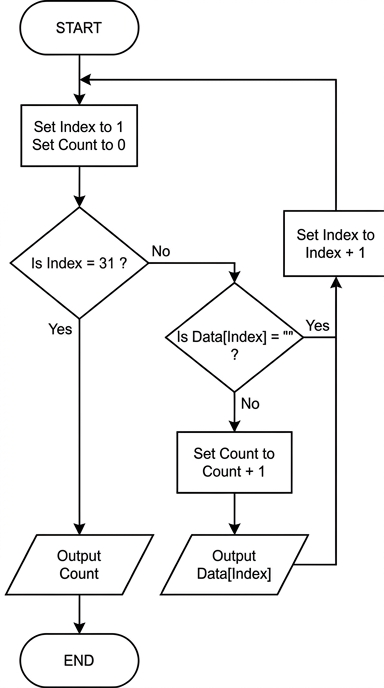
See flowchart
Background Concept
A flowchart is a visual way to represent an algorithm. In Paper 2, it must show the control flow clearly using the standard constructs:
- sequence: steps done one after another
- selection: a decision with different paths, such as checking whether a value is blank
- iteration: repeating steps until a condition is met
This question also uses array processing. A 1D array contains elements in order, so a common pattern is:
- set an index to the first position
- repeat while the index is within bounds
- inspect the current element
- do something if it matches a condition
- move to the next element
Because Data has 30 elements, the algorithm must make sure it checks every element exactly once. Since the array elements are strings, a blank element is represented by the empty string "".
Understanding the Question
You are told that Data is a global 1D array of 30 STRING values. The algorithm must:
- output every element that is not blank
- output the final total number of elements that were output
So this is not just printing the whole array. The algorithm must filter the data first:
- if
Data[Index]is"", skip it - otherwise output it and increase the count
The question specifically asks for a flowchart, not pseudocode. That means the marks come from having the right flow of boxes, decisions and loop structure.
Approach
A good strategy is:
- Initialise two variables:
Indexstarts at 1, because the mark scheme uses array positions 1 to 30Countstarts at 0, because nothing has been output yet
- Loop through the array until all 30 positions have been checked
- For each element, test whether it is blank
- If it is not blank:
- increase
Count - output the element
- increase
- After either case, increase
Indexand repeat - When the loop finishes, output
Count
One accepted way is to test at the top whether Index = 31. That works because after processing element 30, Index becomes 31, which means the loop should stop.
Step-by-Step Reasoning
The completed flowchart should look like this:
Now follow the logic carefully.
-
START
- begin the algorithm
-
Set
Indexto 1 andCountto 0Indexpoints to the first array elementCountis the running total of non-blank elements output
-
Decision:
Is Index = 31?- if yes, then all 30 elements have already been checked
- if no, continue to inspect the current element
-
Decision:
Is Data[Index] = ""?- if yes, this element is blank, so it must not be output
- if no, this element is non-blank and must be counted and output
-
If the element is non-blank
Set Count to Count + 1Output Data[Index]
-
Move to the next element
Set Index to Index + 1- this happens whether the current element was blank or not
-
Loop back
- return to the
Is Index = 31?decision
- return to the
-
When
Index = 31- output the final
Count - then END
- output the final
Why 31 and not 30 in the first decision? Because with this design, the check happens before processing the next element. Elements 1 to 30 are processed while Index is not 31. As soon as the index becomes 31, the loop stops.
The alternative flowchart in the mark scheme is also valid. That version checks the array element first and then asks whether Index > 30 after incrementing. The important thing is that the flowchart:
- starts correctly
- initialises both variables
- checks whether each string is blank
- outputs only non-blank strings
- updates the count correctly
- advances through the array
- outputs the final total
Key Takeaways
- A standard array-processing algorithm uses an index, a loop and a conditional test.
- The empty string
""is the correct way to test whether a string element is blank. - Counting qualifying items needs a separate counter initialised to 0.
- In a flowchart, the loop must be structured so every array element is checked once and the algorithm stops at the correct boundary.
Common Mistakes
- Not initialising
Countto 0: then the final total is undefined or wrong. - Not initialising
Indexto 1: this would skip the first element or use an invalid position. - Outputting blank elements: the question says only non-blank elements should be output.
- Forgetting to increment
Indexon one branch: this can cause an infinite loop. - Using the wrong stopping condition: for this layout,
Index = 31is correct; stopping at the wrong point may miss element 30 or go past the end. - Incrementing
Countfor every element: it should increase only when the element is non-blank. - Forgetting the final output of
Count: the algorithm must output both the matching elements and the total number of them.
Things to Be Careful About
- The mark scheme treats the array as indexed from 1 to 30, not 0 to 29.
- The blank-string test must be against
"", not a space character. - The flowchart must use appropriate shapes:
- oval for START/END
- rectangle for assignment/process steps
- diamond for decisions
- parallelogram for output
- Make sure both blank and non-blank paths rejoin the loop properly.
- The final output is the total count only after all 30 elements have been checked.
A program is needed to manage individual rentals in a car-hire business.
The data items for each rental will be held in a record structure of type RentalRecord
The programmer has started to define the items that will be needed:
| Item | Example value | Comment |
|---|---|---|
| RentalID | "AB1234" | a unique alpha-numeric value |
| CarID | 241 | a numeric value used as an array index |
| DisCode | 'S' | a letter indicating the type of discount offered |
| Start | 13/06/2025 | when the rental starts |
| Duration | 7 | the number of days of the rental |
| Completed | FALSE | TRUE when the car is returned and the rental charge paid |
Answer
TYPE RentalRecord
   DECLARE RentalID : STRING
   DECLARE CarID : INTEGER
   DECLARE DisCode : CHAR
   DECLARE Start : DATE
   DECLARE Duration : INTEGER
   DECLARE Completed : BOOLEAN
ENDTYPE
See completed pseudocode
Background Concept
A record is a composite data structure used to store several related data items together under one name. Each item inside the record is called a field. Records are useful when one real-world object has several different attributes, often with different data types.
In this question, one rental has:
- an ID
- a car number
- a discount code
- a start date
- a duration
- a completion flag
These are clearly related, so they belong together in one record type.
In CIE pseudocode, a record structure is usually declared with TYPE ... ENDTYPE, and each field is declared inside it with its own data type.
Typical data types used here are:
STRINGfor text such asRentalIDINTEGERfor whole numbers such asCarIDandDurationCHARfor a single character such asDisCodeDATEfor a date value such asStartBOOLEANfor a true/false field such asCompleted
Understanding the Question
The question gives a table of data items for one rental and asks you to write pseudocode to declare the record structure for type RentalRecord.
So you are not writing a full program and you are not creating an array yet. You are only defining the template for one rental record. The clue is the phrase "declare the record structure". That means you must:
- start a record type called
RentalRecord - include all the named fields shown in the table
- give each field a sensible data type
Approach
The best approach is to go through the table row by row and translate each item into a field declaration.
For each item, ask:
- Is it text, a number, one character, a date, or true/false?
- What is the exact field name I should use?
Then place all of those declarations inside a TYPE RentalRecord ... ENDTYPE block.
Step-by-Step Reasoning
We begin the record declaration with:
TYPE RentalRecord
This tells the examiner we are defining a new record type called RentalRecord.
Now choose each field.
-
RentalID- Example value:
"AB1234" - This is several characters, not just one.
- So the correct type is
STRING.
- Example value:
-
CarID- Example value:
241 - This is numeric and used as an array index.
- An index is a whole number, so
INTEGERis suitable.
- Example value:
-
DisCode- Example value:
'S' - This is one letter only.
- So the correct type is
CHAR.
- Example value:
-
Start- Example value:
13/06/2025 - This is a date.
- So
DATEis an appropriate type.
- Example value:
-
Duration- Example value:
7 - Number of days is a whole number.
- So this should be
INTEGER.
- Example value:
-
Completed- Example value:
FALSE - This is a true/false condition.
- So the correct type is
BOOLEAN.
- Example value:
Finally, close the type definition with:
ENDTYPE
That produces a complete record structure for one rental.
Key Takeaways
- Use a record when one entity has several related attributes.
- Choose field types from the meaning of the data, not just from the example value.
- In CIE pseudocode, record definitions use
TYPE ... ENDTYPE. - A good record declaration uses the exact field names from the question.
Common Mistakes
- Using
STRINGforDisCodewhen the value is clearly a single character. - Forgetting one of the fields from the table.
- Writing variable assignments instead of declarations.
- Not naming the record type
RentalRecordexactly as required. - Using
=instead of:in declarations or using non-CIE-style pseudocode.
Things to Be Careful About
- Keep the identifier casing exactly as given:
RentalRecord,RentalID,CarID,DisCode,Start,Duration,Completed. - This is a type definition, so do not try to store example values in it.
Completedmust beBOOLEAN, because it storesTRUEorFALSE.CarIDandDurationare whole numbers, soINTEGERis the best match.- Make sure the record is properly closed with
ENDTYPE.
A 1D array Rental containing 500 elements is used to store the data for all rental records.
Write pseudocode to declare the Rental array.
Answer
DECLARE Rental : ARRAY[1:500] OF RentalRecord
See completed pseudocode
Background Concept
An array stores multiple items of the same type under one identifier, with each item accessed by an index. A 1D array is a single list of elements.
When the element type is a record, each array position stores one whole record. That means each element in the array contains all the fields defined in the record type.
So if RentalRecord is the type for one rental, then an array of RentalRecord can store many rentals.
Understanding the Question
The question says that a 1D array called Rental containing 500 elements is used to store the data for all rental records.
That means you must declare:
- the array name:
Rental - the number of elements:
500 - the element type:
RentalRecord
You are not redefining the fields here. Those were already handled in part (i). This part only asks for the array declaration.
Approach
Use standard CIE array declaration syntax:
DECLARE ArrayName : ARRAY[lower:upper] OF ElementType
Then substitute:
Rentalas the array name1:500as the boundsRentalRecordas the element type
Step-by-Step Reasoning
We need one identifier for the whole collection, so the array name is Rental.
The question says there are 500 elements. In CIE pseudocode, a common way to show this is:
ARRAY[1:500]
This means the valid positions are 1, 2, 3, ..., 500.
Each position is not just a number or a string. Each position must store a complete rental record. That is why the element type is:
OF RentalRecord
Putting it all together gives:
DECLARE Rental : ARRAY[1:500] OF RentalRecord
This means Rental[1] stores one full rental record, Rental[2] stores another, and so on up to Rental[500].
Key Takeaways
- A 1D array stores many values of one type.
- If the type is a record, each array element stores one full record.
- Array declarations must include the name, bounds, and element type.
ARRAY[1:500] OF RentalRecordmeans 500 rental records can be stored.
Common Mistakes
- Declaring the array as
ARRAY[500]without valid CIE-style bounds. - Using the wrong type, such as
INTEGERinstead ofRentalRecord. - Forgetting the word
OF. - Redeclaring all the record fields again inside the array declaration.
Things to Be Careful About
- Use the exact array name
Rental. - The question says 500 elements, so the bounds must allow 500 positions.
- Do not confuse
RentalRecordthe type withRentalthe array variable. - Keep the syntax in CIE pseudocode form, not a programming-language-specific version.
Answer
- Each rental can be stored as one record, so all related data items for that rental are kept together.
- An array allows many rental records to be stored under one identifier instead of using many separate variables.
- The records can be accessed and processed easily using an index, for example when searching, updating or listing rentals.
Related data is grouped per rental, many rentals are stored under one array name, and the records can be processed easily by index.
Background Concept
A record and an array solve different storage problems.
- A record groups different fields that belong to one item.
- An array stores many items of the same type.
When combined, an array of records is a very common design:
- one record = one real-world entity
- the array = the whole collection of those entities
Here, one rental has several fields, so a record is appropriate. The business has many rentals, so an array of those records is appropriate.
Understanding the Question
This part is not asking for code. It asks for three benefits of using an array of records to store all rentals.
So the answer should explain why this design is useful, rather than showing syntax.
The important idea is to think about both parts of the structure:
- what advantage records give
- what advantage arrays give
Approach
A good way to answer is to identify three practical benefits from the viewpoint of program design:
- data for one rental stays together
- many rentals can be stored consistently
- the collection becomes easy to process with loops and indexes
These are strong general benefits and fit the car-rental scenario well.
Step-by-Step Reasoning
First benefit: records keep related data together.
A rental is not just one value. It has an ID, a car number, a discount code, a date, a duration and a completion flag. If these were stored as separate unrelated variables, it would be harder to keep them connected. A record solves that by bundling them into one structure.
Second benefit: arrays allow many rentals to be stored efficiently.
Instead of declaring hundreds of separate variables such as Rental1, Rental2, Rental3, and so on, one array name can hold the whole set. This makes the program shorter, clearer and easier to manage.
Third benefit: array indexing makes processing easier.
Because the records are stored in numbered positions, the program can use loops to move through them. That makes common tasks easier, such as:
- searching for a rental
- updating a rental
- printing all rentals
- checking which rentals are completed
That is why "easy processing by index" is a strong exam point.
Key Takeaways
- Records are used for one complex item with multiple fields.
- Arrays are used for many items of the same type.
- An array of records is ideal when you need many similar real-world objects, each with several attributes.
- This design improves organisation, readability and processing.
Common Mistakes
- Giving features instead of benefits, for example just saying "it uses an array" without explaining why that helps.
- Repeating the same idea three times in slightly different words.
- Talking only about records and ignoring the benefit of the array, or vice versa.
- Giving vague points such as "it is better" without saying how it is better.
Things to Be Careful About
- The question asks for three benefits, so give three distinct points.
- Make each point specific to storage or processing of rentals.
- Benefits such as easier searching, updating and looping are stronger than very general statements.
- Avoid discussing implementation details that were not asked for, such as memory addresses or file storage.
A program contains a global 1D array Number consisting of 20 elements of type REAL
A procedure Store() will input a sequence of up to 20 real values, one value at a time. These values will be assigned to elements of the array using four steps:
Step 1: store the first value in the sequence in the first element of the array
Step 2: check each subsequent value input. If this value is larger than the previous value input, then assign the value to the next array element, otherwise go to step 4
Step 3: repeat from step 2 unless the array is full
Step 4: output the count of the number of values stored in the array together with a suitable message.
Complete the pseudocode for Store()
All variables used in the algorithm must be declared.
PROCEDURE Store()
...................................................................................................................................................
...................................................................................................................................................
...................................................................................................................................................
...................................................................................................................................................
...................................................................................................................................................
...................................................................................................................................................
...................................................................................................................................................
...................................................................................................................................................
...................................................................................................................................................
...................................................................................................................................................
...................................................................................................................................................
...................................................................................................................................................
...................................................................................................................................................
...................................................................................................................................................
...................................................................................................................................................
...................................................................................................................................................
...................................................................................................................................................
...................................................................................................................................................
ENDPROCEDURE
Answer
PROCEDURE Store()
   DECLARE PreviousValue, CurrentValue : REAL
   DECLARE Count : INTEGER
   DECLARE Finished : BOOLEAN

   INPUT PreviousValue
   Number[1] ← PreviousValue
   Count ← 1
   Finished ← FALSE

   WHILE Count < 20 AND Finished = FALSE
      INPUT CurrentValue
      IF CurrentValue > PreviousValue THEN
         Count ← Count + 1
         Number[Count] ← CurrentValue
         PreviousValue ← CurrentValue
      ELSE
         Finished ← TRUE
      ENDIF
   ENDWHILE

   OUTPUT Count, " values stored in the array"
ENDPROCEDURE
See completed pseudocode
Background Concept
A 1D array stores multiple values of the same data type in indexed positions. Here, Number is a global array of 20 REAL values, so the procedure must place values into successive positions without going past the end of the array.
This task also uses the three main programming constructs:
- sequence: statements carried out in order
- selection: deciding what to do using
IF ... THEN ... ELSE - iteration: repeating a block using a loop
A common pattern for this kind of question is:
- deal with the first item separately
- keep a count of how many values have been stored
- compare each new item with the previous one
- stop when the required condition is no longer true or when the array is full
Because the array has a fixed size, the loop must include a bounds check such as Count < 20 before storing another value.
Understanding the Question
The procedure Store() must read real numbers one at a time and store them in the global array Number.
The rules are:
- the first value always goes into the first array element
- each later value is only stored if it is larger than the value entered immediately before it
- as soon as a value is not larger than the previous value, input stops
- input must also stop if the array becomes full
- finally, the procedure must output how many values were stored, with a message
So this is not just "store up to 20 values". It is "store an increasing sequence until it stops increasing, or until 20 values have been stored".
Approach
The cleanest approach is:
- declare variables for the previous value, current value, count, and a Boolean flag
- input the first value before the loop and store it in
Number[1] - set
Countto 1 because one value has already been stored - repeat while there is still space in the array and the sequence has not ended
- input the next value
- if it is larger than the previous value, store it in the next array element and update the previous value
- otherwise, set a flag so the loop stops
- after the loop, output the count and a message
The important design choice is handling the first value outside the loop. That avoids awkward special cases inside the loop, because after the first input there is always a valid "previous value" available for comparison.
Step-by-Step Reasoning
Start with the declarations:
PreviousValueandCurrentValuemust beREALbecause the sequence contains real values.Countmust beINTEGERbecause it counts how many values have been stored.Finishedmust beBOOLEANbecause it represents whether the procedure should stop.
Then input the first value:
INPUT PreviousValue- this first value is stored immediately in
Number[1] Count ← 1because one value is now in the arrayFinished ← FALSEbecause processing has not ended yet
Now consider the loop condition:
Count < 20means there is still room for another valueFinished = FALSEmeans the increasing-sequence rule has not been broken yet- both conditions must be true for the loop to continue
Inside the loop:
- input the next value into
CurrentValue - compare it with
PreviousValue - if
CurrentValue > PreviousValue, then:- increase the count
- store the value in the next free array element
- update
PreviousValueso the next comparison uses the newly accepted value
- otherwise:
- do not store the value
- set
Finished ← TRUEso the loop ends
Why update PreviousValue only after storing?
Because the next comparison must be against the last valid stored value, not against a rejected one.
Finally, after the loop ends, output the count with a suitable message. The loop can end in two ways:
- the next input is not larger than the previous one
Countreaches 20, so the array is full
In both cases, the number of values actually stored is held in Count, so one final OUTPUT statement is enough.
Key Takeaways
- When processing a sequence based on comparison with the previous item, it is often easiest to read the first value before the loop.
- Fixed-size arrays must always be protected by a bounds check.
- A Boolean flag is a clear way to stop a loop when a condition fails.
- Keep separate variables for the "current" and "previous" values when comparing sequential input.
Common Mistakes
- Not storing the first value separately: this leaves nothing valid to compare the second value against.
- Forgetting to update
PreviousValueafter accepting a new value: then later comparisons use the wrong reference value. - Using
<= 20in the loop condition: that risks trying to store beyond the last array element. - Incrementing
Countin the wrong place: if done too early or too late, the value may be stored in the wrong position. - Stopping only when the sequence fails and not when the array is full: this breaks the array bound requirement.
- Using
=instead of←for assignment in pseudocode: CIE expects the assignment arrow.
Things to Be Careful About
- The array has 20 elements, so if
Count = 20, no further value can be stored. - The comparison must be with the previous value input that was accepted, not simply any earlier value.
- The question says all variables must be declared, so every local variable used in the procedure must appear in
DECLAREstatements. - The final output must give the count together with a message, not just the number alone.
- Keep to CIE pseudocode style: upper-case keywords, correct assignment arrow, and matching
ENDIF,ENDWHILE, andENDPROCEDURE.
The requirements of the program change:
- the number of values in the sequence is unknown, but may be higher than 20
- the values will need to be accessed by another program as data.
The data will be stored in a text file instead of an array.
Answer
- A text file is not restricted to 20 values, so it can store a larger sequence.
- The data is stored permanently and can be accessed by another program.
See explanation
Background Concept
An array is an in-memory data structure used while a program is running. Its size is normally fixed when declared. In this question, the array has exactly 20 elements, so it cannot hold more than 20 values.
A text file is different. It is stored on secondary storage, so the data remains after the program finishes. It can also be opened later by the same program or by a different program.
So arrays are good for temporary working storage during execution, while files are good for larger and persistent data storage.
Understanding the Question
The original solution used an array of 20 elements. Now the requirements have changed:
- the sequence length is unknown and may be more than 20
- another program must be able to access the stored values as data
The question asks for two benefits of changing from array storage to text-file storage. The best answers should match these two new requirements directly.
Approach
Take each changed requirement and link it to a benefit of a text file:
- if the number of values may exceed 20, a fixed-size array is a problem, but a file can hold many more values
- if another program must use the data, file storage is suitable because files can be shared/read later by other programs
This gives two precise benefits, each tied to the scenario.
Step-by-Step Reasoning
First benefit:
- the array
Numberhas only 20 elements - if more than 20 values arrive, the array cannot store them all
- a text file does not have that fixed 20-item limit
- therefore, a text file is better when the number of values is unknown or may be larger than 20
Second benefit:
- array contents exist only while the program is running
- another program cannot directly use that array as stored data after the first program ends
- a text file is saved on secondary storage
- therefore, another program can open the file and read the values later
These are the two main reasons the requirement changed from array storage to file storage.
Key Takeaways
- Arrays are fixed-size working storage inside a program.
- Text files are persistent storage and are suitable for sharing data between programs.
- When requirements mention unknown quantity or later access by another program, file storage is often more suitable than an array.
Common Mistakes
- Saying only "a file is bigger": this is too vague; the key point is that the file is not limited to the array's fixed size of 20 values.
- Giving two versions of the same benefit: for example, "stores more values" and "has more space" are really the same point.
- Ignoring the second requirement about another program accessing the data.
- Saying files are always faster than arrays: that is not generally true and is not the point here.
Things to Be Careful About
- Keep the answer linked to the changed requirements in the question.
- A text file is still limited by available storage, but it is not limited to the fixed size of 20 elements.
- "Accessed by another program" means persistent external storage is needed; a normal array inside one running program does not provide that.
Answer
- Convert each
REALvalue to aSTRINGbefore writing it to the text file.
Convert each REAL value to a STRING before writing it to the text file.
Background Concept
A text file stores data as characters. That means values written to it must be represented in text form, not just as internal numeric values in memory.
For example, the real value 12.5 must be written as the characters 1, 2, ., 5 in the file. In pseudocode this usually means converting a number to a string before writing it.
Understanding the Question
The program is being changed from using an array to using a text file. The question asks what change is needed before each value is written.
Because the values are REAL numbers and the destination is a text file, the main required change is converting the value into a text representation.
Approach
Think about the storage type:
- array element: can directly hold a
REAL - text file: stores characters
So before writing each numeric value to the file, convert it from numeric form to string form.
Step-by-Step Reasoning
Originally, a value such as 7.25 could be stored directly in an array element because the array was declared as type REAL.
When writing to a text file:
- the file does not store the internal real-number format used in memory
- it stores characters instead
- therefore each real value must first be changed into a string
In CIE pseudocode, this would usually be done with a conversion such as NUM_TO_STR(...) before WRITEFILE.
A separator such as a new line or delimiter may also be needed in a full program, but the key change the question is looking for is the conversion from numeric to string form.
Key Takeaways
- Text files store characters, not raw numeric memory values.
- Numeric data must usually be converted to string form before being written to a text file.
- Always match the data representation to the storage medium.
Common Mistakes
- Writing the real value directly without conversion: this ignores that the destination is a text file.
- Talking only about opening or closing the file: those are file-handling steps, but they are not the specific change asked for here.
- Confusing text files with binary files: binary files can store data differently, but this question specifically says text file.
Things to Be Careful About
- The question says text file, so the answer should mention text representation or string conversion.
- If writing several values in a full solution, they would also need separators such as line breaks or delimiters so they can be read back correctly.
- Keep the answer focused on what must happen before each value is written.
A program is being designed in pseudocode.
The program contains the following declaration for the global array MyData:
DECLARE MyData : ARRAY[1:10000] OF STRING
A function FindFirst() is written to search the array for a given string and to return the index of the first element where that string is found, or to return –1 if the string is not found.
The function is written in pseudocode as shown:
FUNCTION FindFirst(SearchString : STRING) RETURNS INTEGER
    DECLARE Index, FoundAt : INTEGER
    FoundAt ← -1
    FOR Index ← 1 TO 10000
        IF MyData[Index] = SearchString THEN // outer conditional clause
            IF FoundAt = -1 THEN // inner conditional clause
                FoundAt ← Index
            ENDIF
        ENDIF
    NEXT Index
    RETURN FoundAt
ENDFUNCTION
Answer
-1is used because it is not a valid index forMyData.- It can therefore be used to mean "not found".
-1 is outside the valid index range 1 to 10000, so it can be used as a not-found value.
Background Concept
When a program searches an array, it often needs a special value to show that no matching item has been found yet. This special value is called a sentinel or flag value. A good sentinel must be a value that could never be mistaken for a real result.
Here, MyData is declared as ARRAY[1:10000] OF STRING, so the only valid positions in the array are 1 to 10000. Any index outside that range is impossible as a genuine answer.
Understanding the Question
The question asks why the programmer chose -1 as the initial value of FoundAt before the search starts.
From the stem, FindFirst() must return:
- the index of the first matching element, or
-1if the string is not found.
So the reason for choosing -1 must connect to the valid range of array indices.
Approach
Check the legal index values for MyData, then decide whether -1 could ever be a real position in the array. If it cannot, it is safe to use as a special "not found" value.
Step-by-Step Reasoning
MyData is indexed from 1 to 10000.
That means:
- 1 is a valid position
- 10000 is a valid position
-1is not a valid position
So if FoundAt contains -1, the program can safely interpret this as meaning "no match has been recorded". Later, if a match is found, FoundAt can be replaced with a real index such as 27 or 5832.
This is why -1 is a sensible initial value: it cannot be confused with an actual array location.
Key Takeaways
- A sentinel value is a special value used to show a particular state such as "not found".
- The sentinel should be outside the range of valid data.
- For an array indexed from 1 upwards,
-1is a common not-found value.
Common Mistakes
- Saying only that
-1is the initial value, without explaining why it is suitable. - Saying it means "empty" rather than "not found". The variable stores an index, not the array contents.
- Forgetting that the explanation depends on the index range 1 to 10000.
Things to Be Careful About
- The answer is about array indices, not string values.
0would also be outside the valid range here, but the question asks why-1was chosen, so the safest explanation is that it is not a legal index and therefore clearly signals "not found".- Always use the declared bounds from the stem when justifying a sentinel value.
Answer
- It checks whether the current element
MyData[Index]matchesSearchString. - Only if a match is found does the program enter the inner conditional clause.
It checks whether the current array element matches the search string, so the inner clause is only considered when a match occurs.
Background Concept
A conditional statement controls whether a block of code runs. In a search algorithm, a condition is used to compare the current item being examined with the target value being searched for.
A nested conditional means one IF statement is placed inside another. The outer condition acts as a filter: the inner condition is only tested if the outer one is true.
Understanding the Question
The question specifically asks about the purpose of the outer conditional clause:
IF MyData[Index] = SearchString THEN
This means we need to explain what that comparison is doing in the search process.
Approach
Look at what values are being compared:
MyData[Index]= the current item in the arraySearchString= the string we want to find
So the outer clause must be deciding whether the current position contains a match.
Step-by-Step Reasoning
The loop moves through the array from index 1 to 10000.
At each step, the program checks:
MyData[Index] = SearchString
If this is false:
- the current item is not the one being searched for
- the inner
IFis skipped completely - nothing is stored in
FoundAt
If this is true:
- the current item matches the search string
- the program then goes on to the inner condition to decide whether this match should be recorded
So the outer conditional clause performs the actual search comparison. It ensures the code for storing an index is only reached when a matching element has been found.
Key Takeaways
- The outer
IFin a nested search routine usually checks for a match. - It acts as a filter before any further action is taken.
- In a search, comparing the current element with the target is the key first step.
Common Mistakes
- Describing the inner clause instead of the outer clause.
- Saying it checks whether the value has been found before, which is the job of
FoundAt = -1in the inner clause. - Forgetting to mention that the comparison is between the current array element and the search string.
Things to Be Careful About
- The outer condition does not decide whether this is the first match; it only decides whether there is a match at the current index.
- Keep the roles separate:
- outer clause = match test
- inner clause = first-match test
- In exam answers, name the variables from the stem where helpful so the explanation is precise.
The inner conditional clause ensures that only the index of the first matching element, if any, is returned.
Explain how this clause works.
Answer
- The inner clause checks whether
FoundAtis still-1, which means no earlier match has been stored. - When the first match is found,
FoundAtis set toIndex. - After that,
FoundAtis no longer-1, so later matches do not change it.
It only stores the index when FoundAt is still -1, so the first matching index is recorded and later matches are ignored.
Background Concept
When searching for the first occurrence of a value, the program must record the match once and then avoid overwriting it later. A common way to do this is:
- start with a sentinel such as
-1 - change it when the first match is found
- refuse to change it again after that
This is different from finding the last occurrence, where the stored index would be updated every time a new match is found.
Understanding the Question
The question asks how the inner conditional clause ensures that the function returns the index of the first matching element only.
The inner clause is:
IF FoundAt = -1 THEN
    FoundAt ← Index
ENDIF
So we must explain how this condition prevents later matches from replacing the earlier one.
Approach
Track the meaning of FoundAt through the search:
- before any match:
FoundAt = -1 - after the first match:
FoundAtbecomes a real index - on later matches: the condition is false, so the value stays unchanged
Step-by-Step Reasoning
At the start of the function:
FoundAt ← -1
This means no match has been recorded yet.
Now suppose the loop reaches a position where MyData[Index] = SearchString.
The outer condition is true, so the program enters the inner condition:
IF FoundAt = -1 THEN
First match
For the first matching element:
FoundAtis still-1- the condition is true
- the program executes:
FoundAt ← Index
So the index of the first match is stored.
Later matches
If another matching element appears later:
FoundAtalready contains the earlier indexFoundAt = -1is now false- the assignment does not happen
So the original stored index is kept.
This is exactly how the routine returns the first matching position, not the last one.
Key Takeaways
- A sentinel value can show whether a result has already been recorded.
- Checking
FoundAt = -1lets the program detect the first time a match occurs. - To keep the first match, do not allow later matches to overwrite the stored index.
Common Mistakes
- Saying it checks whether the current element is the first one in the array. It does not; it checks whether this is the first match found so far.
- Saying the inner clause stops the loop. It does not stop the loop in this version; it only stops
FoundAtbeing changed again. - Confusing "first matching element" with "smallest index value" without linking it to the order of the loop.
Things to Be Careful About
- The loop still continues through the rest of the array in this version.
- The protection comes from not overwriting
FoundAt, not from ending the search early. - In an exam explanation, make clear that
FoundAtchanges only once.
The pseudocode does not use the most appropriate loop construct.
Answer
- A
FORloop always runs from 1 to 10000. - The search could stop as soon as the first match is found, so continuing through the whole array is unnecessary.
A FOR loop always checks all 10000 elements, even though the search could stop once the first match is found.
Background Concept
A FOR loop is a count-controlled loop. It is most suitable when the exact number of iterations is known in advance and all of them are needed.
A search for the first matching item is different. The number of iterations needed is not fixed:
- if the item is near the start, very few checks are needed
- if the item is near the end, many checks are needed
- if it is absent, the whole array must be checked
So this kind of task often suits a condition-controlled loop better.
Understanding the Question
The question says the pseudocode does not use the most appropriate loop construct and asks why.
The current loop is:
FOR Index ← 1 TO 10000
The function is supposed to return the first matching index, so once that first match has been found, there is no need to continue searching.
Approach
Compare what the current loop does with what the algorithm actually needs. If the loop carries on after the answer is already known, it is not the best choice.
Step-by-Step Reasoning
A FOR loop from 1 to 10000 will execute exactly 10000 iterations.
That means:
- if the match is at index 3, the loop still continues up to 10000
- if the match is at index 400, the loop still continues up to 10000
- only if the item is not found at all is it genuinely necessary to inspect every element
Since the function only needs the first match, once FoundAt has been set, the answer is already known. Continuing to test the remaining elements wastes time.
So the problem with this FOR loop is not that it is incorrect; it is that it is less appropriate and less efficient than a loop that can stop early.
Key Takeaways
- A count-controlled loop is not always the best choice just because the array size is known.
- For a "find first" search, an early exit is desirable.
- The most appropriate loop is the one that matches the stopping condition of the problem.
Common Mistakes
- Saying the
FORloop is wrong. It is logically correct, just not the most suitable. - Saying a
FORloop cannot be used for searching. It can, but it may be inefficient here. - Forgetting that the reason is early termination after the first match.
Things to Be Careful About
- The criticism is about efficiency and suitability, not correctness.
- The loop must still be able to handle the not-found case by reaching the end of the array.
- Use the phrase "can stop when the first match is found" to target the mark directly.
Suggest and justify a more appropriate loop construct that could be used.
Construct ...........................................................................................................................
Justification .......................................................................................................................
Answer
- Construct:
WHILE - Justification: a
WHILEloop can continue whileIndex <= 10000ANDFoundAt = -1, so it stops as soon as the first match is found or when the end of the array is reached. This avoids unnecessary iterations.
Construct: WHILE. Justification: it can stop when the first match is found or when the end of the array is reached, so it is more efficient.
Background Concept
Condition-controlled loops are used when repetition should continue only while a condition is true, rather than for a fixed number of times.
In CIE pseudocode, a WHILE loop is a pre-condition loop. The condition is tested before each iteration. This makes it suitable when you want to stop as soon as some event happens, such as:
- an item has been found
- the end of an array has been reached
This is a common pattern in linear search algorithms.
Understanding the Question
The question asks for:
- a more appropriate loop construct
- a justification for why it is better
Because the function is searching for the first occurrence, the ideal loop should stop when either:
- the first match is found, or
- the array has been fully checked
That clue points to a condition-controlled loop rather than a fixed-count FOR loop.
Approach
Choose a loop that can express both stopping conditions directly. A WHILE loop does this well because you can continue while:
- the index is still within bounds, and
- no match has yet been found
Step-by-Step Reasoning
A suitable replacement is a WHILE loop.
The logic would be based on a condition such as:
WHILE Index <= 10000 AND FoundAt = -1
This means the loop keeps going only while both of these are true:
- there are still array elements left to check
- no match has been recorded yet
Why this is better
If a match is found:
FoundAtchanges from-1to the current indexFoundAt = -1becomes false- the loop ends before checking the rest of the array
If no match is found:
FoundAtremains-1- the loop continues until
Indexgoes past 10000
So the WHILE loop naturally matches the real stopping conditions of the algorithm.
This is more appropriate than FOR Index ← 1 TO 10000 because the search does not always need 10000 iterations.
Key Takeaways
- Use a
WHILEloop when repetition depends on a condition rather than a fixed count. - Linear search for the first occurrence often uses two conditions: still within bounds, and not found yet.
- A more appropriate construct is one that avoids unnecessary work.
Common Mistakes
- Naming
WHILEbut not justifying it. - Giving a vague reason such as "it is better" without saying it can stop early.
- Forgetting that the loop must also stop at the end of the array if the item is absent.
- Choosing a loop construct without linking it to the exact search conditions.
Things to Be Careful About
- If writing the condition, include both parts: array bound and not-found test.
- In CIE pseudocode, use
ANDand the assignment arrow←correctly if code is shown. - The question asks for the construct and a justification, so both must be present for full marks.
Students are learning about a simple check digit method for data validation. In this method, a single check digit is appended to the end of an original number to give a new number.
The students are studying a method which:
- calculates the sum of all the digits in the original number
- uses integer division to calculate the remainder when the sum is divided by 10
- uses the remainder as the check digit
- appends the check digit to the original number, creating the new number.
For example:
| original number | 4162 |
| sum of all digits | 4 + 1 + 6 + 2 = 13 |
| remainder when the sum is divided by 10 using integer division | 3 |
| new number | 41623 |
The method described can be used to detect single-digit errors. For example, if the new number is incorrectly input as 41633, then the check digit does not match and the input will be rejected.
An incorrect attempt was made to enter 41623. The first two digits were entered incorrectly; the last three digits were entered correctly.
When this number was tested, the check digit was found to be correct and the input was accepted.
Identify an example of the incorrect attempt to enter 41623 and explain why this number would not be rejected.
Number .....................................................................................................................................
Explanation ...............................................................................................................................
Answer
- Number:
23623 - Explanation:
2 + 3 + 6 + 2 = 13, and13gives a remainder of3when divided by10, so the check digit is still3. The last digit therefore matches, so the input would be accepted.
23623 — same digit sum gives check digit 3
Background Concept
A check digit is an extra digit added to data so that the data can be tested later for errors. In this question, the rule is very simple:
- Add all digits of the original number.
- Find the remainder when that total is divided by
10. - Use that remainder as the check digit.
- Put the check digit at the end.
For 4162:
- sum of digits =
4 + 1 + 6 + 2 = 13 - remainder when divided by
10=3 - new number =
41623
This kind of method can detect some errors, especially many single-digit errors, but it is not perfect. If different digits still produce the same overall sum remainder, the wrong number can pass the check.
Understanding the Question
You are told that 41623 was entered incorrectly, but:
- the last three digits were entered correctly, so the entry must end in
623 - the first two digits were wrong
- when the number was tested, it was still accepted
So you need to find a different five-digit number of the form:
- _ _
623
such that the first four digits still produce check digit 3.
The important clue is that this check-digit system depends only on the sum of the first four digits, not on the position of the digits.
Approach
Start with the known correct number 41623.
The original four-digit part is 4162, whose digit sum is 13.
To be accepted, the incorrect first four digits must also have a digit sum that gives remainder 3 when divided by 10. Since the last two original digits 6 and 2 are fixed, their contribution is already 8.
So the new first two digits must add up to a value that makes the whole total end in 3. A total of 13 is the easiest match, so the first two digits should add to 5.
Any pair of wrong digits adding to 5 will work, provided they are not 4 and 1.
Step-by-Step Reasoning
The correct number is:
- original part:
4162 - check digit:
3
Check:
4 + 1 + 6 + 2 = 1313divided by10leaves remainder3
Now we need a different entry with:
- first two digits wrong
- last three digits still
623
Choose 23623.
Now test it using the same rule:
- original part entered =
2362 - sum of digits =
2 + 3 + 6 + 2 = 13 13divided by10still leaves remainder3- check digit entered =
3
So the calculated check digit matches the entered last digit.
That means the system accepts the number, even though the first two digits are wrong.
Why? Because this method only uses the digit sum remainder. It does not know which positions changed; it only sees that the total still gives the same remainder.
Key Takeaways
- A check digit is used to detect some input errors.
- This method depends on the sum of the digits modulo
10. - Different numbers can produce the same check digit.
- Therefore, this method can miss some multiple-digit errors.
Common Mistakes
- Giving a number where one of the last three digits changes. The question says the last three digits were entered correctly, so they must remain
623. - Giving a number where one of the first two digits is still correct. The question says the first two digits were entered incorrectly, so both must change.
- Choosing digits that do not preserve check digit
3. The new first four digits must still give a remainder of3. - Explaining only that the number is "wrong" without showing why it still passes the test. The explanation must link to the digit sum and remainder.
Things to Be Careful About
- The check digit is calculated from the original number only, not including the check digit itself.
- The last digit of the entered number is compared with the calculated check digit.
- This method is based on remainder after division by
10, so totals such as13,23,33and so on all give check digit3. - There are many valid answers, not just one. Any number of the form _ _
623with both first digits wrong and the same resulting remainder would be acceptable.
A module Generate() will take an integer value representing an original number and return an integer value representing a new number which includes the check digit.
The original number is always at least three digits in length.
Write pseudocode for the module Generate()
Assume that the parameter is valid.
Answer
FUNCTION Generate(BYVAL OriginalNumber : INTEGER) RETURNS INTEGER
   DECLARE TempNumber, Digit, SumDigits, CheckDigit, NewNumber : INTEGER
   SumDigits ← 0
   TempNumber ← OriginalNumber
   WHILE TempNumber > 0
      Digit ← TempNumber MOD 10
      SumDigits ← SumDigits + Digit
      TempNumber ← TempNumber DIV 10
   ENDWHILE
   CheckDigit ← SumDigits - ((SumDigits DIV 10) * 10)
   NewNumber ← (OriginalNumber * 10) + CheckDigit
   RETURN NewNumber
ENDFUNCTION
See completed pseudocode
Background Concept
This question is about writing a function in CIE pseudocode.
A function is used when a module must return a value. Here, Generate() receives the original number and must return the new number with the check digit added, so a function is the correct choice.
There are three key programming ideas involved:
-
Iteration
- We need to process every digit in the number.
- A loop is used until there are no digits left.
-
Digit extraction from an integer
MOD 10gives the last digit.DIV 10removes the last digit.
Example with
4162:4162 MOD 10 = 24162 DIV 10 = 416- then
416 MOD 10 = 6 - then
416 DIV 10 = 41, and so on
-
Appending a digit to the end of a number
- Multiply the original number by
10to shift all digits left by one place. - Add the check digit.
Example:
4162 * 10 = 4162041620 + 3 = 41623
- Multiply the original number by
The question also states that the remainder must be found using integer division. A standard way to do that is:
So if the sum is 13:
13 DIV 10 = 11 * 10 = 1013 - 10 = 3
Understanding the Question
You must write pseudocode for a module called Generate().
What it receives:
- one integer parameter, representing the original number
What it must return:
- the original number with its check digit appended
What the algorithm must do:
- find the sum of all digits in the original number
- calculate the remainder when that sum is divided by
10 - use that remainder as the check digit
- append it to the end of the original number
- return the new integer
The phrase "Assume that the parameter is valid" means you do not need extra validation code for length, type, or negative values.
Approach
The cleanest method is to keep two versions of the number:
OriginalNumberstays unchanged so it can be used later when appending the check digitTempNumberis copied from it and then reduced digit by digit inside the loop
The algorithm structure is:
- Set
SumDigitsto0. - Copy the parameter into
TempNumber. - While
TempNumber > 0:- take the last digit with
MOD 10 - add it to the total
- remove that digit with
DIV 10
- take the last digit with
- Calculate the check digit from the sum.
- Append the check digit to the original number.
- Return the new number.
This is efficient and uses arithmetic only, so there is no need to convert the number to a string.
Step-by-Step Reasoning
Here is what each part of the solution does.
FUNCTION Generate(BYVAL OriginalNumber : INTEGER) RETURNS INTEGER
- The module must return a value, so
FUNCTIONis appropriate. OriginalNumberis passed in.- The function returns an
INTEGER.
DECLARE TempNumber, Digit, SumDigits, CheckDigit, NewNumber : INTEGER
TempNumberis used to work through the digits without losing the original input.Digitstores the current last digit.SumDigitsis the running total of all digits.CheckDigitstores the remainder.NewNumberstores the final answer to return.
   SumDigits ← 0
   TempNumber ← OriginalNumber
- The accumulator must start at
0. - The original number is copied so it is preserved.
   WHILE TempNumber > 0
      Digit ← TempNumber MOD 10
      SumDigits ← SumDigits + Digit
      TempNumber ← TempNumber DIV 10
   ENDWHILE
This loop processes one digit each time.
Suppose OriginalNumber = 4162.
First iteration:
TempNumber = 4162Digit = 4162 MOD 10 = 2SumDigits = 0 + 2 = 2TempNumber = 4162 DIV 10 = 416
Second iteration:
Digit = 416 MOD 10 = 6SumDigits = 2 + 6 = 8TempNumber = 416 DIV 10 = 41
Third iteration:
Digit = 41 MOD 10 = 1SumDigits = 8 + 1 = 9TempNumber = 41 DIV 10 = 4
Fourth iteration:
Digit = 4 MOD 10 = 4SumDigits = 9 + 4 = 13TempNumber = 4 DIV 10 = 0
Now TempNumber > 0 is false, so the loop ends.
CheckDigit ← SumDigits - ((SumDigits DIV 10) * 10)
- This calculates the remainder after division by
10using integer division. - With
SumDigits = 13:13 DIV 10 = 11 * 10 = 1013 - 10 = 3
- So
CheckDigit = 3
NewNumber ← (OriginalNumber * 10) + CheckDigit
- Multiplying by
10shifts the digits left by one place. - Then the check digit is added on the end.
- For
4162:4162 * 10 = 4162041620 + 3 = 41623
   RETURN NewNumber
ENDFUNCTION
- The completed new number is returned to the caller.
A valid alternative would be to use:
CheckDigit ← SumDigits MOD 10
but because the question specifically describes calculating the remainder using integer division, the subtraction method matches the wording more closely.
Key Takeaways
- Use a function when a module must return a value.
MOD 10gets the last digit of an integer.DIV 10removes the last digit.- A loop can process every digit of a number without converting it to text.
- To append one digit to a number, multiply the number by
10and add the digit. - A remainder can be found from integer division by subtracting the largest lower multiple of the divisor.
Common Mistakes
- Changing
OriginalNumberdirectly in the loop. If you do this, you lose the original value needed for appending the check digit. - Forgetting to initialise
SumDigitsto0. The total would then be undefined. - Using
TempNumber ← TempNumber / 10instead ofDIV 10. Ordinary division may produce a real number, which breaks digit processing. - Returning only the check digit instead of the new full number.
- Appending incorrectly, for example using
OriginalNumber + CheckDigitinstead of(OriginalNumber * 10) + CheckDigit. - Writing a procedure instead of a function. The question says the module will return a value.
Things to Be Careful About
- In CIE pseudocode, assignment must use
←, not=. MODandDIVare integer operations and are essential here.- The loop condition should be
TempNumber > 0so that all digits are processed and the loop stops once the number has been reduced to0. - Declare all local variables with their types.
- Keep the parameter and identifier names consistent. If the question gives
Generate(), use that exact module name. - The question says the original number is at least three digits, but the algorithm works for any positive integer with one or more digits because the loop continues until no digits remain.
There are several different ways to express an algorithm during the design of a program.
One part of the program contains an algorithm which is represented by a state-transition diagram.
The table shows the inputs, outputs and states for the algorithm:
| Current state | Input | Output | Next state |
|---|---|---|---|
| S1 | A2 | X2 | S3 |
| S1 | A1 | X1 | S2 |
| S2 | A4 | X4 | S5 |
| S3 | A1 | S3 | |
| S3 | A3 | X3 | S2 |
| S3 | A2 | X4 | S4 |
| S4 | A1 | X1 | S4 |
| S4 | A3 | S2 | |
| S4 | A4 | X4 | S5 |
Complete the state-transition diagram to represent the information given in the table.
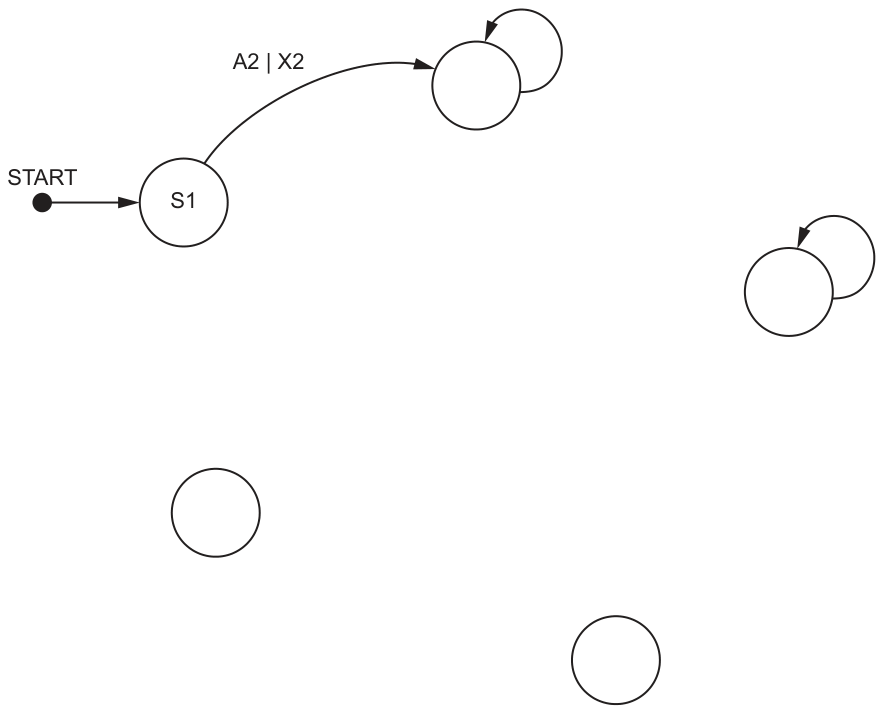
Answer
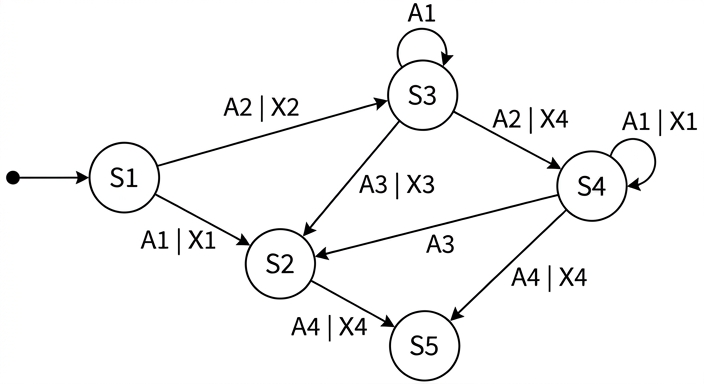
See completed state-transition diagram
Background Concept
A state-transition diagram shows how a system moves between states. Each arrow represents a transition caused by an input. The label on the arrow normally shows the input and, if there is one, the output produced during that transition.
The main ideas are:
- A state is the current condition of the system, such as
S1,S2orS4. - The current state tells you where the arrow starts.
- The next state tells you where the arrow ends.
- The input is the event that causes the change.
- The output is what the system produces during that change.
- If the current state and next state are the same, the transition is drawn as a self-loop.
- If no output is given, the transition label contains only the input.
This is a common way to document algorithms or systems whose behaviour depends on what state they are currently in.
Understanding the Question
You are given a transition table with four columns:
- current state
- input
- output
- next state
You must use that table to complete the unfinished state-transition diagram. The start state is already shown as S1, and one transition A2 | X2 is already drawn from S1 to the upper state. The remaining empty circles and unlabeled arrows must be identified and completed so that the diagram matches every row in the table.
So this is not a pseudocode task. It is a diagram-reading and diagram-completion task.
Approach
The best method is to process the table one row at a time.
For each row:
- Find the current state.
- Start an arrow from that state.
- Find the next state.
- End the arrow at that state.
- Write the label as
input | outputif an output exists. - If the output cell is blank, write only the input.
- If current state and next state are the same, draw a self-loop.
Also use the partly completed diagram to identify which blank circle must be S2, S3, S4 and S5.
Step-by-Step Reasoning
Start with what is already provided:
STARTpoints toS1.S1with inputA2and outputX2goes to the upper state, so that upper state must beS3.
Now use the rest of the table.
-
S1, inputA1, outputX1, next stateS2- Draw an arrow from
S1toS2. - Label it
A1 | X1. - This identifies the lower-left blank state as
S2.
- Draw an arrow from
-
S2, inputA4, outputX4, next stateS5- Draw an arrow from
S2toS5. - Label it
A4 | X4. - This identifies the bottom state as
S5.
- Draw an arrow from
-
S3, inputA1, no output, next stateS3- Current and next state are the same, so this is a self-loop on
S3. - The label is just
A1.
- Current and next state are the same, so this is a self-loop on
-
S3, inputA3, outputX3, next stateS2- Draw an arrow from
S3toS2. - Label it
A3 | X3.
- Draw an arrow from
-
S3, inputA2, outputX4, next stateS4- Draw an arrow from
S3to the right-hand blank state. - Label it
A2 | X4. - This identifies that state as
S4.
- Draw an arrow from
-
S4, inputA1, outputX1, next stateS4- Draw a self-loop on
S4. - Label it
A1 | X1.
- Draw a self-loop on
-
S4, inputA3, no output, next stateS2- Draw an arrow from
S4toS2. - Label it
A3only.
- Draw an arrow from
-
S4, inputA4, outputX4, next stateS5- Draw an arrow from
S4toS5. - Label it
A4 | X4.
- Draw an arrow from
That completes all rows in the table, so the completed diagram is:
Key Takeaways
- A transition table can be converted directly into a state-transition diagram.
Current stateis where the arrow starts, andNext stateis where it finishes.- A self-loop is used when the system stays in the same state.
- If the output cell is blank, the transition label should contain only the input.
Common Mistakes
- Reversing the direction of a transition by using next state as the start and current state as the end.
- Writing
A1 |orA3 |when no output exists. If there is no output, only the input should appear. - Missing self-loops on
S3orS4. - Putting
A3 | X3on the wrong transition. It must go fromS3toS2. - Confusing which blank state is
S2,S4orS5.
Things to Be Careful About
- Use every row in the table exactly once.
- Keep the state names exact:
S1,S2,S3,S4,S5. - Keep the labels exact:
A1 | X1,A2 | X2,A2 | X4,A3 | X3,A4 | X4,A1,A3. - Do not invent extra transitions that are not in the table.
- Make sure the two blank-output transitions are written without an output part.
A structure chart is used to document a different part of the program.
This part of the program contains six modules:
| Pseudocode module header |
|---|
PROCEDURE Setup() |
PROCEDURE Restart(H1 : STRING, C1 : INTEGER) |
FUNCTION Modify(B1 : BOOLEAN) RETURNS INTEGER |
PROCEDURE Final(T1 : INTEGER) |
PROCEDURE Update(BYREF R2 : STRING) |
FUNCTION Confirm() RETURNS BOOLEAN |
Module Setup will repeatedly call three of the modules.
Complete the structure chart to document the information given in the table.
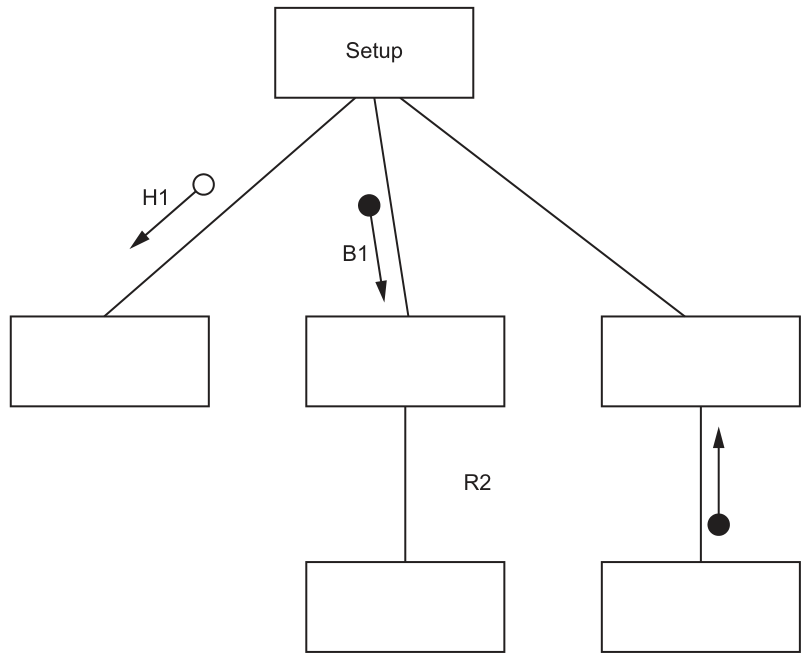
Answer
See completed structure chart
Background Concept
A structure chart documents the modular design of a program. It shows which module calls which other modules and what information passes between them.
Important conventions are:
- A module is shown as a box.
- A line from one module to another shows that the higher module calls the lower one.
- A procedure performs an action but does not return a value.
- A function returns a value to the module that called it.
- A data couple shows data being passed between modules.
- A control couple shows a control flag or logical result affecting what happens next.
BYREFmeans the called module can change the original variable, so the data effectively goes down and comes back changed.- An iteration symbol above a set of calls shows those modules are called repeatedly.
In a structure chart, the direction of the arrow matters:
- parameters usually go down from caller to called module
- return values go up from function to caller
Understanding the Question
You are given six module headers:
PROCEDURE Setup()PROCEDURE Restart(H1 : STRING, C1 : INTEGER)FUNCTION Modify(B1 : BOOLEAN) RETURNS INTEGERPROCEDURE Final(T1 : INTEGER)PROCEDURE Update(BYREF R2 : STRING)FUNCTION Confirm() RETURNS BOOLEAN
You are also told that Setup repeatedly calls three modules.
The partial structure chart already gives useful clues:
Setupis the top module.- There are three child boxes under
Setup. - The left child has an incoming downward data couple labelled
H1, so that module must beRestart(H1 : STRING, C1 : INTEGER). - The middle child has a downward filled-circle couple labelled
B1, which matchesModify(B1 : BOOLEAN). - The middle child calls another module below it with
R2, matchingUpdate(BYREF R2 : STRING). - The right child must therefore be
Final(T1 : INTEGER). - The lower right function returning a Boolean must be
Confirm().
You must complete the chart with the module names, the missing couples and the iteration symbol.
Approach
Use the module headers and the partly drawn arrows together.
A reliable method is:
- Identify which boxes must be procedures and which must be functions.
- Match parameter names already shown in the diagram to the correct module header.
- Put function return arrows back up to the caller.
- Treat
BYREFas data passed down and back up. - Add the iteration arc because
Setuprepeatedly calls the three modules underneath it.
The names of the parameters matter, because they tell you which module belongs in which position.
Step-by-Step Reasoning
First identify the three modules directly called by Setup.
The question says Setup repeatedly calls three modules, so the three boxes directly below Setup must be:
RestartModifyFinal
Now match them one by one.
-
Left child of
Setup- The given diagram shows a downward data couple labelled
H1on the left branch. - Only
Restart(H1 : STRING, C1 : INTEGER)has parameterH1. - So the left box is
Restart. - Add the second downward data couple labelled
C1on the same branch.
- The given diagram shows a downward data couple labelled
-
Middle child of
Setup- The branch already has
B1going down. - Only
Modify(B1 : BOOLEAN) RETURNS INTEGERusesB1. - So the middle box is
Modify. - Because
Modifyis a function, it must return anINTEGERback up toSetup, so add an upward return arrow fromModifytoSetup.
- The branch already has
-
Right child of
Setup- The remaining direct child must be
Final(T1 : INTEGER). - Add the downward data couple labelled
T1fromSetuptoFinal.
- The remaining direct child must be
Now complete the lower modules.
-
Module below
Modify- The vertical connection is labelled
R2. Update(BYREF R2 : STRING)matches this exactly.- So the lower middle box is
Update. - Because
R2is passedBYREF, show the data moving both down toUpdateand back up toModify.
- The vertical connection is labelled
-
Module below
Final- The remaining module is
Confirm(). Confirmis a function returningBOOLEAN.- So the lower right box is
Confirm. - Its Boolean result returns upward to
Finalas a control couple.
- The remaining module is
-
Repetition
- The question says
Setupwill repeatedly call three modules. - Therefore draw the iteration arc across the three outgoing calls from
SetuptoRestart,ModifyandFinal.
- The question says
The completed chart is:
Key Takeaways
- In a structure chart, the top module calls the modules beneath it.
- Procedure headers help identify modules that perform actions only.
- Function headers must include a return route back to the caller.
- Parameter names are often the easiest way to match a module header to a position in the chart.
BYREFmeans the same data item can be altered and returned.- An iteration symbol shows repeated execution of a group of module calls.
Common Mistakes
- Putting the modules in the wrong boxes, especially swapping
Restart,ModifyandFinal. - Forgetting that
Modifyis a function, so it must return a value upward toSetup. - Forgetting that
Confirmis also a function and returns upward toFinal. - Showing
R2only one way even thoughBYREFmeans it must travel down and back. - Omitting
C1from theRestartcall. - Leaving out the iteration arc even though
Setuprepeatedly calls the three modules.
Things to Be Careful About
- Match the module names exactly:
Setup,Restart,Modify,Final,Update,Confirm. - Match the parameter names exactly:
H1,C1,B1,T1,R2. - Keep arrow direction correct: parameters down, function results up.
- Distinguish between data couples and control couples according to the chart notation given.
- Do not attach
Updateto the wrong parent; it belongs underModifybecause ofR2. - Do not attach
ConfirmtoSetup; it is called byFinal.
A program is being developed to manage student book loans from a college library. Students may borrow up to five books at a time from the library.
The programmer has defined a record type to define each loan.
The record data items are:
| Data item | Data type | Comment |
|---|---|---|
| StudentID | STRING | the unique ID of the student who has borrowed the book |
| BookID | STRING | the unique ID of the book being borrowed |
| OnLoan | BOOLEAN | TRUE if the book has not been returned |
The programmer has defined a global array Loan to store 5000 loan records.
There are more elements in the array than books in the library. Unused elements have the StudentID set to an empty string. These may occur anywhere in the array.
The programmer has defined the first program module:
| Module | Description |
|---|---|
OKToBorrow() | • called with a parameter of type STRING representing a StudentID • search the array for loan records for the specified student • output a suitable message to say whether the student may, or may not, borrow another book |
Answer
PROCEDURE OKToBorrow(BYVAL SearchStudentID : STRING)
   DECLARE Index, LoanCount : INTEGER
   LoanCount ← 0
   Index ← 1
   WHILE Index <= 5000 AND LoanCount < 5
      IF Loan[Index].StudentID = SearchStudentID AND Loan[Index].OnLoan = TRUE THEN
         LoanCount ← LoanCount + 1
      ENDIF
      Index ← Index + 1
   ENDWHILE
   IF LoanCount < 5 THEN
      OUTPUT "Student may borrow another book"
   ELSE
      OUTPUT "Student may not borrow another book"
   ENDIF
ENDPROCEDURE
See completed pseudocode
Background Concept
A record stores several related fields together under one structure. Here, each Loan record contains a StudentID, a BookID and an OnLoan Boolean. The global array Loan contains many such records.
To decide whether a student can borrow another book, the program must count how many books that student currently has on loan. "Currently on loan" means OnLoan = TRUE. Returned books must not be counted.
For efficiency, when a question gives a limit such as "up to five books", a good algorithm does not always need to scan all 5000 records fully. If the count reaches 5, the answer is already known, so the loop can stop early.
Understanding the Question
The module OKToBorrow() is given one StudentID. It must search the whole Loan array for records belonging to that student and then output a message saying whether that student may borrow another book.
Important details from the stem:
- The array has 5000 elements.
- Unused elements have
StudentIDset to an empty string. - Unused elements may occur anywhere in the array.
- A student may borrow up to 5 books at a time.
That last point means:
- fewer than 5 active loans -> may borrow
- 5 active loans -> may not borrow
Because unused entries can appear anywhere, you cannot stop just because you see an empty StudentID once.
Approach
Use a procedure, because the module description says it should output a suitable message rather than return a value.
The strategy is:
- Start a counter at 0.
- Scan through the array.
- For each record, check two conditions:
- the
StudentIDmatches the parameter OnLoanisTRUE
- the
- If both are true, increase the count.
- Stop the loop early if the count reaches 5, because then the student definitely cannot borrow another book.
- Output the correct message after the loop.
Step-by-Step Reasoning
PROCEDURE OKToBorrow(BYVAL SearchStudentID : STRING)
- This defines a procedure named
OKToBorrow. - The parameter is passed in as a string containing the student to search for.
DECLARE Index, LoanCount : INTEGER
Indexis needed to move through the array.LoanCountstores how many active loans this student currently has.
LoanCount ← 0
- The count must begin at zero before any records are checked.
Index ← 1
- The search starts at the first array element.
WHILE Index <= 5000 AND LoanCount < 5
- The loop continues while there are still array elements left.
- It also continues only while the count is still below 5.
- This second condition is the efficiency improvement: once 5 is reached, there is no need to keep searching.
IF Loan[Index].StudentID = SearchStudentID AND Loan[Index].OnLoan = TRUE THEN
- This checks that the record belongs to the required student.
- It also checks that the book has not yet been returned.
- Both are necessary: a returned book should not count towards the limit.
LoanCount ← LoanCount + 1
- If both conditions are true, increase the number of active loans for that student.
Index ← Index + 1
- Move on to the next record.
After the loop:
- If
LoanCount < 5, the student still has room to borrow another book. - Otherwise, the student has already reached the limit.
The output messages can be any clear equivalent wording, provided one message means the student can borrow and the other means the student cannot.
Key Takeaways
- Count only records that meet all the required conditions.
- A Boolean field such as
OnLoanis often used to filter active records from inactive ones. - An efficient search can stop early when the result is already known.
- Do not treat an empty array element as the end of data unless the question explicitly says the used records are contiguous.
Common Mistakes
- Counting all matching
StudentIDrecords, including returned books. This is wrong because only books still on loan count towards the limit. - Stopping at the first empty
StudentID. This is wrong because unused elements may occur anywhere in the array. - Using a function instead of a procedure and forgetting the required output message.
- Allowing the loop to continue after reaching 5, which is less efficient than the question asks for.
- Using
=instead of←for assignment in pseudocode.
Things to Be Careful About
- The array size is 5000, so the loop bounds must cover all 5000 elements unless the early-exit condition is met.
- The comparison must use both the parameter value and the
OnLoanfield. - The student may borrow another book only if the active count is strictly less than 5.
- Keep the identifier casing consistent, for example
StudentIDandOnLoan. - In CIE pseudocode, write
PROCEDURE,DECLARE,WHILE,ENDIFandENDPROCEDUREin upper case.
A second module is defined:
| Module | Description |
|---|---|
ReturnBook() | • called with two parameters of type STRING representing a StudentID and a BookID • searches the array for the relevant loan record • when found, sets OnLoan to FALSE and returns TRUE • if a loan record is not found, or the book has already been returned, then returns FALSE |
Write efficient pseudocode for the module ReturnBook()
Assume that each student is only allowed to borrow each book only once. That means that there will be no more than one loan record for a given combination of student and book.
Answer
FUNCTION ReturnBook(BYVAL SearchStudentID : STRING, BYVAL SearchBookID : STRING) RETURNS BOOLEAN
   DECLARE Index : INTEGER
   Index ← 1
   WHILE Index <= 5000
      IF Loan[Index].StudentID = SearchStudentID AND Loan[Index].BookID = SearchBookID THEN
         IF Loan[Index].OnLoan = TRUE THEN
            Loan[Index].OnLoan ← FALSE
            RETURN TRUE
         ELSE
            RETURN FALSE
         ENDIF
      ENDIF
      Index ← Index + 1
   ENDWHILE
   RETURN FALSE
ENDFUNCTION
See completed pseudocode
Background Concept
A function is used when a module must return a value. Here, ReturnBook() must return either TRUE or FALSE, so it should be written as a Boolean function.
This question uses a record array search. A particular loan record is identified by a combination of two fields:
StudentIDBookID
That pair acts like a compound key for this task. The stem also states there can be no more than one record for a given student-book combination. That matters because once a match is found, the function can stop immediately.
Understanding the Question
The function receives two strings: one student ID and one book ID. It must:
- search the array for the matching loan record
- if found and the book is still on loan, set
OnLoantoFALSEand returnTRUE - return
FALSEif no such record exists - also return
FALSEif the matching record exists but the book has already been returned
The important clue is the word "efficient". Since there can be at most one matching record, there is no reason to continue searching after a match has been found.
Also, as in part (a), unused records may occur anywhere, so an empty StudentID cannot be used as a stopping point.
Approach
Use a linear search through the Loan array.
For each record:
- Check whether both
StudentIDandBookIDmatch the parameters. - If not, move on.
- If they do match, inspect
OnLoan:- if
TRUE, change it toFALSEand returnTRUE - if
FALSE, returnFALSEimmediately because the book was already returned
- if
- If the loop finishes with no match, return
FALSE
That structure is efficient because the function exits as soon as the answer is known.
Step-by-Step Reasoning
FUNCTION ReturnBook(BYVAL SearchStudentID : STRING, BYVAL SearchBookID : STRING) RETURNS BOOLEAN
- This defines a function because the module must return
TRUEorFALSE. - The two parameters are the identifiers used to locate the correct record.
DECLARE Index : INTEGER
- Only one loop variable is needed for the search.
Index ← 1
- Start from the first array element.
WHILE Index <= 5000
- Check every array element if necessary.
- There is no safe earlier stopping condition based on empty elements because unused entries may appear anywhere.
IF Loan[Index].StudentID = SearchStudentID AND Loan[Index].BookID = SearchBookID THEN
- This is the key matching test.
- Both fields must match, not just one of them.
- Matching only the student would be wrong because the student may have several loans.
- Matching only the book would be wrong because different students may borrow different books over time.
Inside the matching case:
IF Loan[Index].OnLoan = TRUE THEN
- The record exists, so now check whether the book is still currently on loan.
Loan[Index].OnLoan ← FALSE
- This updates the record to show the book has been returned.
RETURN TRUE
- The return was successful, so the function returns
TRUE. - The search stops immediately.
ELSE RETURN FALSE
- If the matching record exists but
OnLoanis alreadyFALSE, the book has already been returned. - The question says this must return
FALSE. - Because only one such student-book combination can exist, the search can stop here as well.
If no match is found in the whole array:
RETURN FALSE
- This covers the case where the relevant loan record does not exist at all.
This function has three logical outcomes:
- matching record found and updated ->
TRUE - matching record found but already returned ->
FALSE - no matching record found ->
FALSE
Key Takeaways
- Use a function when a Boolean result must be returned.
- When two fields together identify a record, both must be checked in the condition.
- If the question guarantees at most one match, you can return immediately once it is found.
- Updating a record field in an array is done directly through the indexed record element.
Common Mistakes
- Searching using only
StudentIDor onlyBookID. This can return the wrong record. - Setting
OnLoantoFALSEwithout first checking whether it is alreadyFALSE. - Continuing to search after finding the matching record, even though the question states there can only be one.
- Returning
TRUEwhen the record exists but the book has already been returned. The question explicitly says that case must returnFALSE. - Stopping on an empty
StudentID, which is invalid because unused entries may appear anywhere.
Things to Be Careful About
- The function must be a
FUNCTION, not aPROCEDURE, because it returns a Boolean value. - The record field update must use assignment:
Loan[Index].OnLoan ← FALSE. - Make sure the final
RETURN FALSEis present for the "not found" case. - Keep the loop index increment outside the matching branch so the search progresses correctly when there is no match.
- Use the exact field names from the stem:
StudentID,BookID,OnLoan.
It is decided to introduce a system of fines for books that have been borrowed for too long.
Two new requirements are defined:
- Each loan has a maximum length, represented as a number of days.
- Each book in the library will be assigned one of three categories. Each category has a different maximum loan length.
Record structure and program design changes are needed to meet these two requirements.
Outline the changes that are necessary to meet the two requirements.
Answer
- Add a new field to each loan record to store the maximum loan length in days, for example
MaxLoanDays : INTEGER. - Store a category for each book and store the allowed number of days for each of the three categories; amend the borrowing/fine-checking modules to use the book's category to set/check the correct maximum loan length.
See explanation
Background Concept
When program requirements change, the data structures often have to change as well. In record-based designs, this usually means adding new fields or introducing another related record structure.
A good design stores data in a way that supports later processing. Here, the system is being extended to handle different loan lengths and fines. That means the program must know how long a loan is allowed to last, and that allowed length depends on the category of the book.
Understanding the Question
The question gives two new requirements:
- each loan has a maximum length measured in days
- each book belongs to one of three categories, and each category has a different maximum loan length
It asks for the necessary changes to record structure and program design. So this is not asking for full pseudocode. It wants the design changes that make these requirements possible.
Approach
There are two direct design consequences:
- the program must store the maximum permitted loan period
- the program must know the category of each book and connect that category to the correct loan length
So a complete outline should mention one data-structure change for the loan length and one design change for categories and how the program uses them.
Step-by-Step Reasoning
First requirement: each loan has a maximum length in days.
- The system needs somewhere to store that value.
- The simplest change is to add a field such as
MaxLoanDays : INTEGER. - That lets each loan record carry the allowed number of days.
Second requirement: each book belongs to one of three categories, each with a different maximum length.
- The program must store a category for each book, for example in a book record or related data structure.
- It must also store the permitted days for the three categories, for example as constants, an array, or another lookup structure.
- When a loan is created, or when overdue/fine logic runs, the program uses the book's category to determine the correct maximum loan length.
The key idea is that the category itself is not enough; the program also needs the mapping from category to number of days.
Key Takeaways
- New requirements often mean adding fields to records.
- If one item's behaviour depends on a category, the category and its rules must both be represented in the design.
- Data design and program logic must be changed together.
Common Mistakes
- Saying only "add a fine field". That does not meet the stated requirements about loan length and category.
- Adding only a category field but not explaining that each category needs a corresponding loan-length value.
- Mentioning program changes without any data-structure change, or vice versa.
Things to Be Careful About
- The question asks for changes needed for the two stated requirements, so keep the answer focused on those.
- A field storing days should use a numeric type such as
INTEGER. - The category data belongs with books, while the allowed loan period must also be available to the loan-handling logic.
- In an exam outline question, concise accurate design points score better than long vague descriptions.