Computer Science 9618/13 — October/November 2025
Cambridge AS Level · Theory Fundamentals · worked solutions for every part, with the mark scheme
Topics Information Representation · Hardware · Communication · Processor Fundamentals · Security, Privacy and Data Integrity · Ethics and Ownership · +2 more
A student creates sound recordings.
Making changes to a sound recording may impact the accuracy of the resulting sound file or the size of the file.
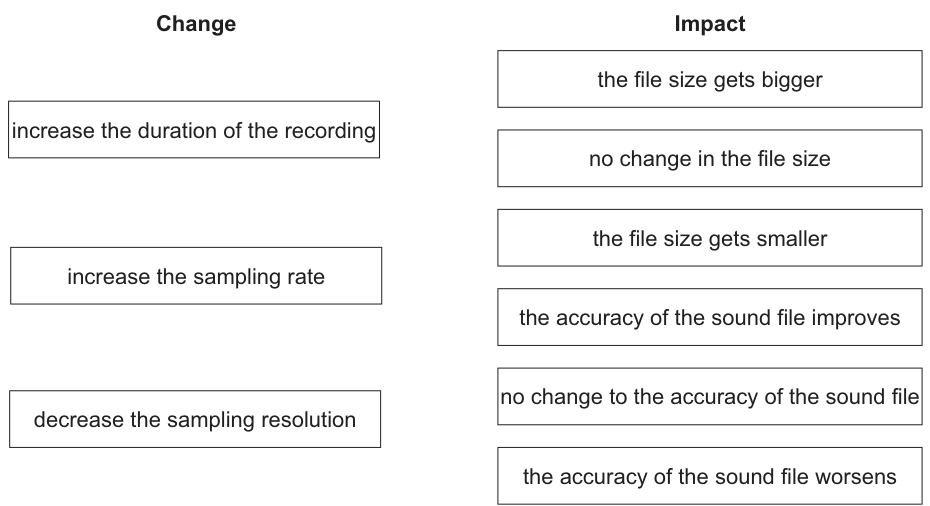
Draw two lines from each change to the impacts it has on the sound file.
Answer
- increase the duration of the recording → the file size gets bigger
- increase the sampling rate → the file size gets bigger; the accuracy of the sound file improves
- decrease the sampling resolution → the file size gets smaller; the accuracy of the sound file worsens
increase the duration of the recording → the file size gets bigger; increase the sampling rate → the file size gets bigger and the accuracy of the sound file improves; decrease the sampling resolution → the file size gets smaller and the accuracy of the sound file worsens
Background Concept
A digital sound file stores sound by taking samples of the original analogue wave.
Three important factors affect the stored file:
- Duration: how long the recording lasts.
- Sampling rate: how many samples are taken each second.
- Sampling resolution: how many bits are used to store each sample.
These affect two things:
- File size: more samples or more bits per sample means more data must be stored.
- Accuracy/quality: a higher sampling rate captures the wave more often, and a higher sampling resolution stores each sample more precisely.
So in general:
- longer duration → bigger file
- higher sampling rate → bigger file and better accuracy
- lower sampling resolution → smaller file and worse accuracy
Understanding the Question
You are given three possible changes to a sound recording and a list of possible impacts. You must match each change to the correct impact or impacts.
The key is to decide whether each change affects:
- the amount of data stored
- the quality/accuracy of the digital representation
- or both
This is not a calculation question. It is purely about knowing how the properties of sampled sound affect storage and quality.
Approach
Take each change one at a time:
- Ask whether it changes how much sound is being stored.
- Ask whether it changes how accurately the sound is captured.
- Match it to the correct file-size statement and/or accuracy statement.
A useful mental rule is:
- more time = more data
- more samples per second = more data and better detail
- fewer bits per sample = less data but less precision
Step-by-Step Reasoning
1. Increase the duration of the recording
If the recording lasts longer, the computer must store sound data for more seconds.
That means:
- there are more total samples overall
- so the file size gets bigger
This does not by itself make each sample better or worse. It just stores more of the recording.
So the correct match is:
- the file size gets bigger
2. Increase the sampling rate
Sampling rate is the number of samples taken per second.
If this increases:
- more samples are stored every second
- so more data is needed
- therefore the file size gets bigger
Also:
- taking samples more often gives a closer representation of the original sound wave
- so the accuracy of the sound file improves
So the correct matches are:
- the file size gets bigger
- the accuracy of the sound file improves
3. Decrease the sampling resolution
Sampling resolution is the number of bits used for each sample value.
If this decreases:
- fewer bits are stored for each sample
- so the file size gets smaller
But also:
- each sample is recorded less precisely
- so the sound file is a less accurate representation of the original sound
- therefore the accuracy worsens
So the correct matches are:
- the file size gets smaller
- the accuracy of the sound file worsens
Key Takeaways
- Duration affects how much total sound is stored, so it affects file size.
- Sampling rate affects both file size and accuracy.
- Sampling resolution affects both file size and accuracy.
- Higher rate or higher resolution usually means larger files.
- Lower resolution usually means less accurate sound.
Common Mistakes
- Saying longer duration improves accuracy: it does not. It only means more recording is stored.
- Confusing sampling rate with sampling resolution: sampling rate is samples per second; sampling resolution is bits per sample.
- Thinking lower resolution improves quality: it does the opposite because each sample is stored less precisely.
- Choosing “no change” for duration: duration clearly changes file size because more seconds of sound are stored.
Things to Be Careful About
- Do not mix up file size and accuracy; some changes affect one, some affect both.
- “Increase sampling rate” means more samples each second, not louder sound.
- “Decrease sampling resolution” means fewer bits per sample, so less precision.
- In matching questions, one impact may be used more than once; here, the file size gets bigger matches two different changes.
The file names of the sound recordings are stored using the ASCII character set.
Explain how text is represented by the ASCII character set.
Answer
- ASCII gives each character a unique code.
- The code is stored in binary (7 bits, often stored in 1 byte), so a text string is stored as a sequence of character codes.
ASCII gives each character a unique binary code; text is stored as a sequence of these codes.
Background Concept
Computers do not store text as letters directly. They store everything as binary.
A character set is a standard that maps each character to a numeric code. For example, letters, digits and punctuation marks are each assigned a specific number.
ASCII is one such character set. In standard ASCII, each character has a unique 7-bit code. In storage, it is often placed into 1 byte.
So text such as a file name is represented by:
- looking up each character in the ASCII table
- replacing each character with its code value
- storing those code values in binary
Understanding the Question
The question says that file names are stored using ASCII and asks you to explain how text is represented.
That means you must explain the general method, not give specific file names. The important points are:
- each character has its own ASCII code
- the code is stored in binary
For 2 marks, these are the two key ideas the examiner is looking for.
Approach
A clear answer should describe the process from text to storage:
- characters are mapped to codes
- codes are stored as binary bit patterns
- a whole word or file name becomes a sequence of these codes
That covers both the meaning of ASCII and how representation actually happens in memory or a file.
Step-by-Step Reasoning
Suppose a file name contains several characters.
For each character:
- ASCII provides a unique code value.
- That value is converted to binary.
- The binary value is stored.
So a whole text string is not stored as “letters” in a special text form. It is stored as a series of binary codes, one code for each character.
For example, if you had the letter A, ASCII assigns it a specific numeric code. The computer stores the binary form of that code. The same happens for every next character in the text.
That is exactly what “text is represented by ASCII” means.
Key Takeaways
- Character sets map characters to numbers.
- ASCII is a standard mapping for text characters.
- Text is stored as binary codes, one code per character.
- A string is therefore a sequence of character codes.
Common Mistakes
- Saying ASCII stores whole words: ASCII works character by character, not word by word.
- Forgetting binary: the code values must be stored as binary because computers store data in bits.
- Confusing ASCII with Unicode: this question specifically asks about ASCII, so keep the explanation focused on ASCII representation.
- Only saying “ASCII is a character set”: that is not enough for a full explanation of representation.
Things to Be Careful About
- Use the idea of a unique code for each character.
- Mention that the code is stored in binary.
- If you mention bit length, standard ASCII is 7-bit; many systems store it in 1 byte.
- Do not drift into comparing ASCII and Unicode here; that belongs to the next part.
Answer
- ASCII has a much smaller character set (standard ASCII has 128 characters), whereas Unicode can represent many more characters.
- ASCII uses fewer bits per character (7 bits, or 8 for extended ASCII), whereas Unicode uses more bits / variable-length encoding to store its larger range of characters.
ASCII has far fewer characters and uses fewer bits per character; Unicode supports many more characters and uses more bits or variable-length encoding.
Background Concept
A character set defines which characters can be represented and what code is assigned to each one.
ASCII was designed for a relatively small set of characters, mainly for English text, digits and common punctuation.
Unicode was designed to support a far wider range of characters, including:
- many world languages
- accented letters
- mathematical symbols
- special symbols and emoji
Because Unicode covers far more characters, it needs more possible code values than ASCII.
Understanding the Question
The question asks for two differences between ASCII and Unicode.
So you should give two clear comparison points, not a long description of one system on its own.
The safest differences are:
- number/range of characters supported
- number of bits or size of encoding used
These are standard, accepted contrasts.
Approach
Compare the two character sets side by side.
A good structure is:
- first difference: what they can represent
- second difference: how much storage/encoding is needed
That keeps the answer precise and avoids vague statements like “Unicode is better”.
Step-by-Step Reasoning
Difference 1: Number of characters
Standard ASCII has 128 possible characters. Even extended ASCII is still limited.
Unicode supports a vastly larger range of characters, enough for many different languages and symbol sets.
So Unicode is much more flexible for international text.
Difference 2: Bits/encoding size
ASCII uses fewer bits for each character: standard ASCII uses 7 bits, and extended ASCII uses 8 bits.
Unicode needs more code possibilities, so its encoding uses more bits overall or variable-length encodings depending on the Unicode format used.
That larger encoding capacity is what allows Unicode to represent many more characters than ASCII.
Key Takeaways
- ASCII is a smaller, older character set.
- Unicode is a much larger standard designed for global text representation.
- More supported characters usually means a larger or more flexible encoding scheme.
- Comparing character sets usually involves both range and storage/encoding.
Common Mistakes
- Saying only “Unicode is bigger”: you need to say bigger in what sense, for example more characters.
- Giving two versions of the same difference: for example “Unicode has more symbols” and “Unicode has more languages” are really the same idea.
- Claiming ASCII can represent all languages: it cannot.
- Using inaccurate fixed sizes for all Unicode: Unicode is better described as using more bits or variable-length encodings, rather than always one single fixed size in all contexts.
Things to Be Careful About
- The question asks for two differences, so make them distinct.
- A safe first point is ASCII has fewer characters; Unicode has many more.
- A safe second point is ASCII uses fewer bits; Unicode uses more bits or a variable-length encoding.
- Avoid overcomplicating the answer with encoding standards unless needed; this is a short Paper 1 comparison question.
Data in a computer system is represented in binary.
Put one tick (✓) in each row to identify the minimum number of bits used to store each example of data.
| Example of data | 4 | 8 | 16 | 24 | 32 | 64 | 128 |
|---|---|---|---|---|---|---|---|
| the hexadecimal value F139 | |||||||
| 16 000 000 unique amplitude values | |||||||
| an IPv4 address | |||||||
| 256 unique colours | |||||||
| an IPv6 address | |||||||
| the denary value 65 000 |
Working
F139has 4 hexadecimal digits, so bits.- For 16 000 000 unique values, , so 24 bits are needed.
- An IPv4 address uses 32 bits.
- 256 unique colours need , so 8 bits.
- An IPv6 address uses 128 bits.
- For 65 000, , so 16 bits are needed.
Answer
| Example of data | 4 | 8 | 16 | 24 | 32 | 64 | 128 |
|---|---|---|---|---|---|---|---|
| the hexadecimal value F139 | ✓ | ||||||
| 16 000 000 unique amplitude values | ✓ | ||||||
| an IPv4 address | ✓ | ||||||
| 256 unique colours | ✓ | ||||||
| an IPv6 address | ✓ | ||||||
| the denary value 65 000 | ✓ |
See completed table
Background Concept
Many data-representation questions reduce to one idea: how many distinct patterns can a given number of bits store? With bits, there are different bit patterns.
That lets you answer several common cases:
- For a fixed-base number such as hexadecimal, each hexadecimal digit represents exactly 4 binary bits.
- For a set of unique values, such as colours or sound amplitudes, you need the smallest such that is at least the number of required values.
- Some items have standard fixed sizes that must simply be known, such as IPv4 and IPv6 addresses.
- For a positive denary integer stored as an ordinary unsigned value, you need the smallest such that the largest possible value, , is at least that denary number.
Understanding the Question
This question gives six different examples of data and asks for the minimum number of bits needed for each one. The clue is the word "minimum": you are not choosing any bit-width that works, but the smallest one from the list given in the table.
The examples come from different areas:
- hexadecimal representation
- sound amplitude values
- IP addressing
- colour depth
- a positive denary integer
So you need to switch method depending on the row.
Approach
Go row by row and decide which rule applies:
- If the data is hexadecimal, multiply the number of hex digits by 4.
- If the data is a count of unique values, compare that count with powers of two.
- If the data is an IP address, recall the standard size.
- If the data is a positive integer, find the smallest power-of-two range that includes it.
Then place one tick in the matching column only.
Step-by-Step Reasoning
1. The hexadecimal value F139
A hexadecimal digit maps exactly to 4 binary bits:
F= 4 bits1= 4 bits3= 4 bits9= 4 bits
There are 4 hex digits, so:
So the correct tick is under 16.
2. 16 000 000 unique amplitude values
For unique values, use powers of two:
- which is too small
- which is enough
So the minimum is 24 bits.
3. An IPv4 address
An IPv4 address is made of 4 octets, and each octet is 8 bits:
So the correct tick is under 32.
4. 256 unique colours
Again use powers of two:
So exactly 8 bits are needed.
5. An IPv6 address
An IPv6 address has a standard size of 128 bits.
So the tick goes under 128.
6. The denary value 65 000
For a positive integer, look for the smallest bit-width whose maximum value is large enough:
- 15 bits can store up to , which is not enough
- 16 bits can store up to , which is enough
So the minimum is 16 bits.
Key Takeaways
- bits can represent different patterns.
- One hexadecimal digit always represents 4 bits.
- Bit-width questions often depend on comparing the required number of values with powers of two.
- Some data items, especially network addresses, have fixed standard sizes that should be memorised.
Common Mistakes
- Using 8 bits for
F139because it "looks short". Hex must be converted by digits, not guessed. - Choosing 16 bits for 16 000 000 values. 16 bits only gives patterns, far too few.
- Confusing IPv4 and IPv6, giving 128 bits for IPv4 or 32 bits for IPv6.
- Giving 24 bits for 256 colours because 24-bit colour is common in graphics. The question asks for the minimum bits for 256 unique colours, which is 8.
- Forgetting that 65 000 is a value, not a count of values. For stored integers, check the largest representable value.
Things to Be Careful About
- Read whether the question is asking about the number of values or the largest integer value.
- Use the smallest valid option only.
- Remember that standard real-world sizes like "24-bit colour" are not relevant unless the question asks for that specific format.
- For exam tables like this, each row should have one tick only.
Working
Invert:
111110010011
Add 1:
111110010100
Answer
111110010100
111110010100
Background Concept
Two's complement is the standard way of storing signed integers in binary. In an -bit two's complement number:
- the leftmost bit is the sign bit
- positive values are written as normal binary with leading zeros
- negative values are found by taking the positive version, inverting all bits, then adding 1
For 12 bits, every answer must contain exactly 12 binary digits.
Understanding the Question
The question asks for the denary number written as a 12-bit two's complement number. The important clues are:
- it is negative, so ordinary unsigned binary is not enough
- it must be 12 bits long, so padding matters
- it specifically asks for two's complement, not sign-and-magnitude or one's complement
Approach
Use the standard method:
- Convert the positive magnitude, 108, into binary.
- Pad it to 12 bits.
- Invert every bit.
- Add 1.
That gives the 12-bit two's complement form of .
Step-by-Step Reasoning
First convert 108 to binary.
108 can be written as:
So the binary form is:
1101100
Because the question requires 12 bits, pad with leading zeros:
000001101100
Now invert all bits:
- 0 becomes 1
- 1 becomes 0
So:
111110010011
Now add 1:
111110010011 + 1 = 111110010100
So the 12-bit two's complement representation of is:
111110010100
A quick check: the first bit is 1, so it is negative, which matches the question.
Key Takeaways
- To form a negative two's complement value, start with the positive binary value.
- Always pad to the required number of bits before inverting.
- The two steps are invert, then add 1.
Common Mistakes
- Forgetting to pad to 12 bits before inverting. That changes the answer.
- Writing the positive binary form only, which would represent , not .
- Inverting the bits but forgetting the final +1, which gives one's complement instead.
- Using the wrong bit-length, such as 8 bits instead of 12.
Things to Be Careful About
- Count the bits carefully: the final answer must have exactly 12 bits.
- Keep the order correct: invert first, then add 1.
- If your binary addition causes a carry beyond 12 bits, discard the extra carry; only 12 bits are stored.
A three-place arithmetic shift to the right is performed on the following two’s complement negative integer.
Show the result of this arithmetic shift.
10010011
Working
10010011
1 shift right arithmetically: 11001001
2 shifts right arithmetically: 11100100
3 shifts right arithmetically: 11110010
Answer
11110010
11110010
Background Concept
A right shift moves every bit one place to the right. The key issue is what gets inserted on the left.
There are two main types:
- Logical right shift: insert 0 on the left
- Arithmetic right shift: copy the sign bit onto the left
For two's complement signed integers, an arithmetic right shift is used so that the sign is preserved. If the number is negative, the leftmost bit is 1, so each arithmetic right shift inserts another 1 on the left.
Understanding the Question
The given value is:
10010011
The question explicitly says it is a two's complement negative integer and asks for a three-place arithmetic shift to the right. That means:
- treat the first bit as the sign bit
- because the number is negative, the sign bit is 1
- each shift must insert 1 on the left, not 0
Approach
Do the shift one place at a time. Each time:
- drop the rightmost bit
- move all remaining bits one place right
- insert the sign bit, 1, on the left
Repeat this three times.
Step-by-Step Reasoning
Start with:
10010011
Because the first bit is 1, this is negative in two's complement. So each arithmetic right shift will place a 1 on the left.
First arithmetic right shift
Move everything right and insert 1 on the left:
11001001
Second arithmetic right shift
Shift again in the same way:
11100100
Third arithmetic right shift
Shift once more:
11110010
So after three arithmetic right shifts, the result is:
11110010
Key Takeaways
- Arithmetic right shift preserves the sign of a two's complement number.
- For a negative number, the inserted bit on the left is 1.
- Arithmetic and logical right shifts are different, and exam questions often test that distinction.
Common Mistakes
- Using a logical right shift and inserting 0 on the left. That would give the wrong answer for a negative signed value.
- Shifting three places in one jump and losing track of the bits.
- Forgetting that the question says two's complement, so the sign bit matters.
Things to Be Careful About
- Read "arithmetic" and "logical" very carefully; they are not interchangeable.
- The leftmost inserted bit comes from the original sign, not from guessing.
- Keep the answer at the same bit-length as the original value: here it stays 8 bits.
Working
Group into 4-bit blocks:
1110 0011 0011 1011
1110 = E
0011 = 3
0011 = 3
1011 = B
Answer
E33B
E33B
Background Concept
Hexadecimal is base 16, and each hexadecimal digit corresponds exactly to 4 binary bits. This makes binary-to-hex conversion quick:
- split the binary number into groups of 4 bits from the right
- convert each 4-bit group to its hexadecimal equivalent
- combine the hex digits in the same order
This works neatly because .
Understanding the Question
The question gives a positive binary integer:
1110001100111011
and asks for its hexadecimal form. Since it is already positive, there is no need to think about sign bits or two's complement. This is a straightforward grouping question.
Approach
Split the 16-bit binary number into 4-bit nibbles:
1110 0011 0011 1011
Then convert each nibble separately.
Step-by-Step Reasoning
Take the binary number:
1110001100111011
Group into 4s from the right:
1110 0011 0011 1011
Now convert each group:
1110= 14 =E0011= 3 =30011= 3 =31011= 11 =B
So the hexadecimal number is:
E33B
Key Takeaways
- One hexadecimal digit always matches 4 binary bits.
- Binary-to-hex conversion is usually done by nibble grouping, not by converting the whole number through denary first.
- The groups must be kept in order from left to right.
Common Mistakes
- Grouping from the left incorrectly when the total number of bits is not a multiple of 4.
- Misreading
1011asDinstead ofB. - Writing lowercase if the paper or mark scheme expects uppercase hex digits.
Things to Be Careful About
- Check each nibble carefully before converting.
- Use leading zeros inside a nibble if needed;
0011is still a full 4-bit group. - Keep hexadecimal digits in the same order as the binary groups.
Complete the truth table for the following logic expression:
| A | B | C | Working space | X |
|---|---|---|---|---|
| 0 | 0 | 0 | ||
| 0 | 0 | 1 | ||
| 0 | 1 | 0 | ||
| 0 | 1 | 1 | ||
| 1 | 0 | 0 | ||
| 1 | 0 | 1 | ||
| 1 | 1 | 0 | ||
| 1 | 1 | 1 |
Answer
| A | B | C | Working space | X |
|---|---|---|---|---|
| 0 | 0 | 0 | 1 NAND 0 | 1 |
| 0 | 0 | 1 | 1 NAND 1 | 0 |
| 0 | 1 | 0 | 0 NAND 1 | 1 |
| 0 | 1 | 1 | 0 NAND 0 | 1 |
| 1 | 0 | 0 | 0 NAND 0 | 1 |
| 1 | 0 | 1 | 0 NAND 1 | 1 |
| 1 | 1 | 0 | 0 NAND 1 | 1 |
| 1 | 1 | 1 | 0 NAND 0 | 1 |
See completed truth table
Background Concept
A truth table lists every possible combination of binary inputs and shows the resulting output. For three inputs, there are rows.
This expression uses three logic operations:
- NOR means NOT OR. It gives
1only when both inputs are0. - XOR means exclusive OR. It gives
1only when the two inputs are different. - NAND means NOT AND. It gives
0only when both inputs are1.
For a composite expression, the safest method is to evaluate the bracketed parts first, then combine those results using the outer operation.
Understanding the Question
You are given the expression:
and a partially blank truth table with all eight input combinations already listed. The task is to fill the working column and the final output column X.
The key clue is the brackets: you must first work out:
Then use those two results as the inputs to the final NAND.
Approach
For each row:
- Calculate
A NOR B. - Calculate
C XOR B. - Substitute those two results into
... NAND .... - Write the final value of
X.
Because the table gives only one working-space column, a neat way to use it is to write the two intermediate results as the NAND input pair, for example 1 NAND 0.
Step-by-Step Reasoning
We work through the rows in order.
Row 1: A=0, B=0, C=0
A NOR B = 0 NOR 0 = 1C XOR B = 0 XOR 0 = 01 NAND 0 = 1
Row 2: A=0, B=0, C=1
A NOR B = 1C XOR B = 1 XOR 0 = 11 NAND 1 = 0
Row 3: A=0, B=1, C=0
A NOR B = 0 NOR 1 = 0C XOR B = 0 XOR 1 = 10 NAND 1 = 1
Row 4: A=0, B=1, C=1
A NOR B = 0C XOR B = 1 XOR 1 = 00 NAND 0 = 1
Row 5: A=1, B=0, C=0
A NOR B = 1 NOR 0 = 0C XOR B = 0 XOR 0 = 00 NAND 0 = 1
Row 6: A=1, B=0, C=1
A NOR B = 0C XOR B = 1 XOR 0 = 10 NAND 1 = 1
Row 7: A=1, B=1, C=0
A NOR B = 0C XOR B = 0 XOR 1 = 10 NAND 1 = 1
Row 8: A=1, B=1, C=1
A NOR B = 0C XOR B = 1 XOR 1 = 00 NAND 0 = 1
Notice the important NAND rule: the output is 0 only when both inputs to the NAND are 1. That happens only in row 2, so every other row gives 1.
Key Takeaways
- Break a composite logic expression into smaller bracketed parts.
- Know the special output patterns of NOR, XOR and NAND.
- For three inputs, always expect 8 truth-table rows.
- NAND is
1in every case except when both inputs are1.
Common Mistakes
- Treating NOR as just OR. NOR must include the NOT afterwards.
- Treating XOR as ordinary OR. XOR is
1only when the inputs are different. - Applying NAND directly to the original variables instead of to the two bracketed results.
- Forgetting that
1 NAND 1 = 0; many students incorrectly write1.
Things to Be Careful About
- Use the row order exactly as given in the table.
- Keep the operations in the correct bracketed order.
- If you use the working-space column, make sure it shows the two values going into the final NAND, not unrelated rough work.
- Check that only one row produces
0, because that is consistent with the NAND stage here.
Answer
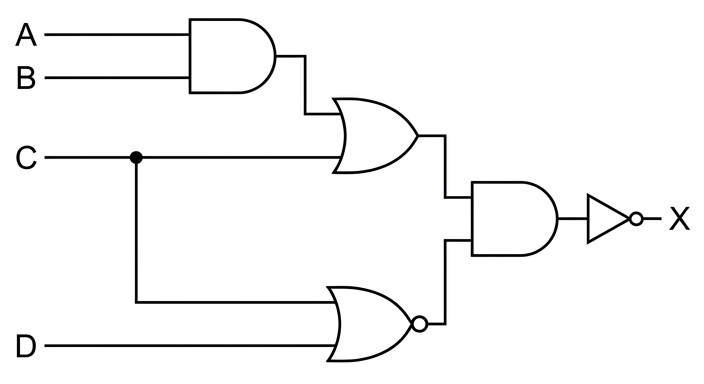
See logic circuit
Background Concept
A logic circuit is the hardware form of a Boolean expression. Each operator in the expression becomes a gate:
- AND becomes an AND gate
- OR becomes an OR gate
- NOT becomes a NOT gate
- NOR means an OR gate with inversion on the output
When an expression is nested, you build the circuit in stages. The inner brackets are produced first, then those outputs are used as inputs to later gates. If one variable appears in more than one place, its input line must branch so it can feed both gates.
Understanding the Question
The expression is:
You are not being asked to simplify it. You must draw the circuit that matches this exact structure.
There are two main sub-expressions inside the outer NOT:
((A AND B) OR C)(C NOR D)
Those two outputs then go into an AND gate, and the result is inverted to make X.
Approach
Work from the inside outward:
- Build
A AND B. - Take that output and OR it with
C. - Separately, build
C NOR D. - AND the two sub-results together.
- Put a NOT gate on the final output.
This method prevents gates being connected in the wrong order.
Step-by-Step Reasoning
First, identify the left-hand branch:
AandBmust feed an AND gate.- The output of that AND gate must then combine with
Cin an OR gate.
Second, identify the lower branch:
CandDmust feed a NOR gate.- Because
Cis already used in the OR stage above, theCinput line must branch to the OR gate and to the NOR gate.
Third, combine the two branches:
- The output of
((A AND B) OR C)and the output of(C NOR D)go into an AND gate.
Finally:
- The output of that AND gate goes through a NOT gate.
- The NOT gate output is labelled
X.
So the gate order is:
- AND on
AandB - OR with
C - NOR on
CandD - AND the two branch outputs
- NOT to produce
X
Key Takeaways
- Convert a Boolean expression into a circuit by following the bracket structure.
- Build the innermost operations first.
- Use branches when one input variable feeds more than one gate.
- A final outer
NOTmeans the entire previous result is inverted, not just one input.
Common Mistakes
- Putting the NOT gate on the wrong part of the circuit instead of at the very end.
- Drawing an OR gate instead of a NOR gate for
(C NOR D). - Forgetting that
Cmust split to feed both the OR gate and the NOR gate. - Combining the branches with OR instead of AND before the final NOT.
- Ignoring the bracket structure and drawing the gates in the wrong sequence.
Things to Be Careful About
- The expression is not simplified first; the circuit must match the given expression exactly.
- A NOR gate is an OR gate with inversion at its output, not a separate NOT on one input.
- The output label
Xmust be after the final NOT gate. - Make sure the two middle subcircuits are completed before they enter the final AND gate.
A network engineer is setting up a Local Area Network (LAN) in an office. The network uses both wired and wireless connectivity.
Answer
- Devices can move around and still stay connected within the wireless range.
- No network cabling is needed, so installation is easier and usually cheaper.
- It is easier to add new devices or extend the network without laying extra cables.
Mobility; easier/cheaper installation because no cabling; easier to add devices or expand the network.
Background Concept
A wired network uses physical cables, such as copper or fibre-optic, to connect devices. A wireless network uses radio waves, usually through a wireless access point, to connect devices without a physical cable to each one.
When an exam asks for advantages of wireless compared to wired, it wants points that are genuinely due to the absence of cables and the use of radio communication. Common valid ideas are mobility, easier installation, lower disruption, and simpler expansion.
Understanding the Question
The question describes an office LAN that uses both wired and wireless connectivity. Part (a) asks for three advantages of the wireless part of that network when compared with a wired network.
So the task is not to describe wireless networks in general, but to give three comparative benefits. Each point should clearly show why wireless is better in that specific respect.
Approach
Think of the main consequences of not needing a cable to each device:
- Users can move around more freely.
- The network is easier to set up because there is less physical installation work.
- Adding more devices is simpler because you do not need to run extra cables.
These are standard, mark-worthy advantages and are distinct from each other.
Step-by-Step Reasoning
- Mobility: In a wired network, a device is physically tied to the network point where its cable reaches. In a wireless network, the device can move around within signal range and still remain connected. This is especially useful for laptops, tablets, and phones.
- Easier and cheaper installation: A wired network needs cables routed through walls, ceilings, floors, or trunking. That takes time, materials, and labour. Wireless avoids much of that, so setup is simpler and often cheaper.
- Easier expansion: If a new employee joins or devices are moved, a wired network may need extra cabling or new wall ports. A wireless network can often connect the new device immediately, provided it is within range and has the correct access credentials.
These are three separate benefits, so they can each earn a mark.
Key Takeaways
- Wireless networks are often chosen for flexibility and convenience.
- Strong comparison answers focus on mobility, installation, and expansion.
- In exam questions, make each advantage distinct rather than repeating the same idea in different words.
Common Mistakes
- Saying wireless is always faster than wired. This is usually not true; wired is often faster and more stable.
- Giving the same point twice, such as "no cables" and "less cabling" as two separate advantages.
- Writing vague answers like "better" or "more useful" without explaining in what way.
Things to Be Careful About
- The question says compared to a wired network, so each answer should be comparative.
- Do not include a drawback here, such as interference or weaker security.
- Keep the points practical and office-based, since the scenario is a LAN in an office.
Answer
- Wireless networks are less secure because signals can be intercepted more easily than data sent through cables.
Wireless networks are less secure.
Background Concept
Wireless networks transmit data through the air using radio signals. Because those signals are broadcast, they can potentially be detected by devices that are not physically connected to the network. This creates some disadvantages compared with wired networks.
Typical drawbacks include lower security, interference, limited range, and sometimes lower speed or reliability.
Understanding the Question
This part asks for just one drawback of using a wireless network. Since it is only one mark, a single clear statement is enough.
The best strategy is to choose a standard disadvantage that is definitely accepted, such as weaker security.
Approach
Pick one well-known weakness of wireless networking and state it directly. The answer should be short and specific.
Step-by-Step Reasoning
A strong answer is:
- Less secure: unlike a cable, a radio signal spreads through the surrounding area. If security is weak or incorrectly configured, an unauthorised user may intercept traffic or try to connect to the network.
That directly identifies a drawback and explains why it happens.
Key Takeaways
- Wireless networking is convenient, but it brings trade-offs.
- Security is one of the most common disadvantages examined.
- A one-mark question needs one valid point, clearly stated.
Common Mistakes
- Giving an advantage instead of a drawback.
- Saying simply "it is bad" without naming the specific problem.
- Choosing something untrue, such as saying wireless always has no range.
Things to Be Careful About
- Only one drawback is needed, so do not waste time writing a long paragraph.
- Make sure the drawback really applies to wireless networking.
- If you choose security, make the point explicit: wireless signals are easier to intercept than data in cables.
Complete the table by writing the name of the type of memory technology for each description.
| Description | Memory technology |
|---|---|
| A read only memory where the contents can be erased using a voltage pulse. The contents can be changed multiple times without physically removing the memory. | |
| A read only memory where the contents are erased using ultraviolet (UV) light. The memory must be physically removed to be reprogrammed. | |
| A read only memory where the contents can be written only once after manufacture. |
Answer
| Description | Memory technology |
|---|---|
| A read only memory where the contents can be erased using a voltage pulse. The contents can be changed multiple times without physically removing the memory. | EEPROM |
| A read only memory where the contents are erased using ultraviolet (UV) light. The memory must be physically removed to be reprogrammed. | EPROM |
| A read only memory where the contents can be written only once after manufacture. | PROM |
EEPROM; EPROM; PROM
Background Concept
ROM stands for Read Only Memory. In practice, ROM is used to store data or instructions that should not be lost when power is turned off. Different ROM technologies vary in how they are programmed and whether they can be erased and rewritten.
The important types here are:
- PROM: Programmable Read Only Memory. It can be programmed once after manufacture.
- EPROM: Erasable Programmable Read Only Memory. It can be erased using ultraviolet light and then reprogrammed.
- EEPROM: Electrically Erasable Programmable Read Only Memory. It can be erased and rewritten electrically, without removing the chip.
The exam often tests these by giving the description rather than the acronym.
Understanding the Question
You are given three descriptions of ROM technologies and must supply the correct name for each one.
The key clue words are:
- voltage pulse and without physically removing
- ultraviolet (UV) light and physically removed
- written only once
Each clue maps directly to one ROM type.
Approach
Read each description and look for the erase or write method:
- Electrical erasing while still in place means EEPROM.
- UV-light erasing with chip removal means EPROM.
- Programmed once only means PROM.
This is mainly a recognition and matching exercise.
Step-by-Step Reasoning
First description
"A read only memory where the contents can be erased using a voltage pulse. The contents can be changed multiple times without physically removing the memory."
- The phrase voltage pulse means electrical erasing.
- The phrase without physically removing the memory confirms that it can be changed while still installed.
- That is EEPROM.
Second description
"A read only memory where the contents are erased using ultraviolet (UV) light. The memory must be physically removed to be reprogrammed."
- The phrase ultraviolet light is the classic clue for EPROM.
- The requirement to physically remove it also matches EPROM.
- So this is EPROM.
Third description
"A read only memory where the contents can be written only once after manufacture."
- Written only once is the key feature of PROM.
- After it has been programmed, it cannot be rewritten.
- So this is PROM.
That gives the completed table entries in the order: EEPROM, EPROM, PROM.
Key Takeaways
- PROM = programmable once.
- EPROM = erased by UV light.
- EEPROM = erased electrically and rewritten without removing the chip.
- In ROM-identification questions, the erase method is usually the most useful clue.
Common Mistakes
- Mixing up EPROM and EEPROM because both can be erased and reprogrammed.
- Forgetting that EPROM uses UV light and usually must be removed from the device.
- Writing RAM or Flash memory instead of the specific ROM technology named in the syllabus.
Things to Be Careful About
- Read the wording closely: electrically erased points to EEPROM, not EPROM.
- Written only once means PROM, not a rewritable memory type.
- Use the exact acronyms correctly: PROM, EPROM, EEPROM.
A company creates a relational database to store data about its customers.
The database, REVIEWS, stores data about the customers, products, complaints and staff.
The database has four tables:
CUSTOMER(CustomerID, CustomerFirstName, CustomerLastName, CustomerEmail)
PRODUCT(ProductID, ProductName, ProductDetail, Price, Rating)
COMPLAINT(ComplaintID, ProductID, CustomerID, ComplaintDetails, StaffID)
STAFF(StaffID, StaffFirstName, StaffLastName, Department, RemoteWorker)
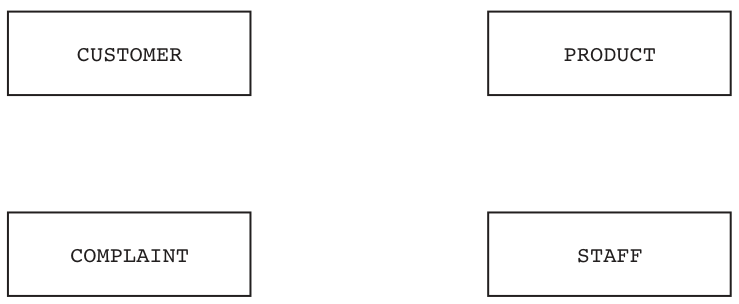
Answer
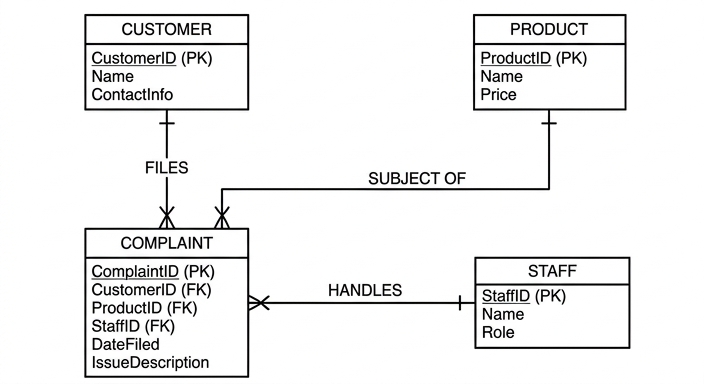
See E-R diagram
Background Concept
An entity-relationship diagram shows the entities in a relational database and the relationships between them. In questions like this, each table is usually an entity.
A very useful clue is the presence of foreign keys. If one table contains the primary key of another table, that usually means there is a relationship between them.
Here, COMPLAINT contains:
ProductIDCustomerIDStaffID
That means each complaint record refers to one product, one customer and one staff member. Because many complaint records can repeat the same customer, product or staff ID, the relationships are one-to-many from those tables to COMPLAINT.
Understanding the Question
You are given four tables:
CUSTOMERPRODUCTCOMPLAINTSTAFF
You must complete the E-R diagram by adding the relationship lines and the correct cardinalities. The key idea is to look at which table stores the foreign keys. Since COMPLAINT stores ProductID, CustomerID and StaffID, it is the table linked to all three of the others.
Approach
Start with COMPLAINT because it contains the foreign keys.
For each foreign key:
- Find which table that key belongs to as a primary key.
- Link that table to
COMPLAINT. - Decide the cardinality:
- one
CUSTOMERcan appear in many complaint records - one
PRODUCTcan appear in many complaint records - one
STAFFmember can appear in many complaint records
- one
So the parent tables are CUSTOMER, PRODUCT and STAFF, and the child table is COMPLAINT.
Step-by-Step Reasoning
COMPLAINT(ComplaintID, ProductID, CustomerID, ComplaintDetails, StaffID) contains three references to other tables.
-
CustomerIDmatchesCUSTOMER(CustomerID, ...)- therefore
CUSTOMERis related toCOMPLAINT - one customer can make many complaints
- each complaint belongs to one customer
- therefore
-
ProductIDmatchesPRODUCT(ProductID, ...)- therefore
PRODUCTis related toCOMPLAINT - one product can have many complaints
- each complaint is about one product
- therefore
-
StaffIDmatchesSTAFF(StaffID, ...)- therefore
STAFFis related toCOMPLAINT - one staff member can deal with many complaints
- each complaint is handled by one staff member
- therefore
So there are three one-to-many relationships, all pointing towards COMPLAINT as the many side.
There is no direct relationship shown between CUSTOMER and PRODUCT, or between CUSTOMER and STAFF, because the schema does not show those keys directly in each other's tables. The link goes through COMPLAINT.
Key Takeaways
- Foreign keys are the fastest way to identify relationships in a relational schema.
- If a table contains another table's key, it is usually on the many side of the relationship.
- A complaint record links one customer, one product and one staff member.
Common Mistakes
- Drawing a direct relationship between
CUSTOMERandPRODUCTjust because customers complain about products. In this schema, that connection is represented throughCOMPLAINT. - Reversing the cardinality and making
COMPLAINTone-to-one with another table. The repeated foreign keys show many complaint records can refer to the same customer, product or staff member. - Missing one of the three links from
COMPLAINT.
Things to Be Careful About
- Use the table names exactly as given:
CUSTOMER,PRODUCT,COMPLAINT,STAFF. - Base the relationships on the keys in the schema, not on assumptions from the story.
- Make sure
COMPLAINTis connected to all three other entities, withCOMPLAINTon the many side each time.
Some example data from the STAFF table is shown.
| StaffID | StaffFirstName | StaffLastName | Department | RemoteWorker |
|---|---|---|---|---|
| 1 | Ralph | Jura | E | Yes |
| 2 | Luca | Emcee | A | Yes |
| 3 | Darwin | Acula | F | No |
Write a Structured Query Language (SQL) script to define the table STAFF.
Answer
CREATE TABLE STAFF (
  StaffID INTEGER PRIMARY KEY,
  StaffFirstName VARCHAR(20),
  StaffLastName VARCHAR(20),
  Department CHAR(1),
  RemoteWorker VARCHAR(3)
);
See SQL script
Background Concept
SQL DDL stands for Data Definition Language. It is used to define the structure of a database, for example by creating tables and specifying:
- field names
- data types
- keys
The CREATE TABLE command is the usual way to do this.
A primary key is a field whose value is unique for each record. In this table, StaffID is clearly the identifier, so it should be the primary key.
Data types should match the kind of data stored:
- whole-number identifiers usually use
INTEGER - names usually use
VARCHAR(...) - a one-character code such as a department letter can use
CHAR(1) - text values such as
YesorNocan use a short character type such asVARCHAR(3)
Understanding the Question
You are asked to define the STAFF table in SQL. The example data shows the fields:
StaffIDStaffFirstNameStaffLastNameDepartmentRemoteWorker
So the script must create a table with those exact field names and suitable data types. It should also identify the primary key.
Approach
Read the sample data and choose a sensible type for each field:
StaffIDcontains numbers only, soINTEGER- first and last names are text, so
VARCHAR Departmentis a single-letter code, soCHAR(1)RemoteWorkerstoresYesorNo, so a short text type is suitable
Then write a CREATE TABLE STAFF (...) statement and mark StaffID as the primary key.
Step-by-Step Reasoning
The table name must be STAFF because that is given in the schema.
Now define each field:
-
StaffID INTEGER PRIMARY KEYStaffIDis numeric- it uniquely identifies each staff member
- so it is the primary key
-
StaffFirstName VARCHAR(20)- a first name is text
VARCHARis suitable because different names have different lengths
-
StaffLastName VARCHAR(20)- same reasoning as first name
-
Department CHAR(1)- the sample values are single letters such as
E,A,F - so one character is enough
- the sample values are single letters such as
-
RemoteWorker VARCHAR(3)- the sample values are
YesandNo - a short text field can store these values
- the sample values are
That gives a complete table definition.
Key Takeaways
CREATE TABLEis used to define a table's structure.- Choose data types from the data shown, not from guesswork.
- Always identify the primary key when the field is obvious.
Common Mistakes
- Forgetting to declare
StaffIDas the primary key. - Using the wrong field names or changing their spelling/capitalisation from the question.
- Choosing an unsuitable type, such as a numeric type for names.
- Omitting brackets or commas in the
CREATE TABLEstatement.
Things to Be Careful About
- In exam questions, sensible data types are usually accepted, but they must fit the data shown.
Departmentis only one character here, soCHAR(1)is more precise than a longer text field.RemoteWorkeris stored as text in the sample, so a text type matches the given data better than a numeric type.- SQL syntax varies slightly between systems, but the important marks are usually for correct fields, suitable data types and the primary key.
Products are given a rating between 1 and 10 inclusive.
Write an SQL script to return only the ProductID, ProductName and ComplaintDetails for all products with a rating of 5 or less. The results need to be displayed in descending order of rating.
Answer
SELECT PRODUCT.ProductID, PRODUCT.ProductName, COMPLAINT.ComplaintDetails
FROM PRODUCT
INNER JOIN COMPLAINT
ON PRODUCT.ProductID = COMPLAINT.ProductID
WHERE PRODUCT.Rating <= 5
ORDER BY PRODUCT.Rating DESC;
See SQL script
Background Concept
An SQL SELECT query can do four main things relevant here:
- choose which fields to display
- choose which table or tables to read from
- filter rows with
WHERE - sort the output with
ORDER BY
When the required fields come from more than one table, a join is needed. A join combines matching rows from related tables using a common field. Here, PRODUCT and COMPLAINT are related by ProductID.
Understanding the Question
You must return only:
ProductIDProductNameComplaintDetails
for products whose rating is 5 or less, and the results must be in descending order of rating.
The important clue is that ComplaintDetails is not in the PRODUCT table. It is in COMPLAINT. So one table alone is not enough; you must join PRODUCT to COMPLAINT.
Approach
Use PRODUCT as one table and COMPLAINT as the second table.
Then:
- join them on
ProductID - keep only rows where
Rating <= 5 - display only the three requested fields
- sort by
Rating DESC
Even though Rating is not one of the displayed fields, it can still be used for ordering in standard SQL.
Step-by-Step Reasoning
First decide the fields in the SELECT clause:
PRODUCT.ProductIDPRODUCT.ProductNameCOMPLAINT.ComplaintDetails
These are exactly the three outputs requested.
Next decide the tables:
PRODUCTCOMPLAINT
These must be joined because the complaint text is stored separately from product details.
The join condition is:
PRODUCT.ProductID = COMPLAINT.ProductID
This matches each complaint to the correct product.
Now apply the filter:
WHERE PRODUCT.Rating <= 5
The question says rating of 5 or less, so the condition must include 5. That means <= 5, not < 5.
Finally sort the rows:
ORDER BY PRODUCT.Rating DESC
Descending order means the highest permitted rating appears first. Since only ratings 5 or less are included, the output will be ordered from 5 down to 1.
Key Takeaways
- If the needed fields are spread across tables, use a join.
- Put the filtering rule in
WHERE. - Put the sorting rule in
ORDER BY ... DESCfor descending order. - Only include the requested output fields in the
SELECTlist.
Common Mistakes
- Querying only
PRODUCTand forgetting thatComplaintDetailsis inCOMPLAINT. - Using
Rating < 5instead ofRating <= 5, which wrongly excludes rating 5. - Sorting in ascending order or omitting
DESC. - Displaying extra fields such as
Ratingwhen the question says to return only three fields. - Joining on the wrong field instead of
ProductID.
Things to Be Careful About
- Use the exact field names from the schema:
ProductID,ProductName,ComplaintDetails,Rating. - Qualifying fields with table names is safer when two tables are involved.
ORDER BYcan use a field that is not shown in the final output, which is useful here.- If a product has multiple complaints, the query will return multiple rows for that product, which is correct because each row includes a different
ComplaintDetailsvalue.
A Database Management System (DBMS) is used to maintain and manage the database.
Describe two ways in which the DBMS can be used to ensure the security of the customer data.
Answer
- The DBMS can require user authentication, for example a username and password, so only authorised users can access the database.
- The DBMS can assign access rights/permissions, so different users can be restricted to only the data and actions they are allowed, for example view-only or no access to customer records.
See explanation
Background Concept
A DBMS does more than store data. It also provides tools to control who can access the data and what they are allowed to do with it. Security of data means protecting it from unauthorised access, unauthorised changes, theft or misuse.
Common DBMS security features include:
- authentication: checking who the user is
- access rights or privileges: controlling what that user can do
- views: limiting which data is visible
- encryption: protecting stored or transmitted data
Understanding the Question
The question asks for two ways a DBMS can be used to ensure the security of customer data. So you need security measures provided through the DBMS, not general points about databases.
A good answer names two features and explains how each one protects the customer data.
Approach
Choose two clear DBMS-related security methods and explain each in one sentence.
The strongest pair is:
- authentication
- access rights/permissions
These are both standard DBMS features and directly protect customer data from unauthorised access.
Step-by-Step Reasoning
First method: authentication.
A DBMS can require each user to log in using credentials such as a username and password. This means only approved users can open the database or connect to it. If someone is not authorised, they cannot access the customer data at all.
Second method: access rights or permissions.
Once a user has logged in, the DBMS can still limit what they can do. For example:
- one user may only be allowed to view records
- another may be allowed to add data
- only certain staff may update or delete customer records
This protects customer data because not every user gets full control.
These two methods are distinct:
- authentication decides who the user is
- access rights decide what that user is allowed to do
Key Takeaways
- A DBMS helps secure data through built-in user management features.
- Authentication controls access to the database.
- Permissions control which data and operations each user may use.
Common Mistakes
- Giving validation as a security method. Validation checks input correctness, not whether access is authorised.
- Giving backup as a security method. Backups help recovery and availability more than security.
- Repeating the same idea twice, for example saying passwords and login without adding a second distinct method.
- Giving physical security points that are not specifically DBMS features.
Things to Be Careful About
- The question asks for DBMS use, so make the answer clearly about features the DBMS can provide.
- Explain how each method protects customer data, not just name the feature.
- Keep security separate from integrity: preventing unauthorised access is different from checking data is valid or accurate.
The following table shows part of the instruction set for a processor. The processor has two registers: the Accumulator (ACC) and the Index Register (IX).
| Instruction | Explanation |
| :--- | :--- | :--- |
| Opcode | Operand | |
| LDM | #n | Immediate addressing. Load the number n to the ACC |
| AND | #n / Bn / &n | Bitwise AND operation of the contents of the ACC with the operand |
| AND |
| XOR | #n / Bn / &n | Bitwise XOR operation of the contents of the ACC with the operand |
| XOR | | Bitwise XOR operation of the contents of the ACC with the contents of |
| OR | #n / Bn / &n | Bitwise OR operation of the contents of the ACC with the operand |
| OR | | Bitwise OR operation of the contents of the ACC with the contents of |
| CMP | #n | Compare the contents of the ACC with number n |
| CMP | | Compare the contents of the ACC with the contents of |
| LSL | #n | Bits in the ACC are shifted logically n places to the left. Zeros are introduced on the right-hand end |
| LSR | #n | Bits in the ACC are shifted logically n places to the right. Zeros are introduced on the left-hand end |
<address> can be an absolute or symbolic address
# denotes a denary number, e.g. #127
B denotes a binary number, e.g. B10010001
& denotes a hexadecimal number, e.g. &4A
The current contents of main memory are shown:
| Address | Data |
|---|---|
| 100 | 0000 0011 |
| 101 | 1010 1110 |
| 102 | 1100 1100 |
| 103 | 1111 1111 |
| 104 | 1100 1100 |
Complete the table by writing the contents of the ACC after the execution of each instruction.
| Current contents of the ACC | Instruction | Contents of the ACC after the execution of the instruction |
|---|---|---|
| 0000 1111 | AND 101 | |
| 0000 0000 | LDM #100 | |
| 0000 0001 | XOR &F1 | |
| 0001 0001 | CMP 101 |
Working
AND 101uses the contents of address101, which is1010 1110.LDM #100loads denary100into the ACC:0110 0100.XOR &F1uses hexadecimalF1=1111 0001.CMP 101compares only, so the ACC is unchanged.
Answer
| Current contents of the ACC | Instruction | Contents of the ACC after the execution of the instruction |
|---|---|---|
| 0000 1111 | AND 101 | 0000 1110 |
| 0000 0000 | LDM #100 | 0110 0100 |
| 0000 0001 | XOR &F1 | 1111 0000 |
| 0001 0001 | CMP 101 | 0001 0001 |
0000 1110; 0110 0100; 1111 0000; 0001 0001
Background Concept
This question tests how assembly-language instructions affect the accumulator, and how to interpret different operand formats.
The important ideas are:
- The ACC is the register where these operations take place.
- An operand written as a plain number such as
101means a memory address here, so the processor uses the contents stored at that address. #means denary immediate data, so#100means the value 100 itself.&means hexadecimal immediate data, so&F1must be converted to binary before using it.AND,XORandORare bitwise logical operations applied bit by bit.CMPmeans compare. A compare instruction normally affects status flags, not the ACC value itself.
For bitwise operations:
ANDgives1only when both bits are1.XORgives1when the two bits are different.
Understanding the Question
You are given a small instruction set and a memory table. For each row, you must work out what the ACC contains after one instruction executes.
The main trap is reading the operand correctly:
AND 101means use the data stored at memory address101, not the binary number101.LDM #100means load the denary value 100 directly.XOR &F1means use the hexadecimal valueF1.CMP 101compares with the contents of address101, but does not replace the ACC value.
So each row is independent, and you use the starting ACC value given in that row only.
Approach
For each instruction:
- Identify the addressing mode from the operand notation.
- Obtain the operand value:
- from memory if it is an address
- by conversion if it is denary or hexadecimal immediate data
- Apply the instruction to the current ACC value.
- Write the resulting 8-bit binary value.
- For
CMP, remember that the ACC does not change.
Step-by-Step Reasoning
Row 1
Current ACC = 0000 1111
Instruction = AND 101
Because there is no #, B or &, 101 is a memory address.
From the memory table:
- address
101contains1010 1110
Now perform bitwise AND:
0000 11111010 1110- result
0000 1110
Bit by bit, only the last three positions where both values contain 1 stay as 1.
Row 2
Current ACC = 0000 0000
Instruction = LDM #100
#100 means the denary value 100.
Convert 100 to 8-bit binary:
- 100 = 64 + 32 + 4
- so binary is
0110 0100
LDM loads that value directly into the ACC, so the new ACC is 0110 0100.
Row 3
Current ACC = 0000 0001
Instruction = XOR &F1
&F1 is hexadecimal.
Convert F1 to binary:
F=11111=0001- so
&F1=1111 0001
Now perform XOR:
0000 00011111 0001- result
1111 0000
The last bit is 1 XOR 1 = 0, and the first four bits become 1 because 0 XOR 1 = 1.
Row 4
Current ACC = 0001 0001
Instruction = CMP 101
Again, 101 is an address, so use the contents of address 101:
- address
101contains1010 1110
A compare instruction checks the ACC against that operand, usually by affecting status flags such as equal, less than, or greater than. It does not overwrite the ACC.
So after the instruction, the ACC is still:
0001 0001
Key Takeaways
- Always read operand notation carefully: address, denary immediate, binary immediate and hexadecimal immediate mean different things.
- For address operands, use the value stored in memory at that address.
- Bitwise logic works one bit at a time across the whole byte.
CMPis a common instruction that changes comparison state, not the accumulator contents.
Common Mistakes
- Treating
101as the binary value101instead of memory address101. - Forgetting to convert
#100from denary into binary before writing the ACC value. - Converting
&F1incorrectly; hexadecimal digits must each become 4 binary bits. - Changing the ACC after
CMP; compare does not load a new value into ACC. - Writing fewer than 8 bits in the answer.
Things to Be Careful About
- The memory table entries are already 8-bit values, so keep all results in 8-bit form.
AND,XORandORare bitwise, not arithmetic operations.- The question asks for the contents of the ACC after execution, so for
CMPyou must report the unchanged ACC, not a flag result. - Each row starts from its own stated ACC value; do not carry the result of one row into the next.
The Von Neumann model for a computer system uses registers.
Describe the role of the Memory Address Register (MAR) and Memory Data Register (MDR) in the fetch-execute (F-E) cycle.
Answer
- The MAR stores the address of the memory location to be accessed.
- During the fetch stage, the address of the next instruction is copied to the MAR.
- The MDR stores the data or instruction being transferred to or from memory.
- The contents of the memory location whose address is in the MAR are copied into the MDR during a read operation.
See explanation
Background Concept
In the Von Neumann model, instructions and data are both stored in main memory. The CPU must therefore fetch instructions from memory, and sometimes fetch or store data as well. Registers are used to hold the temporary values needed during this process.
Two key registers are:
- MAR (Memory Address Register): holds the address in memory that the CPU wants to access.
- MDR (Memory Data Register): holds the data or instruction that is being transferred between the CPU and memory.
So the MAR answers where in memory, and the MDR answers what value is being moved.
During the fetch-execute cycle, the CPU repeatedly:
- fetches the next instruction from memory
- decodes it
- executes it
The MAR and MDR are central to the fetch stage, and also to any later memory read or write during execution.
Understanding the Question
The question asks for the role of the MAR and MDR specifically in the fetch-execute cycle. That means you should not just define the registers in isolation; you should connect them to what happens while the CPU fetches instructions from memory.
A strong answer therefore needs both:
- what each register stores
- how it is used when an instruction is fetched or data is transferred
Approach
A safe way to answer is:
- State what the MAR stores.
- State what the MDR stores.
- Link MAR to the address of the next instruction or memory location.
- Link MDR to the actual instruction/data moved from memory.
This gives a clear distinction:
- MAR = address
- MDR = data/instruction contents
Step-by-Step Reasoning
The fetch-execute cycle begins with the CPU needing the next instruction.
Role of the MAR
The CPU first needs to know which memory location contains the next instruction. That address is placed in the MAR.
In many descriptions, the address comes from the Program Counter and is copied into the MAR during fetch. The MAR is therefore the register that presents the required memory address to main memory.
So the MAR's role is:
- holding the address of the memory location being accessed
- allowing the CPU to tell memory which location to read from or write to
Role of the MDR
Once the address is known and memory is accessed, the contents of that memory location must be transferred. Those contents go into the MDR.
If the CPU is reading memory, the MDR holds:
- the instruction just fetched, or
- the data just read
If the CPU is writing to memory, the MDR holds the data that is about to be written out.
So the MDR's role is:
- storing the actual data or instruction in transit between CPU and memory
Putting them together in the fetch stage
A typical fetch sequence is:
- The address of the next instruction is placed in the MAR.
- Memory is read from that address.
- The instruction found there is placed in the MDR.
- The instruction can then be copied onward for decoding.
This is why the two registers are usually described together: one identifies the memory location, and the other carries the value from that location.
Key Takeaways
- The MAR stores a memory address.
- The MDR stores the data or instruction being transferred.
- In the fetch stage, the CPU uses the MAR to point to the next instruction and the MDR to receive it.
- A good exam answer distinguishes clearly between address and contents.
Common Mistakes
- Saying both registers store data. The MAR stores an address, not the data itself.
- Saying the MDR stores only instructions. It can hold either instructions or data.
- Describing the Program Counter instead of the MAR. The PC is related, but it is not what the question asked for.
- Giving only a definition with no link to the fetch-execute cycle.
Things to Be Careful About
- Use precise wording: address for MAR, data/instruction being transferred for MDR.
- The question is about the fetch-execute cycle, so mention reading from memory into the MDR.
- If you mention writing as well, make sure it is still clear that the MDR can hold data going in either direction.
- Do not confuse MDR with the CIR or PC; those are different registers with different roles.
Assembly language instructions are grouped.
Complete each statement by writing the name of the appropriate instruction group.
Loading data into the accumulator is an example of an instruction in the ............................................................... group.
Incrementing the index register is an example of an instruction in the ............................................................... group.
Branching to another address is an example of an instruction in the ............................................................... group.
Answer
- Loading data into the accumulator: data transfer
- Incrementing the index register: arithmetic
- Branching to another address: branching
data transfer; arithmetic; branching
Background Concept
Assembly instructions are often classified into groups according to what they do. This helps when learning instruction sets, because many different opcodes belong to the same broad category.
Common instruction groups include:
- data transfer: move or load data between memory, registers and sometimes I/O
- arithmetic: perform calculations such as add, subtract, increment or decrement
- logical: perform operations such as AND, OR, XOR, NOT
- branching: change the normal sequence of execution by jumping to another address
- input/output: communicate with peripherals
The question gives an example action, and you must name the group it belongs to.
Understanding the Question
You are not being asked for a specific opcode. You are being asked for the type of instruction group.
So you should think:
- What general category does this action belong to?
- Is it moving data, calculating, or changing control flow?
The three actions here are very standard examples.
Approach
Match each description to its purpose:
- If it moves a value into a register, it is data transfer.
- If it increases a register by 1, it is an arithmetic operation.
- If it jumps to a different address, it is branching.
This is a classification task, so no calculation is needed.
Step-by-Step Reasoning
Loading data into the accumulator
This means placing a value into the ACC. The main purpose is moving data from one place to another, not calculating with it yet.
So this is in the data transfer group.
Incrementing the index register
Increment means add 1. Even though it is done to a register, it is still a numerical operation.
So this is in the arithmetic group.
Branching to another address
A branch changes the next instruction that will be executed by sending control to a different memory address.
So this is in the branching group.
Key Takeaways
- Instruction groups are based on function.
- Loading or moving values is data transfer.
- Increasing or decreasing a value is arithmetic.
- Jumping elsewhere in the program is branching.
Common Mistakes
- Calling loading an arithmetic instruction. No calculation is taking place when a value is simply loaded.
- Calling incrementing a data transfer instruction. It changes a value, so it is arithmetic.
- Writing a specific opcode instead of the instruction group.
- Using a vague term like "control" when the expected group name is branching.
Things to Be Careful About
- Read the wording carefully: it asks for the name of the instruction group, not an example instruction.
- Use standard group names such as data transfer, arithmetic, and branching.
- Keep each answer short and specific; this is a recall question, so long explanations are unnecessary in the exam.
A digital video camera records students in a classroom. The data is transferred from the digital video camera over the internet to a server. Artificial Intelligence (AI) is used to analyse the video on the server to identify when students are interacting with the lesson and the teacher.
Answer
- Students may lose privacy because they are constantly recorded and analysed by AI.
- This means personal behaviour data is collected about them, which could make them uncomfortable or be misused if accessed by others.
Privacy is reduced because students are constantly recorded and analysed, so personal behaviour data is collected and could be misused.
Background Concept
Ethical impacts are effects on people that raise questions about what is right, fair or acceptable. In AI systems, common ethical concerns include privacy, bias, lack of consent, surveillance, and misuse of collected data. In a classroom, AI is not just processing anonymous data: it may be observing identifiable students and making judgments about their behaviour.
Privacy means having control over personal information and not being watched or recorded unnecessarily. When AI analyses classroom video, it can gather data about who is present, how they behave, when they appear attentive, and how they interact.
Understanding the Question
The question asks for one ethical impact of using AI to analyse classroom video. The important part is that the camera records students, sends the video to a server, and AI examines it to judge whether students are engaging with the lesson.
So the answer must not just name AI or cameras in general. It needs one ethical issue connected to this exact situation, plus a description of why it matters.
Approach
Pick one strong ethical issue that clearly fits the scenario. The easiest valid choice is privacy. Then describe how the use of AI affects privacy in this classroom: students are being continuously recorded, their actions are analysed, and personal data about behaviour is produced.
A 2-mark answer usually needs:
- the ethical issue
- a clear explanation of the impact in context
Step-by-Step Reasoning
The system records students in a classroom.
That already creates personal data, because the video can identify individuals.
Then AI analyses the video. This makes the issue stronger, because it is not just storing footage; it is extracting information about behaviour and engagement.
That leads to an ethical concern about privacy:
- students may feel they are under constant surveillance
- data about their behaviour is being collected
- this information could be accessed, shared or used in ways they do not fully control
So a good exam answer states privacy as the ethical issue and then explains that constant recording and analysis reduces privacy and may make students uncomfortable or expose personal data to misuse.
Key Takeaways
- Ethical impacts are about fairness, rights and acceptable use of technology.
- Privacy is a very common ethical issue when AI analyses video of people.
- In descriptive questions, always connect the issue directly to the scenario given.
Common Mistakes
- Giving a technical issue instead of an ethical one, such as "the internet may be slow".
- Naming an issue without describing it, for example writing only "privacy".
- Describing AI benefits instead of an ethical impact.
- Making the point too vague, such as "AI is bad".
Things to Be Careful About
- The question asks for one ethical impact, so one well-developed point is better than several undeveloped ideas.
- Keep the answer linked to the classroom video system, not AI in general.
- If you use privacy, mention recording, analysis, personal data or surveillance so the description is specific enough for full marks.
A video is made of many bitmap images called frames. 30 frames are recorded every second.
Each frame is 4000 pixels wide by 3000 pixels high. The video records using 16-bit colour depth.
Calculate an estimate for the file size for one second of the video in gigabytes.
Show your working.
File size ................................ gigabytes
Working
4000 × 3000 = 12 000 000 pixels per frame
12 000 000 × 16 = 192 000 000 bits per frame
192 000 000 × 30 = 5 760 000 000 bits per second
5 760 000 000 ÷ 8 = 720 000 000 bytes
720 000 000 ÷ 1 000 000 000 = 0.72 GB
Answer
File size = 0.72 gigabytes
0.72 GB
Background Concept
A video is made from many individual bitmap images called frames. For an uncompressed bitmap frame, the file size depends on:
- image width in pixels
- image height in pixels
- colour depth in bits per pixel
The basic method is:
- pixels in one frame = width × height
- bits in one frame = pixels × colour depth
- bits in the whole video segment = bits per frame × number of frames
Then convert bits to bytes by dividing by 8, and convert bytes to gigabytes using the unit requested.
Understanding the Question
The question gives all the values needed for one second of video:
- 30 frames per second
- each frame is 4000 by 3000 pixels
- 16-bit colour depth
It asks for an estimate of the file size in gigabytes and says to show working. That means the marks are for the method as well as the final answer.
Approach
Work in a clear sequence:
- Find the number of pixels in one frame.
- Multiply by 16 bits per pixel.
- Multiply by 30 frames for one second.
- Convert from bits to bytes.
- Convert from bytes to gigabytes.
Because the question says estimate, using decimal gigabytes is acceptable here.
Step-by-Step Reasoning
First, find how many pixels are in one frame:
4000 × 3000 = 12 000 000 pixels
Each pixel uses 16 bits, so one frame needs:
12 000 000 × 16 = 192 000 000 bits
There are 30 frames in one second, so total bits for one second are:
192 000 000 × 30 = 5 760 000 000 bits
Now convert bits to bytes:
5 760 000 000 ÷ 8 = 720 000 000 bytes
Now convert bytes to gigabytes:
720 000 000 ÷ 1 000 000 000 = 0.72 GB
So the estimated file size for one second of video is 0.72 GB.
Key Takeaways
- For bitmap images, file size depends on resolution and colour depth.
- For video, multiply the frame size by the number of frames.
- Always convert units carefully: bits to bytes, then bytes to larger units.
Common Mistakes
- Forgetting to multiply by 30 frames per second.
- Using 16 bytes instead of 16 bits for colour depth.
- Forgetting to divide by 8 when converting bits to bytes.
- Stopping at bytes and not converting to gigabytes.
- Multiplying width and height incorrectly.
Things to Be Careful About
- Colour depth is in bits per pixel, not bytes per pixel.
- The answer is for one second only, not one frame.
- If a question asks for an estimate in GB, use a sensible unit conversion and show it clearly.
- Keep your working ordered so that an examiner can award method marks even if the final conversion is wrong.
Identify and describe one method of data verification that can be used when transferring data from the digital video camera to the server.
Method ......................................................................................................................................
Description ................................................................................................................................
Answer
- Method: Checksum
- Description: A checksum is calculated from the video data before it is sent and is sent with the data. The server calculates a checksum from the received data and compares it with the original. If the values are different, the data has changed during transfer and it is sent again.
Checksum
Background Concept
Verification checks whether data has been copied or transferred accurately, without being changed accidentally. It is different from validation.
- Validation checks whether data is sensible or follows rules.
- Verification checks whether the received data matches the original data.
For data transfer over a network, a common verification method is a checksum. A checksum is a value calculated from the data before transmission. After the data arrives, the receiving system calculates the checksum again. If the two values match, the data is assumed to have been transferred correctly. If they do not match, an error has occurred during transmission.
Understanding the Question
The question is about sending video from a digital camera to a server over the internet. Because data travels across a network, bits could be corrupted during transfer.
The question asks for one method of data verification used during this transfer, and a description of how it works. So the answer needs both:
- the name of the verification method
- the process by which it checks transfer accuracy
Approach
Choose the most suitable method for data transfer: checksum. Then describe the sequence:
- sender calculates checksum
- sender sends data and checksum
- receiver recalculates checksum
- receiver compares values
- mismatch means data was altered and should be resent
That gives a complete 3-mark style answer.
Step-by-Step Reasoning
The camera is the sender. Before sending the video data, it calculates a checksum from that data.
It then sends:
- the video data
- the checksum value
When the server receives the video, it performs the same checksum calculation on the received data.
Then it compares:
- original checksum sent by the camera
- newly calculated checksum on the server
If they are the same, the transfer is assumed to be correct.
If they are different, this shows that the data has been changed or corrupted during transmission. The system can then request the data again or reject the transfer.
Key Takeaways
- Verification is about accuracy of copying or transfer.
- Checksum is a standard verification method for transmitted data.
- A full description usually includes calculation, transmission, recalculation, comparison, and error handling.
Common Mistakes
- Writing a validation method such as range check or format check instead of a verification method.
- Naming checksum but not explaining how it is used.
- Saying it prevents hacking; checksum is mainly for detecting accidental transfer errors, not providing security.
- Confusing verification with encryption.
Things to Be Careful About
- Use the term verification, not validation.
- Mention both ends of the transfer: sender and receiver.
- Include what happens if the values do not match, because that often earns the final mark.
- Keep the description about transferred data, since the question is specifically about internet transfer from camera to server.
Describe two reasons why the server that stores the videos uses magnetic hard disks instead of solid state (flash) memory.
Answer
- Magnetic hard disks have a lower cost per gigabyte, so storing large numbers of video files is cheaper.
- Magnetic hard disks are available with larger capacities, so the server can store more video before needing extra storage.
Magnetic hard disks are cheaper per gigabyte and provide larger storage capacity.
Background Concept
A server that stores video needs secondary storage. Secondary storage is non-volatile storage used to keep data when power is off.
Two common storage types are:
- magnetic hard disk drives (HDDs)
- solid state drives using flash memory (SSDs)
Important characteristics when comparing storage devices include:
- capacity
- cost per gigabyte
- speed
- durability
- power use
For long-term storage of large video files, capacity and cost are often the most important factors.
Understanding the Question
The scenario involves a server storing classroom videos. Video files are very large, especially at high resolution. The question asks why the server uses magnetic hard disks instead of solid state flash memory.
So the answer needs two comparative reasons that make HDDs more suitable in this situation.
Approach
Think about what a video-storage server needs most:
- a lot of space
- reasonable cost for that large amount of space
That points to the two strongest answers:
- larger capacity
- lower cost per gigabyte
Each reason should be linked to the fact that many large video files must be stored.
Step-by-Step Reasoning
The files in this question are large because video consists of many high-resolution bitmap frames. A server storing many such videos needs a lot of storage space.
First reason: capacity.
Magnetic hard disks are commonly available in very large capacities. This means a server can keep more video files on the same device or fewer drives are needed.
Second reason: cost.
Magnetic hard disks usually cost less per gigabyte than flash memory. For a server storing lots of video, this makes the total storage system much cheaper.
These reasons fit the scenario better than speed-related points, because the question is about storing videos, not necessarily processing them as quickly as possible.
Key Takeaways
- HDDs are often chosen when large capacity is needed at lower cost.
- SSDs are often chosen when speed is more important.
- Always link hardware characteristics to the use case in the question.
Common Mistakes
- Giving the same reason twice in different words, such as "cheap" and "costs less".
- Saying HDDs are faster than SSDs; that is usually not true.
- Giving unconnected facts about storage devices without explaining why they matter for video storage.
- Confusing primary storage with secondary storage.
Things to Be Careful About
- The question asks why HDDs are used instead of flash memory, so make the comparison clear.
- Each reason needs a short description, not just a one-word feature.
- Capacity and cost per gigabyte are separate points, so explain both distinctly.
- Keep the answer focused on storing large video files on a server.
The table contains three algorithms that perform data validation. The third algorithm uses the functions MID and LENGTH.
The functions MID and LENGTH are defined as follows:
MID(ThisString : STRING, x : INTEGER, y : INTEGER) RETURNS STRINGreturns a string of lengthystarting at positionxfromThisStringLENGTH(ThisString : STRING) RETURNS INTEGERreturns the integer value representing the length ofThisString
Complete the table to identify the method of data validation for each algorithm. Each method of data validation must be different.
| Algorithm | Method of data validation |
|---|---|
| ```pseudocode | |
| INPUT x | |
| IF x < 1 or x > 26 THEN | |
| OUTPUT "Invalid" | |
| ENDIF |
| ```pseudocode
INPUT x
IF x <> 'R' AND x <> 'G' AND x <> 'B' THEN
 OUTPUT "Invalid"
ENDIF
``` | |
| ```pseudocode
INPUT x
FLAG ← FALSE
FOR INDEX ← 1 TO LENGTH(x)
 IF MID(x, INDEX, 1) = "@" THEN
 FLAG ← TRUE
 ENDIF
NEXT INDEX
IF NOT FLAG THEN
 OUTPUT "Invalid"
ENDIF
``` | |
Answer
| Algorithm | Method of data validation |
|---|---|
IF x < 1 or x > 26 THEN | Range check |
IF x <> 'R' AND x <> 'G' AND x <> 'B' THEN | Lookup check |
Checks whether x contains "@" | Format check |
Range check; Lookup check; Format check
Background Concept
Validation checks whether input data is sensible and follows predefined rules before it is accepted. Common validation methods include:
- range check: value must lie between limits
- lookup check: value must be one of an allowed set
- format check: data must match a required pattern
- length check: data must have the correct number of characters
- presence check: data must not be empty
- type check: data must be of the correct data type
To identify a validation method from pseudocode, look at what rule is being tested.
Understanding the Question
The question gives three algorithms and asks you to name the data validation method used by each one. It also says each method must be different.
So you must read the condition in each algorithm and decide what kind of rule it is enforcing.
Approach
For each algorithm, ask:
- Is it checking minimum and maximum values?
- Is it checking whether the value is one of a small allowed list?
- Is it checking whether the string contains a required symbol or pattern?
Then match that to the standard validation term.
Step-by-Step Reasoning
First algorithm:
It inputs x and tests whether x < 1 or x > 26.
That means values outside the allowed limits are rejected. This is a range check, because the valid values must be within a lower and upper boundary.
Second algorithm:
It inputs x and rejects it if it is not R, not G, and not B.
So only a fixed set of allowed values is accepted. This is a lookup check, because the value must match one item from an allowed list.
Third algorithm:
It inputs string x, loops through each character, and sets FLAG to TRUE if it finds @.
At the end, if no @ was found, the input is invalid.
This is checking whether the data follows a required pattern for that kind of string. That is a format check.
Key Takeaways
- Range check means between minimum and maximum values.
- Lookup check means one of a set of allowed values.
- Format check means the data must contain or match a required pattern.
- Read the rule in the code, not just the data type.
Common Mistakes
- Calling the second algorithm a type check; it is not checking data type, it is checking membership of an allowed set.
- Calling the third algorithm a presence check; it is not just checking that the string exists, it is checking for a required character pattern.
- Mixing up length check and format check.
- Reusing the same validation method name for more than one row when the question says they must be different.
Things to Be Careful About
- A lookup check can be done without an actual table; the important idea is that only listed values are allowed.
- The third algorithm does not check the full correctness of an email address, only whether a required symbol appears. That still fits format check.
- In validation questions, use the exact standard method names expected by the syllabus: range check, lookup check, format check, and so on.
Compilers and interpreters are used to translate programs written in a high-level language into a low-level language.
State two disadvantages of using a compiler compared to an interpreter during program development.
Answer
- A compiler translates the whole program before it can be run, so parts of the program cannot be tested immediately.
- After any change, the whole program must be compiled again, so errors are found more slowly during development.
The whole program must be compiled before testing, and the whole program must be recompiled after each change.
Background Concept
A compiler and an interpreter both translate high-level language programs into a form the computer can execute, but they do it in different ways.
- A compiler translates the entire source code before the program runs.
- An interpreter translates and executes the program one statement at a time.
During program development, the programmer is constantly writing code, testing small sections, fixing errors, and running the program again. Because of that, the way translation happens affects how quickly errors can be found and corrected.
Understanding the Question
The question is not asking for general disadvantages of compilers. It is asking specifically for disadvantages during development when compared with an interpreter.
So the focus should be on things that matter while a programmer is still building and debugging the program, such as:
- how quickly code can be tested
- when errors are reported
- whether the whole program must be translated again after changes
Approach
To answer this well, compare what happens when a programmer edits code and wants to test it.
Think about these two development situations:
- The programmer wants to test a small part of the program.
- The programmer has fixed one error and wants to try again.
A compiler is less convenient in both situations because it works on the whole program before execution.
Step-by-Step Reasoning
A strong first point is that a compiler translates the whole program before it runs.
That means:
- the programmer cannot immediately test a single line or small section in the same direct way as with an interpreter
- they must wait for compilation to finish first
A strong second point is that when the programmer changes the program, the compiler must translate the program again.
That means:
- after fixing an error, the programmer cannot just continue from that line
- they must recompile before testing again
- this slows down debugging and development
Another related idea is that interpreters often reveal errors as execution reaches them, while a compiler follows a compile-then-run process. The key exam point, though, is the development delay caused by whole-program compilation and recompilation.
Key Takeaways
- A compiler translates the whole program before execution.
- An interpreter translates and runs code step by step.
- During development, interpreters are often more convenient for testing and debugging.
- Compiler disadvantages in this context usually involve slower testing and recompilation.
Common Mistakes
- Giving runtime advantages/disadvantages instead of development ones. The question is about program development, not normal use after release.
- Saying simply "a compiler is slower" without explaining why. The mark usually comes from linking this to whole-program compilation or recompilation.
- Giving features of an interpreter only, without making the comparison to a compiler.
Things to Be Careful About
- Focus on development stage wording.
- Make sure each point is a genuine disadvantage of a compiler compared to an interpreter.
- Avoid vague answers such as "harder to use" unless you explain the exact reason.
Explain how a programmer benefits from using program libraries during program development.
Answer
- Program libraries provide pre-written routines/modules that the programmer can use instead of writing all the code from scratch.
- The library routines have already been tested/debugged, so fewer errors are introduced and the program is more reliable.
- This reduces development time and effort, so development is quicker and cheaper.
Libraries provide reusable pre-written, tested code, so less code has to be written and tested and development is faster and more reliable.
Background Concept
A program library is a collection of pre-written code that a programmer can use in their own programs. The library may contain procedures, functions, classes, or modules that perform common tasks.
Instead of writing every feature from the beginning, a programmer can call code from the library. This is called software reuse.
Libraries are useful because many programming tasks are common, for example:
- sorting data
- opening files
- handling graphics
- validating input
- carrying out mathematical operations
Understanding the Question
The question asks how a programmer benefits during program development from using program libraries.
This means the answer should focus on advantages to the developer, such as:
- less code to write
- faster development
- better reliability because the code is already tested
It is not really asking what a library is; it is asking why using one helps.
Approach
A good approach is to think of the development process in three stages:
- Writing code
- Testing/debugging code
- Finishing the software more quickly
Libraries help in all three stages, so those become the natural mark points.
Step-by-Step Reasoning
First, libraries contain pre-written routines or modules.
So instead of creating everything from scratch, the programmer can reuse existing code. That is a direct benefit because it reduces the amount of new code they must write.
Second, library code is usually already tested and debugged.
This benefits the programmer because:
- they are less likely to introduce new errors in that part of the program
- they do not need to spend as much time checking that routine themselves
- the final program is likely to be more reliable
Third, if less code has to be written and less code has to be debugged, then development is faster and easier.
That leads to practical benefits such as:
- reduced development time
- reduced development cost
- improved productivity
These are exactly the kinds of benefits examiners look for.
Key Takeaways
- Program libraries support code reuse.
- Reusing existing code reduces the amount of coding needed.
- Tested library code improves reliability.
- Less writing and testing means faster development.
Common Mistakes
- Saying only "libraries store programs" without explaining the benefit.
- Repeating the same idea twice, for example "saves time" and "quicker" as separate points without another distinct reason.
- Describing DLL technical details when the question is about development benefits.
Things to Be Careful About
- Make the answer benefit-focused: what the programmer gains.
- Use distinct points: reusable code, tested/debugged code, reduced time/effort/cost.
- Avoid vague statements like "better" unless you explain better in what way.
A programmer is developing an Operating System (OS).
Identify two types of software licence the programmer can use to allow other people to edit and redistribute the OS.
Answer
- Open-source licence
- Copyleft licence, for example GNU General Public License (GPL)
Open-source licence; copyleft licence such as GPL
Background Concept
A software licence states what other people are allowed to do with software. It can control whether users may:
- use the software
- copy it
- modify it
- redistribute it
- sell it
If a programmer wants other people to edit and redistribute an operating system, they need a licence that allows access to the source code and permits sharing modified versions.
Two important ideas here are:
- open-source licensing: the source code is available and modification/redistribution is permitted under the licence terms
- copyleft licensing: modified versions may be redistributed, but they must usually remain under the same licence terms; GPL is a common example
Understanding the Question
The question gives a very specific condition: the licence must allow other people to edit the OS and redistribute it.
That immediately rules out restrictive licences such as:
- proprietary licences
- most commercial closed-source licences
- freeware, which may allow use but usually not editing of the source code
So we need licence types that explicitly support modification and sharing.
Approach
Start by thinking: which licences are designed to let others access source code and legally pass it on?
That leads to two valid categories:
- Open-source
- Copyleft, such as GPL
These are the best fits because both are used for software and both permit editing and redistribution under stated conditions.
Step-by-Step Reasoning
An open-source licence is suitable because it allows users to access the source code and modify it. It also normally allows redistribution, subject to the licence terms.
A copyleft licence is also suitable. A common example is the GNU General Public License (GPL). This allows users to edit and redistribute the software, but usually requires redistributed versions to stay under the same licence.
That directly matches the wording of the question: allowing other people to edit and redistribute the OS.
Key Takeaways
- The licence controls what others may do with software.
- If modification and redistribution are required, look for open licensing models.
- Open-source and copyleft/GPL are standard answers for software that others may edit and share.
Common Mistakes
- Giving freeware as an answer. Freeware may be free to use, but that does not usually allow editing the source code.
- Giving proprietary or commercial licences. These usually restrict copying and modification.
- Naming something unrelated to software licensing, such as a general copyright term without linking it to permissions.
Things to Be Careful About
- The key words are edit and redistribute.
- A licence that only allows free use is not enough.
- GPL is best described as a kind of copyleft/open-source software licence, so writing it clearly helps avoid ambiguity.
Memory management is one key management task performed by an OS.
Give three other key management tasks that are performed by an OS.
Answer
- Processor management
- File management
- Peripheral / device management
Processor management, file management, peripheral/device management
Background Concept
An operating system (OS) is system software that manages the computer's hardware and software resources and provides services for programs and users.
Its management tasks typically include:
- memory management
- processor management
- file management
- device or peripheral management
- security/user management
- providing a user interface
The question already gives memory management, so the answer must name other tasks.
Understanding the Question
This asks for three other key management tasks carried out by an operating system.
So:
- the answer should be a list
- each item should be a separate OS responsibility
- memory management must not be repeated because it is already given
Approach
Think of the OS as the manager of major computer resources:
- CPU
- files on storage
- input/output devices
Those naturally give three standard answers:
- processor management
- file management
- peripheral/device management
Step-by-Step Reasoning
Processor management means the OS decides which process gets CPU time and when. This is important when several programs or processes need to run.
File management means the OS organises files on secondary storage, including creating, deleting, naming, storing, and retrieving files.
Peripheral/device management means the OS controls communication with hardware devices such as printers, keyboards, disks, and other input/output devices, often using drivers and buffering.
These are all different from memory management, so they satisfy the question requirement.
Key Takeaways
- The OS manages major system resources.
- Common management areas are memory, processor, files, and devices.
- When a question says "other than", do not repeat the example already given.
Common Mistakes
- Repeating memory management, which the question has already excluded.
- Giving tasks that are too vague, such as "runs the computer".
- Listing related ideas that are not clearly separate management tasks.
Things to Be Careful About
- Make sure the three answers are distinct.
- Use standard OS terminology such as processor management, file management, and device/peripheral management.
- If you choose alternatives such as security management or user interface management, they still need to be clearly valid OS tasks.