Computer Science 9618/12 — October/November 2025
Cambridge AS Level · Theory Fundamentals · worked solutions for every part, with the mark scheme
Topics Security, Privacy and Data Integrity · Hardware · Ethics and Ownership · Communication · Information Representation · System Software · +2 more
Draw one line from each verification method to indicate whether it is used during data transfer or data entry.
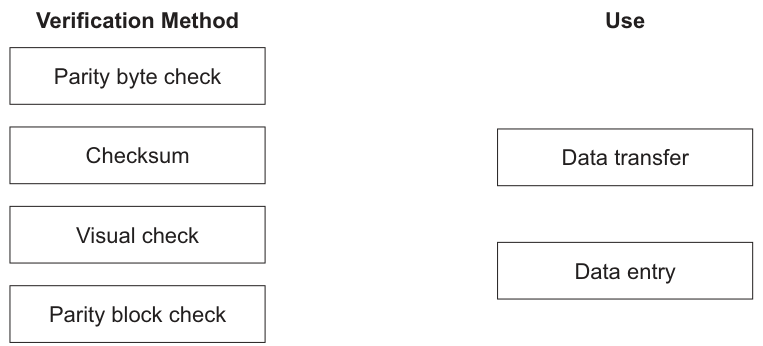
Answer
- Parity byte check → Data transfer
- Checksum → Data transfer
- Visual check → Data entry
- Parity block check → Data transfer
Parity byte check → Data transfer; Checksum → Data transfer; Visual check → Data entry; Parity block check → Data transfer
Background Concept
Verification is used to check that data has been copied or transferred correctly. It does not check whether the data is sensible or reasonable; that is validation.
In this syllabus, verification methods are often divided into two situations:
- Data entry: checking that what was entered matches the original source document.
- Data transfer: checking that data sent from one place to another has not been changed or corrupted in transmission.
Typical examples:
- Visual check is a data entry method. A person looks at the entered data and compares it with the original.
- Checksum is a data transfer method. A value is calculated from the data before and after transfer and compared.
- Parity byte check is a data transfer method. Extra parity information is used to detect transmission errors.
- Parity block check is also a data transfer method. It extends parity checking across a block of data.
Understanding the Question
The question gives four verification methods and asks you to match each one to either:
- Data transfer, or
- Data entry.
So this is not asking you to explain how each method works in detail. It is only asking you to recognise where each method is used.
Approach
Use the standard rule:
- If the method is about detecting errors while data is being sent, match it to data transfer.
- If the method is about checking what a user typed against the original source, match it to data entry.
Then classify each item:
- parity byte check → transmission
- checksum → transmission
- visual check → entry
- parity block check → transmission
Step-by-Step Reasoning
- Parity byte check uses parity information to detect whether bits may have changed during communication, so it is used in data transfer.
- Checksum is calculated from the data and compared after sending/receiving, so it is used in data transfer.
- Visual check means a person compares the entered data with the original document or source, so it is used in data entry.
- Parity block check checks a block of transmitted data using parity, so it is used in data transfer.
Therefore the correct matches are:
- Parity byte check → Data transfer
- Checksum → Data transfer
- Visual check → Data entry
- Parity block check → Data transfer
Key Takeaways
- Verification checks whether data has been copied or transmitted accurately.
- Visual check is associated with data entry.
- Checksum and parity-based methods are associated with data transfer.
- Do not confuse verification with validation.
Common Mistakes
- Matching visual check to data transfer. This is wrong because visual checking is done by a person comparing entered data with the source.
- Confusing verification with validation. Validation checks whether data is sensible; verification checks whether it was copied/transferred correctly.
- Thinking parity methods are for data entry. In this context, parity methods are used to detect transmission errors.
Things to Be Careful About
- Read the wording carefully: it asks for use during data transfer or data entry, not a definition of the method.
- Remember that several methods can match to the same category; here, three methods match to data transfer.
- In exam questions like this, use the standard textbook classification rather than unusual real-world edge cases.
Complete the table by describing each term.
| Term | Description |
|---|---|
| Copyright | |
| Open Source (Initiative) | |
| Shareware | |
| Software Licence |
Answer
| Term | Description |
|---|---|
| Copyright | Legal protection giving the creator/owner rights over the software and preventing copying or use without permission. |
| Open Source (Initiative) | Software whose source code is made available so it can be used, studied, modified and redistributed under its licence terms. |
| Shareware | Software distributed free on a trial or limited-use basis, with payment required for full or continued use. |
| Software Licence | A legal agreement stating the conditions under which software may be installed, copied, used or distributed. |
See completed table
Background Concept
This part is about software ownership and licensing. When software is created, it is not automatically free for anyone to copy or change. The creator or company that owns it has legal rights over it.
Copyright is the legal protection for original work, including software. It gives the owner control over copying, distribution and use.
A software licence is the set of rules that tells the user what they are allowed to do with the software. For example, it may limit the number of devices, forbid redistribution, or allow modification.
Different distribution models sit under licensing:
- Open source software makes the source code available and allows users to inspect, modify and often redistribute it, but still under licence conditions.
- Shareware is usually given out freely at first, but only as a trial, limited version or time-limited version.
So, copyright is about ownership rights, while a licence is about permission to use.
Understanding the Question
The question gives four terms and asks for a description of each. That means each answer should be short, precise and clearly different from the others.
A common challenge here is that some of these terms overlap. For example, open source software is still copyrighted, and it still has a licence. So the key is to define each one by its main idea:
- copyright = legal ownership/protection
- open source = source code available with permission to modify/use
- shareware = trial/limited-use distribution
- software licence = rules/conditions of use
Approach
For each row, identify the essential feature that makes that term unique:
- State what the term is.
- State its purpose or effect.
- Avoid mixing it up with another term.
A good exam answer here is one sentence per term, focused on the defining point.
Step-by-Step Reasoning
-
Copyright: This is not a type of software. It is the legal protection attached to the software. The key idea is that the owner has rights and others cannot legally copy or use it without permission.
-
Open Source (Initiative): The defining feature is access to the source code. Users are allowed to inspect it and usually modify and redistribute it, but only according to the stated open-source licence.
-
Shareware: The important idea is that it is not fully free software. It is usually provided so people can try it first, often with restricted features or a time limit, and then pay if they want full use.
-
Software Licence: This is the legal agreement or terms of use. It explains what the user can and cannot do, such as install, copy, share or modify the software.
The reason these definitions score well is that each one highlights a different role:
- ownership right
- source-code availability and modification rights
- trial distribution model
- usage agreement
Key Takeaways
- Copyright protects software legally.
- A software licence sets the rules for use.
- Open source does not mean "no copyright"; it means licensed access to source code and modification rights.
- Shareware is trial or limited-use software, not fully unrestricted software.
Common Mistakes
- Saying open source means free of charge. Open source refers mainly to source-code access and modification rights, not necessarily price.
- Saying shareware is freeware. Shareware is normally trial software, while freeware is fully free to use.
- Defining copyright as "a licence". Copyright is ownership protection; the licence is the permission granted.
- Forgetting that open source still has a licence. It is not public domain by default.
Things to Be Careful About
- Use legally accurate wording such as "permission", "rights", "conditions" and "owner".
- Do not claim users can do absolutely anything with open-source software; they must still follow the licence.
- Make each definition distinct. If two rows sound the same, one of them is probably too vague.
- Keep descriptions short and direct, because this is a definition question, not an essay.
Answer
- To provide a set of rules and standards for professional behaviour.
- To guide members in making ethical decisions and help protect clients, users and the reputation of the profession.
See explanation
Background Concept
A code of conduct is a set of rules or principles that members of a profession are expected to follow. In computing, professional bodies such as the BCS or IEEE publish codes of conduct or codes of ethics.
These codes exist because people working in computing can affect privacy, security, safety, fairness and access to information. Their decisions may affect large numbers of users, so technical ability alone is not enough; professionals also need ethical guidance.
A code of conduct typically covers ideas such as:
- acting honestly
- protecting confidential information
- respecting the law and intellectual property
- avoiding harm to users
- behaving professionally and responsibly
Understanding the Question
The question asks for the purpose of a code of conduct, not a list of rules from one. So the answer should explain why such a code is used.
The important points are:
- it sets expected standards of behaviour
- it guides ethical actions and protects the public and the profession
Because it is a 2-mark question, two clear points are enough.
Approach
Think in terms of function:
- What does the code do for the professional?
- What does it do for other people affected by the professional's work?
That leads naturally to two strong ideas:
- guidance/standards for behaviour
- protection of clients, users and the profession
Step-by-Step Reasoning
First, a code of conduct gives members a clear standard to follow. Without this, different people may make inconsistent or poor decisions. So one purpose is to define acceptable professional behaviour.
Second, a code of conduct helps with ethical decision-making. In computing, professionals may face issues involving personal data, software safety, bias, system misuse or copyright. The code provides principles to guide them.
Third, this guidance does not only help the professional. It also protects:
- clients and users, because they are less likely to be harmed by careless or unethical behaviour
- the profession, because common standards improve trust and reputation
So a good concise answer mentions both standards and protection/guidance.
Key Takeaways
- A code of conduct sets expected professional standards.
- It helps professionals choose ethical actions in difficult situations.
- It protects users, clients and public trust in the profession.
Common Mistakes
- Writing what a code of conduct contains instead of its purpose. The question asks why it exists.
- Giving only one vague point such as "to make people behave well". That is too general unless linked to standards or ethics.
- Confusing a code of conduct with a legal document. It may support lawful behaviour, but it is mainly professional and ethical guidance.
Things to Be Careful About
- Use the idea of professional behaviour rather than personal opinion.
- Make the answer purposeful: words like "provide", "guide", "protect" and "maintain standards" are useful.
- Do not overcomplicate it with details of a specific body unless asked.
- For a short-mark question, give two distinct points rather than repeating the same idea in different words.
Answer
- Relative addressing is when the effective address is found by adding the address/operand in the instruction to the contents of a register.
The effective address is calculated by adding the operand/address in the instruction to the contents of a register.
Background Concept
Addressing modes describe how the CPU finds the data needed by an instruction. The operand written in the instruction is not always the actual memory location used. In some modes it is the value itself, in some it is a memory address, and in others it must be combined with something else.
Relative addressing is a mode where the final address used by the CPU is calculated from two parts:
- a value given in the instruction
- the contents of a register
So the instruction does not directly give the exact memory location. Instead, it gives an offset or base value that is combined with a register value to form the effective address.
Understanding the Question
This part asks only for the meaning of relative addressing. It is not asking for an example calculation or for a comparison with other addressing modes. For 1 mark, the key idea needed is that the address used is calculated relative to a register value, rather than being used exactly as written.
Approach
For a definition question like this, the safest method is to include the essential feature:
- the address is calculated
- it is found by adding the operand/address in the instruction to the contents of a register
That is the core idea the examiner is looking for.
Step-by-Step Reasoning
In direct addressing, the instruction gives the address to use.
In relative addressing, the instruction gives a value that is not enough on its own. The CPU must combine it with a register value.
So if an instruction contained an address part of 100 and the register contained 5, the effective address would become 105. The data would then be taken from memory location 105.
That is why a correct definition must mention both:
- the operand/address from the instruction
- the contents of a register
and say that these are added to form the address actually used.
Key Takeaways
- Relative addressing is an addressing mode.
- The effective address is calculated, not taken directly.
- It uses the operand in the instruction together with a register value.
Common Mistakes
- Saying only "it uses a register" without explaining that an address is calculated. That is too vague.
- Confusing relative addressing with direct addressing. In direct addressing, the address in the instruction is used as it is.
- Describing the operand as the data value itself. In this mode, it helps form the address, not necessarily the data.
Things to Be Careful About
- The question asks for relative addressing, so mention address calculation, not just storage or transfer.
- For full accuracy, say the address is formed by adding the instruction's address/operand to a register value.
- Do not describe immediate addressing by mistake; immediate addressing uses the value directly rather than calculating an address.
Registers such as the Accumulator (ACC) and the Index Register (IX) are used in the CPU.
Identify two special purpose registers used in the CPU. Do not include the ACC or IX in your answers.
1 .........................................................................................................................................
2 .........................................................................................................................................
Answer
- Program Counter (PC)
- Memory Address Register (MAR)
Program Counter (PC); Memory Address Register (MAR)
Background Concept
A CPU contains several registers, which are very small, very fast storage locations used during processing. Some registers are general purpose or commonly used in instruction execution, while others have specific fixed roles and are called special purpose registers.
Examples of special purpose registers include:
- Program Counter (PC) - stores the address of the next instruction
- Memory Address Register (MAR) - stores the address in memory to be accessed
- Memory Data Register (MDR) - stores data being read from or written to memory
- Current Instruction Register (CIR) - stores the current instruction being decoded/executed
Understanding the Question
The question asks for any two special purpose registers used in the CPU, but it specifically says not to include the ACC or IX. That means you must choose two others from the standard CPU register set.
This is a recall question. You are not being asked to describe what the registers do, only to identify them.
Approach
Choose two well-known special purpose registers that are always accepted in standard CPU architecture answers. The safest choices are:
- Program Counter (PC)
- Memory Address Register (MAR)
These are clearly special purpose and are not excluded by the question.
Step-by-Step Reasoning
The exclusion tells you not to write:
- Accumulator (ACC)
- Index Register (IX)
So you need two other register names.
A good strategy in CPU questions is to think of the fetch-execute cycle. During that cycle, the CPU commonly uses:
- PC to point to the next instruction
- MAR to hold the memory address being accessed
- MDR to hold the data from memory
- CIR to hold the current instruction
Any two of these standard special purpose registers would be acceptable. Writing PC and MAR is a clear and safe pair.
Key Takeaways
- Special purpose registers have fixed roles in CPU operation.
- Common examples are PC, MAR, MDR and CIR.
- Always read restrictions carefully so you do not give excluded answers.
Common Mistakes
- Giving ACC or IX even though the question says not to. Those answers would not be credited.
- Naming CPU components that are not registers, such as ALU or CU.
- Writing vague terms like "memory register" without the correct register name.
Things to Be Careful About
- The question asks for register names only, so spell them correctly.
- Use accepted abbreviations only if they are standard, such as PC or MAR.
- Do not list storage devices or memory types; only CPU registers are valid here.
The following table shows part of the instruction set for a processor. The processor has two registers: the ACC and an IX.
| Instruction | Explanation |
| :--- | :--- | :--- |
| Opcode | Operand | |
| LDM | #n | Immediate addressing. Load the number n to ACC |
| LDD | <address> | Direct addressing. Load the contents of the location at the given address to ACC |
| LDI | <address> | Indirect addressing. The address to be used is at the given address. Load the contents of this second address to ACC |
| LDX | <address> | Indexed addressing. Form the address from <address> + the contents of the index register. Copy the contents of this calculated address to ACC |
| LDR | #n | Immediate addressing. Load the number n to IX |
<address> can be an absolute or symbolic address
# denotes a denary number, e.g. #127
The current contents of the main memory and the index register are shown.
| Address | Instruction |
|---|---|
| 98 | 8 |
| 99 | 16 |
| 100 | 3 |
| 101 | 98 |
| 102 | 32 |
| IX | 2 |
Write the contents of the ACC after each instruction is executed.
| Instruction | Value in ACC |
|---|---|
| LDM #98 | |
| LDI 101 | |
| LDX 100 |
Working
LDM #98loads the value98directly into the ACC.LDI 101uses the contents of address101, which is98, then loads the contents of address98, which is8.LDX 100uses100 + IX = 100 + 2 = 102, then loads the contents of address102, which is32.
Answer
| Instruction | Value in ACC |
|---|---|
| LDM #98 | 98 |
| LDI 101 | 8 |
| LDX 100 | 32 |
98, 8, 32
Background Concept
This question is about addressing modes and tracing what happens when instructions are executed.
An addressing mode tells the CPU how to obtain the value needed by an instruction.
For this instruction set:
LDM #nuses immediate addressing: the value is written directly in the instruction.LDD <address>uses direct addressing: go to that address and load the value found there.LDI <address>uses indirect addressing: first go to the given address, treat the value found there as a second address, then load the value from that second address.LDX <address>uses indexed addressing: add the given address to the contents of the index registerIX, then load the value from the resulting address.
Tracing means following these rules carefully using the memory table provided.
Understanding the Question
You are given:
- a small instruction set
- the contents of memory locations 98 to 102
- the value of the index register
IX = 2
You must work out what value ends up in the accumulator after each instruction is executed. The important point is that each instruction uses a different addressing rule, so you must not treat them all the same way.
The memory contents are:
- address 98 contains 8
- address 99 contains 16
- address 100 contains 3
- address 101 contains 98
- address 102 contains 32
Approach
Take each instruction separately.
- Identify its addressing mode from the opcode.
- Apply the correct rule for that mode.
- Use the memory table only as many times as needed.
- Write the final value loaded into
ACC.
A very common exam skill here is distinguishing between:
- immediate: use the number itself
- direct: use the contents at the address
- indirect: use an address stored at an address
- indexed: calculate a new address using
IX
Step-by-Step Reasoning
First instruction: LDM #98
LDM means immediate addressing. The # symbol tells you the operand is the actual number to load, not a memory address.
So the CPU loads 98 directly into ACC.
Result: ACC = 98
Second instruction: LDI 101
LDI means indirect addressing. This takes two memory lookups.
- Look at address 101.
- The contents of address 101 are 98.
- That 98 is not the final value; it is the second address to use.
- Now look at address 98.
- The contents of address 98 are 8.
So the accumulator receives 8.
Result: ACC = 8
Third instruction: LDX 100
LDX means indexed addressing.
- Start with the given address: 100
- Add the contents of
IX: 2 - Calculated address = 102
- Look at address 102
- The contents of address 102 are 32
So the accumulator receives 32.
Result: ACC = 32
That gives the final answers:
LDM #98-> 98LDI 101-> 8LDX 100-> 32
Key Takeaways
- Immediate addressing loads the value written in the instruction.
- Indirect addressing needs two memory accesses.
- Indexed addressing requires an address calculation using
IX. - In trace questions, always follow the rule for the specific opcode before reading the table.
Common Mistakes
- Treating
LDM #98as if 98 were a memory address and answering 8. The#means immediate value, so the answer is 98. - Stopping too early with
LDI 101and answering 98. In indirect addressing, 98 is the second address, not the final value. - Forgetting to add
IXinLDX 100. Indexed addressing must useaddress + IX. - Adding incorrectly and using the wrong memory location.
Things to Be Careful About
- Read the opcode carefully because one letter changes the whole method.
- Use the memory table exactly as given; the left column is the address and the right column is the value stored there.
- For indirect addressing, make sure you perform both stages.
- For indexed addressing, use the current
IXvalue given in the question, which here is 2.
A student buys a new computer. The table shows the specifications of the old computer and the new computer.
| Old computer | New computer |
|---|---|
| 1.8 GHz dual core processor | 2.3 GHz dual core processor |
| 16 MB cache | 32 MB cache |
Explain why increasing the clock speed and increasing the cache memory will improve the performance of the computer.
Clock speed ..............................................................................................................................
Cache memory ..........................................................................................................................
Answer
- Clock speed: A higher clock speed means more fetch-execute cycles each second, so instructions can be processed faster.
- Cache memory: A larger cache can store more frequently used data/instructions close to the CPU, so the CPU needs to access slower RAM less often and spends less time waiting.
Higher clock speed gives more cycles per second so instructions are processed faster; larger cache stores more frequently used data/instructions near the CPU so there are fewer accesses to slower RAM.
Background Concept
Computer performance depends on several factors, including processor clock speed and cache size.
Clock speed is the rate at which the CPU clock ticks, usually measured in GHz. Each tick helps coordinate operations in the fetch-execute cycle. In general, a higher clock speed allows the processor to carry out more cycles per second.
Cache memory is a small, very fast memory located close to or inside the CPU. It stores frequently used instructions and data. Because cache is much faster than RAM, the CPU can get what it needs more quickly if it is already in cache.
Understanding the Question
The question compares an old computer and a new computer. The new one has:
- a higher clock speed: 2.3 GHz instead of 1.8 GHz
- a larger cache: 32 MB instead of 16 MB
You are asked to explain why both of these changes improve performance. This means you should not just say "it is faster". You need to connect each specification to the reason the CPU can do its work more efficiently.
Approach
Treat the two headings separately:
- For clock speed, explain that more cycles happen each second, so processing can happen faster.
- For cache memory, explain that more frequently used data/instructions can be kept in fast memory near the CPU, reducing accesses to slower main memory.
The key to scoring well is giving cause and effect, not just repeating the specification.
Step-by-Step Reasoning
Clock speed:
A processor works through the fetch-execute cycle repeatedly. The clock controls the timing of these operations. If the clock speed increases from 1.8 GHz to 2.3 GHz, the CPU can perform more clock cycles in one second.
That means:
- more processing steps can be completed per second
- instructions can be fetched, decoded and executed more quickly
- overall processing is faster
So increasing clock speed improves performance because the CPU can carry out more work in the same amount of time.
Cache memory:
The CPU often needs the same instructions and data repeatedly. If these are stored in cache, they can be accessed much faster than if the CPU has to fetch them from RAM.
When the cache is larger:
- more frequently used data and instructions can be stored there
- the chance of finding needed items in cache is higher
- the CPU has to go to slower RAM less often
- the CPU spends less time waiting for data
So increasing cache improves performance because memory access becomes faster on average.
The question says increasing clock speed and increasing cache memory, so a full answer should explain both separately.
Key Takeaways
- Higher clock speed usually means more CPU cycles per second.
- More cycles per second usually means faster instruction processing.
- Cache is fast memory close to the CPU.
- Larger cache reduces the number of accesses to slower main memory.
Common Mistakes
- Saying only "clock speed is faster" without explaining that it means more cycles per second.
- Saying only "cache stores data" without explaining that it reduces access to slower RAM.
- Confusing cache with secondary storage such as an SSD or hard disk.
- Repeating the figures from the table without linking them to performance.
Things to Be Careful About
- The question asks why performance improves, so include the mechanism, not just the result.
- Cache is about speed of access, not permanent storage capacity.
- A larger cache does not guarantee every task doubles in speed; it improves performance because needed items are more likely to be available quickly.
- Keep the two explanations separate: clock speed affects cycle rate, while cache affects memory access time.
A relational database, SHIPPING, stores data about the ships in a company and the containers that are carried on the ships.
The database has the following tables:
CONTAINER(ContainerID, Type, Weight, OwnerName, ShipID)
SHIP(ShipID, Type, Capacity, ShipName)
Describe the relationship between the two tables. Refer to the primary and foreign keys in your answer.
Answer
ShipIDis the primary key inSHIP.ContainerIDis the primary key inCONTAINER.ShipIDinCONTAINERis a foreign key that referencesSHIP(ShipID).- This gives a one-to-many relationship: one ship can carry many containers, but each container is linked to one ship.
One-to-many: SHIP.ShipID is the primary key, CONTAINER.ContainerID is the primary key, and CONTAINER.ShipID is a foreign key referencing SHIP(ShipID).
Background Concept
In a relational database, a primary key uniquely identifies each record in a table. A foreign key is a field in one table that stores values matching the primary key of another table, so that the tables can be linked.
The placement of the foreign key tells you the relationship:
- if table A's primary key appears as a foreign key in table B,
- then one record in A can be related to many records in B.
That is a one-to-many relationship.
Understanding the Question
The question gives two tables:
SHIP(ShipID, Type, Capacity, ShipName)CONTAINER(ContainerID, Type, Weight, OwnerName, ShipID)
You are asked to describe the relationship between them and specifically mention the primary key and foreign key.
So this is not just asking for "one-to-many" on its own. You must also say which field is the primary key and which field is the foreign key.
Approach
First, identify the unique identifier in each table:
ShipIDidentifies each ship.ContainerIDidentifies each container.
Then look for the repeated linking field. ShipID appears in both tables, so in CONTAINER it must be the foreign key linking each container to a ship.
From that, decide the cardinality:
- one ship can have many containers
- each container is assigned to one ship
Step-by-Step Reasoning
In SHIP, the field ShipID is the field that uniquely identifies a ship, so it is the primary key.
In CONTAINER, the field ContainerID uniquely identifies a container, so it is the primary key for that table.
The field ShipID also appears in CONTAINER. Since it matches the primary key in SHIP, it is acting as a foreign key.
That means each container record stores the ShipID of the ship carrying it.
Because many different container records can contain the same ShipID, several containers can be linked to the same ship. But each container record contains only one ShipID, so each container is linked to one ship.
Therefore the relationship is:
SHIPtoCONTAINER= one-to-many
Key Takeaways
- A primary key uniquely identifies a record in its own table.
- A foreign key links one table to another by storing the primary key value from the related table.
- If the primary key of one table appears many times in another table, the relationship is one-to-many.
Common Mistakes
- Saying only "one-to-many" without naming the key fields.
- Calling
ShipIDthe primary key in both tables. InCONTAINER,ShipIDis a foreign key, not the primary key. - Reversing the meaning and saying one container has many ships.
- Forgetting that
ContainerIDis the primary key for theCONTAINERtable.
Things to Be Careful About
- Use the exact field names from the question:
ShipIDandContainerID. - Be clear which table each key belongs to.
- State the relationship from the data structure, not from guesswork about real ships and containers.
- Make sure your answer includes both the relationship and the primary/foreign key references, because the question explicitly asks for both.
The table CONTAINER needs an additional field to store the data for the last inspection date.
Write a Structured Query Language (SQL) script to add one field to the table CONTAINER to store the date of last inspection of the container, for example 08/07/2019.
Answer
ALTER TABLE CONTAINER
ADD LastInspectionDate DATE;
ALTER TABLE CONTAINER
ADD LastInspectionDate DATE;
Background Concept
SQL DDL stands for Data Definition Language. These are SQL commands used to create or change the structure of a database, such as:
CREATE TABLEALTER TABLEDROP TABLE
When a table already exists and you want to add a new field, the normal command is ALTER TABLE ... ADD.
A field storing a calendar date should use a suitable date data type, typically DATE.
Understanding the Question
The table CONTAINER already exists. The question says it needs an additional field to store the last inspection date.
So you are not creating the whole table again. You are changing the existing table by adding one new field.
The example date 08/07/2019 shows the field must store a date value, so the data type should be DATE.
Approach
Because the table already exists:
- use
ALTER TABLE CONTAINER - use
ADDto insert a new field definition - choose a sensible field name such as
LastInspectionDate - assign the type
DATE
That is enough for full credit.
Step-by-Step Reasoning
ALTER TABLE CONTAINER tells the DBMS that the existing table called CONTAINER is being changed.
ADD LastInspectionDate DATE says to add one new field called LastInspectionDate, and that field will store date values.
So the complete SQL statement is:
ALTER TABLE CONTAINER
ADD LastInspectionDate DATE;
This matches the requirement exactly:
- table altered:
CONTAINER - one field added
- field stores dates
Key Takeaways
- Use
ALTER TABLEwhen modifying an existing table. - Use
ADDto add a new field. - Choose a data type that matches the kind of data stored.
Common Mistakes
- Writing
CREATE TABLEinstead ofALTER TABLE. - Using a text type instead of
DATEfor a date field. - Forgetting to name the new field.
- Adding more than one field when the question asks for only one.
Things to Be Careful About
- The question asks for an SQL script, but for this task a single correct SQL statement is enough.
- Keep the table name exactly as given:
CONTAINER. - Use an appropriate field name; different sensible names may be accepted, but it must clearly represent the last inspection date.
- Do not include unnecessary clauses or recreate the table structure.
Write an SQL script to return the number of containers stored in the database for the ship with the name Caledonia.
Answer
SELECT COUNT(*)
FROM CONTAINER
JOIN SHIP ON CONTAINER.ShipID = SHIP.ShipID
WHERE ShipName = 'Caledonia';
SELECT COUNT(*)
FROM CONTAINER
JOIN SHIP ON CONTAINER.ShipID = SHIP.ShipID
WHERE ShipName = 'Caledonia';
Background Concept
A SELECT query is used to retrieve data from one or more tables. When the data you need depends on fields stored in different tables, you must join those tables.
Here the link between the tables is:
SHIP.ShipIDas the primary keyCONTAINER.ShipIDas the foreign key
To count how many rows match a condition, SQL uses the aggregate function COUNT(*).
So the overall pattern is:
- join the tables
- filter the correct records
- count the remaining rows
Understanding the Question
You are asked to return the number of containers for the ship with the name Caledonia.
Important detail:
- the table
CONTAINERhas the containers - the field
ShipNameis not inCONTAINER; it is inSHIP
So you cannot solve this using only CONTAINER. You must connect CONTAINER to SHIP through ShipID, then select the ship whose name is Caledonia, and count the matching container rows.
Approach
The required strategy is:
- start from
CONTAINERbecause those are the rows being counted - join
SHIPusingCONTAINER.ShipID = SHIP.ShipID - use
WHERE ShipName = 'Caledonia' - use
COUNT(*)to return the number of matching containers
This is the cleanest standard SQL solution.
Step-by-Step Reasoning
SELECT COUNT(*) means the query will return one number: the number of rows that match.
FROM CONTAINER means the counting is based on container records.
JOIN SHIP ON CONTAINER.ShipID = SHIP.ShipID connects each container to the ship that carries it. This works because ShipID is the linking field between the tables.
WHERE ShipName = 'Caledonia' filters the joined data so only containers on the ship called Caledonia are considered.
After the filtering, COUNT(*) counts those container rows.
So the final query is:
SELECT COUNT(*)
FROM CONTAINER
JOIN SHIP ON CONTAINER.ShipID = SHIP.ShipID
WHERE ShipName = 'Caledonia';
This returns exactly one value: the number of containers linked to the ship named Caledonia.
Key Takeaways
- Use a join when the filter field is in a different table from the data being counted.
- Join parent and child tables using the primary key and foreign key.
- Use
COUNT(*)to return the number of matching rows.
Common Mistakes
- Trying to query only
CONTAINERand usingShipNamethere, even thoughShipNameis inSHIP. - Forgetting the join condition, which can produce incorrect results.
- Counting
Shiprows instead ofCONTAINERrows. - Misspelling
'Caledonia'or forgetting the quotes around the text value.
Things to Be Careful About
- Use the exact linking fields:
CONTAINER.ShipID = SHIP.ShipID. - Use
COUNT(*)or another valid count expression; the aim is to return a total number. - The condition must be on
ShipName, notType,ShipID, or any container field. - Text values in SQL should be enclosed in single quotes.
- If field names are repeated across tables, qualifying them with table names avoids ambiguity.
Answer
- A developer interface provides tools for a developer to create and modify the database and its applications.
- It is used to design items such as tables, relationships, queries, forms and reports.
A developer interface provides tools for creating and modifying the database and related objects such as tables, relationships, queries, forms and reports.
Background Concept
A DBMS usually provides different interfaces for different users. For example:
- an end-user interface for entering or viewing data
- a developer interface for building and changing the database system
A developer interface is aimed at the person designing or maintaining the database. It provides tools to create the structure of the database and other database objects.
These objects can include:
- tables
- relationships
- queries
- forms
- reports
- validation rules or other application components
Understanding the Question
The question asks for the purpose of a developer interface in a DBMS. That means it wants what the interface is used for, not just a vague statement like "it helps the developer".
A strong answer should mention both:
- who it is for: the developer
- what it is used to create or edit: the database structure and related objects
Approach
To answer clearly:
- state that the interface is for the database developer or application developer
- explain that it is used to create, amend and manage database objects
- give examples of those objects
That gives a complete purpose-based description.
Step-by-Step Reasoning
A developer interface is not mainly for everyday data entry. Its role is to support the building of the database system.
That means it lets the developer:
- define tables and fields
- set up relationships between tables
- create queries to retrieve or update data
- design forms for input screens
- generate reports for output
So the purpose is to provide tools to develop and maintain the database and its front-end components.
Key Takeaways
- Different DBMS interfaces exist for different types of users.
- A developer interface supports the creation and maintenance of database objects.
- Good answers usually mention examples such as tables, queries, forms and reports.
Common Mistakes
- Describing a user interface for entering data instead of a developer interface.
- Saying only "to access the database" without mentioning development tasks.
- Giving examples of hardware or networking tools, which are not relevant here.
Things to Be Careful About
- Focus on the purpose of the interface, not just its name.
- Mention development or maintenance of the database structure or objects.
- Keep the answer in DBMS terms such as tables, relationships, queries, forms and reports.
- Do not confuse the developer interface with DBMS security features or end-user data-entry screens.
A local area network (LAN) has five computers, one switch and one server.
Answer
- Covers a small geographical area, such as one building or site.
- Usually owned and managed by a single organisation.
Covers a small geographical area and is usually owned and managed by one organisation.
Background Concept
A local area network (LAN) is a network that connects devices over a limited geographical area. Typical examples are a school, office, home, or one campus site. Because the network is local, it is usually under the control of one person or organisation rather than a telecommunications company.
Common LAN characteristics include:
- small geographical coverage
- high data transfer speeds compared with a WAN
- private ownership and management
- connecting devices such as computers, printers, switches, and servers within one site
Understanding the Question
The question asks for the characteristics of a LAN, not an example of a LAN and not a diagram. For 2 marks, the examiner is usually expecting two clear properties.
The best answer is to give the core textbook features of a LAN:
- it covers a small area
- it is normally owned or managed by one organisation
Approach
Pick the most standard identifying features of a LAN. In exam questions like this, short precise statements score better than vague comments such as "used in offices".
Step-by-Step Reasoning
A LAN is defined mainly by its scale and control:
- Small geographical area: a LAN does not stretch across cities or countries. It is confined to somewhere local, such as a building or site.
- Single organisation control: the hardware, cabling, switch, and server are usually installed and managed by the same organisation.
These two points are enough for full marks here.
Key Takeaways
- A LAN connects devices in a limited local area.
- A LAN is usually privately owned or controlled by one organisation.
- When asked for characteristics, give defining features rather than examples.
Common Mistakes
- Saying only that a LAN "connects computers". That is too general because many networks do that.
- Describing a WAN instead, for example saying it covers a large geographical area.
- Giving topology names such as star or bus instead of LAN characteristics.
Things to Be Careful About
- Use the word small or local area clearly.
- Make sure your second point is about ownership/management or another accepted LAN feature, not just a repeat of the first point.
- Do not confuse the type of network (LAN) with the arrangement of devices (topology).
Complete the following diagram to show how these devices are connected in a star topology.
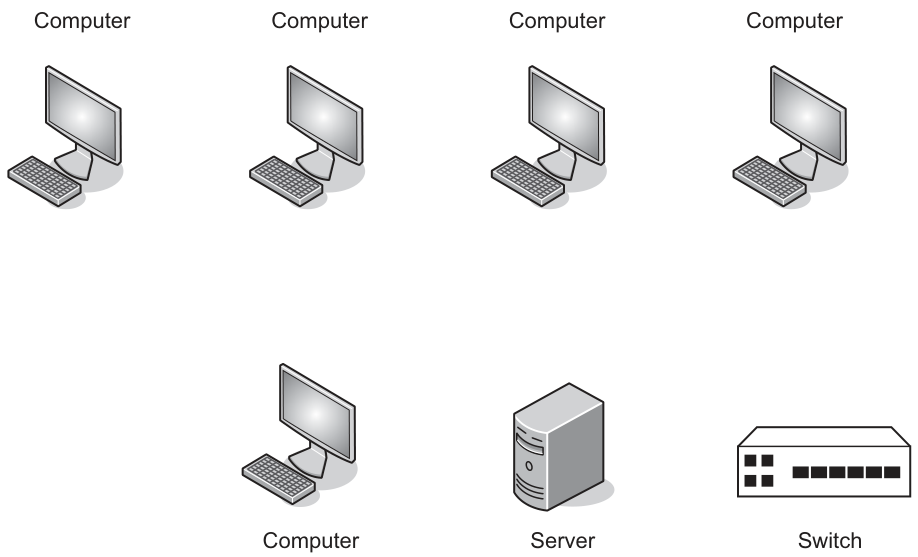
Answer
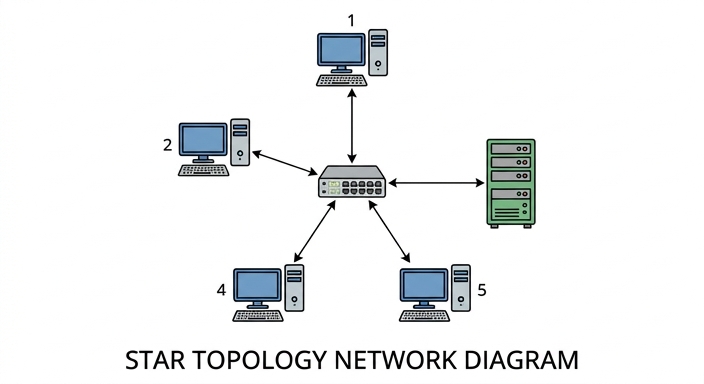
See star topology diagram
Background Concept
In a star topology, every device has its own separate connection to one central device, usually a switch or hub. The central device is the point through which all communication passes.
Important features of a star topology are:
- one central device
- each computer or server connects directly to that central device
- end devices are not connected directly to each other
Understanding the Question
The diagram already shows five computers, one server, and one switch. The task is to complete it as a star topology.
That means the switch must be the centre, and every other device must have exactly one direct line to the switch.
Approach
Find the central networking device first. In this question, that is the switch. Then draw one separate connection from each of the five computers to the switch, and one connection from the server to the switch. Do not draw lines between computers.
Step-by-Step Reasoning
A correct star network here has:
- Computer 1 connected to the switch
- Computer 2 connected to the switch
- Computer 3 connected to the switch
- Computer 4 connected to the switch
- Computer 5 connected to the switch
- Server connected to the switch
There should be no other connections.
This is what makes the topology a star: all devices radiate out from the switch like spokes from the centre.
Key Takeaways
- In a star topology, the switch is the centre.
- Every node has its own direct link to the switch.
- There are no direct device-to-device links in the basic star layout.
Common Mistakes
- Connecting computers to each other as well as to the switch.
- Leaving the server unconnected.
- Drawing one long shared cable, which would represent a bus topology instead.
Things to Be Careful About
- Every device except the switch must connect directly to the switch.
- The server is also a node on the network, so it needs its own connection.
- Do not add extra lines not required by the topology.
Answer
- The source host sends the packet to the central switch.
- The switch reads the destination address in the packet.
- The switch forwards the packet only to the connection for the destination host.
The source host sends the packet to the switch, the switch checks the destination address, and it forwards the packet to the destination host only.
Background Concept
In a star topology, devices do not send data directly to each other over a shared cable. Instead, each device connects to a central switch. When one host wants to communicate with another, the packet first goes to the switch.
A packet contains data plus control information, including addressing information. A switch uses this addressing information to decide where the packet should go.
Understanding the Question
The question asks what happens when one host sends data to another in a star topology. Since the network in the stem includes a switch, the expected explanation is about the switch receiving the packet and then sending it to the correct destination.
Approach
Describe the journey in three stages:
- source host sends to switch
- switch checks the destination address
- switch sends the packet on the correct link to the destination host
This matches the network layout in a star topology.
Step-by-Step Reasoning
- Source transmits: the sending host places the packet on its own connection to the switch.
- Switch receives: because the switch is the centre of the star, the packet always reaches the switch first.
- Address checked: the switch examines the destination address in the packet.
- Correct forwarding: the switch sends the packet out through the port connected to the destination host.
- Destination receives: the intended host receives the packet.
The important idea is that the packet is not broadcast blindly to every device in the simplified exam description; the switch uses the destination information to forward it appropriately.
Key Takeaways
- In a star topology, traffic passes through the central switch.
- The switch reads the destination address.
- The switch forwards the packet to the correct device.
Common Mistakes
- Saying the source host sends directly to the destination host without involving the switch.
- Describing a bus network instead, where devices share one main cable.
- Forgetting to mention the destination address check.
Things to Be Careful About
- Use the term switch, not just "central computer".
- Make clear that the switch decides where to send the packet.
- Do not mix this up with routing across the internet; this question is about a LAN star topology.
Another type of network is a bus network.
Ethernet is used to transmit and receive data between the devices on the bus network.
Describe how collisions are detected and managed on this network.
Answer
- A device listens to check whether the bus is free before transmitting.
- If two devices transmit at the same time, a collision is detected on the network.
- The devices stop transmitting, wait for a random time, then try to retransmit.
Devices listen before sending; if two send together a collision is detected; they stop, wait a random time, and retransmit.
Background Concept
A bus network uses one shared communication line. Because all devices use the same cable, two devices may try to transmit at the same time. If this happens, the signals interfere with each other. This is called a collision.
Ethernet on a shared medium uses CSMA/CD:
- Carrier Sense: listen first to see whether the line is busy
- Multiple Access: many devices share the same medium
- Collision Detection: detect when two transmissions overlap
Once a collision happens, devices must recover and try again later.
Understanding the Question
The question is specifically about a bus network using Ethernet. It asks both how collisions are detected and how they are managed.
So a complete answer needs both parts:
- devices check the line and detect a collision
- they stop and retransmit after a delay
Approach
Use the standard CSMA/CD sequence:
- listen before sending
- detect if a collision happens
- stop transmission
- wait a random backoff time
- retransmit
Step-by-Step Reasoning
In a bus network, all devices share one cable, so only one should transmit successfully at a time.
- Before sending, a device listens to the network to check whether the cable is currently in use.
- If the cable seems free, it starts transmitting.
- Sometimes two devices both decide the line is free and start transmitting almost together.
- Their signals interfere. This is the collision.
- The devices detect that a collision has occurred.
- They stop transmitting because the current data has been corrupted.
- Each waits for a random period of time so they are less likely to clash again.
- After waiting, they attempt to retransmit.
The random wait matters: if both retried immediately, another collision could happen again.
Key Takeaways
- Bus networks use a shared medium, so collisions are possible.
- CSMA/CD is the standard method for dealing with collisions on shared Ethernet.
- The recovery step is to stop, wait a random time, and retransmit.
Common Mistakes
- Saying collisions cannot happen on a bus network. They can, because the cable is shared.
- Mentioning only detection but not what happens next.
- Forgetting the random delay and simply saying "send again immediately".
Things to Be Careful About
- This explanation applies to shared-medium Ethernet, such as the exam's bus network context.
- The key word is random waiting time or backoff period.
- Do not describe switch-based star behaviour here; this part is specifically about a bus network.
Complete the table by identifying one threat to computer and data security posed by networks and the internet.
Describe the threat and give a method of prevention.
| Threat | Description | Prevention |
|---|---|---|
Answer
| Threat | Description | Prevention |
|---|---|---|
| Phishing | Fraudulent emails or websites pretend to be genuine in order to trick a user into revealing usernames, passwords or bank details. | User education and checking links carefully before entering details. |
See completed table
Background Concept
A network or internet threat is something that can harm computer systems, steal data, or trick users into giving away private information. Common examples include malware, hacking, phishing, and pharming.
A good security answer usually has three parts:
- the name of the threat
- what the threat does
- how to reduce or prevent it
Understanding the Question
The question asks for one threat only. That means you do not need several examples. You just need one complete row with:
- the threat name
- a description of the threat
- a prevention method
Approach
Choose a threat that is easy to explain clearly. Phishing is a strong choice because it naturally leads to a clear prevention method.
Then write:
- what phishing is
- what information it tries to steal
- how users can avoid it
Step-by-Step Reasoning
The chosen threat is phishing.
- Threat: phishing
- Description: the attacker sends fake emails or creates fake websites that look genuine. The aim is to trick the victim into typing in confidential information such as usernames, passwords, or bank details.
- Prevention: user education helps people recognise suspicious emails and fake links. A user should verify links before clicking and avoid entering details on untrusted pages.
Any one valid threat with a correct description and matching prevention could score, but the answer must include all three parts.
Key Takeaways
- Security threats should be named precisely.
- A complete answer includes both the danger and a realistic prevention.
- Prevention must match the chosen threat.
Common Mistakes
- Giving only the threat name with no description.
- Giving a prevention method that does not fit the threat.
- Naming something too vague, such as just "internet", instead of a specific threat.
Things to Be Careful About
- The question asks for one threat, so one well-developed example is enough.
- Make sure the description explains the mechanism of the threat, not just that it is "bad".
- The prevention should be practical and specific, such as training, anti-malware, firewall use, authentication, or careful link checking depending on the threat chosen.
A sound file is compressed by reducing the sampling rate.
State whether this is lossless or lossy compression. Justify your choice.
Type of compression .................................................................................................................
Justification ...............................................................................................................................
Answer
- Type of compression: lossy
- Justification: reducing the sampling rate removes some of the sample data, so the original sound cannot be reconstructed exactly.
Lossy — reducing the sampling rate removes data, so the original cannot be reconstructed exactly.
Background Concept
Sound is stored digitally by taking samples of the original analogue waveform at regular intervals. The sampling rate is how many samples are taken per second. A higher sampling rate keeps more detail from the original sound; a lower sampling rate keeps less detail.
Compression can be either lossless or lossy. Lossless compression reduces file size without throwing away information, so the original can be recreated exactly. Lossy compression reduces file size by permanently removing some data, which means the reconstructed file is not identical to the original.
Understanding the Question
The question says the sound file is compressed by reducing the sampling rate. That is the key clue. We are not being asked about a named compression method such as RLE; we are being asked to decide whether lowering the sampling rate keeps all the original data or discards some of it.
Approach
Ask one simple question: after reducing the sampling rate, can the exact original sound file be recovered? If the answer is no, then the compression is lossy. Then justify it by referring to the missing samples.
Step-by-Step Reasoning
Reducing the sampling rate means fewer sound samples are stored each second.
Those missing samples were part of the original sound data.
Because some original data has been removed, the sound cannot be rebuilt exactly as it was before compression.
That matches the definition of lossy compression.
A good justification must mention loss of data, not just "the file gets smaller". Both lossy and lossless methods reduce file size, so file-size reduction alone is not enough.
Key Takeaways
- Lowering sampling rate reduces sound quality because less of the waveform is captured.
- If original data is discarded and cannot be recovered exactly, the method is lossy.
- The definition of lossless is exact reconstruction of the original.
Common Mistakes
- Saying "lossless" because the file is still usable. A file can still play correctly and yet be lossy.
- Saying only "the file size is reduced" as the justification. That does not distinguish lossy from lossless.
- Confusing sampling rate with bit depth. Both affect sound quality and file size, but the question specifically mentions sampling rate.
Things to Be Careful About
Use the exact idea of irreversible data loss in the justification. In exam questions, the mark is usually for recognising that reducing the sampling rate removes samples, so the original sound cannot be recreated exactly.
The following table shows some words and corresponding denary values.
| Word | Denary value |
|---|---|
| Computing | 55 |
| Science | 56 |
| Computers | 57 |
| are | 58 |
| Brilliant! | 59 |
| is | 60 |
| Fun! | 61 |
| Amazing! | 62 |
The following table shows three bytes of data that have been received.
Use the table to find the corresponding words from the binary values received.
| Binary value | 00111000 | 00111100 | 00111110 |
|---|---|---|---|
| Word |
Working .....................................................................................................................................
Working
00111000 = 56
00111100 = 60
00111110 = 62
Answer
| Binary value | 00111000 | 00111100 | 00111110 |
|---|---|---|---|
| Word | Science | is | Amazing! |
Science, is, Amazing!
Background Concept
Binary is base 2, so each bit position has a place value that is a power of 2. In an 8-bit number, the place values from left to right are 128, 64, 32, 16, 8, 4, 2, 1. To convert a binary value to denary, add the place values where there is a 1.
Once the denary number is known, this question uses a lookup table to map that value to a word.
Understanding the Question
You are given three 8-bit binary values and a table that pairs words with denary values from 55 to 62. The task is to work out the denary value of each binary byte, then find the matching word from the table.
Approach
Convert each binary value into denary. Then read across the provided word table and select the word with the same denary value.
Step-by-Step Reasoning
For 00111000:
- The 1s are in the 32, 16 and 8 positions.
- So the value is .
- Denary 56 corresponds to Science.
For 00111100:
- The 1s are in the 32, 16, 8 and 4 positions.
- So the value is .
- Denary 60 corresponds to is.
For 00111110:
- The 1s are in the 32, 16, 8, 4 and 2 positions.
- So the value is .
- Denary 62 corresponds to Amazing!
So the completed row of words is Science, is, Amazing!
Key Takeaways
- Convert binary to denary by summing the place values of the 1 bits.
- In lookup questions, conversion is only the first step; then match to the given table.
- 8-bit unsigned binary values like these are read using place values from 128 down to 1.
Common Mistakes
- Reading the binary number as decimal digits instead of base 2 place values.
- Missing one of the middle place values, especially 8 or 4.
- Choosing the wrong word because of copying the denary value incorrectly from the table.
Things to Be Careful About
Keep the bit positions in the correct order from left to right: 128, 64, 32, 16, 8, 4, 2, 1. Also, use the table exactly as given; this is a lookup, not a guess from the meaning of the words.
A computer system uses even parity. The least significant (rightmost) bit of each byte is the parity bit.
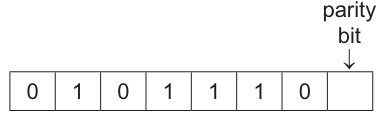
Working
The first 7 bits contain 4 ones, so the total is already even.
Answer
Parity bit = 0
0
Background Concept
A parity bit is an extra bit added to a data byte to help detect errors during transmission. With even parity, the total number of 1 bits in the full byte, including the parity bit, must be even. With odd parity, the total number of 1 bits must be odd.
This question states that the least significant bit, the rightmost bit, is the parity bit. So the first 7 bits are the data bits, and the final bit is chosen to make the total parity correct.
Understanding the Question
The byte shown is 0 1 0 1 1 1 0 followed by an empty box for the parity bit. You must decide whether the parity bit should be 0 or 1 so that the whole 8-bit byte has even parity.
Approach
Count how many 1s are already present in the seven given bits. If that count is even, the parity bit must be 0. If that count is odd, the parity bit must be 1.
Step-by-Step Reasoning
The seven given bits are:
0 1 0 1 1 1 0
Count the 1s:
- second bit = 1
- fourth bit = 1
- fifth bit = 1
- sixth bit = 1
That gives 4 ones.
4 is already even.
Because the system uses even parity, the parity bit must keep the total even.
So the parity bit is 0.
If we added 1 instead, the total number of 1s would become 5, which is odd, so that would be wrong.
Key Takeaways
- Even parity means the total number of 1s must be even.
- Count the existing 1s first, then choose the parity bit.
- If the count is already even, the parity bit is 0.
Common Mistakes
- Counting the number of bits instead of the number of 1s.
- Using odd parity by mistake when the question says even parity.
- Putting the parity bit on the wrong side; this question says it is the least significant, rightmost bit.
Things to Be Careful About
Always include the parity bit in the final total, but do not count it before you have chosen it. Also read the question carefully because some parity questions place the parity bit at the left, while this one places it at the right.
The computer also uses parity block check. The parity block check uses even parity.
Computer A transmits four bytes of data to computer B, followed by a parity byte.
Computer B receives the following sequence of bytes.
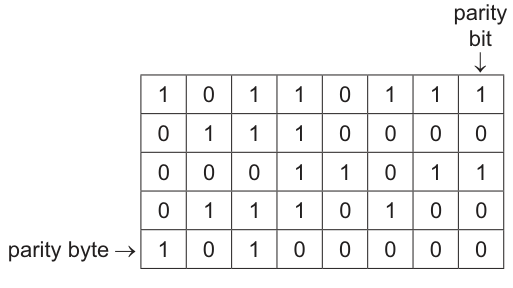
Following transmission, one of the four bytes of data has an error in one of the bits.
Circle the bit that has been altered during the data transfer.
Working
- Row 2 has odd parity.
- Column 5 has odd parity.
Answer
Circle the bit in row 2, column 5 (the 0 in the second byte).
Row 2, column 5
Background Concept
Parity block check is an extension of ordinary parity checking. Instead of checking only one byte at a time, the system also adds a parity byte so that each column of bits has the required parity as well.
With even parity:
- each row should contain an even number of 1s
- each column, including the parity byte, should also contain an even number of 1s
If one bit changes during transmission, exactly one row and one column will fail the parity test. The incorrect bit is at the intersection of that row and column.
Understanding the Question
You are told that one bit in one of the four data bytes has changed during transmission. The received grid shows four data rows and one parity-byte row. The last column is the parity-bit column. Because only one bit is wrong, parity block check can identify its exact position.
Approach
First check each row to find which data byte has odd parity. Then check each column, including the parity byte row, to find which bit position has odd parity. The error is where that row and column cross.
Step-by-Step Reasoning
Write the rows as received:
- Row 1:
1 0 1 1 0 1 1 1 - Row 2:
0 1 1 1 0 0 0 0 - Row 3:
0 0 0 1 1 0 1 1 - Row 4:
0 1 1 1 0 1 0 0 - Parity byte:
1 0 1 0 0 0 0 0
Check row parity:
- Row 1 has 6 ones, so it is even.
- Row 2 has 3 ones, so it is odd.
- Row 3 has 4 ones, so it is even.
- Row 4 has 4 ones, so it is even.
So the incorrect bit is somewhere in row 2.
Now check column parity using all five rows:
- Column 1:
1, 0, 0, 0, 1gives 2 ones, even. - Column 2:
0, 1, 0, 1, 0gives 2 ones, even. - Column 3:
1, 1, 0, 1, 1gives 4 ones, even. - Column 4:
1, 1, 1, 1, 0gives 4 ones, even. - Column 5:
0, 0, 1, 0, 0gives 1 one, odd. - The remaining columns are even.
So the incorrect bit is in column 5.
The error is therefore at the intersection: row 2, column 5.
The received bit there is 0. Since flipping that bit to 1 would make both the row and the column even, that must be the altered bit.
Key Takeaways
- Parity block check uses both row parity and column parity.
- One wrong bit can be located exactly by finding the row with wrong parity and the column with wrong parity.
- The bad bit lies at their intersection.
Common Mistakes
- Checking only the rows and forgetting the columns.
- Forgetting to include the parity byte when checking column parity.
- Forgetting that the last column is itself a parity-bit column and must also be tested.
- Miscounting the number of 1s in a row or column.
Things to Be Careful About
This method works cleanly when there is a single-bit error. If more than one bit changes, parity block check may fail to identify the position correctly. Also be careful to count all bits in each row, including the row parity bit, and all rows in each column, including the parity byte.
A bitmap image has a resolution of 1000 pixels wide by 2000 pixels high. The colour depth is 16 bits.
Calculate an estimate of the file size in megabytes.
Show your working.
File size .......................... megabytes
Working
Answer
File size = 4 megabytes
4 MB
Background Concept
For an uncompressed bitmap image, file size depends mainly on two things:
- resolution, which is the number of pixels
- colour depth, which is the number of bits used for each pixel
The basic calculation is:
Then convert bits to bytes by dividing by 8. If the question asks for an estimate in megabytes, exam questions often use bytes for a simple estimate.
Understanding the Question
The image is 1000 pixels wide and 2000 pixels high, with a colour depth of 16 bits. You need to estimate the file size in megabytes and show the working.
The word "estimate" is important because it signals that a straightforward conversion to MB is acceptable.
Approach
Find the number of pixels first. Then multiply by 16 bits per pixel. Then divide by 8 to get bytes. Finally convert to megabytes.
Step-by-Step Reasoning
First calculate the number of pixels:
Each pixel uses 16 bits, so total bits are:
Convert bits to bytes:
Convert bytes to megabytes:
So the estimated file size is 4 MB.
Key Takeaways
- Bitmap file size depends on pixel count and colour depth.
- Multiply width by height to get the number of pixels.
- Multiply pixels by bits per pixel, then divide by 8 for bytes.
- For an estimate, use a simple MB conversion unless told otherwise.
Common Mistakes
- Adding width and height instead of multiplying them.
- Forgetting to multiply by colour depth.
- Giving the answer in bits or bytes when the question asks for megabytes.
- Forgetting to divide by 8 when converting bits to bytes.
Things to Be Careful About
Read whether the image is bitmap and whether compression is mentioned. This question does not mention compression, so use the raw bitmap calculation. Also watch the unit: "megabytes" means convert from bits properly before giving the final answer.
The following binary addition is performed using 8-bit registers.
Complete the calculation using binary addition.
  1 0 0 0 0 1 1 1
+ 0 0 1 1 1 0 0 1
-----------------
Working
10000111 + 00111001 = 11000000
Answer
11000000
11000000
Background Concept
Binary addition works in base 2, so each column can only total to 0, 1, 10 or 11 in binary. The key rules are:
0 + 0 = 00 + 1 = 11 + 1 = 10so write0and carry11 + 1 + 1 = 11so write1and carry1
When a question says the addition is done using 8-bit registers, it means the result should be written using 8 bits. Any carry beyond the leftmost bit would indicate overflow, but here the sum still fits into 8 bits.
Understanding the Question
You are given two 8-bit binary numbers:
1000011100111001
You must add them exactly as binary numbers, column by column from right to left, and write the 8-bit result.
Approach
The correct method is standard binary column addition:
- Start at the least significant bit on the right.
- Add the two bits, including any carry from the previous column.
- Write the result bit for that column.
- Carry
1to the next column whenever the total is10or11in binary. - Continue until the leftmost bit is reached.
Step-by-Step Reasoning
Add the bits from right to left:
- Rightmost column:
1 + 1 = 10so write0, carry1 - Next column:
1 + 0 + carry 1 = 10so write0, carry1 - Next column:
1 + 0 + carry 1 = 10so write0, carry1 - Next column:
0 + 1 + carry 1 = 10so write0, carry1 - Next column:
0 + 1 + carry 1 = 10so write0, carry1 - Next column:
0 + 1 + carry 1 = 10so write0, carry1 - Next column:
0 + 0 + carry 1 = 1so write1 - Leftmost column:
1 + 0 = 1
So the final 8-bit result is:
11000000
A quick denary check confirms it:
10000111= 13500111001= 57- 135 + 57 = 192
- 192 in binary is
11000000
Key Takeaways
- Binary addition follows fixed bit rules and uses carries just like denary column addition.
- Always add from right to left.
- In an 8-bit question, make sure the final answer is written as 8 bits.
Common Mistakes
- Forgetting to include a carry in the next column.
- Writing a 9-bit answer when the result actually fits in 8 bits.
- Mixing up
1 + 1 = 10with1 + 1 = 2; in binary you must write0and carry1.
Things to Be Careful About
- Keep the bits aligned by column before adding.
- Do not drop leading bits from the answer if the question expects an 8-bit result.
- If a carry comes out of the leftmost bit, check whether the question expects you to mention overflow; here it is not needed because the correct 8-bit sum is
11000000.
A computer uses the Unicode character set.
State the number of bits used to store one character from the Unicode character set.
Answer
- 16 bits
16 bits
Background Concept
A character set is a system for representing characters as binary codes inside a computer. Different character sets use different numbers of bits and can represent different numbers of symbols.
In this syllabus, ASCII is the smaller character set and Unicode is the larger one. Unicode is taught as using 16 bits per character, allowing far more characters from many languages and symbol sets to be represented.
Understanding the Question
The question does not ask you to calculate anything. It tells you the computer uses Unicode and asks for the number of bits needed to store one character.
So this is a recall question about character representation.
Approach
Recognise the keyword Unicode and recall the standard syllabus fact:
- ASCII uses fewer bits.
- Unicode uses 16 bits per character.
Then state that value clearly with the unit bits.
Step-by-Step Reasoning
Because the question is specifically about the Unicode character set, the required storage per character is:
16 bits
That is the whole answer.
Key Takeaways
- ASCII and Unicode are both character sets.
- Unicode can store many more characters than ASCII.
- For this exam, Unicode is taken as
16 bitsper character.
Common Mistakes
- Writing
8 bits, which is usually associated with ASCII or extended ASCII, not Unicode. - Giving the number of characters possible instead of the number of bits.
- Omitting the unit and writing only
16.
Things to Be Careful About
- Answer the exact question asked: it wants the number of bits for one character, not a comparison with ASCII.
- Use the syllabus convention expected by the mark scheme:
16 bits.
ASCII is another character set. The ASCII value for the character ‘h’ has the denary value 104.
Working
104 in BCD is:
1→00010→00004→0100
Answer
0001 0000 0100
0001 0000 0100
Background Concept
BCD stands for Binary Coded Decimal. In BCD, each decimal digit is stored separately as a 4-bit binary value.
So:
- decimal
1becomes0001 - decimal
0becomes0000 - decimal
4becomes0100
This is different from converting the whole number directly into binary. For example, denary 104 in pure binary is 01101000, but that is not BCD.
The question also mentions ASCII. ASCII gives a denary code for a character, and here the character h has ASCII value 104. Once that denary value is known, you can represent it in different ways, including BCD.
Understanding the Question
You are told that the ASCII value for h is denary 104. You are not being asked for the ASCII bit pattern itself. You are being asked to write the BCD value for the number 104.
That means you must treat 104 as three decimal digits:
104
and convert each digit separately into a 4-bit BCD group.
Approach
Use the denary value already given. Then:
- Split
104into its decimal digits. - Convert each digit to 4-bit binary.
- Write the three 4-bit groups side by side.
This works because BCD stores decimal digits independently.
Step-by-Step Reasoning
The number is 104.
Break it into digits:
- first digit =
1 - second digit =
0 - third digit =
4
Now convert each digit to 4-bit BCD:
1=00010=00004=0100
Put them together in the same order:
0001 0000 0100
So the BCD value for the ASCII character h, using its denary code 104, is 0001 0000 0100.
Key Takeaways
- BCD encodes each decimal digit separately.
- Do not convert the whole denary number into ordinary binary when BCD is required.
- A character code can be given in one representation and then rewritten in another.
Common Mistakes
- Writing ordinary binary for 104, such as
01101000, which is not BCD. - Forgetting that each BCD digit must use 4 bits.
- Reordering the digits or omitting the middle
0.
Things to Be Careful About
- Keep the decimal digits separate before converting.
- Include all three 4-bit groups because
104has three decimal digits. - Do not confuse
ASCII valuewithASCII bit pattern; the question only uses ASCII to tell you the denary number.
Working
104 = 6 × 16 + 8
Answer
68
68
Background Concept
Hexadecimal is base 16. Its digits are:
0 1 2 3 4 5 6 7 8 9 A B C D E F
To convert a denary number to hexadecimal, you can divide by 16:
- the quotient gives the high-order hex digit
- the remainder gives the low-order hex digit
The question again uses the ASCII code only to tell you the denary value of the character h, which is 104.
Understanding the Question
You are given the denary ASCII value 104 for the character h. This part asks for the hexadecimal value of that same code.
So the task is simply: convert denary 104 into hexadecimal.
Approach
Use division by 16:
- Divide
104by16. - Take the quotient as the first hex digit.
- Take the remainder as the second hex digit.
- Write the two hex digits together.
Step-by-Step Reasoning
Divide 104 by 16:
16 × 6 = 96- remainder
104 - 96 = 8
So:
- quotient =
6 - remainder =
8
Therefore the hexadecimal representation is:
68
You can also confirm this by converting from binary:
104in binary is01101000- split into 4-bit groups:
0110 1000 0110=6and1000=8- so the hexadecimal value is
68
Key Takeaways
- Hexadecimal is base 16.
- Denary to hexadecimal can be done using division by 16 and a remainder.
- A character code can be written in denary, binary or hexadecimal and still represent the same character.
Common Mistakes
- Writing
104again instead of converting it. - Giving the binary value instead of the hexadecimal value.
- Writing
86by reversing the order of quotient and remainder.
Things to Be Careful About
- Keep the quotient first and the remainder second.
- Use hexadecimal digits, not decimal pairs.
- Do not add extra prefixes unless the question asks for them;
68is sufficient here.
A restaurant accesses software and stores data using cloud computing.
Give two benefits of storing data using cloud computing.
1 .........................................................................................................................................
2 .........................................................................................................................................
Answer
- Data can be accessed from any location/device with an internet connection.
- The cloud provider stores backups/redundant copies, so data is less likely to be lost if local hardware fails.
Access from anywhere; provider backup/redundancy reduces data loss.
Background Concept
Cloud computing means using internet-based services instead of relying entirely on local computers or local storage in the restaurant. When data is stored in the cloud, it is kept on remote servers managed by a provider.
Typical benefits of cloud storage include:
- access from different places
- sharing between multiple users/devices
- reduced need for local storage hardware
- backup and disaster recovery
- scalability
For short theory questions like this, examiners usually want broad, practical benefits rather than technical detail.
Understanding the Question
The question is specifically about storing data using cloud computing, not about software development or networking generally. It asks for two benefits, so two separate valid advantages are enough.
Because the wording says "storing data", strong answers focus on things like:
- being able to access stored data remotely
- improved backup/recovery
- reduced dependence on local storage devices
Approach
Pick two clear, different benefits that are widely accepted for cloud storage. Avoid giving two versions of the same idea.
A safe pair is:
- access from anywhere using the internet
- backup/redundancy reducing the risk of permanent data loss
These are distinct and directly linked to data storage.
Step-by-Step Reasoning
The first benefit is remote access. If the restaurant stores data in the cloud, staff or managers can get to it from different devices or locations, as long as they have permission and internet access. That is a standard advantage over keeping files only on one local machine.
The second benefit is protection against local failure. If a computer or storage device in the restaurant fails, the data is not necessarily lost because copies are kept on the provider's servers. Many cloud systems use redundancy and backup across multiple servers.
So the two valid benefit statements are:
- anywhere access
- reduced risk of data loss through backup/redundancy
Key Takeaways
- Cloud storage keeps data on remote internet-connected servers.
- Common benefits include accessibility, backup, scalability and reduced local hardware needs.
- In a short "give two benefits" question, concise distinct points score best.
Common Mistakes
- Giving benefits of computers in general rather than benefits of cloud storage.
- Repeating the same idea twice, for example "can access anywhere" and "can access from home".
- Giving vague answers such as "it is better" without saying why.
- Confusing cloud storage with local network storage.
Things to Be Careful About
- The question asks for two benefits, so give two separate points.
- Keep the answer linked to data storage.
- If you mention remote access, it is sensible to imply that an internet connection is needed, but that requirement belongs more naturally to drawbacks than to benefits.
Give two drawbacks of using cloud computing.
1 .........................................................................................................................................
2 .........................................................................................................................................
Answer
- Access depends on a reliable internet connection; if the connection fails, the data may not be available.
- Data stored on third-party servers creates security/privacy risks because unauthorised access or breaches may occur.
Needs reliable internet access; security/privacy risk on third-party servers.
Background Concept
Although cloud computing offers many benefits, it also introduces risks and limitations. A cloud service depends on external infrastructure: internet access, the cloud provider's servers, and the provider's security controls.
Common drawbacks include:
- dependence on an internet connection
- possible service outages
- security and privacy concerns
- less direct control over stored data
- ongoing subscription costs
Understanding the Question
The question asks for two drawbacks of using cloud computing. Since part (a)(i) asked for benefits, here the examiner wants disadvantages that a business such as a restaurant might face.
Good answers usually focus on major issues such as:
- availability problems if internet access fails
- security/privacy concerns when data is held off-site
Approach
Choose two different disadvantages that clearly arise because the data is in the cloud rather than entirely on local systems.
The strongest pair is:
- dependence on the internet
- security/privacy concerns from storing data with a third party
These are both standard syllabus points and are easy to state clearly.
Step-by-Step Reasoning
First, cloud access usually requires an internet connection. If the restaurant's internet connection is slow, unreliable or unavailable, staff may not be able to retrieve important data when needed. This is a direct operational drawback.
Second, the data is held on remote servers owned or managed by another organisation. That introduces security and privacy concerns. If the provider is attacked, or if access control is weak, confidential information could be exposed.
So two correct drawbacks are:
- reliance on internet connectivity
- security/privacy risks from third-party storage
Key Takeaways
- Cloud computing is not only about convenience; it also introduces dependency and risk.
- Internet reliance and security/privacy concerns are among the most common exam answers.
- Drawbacks should be directly tied to the nature of cloud services.
Common Mistakes
- Giving a drawback that is too vague, such as "it can be bad".
- Repeating the same drawback in two ways, such as "internet failure" and "cannot connect online".
- Writing about unrelated hardware faults inside the restaurant without linking them to cloud use.
Things to Be Careful About
- The question wants drawbacks of cloud computing, not of computers in general.
- If you mention security, make the risk clear: third-party storage, unauthorised access or breaches.
- If you mention internet dependence, explain the consequence: data may be inaccessible.
The restaurant uses touchscreens as input devices to allow staff to select items from a menu.
Answer
- The touchscreen has a touch-sensitive layer/grid over the display that detects when it is touched.
- The touch produces signals that are used to determine the and coordinates of the touch point.
- These coordinates are sent to the processor/software.
- The software compares the coordinates with the stored screen areas for each menu item and selects the item whose area was touched.
Touch is detected, x-y coordinates are calculated, sent to the processor, and matched to the menu item's screen area.
Background Concept
A touchscreen is an input device combined with a display. It allows the user to choose an option by touching an area of the screen instead of using a mouse or keyboard.
The key idea is that the system must do two things:
- detect that a touch happened
- work out where on the screen it happened
Once the location is known, software can interpret that position. On a menu screen, each button or menu option occupies a defined rectangular area, so a touch inside that area is treated as a selection of that item.
Different touchscreen technologies exist, such as resistive and capacitive screens, but for this question the important principle is coordinate detection and mapping to a menu option.
Understanding the Question
The question is not asking for advantages of touchscreens. It asks how a point of touch is converted into a selection from the menu.
That means the answer must describe the chain from:
- finger touches screen
- hardware detects location
- coordinates are generated
- software uses those coordinates to choose a menu item
So a complete answer needs both hardware detection and software interpretation.
Approach
A good structure is a simple four-step explanation:
- mention the touch-sensitive layer/grid
- say the point of touch is converted into coordinates
- say those coordinates are sent to the processor/software
- explain that the coordinates are matched against the menu item's stored area
This matches how examiners usually award marks for "operation of device" questions.
Step-by-Step Reasoning
When the member of staff touches the screen, the touch-sensitive layer detects the contact. Depending on the technology, this may be due to pressure or a change in capacitance, but the general idea is that the screen senses a touch event.
The touchscreen electronics then determine the position of that touch on the screen. This is usually represented as horizontal and vertical coordinates, often described as and values.
Those coordinate values are passed to the processor or operating software controlling the display.
The menu interface already knows where each button or menu item is located on the screen. For example, one button might occupy a certain range of values and a certain range of values. The software compares the detected touch coordinates with these stored regions.
If the touch coordinates fall inside the region for "Burger", then "Burger" is selected. If they fall inside the region for "Drink", then that item is selected instead.
So the full conversion process is:
- detect touch
- calculate location
- send coordinates to software
- match location to a menu option
Key Takeaways
- A touchscreen must identify the position of the touch, not just detect touch.
- Screen positions are represented by coordinates.
- GUI software maps coordinate ranges to buttons or menu items.
- Hardware detection and software interpretation are both needed for a full explanation.
Common Mistakes
- Saying only "the screen senses pressure" and stopping there. That does not explain how a menu item is selected.
- Saying only "it selects the button pressed" without explaining how the system knows which button was pressed.
- Confusing a touchscreen with a touchpad or mouse.
- Giving a purely general answer about input devices instead of describing the conversion from touch to selection.
Things to Be Careful About
- Include both stages: coordinate detection and coordinate matching.
- Use the idea of and position, because that shows how the location is represented.
- Do not over-focus on one touchscreen technology unless the question specifically asks for it.
- Keep the answer tied to the menu interface shown in the question context.
The image files that are displayed on the touchscreen have been corrupted.
Identify two examples of utility software that could be used to recover the images.
1 .........................................................................................................................................
2 .........................................................................................................................................
Answer
- Backup/restore utility
- File recovery or disk repair/checking utility
Backup/restore utility; file recovery or disk repair/checking utility.
Background Concept
Utility software is system software designed to maintain, protect or manage a computer system and its data. Typical examples include backup tools, recovery tools, disk repair tools, anti-malware tools and compression utilities.
When files are corrupted or lost, the most relevant utilities are those that can:
- restore an earlier safe copy
- repair file system problems
- recover deleted or damaged data
Understanding the Question
The image files on the touchscreen system have been corrupted, and the question asks for two examples of utility software that could be used to recover them.
So the answer should name utility types, not general applications. For example, an image editor would not be the best response because it is application software, not utility software.
Approach
Think: what utilities are specifically associated with data recovery?
The strongest answers are:
- a backup/restore utility, which can restore a previous good copy of the image files
- a file recovery or disk repair/checking utility, which may recover damaged files or repair storage problems affecting them
Step-by-Step Reasoning
If the image files were previously backed up, the safest recovery method is to use a backup or restore utility. This utility retrieves an earlier uncorrupted version of the files.
If the corruption is caused by storage or file system problems, a disk repair/checking utility can detect and repair errors on the storage medium. In some cases, a file recovery utility may be used to retrieve usable copies of files.
Therefore two valid examples are:
- backup/restore utility
- file recovery utility or disk repair/checking utility
Key Takeaways
- Utility software is system software for maintenance and recovery tasks.
- Backup/restore tools are the clearest answer when a question mentions recovering files.
- File recovery and disk repair utilities are also relevant when corruption or storage errors are involved.
Common Mistakes
- Naming application software instead of utility software.
- Giving hardware devices, such as an external drive, rather than software.
- Listing two utilities that are effectively the same without making them distinct.
- Choosing unrelated utilities such as a defragmenter, which does not normally recover corrupted images.
Things to Be Careful About
- The question says identify, so short named examples are enough.
- Make sure the examples are genuinely utilities.
- If you use "backup", it is better written as backup/restore utility to show the recovery function clearly.
Consider the following logic circuit:
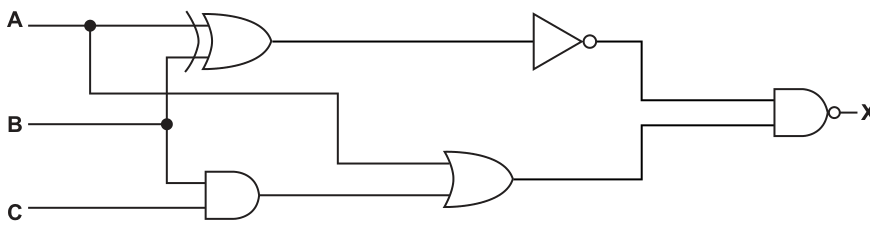
Write the logic expression for the logic circuit. Do not simplify the expression.
X =
Answer
X = (NOT (A XOR B)) NAND ((B AND C) OR B)
X = (NOT (A XOR B)) NAND ((B AND C) OR B)
Background Concept
A logic circuit can be turned into a logic expression by following the signal from the inputs through each gate, one stage at a time. Each gate has a standard meaning:
- XOR gives true when the two inputs are different.
- NOT inverts a single input.
- AND gives true only when both inputs are true.
- OR gives true when at least one input is true.
- NAND means NOT of AND.
When writing the expression, brackets are important because they show which sub-expression is formed first. In questions like this, "do not simplify" means you should copy the structure of the circuit exactly, even if part of it could be reduced using Boolean algebra.
Understanding the Question
You are given a completed circuit with inputs A, B and C, and you must write the expression for output X. The key task is not to simplify it, but to mirror the gates exactly as they appear.
From the circuit:
- A and B go into an XOR gate.
- That result goes into a NOT gate.
- B and C go into an AND gate.
- That AND output and B go into an OR gate.
- The two results then go into a NAND gate to produce X.
So the answer must show the two separate branches first, then combine them with NAND.
Approach
Start by writing the output of each small gate:
- Write the XOR result from A and B.
- Apply NOT to that result.
- Write the AND result from B and C.
- OR that result with B.
- Combine the two branch results using NAND.
This stage-by-stage method prevents missing brackets or using the wrong operator.
Step-by-Step Reasoning
First branch:
- Inputs A and B enter an XOR gate.
- This gives
(A XOR B). - That output goes through a NOT gate.
- So the first branch becomes
NOT (A XOR B).
Second branch:
- Inputs B and C enter an AND gate.
- This gives
(B AND C). - That result and input B enter an OR gate.
- So the second branch becomes
((B AND C) OR B).
Final gate:
- The outputs of those two branches go into a NAND gate.
- Therefore the complete expression is:
X = (NOT (A XOR B)) NAND ((B AND C) OR B)
That is unsimplified, which is exactly what the question asks for. A simplified version is not needed and could lose marks if it no longer reflects the circuit structure clearly.
Key Takeaways
- Build a logic expression one gate at a time.
- Use brackets to preserve the order of operations.
- Keep repeated inputs if the question says not to simplify.
- A NAND gate can be written directly as NAND rather than rewriting it as NOT of an AND, unless you prefer that form.
Common Mistakes
- Writing
NOT A XOR Binstead ofNOT (A XOR B). The NOT acts on the whole XOR output, not just A. - Simplifying
((B AND C) OR B)toB. The question specifically says not to simplify. - Using AND instead of NAND for the final gate. The small bubble on the output means inversion, so it is NAND.
- Missing one set of brackets, which changes the meaning of the expression.
Things to Be Careful About
- Follow the circuit in the correct order from left to right.
- Treat each gate output as a complete sub-expression before using it in the next gate.
- Make sure the final operator is
NAND, notAND. - Keep the exact branch structure of the diagram, because this is a transcription question rather than a simplification question.
Consider the following logic expression:
A truth table for the logic expression is given:
| Row number | A | B | C | X |
|---|---|---|---|---|
| 1 | 0 | 0 | 0 | 1 |
| 2 | 0 | 0 | 1 | 0 |
| 3 | 0 | 1 | 0 | 1 |
| 4 | 0 | 1 | 1 | 0 |
| 5 | 1 | 0 | 0 | 1 |
| 6 | 1 | 0 | 1 | 0 |
| 7 | 1 | 1 | 0 | 1 |
| 8 | 1 | 1 | 1 | 1 |
There are three errors in the truth table.
Identify the three errors in the truth table by writing the row numbers with an incorrect output.
Error 1 Row number ......................................................
Error 2 Row number ......................................................
Error 3 Row number ......................................................
Working
For X = NOT ((A NAND B) XOR (NOT A OR NOT C)), the correct outputs are:
| Row | A | B | C | Correct X |
|---|---|---|---|---|
| 1 | 0 | 0 | 0 | 1 |
| 2 | 0 | 0 | 1 | 1 |
| 3 | 0 | 1 | 0 | 1 |
| 4 | 0 | 1 | 1 | 1 |
| 5 | 1 | 0 | 0 | 1 |
| 6 | 1 | 0 | 1 | 0 |
| 7 | 1 | 1 | 0 | 0 |
| 8 | 1 | 1 | 1 | 1 |
Comparing with the given table, the incorrect rows are 2, 4 and 7.
Answer
- Error 1 Row number 2
- Error 2 Row number 4
- Error 3 Row number 7
2, 4 and 7
Background Concept
A truth table lists every possible combination of input values and the corresponding output of a logic expression. For three inputs A, B and C, there are 8 rows because there are 2 possible values for each input and 2 × 2 × 2 = 8.
For a compound logic expression, the safest method is to evaluate it in stages using intermediate results. Here the expression is:
X = NOT ((A NAND B) XOR (NOT A OR NOT C))
Useful gate rules:
A NAND BmeansNOT (A AND B).NOT A OR NOT Cis true unless both A and C are 1.P XOR Qis true when P and Q are different.NOT (P XOR Q)is true when P and Q are the same.
So this question is really checking whether you can evaluate a nested expression accurately across all rows.
Understanding the Question
You are not being asked to create a truth table from scratch. A truth table is already given, but the question says there are three errors in the X column. Your job is to find exactly which row numbers are wrong.
That means you should:
- Work out the correct value of X for each row.
- Compare your result with the value shown in the table.
- Record the row numbers where the two values differ.
Because there are only three mistakes, the final answer is just three row numbers.
Approach
The best approach is to create intermediate values for:
A NAND BNOT A OR NOT C- the XOR of those two results
- then the final NOT
This is much less error-prone than trying to do the whole expression mentally in one step. Once the correct X values are known, compare them row by row with the given table.
Step-by-Step Reasoning
Let:
P = A NAND BQ = NOT A OR NOT CX = NOT (P XOR Q)
Now evaluate each row.
| Row | A | B | C | P = A NAND B | Q = NOT A OR NOT C | X = NOT (P XOR Q) | Given X | Correct? |
|---|---|---|---|---|---|---|---|---|
| 1 | 0 | 0 | 0 | 1 | 1 | 1 | 1 | yes |
| 2 | 0 | 0 | 1 | 1 | 1 | 1 | 0 | no |
| 3 | 0 | 1 | 0 | 1 | 1 | 1 | 1 | yes |
| 4 | 0 | 1 | 1 | 1 | 1 | 1 | 0 | no |
| 5 | 1 | 0 | 0 | 1 | 1 | 1 | 1 | yes |
| 6 | 1 | 0 | 1 | 1 | 0 | 0 | 0 | yes |
| 7 | 1 | 1 | 0 | 0 | 1 | 0 | 1 | no |
| 8 | 1 | 1 | 1 | 0 | 0 | 1 | 1 | yes |
Now identify the mismatches:
- Row 2 is wrong.
- Row 4 is wrong.
- Row 7 is wrong.
So the three errors are rows 2, 4 and 7.
A quick pattern check also helps: since NOT (P XOR Q) is true when P and Q match, rows where both intermediate values are the same should produce 1. That confirms rows 2 and 4 should both be 1, not 0.
Key Takeaways
- For a complex logic expression, calculate intermediate columns first.
NANDmeans do AND first, then invert the result.NOT (XOR)is effectively an XNOR pattern: the result is 1 when the two inputs are equal.- When checking a given truth table, compare your computed output row by row rather than guessing from patterns.
Common Mistakes
- Treating
A NAND Bas the same asA AND B. This loses the inversion and changes several rows. - Misreading
NOT A OR NOT CasNOT (A OR C). Those are different expressions. - Applying NOT to only one part of the expression instead of the entire XOR result.
- Stopping after finding one or two wrong rows, even though the question says there are three.
Things to Be Careful About
- Keep the row order exactly as given:
000, 001, 010, 011, 100, 101, 110, 111. - Use brackets carefully. The final NOT applies to the whole
(A NAND B) XOR (NOT A OR NOT C)expression. - XOR is 1 only when the two inputs differ; if they are both 0 or both 1, XOR is 0.
- Since the question asks for row numbers, your final response should be the row numbers only, not rewritten truth-table values.
A programmer is developing a computer program.
Explain how the programmer can first use an interpreter and then a compiler to develop the computer program.
Interpreter..................................................................................................................................
Compiler ....................................................................................................................................
Answer
- Interpreter: use it while writing and testing the program because it translates and executes the program one line at a time.
- Interpreter: errors are reported as soon as they are reached, so individual sections can be tested and corrected quickly.
- Compiler: when the program has been debugged, use a compiler to translate the whole source code into object/executable code.
- Compiler: the compiled program can then be released to users and runs without needing the source code to be translated each time.
See explanation
Background Concept
An interpreter and a compiler are both translators, but they work differently.
An interpreter translates source code one statement at a time and usually executes each translated line immediately. This is useful while developing programs because the programmer can test small sections and see errors as they occur.
A compiler translates the whole program before execution. If the compilation is successful, it produces object code or an executable file. This is more suitable for the finished version of the program because the end user can run the compiled program directly.
The key idea in this question is not just to define each translator, but to explain why a programmer would use them in that order during development.
Understanding the Question
The question says the programmer can first use an interpreter and then a compiler. So it is asking for a sequence:
- What the interpreter is used for early in development.
- What the compiler is used for later, after testing/debugging.
The wording "develop the computer program" is important. It means the answer should focus on writing, testing, correcting and then releasing the program, not just giving textbook definitions.
Approach
A good approach is:
- For the interpreter, link it to testing and debugging.
- For the compiler, link it to translating the finished program for release.
That gives the clear development flow the examiner wants:
- write code
- test small parts quickly with the interpreter
- fix errors as they appear
- once correct, compile the full program for distribution/use
Step-by-Step Reasoning
The first stage is development. During development, programmers usually need quick feedback. An interpreter helps because it does not require the whole program to be translated before anything can be tested. It works line by line.
That means:
- the programmer can run part of the program
- if an error is reached, it is reported at that point
- the programmer can correct the mistake and test again quickly
This is why the interpreter is used first.
After the program has been tested and corrected, the programmer no longer needs line-by-line translation for debugging. At that point, the program is ready to be turned into a form that users can run more easily.
So the programmer then uses a compiler to:
- translate the entire source program
- produce object code or an executable file
- release that compiled version to users
This fits the phrase "then a compiler" because compilation is typically the later stage, once the program is working properly.
A strong exam answer should therefore mention both the method and the purpose:
- interpreter: line by line, quick testing, immediate error detection
- compiler: whole program, final translation, release/distribution
Key Takeaways
- An interpreter is best associated with testing and debugging during development.
- A compiler is best associated with producing the final translated version of a program.
- In scenario questions, always explain why the programmer chooses each tool, not just what it is.
Common Mistakes
- Saying both simply "translate the program" without explaining the difference in how and when they are used.
- Saying the interpreter translates the whole program first. It does not; it works line by line.
- Forgetting the development order. The question specifically wants interpreter first, compiler second.
- Giving only advantages of compiled code such as "runs faster" without linking it to the program being finished and released.
Things to Be Careful About
- Do not confuse an interpreter with an IDE. The IDE may contain tools for editing and debugging, but the translator itself is different.
- Do not say a compiler is used to find errors one line at a time; that is the interpreter-style idea.
- Use the correct development context: interpreter for debugging, compiler for final translation/release.
- If marks are limited, make each point distinct rather than repeating "translates code" in different words.
The programmer releases the program as Free Software.
Describe what is meant by Free Software.
Answer
- Free Software gives users the freedom to use, copy and distribute the program.
- Its source code is available so users can study it and modify it.
Users may use, copy, distribute and modify the software because the source code is available.
Background Concept
Free Software is about freedom, not simply about price. In computing, it means software released under a licence that allows users to do things such as:
- run the program
- copy it
- share it
- study how it works
- modify it
To make studying and modifying possible, the source code must be available.
This is different from freeware, which only means the software is available at no cost. Freeware may still forbid copying, changing or redistributing the program.
Understanding the Question
The question says the programmer releases the program as Free Software and asks what that means.
So the answer must describe the licence freedoms given to the user. The strongest points are:
- users are allowed to use/copy/distribute it
- users can access the source code and modify it
The question is only 2 marks, so the answer should be short and precise.
Approach
To answer well, focus on the two most creditworthy ideas:
- Freedom to use/share the software.
- Access to source code so it can be studied and changed.
That avoids the very common mistake of talking only about the software being free of charge.
Step-by-Step Reasoning
The phrase Free Software refers to the permissions granted by the licence.
First, the user is not restricted to just running one purchased copy. The licence allows the software to be copied and distributed.
Second, the user is not locked out of the program's internals. The source code is available, which means the user can study how the program works and modify it.
Those two ideas together capture what the examiner is looking for.
If you only wrote "it costs nothing," that would not be enough, because software can be free to download but still not be free software.
Key Takeaways
- Free Software means freedom of use, copying, sharing and modification.
- Source code availability is central because it makes study and modification possible.
- Do not confuse free software with freeware.
Common Mistakes
- Saying only "it is free to download" or "it costs no money." That describes price, not software freedom.
- Confusing Free Software with open source in a vague way without mentioning the actual freedoms.
- Forgetting to mention source code when talking about modification.
Things to Be Careful About
- The word free here means liberty, not necessarily zero cost.
- A 2-mark answer should include two distinct points, not the same idea repeated.
- If you mention modification, make it clear that this is possible because the source code is available.
A user downloads the computer program from the internet.
State what should be included as part of the download to make sure the program is authentic.
Answer
- A digital certificate.
A digital certificate
Background Concept
When software is downloaded from the internet, a user may want to know whether it is really from the claimed publisher and has not been altered. This is the idea of authenticity.
A common way to support authenticity is a digital certificate. A digital certificate links an identity, such as a software publisher, to a public key and is issued by a trusted authority. It can be used to verify that the software really comes from that source.
In practice, authenticity may also involve a digital signature, but in many exam questions the expected named item is a digital certificate.
Understanding the Question
The question asks what should be included with the download to make sure the program is authentic.
The key word is authentic, meaning genuine or really from the claimed source. This is not mainly about virus removal or downloading speed; it is about verifying identity.
So the answer should name the security item that helps prove the software's origin.
Approach
Look for the security method connected to authentication rather than general protection.
- firewall: blocks network traffic
- anti-malware: detects malicious software
- encryption: protects confidentiality
- digital certificate: helps verify identity/authenticity
Therefore the correct response is the certificate.
Step-by-Step Reasoning
If a user downloads a program, there is a risk it could be fake or altered.
To address that, the download should include a digital certificate. The certificate allows the user's system to check that the software publisher is genuine and trusted.
That directly matches the requirement to make sure the program is authentic.
Because this is a 1-mark question, the examiner is likely just looking for the named term.
Key Takeaways
- Authenticity means confirming that something is genuine and from the claimed source.
- A digital certificate is used to support authenticity.
- In security questions, match the method to the exact goal being asked about.
Common Mistakes
- Writing anti-virus or anti-malware. That protects against malicious files but does not prove who created the program.
- Writing encryption on its own. Encryption protects data from being read, but does not necessarily prove the sender's identity.
- Giving password or username, which are about user login rather than verifying downloaded software.
Things to Be Careful About
- Focus on the exact term authentic. That points to identity verification.
- For a 1-mark state question, give one precise item rather than a long explanation.
- If your course or teacher uses the paired idea of digital certificate/digital signature, remember that the certificate is the clearest syllabus-aligned answer here.
An automated system opens doors when a person is detected within 2 metres. The system closes the doors when there is no longer a person within 2 metres.
Identify whether the automated system is an example of a monitoring system or a control system.
Justify your choice.
Monitoring or Control.....................................................
Justification .......................................................................................................................................
Answer
- Control system
- The system uses a sensor to detect whether a person is within 2 metres.
- It then automatically operates the doors by opening or closing them, so it is taking action rather than just reporting a condition.
Control system — it uses sensor input to automatically open and close the doors.
Background Concept
A monitoring system measures or detects a condition and reports it, but it does not automatically change the situation. Its job is mainly to observe. For example, a temperature monitoring system may display the temperature or trigger an alarm for a human to respond.
A control system also uses input from sensors, but it goes further: it automatically makes a change using an actuator or output device. In other words, it does something in response to the data it receives.
The key idea is:
- Monitoring system = senses and reports
- Control system = senses and acts
In many control systems, the input from the sensor is used to decide whether an output should happen. Here, the output is usually some physical action, such as switching, moving, heating, cooling, or opening and closing.
Understanding the Question
The question describes an automated door system:
- it detects a person within 2 metres
- it opens the doors when that happens
- it closes the doors when no person is within 2 metres
So you are not just being asked to name the type of system. You must also explain why it fits that type.
The important clue is that the system is not only detecting something; it is also changing the state of the doors automatically.
Approach
To answer this, compare the system with the definitions of monitoring and control:
- Look for a sensor input.
- Check whether the system automatically performs an action.
- If it only observes/reports, it is monitoring.
- If it observes and then operates something, it is control.
Here, the sensor detects a person, and then the system opens or closes the door. That means it is a control system.
Step-by-Step Reasoning
First, identify the input:
- The system detects whether a person is within 2 metres.
- That means there is some form of sensor providing input data to the system.
Next, identify what the system does with that input:
- If a person is detected, the doors open.
- If no person is detected, the doors close.
This is the crucial difference from monitoring:
- A monitoring system would perhaps display a message, sound an alarm, or record that someone is nearby.
- This system does more than that: it physically changes the door position.
That physical change would be carried out by an actuator or motor mechanism connected to the doors.
So the reasoning is:
- sensor detects person
- system processes that input
- actuator opens/closes doors automatically
- therefore it is a control system
A strong justification mentions both parts:
- the detection by a sensor
- the automatic action on the doors
Key Takeaways
- A monitoring system collects data and reports it.
- A control system collects data and automatically takes action.
- To classify a system, ask: does it only observe, or does it also operate something?
- Automated doors are a classic example of a control system because sensor input causes physical output.
Common Mistakes
- Saying monitoring system just because a sensor is involved. Sensors are used in both monitoring and control systems.
- Giving no justification. This question requires both the classification and the reason.
- Writing only "it opens the doors" without linking that to the idea of automatic action.
- Confusing an alarm with control. An alarm alone is closer to monitoring unless it also automatically changes the environment.
Things to Be Careful About
- Use the exact classification: control system.
- Your justification should mention that the system automatically opens/closes the doors.
- If possible, include both technical ideas: sensor input and actuator/output action.
- Do not say it is monitoring simply because it detects a person; detection alone is not enough to decide.