Computer Science 9618/11 — October/November 2025
Cambridge AS Level · Theory Fundamentals · worked solutions for every part, with the mark scheme
Topics Hardware · Information Representation · Processor Fundamentals · Security, Privacy and Data Integrity · Databases · System Software · +2 more
Convert the binary number into hexadecimal.
101100111010
.....................................................................................................................................
Working
101100111010 = 1011 0011 1010
1011 = B, 0011 = 3, 1010 = A
Answer
B3A
B3A
Background Concept
Binary and hexadecimal are closely related because one hexadecimal digit represents exactly 4 binary bits. A 4-bit group is often called a nibble. This means binary-to-hex conversion is usually done by splitting the binary number into groups of 4 bits from the right, then replacing each group with its hexadecimal equivalent.
The hexadecimal digits are 0 to 9, then A for 10, B for 11, C for 12, D for 13, E for 14 and F for 15.
Understanding the Question
You are given the binary number 101100111010 and asked to convert it into hexadecimal. The clue is that hexadecimal works in 4-bit groups, so the method is to split the binary value into nibbles and translate each nibble.
Approach
Take the 12-bit binary number and separate it into 3 groups of 4 bits:
- first nibble
- second nibble
- third nibble
Then convert each nibble into one hexadecimal symbol and write them together in the same order.
Step-by-Step Reasoning
Start with:
101100111010
Split into groups of 4 bits from the right:
1011 0011 1010
Now convert each group:
1011= 11 in denary, which isBin hexadecimal0011= 3 in denary, which is3in hexadecimal1010= 10 in denary, which isAin hexadecimal
So the final hexadecimal number is B3A.
Key Takeaways
- Binary-to-hex conversion is done in 4-bit groups.
- Each nibble maps directly to one hexadecimal digit.
- Always group from the right-hand side.
Common Mistakes
- Grouping into 3-bit groups instead of 4-bit groups.
- Writing denary values like 10 or 11 instead of hexadecimal letters
AorB. - Reversing the order of the groups.
Things to Be Careful About
- Keep leading zeros inside a nibble if needed, because
0011is still one complete 4-bit group. - Use uppercase hexadecimal digits if that is the style used in the paper.
- Do not convert the whole value through denary unless necessary; the nibble method is quicker and less error-prone.
Convert the denary number into Binary Coded Decimal (BCD).
108
.....................................................................................................................................
Working
108 → 1 0 8
1 = 0001, 0 = 0000, 8 = 1000
Answer
0001 0000 1000
0001 0000 1000
Background Concept
Binary Coded Decimal (BCD) does not convert the whole denary number into pure binary. Instead, each separate decimal digit is stored as its own 4-bit binary value. So in BCD, the denary number 108 is treated as three digits: 1, 0 and 8.
This is different from ordinary binary. For example, pure binary for 108 is 1101100, but BCD for 108 is 0001 0000 1000 because each decimal digit is encoded separately.
Understanding the Question
The question asks for the denary number 108 to be written in BCD. That means you should not convert 108 directly into binary. You must split it into the digits 1, 0 and 8, then write each one as a 4-bit binary code.
Approach
Use this rule:
- Separate the denary number into decimal digits.
- Convert each digit individually into 4-bit binary.
- Write the 4-bit codes next to each other in the same order.
Step-by-Step Reasoning
The denary number is 108.
Split it into decimal digits:
108
Convert each digit into 4-bit binary:
1=00010=00008=1000
Put them together:
0001 0000 1000
That is the BCD representation.
Key Takeaways
- BCD stores each decimal digit separately.
- Every decimal digit uses 4 bits.
- BCD is not the same as pure binary.
Common Mistakes
- Converting the whole number 108 into pure binary instead of BCD.
- Forgetting that each digit must have 4 bits, for example writing
1instead of0001. - Mixing up digit order.
Things to Be Careful About
- Keep all 4 bits for each decimal digit, including leading zeros.
- Check that each BCD nibble represents a decimal digit from 0 to 9 only.
- Write spaces between nibbles if it helps readability, but keep the bit groups in the correct order.
Convert the 12-bit two’s complement binary integer into denary.
Show your working.
111110111100
Working .............................................................................................................................
...........................................................................................................................................
...........................................................................................................................................
...........................................................................................................................................
Denary value ..................................................
Working
Most significant bit is 1, so the number is negative.
Invert bits:
111110111100 → 000001000011
Add 1:
000001000011 + 1 = 000001000100
000001000100 = 68
Answer
Denary value = -68
-68
Background Concept
Two's complement is the standard way of representing signed integers in binary. In an -bit two's complement number:
- if the most significant bit is
0, the number is positive - if the most significant bit is
1, the number is negative
To find the denary value of a negative two's complement number, a common method is:
- invert all the bits
- add 1
- convert the result to denary
- attach a negative sign
This works because two's complement stores a negative value by taking the positive value, inverting the bits and adding 1.
Understanding the Question
You are given a 12-bit two's complement number: 111110111100. The question asks for its denary value and says to show working. Because it is specifically a two's complement number, you must use signed-binary rules, not treat it as an ordinary unsigned binary number.
Approach
First inspect the leftmost bit. Since it is 1, the number is negative. Then use the standard two's complement reversal method to find the magnitude:
- invert all bits
- add 1
- convert that positive result to denary
- make the final answer negative
Step-by-Step Reasoning
The number is:
111110111100
The most significant bit is 1, so this is a negative number.
Now invert every bit:
1becomes00becomes1
So:
111110111100 → 000001000011
Now add 1:
000001000011 + 1 = 000001000100
Now convert 000001000100 to denary.
Using place values:
- the
1bits are at and - so the value is
Because the original two's complement number was negative, the denary value is -68.
Another valid check is to treat the original pattern as unsigned and subtract :
Both methods give the same answer.
Key Takeaways
- In two's complement, the leftmost bit shows whether the number is positive or negative.
- For a negative value, invert bits and add 1 to find the magnitude.
- Always keep the correct bit width in mind; here it is 12 bits.
Common Mistakes
- Treating the number as unsigned binary and giving a large positive denary value.
- Forgetting the final add 1 after inverting the bits.
- Forgetting to make the final answer negative.
- Using the wrong bit width when checking with subtraction from .
Things to Be Careful About
- This is a 12-bit value, not 8-bit, so the full width matters.
- When inverting, change every bit, not just part of the number.
- After finding the positive magnitude, the original sign still matters: the final answer must be negative.
The following binary addition is performed using 8-bit registers.
Complete the calculation using binary addition.
  1 0 1 1 0 0 1 1
+ 0 1 1 1 1 0 0 0
-----------------
Working
  10110011
+ 01111000
----------
1 00101011
Answer
1 00101011
1 00101011
Background Concept
Binary addition works in the same way as denary addition, except each column can only contain 0 or 1. The basic rules are:
0 + 0 = 00 + 1 = 11 + 0 = 11 + 1 = 10so write0and carry11 + 1 + 1 = 11so write1and carry1
When a fixed register size is used, such as 8 bits, any extra carry beyond the leftmost bit cannot be stored in the register itself.
Understanding the Question
You must complete the binary addition:
1011001101111000
The question says 8-bit registers are used, so there are 8 columns for the stored result, but the addition itself may produce a carry beyond those 8 bits.
Approach
Add from right to left, just as with ordinary addition. Keep track of any carry moving into the next column. At the end, if there is still a carry after the most significant bit, write it at the front of the full calculation.
Step-by-Step Reasoning
Add the bits from the rightmost column.
Starting values:
  10110011
+ 01111000
From right to left:
- bit 0:
1 + 0 = 1 - bit 1:
1 + 0 = 1 - bit 2:
0 + 0 = 0 - bit 3:
0 + 1 = 1 - bit 4:
1 + 1 = 10so write0, carry1 - bit 5:
1 + 1 + carry 1 = 11so write1, carry1 - bit 6:
0 + 1 + carry 1 = 10so write0, carry1 - bit 7:
1 + 0 + carry 1 = 10so write0, carry1
There is still a carry left after the most significant bit, so place 1 in front.
This gives:
1 00101011
If only the 8-bit register contents were stored, the register would hold 00101011 and the extra carry would be outside the 8 bits.
Key Takeaways
- Binary addition is column-by-column from right to left.
- A sum of 2 creates a carry.
- A final carry beyond the leftmost bit shows that more than the fixed number of bits is needed for the full result.
Common Mistakes
- Forgetting to carry into the next column.
- Dropping the final carry when asked to complete the full addition.
- Misaligning the bits so the place values do not match.
Things to Be Careful About
- Work from right to left only.
- Keep each carry for the next column, not the current one.
- If the question mentions fixed-size registers, think about whether the final carry fits or not.
Name and describe the error that can occur when binary addition is performed.
...........................................................................................................................................
...........................................................................................................................................
...........................................................................................................................................
.....................................................................................................................................
Answer
- The error is overflow.
- It happens when the result of the addition needs more bits than are available in the register.
- A carry is produced out of the most significant bit, so the extra bit cannot be stored and the value held in the register is incorrect.
Overflow
Background Concept
Overflow is an arithmetic error that occurs when the correct result of a calculation is outside the range that can be represented with the available number of bits. In a fixed-size register, there is a maximum and minimum value that can be stored. If a calculation goes beyond that range, the register cannot represent the true answer.
In binary addition, overflow is often seen as a carry out of the most significant bit, or in signed arithmetic as a result whose sign becomes invalid for the operands involved.
Understanding the Question
The question asks you to name and describe the error that can occur during binary addition. Since the previous part uses 8-bit registers, the key idea is that the register has limited capacity. If the total needs more than 8 bits, the extra bit cannot be kept.
Approach
Give:
- the name of the error
- a description of when it happens
- the effect on the stored result
That is enough to match a typical 2-mark response.
Step-by-Step Reasoning
The correct term is overflow.
Why does overflow happen?
- A register can only store a fixed number of bits.
- In an 8-bit register, only 8 bits of the answer can be stored.
- If the addition produces a 9th bit, that extra bit is outside the available storage.
What is the effect?
- The full correct result cannot be represented.
- The carry beyond the most significant bit is lost if only the register contents are kept.
- Therefore the stored binary value is not the true result.
That is why overflow is considered an error condition in fixed-width arithmetic.
Key Takeaways
- Overflow means the true result is too large or too small for the available bit width.
- Fixed-size registers limit the range of numbers that can be stored.
- In binary addition, a carry beyond the most significant bit is a key warning sign.
Common Mistakes
- Naming the error as just a carry instead of overflow.
- Saying the register becomes full without explaining that the result is outside the representable range.
- Confusing overflow with underflow or with a syntax/programming error.
Things to Be Careful About
- The question asks for both the name and the description, so both are needed.
- In unsigned addition, a carry out of the leftmost bit is the standard indicator.
- In signed two's complement arithmetic, overflow has a more specific rule, but for this question the general fixed-width explanation is appropriate.
A relational database, WORKEXPERIENCE, stores data about students and the companies where they complete work experience.
Students can complete multiple work experience placements but can only complete one placement at a time.
Students can complete more than one placement at the same company.
Part of the database is shown:
STUDENT(StudentID, FirstName, TelephoneNumber, UniversityName)
PLACEMENT(PlacementID, StudentID, CompanyID, StartDate, EndDate, Complete)
COMPANY(CompanyID, CompanyName, MaxStudentsPerPlacement)
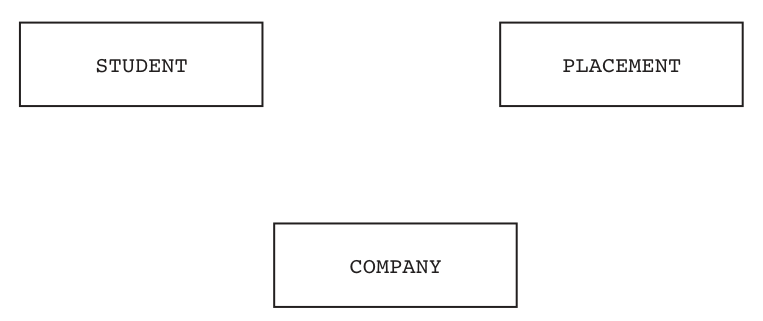
Answer
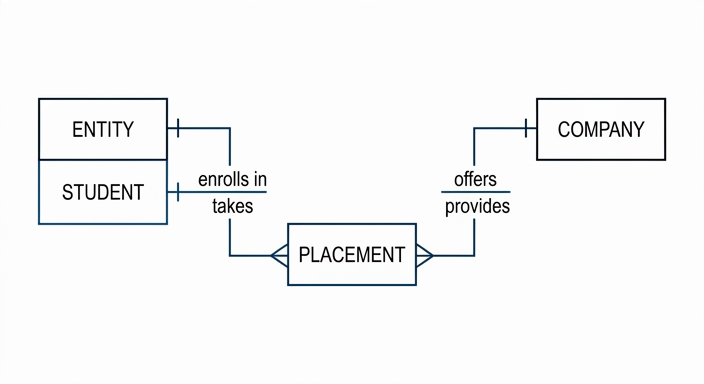
See E-R diagram
Background Concept
An entity-relationship (E-R) diagram shows the main entities in a relational database and the relationships between them. The important idea here is cardinality: how many instances of one entity can be related to how many instances of another.
A one-to-many relationship means one record in the first entity can be linked to many records in the second entity. In a crow's foot diagram, the crow's foot is placed on the many side.
In this database, PLACEMENT acts as the table that records each work-experience placement. It links a student to a company for a particular period.
Understanding the Question
You are given three entities: STUDENT, PLACEMENT and COMPANY. You must complete the E-R diagram by adding the correct relationship lines and cardinalities.
The wording gives the clues:
- "Students can complete multiple work experience placements" means one student can be linked to many placement records.
- "Students can only complete one placement at a time" does not change the cardinality shown in the E-R diagram; it is a business rule about timing.
- "Students can complete more than one placement at the same company" means a company can also be linked to many placement records.
So PLACEMENT is the many side in both relationships.
Approach
Start from the meaning of each table:
STUDENTstores one record per student.COMPANYstores one record per company.PLACEMENTstores one record per placement.
Then ask:
- How many placements can one student have? Many.
- How many placements can one company have? Many.
So draw:
STUDENTtoPLACEMENTas 1:MCOMPANYtoPLACEMENTas 1:M
There is no need for a direct relationship line between STUDENT and COMPANY because that relationship is represented through PLACEMENT.
Step-by-Step Reasoning
From the statement "Students can complete multiple work experience placements":
- one
STUDENTcan relate to manyPLACEMENTrecords - each
PLACEMENTrecord belongs to one student - therefore the crow's foot goes at
PLACEMENT, and the one side is atSTUDENT
From the fact that each placement happens at a company, and students can complete more than one placement at the same company:
- one
COMPANYcan relate to manyPLACEMENTrecords - each
PLACEMENTrecord belongs to one company - therefore the crow's foot again goes at
PLACEMENT, and the one side is atCOMPANY
That gives two one-to-many relationships, both pointing into PLACEMENT as the many side.
Key Takeaways
- Read the business rules carefully to determine relationship cardinality.
- A crow's foot is always placed on the many side of a relationship.
- A linking table such as
PLACEMENToften sits between two main entities and records repeated events or transactions.
Common Mistakes
- Drawing a many-to-many relationship directly between
STUDENTandCOMPANY. ThePLACEMENTtable already resolves that relationship. - Putting the crow's foot at
STUDENTorCOMPANYinstead of atPLACEMENT. - Adding a direct line between
STUDENTandCOMPANYwhen the placement record is the actual relationship.
Things to Be Careful About
- Use the wording of the scenario, not just the table names.
- "One placement at a time" is a timing constraint, not a different cardinality for this diagram.
- Make sure both relationships are shown as one-to-many, with
PLACEMENTon the many side in each case.
Explain why the database WORKEXPERIENCE is in Third Normal Form (3NF).
...................................................................................................................................................
...................................................................................................................................................
...................................................................................................................................................
.............................................................................................................................................
Answer
- Each table has a single primary key and all attributes contain single values, so there are no repeating groups and no partial dependencies.
- All non-key attributes depend only on the primary key of their own table, with no non-key attribute depending on another non-key attribute, so the tables are in 3NF.
See explanation
Background Concept
Third Normal Form (3NF) is a stage of database normalisation used to reduce redundancy and avoid update anomalies.
A table is in:
- 1NF if fields contain atomic values and there are no repeating groups
- 2NF if it is already in 1NF and every non-key attribute depends on the whole key
- 3NF if it is already in 2NF and there are no transitive dependencies, meaning non-key attributes do not depend on other non-key attributes
In simple terms, in 3NF each non-key item should depend on the key, the whole key, and nothing but the key.
Understanding the Question
You are asked to explain why the database structure shown is in 3NF. That means you must refer to the normal-form rules and connect them to these tables:
STUDENT(StudentID, FirstName, TelephoneNumber, UniversityName)PLACEMENT(PlacementID, StudentID, CompanyID, StartDate, EndDate, Complete)COMPANY(CompanyID, CompanyName, MaxStudentsPerPlacement)
The question is not asking you to redesign the tables, only to justify why the design meets 3NF.
Approach
A clear way to answer is:
- note that each table has a single-field primary key
- note that the attributes are atomic
- explain that with single-field keys there are no partial dependencies
- explain that non-key attributes depend only on the primary key, not on other non-key attributes
That directly covers the conditions for 3NF.
Step-by-Step Reasoning
First, each table has a clear primary key:
StudentIDinSTUDENTPlacementIDinPLACEMENTCompanyIDinCOMPANY
Because these are single-field keys, partial dependency cannot occur. Partial dependency is only an issue when a table has a composite primary key and an attribute depends on only part of it.
Next, the attributes are atomic. For example:
FirstNamestores one valueTelephoneNumberstores one valueStartDatestores one valueCompletestores one value
So the tables satisfy 1NF.
Then consider whether non-key attributes depend only on the key:
- in
STUDENT,FirstName,TelephoneNumberandUniversityNamedepend onStudentID - in
COMPANY,CompanyNameandMaxStudentsPerPlacementdepend onCompanyID - in
PLACEMENT,StudentID,CompanyID,StartDate,EndDateandCompleteare properties of that placement record identified byPlacementID
Finally, there is no transitive dependency shown. For example, CompanyName is not stored inside PLACEMENT; it is correctly stored in COMPANY. That avoids non-key data depending on another non-key item through a foreign key.
So the database can be justified as being in 3NF.
Key Takeaways
- 3NF means no repeating groups, no partial dependency and no transitive dependency.
- Single-field primary keys make the 2NF check easier because partial dependency cannot occur.
- Descriptive data should stay in the correct table instead of being duplicated elsewhere.
Common Mistakes
- Saying only "it has a primary key". That is not enough to explain 3NF.
- Forgetting to mention that non-key attributes must depend only on the primary key.
- Confusing foreign keys with transitive dependency. A foreign key is not automatically a problem.
Things to Be Careful About
- 3NF explanation should build on 1NF and 2NF ideas.
- Use the exact table structure given, not assumptions about extra attributes.
- Do not claim a table is not in 3NF just because it contains foreign keys; foreign keys are normal in relational design.
Some example data from the PLACEMENT table is shown:
| PlacementID | StudentID | CompanyID | StartDate | EndDate | Complete |
|---|---|---|---|---|---|
| PC001 | LDEA01 | MSCM | 01/01/2023 | 12/07/2023 | TRUE |
| PC002 | LDEA01 | MSCM | 01/04/2024 | 08/05/2024 | FALSE |
| PC003 | ALAU02 | NEAM | 09/03/2020 | 10/03/2021 | FALSE |
| PC004 | LOLI75 | GOUZ | 07/06/2018 | 11/09/2018 | TRUE |
Write a Structured Query Language (SQL) script to delete all placements that have been completed.
...........................................................................................................................................
...........................................................................................................................................
...........................................................................................................................................
.....................................................................................................................................
Answer
DELETE FROM PLACEMENT
WHERE Complete = TRUE;
DELETE FROM PLACEMENT WHERE Complete = TRUE;
Background Concept
DELETE is an SQL Data Manipulation Language (DML) command used to remove records from a table. If you use DELETE without a WHERE clause, every record in the table is removed. If you use a WHERE clause, only the records that satisfy the condition are deleted.
Understanding the Question
You are asked to delete all placements that have been completed. In the PLACEMENT table, the field that shows this is Complete, which stores Boolean values such as TRUE or FALSE.
So you need:
- the correct table:
PLACEMENT - the correct command:
DELETE - the correct condition: only rows where
Complete = TRUE
Approach
Use the standard SQL pattern:
DELETE FROM table_nameWHERE condition
The condition must keep incomplete placements and remove only completed ones.
Step-by-Step Reasoning
The table to edit is PLACEMENT, so the statement begins:
DELETE FROM PLACEMENT
Now decide which rows to remove. Completed placements are marked by the Boolean field Complete being TRUE, so add:
WHERE Complete = TRUE
That means:
- rows with
Complete = TRUEare deleted - rows with
Complete = FALSEremain
This is exactly what the question asks.
Key Takeaways
- Use
DELETE FROMto remove rows. - Always add a
WHEREclause unless you really intend to delete every row. - Boolean fields can be tested directly in the condition.
Common Mistakes
- Forgetting the
WHEREclause, which would delete the entire table contents. - Using
SELECTinstead ofDELETE. - Testing the wrong value, such as
FALSE, which would delete the incomplete placements instead.
Things to Be Careful About
- Use the table name exactly as given:
PLACEMENT. - Use the field name exactly as given:
Complete. - The question asks for completed placements, so the condition must be
TRUE, notFALSE.
Write an SQL script to return the total number of placements completed by the student with ID LDEA01 at the company with ID NEAM. The total should be given an appropriate name.
...........................................................................................................................................
...........................................................................................................................................
...........................................................................................................................................
...........................................................................................................................................
...........................................................................................................................................
.....................................................................................................................................
Answer
SELECT COUNT(PlacementID) AS TotalCompletedPlacements
FROM PLACEMENT
WHERE StudentID = 'LDEA01'
AND CompanyID = 'NEAM'
AND Complete = TRUE;
SELECT COUNT(PlacementID) AS TotalCompletedPlacements FROM PLACEMENT WHERE StudentID = 'LDEA01' AND CompanyID = 'NEAM' AND Complete = TRUE;
Background Concept
When a question asks for a total number of records, SQL normally uses an aggregate function such as COUNT(). COUNT() returns how many rows match the condition.
A WHERE clause is then used to limit the rows being counted. If several conditions must all be true, they are joined with AND.
An alias created with AS gives the result column a meaningful heading.
Understanding the Question
You must return the total number of placements that satisfy all of these conditions:
- the student ID is
LDEA01 - the company ID is
NEAM - the placements have been completed
The answer should also give the total an appropriate name, so an alias is needed.
Approach
Use a SELECT COUNT(...) query on the PLACEMENT table because every placement is stored there. Then filter the rows using three conditions in the WHERE clause.
The query does not need a join, because both StudentID and CompanyID already exist in PLACEMENT.
Step-by-Step Reasoning
Start with the aggregate:
SELECT COUNT(PlacementID)
Counting PlacementID counts the number of placement records that match the conditions.
Next, give the result a sensible name using an alias, for example:
AS TotalCompletedPlacements
Now choose the table:
FROM PLACEMENT
Finally, add all required filters:
StudentID = 'LDEA01'selects only that student's placementsCompanyID = 'NEAM'selects only placements at that companyComplete = TRUEensures only completed placements are counted
Because all three conditions must be true together, they are joined with AND.
So the query counts only rows that satisfy every requirement.
Key Takeaways
- Use
COUNT()when the question asks for a total number of matching records. - Put all required restrictions in the
WHEREclause. - Use
ASto give calculated output a clear name.
Common Mistakes
- Forgetting the
Complete = TRUEcondition, which would count incomplete placements as well. - Using separate queries instead of one query with all conditions.
- Counting from the wrong table or trying to join tables unnecessarily.
- Forgetting to give the total an alias when the question asks for an appropriate name.
Things to Be Careful About
- String values such as
LDEA01andNEAMmust be written in quotes. - The field names must match the schema exactly:
StudentID,CompanyID,Complete. COUNT(PlacementID)andCOUNT(*)would both be acceptable in many SQL systems, but using the key field is clear and appropriate here.
The database tables are repeated here:
STUDENT(StudentID, FirstName, TelephoneNumber, UniversityName)
PLACEMENT(PlacementID, StudentID, CompanyID, StartDate, EndDate, Complete)
COMPANY(CompanyID, CompanyName, MaxStudentsPerPlacement)
Explain what is meant by referential integrity, and how it applies to this database.
...................................................................................................................................................
...................................................................................................................................................
...................................................................................................................................................
...................................................................................................................................................
...................................................................................................................................................
.............................................................................................................................................
Answer
- Referential integrity means a foreign key value must match an existing primary key value in the related table.
- In this database,
PLACEMENT.StudentIDmust match aStudentIDinSTUDENTandPLACEMENT.CompanyIDmust match aCompanyIDinCOMPANY. - Therefore, a placement cannot be entered for a student or company that does not exist, and related student or company records should not be deleted if matching placement records still exist.
See explanation
Background Concept
Referential integrity is a rule used in relational databases to keep links between tables valid. It applies when one table contains a foreign key that refers to the primary key of another table.
The rule means that a foreign key value in the child table must either:
- match an existing primary key value in the parent table, or
- be null, if nulls are allowed
This prevents orphan records, where a child record points to a parent record that does not exist.
Understanding the Question
You are asked to explain both:
- what referential integrity means in general
- how it applies to the specific tables shown
The key table here is PLACEMENT, because it contains:
StudentIDCompanyID
These are foreign keys linking each placement to a student and a company.
Approach
A strong answer should do three things:
- define referential integrity clearly
- identify the foreign-key relationships in this schema
- explain the practical effect, such as preventing invalid inserts or deletions
Step-by-Step Reasoning
Look at the tables:
STUDENT(StudentID, FirstName, TelephoneNumber, UniversityName)PLACEMENT(PlacementID, StudentID, CompanyID, StartDate, EndDate, Complete)COMPANY(CompanyID, CompanyName, MaxStudentsPerPlacement)
StudentID is the primary key of STUDENT.
CompanyID is the primary key of COMPANY.
Inside PLACEMENT, the fields StudentID and CompanyID are used to refer to those tables, so they act as foreign keys.
Referential integrity therefore requires:
- every
PLACEMENT.StudentIDto match a realSTUDENT.StudentID - every
PLACEMENT.CompanyIDto match a realCOMPANY.CompanyID
This means you cannot have a placement record for a student who is not in STUDENT, or for a company that is not in COMPANY.
It also means the database should stop actions that would break those links. For example, if a student still has placement records, deleting that student could leave invalid references unless the DBMS prevents the deletion or handles it with a defined action such as cascading.
Key Takeaways
- Referential integrity keeps relationships between tables valid.
- It is enforced through primary key and foreign key links.
- It prevents orphan records and inconsistent data.
Common Mistakes
- Defining referential integrity only as "keeping data correct" without mentioning primary keys and foreign keys.
- Naming the wrong fields as the foreign keys.
- Forgetting to apply the idea to both links in this database: student and company.
Things to Be Careful About
PLACEMENTis the child table here because it stores the foreign keys.STUDENTandCOMPANYare parent tables for those links.- The question asks for both the general meaning and the application to this schema, so both parts should be included.
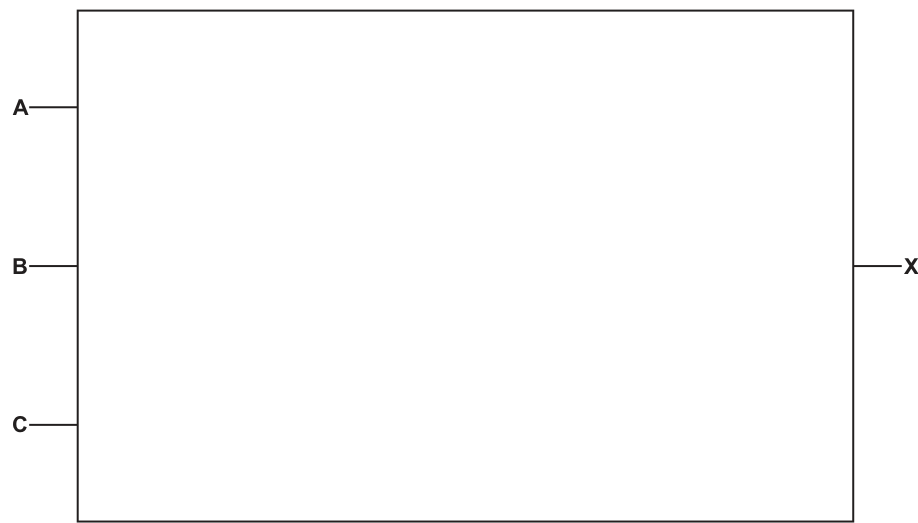
Answer
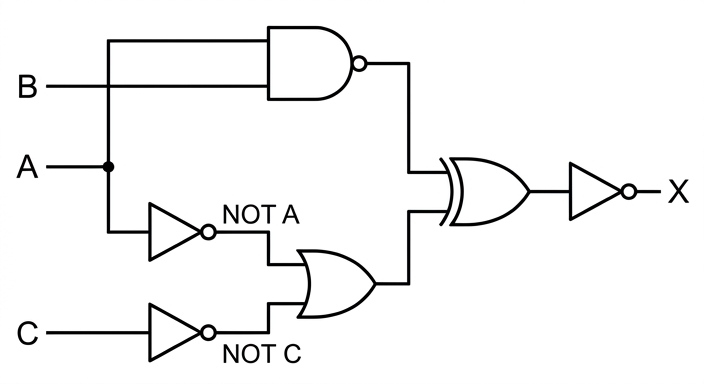
See logic circuit
Background Concept
A logic circuit is a hardware representation of a Boolean expression. Each operator in the expression becomes a gate:
NOTbecomes a NOT gateANDbecomes an AND gateORbecomes an OR gateNANDmeans AND followed by NOTXORoutputs1only when its two inputs are different
When an expression is nested, the circuit must follow the same structure as the brackets. Inner bracketed parts are built first, then their outputs are used as inputs to later gates. This is exactly like following the order of operations in arithmetic.
For this expression,
there are three main stages inside the final NOT:
- build
A NAND B - build
NOT A OR NOT C - XOR those two results
Then the whole XOR result is inverted by the final NOT gate.
Understanding the Question
The question gives the full logic expression and asks for the corresponding circuit. The input lines A, B and C are already provided in the figure, and the required output is X.
The important clue is that the expression already shows the gate structure through its brackets. So the task is not to simplify the expression, but to draw the gates in the correct order and join them correctly.
Approach
The safest method is to break the expression into smaller sub-expressions:
- first sub-expression:
A NAND B - second sub-expression:
NOT A OR NOT C - combine those two using
XOR - apply a final
NOTto produceX
This avoids wiring mistakes. A common way to think about it is to give each sub-expression a temporary name:
- let
P = A NAND B - let
Q = NOT A OR NOT C - then
X = NOT (P XOR Q)
Once split up like this, the circuit becomes much easier to draw.
Step-by-Step Reasoning
Start with the first sub-expression:
- Inputs
AandBgo into a NAND gate. - The output of that gate is the value of
A NAND B.
Now build the second sub-expression:
- Input
Amust be inverted, soAgoes through a NOT gate to produceNOT A. - Input
Cmust also be inverted, soCgoes through a NOT gate to produceNOT C. - These two outputs go into an OR gate.
- The OR gate output is
(NOT A OR NOT C).
Now combine the two larger parts:
- The output from the NAND gate and the output from the OR gate both go into an XOR gate.
- This gives
((A NAND B) XOR (NOT A OR NOT C)).
Finally:
- the output of the XOR gate goes through one more NOT gate
- that final output is labelled
X
So the finished circuit must contain:
- one NAND gate using
AandB - two NOT gates, one on
Aand one onC - one OR gate combining those two inverted signals
- one XOR gate combining the NAND result and the OR result
- one final NOT gate producing
X
Key Takeaways
- Follow the brackets in the expression when drawing a logic circuit.
- Build inner sub-expressions first, then combine them.
NANDis not a separate algebraic step in writing; in a circuit it is a single gate.- A final outer
NOTmeans the whole preceding result must be inverted at the end.
Common Mistakes
- Drawing an AND gate instead of a NAND gate for
A NAND B. - Forgetting that both
AandCmust be inverted before the OR gate. - Applying the final NOT to only one branch instead of to the XOR output.
- Ignoring the brackets and connecting gates in the wrong order.
- Using an OR or AND gate instead of XOR for the middle combination.
Things to Be Careful About
- Make sure the line from
Abranches correctly: one branch goes to the NAND gate withB, and another branch goes to the NOT gate forNOT A. - The final NOT is on the output of the XOR gate, not on one of its inputs.
NOT A OR NOT Cmeans two separate NOT operations feeding an OR gate; it is not the same asNOT (A OR C)unless specifically transformed by De Morgan's law.- The output line should be clearly labelled
X.
Write the logic expression for the following truth table.
| R | S | T | Q |
|---|---|---|---|
| 0 | 0 | 0 | 0 |
| 0 | 0 | 1 | 1 |
| 0 | 1 | 0 | 0 |
| 0 | 1 | 1 | 0 |
| 1 | 0 | 0 | 0 |
| 1 | 0 | 1 | 0 |
| 1 | 1 | 0 | 1 |
| 1 | 1 | 1 | 0 |
Q = ......................................................................................................................................
Answer
Q = (NOT R AND NOT S AND T) OR (R AND S AND NOT T)
Background Concept
To write a logic expression from a truth table, the standard method is to look for every row where the output is 1. For each such row, write a product term (an AND term):
- if an input is
1in that row, write the input normally - if an input is
0in that row, writeNOTof that input
Then join all those product terms using OR.
This is called a sum-of-products form. It works because each product term is true for exactly the row it represents.
Understanding the Question
The table has three inputs, R, S and T, and one output, Q. You are asked to write a logic expression that produces exactly the same output pattern.
From the table, Q = 1 only in these two cases:
R = 0,S = 0,T = 1R = 1,S = 1,T = 0
All other rows have output 0, so they do not appear directly in the sum-of-products expression.
Approach
Use the true rows only.
For each row where Q = 1:
- convert the row into an AND term
- use
NOTon any variable that is0 - join the resulting terms with
OR
Because there are only two rows where Q = 1, the final expression will have two AND terms joined by one OR.
Step-by-Step Reasoning
First true row:
R = 0so writeNOT RS = 0so writeNOT ST = 1so writeT
This gives:
Second true row:
R = 1so writeRS = 1so writeST = 0so writeNOT T
This gives:
Now combine the two true cases with OR:
That matches the truth table because Q becomes 1 in exactly those two rows and 0 everywhere else.
An equivalent simplified form may also exist, but the direct sum-of-products form is the safest exam answer from a truth table.
Key Takeaways
- To form an expression from a truth table, focus on the rows where the output is
1. - A
0in a true row becomesNOTof that variable. - A
1in a true row stays as the variable itself. - Join the row expressions using
OR.
Common Mistakes
- Using rows where
Q = 0instead of rows whereQ = 1. - Forgetting to negate variables that are
0in a true row. - Joining the two row terms with
ANDinstead ofOR. - Writing only one of the true rows and missing the other.
- Mixing the variable order or copying a row incorrectly.
Things to Be Careful About
- Check each true row carefully before writing the term.
NOT R AND NOT S AND Tis one complete term; it should stay grouped before being ORed with the second term.- Equivalent notation such as means the same thing, but keep the notation consistent.
- Do not simplify unless you are certain; the canonical expression directly from the table is usually the most reliable exam answer.
The table shows part of the instruction set for a processor. The processor has one register, the Accumulator (ACC).
| Instruction | Explanation | |
|---|---|---|
| Opcode | Operand | |
| AND | #n / Bn / &n | Bitwise AND operation of the contents of the ACC with the operand |
| AND | Bitwise AND operation of the contents of the ACC with the contents of | |
| XOR | #n / Bn / &n | Bitwise XOR operation of the contents of the ACC with the operand |
| XOR | Bitwise XOR operation of the contents of the ACC with the contents of | |
| OR | #n / Bn / &n | Bitwise OR operation of the contents of the ACC with the operand |
| OR | Bitwise OR operation of the contents of the ACC with the contents of | |
| LSL | #n | Bits in ACC are shifted logically n places to the left. Zeros are introduced on the right-hand end. |
| LSR | #n | Bits in ACC are shifted logically n places to the right. Zeros are introduced on the left-hand end. |
<address> can be an absolute or symbolic address
# denotes a denary number, e.g. #127
B denotes a binary number, e.g. B10010001
& denotes a hexadecimal number, e.g. &4A
The ACC currently contains the following positive binary integer:
| 0 | 0 | 0 | 1 | 1 | 1 | 1 | 0 |
|---|
Write a bit manipulation instruction that uses a binary shift to change the contents of the ACC to:
| 0 | 1 | 1 | 1 | 1 | 0 | 0 | 0 |
|---|
Instruction ...........................................................................................................................
Answer
LSL #2
LSL #2
Background Concept
A logical shift moves every bit left or right by a specified number of places.
LSL #nshifts bits left bynplaces.LSR #nshifts bits right bynplaces.- In a logical shift, any new spaces are filled with
0. - Bits shifted out of the end are lost.
For an 8-bit ACC, shifting left by 1 moves each bit one column to the left and puts 0 into the rightmost position.
Understanding the Question
The ACC currently contains 00011110, and the question wants a single bit manipulation instruction that changes it to 01111000.
The key clue is that it says to use a binary shift, so the correct answer must be either LSL or LSR with the correct number of places.
Approach
Compare the starting pattern with the required pattern and see whether the bits have moved left or right.
If the bits have moved left, use LSL. Then count how many places they moved.
Step-by-Step Reasoning
Start with:
00011110
Shift left by 1:
00111100
Shift left by 2:
01111000
That matches the required result exactly, so the instruction is:
LSL #2
A right shift would move the 1 bits the wrong way, so LSR cannot be correct.
Key Takeaways
- A logical left shift moves all bits left and inserts
0on the right. - To find the instruction, compare the original and target bit patterns.
- Always count exactly how many places the bits moved.
Common Mistakes
- Using
LSRinstead ofLSL; this moves the bits in the wrong direction. - Giving the wrong shift amount, such as
#1or#3. - Forgetting that zeros are inserted after a logical shift.
Things to Be Careful About
- The operand for the shift instruction is denary, so write
#2, not binaryB10. - Make sure the final 8-bit pattern matches exactly.
- Do not treat this as a rotate; bits shifted out are discarded.
The ACC currently contains the following positive binary integer:
| 1 | 1 | 1 | 0 | 0 | 0 | 1 | 1 |
|---|
Write the contents of the ACC after the instruction XOR &12 is carried out.
Working
&12 = 00010010
11100011 XOR 00010010 = 11110001
Answer
11110001
11110001
Background Concept
XOR is a bitwise logical operation. It compares corresponding bits in two binary values.
The XOR rules are:
0 XOR 0 = 00 XOR 1 = 11 XOR 0 = 11 XOR 1 = 0
So XOR gives 1 when the two bits are different, and 0 when they are the same.
The operand &12 is hexadecimal. Each hex digit corresponds to 4 binary bits:
1=00012=0010
So &12 becomes 00010010.
Understanding the Question
The ACC contains 11100011, and the instruction is XOR &12.
That means:
- Convert
&12into binary. - XOR it bit by bit with the ACC contents.
- Write the new ACC contents.
Because the ACC is shown as 8 bits, the hexadecimal value must also be written as 8 bits.
Approach
First convert the hexadecimal operand to binary. Then place the two 8-bit values underneath each other and apply XOR column by column.
This is the safest method because it avoids mistakes with bit positions.
Step-by-Step Reasoning
ACC:
11100011
Operand:
&12
Convert &12 to binary:
1becomes00012becomes0010
So:
&12 = 00010010
Now XOR bit by bit:
1 XOR 0 = 11 XOR 0 = 11 XOR 0 = 10 XOR 1 = 10 XOR 0 = 00 XOR 0 = 01 XOR 1 = 01 XOR 0 = 1
Result:
11110001
So the new contents of the ACC are 11110001.
Key Takeaways
- Convert hexadecimal to binary before doing bitwise operations.
- XOR outputs
1only when the bits differ. - Keep values aligned as 8-bit patterns.
Common Mistakes
- Converting
&12incorrectly, for example as denary 12 instead of hexadecimal12. - Forgetting leading zeros and writing only
10010instead of00010010. - Confusing XOR with OR or AND.
Things to Be Careful About
&means hexadecimal in this instruction set.- The answer should remain 8 bits long.
- Work from left to right or right to left consistently so the bit positions stay matched.
The ACC currently contains the following positive binary integer:
| 1 | 1 | 1 | 0 | 0 | 0 | 1 | 1 |
|---|
Write the contents of the ACC after the instruction AND #63 is carried out.
Working
#63 = 00111111
11100011 AND 00111111 = 00100011
Answer
00100011
00100011
Background Concept
AND is a bitwise logical operation. It compares corresponding bits in two binary values.
The AND rules are:
0 AND 0 = 00 AND 1 = 01 AND 0 = 01 AND 1 = 1
So AND only produces 1 when both bits are 1.
The operand #63 is denary because of the # symbol. Denary 63 written as 8-bit binary is 00111111.
Understanding the Question
The ACC contains 11100011 and the instruction is AND #63.
So the task is:
- Convert denary
63into binary. - Perform a bitwise AND with the ACC contents.
- Write the 8-bit result.
Approach
Translate the denary operand first, then compare the two 8-bit values one bit at a time using the AND rule.
A useful way to think about AND is that it can be used as a mask: it keeps some bits and forces others to 0.
Step-by-Step Reasoning
ACC:
11100011
Operand:
#63
Convert 63 to binary:
63 = 32 + 16 + 8 + 4 + 2 + 1
So in 8 bits:
00111111
Now perform AND:
11100011
00111111
Compare each bit:
1 AND 0 = 01 AND 0 = 01 AND 1 = 10 AND 1 = 00 AND 1 = 00 AND 1 = 01 AND 1 = 11 AND 1 = 1
Result:
00100011
So the ACC becomes 00100011.
Key Takeaways
#means the operand is denary and must be converted first.- AND only keeps a
1where both bits are1. - An AND mask can clear selected bits to
0.
Common Mistakes
- Treating
#63as already binary. - Writing
111111instead of the full 8-bit00111111. - Mixing up AND and OR, which give different results.
Things to Be Careful About
- Keep the binary operand padded to 8 bits.
- Do not drop leading zeros in the final ACC value.
- Make sure you use the denary value
63, not hex63.
The ACC currently contains the following positive binary integer:
| 1 | 1 | 1 | 0 | 0 | 0 | 1 | 1 |
|---|
The current contents of memory are:
| Address | Data |
|---|---|
| 98 | 00100100 |
| 99 | 00110001 |
| 100 | 00110011 |
| 101 | 10100011 |
| 102 | 10101100 |
Write the contents of the ACC after the instruction OR 100 is carried out.
Working
100 contains 00110011
11100011 OR 00110011 = 11110011
Answer
11110011
11110011
Background Concept
When an instruction uses an address as its operand, the processor does not use the address number itself in the logic operation. It uses the data stored at that address.
OR is a bitwise logical operation with these rules:
0 OR 0 = 00 OR 1 = 11 OR 0 = 11 OR 1 = 1
So OR produces 1 if either bit is 1.
Understanding the Question
The ACC contains 11100011. The instruction is OR 100.
The memory table shows that address 100 contains 00110011.
So the operation is not:
11100011 OR 100
It is:
11100011 OR 00110011
The task is to use the contents of memory location 100 and find the new ACC value.
Approach
Look up the data stored at address 100, then write that 8-bit value underneath the ACC contents and apply OR bit by bit.
This is a common check in assembly-style questions: first identify the addressing mode correctly, then carry out the operation.
Step-by-Step Reasoning
ACC:
11100011
From the memory table:
- address
100contains00110011
Now perform OR:
11100011
00110011
Bit by bit:
1 OR 0 = 11 OR 0 = 11 OR 1 = 10 OR 1 = 10 OR 0 = 00 OR 0 = 01 OR 1 = 11 OR 1 = 1
Result:
11110011
So the contents of the ACC after OR 100 are 11110011.
Key Takeaways
- An address operand means use the contents stored at that address.
- OR gives
1whenever at least one of the two bits is1. - Always look up the correct memory location before doing the operation.
Common Mistakes
- Using the address
100itself as the operand instead of the contents at address100. - Looking up the wrong row in the memory table, such as
99or101. - Confusing OR with XOR or AND.
Things to Be Careful About
OR 100means direct addressing using memory location100.- Copy the data from the table exactly:
00110011. - Keep the final answer as an 8-bit value, including any leading
1or0bits.
The Operating System (OS) is responsible for hardware and security management in a computer system.
State two tasks that are performed by hardware management.
1 ........................................................................................................................................
...........................................................................................................................................
2 ........................................................................................................................................
...........................................................................................................................................
Answer
- Memory management.
- Peripheral / input-output device management.
Memory management; peripheral / input-output device management
Background Concept
Hardware management is one of the main jobs of an operating system. The OS sits between application software and the physical hardware, making sure that components such as memory, storage devices, input devices and output devices are used efficiently and correctly. Typical hardware-management tasks include memory management, processor scheduling, device management, interrupt handling, buffering and spooling.
Understanding the Question
This part asks for two tasks performed by hardware management. Because it says "state", no detailed description is needed in the exam answer. You just need to name two valid OS tasks connected with controlling or organising hardware resources.
Approach
Think of the physical resources the OS controls:
- main memory
- input/output and peripheral devices
- the processor
Any two standard tasks from this area would score.
Step-by-Step Reasoning
A correct choice is memory management. The OS decides how RAM is allocated to programs, keeps track of which areas are in use and which are free, and helps prevent programs interfering with each other.
A second correct choice is peripheral / input-output device management. The OS controls communication with hardware such as printers, disks, keyboards and monitors, often through device drivers. It also organises access when several programs want to use a device.
Other answers that are often accepted in this topic include processor management, interrupt handling, buffering and spooling, provided they are clearly hardware-related.
Key Takeaways
- Hardware management is about controlling physical resources.
- Typical OS hardware tasks include memory management, processor management and device management.
- For a "state" question, short accurate terms are enough.
Common Mistakes
- Giving a software-development feature such as error diagnostics instead of an OS hardware task.
- Giving a security task such as password control, which belongs to security management, not hardware management.
- Writing vague answers like "manage the computer" without naming a specific task.
Things to Be Careful About
- Make sure the task is genuinely related to hardware resources.
- Use precise terms such as "memory management" rather than a long unclear sentence.
- Do not repeat the same idea twice in different words, such as "device management" and "I/O management", unless the wording clearly distinguishes them.
State two tasks that are performed by security management.
1 ........................................................................................................................................
...........................................................................................................................................
2 ........................................................................................................................................
...........................................................................................................................................
Answer
- User authentication using usernames and passwords.
- Setting and controlling file / user access rights and permissions.
User authentication; setting and controlling access rights and permissions
Background Concept
Security management is another major function of the operating system. Its purpose is to protect data and system resources from unauthorised access, misuse or damage. Common security-management tasks include authentication, access control, managing user accounts, permissions, auditing and sometimes support for encryption.
Understanding the Question
The question asks for two tasks performed by security management. Since it says "state", you only need to identify two correct examples. They should be about keeping the system and data secure, not about managing hardware.
Approach
Think about how an OS keeps users out of things they should not access:
- check who the user is
- decide what that user is allowed to do
That leads directly to authentication and access rights.
Step-by-Step Reasoning
A strong first answer is user authentication using usernames and passwords. Before allowing access, the OS checks the login details to confirm the user is genuine.
A strong second answer is setting and controlling access rights / permissions. The OS can decide which users may read, write, edit or delete files and whether they can use particular resources.
These are both classic OS security-management tasks and are clearly different from each other, so they make a safe pair of answers.
Key Takeaways
- Security management protects the system and its data.
- Authentication checks identity.
- Access rights control what an authenticated user is allowed to do.
Common Mistakes
- Naming anti-malware software as if it is always an OS task; while security software exists, the OS question usually expects account and permission control.
- Giving hardware-management tasks such as memory management.
- Repeating the same idea twice, for example "passwords" and "login", which may be treated as one point.
Things to Be Careful About
- Choose two distinct security tasks.
- Keep the answer within OS security management, especially user accounts and permissions.
- If you mention passwords, link them to authentication rather than just writing "passwords" on its own.
Describe one benefit of using library routines when developing software.
...........................................................................................................................................
...........................................................................................................................................
...........................................................................................................................................
.....................................................................................................................................
Answer
- Library routines provide pre-written, tested code, so programmers do not need to write that section themselves.
- This speeds up development and reduces the chance of introducing new errors.
Pre-written tested routines can be reused, making development faster and reducing errors.
Background Concept
A library routine is a pre-written program module that performs a common task. Examples include routines for sorting, handling files, mathematical calculations or displaying graphics. Libraries are useful because software developers can reuse code instead of rewriting standard functions from scratch.
Understanding the Question
This part asks for one benefit of using library routines, but it says describe, not just state. That means a one-word answer like "faster" is too weak on its own. You need the benefit and a short explanation of why it is a benefit.
Approach
Choose one strong benefit and expand it briefly. The safest route is:
- library routines are already written and tested
- therefore development is quicker and often more reliable
That gives both the point and the description needed for 2 marks.
Step-by-Step Reasoning
The answer starts with the idea that library routines are pre-written. This means the programmer does not need to create that code from nothing.
Then add that they are often tested/debugged already. Because the routine has usually been used before, it is less likely to contain fresh errors than new code written under time pressure.
From those facts, the benefit follows naturally: development is faster and the chance of errors is reduced.
Any one of those linked explanations would typically be enough for full credit as long as it is clearly described.
Key Takeaways
- Library routines are reusable code modules.
- Their main value is saving development time.
- Reuse can also improve reliability because existing code has often been tested already.
Common Mistakes
- Writing only "saves time" without explaining why.
- Giving two very short benefits instead of fully describing one.
- Confusing a library with an IDE or with an operating system utility.
Things to Be Careful About
- For a "describe" question, include cause and effect.
- Make sure the benefit is about software development, not about hardware performance.
- If you say "tested", be clear that this reduces debugging effort or errors.
Describe one drawback of using library routines when developing software.
...........................................................................................................................................
...........................................................................................................................................
...........................................................................................................................................
.....................................................................................................................................
Answer
- A library routine may be general-purpose and include functions the program does not need.
- This can make the program less efficient, for example using more memory / storage than necessary.
A library routine may include unnecessary general-purpose code, making the program less efficient and using extra memory/storage.
Background Concept
Library routines are convenient, but reuse is not always perfect. Because libraries are designed for many situations, a routine may be more general than a specific program needs. That can lead to inefficiency, reduced flexibility or dependence on code written by someone else.
Understanding the Question
This part asks for one drawback of using library routines and wants it described. So, again, you need the drawback plus its effect. A simple phrase like "less efficient" is not enough by itself.
Approach
Pick one clear drawback and explain why it matters. A very standard answer is:
- the routine is general-purpose
- so it may contain unnecessary code or features
- this can waste memory/storage or reduce efficiency
Step-by-Step Reasoning
A library routine is often written to work in many different programs. Because of that, it may contain extra instructions or options not needed in this specific software.
If unnecessary code is included, the finished program may:
- take up more storage space
- use more memory
- run less efficiently than a custom routine
That chain of reasoning gives the drawback and explains its impact, which is what the question requires.
Other sensible drawbacks sometimes accepted include not being able to modify the library source, needing to learn how to use the routine correctly, or dependence on version compatibility. But the inefficiency answer is one of the safest.
Key Takeaways
- Library routines are useful, but they are not always the perfect fit.
- General-purpose reusable code can be less efficient than code tailored to one task.
- A drawback answer should say both what the issue is and why it is a problem.
Common Mistakes
- Writing only "it is hard to use" without explaining why.
- Giving a drawback that is really a benefit, such as "already tested".
- Saying "libraries are slow" as a blanket statement; the issue is usually unnecessary generality, not that every library is always slow.
Things to Be Careful About
- Keep the drawback realistic and linked to development or execution.
- Do not make the answer too vague; mention the effect, such as more memory use or lower efficiency.
- Since the question asks for one drawback, one developed point is better than several undeveloped ones.
Identify two presentation features found in a typical Integrated Development Environment (IDE).
1 ................................................................................................................................................
2 ................................................................................................................................................
Answer
- Syntax highlighting.
- Automatic indentation / pretty printing.
Syntax highlighting; automatic indentation / pretty printing
Background Concept
An Integrated Development Environment (IDE) provides tools to help programmers write, test and present code. IDE features are often grouped into coding features, debugging features and presentation features. Presentation features improve the readability and visual organisation of source code so that programmers can understand it more easily.
Understanding the Question
This question asks for two presentation features found in a typical IDE. Because it says "identify", short feature names are enough. You do not need to explain how they work unless the question asks for description.
Approach
Think about features that change how code looks on screen rather than how it runs. Common examples are:
- syntax highlighting
- automatic indentation
- pretty printing
- line numbering
n
Any two valid presentation features would score.
Step-by-Step Reasoning
Syntax highlighting is a presentation feature because the IDE displays keywords, strings, comments and other language elements in different colours or styles. This makes code easier to read.
Automatic indentation / pretty printing is also a presentation feature because it formats code neatly, aligning blocks and showing structure clearly.
These are both typical and widely accepted examples.
Key Takeaways
- Presentation features improve readability of code.
- Syntax highlighting and indentation are classic IDE presentation tools.
- "Identify" questions usually just need the feature names.
Common Mistakes
- Giving debugging features such as breakpoints or single stepping.
- Giving coding features such as auto-completion if the question specifically wants presentation.
- Naming hardware or operating system features instead of IDE features.
Things to Be Careful About
- Make sure the two features are distinct.
- Stay within the IDE topic, not general programming tools.
- If unsure, choose common textbook examples such as syntax highlighting and pretty printing.
The processor uses several registers, including the Accumulator (ACC) and the Current Instruction Register (CIR).
Complete the table by describing the role of each register.
| Register | Role |
|---|---|
| ACC | ............................................................................................................................. |
| ............................................................................................................................. | |
| CIR | ............................................................................................................................. |
| ............................................................................................................................. |
Answer
- ACC: stores data currently being processed and the results of calculations/logic operations.
- CIR: stores the current instruction after it has been fetched, while it is decoded/executed.
ACC stores data/results being processed; CIR stores the current instruction.
Background Concept
A register is a very small, very fast storage location inside the CPU. Registers hold values that the processor needs immediately during the fetch-execute cycle. Because they are inside the processor, they are much faster to access than main memory.
Two important registers here are:
- ACC (Accumulator): used to hold data being worked on, especially the result of arithmetic or logic operations carried out by the ALU.
- CIR (Current Instruction Register): used to hold the instruction that has just been fetched from memory, so it can be decoded and executed.
Understanding the Question
The question gives two register names, ACC and CIR, and asks for the role of each one. This means you do not need a long explanation of the whole CPU — just the specific job of each register.
A good answer must clearly separate:
- a register that stores data/results (
ACC) - a register that stores the current instruction (
CIR)
Approach
Recall what each register is used for in processor operation:
- Identify what kind of thing the register stores.
- State when or why it stores it.
- Keep the answer short and precise.
For ACC, mention data or calculation results.
For CIR, mention the current fetched instruction being decoded or executed.
Step-by-Step Reasoning
-
The Accumulator is linked to the ALU. When arithmetic or logic is performed, the value being worked on, or the result produced, is typically held in the ACC.
-
So the role of the ACC is to store data currently being processed and/or the result of processing.
-
The Current Instruction Register is part of the instruction-handling process.
-
After an instruction is fetched from memory, it is placed in the CIR.
-
The control unit then decodes that instruction and controls its execution.
-
So the role of the CIR is to store the current instruction while it is being decoded/executed.
Key Takeaways
- Registers are fast storage locations inside the CPU.
- ACC is mainly for data/results.
- CIR is for the current instruction.
- In register questions, always say what is stored and why.
Common Mistakes
- Saying the ACC stores the current instruction — that is the job of the CIR, not the accumulator.
- Saying the CIR stores data — it stores an instruction, not general working data.
- Being too vague, such as writing only "stores information". The mark usually depends on naming the type of information correctly.
Things to Be Careful About
- Do not confuse CIR with registers such as the MAR, MDR, or PC.
- For ACC, mention results of calculations/logic operations or data being processed.
- For CIR, mention current instruction and ideally that it has been fetched and is being decoded/executed.
Increasing the number of cores in a processor can affect the performance of a computer.
Describe the drawbacks of increasing the number of cores in a processor.
...................................................................................................................................................
...................................................................................................................................................
...................................................................................................................................................
.............................................................................................................................................
Answer
- Not all software is written to use multiple cores, so extra cores may be unused and give little or no performance improvement.
- More cores increase cost/power consumption and generate more heat, so extra cooling may be needed.
Extra cores may not be fully used by software, and they increase cost/power/heat.
Background Concept
A processor core is an independent processing unit inside the CPU. A multicore processor has several cores, allowing more than one task, thread, or process to run at the same time.
In principle, more cores can improve performance, especially when:
- the operating system can schedule work efficiently across them
- the software is designed for parallel processing
- there are several tasks to run at once
However, adding cores does not guarantee a proportional speed increase.
Understanding the Question
The question asks for drawbacks of increasing the number of cores. So this is not asking for advantages such as better multitasking. It wants reasons why adding more cores can be a disadvantage or may fail to improve performance enough.
With 2 marks, two developed points are usually enough.
Approach
Think about two categories of drawback:
- Software limitation: more cores only help if programs can use them.
- Hardware/resource cost: more cores need more power, produce more heat, and cost more.
Either of these can be described clearly for full credit.
Step-by-Step Reasoning
- A multicore processor can run multiple threads or processes in parallel.
- But many programs are still single-threaded or only partly parallelised.
- If software uses only one core, the other cores bring little benefit for that program.
- So one drawback is that extra cores may be underused, meaning limited performance gain.
Another drawback comes from the physical hardware:
- More cores mean more circuitry on the chip.
- This usually increases manufacturing cost.
- It often increases power consumption.
- More power leads to more heat generation.
- More heat may require better cooling, which adds further cost and complexity.
A further valid idea, though not necessary here, is that managing work across multiple cores adds overhead, so performance gains are not always linear.
Key Takeaways
- More cores help only when work can be split across them.
- Software design is a major limit on the usefulness of multicore CPUs.
- Hardware improvements often involve trade-offs such as cost, heat, and power.
Common Mistakes
- Giving advantages instead of drawbacks, such as "better multitasking".
- Writing only "more cores are faster" which does not answer the question.
- Saying all programs automatically run faster on more cores — this is not true unless software can use parallel execution.
- Repeating the same idea twice, for example "more expensive" and "costs more" as separate differences.
Things to Be Careful About
- The question says describe, so each point should include a brief consequence, not just a label.
- Avoid absolute statements like "extra cores are useless". They are useful in many cases, just not always.
- If you mention software, make it clear that the issue is not all programs are designed to take advantage of multiple cores.
State three differences between Dynamic RAM (DRAM) and Static RAM (SRAM).
1 ................................................................................................................................................
...................................................................................................................................................
2 ................................................................................................................................................
...................................................................................................................................................
3 ................................................................................................................................................
...................................................................................................................................................
Answer
- DRAM needs to be refreshed regularly; SRAM does not need refreshing.
- DRAM is slower to access; SRAM is faster.
- DRAM is cheaper and has higher density/larger capacity; SRAM is more expensive and has lower density/smaller capacity.
DRAM needs refresh and is slower but cheaper/higher density; SRAM does not need refresh and is faster but more expensive/lower density.
Background Concept
Both DRAM and SRAM are types of RAM (Random Access Memory). RAM is volatile memory, meaning its contents are lost when power is switched off.
The two types differ in how they store bits:
- DRAM (Dynamic RAM) stores each bit using a capacitor.
- SRAM (Static RAM) stores each bit using a flip-flop circuit.
This difference in design leads to differences in speed, cost, density, and whether refreshing is required.
Understanding the Question
The question asks for three differences between DRAM and SRAM. That means you should give three paired contrasts, not just three facts about one of them.
A strong structure is:
- state the DRAM property
- state the matching SRAM contrast
This makes the difference explicit and easy to mark.
Approach
Choose three standard textbook differences that are widely accepted:
- refresh requirement
- speed
- cost/density/capacity
These are the clearest and safest differences for exam answers.
Step-by-Step Reasoning
1. Refreshing
- In DRAM, each bit is held in a capacitor.
- Capacitors gradually lose charge.
- Therefore DRAM must be refreshed regularly to keep its data.
- In SRAM, the data is stored in flip-flops, which keep their state while power remains on.
- Therefore SRAM does not need refreshing.
2. Speed
- Because DRAM needs refreshing and uses a different storage method, it is generally slower.
- SRAM can be accessed more quickly, so it is generally faster.
- This is why SRAM is often used for cache memory.
3. Cost and density
- A DRAM cell is simpler, so more memory cells can fit into the same chip area.
- This gives higher density and usually larger capacity at lower cost.
- SRAM cells are more complex and take more space.
- This gives lower density and makes SRAM more expensive per bit.
Any three clear contrasts like these would gain credit.
Key Takeaways
- DRAM: refresh needed, slower, cheaper, higher density.
- SRAM: no refresh, faster, more expensive, lower density.
- Storage method affects practical properties.
- SRAM is commonly used where speed matters most; DRAM is commonly used for main memory where large capacity is needed.
Common Mistakes
- Giving unpaired facts, such as only writing "DRAM is cheaper" without stating the SRAM contrast.
- Saying SRAM is non-volatile — it is still volatile RAM.
- Confusing DRAM/SRAM with ROM types such as PROM or EEPROM.
- Repeating the same idea twice, for example "SRAM is faster" and "DRAM is slower" as if they were two separate differences.
Things to Be Careful About
- The question asks for differences, so present each one as a direct comparison.
- If using cost/capacity, keep the pairing accurate: DRAM cheaper and higher density, SRAM more expensive and lower density.
- Do not mix up refreshing with losing data when power is off. Both are volatile, so both lose contents without power.
Web browsers use Internet Protocol (IP) addresses.
Complete the table by describing the following types of IP address.
| Type of IP address | Description |
|---|---|
| Static | ........................................................................................................... |
| ........................................................................................................... | |
| Public | ........................................................................................................... |
| ........................................................................................................... |
Answer
- Static: a fixed IP address that does not change.
- Public: an IP address that is visible/routable on the Internet and uniquely identifies a device or network externally.
Static: fixed and does not change; Public: visible/routable on the Internet.
Background Concept
An IP address is a numerical address used to identify a device on a network so data can be sent to the correct destination. Questions about IP addresses often ask about different types of address rather than about IPv4/IPv6 structure.
A static IP address is one that stays the same. It is usually configured manually or reserved so the device always keeps that address. This is useful for servers, printers and devices that must be found reliably.
A public IP address is the address seen on the Internet. It is globally unique and can be used to identify a network or device from outside the local network. Public addresses are different from private addresses, which are used only inside local networks.
Understanding the Question
This part gives two address types, Static and Public, and asks for a description of each. It is not asking for advantages, disadvantages, or examples. A short, accurate definition for each term is enough.
Approach
Answer by giving the key defining feature of each term:
- for static, focus on whether it changes
- for public, focus on whether it is accessible/visible on the Internet
Because the question is only worth 2 marks, one correct point for each type is enough.
Step-by-Step Reasoning
For Static:
- The important idea is permanence.
- A static address remains the same rather than being changed automatically each time a device connects.
- So a correct description is that it is a fixed IP address that does not change.
For Public:
- The important idea is external visibility.
- A public address is the address used outside the local network.
- It is the address that can be routed across the Internet.
- So a correct description is that it is visible or routable on the Internet and uniquely identifies the device/network externally.
Key Takeaways
- Static means fixed.
- Public means externally visible on the Internet.
- In definition questions, give the core meaning, not a long discussion.
Common Mistakes
- Saying static means "more secure". That is not its definition.
- Saying public means "free to use". Here, public means Internet-routable, not available to everyone without restriction.
- Confusing public with private IP addresses.
Things to Be Careful About
- Keep the answer as a definition, because the question says "describe the following types of IP address".
- Do not drift into DHCP or NAT unless it directly supports the definition.
- For public, mention the Internet/external network clearly.
Consider the following IP address:
256.0.0.A
Circle whether this IP address is IPv4, IPv6 or an invalid IP address.
IPv4 IPv6 Invalid
Justify your choice.
...................................................................................................................................................
...................................................................................................................................................
...................................................................................................................................................
.............................................................................................................................................
Answer
- Invalid
- An IPv4 address has four decimal numbers, each in the range
0to255. In256.0.0.A,256is out of range andAis not a valid decimal octet. - It is not IPv6 because IPv6 uses hexadecimal groups separated by colons, not four dot-separated values.
Invalid
Background Concept
To classify an IP address, you need to know the expected format.
An IPv4 address:
- has four sections separated by full stops
- each section is called an octet
- each octet is a denary value from
0to255
Example: 192.168.1.10
An IPv6 address:
- is written as groups separated by colons
- each group uses hexadecimal digits (
0-9andA-F) - has a completely different layout from IPv4
Example: 2001:0db8:85a3:0000:0000:8a2e:0370:7334
If a given address does not fit either valid format, it is invalid.
Understanding the Question
The address given is 256.0.0.A. You must decide whether it is IPv4, IPv6 or invalid, and then justify the decision.
The important clues are:
- it uses dots, so it looks more like IPv4 than IPv6
- one part is
256 - one part is
A
That means you should test it against the IPv4 rules carefully.
Approach
Use a simple checklist:
- Does it match IPv4 structure?
- Are all four parts valid decimal values in the range
0to255? - If not, does it match IPv6 structure?
- If neither works, it is invalid.
Step-by-Step Reasoning
Check against IPv4:
- There are four sections separated by dots, which matches the basic IPv4 shape.
- But each IPv4 section must be a decimal number between
0and255. - The first section is
256, which is too large. - The last section is
A, which is not a decimal number at all.
So it is not a valid IPv4 address.
Check against IPv6:
- IPv6 uses colons, not dots.
- IPv6 has hexadecimal groups, not four dot-separated octets.
So it is not IPv6 either.
Therefore the correct classification is invalid.
Key Takeaways
- IPv4 uses four dot-separated decimal octets.
- Each IPv4 octet must be in the range
0to255. - IPv6 uses colon-separated hexadecimal groups.
- If a value breaks the format rules, the address is invalid.
Common Mistakes
- Choosing IPv4 just because the address contains dots, without checking the values.
- Ignoring the fact that
256is out of range. - Thinking
Ais acceptable in IPv4 because letters appear in IPv6. - Choosing IPv6 because of the
A, even though the separators are wrong.
Things to Be Careful About
- You need both the classification and the reason.
- A dotted format alone is not enough for valid IPv4.
- Mentioning either
256being out of range orAnot being a decimal octet helps, but the strongest justification includes both.
A user types a Uniform Resource Locator (URL) into the address bar of a web browser to access a web page.
Explain how the web browser uses the URL to access the web page.
...................................................................................................................................................
...................................................................................................................................................
...................................................................................................................................................
...................................................................................................................................................
...................................................................................................................................................
...................................................................................................................................................
...................................................................................................................................................
.............................................................................................................................................
Answer
- The browser reads the URL to identify the protocol and the domain name, and any path/file required.
- The domain name is looked up using DNS to find the corresponding IP address.
- The browser uses this IP address to connect to the web server using the protocol given in the URL, for example HTTP or HTTPS.
- The browser sends a request for the required web page/resource and the server returns the page data, which the browser displays.
Browser reads URL, uses DNS to get the IP address, connects to the server using HTTP/HTTPS, requests the page and displays the returned data.
Background Concept
A URL (Uniform Resource Locator) is the address of a resource on the Web. It normally contains several useful parts, such as:
- the protocol (
httporhttps) - the domain name (for example
www.example.com) - the path to the specific page or file
Humans usually type domain names, not IP addresses. Computers, however, send network traffic using IP addresses. That is why the DNS (Domain Name System) is needed: it converts a domain name into the IP address of the web server.
Once the IP address is known, the browser can contact the server, request the required resource, and then display the returned content.
Understanding the Question
The question asks how the browser uses a URL to access a web page. So this is not just "what a URL is". It wants the sequence of actions from typed URL to displayed page.
The key stages are:
- interpret the URL
- find the IP address
- contact the server
- request the page
- receive and display it
Because this part is worth 4 marks, it usually expects a clear chain of events rather than one short statement.
Approach
Follow the browser's journey step by step:
- Read the URL.
- Extract the domain name and protocol.
- Use DNS to obtain the server's IP address.
- Connect to that server.
- Request the specific page or resource.
- Receive the response and render it.
This matches the normal browser process and covers the most likely marking points.
Step-by-Step Reasoning
First, the browser examines the URL.
- From this, it can tell which protocol to use, such as HTTP or HTTPS.
- It can also identify the domain name, such as
www.something.com. - If the URL includes a path, it also knows which page or file is being requested.
Next, the browser needs the IP address.
- A domain name is convenient for people, but the network needs an IP address.
- So the browser, or the operating system on its behalf, performs a DNS lookup.
- DNS returns the IP address associated with that domain name.
Then the browser makes the connection.
- Using the returned IP address, it contacts the correct web server.
- It uses the protocol from the URL, such as HTTP or HTTPS.
After that, the browser sends a request.
- The request asks for the page or other resource named by the URL path.
- This might be an HTML page, an image, a stylesheet, or another web resource.
Finally, the server responds.
- The server sends back the requested page data.
- The browser receives it, interprets it, and displays the web page to the user.
Key Takeaways
- A URL gives the browser the protocol, domain name, and often the path.
- DNS converts the domain name into an IP address.
- The browser connects to the server using that IP address.
- The browser requests the resource and displays the response.
Common Mistakes
- Saying the browser uses the URL directly as the IP address. It usually must use DNS first.
- Describing only what a URL stands for, without explaining the access process.
- Forgetting to mention the request sent to the server.
- Forgetting that the browser must finally display/render the returned page.
Things to Be Careful About
- Keep the sequence in the correct order: URL read, DNS lookup, connection, request, response, display.
- Do not confuse the Internet with the World Wide Web. The Web uses Internet services.
- If you mention HTTPS, remember it is the protocol used to communicate securely; DNS is still the name-to-address lookup mechanism.
A bitmap file is downloaded. The image has a maximum of 256 colours and measures 512 pixels wide by 2048 pixels high.
Calculate an estimate of the file size of the bitmap in kibibytes.
Show your working.
Working .............................................................................................................................
...........................................................................................................................................
...........................................................................................................................................
...........................................................................................................................................
File size of bitmap ......................................................... kibibytes
Working
Maximum of 256 colours means 8 bits per pixel.
Answer
File size of bitmap = 1024 kibibytes
1024 kibibytes
Background Concept
For an uncompressed bitmap image, the estimated file size depends mainly on:
- resolution: how many pixels there are in total
- colour depth: how many bits are used to store each pixel
The basic calculation is:
Then convert bits to bytes by dividing by 8.
If the answer is needed in kibibytes (KiB), divide bytes by 1024, because:
A maximum of 256 colours means you need enough bits to represent 256 different values. Since:
that means the image uses 8 bits per pixel.
Understanding the Question
You are told:
- maximum of
256colours - width
512pixels - height
2048pixels
You must estimate the bitmap file size in kibibytes and show working. The word estimate is a clue that you are using the simple image-data calculation, not including extras such as headers.
Approach
Use the standard four-step method:
- Convert number of colours to bits per pixel.
- Calculate total pixels.
- Multiply pixels by bits per pixel.
- Convert bits to bytes, then bytes to KiB.
Step-by-Step Reasoning
First convert colours to colour depth.
- The image can show up to
256colours. 256 = 2^8, so each pixel needs8bits.
Now find the number of pixels.
Now find the total number of bits.
Convert bits to bytes.
Convert bytes to kibibytes.
So the estimated bitmap size is 1024 KiB.
Key Takeaways
- Use to find the bits per pixel from the maximum number of colours.
- Total pixels = width height.
- File size in bits = pixels bits per pixel.
KiBmeans divide bytes by1024, not1000.
Common Mistakes
- Using
256bits per pixel instead of8bits per pixel. - Forgetting to convert from bits to bytes.
- Dividing by
1000instead of1024for kibibytes. - Adding extra header or palette information when the question asks for an estimate.
Things to Be Careful About
- Read the unit carefully: kibibytes, not kilobytes.
- The simple estimate assumes raw bitmap image data only.
- Keep track of whether each step is in pixels, bits, bytes or KiB.
Explain why the actual file size may be larger than the one calculated in (d)(i).
...........................................................................................................................................
...........................................................................................................................................
...........................................................................................................................................
.....................................................................................................................................
Answer
- The calculation in (d)(i) only estimated the image data.
- The actual file may also include extra data such as a file header/metadata and a colour palette, so the stored file size can be larger.
The real file can be larger because it also stores overhead such as headers/metadata and a colour palette.
Background Concept
A file-size estimate for a bitmap often calculates only the pixel data. However, a real bitmap file usually stores more than just the colour value of each pixel.
Extra stored information can include:
- a file header
- metadata such as image dimensions and format information
- a colour palette/table for indexed-colour images such as 256-colour bitmaps
- sometimes padding or alignment information depending on the format
So the true file size can be larger than the simple raw-data calculation.
Understanding the Question
Part (d)(i) asked for an estimate, so it probably ignored extra storage overhead. This part asks why the actual size may be larger. That means you should explain what extra information a real bitmap file stores besides the pixel values.
Approach
Compare two things:
- the estimate from (d)(i): just pixel data
- the actual file: pixel data plus extra file information
Then name one or two examples of that extra information.
Step-by-Step Reasoning
In part (d)(i), the size was found by multiplying:
- number of pixels
- by bits per pixel
That gives the size of the image data itself.
But the actual file on disk is not just a long list of pixels.
It usually also contains:
- a header, which tells software what type of file it is and how to interpret it
- metadata, such as width, height, colour depth and other format details
- for a 256-colour bitmap, often a palette or colour lookup table, because the pixel values may refer to entries in that palette rather than storing full colour values directly
Because these extra items take up space, the actual file can be larger than the calculated estimate.
Key Takeaways
- Estimated bitmap size often means pixel data only.
- Actual file size can be larger because real files also store overhead information.
- For limited-colour images, a palette is an especially relevant extra item.
Common Mistakes
- Saying the file is larger because there are "more pixels". The dimensions are already included in the estimate.
- Saying it is larger because of compression. Compression usually reduces size, not increases it.
- Giving only a vague answer like "extra data" without an example such as header or palette.
Things to Be Careful About
- Use wording like may be larger because not all formats store overhead in exactly the same way.
- Make sure your explanation clearly distinguishes between estimated pixel data and real stored file contents.
Explain how a bitmap image is compressed using run-length encoding (RLE).
...........................................................................................................................................
...........................................................................................................................................
...........................................................................................................................................
.....................................................................................................................................
Answer
- RLE finds runs of consecutive pixels with the same colour/value.
- Instead of storing each repeated pixel separately, it stores the colour/value once together with the number of times it repeats.
- This reduces file size when there are long runs of the same colour.
RLE stores each run of identical pixels as one value plus a count of how many times it repeats.
Background Concept
Run-length encoding (RLE) is a lossless compression method. Lossless means the original data can be reconstructed exactly after decompression.
RLE works best when the data contains many repeated consecutive values. In a bitmap, this means long sequences of adjacent pixels with the same colour.
Instead of storing:
- red, red, red, red, red
RLE stores something like:
- 5 red
So it replaces repetition with a count and a value.
Understanding the Question
The question is specifically about how a bitmap image is compressed using RLE. That means you should describe the method, not just say "it reduces file size".
The key ideas the examiner wants are:
- look for repeated adjacent pixels
- store the run length and the pixel value
- do this instead of storing every repeated pixel individually
Approach
Explain the process in simple sequence:
- Scan the image data.
- Detect a run of identical neighbouring pixel values.
- Store the number of repeats and the value once.
- Repeat for the next run.
Then mention when it is effective.
Step-by-Step Reasoning
Imagine a row of bitmap pixels with values like:
7 7 7 7 7 3 3 9 9 9
Without compression, every pixel value is stored separately.
With RLE:
- the five
7s become something like(5, 7) - the two
3s become(2, 3) - the three
9s become(3, 9)
So instead of storing ten separate pixel values, the file stores three runs.
This can reduce the file size significantly if the image has:
- large flat areas
- long horizontal runs of the same colour
Because RLE is lossless, the decoder can rebuild the exact original sequence by repeating each value the required number of times.
Key Takeaways
- RLE is lossless compression.
- It replaces repeated consecutive data with count + value.
- It works well for bitmap images with large areas of the same colour.
Common Mistakes
- Saying RLE stores only the colour and not the count. Both are needed.
- Saying RLE works by removing "unimportant" data. That would describe a lossy method, not RLE.
- Forgetting that the repeated values must be consecutive to form a run.
Things to Be Careful About
- Use the term run to mean a consecutive sequence of identical values.
- Do not say RLE always gives a smaller file. It is most effective when there are long repeated runs.
- Keep the explanation about bitmap pixel values, since that is the context of the question.
One ethical consideration for a student connecting their personal computer to the school network is the risk of spreading malware on the network.
Viruses and pharming are examples of malware.
Explain what is meant by a virus and pharming.
Virus ..........................................................................................................................................
...................................................................................................................................................
...................................................................................................................................................
Pharming ..................................................................................................................................
...................................................................................................................................................
...................................................................................................................................................
Answer
- Virus: malware that copies itself by infecting other files or programs and can damage, alter or delete data.
- Pharming: redirecting a user from a genuine website to a fake website so that personal details can be stolen.
Virus: malware that replicates by infecting files/programs and may damage data. Pharming: redirecting users from a real website to a fake one to steal details.
Background Concept
A virus is a type of malware. Malware is malicious software designed to harm a computer system, disrupt its operation, or gain unauthorised access to data. A virus normally attaches itself to another file or program and then spreads when that file or program is run. A key feature is self-replication.
Pharming is also a security threat, but it works differently. Instead of infecting a file in the same way as a virus, pharming redirects a user who tries to visit a legitimate website to a fake copy. The aim is usually to trick the user into entering usernames, passwords or banking details.
So the two terms are both security threats, but one is about malicious code spreading inside systems, while the other is about deceiving users into visiting a fraudulent site.
Understanding the Question
This part asks for what is meant by a virus and pharming. That means the answer needs short, accurate definitions rather than examples.
The important clues are:
- both are named as examples of malware/security threats
- one mark is likely available for each term
- the answer should state the essential feature of each
For a virus, the essential feature is that it infects other files/programs and replicates. For pharming, the essential feature is redirecting a user to a fake website to steal information.
Approach
The best approach is to give one precise sentence for each term:
- identify what the threat is
- explain how it works
- include its harmful effect or purpose
That gives a complete exam definition without wasting time.
Step-by-Step Reasoning
For virus:
- Start with the general category: it is malware.
- Add the defining behaviour: it can copy itself or replicate.
- Explain how: it infects other files or programs.
- Add the effect: it may corrupt, alter or delete data, or otherwise damage the system.
A concise full-mark definition is therefore: malware that copies itself by infecting other files or programs and may damage data.
For pharming:
- State the action: the user is redirected.
- State from where to where: from a genuine website to a fake website.
- State the purpose: to steal personal or login details.
A concise full-mark definition is therefore: redirecting a user from a genuine website to a fake one so information can be stolen.
Key Takeaways
- A virus is malicious code that infects and replicates.
- Pharming is a redirection attack to a fake website.
- In security definitions, include both how it works and what the effect is.
Common Mistakes
- Defining a virus only as "something harmful" without mentioning that it infects other files/programs or replicates.
- Confusing pharming with phishing. Phishing usually involves sending fraudulent emails/messages to lure users in, while pharming redirects users to a fake site.
- Saying pharming is just "hacking a website". That is too vague and misses the key idea of redirection.
Things to Be Careful About
- Use the exact security term correctly: virus is not the same as all malware.
- For pharming, include the idea of a genuine-looking fake website.
- Keep the answer as a definition, not a long description or example.
Give three other ethical considerations for a student using their personal computer to connect to the school network.
1 ................................................................................................................................................
...................................................................................................................................................
2 ................................................................................................................................................
...................................................................................................................................................
3 ................................................................................................................................................
...................................................................................................................................................
Answer
- Do not access, change or delete other users' files or accounts without permission.
- Respect privacy and confidentiality of school, staff and student data stored on the network.
- Do not use pirated or unlicensed software, or download copyrighted material illegally using the network.
Do not access others' accounts/files without permission; respect privacy/confidentiality of data; do not use pirated software or illegally download copyrighted material.
Background Concept
An ethical consideration is something a person should think about in order to behave responsibly and fairly, even if a technical action might be possible. In computing, ethics often involves:
- respecting other people's privacy
- not causing harm or disruption
- not accessing data without permission
- respecting ownership and copyright
- using shared systems fairly
When someone connects a personal device to a school network, they are using a shared environment. That means their actions can affect not just their own machine, but other students, teachers, files and services.
Understanding the Question
The question already gives one ethical issue: spreading malware. It then asks for three other ethical considerations. So the answer must avoid repeating malware and instead give three different responsible-use issues.
Because the context is a school network, strong answers are ones connected to:
- privacy of school data
- unauthorised access
- legal and ethical software use
Each numbered line is likely worth one mark, so three clear and distinct points are needed.
Approach
A good strategy is to think: "What duties does a student have when using a shared school network from their own computer?"
That usually leads to three strong categories:
- permission and unauthorised access
- privacy/confidentiality
- copyright/licensing
These are clearly different from one another, so they are less likely to overlap and lose marks.
Step-by-Step Reasoning
Point 1: Do not access or alter other users' files/accounts without permission.
- A school network contains shared and personal data.
- Even if a student can technically see or reach a file, it is unethical to open, edit or delete it without authorisation.
- This is about respecting ownership and permission.
Point 2: Respect privacy and confidentiality of data.
- School networks may store personal details, assessment records and staff/student information.
- A student should not copy, share or misuse this information.
- This is different from the first point: the first is about access without permission, while this one focuses on protecting private information.
Point 3: Do not use pirated/unlicensed software or download copyrighted material illegally.
- A personal device might have software installed that is not properly licensed.
- Using illegal copies of software or downloading copyrighted files through the school network is unethical and may also be illegal.
- This links to ownership and copyright rather than privacy.
Other answers might also be acceptable in an exam if they are ethical and relevant, such as not using the network for bullying, offensive content, or wasting shared resources. But the three above are clear syllabus-linked examples.
Key Takeaways
- Ethical questions are about responsible behaviour, not just technical ability.
- On a shared network, important themes are permission, privacy and ownership.
- Distinct points score better than repeating the same idea in different words.
Common Mistakes
- Repeating the example already given in the question, such as malware, instead of giving other considerations.
- Giving three versions of the same idea, for example three privacy points that overlap heavily.
- Writing vague answers like "be responsible" without saying what responsible behaviour actually is.
- Giving purely technical measures, such as "install antivirus", when the question asks for ethical considerations.
Things to Be Careful About
- Make sure each point is different.
- Keep the answer linked to the context of a personal computer connected to a school network.
- If using copyright as a point, mention pirated/unlicensed software or illegal downloads clearly.
- If using privacy as a point, focus on confidential data and not just general "be careful online" wording.
Describe two social impacts of students using Artificial Intelligence (AI) to complete their homework.
1 ................................................................................................................................................
...................................................................................................................................................
...................................................................................................................................................
...................................................................................................................................................
2 ................................................................................................................................................
...................................................................................................................................................
...................................................................................................................................................
...................................................................................................................................................
Answer
-
Students may become dependent on AI to produce answers, so they do less independent thinking and practise less research, writing and problem-solving.
-
It can make homework less fair because some students may submit AI-generated work as their own, which is a form of cheating and makes it harder for teachers to judge real ability.
Students may become dependent on AI and learn less independently; AI-generated homework can also create unfairness and cheating.
Background Concept
Artificial Intelligence (AI) systems can generate text, solve problems, explain ideas and suggest answers. In education, this can have both positive and negative effects. When a question asks for social impacts, it is asking about the effect on people, behaviour, relationships, fairness, trust, learning habits and society, rather than cost or technical performance.
Typical social impacts of AI in homework include:
- changes in how students learn
- effects on fairness and honesty
- changes in teacher-student trust
- changes in interaction and communication
- improved support and accessibility for some learners
A strong exam answer does more than name an impact; it describes it by showing who is affected and how.
Understanding the Question
The question asks for two social impacts of students using AI to complete homework. The key words are:
- Describe: give the impact and explain it
- Social impacts: focus on people and behaviour
- students using AI to complete their homework: the answer must stay in the education/homework context
Since the part is worth 4 marks, it is likely expecting two developed points, not just a list of words like "cheating" and "dependency".
Approach
Choose two clear social impacts and develop each one in one or two sentences.
A safe structure is:
- state the impact
- explain the consequence for students, teachers or school life
Two of the strongest, easiest-to-explain impacts are:
- dependence leading to weaker independent learning
- unfairness/cheating leading to reduced trust in assessment
Step-by-Step Reasoning
Impact 1: Dependence on AI may reduce independent learning.
- If students ask AI to produce answers for them, they may skip the thinking process.
- Homework is meant to help practise skills such as research, writing, evaluation and problem-solving.
- If AI does too much of the work, students may not build those skills properly.
- This is a social impact because it changes learning behaviour and long-term habits.
That is why the answer says students may become dependent on AI and do less independent thinking and practice.
Impact 2: AI can make homework less fair and encourage cheating.
- Some students may submit AI-generated work as if they wrote it themselves.
- That gives an unfair advantage over students who complete the work honestly.
- Teachers may then find it harder to judge a student's real ability.
- This can damage trust between teachers and students and reduce confidence in assessment.
That is why the answer says AI-generated homework can create unfairness and cheating.
Other valid social impacts could include positive ones, for example AI giving extra support to students who need help outside school hours, or helping learners with language difficulties. But whichever impacts are chosen, they must be described, not just named.
Key Takeaways
- Social impact means the effect on people, behaviour, fairness and relationships.
- In AI questions, strong points often involve learning quality, honesty, trust and access.
- For "describe" questions, always include the consequence, not just the label.
Common Mistakes
- Giving economic impacts instead, such as cost savings, when the question asks for social impacts.
- Writing only one-word answers like "cheating" or "dependency" without explanation.
- Repeating the same impact twice in slightly different words, for example "less learning" and "worse understanding".
- Describing AI in general rather than linking it specifically to homework.
Things to Be Careful About
- Make each impact distinct.
- Keep the explanation focused on students, teachers and school assessment.
- If you choose a positive impact, still explain exactly how it benefits students socially or educationally.
- Avoid drifting into technical details about how AI works; this question is about its impact on people.
Describe the differences between a monitoring system and a control system.
..........................................................................................................................................................
..........................................................................................................................................................
..........................................................................................................................................................
..........................................................................................................................................................
..........................................................................................................................................................
....................................................................................................................................................
Answer
- A monitoring system only measures conditions using sensors and reports the data or raises an alarm.
- A control system measures conditions and then automatically makes changes to the system.
- A control system uses feedback and actuators to adjust the process, whereas a monitoring system does not automatically control the process and needs human intervention if action is required.
A monitoring system only senses and reports; a control system senses and automatically uses feedback and actuators to make changes.
Background Concept
Both monitoring systems and control systems collect data from the real world using sensors, but they are not the same thing.
A monitoring system observes a condition. It takes readings such as temperature, pressure, water level, heart rate or smoke level, and then records the value, displays it, or triggers an alert if something unusual happens. Its job is to watch.
A control system also takes readings from sensors, but it goes further. It compares the reading with a target or preset value and then uses actuators to change the system automatically. Its job is to watch and react.
Key terms:
- Sensor: input device that measures a physical condition.
- Actuator: output device that causes a physical action, such as opening a valve, switching on a heater or moving a motor.
- Feedback: the system keeps taking new sensor readings after making a change, so it can decide whether more adjustment is needed.
A common way to remember the difference is:
- Monitoring = measure and report
- Control = measure, compare and adjust
Understanding the Question
The question asks for the differences between a monitoring system and a control system, so a good answer must make a comparison rather than just define one of them.
You need to show at least these contrasts:
- what each system does with the sensor data
- whether it takes automatic action
- whether actuators/feedback are involved
Since it is a 3-mark question, three distinct comparison points are enough.
Approach
The best approach is to write paired contrasts:
- Monitoring systems collect data and report it.
- Control systems collect data and use it to change something automatically.
- Monitoring systems do not directly alter the process, but control systems do, usually through feedback and actuators.
This gives three separate marking points without repeating the same idea.
Step-by-Step Reasoning
Start with what both systems have in common: both may use sensors to gather data from the environment.
Then explain the first difference:
- In a monitoring system, the reading is mainly used for observation.
- The system may display it on a screen, store it in a file, or sound an alarm.
- Example: a temperature monitor in a server room can warn staff if the room gets too hot.
Now the second difference:
- In a control system, the reading is not only observed.
- It is compared with a desired value or acceptable range.
- If the value is wrong, the system decides what correction is needed.
Then the third difference:
- A control system automatically changes the physical system using actuators.
- For example, if a greenhouse is too cold, the control system can switch on a heater.
- After that, it keeps checking the temperature again. This repeated checking is feedback.
By contrast:
- A monitoring system usually does not change anything itself.
- If action is needed, a human operator may respond after seeing the warning or data.
So the full comparison becomes:
- Monitoring: senses and reports
- Control: senses and adjusts
- Monitoring: no automatic correction
- Control: automatic correction using actuators and feedback
Key Takeaways
- A monitoring system observes and reports conditions.
- A control system observes conditions and automatically changes the system.
- Actuators and feedback are key features of control systems.
- The clearest exam answers use direct contrasts between the two systems.
Common Mistakes
- Saying both systems are the same because both use sensors: this misses the important difference in what happens after the reading is taken.
- Forgetting automatic action: the main feature of a control system is that it responds automatically.
- Mentioning alarms as proof of control: an alarm alone is usually monitoring, not control, because it alerts someone rather than changing the system itself.
- Not using comparison language: the question asks for differences, so answers should contrast one with the other.
Things to Be Careful About
- Do not say a monitoring system uses actuators to change the environment automatically; that describes a control system.
- If you mention feedback, link it correctly to control systems: the sensor reading is checked again after a change.
- Keep the answer focused on differences, not long examples.
- For a short 3-mark theory question, three clear points are usually better than one long paragraph with repeated ideas.
An architect needs a model of a building.
Explain how the model will be printed using a 3D printer.
...................................................................................................................................................
...................................................................................................................................................
...................................................................................................................................................
...................................................................................................................................................
...................................................................................................................................................
.............................................................................................................................................
Answer
- The building is first created as a 3D computer model and the model is sliced into many thin layers.
- The printer deposits material for one layer at a time in the required pattern.
- Each layer is hardened/fused and the process is repeated layer by layer until the complete model is built.
See explanation
Background Concept
A 3D printer is an output device that produces a physical object from a digital model. Unlike a normal printer, which places ink on paper in two dimensions, a 3D printer uses additive manufacturing. This means it builds the object by adding material bit by bit instead of cutting material away.
The usual process is:
- create a 3D model using CAD software
- convert that model into many thin horizontal layers
- print each layer in turn
- join or harden the layers so the object keeps its shape
Common materials include melted plastic filament, resin or powdered material, depending on the printer type.
Understanding the Question
The question asks how an architect's building model will be printed using a 3D printer. So the answer needs the printing process, not just a definition of a 3D printer.
The key ideas the examiner is looking for are:
- the model exists first as a computer design
- the design is broken into layers
- the printer builds the object layer by layer
- the material is set, hardened or fused to form the final solid object
Because this is a 3-mark explain question, a sequence of three clear steps is enough.
Approach
Use the standard 3D-printing process in order:
- Start with the digital 3D model.
- State that it is sliced into thin layers.
- Explain that the printer deposits material one layer at a time.
- Add that each layer is hardened or fused, and the process repeats until the full model is complete.
That gives a complete process description without unnecessary detail.
Step-by-Step Reasoning
First, the architect designs the building as a 3D model on a computer. The printer cannot directly print a whole solid object in one go, so the software converts the design into a set of very thin layers.
Next, the printer reads this layer data and produces the first layer. It places material only where that layer should exist. For example, it may extrude melted plastic through a nozzle.
After one layer is placed, that layer must become stable. Depending on the printer, the material may cool, harden, or be fused.
Then the printer moves on to the next layer and places material on top of the previous one. This continues repeatedly.
Eventually, after all layers have been printed and joined together, the complete physical model of the building is produced.
So the important idea is that the object is not printed all at once; it is built up gradually from many 2D layers.
Key Takeaways
- A 3D printer is an output device that creates a physical object.
- It uses additive manufacturing, meaning material is added rather than removed.
- The model is sliced into layers, and each layer is printed in sequence.
- A strong exam answer should describe the process in order.
Common Mistakes
- Saying only that it prints "a model from a computer" without explaining layers. That is too vague for full marks.
- Confusing 3D printing with ordinary 2D printing. A 3D printer builds depth by stacking layers.
- Describing cutting or carving from a block of material. That is subtractive manufacture, not normal 3D printing.
- Missing the idea that the material is hardened, fused or set before the next layers are added.
Things to Be Careful About
- Use the phrase layer by layer or an equivalent clear description.
- Make sure the answer is about the process, not just the uses of 3D printers.
- Do not get distracted by naming specific materials unless they help the explanation.
- Keep the sequence logical: model, slicing, layer printing, hardening, repetition.
State why a 3D printer needs a buffer.
...................................................................................................................................................
.............................................................................................................................................
Answer
- A buffer temporarily stores data because the computer sends data faster than the 3D printer can use/print it.
A buffer temporarily stores data because the computer sends data faster than the 3D printer can print it.
Background Concept
A buffer is a temporary memory area used when two devices operate at different speeds. It allows data to be stored briefly while it waits to be processed.
Printers are much slower than the computer that sends the print data. Without a buffer, the printer might not receive data smoothly enough, or the faster device would have to keep stopping and waiting.
Understanding the Question
This part asks for one reason a 3D printer needs a buffer. Since it is only 1 mark, the expected answer is short and direct.
The key idea is speed difference:
- the computer can generate and send data quickly
- the 3D printer prints much more slowly
So the buffer is needed to hold data temporarily.
Approach
Give one precise sentence linking the purpose of the buffer to the speed mismatch between the computer and the printer.
A good pattern is:
- what the buffer does: temporary storage
- why it is needed: printer is slower than the data source
Step-by-Step Reasoning
When a model is sent to a 3D printer, the computer can pass the instructions very quickly. However, the printer cannot physically create layers at that same speed.
Because of this, incoming data needs somewhere to wait. The buffer stores the print data temporarily until the printer is ready to use it.
This prevents problems caused by the sender and receiver working at different rates.
Key Takeaways
- A buffer is temporary storage.
- Buffers are used when one device is faster than another.
- In printing, the computer is faster than the printer.
Common Mistakes
- Saying just "to store data" without mentioning that the storage is temporary or due to speed difference.
- Confusing a buffer with permanent storage such as a hard drive or SSD.
- Saying the printer uses a buffer to make the print higher quality. That is not the main purpose being tested here.
Things to Be Careful About
- For full precision, mention both temporary storage and different operating speeds.
- Do not overcomplicate a 1-mark answer.
- Make sure the answer is about the printer buffer, not a buffer in image design software.