Computer Science 9618/23 — May/June 2025
Cambridge AS Level · Fundamental Problem-solving and Programming Skills · worked solutions for every part, with the mark scheme
Topics Programming · Data Types and Structures · Algorithm Design and Problem-solving · Software Development
A program is being developed for the management of a sports centre.
The programmer developing the software decides to use modules (procedures or functions) and local variables. They also decide not to use global variables.
State two reasons why the programmer decides to use modules.
1 ........................................................................................................................................
...........................................................................................................................................
2 ........................................................................................................................................
...........................................................................................................................................
Answer
- Each module can be tested and debugged separately.
- Modules can be reused, reducing repeated code and making the program easier to maintain.
See explanation
Background Concept
A module is a separate section of a program that performs one clear task. In Cambridge pseudocode, modules are usually written as procedures or functions. Using modules is part of decomposition: breaking a large problem into smaller, manageable parts.
This is useful because a large program is easier to design, build and check when each part has a specific purpose. For example, one module might input booking details, another might calculate cost, and another might print a confirmation.
Common advantages of modules include:
- easier testing because each module can be checked on its own
- easier debugging because faults are isolated to one section
- easier maintenance because changes are made in one place
- reusability because the same module can be called from different places
- clearer structure and readability
Understanding the Question
The question says the programmer chooses to use modules in the sports centre program and asks for two reasons for that decision. This is not asking for definitions of procedure and function. It is asking why modular design is a good idea.
So the task is to name two valid benefits of modular programming. Any two correct reasons would usually gain the marks.
Approach
Think of what modules help with during software development:
- building the program
- checking the program
- changing the program later
- avoiding repeated code
Choose two strong, distinct reasons. The safest answers are usually testing/debugging and maintenance/reuse.
Step-by-Step Reasoning
A good answer needs two separate benefits.
First reason: each module can be tested independently. That means if there is a problem in one part, the programmer can run and inspect just that part instead of searching through the whole program.
Second reason: modules can be reused and maintained more easily. If the same task is needed in more than one place, the programmer writes it once and calls it when needed. If a change is required later, only that module needs editing.
These are both standard, accepted reasons for using procedures or functions.
Key Takeaways
- Modules are used to break a large problem into smaller parts.
- Modular programs are easier to test, debug, maintain and reuse.
- When asked for reasons, give distinct benefits rather than repeating the same idea in different words.
Common Mistakes
- Giving a definition instead of a reason, such as "a function returns a value". That is true, but it does not explain why modules are useful here.
- Repeating the same point twice, such as "easier to test" and "easier to debug" without making it clear they are different benefits.
- Talking about local variables or global variables here instead of modules. That belongs to later parts.
Things to Be Careful About
- The question asks specifically about modules, so keep the answer focused on modular design.
- Make sure the two reasons are separate enough to count as two marking points.
- Use concise statements; this is a short recall question, not a long explanation.
State one difference between local and global variables.
...........................................................................................................................................
.....................................................................................................................................
Answer
- A local variable can only be accessed inside the module where it is declared, whereas a global variable can be accessed throughout the whole program.
A local variable is only accessible within its module, while a global variable is accessible throughout the program.
Background Concept
A variable stores data in a program. One important idea is scope, which means where in the program that variable can be accessed.
- A local variable is declared inside a procedure or function and can only be used there.
- A global variable is declared outside the modules and can be used by many or all parts of the program.
So the main difference is visibility across the program.
Understanding the Question
The question asks for one difference between local and global variables. Only one clear distinction is needed.
The simplest and strongest difference is scope: where each variable can be accessed.
Approach
Use the most fundamental contrast:
- local = only inside one module
- global = available across the whole program
This is better than giving a vague statement like "local variables are safer" because the question asks for a difference, not a benefit.
Step-by-Step Reasoning
A local variable belongs to the procedure or function where it is declared. Other modules cannot directly use it.
A global variable is declared in a wider scope, so different modules can access it.
That gives a complete one-mark answer.
Key Takeaways
- Scope means where a variable is available.
- Local variables have limited scope.
- Global variables have program-wide scope.
Common Mistakes
- Saying "local variables are inside the program" and "global variables are outside the program". That wording is inaccurate.
- Giving a benefit instead of a difference, for example "local variables are easier to debug".
- Confusing scope with data type.
Things to Be Careful About
- Use the word access or scope clearly.
- Do not overcomplicate the answer; one precise sentence is enough.
- Make sure the contrast is direct: local versus global.
State two benefits of using local variables.
1 ........................................................................................................................................
...........................................................................................................................................
2 ........................................................................................................................................
...........................................................................................................................................
Answer
- They can only be changed within the module, so accidental changes elsewhere in the program are prevented.
- They only exist while the module is running, so memory is used more efficiently.
See explanation
Background Concept
Local variables are variables declared inside a single procedure or function. They are created for use within that module only and are not directly available elsewhere.
Because their scope is limited, they help control how data is used in a program. This often makes a program safer and easier to manage.
Typical benefits of local variables include:
- preventing other modules from changing them accidentally
- reducing unwanted side effects
- allowing the same variable names to be reused in different modules
- only using memory when the module is active
Understanding the Question
This part asks for two benefits of using local variables, not just a difference between local and global variables.
So you should explain why local variables are a good design choice.
Approach
Choose two distinct benefits. Strong answers usually focus on:
- safety and control of data
- efficient use of memory
These are clear, separate points and are widely accepted.
Step-by-Step Reasoning
First benefit: a local variable can only be accessed in its own module. That means another module cannot accidentally alter its value. This reduces errors caused by one part of the program interfering with another.
Second benefit: local variables usually exist only while that module is running. Once the module finishes, that storage is no longer needed. This means memory is used more efficiently than keeping many values available globally all the time.
Other valid benefits may exist, but these two are direct and easy to mark.
Key Takeaways
- Local variables improve control because their scope is limited.
- They help avoid unintended changes from other modules.
- They can improve memory efficiency because they are only needed temporarily.
Common Mistakes
- Repeating the same idea twice, such as "safer" and "more secure", without explaining the difference.
- Giving benefits of modules instead of benefits of local variables.
- Saying simply "they are easier" without stating what is easier and why.
Things to Be Careful About
- Make sure each benefit is distinct.
- Link the benefit directly to the fact that the variable is local.
- Keep the answer focused on variables, not on procedures or functions in general.
The pseudocode design contains a number of expressions.
Complete each pseudocode expression so that it evaluates to the value shown.
Refer to the insert for the list of pseudocode functions and operators.
| Expression | Evaluates to |
|---|---|
| ................................(68) | 'D' |
| ................................(04/02/2025) | 2 |
| ................................TRUE | FALSE |
| ................................(................................ ("Court1.4Upper" ,..........,...........)) | 1.4 |
Answer
| Expression | Evaluates to |
|---|---|
CHR(68) | 'D' |
MONTH(04/02/2025) | 2 |
NOT TRUE | FALSE |
STR_TO_NUM(MID("Court1.4Upper", 6, 3)) | 1.4 |
See completed expressions
Background Concept
This question tests recognition and use of standard pseudocode functions and operators.
Important ideas here are:
CHR(number)converts an ASCII code to its character.MONTH(date)extracts the month number from a date.NOTreverses a Boolean value, soTRUEbecomesFALSEandFALSEbecomesTRUE.MID(string, start, length)extracts part of a string.STR_TO_NUM(string)converts a numeric string such as"1.4"into the number1.4.
In Paper 2, you must use the built-in pseudocode functions exactly as given in the insert.
Understanding the Question
You are given results and must complete each expression so that it evaluates to that result. This means the job is not to calculate from a full expression, but to choose the right function or operator that produces the required output.
The final row is the most demanding because it uses a nested expression: first take the correct part of the string, then convert it into a number.
Approach
For each row:
- identify the type of input
- identify the type of output needed
- choose the matching built-in function or operator
For the last row, work inside-out:
- find the substring
"1.4" - then convert that string to a numeric value
Step-by-Step Reasoning
First expression: input is 68, output is 'D'. That means we need the function that converts a character code into a character. So the expression is CHR(68).
Second expression: input is the date 04/02/2025, output is 2. Since the month in that date is February, the correct function is MONTH(04/02/2025).
Third expression: input is TRUE, output is FALSE. The Boolean operator that reverses a truth value is NOT, so the expression is NOT TRUE.
Fourth expression: we need 1.4 from "Court1.4Upper".
Count the character positions:
C= 1o= 2u= 3r= 4t= 51= 6.= 74= 8
So the required substring starts at position 6 and has length 3. That gives:
MID("Court1.4Upper", 6, 3) which returns "1.4".
But the final answer required is the number 1.4, not the string "1.4". So convert it using:
STR_TO_NUM(MID("Court1.4Upper", 6, 3))
That evaluates to 1.4.
Key Takeaways
- Match the function to the kind of conversion needed.
CHRconverts code to character.MONTHextracts the month number from a date.NOTflips a Boolean value.- Nested expressions are often solved from the inside out.
Common Mistakes
- Using the reverse function for the first row, such as converting a character to a code instead of a code to a character.
- Using
DAYorYEARinstead ofMONTHfor the date. - Writing
TRUE = FALSEinstead ofNOT TRUE. - Extracting the wrong substring positions in the final row.
- Forgetting to convert the extracted substring to a number, leaving it as text.
Things to Be Careful About
- Character positions in pseudocode string functions are counted carefully; off-by-one errors are common.
MIDreturns a string, so if the required result is numeric, a conversion function is needed.- Use the built-in function names exactly as defined in the pseudocode insert.
- Distinguish clearly between
'D', which is a character, and68, which is a number.
The table lists some of the variables used in the program.
Complete the table by writing the most appropriate data type for each variable.
| Variable | Use of variable | Data type |
|---|---|---|
MemberCount | stores how many members have used the sports centre each day | |
TotalTakings | stores the total amount of money taken each day | |
BookingConfirmed | stores the state of a booking for an exercise class; a booking is either confirmed or not confirmed | |
MemberDOB | to calculate when to send an email with a birthday message to a member |
Answer
| Variable | Data type |
|---|---|
MemberCount | INTEGER |
TotalTakings | REAL |
BookingConfirmed | BOOLEAN |
MemberDOB | DATE |
MemberCount INTEGER; TotalTakings REAL; BookingConfirmed BOOLEAN; MemberDOB DATE
Background Concept
Choosing a data type means selecting the most suitable kind of storage for a value.
Common data types in this syllabus include:
INTEGERfor whole numbersREALfor numbers that may include a fractional partBOOLEANfor values that are only true/falseDATEfor calendar datesSTRINGfor text
The correct type depends on what the variable is storing and what operations will be performed on it.
Understanding the Question
The table gives each variable name and explains what it is used for. Your job is to choose the most appropriate data type for each one.
This means reading the description carefully. Do not guess from the variable name alone; use the stated purpose.
Approach
For each variable, ask:
- Is it a number, text, a date, or a true/false state?
- If it is a number, can it have a fractional part?
- Does the value represent one of only two states?
Then match that to the standard data type.
Step-by-Step Reasoning
MemberCount stores how many members used the sports centre each day. A count is a whole number, so INTEGER is appropriate.
TotalTakings stores the total money taken each day. Money can include decimal values, so REAL is the best choice in this syllabus context.
BookingConfirmed stores whether a booking is confirmed or not confirmed. That is a two-state value, so it should be BOOLEAN.
MemberDOB stores a member's date of birth. Since it is a calendar date used to work out birthdays, the most appropriate type is DATE.
Key Takeaways
- Counts are usually
INTEGER. - Values that may contain decimals are usually
REAL. - Two-state values are
BOOLEAN. - Birthdays and similar calendar values should use
DATE.
Common Mistakes
- Choosing
REALfor a count. Counts should be whole numbers, soINTEGERis better. - Choosing
STRINGforBookingConfirmedbecause words like"yes"or"no"could be stored. The most appropriate logical type isBOOLEAN. - Choosing
STRINGfor a date because it can be written as text. The question asks for the most appropriate data type, which isDATE. - Using
INTEGERfor money without considering decimals.
Things to Be Careful About
- Focus on the variable's use, not just its name.
- "Most appropriate" means the type that best matches the data and intended processing.
- In exam questions like this, use the standard abstract data type names from the syllabus, such as
INTEGER,REAL,BOOLEAN, andDATE.
A programmer uses a number of Abstract Data Types (ADT) in the programs that she is developing.
A stack using memory locations 400 to 409 is used in one program.
The diagram represents the current state of the stack.
A variable TopOfStack pointer indicates the last value added to the stack.
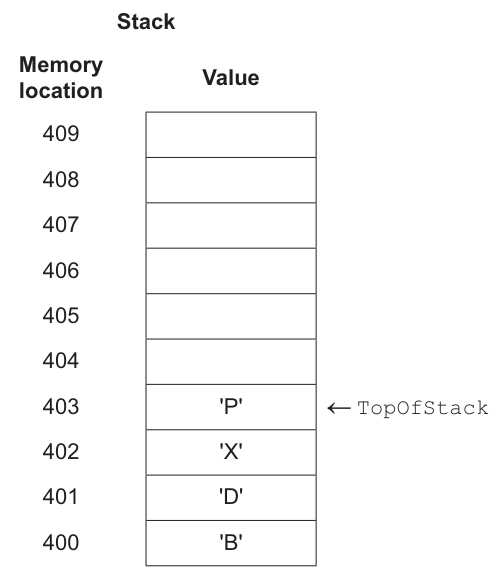
Complete the answer column in the following table:
| Answer | |
|---|---|
| the memory location of the value that has been on the stack for the longest time | |
the number of consecutive push operations that will result in the TopOfStack variable containing 409 |
Answer
| Answer | |
|---|---|
| the memory location of the value that has been on the stack for the longest time | 400 |
the number of consecutive push operations that will result in the TopOfStack variable containing 409 | 6 |
400; 6
Background Concept
A stack is an Abstract Data Type that works on the LIFO principle: Last In, First Out. The most recently added item is the first one removed. In an array-based stack, items are stored in consecutive memory locations, and a pointer such as TopOfStack stores the location of the current top item.
The bottom item is the one that has been in the stack the longest. In a full or partly full stack stored from lower addresses upwards, that oldest item is found at the lowest occupied memory location. A PUSH operation adds a new item above the current top and moves TopOfStack up by one location.
Understanding the Question
The diagram shows a stack stored in memory locations 400 to 409. The values currently stored are at 400, 401, 402 and 403, and TopOfStack points to 403.
You are asked for two things:
- which memory location holds the value that has been on the stack the longest
- how many consecutive
PUSHoperations are needed beforeTopOfStackbecomes 409
So this is really a question about reading the current stack layout and understanding how the top pointer moves.
Approach
First, identify the oldest item by looking for the bottom occupied location of the stack.
Then, for the number of pushes, count how many higher locations are still available above the current top location 403 until you reach 409. Each push moves the pointer up by exactly one location.
Step-by-Step Reasoning
The occupied locations are:
- 400 contains
B - 401 contains
D - 402 contains
X - 403 contains
P
Because a stack is LIFO, the value that has been on the stack the longest is the one at the bottom, not the one at the top. The bottom occupied location is 400, so that is the first answer.
Now consider the pushes.
Currently TopOfStack = 403.
Each push would move it to:
- 404 after 1 push
- 405 after 2 pushes
- 406 after 3 pushes
- 407 after 4 pushes
- 408 after 5 pushes
- 409 after 6 pushes
So 6 consecutive pushes are needed.
Key Takeaways
- In a stack, the oldest item is at the bottom.
TopOfStackpoints to the most recently added current item.- In an array implementation, one push usually moves the top pointer by one position.
- Counting free spaces above the current top tells you how many more pushes are possible before reaching a given location.
Common Mistakes
- Choosing 403 as the oldest item because it is pointed to by
TopOfStack. That is wrong because 403 is the newest current item, not the oldest. - Counting memory locations incorrectly and giving 5 instead of 6. You must count 404, 405, 406, 407, 408 and 409.
- Forgetting that 409 itself is included in the count because the question asks when
TopOfStackwill contain 409.
Things to Be Careful About
- Distinguish between the bottom of the stack and the top of the stack.
- Read the memory addresses carefully: they increase upwards in this diagram.
- Do not count occupied locations already below the current top; only count the available positions above 403 up to 409.
The diagram shows the current state of the stack.
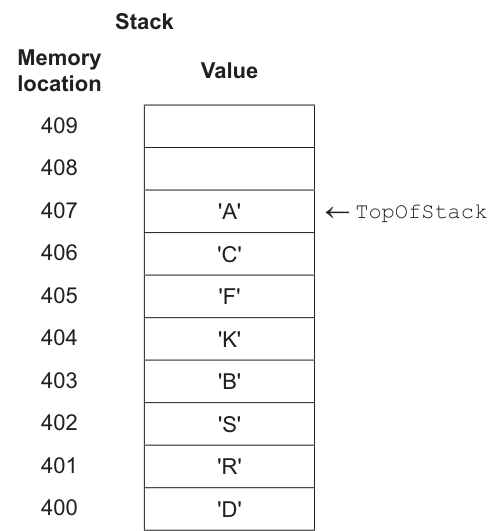
The following sequence of operations are performed:
PUSH 'T'
POP
POP
PUSH 'Z'
PUSH 'X'
POP
PUSH 'Y'
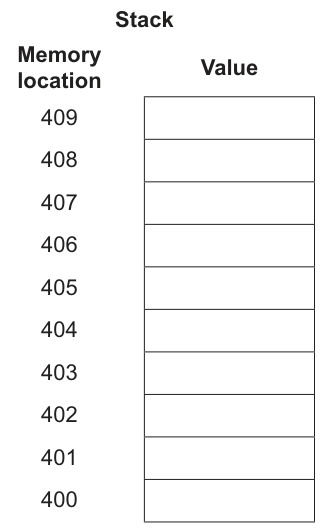
Complete the following diagram to show the state of the stack after the operations have been performed.
Answer
See stack diagram
Background Concept
A stack uses the LIFO rule: Last In, First Out. The two main operations are:
PUSH: add a new item to the top of the stack, then moveTopOfStackupPOP: remove the current top item, then moveTopOfStackdown
When a stack is implemented using an array, the items occupy consecutive positions. The TopOfStack pointer tells you where the current top item is stored. To answer questions like this, the safest method is to trace each operation one by one in order.
Understanding the Question
You are given the current stack contents:
- 400:
D - 401:
R - 402:
S - 403:
B - 404:
K - 405:
F - 406:
C - 407:
A TopOfStack = 407
Then the following operations are carried out:
PUSH 'T'POPPOPPUSH 'Z'PUSH 'X'POPPUSH 'Y'
The question wants the final stack state after all these have happened, not the intermediate states.
Approach
Start from the given stack and process each instruction in sequence. After each PUSH, add the new value above the old top and move the pointer up. After each POP, remove the current top item and move the pointer down.
This is a classic dry-run question: accuracy comes from doing one operation at a time and not trying to jump straight to the result.
Step-by-Step Reasoning
Initial state:
- 400
D - 401
R - 402
S - 403
B - 404
K - 405
F - 406
C - 407
A TopOfStack = 407
Now apply the operations.
-
PUSH 'T'- New top becomes 408
- 408 stores
T
-
POP- Remove top item
T - Top moves back to 407
- Remove top item
-
POP- Remove top item
A - Top moves back to 406
- Remove top item
-
PUSH 'Z'- New top becomes 407
- 407 stores
Z
-
PUSH 'X'- New top becomes 408
- 408 stores
X
-
POP- Remove top item
X - Top moves back to 407
- Remove top item
-
PUSH 'Y'- New top becomes 408
- 408 stores
Y
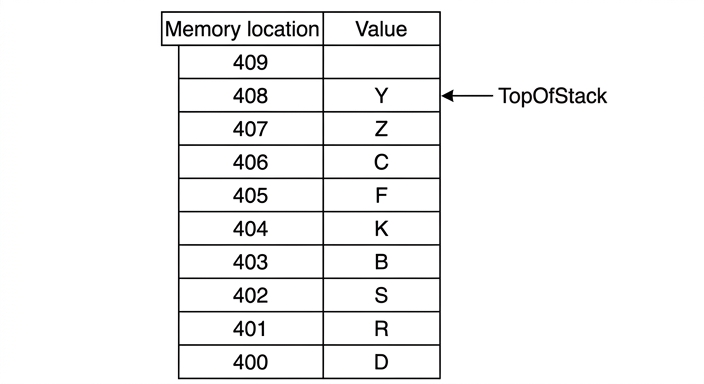
So the final contents are:
- 400
D - 401
R - 402
S - 403
B - 404
K - 405
F - 406
C - 407
Z - 408
Y - 409 empty
TopOfStack = 408
Key Takeaways
- Always process stack operations in the exact order given.
- A
PUSHadds a new top item; aPOPremoves the current top item. - Tracking the top pointer is just as important as tracking the values.
- Dry-running step by step is the best method for ADT trace questions.
Common Mistakes
- Forgetting that the first
POPremovesT, notA, becauseTwas just pushed. - Removing too many values by treating
POPas clearing more than one item. - Leaving
Ain location 407 at the end. It was popped and later replaced byZ. - Leaving
Xin 408 at the end. It was pushed and then immediately popped beforeYwas pushed.
Things to Be Careful About
- Do not reorder the operations.
- Update
TopOfStackafter every push or pop. - If a value is popped, it is no longer part of the final stack state even if it was there earlier.
- The final diagram must show both the correct values and the pointer in the correct position.
In a different program, the programmer decides to implement a linked list using an array of records.
The array is represented in the diagram.
A pointer value of -1 indicates the end of the linked list.
Complete the pointer field to produce a linked list that is in alphabetical order.
| Index | Data | Pointer |
|---|---|---|
| 0 | "Neptune" | |
| 1 | "Jupiter" | |
| 2 | "Saturn" | |
| 3 | "Earth" | |
| 4 | "Mercury" | |
| 5 | "Uranus" |
Answer
| Index | Data | Pointer |
|---|---|---|
| 0 | Neptune | 2 |
| 1 | Jupiter | 4 |
| 2 | Saturn | 5 |
| 3 | Earth | 1 |
| 4 | Mercury | 0 |
| 5 | Uranus | -1 |
0→2, 1→4, 2→5, 3→1, 4→0, 5→-1
Background Concept
In a linked list implemented using an array of records, each record usually contains two fields:
- a data field, which stores the actual item
- a pointer field, which stores the index of the next item in the logical list
This is important: the logical order of a linked list does not have to match the physical order of the array. The items can sit anywhere in the array, and the pointers link them together in the required order.
A pointer value of -1 means there is no next item, so that node is the end of the list.
Understanding the Question
You are given six array entries, each with an index and a planet name. The data values are not already in alphabetical order in the table.
You must complete the pointer field so that when the linked list is followed from the first item to the last, the planet names appear in alphabetical order.
So the task is not to move the data. The task is to leave the data where it is and make the pointers create the correct order.
Approach
First, list the planet names in alphabetical order. Then note the index of each of those names in the original table. Finally, make each record point to the index of the next name in that alphabetical sequence. The last item must point to -1.
Step-by-Step Reasoning
The data values and indices are:
- 0: Neptune
- 1: Jupiter
- 2: Saturn
- 3: Earth
- 4: Mercury
- 5: Uranus
Alphabetical order is:
- Earth
- Jupiter
- Mercury
- Neptune
- Saturn
- Uranus
Now replace each name with its array index:
- Earth = 3
- Jupiter = 1
- Mercury = 4
- Neptune = 0
- Saturn = 2
- Uranus = 5
So the linked order of indices is:
3 → 1 → 4 → 0 → 2 → 5 → -1
Now fill the pointer field for each row:
- index 3 points to 1
- index 1 points to 4
- index 4 points to 0
- index 0 points to 2
- index 2 points to 5
- index 5 points to -1
Written in row order of the table, the pointers are:
- 0: 2
- 1: 4
- 2: 5
- 3: 1
- 4: 0
- 5: -1
Key Takeaways
- In a linked list, logical order is controlled by pointers, not by physical row order.
- For an array-based linked list, the pointer stores the index of the next node.
- To build a linked list in a required order, first decide the logical sequence, then assign pointer values.
-1is commonly used to mark the end of the list.
Common Mistakes
- Rewriting the data items into alphabetical order in the table instead of changing only the pointers.
- Using the planet name itself as the pointer instead of the index.
- Forgetting that the final node must point to
-1. - Giving the pointers in alphabetical sequence order but putting them into the wrong table rows.
Things to Be Careful About
- Always distinguish between index position and stored data.
- Fill the pointer for every row, not just the first few nodes.
- Make sure each pointer refers to the next node's index, not the current node's own index.
- Check that a full traversal from the start reaches every item exactly once and ends with
-1.
The variable StartPointer contains the index of the first item in the linked list.
State the value of the variable StartPointer
.....................................................................................................................................
Answer
StartPointer = 3
3
Background Concept
In a linked list, StartPointer stores the index of the first node in the list. It is the entry point used to begin traversal. Once the first index is known, the rest of the list is found by following the pointer field from one node to the next.
Understanding the Question
This part refers directly to the linked list created in the previous part. You have already arranged the items so that the list is in alphabetical order.
Now you must state the value of StartPointer, which means: which index contains the first item in that linked list?
Approach
Look at the alphabetical order you established and identify the very first item. Then take the index of that item. That index is the StartPointer.
Step-by-Step Reasoning
From part (b)(i), the alphabetical order is:
Earth → Jupiter → Mercury → Neptune → Saturn → Uranus
The first item is Earth.
In the table, Earth is stored at index 3.
Therefore:
StartPointer = 3
Key Takeaways
StartPointeralways holds the index of the first node in the logical list.- To find it, identify the first item in the linked sequence, not the first row of the table.
Common Mistakes
- Giving 0 because it is the first array index. That is wrong because linked lists use logical order, not physical row order.
- Giving 1 because Jupiter comes early alphabetically, but Earth comes before Jupiter.
- Forgetting that this answer depends on the pointer sequence from part (b)(i).
Things to Be Careful About
- Do not confuse the first row in the array with the first node in the list.
- Use the index of the first item, not its data value.
- Check the alphabetical order carefully before deciding the start node.
A third program is also being created to manage a queue.
Describe two features of a queue.
Feature one ..............................................................................................................................
...................................................................................................................................................
Feature two ...............................................................................................................................
...................................................................................................................................................
Answer
- A queue operates on a FIFO basis, so the first item added is the first item removed.
- New items are added at the rear of the queue and items are removed from the front.
FIFO; add at rear and remove from front
Background Concept
A queue is an Abstract Data Type in which items are processed in the order they arrive. Its key rule is FIFO: First In, First Out. This means the oldest item leaves first, unlike a stack where the newest item leaves first.
A queue has two ends:
- the rear (or tail), where new items are added
- the front (or head), where items are removed
Queues are used when fairness and arrival order matter, such as print jobs, CPU scheduling and customer-service systems.
Understanding the Question
The question asks for two features of a queue. That means you do not need code or a diagram. You need two clear descriptive properties that define how a queue works.
The safest features to use are:
- the FIFO rule
- where insertion and deletion take place
These are standard defining features and directly answer the question.
Approach
Choose two distinct points rather than repeating the same idea in different words. One point can describe the order of removal, and the other can describe the positions used for adding and removing items.
Step-by-Step Reasoning
A strong answer can be built from the core definition of a queue.
First feature:
A queue is FIFO. If three items arrive in the order A, then B, then C, they will leave in the order A, then B, then C. So the first item added is the first item removed.
Second feature:
Operations happen at opposite ends. New items join at the rear, while removal happens at the front. This is what preserves FIFO behaviour.
These two points are separate and each earns credit.
Key Takeaways
- A queue uses FIFO ordering.
- Enqueueing happens at the rear and dequeueing happens at the front.
- Queue behaviour is different from stack behaviour.
Common Mistakes
- Saying LIFO instead of FIFO. That describes a stack, not a queue.
- Saying both features in a way that repeats the same idea without adding a second distinct point.
- Describing a queue as sorted. A queue keeps arrival order, not alphabetical or numerical order.
Things to Be Careful About
- Use the correct terminology: front/rear or head/tail.
- Make sure your two features are clearly separate.
- Do not mix up queue operations with stack operations such as
PUSHandPOP.
A programmer has been asked to create a module RollDice() to simulate multiple rolls of a dice. This module will be used as part of a program for a game.
The module will:
step 1 – take a positive integer parameter representing the number of times the dice will be rolled
step 2 – simulate one roll of the dice by generating a random integer between 1 and 6 inclusive
step 3 – output the integer generated
step 4 – repeat, as required from step 2
step 5 – calculate the average value of the random integers generated
step 6 – return the average value.
Write pseudocode for the module RollDice()
..........................................................................................................................................................
..........................................................................................................................................................
..........................................................................................................................................................
..........................................................................................................................................................
..........................................................................................................................................................
..........................................................................................................................................................
..........................................................................................................................................................
..........................................................................................................................................................
..........................................................................................................................................................
..........................................................................................................................................................
..........................................................................................................................................................
..........................................................................................................................................................
..........................................................................................................................................................
..........................................................................................................................................................
..........................................................................................................................................................
..........................................................................................................................................................
..........................................................................................................................................................
..........................................................................................................................................................
..........................................................................................................................................................
....................................................................................................................................................
Answer
FUNCTION RollDice(BYVAL NumberRolls : INTEGER) RETURNS REAL
   DECLARE Count, DiceValue, Total : INTEGER
   DECLARE Average : REAL

   Total ← 0

   FOR Count ← 1 TO NumberRolls
      DiceValue ← RANDOM(1, 6)
      OUTPUT DiceValue
      Total ← Total + DiceValue
   NEXT Count

   Average ← Total / NumberRolls
   RETURN Average
ENDFUNCTION
See completed pseudocode
Background Concept
A module is a self-contained block of code that performs one task. In Cambridge pseudocode, a module is usually written as either a PROCEDURE or a FUNCTION.
- A PROCEDURE carries out actions but does not return a value.
- A FUNCTION carries out actions and returns a single value.
Here, the module must return the average, so the best choice is a FUNCTION.
This question also uses a parameter, which is a value passed into the module. The parameter tells the function how many times to repeat the dice roll. Because the number of rolls is known before the loop starts, a count-controlled loop such as FOR is the natural choice.
To simulate a dice roll, the algorithm must generate a random integer from 1 to 6 inclusive. After each roll:
- the value is output
- the value is added to a running total
After all rolls are complete, the average is calculated using:
Because an average may include a fractional part, the returned value should be REAL.
Understanding the Question
The question gives a sequence of steps for a module called RollDice() and asks for pseudocode that performs exactly those steps.
The important clues are:
- it must take a positive integer parameter: so the function needs an input such as
NumberRolls - it must repeat a dice roll that many times: so a loop is required
- it must output each generated value: so the output happens inside the loop
- it must calculate the average of all generated values: so a running total is needed
- it must return the average: so this should be written as a FUNCTION, not a procedure
Since the parameter is said to be a positive integer, the question is already assuming valid input. That means no extra validation is needed unless specifically asked.
Approach
A good way to structure this is:
- Write
RollDiceas a function returningREAL. - Give it one parameter, the number of rolls.
- Declare variables:
- a loop counter
- a variable to store one dice value
- a total for all rolls
- an average
- Set
Total ← 0before the loop. - Use a
FORloop from 1 toNumberRolls. - Inside the loop:
- generate a random integer between 1 and 6
- output it
- add it to
Total
- After the loop, calculate
Average ← Total / NumberRolls. - Return
Average.
That matches the order of the steps in the question exactly.
Step-by-Step Reasoning
Start with the function header:
FUNCTION RollDice(BYVAL NumberRolls : INTEGER) RETURNS REAL
Why this is correct:
FUNCTIONis used because a value must be returnedNumberRollsis the input parameter- its type is
INTEGERbecause the number of dice rolls must be a whole number RETURNS REALis appropriate because an average can be non-integer
Next, declare variables:
DECLARE Count, DiceValue, Total : INTEGER
DECLARE Average : REAL
Countcontrols the loopDiceValuestores one simulated rollTotalstores the sum of all rollsAveragestores the final result
Then initialise the total:
Total ← 0
This is essential. If Total is not initialised, it would contain an undefined value and the calculation would be wrong.
Now the repetition:
FOR Count ← 1 TO NumberRolls
This repeats exactly NumberRolls times. A FOR loop is the clearest choice because the number of iterations is known in advance.
Inside the loop, simulate one roll:
DiceValue ← RANDOM(1, 6)
This means generate a random integer from 1 to 6 inclusive. That matches a standard six-sided dice. Different centres or mark schemes may accept slightly different random-function names, but the logic must clearly show an inclusive integer range from 1 to 6.
Then output the roll:
OUTPUT DiceValue
This satisfies the step that each generated integer must be displayed.
Then add the roll to the total:
Total ← Total + DiceValue
This is the running-total pattern. After each iteration, Total increases by the latest roll.
After all repetitions:
NEXT Count
Then compute the average:
Average ← Total / NumberRolls
This divides the sum of all dice values by how many values were generated. Because NumberRolls is positive, division by zero is not a problem here.
Finally, return the answer:
RETURN Average
ENDFUNCTION
That completes the function.
If, for example, NumberRolls were 4 and the random values happened to be 3, 6, 2, 5:
- outputs would be
3,6,2,5 - total would become
16 - average would be
16 / 4 = 4
If the rolls were 1, 2, 2:
- total =
5 - average =
5 / 3 - this is why returning
REALis sensible
Key Takeaways
- Use a FUNCTION when the module must return a value.
- Use a parameter to pass in the number of repetitions needed.
- Use a FOR loop when the number of iterations is known.
- Use a running total to calculate an average efficiently.
- An average should usually be stored as a REAL value.
- Output required per iteration must be placed inside the loop, not after it.
Common Mistakes
- Writing a
PROCEDUREinstead of aFUNCTION. This is wrong because the question explicitly says to return the average value. - Forgetting to initialise
Totalto 0. Without this, the sum is unreliable. - Outputting only once after the loop. The question requires the integer generated for each roll to be output.
- Generating a random number in the wrong range, such as 0 to 5 or 1 to 5. A dice must produce 1 to 6 inclusive.
- Calculating the average inside the loop each time. It is simpler and more accurate to total all values first and calculate the average once at the end.
- Returning
Totalinstead ofAverage. The module must return the average value, not the sum. - Using
=instead of the assignment arrow←in pseudocode.
Things to Be Careful About
- Follow CIE pseudocode conventions:
FUNCTION,DECLARE,FOR,NEXT,RETURN,ENDFUNCTIONin upper case. - Use the real assignment arrow
←for assignment. - Make sure the loop runs from
1 TO NumberRolls, giving exactly the required number of rolls. - Keep the output statement inside the loop so every roll is shown.
- Use a data type for the returned value that allows decimals.
- The parameter is stated to be a positive integer, so extra validation is not necessary unless the question asks for it.
- If your random-function name differs slightly, it must still clearly mean “random integer from 1 to 6 inclusive”.
A programmer is developing a new stock control program for a shop owner to produce sales reports.
A text file Sales.txt stores strings representing the number of items sold.
The file contains 52 lines, each representing the number of items sold in each week of the year.
For example:
| File line number | File data |
|---|---|
| 1 | "350" |
| 2 | "502" |
| 3 | "434" |
| ... | ... |
| 49 | "492" |
| 50 | "872" |
| 51 | "772" |
| 52 | "201" |
The example shows that 502 items were sold in week 2.
The owner requires a module to output all week numbers where the number of items sold is greater than 500.
Describe an algorithm that produces the required module.
Do not include pseudocode statements in your answer.
...................................................................................................................................................
...................................................................................................................................................
...................................................................................................................................................
...................................................................................................................................................
...................................................................................................................................................
...................................................................................................................................................
...................................................................................................................................................
...................................................................................................................................................
...................................................................................................................................................
...................................................................................................................................................
...................................................................................................................................................
.............................................................................................................................................
Answer
- Open
Sales.txtfor reading. - Start a week counter at 1.
- Read each line of the file in turn until all 52 lines have been processed.
- For each line, take the value read, convert it from a string to a number and compare it with 500.
- If the number of items sold is greater than 500, output the current week number.
- Increase the week counter after each line is processed.
- Close the file when all data has been read.
See explanation
Background Concept
A text file stores data as characters, so even when the file contains something that looks like a number such as 502, it is read as text first. When an algorithm needs to compare the value numerically, it should treat that text as a number before carrying out the comparison.
This question is mainly about a standard file-processing pattern:
- open the file
- read records one at a time
- process each record
- repeat until all records are handled
- close the file
It also uses two basic programming constructs:
- iteration, because the same steps are repeated for each week
- selection, because only weeks with sales greater than 500 should be output
Because the question says not to include pseudocode statements, the answer should be written as a clear description in ordinary English rather than with keywords such as IF, FOR, WHILE or assignment arrows.
Understanding the Question
The file Sales.txt contains 52 lines. Each line represents one week of the year, so line 1 is week 1, line 2 is week 2, and so on up to week 52.
The task is to describe a module that outputs all week numbers where the sales figure is above 500. The important detail is that the required output is the week number, not the sales value itself.
So the algorithm must:
- read each line from the file
- know which week that line represents
- test whether the sales value is greater than 500
- output the week number if the test is true
Approach
A good approach is to process the file from start to finish, one line at a time.
Since each line corresponds to one week, keep a counter that starts at 1. Each time a line is read, that counter tells us the current week number.
For every line:
- read the line
- interpret its contents as a number
- compare that number with 500
- if it is greater than 500, output the current week number
- move on to the next week
Because the file size is fixed at 52 lines, the algorithm can be described as repeating this process until all 52 lines have been read.
Step-by-Step Reasoning
First, the file must be opened for reading. Without opening it, the program cannot access the stored lines.
Next, a week counter is needed. This should begin at 1 because the first line represents week 1.
Then the algorithm reads the file line by line. Each line contains a string such as 350 or 502.
Although these look like numbers, they are stored as strings in the text file. To perform a proper numeric comparison with 500, the value should be converted to a number.
After reading a line and obtaining its numeric value:
- if the value is greater than 500, output the current week number
- if the value is 500 or less, output nothing for that week
For example:
- line 1 contains
350, so week 1 is not output - line 2 contains
502, so week 2 is output
After processing that line, increase the week counter so the next line is treated as the next week.
This repeats until all 52 lines have been processed.
Finally, the file should be closed.
A strong answer includes these marking points:
- opening the file
- reading each line in sequence
- using a week number or counter
- comparing each value with 500
- outputting the week number when the value is greater than 500
- closing the file
Key Takeaways
- Text file processing usually follows the pattern open, read, process, repeat, close.
- When file data is numeric but stored as text, it must be treated as a number for numeric comparison.
- A counter is often used to link a record's position in a file to something meaningful, here the week number.
- This task combines iteration with selection.
Common Mistakes
- Outputting the sales figure instead of the week number. The question asks for week numbers only.
- Forgetting that the file stores strings. Comparing text rather than numbers can give the wrong result in some contexts.
- Starting the week counter at 0. The first line is week 1, not week 0.
- Saying to stop at the first value greater than 500. The task requires all matching weeks, not just the first one.
- Omitting file handling steps such as opening or closing the file.
- Writing full pseudocode. The question explicitly says not to include pseudocode statements.
Things to Be Careful About
- Make clear that all 52 lines must be processed, not just an unspecified number of records.
- Make clear that the comparison is strictly greater than 500, so 500 itself does not qualify.
- Keep the answer in descriptive English rather than code-like notation.
- Distinguish carefully between the line number, the week number and the sales value.
- If describing the loop, be precise that the counter is increased after each line is processed.
Once the program has been completed, it is tested using the walkthrough method.
Describe the walkthrough method and explain how it can be used to identify errors.
...................................................................................................................................................
...................................................................................................................................................
...................................................................................................................................................
...................................................................................................................................................
...................................................................................................................................................
...................................................................................................................................................
...................................................................................................................................................
.............................................................................................................................................
Answer
- A walkthrough is a testing method where the programmer and/or other people go through the program or algorithm step by step using test data.
- Each statement is checked in sequence and the values of variables and outputs are followed as the program runs.
- Errors can be identified when the actual result or traced values do not match the expected result, showing faults such as incorrect logic or missing cases.
See explanation
Background Concept
A walkthrough is a static or semi-manual review method used during testing and debugging. Instead of relying only on running the completed system and checking the final output, the people involved examine the algorithm or program carefully, step by step.
The idea is to follow the logic in the same order the computer would follow it and check whether every step makes sense.
This is especially useful for finding:
- logic errors, where the algorithm does the wrong thing
- missing cases, where some situations were not handled
- incorrect calculations or updates to variables
A walkthrough is different from simply saying "the program works" after one test. It is a detailed examination of how the program reaches its result.
Understanding the Question
The question asks for two things:
- a description of what the walkthrough method is
- an explanation of how it helps to identify errors
So a complete answer must not just define walkthrough. It must also say how stepping through the code helps reveal mistakes.
Since this is about testing after the program has been completed, the focus is on checking the program logic and behaviour carefully.
Approach
To answer this well, describe the method first:
- people examine the program or algorithm
- they go through it one step at a time
- they often use sample or test data
Then explain why that works for finding errors:
- variable values can be checked at each stage
- decisions can be checked to see whether the correct branch is taken
- outputs can be compared with what should happen
- any mismatch shows an error in the code or logic
Step-by-Step Reasoning
A walkthrough means the program, design or algorithm is examined in order, line by line or step by step.
Usually the programmer may do this alone or with other people such as testers or colleagues. Using other people can help because they may spot mistakes the original programmer missed.
Test data can be chosen and then traced through the program. As the walkthrough proceeds, the people involved check:
- what input is being used
- what each statement should do
- how variable values change
- which path is taken after each decision
- what output should be produced
If at any point the observed or predicted result is different from the expected result, that suggests an error.
For example, if a condition should accept values above 500 but the traced logic shows that 502 is ignored, then the walkthrough reveals a logic error. If a variable is updated in the wrong place, the walkthrough will show incorrect values building up from that point onward.
This method is good for uncovering logic mistakes because it focuses on the process, not just the final answer.
Key Takeaways
- A walkthrough is a step-by-step review of a program or algorithm.
- It often uses test data to trace what happens at each stage.
- It helps find errors by checking logic, variable values and outputs against what is expected.
- It is particularly useful for detecting logic errors and omitted cases.
Common Mistakes
- Defining walkthrough too vaguely as just "testing the program". The key idea is step-by-step checking.
- Saying it only checks the final output. A walkthrough checks intermediate steps as well.
- Confusing walkthrough with automated testing. A walkthrough is a manual review technique.
- Forgetting to explain how errors are found. The answer must mention comparing traced behaviour with expected behaviour.
Things to Be Careful About
- Include both parts of the question: what the method is and how it identifies errors.
- Use wording such as step by step, line by line, trace values, and compare with expected results.
- Do not focus only on syntax errors; walkthroughs are especially useful for logic errors.
- Keep the explanation linked to testing, not to maintenance or documentation.
A module Parity() takes a string as a parameter. The parameter has the identifier BitString and it represents a binary value.
The module will concatenate a single character to the end of BitString by applying one of the two rules:
• '0' if BitString contains an even number of 1s
• '1' if BitString contains an odd number of 1s.
The modified value of BitString is then returned.
For example:
| Parameter | String returned | Explanation |
|---|---|---|
| "0010010110" | "00100101100" | there are an even number of 1s in the string passed to Parity() so a '0' is concatenated to the end of BitString |
| "101010" | "1010101" | there are an odd number of 1s in the string passed to Parity() so a '1' is concatenated to the end of BitString |
Write pseudocode for the module Parity()
Assume the parameter BitString can only contain the characters '0' and '1'
..........................................................................................................................................................
..........................................................................................................................................................
..........................................................................................................................................................
..........................................................................................................................................................
..........................................................................................................................................................
..........................................................................................................................................................
..........................................................................................................................................................
..........................................................................................................................................................
..........................................................................................................................................................
..........................................................................................................................................................
..........................................................................................................................................................
..........................................................................................................................................................
..........................................................................................................................................................
..........................................................................................................................................................
..........................................................................................................................................................
..........................................................................................................................................................
..........................................................................................................................................................
..........................................................................................................................................................
..........................................................................................................................................................
..........................................................................................................................................................
..........................................................................................................................................................
..........................................................................................................................................................
..........................................................................................................................................................
....................................................................................................................................................
Answer
FUNCTION Parity(BYVAL BitString : STRING) RETURNS STRING
   DECLARE Count, Index : INTEGER
   Count ← 0
   FOR Index ← 1 TO LENGTH(BitString)
      IF MID(BitString, Index, 1) = "1" THEN
         Count ← Count + 1
      ENDIF
   NEXT Index
   IF Count MOD 2 = 0 THEN
      BitString ← BitString & "0"
   ELSE
      BitString ← BitString & "1"
   ENDIF
   RETURN BitString
ENDFUNCTION
See completed pseudocode
Background Concept
A parity bit is an extra bit added to a binary value so that the total number of 1 bits follows a rule. In this question, the rule is:
- if the number of
1s already in the string is even, append"0" - if the number of
1s is odd, append"1"
This keeps the total number of 1s even after the extra bit is added. That is called even parity.
To solve this in pseudocode, we need a few standard programming ideas:
- a function is used when a value must be returned
- a count-controlled loop can examine each character in the string in turn
- a counter stores how many
1s have been found MOD 2tells us whether a number is even or odd- result
0means even - result
1means odd
- result
- string concatenation adds one character to the end of the existing string
Understanding the Question
The question gives a module called Parity() with one parameter, BitString. That parameter is a string containing only the characters "0" and "1".
We must write pseudocode that:
- receives
BitString - counts how many
1s are in it - appends one extra character to the end
- returns the new string
The wording "The modified value of BitString is then returned" is the clue that a function is the most suitable choice, because functions return a value.
The examples confirm the rule:
"0010010110"has an even number of1s, so append"0""101010"has an odd number of1s, so append"1"
So the task is not to change any existing bit. It is only to add one new bit at the end.
Approach
A reliable method is:
- Set a counter to
0 - Loop through the string from the first character to the last
- For each position, check whether that character is
"1" - If it is, increase the counter
- After the loop, test
Count MOD 2 - Append
"0"if the count is even, otherwise append"1" - Return the updated string
This approach is simple and matches the mark-worthy structure examiners expect:
- correct function header
- declared variables
- iteration through the string
- selection using
IF - concatenation
- return statement
Step-by-Step Reasoning
Start with the function heading:
FUNCTION Parity(BYVAL BitString : STRING) RETURNS STRING
This says:
- the module name is
Parity - it receives
BitString - the parameter is a string
- the module returns a string
BYVAL is suitable because we only need to use the input value and then return the final result.
Next, declare local variables:
DECLARE Count, Index : INTEGER
Countstores how many1s have been foundIndexis the loop variable used to move through the string
Initialise the counter:
Count ← 0
This is essential. Without it, the counter would not start from a known value.
Now loop through every character in the string:
FOR Index ← 1 TO LENGTH(BitString)
In CIE pseudocode, strings are normally processed from position 1 up to LENGTH(BitString).
Inside the loop, extract one character:
IF MID(BitString, Index, 1) = "1" THEN
MID(BitString, Index, 1) means:
- take
BitString - start at position
Index - take
1character
So this checks the current character only.
If that character is "1", increase the count:
Count ← Count + 1
If it is "0", nothing happens.
After checking each position, the loop ends with:
NEXT Index
At this point, Count equals the total number of 1s in the whole string.
Now test whether the count is even:
IF Count MOD 2 = 0 THEN
Why does this work?
- an even number divided by
2leaves remainder0 - an odd number divided by
2leaves remainder1
So:
- if
Count MOD 2 = 0, append"0" - otherwise append
"1"
That gives:
BitString ← BitString & "0"
or
BitString ← BitString & "1"
The & operator concatenates the extra character onto the end of the existing string.
Finally:
RETURN BitString
This sends the modified string back to wherever the function was called.
For example, if BitString = "101010":
- the loop finds
3ones 3 MOD 2 = 1, so the count is odd- append
"1" - returned value is
"1010101"
If BitString = "0010010110":
- the loop finds
4ones 4 MOD 2 = 0, so the count is even- append
"0" - returned value is
"00100101100"
Key Takeaways
- Use a function when the question says a value is returned.
- To process every character in a string, loop from
1toLENGTH(string). - Use
MID(string, position, 1)to examine one character at a time. - Use a counter to count matching characters.
- Use
MOD 2to test even or odd. - Concatenate a character to the end of a string with
&.
Common Mistakes
- Writing a
PROCEDUREinstead of aFUNCTIONwhen the question requires a returned string. - Forgetting to declare
CountandIndex. - Starting the loop at
0instead of1in CIE pseudocode. - Counting both
0s and1s instead of counting only1s. - Appending the parity bit to a different variable and then returning the wrong one.
- Using
=for assignment instead of the correct assignment arrow←. - Forgetting the
RETURN BitStringstatement. - Reversing the logic and appending
"1"for even counts or"0"for odd counts.
Things to Be Careful About
- Keep the identifier exactly as given:
BitString. - Use
LENGTH(BitString)as the upper loop bound so every character is checked. MID(BitString, Index, 1)must extract exactly one character.MODis the correct operator for checking parity; do not use division alone.- The appended value must be a string character:
"0"or"1", not numeric0or1. - Make sure the concatenation happens after the count is complete, not inside the loop.
- Close the
IFandFORstructures properly withENDIFandNEXT Index.
Study the structure chart:
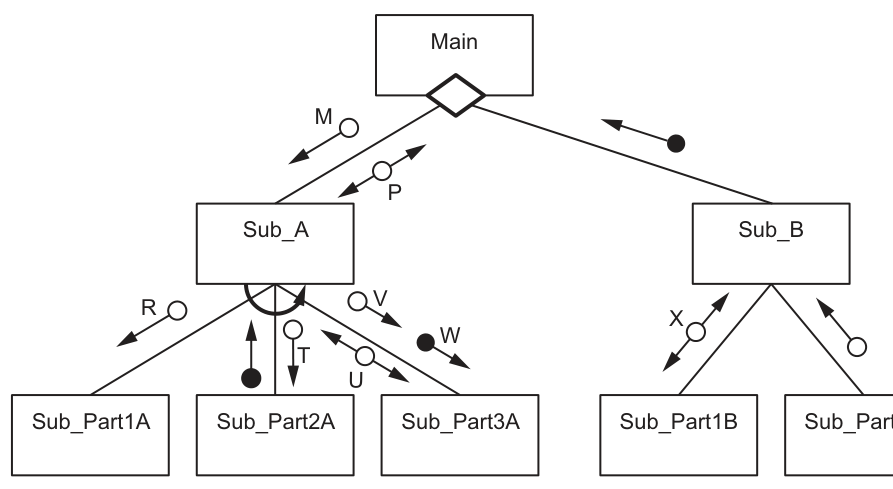
Some of the parameter data types are:
• R and V are of type INTEGER
• T is of type REAL
• U is of type STRING
• W is of type BOOLEAN.
Some of the modules in the structure chart are functions, others are procedures.
Explain one difference between functions and procedures.
...................................................................................................................................................
.............................................................................................................................................
Answer
- A function returns a value to the calling module, whereas a procedure does not return a value directly.
A function returns a value; a procedure does not return a value directly.
Background Concept
A program is often broken into smaller modules. Two common module types are procedures and functions.
A procedure is a named block of code that performs a task. It may take parameters, but its main purpose is to carry out an action.
A function is also a named block of code, but it is used when the module must produce and return a single value to the module that called it.
So the key distinction is usually:
- procedure = do something
- function = calculate something and return the result
Understanding the Question
This part asks for just one difference. Because it is only 1 mark, the safest answer is the clearest textbook distinction: whether the module returns a value.
The question is not asking for a long comparison, an example, or syntax. One precise statement is enough.
Approach
Choose the most standard difference between the two terms:
- a function returns a value
- a procedure does not return a value directly
That is the simplest and most reliably credited answer.
Step-by-Step Reasoning
To decide what to write:
-
Recall what a function is.
- A function is designed to produce a result.
- That result is passed back to the calling module.
-
Recall what a procedure is.
- A procedure performs an action or set of actions.
- It does not directly return a single value as its purpose.
-
Turn that into one sentence.
- "A function returns a value to the calling module, whereas a procedure does not return a value directly."
That gives the exact contrast the examiner is looking for.
Key Takeaways
- Functions are used when a value must be returned.
- Procedures are used to perform tasks.
- In short exam questions, give the clearest defining difference first.
Common Mistakes
- Saying only that they are "different types of modules" without explaining how. That is too vague.
- Giving an example instead of a definition. The mark is for the difference, not for an example.
- Saying a procedure can never send data back at all. In practice data can be altered through parameters, but the standard distinction is that a procedure does not directly return a value like a function does.
Things to Be Careful About
- The question asks for one difference, so one accurate statement is enough.
- Use the word returns carefully: it is the main feature that identifies a function in this syllabus context.
Write the pseudocode to define the module headers:
Sub_Part1A
...................................................................................................................................................
...................................................................................................................................................
Sub_Part2A
...................................................................................................................................................
...................................................................................................................................................
Sub_Part3A
...................................................................................................................................................
...................................................................................................................................................
Answer
PROCEDURE Sub_Part1A(BYVAL R : INTEGER)
ENDPROCEDURE

PROCEDURE Sub_Part2A(BYVAL T : REAL)
ENDPROCEDURE

FUNCTION Sub_Part3A(BYVAL V : INTEGER, BYVAL W : BOOLEAN) RETURNS STRING
ENDFUNCTION
See completed pseudocode
Background Concept
A structure chart shows the modules in a program and how they communicate.
Important ideas used here are:
- A rectangle represents a module.
- Lines show which module calls another module.
- A parameter shown with an open circle is a data couple.
- A parameter shown with a filled circle is a control couple.
- The arrow direction shows which way the data or control information moves.
When writing module headers from a structure chart:
- if data goes into the module, it becomes an input parameter
- if a module sends a single data value back to its caller, that strongly suggests the module should be a function
- if a module just performs an action using given parameters, it is usually a procedure
In CIE pseudocode, headers must use correct keywords such as PROCEDURE, FUNCTION, RETURNS, and suitable parameter declarations.
Understanding the Question
You are given a structure chart for Sub_A and its three lower-level modules:
Sub_Part1ASub_Part2ASub_Part3A
You are also told the data types of the named parameters:
RandVareINTEGERTisREALUisSTRINGWisBOOLEAN
The job is to turn what the chart shows into pseudocode module headers.
So you must work out:
- which parameters belong to each module
- which way each parameter moves
- whether each module is a procedure or a function
- the correct pseudocode header syntax
Approach
Read each link between Sub_A and its child module carefully.
- If the arrow shows a value going from
Sub_Ato the child, treat it as an input parameter. - If the chart shows a value coming back from the child to
Sub_A, that is a strong sign the child is a function returning that value. - Then write the header with the correct parameter names and data types.
For this question:
Sub_Part1AreceivesRSub_Part2AreceivesTSub_Part3AreceivesVandW, and returnsU
Since U is a STRING, Sub_Part3A should be written as a function returning STRING.
Step-by-Step Reasoning
1. Sub_Part1A
The chart shows parameter R moving from Sub_A down to Sub_Part1A.
That means:
Ris an input toSub_Part1ARhas typeINTEGER- no returned data value is shown
So Sub_Part1A is best written as a procedure with one input parameter:
PROCEDURE Sub_Part1A(BYVAL R : INTEGER)
ENDPROCEDURE
2. Sub_Part2A
The chart shows parameter T moving from Sub_A to Sub_Part2A.
That means:
Tis an input parameterThas typeREAL- no named returned data value is shown
So this is also written as a procedure:
PROCEDURE Sub_Part2A(BYVAL T : REAL)
ENDPROCEDURE
3. Sub_Part3A
This is the most important one.
The chart shows:
Vgoing fromSub_AtoSub_Part3AWgoing fromSub_AtoSub_Part3AUcoming back fromSub_Part3AtoSub_A
So:
Vis an input parameter of typeINTEGERWis an input parameter of typeBOOLEANUis a returned result of typeSTRING
A module that returns a value is written as a function. Therefore the header is:
FUNCTION Sub_Part3A(BYVAL V : INTEGER, BYVAL W : BOOLEAN) RETURNS STRING
ENDFUNCTION
Why U is not written as an ordinary input parameter
Because the chart shows U travelling back to Sub_A, it is better represented as the function's returned value, not as an incoming parameter.
That is exactly the clue that distinguishes Sub_Part3A from the first two modules.
Key Takeaways
- Use arrow direction in a structure chart to identify input and output data.
- Open circles show data values; filled circles show control information.
- A module that returns a single value is usually written as a
FUNCTION. - A module that just carries out a task is usually written as a
PROCEDURE. - Match every parameter name to its correct given type.
Common Mistakes
- Writing all three modules as procedures. This loses the important point that
Sub_Part3Areturns data. - Including
Uas an input parameter instead of the function return type. The chart shows it going back to the caller. - Using the wrong data types, such as writing
TasINTEGERorWasSTRING. - Forgetting
RETURNS STRINGon the function header. - Using programming-language syntax instead of CIE pseudocode syntax.
Things to Be Careful About
- Follow the exact module names from the chart:
Sub_Part1A,Sub_Part2A,Sub_Part3A. - Keep the case of identifiers correct.
- Use
FUNCTION ... RETURNS ...for a returned value. - Use
PROCEDUREfor modules with no direct returned value. - In Paper 2, the expected answer is pseudocode, not Python, Java, or Visual Basic.
The structure chart uses the two symbols shown.
Complete the table to explain what each symbol means and how the relevant modules in the structure chart are affected.
| Symbol | Explanation |
|---|---|

| ........................................................................................................................
........................................................................................................................ |
|

| ........................................................................................................................
........................................................................................................................ |
Answer
| Symbol | Explanation |
|---|---|
| Diamond | Selection. Main chooses which module to call, so only one of Sub_A or Sub_B is called depending on a condition. |
| Curved arrow | Iteration/repetition. The subordinate module(s) under Sub_A are repeated until the required condition is met or for the required number of times. |
See explanation
Background Concept
A structure chart shows the modular design of a program. As well as module names and parameters, it can include symbols that describe how modules are used.
Two standard symbols are relevant here:
-
Diamond: selection
- this means a decision is made
- one path or one module is chosen depending on a condition
-
Curved arrow: iteration
- this means repetition
- a module or group of modules is called repeatedly
These symbols do not show the exact condition or loop count. They show the type of control structure involved.
Understanding the Question
The question gives two symbols from the structure chart and asks for two things for each one:
- what the symbol means
- how the modules in this particular chart are affected
So a complete answer must do more than say "selection" or "iteration". It must also link the symbol to the named modules in Fig. 6.1.
Approach
For each symbol:
- identify its standard meaning in a structure chart
- look at where it is placed in Fig. 6.1
- explain what that placement tells you about the modules connected there
This second step is what turns a generic definition into a full-mark answer.
Step-by-Step Reasoning
1. Diamond symbol
The diamond is placed below Main, where the calls branch to Sub_A and Sub_B.
In structure charts, a diamond means selection or decision.
Because it is at the point where Main branches to Sub_A and Sub_B, it shows that Main does not automatically call both in the same way every time. Instead, a condition is used to decide which path to take.
So the effect on the chart is:
Mainselects betweenSub_AandSub_B- only the appropriate module is called for that case
2. Curved arrow symbol
The curved arrow is shown beneath Sub_A, above its lower-level modules.
In structure charts, a curved arrow means iteration or repetition.
Its position tells you that the relevant subordinate module or modules under Sub_A are repeated.
So the effect is:
- the lower-level module calls associated with
Sub_Aare repeated - this continues until a stopping condition is satisfied, or for the required number of times
That is the specific effect in this chart, not just the general meaning of the symbol.
Key Takeaways
- A diamond in a structure chart means selection.
- A curved arrow in a structure chart means iteration.
- To gain full marks, always connect the symbol to the actual modules shown in the diagram.
Common Mistakes
- Naming the symbol correctly but not explaining how it affects the modules in Fig. 6.1.
- Saying the diamond means "input" or "validation". In a structure chart it means selection/decision.
- Saying the curved arrow means recursion. In this context it means repetition/iteration.
- Saying both
Sub_AandSub_Bare always called, which contradicts the selection symbol.
Things to Be Careful About
- Use the correct terminology: selection and iteration are the clearest terms.
- Refer to the right modules: the diamond affects
Sub_AandSub_BunderMain. - For the curved arrow, describe the repeated subordinate module(s) under
Sub_Arather than giving only a vague definition.
A program is being developed to implement a customer loyalty scheme for a coffee shop.
The programmer has decided that the following data items need to be stored for each customer:
| Data item | Description |
|---|---|
| customer ID | a unique six-digit string |
| loyalty points | an integer value that depends on how often the customer visits the coffee shop |
| last visit date | the date the customer last visited the coffee shop |
The programmer has defined a program module:
| Module | Description |
|---|---|
UpdateVisit() | • called with two parameters: 1. loyalty points of type INTEGER2. last visit date of type DATE• change the loyalty points: - increase by four if the last visit date and the current date are in the same month - otherwise increase by one • change the last visit date to the current date • the changed values must be available to the code that follows the call to UpdateVisit() |
Write pseudocode for module UpdateVisit()
Assume the customer has made at least one previous visit.
...........................................................................................................................................
...........................................................................................................................................
...........................................................................................................................................
...........................................................................................................................................
...........................................................................................................................................
...........................................................................................................................................
...........................................................................................................................................
...........................................................................................................................................
...........................................................................................................................................
...........................................................................................................................................
...........................................................................................................................................
...........................................................................................................................................
Answer
PROCEDURE UpdateVisit(BYREF LoyaltyPoints : INTEGER, BYREF LastVisitDate : DATE)
   DECLARE CurrentDate : DATE
   CurrentDate ← TODAY
   IF MONTH(LastVisitDate) = MONTH(CurrentDate) THEN
      LoyaltyPoints ← LoyaltyPoints + 4
   ELSE
      LoyaltyPoints ← LoyaltyPoints + 1
   ENDIF
   LastVisitDate ← CurrentDate
ENDPROCEDURE
See completed pseudocode
Background Concept
A module that changes values and needs those changed values to still be available after the call should usually be written as a PROCEDURE with BYREF parameters. BYREF means the original variables are passed in such a way that any change made inside the procedure affects the variables outside the procedure as well.
This question also uses selection. Selection means the algorithm makes a decision using IF ... THEN ... ELSE ... ENDIF. Here the decision is based on whether two dates fall in the same month.
The final important idea is that date values can be processed by extracting parts from them, for example the month. Once the condition has been checked, the stored last visit date must be updated to today's date.
Understanding the Question
You are asked to write the module UpdateVisit(). The parent stem tells you exactly what the module must do:
- it receives two items: loyalty points and last visit date
- if the customer's last visit was in the same month as the current date, add 4 points
- otherwise add 1 point
- then replace the old last visit date with the current date
- the changed values must still exist after the module finishes
That last bullet is the key clue that the parameters must be passed BYREF.
Approach
The clean way to solve this is:
- Write
UpdateVisitas aPROCEDURE, not a function, because it is updating existing values. - Pass both parameters
BYREFso the calling code sees the new points and new date. - Get the current date and store it in a local variable.
- Compare the month from
LastVisitDatewith the month fromCurrentDate. - Add either 4 or 1 to the loyalty points.
- Set
LastVisitDatetoCurrentDate.
Step-by-Step Reasoning
The procedure header is:
PROCEDUREbecause the module's job is to update values.BYREF LoyaltyPoints : INTEGERbecause the points value is changed.BYREF LastVisitDate : DATEbecause the stored date is also changed.
A local date variable is useful so the current date is obtained once and then reused:
DECLARE CurrentDate : DATECurrentDate ← TODAY
The decision is then made with an IF statement:
- if the month part of
LastVisitDatematches the month part ofCurrentDate, add 4 - otherwise add 1
That gives:
IF MONTH(LastVisitDate) = MONTH(CurrentDate) THENLoyaltyPoints ← LoyaltyPoints + 4ELSELoyaltyPoints ← LoyaltyPoints + 1ENDIF
Finally, once the visit has been processed, the most recent visit date must become today's date:
LastVisitDate ← CurrentDate
That last assignment is essential. Without it, the next visit would still be compared against an out-of-date last visit.
Key Takeaways
- Use a
PROCEDUREwithBYREFwhen a module must change variables permanently. - Use selection to choose between two update rules.
- When a date-based rule is given, extract and compare the relevant part of the date.
- Always complete every stated task in the module description, including updating stored values.
Common Mistakes
- Using a
FUNCTIONinstead of aPROCEDUREwhen no returned single result is required. - Passing parameters
BYVAL, which would stop the changed values being available after the call. - Forgetting to update
LastVisitDateto the current date. - Adding the wrong number of points in one of the branches.
- Comparing the whole date instead of the month when the rule only depends on the month.
Things to Be Careful About
- The question says the changed values must be available after the call, so
BYREFis important. - Keep the parameter names and types consistent with the stem:
INTEGERfor points andDATEfor the last visit date. - Use proper CIE pseudocode syntax:
←for assignment, upper-case keywords, andENDIF/ENDPROCEDURE. - Make sure
CurrentDateis declared before it is used.
The programmer decides to amend the UpdateVisit() module so that loyalty points are further increased if the customer visits the coffee shop the same day of the week as their last visit.
Write the pseudocode for this condition.
...........................................................................................................................................
.....................................................................................................................................
Answer
IF DAY_OF_WEEK(CurrentDate) = DAY_OF_WEEK(LastVisitDate) THEN
   // further increase loyalty points
ENDIF
See completed pseudocode
Background Concept
A condition in pseudocode is a Boolean test that evaluates to either true or false. When a rule depends on the day of the week, the algorithm should not compare the numeric day of the month such as 05 or 12; it should compare the weekday value, such as Monday, Tuesday, and so on.
This is another use of selection. The test goes inside an IF statement, and if the condition is true, the extra action happens.
Understanding the Question
This part says the module is being amended so that loyalty points are increased further if the customer visits on the same day of the week as their last visit.
The important phrase is "same day of the week". That means:
- look at the current visit date
- look at the previous visit date
- compare their weekday values
Because this part is only worth 1 mark, the key requirement is the condition itself.
Approach
Use a date function that returns the weekday for each date, then compare the two results with = inside an IF statement.
The logic is:
- weekday of current visit
- weekday of previous visit
- if they match, the extra increase rule applies
Step-by-Step Reasoning
The existing procedure already has access to:
CurrentDateLastVisitDate
So the simplest test is:
DAY_OF_WEEK(CurrentDate)gives the weekday for todayDAY_OF_WEEK(LastVisitDate)gives the weekday for the previous visit- if the two are equal, the new condition is true
That produces:
IF DAY_OF_WEEK(CurrentDate) = DAY_OF_WEEK(LastVisitDate) THEN
   // further increase loyalty points
ENDIF
Since the question does not specify the extra number of points to add, the essential credited part is the correct condition comparing the two weekdays.
Key Takeaways
- "Same day of the week" means compare weekday values, not day numbers.
- A one-mark pseudocode condition is usually testing whether you can form the correct Boolean expression.
- Reuse existing variables when the module already contains the dates you need.
Common Mistakes
- Comparing
DAY(CurrentDate)withDAY(LastVisitDate)instead of weekday values. - Comparing the month instead of the weekday.
- Using the current customer ID or the text string when the condition should be based on dates.
- Adding an arbitrary bonus amount even though this part only asks for the condition.
Things to Be Careful About
- Keep the condition in valid pseudocode form with
IF ... THEN. - Use the same date variables already used in the module.
- Do not confuse
CurrentDatewithLastVisitDate. - If you include an action inside the
IF, make sure it is only the extra increase and not a repeat of the earlier month-based update.
A text file Loyalty.txt will be used to store the data items for the loyalty scheme.
The text file Loyalty.txt contains only one line of data for each customer.
Each data item is separated by a comma:
<CustomerID>,<LoyaltyPointsString>,<LastVisitDateString>
LastVisitDateString is always eight characters in length in the format: DDMMYYYY.
An example of how a line of data will be stored in the text file Loyalty.txt is:
"100123,132,05032025"
This example shows that the customer with an ID of 100123 had 132 loyalty points following their last visit to the coffee shop on 05/03/2025.
If a customer visits the coffee shop on a Monday, the value of their loyalty points is increased by 10.
The programmer has defined two more program modules:
| Module | Description |
|---|---|
FindCustomer()(is already written) | • called with a parameter of type STRING that represents a customer ID• returns the line of data read from the text file Loyalty.txt containing the data items for that customer |
MondayCheck() | • called with a parameter of type STRING that represents the customer ID of a customer• calls FindCustomer()• extracts the loyalty points from the string returned by FindCustomer()• increases the loyalty points for the current customer by 10 if the day visited is a Monday • returns an integer value representing the loyalty points |
Write pseudocode for module MondayCheck()
The module FindCustomer() must be used and assume it returns a valid string for the current customer.
...........................................................................................................................................
...........................................................................................................................................
...........................................................................................................................................
...........................................................................................................................................
...........................................................................................................................................
...........................................................................................................................................
...........................................................................................................................................
...........................................................................................................................................
...........................................................................................................................................
...........................................................................................................................................
...........................................................................................................................................
...........................................................................................................................................
...........................................................................................................................................
...........................................................................................................................................
...........................................................................................................................................
...........................................................................................................................................
...........................................................................................................................................
...........................................................................................................................................
...........................................................................................................................................
...........................................................................................................................................
...........................................................................................................................................
Answer
FUNCTION MondayCheck(CustomerID : STRING) RETURNS INTEGER
   DECLARE CustomerData, LoyaltyPointsString : STRING
   DECLARE LoyaltyPoints : INTEGER
   DECLARE CurrentDate : DATE

   CustomerData ← FindCustomer(CustomerID)
   LoyaltyPointsString ← MID(CustomerData, 8, LENGTH(CustomerData) - 16)
   LoyaltyPoints ← STR_TO_NUM(LoyaltyPointsString)

   CurrentDate ← TODAY
   IF DAY_OF_WEEK(CurrentDate) = "Monday" THEN
      LoyaltyPoints ← LoyaltyPoints + 10
   ENDIF

   RETURN LoyaltyPoints
ENDFUNCTION
See completed pseudocode
Background Concept
A FUNCTION is used when a module must return a single value. Here, MondayCheck() must return an integer loyalty-points value, so a function is the correct choice.
This question also depends on string processing. The data returned by FindCustomer() is a single text line in the form:
<CustomerID>,<LoyaltyPointsString>,<LastVisitDateString>
That means the algorithm must take one large string and isolate the middle item. In Paper 2, this is commonly done with string functions such as MID() and LENGTH().
Finally, once the middle field has been extracted, it is still a string, so it must be converted into an integer using STR_TO_NUM() before arithmetic can be performed on it.
Understanding the Question
You are told that FindCustomer() is already written and returns the full line for the current customer. Your job is to write MondayCheck() so that it:
- accepts a customer ID as a string parameter
- calls
FindCustomer()using that ID - extracts the loyalty points from the returned line
- increases the points by 10 if the visit day is Monday
- returns the final points value as an integer
A key clue is the file format. The customer ID is always six digits, and the last visit date string is always eight characters. That fixed structure makes it possible to calculate exactly where the points substring begins and how long it is.
Approach
The most direct method is:
- Make
MondayCheck()aFUNCTION ... RETURNS INTEGER. - Call
FindCustomer(CustomerID)and store the returned line. - Extract the middle field containing the loyalty points.
- Convert that field from string to integer.
- Check whether today's weekday is Monday.
- If it is, add 10.
- Return the resulting integer.
Because the question says to assume FindCustomer() returns a valid string, no error handling is needed here.
Step-by-Step Reasoning
The function header should be:
FUNCTION MondayCheck(CustomerID : STRING) RETURNS INTEGER
It needs local variables:
CustomerDatato hold the returned full lineLoyaltyPointsStringto hold the extracted middle fieldLoyaltyPointsas the numeric versionCurrentDateif you want to store today's date before checking the weekday
So the declarations are:
DECLARE CustomerData, LoyaltyPointsString : STRINGDECLARE LoyaltyPoints : INTEGERDECLARE CurrentDate : DATE
Next, call the existing module:
CustomerData ← FindCustomer(CustomerID)
Suppose the returned line is 100123,132,05032025.
Character positions are:
- characters 1 to 6: customer ID
- character 7: first comma
- characters from 8 onward: loyalty points, then comma, then date
The final date section is always 8 characters, and there is also a comma before it. So the end of the line always contains 9 characters that are not part of the points field.
Total line length is:
- 6 for ID
- 1 comma
- points field length
- 1 comma
- 8 for date
So the points field length is LENGTH(CustomerData) - 16.
That gives:
LoyaltyPointsString ← MID(CustomerData, 8, LENGTH(CustomerData) - 16)
Now convert it to an integer:
LoyaltyPoints ← STR_TO_NUM(LoyaltyPointsString)
Next handle the Monday bonus. The condition depends on the current visit day, so obtain today's date and test its weekday:
CurrentDate ← TODAYIF DAY_OF_WEEK(CurrentDate) = "Monday" THENLoyaltyPoints ← LoyaltyPoints + 10ENDIF
Finally return the integer:
RETURN LoyaltyPoints
That completes the function.
Key Takeaways
- Use a function when a single value must be returned.
- A fixed-format text record can often be parsed with position-based string functions.
- Numeric text must be converted before arithmetic is performed.
- Break the task into stages: get data, extract field, convert, test condition, return result.
Common Mistakes
- Writing
MondayCheck()as a procedure instead of a function. - Forgetting to call
FindCustomer()even though the question says it must be used. - Returning the string version of the points instead of an integer.
- Extracting the wrong substring because the commas or fixed lengths are miscounted.
- Checking whether
LastVisitDateStringis a Monday when the rule is about the current visit day.
Things to Be Careful About
CustomerIDis a string parameter, not an integer.- The points field does not have a fixed number of digits, so the substring length must be calculated.
MID(CustomerData, 8, LENGTH(CustomerData) - 16)works because the ID is always 6 digits and the date is always 8 characters.- Use
STR_TO_NUM()before trying to add 10. - End the function with
RETURN LoyaltyPointsandENDFUNCTION.
A date is stored in LastVisitDateString in the format:
DDMMYYYY
DD is a 2-digit string
MM is a 2-digit string
YYYY is a 4-digit string.
For example, the date 03/09/2024 is stored as "03092024"
An algorithm is needed to convert the string stored in LastVisitDateString to data type DATE which is then stored in the variable LastVisitDate.
Complete the pseudocode for this algorithm:
Assume that LastVisitDateString has been declared and contains valid data.
DECLARE DayInt, MonthInt, YearInt : INTEGER
DECLARE LastVisitDate : DATE
...........................................................................................................................................
...........................................................................................................................................
...........................................................................................................................................
...........................................................................................................................................
...........................................................................................................................................
...........................................................................................................................................
...........................................................................................................................................
...........................................................................................................................................
Answer
DECLARE DayInt, MonthInt, YearInt : INTEGER
DECLARE LastVisitDate : DATE
DayInt ← STR_TO_NUM(LEFT(LastVisitDateString, 2))
MonthInt ← STR_TO_NUM(MID(LastVisitDateString, 3, 2))
YearInt ← STR_TO_NUM(RIGHT(LastVisitDateString, 4))
LastVisitDate ← DATE(DayInt, MonthInt, YearInt)
See completed pseudocode
Background Concept
A fixed-format string is one where each part always appears in the same position. The date string here uses DDMMYYYY, which means:
- characters 1 to 2 are the day
- characters 3 to 4 are the month
- characters 5 to 8 are the year
When data is stored as text but later needs to be used as a proper typed value, the algorithm usually has two stages:
- split the string into its component parts
- convert those parts into the required data type
String functions such as LEFT, MID and RIGHT are designed for exactly this kind of task.
Understanding the Question
The question gives you LastVisitDateString, which already contains a valid date such as 03092024. You must complete the pseudocode so that this string is converted into a DATE value stored in LastVisitDate.
The declarations are already given, so the missing part is the algorithm itself.
Approach
Because the format is fixed, the simplest approach is:
- take the first 2 characters for the day
- take the next 2 characters for the month
- take the last 4 characters for the year
- convert each substring to an integer
- build the
DATEvalue from those three integers
Step-by-Step Reasoning
Take the example 03092024.
Day:
LEFT(LastVisitDateString, 2)gives03STR_TO_NUM(...)converts it to integer3- store that in
DayInt
So:
DayInt ← STR_TO_NUM(LEFT(LastVisitDateString, 2))
Month:
- characters 3 and 4 are
09 MID(LastVisitDateString, 3, 2)extracts those two charactersSTR_TO_NUM(...)converts them to integer9
So:
MonthInt ← STR_TO_NUM(MID(LastVisitDateString, 3, 2))
Year:
RIGHT(LastVisitDateString, 4)gives2024STR_TO_NUM(...)converts it to integer2024
So:
YearInt ← STR_TO_NUM(RIGHT(LastVisitDateString, 4))
Once the three numeric parts have been extracted, combine them into a date value:
LastVisitDate ← DATE(DayInt, MonthInt, YearInt)
That creates the required DATE-typed variable.
Key Takeaways
- Use substring functions when the input format is fixed.
- Convert numeric text to integers before using it as structured date data.
- Read the format carefully:
DDMMYYYYtells you the exact positions and lengths.
Common Mistakes
- Using the wrong start position for the month, such as starting at character 2 instead of 3.
- Taking only 2 digits for the year instead of 4.
- Forgetting
STR_TO_NUM(), leaving the values as strings. - Mixing up day and month because of reading the format too quickly.
Things to Be Careful About
MID(LastVisitDateString, 3, 2)is correct because indexing starts at the first character of the string and the month begins at the third character.RIGHT(LastVisitDateString, 4)must be 4 because the year is four digits.- Do not redeclare the variables; the declarations are already provided in the question.
- Keep the final result as a
DATE, not as another formatted string.