Computer Science 9618/22 — May/June 2025
Cambridge AS Level · Fundamental Problem-solving and Programming Skills · worked solutions for every part, with the mark scheme
Topics Programming · Data Types and Structures · Software Development · Algorithm Design and Problem-solving
A program is being developed to control the production line in a factory.
A number of different program life cycles are available for the development of a program.
Answer
- Different programs have different requirements, so different development life cycles are needed because one model will not be suitable for every project.
Different projects have different requirements, so different program development life cycles are needed.
Background Concept
A program development life cycle is the overall model used to organise how software is planned, designed, coded, tested and maintained. Common life cycles include waterfall, iterative and prototyping approaches. The key idea is that different projects do not all behave in the same way.
Some projects have fixed requirements from the start, while others change frequently. Some are safety-critical, some are small and quick to build, and some need frequent user feedback. Because of that, software teams choose different life cycles to match the situation.
Understanding the Question
This question is asking for the reason why there is more than one possible program development life cycle. It is not asking you to name life cycles or describe all their stages. It wants the general idea that different development situations need different approaches.
The context is a factory production-line program, but the answer is still broad: software projects vary, so the life cycle chosen must fit the project.
Approach
For a 1-mark "explain the need" question, the safest approach is to make one clear point:
- projects differ in requirements or circumstances
- therefore one single life cycle cannot suit them all
That directly answers both parts of the idea: why there are different models, and why they are needed.
Step-by-Step Reasoning
A strong answer begins with the fact that software projects are not identical. They may differ in:
- size
- complexity
- urgency
- how stable the requirements are
- how much user feedback is needed
- how much testing and documentation are required
Once you state that projects differ, the conclusion follows: a single life cycle would not be appropriate for every project. For example, a rigid stage-by-stage model may be suitable when requirements are fixed, but not when they are likely to change.
So the mark-winning point is that different requirements lead to different suitable development models.
Key Takeaways
- A program development life cycle is chosen to fit the project.
- There is no universal best life cycle for all software.
- When requirements or conditions differ, the development model may also need to differ.
Common Mistakes
- Naming a life cycle only, such as "waterfall". That does not explain why different ones are needed.
- Talking about coding or testing stages instead of the reason for choosing different models.
- Giving a vague answer such as "because programs are different" without linking it to suitability of the life cycle.
Things to Be Careful About
- This is a general software-development question, not a question about maintenance.
- For 1 mark, keep the answer short but complete: different project requirements mean different life cycles are needed.
- Make sure the answer explains need, not just lists examples.
Coding is a stage in a program development life cycle.
State one consideration that would influence the choice of programming language.
Answer
- The programming language must be suitable for the task, for example it should support the real-time control required by the production line.
The language should be suitable for the task, for example supporting real-time control.
Background Concept
During the coding stage, developers choose a programming language in which to implement the design. That choice matters because languages differ in speed, available libraries, hardware support, portability, ease of development and suitability for particular kinds of problem.
A language that works well for one project may be a poor choice for another. For example, a language used for web development may not be the best choice for low-level device control.
Understanding the Question
The question asks for one consideration that affects the choice of programming language. Because it says "State one consideration", only one valid factor is needed.
The program controls a factory production line, so a very sensible consideration is whether the language is suitable for real-time or hardware-interfacing tasks.
Approach
Pick one strong, specific factor that clearly affects the decision. Good examples include:
- suitability for the application
- speed of execution
- available libraries
- programmer expertise
- compatibility with existing hardware or operating system
For this context, suitability for real-time control is especially relevant.
Step-by-Step Reasoning
A production-line control system often has to react to inputs quickly and reliably. For example, it may read sensors, operate machinery or respond within strict time limits. Therefore, when choosing a language, the development team must consider whether that language can support these needs.
So an answer such as "the language must be suitable for real-time control" is strong because it connects the language choice to the task the program must perform.
Other answers could also be valid, but in an exam you only need one correct consideration.
Key Takeaways
- Language choice is influenced by the program's requirements.
- A good answer states one factor and, if possible, ties it to the context.
- Suitability for the task is one of the most reliable exam answers.
Common Mistakes
- Giving a life-cycle stage instead of a consideration.
- Naming a programming language without saying why it was chosen.
- Giving a very vague answer such as "because it is better".
Things to Be Careful About
- The question asks for one consideration, not several.
- Keep the answer focused on the choice of language, not on testing or maintenance.
- If you use the factory context, make sure the factor really relates to control software, such as real-time performance or hardware compatibility.
The program has been in use for a number of months and adaptive maintenance is required.
Give three reasons why adaptive maintenance may be required.
1 ........................................................................................................................................
2 ........................................................................................................................................
3 ........................................................................................................................................
Answer
- New hardware or devices are introduced, so the program must be changed to work with them.
- The operating system or other system software is changed.
- The production process or working procedures change, so the program must be adapted to the new environment.
New hardware; changed operating system/system software; changed production process or working procedures.
Background Concept
Adaptive maintenance means changing a program so that it continues to work in a changed environment. The key word is adaptive: the software is being adjusted to fit something external that has changed.
This is different from:
- corrective maintenance, which fixes faults
- perfective maintenance, which improves or extends the system
- preventive maintenance, which reduces the risk of future problems
Adaptive maintenance is about responding to change around the software, such as hardware, operating systems or business procedures.
Understanding the Question
The question says the program has already been in use for months and adaptive maintenance is required. It then asks for three reasons why this type of maintenance may be needed.
So you should not give reasons like "there is a bug" because that would be corrective maintenance. Instead, you need three examples of changes in the environment that force the software to be altered.
Approach
Think: what has changed around the software rather than inside the software?
Typical adaptive triggers are:
- new hardware
- a new operating system or updated system software
- changes to working practices, procedures or external conditions
Choose three clearly different examples.
Step-by-Step Reasoning
Reason 1: new hardware or devices.
If the factory adds new sensors, robots or input devices, the software may need new drivers, new input handling or revised control logic.
Reason 2: changed operating system or system software.
If the computers running the production line are upgraded, the existing program may no longer run correctly without modification.
Reason 3: changed production process or working procedures.
If the factory changes how items move through the production line, or changes timings, limits or rules, the software must be adapted to match the new environment.
These are all adaptive because the software is being changed to fit external changes, not because the original code was necessarily wrong.
Key Takeaways
- Adaptive maintenance responds to environmental change.
- Good examples usually involve hardware, system software or operating conditions.
- Do not confuse adaptive maintenance with fixing errors.
Common Mistakes
- Writing "fixing bugs". That is corrective maintenance, not adaptive.
- Writing "making the program faster" without context. That is usually perfective, not adaptive.
- Giving three versions of the same idea, such as three different ways to say "hardware changed".
Things to Be Careful About
- You need three separate reasons.
- Each reason should imply a changed environment.
- Because the system is a factory control program, practical examples like sensors, machines or production procedures are especially appropriate.
As well as adaptive maintenance, other types of program maintenance may be needed.
Identify one other type of program maintenance.
Answer
- Corrective maintenance
Corrective maintenance
Background Concept
Software maintenance is usually divided into categories:
- corrective maintenance: fixing errors or faults
- adaptive maintenance: changing software because the environment has changed
- perfective maintenance: improving performance or adding enhancements
- preventive maintenance: restructuring or updating to reduce future problems
Exams often test whether you can recognise these categories and tell them apart.
Understanding the Question
This question already mentions adaptive maintenance and asks you to identify one other type. Because it says "Identify one", any one valid maintenance type other than adaptive would gain the mark.
Approach
The safest strategy is to give a standard textbook category, such as:
- corrective
- perfective
- preventive
A single word or short phrase is enough.
Step-by-Step Reasoning
Since adaptive maintenance has already been named, we choose another recognised category. "Corrective maintenance" is a clear valid answer because it refers to fixing faults found after deployment.
That satisfies the question fully.
Key Takeaways
- Learn the main maintenance categories by name.
- Be able to match each category to its purpose.
- For "identify" questions, a brief accurate term is enough.
Common Mistakes
- Repeating "adaptive maintenance", which does not answer "one other type".
- Giving a stage of development, such as testing or coding, instead of a maintenance type.
- Describing the type without naming it when the question specifically says identify.
Things to Be Careful About
- Only one other type is required.
- Use the standard category name exactly.
- Do not mix up maintenance with development models such as waterfall or iterative.
Pseudocode has been used to design modules for the program to control the production line.
The table shows four valid pseudocode expressions.
Complete the table by giving the data type of the evaluated expression.
| Expression | Data type |
|---|---|
RIGHT(MachineCode, 4) | |
Speed * 2.5 | |
NOT Status | |
IS_NUM(Check) |
Answer
| Expression | Data type |
|---|---|
RIGHT(MachineCode, 4) | STRING |
Speed * 2.5 | REAL |
NOT Status | BOOLEAN |
IS_NUM(Check) | BOOLEAN |
RIGHT(MachineCode, 4) = STRING; Speed * 2.5 = REAL; NOT Status = BOOLEAN; IS_NUM(Check) = BOOLEAN
Background Concept
An expression has a data type based on the value it evaluates to. In pseudocode, common data types include:
- INTEGER: whole numbers
- REAL: numbers with a fractional part allowed
- STRING: text
- BOOLEAN: values that are only TRUE or FALSE
When you see an expression, you do not look only at the variables involved. You look at what the whole expression returns.
Built-in functions also have return types. For example:
- string functions such as
RIGHT()return a STRING - checking functions such as
IS_NUM()return a BOOLEAN - Boolean operators such as
NOTalso produce a BOOLEAN result
Understanding the Question
The question provides four valid pseudocode expressions and asks for the data type of the evaluated expression in each case.
That means you are not being asked for the variable type originally stored in MachineCode, Speed, Status or Check. You are being asked what type comes out after the expression is evaluated.
Approach
Take each expression one by one and ask:
- What operation or function is being used?
- What kind of value does that operation produce?
This is faster and more reliable than guessing from the variable names.
Step-by-Step Reasoning
RIGHT(MachineCode, 4)
RIGHT() takes characters from the right-hand end of a string. Even if those characters happen to be digits, the function still returns text.
So the result type is STRING.
Speed * 2.5
The value 2.5 is a real number because it has a decimal point. Multiplying by a real gives a real result.
So the result type is REAL.
NOT Status
NOT is a Boolean operator. It reverses TRUE to FALSE or FALSE to TRUE.
So the result type is BOOLEAN.
IS_NUM(Check)
IS_NUM() checks whether something is numeric. A check like that gives an answer of TRUE or FALSE.
So the result type is BOOLEAN.
Key Takeaways
- The type of an expression depends on the result of the whole expression.
- String functions usually return STRING values.
- Boolean operators and checking functions return BOOLEAN values.
- Arithmetic involving a real value usually gives a REAL result.
Common Mistakes
- Saying
RIGHT(MachineCode, 4)is INTEGER because it may look like digits. It is still a STRING. - Saying
Speed * 2.5is INTEGER. The presence of2.5makes the result REAL. - Confusing a variable name like
Statuswith the expressionNOT Status; the operator changes what you are considering. - Treating
IS_NUM()as returning a number instead of TRUE or FALSE.
Things to Be Careful About
- Focus on the expression's result, not the original variable's likely type.
- In exam pseudocode, function names often tell you the result type if you know what the function does.
- Watch out for decimal literals such as
2.5, because they usually force a REAL result.
A global array Product is used as part of the pseudocode design being developed to control the production line. Product is used to store the number of rejected items each day.
The following pseudocode statement is used to assign a value to an element of the array:
Product[x, y] ← 23
The lower and upper bound values are shown in the table:
| Variable | Lower bound | Upper bound |
|---|---|---|
| x | 0 | 99 |
| y | 0 | 9 |
Answer
- 2
2
Background Concept
An array dimension tells you how many indices are needed to access one element.
- A 1D array uses one index, for example
Scores[5]. - A 2D array uses two indices, for example
Scores[5, 3]. - A 3D array would use three indices, and so on.
A 2D array is often thought of as rows and columns.
Understanding the Question
The array element is shown as:
Product[x, y] ← 23
The question asks for the number of dimensions of Product. So you simply need to count how many index positions appear inside the brackets.
Approach
Count the subscripts separated by commas in the array reference.
- one subscript means 1 dimension
- two subscripts mean 2 dimensions
Step-by-Step Reasoning
Product[x, y] has two index values:
xy
Because two separate subscripts are needed to locate one element, Product is a two-dimensional array.
Key Takeaways
- The number of dimensions equals the number of indices used.
Array[a, b]is 2D because it uses two subscripts.
Common Mistakes
- Saying the answer is 100 or 1000 because the question mentions bounds. That is about size, not dimensions.
- Confusing variables
xandywith stored data values. Here they are indices.
Things to Be Careful About
- This question asks only for dimensions, not total elements.
- A comma inside the brackets is the clue that there is more than one dimension.
Working
Number of values for x:
Number of values for y:
Total elements:
Answer
1000
1000
Background Concept
The total number of elements in an array depends on how many valid index positions there are in each dimension. When bounds are inclusive, the count is:
The + 1 matters because both the lower and upper bound are included.
For a multi-dimensional array, multiply the number of positions in each dimension.
Understanding the Question
The array Product uses two dimensions with these bounds:
x: 0 to 99y: 0 to 9
The question asks for the total number of elements, so you must work out how many possible x values there are, how many possible y values there are, and then multiply them.
Approach
Use this method:
- Find the number of valid
xindices. - Find the number of valid
yindices. - Multiply the two counts.
This is the standard method for any 2D array.
Step-by-Step Reasoning
For x, the lower bound is 0 and the upper bound is 99.
Because the bounds are inclusive:
So there are 100 possible x positions.
For y, the lower bound is 0 and the upper bound is 9.
Again using inclusive counting:
So there are 10 possible y positions.
Now multiply the size of each dimension:
So the array contains 1000 elements in total.
Key Takeaways
- Always use inclusive counting for array bounds unless told otherwise.
- The formula is upper minus lower plus one.
- For 2D arrays, multiply the size of one dimension by the size of the other.
Common Mistakes
- Forgetting the
+ 1, giving 99 instead of 100 or 9 instead of 10. - Adding the two dimension sizes instead of multiplying them.
- Confusing total elements with number of dimensions.
Things to Be Careful About
- Bounds from 0 to 99 still give 100 values, not 99.
- Check whether the question gives inclusive bounds, which is the normal interpretation here.
- Keep the dimensions separate until the final multiplication.
Answer
DECLARE Product : ARRAY[0:99, 0:9] OF INTEGER
DECLARE Product : ARRAY[0:99, 0:9] OF INTEGER
Background Concept
In CIE pseudocode, an array declaration must show:
- the identifier name
- that it is an ARRAY
- the bounds for each dimension
- the data type stored in each element
The general pattern is:
DECLARE ArrayName : ARRAY[lower:upper, lower:upper] OF DataType
The data type should match what the array stores.
Understanding the Question
The question tells you that Product stores the number of rejected items each day. It also gives the index ranges:
xfrom 0 to 99yfrom 0 to 9
So you must write the full pseudocode declaration for a two-dimensional array with those exact bounds.
Approach
Build the declaration in parts:
- Start with
DECLARE Product. - Show that it is an
ARRAY. - Insert both dimensions with their exact bounds:
[0:99, 0:9]. - Choose the data type stored in each element.
Because the array stores counts of rejected items, INTEGER is the appropriate data type.
Step-by-Step Reasoning
The identifier is Product.
The array has two dimensions because elements are accessed with x and y, so both ranges must appear inside the brackets.
From the table:
- first dimension is
0:99 - second dimension is
0:9
Now decide the element type. The description says the array stores the number of rejected items each day. A number of items is a whole-number count, so INTEGER is suitable.
Putting it together gives:
DECLARE Product : ARRAY[0:99, 0:9] OF INTEGER
That is a complete CIE-style declaration.
Key Takeaways
- Array declarations need name, bounds and element type.
- Multi-dimensional bounds are written in the same bracket list, separated by commas.
- Counts are normally stored as INTEGER.
Common Mistakes
- Omitting one dimension.
- Using round brackets instead of square brackets.
- Writing the bounds incorrectly, for example
1:100instead of0:99. - Leaving out
OF INTEGER. - Using
REALeven though the values are counts.
Things to Be Careful About
- Copy the identifier exactly as given:
Product. - Use CIE pseudocode syntax, including
DECLAREandARRAY[...] OF .... - Bounds must match the question exactly; do not convert them to a size only.
- Since this is Paper 2, write pseudocode, not a declaration from a real programming language.
A program to calculate the pay of employees working for a company is being designed.
Stepwise refinement has been used in the design of the program.
Describe stepwise refinement.
Answer
- Stepwise refinement starts with the overall problem and breaks it down into smaller sub-problems or modules.
- Each module is then broken down again into more detailed steps until the instructions are simple enough to implement in code.
Break the whole problem into smaller modules, then keep breaking each module into simpler detailed steps until it can be coded.
Background Concept
Stepwise refinement is a program design technique used before writing code. The idea is to begin with the big task the program must perform, then repeatedly split that task into smaller and more manageable parts. This is closely linked to top-down design and decomposition.
At first, the program may be described only in very general terms, such as "calculate employee pay". That is too broad to code directly. Using stepwise refinement, the designer gradually adds detail, for example splitting the problem into modules such as input employee details, calculate normal pay, calculate bonus, and output final pay.
This process continues until each step is precise and simple enough to be written as pseudocode or program code.
Understanding the Question
The question says that stepwise refinement has been used in designing a payroll program and asks you to describe what stepwise refinement means.
So this is not asking for an example program or pseudocode. It is asking for the design idea itself. To gain full marks, you need to mention both:
- starting with the whole problem
- repeatedly breaking it into smaller, more detailed parts until it is easy to code
Approach
For a definition question like this, give the key stages of the method in order:
- Start with the overall problem.
- Split it into modules or sub-problems.
- Refine those modules further.
- Stop when each part is simple enough to implement.
That covers the full meaning without unnecessary detail.
Step-by-Step Reasoning
The program being designed is a company pay calculator. That whole task is too large to code as one undefined block.
Using stepwise refinement, the programmer would first identify major tasks, for example:
- input employee data
- calculate hours-based pay
- calculate bonus pay
- calculate total pay
- display or store the result
Each of those can still be too general. So each one is refined again. For example, "calculate bonus pay" could be refined into:
- read hours worked
- read value of sales
- test which range the hours fall into
- test which range the sales fall into
- assign the correct bonus amount
This refinement continues until the steps are detailed enough to write directly in pseudocode or code. That is exactly what the definition is describing.
Key Takeaways
- Stepwise refinement is a top-down design method.
- It means breaking a problem into smaller and smaller parts.
- The aim is to reach steps that are clear enough to implement directly.
- It helps make algorithms easier to design, test and maintain.
Common Mistakes
- Saying only "split the problem into modules". That is incomplete because stepwise refinement also involves repeatedly adding detail.
- Confusing it with flowcharts or pseudocode. Those are ways to document a design, not the design method itself.
- Describing testing instead of design. This question is about how the program is planned, not how it is checked.
Things to Be Careful About
- Include the idea of repeated refinement, not just one split.
- Make clear that the process starts with the whole problem.
- Make clear that the final steps must be simple enough to code.
One of the program modules used to calculate employees’ weekly bonus pay has been completed. The amount of bonus pay they receive is based on the number of hours worked and the value of sales made as shown in the table.
Bonus pay and value of sales are both in dollars.
| Hours worked | Value of sales | Bonus pay |
|---|---|---|
| between 1 and 40 inclusive | 2000 or less | 0 |
| between 1 and 40 inclusive | above 2000 | 50 |
| above 40 | 2000 or less | 10 |
| above 40 | above 2000 | 100 |
The module is tested using white-box testing.
State two tests, using valid data, that can be used to test different paths through the program.
Test one:
Hours worked .................................................
Value of sales .................................................
Bonus pay ......................................................
Test two:
Hours worked .................................................
Value of sales .................................................
Bonus pay ......................................................
Answer
| Test | Hours worked | Value of sales | Bonus pay |
|---|---|---|---|
| One | 20 | 1500 | 0 |
| Two | 45 | 2500 | 100 |
See test data
Background Concept
White-box testing tests the internal paths and logic of a program. The tester uses knowledge of the program structure and chooses data that will make the program follow particular branches.
Here, the bonus module depends on two conditions:
- whether hours worked is between 1 and 40 inclusive, or above 40
- whether value of sales is 2000 or less, or above 2000
These two decisions create four possible logical paths through the module. White-box testing aims to choose inputs that make the program follow selected paths so that the conditions are actually executed.
Understanding the Question
The question gives a decision table for weekly bonus pay and asks for two tests using valid data that will test different paths through the program.
"Valid data" means the values must fit the input rules. For example, hours worked should be sensible positive values, and sales values should be valid numbers.
"Different paths" means your two tests must not both land in the same row of the table. Each test should trigger a different outcome branch.
Approach
Use the bonus table as a set of decision branches. Pick one valid pair of values from one row and another valid pair from a different row.
Then work out the expected bonus from that row.
There are four possible branches:
- 1 to 40 hours and sales 2000 or less gives 0
- 1 to 40 hours and sales above 2000 gives 50
- above 40 hours and sales 2000 or less gives 10
- above 40 hours and sales above 2000 gives 100
Any two different branches would be acceptable.
Step-by-Step Reasoning
For Test One, choose a value that fits the first branch:
- Hours worked = 20, which is between 1 and 40 inclusive
- Value of sales = 1500, which is 2000 or less
Looking at the table, that combination gives:
- Bonus pay = 0
For Test Two, choose a value that fits a different branch, for example the fourth branch:
- Hours worked = 45, which is above 40
- Value of sales = 2500, which is above 2000
Looking at the table, that combination gives:
- Bonus pay = 100
These are both valid inputs, and they make the program follow two different decision paths.
Many other correct answers are possible. For example:
- 35 hours and 2500 sales gives 50
- 50 hours and 1800 sales gives 10
As long as the data is valid and the two tests exercise different rows, the tests are suitable.
Key Takeaways
- White-box testing is about covering internal program paths.
- Use the program logic or decision table to choose test data.
- Each test should be linked to an expected output.
- Different branches need different input combinations.
Common Mistakes
- Giving two tests that follow the same row of the table. That does not test different paths.
- Forgetting to include the expected bonus pay. Test data alone is incomplete.
- Using invalid data when the question explicitly asks for valid data.
- Misreading "2000 or less" and treating 2000 as if it were in the "above 2000" group.
Things to Be Careful About
- "Between 1 and 40 inclusive" means both 1 and 40 are included in that branch.
- "Above 40" means strictly greater than 40.
- "2000 or less" includes exactly 2000.
- Make sure each chosen input pair matches the bonus you state.
The program to calculate pay uses a number of modules which are each called from different places in the program.
The program is to be tested using stub testing before all the program modules have been completed.
Describe stub testing.
Answer
- Stub testing uses a temporary dummy module in place of a module that has not yet been completed.
- The stub has the same interface and can return fixed or test values so the completed parts of the program can be tested before the whole system is finished.
A stub is a temporary dummy module used instead of an unfinished module so other completed parts can be tested.
Background Concept
When a program is made of several modules, it is often useful to test some parts before the whole program is finished. If one module depends on another unfinished module, the missing part can be simulated.
A stub is a simple temporary module written to stand in for a real module that does not yet exist or is not yet complete. It usually has the same name, parameters, and expected return behaviour as the real module, but instead of carrying out full processing it may simply return a fixed value or display a message.
This allows integration or module testing to begin earlier.
Understanding the Question
The question says that the pay program has several modules and not all of them are complete yet. It asks you to describe stub testing.
So you need to explain:
- what a stub is
- why it is used
The key idea is that unfinished modules are temporarily replaced so testing can still go ahead.
Approach
A good two-mark description needs two points:
- A stub is a dummy or temporary replacement for a missing module.
- It allows the rest of the completed program or module to be tested before every part has been finished.
That is enough for full credit.
Step-by-Step Reasoning
Suppose one payroll module calls another module to calculate tax, but the tax module has not been written yet.
Without a replacement, testing the calling module would stop at that point because the required module does not exist.
So a stub can be written instead. The stub would:
- accept the same inputs as the real tax module
- possibly return a simple fixed value
- allow the rest of the program flow to continue
This means the completed parts of the payroll program can be tested now, even though some modules are still missing.
The real module is later substituted for the stub once it has been completed.
Key Takeaways
- A stub is a temporary dummy module.
- It replaces an unfinished called module.
- It helps testing start before the full system is complete.
- It usually mimics the real module's interface and returns simple test data.
Common Mistakes
- Confusing a stub with a driver. A stub stands in for a called module; a driver is used to call the module being tested.
- Saying only that it is used for testing, without explaining that it replaces an unfinished module.
- Describing black-box or white-box testing instead of the specific role of a stub.
Things to Be Careful About
- Use the word "temporary" or "dummy" to show the module is not the final one.
- Mention that the stub allows testing before the whole program is complete.
- If comparing with a driver, keep the roles separate so you do not lose marks through confusion.
The program has been completed and compiles successfully.
The program is tested using black-box testing.
Identify and describe one type of error that black-box testing could detect.
Type of error ......................................................................................................................
Description ........................................................................................................................
Answer
- Type of error: Logic error
- Description: The program runs successfully but produces an incorrect result for some test data, for example calculating the wrong bonus or pay because the condition or calculation is wrong.
Logic error — the program runs but gives an incorrect result because the processing or condition is wrong.
Background Concept
Black-box testing checks a program by supplying inputs and comparing the actual outputs with the expected outputs. The tester does not need to know the internal code structure.
Different types of errors exist:
- Syntax errors: mistakes in the language rules, usually found by the compiler or interpreter.
- Logic errors: mistakes in the algorithm or conditions, so the program runs but gives wrong results.
- Run-time errors: errors that happen during execution, such as dividing by zero or using invalid data.
Because the question says the program compiles successfully, syntax errors have already been removed. Black-box testing is especially good at revealing logic problems by showing that outputs do not match what they should be.
Understanding the Question
The program has compiled, and then black-box testing is used. You must identify one type of error that black-box testing could detect and describe it.
Since the program already compiles, the safest answer is a logic error. A black-box tester can enter test values and see that the answer produced is wrong even though the program runs.
Approach
Choose one suitable error type and explain how it would appear from the outside.
The best fit here is:
- logic error
Then describe it as a case where the program executes but produces the wrong pay or bonus for given inputs.
Step-by-Step Reasoning
In this payroll context, black-box testing would involve choosing hours worked and sales values, then checking whether the calculated bonus or total pay matches the expected result from the specification.
If the program compiles and runs, but for a test such as more than 40 hours and more than 2000 sales it outputs 50 instead of 100, that shows a logic error.
The error is not a syntax error, because syntax errors stop successful compilation.
The error is visible purely from the behaviour of the program:
- input is entered
- program runs
- output is compared with expected output
- mismatch shows the logic is wrong
That is why black-box testing can detect this type of error.
Key Takeaways
- Black-box testing checks outputs against expected results.
- If a compiled program gives the wrong answer, the problem is often a logic error.
- Syntax errors are usually found before black-box testing because the program would not compile.
- In real test cases, the specification is used to decide what the output should be.
Common Mistakes
- Saying syntax error. The question says the program compiles successfully, so syntax errors should already have been found.
- Naming a logic error but not describing it. You need both the type and what it means.
- Giving a vague description such as "the program is wrong" without explaining that it runs but gives incorrect output.
- Confusing black-box testing with white-box testing by talking about paths through the code.
Things to Be Careful About
- Link the description to observable behaviour, because black-box testing judges outputs, not code structure.
- Use an error type from the syllabus wording: syntax, logic, or run-time.
- Since the program compiles successfully, logic error is usually the clearest and strongest answer.
An algorithm is designed to generate and output two unique random integers. Each integer value is between –10 and 10 inclusive.
If both integers output are negative, a third random integer between 30 and 35 inclusive will be generated and output.
Write pseudocode for this algorithm.
Answer
DECLARE Integer1, Integer2, Integer3 : INTEGER

Integer1 ← RANDOMBETWEEN(-10, 10)

REPEAT
   Integer2 ← RANDOMBETWEEN(-10, 10)
UNTIL Integer2 <> Integer1

OUTPUT Integer1
OUTPUT Integer2

IF Integer1 < 0 AND Integer2 < 0 THEN
   Integer3 ← RANDOMBETWEEN(30, 35)
   OUTPUT Integer3
ENDIF
See completed pseudocode
Background Concept
This question is about designing a small algorithm in pseudocode using the three basic programming constructs:
- sequence: doing steps in order
- selection: making a decision with
IF ... THEN - iteration: repeating a step until a condition is satisfied
It also uses random integer generation and a compound condition. A compound condition combines more than one test, for example Integer1 < 0 AND Integer2 < 0.
Because the two integers must be unique, the algorithm cannot simply generate two random values once and assume they are different. It must include a check and, if necessary, generate the second value again. That is a classic use of a loop.
In CIE-style pseudocode, an algorithm should be written clearly with:
- declared variables
- assignment using
← - control structures such as
REPEAT ... UNTILorWHILE ... ENDWHILE - clear conditions using operators such as
<,=,<>,AND
Understanding the Question
The algorithm must do three things:
- Generate two random integers.
- Make sure they are unique, so they must not be equal.
- Ensure each of those two integers is in the range -10 to 10 inclusive.
Then there is an extra rule:
- if both of the generated integers are negative, generate and output a third random integer in the range 30 to 35 inclusive.
So the key requirements are:
- random values
- inclusive ranges
- uniqueness of the first two values
- a conditional third value only in one case
The phrase "both integers output are negative" is the clue that the condition must use AND, not OR.
Approach
A clean way to solve this is:
- Generate the first random integer in the range
-10to10. - Generate the second random integer.
- If the second equals the first, keep generating it again until it is different.
- Output the two values.
- Test whether both are negative.
- If they are, generate a third random integer in the range
30to35and output it.
The best loop here is a post-condition loop such as REPEAT ... UNTIL, because the second number must be generated at least once before it can be compared with the first.
Step-by-Step Reasoning
First, declare the variables:
DECLARE Integer1, Integer2, Integer3 : INTEGER
All three values are integers, so INTEGER is the correct type.
Next, generate the first random integer:
Integer1 ← RANDOMBETWEEN(-10, 10)
This satisfies the first part of the range requirement.
Now generate the second integer, but it must be different from the first. That is why a loop is needed:
REPEAT
   Integer2 ← RANDOMBETWEEN(-10, 10)
UNTIL Integer2 <> Integer1
This means:
- generate a value for
Integer2 - compare it with
Integer1 - if it is the same, repeat
- stop only when it is different
This guarantees the two integers are unique.
Then output the two integers:
OUTPUT Integer1
OUTPUT Integer2
After that, test whether both are negative:
IF Integer1 < 0 AND Integer2 < 0 THEN
This is important:
Integer1 < 0checks whether the first is negativeInteger2 < 0checks whether the second is negativeANDmeans both conditions must be true
If the condition is true, generate the third random integer in the new range:
Integer3 ← RANDOMBETWEEN(30, 35)
OUTPUT Integer3
Finally, close the selection:
ENDIF
That completes all requirements exactly.
An equally valid approach would be to generate both numbers inside a loop and repeat the whole process until they are different, but the version above is more direct because only the second value needs to be regenerated.
Key Takeaways
- Use a loop whenever a value must satisfy a condition before the program can continue.
REPEAT ... UNTILis useful when the action must happen at least once.- For unique values, compare the new value with the existing one and regenerate if needed.
- For both conditions must be true, use
AND. - Always pay attention to whether a range is inclusive.
Common Mistakes
- Generating both numbers once without checking equality: this does not guarantee uniqueness.
- Using
ORinstead ofANDin the negative test: that would generate the third number when only one value is negative, which is wrong. - Using
<= 0instead of< 0: zero is not negative. - Using the wrong range for the third number, such as
30to35exclusive: the question says inclusive. - Outputting the third number unconditionally: it should only be output if both earlier values are negative.
- Using
=for assignment in pseudocode: CIE pseudocode uses←for assignment and=for comparison.
Things to Be Careful About
- Make sure the two required integers are the ones in the range
-10to10inclusive. - The uniqueness rule applies to the first two integers only.
- The condition should be tested after both numbers exist.
- If you use a loop, ensure the stop condition is correct:
Integer2 <> Integer1means stop when the values are different. - Keep keyword style consistent:
DECLARE,REPEAT,UNTIL,IF,THEN,ENDIF,OUTPUT. - Use clear variable names and declare every variable you use.
An algorithm will:
• input 100 integer values, one value at a time
• store the first value input into the first location of the array Number
• store the next input value in the next unused location of the array Number
• output the contents of Number array in the opposite sequence to that in which the values were input.
Complete the program flowchart to represent the algorithm.
Variable declarations are not required.

Answer
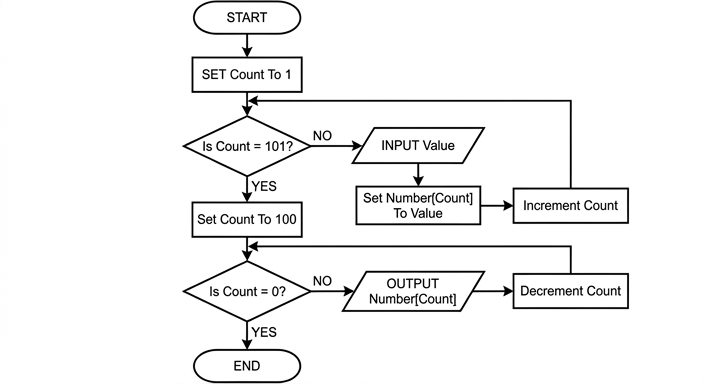
See flowchart
Background Concept
A flowchart is a diagrammatic way to represent an algorithm. It shows the order of operations and the control structures used.
In this question, the important ideas are:
- Sequence: statements carried out one after another.
- Iteration: repeating a set of steps using a loop.
- Selection: using a decision to choose whether to continue looping or stop.
- Array processing: storing values in indexed positions such as
Number[1],Number[2], and so on.
To output values in the opposite order to their input, a common method is:
- store all values in an array in the order they arrive
- start from the last used index
- move backwards through the array, outputting each value
That means this algorithm naturally has two phases:
- an input-and-store loop
- an output-in-reverse loop
A flowchart usually uses:
- oval for START and END
- rectangle for a process such as setting or incrementing a variable
- parallelogram for INPUT or OUTPUT
- diamond for a decision
Understanding the Question
The question says the algorithm will:
- input 100 integer values, one at a time
- store them in array
Numberstarting at the first location - place each new value in the next unused location
- output the contents of
Numberin the reverse order
So the flowchart must do exactly this:
- begin with a counter at 1
- keep inputting and storing until 100 values have been stored
- then set the counter to 100
- keep outputting
Number[Count]while moving backwards down to 1 - stop once the counter reaches 0
The clue phrase is opposite sequence. That tells you the second part must move through the array from the end back to the start.
Also, the question explicitly says variable declarations are not required, so the answer should focus only on the flowchart logic.
Approach
The cleanest way to build this flowchart is to split it into two loops.
First loop: input and store
- Set
Countto 1. - Test whether all 100 inputs have been processed.
- If not, input a value.
- Store it in
Number[Count]. - Increment
Count. - Go back to the decision.
Using the condition Is Count = 101? works because after storing the 100th value, Count is incremented from 100 to 101, which means the loop is finished.
Second loop: output in reverse
- Set
Countto 100. - Test whether
Counthas reached 0. - If not, output
Number[Count]. - Decrement
Count. - Go back to the decision.
This ensures the values are output from Number[100] down to Number[1].
Step-by-Step Reasoning
Start with the flowchart entry point.
-
START
- The algorithm begins.
-
SET Count To 1
- This prepares the first array position for the first input.
- The first value must go into
Number[1], so the counter starts at 1.
-
Decision: Is Count = 101?
- This is the loop test for the input stage.
- If
Countis not 101, there are still values left to input. - If
Countis 101, then 100 values have already been stored.
-
NO branch from
Is Count = 101?- Continue the input loop.
-
INPUT Value
- Read one integer value.
-
Set Number[Count] To Value
- Store the input in the current array position.
- So first input goes to
Number[1], second toNumber[2], and so on.
-
Increment Count
- Move to the next unused array location.
- After storing in
Number[1],Countbecomes 2. - After storing in
Number[100],Countbecomes 101.
-
Loop back to
Is Count = 101?- The input phase repeats until all 100 values are stored.
-
YES branch from
Is Count = 101?- This means the input loop is complete.
-
Set Count To 100
- Now the algorithm prepares to output in reverse order.
- The last stored item is in
Number[100], so the reverse traversal must begin there.
-
Decision: Is Count = 0?
- This is the loop test for the output phase.
- If
Countis not 0, there is still an item to output. - If
Countis 0, all values fromNumber[100]down toNumber[1]have been output.
-
NO branch from
Is Count = 0?- Continue the output loop.
-
OUTPUT Number[Count]
- Output the current array element.
- This starts with
Number[100], thenNumber[99], and so on.
-
Decrement Count
- Move backwards to the previous array position.
-
Loop back to
Is Count = 0?- The reverse-output phase repeats.
-
YES branch from
Is Count = 0?- The counter has moved past
Number[1], so the algorithm is finished.
- The counter has moved past
-
END
- Stop the algorithm.
This exactly matches the required behaviour: input in forward order, output in reverse order.
Key Takeaways
- Reverse output from a sequence is often done by first storing values in an array and then traversing the array backwards.
- A flowchart for this kind of task usually contains separate loops for input and output.
- Counter-controlled loops in flowcharts are often implemented using a decision plus increment/decrement steps.
- Array indexing must match the intended storage order exactly.
Common Mistakes
- Outputting values immediately after input: this would keep the original order, not reverse order.
- Forgetting to reset
Countto 100 before the output loop: without this, the reverse traversal cannot begin at the last stored value. - Using the wrong loop condition: for this mark scheme the first decision is
Is Count = 101?and the second isIs Count = 0?. - Missing the increment or decrement step: that would cause an infinite loop.
- Placing the output before the array storage is complete: the question requires all values to be stored first, then output in reverse.
- Using the wrong flowchart symbols: input/output should be in parallelograms, not rectangles.
Things to Be Careful About
- The array positions are effectively
1to100, so the first loop starts at1and finishes after100values have been stored. - The first termination test is after repeated incrementing, so
101is the stopping value in the mark scheme. - The reverse loop must begin at
100, not99or101. - Label the decision branches clearly as YES and NO.
- Make sure each loop arrow returns to the correct decision diamond.
- Do not add declaration boxes or extra variables, because the question says variable declarations are not required.
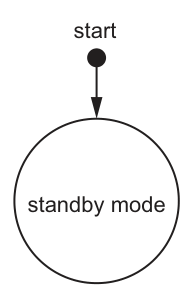
An automated digital camera system is used to take a sequence of pictures of animals in a garden. During the design of the system, a state-transition diagram is produced.
The table details the states in the automated digital camera system along with the events which cause the states to change.
The system starts in standby mode. The sequence of pictures is taken when in active mode.
| Current state | Event | Next state |
|---|---|---|
| standby mode | turn on | detect mode |
| detect mode | turn off | standby mode |
| detect mode | movement detected | active mode |
| active mode | 20 seconds elapsed | sequence complete |
| active mode | turn off | standby mode |
| sequence complete | time saved | detect mode |
Answer
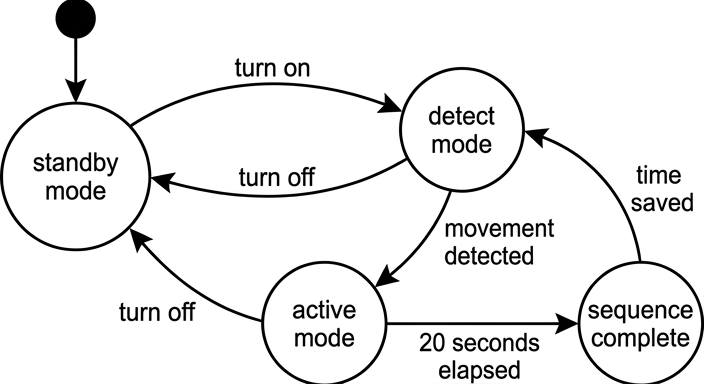
See state-transition diagram
Background Concept
A state-transition diagram shows how a system moves between different states. A state is the condition the system is currently in, such as standby mode or active mode. A transition is a change from one state to another. Each transition is caused by an event, and that event is written on the arrow.
The important rules are:
- states are drawn as circles
- arrows show the direction of change
- the label on the arrow is the event that causes the change
- a start symbol shows the initial state
So, to build or complete a state-transition diagram, you read each row of the transition table as:
current state --event--> next state
Understanding the Question
The question gives a transition table for the camera system and a partial diagram that already shows the start arrow going to standby mode.
You must complete the rest of the diagram by:
- adding the missing states
- drawing arrows between the correct states
- labelling each arrow with the correct event
The key information comes from the table, not from guesswork. Every row in the table corresponds to one arrow in the completed diagram.
Approach
Use the table one row at a time.
- Keep the given start state:
standby mode. - Add the other states named in the table:
detect mode,active mode, andsequence complete. - For each table row, draw one arrow from the current state to the next state.
- Put the event name on that arrow.
This is the safest method because it ensures every transition in the table appears once in the diagram.
Step-by-Step Reasoning
The start state is already shown as standby mode, so that part stays as it is.
Now convert each row of the table into a transition:
-
standby modewith eventturn ongoes todetect mode.- Draw an arrow from
standby modetodetect mode. - Label it
turn on.
- Draw an arrow from
-
detect modewith eventturn offgoes tostandby mode.- Draw an arrow back from
detect modetostandby mode. - Label it
turn off.
- Draw an arrow back from
-
detect modewith eventmovement detectedgoes toactive mode.- Draw an arrow from
detect modetoactive mode. - Label it
movement detected.
- Draw an arrow from
-
active modewith event20 seconds elapsedgoes tosequence complete.- Draw an arrow from
active modetosequence complete. - Label it
20 seconds elapsed.
- Draw an arrow from
-
active modewith eventturn offgoes tostandby mode.- Draw another arrow from
active modetostandby mode. - Label it
turn off.
- Draw another arrow from
-
sequence completewith eventtime savedgoes todetect mode.- Draw an arrow from
sequence completetodetect mode. - Label it
time saved.
- Draw an arrow from
That produces the completed diagram below.
Key Takeaways
- A state-transition diagram is built directly from a transition table.
- Each row becomes one labelled arrow.
- Arrow direction matters because it shows the next state.
- The start symbol identifies the initial state of the system.
Common Mistakes
- Drawing an arrow in the wrong direction, for example
detect modetostandby modeinstead of the other way round forturn on. - Putting event labels inside the state circles instead of on the arrows.
- Missing one of the two
turn offtransitions; one is fromdetect mode, and another is fromactive mode. - Forgetting to add the
sequence completestate or itstime savedtransition back todetect mode.
Things to Be Careful About
- Use the exact state names from the table.
- Use the exact event labels from the table.
- Make sure every state named in the table appears in the diagram.
- Do not invent extra transitions that are not listed.
- The given start arrow already points to
standby mode, so that must remain the initial state.
At the end of each sequence of pictures, the time is saved as a string in the format <HH><MM><SS> where:
• HH represents the hours using two digits
• MM represents the minutes using two digits
• SS represents the seconds using two digits.
For example:
• "081230" is stored to represent the time 8:12:30, in the morning
• "152235" is stored to represent the time 15:22:35, in the afternoon.
Each string is stored on a new line in the text file TimeTaken.txt
An algorithm is required to process the content of the text file TimeTaken.txt once it has been transferred to the computer.
For each hour when pictures are taken, output a suitable message showing the hour and the total number of sequences of pictures taken within that hour.
Example outputs:
Hour : 15 Total : 32
Hour : 18 Total : 1
Write pseudocode for this algorithm.
Assume the text file TimeTaken.txt contains at least one line.
Answer
DECLARE ThisTime, ThisHour, PreviousHour : STRING
DECLARE Count : INTEGER

OPENFILE "TimeTaken.txt" FOR READ
READFILE "TimeTaken.txt", ThisTime
PreviousHour ← LEFT(ThisTime, 2)
Count ← 1

WHILE NOT EOF("TimeTaken.txt")
   READFILE "TimeTaken.txt", ThisTime
   ThisHour ← LEFT(ThisTime, 2)
   IF ThisHour = PreviousHour THEN
      Count ← Count + 1
   ELSE
      OUTPUT "Hour : ", PreviousHour, " Total : ", Count
      PreviousHour ← ThisHour
      Count ← 1
   ENDIF
ENDWHILE

OUTPUT "Hour : ", PreviousHour, " Total : ", Count
CLOSEFILE "TimeTaken.txt"
See completed pseudocode
Background Concept
This question is about text file processing and grouping records while reading them one by one.
Each line of the file contains a time stored as a six-character string in the form HHMMSS:
HH= hourMM= minutesSS= seconds
For this task, we do not need the minutes or seconds. We only need the first two characters, because they tell us the hour. In CIE pseudocode, the first two characters can be extracted with:
LEFT(TimeString, 2)
A common pattern for grouped file data is:
- read the first record before the loop
- store its key value (
PreviousHourhere) - count matching records while the key stays the same
- when the key changes, output the previous total and start a new count
- after the loop, output the final group
That last step is very important, because the final hour will not trigger a change after it.
Understanding the Question
The file TimeTaken.txt contains one time per line, for example 152235.
You must write pseudocode to:
- read every line in the file
- find the hour from each line
- count how many sequences were taken in each hour
- output a message such as
Hour : 15 Total : 32
The question says to assume the file contains at least one line. That is a clue that a priming read is suitable: read the first line before entering the main loop, then compare later lines with it.
Approach
The idea is to process the file in order and keep track of the current hour group.
We need these variables:
ThisTimefor the full six-character time stringThisHourfor the hour from the current recordPreviousHourfor the hour currently being countedCountfor how many records belong to that hour
Strategy:
- Open the file.
- Read the first line.
- Extract its hour and store it in
PreviousHour. - Set
Countto 1 because that first line already belongs to that hour. - Read the remaining lines in a loop.
- For each new line, extract the hour.
- If it matches
PreviousHour, increase the count. - Otherwise, output the old hour and count, then start counting the new hour.
- If it matches
- When the loop ends, output the final hour and count.
- Close the file.
Step-by-Step Reasoning
Start by declaring variables:
DECLARE ThisTime, ThisHour, PreviousHour : STRING
DECLARE Count : INTEGER
We use strings because each line is stored as text, not as a numeric time data type.
Open the file and read the first line:
OPENFILE "TimeTaken.txt" FOR READ
READFILE "TimeTaken.txt", ThisTime
Because the file has at least one line, this first read is safe.
Now extract the hour from the first line:
PreviousHour ← LEFT(ThisTime, 2)
If the first line were 152235, then PreviousHour becomes 15.
Set the first count to 1:
Count ← 1
That first record has already been seen, so the current hour group already contains one item.
Now process the rest of the file:
WHILE NOT EOF("TimeTaken.txt")
   READFILE "TimeTaken.txt", ThisTime
   ThisHour ← LEFT(ThisTime, 2)
Each time through the loop:
- read the next line
- extract its hour
Then compare it with the hour we are currently counting:
   IF ThisHour = PreviousHour THEN
      Count ← Count + 1
If the hour is the same, we are still in the same group, so just increment the total.
Otherwise, the hour has changed:
   ELSE
      OUTPUT "Hour : ", PreviousHour, " Total : ", Count
      PreviousHour ← ThisHour
      Count ← 1
   ENDIF
ENDWHILE
In that case:
- output the completed total for the old hour
- switch
PreviousHourto the new hour - reset
Countto 1 because the new hour has started with the current line
After the loop finishes, there is still one group left to output:
OUTPUT "Hour : ", PreviousHour, " Total : ", Count
This is essential. Without it, the last hour in the file would never be displayed.
Finally, close the file:
CLOSEFILE "TimeTaken.txt"
So the complete solution is a standard grouped sequential file-processing algorithm using string extraction and a pre-condition loop.
Key Takeaways
- Use
LEFT(String, 2)to extract the hour from a time string inHHMMSSformat. - A priming read is useful when a file is guaranteed to contain at least one record.
- When counting grouped data, compare the current key with the previous key.
- Always output the final group after the loop.
- File-processing questions often test both algorithm logic and correct use of file operations.
Common Mistakes
- Forgetting the final
OUTPUTafter the loop. This loses the count for the last hour. - Setting
Count ← 0after the first read. It should be1, because the first line has already been counted. - Comparing whole time strings instead of just the first two characters. The question wants totals by hour, not by exact time.
- Reading from the file in the wrong place, causing a line to be skipped or processed twice.
- Omitting
CLOSEFILE, which is poor file-handling practice. - Using lower-case or non-CIE pseudocode forms such as
while,==, or=for assignment instead ofWHILE,=for comparison, and←for assignment.
Things to Be Careful About
- The hour must stay as two characters, so
08should remain08, not become8. - The variable holding the current group should be updated only after outputting the previous group.
EOF("TimeTaken.txt")must be checked correctly so the loop stops at the right point.- Since the solution uses grouped processing, it relies on reading the records in file order. If records were not grouped by hour, a different approach such as a 24-element counting array would be needed.
- Keep the output format consistent with the question, for example
Hour : 15 Total : 32.
Two arrays Data and Pointer are accessed by the procedure Place()
Data and Pointer are both global arrays of type INTEGER
The contents of these two arrays are shown:
| Data | Pointer | ||
|---|---|---|---|
| 1 | 1018 | 1 | 7 |
| 2 | 1007 | 2 | 3 |
| 3 | 1010 | 3 | 1 |
| 4 | 1056 | 4 | 6 |
| 5 | 1092 | 5 | -1 |
| 6 | 1062 | 6 | 5 |
| 7 | 1034 | 7 | 4 |
| 8 | 0 | 8 | 9 |
| 9 | 0 | 9 | 10 |
| 10 | 0 | 10 | -1 |
Study the pseudocode:
PROCEDURE Place(Value : INTEGER, Start : INTEGER, Unused : INTEGER)
    DECLARE New, Current, Last : INTEGER
    CONSTANT NullPointer = -1
    New ← Unused
    Last ← NullPointer
    Current ← Start
    WHILE Current <> NullPointer AND Data[Current] < Value
        Last ← Current
        Current ← Pointer[Current]
    ENDWHILE
    Pointer[New] ← Pointer[Last]
    Pointer[Last] ← New
    Data[New] ← Value
ENDPROCEDURE
Complete the trace table below by dry running the procedure Place() when it is called by the statement:
CALL Place(1043, 2, 8)
| Value | Start | Unused | New | Last | Current |
|---|---|---|---|---|---|
Working
Initial values from the call:
Value = 1043Start = 2Unused = 8
Initialisation in the procedure gives:
New = 8Last = -1Current = 2
The loop follows the list while Data[Current] < 1043:
Data[2] = 1007soLast = 2,Current = 3Data[3] = 1010soLast = 3,Current = 1Data[1] = 1018soLast = 1,Current = 7Data[7] = 1034soLast = 7,Current = 4Data[4] = 1056so the loop stops
Answer
| Value | Start | Unused | New | Last | Current |
|---|---|---|---|---|---|
| 1043 | 2 | 8 | — | — | — |
| 1043 | 2 | 8 | 8 | -1 | 2 |
| 1043 | 2 | 8 | 8 | 2 | 3 |
| 1043 | 2 | 8 | 8 | 3 | 1 |
| 1043 | 2 | 8 | 8 | 1 | 7 |
| 1043 | 2 | 8 | 8 | 7 | 4 |
See completed trace table
Background Concept
This question uses an array-based linked list. Instead of storing each node as a separate dynamic object, two parallel arrays are used:
Data[Index]stores the value in a node.Pointer[Index]stores the index of the next node.
A special value such as -1 is used as a null pointer to mean "there is no next node".
The variable Start tells us where the active list begins. From there, we follow the chain using Pointer[Current].
This procedure is performing a sorted insertion. That means it moves along the linked list until it finds the first value that is not less than the new value. It keeps two positions:
Current= the node being examined nowLast= the node just beforeCurrent
That pair is very important in linked-list insertion, because when the correct position is found, the new node must be linked between Last and Current.
Understanding the Question
You are given the full contents of the two global arrays and the procedure Place().
You must dry run the call:
CALL Place(1043, 2, 8)
So the starting values are:
Value = 1043Start = 2Unused = 8
The trace table only asks for these variables:
ValueStartUnusedNewLastCurrent
That means you trace how those variables change as the procedure runs. You do not need to trace Data and Pointer yet in this part.
Approach
The best way is:
- Write in the parameter values from the procedure call.
- Apply the three initial assignments:
New ← UnusedLast ← NullPointerCurrent ← Start
- Follow the
WHILEloop step by step. - At each loop pass, compare
Data[Current]withValue. - If the condition is true, update:
Last ← CurrentCurrent ← Pointer[Current]
- Stop when
Data[Current]is no longer less thanValue.
The active linked list starts at index 2, not index 1, so we must follow the list from Start.
Step-by-Step Reasoning
First, identify the active list from Start = 2:
- index 2 has data
1007, pointer3 - index 3 has data
1010, pointer1 - index 1 has data
1018, pointer7 - index 7 has data
1034, pointer4 - index 4 has data
1056, pointer6 - index 6 has data
1062, pointer5 - index 5 has data
1092, pointer-1
So the ordered list is:
1007 -> 1010 -> 1018 -> 1034 -> 1056 -> 1062 -> 1092
Now dry run the procedure.
1. Parameters from the call
Value = 1043, Start = 2, Unused = 8
2. Initialisation
New ← Unused so New = 8
Last ← NullPointer so Last = -1
Current ← Start so Current = 2
3. First loop test
Check:
Current <> -1is true becauseCurrent = 2Data[2] < 1043means1007 < 1043, which is true
So the loop runs.
Inside the loop:
Last ← CurrentgivesLast = 2Current ← Pointer[2]givesCurrent = 3
4. Second loop test
Check Data[3] < 1043:
1010 < 1043is true
So:
Last = 3Current = Pointer[3] = 1
5. Third loop test
Check Data[1] < 1043:
1018 < 1043is true
So:
Last = 1Current = Pointer[1] = 7
6. Fourth loop test
Check Data[7] < 1043:
1034 < 1043is true
So:
Last = 7Current = Pointer[7] = 4
7. Fifth loop test
Check Data[4] < 1043:
1056 < 1043is false
So the loop stops.
The final traced values are therefore:
New = 8Last = 7Current = 4
That means the new value will be inserted between node 7 and node 4.
Key Takeaways
- In an array-based linked list, the order of the list is determined by the
Pointerarray, not by the physical order of indices. Currentmoves through the list;Laststays one node behind.- For sorted insertion, the loop continues while the current data value is still less than the new value.
- Always begin tracing from
Start, then followPointer[Current].
Common Mistakes
- Starting at index 1 just because it is the first row of the table. The correct start node is
Start = 2. - Reading the next node from
Data[Current]instead ofPointer[Current]. - Forgetting that
Lastmust be updated beforeCurrentmoves on. - Continuing past index 4. The loop stops there because
1056is not less than1043. - Treating
-1as a valid array index instead of the null pointer marker.
Things to Be Careful About
- The arrays are 1-indexed here.
- Only the nodes reachable from
Startare part of the active linked list. - The loop condition has two parts joined by
AND; both must be true for another iteration. - This particular procedure works here because the new value is not inserted before the first node. If the new value were smaller than the first item,
Lastwould still be-1, which would need special handling in a full implementation.
Complete the diagram showing the contents of the global arrays Data and Pointer after the procedure Place() has run to completion when called as shown in part (a)(i).
| Data | Pointer | ||
|---|---|---|---|
| 1 | 1018 | 1 | |
| 2 | 1007 | 2 | |
| 3 | 1010 | 3 | |
| 4 | 1056 | 4 | |
| 5 | 1092 | 5 | |
| 6 | 1062 | 6 | |
| 7 | 1034 | 7 | |
| 8 | 8 | ||
| 9 | 9 | ||
| 10 | 10 |
Working
From part (a)(i):
New = 8Last = 7Current = 4
So the final statements do:
Pointer[8] ← Pointer[7]soPointer[8] = 4Pointer[7] ← 8Data[8] ← 1043
All other values stay the same.
Answer
| Index | Data | Pointer |
|---|---|---|
| 1 | 1018 | 7 |
| 2 | 1007 | 3 |
| 3 | 1010 | 1 |
| 4 | 1056 | 6 |
| 5 | 1092 | -1 |
| 6 | 1062 | 5 |
| 7 | 1034 | 8 |
| 8 | 1043 | 4 |
| 9 | 0 | 10 |
| 10 | 0 | -1 |
See completed table
Background Concept
To insert a new node into an array-based linked list, three things usually matter:
- The index of the new unused node
- The node that comes before the insertion point
- The node that comes after the insertion point
Those are exactly the roles of:
NewLastCurrent
The insertion is done by changing pointers, not by shifting all the later values as you would in a normal array.
For insertion between two existing nodes:
- the new node's pointer should point to the next node
- the previous node's pointer should point to the new node
- the data value is stored in the new node
This preserves the chain of the linked list.
Understanding the Question
This part asks for the contents of the global arrays after the procedure finishes.
So you must use the final values found in part (a)(i), then apply the last three statements of the procedure:
Pointer[New] ← Pointer[Last]
Pointer[Last] ← New
Data[New] ← Value
You are not re-tracing the whole loop here. You are updating the arrays using the result of the trace.
Approach
Use the final position found from the dry run:
Last = 7Current = 4New = 8
That means the new node at index 8 must be inserted between index 7 and index 4.
So:
- Make node 8 point where node 7 used to point.
- Make node 7 point to node 8.
- Store
1043inData[8]. - Leave every other entry unchanged.
Step-by-Step Reasoning
From part (a)(i), the loop stopped with:
Last = 7Current = 4New = 8
Before insertion:
Pointer[7] = 4
This means node 7 currently points directly to node 4.
Now apply the statements.
1. Pointer[New] ← Pointer[Last]
Substitute the values:
Pointer[8] ← Pointer[7]
Since Pointer[7] = 4, this gives:
Pointer[8] = 4
So the new node will point to index 4.
2. Pointer[Last] ← New
Substitute the values:
Pointer[7] ← 8
Now node 7 points to node 8.
3. Data[New] ← Value
Substitute the values:
Data[8] ← 1043
So index 8 now stores the new data item.
4. Check the updated chain
The relevant part of the list changes from:
7 -> 4
into:
7 -> 8 -> 4
Since:
Data[7] = 1034Data[8] = 1043Data[4] = 1056
this keeps the list in ascending order.
5. Unchanged entries
No other Data or Pointer entries are modified by the procedure, so all remaining rows stay as they were.
Key Takeaways
- In linked-list insertion, you usually change pointers rather than move many data values.
- The order of updates matters conceptually: the new node must point to the next node, then the previous node is redirected to the new node.
Last,Current, andNewtogether tell you exactly where the insertion happens.- After insertion, the logical list order may change even though most array rows stay the same.
Common Mistakes
- Setting
Pointer[8]to7instead of4. The new node should point forward to the next node, not backward to the previous one. - Changing
Pointer[4]. Node 4 is after the insertion point and does not need to change. - Forgetting to update
Data[8]to1043. - Altering rows 9 and 10 even though they are unaffected in the given procedure.
- Thinking the list must be physically rearranged in the array. It is the pointers that create the order.
Things to Be Careful About
- Use the values from the end of part (a)(i), not from the start of the trace.
Pointer[New] ← Pointer[Last]must use the old value ofPointer[Last]beforePointer[Last]is changed.- Only indices 7 and 8 change in the
Pointerarray, and only index 8 changes in theDataarray. - In a full implementation, the head of the unused list would also normally need updating after node 8 is taken, but this question only asks for the effects of the given procedure on
DataandPointer.
The operation carried out by procedure Place() together with the arrays form part of the implementation of an Abstract Data Type (ADT).
Identify the ADT and state the operation carried out by procedure Place()
Answer
- The ADT is a linked list.
- The operation is insertion of a new item/node into the linked list in its correct sorted position.
Linked list; insertion of a new item/node in sorted position.
Background Concept
An Abstract Data Type (ADT) describes a data structure in terms of what it does, rather than the exact low-level storage details. A linked list ADT stores items as nodes connected by links.
In this question, the links are implemented using an array of pointers rather than dynamic memory addresses:
Data[Index]stores the itemPointer[Index]stores the index of the next item
This is still a linked list because the nodes are connected by links from one node to the next.
Common linked-list operations include:
- traversing the list
- searching the list
- inserting a node
- deleting a node
Understanding the Question
You are asked to identify:
- the ADT represented by the arrays and procedure
- the operation carried out by
Place()
The clues are in the code:
- it follows a chain using
Current ← Pointer[Current] - it keeps track of
LastandCurrent - it uses an unused node
New - it changes two pointers and stores a value
Those are all classic signs of insertion into a linked list.
Approach
Recognise the structure first:
- data held in one array
- next-node links held in another array
-1used as a null pointer
That identifies a linked list.
Then recognise the operation:
- the procedure moves through the list while values are smaller than the new one
- when it stops, it inserts the new node between
LastandCurrent
That identifies insertion into an ordered linked list.
Step-by-Step Reasoning
Why is the ADT a linked list?
- The items are not necessarily stored in sorted or logical order by array index.
- The logical order is created by following
Pointer[Index]values. NullPointer = -1marks the end of the chain.
That is exactly how a linked list works.
Why is the operation insertion?
New ← Unusedchooses a free node.- The loop searches for the correct place to put the new value.
Pointer[New] ← Pointer[Last]makes the new node point to the next node.Pointer[Last] ← Newmakes the previous node point to the new node.Data[New] ← Valuestores the inserted value.
So the procedure is inserting a new node into the list.
Why is it a sorted insertion?
Because the loop condition is:
WHILE Current <> NullPointer AND Data[Current] < Value
This means the procedure moves forward while the current item is still smaller than the new value. So when the loop stops, the correct ordered position has been found.
Key Takeaways
- A linked list can be implemented using arrays and integer pointers.
- The logical order of a linked list comes from the pointer chain, not the array row numbers.
- Insertion into a linked list is recognised by taking an unused node and reconnecting links around it.
- A comparison inside the traversal loop often shows whether the insertion is ordered.
Common Mistakes
- Answering "array" as the ADT. Arrays are used for implementation here, but the ADT itself is a linked list.
- Saying the operation is "search" only. The procedure does search for a position, but its main purpose is insertion.
- Saying it is a queue or stack. The pointer-following and ordered insertion do not match standard queue or stack behaviour.
- Missing the word "sorted" or "correct position" when describing the operation.
Things to Be Careful About
- Distinguish between the implementation method and the ADT itself.
- A linked list implemented with arrays is still a linked list.
- The operation is not just adding to the end or beginning; it is inserting into the correct place in order.
- Use precise terminology such as "linked list" and "insert a new node/item in sorted position" for full credit.
A program is being developed to implement a customer loyalty scheme for a coffee shop.
Each customer has a unique customer ID starting at 10001 with this value increasing by one each time a new customer joins the loyalty scheme.
For example, the third customer who joins the loyalty scheme is given the customer ID 10003
The loyalty scheme is limited to 1000 customers.
A customer is awarded a loyalty point every time they buy a coffee.
The programmer has decided to use a global 2D array Loyalty of type INTEGER. The array Loyalty is made up of 1000 rows and 2 columns. Each row relates to one customer; column 1 contains the unique customer ID and column 2 contains the number of customer loyalty points.
Rows in the array Loyalty that are not currently being used have the value of Column 1 set to 99999
The array is sorted in ascending order by customer ID.
The programmer has defined a program module:
| Module | Description |
|---|---|
FindCustomer() | • called with parameter of type INTEGER representing a customer ID• searches the Loyalty array for this customer ID• the search will stop as soon as the customer ID is found • the search should efficiently deal with the situation when the customer ID is not stored in the Loyalty array• if the customer ID is found, return an integer value representing the loyalty points, otherwise return -1 |
Answer
FUNCTION FindCustomer(BYVAL CustomerID : INTEGER) RETURNS INTEGER
   DECLARE Row : INTEGER
   Row ← 1

   WHILE Row <= 1000 AND Loyalty[Row, 1] <> 99999 AND Loyalty[Row, 1] < CustomerID
      Row ← Row + 1
   ENDWHILE

   IF Row <= 1000 AND Loyalty[Row, 1] = CustomerID THEN
      RETURN Loyalty[Row, 2]
   ELSE
      RETURN -1
   ENDIF
ENDFUNCTION
See completed pseudocode
Background Concept
A search routine looks through stored data to find a required item. In this question, the data is held in a global 2D array called Loyalty, where each row represents one customer. Column 1 stores the customer ID and column 2 stores that customer's loyalty points.
Because the array is sorted in ascending order by customer ID, we do not need to examine every used row. A linear search can be made more efficient by stopping as soon as the current customer ID becomes greater than the one being searched for, because the target cannot appear later in a sorted ascending list once it has been passed.
There is also a sentinel value: unused rows have 99999 in column 1. That means the used data is grouped at the start of the array, so the search can stop at the first unused row instead of scanning all 1000 rows.
A function is appropriate here because the module must return a value: either the loyalty points if the customer exists, or -1 if the customer does not exist.
Understanding the Question
The question asks for pseudocode for FindCustomer(). The input to the function is one integer customer ID. The required output is:
- the loyalty points for that customer if the ID is found
-1if the ID is not found
The important clues are:
- the array is sorted by customer ID
- unused rows are marked with
99999 - the search should be efficient
- the search should stop as soon as the customer is found
So the function should not blindly scan all 1000 rows. It should stop when one of these happens:
- the customer is found
- the current stored ID is greater than the target ID
- an unused row is reached
- the end of the array is reached
Approach
A good approach is an improved linear search.
- Start at row 1.
- Keep moving forward while the current row is still valid and the current customer ID is less than the target ID.
- When the loop stops, check whether the current row actually matches the target.
- If it matches, return the points from column 2.
- Otherwise return
-1.
This works well because the array is sorted and because 99999 marks the end of the used rows.
Step-by-Step Reasoning
The function header is:
FUNCTION FindCustomer(BYVAL CustomerID : INTEGER) RETURNS INTEGER
This shows that:
- the module is a function, because it returns a value
- the parameter is passed in as an integer customer ID
- the returned value is also an integer
We declare Row as an integer and set it to 1 so the search begins at the first row:
DECLARE Row : INTEGER
Row ← 1
The loop condition is the key part:
WHILE Row <= 1000 AND Loyalty[Row, 1] <> 99999 AND Loyalty[Row, 1] < CustomerID
   Row ← Row + 1
ENDWHILE
This means we continue moving down the array only while all three conditions are true:
Row <= 1000keeps the index inside the array bounds.Loyalty[Row, 1] <> 99999means the row is being used by a real customer.Loyalty[Row, 1] < CustomerIDmeans the current ID is still smaller than the one we want.
Why use < CustomerID and not <> CustomerID? Because the array is sorted. If the current value becomes equal, we should stop immediately because we have found the customer. If the current value becomes greater, we should also stop because the customer cannot appear later.
After the loop ends, there are several possibilities:
- the row now contains the correct customer ID
- the row contains a larger ID, so the target is not present
- the row is unused (
99999), so the target is not present Rowhas gone beyond 1000, so the target is not present
So we then test for an exact match:
IF Row <= 1000 AND Loyalty[Row, 1] = CustomerID THEN
   RETURN Loyalty[Row, 2]
ELSE
   RETURN -1
ENDIF
If the customer is found, the function returns the points from column 2 in the same row. Otherwise it returns -1, exactly as required.
This is efficient because it does not process unnecessary rows.
Key Takeaways
- A sorted array allows an early-stop linear search.
- A sentinel value such as
99999can be used to detect the end of stored data. - A function is used when a module must return a value.
- In a 2D array, related pieces of data can be stored in different columns of the same row.
Common Mistakes
- Scanning all 1000 rows even though the array is sorted and unused rows are marked. This loses the efficiency marks.
- Returning the customer ID instead of the loyalty points. The function must return column 2, not column 1.
- Forgetting to return
-1when the customer is not found. - Using
Loyalty[Row, 1] <> CustomerIDas the loop condition. That does not take advantage of the sorted order and may continue too far. - Not checking the array bound before accessing
Loyalty[Row, 1].
Things to Be Careful About
- Column 1 is the customer ID and column 2 is the loyalty points; do not swap them.
- The array is 1-indexed in CIE pseudocode style here, so starting at row 1 is important.
- The stopping condition must include the sentinel
99999. - The function name and parameter type should match the question stem.
- Use
RETURNinside a function, notOUTPUT, because the module is defined to return a value.
A customer can claim a free coffee for every 11 loyalty points.
The programmer has defined a second program module:
| Module | Description |
|---|---|
PointsReport() | • output the customer ID for each customer who has 11 or more loyalty points • output the average loyalty points for all customers in the Loyalty array along with an appropriate message |
Write efficient pseudocode for module PointsReport()
Assume the array contains the data for at least one customer.
Answer
PROCEDURE PointsReport()
   DECLARE Row, Count, Total : INTEGER
   DECLARE Average : REAL

   Row ← 1
   Count ← 0
   Total ← 0

   WHILE Row <= 1000 AND Loyalty[Row, 1] <> 99999
      IF Loyalty[Row, 2] >= 11 THEN
         OUTPUT Loyalty[Row, 1]
      ENDIF
      Total ← Total + Loyalty[Row, 2]
      Count ← Count + 1
      Row ← Row + 1
   ENDWHILE

   Average ← Total / Count
   OUTPUT "Average loyalty points = ", Average
ENDPROCEDURE
See completed pseudocode
Background Concept
A reporting procedure processes stored data and produces output. Unlike a function, a procedure does not return a single value to the caller; instead it usually performs actions such as outputting information.
This question uses common array-processing patterns:
- iteration through records
- selection using an
IFstatement - accumulation using a running total
- counting how many items were processed
- calculating an average at the end
Because the Loyalty array contains unused rows marked by 99999 in column 1, the procedure can stop when it reaches that sentinel value. That is more efficient than looping over all 1000 rows.
Understanding the Question
The module PointsReport() must do two things:
- Output the customer ID of every customer who has
11or more loyalty points. - Output the average loyalty points for all customers stored in the array, together with a message.
The array structure is inherited from the main question stem:
Loyalty[row, 1]is the customer IDLoyalty[row, 2]is the number of loyalty points99999in column 1 means the row is unused
The question also says to assume there is at least one customer. That matters because it means dividing by Count is safe once the loop finishes.
Approach
The best method is a single pass through the used rows of the array.
During the same loop, we can:
- check whether each customer has at least 11 points and output the ID if true
- add each customer's points to
Total - increase
Countfor each valid customer row
After the loop, compute:
Average ← Total / Count
Then output the average with a message.
Using one loop is efficient because it avoids scanning the same data twice.
Step-by-Step Reasoning
The procedure header is:
PROCEDURE PointsReport()
It is a procedure because the task is to output a report, not return one single value.
We declare variables:
DECLARE Row, Count, Total : INTEGER
DECLARE Average : REAL
Rowtracks the current array rowCountstores how many customers have been processedTotalstores the sum of all loyalty pointsAveragemust beREALbecause the result may not be a whole number
Initial values are set:
Row ← 1
Count ← 0
Total ← 0
The loop continues while the row number is valid and the row is in use:
WHILE Row <= 1000 AND Loyalty[Row, 1] <> 99999
Inside the loop, first test whether the customer can claim a free coffee:
IF Loyalty[Row, 2] >= 11 THEN
   OUTPUT Loyalty[Row, 1]
ENDIF
This uses the threshold from the question. If the customer has 11 or more points, output the customer ID from column 1.
Next, update the running total and count:
Total ← Total + Loyalty[Row, 2]
Count ← Count + 1
This ensures every valid customer contributes to the average.
Then move to the next row:
Row ← Row + 1
After the loop finishes, calculate the average:
Average ← Total / Count
Since the question guarantees at least one customer, Count will be at least 1.
Finally, output the result with a message:
OUTPUT "Average loyalty points = ", Average
That satisfies the requirement for an appropriate message alongside the value.
Key Takeaways
- A sentinel value lets you stop processing a partially filled array efficiently.
- A single loop can both filter records and calculate summary statistics.
- An average requires both a running total and a count.
- Use a procedure for report-style output and a function for returning a value.
Common Mistakes
- Looping through all 1000 rows instead of stopping at the first
99999row. - Outputting the loyalty points instead of the customer ID for qualifying customers.
- Forgetting to increment
Count, which would make the average wrong or impossible to calculate. - Declaring
AverageasINTEGER, which may lose the fractional part. - Calculating the average inside the loop each time. It is simpler and clearer to calculate it once after the total and count are complete.
Things to Be Careful About
- The threshold is
11 or more, so the comparison must be>= 11, not> 11. - Use column 1 for the ID and column 2 for points.
- The assumption that there is at least one customer removes the divide-by-zero problem, but in a real program you would still usually guard against
Count = 0. - Keep the loop bound
Row <= 1000as well as the sentinel check. - Include an actual message with the average, because the question specifically asks for one.
The programmer decides to amend the customer ID; it will be stored as a STRING instead of an INTEGER. This means that the 2D array Loyalty can no longer be used.
Answer
- A 2D array stores one data type only, so it cannot store a
STRINGcustomer ID in one column andINTEGERloyalty points in the other.
A 2D array is homogeneous, so it cannot store both STRING and INTEGER values.
Background Concept
Standard arrays are homogeneous data structures. That means every element in the array must have the same data type. If an array is declared as INTEGER, every stored item must be an integer. If an array is declared as STRING, every stored item must be a string.
A 2D array is still just an array. The fact that it has rows and columns does not change the rule: all entries must have the same type.
Understanding the Question
Originally, the Loyalty array was a 2D array of type INTEGER:
- column 1 stored customer IDs
- column 2 stored loyalty points
That worked when customer IDs were integers.
Now the programmer changes the customer ID so that it is stored as a STRING. The question asks why the existing 2D array can no longer be used.
Approach
The answer depends on one key rule: arrays store one data type only. Once customer IDs become strings, the array would need to hold:
STRINGvalues in column 1INTEGERvalues in column 2
That mixture is not allowed in a normal array of type INTEGER.
Step-by-Step Reasoning
The current array is declared as an integer array. That means every element such as Loyalty[1, 1], Loyalty[1, 2], Loyalty[2, 1], and so on must store integers.
After the change:
- customer ID is a
STRING - loyalty points are still
INTEGER
So the array would need mixed data types across its columns. A simple 2D array cannot do that because it is homogeneous.
That is why the existing 2D INTEGER array can no longer be used.
Key Takeaways
- Arrays are homogeneous: all elements must have the same type.
- Changing one field to a different data type can make a previous array design unsuitable.
- Mixed-type records usually need a record-based structure rather than a plain array.
Common Mistakes
- Saying a 2D array cannot store strings at all. It can, but only if the whole array is declared as
STRING. - Saying the problem is the number of columns. The real issue is the mixed data types.
- Forgetting that the original array was specifically an
INTEGERarray.
Things to Be Careful About
- The important idea is not just that customer IDs changed, but that they changed to a different type from the loyalty points.
- A column-based mental model can be misleading: although we talk about columns, the whole array still has one declared type.
- Use the term
STRINGandINTEGERclearly because the mark depends on identifying the type mismatch.
Explain how a 1D array could be used to store both the loyalty points and the amended customer ID.
Answer
- Define a record with two fields, for example
CustomerID : STRINGandPoints : INTEGER. - Declare a 1D array of this record type so that each array element stores one customer's ID and loyalty points.
Use a 1D array of records, with fields CustomerID as STRING and Points as INTEGER.
Background Concept
When related data items have different types but belong together, a record is a suitable structure. A record groups fields under one name, and each field can have its own data type.
For example, one customer might need:
CustomerIDas aSTRINGPointsas anINTEGER
A 1D array can then be used to store many of these records. Each position in the array stores one complete record.
Understanding the Question
The question asks how a 1D array could be used to store both the amended customer ID and the loyalty points.
Because the customer ID is now a string while the points remain integers, a plain numeric 2D array is no longer suitable. The answer needs a structure that can store both values together for each customer.
Approach
Use two levels of structure:
- A record type for one customer.
- A 1D array where each element is one customer record.
This keeps the same idea of one stored item per customer, but now each stored item can contain mixed data types.
Step-by-Step Reasoning
First, define a record type such as:
CustomerID : STRINGPoints : INTEGER
That creates a single structure representing one customer.
Then declare a 1D array of this record type. Conceptually, it would work like this:
Loyalty[1]stores the first customer's full recordLoyalty[2]stores the second customer's full record- and so on up to the limit of 1000 customers
Each array element contains both fields. So for one customer you could access:
Loyalty[Row].CustomerIDLoyalty[Row].Points
This solves the mixed-type problem because the array stores records, and each record field can have its own type.
Key Takeaways
- A record groups related fields of different data types.
- A 1D array of records is a common way to store many similar entities.
- Each array element can represent one real-world object, such as one customer.
Common Mistakes
- Suggesting two separate 1D arrays without explaining how they stay linked. That can work in some designs, but this question strongly points toward storing both values together.
- Saying a 1D array alone can directly store both strings and integers. It cannot unless each element is a record or similar composite type.
- Forgetting to state the types of the two fields.
Things to Be Careful About
- Make it clear that the 1D array stores records, not raw values of mixed types.
- Each element represents one customer, so both pieces of data must be in the same record.
- The customer limit still applies, so the array would still need space for up to 1000 records.