Computer Science 9618/21 — May/June 2025
Cambridge AS Level · Fundamental Problem-solving and Programming Skills · worked solutions for every part, with the mark scheme
Topics Data Types and Structures · Programming · Algorithm Design and Problem-solving · Software Development
A program is being developed to help the manager of a shop control the stock.
An identifier table has been used during the design stage.
Complete the identifier table:
| Example value | Explanation | Variable name | Data type |
|---|---|---|---|
| "Fruit" | a category of stock that is sold in the shop | ||
| 20/02/2025 | when an item was sold | ||
| 12.67 | the cost of an item | ||
| TRUE | to indicate if an item is in stock |
Answer
| Example value | Explanation | Variable name | Data type |
|---|---|---|---|
| "Fruit" | a category of stock that is sold in the shop | Category | STRING |
| 20/02/2025 | when an item was sold | DateSold | DATE |
| 12.67 | the cost of an item | Cost | REAL |
| TRUE | to indicate if an item is in stock | InStock | BOOLEAN |
See completed table
Background Concept
An identifier table is a design tool used before or during program development. It lists important data items used in a program and usually shows things such as the variable name, its purpose, and its data type.
The key idea is that each identifier should:
- have a meaningful name
- store one clear kind of data
- use a suitable data type
Typical data types here are:
STRINGfor text such as names or categoriesDATEfor datesREALfor decimal values such as moneyBOOLEANforTRUE/FALSEvalues
Understanding the Question
You are given four example values from a stock-control system and must complete the missing parts of the identifier table.
For each row, you need to decide:
- a sensible variable name
- the correct data type
The variable name does not have to be one exact word from the mark scheme in real exams, but it must clearly match the purpose given in the explanation.
Approach
Work through each example value and ask two questions:
- What kind of data is this?
- What would be a clear variable name for it?
For example, if the value is text like "Fruit", that suggests a STRING. If the value is TRUE, that suggests a BOOLEAN.
Step-by-Step Reasoning
"Fruit"is text. It represents a stock category, so a suitable name isCategory. Text data uses the typeSTRING.20/02/2025is a calendar date. It tells us when an item was sold, soDateSoldis a suitable name. The correct type isDATE.12.67has a decimal point, so it is not an integer. It represents a price or cost, soCostis a suitable variable name. Decimal numeric data usesREAL.TRUEis one of the two Boolean values. It shows whether an item is in stock, soInStockis a clear name. The type isBOOLEAN.
The important point is not the exact wording of the variable name, but that it is meaningful and matches the data stored.
Key Takeaways
- Use identifier tables to plan variables clearly.
- Pick variable names that describe the data purpose.
- Match the example value to the correct data type.
STRING,DATE,REAL, andBOOLEANare all common choices in design questions.
Common Mistakes
- Using vague names such as
xordata, which do not describe the purpose. - Writing
INTEGERfor12.67; decimals needREAL. - Writing
STRINGforTRUE;TRUEandFALSEareBOOLEANvalues. - Treating a date as a number just because it contains digits.
Things to Be Careful About
- The variable name should match the explanation, not just the example value.
- Money values usually need
REALbecause they can contain decimal places. - A Boolean field should describe a yes/no condition, such as
InStock. - If your centre has been taught slightly different naming conventions, that is fine as long as the name is sensible and the data type is correct.
A module Sales() is part of the stock control program.
The table contains pseudocode extracts from the module Sales()
Each extract may include all or part of:
- assignment
- selection
- iteration (repetition).
Complete the table by placing one or more ticks (✓) in each row:
| Pseudocode extract | Assignment | Selection | Iteration |
|---|---|---|---|
Result ← CalculateTotal() | |||
WHILE IsClosed | |||
REPEAT INPUT Value UNTIL Sales[4] > Value | |||
IF Sales[Current] <= 150 THEN Discount ← TRUE ENDIF | |||
CASE OF Option |
Answer
| Pseudocode extract | Assignment | Selection | Iteration |
|---|---|---|---|
Result ← CalculateTotal() | ✓ | ||
WHILE IsClosed | ✓ | ||
REPEAT INPUT Value UNTIL Sales[4] > Value | ✓ | ||
IF Sales[Current] <= 150 THEN Discount ← TRUE ENDIF | ✓ | ✓ | |
CASE OF Option | ✓ |
See completed table
Background Concept
In Paper 2, three of the most important programming constructs are:
- assignment: storing a value in a variable
- selection: choosing between alternatives based on a condition
- iteration: repeating steps in a loop
You can usually recognise them from their pseudocode forms:
- Assignment uses the arrow
← - Selection uses
IF...THEN...ENDIForCASE OF - Iteration uses loops such as
WHILE...ENDWHILEorREPEAT...UNTIL
A single extract can contain more than one construct. For example, an IF statement may contain an assignment inside it.
Understanding the Question
You are given several short pseudocode extracts from Sales() and must tick whether each extract includes:
- assignment
- selection
- iteration
The question warns that each extract may contain one or more of these, so you must inspect each row carefully rather than assuming only one tick per line.
Approach
Look for the key feature in each extract:
- If you see
←, that is assignment. - If you see
IForCASE, that is selection. - If you see
WHILEorREPEAT...UNTIL, that is iteration.
Then check whether the extract contains more than one of these features.
Step-by-Step Reasoning
1. Result ← CalculateTotal()
This stores the value returned by CalculateTotal() into Result.
- It contains
←, so it is assignment. - There is no
IF,CASE,WHILE, orREPEAT, so it is not selection or iteration.
2. WHILE IsClosed
A WHILE loop repeats while a condition remains true.
- This is iteration.
- Although a condition is present,
WHILEis classified as a loop, not as a selection statement.
3. REPEAT ... UNTIL Sales[4] > Value
A REPEAT...UNTIL structure keeps repeating until the condition becomes true.
- This is iteration.
- The condition controls when the repetition stops, but the structure itself is still a loop, not an
IF/CASEselection.
4. IF Sales[Current] <= 150 THEN / Discount ← TRUE / ENDIF
This row has two things happening:
IF ... THENmeans selection because the statement only runs when the condition is true.- Inside the
IF,Discount ← TRUEis assignment because a value is stored in a variable.
So this row needs two ticks.
5. CASE OF Option
CASE OF selects one branch from several possible alternatives.
- This is selection.
- It is not assignment or iteration.
Key Takeaways
←indicates assignment.IFandCASE OFare selection constructs.WHILEandREPEAT...UNTILare iteration constructs.- One extract can include more than one construct, so always check the whole row.
Common Mistakes
- Ticking selection for every statement with a condition. A loop condition in
WHILEorUNTILis still part of iteration. - Missing the assignment inside an
IFstatement. - Thinking a function call automatically makes something iteration or selection; it does not.
- Giving only one tick per row when the question allows more than one.
Things to Be Careful About
- In Cambridge pseudocode, assignment is shown by
←, not=. CASE OFis a selection structure even if the branches are not shown in the extract.REPEAT...UNTILis a post-condition loop: it repeats first, then checks the condition.WHILEis a pre-condition loop: it checks the condition before each repetition.
Decomposition has been used to design the program to help the shop manager control the stock.
Describe decomposition.
...................................................................................................................................................
...................................................................................................................................................
...................................................................................................................................................
...................................................................................................................................................
...................................................................................................................................................
.............................................................................................................................................
Answer
- Decomposition means breaking a large problem or system into smaller, more manageable sub-problems or modules.
- Each module carries out one specific task.
- The modules can be designed, coded and tested separately, then combined to form the complete program.
See explanation
Background Concept
Decomposition is a problem-solving technique used in program design. Instead of trying to solve one large, complicated problem all at once, the problem is split into smaller parts.
These smaller parts are often called:
- sub-problems
- modules
- components
Each module should have a clear purpose, such as entering stock data, calculating sales totals, or checking whether an item is in stock.
Decomposition is closely linked to modular design. A modular program is easier to understand, build, test, and maintain.
Understanding the Question
The question says decomposition has been used to design a stock-control program and asks you to describe decomposition.
So you are not being asked to give code. You are being asked for the idea behind the design method.
A strong answer should say:
- what decomposition is
- what the smaller parts are for
- why this helps when developing the whole program
Approach
Give a definition first, then expand it with what happens to the smaller parts.
A good structure is:
- break the large problem into smaller modules
- each module solves one task
- modules can be worked on separately and then combined
That covers both meaning and purpose.
Step-by-Step Reasoning
The whole stock-control system is a large task. It may need to:
- store stock details
- record sales
- update stock levels
- check availability
- produce reports
Instead of writing one huge block of logic, decomposition separates this into modules. For example, one module might handle sales, another stock checking, and another report generation.
This means:
- each module is smaller and easier to understand
- programmers can focus on one task at a time
- modules can be tested individually
- the finished modules are joined together to make the complete system
So the essential description is that decomposition breaks a complex problem into manageable modules, each with its own specific job.
Key Takeaways
- Decomposition is breaking a problem into smaller parts.
- Each module should do one clear task.
- Modular design makes development and testing easier.
- It is a standard design technique in algorithm development.
Common Mistakes
- Describing abstraction instead of decomposition. Abstraction removes unnecessary detail; decomposition splits the problem.
- Saying only that it makes the program easier, without defining what decomposition actually is.
- Talking about writing code line by line rather than dividing the overall problem into modules.
Things to Be Careful About
- The question asks to describe decomposition, so include both the definition and how the smaller modules are used.
- Do not confuse modules with individual lines of code; a module is a meaningful section that performs a task.
- Keep the answer focused on design, not on specific programming syntax.
A program is being developed to calculate the pay of employees working for a company.
A function CalculateBonus() calculates bonus pay based on the value of sales.
Bonus pay is calculated as shown in the table.
| Value of sales (in dollars) | Bonus pay (in dollars) |
|---|---|
| below 2000 | 0 |
| between 2000 and 4000 inclusive | 10 |
| above 4000 | 100 |
A flowchart for the function CalculateBonus() has been designed.
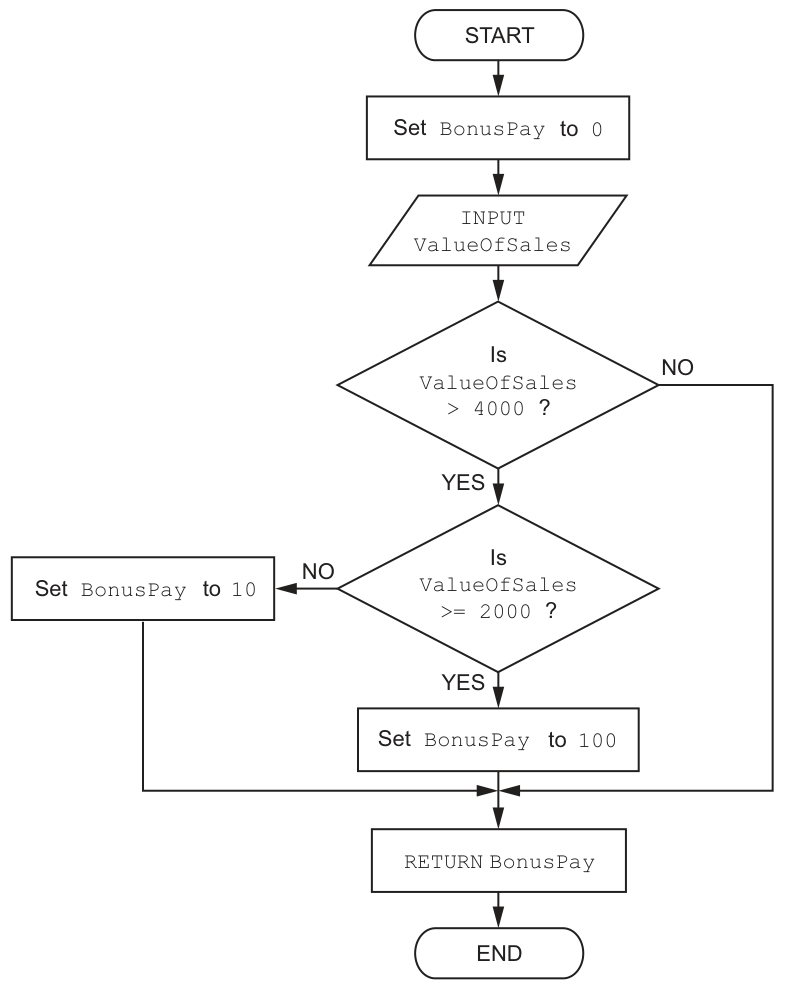
The flowchart contains logic errors.
One logic error is that BonusPay will not be set to 10 although the ValueOfSales input is between 2000 and 4000 inclusive.
Explain why this error occurs.
...........................................................................................................................................
.....................................................................................................................................
Answer
- For values between
2000and4000, the testValueOfSales > 4000is false, so the flowchart follows theNObranch straight toRETURN BonusPay. - The second test is not reached, so
BonusPayis never set to10.
Because values from 2000 to 4000 make the first test false, the flowchart goes straight to RETURN and never reaches the step that sets BonusPay to 10.
Background Concept
A logic error happens when an algorithm is written using the wrong sequence of steps or the wrong condition, so the program runs but produces the wrong result. In a flowchart, this usually means a decision diamond sends control down the wrong path.
To find a logic error, you trace the route that the program would take for particular input values. Each decision is checked as either true or false, and you follow the matching branch.
Understanding the Question
The function is supposed to award:
0if sales are below200010if sales are from2000to4000inclusive100if sales are above4000
This part asks why the existing flowchart fails to give 10 for the middle range. So the key job is to test what happens when ValueOfSales is, for example, 3000.
Approach
Take an example value in the range 2000 to 4000, then walk through the flowchart exactly as the computer would. Check the first condition, follow its branch, and see whether the step Set BonusPay to 10 is ever reached.
Step-by-Step Reasoning
At the start, BonusPay is set to 0.
Now consider a value such as 3000:
- The first decision is
Is ValueOfSales > 4000? - For
3000, this is false. - The flowchart therefore follows the
NObranch. - In the given flowchart, that
NObranch goes directly to the join and then toRETURN BonusPay. - That means the second decision is skipped.
- Since the second decision is skipped, the step that should eventually assign
10is never reached. - So the function returns the original value
0instead of10.
That is why the middle band of sales does not work correctly.
Key Takeaways
- A logic error is found by following the algorithm with test data.
- In a flowchart, a wrong branch can skip an essential process step.
- When checking ranges, make sure each range can actually reach its correct assignment.
Common Mistakes
- Saying the condition itself is false without explaining where the
NObranch goes. - Describing the wrong range, such as values above
4000instead of between2000and4000. - Saying there is a syntax error. The flowchart structure is valid; the problem is its logic.
Things to Be Careful About
- The word
inclusivematters:2000and4000must be included in the middle range. - Follow the flowchart as drawn, not as you think it should work.
- Remember that
BonusPaystarts at0, so if no later assignment is reached,0is returned.
Explain how this error could be corrected.
...........................................................................................................................................
.....................................................................................................................................
Answer
- Change the order of the tests so values of
2000or more go to the second decision. - For example, test
ValueOfSales >= 2000first, then testValueOfSales > 4000.
Change the decision order so the first test is ValueOfSales >= 2000 and the second test is ValueOfSales > 4000.
Background Concept
When an algorithm handles value ranges, the conditions must be arranged so that every possible input reaches the correct action. A common method is to test the ranges in a sensible order, for example:
- first check whether the value reaches the lower boundary of a band
- then check whether it exceeds the upper boundary
If the conditions are in the wrong order, a whole category of values may bypass the correct step.
Understanding the Question
This part asks how to fix the flowchart so that sales between 2000 and 4000 inclusive can correctly lead to BonusPay = 10.
The current problem is that these values do not even reach the second check. So the correction must make sure the middle-range values continue to the next decision instead of returning immediately.
Approach
Make the first decision separate values below 2000 from values 2000 and above. Then use the second decision to separate the middle range from values above 4000.
That matches the three required outcomes cleanly:
- below
2000→0 2000to4000→10- above
4000→100
Step-by-Step Reasoning
A correct sequence is:
- Start with
BonusPay = 0. - First ask whether
ValueOfSales >= 2000.- If
NO, the sales are below2000, so return0. - If
YES, continue to the next test.
- If
- Then ask whether
ValueOfSales > 4000.- If
YES, setBonusPayto100. - If
NO, setBonusPayto10.
- If
This works because:
- a value like
1500fails the first test and keeps bonus0 - a value like
3000passes the first test but fails the second, so gets10 - a value like
5000passes both tests, so gets100
So the correction is to swap the order of the conditions so the lower boundary is checked before the upper one.
Key Takeaways
- Range-based problems need conditions arranged in a logical order.
- A good design is to exclude the lowest range first, then split the remaining values.
- Correcting a logic error often means changing the order of tests, not just changing one value.
Common Mistakes
- Only changing the first branch without making the overall range logic correct.
- Forgetting that
2000must be included in the10bonus band. - Using
> 2000instead of>= 2000, which would wrongly exclude exactly2000.
Things to Be Careful About
- The boundary conditions are important:
2000is included in the middle band, but values must be strictly above4000for100. - Any correction must still allow values above
4000to reach100. - Make sure every possible sales value has exactly one correct route through the flowchart.
There are different ways to reduce the risk of errors when developing the new program, such as the use of constants.
State a value that could be replaced by a constant in the function CalculateBonus()
.....................................................................................................................................
Answer
4000
4000
Background Concept
A constant is a named value that does not change while the program runs. Instead of writing a raw number such as 4000 directly inside conditions, a programmer can use a constant name such as UPPER_SALES_LIMIT.
This avoids using unexplained literal numbers, often called magic numbers.
Understanding the Question
The function uses several fixed values in its decisions and bonus assignments, such as 2000, 4000, 0, 10, and 100. The question asks for one value that could be turned into a constant.
Any fixed value from the function would be acceptable.
Approach
Pick one value that is fixed and meaningful in the algorithm. A threshold value is a strong choice because it controls program logic.
Step-by-Step Reasoning
4000 is suitable because:
- It is a fixed sales threshold.
- It is used in a comparison.
- It is part of the business rule and should not be typed as an unexplained literal each time.
Other values could also work, but giving one valid example is enough here.
Key Takeaways
- A constant stores a fixed value with a meaningful name.
- Thresholds and fixed rates are common values to turn into constants.
- Replacing magic numbers improves readability and safety.
Common Mistakes
- Giving a variable such as
ValueOfSales, which changes and therefore is not a constant. - Explaining constants instead of actually stating a value.
- Choosing something that is not present in the function logic.
Things to Be Careful About
- The question asks for a value, not a constant name.
- Only fixed values qualify; input data does not.
- One correct example is enough.
Explain how the use of constants helps to reduce the risk of programming errors.
...........................................................................................................................................
...........................................................................................................................................
...........................................................................................................................................
.....................................................................................................................................
Answer
- A named constant makes the purpose of the value clear, so the programmer is less likely to use the wrong number.
- If the value needs to be changed, it is changed once in the constant declaration, reducing the risk of inconsistent or missed changes elsewhere in the program.
Named constants make values clearer and allow one change in one place, reducing the chance of using or updating the wrong number.
Background Concept
Constants improve program quality because they give fixed values meaningful names and centralise those values in one place. This helps reduce programming errors in two main ways:
- the code becomes easier to read and understand
- if a rule changes, the programmer updates one definition instead of searching through the whole program
For example, IF ValueOfSales > UPPER_LIMIT is clearer than IF ValueOfSales > 4000.
Understanding the Question
The question is not asking what a constant is. It asks how constants reduce the risk of errors while developing the program.
So the answer must connect constants directly to fewer mistakes in coding and maintenance.
Approach
Give two clear points:
- named constants reduce misunderstanding of what a number means
- changing the value in one place avoids inconsistent edits
Those are the most direct error-reduction benefits.
Step-by-Step Reasoning
Suppose the programmer writes 4000 directly in several places. Problems can happen:
- one occurrence might be mistyped
- one occurrence might be forgotten when the rule changes
- another programmer may not remember what
4000represents
Using a constant avoids these problems.
First benefit: clarity.
If the code uses a name like SALES_BONUS_LIMIT, the programmer can immediately see what that value means. That makes it less likely that the wrong literal value will be used in a condition.
Second benefit: single-point update.
If the company changes the threshold from 4000 to 4500, the programmer only changes the constant declaration once. Without a constant, every occurrence must be found and edited, which increases the chance of missing one and creating inconsistent logic.
Key Takeaways
- Constants replace magic numbers with meaningful names.
- Better readability reduces mistakes.
- Updating one declaration is safer than updating many literals throughout a program.
Common Mistakes
- Saying only that constants 'do not change' without linking that to fewer errors.
- Giving one benefit when two are needed for the available marks.
- Confusing constants with variables.
Things to Be Careful About
- The question is about reducing risk of errors, so every point should mention how mistakes are prevented.
- Focus on development and maintenance benefits, not execution speed.
- Make sure the answer explains both readability and easier updating if aiming for full marks.
One other way that can reduce the risk of errors when writing the program is the use of library routines.
Explain how library routines can reduce the risk of programming errors.
...........................................................................................................................................
.....................................................................................................................................
Answer
- Library routines are pre-written and pre-tested, so using them avoids writing that code from scratch and reduces the chance of introducing errors.
Library routines are pre-written and pre-tested, so reusing them reduces the chance of introducing errors.
Background Concept
A library routine is a ready-made program component provided for programmers to reuse. Because it has already been written, tested, and debugged, it is usually more reliable than a new routine written from scratch for the same job.
Reusing trusted code is a standard way to reduce errors.
Understanding the Question
The question asks how library routines can reduce programming errors in the new program. So the answer should focus on reliability from reuse, not just on saving time.
Approach
Explain that library routines are already tested and therefore less likely to contain mistakes than brand-new code written by the programmer.
Step-by-Step Reasoning
If a programmer writes every routine personally, each new block of code creates another opportunity for mistakes. A library routine reduces that risk because:
- the routine already exists
- it has usually been tested by others
- known bugs may already have been removed
- the programmer does not need to reimplement the same logic
So fewer new lines of custom code usually means fewer opportunities for programming errors.
Key Takeaways
- Library routines are reusable code components.
- Reusing tested code is safer than rewriting common functionality.
- Less new code often means fewer bugs.
Common Mistakes
- Saying only that library routines are quicker, without linking that to error reduction.
- Confusing library routines with user-defined procedures written in the same program.
- Claiming they guarantee no errors at all; they only reduce risk.
Things to Be Careful About
- The mark is for the idea of pre-written, tested code.
- Keep the explanation focused on reducing mistakes, not just convenience.
- 'Built-in' and 'library' are related ideas here, but the important point is trusted existing code.
All the logic errors have been corrected, and the program has been coded.
Identify and describe two other types of error that the program could contain.
Type of error .............................................................................................................................
Description ................................................................................................................................
...................................................................................................................................................
...................................................................................................................................................
Type of error .............................................................................................................................
Description ................................................................................................................................
...................................................................................................................................................
...................................................................................................................................................
Answer
-
Type of error: Syntax error
Description: The program breaks the rules of the programming language, for example a misspelt keyword or missing punctuation, so it is detected by the translator and the program will not run correctly. -
Type of error: Run-time error
Description: The program is syntactically correct but an error occurs while it is executing, for example invalid input or an invalid operation, causing the program to stop or fail during execution.
Syntax error: breaks language rules and is detected by the translator. Run-time error: occurs while the program is executing and causes it to stop or fail.
Background Concept
In program development, different kinds of errors happen at different stages:
- Syntax errors: the program breaks the grammar rules of the language
- Logic errors: the program runs but gives the wrong result
- Run-time errors: the program starts correctly but fails while executing
This question asks for two error types other than logic errors, so the expected choices are syntax error and run-time error.
Understanding the Question
The question says all the logic errors have been corrected. That means you must identify two different remaining categories of error the coded program could still contain.
You must do two things for each:
- name the type of error
- describe what it means
Approach
Use the two standard alternatives to logic error:
- syntax error
- run-time error
Then describe each clearly enough to show how it differs from the others.
Step-by-Step Reasoning
1. Syntax error
A syntax error means the programmer has written code that does not follow the rules of the programming language.
Examples include:
- a misspelt keyword
- missing brackets or punctuation
- a statement written in the wrong format
Because the structure of the code is invalid, the translator detects the problem before the program can run properly.
2. Run-time error
A run-time error happens after the program has started executing. The code may be syntactically correct, but something goes wrong during execution.
Typical causes include:
- invalid data
- division by zero
- trying to access something that does not exist
The effect is usually that the program stops, crashes, or produces an execution failure.
These are both different from logic errors, where the program continues running but produces the wrong output.
Key Takeaways
- Syntax errors are language-rule mistakes found before successful execution.
- Run-time errors happen during execution.
- Logic, syntax, and run-time errors are separate categories and should not be mixed up.
Common Mistakes
- Giving logic error as one of the two answers, even though the question says other types.
- Naming an error type but not describing it.
- Describing a logic error as if it were a run-time error.
- Saying a syntax error happens while the program is running.
Things to Be Careful About
- Make sure the two error types are distinct.
- Include both the name and the description for each one.
- Keep the descriptions general and accurate; they do not need to be tied to one exact line of this program.
A student has been asked to create a simple guessing game program. This program will generate a random integer value between 1 and 100. It will then repeatedly prompt the user to input an integer value until they input the randomly generated value.
The student has written a structured English description:
step 1 – randomly generate an integer value between 1 and 100 inclusive
step 2 – prompt the user to input an integer value
step 3 – output an appropriate message if the value input was too high; then repeat from step 2
step 4 – output an appropriate message if the value input was too low; then repeat from step 2
step 5 – output an appropriate message if the value input was the same value that was randomly generated; then end the program.
Write a pseudocode algorithm from this structured English description.
Assume no input validation is needed.
..........................................................................................................................................................
..........................................................................................................................................................
..........................................................................................................................................................
..........................................................................................................................................................
..........................................................................................................................................................
..........................................................................................................................................................
..........................................................................................................................................................
..........................................................................................................................................................
..........................................................................................................................................................
..........................................................................................................................................................
..........................................................................................................................................................
..........................................................................................................................................................
..........................................................................................................................................................
..........................................................................................................................................................
..........................................................................................................................................................
..........................................................................................................................................................
..........................................................................................................................................................
....................................................................................................................................................
Answer
DECLARE RandomValue, UserValue : INTEGER

RandomValue ← RANDOM(1, 100)

REPEAT
   OUTPUT "Enter an integer value"
   INPUT UserValue
   IF UserValue > RandomValue THEN
      OUTPUT "Too high"
   ELSE
      IF UserValue < RandomValue THEN
         OUTPUT "Too low"
      ELSE
         OUTPUT "Correct"
      ENDIF
   ENDIF
UNTIL UserValue = RandomValue
See completed pseudocode
Background Concept
This question is about turning a structured English description into formal pseudocode. In Paper 2, pseudocode is used to express an algorithm clearly and precisely without needing a real programming language.
The key programming ideas here are:
- Sequence: steps happen in order.
- Selection: the program chooses between alternatives using
IF ... THEN ... ELSE. - Iteration: the program repeats a set of steps until a condition is met.
A guessing game is a very common example of a loop with selection inside it:
- generate a hidden value
- ask the user for a guess
- compare the guess with the hidden value
- say whether the guess is too high, too low, or correct
- repeat until the guess is correct
Because the user must make at least one guess, a post-condition loop such as REPEAT ... UNTIL is a good fit. The test happens after the loop body, so the input and comparison always occur once before checking whether to stop.
Understanding the Question
The question gives a structured English description of a simple game:
- first generate a random integer from 1 to 100 inclusive
- then repeatedly ask the user to input a number
- if the guess is too high, output a suitable message and ask again
- if the guess is too low, output a suitable message and ask again
- if the guess matches the random number, output a suitable message and end
The phrase “repeatedly prompt the user” tells us there must be a loop. The three possible outcomes of each guess — too high, too low, correct — tell us there must be selection.
The instruction “Assume no input validation is needed” is important. It means we do not need extra pseudocode to check whether the user typed a valid integer.
Approach
A clean way to build the algorithm is:
- Declare variables for the random target value and the user's guess.
- Generate the random target value once, before any guesses are made.
- Use a
REPEAT ... UNTILloop because the player must guess at least once. - Inside the loop:
- prompt and input the guess
- compare the guess with the target
- output one of three messages
- End the loop only when the guess equals the target value.
The comparison is easiest to write as:
- if guess is greater than target → output too high
- else if guess is less than target → output too low
- else → it must be equal, so output correct
That covers all possible relationships between two integers.
Step-by-Step Reasoning
Start by declaring the variables:
DECLARE RandomValue, UserValue : INTEGER
Both values are integers, because the question says the random value and user input are integer values.
Next, generate the hidden value:
RandomValue ← RANDOM(1, 100)
This matches step 1 of the structured English: generate a random integer between 1 and 100 inclusive.
Now we need repeated guessing. A REPEAT ... UNTIL loop works well because the user must be asked for input before the stopping condition can be checked.
REPEAT
Inside the loop, prompt and input the user's guess:
   OUTPUT "Enter an integer value"
   INPUT UserValue
This corresponds to step 2.
Now compare the guess with the random value.
First case: guess is too high.
   IF UserValue > RandomValue THEN
      OUTPUT "Too high"
Second case: if it was not too high, it may be too low.
   ELSE
      IF UserValue < RandomValue THEN
         OUTPUT "Too low"
Final case: if it is neither greater than nor less than the target, it must be equal.
      ELSE
         OUTPUT "Correct"
      ENDIF
   ENDIF
That completes the three outcomes required by steps 3, 4 and 5.
Finally, the loop stops only when the guess is correct:
UNTIL UserValue = RandomValue
This is exactly the game rule: keep going until the user inputs the randomly generated value.
So the full algorithm follows the structured English exactly:
- generate once
- ask for a guess
- respond appropriately
- continue until correct
Key Takeaways
- Structured English can be converted directly into pseudocode by identifying sequence, selection and iteration.
- A guessing game is naturally solved using a loop plus comparison.
REPEAT ... UNTILis suitable when the loop body must run at least once.- Nested or chained selection can handle the three comparison outcomes: greater than, less than, equal to.
Common Mistakes
- Using no loop at all: this would only allow one guess, so it would not match “repeatedly prompt”.
- Generating the random number inside the loop: that would change the target every guess, making the game incorrect.
- Stopping on the wrong condition: for example
UNTIL UserValue <> RandomValuewould end when the guess is wrong, which is the opposite of what is needed. - Missing one case: only checking “too high” and “too low” without handling equality means the program would never output the correct final message.
- Using
=for assignment in pseudocode: CIE pseudocode uses←for assignment and=for comparison. - Writing real programming language syntax instead of pseudocode: this paper expects CIE-style pseudocode conventions.
Things to Be Careful About
- Make sure the random value is inclusive of 1 and 100, as stated in the question.
- Keep the identifiers consistent, for example
RandomValueandUserValuethroughout. - In CIE pseudocode, write keywords in upper case:
DECLARE,REPEAT,UNTIL,IF,ELSE,ENDIF. - The loop condition should check for equality at the end:
UNTIL UserValue = RandomValue. - The “correct” message should appear before the loop ends, not after a missing comparison.
- Since no input validation is required, do not waste time adding checks for non-integer input or out-of-range values.
Study the algorithm:
DECLARE Chars : ARRAY[1:4] OF CHAR
DECLARE I, J : INTEGER
DECLARE Key : CHAR
I ← 2
Chars[1] ← 'D'
Chars[2] ← 'T'
Chars[3] ← 'H'
Chars[4] ← 'R'
WHILE I <= 4 //Outer loop
  Key ← Chars[I]
  J ← I - 1
  WHILE J >= 0 AND Chars[J] > Key //Inner loop
    Chars[J + 1] ← Chars[J]
    J ← J - 1
  ENDWHILE
  Chars[J + 1] ← Key
  I ← I + 1
ENDWHILE
The outer loop structure used in the algorithm is not the most appropriate one to use.
State the type of loop structure that would be the most appropriate to use and justify why it is the most appropriate.
Loop structure ...........................................................................................................................
Justification ...............................................................................................................................
...................................................................................................................................................
Answer
- Loop structure:
FOR ... NEXTloop - Justification: The number of iterations is known before the loop starts:
Istarts at 2, increases by 1 each time and stops at 4, so a count-controlled loop is the most appropriate.
FOR...NEXT loop; the number of iterations is known in advance.
Background Concept
There are three common loop types in Cambridge pseudocode:
- A count-controlled loop (
FOR ... NEXT) is used when the number of repetitions is known before the loop begins. - A pre-condition loop (
WHILE ... ENDWHILE) is used when the loop may run an unknown number of times and the condition is tested before each iteration. - A post-condition loop (
REPEAT ... UNTIL) is used when the loop body must execute at least once.
The key question is: do we know in advance how many times the loop should repeat? If yes, FOR ... NEXT is usually the best choice.
Understanding the Question
The algorithm starts with I ← 2 and the outer loop continues while I <= 4. At the end of each pass, I ← I + 1.
So the outer loop will use these values of I:
234
That is a fixed number of iterations: exactly 3 passes. The question asks which loop structure is most appropriate, not just which loop currently works.
Approach
Look at the loop control variable:
- starting value:
2 - ending value:
4 - step size:
+1
Because all three are known before the loop starts, the correct choice is a count-controlled loop.
Step-by-Step Reasoning
The given outer loop is:
I ← 2WHILE I <= 4- ...
I ← I + 1ENDWHILE
This works, but it is not the most suitable structure.
Why?
Because the loop is behaving exactly like a count-controlled loop:
- it starts from a known value
- it ends at a known value
- it changes by a fixed amount each time
A WHILE loop is more suitable when the number of repeats is not known in advance, for example when reading until end-of-file or waiting until a condition becomes true.
Here, the outer loop always makes 3 passes, so FOR I ← 2 TO 4 would express that more clearly.
That is why the justified answer is:
- Loop structure:
FOR ... NEXT - Justification: the number of iterations is known before the loop starts.
Key Takeaways
- Use
FOR ... NEXTwhen the number of repetitions is fixed in advance. - Use
WHILEwhen the loop may run an unknown number of times. - Always justify the loop choice using the start value, end value and step size if they are given.
Common Mistakes
- Saying just "loop" instead of naming the specific type such as
FOR ... NEXT. - Saying
REPEAT ... UNTILjust because the loop must run more than once. That is not the reason to choose it. - Giving a vague justification like "it is easier" instead of stating that the number of iterations is known in advance.
Things to Be Careful About
- The question asks for the most appropriate loop, not whether the given
WHILEloop works. - A correct justification should refer to the values of
I: it starts at 2, ends at 4, and increases by 1. - In Paper 2, be precise with pseudocode terminology: count-controlled, pre-condition, and post-condition.
Complete the trace table by dry running the algorithm.
The first row has been completed.
| I | Key | J | Chars[J] | Chars[1] | Chars[2] | Chars[3] | Chars[4] |
|---|---|---|---|---|---|---|---|
| 2 | 'D' | 'T' | 'H' | 'R' | |||
Working
I = 2:Key = 'T',J = 1. Since'D' > 'T'is false, no shift happens.I = 3:Key = 'H',J = 2. Since'T' > 'H','T'is shifted toChars[3]. ThenJ = 1;'D' > 'H'is false, so'H'is placed inChars[2].I = 4:Key = 'R',J = 3. Since'T' > 'R','T'is shifted toChars[4]. ThenJ = 2;'H' > 'R'is false, so'R'is placed inChars[3].
Answer
| I | Key | J | Chars[J] | Chars[1] | Chars[2] | Chars[3] | Chars[4] |
|---|---|---|---|---|---|---|---|
| 2 | 'D' | 'T' | 'H' | 'R' | |||
| 2 | 'T' | 1 | 'D' | 'D' | 'T' | 'H' | 'R' |
| 3 | 'T' | 1 | 'D' | 'D' | 'T' | 'H' | 'R' |
| 3 | 'H' | 2 | 'T' | 'D' | 'T' | 'T' | 'R' |
| 3 | 'H' | 1 | 'D' | 'D' | 'T' | 'T' | 'R' |
| 3 | 'H' | 1 | 'D' | 'D' | 'H' | 'T' | 'R' |
| 4 | 'H' | 1 | 'D' | 'D' | 'H' | 'T' | 'R' |
| 4 | 'R' | 3 | 'T' | 'D' | 'H' | 'T' | 'T' |
| 4 | 'R' | 2 | 'H' | 'D' | 'H' | 'T' | 'T' |
| 4 | 'R' | 2 | 'H' | 'D' | 'H' | 'R' | 'T' |
| 5 | 'R' | 2 | 'H' | 'D' | 'H' | 'R' | 'T' |
See completed trace table
Background Concept
This algorithm is doing an insertion-style sort on the character array Chars.
The idea of insertion sorting is:
- treat the left part of the array as already sorted
- take the next item, called the Key
- move larger items one place to the right
- insert the
Keyinto the correct gap
In this algorithm:
Imarks the position of the current item being insertedKeystores that item temporarilyJmoves left through the already sorted part of the array
Because the values are characters, comparisons such as Chars[J] > Key use alphabetical / character-code order.
Understanding the Question
You are given the full pseudocode and the starting array:
Chars[1] = 'D'Chars[2] = 'T'Chars[3] = 'H'Chars[4] = 'R'
The task is to dry run the algorithm and fill in the trace table. That means you must follow the code line by line and record the values of:
IKeyJChars[J]- the four array positions
The important thing is not just the final sorted array. You must also show the intermediate values as the algorithm shifts elements and inserts the key.
Approach
The safest way to do this trace is by handling one outer-loop pass at a time.
For each value of I:
- copy
Chars[I]intoKey - set
J ← I - 1 - test whether
Chars[J] > Key - if true, shift
Chars[J]right intoChars[J + 1] - decrease
J - repeat until the correct position is found
- place
KeyintoChars[J + 1] - increase
I
This prevents losing track of what has moved and what has stayed the same.
Step-by-Step Reasoning
Start with:
I = 2- array =
'D', 'T', 'H', 'R'
That is the first row already given.
Pass 1: I = 2
Key ← Chars[2] = 'T'J ← 1- compare
Chars[1]withKey:'D' > 'T'is false - so the inner loop does not run
Chars[J + 1] ← KeymeansChars[2] ← 'T', which changes nothingI ← 3
So after the first pass, the array is still:
'D', 'T', 'H', 'R'
Pass 2: I = 3
Key ← Chars[3] = 'H'J ← 2- compare
Chars[2]withKey:'T' > 'H'is true - shift right:
Chars[3] ← Chars[2], so position 3 becomes'T' J ← 1- compare
Chars[1]withKey:'D' > 'H'is false - stop shifting
- insert key:
Chars[J + 1] ← KeymeansChars[2] ← 'H' I ← 4
Now the array becomes:
'D', 'H', 'T', 'R'
Pass 3: I = 4
Key ← Chars[4] = 'R'J ← 3- compare
Chars[3]withKey:'T' > 'R'is true - shift right:
Chars[4] ← Chars[3], so position 4 becomes'T' J ← 2- compare
Chars[2]withKey:'H' > 'R'is false - stop shifting
- insert key:
Chars[J + 1] ← KeymeansChars[3] ← 'R' I ← 5
Now the array becomes:
'D', 'H', 'R', 'T'
Loop ends
The outer loop condition is I <= 4.
After the final increment, I = 5, so 5 <= 4 is false and the algorithm stops.
Final array:
Chars[1] = 'D'Chars[2] = 'H'Chars[3] = 'R'Chars[4] = 'T'
That is why the completed trace table ends with I = 5 and the sorted array D H R T.
Key Takeaways
- Dry running means following each statement in order and updating variables carefully.
- In insertion sort,
Keyis stored temporarily while larger items are shifted right. - The inner loop moves left through the sorted part of the array.
- The final position for
KeyisJ + 1.
Common Mistakes
- Forgetting to store the current value in
Keybefore shifting array elements. - Moving
Jthe wrong way; hereJdecreases because the algorithm checks leftwards. - Forgetting that characters are compared alphabetically, so
'T' > 'H'is true but'D' > 'H'is false. - Writing the final sorted array correctly but missing intermediate trace rows, which loses marks.
- Putting
Keyback intoChars[J]instead ofChars[J + 1].
Things to Be Careful About
- Keep the order of statements exactly as written in the pseudocode.
- When an item is shifted, it is copied into
Chars[J + 1], not swapped. - The array is indexed from 1 to 4, so always track positions carefully.
- The condition uses
Chars[J] > Key; do not compare the wrong array element afterJchanges. - The trace table records state changes across the run, so missing a single shift can make all later rows wrong.
Stacks and queues are both abstract data types.
A stack uses a top-of-stack pointer to indicate the location of the last item added to the stack.
A queue uses two pointers:
- a front pointer to indicate the location of the next item to be removed from the queue
- a rear pointer to indicate the location of the next item to be added to the queue.
A queue can be used to reverse the items stored on a stack.
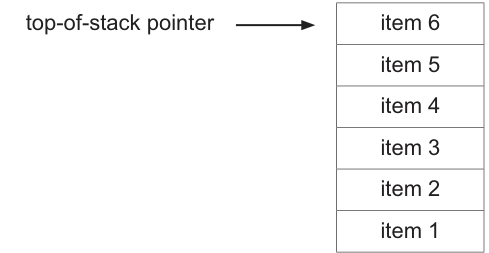
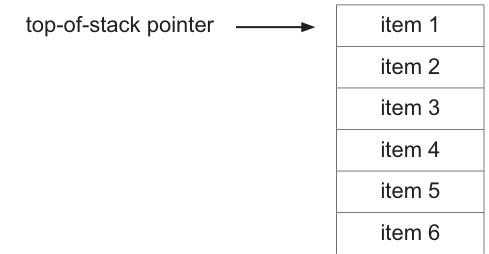
For example, if a stack contains six items:
Initial state of the stack:
Final state of the stack when the items have been reversed:
Describe how the queue could be used to reverse the items that are currently stored on the stack.
Your description must include how the pointers are used in both the stack and queue.
Assume:
- The stack initially contains an unknown number of items.
- The queue can store all the items currently stored on the stack.
- The queue is initially empty.
..........................................................................................................................................................
..........................................................................................................................................................
..........................................................................................................................................................
..........................................................................................................................................................
..........................................................................................................................................................
..........................................................................................................................................................
..........................................................................................................................................................
..........................................................................................................................................................
..........................................................................................................................................................
..........................................................................................................................................................
..........................................................................................................................................................
..........................................................................................................................................................
..........................................................................................................................................................
..........................................................................................................................................................
..........................................................................................................................................................
..........................................................................................................................................................
..........................................................................................................................................................
..........................................................................................................................................................
..........................................................................................................................................................
....................................................................................................................................................
Answer
- Repeatedly remove the item at the top of the stack and add it to the queue.
- For each item removed from the stack, use the top-of-stack pointer to access the current top item, then move the top-of-stack pointer down to the next item.
- When adding each item to the queue, place it in the position indicated by the rear pointer, then move the rear pointer on to the next free position.
- Continue until the stack is empty.
- Then repeatedly remove items from the queue and push them back onto the stack.
- For each removal from the queue, take the item at the position indicated by the front pointer, then move the front pointer on to the next item.
- Each dequeued item is pushed onto the stack, updating the top-of-stack pointer to the new top each time.
- Continue until the queue is empty; the stack is now reversed.
See explanation
Background Concept
A stack and a queue are both abstract data types, but they remove items in different orders.
-
A stack is LIFO: Last In, First Out.
- The item most recently added is the first one removed.
- A top-of-stack pointer shows where the current top item is.
- To pop, remove the item at the top and move the pointer down.
- To push, add a new item at the top and update the pointer to the new top.
-
A queue is FIFO: First In, First Out.
- The first item added is the first one removed.
- A front pointer shows the next item to be removed.
- A rear pointer shows the next position where a new item will be added.
- To enqueue, place the item at the rear and move the rear pointer on.
- To dequeue, remove the item at the front and move the front pointer on.
This question relies on using the different behaviour of LIFO and FIFO together. A queue can help reverse a stack because the order the stack produces items and the order the queue returns them combine to give the reversed stack when the items are pushed back.
Understanding the Question
The stack starts with an unknown number of items. In the example shown, the top item is item 6 and the bottom item is item 1.
The required final stack has item 1 at the top and item 6 at the bottom, so the order has been reversed.
The question is not asking for code. It is asking for a description of the method, and it specifically says the answer must include how the pointers are used.
So a complete answer must mention:
- how items are removed from the stack using the top-of-stack pointer
- how they are added to the queue using the rear pointer
- how they are removed from the queue using the front pointer
- how they are added back to the stack using the top-of-stack pointer again
The queue is empty at the start and is large enough to hold all stack items, so no overflow issue needs to be discussed.
Approach
The easiest strategy is a two-stage transfer:
- Move every item from the stack into the queue.
- Move every item from the queue back into the stack.
Why this works:
- Popping from the stack removes items from top to bottom.
- Enqueuing preserves that order in the queue.
- Dequeuing returns them in that same preserved order.
- Pushing them back onto the stack places the earliest dequeued item lower down and the latest dequeued item at the top.
That causes the original bottom item to become the new top item.
Step-by-Step Reasoning
Start with the example stack:
- top:
item 6 - then
item 5,item 4,item 3,item 2 - bottom:
item 1
Stage 1: Move everything from the stack to the queue
Take the item at the top of the stack.
- The top-of-stack pointer points to
item 6. - Remove
item 6from the stack. - Move the top-of-stack pointer down to the next item.
- Put
item 6into the queue at the position indicated by the rear pointer. - Move the rear pointer on to the next free queue position.
Repeat this for all items:
- pop
item 5, enqueue at rear - pop
item 4, enqueue at rear - pop
item 3, enqueue at rear - pop
item 2, enqueue at rear - pop
item 1, enqueue at rear
Now the stack is empty.
The queue contains, from front to rear:
item 6,item 5,item 4,item 3,item 2,item 1
This is important: the queue's front is item 6, because that was enqueued first.
Stage 2: Move everything from the queue back to the stack
Now remove items from the queue one at a time.
- The front pointer points to
item 6. - Dequeue
item 6. - Move the front pointer on to the next item.
- Push
item 6onto the stack. - Update the top-of-stack pointer so it points to
item 6.
Repeat:
- dequeue
item 5, push onto stack - dequeue
item 4, push onto stack - dequeue
item 3, push onto stack - dequeue
item 2, push onto stack - dequeue
item 1, push onto stack
After these pushes, the stack from top to bottom is:
item 1item 2item 3item 4item 5item 6
So the stack has been reversed.
Why the reversal happens
The original stack gives out items in this order when popped:
item 6, item 5, item 4, item 3, item 2, item 1
The queue keeps this same order for removal because it is FIFO:
item 6, item 5, item 4, item 3, item 2, item 1
When those are pushed back onto the stack in that order, the last one pushed is item 1, so it ends up at the top. That gives the reversed stack.
Key Takeaways
- A stack uses LIFO order and a top-of-stack pointer.
- A queue uses FIFO order and front and rear pointers.
- To reverse a stack using a queue:
- pop all stack items into the queue
- dequeue all queue items back into the stack
- Pointer updates are essential:
- stack pointer moves when popping and pushing
- rear pointer moves when enqueuing
- front pointer moves when dequeuing
Common Mistakes
- Saying the queue removes from the rear. It does not; removal is from the front.
- Forgetting to mention pointer movement. The question explicitly asks how the pointers are used, so naming the data structures alone is not enough.
- Mixing up LIFO and FIFO. A stack is LIFO; a queue is FIFO.
- Only describing one transfer. Moving items from the stack to the queue is not sufficient by itself; they must then be moved back onto the stack.
- Claiming the order reverses inside the queue. The queue preserves the order items enter it; the reversal is seen after pushing them back onto the stack.
Things to Be Careful About
- The stack initially has an unknown number of items, so the description should be phrased as repeating until the stack is empty, not for a fixed number like six.
- The queue is stated to be large enough, so there is no need to discuss queue overflow.
- The queue starts empty, so the first transferred item becomes the first item at the front of the queue.
- Keep the roles of the two queue pointers precise:
- front pointer = next item to remove
- rear pointer = next position to add
- Keep the role of the stack pointer precise:
- top-of-stack pointer = current top item / most recently added item
- In a descriptive answer like this, clear sequencing words such as "repeatedly", "continue until empty", and "then" help show the correct algorithm clearly.
A program monitors the speed of vehicles as they move around a large building site.
Each vehicle contains a sensor which reads an integer value that represents the speed of the vehicle. The value is expected to be in the range 0 to 60 inclusive.
The sensors cannot read values less than 0.
A program module has been written to validate the values read by the sensors.
A test plan is needed to fully test the module.
Complete the table. The first line has been completed for you.
Assume the sensors generate only integer values.
| Type of test data | Test data value | Expected outcome |
|---|---|---|
| normal | 36 | data item is accepted |
Answer
| Type of test data | Test data value | Expected outcome |
|---|---|---|
| normal | 36 | data item is accepted |
| boundary | 0 | data item is accepted |
| boundary | 1 | data item is accepted |
| boundary | 60 | data item is accepted |
| boundary | 61 | data item is rejected |
See completed test table
Background Concept
A validation module checks whether input data is sensible and allowed before the rest of the program uses it. A good test plan does not just try one typical value. It should include:
- normal data: a typical valid value inside the range
- boundary data: values at the edge of the allowed range, and often just next to that edge
- abnormal data: invalid values that should be rejected
Here the allowed values are integers from 0 to 60 inclusive. The word inclusive is important: it means both 0 and 60 are valid.
Understanding the Question
The question says the sensor speed value should be in the range 0 to 60 inclusive. It also tells you two extra facts:
- the sensor only produces integer values
- the sensor cannot read values less than 0
So you do not need to test decimals, and a negative value is not a realistic sensor output in this situation. One normal test has already been given: 36, which should be accepted. You need four more rows to fully test the validation.
Approach
Because a normal case is already provided, the best extra cases are the important edge cases:
- the lower limit itself: 0
- just above the lower limit: 1
- the upper limit itself: 60
- just above the upper limit: 61
Then decide whether each should be accepted or rejected based on the rule 0 to 60 inclusive.
Step-by-Step Reasoning
0is the smallest allowed value, so it is valid and should be accepted.1is just inside the valid range, so it should also be accepted.60is the largest allowed value, so it is valid and should be accepted.61is just outside the valid range, so it should be rejected.
These tests are strong because they focus on where validation errors usually happen: right at the edges of the range.
Key Takeaways
- For range checking, always test the limits as well as a typical value.
- The word inclusive means the endpoints are valid.
- Boundary testing is often the most important part of a validation test plan.
Common Mistakes
- Using
-1as a test case even though the question says the sensors cannot read values less than 0. - Using a decimal value even though the question says the sensor values are integers.
- Saying
60is rejected. It is not rejected because the range is inclusive. - Only giving normal data and missing the boundary cases.
Things to Be Careful About
- Read the range carefully:
0 to 60 inclusivemeans both ends are accepted. - The type of test data must match the value chosen.
- The expected outcome should clearly say whether the data item is accepted or rejected.
- If a centre labels
61as abnormal instead of boundary, that still reflects the same idea: it is outside the valid range. The essential point is that it must be rejected.
Each sensor used in the system has a unique sensor ID number in the range 1 to 50.
The program that is used to monitor the speed of each vehicle reads each sensor value every second and stores this value along with the sensor's unique ID into a global 2D array Reading.
The global array Reading has been declared as follows:
DECLARE Reading : ARRAY[1:2000, 1:2] OF INTEGER
The array contains 4000 elements organised as 2000 rows and 2 columns.
Column 1 contains the sensor value, and column 2 contains the sensor ID.
When 2000 sensor readings have been taken, the array is full and the system stops taking any more sensor readings until the array has been processed.
A procedure Sort() is needed to sort the array into ascending order of sensor value using an efficient bubble sort algorithm.
Write efficient pseudocode for the procedure Sort()
...................................................................................................................................................
...................................................................................................................................................
...................................................................................................................................................
...................................................................................................................................................
...................................................................................................................................................
...................................................................................................................................................
...................................................................................................................................................
...................................................................................................................................................
...................................................................................................................................................
...................................................................................................................................................
...................................................................................................................................................
...................................................................................................................................................
...................................................................................................................................................
...................................................................................................................................................
...................................................................................................................................................
...................................................................................................................................................
...................................................................................................................................................
...................................................................................................................................................
...................................................................................................................................................
...................................................................................................................................................
...................................................................................................................................................
...................................................................................................................................................
...................................................................................................................................................
...................................................................................................................................................
...................................................................................................................................................
.............................................................................................................................................
Answer
PROCEDURE Sort()
   DECLARE Row, Last, TempValue, TempID : INTEGER
   DECLARE Swapped : BOOLEAN

   Last ← 2000
   REPEAT
      Swapped ← FALSE
      FOR Row ← 1 TO Last - 1
         IF Reading[Row, 1] > Reading[Row + 1, 1] THEN
            TempValue ← Reading[Row, 1]
            TempID ← Reading[Row, 2]
            Reading[Row, 1] ← Reading[Row + 1, 1]
            Reading[Row, 2] ← Reading[Row + 1, 2]
            Reading[Row + 1, 1] ← TempValue
            Reading[Row + 1, 2] ← TempID
            Swapped ← TRUE
         ENDIF
      NEXT Row
      Last ← Last - 1
   UNTIL Swapped = FALSE OR Last = 1
ENDPROCEDURE
See completed pseudocode
Background Concept
Bubble sort repeatedly compares adjacent items and swaps them if they are in the wrong order. After one full pass, the largest remaining item has "bubbled" to the end of the unsorted section.
An efficient bubble sort improves the basic version in two ways:
- it stops early if a whole pass makes no swaps, because the data is already sorted
- it reduces the range checked on later passes, because the last item in each pass is already in the correct place
In this question, each row of the 2D array is a record made from two linked pieces of data:
- column 1 = sensor value
- column 2 = sensor ID
That means when two readings are swapped, both columns of the row must move together. If you swap only the sensor values, the IDs would no longer match the correct readings.
Understanding the Question
You are given a global array:
Reading[1:2000, 1:2]
This means:
- there are 2000 rows
- there are 2 columns
- the array is 1-indexed, not 0-indexed
The procedure must sort the rows into ascending order of sensor value, so the comparison key is Reading[row, 1]. Because the question explicitly asks for an efficient bubble sort, a simple bubble sort without early stopping would not be the best answer.
Approach
Use this structure:
- Set a variable such as
Lastto 2000 to show the end of the unsorted section. - Repeat passes through the array until no swaps are made.
- On each pass, compare
Reading[Row, 1]withReading[Row + 1, 1]. - If the first is bigger, swap the entire row data for those two positions.
- Set
SwappedtoTRUEwhenever a swap happens. - After the pass, reduce
Lastby 1 because the final item in that pass is now in the correct place.
This gives the correct sort order and also satisfies the requirement for efficiency.
Step-by-Step Reasoning
First, local variables are declared:
Rowcontrols the inner loopLaststores the last unsorted rowTempValueandTempIDtemporarily hold one row's data during a swapSwappedrecords whether any exchange happened in the current pass
Last ← 2000
The whole array is initially unsorted, so the unsorted section runs to row 2000.
REPEAT
We need at least one pass through the data, so a REPEAT ... UNTIL structure fits well.
Swapped ← FALSE
At the start of each pass, assume no swaps will be needed. If any swap happens, change this to TRUE.
FOR Row ← 1 TO Last - 1
The loop stops at Last - 1 because each comparison uses both Row and Row + 1. If the loop went to Last, then Row + 1 would go out of bounds.
IF Reading[Row, 1] > Reading[Row + 1, 1] THEN
For ascending order, larger values must move right. So if the current row's sensor value is greater than the next row's sensor value, they are in the wrong order.
The swap:
- save the current row's value and ID in temporary variables
- copy the next row into the current row
- copy the saved value and ID into the next row
Notice that both columns are swapped, not just column 1.
Swapped ← TRUE
This records that the pass made a change, so another pass may still be needed.
After the loop finishes:
Last ← Last - 1
The largest item involved in that pass is now at the end of the unsorted section, so the next pass does not need to check it again.
UNTIL Swapped = FALSE OR Last = 1
If Swapped is still FALSE, then the pass made no exchanges and the array is sorted. Last = 1 is a safe stopping condition when only one item remains in the unsorted section.
Key Takeaways
- In a 2D array storing linked data, sort by the key column but swap the whole record.
- Efficient bubble sort uses a swap flag and a shrinking upper bound.
- For ascending order, swap when the left item is greater than the right item.
- With a 1-indexed array, loop bounds must be chosen carefully to avoid going past the end.
Common Mistakes
- Swapping only
Reading[Row, 1]and forgettingReading[Row, 2]. This breaks the connection between each sensor value and its sensor ID. - Looping to
2000orLastinstead ofLast - 1, which makesReading[Row + 1, 1]go out of bounds. - Forgetting to reset
SwappedtoFALSEat the start of each pass. - Writing a basic bubble sort without any efficiency feature, even though the question asks for an efficient version.
- Using the comparison the wrong way round and producing descending instead of ascending order.
Things to Be Careful About
- The array starts at row 1, not row 0.
- Column 1 is the sensor value; column 2 is the sensor ID. Only column 1 is used for comparison, but both columns must be swapped.
- The condition for ascending order is
>when comparing the left item with the right item. - Every local variable should be declared in CIE pseudocode.
- Use the CIE assignment arrow
←, not=for assignment.
A program is being developed to implement a customer loyalty scheme for a coffee shop.
The programmer has decided that the following data items need to be stored for each customer:
| Data item | Description |
|---|---|
| customer ID | a unique six-digit string |
| points | an integer value that is increased by one for every cup of coffee the customer orders |
When a customer visits the shop and orders coffee, the scheme operates as follows:
- The total number of points is increased by the number of coffees ordered.
- If just one cup of coffee is ordered and the number of points goes above 10, then:
- the cup of coffee they have just ordered is given to them free of charge
- the number of points is reduced by 11.
- If the order is for multiple coffees and the number of points goes above 10, then:
- they get one coffee free of charge for every 11 points
- the number of points is reduced by 11 for each free coffee.
For example, the:
- customer currently has 9 points
- customer orders 16 cups of coffee
- total number of points now becomes 25
- customer gets 2 free coffees and now has 3 points left.
The programmer has defined a program module that is called every time a customer places an order:
| Module | Description |
|---|---|
CustomerOrder() | - called with two integer parameters: ◦ the number of coffees ordered ◦ the current number of points - output a suitable message giving the number of free coffees - return a value for the new points total. |
Write pseudocode for module CustomerOrder()
...................................................................................................................................................
...................................................................................................................................................
...................................................................................................................................................
...................................................................................................................................................
...................................................................................................................................................
...................................................................................................................................................
...................................................................................................................................................
...................................................................................................................................................
...................................................................................................................................................
...................................................................................................................................................
...................................................................................................................................................
...................................................................................................................................................
...................................................................................................................................................
...................................................................................................................................................
...................................................................................................................................................
...................................................................................................................................................
...................................................................................................................................................
...................................................................................................................................................
...................................................................................................................................................
.............................................................................................................................................
Answer
FUNCTION CustomerOrder(BYVAL NumberOfCoffees : INTEGER, BYVAL Points : INTEGER) RETURNS INTEGER
   DECLARE FreeCoffees : INTEGER

   Points ← Points + NumberOfCoffees
   FreeCoffees ← 0

   IF NumberOfCoffees = 1 THEN
      IF Points > 10 THEN
         FreeCoffees ← 1
         Points ← Points - 11
      ENDIF
   ELSE
      IF Points > 10 THEN
         FreeCoffees ← Points DIV 11
         Points ← Points MOD 11
      ENDIF
   ENDIF

   OUTPUT "Free coffees = ", FreeCoffees
   RETURN Points
ENDFUNCTION
See completed pseudocode
Background Concept
A module is a self-contained part of a program that performs one task. In this case, the module must both produce output and give back a new value for the customer's points total, so writing it as a FUNCTION is appropriate because a function can return a value.
This question also relies on selection and integer arithmetic:
- selection is needed because the rules are different for one coffee and for multiple coffees
DIVgives the whole-number quotient, which is useful for counting how many free coffees can be claimed from a points totalMODgives the remainder left after whole groups have been removed, which is useful for finding the points left over after free coffees are awarded
For example, if a customer has 25 points after ordering, then:
25 DIV 11 = 2, so they earn 2 free coffees25 MOD 11 = 3, so 3 points remain
Understanding the Question
The module CustomerOrder() is called whenever one customer places one order. It is given:
- the number of coffees ordered
- the current number of points
It must then:
- add the ordered coffees to the points total
- work out how many free coffees are earned
- output a message showing that number
- return the new points total after any deductions
The important wording is that the total number of points is increased first, and only then are the free-coffee rules applied. Another key detail is that there are two different cases:
- if exactly one coffee is ordered, at most one free coffee is awarded
- if multiple coffees are ordered, whole groups of 11 points can give several free coffees
Approach
A good structure is:
- add
NumberOfCoffeestoPoints - start
FreeCoffeesat 0 - use an outer
IFto test whether exactly one coffee was ordered - inside each branch, only award free coffees if the new total is greater than 10
- output the result and return the updated points total
For the multiple-coffee case, DIV and MOD make the algorithm short and accurate:
Points DIV 11calculates how many free coffees to givePoints MOD 11calculates the remaining points afterwards
Step-by-Step Reasoning
First, the points must be updated:
Points ← Points + NumberOfCoffees
This matches the rule that every ordered coffee adds one point.
Next, initialise:
FreeCoffees ← 0
This is important because if no free coffees are earned, the program still needs a correct value to output.
Now handle the one-coffee case:
- if
NumberOfCoffees = 1 - and the new
Points > 10 - then exactly one coffee is free
- so set
FreeCoffees ← 1 - and reduce points by 11
So that branch is:
FreeCoffees ← 1Points ← Points - 11
Then handle the multiple-coffee case in the ELSE branch:
- if the new
Points > 10 - then the number of free coffees is the number of whole 11-point groups
- so
FreeCoffees ← Points DIV 11 - and the remaining points are
Points MOD 11
Using the example in the question:
- current points = 9
- ordered coffees = 16
- new points = 25
25 DIV 11 = 2, so 2 free coffees25 MOD 11 = 3, so 3 points remain
Finally, output the number of free coffees and return the updated points total.
Key Takeaways
- Add to the points total before checking reward conditions.
- Use nested
IFstatements when the business rules split into cases. - Use
DIVfor the number of complete rewards andMODfor the leftover value. - A function is suitable when a module must return a calculated value.
Common Mistakes
- Checking the reward condition before adding the newly ordered coffees to the points total.
- Forgetting to initialise
FreeCoffeesto 0, which can leave it undefined when no reward is earned. - Using the multiple-coffee formula for the one-coffee case without following the rule given in the question.
- Subtracting 11 only once in the multiple-coffee case instead of once for every free coffee.
- Returning the number of free coffees instead of returning the new points total.
Things to Be Careful About
- The condition is
Points > 10, notPoints = 10. - Use
DIVandMOD, not real-number division. - Keep the identifier names consistent with the question, such as
CustomerOrder(). - In CIE pseudocode, use the assignment arrow
←, not=. - Because the module must return the new points total, a
FUNCTIONis the clearest choice here.
A text file Loyalty.txt will be used to store the data items for the loyalty scheme. The data items for each customer will be stored on a separate line of the text file where each data item is separated by a comma:
<CustomerID>,<Points>
The contents of the text file Loyalty.txt will always be stored in ascending order by customer ID.
When the data items are read from or written to the text file Loyalty.txt, they may need to be converted to the appropriate data type.
Each customer has a unique customer ID starting at "100001" with this value increasing by one each time a new customer joins the loyalty scheme.
When a customer joins the loyalty scheme, they are assigned the next customer ID and value of points is set to 0.
For example, if the loyalty scheme has 204 customers and a new customer joins the loyalty scheme, the following line is added to the text file Loyalty.txt:
"100205,0"
You can assume that the number of customers in the loyalty scheme will never be more than 9000.
The programmer has defined a program module as follows:
| Module | Description |
|---|---|
AddNewCustomers() | - called with an integer parameter representing the number of new customers to be added to the loyalty scheme - adds a new line, containing the required information, to the text file Loyalty.txt for each customer added to the loyalty scheme - outputs each new customer ID added to the loyalty scheme |
Write pseudocode for module AddNewCustomers()
Assume that there is at least one customer already in the loyalty scheme.
...........................................................................................................................................
...........................................................................................................................................
...........................................................................................................................................
...........................................................................................................................................
...........................................................................................................................................
...........................................................................................................................................
...........................................................................................................................................
...........................................................................................................................................
...........................................................................................................................................
...........................................................................................................................................
...........................................................................................................................................
...........................................................................................................................................
...........................................................................................................................................
...........................................................................................................................................
...........................................................................................................................................
...........................................................................................................................................
...........................................................................................................................................
...........................................................................................................................................
...........................................................................................................................................
...........................................................................................................................................
...........................................................................................................................................
.....................................................................................................................................
Answer
PROCEDURE AddNewCustomers(BYVAL NumberNewCustomers : INTEGER)
   DECLARE ThisLine, CustomerID, NewLine : STRING
   DECLARE LastID, Count : INTEGER

   OPENFILE "Loyalty.txt" FOR READ
   WHILE NOT EOF("Loyalty.txt")
      READFILE "Loyalty.txt", ThisLine
   ENDWHILE
   CLOSEFILE "Loyalty.txt"

   CustomerID ← LEFT(ThisLine, 6)
   LastID ← STR_TO_NUM(CustomerID)

   OPENFILE "Loyalty.txt" FOR APPEND
   FOR Count ← 1 TO NumberNewCustomers
      LastID ← LastID + 1
      CustomerID ← NUM_TO_STR(LastID)
      NewLine ← CustomerID + ",0"
      WRITEFILE "Loyalty.txt", NewLine
      OUTPUT CustomerID
   NEXT Count
   CLOSEFILE "Loyalty.txt"
ENDPROCEDURE
See completed pseudocode
Background Concept
This task is about text file handling. A text file stores data as characters, so even when a value represents a number, it may still be read in as a string. That means conversions are often needed:
STR_TO_NUM()converts text digits into an integerNUM_TO_STR()converts an integer back into text so it can be written to the file
The file format here is one customer per line:
<CustomerID>,<Points>
For example:
100205,0
Because the file is always in ascending order by customer ID, the last line contains the largest existing customer ID. That makes the problem easier: to find the next ID, read to the end of the file and use the final record.
Understanding the Question
The module AddNewCustomers() receives one integer: how many new customers must be added.
For each new customer, the module must:
- work out the next customer ID
- set points to 0
- add a line to
Loyalty.txt - output the new customer ID
A key given detail is that customer IDs start at 100001 and increase by 1 each time. Another important detail is that the file is already sorted in ascending customer ID order, so any newly added customers belong at the end.
The question also says to assume there is at least one existing customer, so it is safe to read the file and expect a last line to exist.
Approach
The most direct method is:
- open
Loyalty.txtfor reading - read through the whole file so the final value stored is the last line
- take the first 6 characters from that line to get the customer ID
- convert that ID to an integer
- open the file for appending
- repeat the required number of times:
- increase the ID by 1
- convert it back to a string
- join it with
,0 - write the new line
- output the new ID
This works because the last customer already has the highest ID, and new customers are added in sequence.
Step-by-Step Reasoning
First, declare variables for:
- the current line read from the file
- the customer ID as text
- the new line to write
- the last numeric ID found
- the loop counter
Then open the file for reading:
OPENFILE "Loyalty.txt" FOR READ
Next, read until the end of the file. Because ThisLine is updated each time, when the loop ends it holds the last record in the file.
WHILE NOT EOF("Loyalty.txt")
READFILE "Loyalty.txt", ThisLine
ENDWHILE
Then close the read file.
Now extract the customer ID from the line. Since the ID is always a six-digit string at the start of the line, LEFT(ThisLine, 6) gives that field.
Example:
- if
ThisLineis100205,0 - then
LEFT(ThisLine, 6)gives100205
This is still a string, so convert it:
LastID ← STR_TO_NUM(CustomerID)
Now reopen the file for appending, because existing data must be preserved and new lines must be added at the end.
Use a FOR loop from 1 to NumberNewCustomers.
Inside the loop:
LastID ← LastID + 1CustomerID ← NUM_TO_STR(LastID)NewLine ← CustomerID + ",0"WRITEFILE "Loyalty.txt", NewLineOUTPUT CustomerID
So if the last existing ID was 100204 and 3 new customers are added, the loop writes:
100205,0100206,0100207,0
and outputs:
100205100206100207
Finally, close the file again.
Key Takeaways
- When a sorted text file is ordered by key, the last record can be used to find the next key.
- Text files store strings, so numeric data often needs conversion when read or written.
LEFT()is useful when a field has fixed width.APPENDmode is appropriate when new records must be added without removing existing data.
Common Mistakes
- Opening the file for writing instead of appending, which would overwrite the existing customers.
- Forgetting to close the file after reading before opening it again for appending.
- Not converting the customer ID from string to integer before adding 1.
- Writing only the new ID and forgetting the
,0points field. - Using the first line instead of the last line to generate the next ID.
Things to Be Careful About
- The assumption in this part is that at least one customer already exists, so the read-to-last-line method is valid.
- The customer ID is a string in the file, even though it must be incremented numerically.
- The output required is each new customer ID, not the whole line with
,0. - Keep the file format exactly as
<CustomerID>,<Points>. - Make sure the loop runs exactly
NumberNewCustomerstimes.
The requirements for AddNewCustomers() are changed. There may be no existing customers in the loyalty scheme.
Explain the changes that will need to be made to the module AddNewCustomers()
...........................................................................................................................................
...........................................................................................................................................
...........................................................................................................................................
...........................................................................................................................................
...........................................................................................................................................
...........................................................................................................................................
...........................................................................................................................................
...........................................................................................................................................
...........................................................................................................................................
...........................................................................................................................................
...........................................................................................................................................
.....................................................................................................................................
Answer
- Add a check for an empty
Loyalty.txtfile before trying to use the last record. - If the file is empty, do not attempt to read a customer ID from
ThisLine. - If the file is empty, set
LastID ← 100000so the first new customer added becomes100001. - Otherwise, keep the existing method of reading the last line, extracting the customer ID and converting it to
LastID, then append the new records as before.
See explanation
Background Concept
A good algorithm must handle edge cases as well as normal cases. An edge case is a valid situation that is unusual and may break a solution that assumes a more typical input.
In file-processing questions, an empty file is a common edge case. If a program assumes a file contains at least one record, it may try to read data that does not exist or use a variable that was never given a value.
Here, the original solution depends on the last line of the file to find the highest existing customer ID. That works only if at least one customer already exists.
Understanding the Question
The requirements have changed. Now there may be no customers in the loyalty scheme at all.
That means Loyalty.txt could be empty. The earlier method of reading to the last line and extracting the customer ID would fail, because there is no last line to read.
So the question is asking what changes are needed so the module still works correctly when starting from an empty scheme.
Approach
The fix is to add a new case at the start of the algorithm:
- if the file is empty, use a starting ID value that will make the first generated customer ID equal to
100001 - otherwise, use the original logic based on the last record in the file
A convenient way is to set LastID ← 100000 when there are no existing customers. Then the normal loop still works, because the first increment produces 100001.
Step-by-Step Reasoning
In the original version, the program:
- reads through the file
- stores the last line in
ThisLine - extracts the first 6 characters
- converts them to
LastID
That sequence assumes a last line exists.
If the file is empty:
- the loop that reads lines will not read anything
ThisLinewill not contain a valid record- using
LEFT(ThisLine, 6)would be invalid or meaningless
So the module must first test whether the file is empty.
If the file is empty:
- skip the part that reads the last customer ID from the file
- set
LastID ← 100000
This works because the existing add loop usually does:
LastID ← LastID + 1- convert to string
- write the new record
So starting from 100000 means the first new ID generated is 100001, which matches the specification.
If the file is not empty:
- keep the original logic
- read to the last line
- extract the ID
- convert it to
LastID - append new records as before
This is a typical example of modifying an algorithm to handle both the normal case and the empty-data case.
Key Takeaways
- Empty files are important edge cases in file-processing algorithms.
- When an algorithm depends on a previous record, add a separate case for when no previous record exists.
- Initialising to one less than the first valid ID is a neat way to reuse the same increment-and-write loop.
Common Mistakes
- Leaving the original code unchanged and still assuming a last record exists.
- Setting
LastIDto100001in the empty case and then incrementing before writing, which would incorrectly start at100002. - Trying to extract
LEFT(ThisLine, 6)even when nothing was read from the file. - Rewriting the whole loop unnecessarily instead of only changing the initialisation logic.
Things to Be Careful About
- The change is about the case where there are no existing customers, not about changing the file format.
- The first ID must still be exactly
100001. - Think about where the increment happens in the original loop before choosing the initial value for
LastID. - The existing append process can stay the same once the starting ID has been set correctly.