Computer Science 9618/13 — May/June 2025
Cambridge AS Level · Theory Fundamentals · worked solutions for every part, with the mark scheme
Topics Processor Fundamentals · Information Representation · System Software · Security, Privacy and Data Integrity · Communication · Ethics and Ownership · +2 more
A student paints a picture in an art class.
The student takes a photograph of the picture using a digital camera. The digital camera creates an image with a resolution of 2 million pixels and uses a bit depth of 16 bits.
Calculate the file size of the image created by the digital camera in megabytes (MB).
Show your working.
Working space ...................................................................................................................
...........................................................................................................................................
...........................................................................................................................................
Answer ...................................... MB
Working
Answer
4 MB
4 MB
Background Concept
For a bitmap image, file size depends mainly on two values:
- resolution = how many pixels are in the image
- bit depth = how many bits are used to store each pixel
A basic file size calculation for an uncompressed bitmap image is:
Then convert:
- bits to bytes by dividing by 8
- bytes to MB by dividing by 1 000 000 when the question uses MB in the usual exam sense
Higher resolution means more pixels. Higher bit depth means more bits per pixel. Both increase file size.
Understanding the Question
The image created by the digital camera has:
- 2 million pixels
- 16 bits per pixel
The question asks for the file size in megabytes and says to show working. So the task is to calculate total bits first, then convert that to bytes, then to MB.
Approach
Use the standard bitmap file size method:
- Multiply pixels by bit depth to get total bits.
- Divide by 8 to convert bits to bytes.
- Divide by 1 000 000 to convert bytes to MB.
Because the question does not mention compression, assume the image is stored uncompressed for this calculation.
Step-by-Step Reasoning
The image has 2 000 000 pixels.
Each pixel uses 16 bits.
So total size in bits is:
Now convert bits to bytes:
Now convert bytes to megabytes:
So the image file size is 4 MB.
Key Takeaways
- For bitmap images, file size is based on pixel count and bit depth.
- Always calculate in bits first, then convert units carefully.
- Remember: 8 bits = 1 byte.
Common Mistakes
- Forgetting to divide by 8: this leaves the answer in bits, not bytes.
- Using the bit depth as bytes: 16 bits is not 16 bytes; it is 2 bytes.
- Not converting to MB: the question specifically asks for megabytes.
- Using the wrong number of pixels: 2 million pixels means 2 000 000, not 2 048 576 unless stated.
Things to Be Careful About
- Read whether the question gives pixels, resolution dimensions, or total pixels.
- Check whether compression is mentioned; if not, use the direct uncompressed calculation.
- Keep the units clear at each stage: bits, bytes, then MB.
The student takes a second photograph with a lower bit depth.
Explain the effect of decreasing the bit depth on the image and on the image file.
Effect on image .................................................................................................................
...........................................................................................................................................
...........................................................................................................................................
...........................................................................................................................................
Effect on image file ............................................................................................................
...........................................................................................................................................
...........................................................................................................................................
...........................................................................................................................................
Answer
- Effect on image: fewer bits are used for each pixel, so fewer colours/shades can be represented and the image quality is reduced.
- Effect on image file: the file size is smaller because fewer bits are stored for each pixel.
Lower bit depth reduces the number of colours/tones and image quality; file size becomes smaller because fewer bits are stored per pixel.
Background Concept
Bit depth in an image tells us how many bits are used to represent one pixel. The bit depth controls how many different colours or shades can be stored.
The general idea is:
So if bit depth decreases, the number of possible colours also decreases. That means the image can store less colour detail. At the same time, because each pixel uses fewer bits, the total file size becomes smaller.
Understanding the Question
The second photograph is taken with a lower bit depth than the first one. The question wants two linked effects:
- what happens to the image itself
- what happens to the image file
So this is not asking for a calculation. It is asking you to connect the idea of bit depth to both quality and storage size.
Approach
Think about what bit depth controls:
- It controls how many colours or shades can be stored.
- It also controls how many bits each pixel needs.
From that, we can explain:
- lower bit depth → fewer available colours/shades → poorer image quality
- lower bit depth → fewer bits per pixel → smaller file size
Step-by-Step Reasoning
If the bit depth is reduced, each pixel has fewer bits available.
That means the pixel cannot represent as many distinct colours or shades as before. For example, an image with higher bit depth can represent smoother colour changes and more subtle differences. A lower bit depth may make colours look less accurate or less smooth.
So the effect on the image is:
- fewer colours or shades can be shown
- the image quality is lower
- there may be less detail in colour variation
Now consider the file size.
The number of pixels may stay the same, but each pixel uses fewer bits. Since the file size depends on:
using fewer bits per pixel makes the total number of bits smaller.
So the effect on the image file is:
- the file size decreases
- less storage space is needed
Key Takeaways
- Bit depth affects both quality and file size.
- Lower bit depth means fewer colours/shades can be stored.
- Fewer bits per pixel means a smaller image file.
Common Mistakes
- Only talking about file size and not mentioning the image quality.
- Only saying "quality decreases" without explaining that this is because fewer colours or shades can be represented.
- Confusing resolution with bit depth: resolution changes the number of pixels; bit depth changes the number of bits per pixel.
Things to Be Careful About
- Use the correct idea: bit depth affects colour range, not the physical dimensions of the image.
- The image does not become smaller in width or height unless resolution changes.
- A good exam answer usually gives one point about the image and one point about the file size, with a clear cause in each case.
A teacher records an audio file of the student playing the piano during a music lesson.
Complete the table by giving the term for each description about sound representation on a computer.
| Description | Term |
|---|---|
| the number of times the amplitude is measured per time interval | |
| the number of bits used to store each amplitude measurement | |
| the type of sound wave before it is recorded by a computer |
Answer
| Description | Term |
|---|---|
| the number of times the amplitude is measured per time interval | sampling rate |
| the number of bits used to store each amplitude measurement | sampling resolution |
| the type of sound wave before it is recorded by a computer | analogue |
sampling rate, sampling resolution, analogue
Background Concept
To store sound on a computer, an original analogue sound wave must be converted into digital data. This is done by sampling.
There are two important measurements:
- sampling rate: how often the sound wave is measured per second
- sampling resolution: how many bits are used to store each measured value
The original sound wave before digitisation is analogue, meaning it is continuous rather than stored as discrete binary values.
Understanding the Question
You are given three descriptions and must write the correct technical term for each one.
This is a vocabulary-matching question about sound representation. No calculations are needed.
Approach
Match each description to the sound term it defines:
- "number of times the amplitude is measured per time interval" → this is how often samples are taken
- "number of bits used to store each amplitude measurement" → this is how precisely each sample is stored
- "type of sound wave before it is recorded by a computer" → this is the continuous real-world signal
Step-by-Step Reasoning
The first description refers to how many measurements are taken in a period of time. In digital audio, that is called the sampling rate.
The second description refers to the number of bits used for each sampled amplitude value. That is called the sampling resolution.
The third description refers to the form of the sound before a computer records it. Real sound waves are continuous, so the term is analogue.
Key Takeaways
- Sampling rate = frequency of measurement.
- Sampling resolution = bits per sample.
- Analogue sound is continuous and must be digitised for storage in a computer.
Common Mistakes
- Mixing up sampling rate and sampling resolution: rate is how often; resolution is how many bits.
- Writing digital instead of analogue for the original wave.
- Using image terminology like bit depth instead of the sound term the syllabus expects.
Things to Be Careful About
- If the question asks for the term for "how often", use sampling rate.
- If it asks for "how many bits per amplitude measurement", use sampling resolution.
- Keep the meanings separate: one affects time detail, the other affects amplitude precision.
The student types a report on a computer in a history lesson.
The computer uses the Unicode character set.
Give two characteristics of the Unicode character set.
1 ........................................................................................................................................
...........................................................................................................................................
2 ........................................................................................................................................
...........................................................................................................................................
Answer
- It can represent a much larger range of characters than ASCII.
- It includes characters from many different languages and symbols.
It represents a much larger range of characters than ASCII and includes characters from many different languages and symbols.
Background Concept
A character set is a standard that maps characters to numeric codes so that a computer can store and process text.
Unicode is a very large character set designed to represent characters from many writing systems, not just English. It was created because smaller sets such as ASCII and extended ASCII cannot represent enough characters for worldwide use.
ASCII is limited, and extended ASCII still only covers a relatively small number of characters. Unicode solves this by allowing a much wider range of letters, symbols and scripts.
Understanding the Question
The question asks for two characteristics of Unicode. That means two clear facts about what Unicode is or what it does.
You do not need to compare in detail with ASCII, but mentioning that Unicode supports many more characters is a strong characteristic.
Approach
Choose two widely accepted properties of Unicode:
- it can represent a very large number of characters
- it supports many languages and symbols
These are safe, standard syllabus points.
Step-by-Step Reasoning
Unicode is designed as an international character set.
Because it has far more available codes than ASCII, it can represent many more characters. That means it is suitable for worldwide text processing.
It also includes characters from many languages, such as accented letters, non-Latin scripts, symbols and special characters. This makes it much more flexible for modern computing.
So two valid characteristics are:
- it stores a much larger range of characters than ASCII
- it includes characters from many languages and symbols
Key Takeaways
- Character sets assign numbers to characters.
- Unicode is important because computing must support many languages.
- Unicode is much larger and more flexible than ASCII-based sets.
Common Mistakes
- Giving uses instead of characteristics: for example, saying "it is used on computers" is too vague.
- Writing only one idea in two different ways: examiners want two distinct points.
- Stating an exact bit size that may not always apply without care.
Things to Be Careful About
- Keep answers specific: mention many more characters and many languages/symbols.
- Avoid unsupported claims like "Unicode always uses 16 bits".
- Since the question says "give two", provide two separate clear facts.
Some of the school’s computers use the extended ASCII character set.
The table gives some characters from the extended ASCII character set, their denary, 8-bit binary and hexadecimal numbers.
Complete the table by filling in the missing numbers.
| Character | Denary | 8-bit Binary | Hexadecimal |
|---|---|---|---|
| ! | 33 | 21 | |
| L | 01001100 | 4C | |
| ü | 252 | 11111100 |
Answer
| Character | Denary | 8-bit Binary | Hexadecimal |
|---|---|---|---|
| ! | 33 | 00100001 | 21 |
| L | 76 | 01001100 | 4C |
| ü | 252 | 11111100 | FC |
00100001, 76, FC
Background Concept
Character sets store each character as a numeric code. Those codes can be shown in different number systems:
- denary (base 10)
- binary (base 2)
- hexadecimal (base 16)
In extended ASCII, each character is stored in 8 bits, so values range from 0 to 255.
To answer questions like this, you need to be comfortable converting between denary, binary and hexadecimal.
Understanding the Question
The table gives one row with a missing binary value, one row with a missing denary value, and one row with a missing hexadecimal value.
You must complete the missing entries for these character codes:
!has denary 33 and hex21, so binary is missingLhas binary01001100and hex4C, so denary is missingühas denary 252 and binary11111100, so hexadecimal is missing
Approach
Solve each row independently:
- Convert 33 to 8-bit binary.
- Convert
01001100from binary to denary. - Convert 252 or
11111100to hexadecimal.
Because the question already gives two equivalent values in each row, you can use whichever is quickest.
Step-by-Step Reasoning
Row 1: !
Denary is 33.
Write 33 as powers of 2:
So in 8 bits, the 32 column and the 1 column are 1:
00100001
That matches hexadecimal 21 because:
0010=20001=1
Row 2: L
Binary is 01001100.
Using place values 128, 64, 32, 16, 8, 4, 2, 1:
- 0 × 128 = 0
- 1 × 64 = 64
- 0 × 32 = 0
- 0 × 16 = 0
- 1 × 8 = 8
- 1 × 4 = 4
- 0 × 2 = 0
- 0 × 1 = 0
Total:
So the denary value is 76.
Row 3: ü
Binary is 11111100.
Split into two 4-bit groups:
1111 1100
Convert each nibble:
1111=F1100=C
So the hexadecimal value is FC.
Key Takeaways
- Extended ASCII uses 8-bit values.
- Binary-to-hex is easiest by splitting into groups of 4 bits.
- Denary-to-binary and binary-to-denary depend on powers of 2 place values.
Common Mistakes
- Forgetting leading zeros in an 8-bit binary answer, for example writing
100001instead of00100001. - Using the wrong place values when converting binary to denary.
- Grouping binary incorrectly for hexadecimal; always group in 4s from the right.
- Writing lowercase hex when the table uses uppercase.
Things to Be Careful About
- The binary answer must be 8 bits because the table specifically says 8-bit binary.
- For hexadecimal, use
AtoFfor values 10 to 15. - When a value is already given in two forms, use the easier one to find the missing form.
A computer has a processor.
The processor has a Control Unit (CU) and system clock.
Explain how the CU and the system clock work together.
...........................................................................................................................................
...........................................................................................................................................
...........................................................................................................................................
.....................................................................................................................................
Answer
- The system clock generates regular pulses that set the timing of processor operations.
- The CU uses these clock pulses to send control signals and synchronise the stages of processing, so each step happens in the correct order.
The system clock generates timing pulses, and the CU uses these pulses to control and synchronise processor operations.
Background Concept
Inside the processor, different components must work in a tightly controlled order. Two important parts involved in this are the Control Unit (CU) and the system clock.
The system clock produces a steady stream of electrical pulses. These pulses act like a timing signal for the processor. Clock speed is measured in hertz, and it tells us how many pulses occur each second.
The Control Unit manages and coordinates the work of the processor. It does not usually perform calculations itself; instead, it sends control signals to other parts of the CPU so that data is moved, instructions are decoded and operations are carried out at the correct time.
The key idea is that the clock provides the rhythm, and the CU uses that rhythm to organise the processor's actions.
Understanding the Question
This part asks how the CU and the system clock work together, not what each one does in isolation. So the answer must make the link between them.
You are expected to say:
- what the system clock provides
- how the CU uses that timing
- why this matters for processor operation
A good answer therefore needs both components in one explanation: the clock gives pulses, and the CU uses those pulses to coordinate the steps of processing.
Approach
The simplest way to answer is:
- state the purpose of the system clock
- state the purpose of the CU in relation to timing and control
- connect them by saying that the CU uses the clock pulses to synchronise processor activity
Because this is only 2 marks, the answer should be short and direct.
Step-by-Step Reasoning
First, identify the role of the system clock. It generates regular pulses. These pulses are not data; they are timing signals.
Next, identify the role of the CU. The CU controls the sequence of operations in the processor by issuing control signals.
Now combine the two ideas. The CU does not act randomly. It works in step with the clock. On each pulse, or over a defined number of pulses, the CU can trigger the next stage of an operation.
For example, during instruction processing, one action may occur, then the next, then the next, all in a controlled sequence. The clock keeps the timing regular, and the CU makes sure the correct action happens at each stage.
That is why the best full-mark answer says both:
- the clock provides timing pulses
- the CU uses them to synchronise and control operations
Key Takeaways
- The system clock provides regular timing pulses.
- The CU controls and coordinates CPU operations.
- The CU uses the clock pulses so operations happen in the correct sequence and at the correct time.
Common Mistakes
- Saying only that the clock makes the computer faster. That is too vague and does not explain how it works with the CU.
- Describing only the CU and not the clock, or only the clock and not the CU. The question is about how they work together.
- Confusing the CU with the ALU. The ALU performs arithmetic and logical operations; the CU controls the sequence of actions.
Things to Be Careful About
- Use the word synchronise or coordinate, because timing is the key link here.
- Do not say the clock stores data or instructions; it only provides pulses.
- Do not say the CU processes data directly; it mainly controls other components.
The processor runs the Fetch-Execute (F-E) cycle.
Write the stages of the F-E cycle using register transfer notation.
...........................................................................................................................................
...........................................................................................................................................
...........................................................................................................................................
...........................................................................................................................................
...........................................................................................................................................
.....................................................................................................................................
Answer
MAR ← PCMDR ← Memory[MAR]PC ← PC + 1CIR ← MDR- The instruction in
CIRis decoded by the CU. - The instruction is executed.
MAR ← PC; MDR ← Memory[MAR]; PC ← PC + 1; CIR ← MDR; decode; execute.
Background Concept
The Fetch-Execute cycle is the repeated process used by the CPU to run instructions stored in memory. It has three main stages:
- fetch the next instruction from main memory
- decode the instruction
- execute the instruction
Register transfer notation (RTN) is a compact way of showing data being copied or moved between registers and memory-related components. For example, MAR ← PC means the contents of the Program Counter are copied into the Memory Address Register.
Some key registers involved are:
PC(Program Counter): holds the address of the next instructionMAR(Memory Address Register): holds the address in memory to be accessedMDR(Memory Data Register): holds the data or instruction read from memoryCIR(Current Instruction Register): holds the fetched instruction while it is decoded and executed
Understanding the Question
This question wants the stages of the F-E cycle written using register transfer notation. That means you should show the sequence of register changes rather than writing a long prose description.
The important clues are:
- it specifically says Fetch-Execute cycle
- it specifically asks for register transfer notation
So the expected answer is the ordered movement of the instruction from the address in PC, into memory access registers, into CIR, followed by decode and execute.
Approach
A reliable way to answer is to think through the path of the next instruction:
- the address of the next instruction is in
PC - that address is copied to
MAR - memory is accessed and the instruction is copied to
MDR PCis incremented so it points to the following instruction- the fetched instruction is copied to
CIR - the CU decodes and executes it
The exact wording of the memory read can vary slightly between textbooks, but the meaning must stay the same.
Step-by-Step Reasoning
Start with the address of the next instruction. The CPU already knows where to look because that address is stored in the Program Counter.
So the first transfer is:
MAR ← PC
This copies the address into the Memory Address Register, because MAR is the register used when memory is accessed.
Next, the contents of that memory location are read into the Memory Data Register:
MDR ← Memory[MAR]
At this point, the actual instruction has been fetched from memory.
Now the processor prepares for the next cycle by increasing the Program Counter:
PC ← PC + 1
This matters because after the current instruction has been fetched, the CPU must know where the next instruction is likely to be.
Then the fetched instruction is copied into the Current Instruction Register:
CIR ← MDR
Now the instruction is in the correct place for the Control Unit to work on it.
After that, the CU decodes the instruction in CIR. Decoding means working out what operation is required and, if necessary, what operand or address is involved.
Finally, the instruction is executed.
In short, the flow is:
- next instruction address from
PC - address placed in
MAR - instruction fetched into
MDR PCincremented- instruction copied to
CIR - decode and execute
Key Takeaways
- The Fetch-Execute cycle is the repeated method used by the CPU to process instructions.
- RTN shows clearly how values move between registers.
PC,MAR,MDRandCIReach have a specific role in fetching an instruction.- The order of the steps matters.
Common Mistakes
- Putting the steps in the wrong order, especially placing
CIR ← MDRbefore the memory read. - Forgetting to increment the
PC. - Confusing
MARandMDR.MARholds an address;MDRholds the data or instruction read from memory. - Writing only fetch steps and missing decode or execute completely.
- Using unclear notation such as
PC = MAR. In RTN, the arrow shows transfer, so←should be used.
Things to Be Careful About
- Keep the sequence correct: address first, then memory read, then increment, then load
CIR. - Use the register names exactly as expected:
PC,MAR,MDR,CIR. - The decode stage is performed by the CU, but it is not normally written as a register transfer; it is acceptable to state it in words after the RTN lines.
- Do not say the instruction is stored directly in
MAR;MARstores the address, not the instruction itself.
The computer has cache memory.
Describe one benefit of the computer using cache memory.
...................................................................................................................................................
...................................................................................................................................................
...................................................................................................................................................
.............................................................................................................................................
Answer
- Cache stores frequently used data and instructions so the processor can access them faster than from RAM.
- This reduces the time spent waiting for main memory and improves overall performance.
Cache stores frequently used data and instructions for faster access than RAM, so the processor works faster.
Background Concept
Cache memory is a small amount of very fast memory located very close to, or inside, the CPU. Its purpose is to hold data and instructions that are used often or are likely to be needed soon.
Main memory (RAM) is much larger than cache, but it is slower to access. If the processor had to get everything from RAM every time, it would spend more time waiting.
Cache improves performance by reducing this waiting time. When the required data or instruction is already in cache, the CPU can access it much more quickly.
Understanding the Question
The question asks for one benefit of using cache memory. That means you do not need a long list. You need one clear benefit, described properly.
The best benefit to describe is speed:
- cache is faster than RAM
- frequently used items are stored there
- the CPU waits less
- overall performance improves
Approach
A full answer should make a cause-and-effect chain:
- cache stores frequently used data or instructions
- cache can be accessed faster than RAM
- therefore the CPU spends less time waiting
- therefore the computer performs better
That gives a proper description rather than just saying "it is faster".
Step-by-Step Reasoning
The CPU repeatedly needs instructions and data while programs run.
If every access had to go to RAM, the CPU would often pause while waiting for memory access to complete.
Cache memory helps by keeping commonly needed items in a much faster memory area.
So when the CPU needs one of those items:
- it checks cache
- finds it there
- reads it more quickly than from RAM
Because this happens many times each second, the total reduction in waiting time makes the system run faster.
That is why the benefit is usually described as improved performance due to faster access to frequently used data and instructions.
Key Takeaways
- Cache is small but very fast.
- It stores frequently used data and instructions.
- Faster access means less CPU waiting time.
- Less waiting improves system performance.
Common Mistakes
- Saying cache is a type of permanent storage. It is not; it is temporary memory.
- Saying cache stores everything from RAM. It stores selected data and instructions, not all of RAM.
- Giving a vague answer such as "it makes the computer better" without explaining why.
Things to Be Careful About
- Compare cache with RAM in terms of speed, not capacity.
- Make it clear that the benefit comes from reducing access time.
- Do not confuse cache with virtual memory or secondary storage.
The computer connects to a monitor using a High Definition Multimedia Interface (HDMI) cable that connects into an HDMI port.
Explain how HDMI provides connection to peripheral devices.
...................................................................................................................................................
...................................................................................................................................................
...................................................................................................................................................
.............................................................................................................................................
Answer
- HDMI is a standard port/interface that allows a peripheral such as a monitor to be connected to the computer using an HDMI cable.
- The cable carries digital video and audio signals between the computer and the device through a single connection.
HDMI provides a standard port for connecting a peripheral, and the cable carries digital audio and video through one connection.
Background Concept
A peripheral device is a device connected to a computer, such as a monitor, printer, keyboard or external drive. To connect peripherals, a computer uses ports. A port is a physical interface or socket into which a matching connector is plugged.
HDMI stands for High Definition Multimedia Interface. It is a standard designed to carry digital multimedia signals, especially video and audio, between devices.
Unlike older standards that might need separate cables for sound and picture, HDMI can carry both through one cable.
Understanding the Question
The question gives a specific example: a monitor connected using an HDMI cable and HDMI port. It asks how HDMI provides connection to peripheral devices.
So the answer should explain two things:
- the HDMI port is the interface used for the physical connection
- the HDMI cable carries the digital signals between the computer and the monitor or other compatible peripheral
Because it is only 2 marks, a concise explanation covering both ideas is enough.
Approach
To answer well:
- define HDMI as a port/interface standard for connection
- explain that a cable plugs into the port
- state that it transfers digital audio and video signals
That covers both the connection mechanism and what HDMI is used to transmit.
Step-by-Step Reasoning
The first part of the explanation is physical connection. The computer has an HDMI port, which is a socket designed for an HDMI connector. A compatible device, such as a monitor, also has an HDMI port. The cable plugs into both ends, linking the two devices.
The second part is data transfer. Once connected, the HDMI cable carries digital signals. For a monitor, the most important signal is video, but HDMI can also carry audio.
So HDMI provides peripheral connection in two senses:
- it gives a standard physical interface
- it provides a path for multimedia data to travel between devices
That is why a complete answer mentions both the port and the digital audio/video transmission.
Key Takeaways
- A port is the physical interface used to connect a peripheral.
- HDMI is a standard port and cable type.
- HDMI carries digital video and audio signals.
- One HDMI cable can provide a multimedia connection between a computer and a compatible peripheral such as a monitor.
Common Mistakes
- Saying HDMI is only a cable and not mentioning the port/interface.
- Saying HDMI connects any peripheral without recognising that it is mainly for multimedia devices such as monitors, TVs and projectors.
- Mentioning internet or network communication. HDMI is not a networking technology.
- Saying it carries analogue signals. HDMI carries digital signals.
Things to Be Careful About
- Use the term port or interface correctly: it is the connection point on the device.
- Mention that HDMI carries audio and video, not just one of them, unless the question specifically narrows it.
- Do not confuse HDMI with USB. Both are ports, but they are used for different kinds of peripherals and data.
A programmer is writing a program in a high-level language.
Complete the description of compilers and interpreters by writing the missing words.
A compiler checks all the code before attempting to translate the program. If any errors are found, they are all reported at the same time and the program does not translate or run. If there are no errors found, the compiler produces ........................................................ which can run without access to the ........................................................ .
An interpreter translates one line of code and then runs it, before moving to the next line of code. If the line of code has an error, the interpreter ........................................................ and displays the error. The programmer can correct the error ........................................................ and then the interpreter continues translating from that point.
Answer
- the compiler produces object code which can run without access to the source code
- the interpreter stops and displays the error
- the programmer can correct the error immediately
object code; source code; stops; immediately
Background Concept
A compiler translates the whole source program before execution. It checks the program as a complete unit and, if translation succeeds, produces a translated form such as object code or an executable. That translated program can then be run later without needing the original source code to be translated again.
An interpreter works differently. It translates and executes the program one line at a time. If it reaches a line with an error, execution cannot continue from that point, so it stops and reports the error. This makes testing and debugging easier because the programmer can fix the problem and continue.
Understanding the Question
This question gives a paragraph about compilers and interpreters with four gaps. Each gap is asking for a standard term or action:
- what a compiler produces
- what code it no longer needs access to when running
- what an interpreter does when it finds an error
- when the programmer can correct that error
So this is mainly a precise terminology question from translator theory.
Approach
Use the standard comparison:
- Compiler: whole program first, then produces object code, which runs without the source code.
- Interpreter: line by line, so on an error it stops, the programmer fixes it immediately, then translation/execution can continue.
The safest method is to fill each blank with the exact textbook term rather than a long sentence.
Step-by-Step Reasoning
The first sentence says the compiler has found no errors and then produces something that can run. The standard product of compilation is object code.
The next blank asks what it can run without access to. Once compiled, the translated program does not need the original source code in order to run.
For the interpreter section, the question says it translates one line and then runs it before moving on. If that line has an error, the interpreter cannot proceed past that line, so it stops and displays the error.
The last blank asks when the programmer can correct the error. One advantage of an interpreter is immediate debugging, so the error can be corrected immediately.
Key Takeaways
- A compiler translates the whole program before execution.
- A successful compilation produces object code.
- An interpreted program is translated and executed line by line.
- Interpreters stop at the first error reached during execution, which supports immediate correction.
Common Mistakes
- Writing machine code instead of object code when the syllabus wording expects object code.
- Writing program instead of source code for the second blank; the question is testing the technical term.
- Saying the interpreter reports all errors. That is compiler behaviour, not interpreter behaviour.
- Writing later instead of immediately for when the programmer corrects the error.
Things to Be Careful About
- Use the precise terms normally used in Cambridge answers: object code and source code.
- Do not confuse what the compiler produces with what the programmer originally writes.
- For interpreters, remember the sequence is translate one line, run it, then move on. That is why it stops at the faulty line rather than listing every error in the whole program.
The programmer needs to keep the program files secure on their computer and during electronic data transmission over the internet. The files are protected by a password.
Complete the table by identifying one other method of keeping the files secure during electronic data transmission and one other method of keeping the files secure on the computer.
State how each method protects the data.
The methods must be different.
| Method | How the method protects the data | |
|---|---|---|
| during transmission | ...................................... ...................................... | ........................................................................... ........................................................................... ........................................................................... |
| on the computer | ...................................... ...................................... | ........................................................................... ........................................................................... ........................................................................... |
Answer
| Method | How the method protects the data | |
|---|---|---|
| during transmission | Encryption | The data is converted into ciphertext before transmission, so if it is intercepted it cannot be read without the decryption key. |
| on the computer | Access rights | Only authorised users are given permission to access or amend the files, so unauthorised users cannot view or change the data. |
See explanation
Background Concept
Keeping files secure involves protecting them in different situations. Two important situations here are:
- during transmission over the internet
- while stored on the computer
A method suitable for one situation is not always the best for the other. For transmission, a common risk is that data could be intercepted, so encryption is a strong method because it makes the content unreadable without a key.
For files stored on a computer, a common risk is unauthorised access by another user or account. Access rights control who is allowed to read, write, edit or delete the file.
Understanding the Question
The question already says the files are protected by a password, so you must give one other method for transmission and one other method for protection on the computer. It also says the methods must be different.
That means you cannot repeat password protection, and you should not use the same method for both rows. You also need to say how each method protects the data, not just name it.
Approach
Pick one method that clearly matches each context:
- For during transmission, choose encryption because it directly protects data travelling across a network.
- For on the computer, choose access rights because it restricts who can open or modify the files.
Then explain each one in terms of what threat it blocks.
Step-by-Step Reasoning
For the transmission row, the main risk is interception while the data travels across the internet. If the files are encrypted, the original readable data, called plaintext, is transformed into ciphertext. If an attacker intercepts the transmission, they should not be able to understand the contents unless they also have the decryption key. That is a direct explanation of how the data is protected.
For the on-computer row, the main risk is that an unauthorised person using the machine or network may try to open, copy or change the file. Access rights solve this by assigning permissions. For example, some users may be allowed to read a file, while only certain authorised users may edit or delete it. That means the data is protected from unauthorised viewing or alteration.
Other methods could sometimes be credited in similar questions, such as anti-malware, firewall, or backup, but the key is always matching the method to the situation and explaining its effect clearly.
Key Takeaways
- Security methods should be matched to the context in which the data is at risk.
- Encryption is especially suitable for protecting data in transit.
- Access rights are especially suitable for protecting stored files from unauthorised access.
- Naming a method is not enough; you must explain how it protects the data.
Common Mistakes
- Repeating password even though the question asks for one other method.
- Using the same method for both rows when the question says the methods must be different.
- Naming a method without explaining its effect, for example just writing encryption with no mention of ciphertext or unreadability.
- Giving a vague explanation such as it keeps data safe without stating what the method actually does.
Things to Be Careful About
- Read the context words carefully: during transmission and on the computer are different situations.
- Make sure the method and the explanation match each other. For example, if you write access rights, the explanation should be about permissions and authorised users, not about interception on a network.
- Keep the methods different, as the question explicitly requires this.
The computer program allows users to play a game in a virtual world. Users can play the game from any computer with internet access using a web browser. The game allows users to interact with other users.
Explain the reasons why the statement ‘This computer game uses a client-server model’ is correct.
...................................................................................................................................................
...................................................................................................................................................
...................................................................................................................................................
...................................................................................................................................................
...................................................................................................................................................
...................................................................................................................................................
...................................................................................................................................................
.............................................................................................................................................
Answer
- Each user plays from their own computer using a web browser, so each user machine acts as a client.
- The game must be hosted on a central computer, so a server provides the game data and services to the clients.
- The clients send requests to the server, for example to load the game world or send player actions, and the server sends the required data back.
- Because users interact with other users, the server manages shared data for all connected players and coordinates communication between multiple clients.
See explanation
Background Concept
In a client-server model, one or more clients request services from a central server. The server stores data or runs services, and the clients connect to it across a network.
A client is the device or software used by the end user to access the service. A server is the central system that responds to requests, stores shared data, and often manages many users at the same time.
This model is very common for websites, browser-based applications, email systems and online games, especially when many users need access to the same shared resource.
Understanding the Question
The question describes a game in a virtual world where:
- users can play from any computer with internet access
- they use a web browser
- they can interact with other users
You are asked to explain why this shows a client-server model. So you need to connect features of the scenario to the characteristics of client-server systems.
Approach
Look for evidence of both parts of the model:
- what acts as the client
- what must be acting as the server
Then explain how they communicate. The browser on each user's machine is the client side. A central system must host the game and shared world state, so that is the server side. Because users interact with each other, the shared data must be coordinated centrally.
Step-by-Step Reasoning
The phrase any computer with internet access using a web browser strongly suggests that the user's device is not holding the whole shared game system locally. Instead, the user opens a browser and connects to a remote service. That user computer and browser therefore act as the client.
If there are clients, there must be something they connect to. For the game to exist as a shared virtual world, a central computer must host the game resources, user accounts, game state, and communication services. That central computer is the server.
In a client-server system, the client sends a request and the server responds. In this game, clients would request pages, game updates, account information, or send actions such as movement, messages, or commands. The server processes those requests and sends the appropriate data back.
The fact that users can interact with other users is especially important. In a multiplayer environment, all players need a consistent shared world. A central server is well suited to this because it can store and update the world state for everyone, manage sessions, and pass information between users. That is a classic reason why the statement is correct.
Key Takeaways
- In a client-server model, clients request services from a central server.
- A browser-based system normally means the user's machine is acting as the client.
- Shared multiplayer systems commonly use servers to manage common data and communication.
- Evidence from the scenario should be linked directly to the model, not just defined in general terms.
Common Mistakes
- Only defining client-server without referring to the game scenario.
- Saying the users' computers are the server. In this scenario they are the clients.
- Describing peer-to-peer behaviour instead, where each user device shares directly without a central server.
- Ignoring the clue that users interact with other users, which strongly suggests central coordination.
Things to Be Careful About
- Use the scenario details as evidence: web browser, internet access, and interaction with other users are all clues.
- Do not drift into talking only about hardware or only about websites; keep the explanation focused on the model.
- Make sure you mention both roles: the clients and the server.
Describe the possible consequences of the programmer not joining a professional ethical body.
...................................................................................................................................................
...................................................................................................................................................
...................................................................................................................................................
...................................................................................................................................................
...................................................................................................................................................
.............................................................................................................................................
Answer
- The programmer would not be bound by the ethical code of a professional body, so there is a greater risk of unprofessional or unethical behaviour.
- They may miss guidance, training and updates on professional standards and relevant laws, which could lead to poor practice or legal problems.
- Employers or clients may have less trust in the programmer, so their reputation or job opportunities could be reduced.
See explanation
Background Concept
A professional ethical body is an organisation such as the BCS or IEEE that promotes standards of professional behaviour. These bodies usually provide:
- a code of ethics or code of conduct
- guidance on good professional practice
- updates on standards, law and emerging issues
- professional recognition and credibility
Membership does not automatically make someone ethical, but it does mean they are choosing to associate themselves with recognised professional standards.
Understanding the Question
The question asks for the possible consequences if the programmer does not join a professional ethical body. So it is not asking for a definition of such a body. It is asking what the programmer may lose or what risks may increase because they are outside that professional framework.
Approach
Think about what membership gives a programmer, then reverse it:
- If membership gives an ethical code, non-membership means no formal commitment to that code.
- If membership gives guidance and updates, non-membership means the programmer may miss them.
- If membership gives professional recognition, non-membership may reduce trust from employers or clients.
That gives three clear consequences.
Step-by-Step Reasoning
First, professional bodies usually expect members to follow a recognised ethical code. If the programmer does not join, they are not committing themselves to that code through membership. This can increase the chance of poor decisions, such as mishandling user data, ignoring professional responsibilities, or cutting corners.
Second, professional bodies often provide training materials, advice, and updates about standards, legislation and good practice. Without membership, the programmer may be less well informed. That could lead to mistakes, outdated working methods, or even legal and ethical problems.
Third, membership can act as evidence of professionalism. If the programmer is not a member, some employers or clients may see them as less credible or less committed to professional standards. That could reduce trust, damage reputation, or limit career opportunities.
A strong answer does not need to claim that all non-members are unethical. It only needs to explain sensible possible consequences of not joining.
Key Takeaways
- Professional bodies support ethical and professional standards.
- Not joining can mean less ethical guidance, fewer updates, and reduced professional recognition.
- Questions on ethics often reward consequences that affect behaviour, legality, trust and reputation.
Common Mistakes
- Saying that a non-member is automatically unethical. That is too absolute.
- Only describing what a professional body is, without stating a consequence of not joining.
- Giving consequences unrelated to ethics or professionalism, such as computer performance or program speed.
- Repeating the same idea in different words instead of giving distinct consequences.
Things to Be Careful About
- Use cautious wording such as may, could, or greater risk, because the question asks for possible consequences.
- Keep the focus on professional ethics and standards, not on technical security methods or program design.
- Make sure each point is a real consequence, not just a restatement that they are not a member.
Write the logic expressions for the following logic circuit.
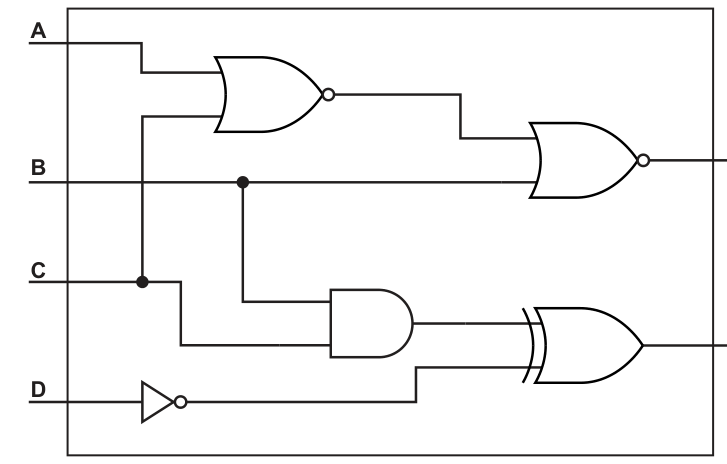
X = ............................................................................................................................................
Y = ............................................................................................................................................
Answer
- X = (A NOR C) NOR B
- Y = (B AND C) XOR (NOT D)
X = (A NOR C) NOR B; Y = (B AND C) XOR (NOT D)
Background Concept
A logic circuit is translated into a logic expression by reading the circuit from left to right. Each gate produces an output based on its inputs:
- AND outputs 1 only if both inputs are 1.
- OR outputs 1 if at least one input is 1.
- NOT inverts a single input.
- NOR means NOT OR, so it is the inverse of OR.
- XOR outputs 1 only when its two inputs are different.
When gates are connected in stages, the output from an earlier gate becomes part of the input to a later gate. That means the expression is often built in layers.
Understanding the Question
You are given a circuit with inputs A, B, C and D, and you must write the expressions for outputs X and Y.
For X, the top branch uses two NOR gates in sequence. So you first form the output of the first NOR gate, then use that result with B in the second NOR gate.
For Y, the lower branch has an AND gate using B and C, a NOT gate using D, and then an XOR gate combining those two results.
Approach
Work one gate at a time.
- Find the inputs to the first gate.
- Write the output of that gate as a sub-expression.
- Follow the wire to the next gate and include the sub-expression there.
- Repeat until you reach the labelled output.
This avoids trying to write the whole expression in one step, which is where most mistakes happen.
Step-by-Step Reasoning
For output X:
- A and C go into a NOR gate.
- So the first sub-expression is
A NOR C. - That result and B then go into another NOR gate.
- Therefore the full expression is:
X = (A NOR C) NOR B
For output Y:
- B and C go into an AND gate.
- So one input to the final gate is
B AND C. - D goes through a NOT gate.
- So the other input to the final gate is
NOT D. - These two results go into an XOR gate.
- Therefore:
Y = (B AND C) XOR (NOT D)
That matches the structure of the circuit exactly.
Key Takeaways
- Translate a circuit by following the wires from left to right.
- Build expressions one gate at a time.
- Use brackets when one gate's output feeds another gate.
- NOR and NAND already include a NOT, so do not add an extra inversion unless the circuit shows one.
Common Mistakes
- Writing
A OR Cinstead ofA NOR Cfor the first gate in X. - Forgetting that X uses the output of the first gate together with B in a second NOR gate.
- Writing
B XOR Cfor Y instead ofB AND C. - Forgetting to invert D before it enters the XOR gate.
- Omitting brackets, which can make the grouping unclear.
Things to Be Careful About
- Read the bubble on the output of a gate carefully: that indicates inversion, so OR with a bubble is NOR.
- Make sure you use the correct gate name from the symbol, especially AND versus XOR.
- Keep the exact wire connections correct; a crossing wire is not automatically a connection unless a junction is shown.
- For exam answers, a structurally correct unsimplified expression is acceptable and safest here.
Complete the truth table for the logic expression:
| A | B | C | Working space | X |
|---|---|---|---|---|
| 0 | 0 | 0 | ||
| 0 | 0 | 1 | ||
| 0 | 1 | 0 | ||
| 0 | 1 | 1 | ||
| 1 | 0 | 0 | ||
| 1 | 0 | 1 | ||
| 1 | 1 | 0 | ||
| 1 | 1 | 1 |
Working
For each row, evaluate (A OR B), (B OR C) and (NOT A NAND C), then XOR the three results.
Answer
| A | B | C | Working space | X |
|---|---|---|---|---|
| 0 | 0 | 0 | 0 XOR 0 XOR 1 | 1 |
| 0 | 0 | 1 | 0 XOR 1 XOR 0 | 1 |
| 0 | 1 | 0 | 1 XOR 1 XOR 1 | 1 |
| 0 | 1 | 1 | 1 XOR 1 XOR 0 | 0 |
| 1 | 0 | 0 | 1 XOR 0 XOR 1 | 0 |
| 1 | 0 | 1 | 1 XOR 1 XOR 1 | 1 |
| 1 | 1 | 0 | 1 XOR 1 XOR 1 | 1 |
| 1 | 1 | 1 | 1 XOR 1 XOR 1 | 1 |
See completed truth table
Background Concept
A truth table lists every possible combination of input values and shows the output for each one. With three inputs A, B and C, there are 8 possible rows.
This expression uses several logic operations:
A OR Bis 1 if either input is 1.NOT Aflips A.NOT A NAND Cmeans first combineNOT AandCwith AND, then invert the result. In other words, NAND is the opposite of AND.XORgives 1 when the two values being compared are different. For a chain of XORs, evaluate across the row step by step.
So the key skill is breaking a long expression into smaller intermediate results.
Understanding the Question
You must complete the truth table for:
X = (A OR B) XOR (B OR C) XOR (NOT A NAND C)
The question gives all 8 input combinations already. Your job is to work out the value of X for each row. The "Working space" column is there so you can show the intermediate results used to reach the final answer.
The important clue is that this is a compound logic expression. That means you should not try to guess the answer directly. Instead, calculate each bracketed part first.
Approach
For every row:
- Find
A OR B. - Find
B OR C. - Find
NOT A. - Use
NOT AandCto getNOT A NAND C. - XOR the three resulting values.
A very reliable method is to write the three values in the working column as something like 1 XOR 0 XOR 1, then reduce it from left to right.
Step-by-Step Reasoning
Let:
P = A OR BQ = B OR CR = NOT A NAND C
Now evaluate each row.
Row 1: A=0, B=0, C=0
P = 0 OR 0 = 0Q = 0 OR 0 = 0NOT A = 11 AND 0 = 0, soR = NAND = 1X = 0 XOR 0 XOR 1 = 1
Row 2: A=0, B=0, C=1
P = 0 OR 0 = 0Q = 0 OR 1 = 1NOT A = 11 AND 1 = 1, soR = NAND = 0X = 0 XOR 1 XOR 0 = 1
Row 3: A=0, B=1, C=0
P = 0 OR 1 = 1Q = 1 OR 0 = 1NOT A = 11 AND 0 = 0, soR = NAND = 1X = 1 XOR 1 XOR 11 XOR 1 = 0, then0 XOR 1 = 1
Row 4: A=0, B=1, C=1
P = 0 OR 1 = 1Q = 1 OR 1 = 1NOT A = 11 AND 1 = 1, soR = NAND = 0X = 1 XOR 1 XOR 01 XOR 1 = 0, then0 XOR 0 = 0
Row 5: A=1, B=0, C=0
P = 1 OR 0 = 1Q = 0 OR 0 = 0NOT A = 00 AND 0 = 0, soR = NAND = 1X = 1 XOR 0 XOR 11 XOR 0 = 1, then1 XOR 1 = 0
Row 6: A=1, B=0, C=1
P = 1 OR 0 = 1Q = 0 OR 1 = 1NOT A = 00 AND 1 = 0, soR = NAND = 1X = 1 XOR 1 XOR 11 XOR 1 = 0, then0 XOR 1 = 1
Row 7: A=1, B=1, C=0
P = 1 OR 1 = 1Q = 1 OR 0 = 1NOT A = 00 AND 0 = 0, soR = NAND = 1X = 1 XOR 1 XOR 1 = 1
Row 8: A=1, B=1, C=1
P = 1 OR 1 = 1Q = 1 OR 1 = 1NOT A = 00 AND 1 = 0, soR = NAND = 1X = 1 XOR 1 XOR 1 = 1
So the final X values down the table are:
1, 1, 1, 0, 0, 1, 1, 1
Key Takeaways
- Break long logic expressions into smaller parts before finding the final output.
- NAND means AND first, then invert.
- When you see
NOT A NAND C, apply NOT to A before the NAND step. - A truth table is safest when completed row by row in a fixed order.
Common Mistakes
- Treating
NOT A NAND CasNOT (A NAND C), which is a different expression. - Forgetting that NAND is the inverse of AND.
- Making an error with XOR by treating it like OR. XOR only gives 1 when the compared values are different.
- Skipping intermediate working and then losing track of where an output value came from.
- Not evaluating
NOT Abefore using it in the NAND part.
Things to Be Careful About
- Respect the brackets: each bracketed term should be found before the XOR operations.
- Keep the input rows in the exact order given in the table.
- If you use the working space, make sure the values written there really are the three term results, not the raw inputs.
- Be consistent with XOR across three values: reduce it step by step rather than mentally jumping to an answer.
- In exam questions, one wrong intermediate value can affect the final X, so careful row-by-row checking is worthwhile.
The following table shows part of the instruction set for a processor. The processor has two registers: the Accumulator (ACC) and an Index Register (IX).
| Instruction | Explanation | |
|---|---|---|
| Opcode | Operand | |
| LDM | #n | Immediate addressing. Load the number n to ACC |
| STO | <address> | Store the contents of ACC at the given address |
| ADD | #n/Bn/&n | Add the number n to the ACC |
| ADD | <address> | Add the contents of the given address to the ACC |
| SUB | <address> | Subtract the contents of the given address from the ACC |
| SUB | #n/Bn/&n | Subtract the number n from the ACC |
| DEC | <register> | Subtract 1 from the contents of the register (ACC or IX) |
| JMP | <address> | Jump to the given address |
| CMP | <address> | Compare the contents of ACC with the contents of <address> |
| CMP | #n | Compare the contents of ACC with number n |
| JPE | <address> | Following a compare instruction, jump to <address> if the compare was True |
| END | Return control to the operating system |
ACC denotes Accumulator
<address> can be an absolute or a symbolic address
denotes a denary number, e.g. #123
B denotes a binary number, e.g. B01001010
& denotes a hexadecimal number, e.g. &4A
The current contents of memory are:
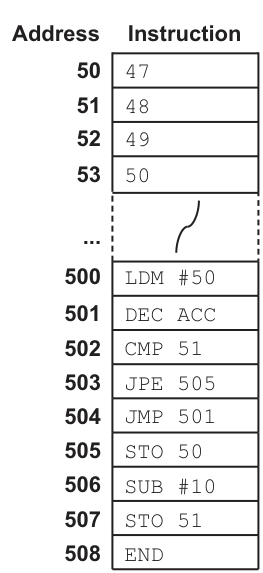
Trace the program currently in memory using the following trace table.
| Instruction address | ACC | Memory address | |||
|---|---|---|---|---|---|
| 50 | 51 | 52 | 53 | ||
| 47 | 48 | 49 | 50 | ||
Working
500 loads 50 into ACC.
The loop from 501 to 504 decrements ACC and compares it with the contents of address 51.
- First time: ACC becomes
49, compare with48is false, so jump to 501. - Second time: ACC becomes
48, compare with48is true, so jump to 505.
505 stores 48 in address 50.
506 subtracts 10, so ACC becomes 38.
507 stores 38 in address 51.
Answer
| Instruction address | ACC | 50 | 51 | 52 | 53 |
|---|---|---|---|---|---|
| Initial | 47 | 48 | 49 | 50 | |
| 500 | 50 | 47 | 48 | 49 | 50 |
| 501 | 49 | 47 | 48 | 49 | 50 |
| 502 | 49 | 47 | 48 | 49 | 50 |
| 503 | 49 | 47 | 48 | 49 | 50 |
| 504 | 49 | 47 | 48 | 49 | 50 |
| 501 | 48 | 47 | 48 | 49 | 50 |
| 502 | 48 | 47 | 48 | 49 | 50 |
| 503 | 48 | 47 | 48 | 49 | 50 |
| 505 | 48 | 48 | 48 | 49 | 50 |
| 506 | 38 | 48 | 48 | 49 | 50 |
| 507 | 38 | 48 | 38 | 49 | 50 |
| 508 | 38 | 48 | 38 | 49 | 50 |
See completed trace table
Background Concept
A trace table is used to follow exactly what a processor does as it executes a sequence of assembly-language instructions. For each instruction, you track the values of the registers and any memory locations that change.
Here the key ideas are:
ACCis the accumulator, so most arithmetic and data operations affect it.LDM #nloads the immediate valuenintoACC.DEC ACCsubtracts 1 fromACC.CMP 51comparesACCwith the contents of memory location51.JPE 505jumps only if the comparison was true.JMP 501always jumps.STO 50stores the current contents ofACCinto memory location50.SUB #10subtracts 10 fromACC.
When tracing, remember that CMP, JPE, JMP and END do not themselves change the memory values shown, and CMP does not change ACC.
Understanding the Question
You are given the initial contents of memory locations 50 to 53, and a program stored from address 500 onwards. The task is to execute the program mentally and complete the trace table.
The important given values are:
- Memory
50 = 47 - Memory
51 = 48 - Memory
52 = 49 - Memory
53 = 50
The program is:
500 LDM #50501 DEC ACC502 CMP 51503 JPE 505504 JMP 501505 STO 50506 SUB #10507 STO 51508 END
So the question is really testing whether you can follow the loop correctly and record when memory changes.
Approach
Start at address 500 and go one instruction at a time.
For each step:
- Update
ACCif the instruction changes it. - Check whether any memory location changes.
- If there is a jump, decide which instruction executes next.
- Copy forward unchanged values into the next row of the trace table.
The crucial part is the loop from 501 to 504. It keeps decreasing ACC until ACC becomes equal to the value stored in address 51.
Step-by-Step Reasoning
Initial state:
50 = 4751 = 4852 = 4953 = 50ACChas not yet been loaded for the trace table.
Execute address 500: LDM #50
- Immediate addressing means load the number
50directly. ACC = 50- No memory location changes.
Execute address 501: DEC ACC
- Decrement means subtract 1.
ACCchanges from50to49.- No memory changes.
Execute address 502: CMP 51
- Compare
ACCwith contents of address51. ACC = 49- Memory
51 = 48 49is not equal to48, so the compare result is false.ACCstays49.
Execute address 503: JPE 505
- Jump only if compare was true.
- It was false, so no jump happens.
- Execution continues to the next instruction,
504. ACCstays49.
Execute address 504: JMP 501
- This is an unconditional jump.
- Control goes back to address
501. ACCstays49.
Execute address 501 again: DEC ACC
ACCgoes from49to48.
Execute address 502 again: CMP 51
- Now compare
ACC = 48with memory51 = 48. - They are equal, so the compare result is true.
ACCremains48.
Execute address 503 again: JPE 505
- This time the compare was true.
- So control jumps to address
505. - Address
504is skipped.
Execute address 505: STO 50
- Store the contents of
ACCinto address50. ACC = 48, so memory50becomes48.
Execute address 506: SUB #10
- Subtract immediate value
10fromACC. 48 - 10 = 38ACC = 38
Execute address 507: STO 51
- Store
ACCinto address51. - Memory
51becomes38.
Execute address 508: END
- Program stops.
- Final values remain:
ACC = 3850 = 4851 = 3852 = 4953 = 50
Key Takeaways
- In an assembly trace, follow the program counter logically through jumps.
CMPchecks a condition but does not itself changeACC.JPEonly jumps when the comparison is true.- Memory values stay the same until a store instruction changes them.
- In a loop, the same instruction addresses can appear more than once in the trace table.
Common Mistakes
- Changing
ACCduringCMP. A compare tests values; it does not replace them. - Executing address
504after the secondJPE. Once the jump is taken, execution goes straight to505. - Forgetting to carry forward unchanged memory values into later rows.
- Storing the wrong value at address
50or51by not using the currentACCvalue at that exact step. - Stopping the loop too early after the first compare, even though
49is not equal to48.
Things to Be Careful About
CMP 51means compare with the contents of memory address51, not the literal number51.#10is immediate data, soSUB #10subtracts the number10directly.- The trace table usually records the state after each executed instruction.
- When the same instruction is executed more than once in a loop, list it each time on a separate row.
- Only addresses
50and51change during this program;52and53stay constant throughout.
Complete the table by identifying and describing two modes of addressing that are not used in the program in part (a).
| Mode of addressing | Description |
|---|---|
| ................................................... | ................................................................................ ................................................................................ ................................................................................ ................................................................................ |
| ................................................... | ................................................................................ ................................................................................ ................................................................................ ................................................................................ |
Answer
| Mode of addressing | Description |
|---|---|
| Indirect addressing | The address field contains the address of a memory location that holds the actual address of the data to be used. |
| Indexed addressing | The effective address is found by adding the contents of the index register to the address part of the instruction. The data at that calculated address is then used. |
Indirect addressing; Indexed addressing
Background Concept
An addressing mode is the method an instruction uses to locate its operand. In other words, it tells the processor where the data comes from.
Common addressing modes include:
- Immediate addressing: the actual value is written in the instruction itself, for example
#10. - Direct addressing: the instruction gives the memory address where the data is stored.
- Indirect addressing: the instruction gives an address which contains another address; that second address is where the real data is found.
- Indexed addressing: the processor adds the contents of an index register to an address in the instruction to calculate the effective address.
- Relative addressing: the address is found by adding an offset to the current instruction address or program counter.
Understanding the Question
Part (a) used some addressing modes already. You now have to name and describe two different modes that did not appear in that program.
In the traced program, the used modes were:
- Immediate: for example
LDM #50andSUB #10 - Direct: for example
CMP 51,STO 50,JMP 501
So you must choose two from other valid modes, such as indirect, indexed or relative, and describe them accurately.
Approach
First identify which modes were already present so you do not repeat them. Then choose two standard alternatives and define each one clearly.
A good description should explain how the processor obtains the operand:
- Is it taken directly from the instruction?
- Is it found at the given address?
- Is the given address only a pointer to the real address?
- Is an index register used to calculate the final address?
Step-by-Step Reasoning
The program in part (a) clearly uses immediate addressing because of operands like #50 and #10. The # symbol means the number is part of the instruction itself.
It also uses direct addressing because instructions such as CMP 51 and STO 50 refer straight to memory locations.
So for this part we need modes not used there.
Indirect addressing
In indirect addressing, the operand in the instruction is not the final data address. Instead:
- The instruction points to a memory location.
- That memory location stores another address.
- The processor then goes to that second address to fetch the real data.
This is why indirect addressing is sometimes described as using a pointer.
Indexed addressing
In indexed addressing:
- The instruction contains a base address.
- The processor adds the contents of the index register, here
IX. - The result is the effective address.
- The operand is taken from that calculated address.
This is especially useful for stepping through arrays, where IX can move from one element to the next.
These two are both valid answers because neither appears in the part (a) program.
Key Takeaways
- Addressing modes describe how an operand is found.
- Immediate and direct are simple and common.
- Indirect uses a stored address to find the real address.
- Indexed uses an index register to calculate the effective address.
Common Mistakes
- Giving immediate or direct as answers, even though those were already used in part (a).
- Saying indirect addressing means "the data is at the given address". That is direct addressing, not indirect.
- Describing indexed addressing without mentioning addition of the index register.
- Naming a mode correctly but giving a vague description that does not explain how the address is obtained.
Things to Be Careful About
- The question asks for modes not used in part (a), so check the original program first.
- If you choose indexed addressing, mention the role of
IXspecifically because the processor in part (a) has an index register. - Use precise wording such as "effective address" and "contents of memory location" to avoid ambiguity.
- A symbolic address is still a form of direct addressing, so it would not count as a different mode here.
The table shows part of the instruction set for a processor. The processor has one register: the Accumulator (ACC).
| Instruction | Explanation | |
|---|---|---|
| Opcode | Operand | |
| AND | #n/Bn/&n | Bitwise AND operation of the contents of ACC with the operand |
| AND | <address> | Bitwise AND operation of the contents of ACC with the contents of <address> |
| XOR | #n/Bn/&n | Bitwise XOR operation of the contents of ACC with the operand |
| XOR | <address> | Bitwise XOR operation of the contents of ACC with the contents of <address> |
| OR | #n/Bn/&n | Bitwise OR operation of the contents of ACC with the operand |
| OR | <address> | Bitwise OR operation of the contents of ACC with the contents of <address> |
<address> can be an absolute or a symbolic address
denotes a denary number, e.g. #123
B denotes a binary number, e.g. B01001010
& denotes a hexadecimal number, e.g. &4A
Write the bit manipulation instructions that can be used to set only the most significant bit to 1 in an 8-bit register.
The instructions need to work on a register that contains any 8-bit binary number.
...................................................................................................................................................
.............................................................................................................................................
Answer
OR B10000000
OR B10000000
Background Concept
Bit manipulation works by using logic operations on individual bits in a register. The three common operations here are:
ANDwith a mask: used to clear bits or test selected bitsORwith a mask: used to set selected bits to1XORwith a mask: used to toggle selected bits
The key rule for OR is:
0 OR x = x1 OR x = 1
So if you want to force one bit to become 1 while leaving all other bits unchanged, you use an OR mask that has:
1in the bit position you want to set0everywhere else
Understanding the Question
The register already contains some unknown 8-bit value. You need an instruction that works for any such value and makes only the most significant bit become 1.
The most significant bit in an 8-bit register is the leftmost bit:
b7 b6 b5 b4 b3 b2 b1 b0
So the required mask is:
10000000
That mask affects only the leftmost bit.
Approach
Use OR, because OR is the operation that sets chosen bits to 1.
Build a mask with:
1in the most significant bit position0in every other position
Then OR the accumulator with that mask.
Step-by-Step Reasoning
Suppose the register contains any 8-bit value, for example:
01010110
OR with the mask:
10000000
Bit by bit:
- Leftmost bit:
0 OR 1 = 1 - All other bits: each original bit is ORed with
0, so it stays the same
Result:
11010110
If the original most significant bit was already 1, for example:
10100101
then:
10100101 OR 10000000 = 10100101
So the bit is still 1, and the other bits are unchanged.
That is exactly what the question asks for.
Therefore the correct instruction is:
OR B10000000
Equivalent masks such as OR #128 or OR &80 represent the same bit pattern, but the binary form shows most clearly why it works.
Key Takeaways
- Use
ORto set bits to1. - Use a mask with
1only where you want a forced1. - Use
0in all other mask positions to preserve the original bits. - For an 8-bit most significant bit, the mask is
10000000.
Common Mistakes
- Using
AND B10000000. That would clear the other seven bits instead of leaving them unchanged. - Using
XOR B10000000. That would toggle the most significant bit, not guarantee it becomes1. - Using the wrong mask such as
00000001, which sets the least significant bit instead. - Forgetting that the register is 8-bit and writing too many or too few bits in the mask.
Things to Be Careful About
- "Set only the most significant bit to 1" means force that bit to
1while not altering the others. - The instruction must work for any starting value, so the operation must be unconditional and safe in all cases.
- Keep the mask aligned correctly: in 8 bits the most significant bit is the far-left bit.
- Binary, hexadecimal and denary masks can all be equivalent, but make sure the value really is
128decimal or&80hexadecimal if you use a different representation.
A shop sells pens to customers. Customers place an order with the shop and collect the items the next day. The shop uses a database to store the information about the orders.
The database contains the following tables:
CUSTOMER(CustomerID, CustomerName, Email)
ORDER(OrderID, CustomerID, Date, Collected)
ORDER_PRODUCT(OrderID, ProductID, Quantity)
PRODUCT(ProductID, ProductName, QuantityInBox, Cost, SupplierID)
SUPPLIER(SupplierID, SupplierName, SupplierEmail)
The primary keys are underlined.
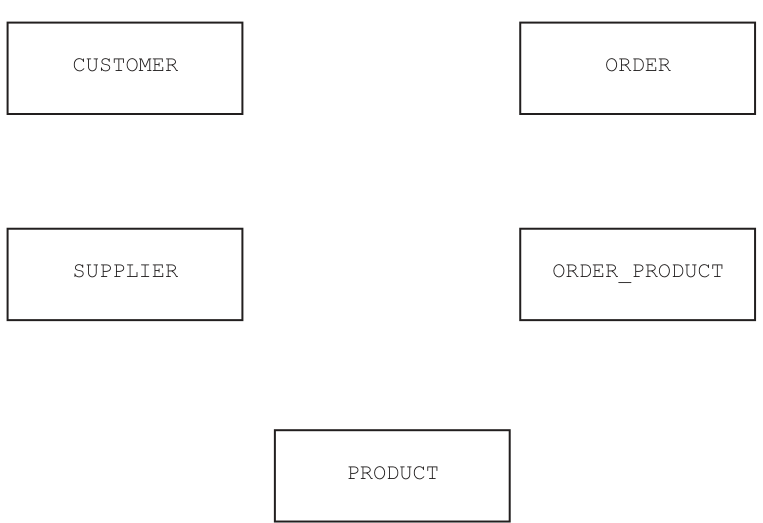
Answer
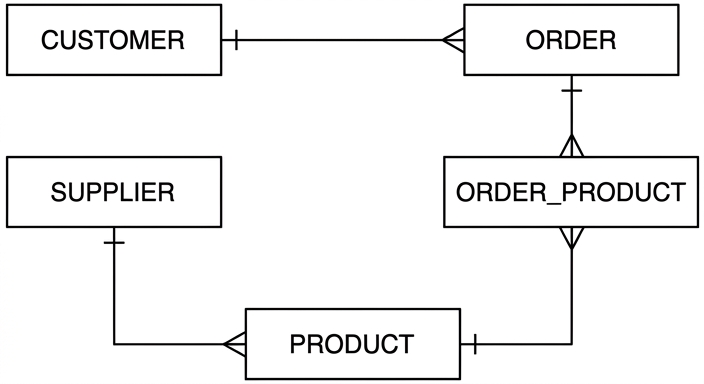
See E-R diagram
Background Concept
An entity-relationship (E-R) diagram shows the structure of a relational database visually. Each table is treated as an entity, and the lines between entities show relationships.
The key idea is to use keys to work out how tables are linked:
- A primary key uniquely identifies one record in a table.
- A foreign key stores the primary key value from another table.
- If table X contains a foreign key from table Y, then many records in X can usually relate to one record in Y.
That usually gives a one-to-many relationship:
- the parent table is on the "one" side
- the child table containing the foreign key is on the "many" side
A crow's foot is drawn on the many side.
Understanding the Question
You are given five tables:
CUSTOMER(CustomerID, CustomerName, Email)ORDER(OrderID, CustomerID, Date, Collected)ORDER_PRODUCT(OrderID, ProductID, Quantity)PRODUCT(ProductID, ProductName, QuantityInBox, Cost, SupplierID)SUPPLIER(SupplierID, SupplierName, SupplierEmail)
The task is to complete the E-R diagram by adding the correct relationship lines and cardinalities.
The important clue is the foreign keys already visible in the table structures:
ORDERcontainsCustomerIDORDER_PRODUCTcontainsOrderIDORDER_PRODUCTcontainsProductIDPRODUCTcontainsSupplierID
Each of those tells you which table links to which other table.
Approach
The safest method is:
- Look for a field in one table that matches the primary key of another table.
- Treat that matching field as a foreign key.
- Put the "one" side at the table whose primary key is being referenced.
- Put the crow's foot at the table that can contain many matching records.
For this question, every relationship is one-to-many.
Step-by-Step Reasoning
Start with CUSTOMER and ORDER.
ORDERcontainsCustomerID.- That means each order belongs to one customer.
- A customer can place many orders.
- So the relationship is
CUSTOMER1 : manyORDER.
Now ORDER and ORDER_PRODUCT.
ORDER_PRODUCTcontainsOrderID.- Each row in
ORDER_PRODUCTbelongs to one order. - One order can contain many rows in
ORDER_PRODUCTbecause an order can include several products. - So the relationship is
ORDER1 : manyORDER_PRODUCT.
Now PRODUCT and ORDER_PRODUCT.
ORDER_PRODUCTalso containsProductID.- Each row in
ORDER_PRODUCTrefers to one product. - A product can appear in many different order-product rows across different orders.
- So the relationship is
PRODUCT1 : manyORDER_PRODUCT.
Finally SUPPLIER and PRODUCT.
PRODUCTcontainsSupplierID.- Each product has one supplier.
- One supplier can supply many products.
- So the relationship is
SUPPLIER1 : manyPRODUCT.
This gives the completed E-R structure shown below.
Key Takeaways
- Foreign keys are the main clue for drawing E-R relationships.
- The table with the foreign key is usually the many side.
- A linking table such as
ORDER_PRODUCTis used to break a many-to-many relationship into two one-to-many relationships.
Common Mistakes
- Reversing the cardinality, for example putting the crow's foot on
CUSTOMERinstead ofORDER. - Drawing a direct many-to-many relationship between
ORDERandPRODUCTand ignoringORDER_PRODUCT. - Missing the
SUPPLIERtoPRODUCTrelationship because it is lower in the diagram. - Assuming every pair of tables must be connected directly. Only tables linked by keys should be connected.
Things to Be Careful About
ORDER_PRODUCTis the intersection table, so it must connect to bothORDERandPRODUCT.ORDERcontainsCustomerID, not the other way round, soORDERis the many side.PRODUCTcontainsSupplierID, soPRODUCTis the many side of the supplier relationship.- Keep each relationship as one-to-many exactly as implied by the schema.
A new product needs to be entered into the database. The product has the ID 002323, the product name ‘Blue ball point 2mm’, there are 50 in a box, the product costs $5.00 and the supplier has the ID SFX223.
Write a Structured Query Language (SQL) script to enter the new product into the table PRODUCT.
...................................................................................................................................................
...................................................................................................................................................
...................................................................................................................................................
...................................................................................................................................................
...................................................................................................................................................
...................................................................................................................................................
...................................................................................................................................................
.............................................................................................................................................
Answer
INSERT INTO PRODUCT (ProductID, ProductName, QuantityInBox, Cost, SupplierID)
VALUES ('002323', 'Blue ball point 2mm', 50, 5.00, 'SFX223');
See SQL script
Background Concept
INSERT INTO is an SQL Data Manipulation Language (DML) command used to add a new record to a table.
The general form is:
INSERT INTO TableName (Field1, Field2, Field3)
VALUES (Value1, Value2, Value3);
Important rules:
- text values are usually written in quotes
- numeric values are not quoted
- the values must match the field order listed in the statement
- using an explicit field list is safer than relying on the table's default column order
Understanding the Question
You must add one new row to the PRODUCT table.
The table structure is:
PRODUCT(ProductID, ProductName, QuantityInBox, Cost, SupplierID)
The given values are:
ProductID=002323ProductName=Blue ball point 2mmQuantityInBox=50Cost=$5.00SupplierID=SFX223
So the job is simply to write one correct INSERT statement that places those values into the correct fields.
Approach
Take the fields in the same order as the table definition, then write the matching values in the VALUES clause.
Use quotes for the ID fields and product name because they are text. Use unquoted numbers for QuantityInBox and Cost.
Step-by-Step Reasoning
The table is PRODUCT, so the statement starts:
INSERT INTO PRODUCT
Then list the fields being filled:
(ProductID, ProductName, QuantityInBox, Cost, SupplierID)
Now match the values carefully:
ProductIDgets'002323'ProductNamegets'Blue ball point 2mm'QuantityInBoxgets50Costgets5.00SupplierIDgets'SFX223'
That produces:
INSERT INTO PRODUCT (ProductID, ProductName, QuantityInBox, Cost, SupplierID)
VALUES ('002323', 'Blue ball point 2mm', 50, 5.00, 'SFX223');
Using the field list makes the answer robust even if the physical column order in the DBMS differs.
Key Takeaways
- Use
INSERT INTO ... VALUES ...to add a row. - Match each value to the correct field.
- Quote string data; do not quote numeric data.
Common Mistakes
- Putting the values in the wrong order.
- Forgetting quotes around text such as the product name or supplier ID.
- Quoting all values, including numbers, unnecessarily.
- Omitting one field or one value so the counts do not match.
Things to Be Careful About
002323may need to be treated as text because it has leading zeros.SFX223is clearly alphanumeric, so it must be quoted.- If the exam uses the table name
PRODUCT, keep that identifier exactly. - The script is for adding one record only, not creating the table.
The attribute Collected in the table ORDER stores the Boolean value TRUE if the order has been collected and FALSE if the order has not been collected.
Write an SQL script to return the customer name for each customer that has orders they have not collected. Include the number of orders each customer has not collected with an appropriate title.
An example output might be:
| CustomerName | NotCollected |
|---|---|
| Jack Wright | 2 |
| Lin Cho | 1 |
| Santaya Yui | 1 |
...................................................................................................................................................
...................................................................................................................................................
...................................................................................................................................................
...................................................................................................................................................
...................................................................................................................................................
...................................................................................................................................................
...................................................................................................................................................
.............................................................................................................................................
Answer
SELECT CUSTOMER.CustomerName, COUNT(`ORDER`.OrderID) AS NotCollected
FROM CUSTOMER
INNER JOIN `ORDER`
ON CUSTOMER.CustomerID = `ORDER`.CustomerID
WHERE `ORDER`.Collected = FALSE
GROUP BY CUSTOMER.CustomerName;
See SQL script
Background Concept
When a query needs data from more than one table, SQL uses a join. A join links rows using matching key values, usually a primary key in one table and a foreign key in another.
This question also needs an aggregate:
COUNT(...)counts matching rows.GROUP BYforms groups so the count is calculated separately for each group.ASgives a result column a clearer title.
A WHERE clause is used before grouping to filter the rows included in the count.
Understanding the Question
You need to return:
- the customer name
- the number of orders not collected by that customer
- with the count labelled
NotCollected
The relevant tables are:
CUSTOMER(CustomerID, CustomerName, Email)ORDER(OrderID, CustomerID, Date, Collected)
The link is CustomerID.
The condition is that Collected must be FALSE, because the question wants orders not yet collected.
The example output shows one row per customer, not one row per order. That tells you aggregation is needed.
Approach
Use CUSTOMER joined to ORDER on CustomerID.
Then:
- filter to only uncollected orders with
WHERE Collected = FALSE - group by the customer name
- count the orders in each group
- rename the count column to
NotCollected
Step-by-Step Reasoning
First select the customer name, because that must appear in the result:
SELECT CUSTOMER.CustomerName
Now add the count of matching orders and give it the required heading:
COUNT(`ORDER`.OrderID) AS NotCollected
Next choose the tables:
FROM CUSTOMER
INNER JOIN `ORDER`
The table ORDER contains CustomerID, so join on matching customer IDs:
ON CUSTOMER.CustomerID = `ORDER`.CustomerID
Now keep only orders that have not been collected:
WHERE `ORDER`.Collected = FALSE
At this point there may still be several rows per customer, one for each qualifying order. To combine them into one row per customer, group by the name:
GROUP BY CUSTOMER.CustomerName;
Putting it together gives:
SELECT CUSTOMER.CustomerName, COUNT(`ORDER`.OrderID) AS NotCollected
FROM CUSTOMER
INNER JOIN `ORDER`
ON CUSTOMER.CustomerID = `ORDER`.CustomerID
WHERE `ORDER`.Collected = FALSE
GROUP BY CUSTOMER.CustomerName;
This returns one row per customer who has at least one uncollected order, with the number of such orders shown in the NotCollected column.
Key Takeaways
- Use a join when the data needed is spread across tables.
- Use
WHEREto keep only the records that match the condition. - Use
COUNTwithGROUP BYto summarise data per customer. - Use
ASto produce a meaningful output heading.
Common Mistakes
- Forgetting the join and trying to select from only one table.
- Using
Collected = TRUE, which gives the opposite result. - Forgetting
GROUP BY, which makes the count incorrect or invalid in SQL. - Counting all rows without first filtering to uncollected orders.
- Not renaming the count column to
NotCollectedas requested.
Things to Be Careful About
- The table name
ORDERis a reserved SQL word in many systems, so surrounding it with backticks is a safe choice. - Group by the customer field you selected.
- The query should return only customers with uncollected orders, not every customer in the database.
- The condition is Boolean, so compare with
FALSE, not a text string unless the specific DBMS stores it that way.
The shop uses a Database Management System (DBMS).
One feature provided by a DBMS is a data dictionary.
The data dictionary stores the attribute names, table names, foreign keys and primary keys in the database.
Identify three other items stored in a data dictionary.
1 ........................................................................................................................................
2 ........................................................................................................................................
3 ........................................................................................................................................
Answer
- Data type of each attribute
- Field size / length
- Validation rules
Data type of each attribute; field size/length; validation rules
Background Concept
A data dictionary is a store of metadata about the database. Metadata means data about data. It describes the structure and rules of the database rather than the actual records entered by users.
Typical items in a data dictionary include:
- table names
n- attribute or field names - primary keys and foreign keys
- data types
- field lengths
- validation rules
- default values
- allowable ranges or formats
The question already gives some examples, so you must provide different ones.
Understanding the Question
You are told that the data dictionary stores:
- attribute names
- table names
- foreign keys
- primary keys
You must identify three other items it stores. So repeating any of those four would not gain credit.
Approach
Choose three valid examples of metadata that describe field structure or rules. The safest answers are standard, widely accepted items such as:
- data type
- field size
- validation rules
These are clearly part of a data dictionary and are different from the examples already given.
Step-by-Step Reasoning
Data type of each attribute is valid because the data dictionary records whether a field is, for example, text, integer, real, date or Boolean.
Field size / length is valid because the data dictionary often stores how many characters or digits a field can hold.
Validation rules is valid because the data dictionary can store constraints such as permitted ranges, input formats or required patterns.
These are all structural descriptions of the database, not actual stored order or customer data.
Key Takeaways
- A data dictionary stores metadata, not transaction data.
- Good examples are schema descriptions and constraints.
- In recall questions, avoid repeating examples already mentioned in the question.
Common Mistakes
- Repeating
table names,attribute names,primary keysorforeign keyseven though the question already lists them. - Giving actual data values, such as customer names or order dates, which are not metadata.
- Naming vague items such as "data" without saying what kind of metadata it is.
Things to Be Careful About
- The answer needs three separate items.
- Make each item specific enough to show it belongs to the data dictionary.
- Stick to things the DBMS stores about the structure or rules of the database.
The DBMS provides a developer interface.
Explain how a database designer can make use of the developer interface.
...........................................................................................................................................
...........................................................................................................................................
...........................................................................................................................................
...........................................................................................................................................
...........................................................................................................................................
.....................................................................................................................................
Answer
- It allows the designer to create and amend tables and attributes, including setting data types and primary/foreign keys.
- It can be used to define relationships and validation rules for the database.
- It allows the designer to write, run and test queries and other database objects such as forms or reports.
Create and amend tables/fields and keys; define relationships and validation; write, run and test queries, forms or reports
Background Concept
A DBMS often provides different interfaces for different users. A developer interface is aimed at the database designer or developer rather than an everyday end user.
It gives tools for creating and managing database objects such as:
- tables
- relationships
- queries
- forms
- reports
- validation and constraints
This interface may be graphical, SQL-based, or both. Its purpose is to help build, test and maintain the database structure and logic.
Understanding the Question
The question is not asking what a developer interface is called. It asks how a database designer can make use of it.
So the answer must connect the feature to actual design tasks, such as building the schema, setting rules and testing queries.
Approach
A good way to answer is to think of the main jobs of a database designer:
- create the tables and fields
- link tables and enforce rules
- test queries and other objects
Then explain how the developer interface helps with each job.
Step-by-Step Reasoning
First, the designer needs to create the structure of the database. The developer interface lets them make new tables, add fields, choose data types and define keys. That is how the schema is built.
Second, the tables must be linked correctly and protected by rules. The interface can be used to set up relationships such as primary key to foreign key links, and to create validation rules so invalid data is rejected.
Third, the designer needs to check that the database works as intended. The developer interface allows SQL queries to be written and run, so the designer can test whether the correct records are returned. Many DBMSs also let the designer create forms and reports through this interface.
These points explain actual use, which is what the question asks for.
Key Takeaways
- A developer interface is for building and maintaining the database, not just using it.
- It supports schema design, relationships, validation and query testing.
- In explanation questions, link the tool to what the designer does with it.
Common Mistakes
- Describing the end-user interface instead of the developer interface.
- Saying only that it is "used to access the database" without explaining design tasks.
- Listing features without stating how the database designer uses them.
Things to Be Careful About
- Focus on the designer's perspective, not the customer's or shop worker's perspective.
- Include explanation words such as "allows the designer to..." so the use is clear.
- Keep the points about development activities: creating structure, defining rules, and testing objects.
A computer can perform logical and arithmetic shifts.
Show the result of a logical left shift of 2 places on the two’s complement binary integer 11001010
...........................................................................................................................................
.....................................................................................................................................
Working
11001010 → shift left 1 place: 10010100
10010100 → shift left 1 more place: 00101000
Answer
00101000
00101000
Background Concept
A shift operation moves every bit in a binary value left or right.
A logical left shift:
- moves every bit to the left
- drops any bit that goes past the left end
- puts
0into each empty position on the right
For an 8-bit value, the answer must still stay 8 bits long. Even if the original number is described as a two's complement integer, a logical left shift still uses 0 fill on the right.
Understanding the Question
You are given the 8-bit binary value 11001010 and asked to perform a logical left shift of 2 places. That means every bit must move left twice. Each time, the leftmost bit is lost and a 0 is inserted at the right.
Approach
The safest method is to do the shift one place at a time:
- Shift left once.
- Shift left again.
- Keep the result as an 8-bit binary value.
This avoids losing track of which bits are discarded.
Step-by-Step Reasoning
Start with:
11001010
After 1 logical left shift:
- each bit moves one position left
- the leftmost
1is discarded - a
0is added on the right
So:
11001010 → 10010100
After the 2nd logical left shift:
- again move every bit left
- discard the new leftmost bit
- add
0on the right
So:
10010100 → 00101000
Therefore the final 8-bit result is:
00101000
Key Takeaways
- A logical left shift always inserts
0on the right. - Bits shifted out of the left side are lost.
- Keep the final result at the same bit width as the original value.
Common Mistakes
- Writing 9 bits instead of 8 after the shift.
- Filling the right side with
1instead of0. - Forgetting to discard bits that move off the left end.
- Confusing a logical shift with an arithmetic right shift.
Things to Be Careful About
- Count the number of shift places exactly: here it is 2, not 1.
- Do not reinterpret the value as denary first; just move the bits.
- Maintain the original 8-bit width throughout.
Show the result of an arithmetic right shift of 3 places on the two’s complement binary integer 10011110
...........................................................................................................................................
.....................................................................................................................................
Working
10011110 → shift right 1 place: 11001111
11001111 → shift right 1 more place: 11100111
11100111 → shift right 1 more place: 11110011
Answer
11110011
11110011
Background Concept
An arithmetic right shift is used with signed binary numbers, especially two's complement integers.
In a two's complement number:
- the leftmost bit is the sign bit
0means positive1means negative
An arithmetic right shift:
- moves all bits one place to the right
- discards the rightmost bit
- copies the sign bit into the new leftmost position
This is different from a logical right shift, which would always put 0 on the left.
Understanding the Question
The question gives the 8-bit two's complement value 10011110 and asks for an arithmetic right shift of 3 places. Because it is arithmetic, you must preserve the sign. Since the sign bit is 1, each new bit inserted on the left must also be 1.
Approach
Do the shift one place at a time and keep checking the sign bit:
- Shift right once, filling the left with
1. - Repeat two more times.
- Keep the answer as an 8-bit result.
Step-by-Step Reasoning
Start with:
10011110
This begins with 1, so it is negative in two's complement. Therefore, every arithmetic right shift must insert 1 on the left.
After 1 arithmetic right shift:
10011110 → 11001111
Explanation:
- the rightmost
0is lost - every other bit moves right
- a
1is placed on the left because the sign bit is1
After 2 arithmetic right shifts:
11001111 → 11100111
After 3 arithmetic right shifts:
11100111 → 11110011
So the final answer is:
11110011
Key Takeaways
- Arithmetic right shift keeps the sign of a two's complement number.
- If the sign bit is
1, fill the left side with1. - Logical right shift and arithmetic right shift are not the same.
Common Mistakes
- Using
0fill on the left, which would be a logical right shift, not arithmetic. - Forgetting that the number is two's complement and therefore signed.
- Losing track of the number of shifts and stopping after 2 instead of 3.
- Writing a result with the wrong number of bits.
Things to Be Careful About
- Check the original sign bit before shifting.
- Insert the sign bit each time, not just once.
- Keep the answer at 8 bits throughout the operation.
Complete the following binary addition. Show your working. Include any overflow bit(s).
  1 1 1 1 0 1 0 1
+ 1 0 1 1 0 0 0 1
-----------------
Working
  11110101
+ 10110001
---------
 110100110
Answer
110100110
110100110
Background Concept
Binary addition works like denary addition, but each column can only contain 0 or 1.
The key rules are:
0 + 0 = 00 + 1 = 11 + 0 = 11 + 1 = 10so write0, carry11 + 1 + 1 = 11so write1, carry1
If an extra carry comes out of the leftmost column, that is the overflow bit the question asks you to include.
Understanding the Question
You must add these two 8-bit binary numbers:
1111010110110001
The question specifically says to include any overflow bit, so if the sum needs 9 bits, you must show all 9 bits.
Approach
Work from right to left:
- Add the bits in the rightmost column.
- Carry when needed.
- Continue across all columns.
- If there is still a carry after the final column, write it at the front.
Step-by-Step Reasoning
Add from the right-hand side.
Column 1:
1 + 1 = 10- write
0, carry1
Column 2:
0 + 0 + 1 = 1- write
1, carry0
Column 3:
1 + 0 = 1- write
1
Column 4:
0 + 0 = 0- write
0
Column 5:
1 + 1 = 10- write
0, carry1
Column 6:
1 + 1 + 1 = 11- write
1, carry1
Column 7:
1 + 0 + 1 = 10- write
0, carry1
Column 8:
1 + 1 + 1 = 11- write
1, carry1
There is still a carry left over, so place it at the front.
Final result:
110100110
Key Takeaways
- Binary addition is done one column at a time from right to left.
- A carry must be included in the next column.
- If the question says to include overflow bits, keep the final carry.
Common Mistakes
- Forgetting to include a carry in the next column.
- Omitting the final overflow bit and writing only 8 bits.
- Adding left to right instead of right to left.
- Treating
1 + 1 + 1as10instead of11.
Things to Be Careful About
- Read the instruction carefully: here the overflow bit must be shown.
- Keep the digits aligned by column.
- Do not drop the leftmost carry at the end.
Subtract the binary number 00011110 from the binary number 01100100 using binary subtraction. Show your working.
Working
  01100100
- 00011110
---------
  01000110
Answer
01000110
01000110
Background Concept
Binary subtraction follows the same idea as denary subtraction, but with only 0 and 1.
Useful rules are:
0 - 0 = 01 - 0 = 11 - 1 = 00 - 1cannot be done directly, so you must borrow from the next column to the left
Borrowing in binary means:
- taking
1from the next column left - that
1is worth10in the current column because the base is 2
So 10 - 1 = 1 in binary.
Understanding the Question
You must subtract:
00011110
from:
01100100
So the calculation is:
  01100100
- 00011110
The question says to use binary subtraction and show working, so the expected method is direct subtraction with borrowing where necessary.
Approach
Start from the rightmost bit and move left:
- Subtract each column.
- If the top bit is smaller than the bottom bit, borrow from the next column left.
- Continue until all 8 columns are complete.
A quick check at the end can be done in denary if you want: 01100100 is 100 and 00011110 is 30, so the answer should be 70, which is 01000110.
Step-by-Step Reasoning
Write the subtraction:
01100100
- 00011110
Work from right to left.
Rightmost column:
0 - 0 = 0
Next column:
0 - 1needs a borrow- borrow from the next column to the left
- current column becomes
10 10 - 1 = 1
Next column:
- because of the borrow, the top bit there has been reduced
- this column also requires borrowing to continue the subtraction correctly
Continuing this borrowing process across the necessary columns gives the final result:
01000110
Check in denary:
01100100= 10000011110= 30100 - 30 = 7070in binary is01000110
So the subtraction is correct.
Key Takeaways
- In binary subtraction,
0 - 1requires borrowing. - A borrowed
1becomes10in the current column because binary is base 2. - Checking the result in denary can help confirm the answer.
Common Mistakes
- Forgetting that a borrowed bit reduces the next left column by 1.
- Writing
0 - 1 = 1without borrowing. - Losing track of multiple consecutive borrows.
- Dropping the leading
0and not keeping the answer as 8 bits.
Things to Be Careful About
- Keep the columns aligned exactly.
- When you borrow, update both the current column and the column you borrowed from.
- The answer should stay as an 8-bit binary number here:
01000110.