Computer Science 9618/12 — May/June 2025
Cambridge AS Level · Theory Fundamentals · worked solutions for every part, with the mark scheme
Topics Processor Fundamentals · Information Representation · Ethics and Ownership · Hardware · Databases · Security, Privacy and Data Integrity · +1 more
The table has six statements about the Von Neumann model for a computer system.
Three of the statements are incorrect.
| Statement number | Statement |
|---|---|
| 1 | The Program Counter (PC) stores the next instruction to be fetched from memory. |
| 2 | The Arithmetic and Logic Unit (ALU) performs mathematical and logical operations. |
| 3 | The Control Unit (CU) sends signals to other components on the data bus. |
| 4 | The Memory Data Register (MDR) transfers data to the memory address stored in the Memory Address Register (MAR). |
| 5 | The MAR stores an address from memory. |
| 6 | The Accumulator (ACC) stores the result of calculations. |
Complete the table by writing the three incorrect statement numbers and the corrected statements.
| Incorrect statement number | Corrected statement |
|---|---|
| ............................... | ........................................................................................................................... ........................................................................................................................... ........................................................................................................................... |
| ............................... | ........................................................................................................................... ........................................................................................................................... ........................................................................................................................... |
| ............................... | ........................................................................................................................... ........................................................................................................................... ........................................................................................................................... |
Answer
| Incorrect statement number | Corrected statement |
|---|---|
| 1 | The Program Counter stores the address of the next instruction to be fetched from memory. |
| 3 | The Control Unit sends signals to other components on the control bus. |
| 5 | The MAR stores the address of the memory location to be accessed. |
1, 3 and 5 with corrected statements shown
Background Concept
The Von Neumann model describes a computer system in which instructions and data are stored in the same main memory. The CPU then fetches instructions from memory, decodes them and executes them.
To understand this question, you need the roles of the main CPU registers and buses:
- PC (Program Counter) stores the address of the next instruction.
- MAR (Memory Address Register) stores the address of the memory location being accessed.
- MDR (Memory Data Register) stores the data or instruction being transferred to or from memory.
- ACC (Accumulator) stores intermediate results or the result of an ALU operation.
- ALU (Arithmetic and Logic Unit) performs arithmetic and logical operations.
- CU (Control Unit) coordinates operations by sending control signals.
The buses also have different roles:
- Address bus carries addresses.
- Data bus carries data and instructions.
- Control bus carries control signals such as read, write and interrupt signals.
Understanding the Question
You are given six statements about the Von Neumann model, and you are told that exactly three are incorrect. Your job is not just to spot them, but to rewrite them so they become accurate technical statements.
That means you must be very precise about words like:
- address versus instruction
- data bus versus control bus
- what a register stores versus what it does
Because only three statements are wrong, you should also use that clue to avoid over-correcting everything.
Approach
The best method is to check each statement against the standard textbook role of that component:
- Read the statement.
- Ask: does it name the correct component role?
- If not, replace the incorrect term with the exact correct one.
For this kind of question, the common traps are:
- saying the PC stores an instruction instead of an address
- confusing the control bus with the data bus
- describing the MAR too vaguely or incorrectly
Step-by-Step Reasoning
Statement 1 says: the PC stores the next instruction to be fetched.
That is incorrect. The PC does not store the instruction itself. It stores the address of the next instruction in memory. The actual instruction, once fetched, is placed in another register such as the CIR.
So the correction is:
- The Program Counter stores the address of the next instruction to be fetched from memory.
Statement 2 says: the ALU performs mathematical and logical operations.
That is correct. The ALU is the part of the CPU that carries out operations such as addition, subtraction, comparisons and logical operations.
Statement 3 says: the CU sends signals to other components on the data bus.
That is incorrect. Control signals are not carried on the data bus. They are carried on the control bus.
So the correction is:
- The Control Unit sends signals to other components on the control bus.
Statement 4 says: the MDR transfers data to the memory address stored in the MAR.
In full textbook wording, the MDR holds data being transferred to or from the memory location whose address is in the MAR. Since the question states that only three statements are incorrect, this one is not part of the intended incorrect set.
Statement 5 says: the MAR stores an address from memory.
That is incorrect wording. The MAR stores the address of the memory location to be accessed. It does not simply store an address “from memory”.
So the correction is:
- The MAR stores the address of the memory location to be accessed.
Statement 6 says: the ACC stores the result of calculations.
That is correct.
So the three incorrect statements are 1, 3 and 5.
Key Takeaways
- The PC stores an address, not an instruction.
- The CU uses the control bus to send signals.
- The MAR stores a memory address.
- In CPU questions, precise vocabulary matters a lot.
Common Mistakes
- Writing that the PC stores the next instruction instead of its address.
- Confusing the data bus and control bus.
- Saying the MAR stores data rather than an address.
- Trying to correct more than three statements when the question clearly says only three are wrong.
Things to Be Careful About
- Use the word address exactly where needed.
- Do not say a register “holds memory”; say it holds an address, data or an instruction.
- Keep bus names exact: address bus, data bus, control bus are not interchangeable.
- Since the question asks for corrected statements, each correction should be a full accurate sentence, not just a single replaced word.
Registers that are used in the Fetch-Execute (F-E) cycle include the PC, MAR, MDR and the ACC.
Identify one other register and describe its role in the Fetch-Execute (F-E) cycle.
Register ....................................................................................................................................
Role ..........................................................................................................................................
...................................................................................................................................................
Answer
- Register: Current Instruction Register (CIR)
- Role: Stores the instruction that has just been fetched from memory so that it can be decoded and executed.
Current Instruction Register (CIR) — stores the fetched instruction so it can be decoded and executed
Background Concept
During the fetch-execute cycle, the CPU uses several registers to manage instructions and data. A register is a small, very fast storage location inside the CPU.
The question already names these registers:
- PC: address of next instruction
- MAR: address in memory to access
- MDR: data/instruction being transferred to or from memory
- ACC: stores results of calculations
Another important register is the CIR (Current Instruction Register), sometimes called the IR (Instruction Register). Its job is to hold the instruction that has just been fetched so the control unit can decode it and direct execution correctly.
Understanding the Question
You must give one other register involved in the fetch-execute cycle and describe its role. Since the question already excludes PC, MAR, MDR and ACC, you need a different valid register.
A strong answer needs two parts:
- the name of the register
- what it does in the cycle
The safest choice is the CIR, because its role is direct and standard.
Approach
Pick a register commonly used in fetch-execute descriptions, then give a role statement that is precise and linked to the cycle.
For the CIR, the structure is simple:
- name the register
- say it stores the instruction after fetch
- say this allows decoding and execution
That fully answers both marks.
Step-by-Step Reasoning
A valid answer is Current Instruction Register (CIR).
Why is this correct?
- During the fetch stage, the instruction is read from memory.
- That instruction is placed into the CIR.
- The control unit then decodes the instruction.
- After decoding, the CPU can execute it.
So the role description should not be vague like “stores instructions”. It should say that it stores the current fetched instruction so it can be decoded and executed.
That is why the answer:
- Current Instruction Register (CIR)
- Stores the instruction that has just been fetched from memory so that it can be decoded and executed
is complete and precise.
Key Takeaways
- Registers each have a specific role in the fetch-execute cycle.
- The CIR is the register that holds the fetched instruction.
- Good exam answers name the register and give its exact role.
Common Mistakes
- Naming a register already listed in the question, such as PC or MAR.
- Giving only the register name with no role description.
- Giving an imprecise role such as “stores data” when the register actually stores an instruction.
- Confusing the CIR with the MDR: the MDR transfers data/instructions to or from memory, while the CIR holds the current instruction for decoding.
Things to Be Careful About
- Use a valid register that is genuinely part of the fetch-execute cycle.
- Make sure the role matches that register exactly.
- If you use IR instead of CIR, it may be accepted in many contexts, but CIR is the clearest match to standard 9618 wording.
- Keep the role tied to the cycle: fetched, decoded, executed.
Explain how an interrupt from an input device will be detected and handled in the F-E cycle.
...................................................................................................................................................
...................................................................................................................................................
...................................................................................................................................................
...................................................................................................................................................
...................................................................................................................................................
...................................................................................................................................................
...................................................................................................................................................
.............................................................................................................................................
Answer
- The input device sends an interrupt signal to the processor on the control bus.
- At the end of the current fetch-execute cycle, the processor checks for interrupts.
- If the interrupt is accepted, the current instruction is completed and the contents of the PC/current state are saved.
- The address of the interrupt service routine is loaded and that routine is executed to service the input device.
- When the interrupt has been handled, the saved state is restored and the original program resumes from the next instruction.
See explanation
Background Concept
An interrupt is a signal that causes the processor to temporarily stop its normal sequence of instructions so that it can deal with something needing attention.
Input devices use interrupts because they often work at much slower speeds than the CPU. Instead of the CPU constantly checking the device, the device can send a signal only when it needs service.
In the fetch-execute cycle, the CPU repeatedly:
- fetches an instruction from memory
- decodes it
- executes it
- checks whether an interrupt needs handling
When an interrupt is accepted, the CPU must preserve enough information to continue the original program later. This usually includes saving the Program Counter and sometimes other register values or status information. The CPU then jumps to an interrupt service routine (ISR), which is a special routine designed to handle that interrupt.
Understanding the Question
The question is specifically about an interrupt from an input device and asks how it is detected and handled in the fetch-execute cycle.
So there are two linked parts to explain:
- Detection: how the CPU notices that the device wants attention
- Handling: what the CPU does next before returning to the interrupted program
A complete answer needs the sequence, not isolated facts.
Approach
Use the standard interrupt-handling sequence:
- input device raises an interrupt
- CPU checks for interrupts at the end of the current cycle
- CPU finishes current instruction and saves state
- CPU loads and runs the ISR
- CPU restores state and resumes the main program
This step-by-step order is exactly what examiners look for in a 4-mark explanation.
Step-by-Step Reasoning
First, the input device needs attention. For example, it may have received data from a keyboard, mouse, scanner or another external device.
It then sends an interrupt signal to the processor. This signal is carried on the control bus, because interrupts are control signals, not data.
The CPU does not usually stop halfway through an instruction. Instead, at the end of the current fetch-execute cycle or after completing the current instruction, it checks whether an interrupt is pending.
If interrupts are enabled and the interrupt is accepted:
- the CPU completes the current instruction
- it saves the current state of the program
The saved state typically includes:
- the contents of the PC, so the CPU knows where to return
- possibly other register or status values, depending on the system
Next, the CPU loads the starting address of the appropriate interrupt service routine (ISR). That address may come from a fixed location or an interrupt vector table.
The CPU then executes the ISR. This routine deals with the input device, such as reading the input data or acknowledging that the device has been serviced.
After the ISR finishes:
- the saved state is restored
- the PC is restored so the CPU knows which instruction comes next
- the interrupted program continues from where it left off
That is the complete detection-and-handling process.
Key Takeaways
- Interrupts let external devices get the CPU's attention efficiently.
- The CPU checks for interrupts at the end of the current instruction/cycle.
- The current program state must be saved before the ISR runs.
- After the ISR, the saved state is restored and normal execution resumes.
Common Mistakes
- Saying the CPU immediately stops in the middle of an instruction. Normally it completes the current instruction first.
- Saying the interrupt travels on the data bus instead of the control bus.
- Forgetting to mention that the CPU saves the current state before branching away.
- Forgetting that execution returns to the original program after the ISR.
- Confusing the ISR with the main program; the ISR is a separate routine specifically for handling the interrupt.
Things to Be Careful About
- Use the correct order: signal, check, save, service, restore, resume.
- Mention that the CPU checks for interrupts at the end of the fetch-execute cycle, not randomly.
- Be precise about what is saved: usually the PC and possibly other status/register values.
- Distinguish between the interrupt signal itself and the data being handled by the ISR.
- If you mention priority, make sure it fits the idea that the CPU decides whether to accept the interrupt before branching to the ISR.
Convert the denary integer 558 into 12-bit binary and hexadecimal.
Binary .......................................................................................................................................
Hexadecimal .............................................................................................................................
Working
558 = 512 + 32 + 8 + 4 + 2
So binary = 1000101110
As a 12-bit value:
0010 0010 1110
Group into nibbles:
0010 0010 1110 = 2 2 E
Answer
Binary: 001000101110
Hexadecimal: 22E
001000101110, 22E
Background Concept
Denary is base 10, binary is base 2, and hexadecimal is base 16. To convert a denary integer to binary, you identify which powers of 2 add up to the number. For a fixed-length binary answer, you must include leading zeroes if needed. Hexadecimal is especially convenient because each hex digit represents exactly 4 binary bits, so binary can be converted to hex by splitting into groups of 4 bits.
Understanding the Question
You are given the denary integer 558 and asked for two forms of the same value: a 12-bit binary form and a hexadecimal form. The phrase 12-bit binary matters because 1000101110 is correct in value but is only 10 bits long, so it must be padded on the left with zeroes.
Approach
First convert 558 into binary by finding the powers of 2 it contains. Then extend that binary number to 12 bits by adding leading zeroes. Finally, split the 12-bit binary value into 4-bit groups and convert each group into one hexadecimal digit.
Step-by-Step Reasoning
The powers of 2 around 558 are:
These add to 558:
So the 1 bits are in those positions, giving binary 1000101110.
Because the question asks for 12 bits, add leading zeroes:
001000101110
Now group into nibbles:
0010= 20010= 21110= E
So the hexadecimal value is 22E.
Key Takeaways
- Always check whether a fixed bit-width is required.
- Leading zeroes do not change the value, but they do matter for the format.
- Hex conversion from binary is easiest by grouping into 4 bits.
Common Mistakes
- Writing
1000101110and forgetting to pad it to 12 bits. - Grouping the bits wrongly when converting to hexadecimal.
- Giving lowercase
eor a denary digit greater than 9 instead of hexadecimalE.
Things to Be Careful About
- Count the bits carefully: 12 bits means exactly 12 binary digits.
- Pad on the left, not the right.
- When grouping for hexadecimal, start from the left only after the total number of bits is a multiple of 4; padding first avoids errors.
Convert the two’s complement binary integer 11100010 into denary.
...........................................................................................................................................
...........................................................................................................................................
.....................................................................................................................................
Working
11100010 is negative.
Invert bits: 00011101
Add 1: 00011110 = 30
Answer
-30
-30
Background Concept
Two's complement is the standard way to represent signed integers in binary. In an 8-bit two's complement number, the leftmost bit is the sign bit. If it is 0, the number is positive. If it is 1, the number is negative. A quick way to find the denary value of a negative two's complement number is to invert all the bits, add 1, and then place a minus sign in front of the result.
Understanding the Question
You are given the 8-bit two's complement number 11100010 and asked to convert it to denary. Since the first bit is 1, this is a negative number, so you cannot read it as an ordinary unsigned binary value.
Approach
Use the standard negative-value method: invert the bits, add 1 to get the magnitude, convert that magnitude to denary, then make the answer negative.
Step-by-Step Reasoning
Start with 11100010.
The first bit is 1, so the value is negative.
Invert every bit:
11100010- becomes
00011101
Add 1:
00011101 + 1 = 00011110
Now convert 00011110 to denary:
So the original number is -30.
Another valid way is using place values directly in two's complement:
-128 + 64 + 32 + 2 = -30
Both methods reach the same result.
Key Takeaways
- In two's complement, a leading 1 means the number is negative.
- For negative values, invert and add 1 to find the magnitude.
- Always apply the minus sign at the end.
Common Mistakes
- Treating
11100010as an unsigned binary number. - Inverting the bits but forgetting to add 1.
- Adding 1 incorrectly and getting the wrong magnitude.
Things to Be Careful About
- The question specifically says two's complement, so use signed interpretation.
- Do not drop leading zeroes while doing the invert-and-add-1 method.
- If you use the place-value method, remember the leftmost bit has weight -128 in 8-bit two's complement.
Write the smallest and the largest two’s complement binary integers that can be represented in 8 bits.
Smallest ............................................................................................................................
Largest ..............................................................................................................................
Answer
Smallest: 10000000
Largest: 01111111
10000000, 01111111
Background Concept
For bits in two's complement, the representable range is from to . In 8 bits, that range is from to . The most negative value has a 1 followed by all 0s. The most positive value has a 0 followed by all 1s.
Understanding the Question
You are not being asked for the denary values here. You are being asked for the binary bit patterns that represent the smallest and largest 8-bit two's complement integers.
Approach
Recall the general 8-bit two's complement range. Then write the corresponding extreme bit patterns directly.
Step-by-Step Reasoning
For 8 bits:
- smallest value =
- largest value =
The binary pattern for the smallest value is:
- sign bit 1, all remaining bits 0
10000000
The binary pattern for the largest value is:
- sign bit 0, all remaining bits 1
01111111
These are the required answers.
Key Takeaways
- 8-bit two's complement ranges from -128 to +127.
- Minimum pattern:
10000000. - Maximum pattern:
01111111.
Common Mistakes
- Writing
11111111as the largest value; that is actually -1 in two's complement. - Giving denary answers instead of the binary patterns.
- Reversing smallest and largest.
Things to Be Careful About
- The question asks for 8-bit values, so each answer must contain exactly 8 bits.
- In two's complement, the positive side has one fewer value than the negative side.
- The pattern
10000000is a valid value and represents the most negative number, not zero.
Give one application where Binary Coded Decimal (BCD) is used and justify its use.
Application ................................................................................................................................
Justification ...............................................................................................................................
...................................................................................................................................................
Answer
- Application: cash register
- Justification: each decimal digit is stored exactly, so money values can be displayed directly and no binary rounding error is introduced.
Cash register; each decimal digit is stored exactly, so money values can be displayed directly without binary rounding error.
Background Concept
Binary Coded Decimal (BCD) stores each denary digit separately as a 4-bit binary value. For example, denary 59 is stored as 0101 1001, not as pure binary 111011. BCD is less storage-efficient than pure binary, but it is useful when exact decimal digits matter, especially for display or for values such as money where decimal accuracy is important.
Understanding the Question
The question asks for one place where BCD is used and a reason why it is suitable there. So you need both parts: a valid application and a justification connected to the properties of BCD.
Approach
Choose a context where numbers are naturally handled as decimal digits, such as money displays, calculators, or digital clocks. Then explain why BCD helps there: exact digit storage and easy conversion to human-readable decimal output.
Step-by-Step Reasoning
A cash register is a valid application because it works with money amounts that are naturally written in decimal.
Why BCD is useful there:
- each decimal digit is stored exactly
- the value can be shown directly on a decimal display
- there is no loss caused by representing the number in ordinary binary floating-point form
That makes BCD a sensible choice where decimal values must be accurate and easy to display.
Key Takeaways
- BCD stores decimal digits exactly, one digit at a time.
- It is useful when decimal accuracy matters more than storage efficiency.
- Good examples are calculators, clocks, and money-handling devices.
Common Mistakes
- Naming an application but not explaining why BCD is useful there.
- Saying only that BCD is faster; that is not the key justification here.
- Confusing BCD with ordinary binary representation.
Things to Be Careful About
- The justification must match the application you choose.
- Focus on exact decimal representation or easy decimal display.
- Avoid vague reasons such as just saying it is easier, unless you explain easier for what.
A computer program uses a digital camera to read the words on an item.
The program can read the words that are written on the item, translate the words to a chosen language and then output the words as audio. For example, when used in a supermarket, the program can output the words written on the labels on products.
The program uses Artificial Intelligence (AI).
Explain how AI is used in the computer program described.
...................................................................................................................................................
...................................................................................................................................................
...................................................................................................................................................
...................................................................................................................................................
...................................................................................................................................................
...................................................................................................................................................
...................................................................................................................................................
.............................................................................................................................................
Answer
- The camera captures an image of the label and AI uses image/pattern recognition (OCR) to identify the letters and words.
- The AI has been trained to recognise words even if fonts, sizes or label styles are different.
- AI translation software uses language rules/patterns to convert the recognised text into the chosen language.
- AI text-to-speech software then converts the translated text into spoken audio output.
See explanation
Background Concept
Artificial Intelligence (AI) is used when a computer system carries out tasks that normally need human intelligence, such as recognising patterns, understanding language, making decisions from data, or learning from examples.
In this question, the important AI-related ideas are:
- Image recognition / OCR (Optical Character Recognition): software examines an image and recognises letters, numbers and words.
- Pattern recognition: the system compares what it sees with patterns it has learned, so it can cope with different fonts, sizes or styles.
- Machine translation / natural language processing (NLP): software analyses text and produces an equivalent meaning in another language.
- Text-to-speech: software turns text into spoken output.
The key point is that the program is not just storing pre-recorded answers. It is interpreting visual input, understanding text, and generating useful output.
Understanding the Question
The program uses a digital camera to read words printed on an item, translate those words, and output them as audio. You are being asked to explain how AI is involved in that process.
So the answer should not just say "it uses AI to translate." It should break the system into stages and explain what the AI is doing at each one:
- reading the printed words from the image
- converting them into another language
- speaking the result aloud
The supermarket example is a clue that the system must deal with many different product labels, layouts and fonts, so pattern recognition is important.
Approach
A strong answer follows the data flow through the system:
- image comes in from the camera
- AI recognises the text in the image
- AI translates the recognised text
- AI generates speech from the translated text
This gives a clear explanation tied directly to the scenario. For 4 marks, it is sensible to make four separate, distinct points.
Step-by-Step Reasoning
First, the camera captures a picture of the item label. At this point the computer only has image data, not words.
Next, AI-based OCR examines the picture and identifies shapes that match letters and numbers. This is AI because the software is performing pattern recognition rather than simple exact matching. Real labels may use different:
- fonts
- sizes
- colours
- spacing
- backgrounds
A trained recognition system can still identify the text.
After the words have been recognised, the program must translate them. This is another AI task. Translation is not just swapping one word for another mechanically; good translation depends on learned language patterns and often context. The AI chooses equivalent words or phrases in the selected language.
Finally, the translated text is sent to text-to-speech software. That software produces spoken output, allowing the user to hear the label content.
So the full AI chain is:
- visual recognition of printed text
- language processing and translation
- speech generation
That is why the program is described as using AI.
Key Takeaways
- AI can be used for recognition, language processing and speech generation.
- OCR is a common AI application for turning images of text into actual text data.
- Machine translation is an AI task because language has patterns and ambiguity.
- A good exam answer should explain each stage of the system, not just mention "AI" generally.
Common Mistakes
- Saying only "it translates the words" and not explaining how the text is first recognised from the camera image.
- Describing the camera hardware but not the AI processing.
- Treating OCR, translation and speech output as the same thing; they are different stages.
- Giving benefits of the system instead of explaining how the AI works.
Things to Be Careful About
- The question is about how AI is used, so keep the answer focused on the stages of processing.
- Tie your answer to the scenario: printed words on labels, chosen language, audio output.
- Use specific terms where possible, such as OCR, pattern recognition, translation, and text-to-speech.
- Do not drift into social impacts here; that belongs more naturally in part (b).
State two social benefits of the use of AI in the computer program described.
1 ................................................................................................................................................
...................................................................................................................................................
...................................................................................................................................................
2 ................................................................................................................................................
...................................................................................................................................................
...................................................................................................................................................
Answer
- Visually impaired people can hear product information, so they can shop more independently.
- People who cannot read the language on the label can understand the product information through translation and audio output.
See explanation
Background Concept
A social benefit is a positive effect on people or society. In AI questions, social benefits often relate to:
- accessibility
- inclusion
- independence
- improved communication
- better access to services or information
The question is not asking for technical advantages such as speed or accuracy on their own. It wants benefits for people.
Understanding the Question
This program reads words from an item, translates them, and speaks them aloud. You need to state two social benefits of that use of AI.
The strongest answers come directly from the scenario. Ask: who would find this useful in everyday life?
Two obvious groups are:
- people with visual impairment, because the program reads labels aloud
- people who do not understand the language on the label, because the program translates it
Approach
Choose two different people-centred advantages and make each one clear.
A good pattern is:
- identify the group helped
- say how the system helps them
- state the social outcome
For example: visually impaired people can hear product labels, so they can act more independently.
Step-by-Step Reasoning
One benefit is improved accessibility for visually impaired users. Printed labels are difficult or impossible for some people to read. Because the program outputs audio, the user can hear the product information instead. That supports independence when shopping.
A second benefit is improved communication across languages. If someone cannot read the language used on the product label, the system translates it and reads it out. This helps people understand what they are buying and reduces exclusion.
These are social benefits because they improve people's ability to take part in everyday activities.
Key Takeaways
- Social benefits focus on people, not just system performance.
- Accessibility and inclusion are common AI benefits.
- The best answers use the exact scenario given rather than generic points about AI.
Common Mistakes
- Giving technical benefits such as "it is faster" without linking them to people.
- Repeating the same idea twice in different words.
- Giving economic benefits, such as reduced staffing costs, when the question specifically asks for social benefits.
Things to Be Careful About
- Make sure the two benefits are distinct.
- Keep the points tied to the described program, not AI in general.
- If you mention a group of users, also explain how the program helps that group.
The computer program is released under a commercial software licence.
Describe the features of a commercial software licence.
...........................................................................................................................................
...........................................................................................................................................
...........................................................................................................................................
...........................................................................................................................................
...........................................................................................................................................
.....................................................................................................................................
Answer
- Users must pay to buy or use the software licence.
- The software remains the property/copyright of the developer, so the source code is not normally available to users.
- Users are not allowed to copy, modify or redistribute the software except as permitted by the licence, and use may be limited to authorised devices/users.
See explanation
Background Concept
A software licence is the legal agreement that sets out what a user is allowed to do with software.
A commercial software licence usually means the software is sold for profit by its owner. It is commonly proprietary, meaning the developer keeps control of the program and its source code.
Typical features include:
- payment is required
- copyright stays with the developer or publisher
- copying, sharing and modification are restricted
- installation or use may be limited to certain users or devices
Understanding the Question
The program in this question is released under a commercial software licence. You need to describe the features of that type of licence.
This is not asking whether the licence is good or bad. It is asking what characterises it.
For 3 marks, three clear features are appropriate.
Approach
Use the standard properties of commercial/proprietary software:
- payment is required
- ownership remains with the creator
- there are restrictions on copying, modifying and sharing
These points directly describe the licence.
Step-by-Step Reasoning
First, commercial software is sold or licensed for money. So a user normally has to pay to obtain the legal right to use it.
Second, paying for the software does not usually transfer ownership of the program itself. The copyright and intellectual property remain with the developer or company.
Third, because the owner keeps control, the licence usually limits what the user may do. Common restrictions include:
- no unauthorised copying
- no redistribution to others
- no modification of the source code
- use only on specified devices or by a named user
Also, source code is not usually supplied in a commercial proprietary licence, which prevents users from altering the program freely.
Key Takeaways
- A commercial licence is mainly about paid, controlled use.
- Buying software usually gives a right to use, not ownership of the code.
- Copyright and redistribution rules are central features of licensing.
Common Mistakes
- Saying the user owns the software after paying for it.
- Confusing commercial software with open source software.
- Describing technical features of the program instead of legal features of the licence.
Things to Be Careful About
- "Commercial" does not just mean "expensive"; it refers to software distributed for business/profit purposes.
- A strong answer should mention both payment and restrictions.
- Do not assume all commercial software can be freely copied once bought; that is normally false.
Explain the reasons why an open source software licence might not be appropriate for the computer program described.
...........................................................................................................................................
...........................................................................................................................................
...........................................................................................................................................
...........................................................................................................................................
...........................................................................................................................................
.....................................................................................................................................
Answer
- With an open source licence, the source code would be available, so competitors could copy or adapt the program, making it harder for the developer to protect its product and recover development costs.
- Other people could modify and redistribute the software, leading to inaccurate translations or unreliable output, which could damage the developer's reputation.
- The developer may want to keep the AI methods/models or training data private and maintain full control over updates and versions.
See explanation
Background Concept
An open source licence allows users to access the program's source code and usually permits modification and redistribution, subject to the terms of that licence.
This can be useful for collaboration and transparency, but it is not always suitable. Some developers want to keep software proprietary so that they can:
- protect intellectual property
- control quality
- manage security and updates
- earn revenue from sales or licences
When evaluating whether open source is appropriate, you should think about both technical and business consequences.
Understanding the Question
The question asks why an open source software licence might not be appropriate for this AI-based label-reading and translation program.
So you need reasons against using open source in this case. The wording "might not be appropriate" means you are not claiming open source is always wrong; you are explaining why, for this product, a different licence could make more sense.
Because the program is commercial and AI-based, strong reasons include:
- protecting the code from competitors
- protecting revenue
- maintaining control over software quality and updates
- protecting valuable AI techniques, models or data
Approach
Link the licence decision to the nature of the product:
- it is a commercial product, so money and competition matter
- it performs important recognition/translation tasks, so accuracy and reliability matter
- it may contain valuable proprietary AI code or training resources, so secrecy and control matter
Then turn those into explained reasons.
Step-by-Step Reasoning
If the software were open source, the source code would be visible to others. That means competitors could study it, copy ideas from it, or build rival products from it. For a company that invested time and money developing the AI system, this could reduce commercial advantage.
A second issue is revenue. If other people can legally obtain, modify or redistribute the program under an open source model, the original developer may find it harder to sell licences and recover the cost of development, training, testing and maintenance.
A third issue is quality control. This program reads labels, translates text and speaks the result. If others modify the code and redistribute changed versions, those versions may produce poor OCR, incorrect translations or unreliable speech output. Users may still associate those faults with the original creator, damaging reputation.
A further reason is that the developer may want to protect proprietary AI assets. These could include:
- trained models
- training data sets
- translation methods
- tuning methods for accuracy
Keeping these private may be important for both competitive and legal reasons.
These reasons explain why open source might not be suitable here.
Key Takeaways
- Open source gives access to source code and usually permits modification and redistribution.
- That openness can be unsuitable when a company needs strong control over profit, quality, or intellectual property.
- In a scenario question, always connect the licence choice to the nature of the software being described.
Common Mistakes
- Saying open source means "no copyright". Open source software is still copyrighted; the licence simply grants permissions.
- Giving only a vague point such as "it is less secure" without explaining why.
- Arguing about open source in general without linking it to this AI translation program.
- Forgetting the word not in the question and accidentally listing advantages of open source instead.
Things to Be Careful About
- Keep the reasons specific to this product: AI code, translation accuracy, commercial value.
- Distinguish between source code availability and free of charge; open source does not simply mean free.
- Make sure each reason is explained, not just named.
- Do not overstate: the question says open source might not be appropriate, so balanced justification is enough.
Write the logic expressions for the following logic circuit.
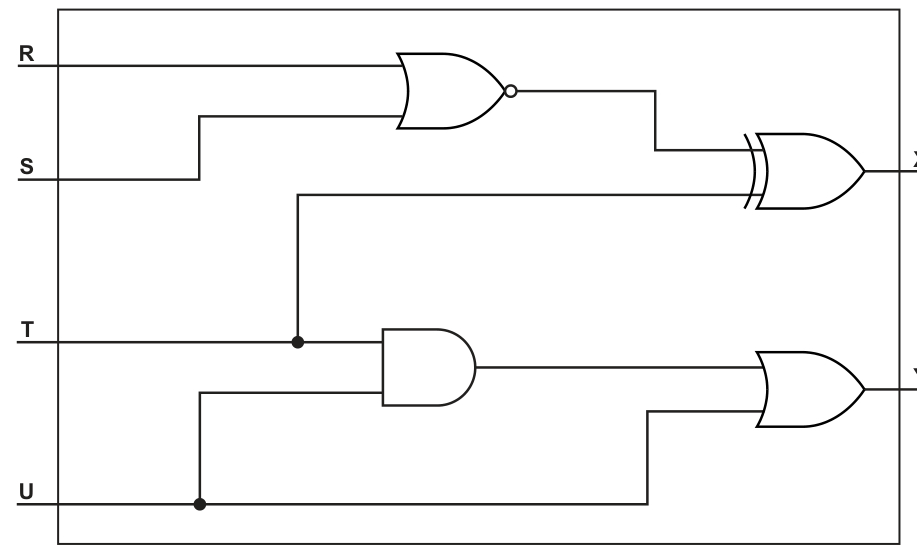
X = ............................................................................................................................................
Y = ............................................................................................................................................
Answer
X = (NOT(R OR S)) XOR T; Y = (T AND U) OR U
Background Concept
A logic circuit can be converted into a logic expression by reading each gate in stages.
- An OR gate gives 1 if either input is 1.
- An AND gate gives 1 only if both inputs are 1.
- A NOT inverts a value.
- A NOR gate means NOT OR, so its output is the inverse of an OR gate.
- An XOR gate gives 1 only when its two inputs are different.
The usual method is to start from the left of the circuit, work out the output of each gate, and then use that output as part of the next gate's expression.
Understanding the Question
The circuit has four inputs: R, S, T and U, and two outputs: X and Y.
You are asked to write the logic expression for each output, based on the gates and connections shown.
So the task is not to simplify the expression as far as possible unless needed; it is mainly to convert the circuit into the correct Boolean form.
Approach
For each output:
- Identify the gate closest to the inputs.
- Write the expression for that gate.
- Follow the wire to the next gate.
- Substitute the earlier expression into the later one.
This gives the final expression for the output.
Step-by-Step Reasoning
For X:
- Inputs
RandSgo into a NOR gate. - OR first gives
R OR S. - NOR means invert that result, so this becomes
NOT(R OR S). - That result goes into an XOR gate with input
T. - Therefore:
For Y:
- Inputs
TandUgo into an AND gate. - That gives
T AND U. - The output of that AND gate goes into an OR gate.
- The other input to that OR gate is
Udirectly. - Therefore:
A simplified form of Y would be just U, because U OR (T AND U) always equals U, but when reading directly from the circuit, the unsimplified expression is the clearest match.
Key Takeaways
- Read logic circuits one gate at a time from input to output.
- A NOR gate is written as
NOT(A OR B). - When a gate output feeds another gate, use the first expression inside the second.
- The circuit expression does not always need to be simplified unless the question asks for simplification.
Common Mistakes
- Writing NOR as just
R OR Sand forgetting the NOT. - Confusing XOR with OR. XOR is true only when the inputs are different.
- Missing a branch in the circuit, especially where one input feeds two different gates.
- Over-simplifying too early and then losing sight of how the circuit is actually connected.
Things to Be Careful About
- Make sure brackets are used correctly, especially in
NOT(R OR S). - Keep the order of operations clear: the NOR output is formed first, then XOR with
T. - For
Y, include both inputs to the final OR gate: the directUpath and theT AND Upath. - Do not replace logic operators with arithmetic symbols unless that notation has been used consistently.
Complete the truth table for the logic expression:
| A | B | C | Working space | X |
|---|---|---|---|---|
| 0 | 0 | 0 | ||
| 0 | 0 | 1 | ||
| 0 | 1 | 0 | ||
| 0 | 1 | 1 | ||
| 1 | 0 | 0 | ||
| 1 | 0 | 1 | ||
| 1 | 1 | 0 | ||
| 1 | 1 | 1 |
Answer
| A | B | C | Working space | X |
|---|---|---|---|---|
| 0 | 0 | 0 | 0 | 1 |
| 0 | 0 | 1 | 0 | 1 |
| 0 | 1 | 0 | 0 | 1 |
| 0 | 1 | 1 | 0 | 1 |
| 1 | 0 | 0 | 0 | 1 |
| 1 | 0 | 1 | 1 | 0 |
| 1 | 1 | 0 | 1 | 0 |
| 1 | 1 | 1 | 0 | 1 |
See completed truth table
Background Concept
A truth table lists every possible combination of binary inputs and shows the resulting output.
For three inputs A, B and C, there are:
possible rows.
This question uses the expression:
Important logic rules here are:
- XOR gives 1 when the two inputs are different, and 0 when they are the same.
- AND gives 1 only when both inputs are 1.
- NOT flips 0 to 1 and 1 to 0.
So the expression is evaluated from the inside out:
- Find
B XOR C - Find
A AND (B XOR C) - Apply
NOTto that result
Understanding the Question
You must complete the truth table for the given expression for all eight input combinations of A, B and C.
The table includes one working column. A sensible use of that column is to write the value of:
because the final output X is just the NOT of that value.
Approach
Go row by row.
For each row:
- Compare
BandCto getB XOR C. - Use
Aand that result to get the AND value. - Put the AND value in the working-space column.
- Invert it to get
X.
This method is systematic and avoids mistakes with the brackets.
Step-by-Step Reasoning
We evaluate each row.
Row 1: A=0, B=0, C=0
B XOR C = 0 XOR 0 = 0A AND (B XOR C) = 0 AND 0 = 0X = NOT 0 = 1
Row 2: A=0, B=0, C=1
B XOR C = 0 XOR 1 = 1A AND (B XOR C) = 0 AND 1 = 0X = NOT 0 = 1
Row 3: A=0, B=1, C=0
B XOR C = 1 XOR 0 = 1A AND (B XOR C) = 0 AND 1 = 0X = NOT 0 = 1
Row 4: A=0, B=1, C=1
B XOR C = 1 XOR 1 = 0A AND (B XOR C) = 0 AND 0 = 0X = NOT 0 = 1
Row 5: A=1, B=0, C=0
B XOR C = 0 XOR 0 = 0A AND (B XOR C) = 1 AND 0 = 0X = NOT 0 = 1
Row 6: A=1, B=0, C=1
B XOR C = 0 XOR 1 = 1A AND (B XOR C) = 1 AND 1 = 1X = NOT 1 = 0
Row 7: A=1, B=1, C=0
B XOR C = 1 XOR 0 = 1A AND (B XOR C) = 1 AND 1 = 1X = NOT 1 = 0
Row 8: A=1, B=1, C=1
B XOR C = 1 XOR 1 = 0A AND (B XOR C) = 1 AND 0 = 0X = NOT 0 = 1
So the working-space column values are:
0, 0, 0, 0, 0, 1, 1, 0
and the final X values are:
1, 1, 1, 1, 1, 0, 0, 1
Key Takeaways
- For a nested Boolean expression, evaluate the innermost bracket first.
- XOR is true only when the two inputs differ.
- Using a working column for the intermediate result makes the final NOT step easy.
- A three-variable truth table always has 8 rows.
Common Mistakes
- Treating XOR as OR. For example,
1 XOR 1is0, not1. - Applying NOT to only part of the expression instead of to the whole
A AND (B XOR C)result. - Ignoring the brackets and doing the operations in the wrong order.
- Copying one row incorrectly because the rows are not checked one by one.
Things to Be Careful About
- Keep the row order exactly as given in the table.
- Use the working-space column consistently; here it represents
A AND (B XOR C). - Remember that if
A=0, the AND result must be 0 regardless ofB XOR C. - Check rows where
BandCare equal, because XOR should then be 0.
An online game has a database that stores data about users and the characters each user creates in the game. Each user can create multiple characters and purchase multiple items for each character.
The normalised database has the following design:
USER(Username, Password, DateOfBirth)
CHARACTER(CharacterName, CharacterID, Username, Level, Money)
ITEM(ItemName, MinimumLevel, Cost)
CHARACTER_ITEM(CharacterID, ItemName)
Explain the purpose of the table CHARACTER_ITEM in the database.
...................................................................................................................................................
...................................................................................................................................................
...................................................................................................................................................
.............................................................................................................................................
Answer
CHARACTER_ITEMis a linking table betweenCHARACTERandITEM.- It stores each item bought by each character, so it resolves the many-to-many relationship between characters and items.
It is a linking table that stores which items each character has purchased, resolving the many-to-many relationship between CHARACTER and ITEM.
Background Concept
In a relational database, a many-to-many relationship cannot usually be stored directly in a single table without causing repetition and possible anomalies. Instead, a separate linking table, also called a junction table or associative entity, is used.
A linking table contains foreign keys from the two related tables. Each row represents one association between one record in the first table and one record in the second table.
Here, one character can buy many items, and the same item can be bought by many different characters. That means CHARACTER and ITEM have a many-to-many relationship.
Understanding the Question
The question gives a normalised design with four tables:
USERCHARACTERITEMCHARACTER_ITEM
You are asked to explain the purpose of CHARACTER_ITEM.
The important clue is in the scenario: each user can create multiple characters and each character can purchase multiple items. Also, the same item name can appear for many characters. So the question is really asking why this extra table is needed instead of just storing item data directly inside CHARACTER.
Approach
To answer this well, identify:
- which two tables are being linked
- what relationship exists between them
- what the linking table stores
- why that is useful in a normalised database
A full-mark answer needs both ideas: that it links CHARACTER to ITEM, and that it handles the many-to-many relationship by storing each purchase/association.
Step-by-Step Reasoning
CHARACTER_ITEM(CharacterID, ItemName) contains:
CharacterID, which identifies a characterItemName, which identifies an item
So each row means: this particular character owns or purchased this particular item.
For example, if character 0002 bought Shield, a row such as (0002, Shield) would be stored.
Why not put all items inside CHARACTER? Because one character can have many items. If you tried to store multiple item names in one field, that would break good relational design. If you repeated character data for every item, you would create redundancy.
The linking table solves that by storing one row per character-item association.
That is why the best explanation is:
- it is a linking table
- it resolves the many-to-many relationship
- it records which items each character has purchased
Key Takeaways
- A linking table is used to implement a many-to-many relationship.
- Each row in the linking table represents one connection between two entities.
- Normalised database designs use linking tables to avoid redundancy and keep data well structured.
Common Mistakes
- Saying only that it "stores items" without mentioning the link between
CHARACTERandITEM. - Saying it links
USERtoITEM; the table actually links characters to items. - Forgetting to mention the many-to-many relationship.
- Describing it as a duplicate table rather than a junction table.
Things to Be Careful About
- Use the table names from the question exactly:
CHARACTER_ITEMlinksCHARACTERandITEM. - The purpose is not just storage, but storage of associations.
- In exam answers, include the phrase "many-to-many relationship" if it applies, because that is usually a key marking point.
Underline the attribute, or attributes, that form the primary key in each of the tables.
USER(Username, Password, DateOfBirth)
CHARACTER(CharacterName, CharacterID, Username, Level, Money)
ITEM(ItemName, MinimumLevel, Cost)
CHARACTER_ITEM(CharacterID, ItemName)
Answer
USER(Username, Password, DateOfBirth)
CHARACTER(CharacterName, CharacterID, Username, Level, Money)
ITEM(ItemName, MinimumLevel, Cost)
CHARACTER_ITEM(CharacterID, ItemName)
Username; CharacterID; ItemName; CharacterID and ItemName
Background Concept
A primary key is the attribute, or combination of attributes, that uniquely identifies each record in a table.
A primary key must be:
- unique for every record
- not null
- stable enough to identify the record reliably
Some tables use a single-attribute primary key, such as Username or CharacterID. A linking table often uses a composite primary key, made from two attributes together.
Understanding the Question
You are given four table definitions and asked to identify the primary key in each one.
That means you need to decide which attribute uniquely identifies one row in each table.
The last table, CHARACTER_ITEM, is especially important because it is a linking table. In many relational designs, the pair of foreign keys together forms the primary key.
Approach
For each table, ask:
- which field would be unique for each record?
- if no single field is enough, do two fields together make a unique combination?
Then mark the correct attribute or attributes.
Step-by-Step Reasoning
USER(Username, Password, DateOfBirth)
Username is the best primary key because each user must have a unique username. Password and date of birth are not suitable because multiple users could share them.
CHARACTER(CharacterName, CharacterID, Username, Level, Money)
CharacterID is the best primary key because it is an ID field intended to uniquely identify each character. CharacterName may not be unique, and the other fields definitely are not unique identifiers.
ITEM(ItemName, MinimumLevel, Cost)
ItemName is used as the identifier in this design. It appears in the linking table, so it is acting as the unique key for items.
CHARACTER_ITEM(CharacterID, ItemName)
This table records which character has which item. A character can appear many times, once for each item, and an item can appear many times, once for each character. So neither CharacterID alone nor ItemName alone is unique.
However, the pair (CharacterID, ItemName) together identifies one specific character-item record. So this is a composite primary key.
Key Takeaways
- A primary key uniquely identifies each row.
- ID fields are often primary keys.
- Linking tables commonly use a composite primary key made from the linked keys.
Common Mistakes
- Choosing
CharacterNameinstead ofCharacterID. - Choosing only one field in
CHARACTER_ITEMinstead of both fields together. - Selecting a field such as
PasswordorCost, which clearly cannot uniquely identify records. - Forgetting that a linking table often has a composite key.
Things to Be Careful About
- The question asks for the attribute or attributes, so more than one may be needed.
- Read the actual schema given, not what you expect from another database design.
- In this design,
ItemNameis being used as the key forITEMbecause it is the attribute referenced inCHARACTER_ITEM.
A Database Management System (DBMS) provides data security.
Identify two methods the DBMS can use to protect the data in the table USER from unauthorised access.
Explain how each method protects the data.
Method 1 ...........................................................................................................................
Explanation .......................................................................................................................
...........................................................................................................................................
...........................................................................................................................................
Method 2 ...........................................................................................................................
Explanation .......................................................................................................................
...........................................................................................................................................
...........................................................................................................................................
Answer
-
Method 1: User IDs and passwords
- Users must log in before accessing the database, so only authenticated users can access the
USERtable.
- Users must log in before accessing the database, so only authenticated users can access the
-
Method 2: Access rights / permissions
- The DBMS can restrict which users can view or change the
USERtable, so unauthorised users cannot access the data.
- The DBMS can restrict which users can view or change the
User IDs and passwords; access rights or permissions
Background Concept
Data security is about preventing unauthorised access, alteration or deletion of data. In a DBMS, this is usually done through a combination of authentication and authorisation.
- Authentication checks who the user is.
- Authorisation decides what that user is allowed to do.
A DBMS often provides built-in tools such as user accounts, passwords, roles, permissions and access levels.
Understanding the Question
The question is specifically about protecting the USER table from unauthorised access.
That means the answer should focus on methods that stop people who should not see or edit the data from doing so. The USER table is especially sensitive because it contains usernames, passwords and dates of birth.
You must give two methods and explain how each protects the data, so naming methods alone is not enough.
Approach
Choose two clear DBMS security measures that directly control access:
- a way to verify identity
- a way to restrict permissions after login
These correspond to:
- user IDs and passwords
- access rights or permissions
Then explain the protection each provides.
Step-by-Step Reasoning
Method 1: User IDs and passwords
A DBMS can require a valid login before anyone can use the database. This means only users with the correct credentials can get in.
Why this protects the USER table:
- it blocks anonymous access
- it checks identity before allowing access
- someone without the correct login details cannot open or query the table
Method 2: Access rights / permissions
Even after logging in, not every user should be able to read or edit every table. The DBMS can assign permissions, for example:
- read only
- insert
- update
- delete
- no access
Why this protects the USER table:
- only authorised users are given permission to view or change it
- other users can be denied access entirely
- sensitive data is hidden from users who do not need it
Together, these two methods provide stronger protection because one checks identity and the other limits actions.
Key Takeaways
- Authentication answers: who are you?
- Authorisation answers: what are you allowed to do?
- A secure DBMS uses both to protect sensitive tables.
Common Mistakes
- Naming a method without explaining how it protects the data.
- Giving a network security measure such as a firewall without relating it to the DBMS table access.
- Repeating the same idea twice, for example "password" and "login" as if they were different methods.
- Saying "encryption" without explaining that it makes data unreadable without the correct key.
Things to Be Careful About
- The question is about unauthorised access, so the explanation must mention stopping unauthorised users.
- Keep the methods distinct: one can be authentication, the other permissions.
- If you use another valid method such as encryption, you must still explain exactly how it protects the table data.
The DBMS also supports data integrity.
Give two ways that a DBMS can support data integrity.
1 ........................................................................................................................................
...........................................................................................................................................
2 ........................................................................................................................................
...........................................................................................................................................
Answer
-
Validation rules can be used to check entered data is sensible and in the correct format before it is stored.
-
Primary key and foreign key constraints can be used to maintain referential integrity, preventing duplicate records and invalid links between tables.
Validation rules; primary key and foreign key constraints
Background Concept
Data integrity means that data remains accurate, valid and consistent. A DBMS helps maintain integrity by enforcing rules on what can be stored and how tables relate to each other.
Two common integrity mechanisms are:
- validation: checks that input data is sensible and correctly formatted
- integrity constraints: rules involving keys and relationships that keep the database consistent
Understanding the Question
You are asked for two ways a DBMS supports data integrity.
This is broader than security. It is not about stopping unauthorised users; it is about making sure the data itself stays correct and consistent.
So suitable answers are features such as validation checks and key constraints.
Approach
Pick two different integrity-support features:
- one that checks individual data values before storage
- one that checks relationships or uniqueness across the database
That gives a balanced answer and matches what DBMSs commonly do.
Step-by-Step Reasoning
1. Validation rules
The DBMS can apply validation when data is entered or updated. Examples include:
- type checks
- format checks
- range checks
- length checks
- presence checks
Why this supports integrity:
- incorrect data is rejected before being stored
- stored values are more likely to be accurate and meaningful
- consistency improves because all values follow the same rules
For example, a date of birth should be stored in a valid date format.
2. Primary key and foreign key constraints
The DBMS can enforce key rules automatically.
- A primary key must be unique, so duplicate records are prevented.
- A foreign key must match an existing related record, so invalid references are prevented.
Why this supports integrity:
- records stay uniquely identifiable
- relationships between tables remain valid
- orphan records and inconsistent links are avoided
For example, a row in CHARACTER_ITEM should not contain a CharacterID that does not exist in CHARACTER.
Key Takeaways
- Data integrity is about correctness and consistency of data.
- Validation checks the correctness of individual values.
- Key constraints protect uniqueness and valid relationships.
Common Mistakes
- Giving security methods such as passwords instead of integrity methods.
- Saying only "use validation" without explaining what it achieves.
- Confusing validation with verification.
- Mentioning normalisation as if the DBMS performs it automatically during everyday operation.
Things to Be Careful About
- The question asks how a DBMS supports integrity, so focus on DBMS-enforced rules and checks.
- Validation and referential integrity are different ideas; avoid repeating the same point in two forms.
- If you mention keys, explain both the uniqueness and relationship aspect clearly.
Write a Structured Query Language (SQL) script to count the number of items purchased by the user with the username "KAT123".
...........................................................................................................................................
...........................................................................................................................................
...........................................................................................................................................
...........................................................................................................................................
...........................................................................................................................................
...........................................................................................................................................
.....................................................................................................................................
Answer
SELECT COUNT(*)
FROM CHARACTER, CHARACTER_ITEM
WHERE CHARACTER.CharacterID = CHARACTER_ITEM.CharacterID
AND Username = "KAT123";
See SQL script
Background Concept
An SQL SELECT query can retrieve data from one or more tables. When the data needed is spread across related tables, a join condition is required.
An aggregate function such as COUNT(*) counts how many rows match the conditions.
In a relational database, joins are often based on a primary key in one table matching a foreign key in another.
Understanding the Question
You need to count the number of items purchased by the user with username KAT123.
From the schema:
CHARACTERcontainsUsernameandCharacterIDCHARACTER_ITEMcontainsCharacterIDandItemName
So the username is not stored directly in CHARACTER_ITEM. That means you cannot count items using only one table. You must connect the user's characters to the items owned by those characters.
Approach
The path through the tables is:
- find all records in
CHARACTERwhereUsername = "KAT123" - match those characters to rows in
CHARACTER_ITEMusingCharacterID - count the matching rows
That means the query needs:
COUNT(*)- both tables in the
FROM - a join condition on
CharacterID - a filter on
Username
Step-by-Step Reasoning
Start with the task: count items.
So the SELECT clause should use:
SELECT COUNT(*)
Next, identify the tables needed:
CHARACTERis needed because it containsUsernameCHARACTER_ITEMis needed because it records purchased items
So:
FROM CHARACTER, CHARACTER_ITEM
Now add the join condition. This ensures rows from the two tables are correctly matched by character:
WHERE CHARACTER.CharacterID = CHARACTER_ITEM.CharacterID
Finally, restrict the result to the required user:
AND Username = "KAT123"
Then COUNT(*) returns the number of matching purchase rows.
If the user has multiple characters, the query still works because all matching character records are joined to their purchased items and all those item rows are counted.
Key Takeaways
- Use a join when the required data is split across related tables.
- Use
COUNT(*)to count matching rows. - Follow the foreign key path through the schema to build the query correctly.
Common Mistakes
- Querying only
USERor onlyCHARACTER_ITEM. - Forgetting the join condition, which would create a Cartesian product and an incorrect count.
- Counting characters instead of counting purchased item rows.
- Filtering on
CharacterID = "KAT123"instead ofUsername = "KAT123".
Things to Be Careful About
- The username is stored in
CHARACTER, notCHARACTER_ITEM. - The item count is based on rows in
CHARACTER_ITEMafter joining. - Use the attribute and table names exactly as given in the schema.
- In some SQL dialects there are other valid join styles, but the logic must still be the same.
The following changes need to be made to the character with the ID "0002":
• level changed to 3
• money changed to 10000.00
Write an SQL script to change the character’s data.
...........................................................................................................................................
...........................................................................................................................................
...........................................................................................................................................
...........................................................................................................................................
...........................................................................................................................................
.....................................................................................................................................
Answer
UPDATE CHARACTER
SET Level = 3, Money = 10000.00
WHERE CharacterID = "0002";
See SQL script
Background Concept
An SQL UPDATE statement changes existing data in a table.
The basic structure is:
UPDATE TableName
SET Field1 = value1, Field2 = value2
WHERE KeyField = keyValue;
The SET clause gives the new values. The WHERE clause is crucial because it identifies which record or records should be changed.
Understanding the Question
You are told to change the data for the character with ID 0002:
Levelbecomes3Moneybecomes10000.00
This means you must update one specific row in the CHARACTER table and change two fields in that row.
Approach
Use one UPDATE statement:
- specify the table:
CHARACTER - set both new values in the
SETclause - use
WHERE CharacterID = "0002"so only that character is changed
Step-by-Step Reasoning
The table being changed is CHARACTER, so begin with:
UPDATE CHARACTER
Two attributes need new values, so use one SET clause with both assignments separated by a comma:
SET Level = 3, Money = 10000.00
Now identify the correct row. CharacterID is the primary key for the table, so it uniquely identifies the character:
WHERE CharacterID = "0002";
Putting these together gives a complete script that updates exactly one record.
Key Takeaways
UPDATEchanges existing records.SETcan change multiple fields at once.WHERElimits the update to the correct record.
Common Mistakes
- Forgetting the
WHEREclause, which would update every row in the table. - Writing two separate
UPDATEstatements when one is enough. - Using the wrong key field.
- Putting text quotes around numeric values unnecessarily in a way that does not match the schema.
Things to Be Careful About
- Always include the correct identifier:
CharacterID = "0002". - Separate multiple assignments in
SETwith a comma. - Make sure you are updating the
CHARACTERtable, notUSERorCHARACTER_ITEM. - In an exam, exact SQL syntax matters:
UPDATE, thenSET, thenWHERE.
A company has multiple sites in different cities.
The company has drivers who deliver products to customers. Each driver can connect to the company’s WAN (Wide Area Network) whilst out of the office using a smartphone.
State two ways that a WAN is different to a LAN (Local Area Network).
1 ................................................................................................................................................
...................................................................................................................................................
2 ................................................................................................................................................
...................................................................................................................................................
Answer
- A WAN covers a much larger geographical area, often across different cities or countries, whereas a LAN covers a small area such as one building or site.
- A WAN usually uses third-party/public communication links, whereas a LAN is normally owned and managed by one organisation on its own premises.
A WAN covers a larger geographical area and typically uses third-party/public links; a LAN covers a small local area and is usually owned and managed by one organisation.
Background Concept
A LAN (Local Area Network) connects devices over a small geographical area, such as a room, office, school or single building. A WAN (Wide Area Network) connects devices and networks over much larger distances, for example between cities, regions or countries.
The main differences usually tested are:
- coverage area — LAN is local, WAN is wide-area
- ownership — LAN is usually owned by one organisation, WAN often relies on leased or public telecommunications infrastructure
- speed/cost — LANs are often faster and cheaper to run locally; WANs are usually more expensive and may have higher latency
For a short "state two ways" question, each point must be a clear difference, not two versions of the same idea.
Understanding the Question
The question asks for two ways a WAN differs from a LAN. The context mentions a company with multiple sites in different cities, which strongly suggests the idea of a WAN spanning long distances.
You are not being asked to define each network fully. You only need two valid contrasts.
Approach
Pick two standard contrasts that are easy to state precisely:
- geographical area covered
- how the network links are provided/owned
These are the safest answers because they are universally accepted in Cambridge mark schemes.
Step-by-Step Reasoning
A good first point is about size of area:
- LAN: local area, such as one office or building
- WAN: large area, such as multiple cities or countries
A good second point is about infrastructure:
- LAN: usually set up and controlled internally by the organisation
- WAN: usually uses external communication links provided by telecoms companies or ISPs
Both points are distinct, so they can each earn a mark.
Key Takeaways
- A LAN is for a small local area.
- A WAN connects over large distances.
- WANs often depend on third-party communication infrastructure.
Common Mistakes
- Giving only one difference written in a long sentence.
- Repeating the same point twice, for example saying WAN is "bigger" and "covers more distance".
- Describing examples without stating the actual difference.
Things to Be Careful About
- The question says state two ways, so make sure there are two separate points.
- Keep each difference direct and comparative.
- Do not drift into unrelated points such as topology or IP addressing unless they clearly answer the difference asked.
The smartphones use the cell phone network to connect to the WAN.
Explain how data is transmitted using the cell phone network.
...................................................................................................................................................
...................................................................................................................................................
...................................................................................................................................................
...................................................................................................................................................
...................................................................................................................................................
...................................................................................................................................................
...................................................................................................................................................
.............................................................................................................................................
Answer
- The area is divided into cells, each with its own base station / transmitter-receiver mast.
- The smartphone sends and receives data wirelessly using radio / microwave signals to the nearest base station.
- The base station passes the data through the telephone network to the destination network / another base station.
- As the driver moves, the connection is handed over from one cell to another so communication continues.
Data is sent by radio between the smartphone and the nearest cell base station, then routed through the mobile phone network, with handover between cells as the device moves.
Background Concept
A cell phone network is called a cellular network because the coverage area is split into many small regions called cells. Each cell is served by a base station (also called a cell tower or mast) that can transmit and receive wireless signals.
A smartphone does not connect directly to the whole WAN. It first connects wirelessly to the nearest base station using radio waves. After that, the mobile provider's infrastructure carries the data onward through its network until it reaches the required destination.
A key idea is handover: when a moving device leaves one cell and enters another, the connection is transferred so the communication is not broken.
Understanding the Question
The question specifically asks how data is transmitted using the cell phone network. So this is not just asking you to name "wireless". You need to explain the path:
- cells
- smartphone to mast
- mast through the mobile network
- continued connection when moving
Because the drivers are out of the office, movement between areas is an important clue that handover is relevant.
Approach
A full-mark answer should describe the process in stages:
- the area is divided into cells
- each cell has a base station
- the smartphone transmits data by radio to the nearest base station
- the mobile network forwards the data onward
- if the phone moves, the network hands the connection to another cell
This gives a logical chain from device to network.
Step-by-Step Reasoning
First, explain the structure of the network:
- The provider's coverage is not one giant transmitter.
- Instead, the region is split into many smaller cells.
- Each cell has equipment that manages communication for devices in that area.
Next, explain the actual transmission from the phone:
- The smartphone uses a wireless signal.
- In syllabus language, this is usually accepted as radio waves or sometimes microwaves.
- The phone communicates with the nearest base station for its current location.
Then explain what happens after the base station receives the data:
- The base station does not keep the data.
- It passes the data into the provider's network.
- From there, the data is routed towards the destination, such as the company's WAN or another device.
Finally, explain mobility:
- Because the driver is moving, the nearest mast may change.
- The network transfers the live connection from one cell to the next.
- This is why data transmission can continue while travelling.
That sequence is what the examiner wants.
Key Takeaways
- Cellular networks divide an area into cells.
- Each cell has a base station.
- Smartphones transmit wirelessly to the nearest base station.
- The provider's network then carries the data onward.
- Handover keeps the connection active while moving.
Common Mistakes
- Saying only "it uses wireless" with no further explanation.
- Confusing Wi-Fi with the cell phone network.
- Forgetting to mention the role of the base station / mast.
- Forgetting that a moving device may switch between cells.
Things to Be Careful About
- Use correct network terms such as cell, base station, radio waves and handover.
- Do not say the phone connects directly to the WAN without the mobile network in between.
- If you mention packets, that is fine, but you still need the cellular transmission explanation itself.
Devices that connect to the WAN have an IP address.
Complete the following description of IP addresses by writing the missing words.
IPv4 is displayed as four groups of 8-bit numbers separated by ........................................ .
Each IPv4 address is 32 bits.
IPv6 is made of eight groups of 4 ........................................ numbers separated by colons.
Multiple consecutive groups of ........................................ can be replaced with a double colon.
Each IPv6 address is ........................................ bits.
A ........................................ IP address can change each time the computer connects to a network.
A ........................................ IP address can only be accessed by other devices in the same LAN and is assigned by the router within the LAN.
Answer
- dots
- hexadecimal
- zeros
- 128
- dynamic
- private
dots, hexadecimal, zeros, 128, dynamic, private
Background Concept
An IP address identifies a device on a network.
IPv4
IPv4 addresses are 32 bits long. They are usually written in four 8-bit groups. In normal display format, these groups are shown as denary values separated by dots.
Example: 192.168.1.10
IPv6
IPv6 addresses are 128 bits long. They are written as eight groups, and each group contains 4 hexadecimal digits. The groups are separated by colons.
Example: 2001:0db8:0000:0000:0000:ff00:0042:8329
IPv6 has a shorthand rule: if there are multiple consecutive groups of zeros, they may be replaced by :: once in an address.
Dynamic and private addresses
- A dynamic IP address can change, often each time a device connects.
- A private IP address is used inside a LAN and is not directly reachable from the wider internet.
Understanding the Question
This part is a fill-in-the-blanks exercise on standard IP addressing facts. Each blank has one precise expected word.
The clues are:
- IPv4 formatting
- IPv6 group contents and length
- IPv6 zero compression
- types of IP address: dynamic and private
So accuracy of wording matters more than long explanations.
Approach
Match each blank to the standard rule:
- IPv4 separators
- IPv6 digit type
- repeated groups that can be compressed
- total IPv6 size in bits
- address type that changes on reconnection
- address type used only within a LAN
Step-by-Step Reasoning
Blank 1: IPv4 is displayed as four groups separated by dots.
- IPv4 is commonly called dotted decimal notation.
- So the missing word is dots.
Blank 2: IPv6 is made of eight groups of 4 hexadecimal numbers.
- Each group is represented in base 16.
- So the correct word is hexadecimal.
Blank 3: Multiple consecutive groups of zeros can be replaced with a double colon.
- Example:
2001:db8::1 - So the word is zeros.
Blank 4: Each IPv6 address is 128 bits.
- IPv4 is 32 bits, IPv6 is 128 bits.
Blank 5: A dynamic IP address can change each time the computer connects.
- This is the opposite of a static address.
Blank 6: A private IP address can only be accessed by devices in the same LAN and is assigned by the router.
- This describes the internal address used within the local network.
Key Takeaways
- IPv4: 32 bits, 4 groups, separated by dots.
- IPv6: 128 bits, 8 groups of hexadecimal digits, separated by colons.
- IPv6 can compress repeated zero groups using
::. - Dynamic addresses can change.
- Private addresses are used only inside a LAN.
Common Mistakes
- Writing colons for IPv4 instead of dots.
- Writing binary instead of hexadecimal for IPv6 display.
- Forgetting that the compressed groups are groups of zeros.
- Mixing up dynamic and static.
- Mixing up private and public IP addresses.
Things to Be Careful About
- The question asks for the displayed form, not the raw binary form.
- For IPv6, the expected word is hexadecimal, not just "letters and numbers".
- A private IP address is valid inside a LAN but is not directly accessible from outside it.
::can compress consecutive zero groups, but in real IPv6 notation it should only be used once per address.
The main office for the company has four wired computers, one server, two printers, one central switch and a device providing a single point of access for the internet. The network is set up as a star topology.
Draw the topology for the main office network. Label all devices.
Answer
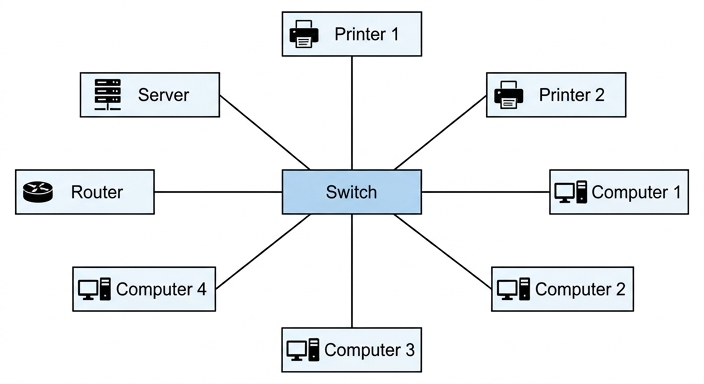
See topology diagram
Background Concept
A star topology is a network layout in which every device has its own direct connection to a single central device. In a wired office LAN, that central device is commonly a switch.
This means:
- every computer, printer and server connects directly to the switch
- devices are not connected to each other in a chain
- if one cable fails, only that device is affected, not the whole network
In this question, the device providing a single point of access to the internet is effectively the router, and it also connects directly to the switch.
Understanding the Question
The question gives all the devices that must appear:
- 4 wired computers
- 1 server
- 2 printers
- 1 central switch
- 1 device providing internet access
It also states the network is set up as a star topology, so the switch must be in the centre and every other device must have its own separate line to it.
Approach
The safest way to answer is:
- place the Switch in the centre
- place the Router and all end devices around it
- draw one direct line from each device to the switch
- label every device clearly
No device should be connected through another end device, because that would not be a pure star topology.
Step-by-Step Reasoning
Start with the topology rule:
- Star topology requires a central point.
- The question explicitly says there is a central switch, so that must go in the middle.
Now list the surrounding devices:
Computer 1Computer 2Computer 3Computer 4ServerPrinter 1Printer 2Router
Draw one line from each of those directly to the switch.
Why not connect, for example, a printer to a computer first? Because then the network would no longer match the star pattern. In a star, each node has its own spoke to the centre.
The exact physical positions around the switch are not the important part. What matters is:
- switch in the centre
- eight separate connections coming out from it
- all devices labelled
Key Takeaways
- In a star topology, all devices connect to one central device.
- In this case the central device is the switch.
- A correct network diagram must include both the structure and the labels.
Common Mistakes
- Putting the router in the centre instead of the switch.
- Joining devices to each other rather than to the switch.
- Forgetting one of the four computers or one of the printers.
- Leaving devices unlabeled.
Things to Be Careful About
- The question says wired computers, so the diagram should show physical cable links, not wireless symbols.
- The switch must be the central node because the question states there is a central switch and the topology is star.
- Make sure the internet access device is shown and labelled; here it is most appropriately labelled Router.
Describe the role of a switch in a network.
...................................................................................................................................................
...................................................................................................................................................
...................................................................................................................................................
...................................................................................................................................................
...................................................................................................................................................
.............................................................................................................................................
Answer
- A switch connects devices together on a LAN.
- It receives data from one device and checks the destination hardware / MAC address.
- It forwards the data only to the port connected to the correct device, reducing unnecessary traffic / collisions.
A switch connects devices on a LAN and forwards data to the correct port by using the destination MAC address, reducing unnecessary traffic.
Background Concept
A switch is a piece of network hardware used in a LAN to connect multiple devices together. It works mainly at the data link layer and forwards frames based on MAC addresses.
Each port on a switch can connect to a different device. The switch learns which MAC address is reachable through which port. When data arrives, the switch examines the destination MAC address and sends the frame only where it needs to go.
This is more efficient than older simple broadcast-style behaviour because it reduces unnecessary traffic on the network.
Understanding the Question
The question asks for the role of a switch, so you should describe what it does in the network, not just say where it is found.
A good answer needs to include:
- that it connects devices in the LAN
- that it looks at a destination address
- that it sends data to the correct port/device
That is the operational role the examiner is looking for.
Approach
Explain the switch in three stages:
- it is the central connection point for devices
- it receives data and checks the destination MAC address
- it forwards the data only to the required device/port, improving efficiency
This neatly matches a typical 3-mark mark scheme.
Step-by-Step Reasoning
First, state the basic purpose:
- A switch allows several devices such as computers, printers and servers to be connected in the same LAN.
Second, explain how it makes a forwarding decision:
- When a frame reaches the switch, it reads the destination MAC address.
- The switch keeps a table of which devices are on which ports.
Third, explain the result:
- Instead of sending the data to every device, it sends it only through the correct port.
- That reduces unnecessary traffic.
- It can also help reduce collisions compared with less intelligent forwarding methods.
So the switch is not just a cable hub; it actively directs traffic.
Key Takeaways
- A switch connects devices in a LAN.
- It uses MAC addresses to decide where to send data.
- It forwards data only to the correct port.
- This improves network efficiency.
Common Mistakes
- Confusing a switch with a router.
- Saying it uses an IP address instead of a MAC address for its normal forwarding role in a LAN.
- Saying it broadcasts every frame to all devices.
- Describing the internet connection role instead of the LAN connection role.
Things to Be Careful About
- For this syllabus, the key address type for a switch is the MAC address.
- A switch operates within the local network; a router connects between networks.
- If you mention collisions, keep it as an extra effect, not the only role of the switch.
The following table shows part of the instruction set for a processor. The processor has one register: the Accumulator (ACC).
| Instruction | Explanation |
|---|---|
| Opcode | Operand |
| LDD | <address> |
| LDM | #n |
| STO | <address> |
| ADD | #n/Bn/&n |
| ADD | <address> |
| INC | <register> |
| CMP | <address> |
| CMP | #n |
| JPE | <address> |
| JMP | <address> |
| END |
ACC denotes Accumulator
<address> can be an absolute or a symbolic address
denotes a denary number, e.g. #123
B denotes a binary number, e.g. B01001010
& denotes a hexadecimal number, e.g. &4A
The current contents of memory are:
| Address | Instruction |
|---|---|
| 10 | 12 |
| 11 | 11 |
| 12 | 10 |
| 13 | 22 |
| 14 | 22 |
| ... | |
| 100 | LDD 10 |
| 101 | ADD 12 |
| 102 | STO 11 |
| 103 | CMP 14 |
| 104 | JPE 107 |
| 105 | INC ACC |
| 106 | JMP 101 |
| 107 | STO 10 |
| 108 | END |
Trace the program currently in memory using the following trace table.
| Instruction address | ACC | Memory address | ||||
|---|---|---|---|---|---|---|
| 10 | 11 | 12 | 13 | 14 | ||
| 12 | 11 | 10 | 22 | 22 | ||
Working
100: LDD 10 so ACC = 12
101: ADD 12 so ACC = 12 + 10 = 22
102: STO 11 so address 11 becomes 22
103: CMP 14 compares 22 with 22, so compare is True
104: JPE 107 jumps to 107
107: STO 10 so address 10 becomes 22
108: END
Answer
| Instruction address | ACC | 10 | 11 | 12 | 13 | 14 |
|---|---|---|---|---|---|---|
| 12 | 11 | 10 | 22 | 22 | ||
| 100 | 12 | 12 | 11 | 10 | 22 | 22 |
| 101 | 22 | 12 | 11 | 10 | 22 | 22 |
| 102 | 22 | 12 | 22 | 10 | 22 | 22 |
| 103 | 22 | 12 | 22 | 10 | 22 | 22 |
| 104 | 22 | 12 | 22 | 10 | 22 | 22 |
| 107 | 22 | 22 | 22 | 10 | 22 | 22 |
| 108 | 22 | 22 | 22 | 10 | 22 | 22 |
See completed trace table
Background Concept
This is an assembly-language trace question. In a trace, you follow the program one instruction at a time and update the machine state after each instruction. Here the machine state consists of:
- the current instruction address being executed
- the contents of the accumulator,
ACC - the contents of the listed memory addresses
The key instruction types here are:
LDD <address>: load intoACCthe contents stored at that memory addressADD <address>: add the contents of that memory address toACCSTO <address>: copyACCinto that memory addressCMP <address>: compareACCwith the contents of that addressJPE <address>: jump if the previous compare was TrueJMP <address>: unconditional jumpEND: stop execution
A very important point is that CMP checks values but does not change ACC, and a jump instruction changes the next instruction address, not the data values.
Understanding the Question
You are given:
- the contents of memory locations
10to14 - the program stored from address
100onward - a blank trace table to complete
So the job is to simulate the program exactly as the processor would execute it. For every instruction that actually runs, you must show the value of ACC and any changed memory contents. Because there is a conditional jump, you also need to decide whether execution continues to 105 or jumps to 107.
Approach
The safest method is:
- Start from the first instruction at address
100. - Read what the instruction does.
- Update
ACCif needed. - Update memory if needed.
- For
CMP, determine whether the condition is True or False. - For
JPE, use that compare result to decide the next instruction. - Write a new row after each executed instruction.
The memory values at the start are:
10 = 1211 = 1112 = 1013 = 2214 = 22
Step-by-Step Reasoning
At address 100, the instruction is LDD 10.
LDD means load the contents of address 10 into ACC. Address 10 contains 12, so after this instruction:
ACC = 12- memory is unchanged
At address 101, the instruction is ADD 12.
This adds the contents of address 12 to ACC. Address 12 contains 10, so:
- old
ACC = 12 - add
10 - new
ACC = 22
Memory still does not change, because ADD only changes the accumulator.
At address 102, the instruction is STO 11.
This stores the current ACC value into address 11. Since ACC = 22, address 11 becomes 22.
Now the memory is:
10 = 1211 = 2212 = 1013 = 2214 = 22
At address 103, the instruction is CMP 14.
This compares ACC with the contents of address 14.
ACC = 22- address
14contains22
So the comparison is True. ACC does not change.
At address 104, the instruction is JPE 107.
Because the compare result was True, execution jumps to address 107. That means addresses 105 and 106 are not executed at all.
At address 107, the instruction is STO 10.
This stores ACC into address 10. Since ACC = 22, address 10 becomes 22.
At address 108, the instruction is END.
The program stops. ACC and memory stay as they were.
So the final important effects are:
ACCends at22- address
11changes from11to22 - address
10changes from12to22 - the jump skips
105and106
Key Takeaways
LDDuses the contents at an address, not the address number itself.CMPchecks a condition but does not alterACC.- Conditional jumps determine which instructions actually execute.
- In a trace table, only executed instructions appear as rows.
Common Mistakes
- Treating
LDD 10as loading the value10instead of the contents of address10. - Changing
ACCduringCMP; comparison does not modify the accumulator. - Filling rows for
105and106even though the jump at104skips them. - Forgetting that
STOchanges memory, notACC.
Things to Be Careful About
- Always distinguish between an address and the value stored at that address.
- After a successful
JPE, continue tracing from the jump destination, not the next line. - Keep unchanged memory values the same in later rows.
- If you include
ENDin the trace, it should show no further change toACCor memory.
State the effect of changing instruction LDD 10 in address 100 to LDM #10
...........................................................................................................................................
...........................................................................................................................................
.....................................................................................................................................
Answer
LDM #10loads the value10intoACCinstead of the contents of address10.- The compare with address
14is then not True, so the jump is not taken and the program loops indefinitely.
LDM #10 loads 10 directly, so the compare is not True and the program loops indefinitely.
Background Concept
This question is about addressing modes. An addressing mode tells the processor how to interpret the operand part of an instruction.
Two important modes here are:
- Direct addressing: the operand is a memory address, so the processor fetches the contents stored there.
- Immediate addressing: the operand is the actual value to use, written directly in the instruction.
So:
LDD 10means load the contents of address10LDM #10means load the literal number10
That difference is small in appearance but can completely change a program's behaviour.
Understanding the Question
You are asked for the effect of changing the first instruction from LDD 10 to LDM #10.
So you do not need a full new trace table, but you do need to work out what changes in the program's behaviour. The key is the very first value loaded into ACC, because every later calculation depends on it.
Approach
To answer this, compare the first step in the original program with the changed one:
- original: load contents of address
10 - changed: load literal
10
Then see how that affects:
- the value in
ACC - the result of the
CMP 14 - whether
JPE 107happens - whether the program ends or keeps looping
Step-by-Step Reasoning
Originally, address 10 contains 12, so LDD 10 makes ACC = 12.
After that:
ADD 12adds the contents of address12, which is10- so
ACCbecomes22 CMP 14compares22with the contents of address14, which is also22- compare is True
JPE 107jumps to107- the program eventually ends
With the changed instruction LDM #10, the processor loads the literal value 10 directly into ACC.
So now:
- after address
100,ACC = 10 - address
101adds the contents of address12, which is10 - so
ACC = 20 CMP 14compares20with22- compare is False
JPE 107is not taken
Execution therefore continues to:
105: INC ACCsoACCincreases by1106: JMP 101so the program jumps back and repeats
Because the value pattern no longer reaches the successful compare at the right point, the program keeps repeating instead of reaching END.
So the main effect is that immediate addressing changes the loaded value, which changes the compare result, which changes the control flow into an endless loop.
Key Takeaways
- Immediate addressing uses the value written in the instruction.
- Direct addressing uses the contents of a memory address.
- A one-instruction change can alter branching and make a terminating program become an infinite loop.
Common Mistakes
- Saying there is no change because both instructions mention
10; they do not mean the same thing. - Forgetting that
#10is the actual value, not an address. - Only stating the first
ACCchange and not the overall effect on the program flow.
Things to Be Careful About
- The
#symbol is the clue for immediate addressing. - When the first loaded value changes, all later arithmetic and comparisons may change too.
- The strongest exam answer mentions both the addressing-mode difference and the resulting infinite loop.
Identify and describe one mode of addressing not given in the table of instructions in part (a).
Mode of addressing ...........................................................................................................
Description ........................................................................................................................
...........................................................................................................................................
...........................................................................................................................................
Answer
- Mode of addressing: Indirect addressing
- Description: The operand gives the address of a memory location that contains the actual address of the data. The processor first looks up that address, then accesses the data from the second address.
Indirect addressing: the operand points to a memory location that holds the actual address of the data.
Background Concept
An addressing mode describes how an instruction finds the operand it needs. In other words, it tells the processor where the data comes from.
The question already gave:
- direct addressing: the operand is the address of the data
- immediate addressing: the operand is the actual data value
Another common addressing mode is indirect addressing.
In indirect addressing, the address written in the instruction is not the final location of the data. Instead, it points to a memory location that stores the real address to use. That real address is often called the effective address.
Understanding the Question
You must do two things:
- identify one addressing mode not already listed
- describe how it works
Because the question says "identify and describe one", you need both the name and a correct explanation. Naming a mode without explaining it would not gain full marks.
Approach
Pick a standard addressing mode that is definitely different from direct and immediate. Then describe it in a way that shows how the processor gets the operand.
Indirect addressing is a strong choice because it has a clear definition:
- first address lookup gets another address
- second address lookup gets the data
Step-by-Step Reasoning
If we choose indirect addressing, the explanation should make clear that there are two stages.
For example, suppose an instruction refers to address 50.
With direct addressing:
- the processor uses address
50as the operand location - it reads the data stored in address
50
With indirect addressing:
- the processor goes to address
50 - the value stored there is treated as another address
- the processor then goes to that second address
- the data at that second address is the actual operand
So if address 50 contains 120, and address 120 contains 37, then indirect addressing would eventually use 37 as the operand value.
That is why the description must mention that the instruction's address does not directly hold the data; it leads to the real address.
Key Takeaways
- Addressing modes define how operands are obtained.
- Direct addressing uses the given address immediately.
- Immediate addressing uses the value written in the instruction.
- Indirect addressing uses one memory location to find the real operand address.
Common Mistakes
- Describing indirect addressing as if it were direct addressing.
- Naming a mode such as indexed or relative but giving no description.
- Saying the operand contains the data when the chosen mode actually contains an address.
Things to Be Careful About
- The description must match the named mode.
- Use wording like "contains the address of the address" carefully; the clearest phrasing is that the first address stores the actual address of the data.
- Do not repeat direct or immediate addressing, because the question asks for a mode not already given.
The table shows part of the instruction set for a processor. The processor has one register: the Accumulator (ACC).
| Instruction | Explanation |
|---|---|
| Opcode | Operand |
| AND | #n/Bn/&n |
| AND | <address> |
| XOR | #n/Bn/&n |
| XOR | <address> |
| OR | #n/Bn/&n |
| OR | <address> |
<address> can be an absolute or symbolic address
denotes a denary number, e.g. #123
B denotes a binary number, e.g. B01001010
& denotes a hexadecimal number, e.g. &4A
The ACC currently contains the following binary value.
| 1 | 1 | 1 | 1 | 0 | 0 | 0 | 0 |
|---|
Write the result after the instruction OR B00001111 is run.
Working
11110000 OR 00001111 = 11111111
Answer
11111111
11111111
Background Concept
A bitwise OR operation compares two binary values bit by bit.
The OR rule is:
0 OR 0 = 00 OR 1 = 11 OR 0 = 11 OR 1 = 1
So OR produces 1 whenever at least one of the two bits is 1.
Understanding the Question
The accumulator already contains 11110000.
You then run OR B00001111.
That means you must OR the current 8-bit ACC value with the 8-bit operand 00001111, matching each bit position from left to right.
Approach
Write the two 8-bit values one under the other and compare each column.
Because the first four bits of the ACC are already 1, those stay 1. Because the last four bits of the operand are 1, those also become 1 in the result.
Step-by-Step Reasoning
Start with:
1111000000001111
Now compare each bit:
- first bit:
1 OR 0 = 1 - second bit:
1 OR 0 = 1 - third bit:
1 OR 0 = 1 - fourth bit:
1 OR 0 = 1 - fifth bit:
0 OR 1 = 1 - sixth bit:
0 OR 1 = 1 - seventh bit:
0 OR 1 = 1 - eighth bit:
0 OR 1 = 1
So every output bit is 1.
Result: 11111111
Key Takeaways
- OR sets a bit to
1if either input bit is1. - A common use of OR is forcing selected bits to
1. - Always keep the values aligned to the same number of bits.
Common Mistakes
- Confusing OR with XOR.
- Treating OR as ordinary addition.
- Misaligning the bits by not keeping both values as 8-bit numbers.
Things to Be Careful About
- Read
B00001111as a binary operand because of theBprefix. - Work bit by bit, not as a denary calculation.
- Keep leading zeroes, because bit positions matter.
The ACC currently contains the following binary value.
| 0 | 0 | 0 | 1 | 1 | 1 | 0 | 1 |
|---|
Write the result after the instruction XOR #30 is run.
Working
#30 = 00011110
00011101 XOR 00011110 = 00000011
Answer
00000011
00000011
Background Concept
A bitwise XOR operation also works bit by bit. Its rule is:
0 XOR 0 = 00 XOR 1 = 11 XOR 0 = 11 XOR 1 = 0
So XOR gives 1 only when the two bits are different.
In this question the operand is written as #30, which means denary 30. Before applying XOR, you must express 30 in binary.
Understanding the Question
The ACC contains 00011101.
The instruction is XOR #30.
So the task is:
- convert denary
30to 8-bit binary - XOR that binary value with
00011101 - write the 8-bit result
Approach
First convert 30 to binary:
30 = 16 + 8 + 4 + 2- so binary
30is11110 - as an 8-bit value this is
00011110
Then line up:
0001110100011110
and apply XOR to each bit position.
Step-by-Step Reasoning
Convert 30 to binary:
30 in 8-bit binary is 00011110.
Now do the XOR:
0001110100011110
Bit by bit:
0 XOR 0 = 00 XOR 0 = 00 XOR 0 = 01 XOR 1 = 01 XOR 1 = 01 XOR 1 = 00 XOR 1 = 11 XOR 0 = 1
So the final result is 00000011.
You can also notice a shortcut: the first six bits are the same in both numbers, so XOR makes them 0. Only the last two bits differ, so only those become 1.
Key Takeaways
- XOR outputs
1when the two bits differ. - Denary operands must be converted to binary before bitwise operations.
- Leading zeroes must be kept so that all 8 bit positions line up correctly.
Common Mistakes
- Forgetting to convert
#30from denary first. - Using OR rules instead of XOR rules.
- Dropping leading zeroes and misaligning the bit positions.
Things to Be Careful About
#30is denary, not binary.- Write the converted value as 8 bits:
00011110, not just11110. - Bitwise operations depend on position, so both values must have the same width.