Computer Science 9618/11 — May/June 2025
Cambridge AS Level · Theory Fundamentals · worked solutions for every part, with the mark scheme
Topics Hardware · Information Representation · Processor Fundamentals · Communication · Ethics and Ownership · Databases · +2 more
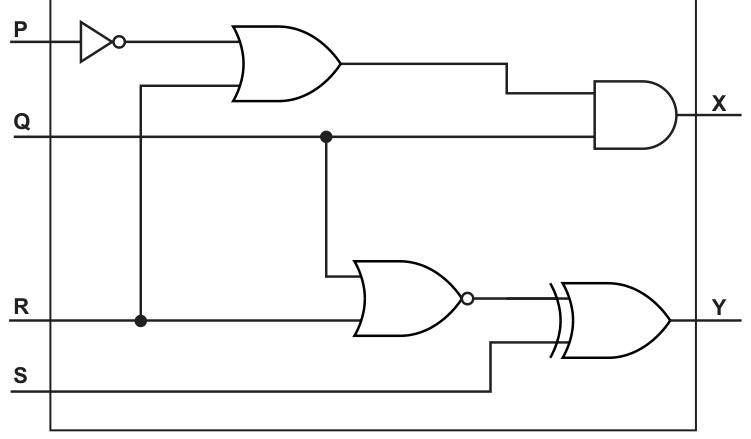
Write the logic expressions for the following logic circuit.
X = ............................................................................................................................................
Y = ............................................................................................................................................
Answer
X = ((NOT P) OR R) AND QY = (NOT(Q OR R)) XOR S
X = ((NOT P) OR R) AND Q; Y = (NOT(Q OR R)) XOR S
Background Concept
A logic circuit can be written as a Boolean expression by tracing each signal from the inputs to the output. Each gate has a direct logical meaning:
- NOT inverts a single input.
- AND is true only when both inputs are true.
- OR is true when at least one input is true.
- NOR means OR followed by NOT.
- XOR is true when the two inputs are different.
When a circuit has several stages, you write the expression one gate at a time. Brackets are important because they show which operation happens first.
Understanding the Question
The question gives one circuit with inputs P, Q, R and S, and asks for the expressions for the two outputs X and Y.
So the task is not to simplify anything. It is just to read the circuit correctly and convert what each branch does into a logic expression.
For X, the top half of the circuit must be followed.
For Y, the lower half of the circuit must be followed.
Approach
Start at the left and move right.
For each output:
- Find the first gate fed by the input lines.
- Write the expression produced by that gate.
- If that result goes into another gate, wrap it in brackets and continue.
- Stop when you reach the labelled output.
This method prevents missed inversions and missed brackets.
Step-by-Step Reasoning
For X:
- Input
Ppasses through a NOT gate, so this becomesNOT P. - That result and input
Rgo into an OR gate, giving:
((NOT P) OR R) - That output and input
Qgo into an AND gate, so:
X = ((NOT P) OR R) AND Q
For Y:
- Inputs
QandRgo into a NOR gate. - A NOR gate means OR first, then NOT, so this gives:
NOT(Q OR R) - That result and input
Sgo into an XOR gate, so:
Y = (NOT(Q OR R)) XOR S
That is all the question needs. No extra simplification is required.
Key Takeaways
- Convert a circuit into an expression by following the signal path gate by gate.
- A NOR gate is
NOT( ... OR ... ), not justNOT ... OR .... - Brackets matter in multi-stage expressions.
- XOR means the two inputs must be different.
Common Mistakes
- Writing
NOT P OR R AND Qwithout brackets, which makes the order unclear. - Treating NOR as just OR, and forgetting the inversion.
- Using the wrong variable at a gate input by tracing the wire incorrectly.
- Writing
NOT Q OR Rinstead ofNOT(Q OR R)for the NOR gate.
Things to Be Careful About
- Follow the wires, not just the vertical position of the inputs.
- Put brackets around any intermediate result that feeds another gate.
- Distinguish carefully between OR and XOR symbols.
- For NOR, the inversion applies to the whole OR result.
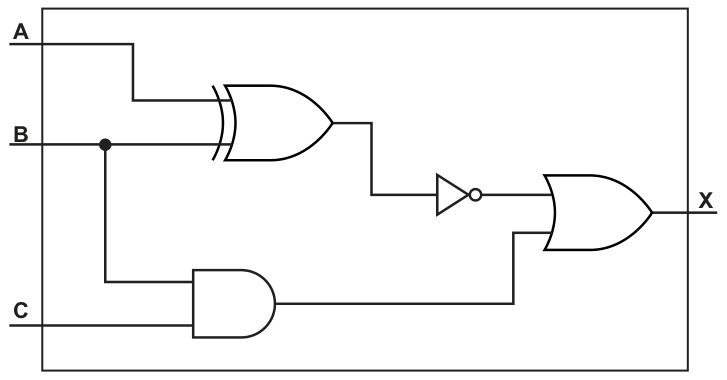
Complete the truth table for the following logic circuit.
| A | B | C | Working space | X |
|---|---|---|---|---|
| 0 | 0 | 0 | ||
| 0 | 0 | 1 | ||
| 0 | 1 | 0 | ||
| 0 | 1 | 1 | ||
| 1 | 0 | 0 | ||
| 1 | 0 | 1 | ||
| 1 | 1 | 0 | ||
| 1 | 1 | 1 |
Working
Working space = NOT(A XOR B)
Answer
| A | B | C | Working space | X |
|---|---|---|---|---|
| 0 | 0 | 0 | 1 | 1 |
| 0 | 0 | 1 | 1 | 1 |
| 0 | 1 | 0 | 0 | 0 |
| 0 | 1 | 1 | 0 | 1 |
| 1 | 0 | 0 | 0 | 0 |
| 1 | 0 | 1 | 0 | 0 |
| 1 | 1 | 0 | 1 | 1 |
| 1 | 1 | 1 | 1 | 1 |
See completed truth table
Background Concept
A truth table shows the output of a logic circuit for every possible combination of its inputs.
With three inputs A, B and C, there are:
possible rows.
This circuit contains:
- an XOR gate on
AandB - a NOT gate after that XOR
- an AND gate on
BandC - an OR gate combining those two branch outputs
Useful gate rules:
A XOR Bis1whenAandBare different.NOTflips0to1and1to0.B AND Cis1only when both are1.- OR gives
1if either input is1.
Understanding the Question
The question asks you to complete the truth table for the circuit in Fig. 1.2.
That means you must work through all 8 input combinations and decide the output X each time. The table includes one Working space column, so it is sensible to use that for one intermediate value. A natural choice is NOT(A XOR B), because that is one whole branch of the circuit.
The final output is:
X = NOT(A XOR B) OR (B AND C)
Approach
For each row:
- Work out
A XOR B. - Invert it to get
NOT(A XOR B). - Work out
B AND C. - OR those two results to get
X.
Even though the printed table has only one working column, while learning it is best to think in terms of both branches of the circuit.
Step-by-Step Reasoning
First write the expression represented by the circuit:
- top branch:
A XOR B, then NOT, soNOT(A XOR B) - bottom branch:
B AND C - final gate: OR
So:
X = NOT(A XOR B) OR (B AND C)
Now evaluate row by row.
| A | B | C | A XOR B | NOT(A XOR B) | B AND C | X |
|---|---|---|---|---|---|---|
| 0 | 0 | 0 | 0 | 1 | 0 | 1 |
| 0 | 0 | 1 | 0 | 1 | 0 | 1 |
| 0 | 1 | 0 | 1 | 0 | 0 | 0 |
| 0 | 1 | 1 | 1 | 0 | 1 | 1 |
| 1 | 0 | 0 | 1 | 0 | 0 | 0 |
| 1 | 0 | 1 | 1 | 0 | 0 | 0 |
| 1 | 1 | 0 | 0 | 1 | 0 | 1 |
| 1 | 1 | 1 | 0 | 1 | 1 | 1 |
If we use the printed Working space column for NOT(A XOR B), the completed table becomes:
| A | B | C | Working space | X |
|---|---|---|---|---|
| 0 | 0 | 0 | 1 | 1 |
| 0 | 0 | 1 | 1 | 1 |
| 0 | 1 | 0 | 0 | 0 |
| 0 | 1 | 1 | 0 | 1 |
| 1 | 0 | 0 | 0 | 0 |
| 1 | 0 | 1 | 0 | 0 |
| 1 | 1 | 0 | 1 | 1 |
| 1 | 1 | 1 | 1 | 1 |
You can check the pattern:
- whenever
AandBare equal, the XOR is0, so the NOT gives1, which makesXequal to1regardless of the bottom branch - when
AandBare different, the top branch gives0, soXdepends entirely on whetherB AND Cis1
Key Takeaways
- Build the truth table by following each branch of the circuit separately.
- XOR is often the gate students misread, so check whether the inputs are equal or different.
- An intermediate working column helps avoid mistakes in the final output column.
- The final output of a multi-stage circuit is easiest to find from the full Boolean expression.
Common Mistakes
- Confusing XOR with OR. XOR is
1only when the inputs differ. - Forgetting to apply the NOT after the XOR.
- Calculating
B AND Cincorrectly and giving1when only one input is1. - Filling the final
Xcolumn directly without working systematically, which often causes row errors.
Things to Be Careful About
- Use all 8 input combinations exactly once.
- Keep the row order consistent with the table given.
- If you choose a value for
Working space, keep it the same meaning on every row. - Remember that the final gate is OR, so only one branch needs to be
1forXto be1.
Programmers in a software development company take part in live video conferences to discuss their work.
The live video conferences take place using real-time bit streaming. The video is compressed before it is transmitted.
Answer
- The live video is sent as a continuous stream of data over the network while it is being produced.
- The receiver does not wait for the whole video to arrive before it is used.
- A small buffer stores a short amount of incoming data so playback can start and continue smoothly.
- The data is decoded and played immediately as it arrives, so if the connection is too slow or interrupted, playback can pause or break up.
See explanation
Background Concept
Real-time bit streaming is used when media such as audio or video must be delivered continuously as it is being watched or listened to. Instead of sending a whole file first and making the user wait, the data is transmitted in a steady flow.
A buffer is normally used at the receiving device. This is a small temporary storage area that holds a short section of the stream before playback starts. The purpose of the buffer is to smooth out small delays in transmission.
Real-time streaming is different from downloading a file. With a download, the complete file is usually received before it is used. With real-time streaming, playback begins before the whole data has arrived.
Understanding the Question
The question says the programmers are using live video conferences. The important clue is the word live and the phrase real-time bit streaming. So this is not about saving a video file first; it is about how the video is transferred so that people can watch and hear it immediately during the conference.
To answer well, you need to explain the transfer process itself: continuous sending, receiving while still transmitting, buffering, and immediate playback.
Approach
A good way to answer is to describe the sequence:
- The live video is captured and sent continuously.
- The receiving device starts receiving data before the transmission has finished.
- A buffer temporarily stores a small amount.
- Playback begins from the buffer while more data continues to arrive.
- If transmission cannot keep up, the stream may pause or lose quality.
That gives a complete explanation rather than just defining streaming in one short sentence.
Step-by-Step Reasoning
The conference video is being generated live by cameras and microphones. Because it is real-time, the sender does not wait until the meeting ends and then send one complete file. Instead, the media data is transmitted continuously across the network.
At the receiving end, the computer or device begins to accept this incoming stream straight away. The whole video does not need to be present before anything can be shown.
Before playback starts, a small amount of the incoming stream is placed into a buffer. This buffer is important because network transmission is not perfectly regular. Some packets may arrive slightly later than others. The buffer gives the device a small reserve of data so the video can continue playing smoothly.
Once enough data is in the buffer, the receiver starts decoding and displaying the video and playing the audio. While this is happening, new data is still arriving. So receiving and playback happen at the same time.
If the network speed drops too much, the buffer may empty faster than it is refilled. When that happens, the video may freeze, pause, or become distorted. That is why a stable connection matters for real-time streaming.
Key Takeaways
- Real-time streaming sends media continuously while it is being used.
- The whole file is not received first.
- A buffer helps smooth out small delays.
- Playback depends on the incoming data arriving fast enough.
Common Mistakes
- Saying it is just downloading a file. Streaming is different because playback begins before the whole data has arrived.
- Forgetting to mention buffering. Buffering is a key part of how streaming works reliably.
- Describing on-demand streaming instead of real-time streaming. Real-time means the data is being delivered live.
- Saying the data is stored permanently first. That is not the normal point of real-time streaming.
Things to Be Careful About
- Use the idea of continuous transfer, not one complete file transfer.
- Make clear that playback starts before the whole video arrives.
- Mention the buffer as temporary storage, not long-term storage.
- Link poor connection speed to interruption in playback, because this is often a scoring point in streaming questions.
Explain the reasons why a video is compressed before it is transmitted using real-time bit streaming.
Answer
- Compression reduces the amount of data that has to be transmitted.
- Less data means the video can be sent faster.
- It needs less bandwidth / makes better use of the available bandwidth.
- This reduces delay, buffering and the risk of interruptions during the live stream.
See explanation
Background Concept
Compression is the process of reducing the number of bits needed to represent data. For video, this matters because uncompressed video contains a very large amount of data, especially when frames are being sent continuously in a live call.
When less data has to be sent, transmission becomes easier. The connection needs less bandwidth, and the receiver is less likely to run out of buffered data. This is especially important in live communication, where delays are very noticeable.
Understanding the Question
The question is not asking how compression works internally. It is asking why compression is used before transmitting video in a real-time stream.
The situation is a live video conference over a network. That means the important issues are the amount of data being sent, the speed at which it can be sent, the bandwidth available, and whether users experience lag or interruptions.
Approach
Start from the main effect of compression: smaller data size. Then follow the consequences:
- Smaller data size means less data to transmit.
- Less data means the transmission can happen more quickly.
- Less bandwidth is needed.
- Fewer delays and interruptions occur in the live conference.
This cause-and-effect chain is exactly what examiners want in a question like this.
Step-by-Step Reasoning
Video consists of many frames, often with sound as well. If sent uncompressed, the amount of data per second would be extremely high. In a live conference, that could easily exceed the capacity of many internet connections.
By compressing the video first, repeated or less important information can be represented using fewer bits. That means the stream contains less data overall.
Because there is less data to send, the transmission takes less time. In a real-time conference, this helps the receiver keep up with the live conversation instead of falling behind.
Compression also reduces the bandwidth needed. Bandwidth is the rate at which data can be transferred. If the compressed stream fits more comfortably within the available bandwidth, there is a lower chance of congestion.
A practical result is that the video call is smoother. There is less buffering, less delay between speaking and hearing, and less risk of freezing or dropped quality.
Key Takeaways
- Compression reduces file or stream size.
- Smaller data size improves transmission efficiency.
- Lower bandwidth demand is very important for live streaming.
- In real-time communication, compression helps reduce lag and interruptions.
Common Mistakes
- Saying compression is only for saving storage space. That may be true in general, but here the focus is transmission.
- Giving only one point such as less data. For full marks, explain the consequences as well.
- Talking about encryption instead of compression. Encryption protects data; compression reduces size.
- Saying compressed video always has better quality. Compression mainly helps transmission; some methods reduce quality.
Things to Be Careful About
- Keep the answer tied to real-time streaming, not just general file storage.
- Mention bandwidth or transmission speed, because these are central here.
- Link compression to smoother live communication, not just to convenience.
- Avoid vague phrases like makes it better unless you explain better in what way.
Identify whether the lossy or lossless compression method is more appropriate for real-time bit streaming. Justify your answer.
Compression method ........................................................................................................
Justification .......................................................................................................................
Answer
- Compression method: lossy
- Justification: lossy compression gives a much greater reduction in data size, so less bandwidth is needed and the video can be transmitted more quickly for live streaming. A small loss of quality is acceptable in a video conference.
lossy
Background Concept
There are two main categories of compression in this syllabus:
- Lossless compression: the original data can be reconstructed exactly.
- Lossy compression: some data is permanently removed to achieve a much greater reduction in size.
Lossless compression is useful when every bit must be preserved exactly, such as text files or some data files. Lossy compression is commonly used for images, audio and video, where a small reduction in quality may not seriously affect human perception.
Understanding the Question
The question asks which compression method is more appropriate for real-time bit streaming of a video conference and then asks for a justification. So you must do two things:
- Name one method.
- Explain why it suits live streamed video.
The key clue is real-time. In a live conference, speed and low bandwidth usage are usually more important than preserving every original bit exactly.
Approach
Compare the two methods against the needs of the situation:
- Real-time streaming needs fast transmission and low delay.
- Video contains a lot of data.
- A method that reduces size more aggressively is usually preferred.
That leads to lossy compression, because it typically produces much smaller video data than lossless compression.
Step-by-Step Reasoning
If lossless compression were used, the original video data could be recovered exactly. That sounds attractive, but the compression ratio is usually not as high as with lossy methods. So the transmitted stream would still be relatively large.
In a live video conference, a larger stream means more bandwidth is required and there is a greater risk of lag, buffering, or poor call performance.
Lossy compression removes some data that is less important to the viewer. As a result, it usually creates a much smaller stream. That smaller stream is better for real-time transmission because:
- it needs less bandwidth
- it can be sent faster
- it helps reduce delay
- it lowers the chance of buffering or interruption
For a video conference, perfect reconstruction is normally not essential. People mainly need the sound and picture to remain clear enough for communication. So a small loss of quality is usually acceptable if it gives smoother live performance.
Key Takeaways
- Lossless keeps all original data exactly.
- Lossy sacrifices some quality for a much smaller size.
- For live video streaming, smaller size and faster transfer usually matter most.
- Therefore lossy is normally the better choice for video conferencing.
Common Mistakes
- Choosing lossless just because it is higher quality. The question is about what is more appropriate for real-time streaming, not what preserves data best.
- Saying lossy keeps all the original data. It does not.
- Giving the method name without a reason. The justification is required.
- Saying quality does not matter at all. It does matter, but a slight loss is usually acceptable.
Things to Be Careful About
- The answer must match the context: live video conferencing.
- Mention the trade-off: better compression versus some quality loss.
- Explain why that trade-off is acceptable here.
- Do not confuse compression method with transmission method; real-time bit streaming is how the data is sent, not the compression type itself.
The video conference is accessed over the internet.
Complete the table by stating how modems and dedicated lines are used when data is transmitted over the internet.
| Hardware | Use |
|---|---|
| modems | |
| dedicated lines |
Answer
| Hardware | Use |
|---|---|
| modems | Convert data between digital and analogue signals so it can be sent over communication lines and converted back at the other end. |
| dedicated lines | Provide a permanent high-speed connection used to carry internet data between network devices / networks. |
See completed table
Background Concept
Internet communication depends on different hardware devices and communication links.
A modem is short for modulator-demodulator. Its job is to convert digital data from a computer or router into a form suitable for transmission over a communication line, and then convert incoming signals back into digital data.
A dedicated line is a permanent communication link reserved for network traffic. Unlike a temporary connection, it is always available and is commonly used where reliable, continuous data transfer is needed.
Understanding the Question
This part gives a small table with two hardware items: modems and dedicated lines. It asks how each is used when data is transmitted over the internet.
So this is not asking for definitions alone. It is asking for the function or role of each in internet transmission.
Approach
Answer each row with one clear use:
- For modems, focus on signal conversion.
- For dedicated lines, focus on the permanent connection used to carry internet traffic.
Because there are only 2 marks, one correct use for each item is enough.
Step-by-Step Reasoning
A computer processes data digitally. Some communication systems require the signal to be changed so it can travel across the transmission medium being used. A modem performs this conversion when sending and reverses it when receiving. That is why modems are associated with internet access over communication lines.
Dedicated lines are different. They are not about signal conversion; they are about the type of connection. A dedicated line is permanently in place and can be used continuously for internet traffic. This makes it suitable for reliable, high-speed transmission between network points.
So the correct table entries focus on:
- modem: convert digital to analogue and back
- dedicated line: provide a permanent high-speed path for internet data
Key Takeaways
- A modem converts signals for transmission and reception.
- A dedicated line is a permanent communication link.
- In internet infrastructure, different hardware has different roles: conversion versus connection.
Common Mistakes
- Saying a modem stores data. It does not; its role is conversion.
- Describing a dedicated line as a device. It is a type of communication connection.
- Mixing up router and modem functions. A router directs packets; a modem converts signals.
- Saying the World Wide Web instead of the internet. The question is about internet transmission hardware.
Things to Be Careful About
- Keep the modem answer focused on conversion between signal forms.
- Keep the dedicated line answer focused on a permanent or always-available connection.
- Do not overcomplicate a 2-mark table; one precise use per item is enough.
- Use communication terminology accurately: transmission, conversion, permanent connection, high speed.
A computer stores images and text files.
One of the images is a bitmapped image.
Complete the table by writing the answer for each statement.
| Statement | Answer |
|---|---|
| the term for the smallest element that makes up an image | |
| the largest number of different colours that can be represented with a bit depth of 8 bits | |
| the term for the dots per inch (dpi) when an image is displayed |
Answer
| Statement | Answer |
|---|---|
| the term for the smallest element that makes up an image | pixel |
| the largest number of different colours that can be represented with a bit depth of 8 bits | 256 |
| the term for the dots per inch (dpi) when an image is displayed | resolution |
See completed table
Background Concept
A bitmapped image is made from tiny individual picture elements called pixels. Each pixel stores colour information.
Two important properties of a bitmap are:
- colour depth (bit depth): how many bits are used to store the colour of one pixel
- resolution: how much detail the image has, often described using measurements such as dots per inch (dpi) or pixels per inch
The number of colours available from a bit depth is found using:
- number of colours = 2^(number of bits)
So with 8 bits, the image can represent 2^8 = 256 different colours.
Understanding the Question
This part gives three short statements about a bitmapped image and asks for the correct technical term or value for each one.
You are expected to know:
- what the smallest unit of a bitmap is
- how to work out the maximum number of colours from a bit depth
- the term used for dpi when discussing displayed image detail
Because it is a table-completion question, each answer should be short and exact.
Approach
Match each statement to the standard bitmap term:
- smallest element of an image -> identify the correct component name
- 8-bit depth -> calculate 2^8
- dpi when displayed -> give the term used for image detail on display
This is mainly recall, with just one very simple calculation.
Step-by-Step Reasoning
First statement:
- A bitmap is made of many tiny picture elements.
- The correct term for one of these elements is pixel.
Second statement:
- Bit depth tells us how many binary combinations are possible.
- With 8 bits, the number of combinations is 2^8.
- 2^8 = 256.
- So the largest number of different colours is 256.
Third statement:
- Dots per inch is a measure of how much detail is shown.
- The general term for this is resolution.
Key Takeaways
- A bitmap image is built from pixels.
- Maximum colours from a bit depth are found using 2^n.
- Resolution describes image detail and may be measured in dpi.
Common Mistakes
- Writing "bit" or "byte" instead of pixel. A bit stores data, but it is not the image element itself.
- Giving 255 instead of 256 for 8-bit colour depth. The count is 2^8, not the highest value only.
- Confusing resolution with colour depth. Resolution is about detail; colour depth is about colour range.
Things to Be Careful About
- Read exactly what is being asked: the term, not a description.
- For bit depth questions, use the number of possible combinations, not the denary range endpoints.
- Use the accepted technical word resolution rather than a vague phrase such as "quality".
The text in the files is stored using the Unicode character set.
Give two advantages of using the Unicode character set instead of using the ASCII character set.
1 ........................................................................................................................................
2 ........................................................................................................................................
Answer
- Unicode has a much larger character set than ASCII.
- Unicode can represent characters from many different languages and also a wider range of symbols.
See explanation
Background Concept
A character set is a standard that maps characters to binary codes so they can be stored in a computer.
ASCII is an older character set with a small number of characters, mainly designed for English letters, digits, punctuation and control characters.
Unicode is a much larger standard designed to represent characters from many languages and many kinds of symbols in a single system.
This matters because computers need an agreed code for every character they store, transmit or display.
Understanding the Question
The question asks for two advantages of using Unicode instead of ASCII for storing text files.
So you need to think about what Unicode can do that ASCII cannot do, and express this as benefits. Since it asks for two advantages, you should give two separate points, not the same idea repeated in different words.
Approach
Start with the main difference:
- ASCII has a limited number of codes.
- Unicode has a far larger range.
Then turn that difference into advantages:
- more characters can be represented
- text from many languages and extra symbols can be stored correctly
These are the two strongest exam-style points.
Step-by-Step Reasoning
First advantage:
- ASCII has a small set of available character codes.
- Unicode has many more available codes.
- Therefore Unicode can store a much larger range of characters.
Second advantage:
- Because Unicode has many more codes, it is not limited mostly to basic English characters.
- It can represent characters from many world languages.
- It can also represent a wider variety of symbols.
So the best two answers are:
- larger character set
- supports many languages and more symbols
Key Takeaways
- ASCII is limited in size and scope.
- Unicode was designed to be a universal character set.
- The major benefit of Unicode is broader representation of text and symbols.
Common Mistakes
- Saying only "Unicode uses more bits" without explaining the benefit. The question asks for advantages, so link the larger coding range to what it allows.
- Giving two versions of the same point, such as "more characters" and "bigger set". These are really one idea.
- Saying Unicode is always smaller to store. That is not generally true.
Things to Be Careful About
- Keep the comparison against ASCII, not against image formats or fonts.
- Make each advantage distinct.
- Focus on representation of characters, languages and symbols, since that is what character sets are for.
The Unicode character '❮' has the binary value: 0010 0111 0110 1110
Convert the binary value for the character '❮' into denary.
Working
0010 0111 0110 1110
= 8192 + 1024 + 512 + 256 + 64 + 32 + 8 + 4 + 2
= 10094
Answer
10094
10094
Background Concept
Binary is base 2, so each bit position has a place value that is a power of 2.
For a 16-bit binary number, from left to right the place values are:
- 32768, 16384, 8192, 4096, 2048, 1024, 512, 256, 128, 64, 32, 16, 8, 4, 2, 1
To convert binary to denary, add the place values of all positions containing 1.
In this question, the binary value is the stored code for a Unicode character, but the conversion method is just ordinary binary-to-denary conversion.
Understanding the Question
You are given the Unicode character code for ❮ in binary: 0010 0111 0110 1110.
The task is not to identify the character set or explain Unicode. It is simply to convert that binary value into denary.
Because it is worth one mark, the expected response is just the correct denary number, but showing the working is a safe method.
Approach
Read the 16-bit binary value and add the denary values of the 1 bits.
A good way is:
- write the place values mentally or on paper
- pick out only the columns where the bit is 1
- add those values carefully
You can also convert via hexadecimal if you notice the 4-bit groups, but direct place-value addition is perfectly fine.
Step-by-Step Reasoning
Binary value:
0010 0111 0110 1110
Break it into place values. The 1 bits occur at:
- 8192
- 1024
- 512
- 256
- 64
- 32
- 8
- 4
- 2
Now add them:
- 8192 + 1024 = 9216
- 9216 + 512 = 9728
- 9728 + 256 = 9984
- 9984 + 64 = 10048
- 10048 + 32 = 10080
- 10080 + 8 = 10088
- 10088 + 4 = 10092
- 10092 + 2 = 10094
So the denary value is 10094.
A quick check is to group the binary into nibbles:
0010= 20111= 70110= 61110= 14 = E
So the binary is hex 276E, which also converts to 10094.
Key Takeaways
- Binary-to-denary conversion means adding the place values of the 1 bits.
- Grouping into 4-bit chunks can help you check your answer using hexadecimal.
- Character codes are still just numbers underneath.
Common Mistakes
- Misreading the place values by starting from the wrong end. The rightmost bit is always 1.
- Missing one of the 1 bits when adding.
- Adding 16 for the third nibble here even though that bit is 0.
Things to Be Careful About
- Keep the bit positions aligned correctly across all 16 bits.
- If you use 4-bit groups, remember that
1110is 14, not 15. - Do not stop at the hexadecimal form unless the question asks for denary.
The Unicode character '⅀' has the hexadecimal value 2140
Convert the hexadecimal code for the character '⅀' into denary.
Working
2140 = 2 × 4096 + 1 × 256 + 4 × 16 + 0
= 8192 + 256 + 64
= 8512
Answer
8512
8512
Background Concept
Hexadecimal is base 16. Each position has a place value that is a power of 16.
For a 4-digit hexadecimal number, the place values are:
- 16^3 = 4096
- 16^2 = 256
- 16^1 = 16
- 16^0 = 1
To convert hexadecimal to denary, multiply each hex digit by its place value and add the results.
Again, the fact that this value is a Unicode code does not change the number-conversion method.
Understanding the Question
You are given the hexadecimal Unicode value 2140 for the character ⅀ and asked to convert it to denary.
So the task is a pure base conversion from hexadecimal to base 10.
Approach
Use place-value expansion:
- 2 in the 4096s column
- 1 in the 256s column
- 4 in the 16s column
- 0 in the 1s column
Then add the results.
Step-by-Step Reasoning
Hex value:
2140
Expand using powers of 16:
- 2 × 16^3 = 2 × 4096 = 8192
- 1 × 16^2 = 1 × 256 = 256
- 4 × 16^1 = 4 × 16 = 64
- 0 × 16^0 = 0 × 1 = 0
Now add them:
- 8192 + 256 = 8448
- 8448 + 64 = 8512
- 8512 + 0 = 8512
So the denary value is 8512.
Key Takeaways
- Hexadecimal place values are powers of 16.
- Convert by multiplying each digit by its place value and adding.
- Unicode values may be written in hex, but they are still converted like any other hex number.
Common Mistakes
- Using powers of 10 instead of powers of 16.
- Treating
2140as if it were denary digits already. - Forgetting that the last digit still has a place value of 1, even when it is 0.
Things to Be Careful About
- Write out the place values clearly: 4096, 256, 16, 1.
- If letters appear in a hex value, remember A to F mean 10 to 15.
- Make sure the final answer is in denary because that is what the question asks for.
A shop installs a new system that allows users to purchase items without going through a manual checkout.
The new system:
- identifies customers when they enter the shop and matches them to their account
- prevents a customer from walking through the automatic barriers if they do not have an account
- automatically detects the items that a customer has taken from a shelf and charges these to the customer’s account.
The new system uses digital cameras and Artificial Intelligence (AI) to identify the customers.
Explain how the new system uses AI to identify each customer.
Answer
- The digital camera captures an image or video of the customer’s face.
- AI software analyses the image and extracts distinguishing facial features or a facial pattern.
- The pattern is compared with stored images / facial templates in a database that has been used to train the system.
- When a close match is found, the system identifies the customer and links them to the correct account; if no match is found, the customer is not identified.
See explanation
Background Concept
A common AI technique for identifying people from camera images is facial recognition. This is a pattern-recognition task. The system does not simply store a photograph and look for an identical picture; instead, it looks for important features of the face, such as the distances and relationships between eyes, nose, mouth, jawline, and other measurable characteristics.
In AI terms, the system has usually been trained using many labelled examples. That means it has seen many face images already associated with the correct person. From this, it learns how to recognise patterns that belong to the same person even if lighting, angle, expression, or hairstyle changes slightly.
The result of the analysis is often a facial template or feature vector rather than the raw image itself. This template is then compared against stored templates in a database. If the similarity is high enough, the person is treated as a match.
Understanding the Question
The question says the shop uses digital cameras and AI to identify customers as they enter. So this is asking for the process of AI-based identification, not just the name of the technology.
The important clues are:
- digital cameras provide the input image
- AI is used to identify each customer
- the system must match the person to their account
So the answer needs to explain the stages from image capture, through AI analysis, to matching with a stored account.
Approach
A good way to answer this is to describe the facial-recognition pipeline in order:
- capture the customer’s face
- analyse it to find unique features
- compare those features with stored data
- choose the matching customer account or reject if there is no match
That gives clear, mark-worthy steps and directly answers how AI is being used.
Step-by-Step Reasoning
First, the camera must collect data. The system needs an image or video frame of the customer entering the shop. Without that input, the AI has nothing to analyse.
Next, the AI processes the image. It detects where the face is in the image and measures important facial characteristics. These are the parts that help distinguish one person from another. For example, the AI might analyse the shape of the face or the relative positions of facial features. The exact internal method is not needed in the exam, but the key idea is that the AI extracts distinguishing patterns.
Then the system compares the extracted pattern with stored patterns in its database. These stored patterns belong to customers who already have accounts. In many real systems, the AI model has also been trained on many examples so that it can make reliable matches even when the face is not shown in exactly the same way as before.
Finally, if one stored record is sufficiently similar, the system identifies that person and links them to the correct customer account. If no acceptable match is found, the system cannot identify the person, so they would not be allowed through the barrier.
That sequence is exactly what the question is looking for: input image, AI analysis, comparison, then identification.
Key Takeaways
- AI can be used for facial recognition by finding patterns in images.
- The camera captures the raw input, but the AI performs the recognition.
- Identification normally involves comparing extracted features with stored templates or trained data.
- A successful match can then be used to link the person to an account.
Common Mistakes
- Saying only "it uses face recognition". That names the method but does not explain how it works.
- Describing a human operator checking the image. The question is specifically about AI, so the process must be automated.
- Saying the system matches the whole image exactly pixel by pixel. Real AI recognition depends on features or patterns, not an identical photograph.
- Forgetting the final step of linking the recognised person to their account.
Things to Be Careful About
- Keep the answer focused on identification, not on payment or barriers unless it helps explain what happens after matching.
- Make it clear that the system compares the captured face with stored customer data.
- If you mention training data, do not let that replace the matching stage; both ideas are useful, but the actual identification still needs comparison with stored records.
- Avoid vague statements like "the computer knows who it is" without describing the matching process.
The new system uses sensors to identify the items taken from a shelf.
Identify one type of sensor that can be used in this new system.
State how the sensor can be used to identify the items taken from a shelf.
Sensor ......................................................................................................................................
Use ...........................................................................................................................................
Answer
- Sensor: RFID reader / RFID sensor
- Use: each item has an RFID tag containing a product code; when the item is taken from the shelf, the reader reads the tag and the code is matched to the item in the database.
RFID reader / RFID sensor; reads the RFID tag on the item and matches its code to the product in the database.
Background Concept
A sensor is an input device that detects a physical property or reads data automatically so that a computer system can respond. In a retail system, sensors can be used to detect that an item has been moved, removed, or passed a certain point.
One suitable technology is RFID, which stands for Radio Frequency Identification. An RFID system usually has two parts:
- an RFID tag attached to the item
- an RFID reader that detects and reads the tag
The tag stores identifying data, such as a product code. When the reader detects the tag, the system can look up that code in a database and determine exactly which item it is.
Understanding the Question
The question asks for two things:
- one type of sensor that could be used
- how that sensor would identify items taken from a shelf
So the answer must not stop after naming a sensor. It also needs a practical explanation of how the system uses the sensor reading to work out which item was taken.
Approach
Choose a sensor that can do more than just detect movement. Since the shop needs to identify the item, not only notice that something changed, RFID is a strong answer because it can read an item-specific code.
Then explain the process clearly:
- item has a tag
- reader detects the tag
- code is read
- code is matched to the product record
Step-by-Step Reasoning
The best answer here is to name an RFID reader or RFID sensor.
Why is RFID appropriate? Because the system needs to identify items automatically. If every item has an RFID tag, that tag can store a unique product code or identifier.
When the customer takes the item from the shelf, the RFID reader near the shelf detects the tag. The reader reads the code stored on it.
The computer system then uses that code to search its database. Once the code matches a record, it knows which product was taken. That product can then be added to the customer’s account.
This is stronger than simply saying "it detects an item" because the question specifically asks how the item is identified.
Key Takeaways
- A sensor question usually needs both the device name and what data it provides.
- RFID is useful when individual items must be recognised automatically.
- Identification normally happens by reading a code and matching it with a database record.
Common Mistakes
- Naming a sensor but not explaining how it identifies the item.
- Choosing a sensor that only detects presence, such as a basic motion sensor, without saying how the exact product is recognised.
- Saying "barcode scanner" without explaining that the code is read and matched to a database. Also, a barcode scanner is less realistic for automatic shelf removal unless specifically positioned and used.
- Describing charging the account instead of explaining identification.
Things to Be Careful About
- The question asks for one type of sensor, so one clear valid example is enough.
- Make sure your explanation includes the data being read, such as a product code.
- Keep the wording linked to the shelf system: the item is taken, the tag is read, and the product is identified.
- Avoid giving a sensor that cannot reasonably identify the item by itself unless you explain the wider setup very carefully.
A company builds and sells furniture to customers. The company stores data about customers, their payment cards and their furniture orders in a database.
The database, FURNITURE, has the following tables:
CUSTOMER(CustomerID, Name, Phone)
CUSTOMER_CARD_DATA(CardID, CustomerID, CardType, CardNumber, EndDate)
ORDER(OrderID, CustomerID, TotalCost, Paid, OrderDate, Complete)
ORDER_ITEM(OrderItemID, OrderID, Type, Height, Width, Depth, Details)
The primary keys are underlined in each table.
The attribute Complete in the table ORDER stores the Boolean value TRUE if the order has been built and FALSE if the order has not been built.
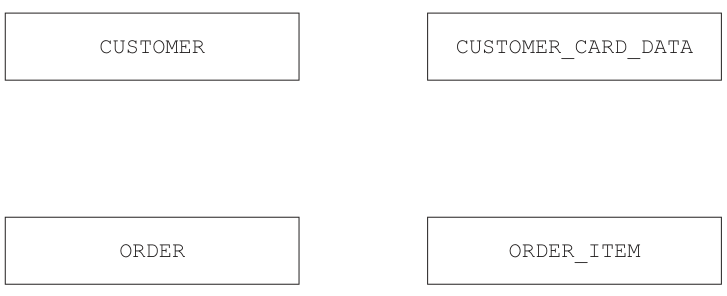
Answer
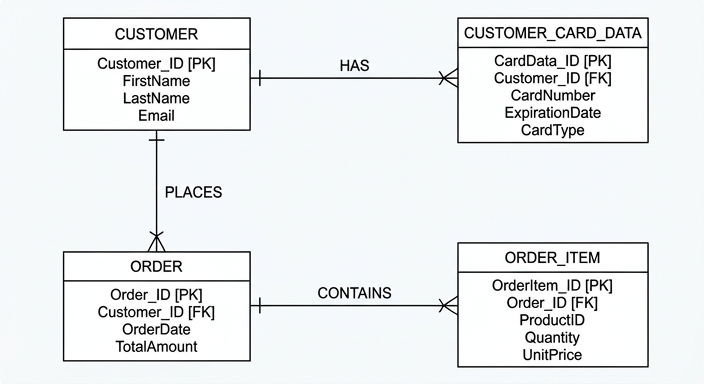
See E-R diagram
Background Concept
An entity-relationship (E-R) diagram shows how tables in a relational database are linked. Each entity represents a table, and the relationship line between entities shows how many records in one table can be linked to records in another table.
A common way to work out the relationships is to look at the foreign keys:
- a primary key uniquely identifies a record in its own table
- a foreign key stores the primary key value from another table
- if a table contains a foreign key, many records in that table can usually refer to one record in the parent table
So a foreign key usually indicates a one-to-many relationship from the parent table to the table containing the foreign key.
Understanding the Question
You are given four tables:
CUSTOMERCUSTOMER_CARD_DATAORDERORDER_ITEM
You need to complete the E-R diagram by adding the correct relationship lines and cardinalities between these tables.
The important clues are in the table structures:
CUSTOMER_CARD_DATAcontainsCustomerIDORDERcontainsCustomerIDORDER_ITEMcontainsOrderID
Those attributes show which table each one depends on.
Approach
Start from the foreign keys.
- Find which table owns the original primary key.
- Find which table stores that key as a foreign key.
- Draw a one-to-many relationship from the parent table to the child table.
That gives:
- one
CUSTOMERcan have many card records - one
CUSTOMERcan have many orders - one
ORDERcan have many order items
Step-by-Step Reasoning
CUSTOMER_CARD_DATA has the attribute CustomerID.
That means each card record belongs to one customer, but a customer may have several cards stored. So the relationship is:
CUSTOMER1 : manyCUSTOMER_CARD_DATA
ORDER also has the attribute CustomerID.
That means each order belongs to one customer, but a customer may place many orders. So the relationship is:
CUSTOMER1 : manyORDER
ORDER_ITEM has the attribute OrderID.
That means each order item belongs to one order, but one order can contain many items. So the relationship is:
ORDER1 : manyORDER_ITEM
That is exactly what must be shown in the completed diagram.
Key Takeaways
- Foreign keys are the main clue for building E-R relationships.
- A table containing a foreign key is usually on the many side of the relationship.
- A parent table whose primary key is referenced is usually on the one side.
Common Mistakes
- Reversing the relationship direction, for example showing many customers for one order. Each order belongs to one customer, not the other way round.
- Missing one of the links, especially
ORDERtoORDER_ITEM. - Drawing a direct relationship between
CUSTOMERandORDER_ITEM, even though the link is throughORDER.
Things to Be Careful About
- Use the table names exactly as given.
- Put the many end on
CUSTOMER_CARD_DATA,ORDER, andORDER_ITEM. - Do not invent extra relationships that are not supported by the foreign keys.
Answer
CardNumber
CardNumber
Background Concept
A candidate key is an attribute, or set of attributes, that could uniquely identify each record in a table. Any candidate key is suitable to become the primary key, although only one is chosen as the actual primary key.
For a single attribute to be a candidate key, its value must be unique for every record and it should not be null.
Understanding the Question
The table is CUSTOMER_CARD_DATA with attributes:
CardIDCustomerIDCardTypeCardNumberEndDate
You are asked for one attribute that could be a candidate key. That means you need an attribute that could uniquely identify each card record.
Approach
Check which attributes are likely to be unique.
CustomerIDcannot be unique because one customer may have more than one card.CardTypecannot be unique because many people can have the same card type.EndDatecannot be unique because many cards can expire on the same date.CardNumberis expected to be unique for each card.
Step-by-Step Reasoning
CardNumber is the best choice because each payment card should have a different card number.
CustomerID is a foreign key, so it can repeat for customers who store more than one card.
CardType and EndDate are clearly not unique enough to identify one record each.
So CardNumber is a valid candidate key.
Key Takeaways
- A candidate key must uniquely identify each row.
- Foreign keys often repeat, so they are usually not candidate keys for that table.
- Real-world meaning helps: card numbers are intended to be unique.
Common Mistakes
- Giving
CustomerID. That would not work if one customer has several cards. - Giving
CardTypeorEndDate, which are not unique. - Confusing the existing primary key with the idea of a different possible candidate key.
Things to Be Careful About
- The question asks for an attribute in
CUSTOMER_CARD_DATA, not from another table. - A candidate key must be unique, not just useful or descriptive.
- In exam questions like this, choose the most clearly unique single attribute.
Identify two tables in the database that contain one or more foreign keys.
Give one attribute that is a foreign key in each table.
| Table | Foreign key | |
|---|---|---|
| 1 | ||
| 2 |
Answer
| Table | Foreign key | |
|---|---|---|
| 1 | CUSTOMER_CARD_DATA | CustomerID |
| 2 | ORDER_ITEM | OrderID |
CUSTOMER_CARD_DATA.CustomerID and ORDER_ITEM.OrderID
Background Concept
A foreign key is an attribute in one table that refers to the primary key of another table. Foreign keys create links between tables and support relationships such as one-to-many.
For example:
- a customer ID in another table points back to a customer record
- an order ID in another table points back to an order record
Understanding the Question
You need to name two tables that contain at least one foreign key, and for each of those tables give one foreign-key attribute.
From the database structure:
CUSTOMER_CARD_DATAcontainsCustomerIDORDERcontainsCustomerIDORDER_ITEMcontainsOrderID
All of those are foreign keys.
Approach
Look for attributes that repeat the name of a primary key from another table.
CustomerIDis the primary key ofCUSTOMEROrderIDis the primary key ofORDER
Any table containing one of those as a non-primary attribute contains a foreign key.
Step-by-Step Reasoning
In CUSTOMER_CARD_DATA, the attribute CustomerID links each card record to a customer in CUSTOMER. So that is a foreign key.
In ORDER_ITEM, the attribute OrderID links each item to an order in ORDER. So that is a foreign key.
ORDER also contains the foreign key CustomerID, so that table would also have been acceptable.
Key Takeaways
- A foreign key repeats the primary key of another table.
- Foreign keys are what connect related tables in a relational database.
- More than one correct answer is often possible when a database has several linked tables.
Common Mistakes
- Naming a primary key instead of a foreign key in the same table.
- Giving
CUSTOMERas a table with a foreign key when it does not contain one here. - Choosing an attribute like
CardTypeorPaid, which does not reference another table.
Things to Be Careful About
- The foreign key must be named in the same table you choose.
- Do not list the same table twice with different attributes unless the question allows it clearly.
- If several answers are possible, any correct pair is acceptable.
Explain the reasons why the data in the table ORDER_ITEM cannot be stored in the table ORDER.
Answer
- One order can contain many order items, so
ORDERtoORDER_ITEMis a one-to-many relationship. - If the item data were stored in
ORDER, there would be repeating groups or multiple sets of item fields in one record. - If each item were stored as a separate row in
ORDER, the order details would be duplicated, causing data redundancy and possible inconsistency when updating data.
See explanation
Background Concept
Normalisation is the process of organising data into tables so that data is stored efficiently and without unnecessary duplication. One of the first problems normalisation removes is repeating groups, where a single record would need multiple copies of the same type of field.
In a relational database:
- one table should represent one type of entity
- a one-to-many relationship is usually handled by using two tables
- repeating data should be separated so each row stores one fact at one level
This improves consistency and reduces redundancy.
Understanding the Question
The question asks why the attributes in ORDER_ITEM should not be placed directly inside the ORDER table.
ORDER stores information about the whole order, such as:
OrderIDCustomerIDTotalCostPaidOrderDateComplete
ORDER_ITEM stores details of each individual item within an order, such as:
TypeHeightWidthDepthDetails
So the key issue is that one order can include several items.
Approach
Explain the database-design problem from three angles:
- the relationship is one order to many items
- storing many items in one
ORDERrecord creates repeating groups - storing them as multiple
ORDERrows duplicates order-level data and causes anomalies
That gives the full reasoning the examiner wants.
Step-by-Step Reasoning
Each record in ORDER represents one order.
But one order may contain several separate furniture items. For example, a customer might order a table and four chairs. Those are multiple items belonging to the same order.
If you tried to store item data inside ORDER, one of two bad designs would happen.
First possibility: put several item fields into the same row, such as Type1, Type2, Type3, and so on. That creates repeating groups. Relational tables should not be designed that way because the number of items per order varies.
Second possibility: store one row per item in ORDER. Then the same order information such as CustomerID, Paid, OrderDate, and Complete would have to be repeated for every item in that order.
That duplication wastes space and can cause inconsistency. For example, if Paid were changed in one repeated row but missed in another, the database would disagree about the same order.
So ORDER_ITEM must be kept as a separate table linked to ORDER by OrderID.
Key Takeaways
- Use separate tables for one-to-many relationships.
- Repeating groups are a sign that a table is not properly normalised.
- Splitting tables reduces redundancy and avoids update anomalies.
Common Mistakes
- Saying only that the table would be too large. Size is not the main database-design reason.
- Forgetting to mention that one order can have many items.
- Describing
ORDER_ITEMas many-to-many withORDER, which is incorrect here.
Things to Be Careful About
- Focus on structure, not just storage space.
- Use database terms such as one-to-many, repeating groups, redundancy, and inconsistency.
- Make it clear that
ORDERstores order-level data whileORDER_ITEMstores item-level data.
Write an Structured Query Language (SQL) script to output the customer ID, the customer’s name and the total cost of the customer’s orders that have not been paid.
The output of the total cost must have an appropriate title.
Answer
SELECT CUSTOMER.CustomerID, CUSTOMER.Name, ORDER.TotalCost AS UnpaidTotalCost
FROM CUSTOMER, ORDER
WHERE CUSTOMER.CustomerID = ORDER.CustomerID
AND ORDER.Paid = FALSE
See SQL script
Background Concept
A SELECT query is used to retrieve data from one or more tables. When the required fields are in different tables, the tables must be joined using their matching key fields.
Important SQL ideas used here are:
SELECTchooses the columns to displayFROMnames the table or tables usedWHEREsets the conditions- a join condition matches related rows across tables
ASgives a column heading or alias in the output
Understanding the Question
You must output:
- the customer ID
- the customer's name
- the total cost of orders that have not been paid
The data comes from two tables:
CUSTOMERforCustomerIDandNameORDERforTotalCostandPaid
Because the two tables are related by CustomerID, you must join them.
The phrase "have not been paid" means only rows where Paid = FALSE should be included.
The phrase "must have an appropriate title" means the TotalCost column should be given an alias.
Approach
Build the query in four parts:
- select the three required fields
- read from both
CUSTOMERandORDER - join the two tables using
CustomerID - filter for unpaid orders with
Paid = FALSE - rename
TotalCostwithAS
Step-by-Step Reasoning
The output needs CustomerID and Name, so those must be selected from CUSTOMER.
The output also needs TotalCost, so that must be selected from ORDER.
Since both tables are involved, the query must read from both:
FROM CUSTOMER, ORDER
But simply naming both tables is not enough. You must say how rows match:
CUSTOMER.CustomerID = ORDER.CustomerID
That join condition links each order to the correct customer.
Now apply the filter for unpaid orders:
ORDER.Paid = FALSE
Finally, give TotalCost a suitable output heading using AS, for example:
AS UnpaidTotalCost
That satisfies the requirement for an appropriate title.
Key Takeaways
- When fields come from different tables, you need a join.
- The join usually matches a primary key to a foreign key.
- Use
ASto control the output heading of a column. - Boolean conditions in SQL can be tested directly with
TRUEorFALSE.
Common Mistakes
- Forgetting the join condition, which would create a Cartesian product.
- Selecting the wrong fields, such as
Phoneinstead ofName. - Missing the
Paid = FALSEcondition. - Forgetting to rename
TotalCostwhen the question asks for an appropriate title.
Things to Be Careful About
- Use the exact table and field names given in the question.
- Make sure the join is on
CustomerID, notOrderID. - Keep the Boolean test correct: unpaid means
FALSE, notTRUE. - The question asks for the total cost already stored in the table, not a calculated
SUM().
A programmer is buying a new computer.
The programmer is considering the following two computers:
| Computer 1 | Quad-core 2.2 GHz processor 16-bit architecture 1 GB Random Access Memory (RAM) 500 GB magnetic hard disk |
| Computer 2 | Dual-core 3.8 GHz processor 32-bit architecture 2 GB RAM 500 GB solid state drive (SSD) |
Computer 1 has a magnetic hard disk.
Complete the description of the principal operation of a magnetic hard disk by writing the missing words.
The magnetic hard disk has one or more ................................................... that can be magnetised. These are mounted on a ................................................... and rotate at high speed.
A ................................................... is moved across the surface on an arm.
When data is read, the changes in the ................................................... produce a change in the electric current.
Answer
- platters
- spindle
- read/write head
- magnetic field
platters; spindle; read/write head; magnetic field
Background Concept
A magnetic hard disk stores data on rotating circular disks called platters. The surface of each platter can be magnetised in tiny areas to represent binary data. The platters are fixed onto a spindle, which spins them at high speed.
A read/write head moves across the platter surface on an arm. When writing, it changes the magnetisation pattern on the surface. When reading, it detects changes in the magnetic field from the surface and these changes induce a change in electric current, which the computer interprets as data.
Understanding the Question
The question gives a sentence describing how a magnetic hard disk works, with four missing technical terms. You are being asked to supply the correct words for:
- the rotating disks
- the central shaft they are mounted on
- the component that moves over the surface
- what changes during reading to produce an electrical signal
This is a storage-device terminology question, so precise vocabulary matters.
Approach
Match each blank to the standard parts of a magnetic hard disk:
- The magnetised circular disks are the platters.
- The platters are mounted on the spindle.
- The moving component is the read/write head.
- Reading works by detecting changes in the magnetic field.
Step-by-Step Reasoning
The first blank says the hard disk has one or more things "that can be magnetised". Those are the platters, because they are the storage surfaces.
The second blank says these are mounted on something and rotate at high speed. That is the spindle, the central axis that spins the platters.
The third blank describes something moved across the surface on an arm. That is the read/write head.
The last blank asks what changes to produce a change in electric current when data is read. The read/write head senses changes in the magnetic field on the platter surface.
So the four missing words are:
- platters
- spindle
- read/write head
- magnetic field
Key Takeaways
- Magnetic hard disks store data magnetically on platters.
- The platters spin on a spindle.
- A read/write head moves over the surface to access data.
- Reading relies on detecting changes in magnetic field and converting them into electrical signals.
Common Mistakes
- Writing "disk" instead of "platter" when the question wants the named component.
- Giving "motor" instead of "spindle". The motor drives the motion, but the platters are mounted on the spindle.
- Writing only "head" if the exam expects the fuller term "read/write head".
- Saying "current" or "electricity" in the last blank instead of the cause, which is the magnetic field.
Things to Be Careful About
Use the exact storage-device terms, not loose everyday descriptions. In fill-in-the-blank questions, each missing word or phrase usually corresponds to a standard textbook term, so accuracy is important.
The two computers have different amounts of RAM.
Explain how different amounts of RAM affect the performance of a computer.
Answer
- More RAM allows more programs and data currently being used to be held in main memory.
- With less RAM, the computer has to use virtual memory / swap data to secondary storage more often.
- Because RAM is much faster to access than secondary storage, more RAM gives faster performance, especially when multitasking.
More RAM allows more active programs/data to stay in main memory, reduces virtual memory use, and improves speed.
Background Concept
RAM stores the programs and data that the CPU is currently using. It is main memory, and it is much faster to access than secondary storage such as a hard disk or SSD. The more RAM a computer has, the more active instructions and data it can keep immediately available.
If RAM becomes full, the operating system may have to move some data out of RAM and use virtual memory on secondary storage instead. This process is much slower than keeping everything in RAM.
Understanding the Question
The question compares two computers with different RAM sizes: one has 1 GB RAM and the other has 2 GB RAM. It asks how different amounts of RAM affect performance.
This means you should not just define RAM. You must explain the performance effect of having more or less of it.
Approach
Use a simple chain of reasoning:
- RAM holds programs and data in current use.
- More RAM means more can stay in main memory.
- Less RAM means more use of virtual memory or swapping.
- Since secondary storage is slower than RAM, performance drops when the computer has to swap more often.
Step-by-Step Reasoning
A computer with more RAM can keep more open programs, files and working data in main memory at the same time. That means the CPU can get what it needs quickly from RAM.
A computer with less RAM reaches its memory limit sooner. When that happens, the operating system may move some data from RAM to secondary storage and bring other data back when needed. This is often called swapping or using virtual memory.
Even though an SSD is faster than a magnetic hard disk, both are still much slower than RAM. So any time the computer has to rely more on secondary storage because RAM is limited, performance becomes slower.
This is especially noticeable when several applications are open at once, because multitasking uses more memory.
So the overall effect is:
- more RAM improves performance because more active data stays in RAM
- less RAM reduces performance because the computer needs more swapping or virtual memory use
Key Takeaways
- RAM stores currently needed programs and data.
- More RAM usually improves performance.
- Low RAM leads to more virtual memory use.
- Secondary storage is much slower than RAM, so swapping causes slowdown.
Common Mistakes
- Saying more RAM increases long-term storage capacity. RAM is not secondary storage.
- Saying RAM directly increases processor clock speed. It does not; it affects how often data is immediately available.
- Forgetting to mention virtual memory or swapping when explaining why low RAM reduces performance.
- Saying RAM keeps data permanently. RAM is volatile.
Things to Be Careful About
Do not confuse RAM amount with storage size. In this question, 1 GB and 2 GB refer to main memory, not file storage. Also, the effect is mainly on responsiveness and multitasking, not on changing the processor's GHz value.
The two computers have different bus widths.
Explain how different bus widths affect the performance of a computer.
Answer
- A wider bus can transfer more bits at the same time in one clock cycle.
- Therefore fewer transfers are needed between the CPU and memory, so the computer performs faster.
A wider bus transfers more bits per cycle, so fewer transfers are needed and performance is faster.
Background Concept
A bus is a pathway used to transfer data, addresses or control signals between components in a computer. Bus width means how many bits can be carried at once.
If a bus is wider, more bits can move in one transfer. For example, a 32-bit transfer moves twice as much data at a time as a 16-bit transfer.
Understanding the Question
The question says the two computers have different bus widths and asks how this affects performance. In the table, one computer has a 16-bit architecture and the other has a 32-bit architecture. The important idea is that a wider architecture means more bits can be handled or transferred at one time.
Approach
Explain the direct performance effect:
- bus width determines how much can be transferred at once
- wider bus means more bits per transfer
- more bits per transfer means fewer transfers are needed
- fewer transfers usually means faster performance
Step-by-Step Reasoning
If the computer can transfer only 16 bits at a time, it may need two transfers to move data that a 32-bit system could move in one transfer.
That means a narrower bus causes more separate transfers between components such as the CPU and main memory. More transfers take more clock cycles.
A wider bus reduces this because each transfer carries more data. As a result, data moves more quickly through the system and overall performance improves.
So the performance effect is that wider buses increase transfer efficiency and speed.
Key Takeaways
- Bus width is the number of bits transferred at once.
- Wider buses move more data per cycle.
- More bits per transfer usually means faster overall performance.
Common Mistakes
- Confusing bus width with clock speed. They are different performance factors.
- Talking only about storage size or RAM capacity instead of transfer size.
- Saying a wider bus always means the computer is better in every way. It improves transfer capacity, but other factors also affect performance.
Things to Be Careful About
Keep the explanation tied to data transfer. The safest exam wording is that a wider bus transfers more bits at once, so fewer transfers are needed and performance improves. Avoid drifting into unrelated ideas unless the question specifically asks for them.
Both computers have an Operating System (OS).
Describe the purpose of an OS in a computer.
Answer
- An operating system provides an interface between the user / application software and the computer hardware.
- It manages the processor by scheduling which processes are run.
- It manages memory, including allocating RAM to programs.
- It manages files and secondary storage.
- It manages input, output and peripheral devices.
The OS provides the interface and manages processor time, memory, files/storage, and input/output devices.
Background Concept
An operating system is system software that controls the basic operation of a computer. It sits between the hardware and the user or application programs. Without an operating system, a user would not have a practical way to run programs, manage files or control devices easily.
The OS is responsible for managing resources such as the CPU, memory, storage and peripherals. It makes the computer usable by coordinating all of these parts.
Understanding the Question
The question asks for the purpose of an OS in a computer. That means you should describe what the operating system is there to do, not just name an example such as Windows or Linux.
For a 5-mark answer, one brief statement is not enough. You need several distinct functions that show the OS's role in the system.
Approach
A strong answer starts with the overall purpose, then gives key management tasks. A good structure is:
- interface role
- processor management
- memory management
- file or storage management
- device or I/O management
This covers the main responsibilities expected in Cambridge answers.
Step-by-Step Reasoning
First, the operating system provides the interface between the user and the hardware. This means users and application programs do not need to control hardware directly.
Second, it manages the processor. If several programs or processes need CPU time, the OS decides which one runs and when. This is often called scheduling.
Third, it manages memory. Programs need RAM while they are running, so the OS allocates memory to them and frees it when it is no longer needed.
Fourth, it manages files and secondary storage. This includes organising how files are stored, found, opened, saved and deleted.
Fifth, it manages input, output and peripheral devices. Keyboards, printers, disks and other devices need controlling, and the OS coordinates this, often using device drivers.
These functions together explain the purpose of the OS: to make the computer usable and to manage its resources efficiently.
Key Takeaways
- The OS is system software, not application software.
- Its main purpose is to act as the interface and resource manager.
- Key resources managed by the OS include CPU time, memory, storage and devices.
Common Mistakes
- Naming operating systems instead of describing their purpose.
- Giving only one vague point such as "it runs the computer" without detail.
- Confusing utility software with the operating system.
- Describing application software functions instead of OS functions.
Things to Be Careful About
For "describe" questions, give separate clear functions rather than one long general sentence. Also keep the answer focused on the OS itself: managing files, memory, processor time and peripherals are classic creditworthy points.
A banker stores personal data on their work computer.
The banker needs to transfer confidential data across the internet.
Identify and describe one method of restricting the risks posed by an unauthorised person intercepting the data whilst it is being transferred across the internet.
Method ......................................................................................................................................
Description ................................................................................................................................
Answer
- Method: Encryption
- Description: The data is encrypted before it is sent, so if it is intercepted it appears as unreadable ciphertext.
- Only a user with the correct decryption key can convert it back to the original plaintext, so an unauthorised person cannot understand the data.
Encryption: the data is converted to unreadable ciphertext before transmission and only someone with the correct key can decrypt it.
Background Concept
When confidential data is sent across the internet, the main risk is that someone may intercept it while it is travelling between sender and receiver. This is a security problem, specifically a problem of confidentiality.
A common way to protect confidentiality is encryption. Encryption takes readable data, called plaintext, and converts it into an unreadable form, called ciphertext. A key is used in this process. Without the correct key, the intercepted data should not be understandable.
In exam questions like this, the important idea is not just naming encryption, but linking it clearly to the risk: interception becomes much less dangerous because the attacker cannot read the content.
Understanding the Question
The question says the banker needs to transfer confidential data across the internet and asks for one method of restricting the risks if an unauthorised person intercepts it.
That wording points directly to a protection used during transmission, not a storage method and not a staff training policy. The key clue is the phrase intercepting the data whilst it is being transferred. So the answer should focus on making intercepted data useless or unreadable.
Approach
The safest exam approach is:
- Name a valid method.
- Describe how it works.
- Link it back to the stated risk.
The clearest method here is encryption because it directly addresses interception in transit.
Step-by-Step Reasoning
A full-mark answer needs a method and a description of why it reduces the risk.
- First, state the method: encryption.
- Then explain that before transmission, the original readable data is changed into ciphertext.
- If someone intercepts the transmitted data, they do not see the original message in readable form.
- Finally, explain that only someone with the correct decryption key can turn it back into plaintext.
That directly answers the question because the unauthorised interceptor may still capture the data, but they should not be able to understand it.
Key Takeaways
- For intercepted confidential data, the main protection is encryption.
- Good answers must link the method to the risk, not just name the method.
- The key idea is: intercepted data is unreadable without the correct key.
Common Mistakes
- Saying only "use security" or "protect it" without naming a specific method.
- Naming passwords for the computer rather than a method that protects data while it is being transferred.
- Saying the data is hidden rather than explaining that it is encrypted into ciphertext.
- Forgetting to mention that the authorised receiver needs the correct key to decrypt it.
Things to Be Careful About
- The question is about transmission across the internet, so keep the answer focused on protection in transit.
- Do not confuse encryption with compression; compression reduces size, not confidentiality.
- Do not say encryption makes interception impossible; it makes intercepted data unreadable to unauthorised users.
- Make sure your description includes both parts: unreadable data and the need for the correct key.
The banker receives confidential data across the internet. The data includes a digital signature.
Explain how a digital signature can make sure the data has not been changed during transmission.
Answer
- The sender creates a hash value/checksum from the original data.
- The sender encrypts this hash value using their private key; this encrypted hash is the digital signature.
- The receiver decrypts the digital signature using the sender's public key to obtain the original hash value.
- The receiver also creates a new hash value from the received data.
- If the two hash values match, the data has not been changed during transmission; if they do not match, the data has been altered.
The sender signs a hash of the data with their private key; the receiver decrypts the signature with the sender's public key and compares it with a newly generated hash of the received data.
Background Concept
A digital signature is used to help prove two things:
- integrity: the data has not been changed
- authenticity: the data came from the claimed sender
For this question, the important one is integrity.
A digital signature normally works with:
- a hash function, which converts the data into a fixed-length digest or hash value
- asymmetric encryption, where a sender has a private key and a matching public key
The sender creates a hash from the original message. That hash is then encrypted using the sender's private key. The encrypted hash is the digital signature.
When the receiver gets the data, they decrypt the signature using the sender's public key, giving the original hash. They also hash the received data themselves. If both hash values match, the data is unchanged.
Understanding the Question
The question says the data includes a digital signature and asks how this can make sure the data has not been changed during transmission.
So this is not mainly asking about secrecy or confidentiality. It is asking about checking integrity. The answer therefore needs the comparison process:
- hash created by sender
- signature made from that hash
- receiver gets and decrypts signature
- receiver calculates own hash
- compare both values
Approach
To answer well, explain the digital signature as a sequence.
A strong structure is:
- what the sender does
- what the receiver does
- what matching or non-matching results mean
That sequence is important because many students know the key terms but mix up whose key is used and what is being encrypted.
Step-by-Step Reasoning
Here is the full logic:
- The sender starts with the original confidential data.
- A hash function is applied to that data. This produces a fixed-size hash value.
- Even a small change to the data should produce a different hash.
- The sender encrypts that hash using their private key.
- This encrypted hash becomes the digital signature.
- The sender sends both:
- the data
- the digital signature
- The receiver receives the message.
- The receiver decrypts the digital signature using the sender's public key.
- This reveals the sender's original hash value.
- The receiver separately applies the same hash function to the received data.
- This creates a second hash value.
- The receiver compares the two hash values.
- If they are the same, the data has not changed in transit.
- If they are different, the data has been altered, damaged, or tampered with.
Why does this work? Because the hash depends on the exact contents of the data. If even one bit changes, the new hash should differ, so the comparison fails.
Key Takeaways
- A digital signature checks integrity by comparing hash values.
- The signature is typically an encrypted hash, not the whole message.
- The sender uses the private key to sign.
- The receiver uses the public key to check the signature.
- Matching hashes mean the data has not been changed.
Common Mistakes
- Saying the entire message is encrypted to form the digital signature. Usually the hash is signed, not the whole message.
- Mixing up the keys and saying the sender signs with the public key. Signing uses the private key.
- Forgetting that the receiver must create a new hash from the received data.
- Explaining confidentiality instead of integrity. This question is about detecting changes, not hiding the message.
- Saying the digital signature itself prevents alteration. More precisely, it lets the receiver detect alteration.
Things to Be Careful About
- Use the correct key roles: private key to sign, public key to verify.
- Mention both hashes, not just one.
- State clearly what the comparison result means.
- Avoid vague wording like "it checks the data". Explain exactly how: decrypt signature, hash received data, compare.
- Do not confuse a digital signature with a digital certificate. They are related but not the same thing.
The data that is transferred can also be verified using a checksum.
Explain how data can be verified using a checksum.
Answer
- Before transmission, a checksum is calculated from the data and sent with the data.
- When the data is received, a new checksum is calculated from the received data.
- The new checksum is compared with the transmitted checksum; if they match, the data is assumed to be unchanged, and if they do not match, an error/change has occurred.
A checksum is calculated before sending, recalculated after receipt, and the two values are compared to detect any change.
Background Concept
A checksum is a value calculated from a block of data using an agreed method. It is sent along with the data so that the receiver can check whether the data changed during transfer.
This is a verification method, not a validation method.
- Validation checks whether data is sensible or acceptable.
- Verification checks whether data has remained the same.
Checksums are useful for detecting accidental changes caused by noise, interference, or transmission errors.
Understanding the Question
The question asks how transferred data can be verified using a checksum. That means it wants the send-calculate, receive-recalculate, compare process.
Because the word used is verified, the answer should focus on checking whether the received data still matches what was sent.
Approach
The simplest full-mark structure is:
- sender calculates checksum
- sender sends data plus checksum
- receiver recalculates checksum
- receiver compares values
- state what matching and non-matching results mean
That covers the whole verification process clearly.
Step-by-Step Reasoning
Here is how checksum verification works:
- The sender takes the original data.
- A checksum is calculated from that data using a defined algorithm.
- The sender transmits:
- the data
- the checksum
- The receiver gets the data and the transmitted checksum.
- The receiver applies the same checksum method to the received data.
- This produces a newly calculated checksum.
- The receiver compares:
- transmitted checksum
- newly calculated checksum
- If the two values are the same, the data is assumed to have arrived unchanged.
- If the values differ, the data has changed or been corrupted during transmission.
- In practice, the receiver may reject the data or request it again.
The key principle is that if the data changes, the calculated checksum should also change, so the mismatch reveals the problem.
Key Takeaways
- A checksum is used to verify integrity during transfer.
- The sender and receiver both calculate a checksum.
- The two checksum values are compared.
- A match suggests no change; a mismatch shows an error or alteration.
Common Mistakes
- Confusing verification with validation.
- Saying only that a checksum is attached without explaining that the receiver must recalculate it.
- Forgetting to mention the comparison step.
- Claiming a matching checksum proves with absolute certainty that no error is possible. It indicates the data is assumed correct, but the main exam point is error detection.
Things to Be Careful About
- Make sure the answer is about data transfer, not data entry.
- Use the word recalculate or calculate again at the receiving end.
- Explain both outcomes: match and mismatch.
- Do not describe encryption here; a checksum checks integrity, not confidentiality.
The following table shows part of the instruction set for a processor. The processor has two registers: the Accumulator (ACC) and an Index Register (IX).
| Instruction | Explanation | |
|---|---|---|
| Opcode | Operand | |
| LDM | #n | Immediate addressing. Load the number n to ACC |
| LDD | <address> | Direct addressing. Load the contents of the location at the given address to ACC |
| LDI | <address> | Indirect addressing. The address to be used is at the given address. Load the contents of this second address to ACC |
| INC | <register> | Add 1 to the contents of the register (ACC or IX) |
| STO | <address> | Store the contents of ACC at the given address |
| ADD | #n/Bn/&n | Add the number n to the ACC |
| DEC | <register> | Subtract 1 from the contents of the register (ACC or IX) |
| JMP | <address> | Jump to the given address |
| CMP | <address> | Compare the contents of ACC with the contents of <address> |
| JPE | <address> | Following a compare instruction, jump to <address> if the compare was True |
| END | Return control to the operating system |
ACC denotes Accumulator
<address> can be an absolute or a symbolic address
denotes a denary number, e.g. #123
B denotes a binary number, e.g. B01001010
& denotes a hexadecimal number, e.g. &4A
The current contents of memory are:
| address | Instruction |
|---|---|
| 80 | 10 |
| 81 | 8 |
| 82 | 80 |
| 83 | 81 |
| ... | |
| 200 | LDD 81 |
| 201 | INC ACC |
| 202 | STO 83 |
| 203 | LDI 82 |
| 204 | CMP 83 |
| 205 | JPE 209 |
| 206 | LDD 83 |
| 207 | ADD #10 |
| 208 | JMP 210 |
| 209 | DEC ACC |
| 210 | STO 81 |
| 211 | END |
Trace the program currently in memory using the following trace table.
| Instruction address | ACC | Memory address | |||
|---|---|---|---|---|---|
| 80 | 81 | 82 | 83 | ||
| 10 | 8 | 80 | 81 | ||
Working
200 LDD 81loads8into ACC.201 INC ACCmakes ACC9.202 STO 83stores9at address83.203 LDI 82uses indirect addressing: address82contains80, so ACC becomes contents of80, which is10.204 CMP 83compares10with9, so the compare is False.205 JPE 209is not taken.206 LDD 83loads9into ACC.207 ADD #10makes ACC19.208 JMP 210jumps to210.210 STO 81stores19at address81.211 ENDstops.
Answer
| Instruction address | ACC | 80 | 81 | 82 | 83 |
|---|---|---|---|---|---|
| 10 | 8 | 80 | 81 | ||
| 200 | 8 | 10 | 8 | 80 | 81 |
| 201 | 9 | 10 | 8 | 80 | 81 |
| 202 | 9 | 10 | 8 | 80 | 9 |
| 203 | 10 | 10 | 8 | 80 | 9 |
| 204 | 10 | 10 | 8 | 80 | 9 |
| 205 | 10 | 10 | 8 | 80 | 9 |
| 206 | 9 | 10 | 8 | 80 | 9 |
| 207 | 19 | 10 | 8 | 80 | 9 |
| 208 | 19 | 10 | 8 | 80 | 9 |
| 210 | 19 | 10 | 19 | 80 | 9 |
| 211 | 19 | 10 | 19 | 80 | 9 |
See completed trace table
Background Concept
Tracing assembly language means following the effect of each instruction on registers and memory, one step at a time. In this question the important ideas are:
ACCstores the current working value.LDD <address>uses direct addressing, so it loads the contents stored at that address.LDI <address>uses indirect addressing, so you first look in the given address to find a second address, then load from that second address.STO <address>copies the current ACC value into memory.CMP <address>compares ACC with the contents of the given memory location.JPE <address>depends on the previous compare. Here it means jump only if the compare was True.JMP <address>always jumps.
When completing a trace table, each row usually shows the machine state after that instruction has executed.
Understanding the Question
You are given:
- the instruction meanings
- the starting contents of memory locations
80,81,82and83 - a short program stored from address
200onwards
You must run through the program in order, taking jumps into account, and fill in the trace table with the new values of ACC and the relevant memory locations after each executed instruction.
The main clues are the addressing modes:
LDD 81means load the contents of address81LDI 82means look at address82, use that as another address, then load from there
So you must be careful not to treat LDD and LDI as the same.
Approach
A reliable method is:
- Write down the initial memory values.
- Start at instruction address
200. - For each instruction, update ACC or memory exactly as the opcode says.
- After
CMP, decide whether the following conditional jump happens. - If a
JMPoccurs, continue from the target address instead of the next sequential address. - Record the complete state after every instruction that is actually executed.
Step-by-Step Reasoning
Initial memory:
80 = 1081 = 882 = 8083 = 81
Now trace the program.
200 LDD 81
- Direct addressing: load contents of address
81. - Address
81contains8. - So
ACC = 8. - Memory does not change.
201 INC ACC
- Add
1to ACC. ACCgoes from8to9.
202 STO 83
- Store ACC into address
83. - ACC is
9, so address83becomes9. - This overwrites the old value
81.
203 LDI 82
- Indirect addressing: first inspect address
82. - Address
82contains80. - So now load from address
80. - Address
80contains10. - Therefore
ACC = 10.
This is the most common place students slip: LDI 82 does not load 80 into ACC; it uses 80 as the next address and loads the contents of that address.
204 CMP 83
- Compare ACC with contents of address
83. - ACC is
10. - Address
83now contains9. 10 = 9is False.- ACC itself stays
10.
205 JPE 209
- Jump only if the compare was True.
- The compare was False, so the jump is not taken.
- Execution continues at
206.
206 LDD 83
- Load contents of address
83into ACC. - Address
83contains9. - So
ACC = 9.
207 ADD #10
- Immediate addressing: add denary
10to ACC. 9 + 10 = 19.- So
ACC = 19.
208 JMP 210
- Unconditional jump.
- Next executed instruction is
210. - The instruction at
209is skipped.
210 STO 81
- Store ACC into address
81. - ACC is
19, so address81becomes19.
211 END
- Program stops.
- No values change.
Final memory state is:
80 = 1081 = 1982 = 8083 = 9
Final ACC is 19.
Key Takeaways
- Direct addressing loads from the named address; indirect addressing loads from the address found in the named address.
CMPaffects the next conditional jump decision, even though it does not change ACC here.STOchanges memory, so later instructions may read a different value from the same address.- In a trace table, jumps mean some instructions are skipped and should not appear as executed rows.
Common Mistakes
- Treating
LDI 82as if it meansACC = 80. It actually means use80as an address, then load contents of address80, which is10. - Forgetting that
STO 83changes address83from81to9before the later compare. - Making
JPE 209jump even when the compare is False. - Including address
209in the executed trace even thoughJMP 210skips over it. - Changing ACC during
CMP. In this instruction set, the compare determines True/False; ACC stays the same in the trace.
Things to Be Careful About
- Always distinguish the address itself from the data stored in that address.
- Record the state after each executed instruction, not before.
- When a memory location is updated, use the new value from that point onward.
- For jump instructions, the instruction address column should show only instructions that actually run.
- Do not lose track of overwritten values: address
83starts as81, but afterSTO 83it is9.
The table shows part of the instruction set for a processor. The processor has one register: the Accumulator (ACC).
| Instruction | Explanation | |
|---|---|---|
| Opcode | Operand | |
| AND | #n/Bn/&n | Bitwise AND operation of the contents of ACC with the operand |
| AND | <address> | Bitwise AND operation of the contents of ACC with the contents of <address> |
| XOR | #n/Bn/&n | Bitwise XOR operation of the contents of ACC with the operand |
| XOR | <address> | Bitwise XOR operation of the contents of ACC with the contents of <address> |
| OR | #n/Bn/&n | Bitwise OR operation of the contents of ACC with the operand |
| OR | <address> | Bitwise OR operation of the contents of ACC with the contents of <address> |
| LSL | #n | Bits in ACC are shifted logically n places to the left. Zeros are introduced on the right-hand end |
| LSR | #n | Bits in ACC are shifted logically n places to the right. Zeros are introduced on the left-hand end |
<address> can be an absolute or symbolic address
denotes a denary number, e.g. #123
B denotes a binary number, e.g. B01001010
& denotes a hexadecimal number, e.g. &4A
Write the bit manipulation instruction that can be used to set the least significant bit to 1 in an 8-bit register. All other bits must remain unchanged.
The instruction needs to work on a register that contains any 8-bit binary number.
Answer
OR B00000001
OR B00000001
Background Concept
Bit manipulation uses logical operations to change selected bits without affecting the others. To set a bit to 1 regardless of its previous value, the normal technique is to use bitwise OR with a mask.
For OR:
0 OR 0 = 00 OR 1 = 11 OR 0 = 11 OR 1 = 1
So if a mask contains 1 in the bit position you want to force on, that result bit will always become 1. If the mask contains 0 in every other position, all other bits stay unchanged.
Understanding the Question
You need one instruction that works for any 8-bit value currently in ACC and makes only the least significant bit become 1.
The least significant bit is the rightmost bit. The phrase "all other bits must remain unchanged" is the clue that you should use a mask, not a shift.
Approach
To set just the least significant bit:
- Create a mask with
1only in the rightmost position. - Use
ORwith that mask.
That mask is 00000001 in binary.
Step-by-Step Reasoning
Suppose the ACC ends in 0, for example 10101100.
Applying OR B00000001 gives:
- all higher bits OR
0, so they stay the same - the last bit OR
1, so it becomes1
Result: 10101101
If the ACC already ends in 1, for example 10101101, then OR with 00000001 leaves it as 10101101.
So this instruction works for any 8-bit value and only affects the least significant bit.
Key Takeaways
- Use
ORwith a mask to set specific bits to1. - A
1in the mask forces that bit on. - A
0in the mask leaves that bit unchanged when usingOR.
Common Mistakes
- Using
XOR B00000001. That toggles the last bit instead of always setting it to1. - Using
AND B00000001. That clears all other bits, so it does not keep them unchanged. - Using a shift instruction. Shifts move many bits, so they do not meet the requirement.
Things to Be Careful About
- The least significant bit is the rightmost bit, not the leftmost.
- The mask must be
00000001, not10000000. - The question asks for an instruction, so include the opcode and operand together.
The ACC currently contains the following binary value.
| 0 | 1 | 0 | 1 | 0 | 1 | 0 | 1 |
|---|
Write the result after the instruction XOR &FE is run.
Working
&FE = 11111110
01010101 XOR 11111110 = 10101011
Answer
10101011
10101011
Background Concept
XOR is the exclusive OR operation. For each bit position:
0 XOR 0 = 00 XOR 1 = 11 XOR 0 = 11 XOR 1 = 0
A useful way to think about XOR is:
- XOR with
0leaves a bit unchanged - XOR with
1flips a bit
The operand &FE is hexadecimal. In 8-bit binary:
F = 1111E = 1110- so
&FE = 11111110
Understanding the Question
The ACC starts as 01010101. You must apply the instruction XOR &FE and write the new 8-bit value.
So the task is not to do arithmetic addition. It is to perform bit-by-bit XOR between the current ACC value and the binary form of &FE.
Approach
The method is:
- Convert the hexadecimal operand to 8-bit binary.
- Line up the two 8-bit values.
- XOR each pair of bits.
Because the mask is 11111110, the first seven bits will flip and the last bit will stay the same.
Step-by-Step Reasoning
Starting ACC:
01010101
Convert operand:
&FE = 11111110
Now XOR bit by bit:
0 XOR 1 = 11 XOR 1 = 00 XOR 1 = 11 XOR 1 = 00 XOR 1 = 11 XOR 1 = 00 XOR 1 = 11 XOR 0 = 1
So the result is:
10101011
You can also interpret it as:
- first seven bits flipped because they were XORed with
1 - last bit unchanged because it was XORed with
0
Key Takeaways
- XOR with
1flips a bit. - XOR with
0leaves a bit unchanged. - Hexadecimal masks should often be converted to binary before applying a bitwise operation.
Common Mistakes
- Treating
XORlikeOR. These operations produce different results. - Converting
&FEincorrectly. It must be11111110in 8 bits. - Writing fewer than 8 bits in the final answer.
Things to Be Careful About
- Keep the bit positions aligned correctly from left to right.
- Make sure the final answer remains 8 bits long.
- Do not reverse the bit order when converting from hexadecimal.
The ACC currently contains the following binary value.
| 0 | 1 | 1 | 0 | 1 | 0 | 1 | 1 |
|---|
Write the result after the instruction LSR #5 is run.
Working
01101011 LSR #5 = 00000011
Answer
00000011
00000011
Background Concept
A logical shift right moves every bit to the right by the specified number of places.
For LSR:
- bits move right
- zeros are inserted on the left
- bits shifted out on the right are lost
This is different from an arithmetic shift, where the sign bit may be preserved. Here the instruction explicitly says it is a logical shift, so new left-hand bits must be 0.
Understanding the Question
The ACC contains 01101011. You must perform LSR #5, which means logically shift right by 5 places.
So the question is testing whether you know:
- the direction of the shift
- that zeros are inserted on the left
- that the result must still be shown as 8 bits
Approach
A good method is to shift step by step or think of keeping only the leftmost bits that remain after moving right 5 places.
Since it is an 8-bit register and you shift right by 5, only the original first 3 bits can remain in the register. Everything else is shifted out.
Step-by-Step Reasoning
Start with:
01101011
Shift right once:
00110101
Shift right twice:
00011010
Shift right three times:
00001101
Shift right four times:
00000110
Shift right five times:
00000011
So the final result is 00000011.
You can also see this directly: shifting 01101011 right by 5 leaves the original leftmost three bits 011 moved into the rightmost three positions, with zeros filling the left side.
Key Takeaways
LSRmoves bits to the right and fills with zeros on the left.- Bits shifted out of the register are lost.
- Always keep the final answer at the original register width unless told otherwise.
Common Mistakes
- Shifting in the wrong direction.
- Filling the left side with
1s instead of0s. - Dropping leading zeros and writing
11instead of the full 8-bit result00000011.
Things to Be Careful About
- The instruction is
LSR, notLSL. - The shift amount is
5, so do not stop after one or two shifts. - Keep the result as an 8-bit binary value.