Computer Science 9618/23 — October/November 2024
Cambridge AS Level · Fundamental Problem-solving and Programming Skills · worked solutions for every part, with the mark scheme
Topics Programming · Algorithm Design and Problem-solving · Data Types and Structures · Software Development
Refer to the insert for the list of pseudocode functions and operators.
The following table contains pseudocode examples.
Each example may contain statements that relate to one or more of the following:
- selection
- iteration (repetition)
- subroutine (procedure or function).
Complete the table by placing one or more ticks ('✓') in each row.
| Pseudocode example | Selection | Iteration | Subroutine |
|---|---|---|---|
FOR Index ← 1 TO 3 IF Safe[Index] = TRUE THEN Flap[Index] ← 0 ENDIF NEXT Index | |||
CASE OF Compound(3) | |||
REPEAT UNTIL AllDone() = TRUE | |||
WHILE Result[3] <> FALSE |
Answer
| Pseudocode example | Selection | Iteration | Subroutine |
|---|---|---|---|
FOR Index ← 1 TO 3 IF Safe[Index] = TRUE THEN Flap[Index] ← 0 ENDIFNEXT Index | ✓ | ✓ | |
CASE OF Compound(3) | ✓ | ✓ | |
REPEAT UNTIL AllDone() = TRUE | ✓ | ✓ | |
WHILE Result[3] <> FALSE | ✓ |
See completed table
Background Concept
This question is about recognising common programming constructs in CIE pseudocode.
- Selection means making a decision between alternatives or deciding whether a block of code runs. Typical selection keywords are
IF ... THEN,ELSE, andCASE OF. - Iteration means repetition. Typical iteration keywords are
FOR,WHILE, andREPEAT UNTIL. - A subroutine is a named block of code that can be used from elsewhere. In this syllabus, that means a procedure or a function. A function call often appears as an identifier followed by brackets, such as
Name()orName(3).
A single pseudocode example can belong to more than one category. For example, a loop might contain an IF, so it is both iteration and selection.
Understanding the Question
You are given four pseudocode fragments and must decide which programming ideas appear in each one.
The key point is that you are not being asked what the code does overall. You are only being asked whether each example contains:
- a decision
- a repetition structure
- a procedure or function call
Because the table says "one or more ticks", some rows need more than one tick.
Approach
For each row:
- Look for loop keywords such as
FOR,WHILE, orREPEAT UNTILto spot iteration. - Look for decision keywords such as
IForCASE OFto spot selection. - Look for a named call with brackets, such as
Compound(3)orAllDone(), to spot a subroutine.
Then tick every category that applies.
Step-by-Step Reasoning
Row 1
FOR Index ← 1 TO 3 ... NEXT Index
FOR ... NEXTis a count-controlled loop, so this is iteration.- Inside the loop there is
IF Safe[Index] = TRUE THEN, which is selection. - There is no procedure or function call here, so subroutine is not ticked.
So row 1 gets Selection and Iteration.
Row 2
CASE OF Compound(3)
CASE OFis a multi-way decision, so this is selection.Compound(3)is a function call because it is a named item with brackets and an argument.- There is no loop structure, so it is not iteration.
So row 2 gets Selection and Subroutine.
Row 3
REPEAT UNTIL AllDone() = TRUE
REPEAT UNTILis a post-condition loop, so this is iteration.AllDone()is a function call, so this is also subroutine.- The condition is checked for loop termination, but the main structure is not an
IForCASE OF, so this is not classified as selection here.
So row 3 gets Iteration and Subroutine.
Row 4
WHILE Result[3] <> FALSE
WHILEis a pre-condition loop, so this is iteration.Result[3]is just an array element, not a function call.- There is no
IForCASE OF, so no selection tick.
So row 4 gets Iteration only.
Key Takeaways
- Learn the signature keywords for each construct:
IFandCASE OFfor selection,FOR/WHILE/REPEAT UNTILfor iteration. - A function or procedure call is usually recognised by a name followed by brackets.
- One piece of pseudocode can contain more than one construct, so always check the whole fragment.
Common Mistakes
- Ticking only one box per row: the question explicitly allows more than one tick.
- Treating any condition as selection: a condition inside
WHILEorREPEAT UNTILis still part of an iteration structure. - Missing a function call:
Compound(3)andAllDone()are subroutine calls because of the brackets. - Thinking array indexing is a subroutine:
Result[3]is an array access, not a function.
Things to Be Careful About
- Read the exact keyword, not just the line quickly.
CASE OFis selection, whileWHILEis iteration. - Do not confuse a loop condition with an
IFstatement. - In CIE pseudocode, brackets after an identifier are a strong clue that it is a procedure or function call.
- Check the entire example before deciding; a loop may also contain a selection statement inside it.
Complete the table by giving the appropriate data type in each case.
| Variable | Example data value | Data type |
|---|---|---|
Available | TRUE | |
Received | "18/04/2021" | |
Index | 100 |
Answer
| Variable | Example data value | Data type |
|---|---|---|
Available | TRUE | BOOLEAN |
Received | "18/04/2021" | STRING |
Index | 100 | INTEGER |
BOOLEAN; STRING; INTEGER
Background Concept
A data type tells the program what kind of value a variable stores and what operations are valid for it.
Common basic data types in this syllabus include:
- BOOLEAN: only
TRUEorFALSE - INTEGER: whole numbers such as
0,17,100,-4 - REAL: numbers with a fractional part such as
3.5 - CHAR: a single character
- STRING: a sequence of characters, usually shown in quotes
The example value often gives the answer immediately.
Understanding the Question
You are given three variables and one sample value for each. You must name the appropriate data type.
The important clue is the form of the value:
- whether it is
TRUE/FALSE - whether it is surrounded by quotation marks
- whether it is a whole number
You are not being asked what the variable name suggests. You are being asked what type fits the given value.
Approach
Look at each example value and classify it by its form:
- Boolean literal?
- Quoted text?
- Whole number?
Then write the standard CIE pseudocode type name in uppercase.
Step-by-Step Reasoning
Available = TRUE
TRUE is one of the two Boolean values: TRUE or FALSE.
So the data type is BOOLEAN.
Received = "18/04/2021"
Even though it looks like a date to a human, it is written inside quotation marks. In this pseudocode context, quoted data is treated as text.
So the data type is STRING.
Index = 100
100 is a whole number with no decimal point.
So the data type is INTEGER.
Key Takeaways
TRUEandFALSEare BOOLEAN values.- Anything in quotation marks is normally a STRING in this syllabus.
- Whole numbers are INTEGER values.
- Always classify the actual value shown, not what you think the variable might represent in real life.
Common Mistakes
- Calling
"18/04/2021"a date type: date is not the expected basic answer here; because it is quoted, it is treated as a string. - Calling
100a real number: it has no fractional part, soINTEGERis the best answer. - Writing
BOOLorINTinstead of full type names: exam answers should use the standard type names such asBOOLEANandINTEGER.
Things to Be Careful About
- Quotation marks are a major clue: quoted values are strings.
- Do not let the variable name mislead you. For example,
Receivedsounds like a date field, but the example value shown determines the type. - Use the exact type vocabulary expected in pseudocode:
BOOLEAN,STRING,INTEGER.
Evaluate each expression in the table by using the data values shown in part (b).
Write ‘ERROR’ if the expression contains an error.
| Expression | Evaluates to |
|---|---|
Available AND NOT(Index > 100) | |
Index MOD 30 | |
NUM_TO_STR(Index + "33") |
Working
Available AND NOT(Index > 100)Index > 100isFALSENOT(FALSE)isTRUETRUE AND TRUEisTRUE
Index MOD 30 = 100 MOD 30 = 10NUM_TO_STR(Index + "33")givesERRORbecauseIndexis anINTEGERand"33"is aSTRING.
Answer
| Expression | Evaluates to |
|---|---|
Available AND NOT(Index > 100) | TRUE |
Index MOD 30 | 10 |
NUM_TO_STR(Index + "33") | ERROR |
TRUE; 10; ERROR
Background Concept
An expression is a combination of values, variables, operators, and sometimes function calls that produces a result.
This question uses three important ideas:
- Boolean logic: operators such as
ANDandNOTwork with Boolean values. - Arithmetic operators:
MODgives the remainder after division. - Type checking: some operations are invalid if the data types do not match.
From part (b), the values are:
Available = TRUEIndex = 100
Also remember:
Index > 100produces a Boolean value.NOTreverses a Boolean value.MODmeans remainder.NUM_TO_STR(...)converts a number to a string, but the expression inside it must first be valid.
Understanding the Question
You must evaluate each expression using the values already identified in part (b). If an expression is not valid, you must write ERROR.
So there are really two tasks for each row:
- Work out the value if the expression is valid.
- Check whether the types used in the expression make sense.
The third expression is designed to test whether you notice a type mismatch before the conversion function is applied.
Approach
For each expression:
- Substitute the known variable values.
- Evaluate inner parts first, such as comparisons in brackets.
- Apply the operators in a sensible order.
- Check that each operation uses compatible data types.
If any operation is invalid, the whole expression becomes ERROR.
Step-by-Step Reasoning
1. Available AND NOT(Index > 100)
Substitute the values:
AvailableisTRUEIndexis100
So the expression becomes:
TRUE AND NOT(100 > 100)
Now evaluate the comparison:
100 > 100isFALSEbecause 100 is not greater than 100
So now we have:
TRUE AND NOT(FALSE)
Apply NOT:
NOT(FALSE)isTRUE
Now the expression is:
TRUE AND TRUE
And that evaluates to TRUE.
2. Index MOD 30
Substitute Index = 100:
100 MOD 30
MOD gives the remainder after division.
- remainder
So the result is 10.
3. NUM_TO_STR(Index + "33")
Substitute Index = 100:
NUM_TO_STR(100 + "33")
Now look at the expression inside the function first:
100is anINTEGER"33"is aSTRING
Using + between an integer and a string is not valid in this pseudocode context. The problem occurs before NUM_TO_STR can do anything.
So the correct result is ERROR.
A common trap is to think the function will somehow fix the mixed types, but it only converts a valid numeric result into a string. It does not make an invalid addition legal.
Key Takeaways
- Always substitute known values carefully before evaluating.
- Comparison expressions such as
Index > 100produce Boolean results. NOTreverses a Boolean value, andANDcombines Boolean values.MODreturns the remainder, not the quotient.- A conversion function does not rescue an invalid inner expression.
Common Mistakes
- Saying
100 > 100is true: it is false, because greater than does not include equality. - Giving
3for100 MOD 30:3is the quotient, not the remainder; the remainder is10. - Writing
10033for the third expression: that would be string concatenation, but the operator shown is not valid here because the types do not match. - Thinking
NUM_TO_STRmakes the whole line valid automatically: the inside of the brackets must still be a valid numeric expression first.
Things to Be Careful About
- Evaluate the bracketed comparison before applying
NOT. - Keep track of data types from part (b):
Availableis Boolean,Indexis integer, and"33"is string. MODonly works as intended with integer arithmetic in this kind of question.- When the instruction says write
ERRORif the expression contains an error, do not try to force a value anyway.
An algorithm will:
- prompt and input a sequence of 100 integer values, one at a time
- sum the positive integers
- output the result of the sum.
Write pseudocode for the algorithm.
Assume the value zero is neither positive nor negative.
You must declare all variables used in the algorithm.
...................................................................................................................................................
...................................................................................................................................................
...................................................................................................................................................
...................................................................................................................................................
...................................................................................................................................................
...................................................................................................................................................
...................................................................................................................................................
...................................................................................................................................................
...................................................................................................................................................
...................................................................................................................................................
...................................................................................................................................................
...................................................................................................................................................
Answer
DECLARE Number, Count, Sum : INTEGER
Sum ← 0
FOR Count ← 1 TO 100
   OUTPUT "Enter value"
   INPUT Number
   IF Number > 0 THEN
      Sum ← Sum + Number
   ENDIF
NEXT Count
OUTPUT Sum
See completed pseudocode
Background Concept
This question is about writing an algorithm in CIE-style pseudocode using the three basic programming constructs:
- sequence: statements happen one after another in order
- selection: a decision is made, usually with
IF ... THEN - iteration: a set of statements repeats, usually with
FOR,WHILEorREPEAT
It also uses a very common programming pattern called an accumulator. An accumulator is a variable, often called something like Total or Sum, that starts at an initial value and is updated repeatedly. Here, the algorithm must add only the positive integers, so the accumulator starts at 0 and only changes when the input value is greater than 0.
Because the algorithm must process exactly 100 values, a count-controlled loop is the most suitable form of iteration. In CIE pseudocode, that is usually written with FOR Count ← 1 TO 100.
Understanding the Question
The question gives the algorithm in words:
- input 100 integer values, one at a time
- sum the positive integers
- output the sum
It also adds an important rule: zero is neither positive nor negative. That means a value of 0 must not be added to the total.
So the pseudocode must do all of these things:
- declare every variable used
- repeat the input process exactly 100 times
- check each value
- add it to the running total only if it is positive
- output the final total after all 100 values have been processed
The clue that helps choose the loop is the phrase sequence of 100 integer values. Since the number of repetitions is fixed, a FOR loop is the natural choice.
Approach
A good way to build this algorithm is:
- Declare the variables.
- one variable for the current input value
- one variable for the loop counter
- one variable for the running total
- Set the running total to
0. - Use a
FORloop from1to100. - Inside the loop, input one integer.
- Use an
IFstatement to test whether it is greater than0. - If it is, add it to the sum.
- After the loop ends, output the sum.
This is efficient and matches the specification exactly.
Step-by-Step Reasoning
Start with the declarations:
DECLARE Number, Count, Sum : INTEGER
Numberstores each integer as it is entered.Countcontrols the loop and makes sure the algorithm runs exactly 100 times.Sumstores the running total.
Next, initialise the accumulator:
Sum ← 0
This is essential. If Sum is not set before being used, the total would be undefined.
Now create the count-controlled loop:
FOR Count ← 1 TO 100
This means the block inside the loop will execute exactly 100 times, once for each value in the sequence.
Inside the loop, prompt and input a value:
   OUTPUT "Enter value"
   INPUT Number
The prompt is optional in some mark schemes, but it matches the wording of the task because the user is being prompted before input.
Then test whether the number is positive:
IF Number > 0 THEN
This uses the definition of positive correctly:
- positive means greater than
0 0is not positive, so it must not be included- negative values must not be included either
If the condition is true, update the running total:
Sum ← Sum + Number
This is the accumulator step. Each positive number is added onto the total already stored in Sum.
Close the selection and loop:
   ENDIF
NEXT Count
Finally, when all 100 values have been processed, output the result:
OUTPUT Sum
That final output must come after the loop. If it were inside the loop, the program would output the running total 100 times instead of outputting the final answer once.
Key Takeaways
- Use a count-controlled
FORloop when the number of repetitions is known in advance. - Use an accumulator to keep a running total.
- Use selection with
IFto include only values that meet a condition. - In CIE pseudocode, always declare variables and use the assignment arrow
←. - A test of
Number > 0correctly excludes both negative numbers and zero.
Common Mistakes
- Forgetting to initialise
Sum: ifSumdoes not start at0, the total will be wrong. - Using
Number >= 0instead ofNumber > 0: this would wrongly include zero, but the question says zero is neither positive nor negative. - Putting
OUTPUT Suminside the loop: this would output after every input, not once at the end. - Using the wrong loop type badly: a
WHILEloop could work, but if the counter is not updated correctly it may not run exactly 100 times. - Not declaring variables: the question explicitly requires all variables to be declared.
- Using
=for assignment: in CIE pseudocode, assignment must use←, while=is for comparison.
Things to Be Careful About
- The loop must process exactly 100 values, no more and no fewer.
- Keep the
IFstatement inside the loop so each input is tested as it is entered. - The variable types should be INTEGER, because the question specifies integer values.
- If you include a prompt, keep it simple; the exact wording of the message is usually not important.
- Make sure the structure is fully closed with
ENDIFandNEXT Count. - Match CIE pseudocode style: upper-case keywords, proper indentation, and the assignment arrow
←.
The algorithm requires the use of basic constructs. One of these is sequence.
Identify one other basic construct required by the algorithm and describe how it is used.
Construct ..................................................................................................................................
Use ...........................................................................................................................................
...................................................................................................................................................
Answer
- Construct: Iteration
- Use: A count-controlled loop is used to repeat the input and processing of values until all 100 integers have been entered.
Iteration — a count-controlled loop repeats the processing for 100 values.
Background Concept
The three basic programming constructs are:
- sequence: instructions carried out in order
- selection: choosing between alternatives based on a condition
- iteration: repeating a set of instructions
Most algorithms use more than one of these. In exam questions, when you are asked to identify a construct, you should name one clearly and then explain exactly where it appears in the algorithm.
Understanding the Question
The question already tells you that sequence is one construct used. It asks for one other construct required by the algorithm and a description of how it is used.
This algorithm must handle 100 values, so some form of repetition is definitely needed. That makes iteration an easy and correct choice.
You could also choose selection, because the algorithm has to decide whether each number is positive before adding it. But only one construct is needed for the answer.
Approach
Choose the construct that is most obviously necessary from the description. Then describe its job in the context of the algorithm, not just as a definition.
A strong answer does two things:
- names the construct correctly
- explains how the construct is used in this specific algorithm
So instead of just writing "iteration repeats instructions", it is better to say that a count-controlled loop repeats the input and processing for all 100 integers.
Step-by-Step Reasoning
Why is iteration required?
- The algorithm does not input just one number.
- It must input a sequence of 100 numbers.
- That means the same actions must happen again and again:
- input a value
- test whether it is positive
- add it if appropriate
Because the number of repetitions is known in advance, the most suitable form is a count-controlled loop.
A good description therefore links iteration directly to the 100 repeated inputs. That is why the answer says a loop repeats the input and processing until all 100 integers have been entered.
If a student chose selection instead, a correct explanation would be that an IF statement is used to test whether the input is greater than zero before adding it to the total.
Key Takeaways
- Be able to recognise sequence, selection and iteration in an algorithm description.
- When asked to describe use, explain the construct in context.
- Fixed repetition usually suggests iteration with a count-controlled loop.
Common Mistakes
- Naming sequence again: the question asks for one other construct, so sequence would not gain credit.
- Giving only a definition: for example, writing just "iteration means repetition" is too vague.
- Not linking the construct to this algorithm: the answer must mention the 100 values or the repeated processing.
- Choosing a construct that is not basic: only sequence, selection and iteration are the standard basic constructs here.
Things to Be Careful About
- Read the wording carefully: "identify" plus "describe how it is used" means two parts are needed.
- If you choose iteration, mention that it repeats the steps for 100 values.
- If you choose selection, mention that it checks whether the number is positive before adding it.
- Keep the answer specific and brief; one precise construct and one precise use is enough.
The implementation of a linked list uses an integer variable and a 1D array List of type Node.
Record type Node is declared in pseudocode as follows:
TYPE Node
  DECLARE Data : STRING
  DECLARE Pointer : INTEGER
ENDTYPE
The array List is declared in pseudocode as follows:
DECLARE List : ARRAY[1:200] OF Node
The linked list will operate as follows:
- Integer variable
HeadPointerwill store the array index for the first node in the linked list. - The
Pointerfield of a node contains the index value of the next array element (the next node) in the linked list. - The value 0 is used as a null pointer.
State why the value 0 has been selected as the null pointer.
...........................................................................................................................................
Answer
0is not a valid index inList, so it cannot refer to a real node and can safely represent null.
0 is not a valid array index, so it can be used as the null pointer.
Background Concept
In an array-based linked list, each node stores data and a pointer. The pointer does not hold a memory address directly; instead, it holds the array index of the next node. A null pointer is a special value used to show that there is no next node.
For a null pointer to work properly, its value must be one that can never be confused with a real node position. If the array indices run from 1 to 200, then any valid node must be in that range. A value outside that range can therefore be reserved to mean "no node".
Understanding the Question
The question tells you that List is declared as ARRAY[1:200] OF Node and that 0 is used as the null pointer. You are asked why 0 was chosen.
The key fact is the array bounds: valid elements are from 1 to 200. So you must explain why 0 is a safe special marker.
Approach
Look at the allowed array indices first. Then ask: can 0 ever point to a real node? If not, it is a good choice for null because the program can recognise it unambiguously.
Step-by-Step Reasoning
The array List starts at index 1, not 0.
That means:
1to200can refer to actual nodes.0cannot refer to any entry in the array.
Because 0 can never be a real node location, the program can use it as a special value meaning "there is no next node" or "end of list".
That is exactly what a null pointer is supposed to do.
Key Takeaways
- In an array-based linked list, pointers often store array indices.
- A null pointer should be a value that is impossible as a real index.
- Choosing a value outside the valid range avoids ambiguity.
Common Mistakes
- Saying
0is the first array position. That is wrong here because the array is declared from1to200. - Saying
0was chosen randomly. It must be justified by the index range. - Saying
0is smaller so it is faster. Speed is not the reason being tested.
Things to Be Careful About
- Always check the declared bounds of the array before deciding whether a value is valid.
- Do not assume all arrays are zero-indexed; in CIE pseudocode they are often declared with explicit bounds such as
1:200. - Keep the idea separate from memory addresses: here the pointer is an index, not a direct address.
Give the range of valid values that could be assigned to variable HeadPointer.
.....................................................................................................................................
Answer
0to200
0 to 200
Background Concept
HeadPointer stores the index of the first node in the linked list. In an array-based linked list, this means HeadPointer must either:
- contain the index of a real node, or
- contain the null pointer if the list is empty.
So the set of valid values depends on both the array bounds and the chosen null value.
Understanding the Question
The question says:
ListisARRAY[1:200] OF NodeHeadPointerstores the array index of the first node0is used as the null pointer
So you must give every value that HeadPointer could validly hold.
Approach
Start with the real node positions: these are 1 to 200.
Then include the null pointer value 0, because HeadPointer may need to show that there is no first node, for example when the list is empty.
Step-by-Step Reasoning
A real first node must be somewhere in the array.
The array bounds are 1 to 200, so any real node index must be in that range.
Also, 0 has a special meaning: null pointer.
Since HeadPointer is itself a pointer variable, it can hold either:
1to200for an existing first node, or0for no first node.
So the full valid range is 0 to 200.
Key Takeaways
- The head pointer can store either a real node index or null.
- To find the valid range, combine the array index range with the null pointer value.
- For an empty linked list, the head pointer is typically null.
Common Mistakes
- Giving only
1to200. That ignores the possibility of an empty list. - Giving only
0to199or1to199. That does not match the declared array bounds. - Forgetting that
HeadPointeris also a pointer variable, not just a normal integer.
Things to Be Careful About
- Read exactly what the variable stores: here it stores the first node index, not the data.
- Include the null pointer when the question asks for all valid pointer values.
- Use the declared range from the stem, not an assumed default range.
The array List will be initialised so that each node points to the following node. The last node will contain a null pointer.
Complete the program flowchart to represent the algorithm for this operation.

Answer
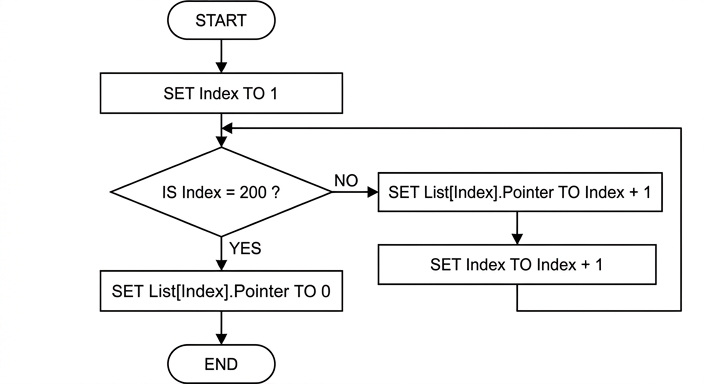
See flowchart
Background Concept
A flowchart is a visual way to represent an algorithm. Different shapes have standard meanings:
- start/end terminal for beginning or stopping
- process box for an action such as assignment
- decision diamond for a true/false test
- arrows for control flow
This question uses a linked-list initialisation routine. Because the list is stored in an array, each node's Pointer field must hold the index of the next node. To create a simple free list or sequential chain:
- node
1points to2 - node
2points to3 - and so on
- node
200points to0because it is the last one
That means the algorithm needs repetition, so a loop is required.
Understanding the Question
You are told to initialise the whole List array so that each node points to the following node, and the last node contains the null pointer.
So the flowchart must show:
- start with the first index
- repeatedly assign each node's
Pointerto the next index - stop when the final node is reached
- assign
0to the final node's pointer
The mark scheme shows that the expected flowchart is a loop built around the test Index = 200 ?.
Approach
Use a control variable, Index, starting at 1.
At each stage, check whether Index is the last valid position.
- If it is not the last position, set
List[Index].PointertoIndex + 1, then increaseIndex. - If it is the last position, set
List[Index].Pointerto0and finish.
This works because every node before the end should point forward by one place, while the final node must point nowhere.
Step-by-Step Reasoning
First, the flowchart needs a process box to initialise the control variable:
SET Index TO 1
Then it needs a decision diamond asking whether the final node has been reached:
IS Index = 200 ?
If the answer is NO:
- assign the pointer of the current node to the next index:
SET List[Index].Pointer TO Index + 1 - then move to the next node position:
SET Index TO Index + 1 - then loop back to the decision diamond
If the answer is YES:
- this means the current node is the last one in the array
- so it cannot point to
201 - instead, set
List[Index].Pointer TO 0 - then end the algorithm
This is the complete loop structure needed.
Key Takeaways
- A flowchart for repetition needs initialisation, a decision, loop actions and a return path.
- In an array-based linked list, a node's pointer often stores the next index.
- The final node must store the null pointer instead of pointing past the array.
Common Mistakes
- Setting every node, including node
200, to point toIndex + 1. That would try to create a pointer value of201, which is invalid. - Forgetting to initialise
Indexto1. Without that, the loop has no correct starting point. - Incrementing
Indexbefore storing the pointer, which would make the pointer assignments wrong. - Using the wrong test, such as
Index > 200, which changes when the last pointer gets assigned.
Things to Be Careful About
- The array bounds are
1to200, so200is a real node and must still be processed. - The test must allow the last node to be set to
0before ending. - Make sure the NO branch loops back to the decision, not to the start terminal.
- In a drawn flowchart, decision branches should be clearly labelled YES and NO.
An algorithm outputs the Data field from all nodes in the array List. The order the Data is output should be the same order it is stored in the linked list.
Describe the algorithm in four steps.
Do not use pseudocode statements in your answer.
Step 1 .......................................................................................................................................
...................................................................................................................................................
Step 2 .......................................................................................................................................
...................................................................................................................................................
Step 3 .......................................................................................................................................
...................................................................................................................................................
Step 4 .......................................................................................................................................
...................................................................................................................................................
Answer
- Set a current pointer to the value in
HeadPointer. - Output the
Datafield in the node at that position. - Replace the current pointer with the
Pointervalue from that node. - Repeat steps 2 and 3 until the current pointer becomes
0.
Set current pointer to HeadPointer, output the current node data, move to the next node using the Pointer field, and repeat until the pointer is 0.
Background Concept
To output the contents of a linked list in the correct order, you do not scan the whole array from 1 to 200. That would only give array order, not linked-list order.
Instead, you traverse the list. Traversal means:
- begin at the first node, found using
HeadPointer - process that node
- follow its pointer to the next node
- keep going until a null pointer is reached
In an array-based linked list, the Pointer field stores the index of the next node. The null pointer value 0 means there is no next node, so the traversal must stop there.
Understanding the Question
The question says an algorithm must output the Data field from all nodes in List, but in the same order as the linked list stores them.
That wording is crucial. The list order is determined by following pointers, not by the physical positions of nodes in the array.
It also says not to use pseudocode statements. So your answer should be written as plain English steps, not lines such as WHILE or OUTPUT written in formal pseudocode style.
Approach
Think of the list as a chain.
First, find the start of the chain using HeadPointer.
Then, at each node:
- read and output the data
- move to the next node by following the pointer
Continue until the pointer says there is no next node.
To turn that into four steps, separate the ideas into start, output, move, repeat/stop.
Step-by-Step Reasoning
Step 1 must identify where traversal begins. In a linked list, you cannot assume the first item is at List[1]. The correct starting place is the value stored in HeadPointer. So a current pointer variable is set to HeadPointer.
Step 2 is to process the current node. The task specifically asks to output the Data field, so you output the data stored in the node whose index is the current pointer.
Step 3 is to move through the list. You do that by taking the Pointer field from the current node and making that the new current pointer.
Step 4 is the repetition rule. If the current pointer is not 0, there is another node to visit, so you go back and output again. When the current pointer becomes 0, that means the end of the list has been reached, so the algorithm stops.
This gives the correct linked-list order because each node tells you which node comes next.
Key Takeaways
- Traversing a linked list means following pointers, not scanning array positions.
HeadPointergives the first node.- The null pointer marks the end of the list.
- When asked for structured steps rather than pseudocode, explain the same logic in plain language.
Common Mistakes
- Saying to output
List[1],List[2],List[3]and so on. That ignores the linked structure and may give the wrong order. - Forgetting to start from
HeadPointer. Without that, you may not begin at the first node in the list. - Forgetting the stopping condition. A traversal must stop when the pointer becomes
0. - Writing formal pseudocode keywords such as
WHILEorOUTPUTwhen the question explicitly says not to use pseudocode statements.
Things to Be Careful About
- Distinguish between array order and linked-list order.
- Make sure the movement step uses the current node's
Pointerfield, not simplycurrent pointer + 1. - Mention the null pointer clearly, because that is what controls termination.
- Since the question asks for four steps, keep the answer neatly separated into four ordered actions.
An examination paper has a maximum of 75 marks. One of five pass grades (A to E) is assigned, depending on the mark obtained. The lowest mark for a given grade is known as the grade boundary.
A program is being written to process examination marks.
The five grade boundaries are stored in a global 1D array GB of type INTEGER, for example:
| Index | Value | Comment |
|---|---|---|
| 1 | 65 | The minimum mark for an A grade. |
| 2 | 57 | The minimum mark for a B grade. |
| 3 | 43 | The minimum mark for a C grade. |
| 4 | 35 | The minimum mark for a D grade. |
| 5 | 27 | The minimum mark for an E grade. |
Any paper that achieves a mark within 2 marks of a grade boundary must be checked. Using the given table, a paper with 45 marks would need to be checked.
The pseudocode algorithm to determine whether a paper should be checked is as shown. The mark for the paper is stored in variable Mark. Global variables Mark, Index, Upper and Lower are declared as integers.
Complete the pseudocode.
FOR Index ← 1 TO ...........................................
  Lower ← GB[Index] - 2
  Upper ← .......................................................
  IF Mark ........................................... AND Mark ........................................... THEN
    OUTPUT "Check this paper"
  ENDIF
NEXT Index
Answer
FOR Index ← 1 TO 5
  Lower ← GB[Index] - 2
  Upper ← GB[Index] + 2
  IF Mark >= Lower AND Mark <= Upper THEN
    OUTPUT "Check this paper"
  ENDIF
NEXT Index
See completed pseudocode
Background Concept
This question is about processing values stored in a 1D array and using selection inside a loop. A 1D array stores a list of related items, and each item is accessed by its index. Here, the array GB stores the five grade boundaries.
To decide whether a mark is within 2 marks of a boundary, we form an inclusive range around each boundary:
boundary - 2boundary + 2
A value is inside that range if it is greater than or equal to the lower limit and less than or equal to the upper limit. In pseudocode, that is tested using AND.
Understanding the Question
You are given an incomplete loop that checks each grade boundary in turn. The missing parts are:
- how many array elements must be processed
- how to calculate the upper limit
- how to write the comparison in the
IFstatement
Because there are five grade boundaries, the algorithm must examine all five elements of GB.
Approach
The method is:
- Loop through each element of
GB. - For each boundary, calculate the lower and upper permitted values.
- Compare
Markwith those two limits. - If
Marklies between them, output the message.
This is a standard array-processing pattern: traverse the array, derive values from each element, then test a condition.
Step-by-Step Reasoning
The array has five entries, so the loop must run from index 1 to index 5:
FOR Index ← 1 TO 5
The lower limit is already given as 2 less than the boundary:
Lower ← GB[Index] - 2
The upper limit must therefore be 2 more than the boundary:
Upper ← GB[Index] + 2
Now we test whether Mark is within the range. Because marks exactly 2 away still count, the comparison must be inclusive:
IF Mark >= Lower AND Mark <= Upper THEN
If the condition is true, the required output is produced:
OUTPUT "Check this paper"
Then the loop continues to the next boundary:
NEXT Index
So the completed pseudocode checks every grade boundary and outputs the message whenever the mark falls in one of those 5-mark windows.
Key Takeaways
- Use a
FORloop to process every element in a fixed-size array. - To test whether a value is within a range, use two comparisons joined by
AND. - Inclusive boundaries require
>=and<=, not>and<.
Common Mistakes
- Using the wrong loop limit, such as
4or75, instead of the five elements inGB. - Writing
Upper ← GB[Index] - 2instead of+ 2. - Using
ORinstead ofAND, which would make the condition true for almost every mark. - Using strict comparisons such as
>and<, which would wrongly exclude marks exactly 2 away from the boundary.
Things to Be Careful About
- The array indices in the question start at 1, not 0.
- The phrase "within 2 marks" includes the boundary itself and marks exactly 2 away.
- In CIE pseudocode, assignment must use
←, while comparison uses=or relational operators such as>=and<=. - Complete only the missing logic asked for; there is no need to add extra variables or control structures here.
An alternative algorithm to determine if a paper needs to be checked uses a global 1D array Check, containing 76 elements of type BOOLEAN. The indices of the array are from 0 to 75 (inclusive), corresponding to the range of possible marks.
An element value in Check is TRUE if the index is within 2 marks of a grade boundary. For example, in the case where the C grade boundary is 43 the corresponding part of the Check array would be as follows:
| Index | Value |
|---|---|
| 40 | FALSE |
| 41 | TRUE |
| 42 | TRUE |
| 43 | TRUE |
| 44 | TRUE |
| 45 | TRUE |
| 46 | FALSE |
The mark for a given paper is stored in variable Mark.
Describe how an algorithm would use the Check array to determine whether this paper should be checked.
...........................................................................................................................................
...........................................................................................................................................
Answer
- Use
Markas the index in theCheckarray. - If
Check[Mark] = TRUE, the paper should be checked; ifCheck[Mark] = FALSE, it does not need to be checked.
Use Mark as the index; if Check[Mark] is TRUE, check the paper.
Background Concept
A Boolean array stores only two possible values in each position: TRUE or FALSE. This is useful when you want very fast decision-making. Instead of recalculating a condition each time, you can pre-store the answer.
Here, each index in Check represents a possible mark from 0 to 75. The value stored at that index tells us whether that mark is close enough to a grade boundary to need checking.
This is an example of direct access: if you know the index, you can immediately retrieve the corresponding value.
Understanding the Question
The question is not asking you to build the Check array yet. It is only asking how to use it once it already exists.
You are told:
Markcontains the paper's markCheckis indexed from 0 to 75Check[index]isTRUEif that mark needs checking
So the task is simply to explain how to use Mark to access the correct element and interpret the Boolean result.
Approach
The strategy is direct lookup:
- Take the mark value.
- Use it as the array index.
- Read the Boolean stored there.
- If the Boolean is
TRUE, the paper must be checked.
No loop is needed because the mark already tells you exactly which element to inspect.
Step-by-Step Reasoning
Suppose Mark is 45.
The algorithm checks:
Check[45]
If that element contains TRUE, then 45 is within 2 marks of at least one grade boundary, so the paper should be checked.
If that element contains FALSE, then 45 is not within 2 marks of any grade boundary, so no check is needed.
That means the full logic is just:
- use
Markas the index - inspect the Boolean value stored there
- act according to whether it is
TRUEorFALSE
This is more efficient during lookup than scanning through all grade boundaries each time, because it needs only one array access.
Key Takeaways
- A Boolean array can act like a ready-made lookup table.
- When the index corresponds directly to the data item, access is immediate.
TRUE/FALSEvalues are often used to simplify later decision-making.
Common Mistakes
- Describing a loop through the entire array. That is unnecessary for this part.
- Saying to compare
Markwith each boundary again. The purpose ofCheckis to avoid that. - Forgetting that the index and the mark are the same value in this design.
Things to Be Careful About
- The array indices run from 0 to 75 inclusive, matching the possible marks.
- You should refer to
Check[Mark], notCheck[Index]unlessIndexhas been set toMark. - The question asks how to determine whether the paper should be checked, so the important part is interpreting
TRUEandFALSEcorrectly.
A procedure GBInitialise() will initialise the Check array using values from the GB array.
Note it can be assumed that the maximum grade boundary value for A is 70 and the minimum value for E is 15.
Write pseudocode for the procedure.
...........................................................................................................................................
...........................................................................................................................................
...........................................................................................................................................
...........................................................................................................................................
...........................................................................................................................................
...........................................................................................................................................
...........................................................................................................................................
...........................................................................................................................................
...........................................................................................................................................
...........................................................................................................................................
...........................................................................................................................................
...........................................................................................................................................
Answer
PROCEDURE GBInitialise()
   DECLARE Index, MarkIndex : INTEGER
   FOR MarkIndex ← 0 TO 75
      Check[MarkIndex] ← FALSE
   NEXT MarkIndex
   FOR Index ← 1 TO 5
      FOR MarkIndex ← GB[Index] - 2 TO GB[Index] + 2
         Check[MarkIndex] ← TRUE
      NEXT MarkIndex
   NEXT Index
ENDPROCEDURE
See completed pseudocode
Background Concept
This question uses two common ideas in algorithm design:
- initialising an array to known values
- using one array to build another array
The Check array is a lookup table. Each index is a possible mark, and each value tells us whether that mark should trigger a check. Before setting the special values to TRUE, the array should usually be initialised so every element has a known default value, here FALSE.
A procedure is appropriate because this task performs an action but does not need to return a single value. It prepares global data for later use.
Understanding the Question
You must write pseudocode for GBInitialise().
Given:
GBcontains the five grade boundaries.Checkhas 76 Boolean elements indexed 0 to 75.- An index in
Checkshould beTRUEif it is within 2 marks of any boundary.
Required:
- fill the
Checkarray correctly using the values inGB
The note about the A boundary being at most 70 and the E boundary being at least 15 is there to reassure you that GB[Index] - 2 and GB[Index] + 2 will stay safely within the valid index range.
Approach
A reliable method is:
- Set every element of
ChecktoFALSE. - For each of the five boundaries in
GB, mark the five relevant positions fromboundary - 2toboundary + 2asTRUE.
This naturally leads to nested loops:
- outer loop: process each grade boundary
- inner loop: mark the range around that boundary
Step-by-Step Reasoning
First, define the procedure and declare local variables:
PROCEDURE GBInitialise()
   DECLARE Index, MarkIndex : INTEGER
Index is used to move through the GB array. MarkIndex is used to move through positions in Check.
Next, initialise the whole Check array to FALSE:
   FOR MarkIndex ← 0 TO 75
      Check[MarkIndex] ← FALSE
   NEXT MarkIndex
This is important because otherwise some elements may contain old or undefined values.
Now process each grade boundary:
FOR Index ← 1 TO 5
There are five entries in GB, one for each grade A to E.
For each boundary, mark the indices from 2 below it to 2 above it:
      FOR MarkIndex ← GB[Index] - 2 TO GB[Index] + 2
         Check[MarkIndex] ← TRUE
      NEXT MarkIndex
If, for example, GB[Index] is 43, this loop sets:
Check[41]Check[42]Check[43]Check[44]Check[45]
to TRUE.
That exactly matches the rule "within 2 marks of a grade boundary".
Finally, close the loops and the procedure:
   NEXT Index
ENDPROCEDURE
After the procedure runs, every mark that should trigger checking will have TRUE stored at its index in Check.
Key Takeaways
- Initialise arrays before using them.
- Use nested loops when one collection must be processed to update ranges in another collection.
- A procedure is suitable for setup code that modifies global structures.
- Precomputing results into a lookup table can make later checks very fast.
Common Mistakes
- Forgetting to initialise
ChecktoFALSEfirst. - Using
1 TO 76forCheck, even though its valid indices are0 TO 75. - Marking only the exact grade boundary as
TRUEinstead of the full range from-2to+2. - Looping through the wrong number of grade boundaries, such as
0 TO 4, when theGBarray is shown with indices1 TO 5. - Writing a function instead of a procedure, even though no value needs to be returned.
Things to Be Careful About
GBandCheckuse different index ranges:GBis indexed 1 to 5, whileCheckis indexed 0 to 75.- The inner loop bounds must be inclusive so that both
boundary - 2andboundary + 2are set toTRUE. - In CIE pseudocode, local variables should be declared explicitly.
- The given assumptions about minimum and maximum boundaries prevent out-of-range access, so you do not need extra bounds checks here unless you choose to add them in another valid approach.
A software developer follows a program development life cycle. The life cycle divides the development process into various stages.
The following table lists some development activities.
Complete the table by writing the name of the life cycle stage for each activity.
| Activity | Name of life cycle stage |
|---|---|
| A compiler is used. | |
| A program that has been released for general use is modified. | |
| The dry run method is used. | |
| The program structure is specified. |
Answer
| Activity | Name of life cycle stage |
|---|---|
| A compiler is used. | Implementation |
| A program that has been released for general use is modified. | Maintenance |
| The dry run method is used. | Testing |
| The program structure is specified. | Design |
Implementation; Maintenance; Testing; Design
Background Concept
The program development life cycle breaks software creation into stages so that the work is organised and controlled. In Cambridge 9618, the key stages commonly used are:
- Analysis: finding out what the problem is and what the user needs.
- Design: planning the solution, including program structure, modules, algorithms, data structures and interfaces.
- Implementation: writing the actual program code.
- Testing: checking that the program works correctly and finding errors.
- Maintenance: changing the program after release, for example to fix faults or improve features.
Questions like this test whether you can recognise the stage from an activity rather than just memorise the stage names.
Understanding the Question
You are given four activities and must write the matching life cycle stage for each one.
The clue words are important:
- compiler suggests program code is being translated, so coding has already happened.
- released for general use means the system is already in use, so later changes belong to maintenance.
- dry run is a testing technique used to trace logic.
- program structure is specified means the solution is being planned, not yet coded.
So this is really a matching exercise between activities and stages.
Approach
For each activity:
- Decide whether it belongs to planning, coding, checking, or changing after release.
- Match that idea to the formal life cycle stage name.
- Use the standard stage labels expected in the syllabus: Design, Implementation, Testing, Maintenance.
Step-by-Step Reasoning
-
A compiler is used.
- A compiler translates source code into machine code or object code.
- That means the program has been written and is in the coding stage.
- So the correct stage is Implementation.
-
A program that has been released for general use is modified.
- Once software has been released, later corrections or improvements are no longer part of initial development.
- These changes are part of looking after the software after delivery.
- So the correct stage is Maintenance.
-
The dry run method is used.
- A dry run means tracing through an algorithm or program step by step using test data.
- This is done to check correctness and find logic errors.
- So the correct stage is Testing.
-
The program structure is specified.
- Deciding modules, structure, and how the solution will be organised happens before coding.
- This is part of planning the solution.
- So the correct stage is Design.
Key Takeaways
- Be able to identify life cycle stages from activities, not just definitions.
- Design is about planning the structure and algorithms.
- Implementation is writing the code.
- Testing is checking the program with methods such as dry runs.
- Maintenance is changing software after release.
Common Mistakes
- Writing analysis for “program structure is specified”. Analysis is about requirements; structure belongs to design.
- Writing implementation for “dry run”. A dry run checks logic, so it is testing.
- Writing testing for “a compiler is used”. Compilation happens while implementing code, not as a test method itself.
- Confusing maintenance with further implementation. Once the software is already released, changes are maintenance.
Things to Be Careful About
- Use the stage name, not a description of the activity.
- Keep the answers in the same order as the rows in the table.
- Do not overcomplicate the wording; standard single-word stage names are what examiners expect.
- If your course materials use slightly different stage labels, choose the conventional 9618 wording that best fits the activity.
A software developer has written modules Test_A() and Test_B(). These have been written but contain errors. These modules are called from several places in the main program and testing of the main program (integration testing) has to stop.
Identify a method that can be used to continue testing the main program before the errors in these modules have been corrected and describe how this would work.
Method ......................................................................................................................................
Description ................................................................................................................................
...................................................................................................................................................
Answer
- Method: Stubs
- Description: Create temporary dummy versions of
Test_A()andTest_B()with the same calls/parameters as the original modules. These return preset or simulated values/output so the main program can continue to be integration tested until the real modules are corrected.
Stubs — temporary dummy versions of the called modules are used so the main program can continue integration testing.
Background Concept
During testing, a program is often built from modules. Sometimes not all modules are ready, or some modules contain errors. To keep testing moving, developers can use test support code.
Two important terms are:
- Stub: a temporary module that stands in for a called module. It is used when the higher-level program or calling module needs to be tested, but the lower-level called module is missing or faulty.
- Driver: a temporary module that calls another module. It is used when the module being tested does not yet have its normal calling program.
So the distinction is:
- If the missing/faulty code is called by the part you want to test, use a stub.
- If the missing/faulty code would normally call the part you want to test, use a driver.
Understanding the Question
The question says:
Test_A()andTest_B()have been written but contain errors.- They are called from several places in the main program.
- Testing of the main program has to continue.
That means the main program depends on these modules. Since the main program is the part we want to continue testing, and the faulty modules are below it, we need a way to replace those called modules temporarily.
That points directly to stubs.
Approach
The correct method is chosen by looking at the direction of the call.
- Identify whether the missing/faulty module is the caller or the called module.
- Since
Test_A()andTest_B()are called by the main program, they should be replaced by temporary stand-ins. - These stand-ins must look enough like the real modules for the main program to run.
- They can return fixed values, sample outputs, or do minimal processing so integration testing of the main program can continue.
Step-by-Step Reasoning
- The main program is already written to call
Test_A()andTest_B(). - Because those modules have errors, using the real versions would stop or disrupt integration testing.
- To avoid this, the developer writes stub versions of those modules.
- Each stub should:
- have the same name or be used in place of the original module,
- accept the same parameters if needed,
- return a sensible dummy value or produce simple placeholder behaviour.
- When the main program calls the stub, the call still succeeds.
- This lets the developer test:
- whether the main program makes the calls correctly,
- whether data is passed correctly,
- whether the rest of the integration works.
- Later, when the real
Test_A()andTest_B()modules are fixed, the stubs are removed and the real modules are used instead.
A short description that would score well is therefore: use stubs, meaning temporary dummy versions of the faulty called modules, with matching parameters, that return preset values so the main program can still be tested.
Key Takeaways
- Use a stub when a called module is unavailable or faulty.
- Use a driver when the calling module is unavailable.
- In integration testing, temporary replacement code helps progress continue even when some modules are not ready.
- Good answers must name the method and explain how it works in the context given.
Common Mistakes
- Writing driver instead of stub. A driver calls a module under test; here the problem modules are themselves being called by the main program.
- Saying only “use dummy data” without naming the method. The mark scheme usually expects the testing method to be identified explicitly.
- Giving a vague description like “ignore those modules”. The main program still needs something to call, so the replacement must act like the module interface.
- Describing full correction of the faulty modules. The question asks how testing can continue before those errors are fixed.
Things to Be Careful About
- Read the direction of the call carefully: the phrase called from the main program is the key clue.
- The stub should match the real module's expected interface closely enough for integration testing to proceed.
- The stub does not need the full real logic; simple preset values or placeholder output are enough.
- Do not confuse this with unit testing terminology alone; the question is specifically about allowing integration testing of the main program to continue.
In some countries, on the third Sunday in March, daylight saving time begins when clocks move forward by one hour.
A module AdjustClock() will take an integer parameter representing a year. The module will return an integer value representing the number of the day in March on which the clocks move forward.
For example, the following line of pseudocode would assign DayNumber the value 20:
DayNumber ← AdjustClock(2022)
Write pseudocode for the function AdjustClock().
Date functions from the insert should be used in your solution.
..........................................................................................................................................................
..........................................................................................................................................................
..........................................................................................................................................................
..........................................................................................................................................................
..........................................................................................................................................................
..........................................................................................................................................................
..........................................................................................................................................................
..........................................................................................................................................................
..........................................................................................................................................................
..........................................................................................................................................................
..........................................................................................................................................................
..........................................................................................................................................................
Answer
FUNCTION AdjustClock(InputYear : INTEGER) RETURNS INTEGER
   DECLARE DayNumber, SundayCount : INTEGER
   DECLARE ThisDate : DATE

   SundayCount ← 0
   FOR DayNumber ← 1 TO 31
      ThisDate ← SETDATE(DayNumber, 3, InputYear)
      IF DAYNAME(ThisDate) = "Sunday" THEN
         SundayCount ← SundayCount + 1
         IF SundayCount = 3 THEN
            RETURN DayNumber
         ENDIF
      ENDIF
   NEXT DayNumber
ENDFUNCTION
See completed pseudocode
Background Concept
This question is about writing a function in CIE-style pseudocode. A function is used when a module must return a value to the calling code. Here, the returned value is the day number in March when daylight saving starts.
The key programming ideas are:
- using a function with a parameter and a return value
- using iteration to examine a sequence of possible dates
- using selection to test whether a date is a Sunday
- using the provided date functions instead of trying to calculate the weekday manually
A common pattern for this type of problem is:
- generate each candidate value
- test whether it matches the condition
- count how many matches have been found
- stop when the required occurrence is reached
Because the question asks for the third Sunday in March, we need to look through the days 1 to 31, identify which of those dates are Sundays, and return the third one found.
Understanding the Question
The function AdjustClock() takes one integer input: the year.
For example:
DayNumber ← AdjustClock(2022)
must return 20, because in 2022 the Sundays in March were the 6th, 13th and 20th, so the third Sunday was 20 March.
Important clues in the question:
- it says to write pseudocode for the function so the answer must be a
FUNCTION ... RETURNS ... ENDFUNCTION - it says to use date functions from the insert, so we should not attempt to work out leap years or weekday patterns ourselves
- it asks for the number of the day in March, so the function returns an integer such as
20, not a full date
So the task is not to move clocks or print text. It is simply to calculate and return the correct March day number.
Approach
A straightforward approach is:
- Start a counter for how many Sundays have been found.
- Loop through all day numbers from
1to31. - For each day number, create the date for that day in March of the given year.
- Check whether that date is a Sunday.
- If it is, increase the Sunday counter.
- As soon as the counter reaches
3, return that day number.
This is a good method because March always has 31 days, so the loop bounds are simple, and the date library handles the weekday calculation for us.
Step-by-Step Reasoning
The function header is:
FUNCTION AdjustClock(InputYear : INTEGER) RETURNS INTEGER
This tells the examiner three important things:
- the module is a function, not a procedure
- it receives one integer parameter, the year
- it returns an integer result
Next, local variables are declared:
DECLARE DayNumber, SundayCount : INTEGER
DECLARE ThisDate : DATE
DayNumberstores the current day in March being checkedSundayCountstores how many Sundays have been found so farThisDatestores the actual date value created from the day, month and year
The counter is initialised:
SundayCount ← 0
This is essential. If it is not set to 0, the count would be undefined.
Now the loop checks every day in March:
FOR DayNumber ← 1 TO 31
March always contains 31 days, so this loop covers the whole month.
Inside the loop, the date is constructed:
ThisDate ← SETDATE(DayNumber, 3, InputYear)
DayNumberis the day being tested3is the month number for MarchInputYearis the year passed into the function
Then the weekday is tested:
IF DAYNAME(ThisDate) = "Sunday" THEN
If this date is a Sunday, then we increment the counter:
SundayCount ← SundayCount + 1
After increasing the count, we check whether this is the third Sunday:
IF SundayCount = 3 THEN
   RETURN DayNumber
ENDIF
This is the key step. The moment the third Sunday is found, the function returns that day number immediately.
For example, for 2022:
6 Marchis Sunday, soSundayCountbecomes113 Marchis Sunday, soSundayCountbecomes220 Marchis Sunday, soSundayCountbecomes3- the function returns
20
Finally, the loop and function are closed correctly:
NEXT DayNumber
ENDFUNCTION
This solution is efficient enough for the task because at most 31 dates are checked, and in practice it usually returns before the end of the loop.
If the insert used a different date function such as DAYINDEX() instead of DAYNAME(), the same idea would still work: loop through the dates, identify Sundays, count them, and return the third one.
Key Takeaways
- Use a function when a value must be returned.
- When looking for the nth occurrence of something, a good pattern is to loop, test, count, return when the count reaches n.
- Use the provided library/date functions rather than recreating date logic manually.
- A simple count-controlled loop is often the clearest solution when the range is fixed and small.
Common Mistakes
- Writing a
PROCEDUREinstead of aFUNCTION. A procedure does not return a value, but this question requires one. - Forgetting the
RETURNS INTEGERpart of the function header. - Not declaring local variables such as
SundayCountorThisDate. - Starting the counter at
1instead of0, which would make the third Sunday be treated as the second or fourth. - Returning the count of Sundays instead of the day number. The answer must be something like
20, not3. - Using the wrong month number. March must be month
3. - Checking for the first Sunday and returning immediately, instead of counting up to the third Sunday.
- Using
=for assignment instead of the CIE assignment arrow←.
Things to Be Careful About
- Keep to exact CIE pseudocode style:
FUNCTION,DECLARE,FOR,IF,RETURN,NEXT,ENDFUNCTION. - Make sure the parameter name and returned value are used consistently.
- The loop should cover all possible days in March:
1 TO 31. - The date must be created using the given year parameter, not a fixed year.
- The function should return as soon as the third Sunday is found; this is clearer and avoids unnecessary extra processing.
- If your insert uses a weekday-number function rather than a weekday-name function, compare against the correct Sunday value from that insert exactly.
A coffee shop owner wants to introduce a computerised loyalty card system.
A programmer discusses the details of the system with the shop owner.
Identify the stage of the program development life cycle that this discussion is part of and give a document that will be produced during this stage.
Stage ........................................................................................................................................
Document .................................................................................................................................
...................................................................................................................................................
Answer
- Stage: Analysis
- Document: Requirements specification
Analysis; requirements specification
Background Concept
The program development life cycle breaks software creation into stages so that the problem is understood before a solution is built. One important early stage is analysis. In analysis, the developer finds out exactly what the user or client needs the system to do.
Typical analysis activities include meeting the client, asking questions, identifying inputs, outputs and processing, and clarifying constraints or special rules. A common document produced at this stage is a requirements specification. This records what the finished system must do.
Understanding the Question
The question says that a programmer discusses the details of the loyalty card system with the shop owner. That tells us the programmer is still finding out the user's needs rather than coding or testing.
So the task is to name:
- the stage of the program development life cycle this belongs to
- one document created during that stage
The key clue is the word discussion with the owner. That points to gathering requirements.
Approach
First identify what kind of activity is happening. If the programmer is talking to the user to understand the problem, that is analysis.
Then think of a document created during analysis. The best standard answer is requirements specification, because it records the user's needs clearly and is the normal output of this stage.
Step-by-Step Reasoning
The scenario is not about writing algorithms, drawing flowcharts, coding or testing. It is about understanding the system that the coffee shop wants.
That means the stage is analysis.
During analysis, the programmer would produce a document describing what the system must do. A suitable document is the requirements specification.
So the complete answer is:
- Stage: Analysis
- Document: Requirements specification
Key Takeaways
- Client discussions to find out system needs belong to the analysis stage.
- A requirements specification is a standard document produced during analysis.
- In life cycle questions, match the activity in the scenario to the stage name.
Common Mistakes
- Giving design instead of analysis. Design happens after the requirements have been gathered.
- Naming a testing document, such as a test plan. That belongs later in development.
- Giving a vague document name such as notes without linking it to a recognised life cycle document.
Things to Be Careful About
Be careful to choose the stage that matches the evidence in the question. A discussion with the owner is about discovering requirements, not building the program. Also make sure the document named is one that would reasonably be produced during that same stage, such as a requirements specification.
The shop will give each customer a loyalty card that displays a unique customer ID as a bar code. A customer will be able to present their card each time they make a purchase. The system will scan the bar code, calculate points, and add them to the customer’s total. When the customer next makes a purchase and presents their card, they will have the option to exchange points for a discount.
The designer decides that this activity will be handled by a new module. Decomposition will be used to break the problem of designing the new module down into sub-problems (sub-modules).
Identify four sub-modules that could be used in the design of the new module and describe their use.
Sub-module 1 ...........................................................................................................................
Use ...........................................................................................................................................
Sub-module 2 ...........................................................................................................................
Use ...........................................................................................................................................
Sub-module 3 ...........................................................................................................................
Use ...........................................................................................................................................
Sub-module 4 ...........................................................................................................................
Use ...........................................................................................................................................
Answer
-
Sub-module 1: Scan loyalty card bar code
Use: Read the customer ID from the card. -
Sub-module 2: Retrieve customer record
Use: Find the customer's current points total using the customer ID. -
Sub-module 3: Calculate points earned
Use: Work out how many points to add from the value of the current purchase. -
Sub-module 4: Redeem points and update record
Use: Check whether the customer wants to exchange points for a discount, subtract any points used, add new points, and store the new total.
See explanation
Background Concept
Decomposition means breaking a large problem into smaller sub-problems, often called modules or sub-modules. Each sub-module should do one clear job. This makes the system easier to design, code, test and maintain.
In program design, a good decomposition often separates:
- input tasks
- processing tasks
- storage or update tasks
- output tasks
A module should be focused and purposeful. For example, one module might read data, another might calculate a value, and another might update stored data.
Understanding the Question
The overall task is a loyalty card system used when a customer makes a purchase. From the description, the system must:
- scan the bar code on the card
- identify the customer
- calculate points
- add points to the customer's total
- possibly exchange points for a discount on the next purchase
The question asks for four sub-modules that could be used when designing this new module, and a description of what each one does.
So you are not writing code here. You are showing sensible decomposition of the system into smaller units.
Approach
Look at the full process in the order it would happen during a transaction.
A good way to decompose it is:
- get the customer ID from the card
- get the customer's existing data
- calculate points for the purchase
- deal with redemption and update the stored total
These choices are strong because each sub-module has one main responsibility, and together they cover the whole loyalty-card process.
Step-by-Step Reasoning
Start with the first action in the scenario: the card is presented and scanned. That naturally suggests a sub-module such as scan bar code. Its job is simply to read the customer ID.
Next, once the ID is known, the system needs the customer's current information. That gives a retrieve customer record sub-module. It would look up the customer using the ID and obtain the current points total.
Then the system must award points for the current purchase. That suggests a calculate points earned sub-module. Its role is to take the purchase amount or transaction details and work out how many points should be added.
Finally, the question mentions that on a later purchase the customer may exchange points for a discount. That means there needs to be logic for checking whether points are being redeemed, reducing the total if necessary, adding any newly earned points, and saving the revised total. That can be described as a redeem points and update record sub-module.
Other valid decompositions could also earn credit, for example a separate discount calculation module or a separate output module to display the new balance. The important point is that the sub-modules must be sensible and their uses must match the system description.
Key Takeaways
- Decomposition breaks a larger system into manageable sub-modules.
- Good sub-modules each have one clear purpose.
- A realistic transaction system can often be divided into input, lookup, calculation and update stages.
- In design questions, clear module names plus a clear use statement are usually enough.
Common Mistakes
- Giving four steps that are too vague, such as process data or handle system, without saying what each one does.
- Repeating the same idea in different words, for example calculate points and work out points, which do not really form separate sub-modules.
- Naming a sub-module without describing its use.
- Describing whole-system behaviour instead of one specific module's role.
Things to Be Careful About
Make sure each sub-module is distinct. The examiner is looking for separate parts of the design, not one long description split across four lines. Also keep the uses tied closely to the loyalty-card scenario: customer ID, points total, discount redemption and record updating are the key elements given in the question.
A program is being developed to implement a game for up to six players.
During the game, each player assembles a team of characters. At the start of the game there are 45 characters available.
Each character has four attributes, as follows:
| Attribute | Examples | Comment |
|---|---|---|
| Player | 0, 1, 3 | The player the character is assigned to. |
| Role | Builder, Teacher, Doctor | The job that the character will perform in the game. |
| Name | Bill, Lee, Farah, Mo | The name of the character. Several characters may perform the same role, but they will each have a unique name. |
| Skill level | 14, 23, 76 | An integer in the range 0 to 100, inclusive. |
The programmer has defined a record type to define each character. The record type definition is shown in pseudocode as follows:
TYPE CharacterType
  DECLARE Player : INTEGER
  DECLARE Role : STRING
  DECLARE Name : STRING
  DECLARE SkillLevel : INTEGER
ENDTYPE
The Player field indicates the player to which the character is assigned (1 to 6). This field value is 0 if the character is not assigned to any player.
The programmer has defined a global array to store the character data, as follows:
DECLARE Character : ARRAY[1:45] OF CharacterType
At the start of the game all record fields are initialised, and all Player fields are set to 0
The programmer has defined a program module as follows:
| Module | Description |
|---|---|
Count() | • called with two parameters: ○ an integer representing a player ○ a string representing a character role • searches the Character array for characters with the given role that are assigned to the given player • counts the number of assigned characters and sums their total skill level • outputs the result of the search if characters with the given role are found, for example: "Player 3 has 4 characters with the role of Teacher and the total skill level is 65" • if no characters with the given role are found, outputs: "No characters with that role are assigned to this player" |
Complete the pseudocode for module Count().
PROCEDURE Count(ThisPlayer : INTEGER, ThisRole : STRING)
...................................................................................................................................................
...................................................................................................................................................
...................................................................................................................................................
...................................................................................................................................................
...................................................................................................................................................
...................................................................................................................................................
...................................................................................................................................................
...................................................................................................................................................
...................................................................................................................................................
...................................................................................................................................................
ENDPROCEDURE
Answer
PROCEDURE Count(ThisPlayer : INTEGER, ThisRole : STRING)
   DECLARE Index, NumCharacters, TotalSkill : INTEGER
   NumCharacters ← 0
   TotalSkill ← 0
   FOR Index ← 1 TO 45
      IF Character[Index].Player = ThisPlayer AND Character[Index].Role = ThisRole THEN
         NumCharacters ← NumCharacters + 1
         TotalSkill ← TotalSkill + Character[Index].SkillLevel
      ENDIF
   NEXT Index
   IF NumCharacters > 0 THEN
      OUTPUT "Player ", ThisPlayer, " has ", NumCharacters, " characters with the role of ", ThisRole, " and the total skill level is ", TotalSkill
   ELSE
      OUTPUT "No characters with that role are assigned to this player"
   ENDIF
ENDPROCEDURE
See completed pseudocode
Background Concept
A record lets one item store several related fields together. Here, each element of the Character array is a CharacterType record containing Player, Role, Name and SkillLevel. To answer a query such as "how many Teachers does player 3 have?", the standard pattern is:
- initialise variables for the result
- loop through every array element
- test whether the current record matches the required conditions
- if it matches, update the result variables
- after the loop, output a message based on whether anything was found
This is a common searching-and-counting task. It is not just finding one match; it must examine all 45 records because several characters may match the same player and role.
Understanding the Question
You are given a global array:
Character[1:45]- each element is a record
- the procedure
Count()receives two inputs:ThisPlayeras an integerThisRoleas a string
The procedure must search the whole array and find records where both of these are true:
Player = ThisPlayerRole = ThisRole
For those matching records, it must:
- count how many there are
- add together their
SkillLevelvalues
Then it must output one of two messages:
- the full summary message if at least one match exists
- the "No characters..." message if none exist
The key clue is that the module description says it "counts" and "sums", so you need accumulator variables, not just a simple found flag.
Approach
Use a count-controlled loop from 1 to 45 because the array bounds are fixed and known.
Inside the loop:
- inspect
Character[Index] - check both the player and the role
- if both match, increase the count by 1 and add that record's
SkillLevelto the total
After the loop:
- if the count is greater than 0, output the detailed sentence
- otherwise output the "No characters..." message
This is better than outputting during the loop, because the question wants one final result after the search is complete.
Step-by-Step Reasoning
PROCEDURE Count(ThisPlayer : INTEGER, ThisRole : STRING)
- This defines the module with the two required parameters.
ThisPlayeris the player number being searched for.ThisRoleis the role being searched for.
DECLARE Index, NumCharacters, TotalSkill : INTEGER
Indexis the loop counter.NumCharactersstores how many matches have been found.TotalSkillstores the running total of matching skill levels.
NumCharacters ← 0
- Before searching, no matching characters have been found yet.
TotalSkill ← 0
- Before searching, the total of skill levels must start at 0.
FOR Index ← 1 TO 45
- The array was declared as
ARRAY[1:45], so the correct bounds are 1 to 45. - Every record must be checked because matches could appear anywhere.
IF Character[Index].Player = ThisPlayer AND Character[Index].Role = ThisRole THEN
- This is the key condition.
- Both conditions must be true at the same time.
- If only one is true, it is not a valid match.
NumCharacters ← NumCharacters + 1
- Each time a valid match is found, increase the count.
TotalSkill ← TotalSkill + Character[Index].SkillLevel
- Add that matching character's skill level to the running total.
After the loop finishes, all records have been checked.
IF NumCharacters > 0 THEN
- If at least one matching record was found, output the detailed message.
OUTPUT "Player ", ThisPlayer, ...
- The output includes the player number, the count, the role, and the total skill level.
ELSE
- If
NumCharactersis still 0, no matching records were found.
OUTPUT "No characters with that role are assigned to this player"
- This matches the required alternative output.
This structure guarantees exactly one output message, and it is based on the final result of the search.
Key Takeaways
- When a question asks for both a count and a total, use two accumulator variables.
- When searching an array of records, access the correct field using dot notation such as
Character[Index].Role. - If there may be multiple matches, you must search the entire array, not stop after the first one.
- A final
IF/ELSEafter the loop is a standard way to choose between "found" and "not found" output.
Common Mistakes
- Forgetting to initialise
NumCharactersorTotalSkillto 0. This gives incorrect results. - Checking only
Roleor onlyPlayerinstead of both. The question requires both conditions. - Putting the output statement inside the loop. That would produce repeated output instead of one final summary.
- Using
Character[Index].Nameby mistake. The search is by role, not by name. - Writing
NumCharacters = 0for assignment. In CIE pseudocode, assignment must use←.
Things to Be Careful About
- The array is 1-indexed, not 0-indexed, because it is declared as
ARRAY[1:45]. Roleis a string, so compare it withThisRole;SkillLevelis the integer that must be added.- The
Playerfield can be 0 for unassigned characters, but those only count ifThisPlayeris also 0. The question context suggests real players are 1 to 6, so the normal use is searching assigned players. - The required message says "if characters with the given role are found". That means you decide after the full search, not record by record.
- Keep the parameter names and field names exactly correct so the pseudocode is clear and consistent.
The Character array data has been saved in the text file SaveFile.txt
Each line of the file contains one element of the array (one record).
New modules are defined:
| Module | Description |
|---|---|
Extract() (already written) | • called with two parameters: ○ a string representing a complete line from the text file ○ an integer representing a field number (see structure below) • returns a string representing the required field |
Restore() | • opens the text file SaveFile.txt • reads lines from the file and assigns values to each record in the Character array using data from each line of the file |
As a reminder, the record structure is repeated here:
TYPE CharacterType
  DECLARE Player : INTEGER     //Field number 1
  DECLARE Role : STRING       //Field number 2
  DECLARE Name : STRING       //Field number 3
  DECLARE SkillLevel : INTEGER //Field number 4
ENDTYPE
Write pseudocode for module Restore().
You must use the module Extract().
...................................................................................................................................................
...................................................................................................................................................
...................................................................................................................................................
...................................................................................................................................................
...................................................................................................................................................
...................................................................................................................................................
...................................................................................................................................................
...................................................................................................................................................
...................................................................................................................................................
Answer
PROCEDURE Restore()
   DECLARE Line : STRING
   DECLARE Index : INTEGER
   OPENFILE "SaveFile.txt" FOR READ
   FOR Index ← 1 TO 45
      READFILE "SaveFile.txt", Line
      Character[Index].Player ← STR_TO_NUM(Extract(Line, 1))
      Character[Index].Role ← Extract(Line, 2)
      Character[Index].Name ← Extract(Line, 3)
      Character[Index].SkillLevel ← STR_TO_NUM(Extract(Line, 4))
   NEXT Index
   CLOSEFILE "SaveFile.txt"
ENDPROCEDURE
See completed pseudocode
Background Concept
Restoring data from a text file means rebuilding the program's in-memory data structures from values stored on secondary storage. This is important because variables and arrays in memory are lost when a program closes, but a file remains available for later use.
Here, each line of the file represents one record. So the restore process is:
- open the file for reading
- read a line
- split the line into its fields
- convert each field to the correct data type
- store the values into the correct array element
- repeat until all records are restored
- close the file
The question says the helper function Extract() already exists. That means you should not write your own parsing logic. You simply call Extract(Line, FieldNumber) to get the required field as a string.
Understanding the Question
The Character array has 45 elements, and each line of SaveFile.txt contains one complete record for one array element.
Each record has four fields:
Playeras an integerRoleas a stringNameas a stringSkillLevelas an integer
The task is to write Restore() so that it reads the file and rebuilds the Character array. The important instruction is: "You must use the module Extract()". So the mark-worthy method is to read the whole line first, then call Extract() four times for field numbers 1 to 4.
Also notice that Extract() returns a string, so numeric fields must be converted using STR_TO_NUM() before storing them in integer fields.
Approach
Because the file contains one line for each of the 45 array elements, a simple count-controlled loop from 1 to 45 is a neat solution.
For each loop iteration:
- read one line from the file into a string variable
- extract field 1 and convert it to an integer for
Player - extract field 2 and store it directly as
Role - extract field 3 and store it directly as
Name - extract field 4 and convert it to an integer for
SkillLevel
Finally, close the file.
This approach matches the record structure exactly and guarantees that file line 1 goes into Character[1], line 2 into Character[2], and so on.
Step-by-Step Reasoning
PROCEDURE Restore()
- This defines the new module.
- It takes no parameters because it always restores the same global array from the same file.
DECLARE Line : STRING
- This variable stores one whole line from the file.
- You need this because
Extract()works on a complete line.
DECLARE Index : INTEGER
- This is used to step through the array positions from 1 to 45.
OPENFILE "SaveFile.txt" FOR READ
- The file must be opened before any attempt to read from it.
FOR READis correct because the task is to load existing data, not to write new data.
FOR Index ← 1 TO 45
- There are 45 characters in the array.
- The array declaration is
ARRAY[1:45], so these are the correct bounds.
READFILE "SaveFile.txt", Line
- This reads the next full record from the file into
Line.
Character[Index].Player ← STR_TO_NUM(Extract(Line, 1))
- Field 1 is
Player. Extract()returns text, butPlayeris an integer field, so conversion is required.
Character[Index].Role ← Extract(Line, 2)
- Field 2 is
Role. Roleis a string, so no conversion is needed.
Character[Index].Name ← Extract(Line, 3)
- Field 3 is
Name. - Again, this is already a string.
Character[Index].SkillLevel ← STR_TO_NUM(Extract(Line, 4))
- Field 4 is
SkillLevel. - This must be converted from string to integer before storage.
NEXT Index
- This repeats the same process for all 45 records.
CLOSEFILE "SaveFile.txt"
- The file should be closed once reading is complete.
- This is good practice and is usually expected in file-handling questions.
ENDPROCEDURE
- This ends the module.
A WHILE NOT EOF(...) approach could also work in principle, but with a fixed 45-element array and one line per record, the FOR loop is simple and directly matches the data structure.
Key Takeaways
- A restore routine rebuilds RAM data structures from persistent file storage.
- When a helper function is provided, use it rather than inventing a different parsing method.
- Always convert extracted strings to integers before storing them in integer fields.
- A count-controlled loop is appropriate when the number of records is known in advance.
- Open files before reading and close them afterwards.
Common Mistakes
- Forgetting to use
Extract(), even though the question explicitly requires it. - Storing
Extract(Line, 1)orExtract(Line, 4)directly into integer fields withoutSTR_TO_NUM(). - Mixing up the field numbers, for example placing field 3 into
Roleor field 2 intoName. - Using the wrong array bounds, such as 0 to 44 instead of 1 to 45.
- Forgetting to close the file.
- Reading the file outside the loop only once, which would restore only one record.
Things to Be Careful About
Extract()returns strings for every field, even when the actual record field should be an integer.- The array element and the file line should stay aligned: first line to
Character[1], second line toCharacter[2], and so on. - Use the exact field order given in the question:
PlayerRoleNameSkillLevel
- The question says each line contains one element of the array, so one
READFILEhappens for each loop cycle. - In CIE pseudocode, keep keywords in upper case and use
←for assignment, not=.
The game can last for several days and users often find that they have to close and rerun the game program many times in order to complete it.
Describe the benefit of using the file SaveFile.txt as described in part (b).
...................................................................................................................................................
...................................................................................................................................................
Answer
- The file stores the current game data permanently, so it is not lost when the program is closed.
- When the game is run again, the saved character data can be restored, so players can continue from the previous state without re-entering everything.
The file keeps the game data after the program closes, so it can be restored later and the game can continue without losing progress.
Background Concept
Data held in variables and arrays during program execution is stored in main memory. Main memory is temporary, so when the program closes or the computer is turned off, that data is lost. A text file stored on secondary storage is persistent, which means the data remains available after the program ends.
In games, this is the basis of a save-and-restore system. The program writes the current state to a file, and later reads it back so the user can continue from the same point.
Understanding the Question
The question says the game may last several days, and users may need to close and rerun the program many times. That means the current state of the game must survive between program runs.
The file SaveFile.txt stores the Character array data. So the benefit being asked for is not just "files store data" in general; it is specifically that the game state can be saved and later restored.
Approach
A good answer needs the benefit in the game context:
- data is kept after the program closes
- users can reopen the game and continue without starting again or typing everything again
Those two linked ideas are usually enough for full credit in a short explain question.
Step-by-Step Reasoning
When the program is closed, the array in memory disappears. Without a save file:
- all player assignments would be lost
- all roles, names and skill data loaded during the game would need to be recreated
- the users could not easily continue a long game
By storing the data in SaveFile.txt:
- the current character information is kept on secondary storage
- the
Restore()module can rebuild the array next time the game starts - the players can continue from where they stopped
- this avoids re-entering or recreating the game state
So the real benefit is continuity of progress across multiple sessions.
Key Takeaways
- Main memory is temporary; files provide permanent storage.
- A save file lets a long-running task or game continue over multiple sessions.
- "Restore" works only because the data was first stored persistently.
Common Mistakes
- Saying only "it stores data" without explaining why that matters in this game.
- Claiming it makes the game faster, which is not the main benefit described here.
- Confusing saving to a file with keeping data in RAM; RAM contents are lost when the program closes.
Things to Be Careful About
- The answer should be about persistence between separate runs of the program.
- Mention the user benefit clearly: progress is not lost and the game can continue later.
- Keep the explanation tied to the scenario of a multi-day game, not just a vague statement about files.