Computer Science 9618/13 — October/November 2024
Cambridge AS Level · Theory Fundamentals · worked solutions for every part, with the mark scheme
Topics Hardware · Information Representation · Processor Fundamentals · Databases · Ethics and Ownership · Communication
Answer
- A 2-input XOR gate outputs
1only when the two inputs are different.
A 2-input XOR gate outputs 1 only when the two inputs are different.
Background Concept
An XOR gate is an exclusive OR gate. It compares two inputs and gives a true output only when exactly one input is true.
For a 2-input XOR gate:
0 XOR 0 = 00 XOR 1 = 11 XOR 0 = 11 XOR 1 = 0
So its key idea is difference, not simply “at least one is 1”.
Understanding the Question
The question asks for the operation of a 2-input XOR gate. That means you are not being asked to draw it or write a truth table in full, just to describe what makes its output become 1.
Because it is only 1 mark, the expected answer is a short, precise statement.
Approach
Recall the defining rule of XOR:
- output
1when the inputs are different - output
0when the inputs are the same
For a 1-mark description, the shortest correct wording is enough.
Step-by-Step Reasoning
A normal OR gate outputs 1 if one or both inputs are 1.
An XOR gate is more restrictive:
- if both inputs are
0, output is0 - if one input is
0and the other is1, output is1 - if one input is
1and the other is0, output is1 - if both inputs are
1, output is0
So the correct description is that the output is 1 only when the two inputs are different, or equivalently when exactly one input is 1.
Key Takeaways
- XOR means exclusive OR.
- A 2-input XOR gate outputs
1for different inputs. - “Exactly one input is
1” is equivalent wording.
Common Mistakes
- Saying “output is
1if one or both inputs are1” — that describes an OR gate, not XOR. - Saying “output is
1when both inputs are1” — that describes an AND gate. - Missing the word “only” or “exactly” — XOR must exclude the case where both inputs are
1.
Things to Be Careful About
- Keep XOR separate from OR; they are not the same.
- In a 1-mark question, give one exact rule rather than a long explanation.
- Accepted phrasing is usually either “inputs are different” or “exactly one input is
1”.
Write the logic expression for the following logic circuit.
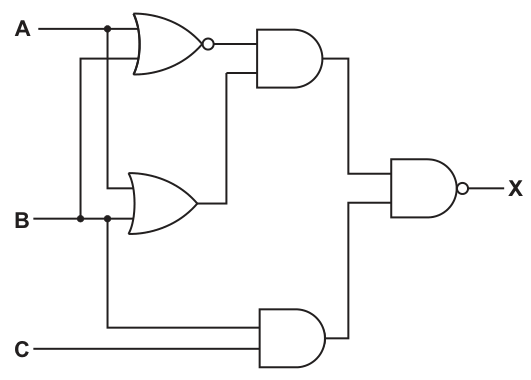
X = ............................................................................................................................................
Working
- Top gate:
NOT (A OR B) - Middle gate:
A OR B - Upper AND output:
NOT (A OR B) AND (A OR B) - Lower AND output:
B AND C - Final gate is NAND
Answer
X = ((NOT (A OR B)) AND (A OR B)) NAND (B AND C)
((NOT (A OR B)) AND (A OR B)) NAND (B AND C)
Background Concept
To write a logic expression from a circuit, you work from left to right and replace each gate with its Boolean operation.
Useful gate meanings here are:
- OR: output is
1if at least one input is1 - AND: output is
1only if both inputs are1 - NOR:
NOT (input1 OR input2) - NAND:
NOT (input1 AND input2)
A multi-stage circuit is built from intermediate results. Instead of jumping straight to the final expression, it is much safer to name the output of each gate one at a time.
Understanding the Question
You are given a completed logic circuit and must write the Boolean expression for output X.
The important job is to follow the actual wiring in the diagram. The top gate takes A and B into a NOR gate. The middle gate takes A and B into an OR gate. The lower gate takes B and C into an AND gate. Those intermediate outputs are then combined by more gates until the final output X is produced.
So this is a circuit-reading question, not a simplification question.
Approach
Use a layer-by-layer method:
- Find the output of each first-level gate.
- Use those results as the inputs to the next gates.
- Keep brackets so the structure stays clear.
- Stop when you reach
X.
This prevents mistakes such as losing track of which signal goes into which gate.
Step-by-Step Reasoning
Start with the leftmost gates.
-
The top gate is a NOR gate with inputs
AandB.- OR of
AandBisA OR B - NOR means negate that result
- so the output is
NOT (A OR B)
- OR of
-
The middle gate is an OR gate with inputs
AandB.- output is
A OR B
- output is
-
These two outputs go into the upper AND gate.
- output becomes
NOT (A OR B) AND (A OR B)
- output becomes
-
The lower gate is an AND gate with inputs
BandC.- output is
B AND C
- output is
-
The final gate is a NAND gate taking:
- the upper AND output, and
- the lower AND output
So:
- first input to final NAND =
NOT (A OR B) AND (A OR B) - second input to final NAND =
B AND C
Therefore:
X = ((NOT (A OR B)) AND (A OR B)) NAND (B AND C)
You may notice that NOT (A OR B) AND (A OR B) can never be 1, because an expression cannot be both true and false at the same time. So the whole circuit would simplify logically. However, the question asks for the expression from the circuit, so writing the unsimplified structural expression is the safest exam answer.
Key Takeaways
- Read logic circuits from inputs to output, stage by stage.
- Write the output of each gate before combining them.
- Use brackets carefully in Boolean expressions.
- For “write the expression” questions, the circuit structure matters more than simplification.
Common Mistakes
- Using the wrong inputs for a gate by misreading the branches.
- Forgetting that NOR means OR followed by NOT.
- Forgetting that NAND means AND followed by NOT.
- Writing a simplified answer such as a constant output when the question wants the circuit expression.
- Missing brackets, which changes the meaning of the expression.
Things to Be Careful About
- Follow the diagram itself, not just what you assume the pattern should be.
- Keep intermediate expressions grouped in brackets before passing them to the next gate.
- Do not swap
ANDandOR. - Do not write
NOT A OR Bwhen you meanNOT (A OR B); the brackets matter.
Draw the logic circuit for the logic expression:
X = ((NOT A AND (B AND C)) OR (B NAND C)) AND NOT A
Answer
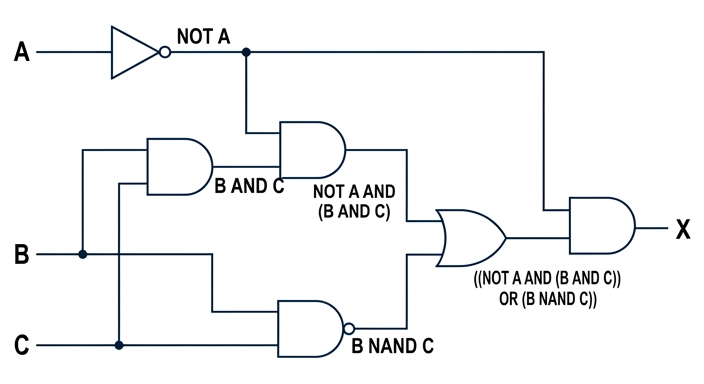
See logic circuit
Background Concept
To draw a logic circuit from an expression, break the expression into smaller parts and draw one gate for each operation.
For the expression
X = ((NOT A AND (B AND C)) OR (B NAND C)) AND NOT A
the operations involved are:
NOT A→ NOT gateB AND C→ AND gateB NAND C→ NAND gate(NOT A AND (B AND C))→ another AND gate(... OR ...)→ OR gate- final
... AND NOT A→ final AND gate
A key point is that one signal can branch to several places. If the same value is needed more than once, the wire splits.
Understanding the Question
You are given a Boolean expression and asked to draw the matching circuit.
The expression has three inputs: A, B, and C, and one output: X.
The important clue is the bracket structure. The brackets tell you which operations happen first and which outputs then feed into later gates. Also, NOT A appears twice in the expression, so the output from the NOT gate must be used in two places.
Approach
Work from the innermost parts outward:
- Draw the gates for the smallest sub-expressions first.
- Reuse signals by branching wires where needed.
- Combine the intermediate outputs in the order shown by the brackets.
- End with the final gate that produces
X.
This is much more reliable than trying to draw the whole circuit in one step.
Step-by-Step Reasoning
Start by identifying the sub-expressions.
-
NOT A- Draw a NOT gate on input
A. - Its output is
NOT A. - This output must split into two branches because it is used twice.
- Draw a NOT gate on input
-
B AND C- Draw an AND gate with inputs
BandC. - Its output is
B AND C.
- Draw an AND gate with inputs
-
NOT A AND (B AND C)- Feed the
NOT Asignal and the output of theB AND Cgate into another AND gate. - That output is
NOT A AND (B AND C).
- Feed the
-
B NAND C- Draw a NAND gate with inputs
BandC. - Its output is
B NAND C.
- Draw a NAND gate with inputs
-
((NOT A AND (B AND C)) OR (B NAND C))- Feed the outputs from step 3 and step 4 into an OR gate.
- That output is the whole bracketed OR section.
-
Final
AND NOT A- Feed the OR output from step 5 and the second branch of
NOT Ainto a final AND gate. - The output of this gate is
X.
- Feed the OR output from step 5 and the second branch of
That gives the full circuit.
This layout matches the expression exactly because each gate corresponds to one operation in the Boolean statement.
Key Takeaways
- Use brackets to decide the order of gates.
- Draw inner sub-expressions first, then build outward.
- If a value is reused, split the wire rather than creating a separate new value.
- NOT, AND, OR, NAND each map directly to a specific gate symbol.
Common Mistakes
- Forgetting that
NOT Ais needed twice, so its output must branch. - Drawing
B NAND CasNOT B AND Cor as a normal AND gate. - Combining gates in the wrong order because brackets were ignored.
- Putting the final AND gate before the OR gate.
- Applying the NOT to the wrong part of the expression.
Things to Be Careful About
B NAND Cmeans the entireB AND Cresult is negated.NOT A AND (B AND C)needs an AND gate after the NOT gate, not before.- The final output is
(... OR ...) AND NOT A, so the last gate must be an AND gate. - Make sure every input line is clearly connected and branches are shown properly.
A memory buffer uses Dynamic RAM (DRAM).
Identify two differences between DRAM and Static RAM (SRAM).
Difference 1 ..............................................................................................................................
Difference 2 ..............................................................................................................................
Answer
- DRAM must be refreshed regularly to keep its data; SRAM does not need refreshing while power is supplied.
- DRAM is slower but cheaper and can store more bits per chip; SRAM is faster but more expensive and stores fewer bits per chip.
DRAM requires refreshing and is slower/cheaper with higher density; SRAM does not require refreshing and is faster/more expensive with lower density.
Background Concept
SRAM and DRAM are both types of volatile main memory, which means they lose their contents when power is removed. The difference is in how each memory cell stores data.
DRAM stores each bit as charge in a capacitor. Because charge leaks away, the contents must be refreshed repeatedly. That is why it is called dynamic RAM.
SRAM stores each bit using a flip-flop circuit. As long as power remains on, the circuit keeps its state without needing refresh. That is why it is called static RAM.
These design differences affect performance and cost:
- DRAM is simpler per bit, so it is cheaper and can pack more memory into a chip.
- SRAM is faster to access, but it uses more circuitry per bit, so it is more expensive and lower density.
Understanding the Question
The question asks for two differences between DRAM and SRAM. Since it says identify, not explain in detail, the expected answer is short paired contrasts.
A good answer gives two direct comparisons such as:
- refresh needed versus not needed
- slower versus faster
- cheaper/higher density versus more expensive/lower density
Approach
Choose two well-known textbook differences and write each one as a direct comparison between the two memory types.
The safest approach is:
- give the refresh difference
- give one performance or cost/density difference
This matches what examiners usually reward for this type of item.
Step-by-Step Reasoning
First difference:
- DRAM uses capacitors.
- Capacitors lose charge over time.
- Therefore DRAM has to be refreshed regularly.
- SRAM uses flip-flops, so it does not need refresh while powered.
Second difference:
- Because DRAM cells are simpler, more of them fit onto a chip.
- That makes DRAM cheaper per bit and higher density.
- However, DRAM access is slower.
- SRAM is faster, but because each cell uses more components, it is more expensive and lower density.
Any two valid contrasts are enough, but each difference must genuinely compare DRAM with SRAM.
Key Takeaways
- DRAM stores bits using capacitors and needs refreshing.
- SRAM stores bits using flip-flops and does not need refreshing.
- DRAM is typically cheaper and denser but slower.
- SRAM is typically faster but more expensive.
Common Mistakes
- Saying only one side of the comparison, for example "DRAM needs refresh" without stating the SRAM contrast.
- Confusing SRAM with secondary storage or ROM.
- Saying DRAM is non-volatile; it is still volatile.
- Repeating the same idea twice, such as giving two speed statements that mean the same thing.
Things to Be Careful About
- The question asks for differences, so write contrasting points, not isolated facts.
- Do not mix up volatility with refreshing: both SRAM and DRAM are volatile.
- If you use cost, density or speed, make sure the direction is correct: DRAM is cheaper and denser; SRAM is faster and more expensive.
Explain how a memory buffer is used when a computer is transferring data to its magnetic hard disk drive.
Answer
- Data to be written to the magnetic hard disk is first placed in the buffer in DRAM.
- The buffer holds the data temporarily while the hard disk/required sector is not yet ready.
- The hard disk controller then transfers data from the buffer to the disk at the slower speed the disk can handle.
- This compensates for the speed difference between the computer and the hard disk, preventing data loss and reducing processor waiting time.
See explanation
Background Concept
A buffer is a temporary storage area used during data transfer between two devices or parts of a system that operate at different speeds. In this question, the buffer uses DRAM, so it is a temporary area in main memory.
A magnetic hard disk drive is much slower than the CPU and main memory. The processor and memory can produce data quickly, but the disk writes data mechanically, using moving platters and read/write heads, so it cannot always accept data immediately.
Buffering solves this mismatch. Instead of forcing the fast part of the system to wait for the slow part at every moment, data is placed into the buffer first and then written out when the slower device is ready.
Understanding the Question
The question is specifically about transferring data to a magnetic hard disk drive, not reading from it and not using cache memory. It wants the role of the memory buffer during that transfer.
The key ideas hidden in the wording are:
- data is going from the computer to the hard disk
- the buffer is temporary storage
- the purpose is to handle a speed difference
- the benefit is smoother transfer, less waiting, and reduced risk of losing data
Approach
To answer clearly, describe the transfer in order:
- where the data goes first
- why it has to wait there
- how it then reaches the disk
- what advantage this gives
This produces a full explanation rather than a vague definition of a buffer.
Step-by-Step Reasoning
When the computer wants to save data onto the hard disk, the data is not always written directly to the disk surface immediately.
Step 1: Data is copied into the buffer.
- The buffer is an area of DRAM.
- It temporarily stores the data that is about to be written.
Step 2: The buffer holds the data while the disk is not ready.
- A magnetic hard disk may need time for the platter to rotate to the correct sector or for the controller to prepare the write.
- During that short delay, the data remains safely in the buffer.
Step 3: The disk controller writes data from the buffer to the disk.
- The controller takes the buffered data and sends it to the hard disk.
- This happens at the rate the hard disk can manage, which is slower than CPU or RAM speed.
Step 4: The buffer smooths out the speed mismatch.
- The processor or the rest of the system does not need to match the exact mechanical speed of the hard disk.
- This reduces idle waiting.
- It also helps prevent data being lost if data arrives faster than the disk can accept it at that instant.
So the overall role of the buffer is temporary holding during transfer, allowing a fast system and a slower storage device to work together efficiently.
Key Takeaways
- A buffer is temporary storage used during transfer.
- Buffers are especially useful when one device is faster than another.
- In disk output, data is placed in DRAM first, then written to the magnetic disk when the disk is ready.
- Buffering improves efficiency and helps avoid data loss or unnecessary waiting.
Common Mistakes
- Describing a buffer as permanent storage. It is temporary.
- Saying the buffer speeds up the hard disk itself. It does not; it manages the transfer between fast and slow components.
- Talking about CPU cache instead of an I/O buffer.
- Explaining data transfer from disk to memory instead of to the disk, which is the direction asked here.
Things to Be Careful About
- Keep the direction correct: this is writing to the hard disk drive.
- Mention temporary storage, not long-term storage.
- Make the speed difference explicit, because that is the main reason a buffer is needed.
- If you mention waiting for the disk, that can include waiting for the correct sector or for the drive/controller to be ready; both fit the idea of delayed writing.
A car has an automatic braking system.
A sensor is used to measure the distance to objects that are in front of the car.
The car automatically brakes if an object is too close to the front of the car or the distance between the car and the object is decreasing too quickly. The closer the object is to the front of the car, the harder the car brakes so that the car slows down more quickly.
Explain the reasons why the automatic braking system of the car is a control system.
Answer
- It uses a sensor to measure the distance to the object in front of the car, so it takes input data continuously.
- The system automatically processes this input and decides whether braking is needed, for example if the object is too close or the distance is decreasing too quickly.
- It produces an output to an actuator that applies the brakes, and the amount of braking changes according to the distance, so the system uses feedback to control the car.
It uses sensor input, automatically processes the data, and sends output to the brakes via an actuator with feedback controlling how hard the car brakes.
Background Concept
A control system is a system that automatically manages or changes the operation of a device or process. It normally has three important parts:
- Input from one or more sensors
- Processing to decide what action to take
- Output to one or more actuators
The key difference between a monitoring system and a control system is this:
- A monitoring system measures and reports data.
- A control system measures data and then automatically changes something in response.
Many control systems also use feedback. Feedback means the system keeps taking new readings and adjusts its output depending on what is happening. For example, if a value becomes more dangerous, the system can respond more strongly.
In a car braking example:
- the sensor measures distance
- the processor decides whether the situation is unsafe
- the actuator applies the brakes
Understanding the Question
The question describes a car with automatic braking. We are told that:
- a sensor measures the distance to objects in front of the car
- the car brakes automatically if an object is too close
- the car also brakes if the distance is decreasing too quickly
- the closer the object gets, the harder the car brakes
The question asks why this is a control system. So the answer must connect the details in the scenario to the defining features of control systems.
That means we should look for:
- a sensor input
- automatic decision-making
- an output action through an actuator
- changing the output according to feedback
Approach
To answer this kind of question, match the real-life example to the standard control-system model:
- Identify what is being measured.
- State how the system decides what to do.
- State what physical action the system carries out.
- Mention feedback or variable response if the scenario shows it.
Here, the measured value is the distance to the object. The system processes that value and also how fast it is changing. Then it sends a braking signal to the car's braking mechanism. Because the braking force changes depending on distance, this is not just a one-off action; it is controlled continuously.
Step-by-Step Reasoning
First, the system has a sensor. The question explicitly says a sensor measures the distance to objects in front of the car. That gives the system its input data.
Second, the system does not just display that distance to a human driver. Instead, it automatically decides whether braking is required. The trigger conditions given are:
- the object is too close, or
- the distance is decreasing too quickly
This shows that the input is being processed against rules or threshold values.
Third, the system then produces an output. In a control system, the output normally affects the real world. Here, the output is braking. The brakes are the part that physically changes the system's behaviour, so they act as the actuator or are controlled by an actuator.
Fourth, the output is variable, not fixed. The question says the closer the object is, the harder the car brakes. This is an important control-system clue. It means the system is not simply turning the brakes on or off; it is adjusting the output level according to the sensor readings.
Finally, because the system keeps checking the distance and changing the braking force, it is using feedback. New sensor readings influence the next braking decision. That is characteristic of a control system.
So the reasons are:
- sensor input is collected
- the input is processed automatically
- an actuator/braking output changes the car's movement
- feedback allows stronger or weaker braking depending on the changing distance
Key Takeaways
- A control system uses sensor input, processing, and actuator output.
- The main feature that makes it a control system is that it automatically changes the system being controlled.
- Feedback is important when the system keeps adjusting its response based on new readings.
- In exam answers, always relate the general definition to the exact example given.
Common Mistakes
- Saying only that it has a sensor. A sensor alone is not enough; monitoring systems also use sensors.
- Describing the system as monitoring rather than controlling. This system actually applies the brakes automatically, so it is control, not just monitoring.
- Forgetting the actuator/output. A control-system answer usually needs the action taken, not just the measurement.
- Ignoring the changing braking force. The fact that braking becomes harder as the object gets closer is strong evidence of feedback-based control.
Things to Be Careful About
- Use the term automatic clearly. The system itself decides and acts; a human does not have to respond first.
- Do not confuse the sensor with the brakes. The sensor measures; the brakes carry out the action.
- If the question asks for reasons, tie each point directly to the car example rather than writing only a textbook definition.
- The phrase about distance decreasing too quickly shows that the system may use not just the current distance but also how the value changes over time, which strengthens the control-system explanation.
A company makes ice cream and sells it to shops.
The ice cream is made in batches: a large quantity of one type and flavour of ice cream that is then split into smaller quantities for sale.
The company’s owner has designed a relational database, ICECREAM, to store data about their ice cream and customers.
Some of the tables in the database are given. The database is not normalised.
BATCH(BatchID, Type, Flavour, Size, SellingPrice, EndDate)
CUSTOMER(CustomerID, CompanyName, EmailAddress, TelephoneNumber)
SALE(SaleID, BatchID, CustomerID, Quantity, Date)
Identify two foreign keys in the table SALE and the table that each foreign key references.
Foreign key 1 ............................................................................................................................
Table name 1 ............................................................................................................................
Foreign key 2 ............................................................................................................................
Table name 2 ............................................................................................................................
Answer
- Foreign key 1:
BatchID
Table name 1:BATCH - Foreign key 2:
CustomerID
Table name 2:CUSTOMER
BatchID -> BATCH; CustomerID -> CUSTOMER
Background Concept
A foreign key is a field in one table that refers to the primary key of another table. It is used to link related tables together.
A primary key uniquely identifies each record in a table. A foreign key does not have to be unique, because many records in one table can refer to the same record in another table.
In a relational database, foreign keys help maintain referential integrity. This means a record should not contain a reference to something that does not exist.
Understanding the Question
You are given three tables:
BATCH(BatchID, Type, Flavour, Size, SellingPrice, EndDate)CUSTOMER(CustomerID, CompanyName, EmailAddress, TelephoneNumber)SALE(SaleID, BatchID, CustomerID, Quantity, Date)
The question asks for two foreign keys in SALE and the table each one references.
So the task is to look at the fields in SALE and decide which ones are being used to link to the other tables.
Approach
Look for fields in SALE whose names match the primary key fields of the other tables.
BatchIDappears inBATCHCustomerIDappears inCUSTOMER
These are the linking fields, so they are the foreign keys in SALE.
Step-by-Step Reasoning
The SALE table contains:
SaleIDBatchIDCustomerIDQuantityDate
Now check which of these fields come from other tables:
-
BatchIDis the identifier for a batch in theBATCHtable.- Therefore
SALE.BatchIDreferencesBATCH. - So
BatchIDis a foreign key.
- Therefore
-
CustomerIDis the identifier for a customer in theCUSTOMERtable.- Therefore
SALE.CustomerIDreferencesCUSTOMER. - So
CustomerIDis a foreign key.
- Therefore
SaleID is not a foreign key here. It is the identifier for the sale record itself, so it would normally be the primary key of SALE.
Key Takeaways
- A foreign key links one table to another.
- The foreign key is usually a field that matches the primary key of the referenced table.
- In transaction tables such as
SALE, foreign keys are often used to connect to master tables likeCUSTOMERorBATCH.
Common Mistakes
- Saying
SaleIDis a foreign key. It identifies the sale itself, so it is not linking to another table. - Giving the referenced field name instead of the referenced table name.
- Mixing up
BatchIDandCustomerIDwith the wrong tables.
Things to Be Careful About
- The question asks for both the foreign key and the table it references.
- Use the exact table names given:
BATCHandCUSTOMER. - Do not invent extra foreign keys that are not shown in the schema.
Write an SQL script to return the total quantity of ice cream sold to the customer with the ID of 0034E in the year 2023.
Answer
SELECT SUM(Quantity)
FROM SALE
WHERE CustomerID = '0034E'
AND YEAR(Date) = 2023;
See SQL script
Background Concept
SQL is used to query data stored in a relational database.
When a question asks for a total, the usual SQL aggregate function is SUM(). Aggregate functions combine values from multiple rows into one result.
The WHERE clause is used to select only the rows that match certain conditions. If more than one condition must be true, they are joined with AND.
Understanding the Question
You need to return the total quantity of ice cream sold:
- to the customer whose ID is
0034E - during the year
2023
The data needed is already in the SALE table because that table contains:
CustomerIDQuantityDate
So you do not need to join to another table. You just need to total the correct Quantity values.
Approach
Use this pattern:
SELECT SUM(Quantity)to total the quantities.FROM SALEbecause the sales data is stored there.WHERE CustomerID = '0034E'to keep only that customer's sales.- Add a second condition to keep only rows from 2023.
Step-by-Step Reasoning
The required total is not a count of rows and not a list of sales. It is the sum of the Quantity field.
So the first line is:
SELECT SUM(Quantity)
The source table is:
FROM SALE
Now apply the customer condition:
CustomerID = '0034E'
Then apply the year condition:
YEAR(Date) = 2023
Putting both conditions together with AND gives a query that returns one total value.
Key Takeaways
- Use
SUM(field)when the question asks for a total. - Read the question carefully to see whether filtering is needed.
- If all required fields are in one table, a join is unnecessary.
Common Mistakes
- Using
SELECT Quantityinstead ofSELECT SUM(Quantity). - Forgetting the condition for the year 2023.
- Filtering by the wrong field, such as
BatchIDinstead ofCustomerID. - Writing the customer ID without quotes even though it is alphanumeric.
Things to Be Careful About
0034Eis a text value, so it should be quoted.- The field name is exactly
Quantity, notSellingPriceorSize. - Make sure both conditions are in the
WHEREclause and joined withAND. - Different SQL systems handle dates differently, but the key idea is that only rows from 2023 must be included.
The table definition for BATCH is repeated here:
BATCH(BatchID, Type, Flavour, Size, SellingPrice, EndDate)
Sample data for the table BATCH is given:
| BatchID | Type | Flavour | Size | SellingPrice | EndDate |
|---|---|---|---|---|---|
| KlV12 | Plain | Vanilla | 1 | 2.20 | 12/12/2024 |
| RlC14 | Plain | Chocolate | 0.5 | 1.80 | 12/12/2024 |
| TYL1 | Non-dairy | Lemon | 0.5 | 2.10 | 01/02/2025 |
| FYV2 | Non-dairy | Vanilla | 0.25 | 1.50 | 02/02/2025 |
| BIV13 | Plain | Vanilla | 1 | 2.20 | 02/02/2024 |
Write an SQL script to define the table BATCH.
Include constraints (restrictions) on the data that can be entered into each field where appropriate.
Answer
CREATE TABLE BATCH (
    BatchID VARCHAR(5) PRIMARY KEY,
    Type VARCHAR(10) NOT NULL CHECK (Type IN ('Plain', 'Non-dairy')),
    Flavour VARCHAR(20) NOT NULL,
    Size DECIMAL(4,2) NOT NULL CHECK (Size > 0),
    SellingPrice DECIMAL(4,2) NOT NULL CHECK (SellingPrice > 0),
    EndDate DATE NOT NULL
);
See SQL script
Background Concept
A table definition in SQL is written using CREATE TABLE. This is part of SQL DDL, Data Definition Language.
When defining a table, you normally decide:
- the field names
- the data type for each field
- the primary key
- any constraints that restrict what values are allowed
Common constraints include:
PRIMARY KEYfor unique identificationNOT NULLto stop empty valuesCHECKto limit acceptable values
Good constraints help prevent invalid data from being stored.
Understanding the Question
You must define the table:
BATCH(BatchID, Type, Flavour, Size, SellingPrice, EndDate)
You are also shown sample data, which helps you infer the data types:
BatchIDcontains short alphanumeric codes such asKIV12andTYL1Typecontains text such asPlainandNon-dairyFlavourcontains text such asVanillaandChocolateSizecontains decimal values such as1,0.5,0.25SellingPricecontains money values such as2.20EndDateis a date
The question also says to include constraints where appropriate, so a good answer should do more than just list data types.
Approach
Choose a suitable type for each field based on the sample data, then add sensible restrictions:
- Make
BatchIDthe primary key because it uniquely identifies each batch. - Use text types for
TypeandFlavour. - Use decimal types for
SizeandSellingPrice. - Use
DATEforEndDate. - Add
NOT NULLand someCHECKconstraints where they make sense.
Step-by-Step Reasoning
Start with the table header:
CREATE TABLE BATCH (
Now define each field.
-
BatchID- It stores values like
KIV12. - That means it is text, not a number.
- A short variable-length text field such as
VARCHAR(5)is suitable. - It should uniquely identify each record, so it is the primary key.
- It stores values like
-
Type- This is text.
- From the sample data, the valid values shown are
PlainandNon-dairy. VARCHAR(10)is enough for these values.NOT NULLstops blank entries.- A
CHECKconstraint can restrict entries to the expected values.
-
Flavour- This is also text.
VARCHAR(20)is a reasonable choice.NOT NULLis appropriate.
-
Size- This uses decimal values, not integers.
DECIMAL(4,2)allows values like1.00,0.50,0.25.- A
CHECK (Size > 0)prevents impossible negative or zero sizes.
-
SellingPrice- This is a money value with two decimal places.
DECIMAL(4,2)is suitable for the sample values.CHECK (SellingPrice > 0)prevents invalid negative or zero prices.
-
EndDate- This should use the
DATEdata type. NOT NULLensures every batch has a recorded date.
- This should use the
Then close the table definition with );.
Key Takeaways
- Choose field types from the actual kind of data stored, not just how the data looks at first glance.
- Every table should have a primary key.
- Constraints such as
NOT NULLandCHECKimprove data quality. - Sample data is a strong clue when deciding data types and restrictions.
Common Mistakes
- Making
BatchIDan integer even though it contains letters. - Forgetting to declare a primary key.
- Using an integer type for
SellingPriceorSize. - Omitting constraints entirely when the question explicitly asks for them.
- Creating overly weak definitions such as allowing negative prices or blank types.
Things to Be Careful About
Typeis the field name used in the question, so keep that exact name.SizeandSellingPriceneed decimal places.- Constraints should be sensible and relevant; they should not contradict the sample data.
- SQL syntax needs commas between field definitions and brackets around the table definition.
The table BATCH is not normalised.
Normalise the database table BATCH.
Write the table definitions for your new tables.
Identify any primary and foreign keys in your tables.
Do not change or include the tables CUSTOMER and SALE.
Answer
-
ICECREAM(Type, Flavour, Size, SellingPrice)
PK:(Type, Flavour, Size) -
BATCH(BatchID, Type, Flavour, Size, EndDate)
PK:BatchID
FK:(Type, Flavour, Size)referencesICECREAM(Type, Flavour, Size)
See normalised tables
Background Concept
Normalisation is the process of restructuring tables to reduce redundancy and improve consistency.
A table is not well normalised if the same fact is stored repeatedly. Repetition causes problems such as:
- wasted storage
- inconsistent updates
- accidental anomalies when inserting, deleting or updating data
A common reason for splitting a table is that some attributes depend on something other than the whole primary key. In other words, one piece of data really belongs to a different entity.
Understanding the Question
You are told that BATCH is not normalised:
BATCH(BatchID, Type, Flavour, Size, SellingPrice, EndDate)
From the description and the sample data, each batch is one production batch of a particular type, flavour and size.
Looking at the sample rows, the same combination of Type, Flavour and Size can appear in more than one batch, and the SellingPrice repeats with it. For example, plain vanilla size 1 appears in more than one batch and has the same selling price.
That suggests SellingPrice depends on the ice cream product details, not on the specific batch ID.
Approach
Separate the data into:
- a table for the ice cream product definition
- a table for the actual batches made
The product table stores facts about the product itself:
TypeFlavourSizeSellingPrice
The batch table stores facts specific to each batch:
BatchIDEndDate- a link to the product details
Step-by-Step Reasoning
Start with the original table:
BATCH(BatchID, Type, Flavour, Size, SellingPrice, EndDate)
Ask what each field depends on.
BatchIDidentifies a particular batch.EndDateis specific to that batch.Type,FlavourandSizedescribe what kind of ice cream the batch contains.SellingPriceappears to depend on the ice cream specification, not the individual batch.
So the dependency is effectively:
(Type, Flavour, Size) -> SellingPrice
This means storing SellingPrice in every batch row repeats the same information.
To remove that redundancy, create a new table for the product details:
ICECREAM(Type, Flavour, Size, SellingPrice)
A single field is not enough to uniquely identify the product from the information given, so use a composite primary key:
PK (Type, Flavour, Size)
Now the BATCH table should keep only batch-specific data plus a reference to the product:
BATCH(BatchID, Type, Flavour, Size, EndDate)
Its primary key is:
PK BatchID
And the product description fields together act as a foreign key back to ICECREAM:
FK (Type, Flavour, Size)referencesICECREAM(Type, Flavour, Size)
That removes repeated SellingPrice values from the batch table.
Key Takeaways
- Normalisation removes repeated data by separating different kinds of facts into different tables.
- If one attribute depends on another non-key combination, that is a clue the table should be decomposed.
- Composite keys are often needed when a combination of fields uniquely identifies something.
Common Mistakes
- Leaving
SellingPriceinBATCH, which keeps the redundancy. - Moving
EndDateout ofBATCHeven though it belongs to the specific batch. - Forgetting to identify primary keys and foreign keys.
- Changing
CUSTOMERorSALEeven though the question says not to include or change them.
Things to Be Careful About
- Only normalise the
BATCHdata. - The foreign key in
BATCHis the combination ofType,FlavourandSize, not just one of those fields alone. - Use the exact attribute names from the question unless you are introducing a clearly justified new table name.
- Make sure each new table still has a proper primary key.
Complete the following table by defining each database term.
| Database term | Definition |
|---|---|
| Entity | |
| Attribute |
Answer
| Database term | Definition |
|---|---|
| Entity | A person, place, object or event about which data is stored. |
| Attribute | A property or characteristic of an entity. |
Entity = a person, place, object or event about which data is stored; Attribute = a property or characteristic of an entity
Background Concept
In database design, it is important to separate the thing you are storing data about from the pieces of information that describe it.
An entity is the real-world thing of interest. Examples include a customer, an order, a product or a batch.
An attribute is a fact that describes that entity. For example, a customer might have attributes such as customer ID, company name and email address.
These terms are used heavily in relational design and E-R modelling.
Understanding the Question
The table asks for definitions of two terms:
EntityAttribute
You are not being asked for examples only. You need the actual definitions.
Approach
Give short, standard textbook-style definitions:
- define what an entity is
- define what an attribute is
Keep them clearly different.
Step-by-Step Reasoning
For Entity:
- This is the thing the data is about.
- In database language, it is usually described as a person, place, object or event.
- So a correct definition is that it is something about which data is stored.
For Attribute:
- This is one item of data describing the entity.
- It is a property or characteristic of that entity.
Using the ice cream database as context:
CUSTOMERis an entity type.EmailAddressis an attribute of that entity.
Key Takeaways
- Entity = the thing.
- Attribute = a property of the thing.
- Clear terminology helps with both E-R diagrams and table design.
Common Mistakes
- Defining an entity as a table only. A table may represent an entity, but the entity is the real-world object or concept.
- Defining an attribute as a record. A record is a whole row; an attribute is a single field/property.
- Giving only examples without a definition.
Things to Be Careful About
- Keep the two definitions separate.
- Use database wording, not vague everyday language.
- A concise, accurate definition is better than a long imprecise one.
A Database Management System (DBMS) supports data integrity.
Explain how a DBMS supports data integrity.
Answer
- A DBMS enforces validation rules and data types, so invalid data can be rejected before it is stored.
- It enforces primary key and foreign key constraints, so records are unique and related records remain consistent.
- It uses transaction control, so incomplete or failed updates can be rolled back to avoid inconsistent data.
See explanation
Background Concept
Data integrity means that data remains accurate, valid and consistent.
A DBMS, Database Management System, helps maintain data integrity by controlling how data is defined, entered, related and updated.
Integrity is not just about keeping data secret. That would be security. Integrity is about making sure the data itself is correct and stays consistent over time.
Understanding the Question
The question asks how a DBMS supports data integrity.
So the answer should focus on mechanisms provided by the DBMS that help stop bad data from being stored or stop the database becoming inconsistent.
This is an explanation question, so you should give clear points that link a DBMS feature to the integrity benefit it provides.
Approach
A strong answer can be built from three standard DBMS mechanisms:
- validation and field constraints
- key and relationship enforcement
- transaction handling
Each point should say both what the DBMS does and how that helps integrity.
Step-by-Step Reasoning
First, a DBMS can enforce field rules.
- Each field has a data type, such as integer, text or date.
- The DBMS can also apply validation or
CHECKconstraints. - This means invalid values can be rejected before they are stored.
- For example, a negative quantity or an incorrectly formatted date can be blocked.
Second, a DBMS can enforce key constraints.
- A primary key must be unique and not null.
- This prevents duplicate records representing the same thing.
- Foreign keys must refer to existing records in related tables.
- This protects referential integrity, so you do not get a sale linked to a batch or customer that does not exist.
Third, a DBMS can control updates through transactions.
- A transaction is treated as a complete unit of work.
- If part of the update fails, the DBMS can roll back the whole transaction.
- That stops the database being left half-updated and inconsistent.
These are all direct ways a DBMS supports integrity.
Key Takeaways
- Data integrity is about correctness and consistency.
- A DBMS supports integrity through constraints, relationships and controlled updates.
- Good answers explain both the feature and its effect on the data.
Common Mistakes
- Talking only about security, such as passwords or encryption, without linking it to integrity.
- Saying a DBMS stores data efficiently but not explaining how it keeps the data accurate.
- Listing features without explaining why they help maintain integrity.
Things to Be Careful About
- The question asks how the DBMS supports integrity, so every point should mention a DBMS mechanism.
- Keep the focus on validity and consistency, not just privacy.
- Use correct terminology such as primary key, foreign key, validation and transaction.
A computer programmer writes programs that are distributed with a software licence.
Complete the table by writing the type of software licence each statement describes.
| Statement | Software licence |
|---|---|
| A fee is charged for the software. The source code cannot be accessed. Users do not get a free trial. | |
| Users can try the software before buying it. Users may not be able to access all features during the trial. | |
| Software is usually free of charge. Users can access the source code and alter the program to their needs. |
Answer
| Statement | Software licence |
|---|---|
| A fee is charged for the software. The source code cannot be accessed. Users do not get a free trial. | Commercial / proprietary |
| Users can try the software before buying it. Users may not be able to access all features during the trial. | Shareware |
| Software is usually free of charge. Users can access the source code and alter the program to their needs. | Open source |
Commercial/proprietary; Shareware; Open source
Background Concept
A software licence is the legal set of rules that tells the user what they are allowed to do with a program. Different licences control things such as whether the software must be paid for, whether the source code can be seen, whether the user may change the program, and whether there is a trial period.
Common licence types at this level are:
- Proprietary / commercial: usually paid-for software; source code is not available to users.
- Shareware: users can try the software before buying it; the trial may be time-limited or feature-limited.
- Open source: source code is available; users can inspect and modify it, usually under stated licence conditions.
Understanding the Question
The question gives three descriptions of software distribution and asks you to name the licence type that matches each one.
The clues are in the wording:
- "fee is charged" and "source code cannot be accessed" point to closed-source paid software
- "try the software before buying it" points to a trial model
- "access the source code and alter the program" points to open source
So this is not asking for definitions in full. It is a matching exercise.
Approach
Take each row separately and look for the key identifying feature:
- Is the software paid for and closed source?
- Is it offered as a trial before purchase?
- Is the source code available and can it be changed?
Then match each feature set to the standard licence term.
Step-by-Step Reasoning
First row
- A fee is charged.
- The source code cannot be accessed.
- There is no free trial.
That means it is normal paid closed-source software. The correct licence description is commercial or proprietary.
Second row
- Users can try the software before buying it.
- Some features may be unavailable during the trial.
That is the classic description of shareware.
Third row
- Software is usually free of charge.
- Users can access the source code.
- Users can alter the program to suit their needs.
That is open source software.
Key Takeaways
- Paid and closed-source software is typically commercial/proprietary.
- Trial-before-purchase software is shareware.
- Source-code access and permission to modify indicate open source.
- In licensing questions, the quickest method is to spot the defining feature in each description.
Common Mistakes
- Writing freeware for the third row. Freeware may be free to use, but its source code is usually not available for modification.
- Confusing shareware with freeware. Shareware is specifically software offered as a trial before purchase.
- Thinking commercial and open source cannot overlap in real life. In exam questions like this, use the description given; here the first row clearly expects proprietary/commercial and the third clearly expects open source.
Things to Be Careful About
- Read every feature in the row, not just one word such as "free" or "paid".
- The strongest clue for open source is access to and modification of source code.
- The strongest clue for shareware is a trial before buying.
- If two terms seem similar, choose the one that matches the exact wording of the description.
Explain the reasons why it is important for the computer programmer to join a professional ethical body.
Answer
- A professional ethical body provides a code of conduct, so the programmer has clear standards for professional and ethical behaviour.
- It gives guidance, training and updates on current legal and ethical issues, helping the programmer keep skills and knowledge up to date.
- Membership increases professional credibility and accountability, so employers and clients are more likely to trust the programmer's work.
See explanation
Background Concept
A professional ethical body is an organisation such as the BCS or IEEE that sets standards for members working in computing and related fields. These organisations do more than just offer membership status. They usually provide:
- a code of conduct or code of ethics
- guidance on legal and professional responsibilities
- continuing professional development opportunities
- support, resources and professional networking
- disciplinary procedures if members behave unethically
In computing, this matters because programmers can affect privacy, safety, security, fairness and reliability. A professional body helps ensure that technical work is done responsibly.
Understanding the Question
The question asks for reasons why it is important for a computer programmer to join a professional ethical body. So the answer must go beyond naming a body like BCS. It needs reasons explaining the value of membership.
Because it is a 3-mark question, three clear explained points are usually enough. Strong answers focus on standards, support, and trust/accountability.
Approach
A good structure is:
- Explain how the body helps the programmer behave ethically.
- Explain how it helps the programmer stay professionally competent.
- Explain how membership benefits reputation, trust or accountability.
This directly covers why joining matters both to the programmer and to the people affected by the programmer's work.
Step-by-Step Reasoning
Point 1: Code of conduct and ethical guidance
Professional bodies publish a code of conduct. This gives the programmer clear rules or principles about how to behave professionally, for example protecting user data, acting honestly, avoiding harm, and respecting intellectual property. That matters because programmers often make decisions with ethical consequences.
Point 2: Training and keeping up to date
Technology, laws and risks change quickly. A professional body often provides training, publications, events and updates. This helps the programmer maintain professional standards and remain aware of current issues such as cybersecurity, privacy law, or responsible use of AI.
Point 3: Credibility, trust and accountability
Membership shows commitment to recognised professional standards. Employers and clients may have more confidence in a programmer who belongs to a respected body. Also, members are accountable to that body's standards, which encourages responsible behaviour.
These three reasons together explain why membership is important: it improves ethical behaviour, professional competence and public confidence.
Key Takeaways
- Professional ethical bodies help programmers follow recognised standards.
- They support continuing professional development.
- Membership can improve trust, reputation and accountability.
- In exam answers, explain the benefit, not just the feature.
Common Mistakes
- Naming a body such as BCS or IEEE without explaining why joining it is important.
- Giving vague statements like "it helps the programmer" without saying how.
- Writing only about technical skills and ignoring ethics or professional conduct.
- Confusing a professional body with a trade union or a software company.
Things to Be Careful About
- The question asks for reasons, so each point should include a consequence or benefit.
- Keep the answer focused on the programmer, but you can mention employers, clients and the public where relevant.
- Do not drift into unrelated topics such as software licences or copyright unless they support the ethical-body point.
- Three distinct points are better than repeating the same idea in different words.
A computer system stores text, images and sound.
A character set is used to represent characters in a computer.
Identify and describe one character set.
Character set ............................................................................................................................
Description ................................................................................................................................
Answer
- Character set: ASCII
- Description: ASCII assigns each character a unique 7-bit binary code, so up to 128 different characters can be represented.
ASCII — each character is represented by a unique 7-bit binary code.
Background Concept
A character set is a standard list of characters together with the binary codes used to store them in a computer. Computers do not store letters such as A or symbols such as ? directly; they store bit patterns that stand for those characters.
Common examples include:
- ASCII: a 7-bit character set with 128 possible codes
- Extended ASCII: an 8-bit version with 256 possible codes
- Unicode: a much larger system designed to represent characters from many languages and symbol sets
The key idea is that each character is assigned a unique code.
Understanding the Question
The question asks for one example of a character set and a description of it. This means you need two things:
- the name of a valid character set
- a short description of how it represents characters
You only need one example, not a comparison of several.
Approach
Pick a well-known character set such as ASCII, then give one clear fact about it that shows you know what it is. The safest description is usually its bit length and the number of characters it can represent.
Step-by-Step Reasoning
If we choose ASCII:
- ASCII is the name of the character set.
- It uses 7 bits for each character.
- With 7 bits, the number of possible codes is .
- Therefore ASCII can represent 128 different characters.
- Each letter, digit or symbol has its own unique binary code.
That is enough for full credit because it both identifies and describes the character set.
Key Takeaways
- A character set maps characters to binary codes.
- ASCII is a standard 7-bit character set.
- A good description usually includes the number of bits used and the number or type of characters represented.
Common Mistakes
- Naming a coding method that is not a character set.
- Saying only the name, with no description.
- Confusing ASCII with Unicode and giving the wrong bit size.
- Saying “stores text as binary” without explaining the unique code for each character.
Things to Be Careful About
- The question asks for one character set, so one valid named example is enough.
- Make sure the description actually matches the character set you chose.
- If you use ASCII, remember standard ASCII is 7-bit, not 8-bit.
The colour of each pixel in a bitmapped image is represented by 8 bits.
Answer
- 256
256
Background Concept
In a bitmap image, each pixel stores a colour value. The number of bits used for each pixel is called the colour depth. If a pixel uses bits, then it can represent different values, because each bit can be either 0 or 1.
Understanding the Question
The question says each pixel is represented by 8 bits and asks for the largest number of different colours possible. So this is asking you to use the colour-depth rule.
Approach
Use the formula:
Substitute 8 for the number of bits.
Step-by-Step Reasoning
With 8 bits per pixel:
So one pixel can store 256 different colour values.
Key Takeaways
- Colour depth is the number of bits used per pixel.
- The number of possible colours is found using .
- 8 bits gives 256 possible values.
Common Mistakes
- Answering 8 instead of 256.
- Multiplying by 8 instead of using powers of 2.
- Forgetting that the question asks for the number of colours, not the number of bits.
Things to Be Careful About
- For this syllabus, use for the number of possible values from bits.
- The wording “largest number of different colours” means the total number representable, not a range of shades for one colour channel.
State one drawback of increasing the number of bits that represents each pixel in the bitmap image.
Answer
- The image file size becomes larger, so more storage space and transmission time are needed.
Larger file size.
Background Concept
Increasing the number of bits per pixel increases the colour depth. This allows more colours to be shown, but it also means each pixel needs more storage.
Since a bitmap stores data for every pixel individually, anything that increases the bits per pixel increases the total file size.
Understanding the Question
The question asks for one drawback of using more bits to represent each pixel. So you need one negative consequence of higher colour depth.
Approach
Think about what happens when each pixel needs more bits:
- more memory/storage is needed
- files take longer to send or load
Any one of these linked drawbacks would be acceptable.
Step-by-Step Reasoning
If each pixel uses more bits:
- the amount of data stored for each pixel increases
- therefore the whole bitmap file becomes larger
- as a result, it needs more storage space and may take longer to transmit
A simple accepted answer is therefore that the file size increases.
Key Takeaways
- More bits per pixel means higher colour depth.
- Higher colour depth improves colour detail.
- The trade-off is a larger file size.
Common Mistakes
- Giving an advantage instead of a drawback.
- Saying “better quality” without mentioning why that is not a drawback.
- Giving a vague answer such as “it is worse” with no specific effect.
Things to Be Careful About
- The question asks for one drawback, so one clear point is enough.
- Keep the answer linked to increasing bits per pixel, not to changing resolution.
A bitmap image can be compressed using lossy compression.
Explain the reasons why lossy compression is often suitable for a bitmap image.
Answer
- Lossy compression removes some image data, but the loss in quality is often small or not noticeable to the human eye.
- This gives a much smaller file size, so the image is easier to store and faster to transmit.
Lossy compression is suitable because small losses in image detail are often not noticeable, while the file size is reduced greatly.
Background Concept
Compression reduces the amount of data needed to store a file.
There are two main types:
- lossless compression: no data is lost, so the original file can be recreated exactly
- lossy compression: some data is permanently discarded to make the file much smaller
For images, lossy compression works because not every small detail is equally important to human vision. Slight changes in colour or fine detail may not be noticeable, especially in photographs.
Understanding the Question
The question is not asking how lossy compression works in technical detail. It asks why lossy compression is often suitable for bitmap images. So you need reasons that justify using it.
The two strongest reasons are:
- the quality loss is often hard to notice
- the file size reduction is large and useful
Approach
To answer well, connect the method to its effect and then to its benefit:
- lossy compression removes some image data
- the resulting quality loss is often minor
- the smaller file is easier to store and transmit
Step-by-Step Reasoning
A bitmap image contains a large amount of pixel data. Lossy compression reduces this by throwing away some detail.
Why is that often acceptable?
- In many images, especially photos, tiny colour changes or very fine detail are not critical.
- The human eye may not notice small losses in detail or colour accuracy.
- Because some data has been removed, the file becomes much smaller.
- A smaller file uses less storage space.
- A smaller file also uploads, downloads or streams more quickly.
So lossy compression is often suitable when a perfect reconstruction is not necessary.
Key Takeaways
- Lossy compression permanently removes some data.
- It is suitable when a near-original result is good enough.
- The main benefit is a much smaller file size.
Common Mistakes
- Saying the original image can be perfectly recreated. That describes lossless, not lossy, compression.
- Giving only “smaller file size” without explaining why image quality is still acceptable.
- Saying lossy compression removes all detail or makes the image unusable.
Things to Be Careful About
- “Suitable” means you must justify why people still choose it.
- Do not confuse bitmap image compression with vector graphics.
- The removed data is permanent; it cannot be recovered later.
Answer
- The analogue sound wave is sampled at regular time intervals.
- The amplitude of each sample is measured and converted into a binary value for storage.
The wave is sampled at regular intervals and each measured amplitude is converted to a binary value.
Background Concept
A sound wave in the real world is analogue, which means it varies continuously. Computers store data digitally, so the continuous wave must be converted into discrete values.
This conversion is done by sampling:
- the sound is measured at regular intervals
- the height of the wave at each point, called the amplitude, is recorded
- each measured value is quantised and stored as binary
This produces a digital representation of the original sound.
Understanding the Question
The question asks how an analogue sound wave becomes digital data. So it wants the basic process of analogue-to-digital conversion, not a detailed description of playback.
The important points are:
- regular sampling
- measuring amplitude
- storing the result digitally
Approach
Give the sequence in order:
- take samples from the analogue wave
- measure the amplitude of each sample
- convert each measurement into binary data
Step-by-Step Reasoning
An analogue sound wave is continuous, so the computer cannot store it directly as a changing physical wave.
Instead:
- The system takes a reading of the wave at regular time intervals. This is sampling.
- At each sampling point, it measures the amplitude, which is how strong the signal is at that moment.
- That measured value is converted into a digital number.
- The number is stored in binary.
After many such samples, the computer has a sequence of binary values that represents the sound.
Key Takeaways
- Analogue sound is continuous; digital sound is discrete.
- Sampling means taking measurements at regular intervals.
- Each sample stores an amplitude value as binary data.
Common Mistakes
- Describing only “the wave is converted to binary” without mentioning sampling.
- Confusing frequency with amplitude.
- Describing output through speakers instead of input conversion.
Things to Be Careful About
- Use the word amplitude correctly: it is the measured height/strength of the wave.
- Do not forget the intervals must be regular.
- The stored values are not the wave itself; they are sampled numerical representations of it.
Answer
- One method is to remove frequencies that humans cannot hear, or sounds that are masked by louder sounds.
- This permanently removes some audio data and reduces the file size.
Remove inaudible or masked sounds from the audio so less data is stored.
Background Concept
Lossy sound compression reduces file size by permanently discarding some audio information. It is based on the idea that human hearing has limits:
- some frequencies are outside the normal hearing range
- some quiet sounds cannot be heard when louder sounds occur at the same time
Formats such as MP3 use this idea to remove data that is less likely to be noticed.
Understanding the Question
The question asks for one method of compressing a sound file using lossy compression. So you should describe a genuine lossy technique, not just say “use MP3” with no explanation.
A good answer explains what kind of sound data is removed.
Approach
Choose one accepted method such as:
- removing frequencies outside human hearing
- removing sounds masked by louder sounds
Then state that this reduces the file size because less audio data is kept.
Step-by-Step Reasoning
A valid lossy method is based on psychoacoustics, which means using what we know about human hearing.
For example:
- Very high or very low frequencies that people cannot hear are identified.
- These frequencies are removed from the sound data.
- Alternatively, quiet sounds that would be hidden by louder nearby sounds can be removed.
- Because some sound information has been discarded, fewer bits are needed.
- The file size becomes smaller, although the removed data cannot be restored exactly.
That is why this counts as lossy compression.
Key Takeaways
- Lossy audio compression removes data permanently.
- It often removes inaudible or masked sound components.
- The aim is to reduce file size while keeping the sound acceptable to listeners.
Common Mistakes
- Naming a file format only, with no method described.
- Describing lossless methods instead of lossy ones.
- Saying the exact original sound can be reconstructed after compression.
- Talking about reducing sample rate or bit depth without explaining it as a compression method.
Things to Be Careful About
- The method must be clearly lossy, meaning some data is permanently discarded.
- Focus on sound information removed because humans are unlikely to notice it.
- A smaller file size is the result, but the method itself is the removal of selected audio data.
The following table shows part of the instruction set for a processor. The processor has two registers, the Accumulator (ACC) and the Index Register (IX).
| Instruction | Explanation | |
|---|---|---|
| Opcode | Operand | |
| LDM | #n | Immediate addressing. Load the number n to ACC |
| LDD | <address> | Direct addressing. Load the contents of the location at the given address to ACC |
| LDI | <address> | Indirect addressing. The address to be used is at the given address. Load the contents of this second address to ACC |
| LDX | <address> | Indexed addressing. Form the address from <address> + the contents of the index register. Copy the contents of this calculated address to ACC |
| LDR | #n | Immediate addressing. Load the number n to IX |
| ADD | #n/Bn/&n | Add the number n to the ACC |
| ADD | <address> | Add the contents of the given address to the ACC |
| SUB | #n/Bn/&n | Subtract the number n from the ACC |
| SUB | <address> | Subtract the contents of the given address from the ACC |
| INC | <register> | Add 1 to the contents of the register (ACC or IX) |
| DEC | <register> | Subtract 1 from the contents of the register (ACC or IX) |
<address> can be an absolute or a symbolic address
denotes a denary number, e.g. #123
B denotes a binary number, e.g. B01001010
& denotes a hexadecimal number, e.g. &4A
The current contents of memory are shown:
| Address | Data |
|---|---|
| 50 | 54 |
| 51 | 55 |
| 52 | 50 |
| 53 | 52 |
| 54 | 100 |
| 55 | 25 |
| 56 | 50 |
The current contents of the ACC and IX are shown:
| Register | Content |
|---|---|
| ACC | 50 |
| IX | 45 |
Complete the table by writing the content of the ACC after each program has run.
| Instructions | ACC content | |
|---|---|---|
| 1 | LDD 50 ADD #4 ADD 54 | |
| 2 | LDI 53 DEC ACC ADD 56 | |
| 3 | LDM #55 SUB #5 |
Working
-
LDD 50loads contents of address 50 = 54
ADD #4gives 58
ADD 54adds contents of address 54 = 100, so ACC = 158 -
LDI 53uses indirect addressing: address 53 contains 52, and address 52 contains 50, so ACC = 50
DEC ACCgives 49
ADD 56adds contents of address 56 = 50, so ACC = 99 -
LDM #55loads 55
SUB #5gives 50
Answer
| Program | ACC content |
|---|---|
| 1 | 158 |
| 2 | 99 |
| 3 | 50 |
1 = 158, 2 = 99, 3 = 50
Background Concept
Assembly-language tracing means following each instruction in order and updating the register contents exactly as the processor would. The key idea in this question is addressing mode:
- Immediate addressing: the value written in the instruction is used directly, for example
#4means the number 4. - Direct addressing: the operand is a memory address, so you go to that address and use the data stored there.
- Indirect addressing: the given address does not hold the final data; it holds another address. You must follow that second address to get the actual data.
The Accumulator (ACC) is the register being changed here. Each instruction changes ACC according to its meaning:
LDM #nloads the numberndirectly intoACC.LDD addressloads the contents of that address intoACC.LDI addressfollows one extra level of addressing before loading intoACC.ADDandSUBchange the currentACCvalue.DEC ACCsubtracts 1 fromACC.
Understanding the Question
You are given:
- a memory table showing what data is stored at addresses 50 to 56
- the current contents of
ACCandIX - three short programs
You must work out the final content of ACC after each program finishes.
A very important point is that these are three separate table entries. You do not carry the result from program 1 into program 2, or from program 2 into program 3. Each one is traced from the stated current machine state.
Also notice that although IX is given, none of these programs uses LDX, so IX is irrelevant for this part.
Approach
For each program:
- Start with the given machine state.
- Read the first instruction carefully.
- Decide which addressing mode is being used.
- If an address is involved, look up the correct value in the memory table.
- Update
ACCone instruction at a time. - Record only the final
ACCvalue.
The main source of error is confusing an address with the contents at that address, especially for LDI.
Step-by-Step Reasoning
Program 1
Instructions:
LDD 50ADD #4ADD 54
First instruction: LDD 50
LDDmeans direct addressing.- So we go to memory address 50.
- The table shows address 50 contains 54.
- Therefore
ACC = 54.
Second instruction: ADD #4
#4is immediate addressing, so add 4 directly.54 + 4 = 58- Therefore
ACC = 58.
Third instruction: ADD 54
- No
#, so this is direct addressing. - Go to memory address 54.
- Address 54 contains 100.
- Add 100 to the current
ACC. 58 + 100 = 158
Final answer for program 1: 158
Program 2
Instructions:
LDI 53DEC ACCADD 56
First instruction: LDI 53
LDImeans indirect addressing.- First go to address 53.
- Address 53 contains 52.
- That 52 is the address we must now use.
- Go to address 52.
- Address 52 contains 50.
- Therefore
ACC = 50.
Second instruction: DEC ACC
- Decrease
ACCby 1. 50 - 1 = 49- Therefore
ACC = 49.
Third instruction: ADD 56
- Direct addressing: go to address 56.
- Address 56 contains 50.
- Add that to the current
ACC. 49 + 50 = 99
Final answer for program 2: 99
Program 3
Instructions:
LDM #55SUB #5
First instruction: LDM #55
LDMwith#55means load the immediate value 55.- Therefore
ACC = 55.
Second instruction: SUB #5
- Immediate subtraction of 5.
55 - 5 = 50
Final answer for program 3: 50
Key Takeaways
- Always identify the addressing mode before calculating.
- Direct addressing means use the contents of the named memory location.
- Indirect addressing means follow an address to another address first.
- Trace register contents one instruction at a time, not all at once.
- In a question with separate program lines, do not accidentally chain one program's result into the next.
Common Mistakes
- Treating
LDD 50as loading 50 instead of loading the contents of address 50. - Treating
LDI 53the same asLDD 53. Indirect addressing needs two lookups, not one. - Using the previous program's final
ACCas the starting value for the next program. - Adding the address number itself, for example adding 54 instead of adding the contents of address 54.
- Trying to use
IXeven though no indexed instruction appears in these sequences.
Things to Be Careful About
- Read the symbols carefully:
#means immediate value, no#here means memory address. DEC ACCchanges the currentACC; it does not look in memory.- In
LDI, the first address gives you the second address, and only then do you fetch the data. - The question asks for the content of ACC after each program has run, so only the final value matters in the answer table.
The instruction set also includes these bit manipulation instructions:
| Instruction | Explanation | |
|---|---|---|
| Opcode | Operand | |
| AND | #n/Bn/&n | Bitwise AND operation of the contents of ACC with the operand |
| AND | <address> | Bitwise AND operation of the contents of ACC with the contents of <address> |
| XOR | #n/Bn/&n | Bitwise XOR operation of the contents of ACC with the operand |
| XOR | <address> | Bitwise XOR operation of the contents of ACC with the contents of <address> |
| OR | #n/Bn/&n | Bitwise OR operation of the contents of ACC with the operand |
| OR | <address> | Bitwise OR operation of the contents of ACC with the contents of <address> |
<address> can be an absolute or a symbolic address
denotes a denary number, e.g. #123
B denotes a binary number, e.g. B01001010
& denotes a hexadecimal number, e.g. &4A
Explain how bit manipulation can be used to clear the data in an 8-bit register.
Write the bit manipulation instruction that will be used.
Explanation ...............................................................................................................................
Instruction .................................................................................................................................
Answer
- Explanation: Use a bitwise AND with
00000000. Each bit in the register is ANDed with 0, and any bit AND 0 gives 0, so all 8 bits become 0. - Instruction:
AND B00000000
AND B00000000
Background Concept
Bit manipulation means operating directly on individual bits in a binary value. Common bitwise operations are:
ANDORXOR
These are applied bit by bit across the whole register.
For this question, the important rule is the truth of AND:
0 AND 0 = 00 AND 1 = 01 AND 0 = 01 AND 1 = 1
That means if one input bit to an AND operation is 0, the result is always 0. This is why AND is often used with a mask. A mask is a bit pattern chosen to force, preserve, or test particular bits.
To clear a register means to set all its bits to 0.
Understanding the Question
The question asks how to clear the data in an 8-bit register using bit manipulation, and then asks for the instruction.
So you need two things:
- a short explanation of why the operation works
- the actual assembly-style instruction
Because the instruction set provided includes AND, XOR, and OR, you must choose the one that guarantees every bit becomes 0.
Approach
Think about which operation can force every bit in the register to 0 regardless of whether the original bit is 0 or 1.
ORwith 0 does not clear bits; it leaves 1s unchanged.XORwith 0 does not clear bits; it leaves bits unchanged.ANDwith 0 always gives 0.
So the correct method is to AND the register with an 8-bit value of all zeros.
Step-by-Step Reasoning
Suppose the current 8-bit contents of ACC are anything at all, for example:
10110110
If we use:
AND B00000000
then the processor compares each bit position in ACC with the corresponding bit in 00000000.
Bit by bit:
1 AND 0 = 00 AND 0 = 01 AND 0 = 01 AND 0 = 00 AND 0 = 01 AND 0 = 01 AND 0 = 00 AND 0 = 0
So the result is:
00000000
This works for any original register value, because every bit is being ANDed with 0.
Therefore:
- the explanation is that AND with zero clears every bit
- the instruction is
AND B00000000
Equivalent values such as AND #0 or AND &00 represent the same zero value, but the binary version makes the 8-bit clearing idea most explicit.
Key Takeaways
- Clearing a register means setting all bits to 0.
- A mask is a bit pattern used in a bitwise operation.
ANDwith 0 forces a bit to 0.ORwith 1 forces a bit to 1, butORwith 0 does not clear bits.XORtoggles bits where the mask has 1s; it is not the standard choice for clearing a register with a zero mask.
Common Mistakes
- Writing
OR B00000000. This does not clear the register; it leaves the bits unchanged. - Writing
XOR B00000000. This also leaves the bits unchanged. - Saying "set the register to zero" without explaining why the bitwise operation achieves it.
- Forgetting that the register is 8-bit and not showing an 8-bit mask.
Things to Be Careful About
- The question asks for a bit manipulation instruction, so give one of the bitwise operations from the table.
- Use the operand format shown in the instruction set, for example binary with
B00000000. - Make sure your explanation refers to the rule
bit AND 0 = 0. - Do not confuse clearing a register with toggling or inverting its bits.
Convert the hexadecimal number 1FAB into denary.
Working .....................................................................................................................................
Denary value ......................................................................................................................
Working
Answer
Denary value = 8107
8107
Background Concept
Hexadecimal is base 16, so each digit represents a power of 16. The place values from right to left are , , , , and so on. The hexadecimal digits A to F stand for denary values 10 to 15.
To convert a hexadecimal number to denary:
- Replace any letter digits with their denary values.
- Multiply each digit by its place value.
- Add the results.
Understanding the Question
The number given is 1FAB, which is a hexadecimal value. The task is to convert it into denary. That means working out what each digit is worth according to its position, then adding them together.
Approach
Use place-value expansion:
1is in the columnFis in the columnAis in the columnBis in the column
Then evaluate each part and total them.
Step-by-Step Reasoning
First convert the letter digits:
F = 15A = 10B = 11
Now apply the place values:
Add them:
So the denary value is 8107.
Key Takeaways
- Hexadecimal uses place values based on powers of 16.
AtoFrepresent 10 to 15.- Converting to denary means multiplying each digit by its place value and adding.
Common Mistakes
- Forgetting that
A,B,C,D,E,Fare 10 to 15. - Using powers of 10 or powers of 2 instead of powers of 16.
- Mixing up the order of the place values from left to right.
- Forgetting that the rightmost digit is multiplied by , not .
Things to Be Careful About
- Write the powers in the correct order: for a 4-digit hexadecimal number they are , , , .
- Check arithmetic carefully, especially the larger multiplication such as .
- Do not stop after partial working; the question wants the final denary value as well.
Explain how to convert the two’s complement integer 10011111 into denary. Give the denary value after conversion.
Explanation ...............................................................................................................................
Denary value ............................................................................................................................
Working
10011111 has a most significant bit of 1, so the number is negative.
Invert the bits:
01100000
Add 1:
01100001
01100001 in denary is:
Answer
Denary value = -97
-97
Background Concept
Two's complement is the standard way of representing signed integers in binary. In an 8-bit two's complement number:
- if the most significant bit is
0, the number is positive - if the most significant bit is
1, the number is negative
To convert a negative two's complement number to denary, a common method is:
- Check that the leftmost bit is
1. - Invert all the bits.
- Add
1. - Convert that result to denary.
- Put the negative sign back on the answer.
This works because two's complement stores a negative number by inverting the positive version and then adding 1.
Understanding the Question
The question gives the 8-bit two's complement value 10011111. It asks for two things:
- an explanation of how to convert it
- the final denary value
Because the first bit is 1, this is a negative number, so we must use the two's complement method rather than reading it as an ordinary unsigned binary number.
Approach
Use the standard negative two's complement conversion:
- detect that it is negative from the leading
1 - invert the bits
- add
1 - convert the resulting positive binary value to denary
- attach the minus sign
Step-by-Step Reasoning
Start with:
10011111
The most significant bit is 1, so the number is negative.
Invert every bit:
1becomes00becomes1
So:
10011111 becomes 01100000
Now add 1:
01100000 + 1 = 01100001
Convert 01100001 to denary using place values:
Add them:
Because the original binary number was negative, the final denary value is -97.
Another valid way is to use signed place values directly:
But the invert-and-add-1 method is usually the clearest when the question explicitly mentions two's complement.
Key Takeaways
- In two's complement, a leading
1means the value is negative. - For a negative number, invert the bits and add 1 to get the magnitude.
- After finding the magnitude in denary, apply the negative sign.
Common Mistakes
- Treating the number as an ordinary unsigned binary value.
- Inverting the bits but forgetting to add
1. - Adding the
1incorrectly after inversion. - Finding
97correctly but forgetting the final answer must be negative. - Using the wrong bit length; this question is specifically an 8-bit value.
Things to Be Careful About
- Always check the most significant bit first.
- Make sure every bit is inverted correctly.
- When converting the result to denary, use the correct binary place values: 128, 64, 32, 16, 8, 4, 2, 1.
- The final sign comes from the original number, not from the inverted result.
Describe the difference between a right logical binary shift and a right arithmetic binary shift.
Answer
- A right logical shift moves all bits one place right and inserts
0into the leftmost bit. - A right arithmetic shift moves all bits one place right and copies the original sign bit into the leftmost bit, so the sign is preserved.
Logical shift inserts 0 at the left; arithmetic shift copies the sign bit at the left.
Background Concept
A binary shift moves all bits in a value left or right. When shifting right, the bit on the far right is lost, and a new bit must be inserted on the left.
There are two common kinds of right shift:
- logical right shift: inserts
0on the left - arithmetic right shift: inserts the old most significant bit on the left
The difference matters when numbers are signed. In two's complement, the most significant bit is the sign bit, so arithmetic shift helps preserve whether the number stays positive or negative.
Understanding the Question
The question asks for the difference between two operations, not just a definition of one of them. So the answer must clearly compare what happens during each shift, especially the new bit inserted at the left.
Approach
State the rule for each shift type:
- What happens to the bits overall.
- What new bit goes into the leftmost position.
- Why arithmetic shift is different for signed values.
That gives the contrast the examiner is looking for.
Step-by-Step Reasoning
In both cases, every bit moves one place to the right.
For a right logical shift:
- the rightmost bit is discarded
0is inserted into the leftmost position- this is suitable for unsigned values or general bit manipulation
For a right arithmetic shift:
- the rightmost bit is discarded
- the original leftmost bit is copied into the new leftmost position
- if the original sign bit was
1, it stays1 - if the original sign bit was
0, it stays0 - this preserves the sign of a signed two's complement number
For example, if a signed value begins with 1, a right arithmetic shift keeps a 1 at the left, so the result still represents a negative number. A logical shift would insert 0, which can change the meaning completely.
Key Takeaways
- Both right shifts move bits right and lose the rightmost bit.
- Logical right shift always inserts
0on the left. - Arithmetic right shift copies the sign bit on the left.
- Arithmetic shift is used when signed two's complement values must keep their sign.
Common Mistakes
- Saying both shifts insert
0on the left. - Forgetting to mention the sign bit for arithmetic shift.
- Describing a left shift instead of a right shift.
- Giving only one definition without making the difference clear.
Things to Be Careful About
- The key contrast is the new leftmost bit.
- Use the word sign bit accurately: it is the most significant bit in signed binary.
- Do not say arithmetic shift always divides by 2 without qualification; the question is about the difference in bit behaviour, not the numerical effect.
A computer is connected to a Local Area Network (LAN) that connects to a Wide Area Network (WAN).
Answer
- A WAN covers a large geographical area and connects networks over long distances.
- It usually connects LANs using third-party/public communication infrastructure such as leased lines or the internet.
See explanation
Background Concept
A Wide Area Network (WAN) is a network that operates over a much larger area than a Local Area Network (LAN). A LAN usually covers a small site such as one room, one office or one building. A WAN is used when networks need to be connected across towns, countries or even worldwide.
A key characteristic of a WAN is that it often links together multiple LANs. Another important feature is that it commonly uses communication services provided by external organisations, for example leased lines, telephone networks or the internet, rather than being entirely owned and managed within one small site.
Understanding the Question
The question gives the context that a computer is on a LAN which connects to a WAN. It asks for the characteristics of a WAN, so it wants general features that define this type of network.
For 2 marks, the safest approach is to give two distinct characteristics, not examples of devices and not a comparison that only talks about a LAN.
Approach
Use the standard definition points:
- describe the scale of a WAN
- describe what it connects or how it is set up
The strongest answers are usually:
- large geographical area
- connects LANs / uses third-party telecommunications infrastructure
Step-by-Step Reasoning
The first marking point is the network's size or range. A WAN is not limited to one building or campus. It is designed for long-distance communication, so saying that it covers a large geographical area is a valid characteristic.
The second marking point is how it is used. A WAN commonly links together separate LANs. For example, a company may have one LAN in each office and a WAN connecting those offices.
Another accepted way to express this is to say that a WAN often uses public or leased communication lines supplied by another organisation. That shows the difference between a local network owned on one site and a wider network connection across distance.
So the two concise points are:
- wide geographical coverage
- connects LANs using external communication infrastructure
Key Takeaways
- A WAN is used for long-distance networking.
- A WAN commonly connects separate LANs together.
- WAN connections often rely on third-party telecommunications services.
Common Mistakes
- Saying only "it is a big network" without explaining what that means. The better wording is that it covers a large geographical area.
- Describing a LAN instead, such as "used in one building".
- Naming hardware like "router" without giving a WAN characteristic.
- Saying "WAN means internet". The internet is an example of a WAN, but a WAN is not defined only as the internet.
Things to Be Careful About
- The question asks for characteristics, so give properties, not just the words "Wide Area Network" expanded.
- Make sure your two points are different. "Large area" and "covers long distances" are really the same idea, so you still need another distinct characteristic.
- If you compare WAN and LAN, keep the answer focused on the WAN itself.
Copper cable can be used to transmit data in a network.
Complete the table by identifying and describing two other transmission media that can be used to transfer data in the WAN.
| Transmission medium | Description |
|---|---|
Answer
| Transmission medium | Description |
|---|---|
| Fibre-optic cable | Data is transmitted as light pulses through glass or plastic fibres; it offers high bandwidth and is not affected by electromagnetic interference. |
| Wireless | Data is transmitted through the air using electromagnetic waves such as radio, microwave or satellite signals, so no physical cable is needed. |
See explanation
Background Concept
Transmission media are the paths used to carry data from one device to another. In this syllabus, the main categories are copper cable, fibre-optic cable and wireless transmission.
- Copper cable carries electrical signals.
- Fibre-optic cable carries light pulses through very thin strands of glass or plastic.
- Wireless transmission carries data through the air using electromagnetic waves such as radio or microwaves.
For WANs, fibre-optic and wireless media are both important because WAN links often need to cover long distances.
Understanding the Question
The table already mentions copper cable, so the task is to give two other transmission media and describe them. That means each row needs:
- the name of a valid medium
- a short description of how it transfers data or a defining feature of it
The easiest correct pair is fibre-optic and wireless.
Approach
Pick two clear syllabus media that are definitely different from copper. Then describe each one in a way that would earn the mark:
- explain the signal type used
- add a useful property if appropriate
That makes the description more than just a name.
Step-by-Step Reasoning
The first valid choice is fibre-optic cable.
Why it is correct:
- it is a recognised transmission medium
- it is widely used in networking, including long-distance links
How to describe it:
- data is sent as pulses of light
- the light travels through strands of glass or plastic
- it supports high data rates and is not affected by electromagnetic interference
The second valid choice is wireless.
Why it is correct:
- it is another recognised transmission medium
- it can be used where laying cable is difficult or over long links using radio, microwave or satellite communication
How to describe it:
- data is sent through the air
- it uses electromagnetic waves rather than a physical cable
These descriptions are strong because they explain the method of transmission, not just the name.
Key Takeaways
- Fibre-optic uses light.
- Wireless uses electromagnetic waves through the air.
- A good description explains how the medium carries the signal, not just one advantage word such as "fast".
Common Mistakes
- Repeating copper cable even though the question asks for two other media.
- Giving devices such as router or switch instead of transmission media.
- Naming "satellite" on its own without making clear that this is wireless transmission.
- Writing only advantages like "very fast" or "cheap" with no explanation of the medium itself.
Things to Be Careful About
- The question wants transmission media, not network topologies and not hardware.
- Make sure the two rows are different media.
- For the description, include how data is carried: electrical signal, light pulse, or electromagnetic wave.
- Fibre-optic is spelled with a hyphen in many exam resources; keep the meaning clear even if spelling varies slightly.
The computer on the LAN is used for real-time video conferences, where people connected to the internet communicate in real-time using video and audio.
Explain how bit streaming is used in a real-time video conference.
Answer
- The video and audio are sent as a continuous stream of data while the conference is taking place.
- The receiving device keeps only a small buffer and starts decoding/playing the data as it arrives.
- The users do not need to wait for the whole video file to be downloaded before seeing and hearing it.
- If some data is delayed or lost, frames/samples may be missed or quality reduced so the conference can continue in real time.
See explanation
Background Concept
Bit streaming means sending media data continuously so that it can be used while it is still arriving. Instead of waiting for a complete file to download, the receiving device begins playback after a small amount of data has arrived.
There are two common forms:
- on-demand streaming, where a stored media file is streamed to the user
- real-time streaming, where live media is captured and sent immediately
A real-time video conference uses real-time streaming because the conversation is happening live. Low delay is important, so the system uses only a small buffer. If the network cannot deliver data quickly enough, quality may drop because the conversation cannot simply pause for a full download.
Understanding the Question
The scenario is a video conference with people communicating live over the internet using video and audio. The question asks how bit streaming is used in that situation.
So the answer must focus on:
- live transmission
- immediate playback as data arrives
- no full download first
- what happens if data is late or missing
Approach
Follow the journey of the media:
- sound and video are captured live
- they are sent continuously across the network
- the receiving device buffers a small amount
- it plays the media immediately
- if the stream is disrupted, quality is affected because real-time delivery is the priority
That sequence gives a complete explanation.
Step-by-Step Reasoning
During a video conference, the camera and microphone capture video and audio continuously. This data is encoded and sent out over the network as a live stream.
Because it is streaming, the receiver does not wait until the whole session has finished. Instead, the device stores only a small amount of arriving data in a buffer. This buffer smooths out tiny timing differences in arrival.
Once enough data has arrived, playback begins immediately. That is why the other participant can see and hear the speaker almost at once.
This is different from downloading a file. In a download-first system, the user waits for the full file or a large chunk of it. In a live conference, that would defeat the purpose because conversation must happen in real time.
If some data arrives too late or is lost, the system may skip a frame, freeze briefly, distort sound or lower quality. The reason is that in real-time streaming, staying live is more important than perfectly reproducing every bit.
So the important ideas are continuous delivery, small buffering, immediate playback and sensitivity to delay.
Key Takeaways
- Real-time streaming sends media while it is being created.
- Playback begins before the whole data set exists or is received.
- A small buffer is used to support smooth delivery.
- Delays or loss reduce quality because the stream must stay live.
Common Mistakes
- Describing a normal file download instead of streaming.
- Saying the whole video conference is downloaded before it is watched.
- Confusing real-time streaming with on-demand streaming from a stored file.
- Ignoring buffering completely, or saying buffering must be very large in a live conference.
Things to Be Careful About
- Use the phrase "continuous stream" or equivalent wording.
- Make clear that playback starts as data arrives, not after complete transfer.
- In a real-time context, mention the effect of delay or packet loss, because that is one of the key differences from non-live media.
- Do not overfocus on storage; the important idea is transmission and immediate use of data.
The LAN has a router. The router has a public IP address and a private IP address.
State the purpose of a public IP address and a private IP address.
Public IP address ..............................................................................................................
Private IP address .............................................................................................................
Answer
- Public IP address: identifies the router/network on the internet so data can be sent to and from the LAN.
- Private IP address: identifies a device within the LAN for internal communication; it is not used directly on the internet.
See explanation
Background Concept
An IP address is used to identify a device or interface on a network. Public and private IP addresses are used in different places.
A public IP address is globally unique on the internet. It is the address that external systems use to find a network or device across the internet.
A private IP address is used inside a local network. These addresses are for internal communication and are not routed across the public internet. Many different LANs can reuse the same private address ranges.
In many networks, the router sits between the LAN and the internet, so it may have both:
- a public IP address on the internet side
- a private IP address on the LAN side
Understanding the Question
The question specifically says the router has both a public IP address and a private IP address. It asks for the purpose of each one, so the answer should explain what each address is used for.
This is not asking for examples of address values, and it is not asking how they are assigned.
Approach
Answer each address separately:
- public IP: communication with external networks over the internet
- private IP: communication within the LAN
That directly matches the wording of the question.
Step-by-Step Reasoning
The public IP address is needed because devices on the internet must have a way to identify the LAN's connection point. In this case, the router uses the public IP address so data from outside the LAN can be sent to the correct network, and outgoing traffic can be identified as coming from that network.
The private IP address is used on the inside of the network. Devices on the LAN communicate with the router and with one another using private addresses. These addresses are only meaningful within the internal network and are not used directly for routing across the public internet.
So the purposes are different because one address deals with outside communication and the other deals with inside communication.
Key Takeaways
- Public IP addresses are used for internet communication.
- Private IP addresses are used for internal LAN communication.
- A router often connects the two addressing worlds together.
Common Mistakes
- Saying every device on a LAN must have its own public IP address.
- Saying a private IP address is simply a "secret" address. Private means internal/non-internet-routable, not hidden by definition.
- Giving a definition of IP address generally, without stating the purpose of each type.
Things to Be Careful About
- The question asks for purpose, so mention what each address is used for.
- Keep public and private clearly separated; do not mix their roles.
- In this context, the router's public IP is the address visible externally, while its private IP is used on the LAN side.
Answer
- Subnetting divides a larger network into smaller subnetworks.
- This reduces unnecessary broadcast traffic and makes the network easier to manage and more efficient.
See explanation
Background Concept
Subnetting is the process of dividing one IP network into smaller logical sections called subnets. Instead of treating one large network as a single block, the network is split into smaller parts.
This helps control traffic because broadcasts stay inside a smaller subnet rather than reaching every device in the whole network. It also helps with organisation, management and sometimes security, because devices can be grouped by department, building or function.
Understanding the Question
The question does not ask you to calculate subnet masks or write binary IP addresses. It asks for the purpose of subnetting, so the focus is why subnetting is done.
For 2 marks, the best answer is usually:
- what subnetting does
- why that is useful
Approach
State the basic purpose first: splitting a large network into smaller subnetworks.
Then add one consequence or benefit, such as:
- reduced broadcast traffic
- improved performance
- easier management
- better organisation or security control
Step-by-Step Reasoning
A large network with many devices can generate lots of broadcast traffic. If every device is in one big network, that traffic reaches everyone, even when it is not relevant.
Subnetting solves this by dividing the network into smaller sections. Each section becomes its own subnet.
Because the subnets are smaller, broadcast traffic is contained within that subnet instead of crossing the whole network. This improves efficiency and can improve performance.
Subnetting also makes administration easier. For example, a school could place the office, library and student computers on different subnets. That makes the network easier to organise and control.
So the purpose is both structural and practical: split the network, then gain better control and efficiency.
Key Takeaways
- Subnetting means dividing a larger network into smaller logical networks.
- Smaller subnets reduce unnecessary broadcasts.
- Subnetting helps network management and can improve performance.
Common Mistakes
- Saying subnetting is mainly to create more IP addresses. It does not create new addresses; it divides the available space differently.
- Giving a mathematical explanation of subnet masks without stating the purpose.
- Saying subnetting physically separates networks with new cables. It is a logical division.
Things to Be Careful About
- The question asks for purpose, not the calculation method.
- Give both parts: what subnetting does and why it helps.
- Use clear network language such as "smaller subnetworks" or "smaller broadcast domains".
- If you mention security, make sure it is presented as a benefit of separation, not as the only purpose.