Computer Science 9618/12 — October/November 2024
Cambridge AS Level · Theory Fundamentals · worked solutions for every part, with the mark scheme
Topics Hardware · Processor Fundamentals · System Software · Security, Privacy and Data Integrity · Ethics and Ownership · Databases · +1 more
Complete the truth table for the logic expression:
| A | B | C | Working space | X |
|---|---|---|---|---|
| 0 | 0 | 0 | ||
| 0 | 0 | 1 | ||
| 0 | 1 | 0 | ||
| 0 | 1 | 1 | ||
| 1 | 0 | 0 | ||
| 1 | 0 | 1 | ||
| 1 | 1 | 0 | ||
| 1 | 1 | 1 |
Answer
Using the working space column for the value before the final NAND:
| A | B | C | Working space | X |
|---|---|---|---|---|
| 0 | 0 | 0 | 0 | 1 |
| 0 | 0 | 1 | 0 | 1 |
| 0 | 1 | 0 | 0 | 1 |
| 0 | 1 | 1 | 0 | 1 |
| 1 | 0 | 0 | 0 | 1 |
| 1 | 0 | 1 | 1 | 0 |
| 1 | 1 | 0 | 0 | 1 |
| 1 | 1 | 1 | 0 | 1 |
See completed truth table
Background Concept
A truth table lists every possible combination of inputs and shows the corresponding output of a logic expression. With three inputs, A, B and C, there are 2^3 = 8 possible rows.
The key gates in this question are:
XOR: outputs1when the two inputs are different, and0when they are the same.AND: outputs1only when both inputs are1.NAND: this is the opposite ofAND. It outputs0only when the AND result would have been1; otherwise it outputs1.
So for X = (A XOR B) NAND (A AND (B XOR C)), the best way is to evaluate the smaller parts first, then combine them.
Understanding the Question
You are given a logic expression and a partly blank truth table. You must fill in the output X for each row of A, B and C.
There is also a single "Working space" column. Since the final operation is a NAND, a sensible use of that column is the value going into the NAND before inversion:
(A XOR B) AND (A AND (B XOR C))
Once that value is known:
- if the working-space value is
1, thenX = 0 - if the working-space value is
0, thenX = 1
Approach
Work row by row.
- Find
A XOR B. - Find
B XOR C. - Find
A AND (B XOR C). - AND that with
A XOR Bto get the value before the final NAND. - Invert that result to get
X.
This systematic approach avoids mistakes with nested expressions.
Step-by-Step Reasoning
We evaluate the expression for each row.
Row 1: A=0, B=0, C=0
A XOR B = 0 XOR 0 = 0B XOR C = 0 XOR 0 = 0A AND (B XOR C) = 0 AND 0 = 0- Working space =
0 AND 0 = 0 X = NAND(0,0) = 1
Row 2: A=0, B=0, C=1
A XOR B = 0B XOR C = 1A AND (B XOR C) = 0 AND 1 = 0- Working space =
0 AND 0 = 0 X = 1
Row 3: A=0, B=1, C=0
A XOR B = 1B XOR C = 1A AND (B XOR C) = 0 AND 1 = 0- Working space =
1 AND 0 = 0 X = 1
Row 4: A=0, B=1, C=1
A XOR B = 1B XOR C = 0A AND (B XOR C) = 0 AND 0 = 0- Working space =
1 AND 0 = 0 X = 1
Row 5: A=1, B=0, C=0
A XOR B = 1B XOR C = 0A AND (B XOR C) = 1 AND 0 = 0- Working space =
1 AND 0 = 0 X = 1
Row 6: A=1, B=0, C=1
A XOR B = 1B XOR C = 1A AND (B XOR C) = 1 AND 1 = 1- Working space =
1 AND 1 = 1 X = 0
This is the only row where the AND result before the NAND is 1, so it is the only row where the NAND output becomes 0.
Row 7: A=1, B=1, C=0
A XOR B = 0B XOR C = 1A AND (B XOR C) = 1 AND 1 = 1- Working space =
0 AND 1 = 0 X = 1
Row 8: A=1, B=1, C=1
A XOR B = 0B XOR C = 0A AND (B XOR C) = 1 AND 0 = 0- Working space =
0 AND 0 = 0 X = 1
So the completed output column is:
1, 1, 1, 1, 1, 0, 1, 1
Key Takeaways
- Always break a logic expression into smaller subexpressions.
XORis1when inputs differ.NANDis just the inverse ofAND.- For three inputs, expect
8rows in the truth table. - A working column is most useful when it stores the intermediate result just before the final gate.
Common Mistakes
- Treating
XORlikeOR.XORis not true when both inputs are1. - Forgetting that
NANDinverts the result ofAND. - Evaluating the expression in the wrong order and ignoring brackets.
- Filling only the
Xcolumn without using the working space logically, which can lead to errors. - Missing the row
A=1, B=0, C=1, which is the only row producingX=0.
Things to Be Careful About
- Follow the brackets exactly:
B XOR Cmust be done beforeA AND (...). - Do not confuse
A XOR BwithB XOR C; they are separate subexpressions. - In a
NAND, the output is1in every case except when both inputs to the NAND are1. - Keep the input rows in the same order as given in the table; do not reorder them while working.
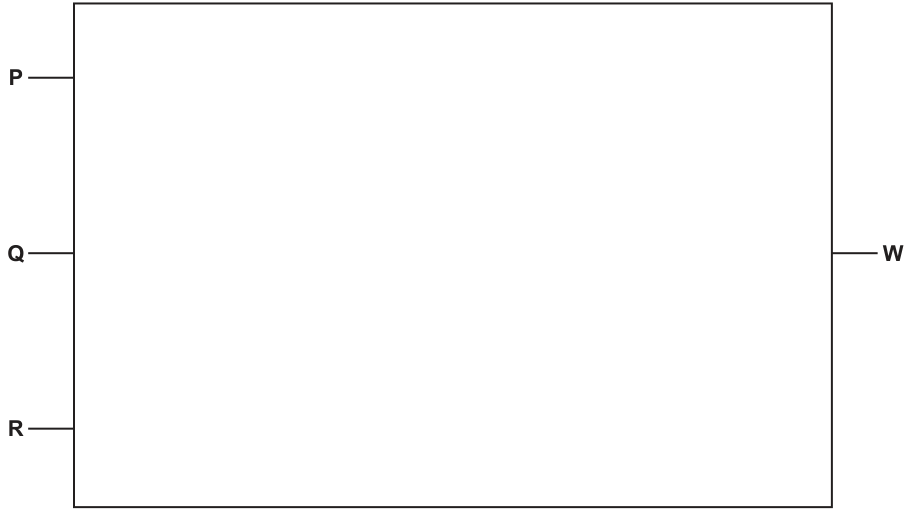
Answer
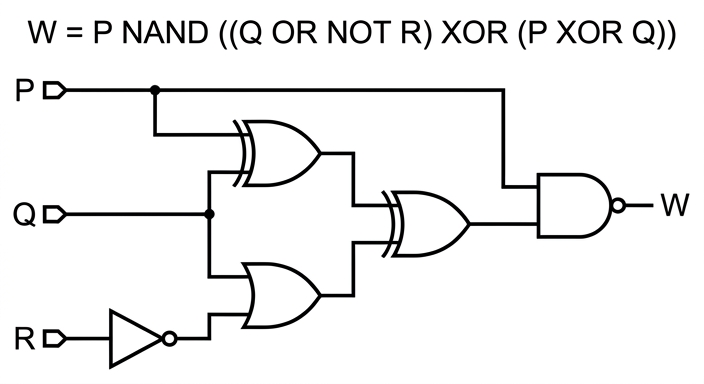
See logic circuit
Background Concept
Drawing a logic circuit from a Boolean expression means turning each operator into its matching gate and then connecting the gates in the same order as the expression.
Useful reminders:
NOT Rmeans invertRfirst using a NOT gate.Q OR NOT Rmeans the output of the NOT gate joinsQat an OR gate.P XOR QmeansPandQfeed an XOR gate.(... ) XOR (... )means the two sub-results feed another XOR gate.P NAND (...)meansPand the previous result feed a NAND gate.
A NAND gate is an AND gate with inversion at the output. In circuit diagrams this is shown as an AND-shaped gate with a small bubble on its output.
Understanding the Question
You are not being asked to simplify the expression. You must draw the circuit that matches the expression exactly:
W = P NAND ((Q OR NOT R) XOR (P XOR Q))
The brackets tell you how the gates must be grouped. The important point is that some inputs are used more than once:
Pis used inP XOR Qand also again in the finalNANDQis used inQ OR NOT Rand also inP XOR QRis first inverted before being used
So the final drawing must include branches from P and Q.
Approach
Build the circuit from the inside out.
- Create
NOT R. - Combine
QwithNOT Rusing an OR gate. - Combine
PwithQusing an XOR gate. - Feed those two results into a second XOR gate.
- Feed that XOR output and the original
Pinto a final NAND gate. - Label the final output
W.
This is safer than trying to sketch the whole circuit at once.
Step-by-Step Reasoning
Start with the three inputs on the left: P, Q and R.
- Take
Rinto a NOT gate. This givesNOT R. - Take
QandNOT Rinto an OR gate. This gives(Q OR NOT R). - Separately, take
PandQinto an XOR gate. This gives(P XOR Q). - Now take the outputs of those two gates into another XOR gate. This gives
((Q OR NOT R) XOR (P XOR Q)). - Finally, take the original
Pagain, branch it upward or directly across, and connect it with the output of the second XOR to a NAND gate. - The output of that NAND gate is
W.
A correct circuit therefore needs:
- one NOT gate
- one OR gate
- two XOR gates
- one NAND gate
- a branch from
P - a branch from
Q
The diagram shows the exact structure required by the expression.
Key Takeaways
- Use brackets to decide the order of gates.
- Build subexpressions first, then combine them.
- Inputs may need to branch if they are used in more than one place.
- A
NANDis not just an AND gate; it must have inverted output.
Common Mistakes
- Using an AND instead of a NAND for the final gate.
- Forgetting to invert
Rbefore the OR gate. - Feeding
PandQstraight into the final XOR without first forming the two bracketed subexpressions. - Missing the second use of
Pin the final NAND. - Missing the second use of
Qin both the OR and the first XOR.
Things to Be Careful About
- Do not simplify the expression unless the question asks you to; draw the circuit that matches the given expression.
- Make sure the final gate is specifically
NAND, shown with the inversion bubble on the output. - Keep the signal flow clear from left to right so the gate groupings are obvious.
- Show proper branching points where one input wire splits to feed two different gates.
Embedded systems are used in many electronic devices.
Answer
- An embedded system is designed for a specific task, so it is not flexible and cannot easily be used for other purposes.
- It usually has limited processing power and memory, so its performance is restricted.
- It is difficult to upgrade, modify or repair because it is built into the device and may need specialist replacement.
Specific task only; limited processing power/memory; difficult to upgrade or repair.
Background Concept
An embedded system is a computer system built into a larger device to control, monitor or manage that device. Unlike a general-purpose computer, it is normally designed to carry out one dedicated job, or a very small set of closely related jobs.
Typical examples include a washing machine controller, a car braking controller, a microwave oven timer and a printer control board. Because the system has a specific purpose, it is often small, efficient and reliable. However, those same design choices create drawbacks.
Common drawbacks come from three main ideas:
- Limited purpose: it is not meant to run a wide range of applications.
- Limited resources: it may have less RAM, storage and processing power than a general-purpose system.
- Difficult maintenance: because it is built into another product, changing it is often harder.
Understanding the Question
The question asks for the drawbacks of embedded systems. That means you should not talk about benefits such as low cost, small size or efficiency. You need disadvantages.
Since it is worth 3 marks, the safest approach is to give three separate drawbacks, each clearly described in one bullet point or sentence.
Approach
Think about what makes embedded systems different from ordinary computers:
- They are built for one job.
- They often use limited hardware resources.
- They are inside another product, so they are harder to alter.
Turning each of those into a disadvantage gives strong exam answers.
Step-by-Step Reasoning
First, an embedded system is usually task-specific. That means it is made to do one job very well, but this also means it cannot easily be adapted for something else. So one drawback is lack of flexibility.
Second, embedded systems are often designed to be cheap, compact or power-efficient. Because of that, they may use a lower-specification processor and smaller memory. That gives another drawback: limited performance or storage compared with a full computer.
Third, because the system is physically built into a device, it can be harder to access. If software or hardware needs changing, the user often cannot do this easily. It may need specialist tools, specialist knowledge, or even replacement of the whole unit. That gives a third drawback: repair, upgrade or modification is difficult.
These three points match the kind of drawbacks examiners usually reward:
- not general purpose
- limited capacity/performance
- hard to upgrade/maintain/repair
Key Takeaways
- Embedded systems are dedicated-purpose systems built into larger devices.
- Their disadvantages usually come from being specialised, resource-limited and hard to change.
- For short theory questions, separate your points clearly so each one can earn a mark.
Common Mistakes
- Giving benefits instead of drawbacks: for example saying they are small, cheap or efficient does not answer this question.
- Repeating the same idea twice: for example "not flexible" and "only does one task" are very similar, so they may not earn two distinct marks unless clearly developed differently.
- Being too vague: saying "they are bad" or "they have problems" is not enough; state what the problem actually is.
Things to Be Careful About
- Make sure each point is a different drawback.
- Use wording linked to embedded systems specifically, not computers in general.
- A brief explanation after each drawback makes the answer stronger, for example not just "limited memory" but also what that causes.
An embedded system has Dynamic RAM (DRAM).
Identify one benefit of using DRAM instead of Static RAM (SRAM) in an embedded system.
Answer
- DRAM is cheaper per bit than SRAM, so more memory can be provided at lower cost.
DRAM is cheaper per bit than SRAM.
Background Concept
Both DRAM and SRAM are types of RAM, so they are volatile memory: their contents are lost when power is removed.
The difference is in how they store bits:
- SRAM (Static RAM) stores data using flip-flop circuits.
- DRAM (Dynamic RAM) stores data using capacitors that must be refreshed regularly.
Because a DRAM cell is simpler, more cells can fit into the same chip area. This usually makes DRAM:
- cheaper per bit
- higher density
- suitable when larger memory capacity is needed
SRAM is faster, but more expensive.
Understanding the Question
The question asks for one benefit of using DRAM instead of SRAM in an embedded system. Since it says "identify", a single short point is enough.
You only need one correct advantage. The safest answer is cost: DRAM is cheaper per unit of storage.
Approach
Compare the two memory types and choose one clear advantage of DRAM. In exam questions like this, avoid more debatable points and use the most standard textbook difference.
Step-by-Step Reasoning
SRAM uses more complex circuitry for each bit stored. That gives high speed, but it takes more space and costs more.
DRAM uses a simpler storage cell. Because of that:
- more bits can fit on a chip
- the cost per bit is lower
So the benefit to state is that DRAM is cheaper per bit than SRAM. In an embedded system, this can reduce manufacturing cost or allow more memory for the same price.
Key Takeaways
- DRAM and SRAM are both volatile RAM types.
- DRAM is usually chosen when cost or larger capacity matters.
- SRAM is usually chosen when speed matters more.
Common Mistakes
- Saying DRAM is faster: this is incorrect; SRAM is generally faster.
- Saying DRAM is non-volatile: it is still RAM, so it is volatile.
- Giving a drawback instead of a benefit: for example mentioning refresh cycles does not answer the question.
Things to Be Careful About
- The question asks for a benefit of DRAM over SRAM, so the comparison direction matters.
- For a one-mark identify question, keep the answer direct and unambiguous.
- "Cheaper" or "higher density" are both strong answers; avoid vague wording like "better".
Give two differences between Erasable Programmable ROM (EPROM) and Electrically Erasable Programmable ROM (EEPROM).
Difference 1 ..............................................................................................................................
Difference 2 ..............................................................................................................................
Answer
- EPROM is erased using ultraviolet light, whereas EEPROM is erased electrically.
- EPROM usually has to be removed and the whole chip erased before reprogramming, whereas EEPROM can be erased and rewritten in circuit, often one byte or block at a time.
EPROM is erased by ultraviolet light and usually whole-chip/off-circuit; EEPROM is erased electrically and can be rewritten in circuit.
Background Concept
EPROM and EEPROM are both types of ROM that can be programmed and then used to store data when power is off. They are forms of non-volatile memory.
Their names tell you the key difference:
- EPROM = Erasable Programmable Read-Only Memory
- EEPROM = Electrically Erasable Programmable Read-Only Memory
The major comparison points are:
- How they are erased
- How conveniently they can be rewritten
EPROM is erased by exposure to ultraviolet light. EEPROM is erased using electrical signals.
Understanding the Question
The question asks for two differences between EPROM and EEPROM. That means you should give two paired comparisons, not just two facts about one of them.
The strongest two differences are:
- erase method
- whether reprogramming can happen in circuit and how much is erased at once
Approach
Use a side-by-side comparison format. Each difference should mention both EPROM and EEPROM.
A good exam technique is:
- Difference 1: how erase happens
- Difference 2: how reprogramming/erasing is carried out in practice
Step-by-Step Reasoning
First difference: erase method.
EPROM needs ultraviolet light to erase stored data. EEPROM does not need UV light; it is erased electrically.
Second difference: ease of updating.
EPROM is less convenient to update. Typically the chip must be removed from the device and erased as a whole before being programmed again.
EEPROM is more flexible. It can usually be erased and reprogrammed while still installed in the system, and erasure may happen a byte at a time or in blocks.
These are clearly distinct differences, so they are suitable for two marks.
Key Takeaways
- Both EPROM and EEPROM are non-volatile programmable ROM types.
- EPROM uses ultraviolet light for erasure.
- EEPROM uses electrical erasure and is easier to update inside a device.
Common Mistakes
- Only stating one side: for example saying "EPROM uses UV" without saying what EEPROM uses makes the comparison weaker.
- Confusing EEPROM with RAM: EEPROM is still non-volatile memory.
- Repeating the same difference twice: for example "EEPROM is electrical" and "EPROM is not electrical" are really the same difference.
Things to Be Careful About
- The question asks for differences, so make each line a true contrast between the two memories.
- Do not confuse EEPROM with EPROM just because the names are similar.
- Keep the focus on exam-standard distinctions: erase method and rewrite convenience are the most reliable ones to use.
A student has a computer.
The computer is designed using the Von Neumann model for a computer system.
Complete the table by describing the purpose of each of the given registers.
| Register | Purpose |
|---|---|
| Program Counter (PC) | |
| Memory Address Register (MAR) | |
| Memory Data Register (MDR) | |
| Index Register (IX) |
Answer
- Program Counter (PC): holds the address of the next instruction to be fetched.
- Memory Address Register (MAR): holds the address of the memory location being accessed.
- Memory Data Register (MDR): holds the data or instruction being transferred to or from memory.
- Index Register (IX): holds a value used to modify an address, for example an offset when accessing array elements.
PC: address of next instruction; MAR: address of memory location being accessed; MDR: data/instruction being transferred to or from memory; IX: value used to modify an address such as an offset.
Background Concept
In the Von Neumann model, both data and program instructions are stored in main memory, so the CPU needs registers to keep track of what to fetch, where to fetch it from, and what data is being moved.
A register is a very small, very fast storage location inside the CPU. Different registers have different jobs:
- The Program Counter (PC) tracks which instruction comes next.
- The Memory Address Register (MAR) stores a memory address.
- The Memory Data Register (MDR) stores the actual data or instruction being moved.
- The Index Register (IX) is used when the CPU needs to adjust an address, often for indexed addressing such as arrays.
These are all part of normal instruction execution, especially during the fetch-execute cycle.
Understanding the Question
The question gives four named registers and asks for the purpose of each one. That means you do not need to describe the whole fetch-execute cycle; you just need to state clearly what each register stores or does.
The important thing is to separate:
- registers that store addresses from
- registers that store data/instructions.
The register names are standard, so this is mainly a definition question.
Approach
For each register:
- Identify whether it stores an address, data, or a modifier.
- State its job in one precise sentence.
- Use standard CPU wording such as "address of the next instruction" or "data being transferred to or from memory".
A good answer is brief but exact.
Step-by-Step Reasoning
-
Program Counter (PC)
- The CPU must know which instruction to fetch next.
- The PC stores that next instruction address.
- It is usually incremented after fetch, unless a jump or branch changes it.
- So the purpose is: holds the address of the next instruction to be fetched.
-
Memory Address Register (MAR)
- Before memory can be read or written, the CPU must specify a location.
- The MAR stores that location's address.
- So the purpose is: holds the address of the memory location being accessed.
-
Memory Data Register (MDR)
- Once memory is accessed, the actual contents being read or written must be held somewhere temporarily.
- That is the role of the MDR.
- It may contain either data or an instruction, depending on what memory is being used for.
- So the purpose is: holds the data or instruction being transferred to or from memory.
-
Index Register (IX)
- Some addresses are not used directly.
- Instead, a base address may be adjusted by an index value, for example when stepping through an array.
- The IX stores that modifying value.
- So the purpose is: holds a value used to modify an address, such as an offset.
Key Takeaways
- The PC stores the next instruction address.
- The MAR stores a memory address.
- The MDR stores the data or instruction being moved.
- The IX stores an offset used in indexed addressing.
A common exam skill is distinguishing address registers from data registers.
Common Mistakes
- Saying the PC stores the current instruction rather than the address of the next instruction.
- Confusing MAR and MDR:
- MAR = address
- MDR = data/instruction
- Saying the IX stores an address without mentioning that it is used to modify or offset an address.
- Giving vague answers like "used in memory" without stating what is actually held.
Things to Be Careful About
- Use the word address for PC and MAR.
- Use the word data or instruction for MDR.
- For IX, mention offset, index, or modify an address.
- Keep the answer to the register's purpose only; do not drift into long descriptions of the whole CPU.
The student needs to connect the computer to a monitor that has a screen resolution of pixels. The monitor also has built-in speakers.
The computer has a Video Graphics Array (VGA) port and a High Definition Multimedia Interface (HDMI) port.
Explain the benefits of connecting the monitor to the computer using the HDMI port instead of the VGA port.
Answer
- HDMI carries a digital signal, so image quality is better and less affected by interference or signal degradation than VGA, which is analogue.
- HDMI has a higher bandwidth, so it is better suited to high-resolution output such as
2560 × 1600. - HDMI can carry audio as well as video.
- Therefore the monitor's built-in speakers can be used without a separate audio cable.
HDMI gives better digital image quality, supports higher-resolution output, carries audio as well as video, and does not need a separate audio cable for the built-in speakers.
Background Concept
A computer port is a physical interface used to connect peripherals. Different ports support different kinds of signals and different amounts of data.
For this question, the important comparison is:
- VGA: carries analogue video only
- HDMI: carries digital video and digital audio
Because HDMI is digital, the signal is less likely to degrade between the computer and the monitor. HDMI also supports higher data rates than VGA, which makes it more suitable for high-resolution displays and multimedia devices.
Understanding the Question
The monitor has two important features:
- a high screen resolution of
2560 × 1600 - built-in speakers
The computer has both a VGA port and an HDMI port, and the question asks why HDMI is better in this situation.
That wording means you should not just describe HDMI generally. You should connect the benefits directly to:
- picture quality / resolution
- audio support for the speakers
Approach
The best way to answer is to compare HDMI against VGA in four clear points:
- HDMI is digital, VGA is analogue.
- Digital transmission gives better image quality and less signal degradation.
- HDMI supports higher bandwidth, which suits high resolution.
- HDMI carries audio as well as video, so no separate sound cable is needed.
Each point should be written as a benefit, not just as a feature.
Step-by-Step Reasoning
- The monitor resolution is
2560 × 1600, which is a high-resolution display. - A high-resolution display needs a connection standard that can carry a lot of display data reliably.
- HDMI is designed for high-definition digital output and has higher bandwidth than VGA.
- VGA is an older analogue standard. Analogue signals are more vulnerable to noise and quality loss, especially compared with a digital interface.
- So, using HDMI means the displayed image will usually be sharper and more accurate.
Now consider the built-in speakers:
- VGA only carries video.
- If VGA were used, sound would need a separate audio connection.
- HDMI carries audio and video together.
- That means one cable can handle both the screen image and the speaker output.
So the mark-scoring ideas are:
- digital rather than analogue
- better image quality / less interference
- better support for high resolution
- carries audio too
- no separate audio cable needed
Key Takeaways
- HDMI is generally preferred over VGA for modern monitors.
- HDMI carries digital video and audio.
- VGA carries analogue video only.
- Higher bandwidth matters when a display has a high resolution.
- Built-in monitor speakers are a clue that audio support must be mentioned.
Common Mistakes
- Saying only "HDMI is faster" without explaining the benefit for the monitor.
- Forgetting that the monitor has built-in speakers, so missing the audio mark.
- Saying VGA also carries audio; it does not.
- Giving vague statements like "HDMI is better quality" without explaining that it is digital and less affected by interference.
- Discussing internet speed or network bandwidth, which is unrelated here.
Things to Be Careful About
- Tie the answer to the actual scenario: high resolution and built-in speakers.
- Do not say HDMI is automatically better in every possible way; focus on the credited benefits.
- Keep the comparison accurate:
- HDMI = digital audio + video
- VGA = analogue video only
- If mentioning resolution, phrase it as HDMI being better suited to or able to support high-resolution output.
The computer has an Operating System (OS). One of the key management tasks of the OS is process management.
Describe the process management tasks performed by an OS.
Answer
- Creates, schedules and terminates processes.
- Allocates CPU time to processes and decides which process runs next.
- Saves and restores process state when switching between processes.
- Manages process priorities so multiple processes can run efficiently.
Creates, schedules and terminates processes; allocates CPU time and decides which process runs next; saves and restores process state during switching; manages process priorities.
Background Concept
Process management is one of the main tasks of an operating system. A process is a program that is currently being executed. In a multitasking system, many processes appear to run at the same time, even though the CPU may only be executing one at any instant.
The OS is responsible for controlling these processes so that the computer runs efficiently and fairly. Important process management jobs include:
- creating processes
- scheduling them
- allocating CPU time
- suspending/resuming them
- terminating them
- switching between them
- handling priorities
This is different from memory management, which focuses mainly on RAM allocation, and different from file management, which focuses on storage.
Understanding the Question
The question specifically asks for process management tasks performed by an OS. So you should give tasks related to the running and control of processes, not general OS jobs such as file handling, user interface, or disk management.
The best answers focus on what the OS does to make multitasking possible.
Approach
Think of what must happen when many programs are active:
- the OS must start them
- the OS must decide which one gets the CPU
- the OS must switch between them
- the OS must stop them when needed
Those are the core process management ideas likely to be rewarded.
Step-by-Step Reasoning
-
Creates processes
- When a user opens a program, the OS sets it up as a process.
- This includes preparing the information the CPU needs to run it.
-
Schedules processes
- Several processes may be waiting to run.
- The OS decides which one should be executed next.
- This is scheduling.
-
Allocates CPU time
- In a multitasking system, one process does not keep the CPU forever.
- The OS gives processor time to each process, often in time slices.
-
Performs context switching
- When the OS changes from one process to another, it must save the current process state and restore another process state.
- That is how multitasking appears seamless.
-
Terminates processes
- When a process finishes or is stopped, the OS removes it from execution.
-
Manages priorities
- Some processes are more urgent than others.
- The OS may use priority levels to decide scheduling order.
For a 4-mark answer, four well-described points are enough. The concise exam answer includes the strongest ones: creation/termination, scheduling, CPU allocation, context switching, and priorities.
Key Takeaways
- Process management is about controlling running programs.
- The OS must create, schedule, switch, and terminate processes.
- Scheduling and CPU allocation are central to multitasking.
- Context switching is the mechanism that allows many processes to share the CPU.
Common Mistakes
- Writing about memory management only, such as allocating RAM, without linking it to processes.
- Writing about file management or security instead of process management.
- Saying simply "the OS runs programs" without explaining how.
- Forgetting scheduling or CPU allocation, which are key process-management tasks.
- Confusing a program with a process; a process is a program in execution.
Things to Be Careful About
- Keep your answer within process management, not general OS functions.
- Use accurate terms such as schedule, allocate CPU time, context switch, and terminate.
- If you mention priorities, make clear that they affect which process runs first or for longer.
- Do not over-explain irrelevant details like secondary storage or device drivers unless linked directly to processes.
A program is written in a high-level language by a team of three programmers using an Integrated Development Environment (IDE).
Describe how the programmers can use the debugging features of a typical IDE during the development of the program.
Answer
- Set breakpoints so the program stops at selected lines and can be checked before continuing.
- Step through the program line by line to follow the execution sequence and find where the logic goes wrong.
- Use watch / variable windows to see the current contents of variables and check whether values are changing correctly.
- Use the IDE error messages / syntax checking to identify the location of errors in the code so they can be corrected.
See explanation
Background Concept
An Integrated Development Environment (IDE) is software that helps programmers write, test and debug programs in one place. Its debugging tools are designed to help find different kinds of errors:
- Syntax errors: mistakes in the rules of the language, such as a missing bracket.
- Logic errors: the program runs, but gives the wrong result.
- Run-time errors: errors that happen while the program is executing.
Typical debugging features in an IDE include:
- Breakpoints: places where execution pauses.
- Single-stepping: running one line at a time.
- Watch windows: showing the values of selected variables while the program runs.
- Error messages / syntax highlighting: identifying mistakes and often showing the line where they occur.
These tools help programmers observe what the program is actually doing instead of guessing.
Understanding the Question
The question asks how a team of programmers can use the debugging features of a typical IDE while developing a high-level language program. So this is not asking for general IDE features such as auto-completion or formatting. It specifically wants features that help detect, trace and fix errors.
For full marks, the answer needs several separate, valid debugging uses. Each point should say both what feature is used and how it helps during development.
Approach
A good way to answer is to think of the main stages of debugging:
- Find where the problem is.
- Pause the program at useful points.
- Follow the execution carefully.
- Check whether variables contain the expected values.
Each of these maps neatly to a standard IDE debugging feature.
Step-by-Step Reasoning
-
Breakpoints: A breakpoint is placed on a line where the programmer wants execution to stop. When the program reaches that line, it pauses. This is useful because the programmer can stop just before or after an important calculation and inspect the program state.
-
Step through code: After the program pauses, the programmer can run it one statement at a time. This makes it easier to see the exact order in which instructions happen and to identify the line where the program begins to behave incorrectly.
-
Watch variables: While stepping through, the programmer can monitor variable values in a watch window. If a variable becomes wrong unexpectedly, this often reveals the faulty line or faulty condition.
-
Error messages / syntax checking: Before or during execution, the IDE may highlight syntax mistakes and show messages indicating the line number or type of error. This speeds up correction because the programmer does not need to search manually through the whole program.
All four are practical debugging actions that a team can use repeatedly during development.
Key Takeaways
- IDE debugging tools help programmers find syntax, logic and run-time errors.
- Breakpoints pause execution at useful places.
- Single-stepping reveals the exact execution path.
- Variable watches help confirm whether data values are correct.
- Error messages help locate faults quickly.
Common Mistakes
- Giving general IDE features instead of debugging features: for example, mentioning code formatting or indentation alone is too vague.
- Naming a feature without saying how it is used: the question says "describe", so each point should include the purpose.
- Repeating the same idea: for example, "trace code" and "step through code" may overlap if not distinguished.
- Talking only about testing: testing finds that a problem exists, but debugging features are about locating and fixing it.
Things to Be Careful About
- Make sure each point is a separate debugging feature or clearly different use.
- Use precise terms such as breakpoint, step through, watch variable, and error message.
- Link the feature to the benefit, such as locating the faulty line or checking variable values.
- Avoid vague phrases like "the IDE helps fix errors" unless you explain how.
The programmers created a new program library whilst developing the program.
Describe the benefits to the programmers of creating a program library.
Answer
- Library routines can be reused, so the programmers do not need to write the same code again, reducing development time.
- The library code can be tested and debugged once, so using it makes programs more reliable and reduces errors.
- The same library can be used by different programmers / programs, making maintenance and updates easier because changes are made in one place.
See explanation
Background Concept
A program library is a collection of pre-written routines, procedures, functions or classes that can be used by one or more programs. Instead of rewriting common tasks every time, programmers can call code from the library.
Libraries support modular programming. This means the program is split into smaller, manageable parts, each with a clear purpose. A team can then build software faster and more consistently.
Common benefits of libraries include:
- Reuse of existing code
- Reduced development time
- Improved reliability if the code has already been tested
- Easier maintenance because updates can be made centrally
Understanding the Question
The question says the programmers created a new program library while developing the program. It asks for the benefits to the programmers of doing this.
So the answer should focus on why creating and using a library helps the development team, not on unrelated system benefits. A strong answer gives a few distinct advantages such as saving time, reducing errors and simplifying maintenance.
Approach
Think about what happens when a team has shared reusable code:
- They write once and use many times.
- They test the shared code thoroughly.
- They update one copy instead of many copies.
Each of these gives a clear benefit and is suitable for a separate marking point.
Step-by-Step Reasoning
-
Reuse of code: If a routine is likely to be needed more than once, placing it in a library means the team can call it whenever needed instead of rewriting it. This saves effort and development time.
-
Test once, use many times: Once a library routine has been tested and debugged, programmers can trust it more than newly written code. Reusing tested code reduces the chance of introducing fresh bugs.
-
Easier maintenance: If several parts of the program, or several programs, use the same library routine, changes can be made in the library rather than in every separate copy. This makes updates simpler and more consistent.
A team of three programmers especially benefits because they can share the same routines and maintain a common standard across the project.
Key Takeaways
- A program library stores reusable code.
- Reuse saves time and avoids repeated work.
- Tested library code improves reliability.
- Centralised code is easier to maintain and update.
Common Mistakes
- Saying only "it is easier" without explaining why: the mark comes from the clear benefit.
- Confusing a library with an IDE: a library is reusable code, not the software used to write code.
- Giving the same benefit twice: for example, "saves time" and "faster to program" may count as one idea unless expanded differently.
- Focusing only on the finished user experience: the question asks about benefits to the programmers during development.
Things to Be Careful About
- Keep the answer about program libraries, not general teamwork.
- Make each benefit distinct: reuse, reliability, maintenance are three separate ideas.
- If mentioning testing, connect it to reliability or fewer errors.
- If mentioning maintenance, explain that one update can affect all uses of the library code.
The file containing the final program code will be sent by email for beta testing.
Identify one security method that can be used to protect the program code from unauthorised access during email transfer.
Explain how your chosen method protects the program code.
Security method ........................................................................................................................
Explanation ...............................................................................................................................
Answer
- Security method: Encryption
- Explanation: The program file is converted into unreadable ciphertext before it is sent. If the email is intercepted during transfer, an unauthorised person cannot read the code without the correct decryption key / password.
Encryption
Background Concept
When data is sent over a network or by email, it is vulnerable while in transit. A security method used here must protect the file from being accessed by someone who is not authorised to see it.
The most suitable method for protecting confidentiality during transfer is encryption. Encryption changes readable data, called plaintext, into unreadable data, called ciphertext. Only someone with the correct key or password can decrypt it back into readable form.
This is different from:
- Authentication, which checks identity
- Access rights, which control permissions on a system
- Anti-malware, which detects malicious software
- Firewalls, which control network traffic
Those may improve security generally, but encryption directly protects the contents of a file during transfer.
Understanding the Question
The question says the final program code is being sent by email for beta testing. It asks for one security method that protects the code from unauthorised access during email transfer, and then asks how that method protects it.
The phrase during email transfer is the clue. That means the method should secure the file while it is moving across networks, not just while stored on a computer.
Approach
Choose a method that provides confidentiality in transit. Encryption is the clearest and safest choice because:
- It protects the contents of the attached file.
- Even if the email is intercepted, the file cannot be understood.
- Only someone with the correct decryption key or password can access the code.
Then explain the protection in terms of unreadable ciphertext and authorised decryption.
Step-by-Step Reasoning
- The program code is in a file attached to an email.
- During transfer, someone could intercept the email or attachment.
- If the file is encrypted before sending, its contents are scrambled into ciphertext.
- Anyone intercepting the file sees only unreadable data.
- The intended recipient uses the correct decryption key or password to convert it back into readable program code.
That directly answers both parts of the question:
- Method: Encryption
- How it protects: It prevents unauthorised people from reading the file contents during transfer.
Key Takeaways
- For data being sent across a network, think about security in transit.
- Encryption is the main method for protecting confidentiality of transferred data.
- Intercepted encrypted data is useless without the correct key.
Common Mistakes
- Choosing a firewall: a firewall filters traffic, but it does not make the attached file unreadable if intercepted.
- Choosing anti-malware: this protects against malicious software, not unauthorised reading of the code during transfer.
- Choosing a digital signature alone: a signature helps verify sender and integrity, but it does not by itself keep the contents secret.
- Forgetting to mention the key/password: the explanation should make clear why unauthorised users still cannot read the file.
Things to Be Careful About
- The question asks for protection from unauthorised access, so confidentiality is the focus.
- Keep the explanation tied to email transfer, not storage on disk.
- Use the term encryption accurately: readable plaintext becomes unreadable ciphertext.
- If you mention a password, make clear it is needed to decrypt or open the encrypted file, not just to log in to email.
A computer programmer is learning about the importance of acting ethically at work.
Explain the reasons why the computer programmer needs to act ethically towards colleagues and the public.
Colleagues ................................................................................................................................
The public .................................................................................................................................
Answer
- Colleagues: The programmer should act honestly and fairly so colleagues can trust their work and work effectively as a team.
- Colleagues: The programmer should respect colleagues' work and not misuse, steal or deliberately damage their code or data.
- The public: The programmer should protect users by producing software that is safe, reliable and not deliberately harmful.
- The public: The programmer should respect privacy and confidentiality so personal or sensitive data is not misused or exposed.
See explanation
Background Concept
Professional ethics in computing means following moral principles when creating, using or managing computer systems. A programmer does not only write code; they also affect other people through that code. Ethical behaviour includes honesty, fairness, respect for other people's work, protection of privacy, and avoiding harm.
In Cambridge International 9618, ethics is usually considered in terms of responsibilities to different groups:
- colleagues and employers
- clients and users
- the general public
A programmer's decisions can affect teamwork inside an organisation and can also affect many external users. For example, careless handling of data may damage trust inside a team, while insecure or unsafe software may harm customers or the wider public.
Understanding the Question
The question asks for reasons why the programmer needs to act ethically towards two specific groups:
- colleagues
- the public
So the answer must not give four random ethical points. It should clearly cover both groups. The wording "explain the reasons why" means each point should say what ethical behaviour is needed and why it matters.
The strongest answers separate the response into the two groups and give relevant examples of ethical responsibility for each one.
Approach
A good method is:
- Think about the programmer's professional relationships inside work: this leads to trust, fairness, respect for other people's work, and teamwork.
- Then think about the effect of software on people outside the team: this leads to privacy, safety, reliability, security, and avoiding harm.
- Write concise explained points, not just single words like "privacy" or "trust".
Step-by-Step Reasoning
For colleagues, ethical behaviour matters because programming is often done as part of a team.
- If a programmer lies about testing, hides mistakes, or interferes with another person's work, the team cannot rely on the program or on each other.
- Ethical conduct means being honest about errors, following agreed standards, and treating colleagues fairly.
- Respecting colleagues also includes not stealing their code, not deleting or sabotaging work, and not taking credit for work done by someone else.
These ideas earn marks because they explain why ethical behaviour supports trust and proper cooperation.
For the public, the key idea is that software can affect users, customers and society.
- If software is unreliable, insecure or deliberately harmful, members of the public may lose money, have their data stolen, or be placed at risk.
- Ethical programmers therefore try to make software safe, well tested and secure.
- They also respect privacy and confidentiality, so they do not misuse personal data or expose it without permission.
These points fit the public side because they focus on protecting users and preventing harm.
Key Takeaways
- Ethics in computing is about responsible behaviour, not just technical skill.
- Duties to colleagues often centre on honesty, fairness, trust and respect for work.
- Duties to the public often centre on safety, privacy, security and avoiding harm.
- In exam answers, separate the stakeholders clearly and make each point specific to that group.
Common Mistakes
- Giving points only about colleagues and forgetting the public, or vice versa.
- Writing vague one-word answers such as "trust" or "privacy" without explaining why they matter.
- Describing legal rules only, when the question is specifically about ethical behaviour.
- Repeating the same idea twice, for example saying "be honest" and "tell the truth" as separate marks.
Things to Be Careful About
- Make sure each point is linked to the correct group named in the question.
- Do not drift into software licensing or copyright; those belong to later parts.
- Keep the answer focused on ethical responsibilities, such as avoiding harm, respecting work, and protecting privacy.
- Because this is an "explain" question, each point should include a brief reason or consequence, not just a label.
The programmer writes a program to be used in a business. The source code of the program can be modified by the business. The business pays the programmer for the maintenance and security updates.
Identify one suitable type of software licence for the program and describe the reasons for your choice.
Type of software licence ....................................................................................................
Reasons for choice ...........................................................................................................
Answer
- Type of software licence: Open-source licence
- Reasons for choice:
- The business can access the source code.
- The business is allowed to modify the program to meet its own needs.
- The programmer can still be paid to provide maintenance and security updates.
Open-source licence
Background Concept
A software licence states what a user or organisation is allowed to do with software. It is the legal permission attached to the program. Different licence types give different rights, for example:
- whether the source code is available
- whether the software can be copied
- whether it can be modified
- whether it can be redistributed
- whether payment is required
For this syllabus, a common contrast is between proprietary software and open-source software.
- Proprietary licence: source code is usually not available and modification is usually restricted.
- Open-source licence: source code is available and users are usually allowed to study and modify it, depending on the exact licence terms.
A business may still pay for services such as customisation, maintenance, support, or security updates even if software is open source.
Understanding the Question
The scenario gives two important clues:
- the source code can be modified by the business
- the business pays the programmer for maintenance and security updates
The first clue strongly suggests a licence that allows access to and modification of source code. The second clue shows that the programmer can still earn money by providing ongoing support.
So the question is not asking for any licence type at random. It is asking for one that fits both of these facts.
Approach
Start from the most important requirement: the business must be able to modify the source code. That rules out many ordinary proprietary licences, because they usually do not give the customer the source code or permission to change it.
An open-source licence is therefore a suitable choice because it matches the modification requirement. Then justify it using the specific details given:
- source code access is needed
- modification must be allowed
- paid maintenance can still happen
Step-by-Step Reasoning
First, identify the key requirement: the business can modify the source code.
If the business is going to modify the source code, then:
- it must be able to see the source code
- it must have permission to alter it
That matches an open-source licence.
Next, connect the licence to the scenario:
- Open source makes the source code available.
- Open source permits modification, so the business can adapt the program for its own use.
- The fact that the business pays the programmer for maintenance and security updates does not conflict with open source. Open-source software can still have paid professional support.
So the choice is suitable because it satisfies both the access/modification requirement and the business arrangement for ongoing maintenance.
Key Takeaways
- A software licence defines what the user may legally do with the software.
- If a question says the source code can be changed by the user or business, open source is often the most suitable answer.
- Open-source software does not mean "no money can be involved"; payment for support and updates is still possible.
- Always justify the chosen licence using the exact facts given in the scenario.
Common Mistakes
- Choosing a proprietary licence even though the business needs to modify the source code.
- Saying "freeware" just because the question mentions software, even though freeware does not normally provide source code for modification.
- Describing open source as meaning the software must be free of charge in every sense.
- Giving only the licence name without reasons.
Things to Be Careful About
- The question asks for one suitable type and reasons for your choice, so both parts are needed.
- Focus on legal permission to access and modify source code, not just on whether the program is used in a business.
- Do not confuse paying for the software itself with paying for maintenance and security updates; these are different things.
- Keep the reasoning tied closely to the scenario rather than giving a memorised definition only.
Answer
- Copyright gives the programmer legal ownership of the program and helps prevent unauthorised copying, distribution or modification.
- It allows the programmer to control how the program is used and to take legal action or receive payment if others use it without permission.
See explanation
Background Concept
Copyright is a legal protection for original work, including software. When a programmer creates a program, copyright helps establish that the work belongs to them unless rights are transferred by contract.
For software, copyright is important because source code and executable code can be copied very easily. Without legal protection, other people could copy, distribute or alter a program and claim it as their own or use it without payment.
Copyright does not stop all misuse by itself, but it gives the creator legal rights and legal remedies.
Understanding the Question
The question asks why the programmer should copyright their program. So the answer should explain the benefits of copyright from the programmer's point of view.
The scenario already tells us that the software is being used in a business and that the source code can be modified. That makes ownership and control especially important, because once software is shared with others, there is a risk of unauthorised copying or use beyond what was agreed.
Approach
Think of two main purposes of copyright in software:
- protection of the programmer's work from unauthorised copying or alteration
- control over how the work is used, including the ability to enforce rights and receive payment
These are the clearest explained reasons and fit a short two-mark answer well.
Step-by-Step Reasoning
First, copyright identifies the program as the programmer's intellectual property.
That matters because software can be duplicated easily. If someone copies the code, redistributes it, or edits it without permission, copyright gives the programmer a legal basis to challenge that action.
Second, copyright gives the programmer control.
This means the programmer can decide who may use the program, under what conditions, and whether payment is required. If another person or business breaks those conditions, the programmer has legal support to take action.
So the reasons are both protective and commercial:
- it protects the creator's work
- it helps the creator keep control and potential income
Key Takeaways
- Copyright protects software as intellectual property.
- It helps prevent unauthorised copying, distribution and modification.
- It gives the creator legal control over use of the program.
- In exam answers, explain both the ownership/protection aspect and the enforcement/payment aspect.
Common Mistakes
- Saying only "so nobody can steal it" without explaining the legal protection.
- Confusing copyright with a software licence. A licence gives permission to use software; copyright establishes legal ownership and protection.
- Writing about patents or trademarks instead of copyright.
- Giving vague business benefits without linking them to legal rights.
Things to Be Careful About
- Keep the focus on the programmer's reasons, not the business's reasons.
- Use software-specific language such as copying, distributing, modifying and using without permission.
- Do not claim that copyright makes misuse impossible; it provides legal protection and the ability to act.
- If the question is only two marks, concise explained points are better than a long general discussion.
A company uses a relational database to store data about its customers, employees and the individual repair jobs that customers have booked.
Answer
- Data is stored once and linked using keys, so there is less data redundancy and less wasted storage.
- Updating one record updates the data for all related uses, so data is more consistent and integrity is improved.
- A relational database supports secure multi-user access and more efficient querying/reporting than separate files.
See explanation
Background Concept
A file-based approach stores data in separate files, often created for individual applications. This can lead to the same data being repeated in multiple places. For example, a customer's details might appear in one file for bookings and another file for invoices.
A relational database stores data in tables and connects those tables using keys. A primary key uniquely identifies each record in a table. A foreign key is a field in one table that refers to the primary key of another table. This structure reduces duplication and allows data to be combined when needed.
Relational databases are also managed by a DBMS, which provides facilities such as access control, concurrent multi-user access, validation, backup, and powerful querying.
Understanding the Question
The question asks for benefits of using a relational database instead of a file-based approach. So the answer should be comparative: what problems a file-based system has, and how a relational database improves on them.
Because it is only 3 marks, the expected answer is likely three clear advantages rather than a long discussion. Strong choices are reduced redundancy, improved consistency/integrity, and better access/query/security features.
Approach
A good way to answer this type of question is:
- Think of the common weaknesses of file-based systems.
- Match each weakness with the corresponding strength of relational databases.
- Write each point clearly as a benefit.
The most standard points are:
- less duplicated data
- better consistency/integrity
- easier querying and secure multi-user access
Step-by-Step Reasoning
First, consider duplication. In a file-based system, the same customer or employee details may be stored in several different files. That wastes storage and creates maintenance problems. In a relational database, the data can be stored once in one table and linked to other tables using keys. That is why reduced redundancy is a valid benefit.
Second, consider consistency. If duplicated data exists in several files, one copy may be updated while another is not. Then the system contains conflicting values. In a relational database, because related data is linked rather than repeatedly copied, updates are made in one place and the linked records continue to use the same correct data. That improves consistency and data integrity.
Third, consider functionality. A DBMS can let multiple users access the data safely, apply permissions, and run queries across related tables. Separate files are much less efficient for complex searches and reports because the relationships between data items are not built into the structure in the same way. So better querying and secure multi-user access are valid benefits.
Key Takeaways
- Relational databases reduce repeated data by storing it once and linking tables with keys.
- Less duplication leads to better consistency and integrity.
- A DBMS gives useful features such as querying, security and multi-user access.
Common Mistakes
- Giving only one idea in different words, such as repeating "less duplication" several times.
- Describing what a database is without comparing it to a file-based approach.
- Writing vague points like "it is better" without stating why.
- Confusing security with integrity: security is about preventing unauthorised access, while integrity is about data remaining accurate and consistent.
Things to Be Careful About
- The question asks for benefits of a relational database, so make sure each point is an advantage, not just a feature.
- Keep the comparison clear: mention the problem with file-based systems or the improvement provided by the relational model.
- For short-mark explain questions, concise full statements score better than long paragraphs with repeated ideas.
The company decides which employees will work on each repair job. An employee can log into the database to access information about their repair jobs.
The database is normalised and includes these tables:
CUSTOMERstores personal data about each customerEMPLOYEEstores personal data about each employeeLOGIN_DATAstores the username and password for each employeeJOBstores the data about each repair jobJOB_EMPLOYEEstores the employees that are working on each repair job.
Identify each relationship between the database tables and explain how each relationship can be implemented in the normalised database.
Answer
CUSTOMERtoJOBis one-to-many. One customer can have many repair jobs, but each job belongs to one customer. Implement this by storingCustomerIDas a foreign key inJOB.EMPLOYEEtoLOGIN_DATAis one-to-one. Each employee has one set of login details. Implement this by storingEmployeeIDinLOGIN_DATAas a foreign key and making it unique (or the primary key).JOBtoEMPLOYEEis many-to-many. One job can have many employees and one employee can work on many jobs. Implement this usingJOB_EMPLOYEEas a linking table containingJobIDandEmployeeIDas foreign keys, with the pair used as a composite primary key.
See explanation
Background Concept
In a relational database, tables are connected through relationships. The main relationship types are:
- one-to-one (1:1): one record in one table matches one record in another table
- one-to-many (1:M): one record in one table can match many records in another table
- many-to-many (M:N): many records in one table can match many records in another table
These relationships are implemented using keys.
- A primary key uniquely identifies each record in a table.
- A foreign key is a field in one table that refers to the primary key of another table.
In a normalised database, a many-to-many relationship is not stored directly. It is resolved using a linking table (also called a junction table or associative entity). That linking table usually stores the primary keys of the two related tables as foreign keys.
Understanding the Question
You are given five tables:
CUSTOMEREMPLOYEELOGIN_DATAJOBJOB_EMPLOYEE
The question asks you to identify each relationship between these tables and explain how each is implemented in a normalised database.
The clues are in the table descriptions:
- customers book repair jobs
- employees work on repair jobs
- each employee can log in to access their jobs
JOB_EMPLOYEEstores the employees working on each job
That tells us we should look for the relationship between customer and job, employee and login data, and job and employee.
Approach
The best method is:
- Read what each table stores.
- Ask how many records from one table can match one record in another.
- Decide the cardinality: 1:1, 1:M or M:N.
- State how that relationship is implemented with keys.
For normalised designs:
- a 1:M relationship is usually implemented by putting the primary key from the "one" table as a foreign key in the "many" table
- a 1:1 relationship is often implemented by using a matching key in the second table and enforcing uniqueness
- an M:N relationship must be split using a linking table
Step-by-Step Reasoning
1. CUSTOMER and JOB
A customer can book several repair jobs over time. However, each individual job is for one customer. That makes the relationship one-to-many from CUSTOMER to JOB.
To implement a one-to-many relationship, the primary key from the one side goes into the many side as a foreign key. So JOB should contain CustomerID as a foreign key referring to the primary key in CUSTOMER.
That means:
- one customer record can be linked to many job records
- each job record stores exactly which customer it belongs to
2. EMPLOYEE and LOGIN_DATA
The description says LOGIN_DATA stores the username and password for each employee. That implies each employee has one set of login details, so this is a one-to-one relationship.
A normal way to implement this is:
- include
EmployeeIDinLOGIN_DATA - make that field a foreign key to
EMPLOYEE - also make it unique, or make it the primary key of
LOGIN_DATA
This guarantees one login record per employee.
3. JOB and EMPLOYEE
A repair job may need more than one employee, and an employee can work on many different jobs. That is a many-to-many relationship.
A many-to-many relationship cannot stay as a direct link in a normalised relational design. It must be broken into two one-to-many relationships using a linking table. Here, that linking table is already given as JOB_EMPLOYEE.
JOB_EMPLOYEE should contain:
JobIDas a foreign key toJOBEmployeeIDas a foreign key toEMPLOYEE
Usually the pair (JobID, EmployeeID) is used as a composite primary key so the same employee is not linked to the same job more than once.
So the original M:N relationship becomes:
JOBtoJOB_EMPLOYEE= one-to-manyEMPLOYEEtoJOB_EMPLOYEE= one-to-many
That is the correct normalised implementation.
Key Takeaways
- Identify relationships by asking "how many?"
- 1:M relationships use a foreign key on the many side.
- 1:1 relationships usually use a matching key with uniqueness enforced.
- M:N relationships must be resolved using a linking table containing foreign keys from both tables.
Common Mistakes
- Saying
CUSTOMERtoJOBis many-to-many. It is not: each job belongs to one customer. - Forgetting to explain implementation. The question asks not only for the relationship type but also how it is stored in the database.
- Treating
JOB_EMPLOYEEas a normal independent entity without recognising that it resolves the many-to-many relationship. - Giving only "foreign key" without saying which table it belongs in.
- Describing
EMPLOYEEtoLOGIN_DATAas one-to-many unless the question explicitly says employees can have multiple logins, which it does not.
Things to Be Careful About
- Use the table names exactly as given:
CUSTOMER,EMPLOYEE,LOGIN_DATA,JOB,JOB_EMPLOYEE. - In a one-to-many relationship, place the foreign key in the table on the many side, not the one side.
- In the linking table, both keys should normally be foreign keys, and together they are often the composite primary key.
- If you refer to example field names such as
CustomerID,EmployeeIDandJobID, keep them consistent throughout your answer.
The database also has the table INVOICE that stores data about each invoice that is sent to a customer.
Example data from the table INVOICE is given.
| InvoiceID | DateSent | Amount | Paid | JobID |
|---|---|---|---|---|
| 29262 | 12/12/2023 | 105.20 | Y | 221 |
| 26765 | 11/11/2023 | 200.00 | Y | 315 |
| 13290 | 02/01/2024 | 50.00 | Y | 315 |
| 34090 | 05/02/2024 | 25.95 | N | 569 |
Write a Structured Query Language (SQL) script to return the total amount of all the invoices sent in the year 2023 that have been paid.
Answer
SELECT SUM(Amount)
FROM INVOICE
WHERE Paid = 'Y'
AND YEAR(DateSent) = 2023;
See SQL script
Background Concept
SQL SELECT queries are used to retrieve data from tables. When a question asks for a total, the standard aggregate function is SUM().
A typical aggregate query has this structure:
SELECT SUM(FieldName)
FROM TableName
WHERE condition;
The WHERE clause filters which rows are included before the total is calculated. If more than one condition must be true, AND is used.
Understanding the Question
The question gives the table INVOICE with these relevant fields:
AmountPaidDateSent
You must return the total amount of invoices that satisfy two conditions:
- they were sent in 2023
- they have been paid
So this is not asking for individual invoice rows. It is asking for one result: the sum of the qualifying Amount values.
Approach
To solve this:
- Use
SUM(Amount)because the query needs a total amount. - Read from the
INVOICEtable. - Restrict the rows to paid invoices only, so
Paid = 'Y'. - Restrict the rows to the year 2023 using the date field.
That leads to a SELECT ... FROM ... WHERE ... AND ... query.
Step-by-Step Reasoning
The output needed is a total, so SUM(Amount) is the correct aggregate.
The table named in the question is INVOICE, so the query must read from that table.
Next, the query must include only invoices that have been paid. In the sample data, paid invoices use Y, so the condition is:
Paid = 'Y'
Then the query must include only invoices sent in 2023. A clean way to express that is:
YEAR(DateSent) = 2023
Now combine both filters with AND, because both conditions must be true for a row to be counted.
Putting the clauses together gives:
SELECT SUM(Amount)
FROM INVOICE
WHERE Paid = 'Y'
AND YEAR(DateSent) = 2023;
If you apply this to the example rows, the qualifying 2023 paid invoices are:
- 105.20 on 12/12/2023
- 200.00 on 11/11/2023
The invoice dated 02/01/2024 is paid but not in 2023, and the invoice dated 05/02/2024 is not paid. So only the two 2023 paid rows are included.
Key Takeaways
- Use
SUM()when a total is required. - Use
WHEREto filter rows before aggregation. - Use
ANDwhen multiple conditions must all be true. - Always select from the correct table and the correct field names.
Common Mistakes
- Writing
SELECT Amountinstead ofSELECT SUM(Amount). - Forgetting one of the two conditions, for example filtering by year but not by paid status.
- Using
ORinstead ofAND, which would include the wrong rows. - Querying the wrong table or wrong field names.
- Returning all invoice details instead of a single aggregated result.
Things to Be Careful About
- SQL keywords should be written clearly in upper case:
SELECT,FROM,WHERE,AND,SUM. Paidis a character value here, so'Y'must be in quotes.- Date handling can vary slightly between SQL systems. The important exam idea is that the query must restrict results to the year 2023 and to paid invoices.
- Use the exact table name
INVOICEand exact field names shown in the question.
A student takes a photograph of a science experiment.
The photograph is saved as a bitmapped image.
Define the following bitmap terms.
Colour depth ......................................................................................................................
File header ........................................................................................................................
Answer
- Colour depth: the number of bits used to store the colour of each pixel.
- File header: the section at the start of the file that stores information about the image, such as its format, size/resolution and colour depth.
See explanation
Background Concept
A bitmapped image stores a picture as a grid of pixels. Each pixel needs data to describe its colour, and the file also needs some extra information so software knows how to interpret the pixel data.
Two important bitmap terms here are:
- Colour depth: how many bits are used for each pixel.
- File header: the metadata stored at the beginning of the file.
If an image has a greater colour depth, each pixel can represent more possible colours. For example, 1 bit per pixel can represent only 2 colours, while 8 bits per pixel can represent 256 colours.
A file header does not store the actual picture itself. Instead, it stores descriptive information such as the file type, image width, image height, colour depth and sometimes compression information.
Understanding the Question
The question says the photograph is saved as a bitmapped image and then asks for definitions of two bitmap terms:
- Colour depth
- File header
This is not asking for an example or an explanation of why they matter. It is simply testing whether you know the precise meanings of these two terms.
Approach
For definition questions like this:
- Give the standard textbook meaning.
- Keep each definition short and accurate.
- Avoid vague wording such as "better colours" or "information about the image" unless you make clear exactly what is being stored.
Step-by-Step Reasoning
For colour depth, the key idea is that each pixel must store colour information. The definition is based on the number of bits assigned to each pixel.
So the correct definition is: the number of bits used to represent the colour of one pixel.
For file header, the key idea is that image software must know how to read the file before it can display the pixels. Therefore the bitmap file begins with metadata.
So the correct definition is: the part at the start of the file that stores information about the image, such as dimensions, colour depth, file type or compression details.
Key Takeaways
- Colour depth is about bits per pixel.
- File header is about metadata at the start of the file.
- In bitmap questions, separate the actual pixel data from the information used to describe that data.
Common Mistakes
- Saying colour depth is the number of colours in the image. More accurately, it is the number of bits used per pixel, which determines the number of possible colours.
- Saying the file header stores the image. It does not store the picture itself; it stores information about how to interpret the picture data.
- Confusing resolution with colour depth. Resolution is the number of pixels; colour depth is the bits used for each pixel.
Things to Be Careful About
- Use the phrase bits per pixel for colour depth.
- For file header, mention that it is at the start of the file.
- If you give examples of what the file header stores, make sure they are metadata such as file type, dimensions or colour depth, not the image content itself.
Explain why changing the image resolution will affect the image quality and file size.
Image quality .....................................................................................................................
File size .............................................................................................................................
Answer
- Image quality: increasing the resolution increases the number of pixels, so more detail is stored and the image looks sharper; decreasing the resolution reduces detail and can make the image pixelated.
- File size: increasing the resolution increases the number of pixels that must be stored, so the file size becomes larger; decreasing the resolution gives a smaller file size.
See explanation
Background Concept
In a bitmap, an image is made from pixels arranged in a grid. Resolution describes how many pixels are used to represent the image. A higher resolution means more pixels; a lower resolution means fewer pixels.
Because each pixel needs storage space, the number of pixels directly affects file size. It also affects visual quality, because more pixels can represent more detail and smoother edges.
Understanding the Question
The question asks why changing the image resolution affects:
- image quality
- file size
So you must connect the same cause, changing the number of pixels, to two separate consequences.
Approach
The best way to answer is:
- State what changing resolution means: changing the number of pixels.
- Link that to quality: more pixels means more detail.
- Link that to file size: more pixels means more data must be stored.
This is a cause-and-effect explanation question, not just a definition.
Step-by-Step Reasoning
If the resolution is increased, the image uses more pixels.
For image quality:
- More pixels means the picture can show finer detail.
- Curves and edges appear smoother.
- The image looks sharper and less blocky.
If the resolution is decreased:
- Fewer pixels are used.
- Less detail can be stored.
- The image may look blurry or pixelated.
For file size:
- Every pixel needs bits to store its colour.
- If there are more pixels, more bits are needed overall.
- Therefore the file size gets larger.
If there are fewer pixels:
- Less pixel data is stored.
- Therefore the file size gets smaller.
The core link is that resolution changes the number of pixels, and the number of pixels affects both appearance and storage requirement.
Key Takeaways
- Resolution is about the number of pixels in the image.
- More pixels usually means better quality.
- More pixels also means a larger file size.
- Fewer pixels usually means lower quality and a smaller file.
Common Mistakes
- Saying only higher resolution means better quality without explaining that this is because there are more pixels.
- Saying only higher resolution means bigger file size without linking it to storing more pixel data.
- Confusing resolution with colour depth. Resolution changes the number of pixels; colour depth changes the number of bits per pixel.
- Writing that increasing resolution always improves quality in every situation. In exam terms, the expected answer is that it allows more detail, but in practice the source image also matters.
Things to Be Careful About
- The explanation should refer to number of pixels.
- For quality, use terms like more detail, sharper, or pixelated.
- For file size, make clear that more pixels must be stored.
- Do not drift into compression unless the question asks for it.
Answer
- Run-length encoding (RLE)
Run-length encoding (RLE)
Background Concept
Compression reduces file size. There are two broad types:
- Lossless compression: no data is lost, so the original file can be reconstructed exactly.
- Lossy compression: some data is discarded to reduce size more, so the original cannot be recovered perfectly.
A standard lossless method named in this syllabus is run-length encoding (RLE).
RLE works well when the same value appears many times in a row, for example long runs of identical pixel colours. Instead of storing every repeated value separately, it stores the value once together with how many times it repeats.
Understanding the Question
The question asks for one lossless method of compressing an image. That means you only need to name a valid technique, not explain it.
Approach
Because the question is only 1 mark, the safest response is the standard syllabus example: Run-length encoding (RLE).
Step-by-Step Reasoning
A lossless method must preserve all the original data. RLE does this because it does not remove information; it just stores repeated data more efficiently.
So a correct answer is:
- Run-length encoding (RLE)
Key Takeaways
- Lossless means exact reconstruction is possible.
- RLE is a recognised lossless compression method for images.
- For a 1-mark "identify" question, naming the correct technique is enough.
Common Mistakes
- Giving a lossy method such as JPEG compression when the question specifically asks for lossless.
- Explaining compression in general without actually naming a method.
- Naming a vague idea like "zipping" instead of a specific method expected by the syllabus.
Things to Be Careful About
- Read whether the question says lossless or lossy.
- For 1-mark identify questions, a short exact name is best.
- RLE is especially safe because it is explicitly included in the syllabus wording.
The student draws a picture on paper that is scanned into the computer and saved as a vector graphic.
Define the vector graphic terms property and drawing list.
Property ....................................................................................................................................
Drawing list ...............................................................................................................................
Answer
- Property: a characteristic of a graphic object, such as its position, size, line thickness or colour.
- Drawing list: the list of objects together with their properties and drawing instructions used to recreate the image.
See explanation
Background Concept
A vector graphic does not store an image as pixels. Instead, it stores the image as a set of objects, such as lines, curves, rectangles and circles, together with information about each object.
Two important vector terms are:
- Property: an attribute of an object.
- Drawing list: the full set of objects and instructions needed to redraw the image.
For example, a circle in a vector graphic might have properties such as centre position, radius, line colour and fill colour. The software reads the stored instructions and redraws the objects when the file is opened.
Understanding the Question
The question asks for definitions of the vector graphic terms property and drawing list.
Although the scenario mentions a scanned paper drawing, which in real life usually starts as a bitmap, the exam is clearly testing your knowledge of vector graphics terminology, so that is what your answer should focus on.
Approach
Answer each term separately:
- For property, define it as a characteristic of one graphical object.
- For drawing list, define it as the collection of stored objects/instructions and their properties that allow the whole image to be recreated.
A short definition with an example of a property is usually enough.
Step-by-Step Reasoning
For property:
A vector image is made of objects. Each object needs attributes to describe how it should appear. These attributes are called properties.
Typical properties include:
- position
- size
- line thickness
- line colour
- fill colour
So the definition is: a property is a characteristic or attribute of a graphical object.
For drawing list:
The computer must store all vector objects in some form. It stores a list of the shapes together with the information needed to draw them. This set of stored instructions is the drawing list.
So the definition is: the list of objects and their properties/instructions used to recreate the image.
Key Takeaways
- Vector graphics are stored as objects, not pixels.
- A property describes one object.
- A drawing list stores all the objects and how to draw them.
Common Mistakes
- Defining a property too vaguely as just "data" without saying it describes a graphical object.
- Confusing a drawing list with a list of pixels. Pixels belong to bitmaps, not vector graphics.
- Giving examples of bitmap features such as resolution or colour depth instead of vector object attributes.
Things to Be Careful About
- Use vector language such as object, shape, attribute, and instruction.
- Good examples of properties are position, size, colour, and line thickness.
- Make clear that the drawing list is what allows the image to be redrawn or recreated.
The following table shows part of the instruction set for a processor. The processor has two registers, the Accumulator (ACC) and the Index Register (IX).
| Instruction | Explanation | |
|---|---|---|
| Opcode | Operand | |
| LDM | #n | Immediate addressing. Load the number n to ACC |
| LDD | <address> | Direct addressing. Load the contents of the location at the given address to ACC |
| LDI | <address> | Indirect addressing. The address to be used is at the given address. Load the contents of this second address to ACC |
| LDX | <address> | Indexed addressing. Form the address from <address> + the contents of the index register. Copy the contents of this calculated address to ACC |
| LDR | #n | Immediate addressing. Load the number n to IX |
| ADD | #n/Bn/&n | Add the number n to the ACC |
| ADD | <address> | Add the contents of the given address to the ACC |
| SUB | #n/Bn/&n | Subtract the number n from the ACC |
| SUB | <address> | Subtract the contents of the given address from the ACC |
| INC | <register> | Add 1 to the contents of the register (ACC or IX) |
| DEC | <register> | Subtract 1 from the contents of the register (ACC or IX) |
<address> can be an absolute or a symbolic address
denotes a denary number, e.g. #123
B denotes a binary number, e.g. B01001010
& denotes a hexadecimal number, e.g. &4A
The current contents of memory are shown:
| Address | Data |
|---|---|
| 19 | 25 |
| 20 | 23 |
| 21 | 2 |
| 22 | 4 |
| 23 | 15 |
| 24 | 50 |
| 25 | 22 |
The current contents of the ACC and IX are shown:
| ACC | 50 |
|---|---|
| IX | 20 |
Complete the table by writing the content of the ACC and the IX after each set of instructions has run.
| Instructions | ACC content | IX content | |
|---|---|---|---|
| 1 | LDM #19 DEC ACC | ||
| 2 | LDD 23 ADD 19 | ||
| 3 | LDI 25 INC ACC | ||
| 4 | LDR #21 LDX 2 |
Working
LDM #19loads19into ACC, thenDEC ACCgives18.LDD 23loads contents of address23=15, thenADD 19adds contents of address19=25, so ACC =40.LDI 25uses contents of address25=22, then loads contents of address22=4;INC ACCgives5.LDR #21loads21into IX.LDX 2uses address2 + IX = 23, so ACC = contents of address23=15.
Answer
| ACC content | IX content | |
|---|---|---|
| 1 | 18 | 20 |
| 2 | 40 | 20 |
| 3 | 5 | 20 |
| 4 | 15 | 21 |
See completed table
Background Concept
This question is about tracing machine-code style instructions using registers and addressing modes.
The two registers given are:
- ACC (Accumulator): the main register used for arithmetic and data operations.
- IX (Index Register): used with indexed addressing to help calculate an address.
The key addressing modes here are:
- Immediate addressing: the actual value is given in the instruction, for example
#19means the value19. - Direct addressing: the operand is a memory address, so you look in that address and use the data stored there.
- Indirect addressing: the given address contains another address; you must follow that second address to get the data.
- Indexed addressing: add the given address to the current contents of
IX, then use that total as the memory address.
Instructions such as INC and DEC change the contents of a register by 1.
Understanding the Question
You are given:
- a memory table showing the data stored at addresses
19to25 - the starting contents of the registers:
ACC = 50,IX = 20 - four separate sets of instructions
You must complete the output table with the contents of ACC and IX after each set has run.
The important point is that each row is traced from the stated current register values unless the question says the results carry forward. Here, the table is presenting separate instruction sets, so each set is treated from the given starting state.
Approach
For each row:
- Start from
ACC = 50andIX = 20. - Read the first instruction and update the correct register.
- Read the second instruction and update again.
- Use the memory table whenever an address must be dereferenced.
- Write the final values of both registers.
The biggest skill is recognising whether the operand is a value itself or an address that must be looked up.
Step-by-Step Reasoning
The memory contents are:
19 → 2520 → 2321 → 222 → 423 → 1524 → 5025 → 22
Starting registers for each set:
ACC = 50IX = 20
Set 1
Instructions:
LDM #19DEC ACC
LDM #19 uses immediate addressing, so the value 19 is placed directly into ACC.
ACC = 19IX = 20
DEC ACC subtracts 1 from ACC.
ACC = 18IX = 20
Final answer for set 1:
ACC = 18IX = 20
Set 2
Instructions:
LDD 23ADD 19
LDD 23 uses direct addressing, so load the contents of address 23.
- memory at
23is15 ACC = 15
ADD 19 has no #, so this is also using an address. Add the contents of address 19.
- memory at
19is25 ACC = 15 + 25 = 40IXis unchanged at20
Final answer for set 2:
ACC = 40IX = 20
Set 3
Instructions:
LDI 25INC ACC
LDI 25 uses indirect addressing.
First look at address 25:
- memory at
25is22
That means the real address to use is 22.
Now look at address 22:
- memory at
22is4
So ACC = 4.
INC ACC adds 1:
ACC = 5IX = 20
Final answer for set 3:
ACC = 5IX = 20
Set 4
Instructions:
LDR #21LDX 2
LDR #21 loads the immediate value 21 into the index register.
IX = 21
LDX 2 uses indexed addressing.
Compute the effective address:
2 + IX = 2 + 21 = 23
Now load the contents of address 23 into ACC:
- memory at
23is15 ACC = 15
Final answer for set 4:
ACC = 15IX = 21
Key Takeaways
#means the operand is the value itself.- No
#here means use the operand as a memory address. - Indirect addressing means two lookups: first to get an address, then to get the data.
- Indexed addressing means add the operand to
IXfirst, then use that address. - Always track which register an instruction changes:
ACC,IX, or both.
Common Mistakes
- Treating
ADD 19as adding the number19instead of the contents of address19. - Forgetting that
LDI 25needs two memory accesses. - Using the old
IXvalue in set 4 afterLDR #21has already changed it. - Carrying results from one row into the next when the question intends each row to start from the given register contents.
- Changing
IXduring instructions that only affectACC.
Things to Be Careful About
- Read the symbol carefully:
#19and19do not mean the same thing. - In indexed addressing, calculate the address first, then read memory.
- In indirect addressing, do not stop after the first lookup.
INCandDECaffect only the named register.- Keep the memory table and register table separate in your mind: addresses hold data, registers hold current working values.
The instruction set also includes these bit manipulation instructions:
| Instruction | Explanation | |
|---|---|---|
| Opcode | Operand | |
| AND | #n/Bn/&n | Bitwise AND operation of the contents of ACC with the operand |
| AND | <address> | Bitwise AND operation of the contents of ACC with the contents of <address> |
| XOR | #n/Bn/&n | Bitwise XOR operation of the contents of ACC with the operand |
| XOR | <address> | Bitwise XOR operation of the contents of ACC with the contents of <address> |
| OR | #n/Bn/&n | Bitwise OR operation of the contents of ACC with the operand |
| OR | <address> | Bitwise OR operation of the contents of ACC with the contents of <address> |
| LSL | #n | Bits in ACC are shifted logically n places to the left. Zeros are introduced on the right-hand end |
| LSR | #n | Bits in ACC are shifted logically n places to the right. Zeros are introduced on the left-hand end. |
<address> can be an absolute or a symbolic address
denotes a denary number, e.g. #123
B denotes a binary number, e.g. B01001010
& denotes a hexadecimal number, e.g. &4A
The current content of the ACC is shown:
| ACC | 1 | 0 | 0 | 1 | 1 | 0 | 1 | 0 |
|---|
The table has three sets of instructions. The binary number 10011010 is reloaded into the ACC before each set of instructions is run.
Complete the table by writing the content of the ACC after each set of instructions has run.
| Instructions | ACC content | |
|---|---|---|
| 1 | LSL #2 | |
| 2 | ADD #5 AND #30 | |
| 3 | OR B11110010 INC ACC |
Working
Initial ACC before each set: 10011010
-
LSL #2
10011010→01101000 -
ADD #5thenAND #30
10011010 + 00000101 = 10011111
10011111 AND 00011110 = 00011110 -
OR B11110010thenINC ACC
10011010 OR 11110010 = 11111010
INC ACC→11111011
Answer
| ACC content | |
|---|---|
| 1 | 01101000 |
| 2 | 00011110 |
| 3 | 11111011 |
See completed table
Background Concept
This question uses bit manipulation, which means operating directly on the bits stored in a register.
The instructions involved are:
- LSL #n: logical shift left by
nplaces. Bits move left, bits that fall off the left end are lost, and0s are inserted on the right. - AND: gives
1only where both bits are1. - OR: gives
1where at least one bit is1. - INC ACC: adds 1 to the binary number in the accumulator.
A useful truth summary is:
1 AND 1 = 1, otherwise01 OR 0 = 1,0 OR 1 = 1,1 OR 1 = 1, only0 OR 0 = 0
Because the question shows ACC as 8 bits, you should keep all results as 8-bit values.
Understanding the Question
You are given the starting accumulator value:
10011010
The question says this value is reloaded before each set of instructions, so each row starts again from 10011010.
You must complete the table with the new contents of ACC after each separate instruction set.
That means:
- row 1 starts from
10011010 - row 2 also starts from
10011010 - row 3 also starts from
10011010
Approach
For each row:
- Start with
10011010. - Apply the first instruction exactly.
- If there is a second instruction, apply it to the result of the first.
- Keep the result in 8 bits.
For ADD #5 and AND #30, convert the denary operands to 8-bit binary first:
5 = 0000010130 = 00011110
Step-by-Step Reasoning
Starting value each time:
ACC = 10011010
Set 1: LSL #2
A logical left shift by 2 moves every bit two positions to the left.
Start:
10011010
Shift left once:
00110100
Shift left again:
01101000
So the result is:
01101000
Set 2: ADD #5 then AND #30
Start again from:
10011010
Convert 5 to 8-bit binary:
00000101
Add:
10011010 + 00000101 = 10011111
Now convert 30 to 8-bit binary:
00011110
Apply bitwise AND:
1001111100011110- result:
00011110
Bit by bit, only the positions where both values contain 1 remain 1.
So the result is:
00011110
Set 3: OR B11110010 then INC ACC
Start again from:
10011010
Apply bitwise OR with 11110010:
1001101011110010- result:
11111010
Now increment by 1:
11111010 + 1 = 11111011
So the result is:
11111011
Key Takeaways
- A logical left shift inserts
0s on the right and discards bits that move past the left edge. - Denary operands in bitwise questions often need converting to binary before use.
ANDis commonly used as a mask because it can keep selected bits and clear others.ORis commonly used to force certain bits to1.- Read carefully when the question says a starting value is reloaded before each set.
Common Mistakes
- Using the result of row 1 as the starting value for row 2.
- Forgetting to convert
5and30into binary before applying bitwise operations. - Treating
ANDorORas ordinary arithmetic instead of bit-by-bit operations. - Shifting in the wrong direction for
LSL. - Writing a result with the wrong number of bits.
Things to Be Careful About
- Keep the values as 8-bit numbers throughout.
- In
LSL, zeros are introduced on the right-hand end. - For
INC ACC, add 1 to the entire binary value, not just the last bit in isolation. AND #30means use the binary form of denary30, not the bit pattern00110000or anything based on ASCII/hex.- Check each bit position carefully in
ANDandOR; one wrong bit loses the mark.
Explain how bit manipulation can be used to test whether the binary number stored in the ACC represents an odd denary number.
Write the bit manipulation instruction that will be used.
Explanation .......................................................................................................................
Instruction ..........................................................................................................................
Answer
- Odd denary numbers have a least significant bit of
1. - Perform a bitwise AND with
00000001to test only the rightmost bit. - If the result is
00000001(or non-zero), the number is odd. If the result is00000000, it is even. - Instruction:
AND #1
AND #1; result 1 means odd, 0 means even
Background Concept
In binary, whether a number is odd or even is determined entirely by the least significant bit (the rightmost bit).
- If the rightmost bit is
0, the number is even. - If the rightmost bit is
1, the number is odd.
Bit manipulation can test this using a mask. A mask is a binary pattern used with a bitwise operation to isolate certain bits.
The standard mask for checking odd/even is:
00000001
When you use bitwise AND with this mask, all bits except the rightmost one become 0.
Understanding the Question
The question asks how bit manipulation can test whether the binary number in ACC represents an odd denary number, and it also asks for the instruction used.
So you need two things:
- an explanation of the method
- the actual bit manipulation instruction
The key clue is that this is not asking you to convert the whole number to denary. It wants a direct binary test.
Approach
Use a mask that keeps only the least significant bit:
- apply
ANDwith1
Why this works:
ANDwith00000001clears every other bit- the result depends only on the rightmost bit of ACC
- if that final bit was
1, the value was odd - if it was
0, the value was even
Step-by-Step Reasoning
Suppose ACC contains some 8-bit value:
abcdefgh
The rightmost bit h determines parity.
Now apply the mask:
00000001
Bitwise AND gives:
0000000h
That means:
- if
h = 1, the result is00000001, so the original number was odd - if
h = 0, the result is00000000, so the original number was even
For example:
10010111 AND 00000001 = 00000001→ odd10010110 AND 00000001 = 00000000→ even
So the correct instruction is:
AND #1
This uses the immediate value 1 as the mask.
Key Takeaways
- Odd/even in binary depends only on the least significant bit.
- A mask is used to isolate selected bits.
AND #1is the standard bit-manipulation test for odd/even.- You do not need to convert the whole binary number to denary to test parity.
Common Mistakes
- Looking at the leftmost bit instead of the rightmost bit.
- Using
OR #1, which forces the bit to1and does not test anything. - Saying that odd numbers end in
01; many odd binary numbers end in other patterns as long as the last bit is1. - Forgetting to state what the result means after the AND operation.
Things to Be Careful About
- The instruction must be a bit manipulation instruction from the given set, so
ANDis appropriate. #1means immediate value1; without#, it would refer to a memory address instead.- After the mask, interpret
00000001as odd and00000000as even. - The test works for any binary number width, not just 8 bits, as long as you examine the least significant bit.
A road bridge has a weight limit and a height limit for vehicles. For example, a vehicle must weigh less than 10000kg and must have a height of less than 3m.
The bridge has a warning system. If a vehicle is approaching the bridge and it exceeds one or both limits, a sign displays a warning telling the driver of the vehicle to stop.
The bridge warning system uses sensors to detect if a vehicle exceeds the limits.
Complete the table by identifying two different sensors that could be used by the system and describe how each sensor is used by the system.
| Sensor | Use in bridge warning system |
|---|---|
Answer
| Sensor | Use in bridge warning system |
|---|---|
| Pressure sensor / load sensor | Measures the vehicle's weight; if it is 10000 kg or more, the system activates the warning sign. |
| Infrared / laser height sensor | Measures the vehicle's height; if it is 3 m or more, the system activates the warning sign. |
Pressure/load sensor for weight and infrared/laser sensor for height; each is used to detect when the vehicle exceeds the limit and trigger the warning sign.
Background Concept
A sensor is an input device that detects a physical quantity and converts it into data a computer system can process. In a system like this, the important idea is to choose a sensor that matches the thing being measured.
Here, the bridge system needs to detect two physical properties of a vehicle:
- weight
- height
A pressure sensor or load sensor can be used where force or weight must be measured. For example, if a vehicle passes over a plate or sensor in the road, the system can estimate the vehicle's weight.
A height sensor is often optical, such as an infrared or laser sensor. A beam can be positioned at the maximum allowed height; if the vehicle breaks that beam, it is too tall. Other equivalent height-measuring sensors may also be acceptable if they clearly measure vehicle height.
Understanding the Question
The question asks for two different sensors and how each is used in this bridge warning system. Because the bridge has two separate limits, the most direct answer is:
- one sensor for checking weight
- one sensor for checking height
The description of use must not just name the sensor; it must say what it measures and how that helps the warning system decide whether to display a stop warning.
Approach
The easiest approach is to match each bridge restriction to a sensible sensor:
- Weight limit -> choose a sensor that measures load or pressure.
- Height limit -> choose a sensor that detects height, commonly with a light beam.
- For each one, explain that if the measured value is above the allowed limit, the warning sign is activated.
This gives two clear, different sensor-use pairs and directly answers the table.
Step-by-Step Reasoning
For the first row, we need a sensor for weight.
- The bridge has a weight limit of less than 10000 kg.
- So the system must measure the vehicle's weight before it reaches the bridge.
- A pressure sensor or load sensor is suitable because it detects the force exerted by the vehicle.
- The system compares the reading with the limit.
- If the value is too high, it turns on the warning sign.
For the second row, we need a sensor for height.
- The bridge has a height limit of less than 3 m.
- So the system must measure or detect whether the vehicle is taller than this.
- An infrared or laser height sensor is suitable.
- One common method is to place a beam at the maximum safe height.
- If the vehicle breaks the beam, it exceeds the height limit.
- The system then turns on the warning sign.
The key to getting the marks is that each row has both parts:
- the sensor name
- how the system uses it
Key Takeaways
- Choose sensors based on the physical quantity being measured.
- A load/pressure sensor is appropriate for vehicle weight.
- An infrared or laser sensor is appropriate for vehicle height detection.
- In exam questions, naming the sensor alone is usually not enough; say how the reading is used.
Common Mistakes
- Naming output devices instead of sensors, for example writing "warning sign" or "alarm" as a sensor.
- Giving two sensors that both measure the same thing without covering both limits.
- Stating a sensor name but not explaining its use in the system.
- Choosing a vague device like "scanner" without making clear what it measures.
Things to Be Careful About
- The question asks for two different sensors, so they must not be duplicates.
- Make sure each sensor matches one of the bridge limits.
- The use description should mention exceeding the limit and activating the warning.
- Equivalent answers may be accepted, but they must clearly be realistic sensors for weight and height detection.
Explain whether the bridge warning system is an example of a monitoring system or of a control system.
Answer
- It is a monitoring system.
- The sensors measure the vehicle's weight and height and the system checks these against the limits.
- If a limit is exceeded, it outputs a warning on the sign.
- It does not automatically control the vehicle or change the bridge conditions; the driver decides what to do.
Monitoring system
Background Concept
A monitoring system measures conditions and reports information to a user. It uses sensors to collect data, then processes that data and produces output such as a display, warning, or alarm. The important point is that a monitoring system does not automatically change the physical situation.
A control system also uses sensors, but it goes further. It uses the sensor data to operate actuators and automatically alter what is happening. A control system usually involves feedback, where the output affects the system being controlled.
A simple distinction is:
- monitoring system = senses and informs
- control system = senses and automatically acts to change something
Understanding the Question
This question is asking you to decide which type of system the bridge warning system is. The system:
- measures vehicle weight and height
- compares them with preset limits
- shows a warning sign if necessary
The key issue is whether the system only warns, or whether it actually controls something automatically.
Approach
To answer, compare the bridge system with the definitions:
- Does it use sensors? Yes.
- Does it produce an output? Yes, a warning sign.
- Does it automatically change the real-world process using an actuator, such as stopping the vehicle or lowering a barrier? No, not from the information given.
So the system fits monitoring, not control.
Step-by-Step Reasoning
Start with what the system does:
- It detects whether a vehicle is too heavy or too tall.
- It then displays a warning telling the driver to stop.
Now compare that to a monitoring system:
- A monitoring system observes conditions.
- It tells a person if something is wrong.
- The person then decides what action to take.
That matches this bridge system exactly:
- sensors collect the data
- the computer compares data with the limits
- the sign warns the driver
- the driver responds
Now compare with a control system:
- A control system would automatically do something to change events.
- For example, it might lower a barrier, close a gate, or redirect traffic without relying on the driver to decide.
The question only says the sign displays a warning telling the driver to stop. That means the system is providing information, not directly controlling the vehicle. Therefore it is a monitoring system.
Key Takeaways
- Monitoring systems collect data and alert or inform users.
- Control systems collect data and automatically make changes using actuators.
- To classify a system, look for automatic action affecting the physical world.
- A warning sign alone usually indicates monitoring rather than control.
Common Mistakes
- Calling it a control system just because it has sensors and produces an output.
- Forgetting that control systems must automatically change something, not just warn a user.
- Saying "it controls the driver"; the driver is making the decision, not the system.
- Using the word feedback without explaining what is actually being adjusted.
Things to Be Careful About
- Base your answer on the details given in the question only.
- The presence of a warning sign does not by itself make it a control system.
- If the question had said the system automatically lowered a barrier, then control system would be much stronger.
- Use the exact comparison: monitoring informs; control automatically acts.