Computer Science 9618/11 — October/November 2024
Cambridge AS Level · Theory Fundamentals · worked solutions for every part, with the mark scheme
Topics Information Representation · Processor Fundamentals · System Software · Hardware · Ethics and Ownership · Databases
Answer
- A tebibyte is bytes, whereas a gigabyte is bytes.
A tebibyte is 2^40 bytes, whereas a gigabyte is 10^9 bytes.
Background Concept
Computer storage units can use either decimal prefixes or binary prefixes.
A decimal prefix is based on powers of 10, so:
- 1 kilobyte (KB) = bytes
- 1 megabyte (MB) = bytes
- 1 gigabyte (GB) = bytes
A binary prefix is based on powers of 2, so:
- 1 kibibyte (KiB) = bytes
- 1 mebibyte (MiB) = bytes
- 1 gibibyte (GiB) = bytes
- 1 tebibyte (TiB) = bytes
The important idea is that binary prefixes are used to give exact powers of 2, while decimal prefixes are powers of 10.
Understanding the Question
The question asks for one difference between a tebibyte and a gigabyte. That means you do not need a long explanation or several points. One precise factual difference is enough.
The clearest difference is the number of bytes in each unit:
- tebibyte uses a binary prefix
- gigabyte uses a decimal prefix
Approach
Answer by stating the size of each unit in bytes. This directly shows the difference and is the most secure 1-mark response.
Step-by-Step Reasoning
A tebibyte is written TiB and uses the binary prefix "tebi", so it means:
- bytes
A gigabyte is written GB and uses the decimal prefix "giga", so it means:
- bytes
Since these values are different, that is a valid difference. Also, a tebibyte is much larger than a gigabyte.
Key Takeaways
- Decimal prefixes use powers of 10.
- Binary prefixes use powers of 2.
- GB and TiB are not interchangeable units.
Common Mistakes
- Saying tebibyte is bytes: that is wrong; bytes is a gibibyte.
- Confusing gigabyte with gibibyte: GB is decimal, GiB is binary.
- Giving vague wording such as "one is bigger" without identifying the sizes.
Things to Be Careful About
Use the correct unit names:
- gigabyte = GB = bytes
- tebibyte = TiB = bytes
Do not mix up tera/tebi or giga/gibi. In 9618, these exact prefixes matter.
Working
110001100111 → 1100 0110 0111 → C67
Answer
C67
C67
Background Concept
Hexadecimal is base 16, so each hex digit represents 4 binary bits. This makes binary-to-hex conversion quick because you can split the binary number into groups of 4 bits, called nibbles.
The binary-to-hex matches are:
0000to1001=0to91010=A1011=B1100=C1101=D1110=E1111=F
Understanding the Question
You are given the unsigned binary integer 110001100111 and asked to convert it to hexadecimal.
The word "unsigned" means there is no sign bit to interpret. You just convert the bit pattern directly.
Approach
Start from the right and split the binary number into groups of 4 bits. Then convert each 4-bit group into the corresponding hexadecimal digit.
Step-by-Step Reasoning
The number is:
110001100111
Group into 4 bits:
1100 0110 0111
Now convert each nibble:
1100=C0110=60111=7
Put the hexadecimal digits together:
C67
Key Takeaways
- 1 hexadecimal digit corresponds exactly to 4 binary bits.
- For binary to hex, grouping into nibbles is the standard method.
- Unsigned means treat the bits only as a positive value.
Common Mistakes
- Grouping from the left incorrectly when the number of bits is not a multiple of 4.
- Writing
12 6 7instead of usingCfor1100. - Treating the value as signed when the question says unsigned.
Things to Be Careful About
Always group into 4 bits. If needed, add leading zeros on the left, not the right. Here that was not necessary because there are already 12 bits, which is exactly 3 nibbles.
Working
Leading bit is 1, so the number is negative.
Invert bits: 011001101000
Add 1: 011001101001 = 1641
Answer
-1641
-1641
Background Concept
Two's complement is the standard way of storing signed binary integers. In an -bit two's complement number:
- if the leftmost bit is
0, the number is positive - if the leftmost bit is
1, the number is negative
To find the denary value of a negative two's complement number:
- invert all the bits
- add 1
- convert the result to denary
- apply the negative sign
This gives the magnitude of the negative number.
Understanding the Question
The question gives the 12-bit two's complement number 100110010111 and asks for its denary value.
Because it explicitly says two's complement, you must not treat it as an ordinary unsigned binary number.
Approach
First check the most significant bit. Since it tells you whether the number is positive or negative, that decides the method.
Here the first bit is 1, so the number is negative. Therefore use the invert-and-add-1 method to find the magnitude.
Step-by-Step Reasoning
Start with:
100110010111
The leading bit is 1, so this is negative.
Invert all bits:
011001101000
Add 1:
011001101001
Now convert 011001101001 to denary.
You can do that by place values:
Add them:
So the original two's complement number is:
-1641
A second valid way is to treat the original bit pattern as unsigned and subtract :
- unsigned value of
100110010111is 2455
Key Takeaways
- In two's complement, a leading
1means the number is negative. - For a negative value, invert bits and add 1 to get the magnitude.
- Always use the given bit width when interpreting signed binary.
Common Mistakes
- Converting the number as if it were unsigned and giving
2455. - Inverting the bits but forgetting to add 1.
- Adding 1 first and then inverting, which gives the wrong value.
- Forgetting to put the negative sign on the final denary answer.
Things to Be Careful About
Keep the bit length fixed at 12 bits throughout. Do not drop leading zeros in the working until after you have finished the two's complement method. Also make sure you are converting the post-inversion-and-addition result, not the original bit pattern.
Working
0101 0111 0011 → 5 7 3
Answer
573
573
Background Concept
BCD stands for Binary Coded Decimal. In BCD, each decimal digit is stored separately as a 4-bit binary value.
For example:
0000= 00001= 10101= 51001= 9
BCD is different from ordinary binary. A full BCD number must be split into 4-bit groups, and each group is decoded as one decimal digit.
Understanding the Question
The question gives the BCD value 010101110011 and asks for the denary number.
Because it says BCD, you should not convert the whole bit string as a single binary integer.
Approach
Split the bits into groups of 4, then convert each 4-bit group into one decimal digit. Finally, write the digits next to each other.
Step-by-Step Reasoning
Start with:
010101110011
Split into 4-bit groups:
0101 0111 0011
Convert each group:
0101= 50111= 70011= 3
So the denary number is:
573
Notice that this is not the same as converting the entire 12-bit pattern as ordinary binary.
Key Takeaways
- BCD stores each decimal digit separately in 4 bits.
- Convert each nibble on its own.
- Join the decoded digits to form the final denary number.
Common Mistakes
- Treating the whole string as one binary number instead of BCD.
- Splitting into the wrong group size.
- Forgetting that valid BCD digits only go from
0000to1001.
Things to Be Careful About
Always read BCD in 4-bit groups from left to right. If any group is 1010 to 1111, that would be invalid BCD. In this question all three groups are valid.
Subtract the denary number 23 from the two’s complement binary number 01001010
Perform this calculation using binary subtraction.
Show your working.
Working
23 = 00010111
  01001010
- 00010111
  --------
  00110011
Answer
00110011
00110011
Background Concept
Binary subtraction works in columns, just like denary subtraction, but the digits are only 0 and 1.
Useful subtraction facts are:
0 - 0 = 01 - 0 = 11 - 1 = 00 - 1needs a borrow
In fixed-width binary, if a question gives a two's complement number that starts with 0, it is a positive value and can be treated like ordinary binary for subtraction.
Understanding the Question
You must subtract the denary number 23 from the two's complement binary number 01001010.
Because 01001010 begins with 0, it is positive. The question specifically says to perform the calculation using binary subtraction and to show working. So the expected method is:
- convert 23 into 8-bit binary
- subtract in binary
Approach
Keep both numbers at 8 bits:
- minuend:
01001010 - subtrahend: binary form of 23
Then subtract bit by bit, borrowing where necessary.
Step-by-Step Reasoning
First convert 23 to 8-bit binary:
23 in binary is 10111, so in 8 bits it is:
00010111
Now subtract:
01001010
00010111
Working from right to left:
- rightmost bit:
0 - 1needs a borrow, so result bit is1 - next bit: after borrowing, subtract again and continue across the columns
- repeat until all 8 bits are completed
The finished result is:
00110011
You can check it in denary:
01001010= 74- 74 - 23 = 51
00110011= 51
So the subtraction is correct.
Key Takeaways
- Convert denary values to the same bit width before subtracting.
- Use column subtraction with borrows in binary.
- A leading
0in two's complement means the value is positive.
Common Mistakes
- Converting 23 to
10111and forgetting to pad it to 8 bits. - Giving the denary answer
51when the question asks for binary subtraction. - Using addition of a two's complement negative when the question specifically asks for subtraction working.
- Losing track of borrows across several columns.
Things to Be Careful About
Keep both numbers as 8-bit values. Do not drop leading zeros. Also make sure the final answer remains in binary, because that is what the question is asking for.
Answer
- Overflow occurs when the result is too large or too small to be represented in the available number of bits.
Overflow occurs when the result is too large or too small to be represented in the available number of bits.
Background Concept
Overflow happens in binary arithmetic when the true result falls outside the range that can be stored with the available number of bits.
For example, with 8-bit two's complement, the range is:
- minimum: -128
- maximum: 127
Any addition or subtraction that produces a result below -128 or above 127 cannot be represented correctly in 8 bits.
Understanding the Question
The question asks for one reason why binary addition and subtraction can result in overflow. It is asking about the cause, not how to detect it in a specific calculation.
The key idea is that binary numbers are stored using a fixed width, so there is a limit to what can be represented.
Approach
State the general reason: the result exceeds the representable range for the number of bits available.
Step-by-Step Reasoning
Computers store integers in a fixed number of bits, such as 8 bits, 16 bits, or 32 bits.
That fixed width means there is a maximum and minimum value possible. If an addition produces a value bigger than the maximum, or a subtraction produces a value smaller than the minimum, the bit pattern cannot hold the true result.
That situation is called overflow.
So the reason is not that binary is unreliable; it is that the storage size is limited.
Key Takeaways
- Overflow is caused by limited bit width.
- Every fixed-width signed representation has a maximum and minimum value.
- Addition and subtraction can both go outside that range.
Common Mistakes
- Saying overflow happens because there is a carry bit. A carry can be a sign of overflow in some cases, but it is not the full reason.
- Saying overflow only happens in addition. It can also happen in subtraction.
- Mixing overflow up with underflow from floating-point topics.
Things to Be Careful About
In integer arithmetic questions, focus on representable range and fixed bit width. Do not drift into floating-point explanations. If the system uses two's complement, remember that the range is asymmetric, for example -128 to 127 for 8 bits.
A shop repairs electronic devices, for example mobile phones and tablet computers. The shop owner stores the data about the repairs using a file-based approach.
Give one limitation of using a file-based approach to store the data and explain how a relational database addresses this limitation.
Answer
- In a file-based system, the same data may be stored in more than one file, so duplicate copies can become inconsistent when one is updated and another is not.
- A relational database stores data in separate related tables and links them using keys, so data is stored once and updates stay consistent.
See explanation
Background Concept
A file-based approach stores data in separate files, often created for particular tasks or applications. One common problem is data redundancy, where the same item of data is stored in multiple places. Redundancy increases storage use, but more importantly it can cause inconsistency: one copy gets changed while another copy does not.
A relational database solves this by splitting data into related tables. Each table stores one kind of entity, and keys are used to link the tables together. This reduces duplication and helps keep the data accurate and consistent.
Understanding the Question
The question says the shop currently uses a file-based approach to store repair data. You must give one limitation of that approach, then explain how a relational database would deal with that exact problem.
So this is not just two separate facts. You need a matched pair:
- a weakness of file-based storage
- how the relational model improves that weakness
A very standard answer is duplication of data leading to inconsistency, because that is one of the clearest differences between file-based systems and relational databases.
Approach
Pick one valid limitation and then directly connect it to a database feature.
A strong structure is:
- State the limitation.
- State the consequence of that limitation.
- State which relational database feature fixes or reduces it.
Here, the limitation is duplicate data in separate files. The consequence is inconsistent data after updates. The relational database feature is separate related tables linked by keys.
Step-by-Step Reasoning
In a file-based system, customer details, repair details, and part details may be repeated in different files. For example, a customer's contact number might appear in more than one file. If the phone number changes, every copy must be updated.
If one file is updated and another is not, the system contains conflicting data. That is called inconsistency.
A relational database avoids this by storing each type of data in its own table. For example, customer data is stored in a CUSTOMER table and repair data in a REPAIR table. Instead of repeating all the customer information in every repair record, the repair record can just store the CustomerID as a foreign key.
Because the data is linked rather than duplicated, there is usually only one stored copy of each customer's details. When that one record is updated, every related repair still points to the same up-to-date data.
That is why the relational database addresses the limitation.
Key Takeaways
- File-based systems often suffer from duplicated data.
- Duplicated data can lead to inconsistent data after updates.
- Relational databases reduce duplication by storing data in separate linked tables.
- Keys are central to how relational databases maintain consistency.
Common Mistakes
- Giving a limitation without explaining how the relational database solves it. The question needs both parts.
- Saying only "it is better organised". That is too vague unless you explain how.
- Confusing security problems with redundancy problems. If you choose a limitation, your explanation must match that limitation.
- Describing a database generally without mentioning tables or keys.
Things to Be Careful About
- Make sure the second part answers the first part directly.
- Use correct terminology such as table, key, duplication, and consistency.
- Do not just say "database"; say what feature of the relational database helps, such as linked tables and keys.
- One clear limitation explained well is better than listing several weak points.
The shop owner creates a relational database called FIXIT.
The database stores data about the customers and the devices for repair.
Some devices need new parts that are ordered from suppliers.
The database FIXIT is designed to include the following tables:
PART(PartID, Description, Price, SupplierID)
CUSTOMER(CustomerID, FirstName, LastName, ContactNumber)
REPAIR(RepairNumber, StartDate, EndDate, CustomerID, Device)
REPAIR_PART(PartID, RepairNumber, Quantity)
Answer
See E-R diagram
Background Concept
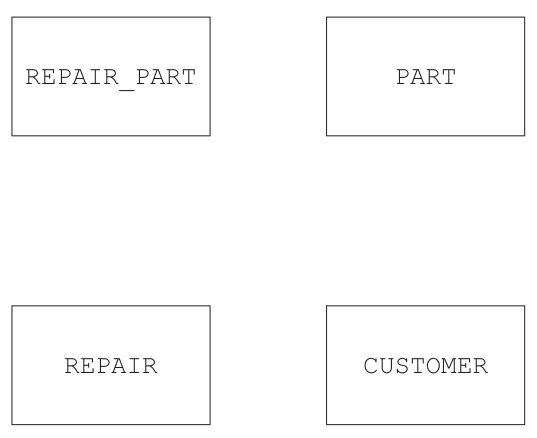
An entity-relationship (E-R) diagram shows the entities in a database and the relationships between them. The important idea here is cardinality: whether one record in one table can be linked to one, many, or no records in another table.
In this syllabus, you often infer relationships from the table design:
- if one table contains the primary key of another table, that key acts as a foreign key
- the table containing the foreign key is usually on the "many" side of the relationship
A linking or associative table is often used to resolve a many-to-many relationship. It stores pairs of keys from two other tables, sometimes with extra data such as Quantity.
Understanding the Question
You are given four tables:
PART(PartID, Description, Price, SupplierID)CUSTOMER(CustomerID, FirstName, LastName, ContactNumber)REPAIR(RepairNumber, StartDate, EndDate, CustomerID, Device)REPAIR_PART(PartID, RepairNumber, Quantity)
You must complete the E-R diagram by drawing the relationships between these four entities.
The clues are in the foreign keys:
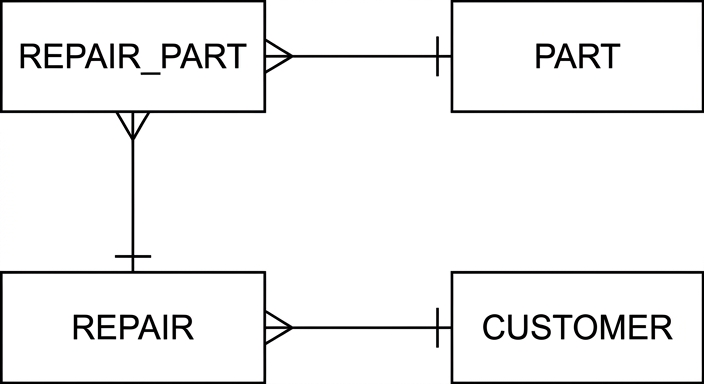
REPAIRcontainsCustomerID, so each repair belongs to one customer.REPAIR_PARTcontains bothPartIDandRepairNumber, so it links parts to repairs.
That tells you which tables connect, and it also tells you the cardinalities.
Approach
Work from the foreign keys.
REPAIR.CustomerIDlinksREPAIRtoCUSTOMER.REPAIR_PART.PartIDlinksREPAIR_PARTtoPART.REPAIR_PART.RepairNumberlinksREPAIR_PARTtoREPAIR.
Then decide the direction of "many".
- Many repairs can belong to one customer.
- Many
REPAIR_PARTrecords can refer to one part. - Many
REPAIR_PARTrecords can refer to one repair.
So the crow's foot goes on REPAIR against CUSTOMER, and on REPAIR_PART against both PART and REPAIR.
Step-by-Step Reasoning
Start with REPAIR and CUSTOMER.
REPAIR has a CustomerID field. That means each repair record refers to one customer record. But one customer can have many repairs over time. So this is a many-to-one relationship from REPAIR to CUSTOMER, or equivalently a one-to-many relationship from CUSTOMER to REPAIR.
Next look at REPAIR_PART and PART.
REPAIR_PART includes PartID. Each REPAIR_PART row refers to one part. But the same part can appear in many repair-part records, because the same kind of part may be used in multiple repairs. So REPAIR_PART is many-to-one with PART.
Now look at REPAIR_PART and REPAIR.
REPAIR_PART also includes RepairNumber. Each REPAIR_PART row refers to one repair. But one repair can involve several parts, so there may be many REPAIR_PART rows for one repair. So REPAIR_PART is many-to-one with REPAIR.
This also shows that REPAIR_PART is the associative entity between REPAIR and PART. Without it, repairs and parts would have a many-to-many relationship. The associative table splits that into two one-to-many relationships.
Key Takeaways
- Foreign keys help you identify database relationships.
- The table containing the foreign key is usually the many side.
- An associative table is used to resolve a many-to-many relationship.
REPAIR_PARTlinks repairs and parts while also storing extra data such asQuantity.
Common Mistakes
- Joining
CUSTOMERdirectly toPART. There is no field showing a direct relationship. - Putting the crow's foot on the wrong side. Here the crow's foot belongs on
REPAIR_PARTfor two relationships and onREPAIRfor the customer relationship. - Treating
REPAIR_PARTas one-to-one withREPAIRorPART. That would ignore multiple parts per repair or reuse of parts across repairs. - Missing one of the three relationship lines.
Things to Be Careful About
- Use the tables actually given in the question only.
- Read the field names carefully:
CustomerIDinsideREPAIRis the clue for theREPAIRtoCUSTOMERlink. REPAIR_PARTcontains two keys because it links two parent tables.- In an exam diagram question, the cardinality marks matter just as much as drawing the connecting lines.
The table shows sample data for the table REPAIR_PART.
| PartID | RepairNumber | Quantity |
|---|---|---|
| ACD128SA | 0022 | 3 |
| PPOR543DWW | 0022 | 1 |
| TR453 | 0023 | 1 |
| PPOR543DWW | 0023 | 2 |
| WED5 | 0024 | 5 |
Write a Structured Query Language (SQL) script to define the table REPAIR_PART.
Include constraints (restrictions) on the data that can be entered into each field where appropriate.
Answer
CREATE TABLE REPAIR_PART (
  PartID VARCHAR(10) NOT NULL,
  RepairNumber CHAR(4) NOT NULL,
  Quantity INTEGER NOT NULL CHECK (Quantity > 0),
  PRIMARY KEY (PartID, RepairNumber),
  FOREIGN KEY (PartID) REFERENCES PART(PartID),
  FOREIGN KEY (RepairNumber) REFERENCES REPAIR(RepairNumber)
);
See SQL script
Background Concept
SQL DDL (Data Definition Language) is used to create and define database structures. The most common command for this is CREATE TABLE. When defining a table, you normally specify:
- each field name
- a data type for each field
- key constraints such as
PRIMARY KEY - relationship constraints such as
FOREIGN KEY - any extra restrictions such as
NOT NULLorCHECK
A composite primary key is a primary key made from more than one field. It is used when a single field alone does not uniquely identify each row.
A foreign key enforces referential integrity by ensuring a value matches a key value in another table.
Understanding the Question
You must write an SQL script to define the table REPAIR_PART.
The given table structure is:
PartIDRepairNumberQuantity
From the earlier schema, REPAIR_PART links PART and REPAIR, so PartID should refer to PART(PartID) and RepairNumber should refer to REPAIR(RepairNumber).
The sample data gives useful clues:
PartIDvalues are alphanumeric, so a text type is needed.RepairNumbervalues include leading zeroes such as0022, so a character type is sensible.Quantityis numeric and should not be zero or negative.
Approach
Build the table definition in layers.
- Define the three fields with sensible data types.
- Decide which field or fields uniquely identify a row.
- Add foreign keys to link back to the parent tables.
- Add restrictions to stop invalid data being entered.
Because one repair can use several parts, and the same part can appear in several repairs, the pair (PartID, RepairNumber) is the natural unique identifier. That makes it the composite primary key.
Step-by-Step Reasoning
PartID needs a text data type because the values contain letters and digits, such as ACD128SA and PPOR543DWW. A type such as VARCHAR(10) is appropriate because the longest sample shown has length 10.
RepairNumber is shown as values such as 0022, 0023, and 0024. Because the leading zero matters, using a character type such as CHAR(4) is a safe choice.
Quantity is a whole number, so INTEGER is appropriate.
Next, identify the primary key. Neither PartID alone nor RepairNumber alone is unique:
- the same part can appear in different repairs
- one repair can use multiple parts
But the combination of PartID and RepairNumber identifies a specific part used in a specific repair. So the table needs:
PRIMARY KEY (PartID, RepairNumber)
Now add the relationships:
PartIDmust exist in thePARTtableRepairNumbermust exist in theREPAIRtable
So the foreign keys are:
FOREIGN KEY (PartID) REFERENCES PART(PartID)FOREIGN KEY (RepairNumber) REFERENCES REPAIR(RepairNumber)
Finally, add field restrictions. NOT NULL is appropriate because every repair-part record must have a part, a repair number, and a quantity. Quantity should also be greater than zero, so a CHECK (Quantity > 0) constraint is appropriate.
Different SQL dialects may allow slightly different text types or lengths, but the important features are the same: suitable data types, a composite primary key, two foreign keys, and a quantity restriction.
Key Takeaways
- Use
CREATE TABLEto define fields and constraints. - Choose data types from the nature of the sample data.
- Use a composite primary key when one field is not enough to make each row unique.
- Use foreign keys to link related tables.
- Use
CHECKandNOT NULLto restrict invalid data.
Common Mistakes
- Making only
PartIDor onlyRepairNumberthe primary key. Neither one is unique on its own. - Using an integer type for
RepairNumberand losing the significance of leading zeroes. - Forgetting the foreign keys, so the linking table has no enforced relationship to
PARTandREPAIR. - Omitting a restriction on
Quantity, allowing zero or negative quantities. - Writing
PRIMARY KEY PartID, RepairNumberwithout brackets, which is invalid SQL syntax.
Things to Be Careful About
- Keep the field names exactly as given:
PartID,RepairNumber,Quantity. - Remember that SQL keywords should be in upper case in exam answers.
- If a value like
0022must keep its leading zero, a character type is often safer than an integer type. - The question asks for constraints where appropriate, so include key constraints and at least one sensible data restriction, not just the field names and types.
Suppliers send invoices to the company for the parts that are used. A new table, INVOICE, stores the data about each invoice and whether it has been paid or not.
The design for the table INVOICE is shown:
INVOICE(InvoiceID, SupplierID, AmountDue, Paid, DatePaid)
The table shows sample data for the table INVOICE.
| InvoiceID | SupplierID | AmountDue | Paid | DatePaid |
|---|---|---|---|---|
| 000001 | JK675 | 22.50 | TRUE | 01/01/2024 |
| 000002 | WR443 | 358.99 | FALSE | |
| 000003 | JK675 | 10.21 | FALSE |
Write an SQL script to return the total amount due to the supplier with the ID of JK675 for all the invoices that have not currently been paid.
Answer
SELECT SUM(AmountDue) AS TotalDue
FROM INVOICE
WHERE SupplierID = 'JK675'
AND Paid = FALSE;
See SQL script
Background Concept
SQL DML (Data Manipulation Language) is used to query and change the data stored in tables. For a retrieval question, SELECT is the main command.
When a question asks for a total, an aggregate function is usually needed. SUM() adds the values from all selected rows.
The WHERE clause filters the rows before the total is calculated. If more than one condition must be true, AND is used.
Understanding the Question
The table INVOICE contains:
InvoiceIDSupplierIDAmountDuePaidDatePaid
You must return the total amount due for supplier JK675, but only for invoices that have not been paid yet.
So there are two filters:
- the supplier must be
JK675 - the invoice must currently be unpaid
Because the question asks for the total amount due, the result should be one summed value, not a list of individual invoices.
Approach
Use:
SELECT SUM(AmountDue)to total the money owedFROM INVOICEbecause that is the table holding the invoice dataWHERE SupplierID = 'JK675' AND Paid = FALSEto select only the unpaid invoices for that supplier
No GROUP BY is needed because the supplier is already fixed to one value in the WHERE clause.
Step-by-Step Reasoning
Start with the table named in the question:
FROM INVOICE
Next, decide what to return. The wording "total amount due" means the values in AmountDue must be added together:
SELECT SUM(AmountDue)
Now filter to the correct supplier:
SupplierID = 'JK675'
Then filter to unpaid invoices only:
Paid = FALSE
Combine those conditions with AND because both must be true at the same time.
So the completed query is:
- select the sum of
AmountDue - from
INVOICE - where supplier is
JK675 - and paid status is false
Using the sample data, invoice 000001 for JK675 is already paid, so it is excluded. Invoice 000003 for JK675 is unpaid, so it is included. That would give a total of 10.21 for the sample data, which confirms the logic of the query.
Key Takeaways
- Use
SUM()when the question asks for a total. - Put row-selection conditions in the
WHEREclause. - Use
ANDwhen all conditions must be true. - If the supplier is fixed in the
WHEREclause,GROUP BYis not necessary.
Common Mistakes
- Writing
SELECT AmountDueinstead ofSELECT SUM(AmountDue), which returns rows rather than a total. - Forgetting the
Paid = FALSEcondition and including already paid invoices. - Forgetting quotes around the text value
JK675. - Using
ORinstead ofAND, which would return the wrong set of rows. - Trying to use
DatePaidinstead ofPaidwhen the question explicitly asks whether invoices have been paid or not.
Things to Be Careful About
- Match the field names exactly:
AmountDue,SupplierID,Paid. - Text values such as
JK675need quotes. - Boolean values depend on SQL dialect, but
TRUEandFALSEmatch the data shown here. - The question asks for a script to return the total, so a single
SELECTstatement is enough.
Complete the table by writing a definition for each of the database terms.
| Term | Definition |
|---|---|
| Referential integrity | |
| Candidate key | |
| Tuple |
Answer
| Term | Definition |
|---|---|
| Referential integrity | A foreign key value must match an existing primary key value in the related table, or be NULL if allowed. |
| Candidate key | A field, or smallest set of fields, that can uniquely identify each record and could be chosen as the primary key. |
| Tuple | A row/record in a table. |
See completed table
Background Concept
The relational model uses precise terms for parts of a database. In exams, these definitions need to be accurate because the terms sound similar but mean different things.
- A key is used to identify records or link tables.
- Referential integrity is a rule about valid links between tables.
- A tuple is the formal relational-model word for a row.
Understanding the terminology helps with later questions on table design, SQL, and normalisation.
Understanding the Question
This part gives three database terms and asks for a definition of each:
Referential integrityCandidate keyTuple
These are definition questions, so the answer should be short, exact, and use proper database vocabulary.
Approach
For each term, give the standard relational-database meaning.
A good definition should:
- identify what kind of thing it is
- say what it does or what rule it describes
- avoid vague wording
Step-by-Step Reasoning
Referential integrity is about relationships between tables. If a table contains a foreign key, that value should point to a valid record in the referenced table. In other words, the foreign key must match an existing primary key value in the related table, unless nulls are allowed.
Candidate key is a field, or combination of fields, that can uniquely identify each record. It is called a candidate key because it is suitable to be chosen as the primary key. A strong definition usually mentions uniqueness and the fact that it could become the primary key.
Tuple is the relational-model word for one row of data in a table. In less formal terms, it is a record.
These definitions are short, but each one targets a different database idea:
- valid table links
- possible unique identifiers
- one stored row
Key Takeaways
- Referential integrity keeps foreign-key links valid.
- A candidate key can uniquely identify a row and could be selected as the primary key.
- A tuple is simply a row in a relation.
- Exact terminology matters in database theory questions.
Common Mistakes
- Defining referential integrity as "data must be correct". That is too vague; it is specifically about valid foreign-key references.
- Saying a candidate key is "the primary key". A candidate key could be chosen as the primary key, but is not necessarily the one chosen.
- Defining a tuple as a field or column. A tuple is a row, not a column.
- Missing the uniqueness idea in the candidate key definition.
Things to Be Careful About
- Use "foreign key" and "primary key" correctly in the referential integrity definition.
- Distinguish between candidate key and primary key.
- Remember that tuple means row/record, while attribute means field/column.
- Keep definitions concise but precise; extra vague wording can weaken an otherwise correct answer.
A computer system has a dual-core Central Processing Unit (CPU).
State the purpose of the system clock and the Control Unit (CU) in a CPU.
System clock .............................................................................................................................
CU .............................................................................................................................................
Answer
- System clock: generates regular timing pulses to synchronise CPU operations and control the speed of the fetch-execute cycle.
- CU: controls and coordinates the operation of the CPU by decoding instructions and sending control signals.
System clock: synchronises CPU operations with timing pulses. CU: decodes instructions and sends control signals to coordinate the CPU.
Background Concept
Inside the CPU, different parts must work together in a precise sequence. Two important parts involved in this are the system clock and the Control Unit (CU).
The system clock produces a steady stream of electronic pulses. These pulses act like a timing signal so that CPU activities happen in step. A higher clock frequency means more pulses per second, so the processor can usually complete more stages of the fetch-execute cycle each second.
The Control Unit is responsible for directing the CPU's work. It interprets the instruction currently being processed and sends the necessary control signals to registers, the ALU, memory interface and buses so that the instruction is carried out correctly.
Understanding the Question
The question asks for the purpose of two items, not a long explanation of how they are built.
So for full marks, you need one clear function for each:
- what the system clock does
- what the CU does
Because each blank is worth one mark, a brief but accurate statement is enough.
Approach
Use the standard textbook role of each component:
- for the system clock, mention timing or synchronisation
- for the CU, mention control/coordination and decoding instructions
That is all the examiner is looking for here.
Step-by-Step Reasoning
For the system clock:
- The CPU must not have parts acting randomly or at different times.
- The clock provides regular pulses.
- These pulses synchronise operations and determine the pace of processing.
- So a correct purpose statement is that it generates timing pulses to synchronise CPU activity.
For the CU:
- When an instruction has been fetched, something must decide what actions are needed.
- The CU decodes the instruction.
- It then sends control signals so that the correct registers, buses and processing units are used.
- So its purpose is to control and coordinate CPU operations.
Key Takeaways
- The system clock provides timing.
- The CU provides control.
- In short: the clock tells the CPU when things happen; the CU tells it what to do.
Common Mistakes
- Saying the system clock "stores data" or "processes data". It does neither; it provides timing pulses.
- Saying the CU "does calculations". That is mainly the role of the ALU, not the CU.
- Giving vague answers like "helps the CPU work" without saying how.
Things to Be Careful About
- Do not confuse clock speed with the purpose of the clock. The question wants the function, not just "measured in GHz".
- Do not confuse the CU with memory or the ALU.
- Include the idea of synchronisation/timing for the clock and control/decoding for the CU.
The number of cores in the processor affects the performance of the computer system.
Identify one other feature of a processor that can affect the performance of a computer system and state why it affects the performance.
Feature ..............................................................................................................................
Reason ..............................................................................................................................
Answer
- Feature: clock speed
- Reason: a higher clock speed gives more clock cycles each second, so more fetch-execute cycles can be completed in the same time.
Feature: clock speed. Reason: higher clock speed allows more cycles per second, so instructions are processed faster.
Background Concept
Processor performance is affected by more than just the number of cores. Other features also influence how quickly instructions can be processed.
A very common factor is clock speed. This is the number of clock cycles per second, usually measured in hertz such as GHz. Since CPU actions are synchronised by the clock, more cycles per second usually means the processor can carry out more stages of instruction processing in the same amount of time.
Other acceptable processor-related factors often include cache size, word size or bus width, but the answer must name one valid feature and explain why it matters.
Understanding the Question
The question already mentions cores, so it wants one different processor feature that affects performance, plus a reason.
That means two parts are needed for full marks:
- name a valid feature
- explain the effect of that feature on performance
A simple and safe choice is clock speed.
Approach
Choose a feature that has an easy, direct explanation.
For clock speed:
- identify it as the feature
- explain that a higher speed means more cycles each second
- connect that to faster execution of instructions
Step-by-Step Reasoning
If the processor has a higher clock speed:
- the system clock produces more pulses every second
- CPU operations are triggered and synchronised by those pulses
- this means more stages of the fetch-execute cycle can occur each second
- therefore the processor can usually execute instructions faster
So the full answer is not just "clock speed". You also need the reasoning that links it to performance.
Key Takeaways
- Processor performance depends on several hardware features, not only the number of cores.
- Clock speed affects how many processing cycles happen per second.
- A good exam answer always states both the feature and why it matters.
Common Mistakes
- Naming a feature but giving no explanation.
- Giving a non-processor feature, such as RAM size, when the question specifically asks for a processor feature.
- Saying simply "it makes the computer faster" without explaining how.
Things to Be Careful About
- Make sure the feature really belongs to the processor.
- If you choose clock speed, mention more cycles per second or more fetch-execute cycles per second.
- Avoid vague wording such as "better performance" unless you explain the reason.
A solid state (flash) memory drive is automatically recognised by the computer when it is plugged into a port in the computer.
Identify an appropriate type of port to connect the solid state memory drive to the computer.
Explain how this port provides an automatic connection.
Port ....................................................................................................................................
Explanation ........................................................................................................................
Answer
- Port: USB
- Explanation: USB supports plug and play / hot swapping, so when the drive is connected the system detects the device automatically, loads the required driver or settings and makes it ready to use without restarting.
Port: USB. Explanation: USB supports plug and play/hot swapping so the system detects and configures the drive automatically.
Background Concept
External storage devices connect to a computer through hardware interfaces called ports. For a flash memory drive, the standard connection is usually USB.
USB is widely used because it supports plug and play and hot swapping:
- Plug and play means the computer can detect the device and configure it automatically.
- Hot swapping means the device can be connected while the computer is powered on.
The operating system helps by recognising the device, loading the driver if needed, and making the drive available to the user.
Understanding the Question
The device is a solid state (flash) memory drive that is automatically recognised when plugged in.
That wording strongly points to USB, because the examiner wants not only the port type but also the reason the connection is automatic.
So the answer must include:
- the port name
- an explanation involving automatic detection/configuration
Approach
Pick the most suitable common port for a flash drive: USB.
Then explain the automatic connection in terms of:
- plug and play
- hot swapping
- the operating system detecting and configuring the device
Step-by-Step Reasoning
Why is USB appropriate?
- Flash drives are commonly designed to use USB ports.
- USB ports provide both communication and, where needed, power.
How does the automatic connection happen?
- When the drive is plugged in, the computer detects that a device has been attached.
- USB supports plug and play, so the operating system identifies the device type.
- The system loads or selects the correct driver/settings.
- The drive is then made available without requiring the computer to be turned off or restarted.
That is what the question means by an automatic connection.
Key Takeaways
- A flash memory drive is commonly connected via USB.
- Plug and play allows automatic device detection and configuration.
- Hot swapping allows the device to be connected while the system is running.
Common Mistakes
- Naming a port such as HDMI or VGA, which are for display output, not storage devices.
- Saying only "USB" with no explanation.
- Confusing plug and play with simply providing power.
Things to Be Careful About
- The question asks for an appropriate type of port, not just any port name.
- The explanation should mention automatic detection/configuration, not merely "it transfers data".
- Do not forget that the operating system plays a role in recognising and setting up the device.
Identify two disadvantages of using Dynamic RAM (DRAM) instead of Static RAM (SRAM) in a computer system.
1 ................................................................................................................................................
2 ................................................................................................................................................
Answer
- Slower access / read-write speed.
- Needs to be refreshed regularly to retain data.
Slower access speed; requires regular refreshing.
Background Concept
Both DRAM and SRAM are forms of RAM, meaning they are volatile memory used while the computer is operating.
The key difference is how each bit is stored:
- DRAM stores each bit using a capacitor, so the charge gradually leaks away.
- SRAM stores each bit using a flip-flop circuit, so it keeps its state while power remains available.
Because of this:
- DRAM must be refreshed regularly
- SRAM is faster but more expensive and less dense
Understanding the Question
The question asks for two disadvantages of DRAM instead of SRAM.
So you must compare them and state where DRAM is worse.
The safest two disadvantages are:
- DRAM is slower
- DRAM needs refreshing
Approach
Think of the standard DRAM vs SRAM comparison table:
- speed
- refresh requirement
- cost
- density
Only list points where DRAM is worse than SRAM.
Step-by-Step Reasoning
First disadvantage: slower access speed
- SRAM can be accessed more quickly.
- Therefore, if DRAM is used instead of SRAM, memory access is slower.
Second disadvantage: refreshing is required
- DRAM cells leak charge over time.
- The system has to refresh them periodically to keep the data.
- This adds overhead and can increase power usage.
Both of these are valid disadvantages when compared with SRAM.
Key Takeaways
- DRAM: cheaper and higher density, but slower and needs refreshing.
- SRAM: faster and no refresh needed, but more expensive.
- In comparisons, always answer relative to what the question asks: here, DRAM compared with SRAM.
Common Mistakes
- Saying DRAM is "volatile" as a disadvantage compared with SRAM. SRAM is also volatile, so that is not a difference.
- Giving "cheaper" as a disadvantage. That is actually an advantage of DRAM.
- Repeating the same idea twice, such as "needs refreshing" and "uses power for refreshing" if the exam expects two distinct points.
Things to Be Careful About
- Make sure the answer is comparative: worse than SRAM, not just a general fact about memory.
- "Slower" should refer to access/read-write speed.
- "Needs refresh" is a distinct hardware reason and is usually a very strong marking point.
The computer system is used to store data received from a temperature sensor every five seconds. The data is stored on an optical disc using an optical disc reader/writer.
Answer
- The disc spins while a laser is directed at its surface.
- For reading, the laser beam is reflected differently by pits and lands on the disc.
- A light sensor detects the reflected light and this is interpreted as binary data.
- For writing, a higher-power laser changes the surface of the disc to create the pattern that stores the data.
See explanation
Background Concept
An optical disc stores data using marks on a disc surface that are read using light, rather than magnetic fields or electronic charge. Examples include CDs, DVDs and Blu-ray discs.
A disc reader/writer uses a laser and a light sensor:
- the laser shines onto the disc surface
- the way the light reflects back depends on the pattern on the disc
- the sensor detects the reflected light
- electronics convert this into binary data
When writing, the writer uses a stronger laser to alter the surface material so that data can be stored.
Understanding the Question
The question asks for the principal operation of an optical disc reader/writer. That means the main idea of how it works, not detailed manufacturing information.
Because it says reader/writer, the answer should ideally include both:
- how data is read
- how data is written
A 4-mark answer needs several distinct technical points.
Approach
Cover the process in a logical order:
- the disc rotates
- a laser is aimed at the disc
- reading depends on reflected light from the disc pattern
- writing uses a higher-power laser to change the surface
That gives a complete high-level description.
Step-by-Step Reasoning
- The optical disc is rotated so different positions on the disc pass under the laser.
- A laser beam is focused onto the disc surface.
- The disc surface has a pattern, often described as pits and lands or areas with different reflectivity.
- When the laser hits these areas, the amount or pattern of reflected light differs.
- A photodiode or light sensor detects the reflected light.
- The electronics interpret these changes as binary values, allowing the stored data to be read.
For writing:
- the device uses a stronger laser than the one used for reading
- this laser changes the disc surface material at selected points
- these changed and unchanged areas form the stored pattern representing the data
That is the essential principle of optical storage.
Key Takeaways
- Optical discs use laser light to read and write data.
- Reading depends on detecting differences in reflected light.
- Writing depends on using a stronger laser to alter the surface.
Common Mistakes
- Describing magnetic storage instead of optical storage.
- Mentioning only reading or only writing when the question says reader/writer.
- Saying the laser "reads 1s and 0s directly" without explaining reflection or surface changes.
Things to Be Careful About
- Use the idea of reflected light for reading.
- Use the idea of changing the disc surface for writing.
- Do not go off-topic into file systems or operating system behaviour; the question is about device operation.
The computer uses a buffer when writing data to the optical disc.
Explain the use of a buffer when writing data to the optical disc.
Answer
- A buffer is a temporary area of memory used to hold data before it is written to the optical disc.
- It stores data while the computer and the optical drive are operating at different speeds.
- This allows a steady flow of data to the writer and helps prevent buffer underrun / incomplete writing if data is not supplied quickly enough.
See explanation
Background Concept
A buffer is a temporary memory area used when data is being transferred between devices or components that operate at different speeds.
This is important because the computer may produce data in bursts, while the storage device may need a smooth, continuous flow. If the destination device does not receive data when expected, the transfer can pause or fail.
When writing to an optical disc, continuous data delivery is especially important because interruptions during writing can corrupt the disc or ruin the recording process.
Understanding the Question
The computer stores temperature data every five seconds and writes it to an optical disc. The question asks why a buffer is used during this writing process.
So the answer needs to explain:
- what the buffer is
- why it is needed between the computer and the disc writer
- what problem it avoids
Approach
Explain buffering in three linked steps:
- temporary storage
- handles speed differences between source and destination
- prevents the writer from running out of data
That matches the most likely marking points.
Step-by-Step Reasoning
- The CPU or system may provide data at an irregular rate.
- The optical disc writer needs data ready when it is about to write.
- A buffer temporarily stores data in memory before it is written to the disc.
- This means data can be collected first, then supplied to the writer in a smoother stream.
- If the computer is briefly busy or slower than the disc writer, the writer can continue taking data from the buffer.
- This helps avoid a buffer underrun, where the writer is ready to write but there is no data available.
- Avoiding underrun reduces the risk of an incomplete or failed write operation.
Key Takeaways
- A buffer is temporary storage.
- Buffers are used to cope with different device speeds.
- During optical disc writing, buffering helps maintain a continuous data stream and prevents write failure.
Common Mistakes
- Saying a buffer is permanent storage. It is temporary memory.
- Saying the buffer makes the optical disc itself faster. It does not; it manages the transfer more effectively.
- Forgetting to mention the speed mismatch between the computer and the disc writer.
Things to Be Careful About
- The buffer is usually in main memory, not on the disc.
- Focus on the writing process, because that is what the question asks.
- A good answer should mention both temporary holding and preventing interruptions/underrun.
A student uses a laptop to write a program that is saved as a text file.
The laptop has utility software and an Operating System (OS).
Answer
- The OS creates, deletes, renames, copies and moves files, and keeps track of them in folders/directories.
- The OS manages secondary storage for files, for example allocating space and controlling access permissions to files.
See explanation
Background Concept
File management is one of the core jobs of an operating system. The OS acts between the user/application programs and the storage devices. It organises how files are stored, located and protected.
Typical file management tasks include:
- creating and deleting files
- renaming, copying and moving files
- organising files into folders/directories
- keeping records of where each file is stored on the backing storage
- allocating and freeing storage space
- controlling which users can access, change or delete files
Without the OS doing this, programs would need to manage raw disk locations themselves, which would be impractical.
Understanding the Question
The question is specifically about file management tasks carried out by the OS on a laptop. It is not asking about utility software here, and it is not asking about hardware tasks such as reading from RAM.
So the answer should focus on what the operating system does to handle files on secondary storage: organising them, storing them, and controlling access to them.
Approach
For a 2-mark "describe" question, the safest approach is to give two distinct file-management tasks and make each one descriptive.
A good pair is:
- managing file operations and directory structure
- managing storage space and access rights
That covers the main expected OS responsibilities.
Step-by-Step Reasoning
First, think of the visible file actions a user performs. When a user saves a file, renames it, moves it into another folder, or deletes it, the operating system carries out those requests. So one valid description is that the OS manages file operations and keeps files organised in directories/folders.
Second, think about what happens behind the scenes. The file must be placed somewhere on the storage device. The OS decides where space is allocated and updates its records so the file can be found again later. If the file is deleted, that space can be released for reuse.
A further file-related task is protection. The OS can control access rights, such as whether a user may open, edit or delete a file.
Putting those ideas into a compact exam answer gives two developed points rather than just a list of words.
Key Takeaways
- File management is a standard responsibility of the OS.
- Good answers mention both user-level file operations and behind-the-scenes storage management.
- Access control to files is also part of OS file management.
Common Mistakes
- Writing only "stores files" with no description. That is too vague.
- Giving utility software examples instead of OS tasks.
- Describing memory management in RAM rather than file management on secondary storage.
- Talking about backing up files here; backup is usually utility software, not the main OS file-management role.
Things to Be Careful About
- Use file-focused points, not general OS points like multitasking or interrupt handling.
- Make sure each point is distinct enough to earn separate credit.
- "Folders/directories" and "storage allocation/access rights" are strong, clearly different areas.
Answer
- Back-up software makes copies of files to other storage/media.
- This is needed so files can be restored if the original is lost, deleted, corrupted, or damaged by hardware failure or malware.
See explanation
Background Concept
Backup software is utility software used to create extra copies of data. These copies are usually stored on a different device, different drive, or remote/cloud storage.
The purpose of a backup is recovery. If the original data is damaged or unavailable, the backup can be used to restore it.
Common causes of data loss include:
- accidental deletion
- file corruption
- storage-device failure
- malware or ransomware
- theft or physical damage to the computer
Understanding the Question
The question asks for the need for backup software. That means you should explain why having backups matters, not just state that it copies files.
A full answer therefore needs both:
- what backup software does
- why that matters if something goes wrong
Approach
A strong 2-mark answer is:
- say that backup software creates copies of files
- explain that the copies allow restoration after loss, corruption, deletion or failure
That directly answers both the function and the need.
Step-by-Step Reasoning
Start with the basic function. Backup software copies files and stores those copies somewhere safe, often automatically and at regular intervals.
Then explain the reason. If the original text file or program file is lost, the backup prevents permanent data loss. For example:
- if the laptop drive fails, the backup copy still exists
- if the user deletes the wrong file, it can be recovered
- if malware damages the file, an earlier clean version can be restored
This is why backup software is needed: it reduces the risk that one problem destroys the only copy of important work.
Key Takeaways
- Backup software is utility software.
- Its value is not just in copying data, but in enabling recovery.
- The key idea is protection against permanent data loss.
Common Mistakes
- Saying only "it saves storage space". Backup software is for protection, not compression.
- Confusing backup with antivirus software.
- Forgetting to mention recovery/restoration.
- Writing about preventing failure instead of recovering from it. Backups do not stop hardware failure; they reduce the damage caused by it.
Things to Be Careful About
- The backup should be on separate storage to be useful if the original device fails.
- "Makes copies" alone may not be enough for full marks; include why those copies are needed.
- Use realistic failure examples such as deletion, corruption, malware or hardware failure.
The student compresses the file before it is emailed to their teacher as an attachment.
Answer
- The attachment uses less storage space on the teacher's device or mail server because the file size is smaller.
- It takes less time to download/open because fewer bits have to be transmitted.
- It uses less bandwidth/data when being received.
See explanation
Background Concept
Compression reduces the number of bits needed to store or transmit a file. A compressed file therefore has a smaller file size than the original.
Smaller files bring practical benefits in two main areas:
- storage: they use less disk space
- transmission: they can be sent and received more quickly and use less bandwidth
For email attachments, both of these matter because the file has to travel across a network and then be stored by the recipient.
Understanding the Question
The question is from the teacher's point of view, not the student's. So the answer should focus on how the teacher benefits when receiving the compressed attachment.
The clue is that the file is emailed. That suggests transmission benefits such as speed and bandwidth, as well as storage benefits after it arrives.
Approach
List three distinct benefits that come from the file being smaller:
- less storage needed
- faster transfer/download
- less bandwidth or data used
These are separate ideas and together they make a strong 3-mark answer.
Step-by-Step Reasoning
Compression reduces the number of bits in the attachment.
Because the attachment is smaller:
- the teacher's email system and device need less storage space to hold it
- the teacher can receive or download it more quickly, because fewer bits must travel over the network
- less bandwidth is used during transmission, which is more efficient for the network connection
If an email service has attachment-size limits, a smaller file may also be easier to receive successfully, but the core three benefits above are the most direct points.
Key Takeaways
- Compression helps both storage and communication.
- For email attachments, think in terms of smaller size, faster transmission and lower bandwidth use.
- Benefits should be expressed from the recipient's perspective if the question asks about the teacher.
Common Mistakes
- Saying "the quality is better". Compression usually reduces size, not improves quality.
- Giving only one idea in different words, such as "smaller" and "takes less space" without adding transmission benefits.
- Focusing only on the sender instead of the teacher.
- Claiming that any compressed file is easier to edit; compression affects size, not editability.
Things to Be Careful About
- Keep the answer about benefits of the attachment being compressed, not about the software used.
- Use distinct points so each mark can be earned separately.
- For a text file, compression is commonly lossless, but this part only asks about the benefits of compression in general.
Answer
- One lossless method is run-length encoding (RLE).
- A sequence of the same character is replaced by the number of times it occurs and the character, for example
aaaaabecomes5a. - No data is lost, so the exact original text file can be reconstructed when decompressed.
Run-length encoding (RLE)
Background Concept
Lossless compression reduces file size without losing any original data. After decompression, the restored file is exactly the same as the original.
This is important for text files because even one changed character could alter the meaning of the text or the behaviour of a program.
A common lossless method in this syllabus is run-length encoding (RLE). RLE works well when the same character or symbol appears repeatedly in a run.
Understanding the Question
The question asks for one lossless method of compressing a text file and wants it described. So you must:
- name a valid lossless method
- explain how it compresses the data
- make clear that the original can be recovered exactly
Because the taxonomy explicitly includes RLE, this is the safest method to use.
Approach
Use RLE:
- identify repeated consecutive characters
- store one character plus the number of repeats instead of storing every copy separately
- explain that decompression expands the count back to the original run
That gives a complete description.
Step-by-Step Reasoning
Suppose the text contains a run like aaaaa.
Instead of storing five separate a characters, RLE stores something equivalent to "5 of a", often written as 5a.
Another example:
- original:
bbbbcc - encoded:
4b2c
This can reduce file size when there are repeated consecutive characters.
The key reason it is called lossless is that nothing is discarded. During decompression, 5a becomes aaaaa again, so the exact original text is restored.
For program text, this matters because changing or losing characters would make the code incorrect.
Key Takeaways
- Lossless compression means exact reconstruction of the original data.
- RLE stores repeated consecutive symbols efficiently.
- Text and program files should use lossless, not lossy, compression.
Common Mistakes
- Naming a lossy method such as JPEG or MP3. Those are not suitable answers for a text file.
- Describing repeated characters that are not consecutive. RLE works on runs of consecutive symbols.
- Forgetting to say that no data is lost.
- Saying only "it makes the file smaller" without explaining the method.
Things to Be Careful About
- Use a text-based example such as repeated letters or spaces.
- Make it clear that the count and symbol replace the whole run.
- Do not imply that every text file compresses well with RLE; it depends on how many repeated runs the file contains.
The student used a program library when writing their program.
Explain the benefits to the student of using library files when writing a program.
Answer
- Library files contain pre-written routines, so the student does not need to write all the code from the beginning.
- This saves development time and reduces the amount of code the student must write.
- The routines are usually already tested/debugged, so the final program is more reliable and less likely to contain errors.
See explanation
Background Concept
A program library is a collection of pre-written code that can be used by other programs. Libraries often contain common routines such as mathematical functions, file handling procedures, graphics functions or string-processing functions.
Instead of writing these routines from scratch, a programmer can call the existing library code.
The main benefits are:
- reuse of existing solutions
- faster development
- less code to write and maintain
- improved reliability because library code is usually well tested
Understanding the Question
The student used a program library while writing a program. The question asks for the benefits to the student.
So the answer should focus on how library files help during development: saving time, reducing work and improving program quality.
Approach
A strong 3-mark answer gives three distinct benefits:
- pre-written code can be reused
- this saves time and effort
- tested code reduces bugs and improves reliability
These are all directly relevant and easy to link to the student's situation.
Step-by-Step Reasoning
If a library already contains a needed routine, the student can import or call it instead of designing, coding and testing that routine themselves.
That immediately reduces development time. Fewer lines of original code also means less opportunity for the student to make mistakes.
Because library routines are often produced and tested by experienced developers, they are usually more reliable than a rushed student-written version of the same function.
So the chain of reasoning is:
- reuse existing routine
- write less code
- finish faster
- likely fewer bugs
That is why libraries are valuable during software development.
Key Takeaways
- Libraries support code reuse.
- Reuse reduces development time and effort.
- Well-tested library routines often increase reliability.
Common Mistakes
- Confusing a program library with a file storage library or a code editor.
- Saying libraries make programs always run faster; that is not guaranteed.
- Giving only one benefit in several different ways.
- Describing the operating system rather than library files.
Things to Be Careful About
- Keep the answer about benefits to the programmer, not the computer hardware.
- Mention both productivity and reliability for a stronger response.
- "Pre-written" and "tested/debugged" are especially useful phrases here.
The program code is written using an Integrated Development Environment (IDE).
One presentation feature found in a typical IDE is prettyprint.
Identify and describe one other presentation feature found in a typical IDE.
Feature ..............................................................................................................................
Description ........................................................................................................................
Answer
- Feature: syntax highlighting
- Description: different parts of the code, such as keywords, strings and comments, are shown in different colours/styles to make the program easier to read.
Feature: syntax highlighting
Background Concept
An Integrated Development Environment (IDE) provides tools to help a programmer write, organise, test and debug code. Some features are for presentation, meaning they improve the way the code is displayed on screen.
Presentation features do not usually change how the program runs. Instead, they help the programmer read and understand the source code more easily.
Examples include:
- syntax highlighting
- auto-indentation
- line numbering
- code folding
- prettyprint
Understanding the Question
The question already gives prettyprint as one presentation feature, so you must choose a different one. Then you must identify it and describe it.
This means the answer needs two parts:
- the feature name
- what it does for the code display
Approach
Pick a clear and common IDE presentation feature. Syntax highlighting is a very safe choice because it is widely recognised and easy to describe accurately.
Then explain how it helps: it displays different code elements in different colours or styles, improving readability.
Step-by-Step Reasoning
A presentation feature changes the visual appearance of the code editor, not the program logic.
With syntax highlighting:
- keywords like
IF,FORorWHILEmay appear in one colour - strings may appear in another colour
- comments may appear in a muted colour or italic style
This makes important parts of the code easier to recognise at a glance, which helps the programmer read and navigate the program.
That is enough for a complete answer: a valid feature plus a correct description.
Key Takeaways
- Presentation features improve readability and organisation of code.
- Syntax highlighting is a standard example.
- In these questions, always avoid repeating the example already given in the question.
Common Mistakes
- Repeating prettyprint even though the question asks for one other feature.
- Naming a debugging feature such as a breakpoint instead of a presentation feature.
- Giving only the feature name with no description.
- Describing what the program does rather than what the IDE feature does.
Things to Be Careful About
- Make sure the feature is genuinely about presentation/display.
- Keep the description practical: colours/styles make code easier to read.
- Other acceptable answers may exist, but the description must match the feature chosen.
One debugging feature found in a typical IDE is single stepping.
Identify and describe one other debugging feature found in a typical IDE.
Feature ..............................................................................................................................
Description ........................................................................................................................
Answer
- Feature: breakpoint
- Description: the programmer sets a line where program execution pauses, so values/variables can be checked at that point.
Feature: breakpoint
Background Concept
Debugging features in an IDE help the programmer find and fix logic errors. Unlike presentation features, debugging tools interact with program execution.
Common debugging features include:
- breakpoints
- variable watches/watch window
- run-time error messages
- step over / step into
- trace of variable values
A breakpoint is one of the most common and useful debugging tools.
Understanding the Question
The question gives single stepping as one debugging feature and asks for one other feature. So you must not repeat single stepping.
You need:
- the name of another debugging feature
- a description of how it helps find errors
Approach
Choose breakpoint because it is standard, easy to define and clearly different from single stepping.
Then describe its action precisely: execution runs until the chosen line, pauses there, and lets the programmer inspect the state of the program.
Step-by-Step Reasoning
When a programmer suspects an error near a certain part of the code, they can place a breakpoint on that line.
During execution:
- the program runs normally up to that point
- it stops automatically at the breakpoint
- the programmer can inspect variable values, program flow or memory state
This is useful because it avoids stepping through the entire program from the start and lets the programmer focus on the section where the problem is likely to occur.
That makes breakpoint a valid debugging feature and the description shows how it is used.
Key Takeaways
- Debugging features help locate and understand errors in a running program.
- A breakpoint pauses execution at a chosen line.
- Good descriptions explain both what the feature does and why that helps debugging.
Common Mistakes
- Repeating single stepping even though the question asks for another feature.
- Naming a presentation feature such as syntax highlighting.
- Saying only "stops the code" without explaining inspection of values/state.
- Confusing a breakpoint with a syntax error message from the compiler/interpreter.
Things to Be Careful About
- The feature must be a debugging tool, not a coding or presentation tool.
- Make the pause purposeful: it allows checking variables or program state.
- If using another valid feature instead, ensure the description matches that feature exactly.
A security system has both a floodlight (very bright light) and an audio alarm.
The data from multiple sensors is analysed and used to:
• turn on the floodlight
• sound the audio alarm.
Sensors can be used to detect:
• if doors are open
• the external daylight level
• if people are detected within a set distance.
Complete the table to identify the most appropriate type of sensor for each scenario.
| Scenario | Type of sensor |
|---|---|
| A door is open. | |
| The external daylight level is below a set amount. | |
| A person is detected within 2 metres. |
Answer
| Scenario | Type of sensor |
|---|---|
| A door is open. | Magnetic/reed switch |
| The external daylight level is below a set amount. | Light sensor / LDR |
| A person is detected within 2 metres. | Proximity sensor / infrared sensor |
Door: magnetic/reed switch; daylight: light sensor/LDR; person within 2 m: proximity/infrared sensor
Background Concept
A sensor is an input device that detects a physical condition and sends data to a computer system or controller. In a security or automated system, the controller uses that input to decide what to do next.
Common examples include:
- a magnetic or reed switch to detect whether a door or window is open or closed
- a light sensor, often an LDR, to detect light level
- a proximity sensor, such as infrared or ultrasonic sensing, to detect whether a person or object is nearby
The key skill in this kind of question is to identify what is being detected, then choose the sensor designed for that job.
Understanding the Question
You are given three real-world situations from a security system:
- detecting that a door is open
- detecting that daylight has fallen below a set level
- detecting that a person is within 2 metres
The task is not to explain how the whole system works. It is just to name the most suitable sensor type for each scenario.
Approach
Take each row separately and ask: what physical condition is being measured?
- For a door, the system needs to know open or closed.
- For daylight, the system needs to measure light intensity.
- For a person within a distance, the system needs to detect nearby presence.
Then match each condition to the standard sensor normally used for it.
Step-by-Step Reasoning
-
A door is open
- The condition is the state of the door: open or closed.
- A common security-system sensor for this is a magnetic switch or reed switch.
- When the door opens, the magnetic field arrangement changes and the switch state changes.
-
The external daylight level is below a set amount
- The condition being measured is the amount of light.
- The suitable sensor is a light sensor such as an LDR.
- The controller can compare the reading with a preset threshold to decide whether it is dark enough.
-
A person is detected within 2 metres
- The condition is nearby presence or distance.
- A suitable answer is a proximity sensor.
- In practice this might use infrared or another detection method, but the important idea is that it detects a nearby person.
Key Takeaways
- Choose the sensor by identifying exactly what physical condition is being detected.
- Door state is commonly detected with a magnetic or reed switch.
- Light level is detected with a light sensor or LDR.
- Nearby presence is detected with a proximity sensor.
Common Mistakes
- Naming an actuator instead of a sensor, such as a buzzer or light.
- Giving a very vague answer like "detector" without showing what kind.
- Choosing a motion sensor for the door row instead of a door-contact style sensor.
- Mixing up a light sensor with a heat sensor.
Things to Be Careful About
- Examiners often accept equivalent valid names, such as light sensor / LDR or magnetic switch / reed switch.
- For the person-detection row, the important point is that the sensor detects nearby presence, not just light or sound.
- Make sure each answer is a sensor type, not the thing being detected.
The floodlight (X) and audio alarm (Y) operate according to the following criteria:
| Parameter | Description of parameter | Binary value | Condition |
|---|---|---|---|
| A | external daylight level | 1 | Low |
| 0 | High | ||
| B | front door | 1 | Open |
| 0 | Closed | ||
| C | person is within 2 m | 1 | Detected |
| 0 | Not detected | ||
| D | back door | 1 | Open |
| 0 | Closed | ||
| E | security system | 1 | Switched on |
| 0 | Switched off |
The floodlight turns on (X = 1) if:
• the security system is switched on
and
• the external daylight level is low
and
• a person is detected within 2 m.
The audio alarm turns on (Y = 1) if:
• the security system is switched on
and
• one or more doors are open, or a person is detected within 2 m.
Write logic expressions for the security system.
X = ............................................................................................................................................
Y = ............................................................................................................................................
Answer
X = A.C.EY = E(B + C + D)
X = A.C.E; Y = E(B + C + D)
Background Concept
A logic expression shows when an output becomes 1 using Boolean variables.
In this style of question:
- AND means all stated conditions must be true
- OR means at least one of the stated conditions must be true
- a variable equal to 1 represents the condition shown in the table
So here:
A = 1means low daylightB = 1means front door openC = 1means person detected within 2 mD = 1means back door openE = 1means security system switched on
A logic expression is built directly from those statements.
Understanding the Question
You are not being asked to draw a circuit or make a truth table. You are being asked to convert two written rules into logic expressions for outputs X and Y.
The floodlight X turns on only when three things are all true together.
The alarm Y turns on when the system is on and there is at least one trigger event: an open front door, an open back door, or a detected person.
Approach
Read each bullet point carefully and convert the wording into Boolean operators.
- Every use of "and" becomes AND, often written as multiplication or a dot.
- A phrase like "one or more doors are open" means front door open OR back door open.
- Then include the system-on condition with AND because the output should not operate if the security system is off.
Step-by-Step Reasoning
Expression for X
The floodlight turns on if:
- the security system is switched on →
E - and the daylight level is low →
A - and a person is detected within 2 m →
C
All three are required together, so:
X = A.C.E
The order does not matter in Boolean multiplication, so X = E.A.C would mean the same thing.
Expression for Y
The audio alarm turns on if:
- the security system is switched on →
E - and one or more doors are open, or a person is detected within 2 m
"One or more doors are open" means:
- front door open →
B - or back door open →
D
So the trigger part is B + D + C.
Because the system must also be switched on, multiply that whole trigger group by E:
Y = E(B + C + D)
That means the alarm is 1 only when E = 1 and at least one of B, C, or D is 1.
Key Takeaways
- Convert each written condition into its Boolean variable first.
- Use AND for conditions that must all happen together.
- Use OR for alternative triggers.
- If one condition controls all others, place it outside a bracketed OR group, as in
E(B + C + D).
Common Mistakes
- Writing
X = A + C + E, which would mean any one condition could turn on the floodlight. - Forgetting to include
E, even though both outputs require the security system to be switched on. - Writing
Y = B + C + Dand missing the system-on condition. - Misreading "one or more doors" and using AND between
BandDinstead of OR.
Things to Be Careful About
- Do not include
BorDin the expression forX; the floodlight rule does not mention doors. - Keep the grouping clear in
Y = E(B + C + D)so it is obvious thatEis required as well as one trigger. - Equivalent Boolean notation may be accepted, such as
X = EACorY = (B + C + D)E, as long as the logic is the same.
Explain whether the security system is an example of a monitoring system or a control system.
Answer
- It is a control system.
- The sensor data is processed and the system automatically turns on outputs such as the floodlight and audio alarm.
- A monitoring system would only observe or report the conditions, rather than automatically taking action.
Control system
Background Concept
A monitoring system collects data from sensors and reports it to a user or stores it for observation. Its main purpose is to keep track of conditions.
A control system also uses sensor input, but it goes further: it makes decisions and automatically changes something by operating an output device or actuator.
So the main difference is:
- monitoring = sense and report
- control = sense, process, and act
Examples:
- A temperature display that only shows the temperature is monitoring.
- A heating system that turns a heater on or off based on the temperature is control.
Understanding the Question
The system described uses several sensors:
- door sensors
- a daylight sensor
- a person-detection sensor
It then uses the data to:
- turn on a floodlight
- sound an audio alarm
The question asks whether that behaviour fits monitoring or control, and you must explain why.
Approach
Use the definitions directly.
Ask:
- Does the system only collect and report information?
- Or does it automatically respond by operating outputs?
Because the description clearly says it turns on a floodlight and sounds an alarm, that points to control.
Step-by-Step Reasoning
- The sensors detect conditions in the environment, such as open doors, low daylight, and nearby people.
- The system analyses those inputs.
- Based on the inputs, it decides whether to activate the floodlight and the audio alarm.
- Those are output actions carried out automatically by the system.
- Therefore, this is a control system, because it does not just observe conditions; it changes the state of output devices in response.
- It is not simply a monitoring system, because the system is not only reporting information to a user.
Key Takeaways
- A monitoring system gathers data and reports it.
- A control system gathers data and automatically acts on it.
- If a question mentions sensors driving alarms, motors, lights, heaters, or other outputs automatically, it is usually a control system.
Common Mistakes
- Saying it is monitoring just because sensors are involved.
- Forgetting that the presence of automatic outputs is the key clue for control.
- Giving only the one-word answer "control" without explaining why.
- Saying monitoring and control are the same thing.
Things to Be Careful About
- Base your answer on the actual behaviour in the question, not just the word "security".
- Mention both parts: sensor input and automatic output action.
- If you compare with monitoring, make the contrast clear: monitoring reports, control acts.
A car park system uses a camera to record the registration number of each car as it enters and leaves the car park.
Explain how artificial intelligence is used in the car park system to identify the car’s registration number.
Answer
- The camera captures an image of the car and the number plate.
- AI is used to locate the registration plate in the image and separate the individual characters.
- Pattern recognition / OCR is then used to recognise each letter and number from its shape.
- The AI system is trained on many examples of characters/number plates, so it can match the image to the most likely registration number, even if the image is unclear or taken at different angles/light levels.
See explanation
Background Concept
Artificial intelligence can be used for image recognition tasks. In this kind of system, the computer is not just storing a picture; it is trying to interpret what is in the picture.
A common AI method here is pattern recognition, often combined with OCR (optical character recognition). OCR means identifying letters and numbers from an image. Modern OCR systems often use machine learning models trained on many examples, so they can recognise characters even when the image is imperfect.
For a car park system, the AI usually has to do several stages:
- detect where the number plate is in the camera image
- isolate the plate area from the background
- separate the characters
- recognise each character
- output the full registration number
Because real images may have shadows, dirt, glare, rain, odd fonts, or a car at an angle, AI is useful because it can learn patterns from training data and make a best match rather than relying only on a rigid rule.
Understanding the Question
The question is asking specifically how AI is used to identify the registration number. So the answer should not drift into general car park features such as barriers opening, storing times, or calculating payment unless they are linked to recognition.
The key idea is that the system has a camera image, and from that image it must work out the text on the number plate. That means the important points are:
- image capture
- finding the number plate in the image
- recognising the characters
- using trained AI/pattern matching to improve accuracy
Since this is 4 marks, the examiner is usually looking for about four clear linked points.
Approach
A good approach is to describe the process in sequence:
- first, the camera takes the image
- then the system finds the plate
- then it splits or analyses the characters
- finally it recognises them using OCR/pattern recognition trained on many examples
That gives a complete explanation from input to identified registration number.
Step-by-Step Reasoning
Start with the input. The car park camera captures an image of the front or rear of the car. The registration number is only a small part of the full image, so the system first needs to identify which region is the number plate.
AI can help detect the plate because it has learned the visual features that number plates usually have: a rectangular shape, strong contrast between background and characters, and a standard layout. In more advanced systems, a trained model can recognise the plate even if it is not perfectly centred.
Once the plate area is found, the system analyses that smaller image and separates the individual characters. This matters because the computer must identify each letter or digit one by one, or at least classify the full string accurately.
Next comes character recognition. This is where OCR and pattern recognition are used. The system compares the character images against patterns it has learned during training. For example, it has seen many forms of A, B, 8, 0, and so on, so it can decide which character in the image is the closest match.
The AI aspect is important because the match is not always exact. A plate might be blurred, slightly dirty, partly shadowed, or viewed at an angle. A trained AI model can still output the most likely character sequence based on patterns it learned from many sample images.
So the final recognised string, such as the registration number, is then stored or used by the car park system for entry and exit records.
Key Takeaways
- AI in this context is mainly image recognition and pattern recognition.
- OCR is the technique used to convert the characters in an image into text.
- Machine learning helps the system recognise plates under imperfect conditions.
- A strong answer explains the process from image capture to character identification.
Common Mistakes
- Talking only about cameras storing images: that describes image capture, not how AI identifies the registration number.
- Describing barriers or ticket prices: those are system actions, not the AI recognition method asked for.
- Saying “the computer reads the plate” without explaining how: this is too vague for full marks.
- Forgetting OCR/pattern recognition: this is usually the core marking point.
- Not mentioning training or matching against examples: this often distinguishes an AI-based explanation from a simple rule-based one.
Things to Be Careful About
- Keep the answer focused on identifying the registration number, not the whole car park workflow.
- Use correct terms such as pattern recognition, OCR, image recognition, or machine learning.
- If mentioning training data, make it clear that the system has been trained on many examples of number plates or characters.
- If mentioning unclear images, explain why AI helps: it can still find the most likely match under different lighting, angle, or image quality conditions.
Software is distributed with a licence.
Give two benefits of distributing software using a shareware software licence.
1 ................................................................................................................................................
2 ................................................................................................................................................
Answer
- Users can try the software before buying, which can encourage more sales of the full version.
- It is a low-cost way to distribute and advertise the software to a wide range of users.
Users can try before buying; low-cost wide distribution and advertising.
Background Concept
A software licence is the legal agreement that states how software may be used, copied and distributed. Different licence types suit different business models.
Shareware is software distributed so that users can try it before paying. It may be fully working for a limited time, or it may have some features disabled until purchase. The key idea is that the software is easy to distribute widely, but payment is still expected for full or continued use.
Understanding the Question
This question asks for two benefits of distributing software under a shareware licence. The important phrase is "benefits of distributing". That usually means advantages to the software producer or vendor, although some answers may also be framed in terms of benefits to users if they clearly support the distribution model.
You only need two clear points. Typical valid ideas are:
- users can test the software first
- the trial can encourage later purchase
- distribution and promotion are cheaper
- many users can access it quickly
Approach
For a short theory question like this, think of the main purpose of shareware:
- let lots of people get access to the software easily
- use the free trial as a way to promote paid sales
So the best answers are the ones that directly connect shareware with greater exposure and more chance of purchase.
Step-by-Step Reasoning
A strong first point is that users can try before they buy. This is a real benefit because many people are more willing to install software if they do not have to pay immediately. Once they have used it and seen that it meets their needs, some of them will pay for the full version. That makes the shareware model a useful sales tool.
A strong second point is that shareware is a cheap way to advertise and distribute software. Because it can be downloaded or shared widely, the producer can reach many potential users without spending as much on traditional advertising or sales channels.
So the two concise benefits are:
- trial use can increase later sales
- wide distribution can happen at low marketing cost
Key Takeaways
- Shareware lets users test software before purchase.
- The trial period or limited version can act as marketing.
- Easy distribution can increase awareness and potential sales.
Common Mistakes
- Giving a feature instead of a benefit, such as just saying "it is free at first" without explaining why that is useful.
- Writing points that describe freeware instead of shareware. Shareware normally expects later payment for full use.
- Repeating the same idea twice, for example "more people download it" and "more people can get it" without adding a distinct benefit.
Things to Be Careful About
- Make sure your points are actually benefits.
- Keep the answer tied to the licensing model, not to software in general.
- If you mention users trying it first, link that to a business advantage such as increased confidence or increased sales.
- Since only two marks are available, give two separate, direct points rather than a long paragraph.
Give two benefits of distributing software using a commercial software licence.
1 ................................................................................................................................................
2 ................................................................................................................................................
Answer
- Each copy sold generates income, so the software producer can make a profit.
- The licence places restrictions on copying and use, helping to protect the software from illegal copying.
Generates income/profit; helps protect software from illegal copying.
Background Concept
A commercial software licence is used when software is sold for profit. The user normally pays to use the software, and the licence states what they are allowed to do with it. For example, it may limit installation to one device or one user, and it usually forbids unauthorised copying or redistribution.
This licence type supports the producer's ownership rights and provides a direct source of revenue.
Understanding the Question
This part asks for two benefits of using a commercial software licence. Again, the wording is about the benefits of distributing software in that way, so the answer should focus on why this model is useful to the software owner or publisher.
The most obvious benefits are:
- the producer gets paid
- the software is legally protected against unauthorised copying or use
Approach
Think about what makes commercial software different from shareware or freeware:
- users usually must pay before or during use
- the licence is stricter about copying and installation
That leads directly to the two strongest benefits: income and protection of intellectual property.
Step-by-Step Reasoning
The first valid point is revenue generation. If every legitimate user or organisation must buy a licence, then each sale brings income to the developer or company. That money can create profit and also fund future development, maintenance and support.
The second valid point is better control over copying and usage. A commercial licence makes the legal restrictions clear. This helps the company protect its copyright and take action against illegal copying, piracy or unauthorised installation.
So the two clean answers are:
- sales generate income/profit
- the licence helps protect the software from unauthorised copying
Key Takeaways
- Commercial licences are designed to earn money from software.
- They also define legal restrictions on use and copying.
- A commercial model supports both profit and ownership protection.
Common Mistakes
- Giving a user benefit such as "the software is good quality" without linking it to the commercial licence.
- Saying only "it costs money". That is a fact, not a benefit unless you explain that it generates revenue for the producer.
- Confusing legal protection with technical protection. A licence is a legal control, even though technical controls may also be used.
Things to Be Careful About
- Keep your answer focused on benefits of the licence, not just benefits of the software.
- Do not repeat the same point in two forms, such as "makes money" and "earns profit" unless you add a different second idea.
- If you mention piracy, make it clear that the licence helps restrict or deter illegal copying rather than guaranteeing piracy cannot happen.
- For a two-mark question, two brief, separate points are enough.
A computer designed using the Von Neumann model for a computer system contains general purpose registers and special purpose registers.
Answer
- The Status Register stores flags that show the result/status of the last operation carried out by the ALU.
- These flags can indicate conditions such as zero, carry or overflow and are used by the CPU for control/conditional operations.
Stores status flags from the last ALU operation, such as zero/carry/overflow, for use by the CPU.
Background Concept
In the Von Neumann model, the CPU contains registers, which are very small, very fast storage locations used while instructions are being executed. Some registers are general purpose, while others are special purpose.
The Status Register (SR) is a special purpose register. Its job is to hold status or condition flags produced by the ALU after an operation. A flag is usually a single bit showing whether a particular condition is true.
Typical flags include:
- zero flag: set if the result of an operation is 0
- carry flag: set if a carry is produced
- overflow flag: set if the result is outside the range that can be represented
- negative/sign flag: set if the result is negative in signed arithmetic
These flags are important because later instructions may depend on them, especially conditional branch instructions.
Understanding the Question
The question asks for the purpose of the Status Register, not just what SR stands for. So the answer needs to say what it stores and why that matters.
A full answer therefore needs two ideas:
- it stores status/condition flags from the last ALU operation
- the CPU uses those flags when deciding what to do next, such as in conditional instructions
Approach
A good way to answer is:
- Name what is stored in the SR.
- Give examples of the kind of information stored there.
- State how the CPU uses that information.
That covers both the storage role and the control role.
Step-by-Step Reasoning
The SR is not used to store ordinary data values like a number being added. Instead, it stores information about the result of an operation.
For example, if the ALU adds two numbers and the result is 0, the zero flag may be set. If an addition produces a carry out of the most significant bit, the carry flag may be set. If signed arithmetic produces a result too large to fit, the overflow flag may be set.
Those bits are then available to the CPU. A later instruction might mean "jump if zero" or "branch if carry". The CPU checks the relevant bit in the Status Register to decide whether that condition is true.
So the purpose is both:
- recording the outcome/condition of the last ALU operation
- allowing program control decisions to be made from that recorded status
Key Takeaways
- The Status Register is a special purpose register.
- It stores condition flags, not ordinary program data.
- Those flags describe the outcome of the last ALU operation.
- The CPU can use those flags in conditional processing.
Common Mistakes
- Saying it "stores the current instruction". That is the role of the CIR, not the SR.
- Saying it "stores data temporarily" without mentioning flags. That describes a more general storage role, not the specific purpose of SR.
- Listing flags only, without saying they come from an operation result or are used by the CPU.
- Confusing overflow with carry. They are different conditions.
Things to Be Careful About
- Use the term status flags or condition flags.
- Mention that the flags relate to the last ALU operation/result.
- If giving examples, use accepted ones such as zero, carry, overflow, negative/sign.
- Do not drift into describing other registers such as the ACC, PC or MDR.
Identify two differences between general purpose registers and special purpose registers.
1 ................................................................................................................................................
2 ................................................................................................................................................
Answer
- General purpose registers can hold data or intermediate results for a range of operations, whereas special purpose registers have one fixed, specific role.
- General purpose registers are available for use by programs/instructions as needed, whereas special purpose registers are reserved for CPU control/processing tasks such as holding an address, instruction or status.
General purpose registers are flexible registers used to hold data/intermediate values, while special purpose registers have fixed dedicated roles for CPU control and processing.
Background Concept
Registers are the fastest storage locations in the CPU. They are used during the fetch-execute cycle and during arithmetic and logical processing.
There are two broad categories here:
- General purpose registers (GPRs): flexible registers that can be used to store data, addresses or intermediate results while instructions are being processed.
- Special purpose registers (SPRs): registers with a dedicated function in CPU operation.
Examples of special purpose registers include:
- Program Counter (PC): holds the address of the next instruction
- Memory Address Register (MAR): holds the address to be accessed in memory
- Memory Data Register (MDR): holds data being transferred to/from memory
- Current Instruction Register (CIR): holds the current instruction
- Accumulator (ACC): often stores intermediate ALU results
- Status Register (SR): stores condition flags
Understanding the Question
The question asks for two differences, so two clear comparisons are needed. The safest way is to compare:
- purpose/function
- how they are used
Because it says identify two differences, brief but precise statements are enough. The answer does not need long descriptions of named registers, but it must make the contrast clear.
Approach
Use paired comparison statements:
- first compare flexibility versus fixed role
- then compare what they typically hold and how the CPU/program uses them
This gives two distinct differences rather than repeating the same idea twice in different words.
Step-by-Step Reasoning
First difference: purpose.
General purpose registers are called "general purpose" because they are not tied to one single job. A program or the CPU can use them as temporary working storage during many different instructions.
Special purpose registers are different because each one has a specific defined role. For example, the PC always tracks the next instruction address; the MAR always stores a memory address being accessed.
So one valid difference is:
- GPRs are flexible/multi-use
- SPRs are dedicated/fixed-use
Second difference: what they store and how they are used.
General purpose registers usually store values needed by the current program operation, such as numbers being processed, addresses for convenience, or intermediate results.
Special purpose registers usually store control-related information needed for processor operation, such as an instruction, a memory address, transferred data, or status flags.
So a second valid difference is:
- GPRs are used as temporary working storage by instructions/programs
- SPRs are reserved for specific CPU control and execution functions
These are distinct points and together make a strong 2-mark answer.
Key Takeaways
- General purpose registers are flexible working registers.
- Special purpose registers each have a dedicated CPU role.
- Good comparison answers should make the contrast explicit using whereas or while.
- Examples of SPRs help you remember the idea: PC, MAR, MDR, CIR, ACC, SR.
Common Mistakes
- Giving examples only, such as "PC and MAR", without stating the actual difference.
- Repeating the same difference twice, for example saying both are "used differently" and "have different purposes" without clarifying how.
- Saying special purpose registers are "more important". That is vague and not a real technical difference.
- Saying general purpose registers are in RAM. They are CPU registers, not main memory.
Things to Be Careful About
- The question asks for differences, so each point must compare both types.
- Keep the wording technical: flexible versus fixed, temporary data versus dedicated control information.
- Do not confuse register size or speed unless the question specifically asks; both are registers inside the CPU.
- If you use examples, make sure they support the difference rather than replacing it.