Computer Science 9618/23 — May/June 2024
Cambridge AS Level · Fundamental Problem-solving and Programming Skills · worked solutions for every part, with the mark scheme
Topics Programming · Algorithm Design and Problem-solving · Data Types and Structures · Software Development
Refer to the insert for the list of pseudocode functions and operators.
A program uses many complex algorithms.
One algorithm is repeated in several places. The code for the algorithm is the same wherever it is used, but the calculations within the algorithm may operate on different data.
The result of each calculation is used by the code that follows it.
It is decided to modify the program and implement the algorithm as a separate module.
Answer
- Repeated code is removed, so the program is shorter and less duplicated.
- Maintenance is easier because any change to the algorithm is made once in the module, not in every place it is used.
Less duplicated code; easier maintenance.
Background Concept
A module is a separate, self-contained section of a program that performs one task. In Cambridge pseudocode, this is usually implemented as a PROCEDURE or a FUNCTION.
Modularisation means taking code that logically belongs together and placing it into its own named module. This is especially useful when the same algorithm appears in more than one place in a program. Instead of copying the same code repeatedly, the program can call the module whenever that task is needed.
Typical benefits of modularisation include:
- less duplicated code
- easier maintenance
- easier testing and debugging
- clearer program structure
- lower risk of inconsistent changes
Understanding the Question
The scenario says that one complex algorithm is repeated in several places in a program. The algorithm itself is the same each time, but it may work on different data values.
This tells you the program currently contains duplicate code. The question asks only for two benefits of changing that design so the repeated algorithm becomes a separate module.
So you are not being asked to write code here. You are being asked to identify why modularising repeated code is a good idea.
Approach
A good approach is to think about the main problems caused by repeated code:
- the same logic has to be written several times
- if the logic needs changing later, every copy must be edited
From those problems come the clearest benefits:
- less duplication
- easier maintenance
These are direct, mark-scheme-style answers.
Step-by-Step Reasoning
If the algorithm is repeated in several places, the original program likely has multiple copies of almost the same code.
First benefit: removing duplication.
When the algorithm is moved into a single module, the main program no longer needs separate copies of that code everywhere. Instead, it calls the same module each time. That makes the overall program shorter and avoids repeating the same statements.
Second benefit: easier maintenance.
Suppose the algorithm later needs fixing or improving. Without a module, every copied version must be found and edited. That is slow and increases the chance of missing one copy. With a module, the algorithm exists in one place only, so the programmer edits it once and every call uses the corrected version.
Those are both strong benefits directly linked to the situation described.
Key Takeaways
- Repeated code is a strong sign that a module should be created.
- Modularisation reduces duplication.
- A single module is easier to maintain than many copied code segments.
- When explaining benefits, link them to the actual scenario rather than giving vague statements.
Common Mistakes
- Saying the program will definitely run faster. Modularisation does not automatically improve execution speed.
- Giving only one benefit expressed in two ways, such as "less code" and "shorter program". These are really the same idea.
- Describing how to implement the module instead of stating benefits. That belongs to the next part.
- Giving a benefit that is too vague, such as "it is better".
Things to Be Careful About
- The question asks for benefits of the modification, so make each point specific to modularising repeated code.
- Avoid unsupported claims such as guaranteed speed improvement.
- Distinguish between a benefit to development/maintenance and a feature of modules in general.
- Since only two benefits are required, give two strong distinct points rather than a long list of weaker ones.
Answer
- Place the repeated algorithm in a separate
FUNCTION. - Pass the different data needed for each use as parameter values.
- Replace each repeated section with a call to the function and use the value returned in the code that follows.
Implement it as a function with parameters and a returned value.
Background Concept
When code is reused in several places, the usual solution is to place it in a module. In pseudocode, the two main kinds of module are:
PROCEDURE— performs a task but does not directly return a single valueFUNCTION— performs a task and returns a value
Parameters allow data to be passed into the module. This means the same algorithm can be reused with different input values each time it is called.
A function is especially suitable when the result of the calculation is needed immediately by the calling code.
Understanding the Question
This question says:
- the algorithm is repeated in several places
- the code is the same each time
- the calculations may use different data
- the result of each calculation is used by the code that follows
These clues are important.
Because the algorithm is the same, it should be written once only.
Because different data may be used, the module must accept parameters.
Because the result is needed afterwards, the module should be a function that returns a value.
Approach
The best strategy is:
- take the common algorithm out of the main program
- place it in a separate function
- make the changing data into parameters
- return the calculated result
- replace each old copy of the algorithm with a function call
This exactly matches the situation described.
Step-by-Step Reasoning
Start with the repeated algorithm. Since the logic is identical wherever it appears, there is no need to keep multiple copies.
Create one FUNCTION containing that algorithm. A function is the correct choice because the question states that the result of each calculation is used by the code that follows. That means the module must give a value back.
Next, identify what changes between one use and another. The question says the calculations may operate on different data. Those differing data values become parameter values. The function can then be called with one set of data in one place and another set elsewhere.
Inside the function, the algorithm performs its calculation using the parameter values. At the end, it uses RETURN to send the result back to the calling code.
Finally, every place that previously contained a full copy of the algorithm is replaced by a call to the function. The returned value is then used by the next statements in that part of the program.
So the implementation idea is:
- one function definition
- parameters for the changing data
- a returned result
- calls to the function instead of copied code
Key Takeaways
- Use a function when a module must return a result.
- Use parameters when the same algorithm must work with different data.
- Replace duplicate code with module calls to improve program structure.
- The wording of the question often tells you whether a procedure or function is needed.
Common Mistakes
- Saying to use a
PROCEDUREwithout explaining how the result gets back. Since the result is needed, a function is the clearer answer. - Forgetting parameters. Without parameters, the module cannot easily work on different data values.
- Forgetting to mention the returned value.
- Saying only "put it in a module" without describing calls replacing the repeated code.
Things to Be Careful About
- The phrase "the result of each calculation is used" is the key clue that a
FUNCTIONis appropriate. - Parameters must represent the data that changes between calls; the algorithm itself stays the same.
- In exam answers, describe both the definition of the module and how the original repeated sections are replaced.
- Do not overcomplicate this with unnecessary technical detail such as full declarations unless the question specifically asks for code.
Four of the expressions used in the program are represented by pseudocode in the table.
Complete each pseudocode expression with a function or operator so that it evaluates to the value shown.
Any functions and operators used must be defined in the insert.
| Pseudocode expression | Evaluates to |
|---|---|
| ........................................ ("Random", 2, 3) | "and" |
| 5 + ........................................ (10/11/2023) | 15 |
| ........................................ ("45000") | TRUE |
| (20 ........................................ 3) + 1 | 3 |
Answer
| Pseudocode expression | Evaluates to |
|---|---|
MID("Random", 2, 3) | "and" |
5 + DAY(10/11/2023) | 15 |
IS_NUM("45000") | TRUE |
(20 MOD 3) + 1 | 3 |
MID, DAY, IS_NUM, MOD
Background Concept
Built-in pseudocode functions save you from writing common operations yourself. This question uses several different kinds:
- string functions such as
MID() - date functions such as
DAY() - validation-style functions such as
IS_NUM() - arithmetic operators such as
MOD
Key meanings:
MID(String, Start, Length)returns a section from inside a stringDAY(Date)returns the day part of a dateIS_NUM(String)returnsTRUEif the string contains a valid numeric valueMODreturns the remainder after integer division
These functions and operators must come from the insert, so the task is to choose the correct one rather than invent your own.
Understanding the Question
You are given four incomplete pseudocode expressions and the value each one must produce. Your job is to fill each blank with one function or operator from the insert so that the whole expression evaluates correctly.
This is really a matching exercise:
- if the result is a piece of text from inside a word, think string extraction
- if the result needs part of a date, think date functions
- if the result is
TRUE, think of a Boolean test function - if the result depends on a remainder, think
MOD
Approach
Take each row separately and ask:
- what type of result is needed?
- what built-in function or operator from the insert would produce that type of result?
- does it fit the exact value shown?
That method avoids guessing.
Step-by-Step Reasoning
First row:
........("Random", 2, 3) must evaluate to "and".
We need a substring from the word "Random".
Using MID("Random", 2, 3) means start at position 2 and take 3 characters.
The characters are:
- position 1 =
R - position 2 =
a - position 3 =
n - position 4 =
d
So the result is "and".
Therefore the correct function is MID.
Second row:
5 + ........(10/11/2023) must evaluate to 15.
The missing function must produce 10, because .
From the date 10/11/2023, the day value is 10.
So the correct function is DAY.
Third row:
........("45000") must evaluate to TRUE.
The input is a string, not a number literal. We need a function that tests whether the string represents a number. "45000" is entirely numeric, so that test should return TRUE.
Therefore the correct function is IS_NUM.
Fourth row:
(20 ........ 3) + 1 must evaluate to 3.
The missing operator must make the bracket evaluate to 2, because .
Now test the obvious arithmetic operator from the insert:
20 DIV 3 = 6, so which is wrong20 MOD 3 = 2, so which is correct
Therefore the correct operator is MOD.
Key Takeaways
MID()extracts characters from within a string.DAY()returns the day component of a date.IS_NUM()checks whether a string is numeric and returns a Boolean value.MODgives the remainder, whileDIVgives the integer quotient.- Matching the required output is often enough to identify the correct function.
Common Mistakes
- Using
LEFTorRIGHTinstead ofMIDfor the first row. Those do not extract the middle section"and"in the required way. - Using
MONTHinstead ofDAYin the second row.MONTH(10/11/2023)would give11, so the total would be16. - Using
STR_TO_NUM("45000")instead ofIS_NUM("45000").STR_TO_NUMgives a number, not the Boolean valueTRUE. - Confusing
DIVandMODin the last row.DIVgives the quotient;MODgives the remainder.
Things to Be Careful About
MIDneeds both a start position and a length.- Read the date in the format given; here the day is
10. IS_NUMreturnsTRUEorFALSE, not a number.MODis only correct because the required bracket value is2.- Use only functions and operators defined in the insert, exactly as named.
A program uses a global 1D array of type string and a text file.
An algorithm that forms part of the program is expressed as follows:
- copy the first line from the file into the first element of the array
- copy the second line from the file into the second element of the array
- continue until all lines in the file have been copied into the array.
Stepwise refinement is applied to the algorithm.
Outline five steps for this algorithm that could be used to produce pseudocode.
Assume there are more elements in the array than lines in the file.
Do not use pseudocode statements in your answer.
Step 1 .......................................................................................................................................
Step 2 .......................................................................................................................................
Step 3 .......................................................................................................................................
Step 4 .......................................................................................................................................
Step 5 .......................................................................................................................................
Answer
- Open the text file for reading.
- Set a counter or index to the first element of the array.
- Read the next line from the file.
- Copy that line into the current element of the array.
- Move to the next array element and continue reading and storing lines until there are no more lines in the file, then close the file.
See explanation
Background Concept
Stepwise refinement means starting with a broad description of a task and breaking it down into smaller, clearer steps that can later be turned into pseudocode. Instead of writing code immediately, you first decide the logical sequence of actions.
In this question, the task involves two important ideas:
- a text file, where data is read line by line
- a 1D array of strings, where each line is stored in a separate element
A sensible refined algorithm for copying file contents into an array usually includes:
- opening the file
- preparing any index or counter
- reading data
- storing data
- repeating until the end of the file
- closing the file
Because the question says not to use pseudocode statements, the answer should stay in plain English steps rather than formal statements such as OPENFILE, READFILE or WHILE.
Understanding the Question
You are given a high-level algorithm:
- first line goes into first array element
- second line goes into second array element
- continue until all lines are copied
You must outline five steps that could later be converted into pseudocode.
The important clues are:
- "Stepwise refinement" means break the task into smaller logical actions.
- "Do not use pseudocode statements" means write normal English descriptions, not formal code-like lines.
- "Assume there are more elements in the array than lines in the file" means you do not need to worry about the array becoming full.
So the answer should describe the process from opening the file through repeated reading and storing.
Approach
A good way to refine this algorithm is to think about what must happen in order:
- The file must be available for reading.
- The program needs to know where in the array to store the first line.
- A line must be read.
- That line must be placed into the correct array element.
- The process must repeat for all remaining lines, then finish neatly.
That gives a natural set of five steps.
Step-by-Step Reasoning
A full copy process cannot begin until the text file is opened, so the first step is to open the file for reading.
Next, because the lines are going into different elements of the array, the program needs some way to track the current position. That is why a counter or index is set to the first element.
Once the setup is done, the program can read a line from the file. Since the file is text-based and the algorithm says "first line", "second line" and so on, the data is being processed one line at a time.
After reading a line, that line must be stored in the array element indicated by the current index. This matches the requirement that each line is copied into the next array position.
Then the index must move on so the next line is not written over the previous one. The reading and storing steps continue until there are no more lines left in the file. At the end, the file should be closed.
Although the answer is written in English, it is clearly preparing for later pseudocode using:
- file open and close operations
- an index variable
- repeated processing
- an end-of-file condition
Any wording that captures those logical stages in the correct order would gain credit.
Key Takeaways
- Stepwise refinement breaks a large task into smaller ordered actions.
- File-to-array copying usually needs setup, repeated read/store steps, and termination.
- When told not to use pseudocode, give logical English descriptions rather than formal syntax.
- An index or counter is needed to place each line into the next array element.
Common Mistakes
- Writing actual pseudocode such as
OPENFILEorWHILEwhen the question specifically says not to. - Forgetting to mention how the program knows which array element to use next.
- Describing only one read and one store, without making it clear that the process repeats.
- Omitting the end condition, so the algorithm does not explain when to stop.
- Forgetting to close the file after processing.
Things to Be Careful About
- Keep the answer in plain English, not code form.
- Make sure the steps are in a sensible processing order.
- Include the idea of repetition until end of file.
- Do not introduce unnecessary array-bound checking, because the question already says there are enough array elements.
- Since the array is global and of type string, each line can be stored directly as text without conversion.
Sequence is one programming construct.
Identify one other programming construct that will be required when the algorithm from part (a) is converted into pseudocode and explain its use.
Construct ..................................................................................................................................
Use ...........................................................................................................................................
Answer
- Construct: Iteration
- Use: It is used to repeat the reading of a line from the file and storing it in the next array element until the end of the file is reached.
Iteration
Background Concept
The three basic programming constructs are:
- sequence — statements carried out one after another
- selection — a decision chooses between alternatives
- iteration — a set of steps is repeated
When a task must happen many times, iteration is usually needed. In file processing, repetition is very common because records or lines are read one by one until some stopping condition is met, such as end of file.
Understanding the Question
The question says sequence is already one construct. It asks for one other construct needed when the algorithm from part (a) is written as pseudocode, and you must explain what that construct does.
The algorithm reads a file line by line and keeps going until all lines have been copied into the array. That repeated action is the key clue.
Approach
Look for whether the task involves:
- doing something once only
- making a decision between alternatives
- repeating the same actions many times
Here, the same steps are repeated for every line in the file, so the needed construct is iteration.
Step-by-Step Reasoning
The program does not just read one line. It must:
- read a line
- store it in the array
- move to the next position
- do the same again for the next line
Because that cycle happens over and over, a loop is required. That is exactly what iteration is for.
The loop would continue until the stopping condition is true, which in this case is reaching the end of the file. So the explanation must mention both the repeated action and the condition for stopping.
A selection test may exist inside the logic in some solutions, but the main additional construct definitely required by this algorithm is iteration because the overall task depends on repetition.
Key Takeaways
- Iteration is used whenever a process must repeat.
- File-reading algorithms commonly use iteration until end of file.
- In short-answer questions, identify the construct and then state exactly what it repeats.
Common Mistakes
- Giving selection instead of iteration without explaining a genuine decision-making role.
- Naming iteration but not explaining what is being repeated.
- Saying only "to make a loop" without linking it to reading each line until end of file.
- Repeating sequence, even though the question asks for another construct.
Things to Be Careful About
- The answer needs both parts: the construct name and its use.
- The use should refer to this exact algorithm, not just a generic definition.
- Mention the stopping point clearly: until the end of the file is reached.
- Keep the explanation short and specific, because this is only a 2-mark item.
A record structure is declared to hold data relating to components being produced in a factory:
TYPE Component
    DECLARE Item_ID : STRING
    DECLARE Reject : BOOLEAN
    DECLARE Weight : REAL
ENDTYPE
The factory normally produces a batch (or set) of 1000 components at a time. A global array is declared to store 1000 records for a batch:
DECLARE Batch : ARRAY [1:1000] OF Component
Two global variables contain the minimum and maximum acceptable weight for each component. The values represent an inclusive range and are declared as:
DECLARE Min, Max : REAL
A program uses a variable ThisIndex as the array index to access a record.
Write a pseudocode clause to check whether or not the weight of an individual component is within the acceptable range.
Answer
IF Batch[ThisIndex].Weight >= Min AND Batch[ThisIndex].Weight <= Max THEN
   Batch[ThisIndex].Reject ← FALSE
ELSE
   Batch[ThisIndex].Reject ← TRUE
ENDIF
See completed pseudocode
Background Concept
A range check tests whether a value lies between two limits. Here the limits are Min and Max, and the question says the range is inclusive. Inclusive means the end values themselves are allowed, so the comparisons must use >= and <=, not just > and <.
The component data is stored in an array of records. That means one item is accessed in two steps:
- choose the array element with an index, such as
Batch[ThisIndex] - choose the field inside that record, such as
.Weight
A Boolean field like Reject can store the result of the check: TRUE if the item should be rejected, FALSE if it is acceptable.
Understanding the Question
You are given:
- a record type
Componentwith fieldsItem_ID,RejectandWeight - a global array
Batch[1:1000]holding those records - a variable
ThisIndexthat tells you which record to inspect - two real values,
MinandMax, that define the acceptable weight range
The task is to write a pseudocode clause that checks whether the selected component's weight is within that acceptable range or not.
Because the question says "whether or not", a full IF ... ELSE ... ENDIF clause is a good way to show both outcomes clearly.
Approach
Take the Weight field from the indexed record: Batch[ThisIndex].Weight.
Then test two things at once:
- is it at least
Min? - is it at most
Max?
Both must be true for the weight to be acceptable, so the conditions are joined with AND.
To make the clause complete and meaningful, store the result in the Reject field:
- if the weight is in range,
Reject ← FALSE - otherwise,
Reject ← TRUE
Step-by-Step Reasoning
First, identify the value being checked:
Batch[ThisIndex]selects one record from the batch array..Weightselects the weight field from that record.
So the value under test is Batch[ThisIndex].Weight.
Next, apply the lower-bound test:
Batch[ThisIndex].Weight >= Min- this is true when the weight is not below the minimum
Then apply the upper-bound test:
Batch[ThisIndex].Weight <= Max- this is true when the weight is not above the maximum
Because the range is inclusive, equality must be accepted at both ends. A component exactly equal to Min or exactly equal to Max is still valid.
Now combine the two tests with AND:
- only if both are true is the weight acceptable
That gives:
Batch[ThisIndex].Weight >= Min AND Batch[ThisIndex].Weight <= Max
Finally, decide what happens in each case:
- if the condition is true, the component is not rejected, so
Reject ← FALSE - otherwise it is outside the acceptable range, so
Reject ← TRUE
That is why the completed clause is:
IF ... THEN- set
RejecttoFALSE ELSE- set
RejecttoTRUE ENDIF
Key Takeaways
- Inclusive range checks use
>=and<=. - A record field inside an array element is accessed with
Array[Index].FieldName. ANDis used when both comparisons must be true.- A Boolean field can store the outcome of a validation check.
Common Mistakes
- Using
>and<instead of>=and<=. This wrongly rejects values exactly equal toMinorMax. - Using
ORinstead ofAND. That would make almost every value pass the test. - Referring to
Batch[ThisIndex]without.Weight. That accesses the whole record, not the weight value. - Reversing the meaning of the
Rejectflag, for example settingReject ← TRUEwhen the weight is valid.
Things to Be Careful About
- Keep the identifier names exactly as given:
Batch,ThisIndex,Weight,Min,Max,Reject. - Remember that
Weight,MinandMaxareREAL, so the comparison is between numeric values, not strings. - In CIE pseudocode, use the assignment arrow
←, not=. - A clause is enough here; you do not need a full program or extra declarations.
When batches of less than 1000 components are processed, it is necessary to indicate that certain elements in the array are unused.
Suggest how an unused array element could be indicated.
Answer
- Use a sentinel value, for example set
Item_IDto""to show that the array element is unused.
Set Item_ID to "" to indicate an unused element.
Background Concept
When an array is larger than the amount of real data being stored, some elements may be unused. A common way to show this is to place a special marker value, often called a sentinel, into one field. The marker must be a value that would not occur for a genuine record.
In an array of records, you do not have to leave every field blank in a special way. Often one field is enough to indicate whether the record is valid or unused.
Understanding the Question
The array Batch always has space for 1000 records, but sometimes a batch contains fewer than 1000 components. The question asks for one sensible way to identify the array positions that are not being used.
Because each element is a Component record, you need a value inside that record that clearly means "no real component here".
Approach
Pick one field that can safely hold a special value. The best choice here is Item_ID, because an empty string is easy to recognise and is unlikely to be a valid component identifier.
So an unused element can be marked by setting:
Item_IDto""
That provides a clear test for whether the record contains real data.
Step-by-Step Reasoning
The record has three fields:
Item_ID : STRINGReject : BOOLEANWeight : REAL
The question asks for a suggestion, so you do not need the only possible answer, just a sensible one.
Using Item_ID is suitable because:
- it identifies the component
- if no component exists in that array position, an empty identifier makes sense
- checking for
""is simple in pseudocode
So an unused array element could be indicated by setting the Item_ID field to an empty string.
Other marker ideas can sometimes work too, but the safest answers use a value that could not be confused with valid data.
Key Takeaways
- A sentinel value is a special marker used to show "no data" or "end of data".
- In a record, one field is often enough to indicate whether the whole record is valid.
- Good sentinel values are easy to test and impossible, or very unlikely, in normal data.
Common Mistakes
- Choosing a marker that might also be a real value, such as an ordinary-looking component ID.
- Using
FALSEinRejectas the unused marker. That is a poor choice because a real acceptable component could also haveReject = FALSE. - Choosing a weight value without knowing whether that value could actually occur.
Things to Be Careful About
- The marker must be unambiguous.
- A string field such as
Item_IDis usually safer than a numeric field unless the question guarantees an impossible numeric value. - The question says "Suggest", so one valid sensible method is enough.
A module InRange() will:
- be called with an integer parameter representing an index value of a record in the
Batcharray - check if the weight of the indexed component is within the acceptable range
- return
TRUEif the weight is in the range andFALSEif it is not.
A module BatchCheck() will:
- iterate through a batch of 1000 component records
- call module
InRange()to check each individual component record - keep a count of the number of components that fail
- output a suitable warning message and immediately stop if the number of failed components exceeds 5.
Complete the program flowchart to represent the algorithm for module BatchCheck().
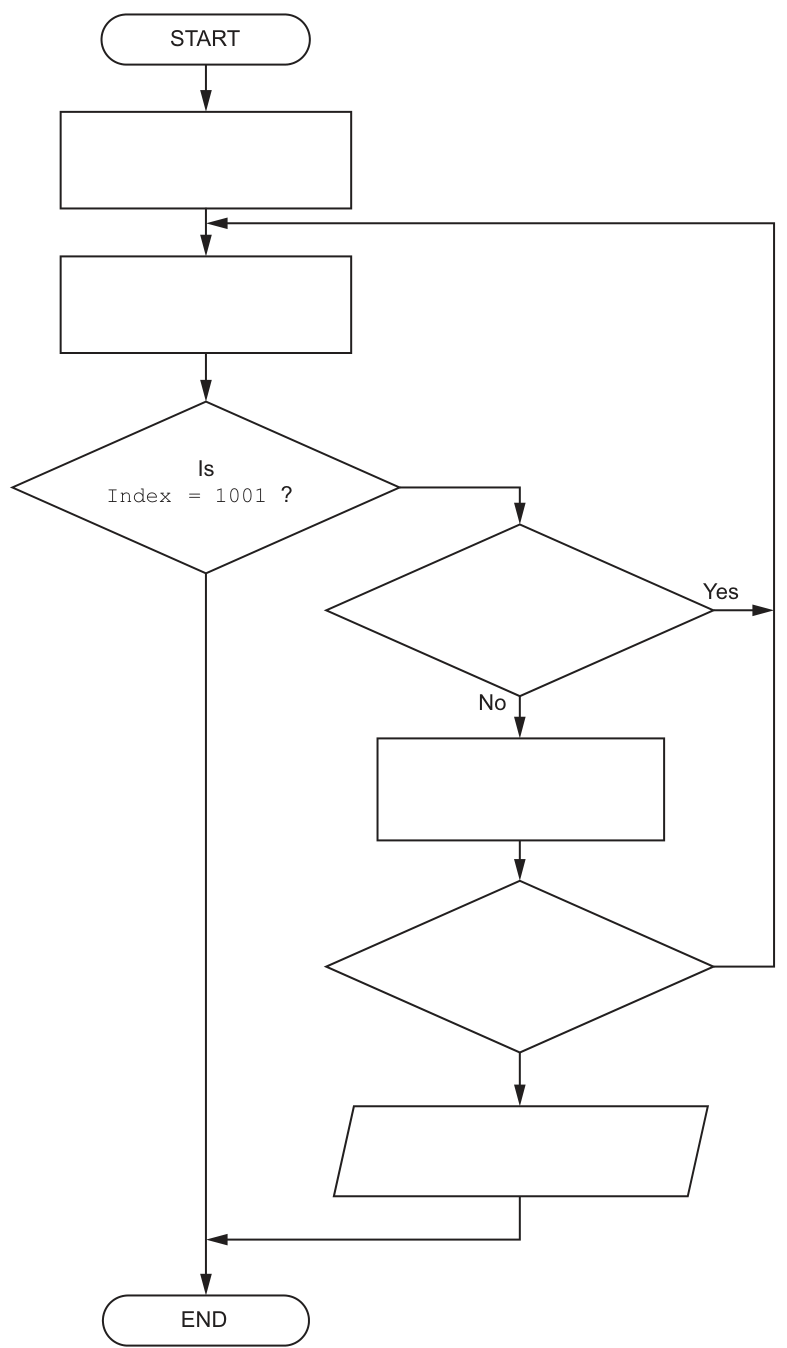
Answer
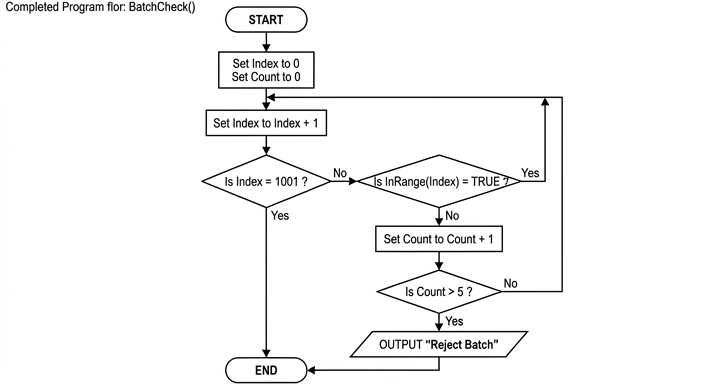
See flowchart
Background Concept
A flowchart shows an algorithm using standard symbols:
- oval for START/END
- rectangle for a process or assignment
- diamond for a decision
- parallelogram for input/output
This question tests how to represent sequence, selection and iteration in a flowchart.
The module BatchCheck() must process up to 1000 records. That means it needs:
- initial values before the loop starts
- repeated checking of each component
- a way to count failures
- an early exit if too many failures are found
A function such as InRange(Index) returns a Boolean value. In a flowchart, that fits naturally inside a decision diamond, because the answer is either TRUE or FALSE.
Understanding the Question
You are not being asked to write pseudocode here. You are being asked to complete the missing parts of a flowchart for BatchCheck().
From the stem, BatchCheck() must:
- examine component records in the
Batcharray - use
InRange()on each record - count how many components fail
- stop immediately and output a warning if more than 5 fail
The incomplete flowchart already gives the overall shape and one decision: Is Index = 1001 ?. Your task is to supply the missing process boxes, decision boxes and output so that the flowchart matches the required algorithm.
Approach
Work through the algorithm in the order it would happen in a real program.
-
Initialise the variables.
Indexmust start before the first valid position.Countmust start at zero.
-
Move to the next component.
- increment
Index
- increment
-
Check whether all 1000 records have been processed.
- if
Index = 1001, stop
- if
-
Check the current component.
- use
InRange(Index) - if it is
TRUE, there is no failure, so go straight back for the next item
- use
-
If the component is not in range, increment the failure count.
-
Check whether the number of failures is now too high.
- if
Count > 5, outputReject Batchand stop - otherwise continue looping
- if
This is exactly the logic the completed flowchart must show.
Step-by-Step Reasoning
Start with the first blank process box after START.
This must initialise both control variables:
Set Index to 0Set Count to 0
Why Index starts at 0:
- the next process box increments it first
- so the first actual record checked becomes
Batch[1] - this avoids skipping record 1
The second blank process box must therefore be:
Set Index to Index + 1
After that comes the given decision Is Index = 1001 ?.
Interpret that carefully:
- if
Index = 1001, all valid indices1to1000have already been handled - so the flowchart should end
- therefore the
Yesbranch goes toEND - the
Nobranch continues to the next test
The next blank decision must call the given Boolean function:
Is InRange(Index) = TRUE ?
Why this is correct:
- the module description explicitly says
BatchCheck()callsInRange()for each component InRange()returnsTRUEif the component weight is acceptable andFALSEotherwise
Now follow each branch:
- if
Yes, the component is acceptable, so no failure is counted - the algorithm just loops back to process the next record
- if
No, the component failed, so the failure count must increase
That makes the next blank process box:
Set Count to Count + 1
Then the final blank decision checks whether the limit has been exceeded:
Is Count > 5 ?
This must be > rather than >= because the requirement says to stop if the number of failed components exceeds 5. That means 6 or more.
Finally, if that decision is Yes, the output box must contain:
OUTPUT "Reject Batch"
After the output, the flowchart ends immediately.
If the decision is No, the batch has not yet exceeded the failure limit, so the flowchart loops back to Set Index to Index + 1.
So the completed flow is:
- initialise
IndexandCount - increment
Index - stop if all items have been checked
- call
InRange(Index) - if in range, continue
- if not in range, increment
Count - if
Count > 5, outputReject Batchand stop - otherwise continue
Key Takeaways
- Flowcharts must show the exact order of processing.
- Initial values are essential before a loop begins.
- A Boolean function can be placed directly in a decision diamond.
- Early termination is shown by sending a decision branch to output and then
END. - The wording of the condition matters: "exceeds 5" means
> 5, not>= 5.
Common Mistakes
- Starting
Indexat 1 and then immediately incrementing it. That would skip the first record. - Using
Count >= 5instead ofCount > 5. That would reject the batch too early. - Incrementing
CountwhenInRange(Index)isTRUE. Only failures should be counted. - Sending the wrong branch from
Is Index = 1001 ?toEND. The algorithm stops only after all 1000 positions have been considered. - Forgetting the output message before ending when the failure count is too high.
Things to Be Careful About
- Keep the identifiers exactly as given:
Index,Count,InRange(Index). - The loop is controlled by incrementing first, then checking for
1001. InRange(Index)must be tested againstTRUEin the flowchart, matching the function description.- The two loop-back paths are different: one from a successful range check, and one from
Countnot exceeding 5. - The output text should be exactly
Reject Batch.
A procedure TwoParts() will input a sequence of real values, one at a time.
The procedure will:
- process the sequence in two parts
- form a first total by adding the values until the first zero
- form a second total by adding the values after the first zero until the second zero
- output the average of the two totals, together with a suitable message.
Values input in the first part are totalled using global variable TotalA and those input in the second part are totalled using global variable TotalB.
Answer
PROCEDURE TwoParts()
   DECLARE Value, Average : REAL
   TotalA ← 0
   TotalB ← 0

   INPUT Value
   WHILE Value <> 0
      TotalA ← TotalA + Value
      INPUT Value
   ENDWHILE

   INPUT Value
   WHILE Value <> 0
      TotalB ← TotalB + Value
      INPUT Value
   ENDWHILE

   Average ← (TotalA + TotalB) / 2
   OUTPUT "Average of totals = ", Average
ENDPROCEDURE
See completed pseudocode
Background Concept
This is a sentinel-controlled input algorithm. A sentinel value is a special value that is not part of the real data and is used to mark a boundary or the end of input. Here, the sentinel is 0.
The sequence is divided into two sections:
- values before the first zero belong to the first part
- values after the first zero and before the second zero belong to the second part
To solve this in pseudocode, we normally:
- initialise totals to zero
- input a value
- repeat processing while the value is not the sentinel
- stop when the sentinel is reached
Because there are two parts, the same pattern is used twice.
This also tests use of a procedure. A procedure performs a task but does not return a value directly. That fits this question because TwoParts() is supposed to process input and output a result. The totals are also stated to be stored in the global variables TotalA and TotalB, so the procedure should update those global variables.
Understanding the Question
The question gives a precise sequence of actions:
- read real numbers one at a time
- add values into
TotalAuntil the first0 - then add values into
TotalBuntil the second0 - then output the average of the two totals with a suitable message
The important detail is that the zeros are separators, not values to be added. So neither zero is included in either total.
The wording "process the sequence in two parts" strongly suggests two separate stages. Since TotalA and TotalB already exist as global variables, the procedure should set them up and then fill them correctly.
Approach
The simplest approach is to use two WHILE loops:
- the first loop handles the first section and adds into
TotalA - the second loop handles the second section and adds into
TotalB
Before each loop, input a value. Inside each loop:
- if the value is not zero, add it to the correct total
- input the next value
When the loop ends, the zero has been found, so we move on to the next part.
Finally, compute:
and output it with a message.
Step-by-Step Reasoning
Start by declaring any local values needed. We need:
Valueto hold each input numberAverageto store the final result
Then initialise the global totals:
TotalA ← 0
TotalB ← 0
This is essential. If they are not reset, old values might remain from an earlier call.
Now process the first part.
INPUT Value
WHILE Value <> 0
   TotalA ← TotalA + Value
   INPUT Value
ENDWHILE
How this works:
- first number is read into
Value - as long as it is not zero, add it to
TotalA - read the next value and test again
- when a zero is entered, the loop stops
That first zero marks the end of part 1, so it is not added.
Now process the second part.
INPUT Value
WHILE Value <> 0
   TotalB ← TotalB + Value
   INPUT Value
ENDWHILE
This is the same logic again, but now the values belong to the second section and are added to TotalB. The second zero ends this loop.
Finally calculate and output the average of the two totals.
Average ← (TotalA + TotalB) / 2
OUTPUT "Average of totals = ", Average
This is the average of the two totals, not the average of all the input values.
For example, if the input sequence were:
4.5, 2.0, 0, 7.0, 1.0, 0
then:
TotalA = 4.5 + 2.0 = 6.5TotalB = 7.0 + 1.0 = 8.0- average of totals:
So the output would report 7.25.
An alternative valid method would be to use one loop plus a flag or counter to track how many zeros have been seen, but the two-loop approach is clearer and matches the wording naturally.
Key Takeaways
- Use a sentinel value to divide or end input.
- Initialise totals before starting accumulation.
- Use separate loops when the data naturally has separate phases.
- Read a new value inside the loop so the condition can change.
- Be careful to calculate the average of totals, not the average of all items.
Common Mistakes
- Adding the zero into a total: zero is a separator here, so it must only stop the loop.
- Forgetting to initialise
TotalAandTotalB: this can leave old values in the globals. - Not inputting the next value inside the loop: this causes an infinite loop because
Valuenever changes. - Using only one total: the question specifically requires
TotalAfor the first part andTotalBfor the second. - Calculating the wrong average: some students divide by the number of values entered, but the task asks for the average of the two totals.
- Using
=for assignment in pseudocode: CIE pseudocode uses←for assignment and=for comparison.
Things to Be Careful About
Valueshould be aREALbecause the question says the inputs are real values.- The first
INPUT Valuebefore eachWHILEis important because this is a pre-condition loop. - The second loop must start with a fresh input after the first zero has already been used as the split marker.
- Output needs a message as well as the calculated value.
- Keep the identifier names exactly as given:
TwoParts(),TotalA, andTotalB.
The value zero denotes the split between the two parts of the sequence.
The requirement changes and now there may be up to 20 parts.
Identify a suitable data structure that could be used to store the different total values.
Answer
- A one-dimensional array of 20
REALvalues, for exampleTotals[1:20].
A one-dimensional array of 20 REAL values
Background Concept
When a program needs to store many values of the same type, a common choice is an array. An array stores multiple items under one identifier, with each item accessed by an index such as Totals[1], Totals[2], and so on.
Arrays are especially suitable when:
- all items are the same data type
- the maximum number of items is known in advance
- items need to be processed repeatedly using loops
Here, each stored item is a total value, so the data type should be REAL.
Understanding the Question
The original version used two separate global variables, TotalA and TotalB, because there were only two parts.
Now the requirement says there may be up to 20 parts. That means using separate variables such as Total1, Total2, Total3, and so on would be inefficient and awkward.
The question asks for a suitable data structure to store the different totals. Since there can be multiple totals of the same type, one for each part, an indexed collection is needed.
Approach
Choose a structure that:
- can hold several numeric totals
- allows access to each total by position
- matches the fixed upper limit of 20
A one-dimensional array fits all of these requirements. Each element of the array stores one part total.
Step-by-Step Reasoning
Each part produces one total.
If there can be up to 20 parts, then the program needs storage for up to 20 totals.
Because every stored value is of the same kind:
- each item is a total
- totals may contain decimal values
- so each item should be of type
REAL
The structure therefore can be:
DECLARE Totals : ARRAY[1:20] OF REAL
This means:
Totals[1]stores the first part totalTotals[2]stores the second part total- ...
Totals[20]stores the twentieth part total
That is much better than creating twenty separate variable names.
Key Takeaways
- Use an array when you need multiple values of the same type.
- A 1D array is suitable for a simple list of totals.
- Choose
REALbecause the totals come from real input values. - A fixed maximum such as 20 makes an array a natural choice.
Common Mistakes
- Choosing separate variables such as
Total1,Total2, etc.: this is not a good data structure and is hard to process. - Using the wrong data type such as
INTEGER: the original inputs are real values, so totals may also be real. - Choosing a 2D array: only one list of totals is needed, not rows and columns.
- Choosing a stack or queue: those are useful when order of insertion/removal matters in a special way, which is not the main need here.
Things to Be Careful About
- The question says up to 20 parts, so the array needs enough positions for 20 values.
- The answer should name the structure clearly: a one-dimensional array.
- If giving an example declaration, use an array bound that matches the chosen indexing system, such as
[1:20].
Answer
- All totals can be stored under one identifier, so there is no need for many separate variables.
- Each total can be accessed or updated directly by its index, for example the total for part 7.
- The totals can be processed easily with loops, for example to initialise, display or calculate with all 20 values.
See explanation
Background Concept
A good data structure is not just one that can store the data; it should also make the program easier to write, read and maintain.
For arrays, the main benefits usually come from:
- grouping related data together
- indexed access to individual items
- easy repetition using loops
These are important in Paper 2 because arrays are often chosen specifically to simplify algorithm design.
Understanding the Question
Part (b)(i) asked for a data structure to store totals for up to 20 parts. If the chosen structure is a 1D array, this part asks for three benefits of using that array.
So the answer should not just repeat "it stores 20 values". It should explain why an array is useful compared with many separate variables.
Approach
Pick three distinct benefits of an array that directly match this problem:
- one array name can hold all the totals
- individual totals can be reached by index
- loops can process all totals efficiently
These are strong, standard benefits and fit the requirement well.
Step-by-Step Reasoning
1. One identifier for all related totals
Instead of writing many separate variables like Total1, Total2, Total3, ..., Total20, an array stores them all under one name such as Totals.
This is beneficial because:
- the program is shorter
- variable management is simpler
- the totals are clearly seen as one collection of related data
2. Direct indexed access
An array element can be accessed using its position:
Totals[1]Totals[2]Totals[7]
This means the program can go straight to the total for a specific part without testing lots of separate variable names. That makes updating and reading individual totals straightforward.
3. Easy processing with loops
Arrays work naturally with loops. For example:
FOR Index ← 1 TO 20
   Totals[Index] ← 0
NEXT Index
or later:
FOR Index ← 1 TO NumberOfParts
   OUTPUT Totals[Index]
NEXT Index
This is much easier than writing twenty separate statements. It also reduces repetition and makes the algorithm easier to change.
Other acceptable benefits could include that the fixed size matches the maximum of 20 parts, or that it is easier to maintain and expand. But the three above are the clearest and most directly useful.
Key Takeaways
- Arrays let you store many related values under one name.
- Indexes make it easy to access a specific item.
- Loops and arrays work together well for repeated processing.
- Good data structure choices make algorithms shorter and easier to maintain.
Common Mistakes
- Giving features instead of benefits: for example, just saying "it is an array" is not a benefit.
- Repeating the same idea three times: for example, "easy to store", "easy to save", "easy to keep" are not clearly different points.
- Describing the wrong structure: the benefits must match the structure named in part (b)(i).
- Giving vague statements such as "it is better" without explaining why.
Things to Be Careful About
- Make sure the points are distinct.
- Tie the benefits to this exact scenario of storing up to 20 totals.
- If the question asks for three benefits, give three clear separate statements.
- Do not drift into implementation details that are not relevant, such as memory addresses or low-level storage.
A program is being designed in pseudocode.
The program contains the following declaration:
DECLARE Data : ARRAY[1:1000] OF STRING
A procedure ArrayInitialise() is written to initialise the values in the array:
PROCEDURE ArrayInitialise(Label : STRING)
    DECLARE Index : INTEGER
    Index ← 1
    WHILE Index <= 1000
        CASE OF (Index MOD 2)
            0 : Data[Index] ← FormatA(Label)
                Index ← Index + 1
            1 : Data[Index] ← FormatB(Label)
                Index ← Index + 1
        ENDCASE
    ENDWHILE
ENDPROCEDURE
Functions FormatA() and FormatB() apply fixed format case changes to the parameter string.
The design of the procedure does not use the most appropriate loop construct.
Suggest a more appropriate construct that could be used and explain your choice.
Construct ..................................................................................................................................
Explanation ...............................................................................................................................
Answer
- Construct:
FOR Index ← 1 TO 1000 - Explanation: A
FORloop is more appropriate because the number of iterations is known in advance.Indexincreases by 1 each time, so the count-controlled loop handles the update automatically and is clearer than using aWHILEloop.
FOR Index ← 1 TO 1000, because the loop runs a known fixed number of times.
Background Concept
A loop construct should match the way repetition works in the problem.
A WHILE loop is a pre-condition loop. It keeps repeating while a condition is true, so it is most suitable when the number of repetitions is not known in advance and the program must test whether it should continue.
A FOR loop is a count-controlled loop. It is most suitable when:
- the start value is known
- the end value is known
- the step is known
In that case, the loop variable changes automatically, which makes the pseudocode shorter, clearer and less error-prone.
Understanding the Question
The procedure ArrayInitialise() fills Data[1] to Data[1000]. The existing code starts at Index ← 1 and continues while Index <= 1000, adding 1 to Index each time through the loop.
That means the number of repetitions is completely fixed: exactly 1000 passes. The question asks which loop construct is more appropriate and why.
The key clue is that the loop is not waiting for some unpredictable event. It is simply counting through array positions from 1 to 1000.
Approach
To answer this, look at how the loop variable behaves:
- It starts at a known value: 1.
- It ends at a known value: 1000.
- It changes by a known step: +1.
That is exactly the pattern for a FOR ... NEXT loop, so the best answer is to recommend a FOR loop and explain that it suits a known number of iterations.
Step-by-Step Reasoning
The original code does this:
- sets
Indexto 1 - checks
Index <= 1000 - performs one of the two assignments depending on whether
Indexis odd or even - increases
Indexby 1 - repeats
So although it is written as a WHILE, it is really just counting from 1 to 1000.
A FOR loop expresses that directly:
FOR Index ← 1 TO 1000
This is more appropriate because:
- the loop bounds are fixed
- the loop counter update is built into the construct
- the pseudocode becomes easier to read
- there is less risk of forgetting
Index ← Index + 1or placing it incorrectly
So the main reason is not that the WHILE loop is wrong, but that it is a less suitable choice for a fixed-count repetition.
Key Takeaways
- Use a
FORloop when the number of repetitions is known in advance. - Use a
WHILEloop when continuation depends on a condition that may vary unpredictably. - Choosing the best construct improves clarity as well as correctness.
Common Mistakes
- Saying the
WHILEloop is invalid. It is valid, just not the most appropriate. - Naming a
REPEAT ... UNTILloop. That is not better here because the number of iterations is still fixed and known. - Giving only the construct without explaining why it is better.
- Saying "because it is faster". The main advantage here is suitability and clarity, not execution speed.
Things to Be Careful About
- The array is declared from
1to1000, so the loop must match those bounds exactly. - The explanation should mention the known fixed number of iterations.
- If writing the loop, keep CIE pseudocode style, for example
FOR Index ← 1 TO 1000.
The algorithm calls one of the functions FormatA() and FormatB() each time within the loop.
Explain why this is not efficient and suggest a more efficient solution.
Answer
- It is not efficient because
Labeldoes not change, soFormatA(Label)always gives the same result andFormatB(Label)always gives the same result. - The loop repeatedly recalculates the same two formatted strings many times.
- A more efficient solution is to call each function once before the loop and store the results in variables.
- Then, inside the loop, assign the stored value to
Data[Index]instead of calling the functions again.
Call FormatA(Label) and FormatB(Label) once before the loop, store the results, then reuse them inside the loop.
Background Concept
An algorithm is inefficient when it performs work repeatedly that does not need to be repeated.
A common source of inefficiency is recomputing the same result inside a loop. If the input to a function does not change, then the output will not change either. Calling that function again and again wastes processing time.
A standard optimisation is:
- compute the result once
- store it in a variable
- reuse that stored value whenever needed
This is especially useful inside loops, because even a small unnecessary action becomes expensive when repeated many times.
Understanding the Question
Inside ArrayInitialise(), the parameter Label is passed to either FormatA() or FormatB() for every array position.
But Label itself never changes during the procedure.
So the procedure is effectively doing this again and again:
- for every odd position, calculate
FormatB(Label) - for every even position, calculate
FormatA(Label)
Since the same input string is used each time, there are really only two distinct formatted results needed:
- one version produced by
FormatA(Label) - one version produced by
FormatB(Label)
The question asks for two things:
- why the current method is inefficient
- what a more efficient solution would be
Approach
The best way to answer is to focus on repeated identical function calls.
Reasoning process:
- Check whether the parameter passed to the functions changes. It does not.
- Conclude that the functions will return the same outputs every time they are called with that parameter.
- Identify that the loop is recalculating those same outputs repeatedly.
- Improve the design by moving those function calls outside the loop.
- Store the results and use the stored strings during the loop.
This is a classic "precompute once, reuse many times" improvement.
Step-by-Step Reasoning
The current procedure uses a loop that runs through the array positions.
For an even Index, it executes:
Data[Index] ← FormatA(Label)
For an odd Index, it executes:
Data[Index] ← FormatB(Label)
Now look carefully at the argument passed to each function: it is always Label.
Because Label does not change:
FormatA(Label)returns the same formatted string every timeFormatB(Label)returns the same formatted string every time
So if the loop runs 1000 times, the program is not creating 1000 different formatted results. It is just recalculating the same two results over and over.
That is inefficient because function calls take time. The formatting operation may involve examining characters, changing case, building a new string, and returning it. Doing that hundreds of extra times is unnecessary.
A better design is:
- before the loop, calculate the two possible formatted versions once
- store them, for example in two variables
- in the loop, copy those stored strings into the array
For example, the improved idea would be:
FormattedA ← FormatA(Label)
FormattedB ← FormatB(Label)
Then inside the loop:
- if the index is even, assign
FormattedA - if the index is odd, assign
FormattedB
This produces exactly the same final array contents, but with far fewer function calls.
Instead of calling formatting functions 1000 times, the program calls them only twice.
That is why the improved version is more efficient.
Key Takeaways
- If a function is called repeatedly with the same input, consider calculating the result once and storing it.
- Efficiency often comes from removing unnecessary repeated work inside loops.
- A loop should usually contain only the operations that genuinely need to vary from one iteration to the next.
Common Mistakes
- Saying it is inefficient just because functions are used. Functions themselves are not the problem; the issue is repeated calls with unchanged input.
- Saying the functions should be removed entirely. The formatting is still needed, just not repeated unnecessarily.
- Suggesting different loop constructs as the main answer here. This part is about repeated function calls, not loop selection.
- Forgetting to state the improved method clearly: call each formatting function once, store the results, then reuse them.
Things to Be Careful About
- The key fact is that
Labelstays the same throughout the procedure. - The efficient version must still preserve the alternating pattern between odd and even indices.
- Do not claim the result changes; the optimisation improves efficiency while keeping the same output.
- In an exam answer, make sure both parts are present: the inefficiency and the suggested improvement.
A program displays a progress bar to inform the user of the progress of tasks that take a significant time to complete, such as those involving file transfer operations.
Task progress is divided into 11 steps. Each step represents the amount of progress as a percentage. An image is associated with each step and each image is stored in a different file.
Different progress bar images may be selected. For a given image, files all have the same filename root, with a different suffix.
The table illustrates the process for using the image with filename root BargraphA
| Step | Percentage progress | Image filename | Image |
|---|---|---|---|
| 1 | < 10 | BargraphA-1.bmp |

|
| 2 | >= 10 and < 20 | BargraphA-2.bmp |

|
| 3 | >= 20 and < 30 | BargraphA-3.bmp |

|
| |

| | |
| 9 | >= 80 and < 90 | BargraphA-9.bmp |

|
| 10 | >= 90 and < 100 | BargraphA-10.bmp |

|
| 11 | 100 | BargraphA-11.bmp |

|
A procedure Progress() will:
- be called with two parameters:
- an integer representing the percentage progress (0 to 100 inclusive)
- a string representing the image filename root
- generate the full image filename
- call a procedure
Display()using the full image filename as the parameter.
Answer
PROCEDURE Progress(Percentage : INTEGER, FilenameRoot : STRING)
   DECLARE Step : INTEGER
   DECLARE FullFilename : STRING

   Step ← Percentage DIV 10 + 1
   FullFilename ← FilenameRoot + "-" + NUM_TO_STR(Step) + ".bmp"
   CALL Display(FullFilename)
ENDPROCEDURE
See completed pseudocode
Background Concept
In Paper 2, when a question asks you to write pseudocode for a module, you are being tested on how to translate a specification into a clear algorithm using standard CIE pseudocode conventions.
A procedure is used when a module performs an action but does not return a value directly. Here, Progress() creates a filename and then calls another procedure, Display(), so a procedure is the correct choice.
This task also uses:
- parameters to pass data into the procedure
- integer division to map a percentage to a step number
- string manipulation to build the filename
- a procedure call to pass the finished filename to another module
The key programming idea is that the percentage range is split into equal bands of 10:
0to9maps to step110to19maps to step2- ...
90to99maps to step10100maps to step11
Using DIV 10 is a neat way to do this because integer division removes the remainder.
Understanding the Question
You are given a description of how a progress bar image is chosen.
The procedure Progress() receives:
- an integer percentage from
0to100 - a string holding the filename root, such as
BargraphA
It must then:
- work out which step number should be used
- generate the full filename such as
BargraphA-3.bmp - call
Display()with that full filename
The table in the question is the important clue. It shows that step numbers line up with percentage intervals of size 10, and that the filename is formed from:
root + "-" + step + ".bmp"
So the whole task is really a small module that converts a percentage into a filename.
Approach
A good strategy is:
- Declare local variables for the step number and full filename.
- Calculate the step from the percentage.
- Convert the step number to text so it can be joined into the filename.
- Concatenate the parts of the filename.
- Pass the result to
Display().
The crucial part is step calculation. Integer division by 10 gives:
0 DIV 10 = 09 DIV 10 = 010 DIV 10 = 199 DIV 10 = 9100 DIV 10 = 10
If we then add 1, the answers become the required step numbers 1 to 11.
Step-by-Step Reasoning
We start with the procedure header:
PROCEDURE Progress(Percentage : INTEGER, FilenameRoot : STRING)
This matches the specification exactly:
Percentageis the integer progress valueFilenameRootis the image filename root
Next, local variables are declared:
DECLARE Step : INTEGER
DECLARE FullFilename : STRING
Step stores which image number to use.
FullFilename stores the finished filename, for example BargraphA-7.bmp.
Now calculate the step:
Step ← Percentage DIV 10 + 1
Why this works:
- if
Percentage = 0, then0 DIV 10 = 0, soStep = 1 - if
Percentage = 8, then8 DIV 10 = 0, soStep = 1 - if
Percentage = 10, then10 DIV 10 = 1, soStep = 2 - if
Percentage = 87, then87 DIV 10 = 8, soStep = 9 - if
Percentage = 100, then100 DIV 10 = 10, soStep = 11
So it matches every row pattern in the table.
Then build the filename:
FullFilename ← FilenameRoot + "-" + NUM_TO_STR(Step) + ".bmp"
This joins four pieces:
- the root, such as
BargraphA - the hyphen
- - the step converted to text
- the extension
.bmp
NUM_TO_STR(Step) is needed because Step is an integer, but filenames are strings.
Finally, call the display procedure:
CALL Display(FullFilename)
This satisfies the last requirement: the generated full filename is passed to Display().
The completed procedure therefore does exactly what the specification asks.
Key Takeaways
- Use a procedure when a module performs an action rather than returning a value.
DIVis very useful for grouping values into fixed-size ranges.- Build filenames or similar text values by concatenating strings.
- Convert numbers to strings before joining them into text.
- When a question gives a pattern in a table, look for a compact arithmetic rule instead of many
IFstatements.
Common Mistakes
- Using a function instead of a procedure. This part specifically asks for procedure
Progress(). - Forgetting to call
Display(). Generating the filename alone is not enough for part (a). - Not converting the step number to a string before concatenation.
- Writing many separate
IFstatements for each percentage range. That is much longer and less elegant than usingDIV. - Getting the step numbering off by one, for example using
Percentage DIV 10without adding1. - Using
=instead of←for assignment in pseudocode.
Things to Be Careful About
- The allowed percentage range is
0to100inclusive, so your logic must handle100correctly. - The filename format must match the table exactly: root, hyphen, step,
.bmp. DIVis integer division, not ordinary real division.- Keep CIE pseudocode style:
PROCEDURE,DECLARE,CALL, and the assignment arrow←. - Use sensible parameter names and keep the types consistent with the question.
The definition of procedure Progress() is provided here for reference:
A procedure Progress() will:
- be called with two parameters:
- an integer representing the percentage progress (0 to 100 inclusive)
- a string representing the image filename root
- generate the full image filename
- call a procedure
Display()using the full image filename as the parameter.
Progress() will be rewritten and a new module Progress2() produced with these requirements:
- an additional parameter of type integer will specify the total number of steps
- the image filename will be returned (procedure
Display()will not be called from withinProgress2()).
Answer
FUNCTION Progress2(Percentage : INTEGER, FilenameRoot : STRING, TotalSteps : INTEGER) RETURNS STRING
FUNCTION Progress2(Percentage : INTEGER, FilenameRoot : STRING, TotalSteps : INTEGER) RETURNS STRING
Background Concept
A procedure performs an action, while a function returns a value. That distinction is central to this part.
In the original design, Progress() generated a filename and then directly called Display(). That means its main purpose was to carry out an action, so a procedure was suitable.
In the new design, the question says the image filename will be returned and Display() will not be called from inside the module. That means the new module must be a function, because its purpose is now to produce and return a value.
A function header must show:
- the function name
- its parameters
- the type of each parameter
- the return type
Understanding the Question
This part asks only for the new module header, not the full code.
Compared with the original Progress(), two changes are required:
- there is an additional integer parameter for the total number of steps
- the module now returns the image filename instead of calling
Display()itself
Since a filename is text, the return type must be STRING.
Approach
The simplest way to answer is:
- change from
PROCEDUREtoFUNCTION - keep the original two parameters
- add a third parameter of type
INTEGERfor total steps - end the header with
RETURNS STRING
The exact parameter names can vary, but they should clearly represent:
- percentage progress
n- filename root - total number of steps
Step-by-Step Reasoning
Start with the module name given in the question:
Progress2()
Because the filename must be returned, write FUNCTION rather than PROCEDURE.
The first parameter is the percentage progress, so include an integer parameter such as:
Percentage : INTEGER
The second parameter is the image filename root, so include:
FilenameRoot : STRING
The new requirement adds a third parameter representing total number of steps, so include:
TotalSteps : INTEGER
Finally, because the module returns the image filename, the return type is STRING.
Putting these together gives:
FUNCTION Progress2(Percentage : INTEGER, FilenameRoot : STRING, TotalSteps : INTEGER) RETURNS STRING
That is all this part requires.
Key Takeaways
- If a module returns a value, it should be written as a function.
- A function header must include the return type.
- Read the specification carefully: wording like "returned" is a strong clue that a function is needed.
- When requirements change, update the header to reflect both the new parameters and the new purpose of the module.
Common Mistakes
- Writing
PROCEDUREinstead ofFUNCTION. - Forgetting the extra integer parameter for total steps.
- Forgetting
RETURNS STRING. - Using the wrong return type, such as
INTEGERinstead ofSTRING. - Writing the full body of the function when only the header is asked for.
Things to Be Careful About
- This part is only asking for the header, so do not add declarations or statements.
- Make sure the additional parameter is of type
INTEGER. - The returned value is the filename, which is text, so the return type must be
STRING. - Keep the module name exactly as given:
Progress2.
Answer
- More steps give a more accurate and smoother indication of progress.
More steps give a more accurate and smoother indication of progress.
Background Concept
A progress bar is a form of user feedback. Its purpose is to show how far through a task the system is, especially for tasks that take noticeable time.
If progress is divided into only a small number of steps, the display changes less often and appears coarse. If progress is divided into more steps, the display can update more frequently and reflect progress more precisely.
This is really about granularity: the more steps you have, the finer the measurement shown to the user.
Understanding the Question
The question asks for one benefit of increasing the number of steps in the progress bar.
So you do not need a long explanation or several ideas. One clear benefit is enough.
The key idea is that if the bar has more possible stages, the displayed progress can match the real progress more closely.
Approach
Give one concise point linked to the user experience of the progress bar.
A strong answer focuses on one of these ideas:
- greater accuracy
- smoother updates
- more precise feedback to the user
Any one of these, expressed clearly, would earn the mark.
Step-by-Step Reasoning
Originally, the bar has a fixed number of stages. That means a range of percentages must share the same image.
For example, if each image covers a wide percentage range, the bar may stay unchanged for a while and then jump suddenly.
If the number of steps is increased:
- each image represents a smaller range of progress
- the display can change more often
- the user sees a result that better reflects the task's real state
So the benefit is that the progress display becomes more precise and smoother.
Key Takeaways
- Increasing the number of steps increases the precision of the progress display.
- Finer-grained feedback usually improves the user experience.
- For one-mark "state one benefit" questions, give one direct point and stop.
Common Mistakes
- Giving a vague answer such as "it is better" without saying why.
- Talking about implementation details instead of the benefit to the displayed progress.
- Giving more than one unclear point instead of one strong point.
- Saying it makes the program faster; more steps affect the display detail, not necessarily speed.
Things to Be Careful About
- The question asks for a benefit of increasing the number of steps, not a description of how to code it.
- Keep the answer focused on the displayed progress bar.
- Use wording such as more accurate, more precise, or smoother to make the benefit explicit.
Seven program modules form part of a program. A description of the relationship between the modules is summarised below. Any return values are stated in the description.
| Module name | Description |
|---|---|
| Mod-A | calls Mod-B followed by Mod-C |
| Mod-B | • called with parameters Par1 and Par2 • calls either Mod-D or Mod-E, determined when the program runs • returns a Boolean value |
| Mod-C | • called with parameters Par1 and Par3 • Par3 is passed by reference • repeatedly calls Mod-F followed by Mod-G |
| Mod-D | called with parameter Par2 |
| Mod-E | • called with parameter Par3 • returns an integer value |
| Mod-F | called with parameter Par3 |
| Mod-G | • called with parameter Par3 • Par3 is passed by reference |
Parameters in the table are as follows:
- Par1 and Par3 are of type string.
- Par2 is of type integer.
Answer
- Mod-B
- Mod-E
Mod-B and Mod-E
Background Concept
A function is a module that returns a value to the module that called it. A procedure is a module that carries out a task but does not return a value directly.
In questions like this, the key clue is the wording in the module description:
- if the description says the module returns a value, it is implemented as a function
- if no return value is stated, it is a procedure
The return value can be any data type, such as Boolean, integer or string.
Understanding the Question
You are given a table describing seven modules and how they interact. This part asks only for the modules that would be implemented as functions.
So you do not need to analyse the full structure chart yet. You just need to scan the descriptions and pick out the modules whose descriptions explicitly say that they return a value.
Approach
Read each module description and look for the phrase saying that a value is returned.
- If a module returns a value, classify it as a function.
- If it only calls other modules or receives parameters, classify it as a procedure instead.
Step-by-Step Reasoning
From the table:
- Mod-A calls Mod-B and then Mod-C. No return value is stated, so it is not a function.
- Mod-B is described as returning a Boolean value, so this must be a function.
- Mod-C is called with parameters and repeatedly calls other modules. No return value is stated, so it is not a function.
- Mod-D is called with parameter Par2 only. No return value is stated.
- Mod-E is described as returning an integer value, so this must be a function.
- Mod-F is called with parameter Par3 only. No return value is stated.
- Mod-G is called with parameter Par3 by reference. No return value is stated.
Therefore, the only modules implemented as functions are Mod-B and Mod-E.
Key Takeaways
- A function returns a value.
- A procedure does not return a value directly.
- In module-description questions, the phrase "returns ..." is the main clue.
Common Mistakes
- Naming modules that have parameters as functions. Having parameters does not make a module a function.
- Choosing Mod-C or Mod-G because they modify data via parameters. Passing by reference is not the same as returning a function value.
- Missing Mod-B because its return type is Boolean rather than integer.
Things to Be Careful About
- Read the wording exactly: "returns a Boolean value" and "returns an integer value" are both function clues.
- Do not confuse a returned value with a changed parameter.
- Only list the modules that definitely return a value from the information given.
Modules Mod-F and Mod-G are both called with Par3 as a parameter.
In the case of Mod-F, the parameter is passed by value.
In the case of Mod-G, the parameter is passed by reference.
Explain the effect of the two different ways of passing the parameter Par3.
Answer
- In Mod-F, Par3 is passed by value, so Mod-F receives a copy of the string and any change made to Par3 in Mod-F does not change the original value.
- In Mod-G, Par3 is passed by reference, so Mod-G accesses the original string and any change made to Par3 in Mod-G changes the original value.
Mod-F uses a copy, so changes do not affect the original; Mod-G uses the original by reference, so changes do affect the original.
Background Concept
When a parameter is passed to a module, there are two common methods:
- Pass by value: the called module receives a copy of the data.
- Pass by reference: the called module receives access to the original data item, not a separate copy.
This matters because it changes whether the called module can alter the caller's data.
For a string parameter:
- with by value, the module can work with the string, but any changes it makes are local to that module
- with by reference, the module can directly change the original string held by the calling module
Understanding the Question
This part focuses specifically on Par3, which is used in two different module calls:
Mod-FreceivesPar3by valueMod-GreceivesPar3by reference
The question asks for the effect of these two methods. That means you must explain what happens to the original Par3 after the called module runs.
Approach
Answer in two matched statements:
- explain what happens when a copy is passed to
Mod-F - explain what happens when the original is passed to
Mod-G
The strongest contrast is whether changes inside the called module affect the original variable in the caller.
Step-by-Step Reasoning
For Mod-F:
Par3is passed by value.- This means
Mod-Fgets its own copy of the string. - If
Mod-Fchanges that parameter, it only changes the copy insideMod-F. - When
Mod-Ffinishes, the originalPar3in the calling module is unchanged.
For Mod-G:
Par3is passed by reference.- This means
Mod-Gis given access to the original string variable. - If
Mod-GchangesPar3, it is changing the caller's actual variable. - When
Mod-Gfinishes, the updated value remains changed in the calling module.
That is the key difference the examiner is looking for.
Key Takeaways
- By value = copy of the data.
- By reference = access to the original data.
- The main exam point is whether the original variable can be changed by the called module.
Common Mistakes
- Saying both methods "pass the value" without distinguishing copy versus original reference.
- Saying that by-value parameters can change the original variable. They cannot.
- Forgetting to mention the effect on the original
Par3, which is the whole point of the question. - Confusing pass by reference with a function return value. They are different mechanisms.
Things to Be Careful About
- Use the exact contrast: copy versus original.
- Mention changes made inside the called module and whether they are visible afterwards.
- Do not overcomplicate the answer with memory addresses unless the question asks for that level of detail.
Draw a structure chart to show the relationship between the seven modules and the parameters passed between them.
Answer
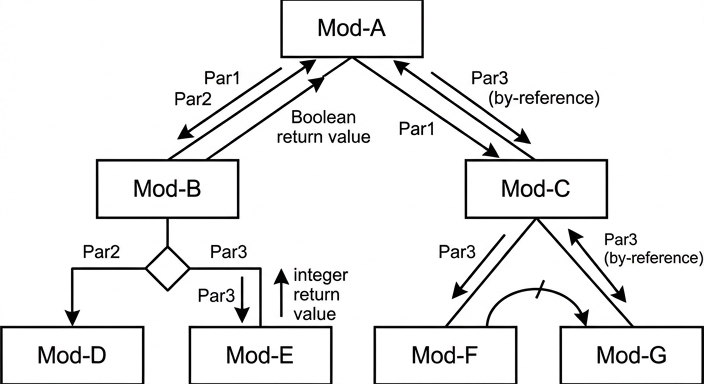
See structure chart
Background Concept
A structure chart shows the relationship between modules in a program. It is not a flowchart of statements; instead, it shows:
- which module calls which other modules
- the hierarchy of modules
- whether calls happen in sequence, by selection, or by iteration
- the data passed between modules
- any return values from functions
Typical structure-chart conventions include:
- a rectangle for each module
- modules placed below the module that calls them
- a diamond to show a selection, meaning one of several modules is chosen at run time
- a curved loop mark to show repeated calls
- labelled data couples to show parameters being passed
- a return value shown back from a function to the calling module
This question also involves pass by reference. In a structure chart, that is commonly shown as data moving back as well as down, because the called module can modify the caller's variable.
Understanding the Question
You are given seven module descriptions and asked to draw one structure chart that shows:
- the top-level module
- which modules are called by each module
- the special control relationships:
Mod-Bcalls eitherMod-DorMod-EMod-Crepeatedly callsMod-Ffollowed byMod-G
- the parameters passed between modules
- the modules that return values
So this is not just a hierarchy question. You must combine several pieces of information from the table into one diagram.
Approach
A reliable method is:
- Find the top-level module.
- Put beneath it the modules it directly calls.
- For each child module, add its own children.
- Add the correct control notation:
- diamond for a choice
- loop mark for repetition
- Label all passed parameters.
- Add return values for function modules.
- Pay attention to by-reference parameters, because those can be shown as two-way data flow.
Step-by-Step Reasoning
Start with the module descriptions.
1. Top level
Mod-A calls Mod-B followed by Mod-C, so Mod-A must be the top box.
Below Mod-A, place two child boxes:
Mod-Bon the leftMod-Con the right
This shows the first level of decomposition.
2. Parameters and return value between Mod-A and Mod-B
Mod-B is called with Par1 and Par2, so show those data couples from Mod-A down to Mod-B.
Mod-B returns a Boolean value, so show a return value from Mod-B back up to Mod-A.
3. Parameters between Mod-A and Mod-C
Mod-C is called with Par1 and Par3, so show both from Mod-A to Mod-C.
Because Par3 is passed by reference to Mod-C, it can be shown with data flowing back as well, indicating that the original value may be changed.
4. Children of Mod-B
Mod-B calls either Mod-D or Mod-E, determined when the program runs.
That means this is a selection, not a sequence. So place a diamond below Mod-B, then from that diamond branch to:
Mod-Don the leftMod-Eon the right
5. Parameters and return value under Mod-B
Mod-D is called with Par2, so label the link from Mod-B to Mod-D with Par2.
Mod-E is called with Par3, so label the link from Mod-B to Mod-E with Par3.
Mod-E returns an integer value, so show a return value from Mod-E back up to Mod-B.
6. Children of Mod-C
Mod-C repeatedly calls Mod-F followed by Mod-G.
So place Mod-F and Mod-G below Mod-C, with Mod-F to the left and Mod-G to the right.
Add the iteration mark above these calls to show that this pair of calls is repeated.
7. Parameters under Mod-C
Mod-F is called with Par3, so show Par3 from Mod-C to Mod-F.
Mod-G is called with Par3, and Par3 is passed by reference, so show Par3 on the link to Mod-G with data movement back as well, indicating that Mod-G may modify the original value.
8. Final structure
The completed chart therefore has:
Mod-Aat the topMod-BandMod-Cunderneath- a selection diamond under
Mod-Bleading toMod-DandMod-E - an iteration mark under
Mod-Ccovering repeated calls toMod-FthenMod-G - all required parameter labels
- a return value from
Mod-BtoMod-A - a return value from
Mod-EtoMod-B
Key Takeaways
- A structure chart shows module relationships, not line-by-line program logic.
- Selection is shown with a diamond.
- Repetition is shown with a loop mark.
- Parameters must be labelled on the links.
- Functions should show a return value back to the caller.
- By-reference parameters are important because the called module can alter the original variable.
Common Mistakes
- Drawing a flowchart instead of a structure chart.
- Putting all seven modules at the same level instead of showing hierarchy.
- Forgetting that
Mod-Bchooses eitherMod-DorMod-E, so missing the selection diamond. - Forgetting that
Mod-Crepeatedly callsMod-FandMod-G, so missing the iteration mark. - Omitting parameter labels such as
Par1,Par2andPar3. - Forgetting return values from
Mod-BandMod-E. - Connecting
Mod-DandMod-Edirectly underMod-Ainstead of underMod-B.
Things to Be Careful About
- Keep the hierarchy exact:
Mod-AcallsMod-BandMod-C;Mod-Bowns the choice betweenMod-DandMod-E;Mod-Cowns the repeated calls toMod-FandMod-G. Mod-DreceivesPar2only.Mod-EreceivesPar3and returns an integer.Mod-FreceivesPar3by value, so a one-way data couple is enough.Mod-GreceivesPar3by reference, so show the possibility of the changed value being passed back.Mod-Bitself is a function because it returns a Boolean value toMod-A, so do not miss that return path.
A teacher is designing a program to process pseudocode projects written by her students.
The program analyses a student project and extracts information about each module that is defined (each procedure or function). This information is stored in a global 2D array ModInfo of type string.
A module header is the first line of a module definition and starts with either of the keywords PROCEDURE or FUNCTION.
An example of part of the array is given below. Row 10 of the array shows that a procedure header occurs on line 27 and row 11 shows that a function header occurs on line 35. "P" represents a procedure and "F" represents a function:
| x = 1 | x = 2 | x = 3 | |
|---|---|---|---|
| ModInfo[10, x] | "27" | "P" | "MyProc(Z : CHAR)" |
| ModInfo[11, x] | "35" | "F" | "MyFun(Y : CHAR) RETURNS BOOLEAN" |
The string stored in column 3 is called the module description. This is the module header without the keyword.
A valid module header will:
- be at least 13 characters long
- start with the keyword
PROCEDUREorFUNCTION. The keyword may appear in either upper or lower case (or a mix of both) and must be followed by a space character.
The teacher has defined the first program module as follows:
| Module | Description |
|---|---|
| Header() | • called with a parameter of type string representing a line of pseudocode • if the line is a valid procedure header, returns a string: "P<Module description>" • if the line is a valid function header, returns a string: "F<Module description>" • otherwise, returns an empty string |
For example, given the string:
"FUNCTION Zap(X : INTEGER) RETURNS CHAR"
Header() returns the string:
"FZap(X : INTEGER) RETURNS CHAR"
Answer
FUNCTION Header(Line : STRING) RETURNS STRING
   DECLARE UpperLine : STRING

   IF LENGTH(Line) < 13 THEN
      RETURN ""
   ENDIF

   UpperLine ← TO_UPPER(Line)

   IF LEFT(UpperLine, 10) = "PROCEDURE " THEN
      RETURN "P" & MID(Line, 11, LENGTH(Line) - 10)
   ELSE
      IF LEFT(UpperLine, 9) = "FUNCTION " THEN
         RETURN "F" & MID(Line, 10, LENGTH(Line) - 9)
      ELSE
         RETURN ""
      ENDIF
   ENDIF
ENDFUNCTION
See completed pseudocode
Background Concept
A function is used when a module must return a value. Here, Header() examines one line of pseudocode and returns either a tagged result or an empty string, so it is naturally a function rather than a procedure.
This question mainly tests string handling and selection. A common pattern is:
- first validate simple conditions such as minimum length
- then standardise the data for comparison
- then extract the required part of the string
For case-insensitive checks, a standard method is to convert the text to one case using TO_UPPER() and compare against uppercase constants. For prefix testing, LEFT() is useful because it checks the first fixed number of characters. For substring extraction, MID() is used to take the part after the keyword.
The rule about the keyword being followed by a space is important. Checking against "PROCEDURE " and "FUNCTION " includes that space, so headers like PROCEDUREX or FUNCTIONS are correctly rejected.
Understanding the Question
The input to Header() is one line of pseudocode, stored as a string.
The function must decide whether that line is a valid module header. A valid header must:
- be at least 13 characters long
- start with
PROCEDUREorFUNCTION - allow any mixture of upper/lower case in the keyword
If it is a procedure header, the function must return:
"P"followed by the module description
If it is a function header, the function must return:
"F"followed by the module description
Otherwise it must return an empty string.
The module description is the whole header line without the keyword. So:
PROCEDURE MyProc(Z : CHAR)becomesMyProc(Z : CHAR)FUNCTION Zap(X : INTEGER) RETURNS CHARbecomesZap(X : INTEGER) RETURNS CHAR
Approach
A good strategy is:
- Reject lines that are too short.
- Make a second version of the line in uppercase so the keyword test is case-insensitive.
- Check whether the line starts with
PROCEDURE. - If not, check whether it starts with
FUNCTION. - If one of those matches, return the appropriate leading letter plus the बाकी of the original line after the keyword.
- If neither matches, return
"".
Using the original Line for the MID() extraction is better than using the uppercase version, because it preserves the student's original casing in the module description.
Step-by-Step Reasoning
The function header is:
FUNCTION Header(Line : STRING) RETURNS STRING
This says the module is a function called Header, it receives one string parameter called Line, and it returns a string.
A local variable is declared:
DECLARE UpperLine : STRING
This stores the uppercase copy used for comparison.
The first check is:
IF LENGTH(Line) < 13 THEN
   RETURN ""
ENDIF
This directly applies the rule in the question. If the line is too short, it cannot be valid, so the function finishes immediately with an empty string.
Next:
UpperLine ← TO_UPPER(Line)
Now a line such as function Zap(X : INTEGER) RETURNS CHAR becomes FUNCTION ZAP(X : INTEGER) RETURNS CHAR for checking purposes. This avoids writing separate tests for upper case, lower case and mixed case.
Then the procedure test:
IF LEFT(UpperLine, 10) = "PROCEDURE " THEN
This checks the first 10 characters exactly:
- 9 letters in
PROCEDURE - plus 1 space
If this matches, the description begins immediately after those 10 characters, so:
RETURN "P" & MID(Line, 11, LENGTH(Line) - 10)
Why character 11? Because characters 1 to 10 are PROCEDURE , so the description starts at the next character.
If the procedure test fails, the function test is tried:
IF LEFT(UpperLine, 9) = "FUNCTION " THEN
This checks:
- 8 letters in
FUNCTION - plus 1 space
If it matches, the description starts at character 10, so:
RETURN "F" & MID(Line, 10, LENGTH(Line) - 9)
Again, the MID() uses the original line so the returned description keeps its original case and punctuation.
If neither prefix matches, the line is not a valid module header, so the function returns "".
This satisfies all three required outputs:
- valid procedure header ->
P<description> - valid function header ->
F<description> - anything else -> empty string
Key Takeaways
- Use a function when a module must return a value.
- For case-insensitive keyword checking, convert to one case first.
- Include the trailing space in the prefix test when the question says the keyword must be followed by a space.
- Use
MID()carefully with correct starting positions based on 1-based indexing. - Returning an empty string is a useful way to signal "not valid".
Common Mistakes
- Checking only
PROCEDUREorFUNCTIONwithout the space. That would wrongly accept strings such asPROCEDUREX. - Forgetting the minimum length test. The question explicitly states this rule.
- Extracting from the wrong position, such as starting at 10 instead of 11 for
PROCEDURE. - Using the uppercase copy for the returned description. That would change the original text unnecessarily.
- Writing a procedure instead of a function, even though a value must be returned.
Things to Be Careful About
- CIE pseudocode uses the assignment arrow
←, not=. - Arrays and string positions are treated as 1-based in this style of pseudocode, so the starting positions in
MID()matter. PROCEDUREis 10 characters, butFUNCTIONis 9 characters.- Return
""exactly for invalid lines, not a space and not a special word such asFALSE. - Preserve the given identifier casing and built-in function names such as
LENGTH,LEFT,MIDandTO_UPPER.
A new module is required:
| Module | Description |
|---|---|
| FindModules() | • called with a parameter of type string representing a student project file name • uses module Header() to check each line of the project • assigns values to the ModInfo array for each module declaration in the student project |
As a reminder, the previous example of part of the array is repeated below:
| x = 1 | x = 2 | x = 3 | |
|---|---|---|---|
| ModInfo[10, x] | "27" | "P" | "MyProc(Z : CHAR)" |
| ModInfo[11, x] | "35" | "F" | "MyFun(Y : CHAR) RETURNS BOOLEAN" |
Write pseudocode for module FindModules().
Assume that the array contains enough rows for the number of modules in each project.
Answer
PROCEDURE FindModules(ProjectFileName : STRING)
   DECLARE ThisLine, Result : STRING
   DECLARE LineNum, ModuleNum : INTEGER

   LineNum ← 0
   ModuleNum ← 0

   OPENFILE ProjectFileName FOR READ
   WHILE NOT EOF(ProjectFileName)
      READFILE ProjectFileName, ThisLine
      LineNum ← LineNum + 1
      Result ← Header(ThisLine)
      IF Result <> "" THEN
         ModuleNum ← ModuleNum + 1
         ModInfo[ModuleNum, 1] ← NUM_TO_STR(LineNum)
         ModInfo[ModuleNum, 2] ← LEFT(Result, 1)
         ModInfo[ModuleNum, 3] ← MID(Result, 2, LENGTH(Result) - 1)
      ENDIF
   ENDWHILE
   CLOSEFILE ProjectFileName
ENDPROCEDURE
See completed pseudocode
Background Concept
This question combines several core Paper 2 ideas:
- text file handling
- iteration until end of file
- calling one module from another
- storing processed data in a 2D array
A procedure is appropriate here because FindModules() does not need to return a single value. Instead, it updates the global array ModInfo.
When reading a file line by line, the usual pattern is:
- open the file for reading
- repeat while not end of file
- read one line
- process that line
- close the file
A 2D array stores data in rows and columns. In this question, each row represents one discovered module, and the columns hold:
- column 1: line number as a string
- column 2: module type,
"P"or"F" - column 3: module description
Understanding the Question
FindModules() receives the filename of a student project.
It must examine every line in that file and use the earlier function Header() to decide whether that line is a module header.
If Header() says the line is a valid header, FindModules() must add a row to ModInfo.
From the given example:
ModInfo[10, 1] = "27"means the module header was on line 27ModInfo[10, 2] = "P"means it was a procedureModInfo[10, 3] = "MyProc(Z : CHAR)"is the description
So the new procedure has to do two separate counts:
- the current file line number
- the current row number in
ModInfo
Those are not the same thing, because most lines in the file will not be module headers.
Approach
The cleanest method is:
- Open the project file.
- Start
LineNumat 0 andModuleNumat 0. - Read each line until the file ends.
- After each read, increase the line number.
- Call
Header()using that line. - If the returned string is not empty, a module has been found.
- Increase the module counter and store the three required values into the next row of
ModInfo. - Close the file.
Because Header() returns either:
P<description>F<description>- or
""
we can split the non-empty result very easily:
- first character -> column 2
- remaining characters -> column 3
Step-by-Step Reasoning
The procedure header is:
PROCEDURE FindModules(ProjectFileName : STRING)
This is a procedure because the task is to populate a global array, not return a single value.
Local variables are declared:
DECLARE ThisLine, Result : STRING
DECLARE LineNum, ModuleNum : INTEGER
ThisLinestores the current line read from the fileResultstores whatHeader()returnsLineNumtracks the actual line number in the project fileModuleNumtracks how many valid module headers have been found so far, and therefore which row ofModInfoto use next
Initial values:
LineNum ← 0
ModuleNum ← 0
Both counters start at 0 before anything has been read.
The file is opened for reading:
OPENFILE ProjectFileName FOR READ
Then the main loop continues until the end of the file:
WHILE NOT EOF(ProjectFileName)
Inside the loop, one whole line is read:
READFILE ProjectFileName, ThisLine
After reading the next line, the line number becomes one higher:
LineNum ← LineNum + 1
Now the line can be checked:
Result ← Header(ThisLine)
There are two possibilities.
If Result = "", the line was not a valid module header, so nothing is stored.
If Result <> "", then a module declaration has been found. So:
ModuleNum ← ModuleNum + 1
This moves to the next free row in ModInfo.
Column 1 stores the line number as a string:
ModInfo[ModuleNum, 1] ← NUM_TO_STR(LineNum)
This conversion matters because ModInfo is a string array.
Column 2 stores the first character of the returned string, which is either P or F:
ModInfo[ModuleNum, 2] ← LEFT(Result, 1)
Column 3 stores the remaining characters, which are the module description:
ModInfo[ModuleNum, 3] ← MID(Result, 2, LENGTH(Result) - 1)
This starts at character 2 because character 1 is the type code.
Once all lines have been processed, the loop ends and the file is closed:
CLOSEFILE ProjectFileName
That completes the required behaviour.
Key Takeaways
- Use one counter for file position and another for the number of valid records found.
- A helper function can simplify a larger procedure by doing the validation separately.
- When a global array stores strings, numeric values may need converting with
NUM_TO_STR(). - A 2D array row can represent one entity, with different columns storing different attributes.
- The standard file-processing pattern is open -> loop until EOF -> read/process -> close.
Common Mistakes
- Using only one counter for both line number and module row. These represent different things and will usually not match.
- Forgetting to increment
ModuleNumonly when a valid module is found. If it is incremented on every line, blank rows or wrong rows will be created. - Storing the line number as an integer instead of converting it to a string for
ModInfo. - Writing the whole
Resultinto column 3, which would wrongly include the leadingPorF. - Forgetting to close the file at the end.
Things to Be Careful About
- The order inside the loop matters: read the line, then increase the line count, then process it.
EOF(ProjectFileName)must be used consistently with the same file identifier that was opened.LEFT(Result, 1)gives only the module type;MID(Result, 2, LENGTH(Result) - 1)gives the rest.- Since the question says to assume enough rows exist, no extra bounds check on
ModInfois needed. - Keep the module names and global array name exactly as given:
Header(),FindModules()andModInfo.