Computer Science 9618/22 — May/June 2024
Cambridge AS Level · Fundamental Problem-solving and Programming Skills · worked solutions for every part, with the mark scheme
Topics Algorithm Design and Problem-solving · Programming · Software Development · Data Types and Structures
Refer to the insert for the list of pseudocode functions and operators.
The following table contains pseudocode examples.
Each example may contain statements that relate to one or more of the following:
- selection
- iteration (repetition)
- input/output.
Complete the table by placing one or more ticks (✓) in each row.
| Pseudocode example | Selection | Iteration | Input/Output |
|---|---|---|---|
FOR Index ← 1 TO 10 Data[Index] ← 0 NEXT Index | |||
WRITEFILE ThisFile, "****" | |||
UNTIL Level > 25 | |||
IF Mark > 74 THEN READFILE OldFile, Data ENDIF |
Answer
| Pseudocode example | Selection | Iteration | Input/Output |
|---|---|---|---|
FOR Index ← 1 TO 10Data[Index] ← 0NEXT Index | ✓ | ||
WRITEFILE ThisFile, "****" | ✓ | ||
UNTIL Level > 25 | ✓ | ||
IF Mark > 74 THENREADFILE OldFile, DataENDIF | ✓ | ✓ |
See completed table
Background Concept
In pseudocode, different statements belong to different programming constructs:
- Selection means a decision is made, usually with
IF ... THEN ... ENDIForCASE OF. - Iteration means repetition, usually with
FOR,WHILE,REPEATorUNTILas part of a loop. - Input/Output means data is read in or written out, for example
INPUT,OUTPUT,READFILEorWRITEFILE.
A single pseudocode example can belong to more than one category. For example, an IF containing a READFILE statement involves both selection and input/output.
Understanding the Question
You are given four short pieces of pseudocode and a table with three headings: selection, iteration and input/output. For each row, you must decide which categories apply.
The key clue is that the question says one or more ticks may be needed in each row. So you must not assume there is only one correct column per example.
Approach
Read each pseudocode example and look for the identifying keyword or operation:
FORorUNTILsuggests repetition.IFsuggests selection.READFILEandWRITEFILEare file input/output operations.
Then tick every category that is present in that row.
Step-by-Step Reasoning
Row 1
FOR Index ← 1 TO 10 ... NEXT Index
FORandNEXTshow a count-controlled loop.- That means the statements inside are repeated.
- There is no decision being made, so it is not selection.
- There is no reading or writing to an external source, so it is not input/output.
So this row is iteration only.
Row 2
WRITEFILE ThisFile, "****"
WRITEFILEsends data to a file.- That is an output operation.
- There is no loop and no decision.
So this row is input/output only.
Row 3
UNTIL Level > 25
UNTILis the condition used with a repetition structure such asREPEAT ... UNTIL.- It is part of an iterative construct.
- It is not by itself an input/output statement.
- It is also not treated as selection here; it controls when repetition stops.
So this row is iteration only.
Row 4
IF Mark > 74 THEN ... READFILE OldFile, Data ... ENDIF
IF ... THEN ... ENDIFis selection, because a condition is tested.READFILEis input, so it is input/output.- There is no repetition.
So this row needs two ticks: selection and input/output.
Key Takeaways
IFindicates selection.FOR,WHILE,REPEAT,UNTILindicate iteration.READFILE,WRITEFILE,INPUT,OUTPUTindicate input/output.- One row can match more than one category.
Common Mistakes
- Ticking only one box per row when the question allows more than one.
- Treating
READFILEas not I/O because it is not keyboard input. File access is still input/output. - Missing that
UNTILbelongs to repetition and leaving that row blank. - Ticking selection for the
UNTILrow. In this context it is part of a loop condition, so it is classified as iteration.
Things to Be Careful About
- Look at the whole row, not just one line. A row can contain both a control structure and an I/O statement.
- Distinguish between decision-making and loop control.
- In exam tables like this, ticks must be placed exactly in the relevant columns; avoid extra ticks.
Program variables have data types as follows:
| Variable | Data type |
|---|---|
MyChar | CHAR |
MyString | STRING |
MyInt | INTEGER |
Complete the table by filling in each gap with a function (from the insert) so that each expression is valid.
| Expression |
|---|
MyInt ← .......................................... (3.1415926) |
MyChar ← .......................................... ("Elwood", 3, 1) |
MyString ← .......................................... ( .......................................... (27.509)) |
MyInt ← .......................................... ( .......................................... ("ABC123", 3)) |
Answer
| Expression |
|---|
MyInt ← INT(3.1415926) |
MyChar ← MID("Elwood", 3, 1) |
MyString ← NUM_TO_STR(INT(27.509)) |
MyInt ← STR_TO_NUM(RIGHT("ABC123", 3)) |
See completed expressions
Background Concept
A valid assignment means the value produced on the right-hand side must match the data type of the variable on the left-hand side.
Here the variables are:
MyChar:CHARMyString:STRINGMyInt:INTEGER
Common pseudocode functions used for this include:
INT(...)to convert a real number to an integer by taking the integer part.MID(String, Start, Length)to extract part of a string.RIGHT(String, Number)to take characters from the right-hand end.NUM_TO_STR(...)to convert a number to a string.STR_TO_NUM(...)to convert a numeric string into a number.
The main skill is to follow the types through the nested functions until the final result matches the target variable.
Understanding the Question
You are not being asked to evaluate the expressions. You are being asked to choose functions so that each assignment is type-correct.
That means:
- if the variable is
INTEGER, the final result must be an integer; - if the variable is
STRING, the final result must be a string; - if the variable is
CHAR, the final result must be a single character.
Two of the expressions have nested blanks, so the inner function must produce something the outer function can use.
Approach
For each row:
- Look at the variable on the left-hand side.
- Decide what type the whole expression must end up as.
- Choose a function, or nested functions, that transform the supplied data into that type.
This is really a type-matching exercise.
Step-by-Step Reasoning
1. MyInt ← .......................................... (3.1415926)
MyIntmust store anINTEGER.3.1415926is a real value.- So we need a function that converts a real to an integer.
INT(3.1415926)does this.
So the completed expression is:
MyInt ← INT(3.1415926)
2. MyChar ← .......................................... ("Elwood", 3, 1)
MyCharmust store a single character.- The parameters
(String, 3, 1)match the pattern ofMID. MID("Elwood", 3, 1)extracts one character starting at position 3.- In
Elwood, the third character isw. - A one-character result is suitable for
MyChar.
So the completed expression is:
MyChar ← MID("Elwood", 3, 1)
3. MyString ← .......................................... ( .......................................... (27.509))
MyStringmust end as aSTRING.- The inner function can turn
27.509into an integer usingINT. - Then the outer function can convert that integer to a string using
NUM_TO_STR.
So:
- inner:
INT(27.509)gives27 - outer:
NUM_TO_STR(27)gives"27"
The completed expression is:
MyString ← NUM_TO_STR(INT(27.509))
4. MyInt ← .......................................... ( .......................................... ("ABC123", 3))
MyIntmust end as anINTEGER.- The inner function needs to extract the numeric part of the string.
RIGHT("ABC123", 3)gives"123".- That is still a string, so the outer function must convert it to a number.
STR_TO_NUM("123")gives the integer123.
The completed expression is:
MyInt ← STR_TO_NUM(RIGHT("ABC123", 3))
Key Takeaways
- Always match the final expression type to the variable type.
INTis useful for converting real values to integers.NUM_TO_STRandSTR_TO_NUMare standard conversion functions.- String functions such as
MIDandRIGHTare often used before type conversion.
Common Mistakes
- Using
NUM_TO_STRwhen the target variable is an integer. That would produce the wrong type. - Using
STR_TO_NUMdirectly on"ABC123". The whole string is not purely numeric. - Choosing
LEFT("ABC123", 3)in the last row. That gives"ABC", which cannot be converted to an integer. - Forgetting that nested blanks must both be filled so the final type works correctly.
Things to Be Careful About
- Keep the function names exactly as given in the insert.
- Check the parameter order for string functions such as
MID. - Make sure the inner function produces a valid input for the outer function.
- The question asks for a valid expression, so the important test is type correctness.
The variables given in part (b) are chosen during the design stage of the program development life cycle.
The choices are to be documented to simplify program maintenance.
State a suitable way of documenting the variables and give one piece of information that should be recorded, in addition to the data type.
Answer
- Use an identifier table.
- Record the purpose/description of each variable.
Identifier table; record the purpose/description of each variable.
Background Concept
During the design stage of the program development life cycle, programmers document the parts of the program before coding. One useful document is an identifier table.
An identifier table records details about items such as variables, constants, arrays and sometimes files. This helps later when the program is corrected, updated or maintained, because another programmer can quickly see what each identifier is for.
Typical information in an identifier table includes:
- identifier name
- data type
- purpose/description
- scope
- initial value
- valid range or allowed values
Understanding the Question
The question tells you that the variables are chosen during the design stage and that the documentation should help with maintenance. So it is asking for:
- a suitable way to document variables, and
- one extra piece of information to record apart from the data type.
A standard answer is an identifier table, plus one useful extra field such as the variable's purpose.
Approach
Pick the most standard documentation method for variables used in Paper 2: an identifier table. Then choose one sensible extra item that helps someone understand the program later.
The best extra item is usually the purpose/description, because it explains what the variable stores or what it is used for.
Step-by-Step Reasoning
- The question is about documenting variables, not whole algorithms or testing.
- A suitable design document for variables is an identifier table.
- To make maintenance easier, the document should include more than just the type.
- Recording the purpose/description means a maintainer can see why the variable exists and how it should be used.
So a complete answer is:
- use an identifier table;
- record the purpose or description of each variable.
Key Takeaways
- An identifier table is used to document variables and other identifiers.
- Good documentation supports maintenance.
- Useful recorded details include purpose, scope, range and initial value, not just type.
Common Mistakes
- Giving a testing document instead of a variable-documentation method.
- Repeating data type as the extra piece of information, even though the question says to give something in addition to that.
- Naming a general document such as "design document" without giving a suitable specific method.
Things to Be Careful About
- The question asks for a way of documenting the variables, so be specific.
- Only one extra piece of information is needed; do not waste time listing many.
- Choose an item that genuinely helps maintenance, such as purpose, scope or valid range.
A program is being developed.
An algorithm for part of the program will:
- input three numeric values and assign them to identifiers
Num1,Num2andNum3 - assign the largest value to variable
Ans - output a message giving the largest value and the average of the three numeric values.
Assume the values are all different and are input in no particular order.
Complete the program flowchart on page 5 to represent the algorithm.
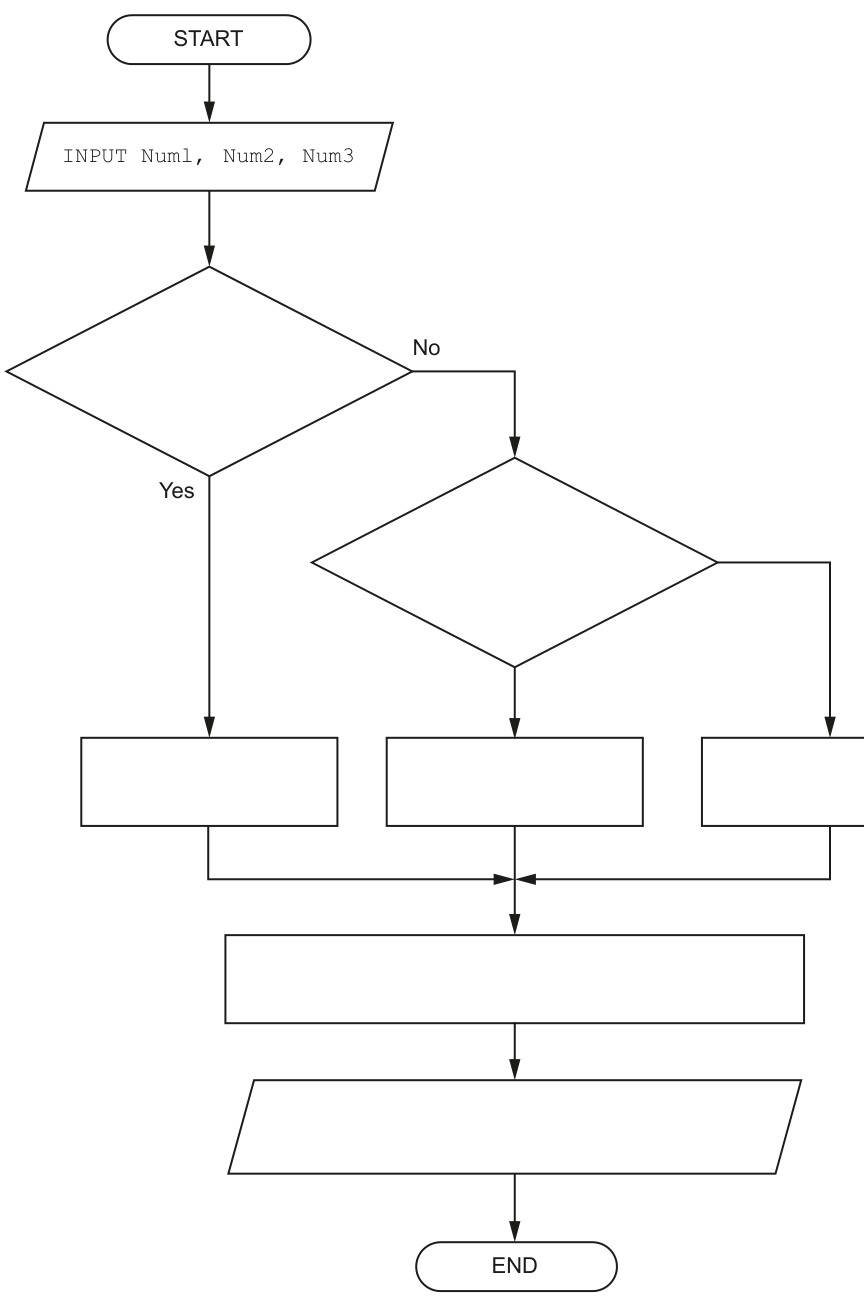
Answer
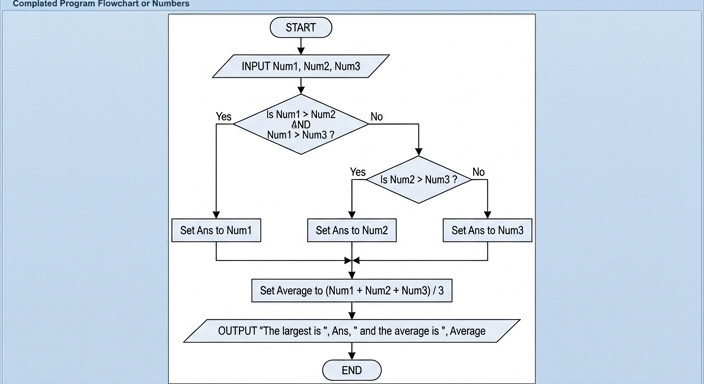
See flowchart
Background Concept
A flowchart shows an algorithm using standard symbols and arrows.
- A terminal/oval shows
STARTorEND. - A parallelogram shows input or output.
- A rectangle shows a process such as an assignment or calculation.
- A diamond shows a decision, with branches such as Yes/No.
This question uses selection. Selection means the program chooses one path depending on a condition. Because the three input values are stated to be all different, there is exactly one largest value, so the logic can use simple > comparisons without needing to handle ties.
Understanding the Question
You are given a partially completed flowchart and asked to fill in the missing parts so it matches the algorithm described.
The algorithm must:
- input
Num1,Num2andNum3 - work out which is the largest and store it in
Ans - calculate the average of the three numbers
- output both the largest value and the average
The input box is already present. The missing parts are the two decision tests, the three assignment boxes for Ans, the rectangle for the average calculation, and the output box text.
Approach
To find the largest of three different numbers efficiently:
- First test whether
Num1is greater than both other values. - If it is,
Ansmust beNum1. - Otherwise, compare
Num2andNum3. - If
Num2is greater thanNum3, thenAnsisNum2; otherwiseAnsisNum3. - After the correct branch joins back together, calculate the average and output both results.
This matches the shape of the given flowchart: one decision, then another decision on the No branch, then three process boxes joining into one common path.
Step-by-Step Reasoning
The first decision must identify whether Num1 is definitely the largest. To do that, it must be greater than both Num2 and Num3, so the condition is:
Num1 > Num2 AND Num1 > Num3
- If this is Yes, the left process box must be
Set Ans to Num1. - If this is No, then
Num1is not the largest, so the largest must be eitherNum2orNum3.
That is why the second decision is simply:
Is Num2 > Num3?
- If Yes, the middle process box is
Set Ans to Num2. - If No, the right process box is
Set Ans to Num3.
After all three branches join, the next rectangle calculates the average:
Set Average to (Num1 + Num2 + Num3) / 3
Finally, the output box must display both required pieces of information, so it outputs a message containing Ans and Average.
A correct completed version is shown here:
Key Takeaways
- To find the largest of three different values, compare one value against both others first.
- Use
ANDwhen one value must satisfy two comparisons at the same time. - In a flowchart, all branches that represent alternative choices should join before the next common step.
- A process box is used for assignments and calculations; a parallelogram is used for output.
Common Mistakes
- Using only
Num1 > Num2in the first decision. That is not enough, becauseNum3might still be larger thanNum1. - Forgetting the
AND Num1 > Num3part of the first condition. - Putting the average calculation inside only one branch instead of after all three branches rejoin.
- Outputting only the largest value or only the average when the question asks for both.
- Using
Ans ← Num2on the wrong branch of the second decision.
Things to Be Careful About
- The question says the values are all different, so strict
>comparisons are fine. - The average should use all three inputs:
(Num1 + Num2 + Num3) / 3. - The second decision is only reached if the first answer is No.
- Make sure each decision branch leads to the correct process box before merging back into the main flow.
A different part of the program contains an algorithm represented by the following program flowchart:
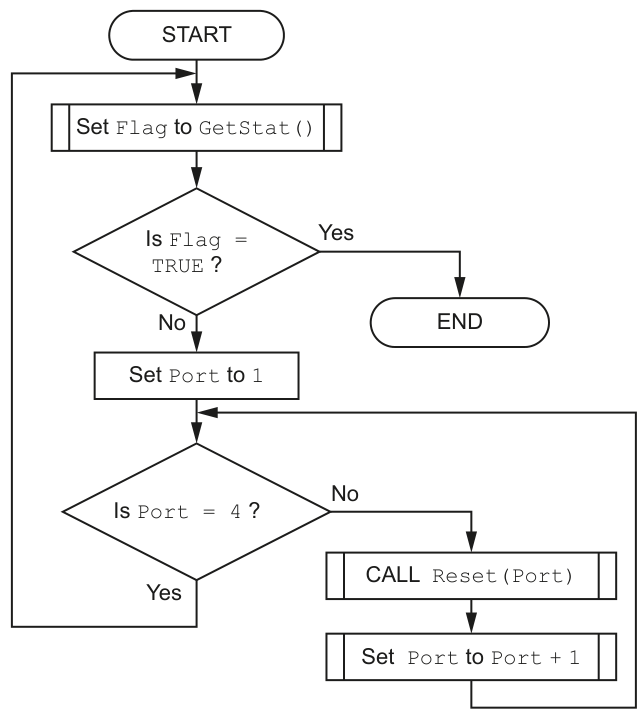
Write pseudocode for the algorithm.
Answer
DECLARE Flag : BOOLEAN
DECLARE Port : INTEGER

REPEAT
   Flag ← GetStat()
   IF Flag = FALSE THEN
      Port ← 1
      WHILE Port <> 4
         CALL Reset(Port)
         Port ← Port + 1
      ENDWHILE
   ENDIF
UNTIL Flag = TRUE
See completed pseudocode
Background Concept
When converting a flowchart into pseudocode, the main task is to recognise the three basic control structures:
- sequence: one step after another
- selection: a decision such as
IF ... THEN - iteration: repetition using
WHILE,REPEAT ... UNTIL, orFOR
This flowchart also uses:
- a function call:
GetStat()returns a value, which is stored inFlag - a procedure call:
Reset(Port)performs an action, so it is written withCALL
A useful skill is deciding which loop structure best matches the diagram. If the test happens after at least one pass through the loop, REPEAT ... UNTIL is often a good fit.
Understanding the Question
You are given a complete flowchart and asked to write equivalent pseudocode.
The flowchart does this:
- set
Flagto the result ofGetStat() - if
FlagisTRUE, stop - otherwise set
Portto1 - while
Portis not4, callReset(Port)and increasePort - when
Portreaches4, go back and checkGetStat()again
So the algorithm keeps checking the status. If the status is not true yet, it resets ports 1, 2 and 3, then checks the status again.
Approach
The cleanest way to write this is:
- an outer
REPEAT ... UNTILloop for the repeated status checking - inside that loop, an
IFto decide whether port resetting is needed - if resetting is needed, initialise
Portto1 - then use a
WHILEloop to process ports untilPort = 4
Why WHILE Port <> 4? Because the flowchart tests Is Port = 4? before performing Reset(Port). So Reset(4) must not happen. Only ports 1, 2 and 3 are reset.
Step-by-Step Reasoning
First declare the variables:
Flagshould beBOOLEANbecause it is compared withTRUEPortshould beINTEGER
The first action box is:
Set Flag to GetStat()
In pseudocode this becomes:
Flag ← GetStat()
Then the decision is Is Flag = TRUE?
- If Yes, the flowchart ends.
- If No, it continues to the port-reset section.
Because the diagram loops back to the GetStat() step after the port loop finishes, the whole process repeats until Flag becomes TRUE. That is why the outer structure can be written as:
REPEAT
   ...
UNTIL Flag = TRUE
Inside the loop, the reset section should only happen when Flag = FALSE, so we use:
IF Flag = FALSE THEN
   ...
ENDIF
Next, the flowchart sets Port to 1:
Port ← 1
Now consider the next decision: Is Port = 4?
- If No, do
CALL Reset(Port)and thenSet Port to Port + 1 - then go back to test
Is Port = 4?again - if Yes, leave the port loop and go back to the top of the outer loop
This means the repetition continues while Port is not 4:
WHILE Port <> 4
   CALL Reset(Port)
   Port ← Port + 1
ENDWHILE
Tracing it mentally:
- start with
Port = 1→ not 4, so reset port 1, then port becomes 2 Port = 2→ not 4, so reset port 2, then port becomes 3Port = 3→ not 4, so reset port 3, then port becomes 4Port = 4→ condition fails, so leave the loop and go back to checkGetStat()again
So the full pseudocode is exactly:
DECLARE Flag : BOOLEAN
DECLARE Port : INTEGER

REPEAT
   Flag ← GetStat()
   IF Flag = FALSE THEN
      Port ← 1
      WHILE Port <> 4
         CALL Reset(Port)
         Port ← Port + 1
      ENDWHILE
   ENDIF
UNTIL Flag = TRUE
Key Takeaways
- Convert each flowchart symbol into the matching pseudocode structure.
- A returned value from a function is assigned to a variable.
- A procedure call is written with
CALL. - Choose the loop condition carefully so the correct values are processed; here ports
1to3are reset, not port4.
Common Mistakes
- Writing
WHILE Port = 4instead ofWHILE Port <> 4. That reverses the logic. - Starting
Portat0or4instead of1. - Forgetting
CALLbeforeReset(Port). - Resetting port
4even though the flowchart stops the inner loop whenPort = 4. - Using a
FOR Port ← 1 TO 4loop, which would usually include4and change the behaviour.
Things to Be Careful About
- Use the CIE assignment arrow
←, not=. GetStat()is used as a function because its value is assigned toFlag.Reset(Port)is used as a procedure because it performs an action.Flagmust be tested correctly againstTRUE/FALSE.- The outer repetition continues until the status becomes true; the inner loop only handles the ports when the status is false.
A factory needs a program to help manage its production of items.
Data will be stored about each item.
The data for each item will be held in a record structure of type Component.
The programmer has started to define the fields that will be needed as shown in the table.
| Field | Example value | Comment |
|---|---|---|
Item_Num | 123478 | a numeric value used as an array index |
Reject | FALSE | TRUE if this item has been rejected |
Stage | 'B' | a letter to indicate the stage of production |
Limit_1 | 13.5 | any value in the range 0 to 100 inclusive |
Limit_2 | 26.4 | any value in the range 0 to 100 inclusive |
Answer
TYPE Component
   DECLARE Item_Num : INTEGER
   DECLARE Reject : BOOLEAN
   DECLARE Stage : CHAR
   DECLARE Limit_1 : REAL
   DECLARE Limit_2 : REAL
ENDTYPE
See completed pseudocode
Background Concept
A record structure is used when one real-world thing needs several related pieces of data stored together. In this case, one factory item has an item number, a reject flag, a production stage and two limit values, so a single simple variable is not enough.
In CIE pseudocode, a record type is declared using TYPE ... ENDTYPE. Inside that type, each field is declared with a name and a suitable data type. Typical data types here are:
INTEGERfor whole numbersBOOLEANforTRUE/FALSECHARfor a single characterREALfor values that may include a decimal part
The important idea is that a record groups related fields into one named structure, so one variable of that type can hold all the data for one item.
Understanding the Question
The question gives a table describing the fields needed for one item of factory data. It explicitly says the data for each item will be held in a record structure of type Component. So this part is asking you to write the pseudocode type definition for that record.
From the table:
Item_Numhas an example like123478, so it is numeric and whole-number based.RejectisTRUEorFALSE, so it must beBOOLEAN.Stageis shown as'B', a single letter, soCHARis appropriate.Limit_1andLimit_2have decimal values like13.5and26.4, so they should beREAL.
The range comment for the limits helps you understand the data, but for this declaration question the main task is the correct record syntax and sensible types.
Approach
The best way to answer is:
- Start the record type with
TYPE Component. - Declare each field on its own line.
- Match each field to the most suitable data type.
- Close the record with
ENDTYPE.
This is a pure declaration task, so no algorithm, loop or processing is needed.
Step-by-Step Reasoning
First, the record type must be named exactly Component, because the question states that each item's data will be held in a record structure of type Component.
So we begin with:
TYPE Component
Now declare each field.
Item_Numstores a number used as an array index. An index is a whole number, soINTEGERis suitable.Rejectstores eitherTRUEorFALSE, so it must beBOOLEAN.Stagestores one letter such as'B', soCHARis the best match.Limit_1can be13.5, so it needs a decimal-capable type:REAL.Limit_2can be26.4, so it is alsoREAL.
That gives:
   DECLARE Item_Num : INTEGER
   DECLARE Reject : BOOLEAN
   DECLARE Stage : CHAR
   DECLARE Limit_1 : REAL
   DECLARE Limit_2 : REAL
Finally, close the type:
ENDTYPE
That completes a valid record structure declaration for one Component.
Key Takeaways
- Use a record when one entity needs several related fields stored together.
- Choose field data types from the example values and descriptions given.
- In CIE pseudocode, define records with
TYPE ... ENDTYPE.
Common Mistakes
- Using
STRINGforRejectinstead ofBOOLEAN.TRUEandFALSEare Boolean values, not text. - Declaring
Limit_1andLimit_2asINTEGER. Their example values include decimal points, so they must beREAL. - Forgetting
ENDTYPE. The record declaration must be closed properly. - Writing assignment statements instead of declarations. This question is about defining the structure, not giving values.
Things to Be Careful About
- Keep the field names exactly as shown:
Item_Num,Reject,Stage,Limit_1,Limit_2. - Use declaration syntax, not program code syntax from another language.
Stageis a single character, soCHARis more precise than a general text type.- The range
0 to 100 inclusivefor the limits describes valid values, but it does not change the need to declare the fields asREAL.
A 1D array Item of 2000 elements will store the data for all items.
Write pseudocode to declare the Item array.
Answer
DECLARE Item : ARRAY[1:2000] OF Component
See completed pseudocode
Background Concept
An array stores many values of the same type under one identifier. A 1D array is a single indexed list. Each position in the array is called an element, and each element is accessed by an index.
In this question, each element is not a simple number or string. Instead, each element is a Component record. That means the array is an array of records: every position stores one full item, including all its fields.
In CIE pseudocode, the declaration pattern is:
DECLARE ArrayName : ARRAY[lower:upper] OF DataType
Understanding the Question
The question says that a 1D array called Item will store the data for all items, and that it must have 2000 elements. The record type from part (i) is Component, so each array element must be of type Component.
So this part is asking for one declaration that combines three facts:
- the array name is
Item - it is one-dimensional
- it stores 2000
Componentrecords
Approach
Use the standard array declaration syntax:
- Write
DECLARE Item. - State the bounds for 2000 elements.
- State that each element is of type
Component.
The key idea is that the array stores many records, not many separate fields.
Step-by-Step Reasoning
The question names the array Item, so that identifier must be used exactly.
Because there are 2000 elements, a natural CIE declaration is:
ARRAY[1:2000]
This gives exactly 2000 positions: 1, 2, 3, ..., 2000.
Now decide what each element contains. From part (i), one item's data is stored in a record of type Component. Therefore the array element type is Component.
Putting the pieces together gives:
DECLARE Item : ARRAY[1:2000] OF Component
This means:
Item[1]stores oneComponentItem[2]stores oneComponent- ...
Item[2000]stores oneComponent
Each of those records then contains the fields Item_Num, Reject, Stage, Limit_1 and Limit_2.
Key Takeaways
- A 1D array stores many elements of the same type.
- An array element type can be a record type, not just a simple type.
- The bounds must match the number of elements required.
Common Mistakes
- Declaring
Itemas a singleComponentinstead of an array ofComponent. - Forgetting
OF Component, which means the element type is missing. - Using the wrong number of elements in the bounds.
- Writing separate arrays for each field, even though the question asks for one array of records.
Things to Be Careful About
- Use the exact array name
Item. - This is a 1D array, so use one pair of bounds, not two dimensions.
- Make sure the array stores
Componentrecords, notINTEGERor another simple type. - If you use
1:2000, that gives exactly 2000 elements, which matches the wording of the question.
Answer
- All the data for one item is kept together in a single record.
- Many items can be stored under one array name and accessed directly by index.
- The whole set of items can be processed easily using loops, for example to search or update records.
See explanation
Background Concept
A record is useful when one object has several different attributes. An array is useful when you need many objects of the same kind. An array of records combines both ideas:
- each record stores all the fields for one item
- the array stores many items of that same record type
This is a very common data structure because it matches real situations well. For example, a school may store many student records, or a factory may store many component records.
Understanding the Question
This part does not ask for code. It asks for three benefits of using an array of records for factory items.
So you need to think about why this structure is better than storing all values separately. The answer should focus on advantages such as organisation, access and processing.
Because the wording says "State three benefits", concise valid points are best. Long explanations are not needed in the exam answer.
Approach
Think of the two structures separately, then combine their advantages:
- What does a record help with? It groups related fields for one item.
- What does an array help with? It stores many similar items under one name and allows indexed access.
- What does the combined structure help with? It makes processing many complete items easier using loops.
That gives you three clear benefit areas.
Step-by-Step Reasoning
First benefit: one item's data stays together.
A factory item has several fields: item number, reject status, stage, and two limits. If these were stored as unrelated separate variables, the data would be harder to manage. A record keeps them together as one complete unit. That improves organisation and reduces the chance of mixing up fields from different items.
Second benefit: many items can be stored in one structure.
A factory will have many items, not just one. An array allows the program to hold lots of Component records using one identifier, Item, with different index positions. This is better than having hundreds or thousands of separate variable names.
Third benefit: easy processing.
Because the items are in an array, the program can use loops to go through them one by one. That makes tasks such as searching, updating, counting rejected items, or printing reports much easier.
A further possible benefit, depending on marking tolerance, is direct indexed access. If you know the index, you can go straight to that position rather than scanning unrelated variables.
Key Takeaways
- Records organise all fields for one entity.
- Arrays organise many entities of the same type.
- Arrays of records are powerful because they support both structured storage and simple repeated processing.
Common Mistakes
- Giving a feature instead of a benefit, for example saying only "it uses an array". You need to say why that helps.
- Repeating the same idea in different words, such as "easy to access" and "simple to retrieve" without adding a distinct new benefit.
- Talking about benefits not linked to this structure, such as claiming it always uses less memory. That is not a guaranteed advantage.
Things to Be Careful About
- Make sure each point is separate enough to earn its own mark.
- Keep the answer focused on the combination of array and record, not just one of them.
- Avoid vague statements like "it is better" unless you explain better in what way.
- Since the question says three benefits, give at least three clear points.
A triangle has sides of length A, B and C.
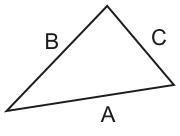
In this example, A is the length of the longest side.
This triangle is said to be right-angled if the following equation is true:
A procedure will be written to check whether three lengths represent a right-angled triangle. The lengths will be input in any sequence.
The procedure IsRA() will:
- prompt and input three integer values representing the three lengths
- test whether the three lengths correspond to the sides of a right-angled triangle
- output a suitable message.
The length of the longest side may not be the first value input.
Write pseudocode for the procedure IsRA().
Answer
PROCEDURE IsRA()
   DECLARE A, B, C, Temp : INTEGER

   OUTPUT "Enter three lengths"
   INPUT A
   INPUT B
   INPUT C

   IF B > A THEN
      Temp ← A
      A ← B
      B ← Temp
   ENDIF

   IF C > A THEN
      Temp ← A
      A ← C
      C ← Temp
   ENDIF

   IF A * A = (B * B) + (C * C) THEN
      OUTPUT "Right-angled triangle"
   ELSE
      OUTPUT "Not a right-angled triangle"
   ENDIF
ENDPROCEDURE
See completed pseudocode
Background Concept
A right-angled triangle satisfies Pythagoras' theorem: the square of the longest side is equal to the sum of the squares of the other two sides.
If the longest side is called A, then the condition is:
The important detail in this question is that the three lengths are entered in any order. That means we cannot just assume the first value entered is the longest one. Before applying the formula, the algorithm must make sure the largest value is stored in the variable used on the left-hand side of the equation.
In Paper 2, answers should be written in CIE pseudocode. That means:
- declare variables with
DECLARE - use
←for assignment - use
IF ... THEN ... ELSE ... ENDIF - write a complete procedure, not informal English
Understanding the Question
The question asks for a procedure called IsRA() that does three jobs:
- prompts for and inputs three integer lengths
- checks whether they could be the sides of a right-angled triangle
- outputs a suitable message
The key clue is the sentence saying the lengths will be input in any sequence, and that the longest side may not be the first value input. That tells you the main challenge is not the Pythagoras test itself, but arranging the data so that the largest side is used correctly.
So the procedure must not simply test the first value squared against the other two. It must first identify the longest side.
Approach
A simple and efficient approach is:
- Input three integers into
A,BandC. - Compare
BwithA. IfBis larger, swap them. - Compare
CwithA. IfCis larger, swap them. - After these two comparisons,
Ais guaranteed to hold the largest value. - Apply the right-angled triangle test using
Aas the hypotenuse. - Output the correct message.
This works because we do not need to sort all three values fully. We only need to ensure that the largest one is in A. The order of B and C does not matter, because both are just squared and added.
Step-by-Step Reasoning
First, the procedure is declared:
PROCEDURE IsRA()gives the required procedure name.
Then the variables are declared:
A,BandCstore the three side lengths.Tempis needed for swapping values safely.
Next, the procedure prompts and inputs the values:
OUTPUT "Enter three lengths"INPUT AINPUT BINPUT C
At this point, the values may be in any order.
Suppose the user enters 3, 5, 4.
Initially:
A = 3B = 5C = 4
Now test B > A:
5 > 3is true, so swapAandB- after swapping:
A = 5,B = 3,C = 4
Now test C > A:
4 > 5is false, so no change
Now A is the longest side, which is exactly what we need.
Another example: input 4, 3, 5.
Initially:
A = 4B = 3C = 5
Test B > A:
3 > 4is false, so no swap
Test C > A:
5 > 4is true, so swapAandC- result:
A = 5,B = 3,C = 4
Again, A ends up holding the longest side.
Once A is the largest value, the Pythagoras test is safe:
For 5, 3, 4:
and
So the condition is true, and the algorithm outputs "Right-angled triangle".
If the input were 2, 3, 4, after placing the largest in A we get:
and
Since 16 is not equal to 13, the triangle is not right-angled, so the ELSE message is output.
A good feature of this solution is that it uses only two comparisons and at most two swaps. That is enough because the task is only to identify the largest side, not to sort all three fully.
Key Takeaways
- For a right-angled triangle, square of longest side = sum of squares of the other two sides.
- When inputs can arrive in any order, do not assume the first one is the largest.
- Swapping values with a temporary variable is a standard technique in pseudocode.
- In Paper 2, write complete CIE-style pseudocode with declarations, assignment arrows and proper control structures.
- You only need the largest value in the hypotenuse variable; the other two do not need sorting.
Common Mistakes
- Testing the formula on the values exactly as entered. This can give the wrong result if the largest side is not first.
- Forgetting to use a temporary variable when swapping. Without
Temp, one original value is lost. - Using
=for assignment instead of←. In CIE pseudocode,=is for comparison and←is for assignment. - Fully sorting all three values unnecessarily. That is not wrong if done correctly, but it is more work than needed.
- Outputting only one message. The question requires a suitable message for both outcomes.
Things to Be Careful About
- Make sure
Ais the longest side before applying the equation. - Keep the procedure name exactly as given:
IsRA(). - Declare all variables, including the temporary swap variable.
- Use integer variables because the question specifies integer inputs.
- Write the condition exactly:
A * A = (B * B) + (C * C). - Ensure the
IF ... ELSE ... ENDIFstructure is complete and correctly nested.
A program is being designed in pseudocode.
The program contains a global 1D array Data of type string containing 200 elements.
The first element has the index value 1.
A procedure Process() is written to initialise the values in the array:
PROCEDURE Process(Label : STRING)
    DECLARE Index : INTEGER
    Index ← 0
    INPUT Data[Index]
    WHILE Index < 200
        Index ← Index + 1
        CASE OF (Index MOD 2)
            0 : Data[Index] ← TO_UPPER(Label)
            1 : Data[Index] ← TO_LOWER(Label)
            OTHERWISE : OUTPUT "Alarm 1201"
        ENDCASE
    NEXT Index
    OUTPUT "Completed " & Index & " times"
ENDPROCEDURE
The pseudocode contains two syntax errors and one other error.
Identify the errors.
Syntax error 1 ....................................................................................................................
Syntax error 2 ....................................................................................................................
Other error .........................................................................................................................
Answer
- Syntax error 1:
PROCEDURE Process(Label : STRING)should declare the parameter asBYVAL Label : STRING. - Syntax error 2:
NEXT Indexshould beENDWHILE. - Other error:
Indexis set to0, soData[0]is accessed, but the first valid index is1.
PROCEDURE Process(Label : STRING) should use BYVAL Label : STRING; NEXT Index should be ENDWHILE; Data[0] is invalid because the array starts at index 1
Background Concept
In Cambridge pseudocode, a syntax error means the pseudocode statement itself is written in an invalid form. Typical examples are using the wrong keyword, missing a required keyword, or closing a construct with the wrong terminator. A non-syntax error means the code may be written in a valid form but still does something wrong.
This procedure uses three ideas that must all be checked:
- parameter declaration in a procedure heading
- correct loop structure and loop terminator
- valid array indexing
For arrays, the lower and upper bounds matter. This question explicitly says the first element of Data has index 1, so valid positions are Data[1] to Data[200]. Accessing Data[0] is outside the allowed range.
Understanding the Question
You are given one block of pseudocode and asked to find exactly:
- two syntax errors
- one other error
So the task is not to rewrite the whole procedure. It is to inspect the given code line by line and identify which parts break pseudocode rules and which part is simply wrong in use.
The important clues in the stem are:
Datais a global 1D array of 200 strings- the first index is
1 - the code is meant to initialise the array
That means any use of index 0 should immediately make you suspicious.
Approach
A good way to tackle this kind of question is:
- Check the procedure heading.
- Check the loop structure from start to finish.
- Check any array access against the declared bounds.
- Separate true syntax mistakes from errors that would only show up when the algorithm runs.
That gives the three expected answers without guessing.
Step-by-Step Reasoning
Look at the procedure header:
PROCEDURE Process(Label : STRING)
In CIE-style pseudocode, when a parameter is given, its passing method should be stated. Here Label is only being used, not changed, so it should be passed by value. The correct form is:
PROCEDURE Process(BYVAL Label : STRING)
So that is one syntax error.
Now look at the loop:
WHILE Index < 200
    ...
NEXT Index
NEXT Index is used to close a FOR ... NEXT loop, not a WHILE loop. A WHILE loop must end with ENDWHILE. So this is the second syntax error.
Now check the indexing:
Index ← 0
INPUT Data[Index]
The array starts at index 1, not 0. So Data[0] is invalid. That is not a syntax mistake, because the statement is written in a valid form. The problem is that it tries to use an array position that does not exist. That is the “other error”.
A precise way to state it is either:
Indexshould not be initialised to0, orData[0]is invalid because the array begins at1
Both express the same underlying issue.
Key Takeaways
WHILEloops end withENDWHILE;FORloops end withNEXT.- In procedure headings, parameters should be declared correctly, including the passing method where required.
- Always compare array access with the declared lower and upper bounds.
- A line can be syntactically valid but still wrong because of invalid indexing.
Common Mistakes
- Writing
NEXTto end any kind of loop. It is only forFORloops. - Missing the difference between syntax errors and run-time problems.
Data[0]is not a syntax error. - Forgetting that exam pseudocode arrays are often 1-based even if many real languages are 0-based.
- Giving vague answers like “the array is wrong” instead of identifying the exact issue: accessing
Data[0].
Things to Be Careful About
- Use the exact keyword expected by the construct:
ENDWHILE, notNEXT. - Read the bounds given in the question carefully. Here the lower bound is explicitly stated as
1. - If you identify the indexing problem, make sure you explain why it is wrong: index
0is outside the array. - When a question asks for separate categories of error, do not list three syntax errors or three general problems. Match the categories asked for exactly.
The procedure contains a statement that is not needed.
Identify the pseudocode statement and explain why it is not needed.
Statement ..........................................................................................................................
Explanation .......................................................................................................................
Answer
- Statement:
OTHERWISE : OUTPUT "Alarm 1201" - Explanation:
Index MOD 2can only give0or1, so theOTHERWISEbranch can never be used.
Statement: OTHERWISE : OUTPUT "Alarm 1201"; Explanation: Index MOD 2 can only be 0 or 1
Background Concept
A CASE OF statement chooses one branch from a set of possible values. An OTHERWISE branch is optional and is used when none of the listed values matches.
The MOD operator gives the remainder after division. For any integer:
- dividing by
2gives a remainder of either0or1
So Index MOD 2 can never produce any other value.
Understanding the Question
This part is asking you to find one statement that is unnecessary, not one that is wrong. That means the program logic already covers all possible valid cases, so one extra line has no effect.
The relevant code is:
CASE OF (Index MOD 2)
    0 : Data[Index] ← TO_UPPER(Label)
    1 : Data[Index] ← TO_LOWER(Label)
    OTHERWISE : OUTPUT "Alarm 1201"
ENDCASE
You need to decide whether OTHERWISE is ever reachable.
Approach
The quickest method is to list every possible result of Index MOD 2.
If the result set is fully covered by the explicit case labels, then OTHERWISE is redundant.
Step-by-Step Reasoning
The expression being tested is:
Index MOD 2
Possible outcomes:
- if
Indexis even, the result is0 - if
Indexis odd, the result is1
There are no other possible remainders when dividing an integer by 2.
Now compare those outcomes with the CASE branches:
0is already covered1is already covered
So every possible value has a matching branch. That means:
OTHERWISE : OUTPUT "Alarm 1201"
will never be selected. Because it can never run, it is not needed.
This does not make it a syntax error. It is simply redundant.
Key Takeaways
MOD 2is a standard way to test odd/even values.- The only results of
x MOD 2are0and1. - An
OTHERWISEbranch is only useful if some values are not already covered. - Redundant code is not necessarily wrong, but it is unnecessary.
Common Mistakes
- Thinking
OTHERWISEmust always be present in everyCASEstatement. It does not. - Forgetting that
MOD 2cannot produce values such as2or-1in this context. - Calling this a syntax error. It is not invalid syntax; it is just unreachable code.
Things to Be Careful About
- Base your reasoning on the expression being tested, not on general habits about
CASEstatements. - When explaining why the statement is not needed, mention the actual possible values:
0and1. - Keep the answer focused on necessity, not on rewriting the whole block.
After correcting all syntax errors, the pseudocode is translated into program code which compiles without generating any errors.
When the program is executed it unexpectedly stops responding.
Identify the type of error that has occurred.
Answer
- Run-time error
Run-time error
Background Concept
The three common error types at this level are:
- syntax error: the code breaks language rules, so translation or compilation fails
- logic error: the program runs, but gives the wrong result
- run-time error: the program starts running, then fails or stops unexpectedly while executing
The key difference is when the problem appears.
Understanding the Question
The question says:
- all syntax errors have been corrected
- the program code compiles successfully
- when executed, it unexpectedly stops responding
So the problem is not during translation. It happens after the program has started to run.
Approach
Use elimination based on the stage of failure:
- If it compiles, it is not a syntax error.
- If it stops during execution, it is not simply a normal wrong-answer logic error.
- Therefore it is a run-time error.
Step-by-Step Reasoning
A syntax error would have prevented the code from compiling. But the question explicitly says compilation succeeds.
A logic error usually means the program completes but produces an incorrect output. The description here is stronger: it “unexpectedly stops responding” during execution.
That behaviour matches a run-time error.
This is also consistent with the remaining issue in the pseudocode: attempting to use an invalid array index can cause a failure when the program runs.
Key Takeaways
- Always classify the error by when it happens.
- Compile failure points to syntax.
- Wrong result with successful execution points to logic.
- Failure during execution points to run-time.
Common Mistakes
- Writing “syntax error” even though the question says the program compiled.
- Writing “logic error” for any unexpected behaviour. A logic error usually still lets the program finish.
- Ignoring the phrase “when the program is executed”, which is the main clue.
Things to Be Careful About
- Read the timeline carefully: corrected syntax, compiled, then executed.
- In exam questions, words such as “compiles”, “runs”, “stops”, and “wrong output” are strong clues to the error type.
- Do not over-explain in a one-mark identification question; the correct label is enough.
A music player stores music in a digital form and has a display which shows the track being played.
Up to 16 characters can be displayed. Track titles longer than 16 characters will need to be trimmed as follows:
- Words must be removed from the end of the track title until the resulting title is less than 14 characters.
- When a word is removed, the space in front of that word is also removed.
- Three dots are added to the end of the last word displayed when one or more words have been removed.
The table below shows some examples:
| Original title | Display string | |||||||||||||||
|---|---|---|---|---|---|---|---|---|---|---|---|---|---|---|---|---|
| 1 | 2 | 3 | 4 | 5 | 6 | 7 | 8 | 9 | 10 | 11 | 12 | 13 | 14 | 15 | 16 | |
| Bat out of Hull | B | a | t | o | u | t | o | f | H | u | l | l | ||||
| Bohemian Symphony | B | o | h | e | m | i | a | n | . | . | . | |||||
| Paperbook Writer | P | a | p | e | r | b | o | o | k | W | r | i | t | e | r | |
| Chris Sings the Blues | C | h | r | i | s | S | i | n | g | s | . | . | . | |||
| Green Home Alabama | G | r | e | e | n | H | o | m | e | . | . | . |
A function Trim() will:
- take a string representing the original title
- return the string to be displayed.
Assume:
- Words in the original title are separated by a single space character.
- There are no spaces before the first word or after the last word of the original title.
- The first word of the original title is less than 14 characters.
Write pseudocode for the function Trim().
Answer
FUNCTION Trim(BYVAL OriginalTitle : STRING) RETURNS STRING
   DECLARE DisplayTitle : STRING
   DECLARE Position : INTEGER

   DisplayTitle ← OriginalTitle

   IF LENGTH(DisplayTitle) > 16 THEN
      REPEAT
         Position ← LENGTH(DisplayTitle)
         WHILE MID(DisplayTitle, Position, 1) <> " "
            Position ← Position - 1
         ENDWHILE
         DisplayTitle ← LEFT(DisplayTitle, Position - 1)
      UNTIL LENGTH(DisplayTitle) < 14
      DisplayTitle ← DisplayTitle & "..."
   ENDIF

   RETURN DisplayTitle
ENDFUNCTION
See completed pseudocode
Background Concept
This question is about string processing in pseudocode. A string can be examined using functions such as LENGTH, MID and LEFT.
LENGTH(String)gives the number of characters.MID(String, Start, Count)extracts part of a string.LEFT(String, Count)takes the leftmost characters.
The algorithm also uses standard control structures:
- selection: decide whether trimming is needed
- iteration: keep removing words until the rule is satisfied
- sequence: carry out the steps in the correct order
The key idea is that the title must fit into 16 display positions, but if words are removed then ... must be added. Because the dots take 3 characters, the remaining title must be shorter than 14 characters before the dots are added. That is why the rule says less than 14, not less than or equal to 14.
Understanding the Question
We are asked to write a function Trim() that takes the original track title and returns the exact display string.
Important details from the question:
- If the title is 16 characters or fewer, it can be displayed unchanged.
- If it is longer than 16 characters, whole words are removed from the end.
- When a word is removed, the space before it is removed too.
- After one or more words have been removed, three dots are added to the end.
- The title must keep losing words until the remaining text is less than 14 characters.
- There is only one space between words, and the first word is guaranteed to be less than 14 characters.
So this is not character-by-character truncation. We must trim by whole words from the right-hand end.
Approach
A good strategy is:
- Copy the original title into a working string.
- Check if its length is already 16 or less.
- If yes, return it unchanged.
- Otherwise, repeatedly remove the last word.
- To do that, start at the end of the string and move backwards until the space before the last word is found.
- Keep only the characters to the left of that space.
- Stop when the remaining title is less than 14 characters.
- Add
...and return the result.
This matches the rules exactly and works for titles with any number of words.
Step-by-Step Reasoning
The function begins by declaring:
DisplayTitleas the working copy of the titlePositionas the index used to search backwards
DisplayTitle ← OriginalTitle
This means we do not destroy the original parameter; we work on a copy.
Next:
IF LENGTH(DisplayTitle) > 16 THEN
Trimming only happens when the title is longer than the display width. If the length is 16 or less, the IF body is skipped and the original title is returned unchanged.
Inside the IF, we use a REPEAT ... UNTIL loop. A repetition structure is suitable because once we know the title is too long, we definitely need to remove at least one word.
Position ← LENGTH(DisplayTitle)
This starts the search at the final character of the current title.
WHILE MID(DisplayTitle, Position, 1) <> " "
This loop moves leftwards until a space is found. That space is the separator before the last word.
Position ← Position - 1
So if the string were Chris Sings the Blues, the pointer would move left from s in Blues, then through e, u, l, B, until it reaches the space before Blues.
When the space is found:
DisplayTitle ← LEFT(DisplayTitle, Position - 1)
This keeps everything before the space. That removes both:
- the last word
- the space in front of it
That is exactly what the question requires.
The loop ends when:
LENGTH(DisplayTitle) < 14
This condition is very important. If you stopped at 14 characters, then adding ... would produce 17 characters, which would not fit on a 16-character display.
Finally:
DisplayTitle ← DisplayTitle & "..."
The ellipsis is added only if trimming happened, because this line is inside the IF LENGTH(DisplayTitle) > 16 THEN block.
Then:
RETURN DisplayTitle
This returns either:
- the unchanged original title, or
- the trimmed title with dots added
For example, with Green Home Alabama:
- original length is more than 16, so trimming is needed
- remove
Alabama - remaining title becomes
Green Home - length is now less than 14
- add
... - result is
Green Home...
Key Takeaways
- Use string functions to manipulate text precisely.
- When trimming by words, search for the last space and cut there.
- Always match the stopping condition to the final size limit, including anything added afterwards.
- A function is appropriate because one input string produces one returned string.
Common Mistakes
- Trimming when the title has exactly 16 characters. The question says titles longer than 16 need trimming.
- Stopping when the remaining title is 14 characters. After adding 3 dots, the result would be too long.
- Removing only the last word but leaving the space before it. The question says the space must also be removed.
- Adding
...even when no words were removed. Dots are only added after trimming. - Cutting characters from the end instead of removing whole words. The examples clearly show whole-word trimming.
Things to Be Careful About
- Use the exact built-in string operations consistently.
- Make sure the backward search starts at the last character of the current title, not the original title.
- The assumptions matter: single spaces between words and first word shorter than 14 characters make the loop safe.
- Keep the loop condition as less than 14, not less than or equal to 14.
- In CIE pseudocode, use the assignment arrow
←, not=.
Music is stored as a sequence of digital samples.
Each digital sample is a denary value in the range 0 to 99999999 (8 digits).
The samples are to be stored in a text file. Each sample is converted to a numeric string and 32 samples are concatenated (joined) to form a single line of the text file.
Each numeric string is 8 characters in length; leading ‘0’ characters are added as required.
Example:
| Sample | Denary value | String |
|---|---|---|
| 1 | 456 | "00000456" |
| 2 | 48 | "00000048" |
| 3 | 37652 | "00037652" |

| | |
| 32 | 673 | "00000673" |
The example samples will be stored in the text file as a single line:
"000004560000004800037652...00000673"
Answer
- It wastes storage space because extra
0characters are stored even though they do not add information to the sample value.
Wastes storage space
Background Concept
When numeric data is stored in a text file, each value is stored as characters rather than as compact binary data. A common technique is fixed-width storage, where every item has the same number of characters. If a value is shorter, padding characters such as leading zeros are added.
This makes extraction easy because every sample starts in a predictable position, but it also means extra characters may be stored that are not really part of the value.
Understanding the Question
Each sample can be anything from 0 to 99999999, so some samples have fewer than 8 digits. The method in the question forces every sample to use exactly 8 characters by adding leading zeros.
The question asks for one drawback of doing this.
Approach
Think about what leading zeros achieve and what they cost.
Benefit:
- every sample has a fixed length, so extracting sample 1, sample 2, and so on is easy
Cost:
- many samples may need several extra characters that carry no useful information
So the clearest drawback is wasted storage space.
Step-by-Step Reasoning
Take the sample value 48.
- As a number, it needs only the digits
4and8. - In the file, it becomes
00000048. - That means 6 extra characters are stored.
Across a large music file with many samples, this extra padding increases the file size unnecessarily. The zeros do help make all samples the same width, but the drawback is that the file contains more characters than are actually needed to represent the values.
Key Takeaways
- Fixed-width text storage is simple to process.
- Padding with leading zeros makes records uniform.
- The main trade-off is increased storage size.
Common Mistakes
- Saying the zeros change the value. They do not change the numeric value represented.
- Giving an advantage instead of a drawback, such as easier extraction.
- Talking about sound quality. The question is about storage format, not audio quality.
Things to Be Careful About
- The question asks for one drawback only, so one clear point is enough.
- Keep the answer linked to text-file storage, not binary storage.
- Make sure the drawback is specifically caused by the leading zeros.
Suggest an alternative method of storing the samples which does not involve adding leading ‘0’ characters but which would still allow each individual sample to be extracted.
Answer
- Store each sample as its digits only and separate samples with a delimiter such as a comma, so each sample can be extracted by splitting at the delimiters.
Use a delimiter between samples
Background Concept
An alternative to fixed-width storage is variable-width storage. In this method, each item is stored using only as many characters as it needs. To keep items separate, a delimiter character is placed between them.
Common delimiters include:
- comma
- space
- semicolon
- newline
This is widely used in text files because it avoids padding shorter values.
Understanding the Question
The question wants another way to store the samples so that:
- leading zeros are not needed
- each sample can still be extracted later
So the method must preserve the boundaries between one sample and the next.
Approach
If samples are not all the same width, the program needs some other way to know where one sample ends and the next begins. The usual answer is to insert a separator character between samples.
For example, the samples could be stored like this:
456,48,37652,...,673
Then the program reads characters until it reaches a comma, which marks the end of one sample.
Step-by-Step Reasoning
Without leading zeros:
456is stored as45648is stored as4837652is stored as37652
If we simply joined them together, we would get something like 4564837652, and it would be impossible to know where one sample ends.
So we add a delimiter:
456,48,37652,...,673
Now each sample can be extracted by reading up to the next comma. This avoids storing lots of extra zeros while still making each sample recoverable.
Key Takeaways
- Variable-length storage saves space when values have different lengths.
- Delimiters are a standard way to separate text items.
- The separator makes later extraction possible.
Common Mistakes
- Saying "just store the numbers" without explaining how they would be separated.
- Suggesting concatenation with no delimiter, which makes extraction ambiguous.
- Giving a binary-storage answer when the question is specifically about a text file.
Things to Be Careful About
- The separator must be a character that cannot be confused with a digit.
- The answer must explain both storage and extraction, not just storage.
- Since the question asks for an alternative method, it is fine to give any clear delimiter-based approach.
Answer
- The program must search for the delimiters to find where each sample ends, so extracting samples is slower or more complex than using fixed-length fields.
Must search for delimiters when extracting samples
Background Concept
Every storage method involves a trade-off.
- Fixed-width fields use more space but make direct access easier because positions are predictable.
- Delimiter-separated fields save padding space but require the program to detect separators.
So when a question asks for a drawback of an alternative method, you should compare what is gained with what is lost.
Understanding the Question
In part (b)(ii), an alternative such as comma-separated samples was suggested. This part asks for one drawback of that method.
Because the samples no longer all have the same length, the system cannot jump straight to a sample position by counting 8 characters each time.
Approach
Think about what extra work delimiter-based storage creates.
To extract values, the program has to:
- read characters
- look for separator characters
- decide where one sample ends
That is more processing than fixed-width extraction.
Step-by-Step Reasoning
With fixed-width storage, sample boundaries are automatic:
- characters 1 to 8 are sample 1
- characters 9 to 16 are sample 2
- characters 17 to 24 are sample 3
No searching is needed.
With comma-separated storage, the samples may have different lengths:
456,48,37652,...
Now the program cannot know the boundary of the next sample from its position alone. It must scan through the text until it finds the next comma. That means extraction is more complex, and may also be slower.
So a correct drawback is that delimiters have to be found during processing.
Key Takeaways
- Saving space often makes processing less direct.
- Fixed-length fields are easy to index.
- Delimiter-separated fields need parsing.
Common Mistakes
- Repeating the same drawback as part (b)(i) without relating it to the alternative method.
- Giving an advantage of the delimiter method instead of a drawback.
- Saying it is impossible to extract samples. It is possible, just less direct.
Things to Be Careful About
- Link your drawback to the actual alternative you suggested.
- One clear drawback is enough for one mark.
- If you use a delimiter method, the strongest drawback is usually extra parsing or searching during extraction.
A fitness club has a computerised membership system.
The system stores information for each club member: name, home address, email address, mobile phone number, date of birth and exercise preferences.
Many classes are full, and the club creates a waiting list for each class. The club adds details of members who want to join a class that is full to the waiting list for that class.
When the system identifies that a space is available in one of the classes, a new module will send a text message to each member who is on the waiting list.
Decomposition will be used to break the new module into sub-modules (sub-problems).
Identify three sub-modules that could be used in the design and describe their use.
Sub-module 1 ...........................................................................................................................
Use ...........................................................................................................................................
Sub-module 2 ...........................................................................................................................
Use ...........................................................................................................................................
Sub-module 3 ...........................................................................................................................
Use ...........................................................................................................................................
Answer
-
Sub-module 1: Check for available spaces in classes
Use: Detect when a class that was full now has a vacant place. -
Sub-module 2: Retrieve the waiting list for the class
Use: Find the members on the waiting list and obtain their details, such as mobile numbers. -
Sub-module 3: Send text messages
Use: Create and send a text message to each member on the waiting list for that class.
See explanation
Background Concept
Decomposition means breaking a larger problem into smaller sub-problems, often called modules or sub-modules. Each module should perform one clear task. This makes a solution easier to design, test, debug and maintain.
In program design, a good module usually:
- has a single purpose
- can be described clearly in one sentence
- fits into a larger sequence of processing
- can be tested on its own
For a real system, this often means separating input, processing and output tasks. For example, one module may detect a condition, another may collect the data needed, and another may produce the final result.
Understanding the Question
The new module is needed when a space becomes available in a class. At that point, the system must send a text message to each member on that class waiting list.
So the overall task is not one single action. The program must:
- know that a vacancy exists
- know which class it is for
- find the correct people on the waiting list
- send the message to them
The question asks for three sub-modules and what each one does. That means you are not writing code here; you are identifying sensible parts of the design.
Approach
A good way to answer is to think of the process in order:
- detect that a place is free
- get the waiting list data for the correct class
- send the text messages
These are distinct tasks, so they make good sub-modules. Each one has a different responsibility, which is exactly what decomposition is meant to achieve.
Step-by-Step Reasoning
A suitable first sub-module is one that checks whether a class now has a free place. The waiting-list process should only happen if this condition is true, so this is a natural separate module.
A second useful sub-module is one that accesses the waiting list for that class. Once a vacancy is found, the system needs the list of members waiting for that specific class, along with enough details to contact them. The important piece of data here is the mobile phone number.
A third sub-module is one that sends the messages. This module would take the selected members and either compose a standard text message or use a prepared message, then send it to each person.
These three modules work together in sequence:
- vacancy found
- waiting list retrieved
- texts sent
That is a clear decomposed design.
Key Takeaways
- Decomposition breaks a larger problem into manageable modules.
- Each module should do one specific job.
- A strong answer names realistic modules and explains their purpose clearly.
- For system design questions, think in terms of input, processing and output steps.
Common Mistakes
- Giving only module names without saying what they do.
- Describing very vague modules such as "process data" or "do the task".
- Repeating the same idea three times in different words.
- Naming modules that are not really needed for the stated task.
Things to Be Careful About
- The question asks for three sub-modules, so give exactly three clear ones.
- Make sure each use is linked to this scenario: waiting lists, class spaces and text messages.
- A sub-module name should be specific enough to show its role.
- The description should explain the purpose of the module, not how to code it in detail.
A different part of the program is represented by the following state-transition diagram.
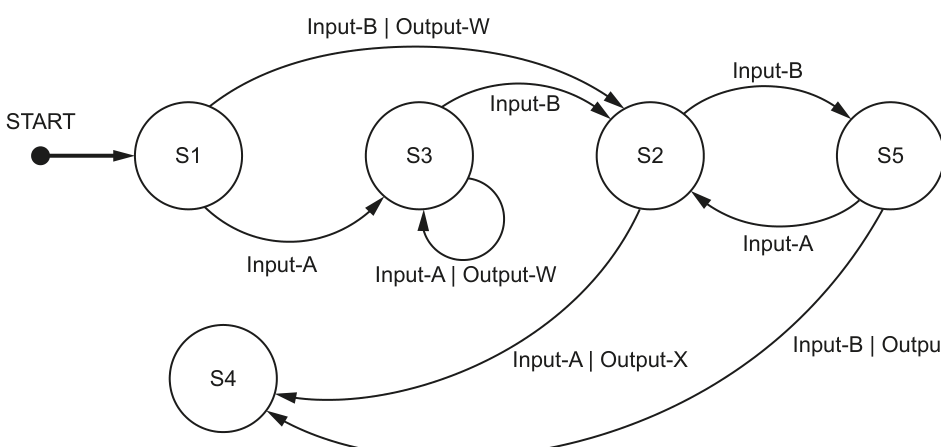
Complete the table to show the inputs, outputs and next states.
Assume that the current state for each row is given by the ‘Next state’ on the previous row. For example, the first Input-A is made when in state S1.
If there is no output for a given transition, then the output cell should contain ‘none’.
The first two rows have been completed.
| Input | Output | Next state |
|---|---|---|
| S1 | ||
| Input-A | none | S3 |
| Output-W | ||
| none | ||
| Input-B | ||
| Input-A | ||
| S4 |
Working
Start at S1.
Input-AfromS1gives outputnoneand moves toS3.- From
S3,Input-AgivesOutput-Wand stays inS3. - From
S3,Input-Bgivesnoneand moves toS2. - From
S2,Input-Bgivesnoneand moves toS5. - From
S5,Input-Agivesnoneand moves toS2. - From
S2,Input-AgivesOutput-Xand moves toS4.
Answer
| Input | Output | Next state |
|---|---|---|
| S1 | ||
| Input-A | none | S3 |
| Input-A | Output-W | S3 |
| Input-B | none | S2 |
| Input-B | none | S5 |
| Input-A | none | S2 |
| Input-A | Output-X | S4 |
See completed table
Background Concept
A state-transition diagram shows how a system moves between states. A state is the current condition the system is in. A transition is a change from one state to another, caused by an input. Some transitions also produce an output.
A label such as Input-B | Output-W means:
- if
Input-Boccurs while the system is in that state - the system follows that arrow
Output-Wis produced- the system arrives at the state at the end of the arrow
If a transition label shows only an input, then there is no output, so the output is recorded as none.
Understanding the Question
You are given a state-transition diagram and a partly completed table. The question tells you that the current state for each row is the Next state from the previous row.
So this is a tracing exercise:
- begin in the starting state shown in the first row
- use the input for that row
- find the matching arrow from that state
- record any output
- record the next state
- then continue from there
The first two rows are already done, so you must continue the sequence correctly.
Approach
The safest method is to process the table one row at a time.
For each row:
- identify the current state
- look at the outgoing arrows from that state
- choose the arrow whose input matches the row
- write the output from that arrow, or
noneif no output is shown - write the state reached by that arrow
Then use that next state as the starting point for the following row.
Step-by-Step Reasoning
The initial row tells us the system starts in S1.
The next row is already given:
- current state
S1 - input
Input-A - the diagram shows
S1 -> S3onInput-A - there is no output shown
- so output is
noneand next state isS3
Now the next row starts from S3.
Row 3
We need an output of Output-W.
From S3, there are two possible transitions:
Input-BtoS2with no outputInput-Aback toS3withOutput-W
So row 3 must be:
- input
Input-A - output
Output-W - next state
S3
Row 4
We are still in S3 because the previous row stayed in S3.
This row shows output none.
From S3, the transition with no output is:
Input-BtoS2
So row 4 is:
- input
Input-B - output
none - next state
S2
Row 5
Current state is now S2.
The input is already given as Input-B.
From S2:
Input-Bgoes toS5- no output is shown
So row 5 is:
- input
Input-B - output
none - next state
S5
Row 6
Current state is now S5.
The input is already given as Input-A.
From S5:
Input-Agoes toS2- no output is shown
So row 6 is:
- input
Input-A - output
none - next state
S2
Row 7
Current state is now S2.
The next state is already given as S4.
From S2, the transition that reaches S4 is:
Input-A | Output-X
So row 7 is:
- input
Input-A - output
Output-X - next state
S4
That completes the table.
Key Takeaways
- In a state-transition diagram, follow arrows from the current state, not from anywhere else.
- The
Next statefrom one row becomes the starting state for the next row. - If no output is written on the transition, record
none. - Self-loops keep the system in the same state.
Common Mistakes
- Reading a transition from the wrong starting state.
- Forgetting that a self-loop means the state does not change.
- Writing an output when none is shown on the arrow.
- Choosing a transition that reaches the correct state but uses the wrong input.
- Not carrying the next state forward to the following row.
Things to Be Careful About
- Pay attention to both parts of a label: input and output.
- The current state is not always the start state; it changes after every row.
Output-W,Output-XandOutput-Yare different and must match exactly.- When the table already gives one item, such as the output or next state, use that as a clue to identify the correct transition.
Identify the input sequence that will cause the minimum number of state changes in the transition from S1 to S4.
Answer
Input-B,Input-A
Input-B, Input-A
Background Concept
A state-transition diagram can be used not only to trace a known sequence, but also to find a sequence that achieves a target state. In this type of question, you look for a path from the start state to the required end state and count how many transitions are used.
Each arrow represents one state change. The sequence with the fewest arrows is the one with the minimum number of state changes.
Understanding the Question
The question asks for the input sequence that causes the minimum number of state changes from S1 to S4.
So you are not being asked for every possible route. You only need the shortest route in terms of transitions.
The inputs are the labels on the arrows, so once you find the shortest path, you write down the inputs in that order.
Approach
Start at S1 and look for the quickest way to reach S4.
- Check whether there is a direct transition from
S1toS4. - If not, check whether
S4can be reached in two transitions. - If yes, that must be minimal, because one transition is impossible.
Then write the inputs on those transitions in order.
Step-by-Step Reasoning
From S1, there are two outgoing transitions:
Input-AtoS3Input-BtoS2
There is no direct arrow from S1 to S4, so at least two state changes are needed.
Now check each two-step possibility.
Route through S3
S1 --Input-A--> S3- from
S3, you can go toS2onInput-Bor stay inS3onInput-A - neither of these reaches
S4in the second step
So S1 -> S3 does not give a two-step route to S4.
Route through S2
S1 --Input-B--> S2S2 --Input-A--> S4
This reaches S4 in exactly two state changes.
Since one state change is impossible and two state changes are possible, this is the minimum.
So the required input sequence is:
Input-BInput-A
Key Takeaways
- To find a minimum path in a state diagram, count transitions.
- Check for a direct route first, then the shortest indirect route.
- The answer is the sequence of inputs, not the sequence of states.
Common Mistakes
- Giving the state path (
S1, S2, S4) instead of the input sequence. - Choosing
Input-A, Input-B, Input-A, which works but is not minimal. - Forgetting that the question asks for the minimum number of state changes.
Things to Be Careful About
- Count arrows, not states.
- Write the inputs in the correct order.
- Do not include outputs unless the question asks for them.
- If two different routes had the same minimum length, either valid input sequence could be acceptable, but here the shortest route is uniquely
Input-B, thenInput-A.
A teacher is designing a program to process pseudocode projects written by her students.
Each student project is stored in a text file.
The process is split into a number of stages. Each stage performs a different task and creates a new file.
For example:
| File name | Comment |
|---|---|
MichaelAday_src.txt | Student project file produced by student Michael Aday |
MichaelAday_S1.txt | File produced by stage 1 |
MichaelAday_S2.txt | File produced by stage 2 |
Suggest a reason why the teacher’s program has been split into a number of stages and give the benefit of producing a different file from each stage.
Reason .....................................................................................................................................
Benefit ......................................................................................................................................
Answer
- Reason: splitting the program into stages makes each part perform one task only, so the program is easier to design, test and debug.
- Benefit: a separate file from each stage lets the teacher check the output after each stage and identify where an error has occurred without changing the original file.
Reason: splitting into stages makes the program easier to design, test and debug. Benefit: each stage file can be checked separately to find errors without overwriting the original.
Background Concept
A large processing task is often broken into smaller stages or modules. This is a form of decomposition. Instead of trying to do everything in one block, each stage has one clear job and passes its result to the next stage.
This improves software quality because:
- each stage is easier to understand
- each stage can be tested on its own
- faults are easier to locate
- later changes are easier to make
When each stage produces its own file, those files act like checkpoints. You can inspect the intermediate output and see whether the program is still working correctly before the next stage runs.
Understanding the Question
The teacher is processing student pseudocode files through several stages, for example source file, then stage 1 file, then stage 2 file.
The question asks for two linked ideas:
- Why split the program into stages?
- What is the benefit of producing a different file from each stage?
So one point should be about modular or staged design, and the other should be about how intermediate files help, especially with checking and debugging.
Approach
A strong answer should give:
- one sensible reason for using stages, such as easier testing, debugging, maintenance or clearer structure
- one specific benefit of separate output files, such as being able to inspect the result after each stage and identify where an error was introduced
The best answers do not just say "it is easier". They explain what becomes easier and why.
Step-by-Step Reasoning
The full task is to process a student's file through several transformations.
If the teacher wrote one huge program that did all transformations at once:
- it would be harder to understand
- an error could be anywhere in the whole process
- testing one part without running everything would be difficult
If the task is split into stages:
- stage 1 does one job
- stage 2 does another job
- each stage can be checked separately
Now consider the separate files:
MichaelAday_src.txtis the original source fileMichaelAday_S1.txtshows exactly what stage 1 producedMichaelAday_S2.txtshows exactly what stage 2 produced
If the stage 2 output is wrong, the teacher can inspect MichaelAday_S1.txt first.
- If
S1is already wrong, the fault is in stage 1. - If
S1is correct butS2is wrong, the fault is in stage 2.
That is why separate stage files are so useful for debugging and verification. They also preserve the original input file instead of overwriting it.
Key Takeaways
- Decomposition means splitting a problem into smaller parts or stages.
- Staged processing makes programs easier to test and debug.
- Intermediate files help you trace where an error first appears.
- Keeping outputs separate helps avoid losing the original data.
Common Mistakes
- Giving the same idea twice, for example saying "easier to debug" as both the reason and the benefit.
- Writing a vague answer such as "it is better" without explaining how or why.
- Talking about speed only. The question is much more about structure, testing and checking output.
- Describing separate files without linking them to debugging or checking intermediate results.
Things to Be Careful About
- The question asks for both a reason and a benefit, so give two distinct points.
- Make the benefit specifically about producing a different file from each stage, not just about modules in general.
- Keep the answer tied to the scenario of processing student files through multiple stages.
The teacher has defined the first program module as follows:
| Module | Description |
|---|---|
DeleteSpaces() | • called with a parameter of type string representing a line of pseudocode from a student’s project file • returns the line after removing any leading space characters |
The following example shows a string before and after the leading spaces have been removed:
Before: " IF X2 > 13 THEN"
After: "IF X2 > 13 THEN"
Complete the pseudocode for module DeleteSpaces().
FUNCTION DeleteSpaces(Line : STRING) RETURNS STRING


ENDFUNCTION
Answer
FUNCTION DeleteSpaces(Line : STRING) RETURNS STRING
   DECLARE Position : INTEGER
   Position ← 1
   WHILE Position <= LENGTH(Line) AND MID(Line, Position, 1) = " "
      Position ← Position + 1
   ENDWHILE
   RETURN MID(Line, Position, LENGTH(Line) - Position + 1)
ENDFUNCTION
See completed pseudocode
Background Concept
This is a string-processing function. A function is used when a module must return a value. Here, the input is a string called Line, and the output is another string with any leading spaces removed.
Leading spaces are spaces at the start of the string only. Spaces in the middle of the line must stay, because they are part of the pseudocode statement.
A common method is:
- start at the first character
- move forward while the character is a space
- stop at the first non-space character
- return the substring from that position to the end
Useful built-in string routines here are:
LENGTH(Line)gives the number of charactersMID(Line, Position, 1)gets one character from a chosen positionMID(Line, Position, n)can return the rest of the string
Understanding the Question
The module DeleteSpaces() has already been specified for you:
- it receives one string parameter,
Line - it must return a string
- it removes only leading space characters
The example shows the intended effect clearly:
- before:
" IF X2 > 13 THEN" - after:
"IF X2 > 13 THEN"
So the function must not remove spaces between words, and it must not just remove one space; it must remove all spaces at the front.
Approach
The safest approach is to keep track of a character position:
- set
Positionto 1 - while
Positionis still inside the string and the current character is a space, increasePosition - once the loop stops,
Positionis at the first non-space character, or just beyond the end if the string was all spaces - return the substring from
Positionto the end
This approach is clear, matches CIE pseudocode style, and handles several cases correctly.
Step-by-Step Reasoning
Start with the function header:
FUNCTION DeleteSpaces(Line : STRING) RETURNS STRING- this tells us the module returns a string value
Then declare a variable:
DECLARE Position : INTEGER- we need this to move along the line character by character
Initialise it:
Position ← 1- strings in CIE pseudocode are normally treated using positions starting from 1
Now the loop:
WHILE Position <= LENGTH(Line) AND MID(Line, Position, 1) = " "- the first condition prevents reading past the end of the string
- the second condition checks whether the current character is a space
Inside the loop:
Position ← Position + 1- keep moving right until the first non-space is found
When the loop finishes, two things are possible:
Positionpoints at the first non-space character- the whole string was spaces, so
Positionis one beyond the end
Finally:
RETURN MID(Line, Position, LENGTH(Line) - Position + 1)- this returns the substring from
Positionto the end
Example walkthrough:
Suppose Line is " IF X2 > 13 THEN".
Position = 1, character is space, so move to 2Position = 2, character is space, so move to 3Position = 3, character is space, so move to 4Position = 4, character isI, so stop- return from position 4 to the end
- result is
"IF X2 > 13 THEN"
If there are no leading spaces:
- the loop does not run
- the whole original string is returned unchanged
If the line is empty or contains only spaces:
- the loop stops when
Positiongoes past the length - the returned substring has length 0, so the result is a blank string
Key Takeaways
- Use a function when you need to return a processed value.
- For leading-character removal, scan from the start until the condition stops being true.
- Guard string access with a length check to avoid going out of range.
- Only remove the part the question asks for: leading spaces, not all spaces.
Common Mistakes
- Removing every space in the string instead of only the leading ones.
- Forgetting to declare
Position. - Using
=for assignment instead of←in pseudocode. - Not checking
Position <= LENGTH(Line)before reading a character. - Returning only one character or the wrong substring length.
Things to Be Careful About
- The question wants a function, not a procedure, because a string must be returned.
- Use exact CIE-style pseudocode keywords such as
FUNCTION,WHILE,RETURN, andENDFUNCTION. - Make sure the loop stops at the first non-space character.
- Keep spaces inside the pseudocode statement untouched.
Two modules are defined:
| Module | Description |
|---|---|
DeleteComment() (already written) | • called with a parameter of type string representing a line of pseudocode from a student’s project file • returns the line after removing any comment |
Stage_2() | • called with two parameters: ○ a string representing an input file name ○ a string representing an output file name • copies each line from the input file to the existing output file having first removed all leading spaces and comments from that line • does not write blank lines to the output file • outputs a final message giving the number of blank lines removed |
Write pseudocode for module Stage_2().
Modules DeleteComment() and DeleteSpaces() must be used in your solution.
Answer
PROCEDURE Stage_2(InputFileName : STRING, OutputFileName : STRING)
   DECLARE ThisLine : STRING
   DECLARE BlankLinesRemoved : INTEGER
   BlankLinesRemoved ← 0

   OPENFILE InputFileName FOR READ
   OPENFILE OutputFileName FOR WRITE

   WHILE NOT EOF(InputFileName)
      READFILE InputFileName, ThisLine
      ThisLine ← DeleteSpaces(ThisLine)
      ThisLine ← DeleteComment(ThisLine)
      IF ThisLine <> "" THEN
         WRITEFILE OutputFileName, ThisLine
      ELSE
         BlankLinesRemoved ← BlankLinesRemoved + 1
      ENDIF
   ENDWHILE

   CLOSEFILE InputFileName
   CLOSEFILE OutputFileName
   OUTPUT BlankLinesRemoved, " blank lines removed"
ENDPROCEDURE
See completed pseudocode
Background Concept
This question combines several Paper 2 ideas in one module:
- text file handling
- procedures and functions
- iteration using an end-of-file loop
- selection to decide whether to write a line
A procedure is used when a module performs actions but does not return a single value. Stage_2() performs file processing, so it is a procedure.
The usual pattern for sequential file processing is:
- open the input file for reading
- open the output file for writing
- loop until
EOF()is reached - read one line
- process the line
- write it if needed
- close both files
The question also requires use of two existing functions:
DeleteSpaces()removes leading spacesDeleteComment()removes any comment
By combining them, a line can become blank, and blank lines must not be written.
Understanding the Question
Stage_2() is given two parameters:
- the input file name
- the output file name
For every line in the input file, the procedure must:
- remove leading spaces
- remove comments
- only write the line if it is not blank
At the end, it must output how many blank lines were removed.
A key instruction is: Modules DeleteComment() and DeleteSpaces() must be used in your solution. So the answer must explicitly call both of them.
Approach
The best structure is a standard file-processing loop.
Inside the loop:
- read one line into a string variable
- pass that string to
DeleteSpaces() - pass the result to
DeleteComment() - test whether the result is blank
- if not blank, write it to the output file
- otherwise increase a counter
A counter is needed because the final message must report how many blank lines were removed.
Step-by-Step Reasoning
Start with the procedure header:
PROCEDURE Stage_2(InputFileName : STRING, OutputFileName : STRING)- this matches the given module description exactly
Declare local variables:
ThisLine : STRINGstores the current line read from the fileBlankLinesRemoved : INTEGERcounts lines that become blank and are not written
Initialise the counter:
BlankLinesRemoved ← 0
Open the files:
- input file for reading
- output file for writing
Then use an EOF loop:
WHILE NOT EOF(InputFileName)- this keeps processing until there are no more lines to read
Inside the loop:
-
READFILE InputFileName, ThisLine- get the next line from the input file
-
ThisLine ← DeleteSpaces(ThisLine)- remove any leading spaces first
- this matters because a comment might begin after some spaces
-
ThisLine ← DeleteComment(ThisLine)- now remove any comment from the cleaned line
-
IF ThisLine <> "" THEN- check whether anything remains
- if the line is not blank, it should be kept
-
WRITEFILE OutputFileName, ThisLine- write only non-blank processed lines
-
ELSE BlankLinesRemoved ← BlankLinesRemoved + 1- if the processed line is blank, do not write it
- instead count it as a removed blank line
After the loop ends:
- close both files
- output the final count message
Why does this correctly count blank lines?
Because a line can be blank in more than one way:
- it was already empty
- it contained only spaces, and
DeleteSpaces()turns it into"" - it contained only a comment, perhaps after spaces, and after both functions it becomes
""
All of these should be excluded from the output file and included in the count.
Key Takeaways
- Use a procedure for a file-processing task that performs actions rather than returning one value.
- The standard file pattern is open, loop until EOF, read, process, write if needed, close.
- Reusing existing modules is good design and is often required by the question.
- A simple counter is enough when you must report how many items were skipped.
Common Mistakes
- Forgetting to call one of the required modules, especially
DeleteSpaces(). - Writing blank lines to the output file instead of skipping them.
- Failing to initialise the counter to 0.
- Using a function header instead of a procedure header.
- Forgetting to close one or both files.
- Counting all input lines instead of only the blank lines removed.
Things to Be Careful About
- The order of processing matters: remove leading spaces before removing comments.
- The output file should receive only non-blank processed lines.
- Use
ThisLine <> ""or an equivalent blank-line test correctly. - Keep parameter names and pseudocode keywords consistent.
- Remember that this is Paper 2, so the answer must be in CIE pseudocode, not a real programming language.