Computer Science 9618/21 — May/June 2024
Cambridge AS Level · Fundamental Problem-solving and Programming Skills · worked solutions for every part, with the mark scheme
Topics Programming · Data Types and Structures · Software Development · Algorithm Design and Problem-solving
An algorithm is developed in pseudocode before being coded in a programming language.
The following table shows four valid pseudocode assignment statements.
Complete the table by giving an appropriate data type to declare each of the variables A, B, C and D.
| Assignment statement | Data type |
|---|---|
A ← LEFT(MyName, 1) | |
B ← Total * 2 | |
C ← INT(ItemCost) / 3 | |
D ← "Odd OR Even" |
Answer
| Assignment statement | Data type |
|---|---|
A ← LEFT(MyName, 1) | STRING |
B ← Total * 2 | INTEGER |
C ← INT(ItemCost) / 3 | REAL |
D ← "Odd OR Even" | STRING |
See completed table
Background Concept
When a variable is declared, its data type must match the kind of value it will store. Common pseudocode data types include:
INTEGERfor whole numbersREALfor numbers that may include a fractional partBOOLEANforTRUE/FALSESTRINGfor text
To choose the correct type, look at the expression on the right-hand side of the assignment. The result of that expression tells you what the variable on the left must be able to store.
Some built-in functions also strongly suggest the type:
LEFT(text, n)returns text, so it gives aSTRINGINT(number)removes the fractional part and gives an integer value- a quoted value such as
"Odd OR Even"is a string literal
Understanding the Question
You are given four assignment statements and asked what data type each receiving variable should have. The important idea is not the variable name itself, but the value produced by the expression after the assignment arrow.
So for each row, ask:
- What does the expression produce?
- Is that result text, a whole number, or a real number?
- Therefore, what type should the variable be declared as?
Approach
Go through each assignment one at a time:
- identify any built-in function used
- decide the type of the returned value
- if it is arithmetic, decide whether the result is whole-number or real
- write the matching data type
This is a direct type-matching exercise.
Step-by-Step Reasoning
A ← LEFT(MyName, 1)
LEFT(MyName, 1) takes the leftmost 1 character from MyName.
That result is still text, so it is a STRING.
B ← Total * 2
This is a multiplication producing a numeric result. With no evidence of fractions here, a suitable type is INTEGER.
C ← INT(ItemCost) / 3
INT(ItemCost) gives a whole number by removing any fractional part from ItemCost.
However, the expression then divides by 3 using /, not DIV. Ordinary division may produce a fractional result, so the final value should be stored as a REAL.
D ← "Odd OR Even"
Anything inside quotation marks is text.
So D must be a STRING.
Key Takeaways
- Always decide a variable's type from the value assigned to it.
- Built-in string functions usually return
STRINGvalues. INTEGERis for whole numbers only.- If ordinary division
/is used, the result may needREAL. - Quoted text literals are
STRINGvalues.
Common Mistakes
- Writing
BOOLEANfor a text result just because the text contains words likeOddorEven. The value is still a string literal. - Choosing
INTEGERforCjust becauseINT(...)appears in the expression. The final/ 3can make the overall result real. - Confusing a one-character text result with something non-text. Even one character is still text in this context.
- Looking at the variable name instead of the expression. The name
Atells you nothing about the type.
Things to Be Careful About
- In Cambridge pseudocode, use the exact type names expected, such as
INTEGER,REAL,STRING,BOOLEAN. - Distinguish
/fromDIV:/can give a real result;DIVgives integer division. - A function returning one character is often still treated as a
STRINGin pseudocode questions. - Make sure you classify the final result of the whole expression, not just part of it.
Other variables in the program have example values as shown:
| Variable | Value |
|---|---|
Sorted | False |
Tries | 9 |
ID | "ZGAC001" |
Complete the table by evaluating each expression, using the example values.
| Expression | Evaluates to |
|---|---|
Tries < 10 AND NOT Sorted | |
Tries MOD 4 | |
TO_LOWER(MID(ID, 3, 1)) | |
LENGTH(ID & "xx") >= Tries |
Answer
| Expression | Evaluates to |
|---|---|
Tries < 10 AND NOT Sorted | TRUE |
Tries MOD 4 | 1 |
TO_LOWER(MID(ID, 3, 1)) | "a" |
LENGTH(ID & "xx") >= Tries | TRUE |
See completed table
Background Concept
Evaluating an expression means replacing variables with their current values and then applying the operators and functions correctly.
This question uses several important pseudocode features:
- Boolean operators:
AND,NOT - arithmetic operator:
MOD - string function:
MID(text, start, length) - string function:
TO_LOWER(text) - string function:
LENGTH(text) - concatenation operator:
& - comparison operator:
>=
Useful reminders:
NOT FALSEbecomesTRUEMODgives the remainder after divisionMID(ID, 3, 1)means take 1 character starting at position 3LENGTHcounts characters- strings in Cambridge pseudocode are indexed from 1
Understanding the Question
You are given example values:
Sorted = FalseTries = 9ID = "ZGAC001"
You must substitute these into each expression and work out the result exactly.
The question mixes different kinds of expressions, so the main challenge is using the correct rule each time:
- first row: Boolean logic
- second row: remainder
- third row: substring and case conversion
- fourth row: concatenation, length and comparison
Approach
For each row:
- replace the variable with its given value
- work from the inside out if functions are nested
- apply operators carefully
- write the final result in the correct form
This avoids mistakes from trying to do too much mentally at once.
Step-by-Step Reasoning
Tries < 10 AND NOT Sorted
Substitute the values:
Triesis9SortedisFalse
So the expression becomes:
9 < 10 AND NOT False
Now evaluate each part:
9 < 10isTRUENOT FalseisTRUE
Then:
TRUE AND TRUE is TRUE
Tries MOD 4
Substitute Tries = 9:
9 MOD 4
Divide 9 by 4:
- quotient = 2
- remainder = 1
So the result is 1.
TO_LOWER(MID(ID, 3, 1))
Substitute ID = "ZGAC001".
Now find MID(ID, 3, 1).
The characters are:
ZGAC001
Starting at position 3 and taking 1 character gives "A".
Now apply TO_LOWER:
TO_LOWER("A") = "a"
So the final answer is "a".
LENGTH(ID & "xx") >= Tries
First concatenate:
ID & "xx"
ID is "ZGAC001", so this becomes:
"ZGAC001xx"
Now count the length:
"ZGAC001"has 7 characters- adding
"xx"makes 9 characters
So:
LENGTH(ID & "xx") = 9
Now compare with Tries = 9:
9 >= 9
This is TRUE.
Key Takeaways
- Substitute values first before evaluating.
NOTreverses a Boolean value.MODgives the remainder, not the quotient.MID(text, start, length)uses a start position and number of characters.LENGTHis often easiest after counting the original string and then any extra concatenated characters.
Common Mistakes
- Treating
NOT SortedasFalseinstead of reversingFalsetoTrue. - Giving
9 MOD 4 = 2; that is the quotient, not the remainder. - Using zero-based indexing for
MID. In Cambridge pseudocode, position 3 means the third character, which isAhere. - Forgetting that
>=includes equality, so9 >= 9isTRUE. - Counting the length of
IDincorrectly or forgetting to add the two extra characters from"xx".
Things to Be Careful About
- Boolean answers should be written as
TRUEorFALSE, not as words like yes/no. - Keep string results as text, for example
"a", not justaas if it were a variable name. - Remember the order: do inner functions first, then outer functions.
- Do not confuse concatenation
&with addition. - Use 1-based character positions for pseudocode string functions unless told otherwise.
The variable names A, B, C and D in part (a) are not good programming practice.
Answer
- They are not meaningful/descriptive names, so they do not indicate the purpose of the variables.
They are not meaningful or descriptive variable names.
Background Concept
Good programming practice includes choosing meaningful identifiers. A variable name should help a reader understand what data is stored in that variable and what role it has in the algorithm.
For example, names such as TotalScore, StudentName or IsSorted immediately give information about purpose. Names such as A, B, C and D do not.
Understanding the Question
This part asks why the names A, B, C and D are not suitable. The issue is not that they are invalid names. They are valid. The issue is that they are poor-quality names from a programming-practice point of view.
So the answer should focus on meaning and clarity.
Approach
State the key principle directly:
- good variable names should describe purpose
- single-letter names here do not do that
Because it is only 1 mark, one clear statement is enough.
Step-by-Step Reasoning
The names A, B, C and D tell the reader almost nothing.
If you saw a statement such as:
B ← Total * 2
you would not know what B is supposed to represent just from the name. By contrast, a name such as DoubleTotal would make the meaning much clearer.
So these names are unsuitable because they are not meaningful or descriptive.
Key Takeaways
- A valid identifier is not automatically a good identifier.
- Good variable names improve readability and understanding.
- Descriptive names make algorithms easier to follow.
Common Mistakes
- Saying the names are “wrong” or “illegal”. They are valid variable names; they are just poor practice.
- Focusing on length alone. A short name is not always bad, but here the problem is lack of meaning.
- Giving a consequence instead of the reason. For this part, the reason is that they are not descriptive.
Things to Be Careful About
- The question asks why they are not suitable, so answer with the reason, not the effect.
- Use wording such as “not meaningful”, “not descriptive”, or “do not show purpose”.
- Do not overcomplicate a 1-mark response.
Answer
- The program becomes harder to read, debug or maintain because it is not clear what each variable stores.
The program is harder to read, debug or maintain because the variable purposes are unclear.
Background Concept
Programming style affects not only whether code works, but also how easy it is to understand, test, debug and maintain. Poor identifier names reduce readability, which increases the chance of mistakes during development or later maintenance.
Readable code matters because programs are often changed by the original programmer or by someone else later.
Understanding the Question
This part does not ask again why the names are unsuitable. It asks for one problem they might cause.
So now the focus is on the consequence of poor naming, such as:
- harder to understand
- harder to debug
- easier to confuse variables
- harder to maintain
Any one valid practical problem is enough.
Approach
Take the poor naming issue and connect it to a real software-development problem. The simplest strong answer is that the code becomes harder to read and maintain.
Step-by-Step Reasoning
If variables are called A, B, C and D, a programmer reading the code has to keep checking where each one was set and what it means.
That leads to practical problems such as:
- misunderstanding the code
- using the wrong variable
- taking longer to find bugs
- making mistakes during maintenance
A clear single answer is therefore that the program becomes harder to read, debug or maintain because the variable purposes are unclear.
Key Takeaways
- Poor naming causes real maintenance and debugging problems.
- Readability is a major part of software quality.
- Good identifiers reduce confusion and errors.
Common Mistakes
- Repeating the answer from part (i) exactly. Here you need the effect or problem caused.
- Giving something vague like “it is bad practice” without saying what problem that causes.
- Saying the program will not run. Poor names do not stop valid code from running.
Things to Be Careful About
- Make sure your answer is a consequence, not just the original reason.
- One clear problem is enough for 1 mark.
- Terms such as “harder to debug”, “harder to maintain”, or “more confusing” are all appropriate if stated clearly.
The choice of suitable variable names is one example of good programming practice.
Give one other example.
Answer
- Add comments to explain the purpose of sections of code.
Add comments to explain the purpose of sections of code.
Background Concept
Good programming practice means writing programs in a way that makes them reliable, readable, testable and maintainable. It is not only about producing correct output; it is also about producing code that is easier for humans to work with.
Examples include:
- meaningful variable names
- comments
- indentation
- modular design
- consistent layout
- using constants instead of unexplained literal values
Understanding the Question
You are asked for one other example of good programming practice, apart from choosing suitable variable names.
So you can give any one valid example. A common and strong answer is the use of comments.
Approach
Choose one widely accepted programming-practice point and state it clearly in a short phrase or sentence.
Because it is only 1 mark, there is no need for expansion.
Step-by-Step Reasoning
Comments are a good example because they help explain:
- what a section of code is doing
- why it is needed
- any important assumptions or special cases
That improves readability and makes future debugging or maintenance easier.
So “add comments to explain the purpose of sections of code” is a valid example of good programming practice.
Key Takeaways
- Good programming practice includes more than just correct syntax.
- Comments can improve understanding and maintenance.
- Many style choices exist to make code easier to work with later.
Common Mistakes
- Repeating “use good variable names” when the question asks for another example.
- Giving something too vague, such as “write good code”.
- Naming a technical feature that is not really a programming-practice example in this context.
Things to Be Careful About
- Give a genuine programming-practice point such as comments, indentation, modularisation or use of constants.
- Only one example is needed.
- Keep the answer short and specific.
An algorithm has three steps. It will:
- repeatedly input a pair of numeric values
AandB - count the number of pairs that are input until
Ahas been greater thanB10 times - output the number of pairs that were input.
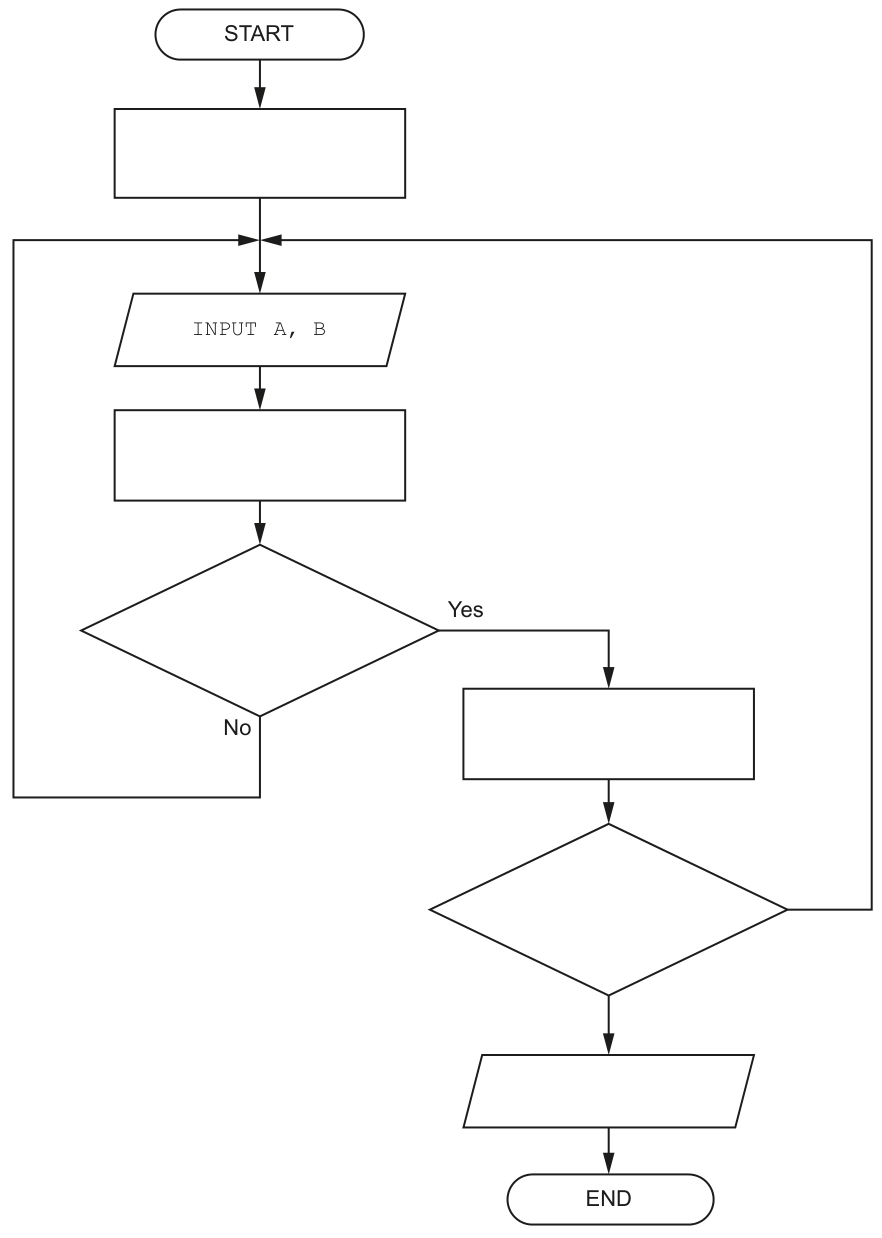
Answer
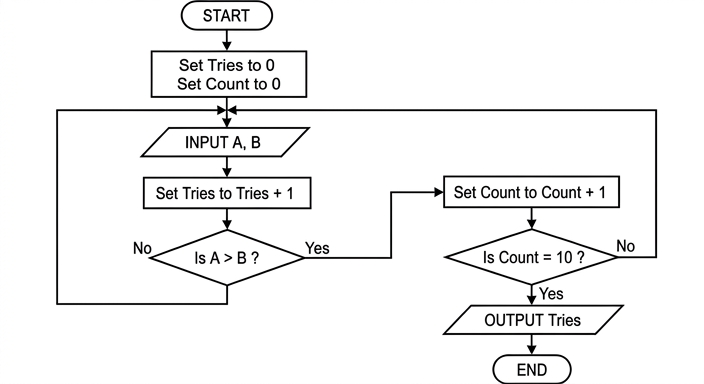
See completed flowchart
Background Concept
A flowchart shows an algorithm using standard symbols. A terminal oval shows START or END, a rectangle shows a process such as assignment, a parallelogram shows input or output, and a diamond shows a decision with branches such as Yes and No.
This algorithm uses all three basic constructs:
- sequence: steps happen in order
- selection: a test decides whether
A > B - iteration: the input-and-test section repeats until a stopping condition is met
When a question says a process continues until something has happened a certain number of times, you usually need:
- a counter initialised before the loop
- an update inside the loop
- a decision that tests whether the counter has reached the target value
Understanding the Question
The algorithm repeatedly inputs pairs of numbers A and B. It must count how many pairs were entered in total, and it must stop only when the condition A > B has been true 10 times.
So there are actually two different counts:
- one count for how many pairs have been entered overall
- one count for how many times
A > Bhas been true
The completed flowchart therefore needs:
- initial values for both counters
- an input step
- an increase to the total number of pairs after every input
- a decision to test whether
A > B - an increase to the second counter only if that test is true
- a final decision to stop when the second counter reaches 10
- output of the total number of pairs entered
Approach
Start by naming the two counters from the mark scheme structure:
Triescounts every pair enteredCountcounts successful cases whereA > B
Then map the algorithm to the flowchart:
- initialise both counters to 0
- input
A, B - increment
Tries - if
A > B, incrementCount - if
Count = 10, outputTriesand end; otherwise repeat
A key detail is that Tries is updated every time a pair is entered, but Count is updated only on the Yes branch from A > B.
Step-by-Step Reasoning
The first empty process box must set both counters to zero, because counting has not started yet:
Set Tries to 0Set Count to 0
After INPUT A, B, the next process must increase the total-pairs counter. That is why the second rectangle is:
Set Tries to Tries + 1
The first decision diamond must test the comparison in the question:
Is A > B ?
If the answer is No, this pair does not contribute to the number of successful comparisons, so the flow returns to input the next pair.
If the answer is Yes, the successful-comparisons counter increases, so the process box on that branch is:
Set Count to Count + 1
After increasing Count, the algorithm must check whether the stopping condition has been reached. So the second decision diamond is:
Is Count = 10 ?
If No, the algorithm loops back for another input.
If Yes, it has reached the required 10 successful cases, so it outputs the total number of pairs entered:
OUTPUT Tries
Then the algorithm ends.
Key Takeaways
- Use separate counters when a question tracks two different quantities.
- Initialise counters before the loop begins.
- Put the loop termination test after the counter that controls stopping has potentially been updated.
- In a flowchart, each process and decision should match one precise step from the algorithm.
Common Mistakes
- Initialising only one variable and forgetting the other counter.
- Increasing
Countevery time instead of only whenA > Bis true. - Testing
Tries = 10instead ofCount = 10; the algorithm stops after 10 successful comparisons, not after 10 inputs. - Outputting
Countinstead ofTries; the question asks for the number of pairs input. - Putting the
Count = 10test beforeCountis incremented, which gives the wrong stopping point.
Things to Be Careful About
- The comparison in the first decision must be exactly
A > B, notA >= BorB > A. - The second decision must check equality with 10, because the algorithm stops when the count has reached 10.
- The No branches must return to the input section so the loop repeats correctly.
- The final output must be the total number of pairs entered, so use
Triesin the output box.
Step 1 of the algorithm is changed.
A variable ThisSequence is used to enter a sequence of 10 pairs of numeric values, using a single input statement.
Following the input of ThisSequence the revised algorithm will extract the pairs of numbers.
Describe the variable ThisSequence and how the numbers are extracted.
Answer
ThisSequenceshould be aSTRINGlong enough to hold all 10 pairs of values, with separators between the values/pairs.- The numbers are extracted by taking each value from the string in turn using the separators, then converting each extracted substring to numeric data to give
AandB.
ThisSequence is a string containing all 10 pairs with separators; each substring is extracted in turn and converted to numbers for A and B.
Background Concept
When many values are entered using one input statement, they are commonly stored first as text in a single string. A string is suitable because it can hold digits together with separator characters such as spaces or commas.
To use the values later as numbers, the program must parse the string. Parsing means breaking the string into smaller pieces, usually by finding separators, then converting each piece from text form into numeric form.
Understanding the Question
The original algorithm input one pair of numeric values at a time. The revised version now inputs all 10 pairs in one go using a single variable called ThisSequence.
So the question is asking for two ideas:
- what kind of variable
ThisSequencemust be - how the individual numbers are then obtained from it
Because one input statement is holding many values, ThisSequence cannot just be a single number. It needs to hold a sequence, so it must be text containing all the entered values in some structured format.
Approach
Use a STRING for ThisSequence, because that allows all the digits and separators to be stored together.
Then explain the extraction method in general terms:
- read the next substring up to a separator
- convert that substring into a numeric value
- assign values in pairs to
AandB - repeat until all 10 pairs have been taken out
The question does not require exact pseudocode, only a description of the storage format and extraction method.
Step-by-Step Reasoning
ThisSequence should be a string variable. For example, it might contain values in a layout such as:
12,7,9,14,3,3,...
or the same idea with spaces or another delimiter.
The important point is not the exact symbol used, but that there must be some way to tell where one number ends and the next begins.
To extract the numbers:
- start at the beginning of the string
- take the characters for the first number until a separator is reached
- convert that substring from string form to numeric form and store it as
A - continue to the next substring
- convert that substring and store it as
B - repeat this process for the remaining pairs
This is why separators are important. Without them, values of different lengths would be hard to distinguish. For example, 12345 could mean 1, 2345, 12, 345, or 123, 45 unless the format is defined.
A strong description therefore mentions both:
- the variable is a string
- the values are separated and then extracted and converted one by one
Key Takeaways
- A single input containing multiple values is often stored as a string first.
- Separators such as commas or spaces make parsing possible.
- Extracted text must be converted to numeric form before it can be used as numbers.
- When values are needed in pairs, extraction normally happens two numbers at a time.
Common Mistakes
- Saying
ThisSequenceis numeric. One numeric variable cannot directly hold a whole sequence of separately identifiable values. - Forgetting separators. Without separators or a fixed-width format, the individual numbers cannot be reliably split.
- Describing storage only, but not explaining how values are extracted.
- Explaining extraction only, but not stating the correct data type for
ThisSequence.
Things to Be Careful About
- The question says numeric values are entered using a single input statement, but the container variable still needs to be text so the whole sequence can be captured.
- After extraction, each substring must be converted from string to number before being treated as
AorB. - If negative numbers or decimal values were possible, the chosen separator and conversion method would need to handle minus signs or decimal points correctly.
The diagram shows an Abstract Data Type (ADT) representation of a linked list after data items have been added.
PSis the start pointer.PFis the free list pointer.- Labels
Df,Dc,DbandDyrepresent the data items of nodes in the list. - Labels
Fg,Fh,FmandFwrepresent the data items of nodes in the free list. - The symbol represents a null pointer.
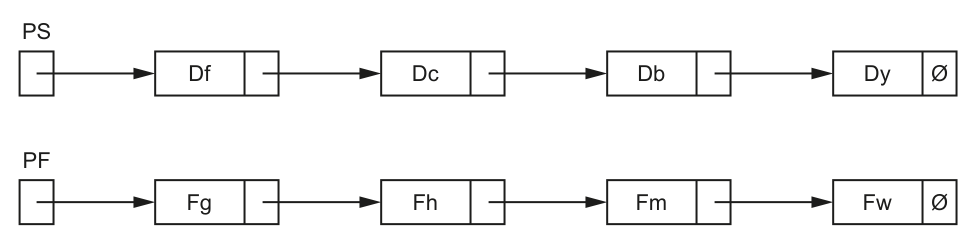
Describe the linked list immediately after initialisation, before any data items are added.
Answer
- The linked list is empty, so
PScontains the null pointer. PFpoints to the first free node.- All nodes are linked together in the free list, with the last free node pointing to the null pointer.
PS is null; PF points to the first free node; all nodes are linked in the free list ending with null.
Background Concept
A linked list stores data items in nodes. Each node has two parts:
- the data item
- a pointer to the next node
In an array-based implementation, these pointers are usually not real memory addresses. They are array indexes showing where the next node is stored.
Two special pointers are commonly used:
PSor start pointer: points to the first node in the actual linked listPFor free list pointer: points to the first unused node
When a linked list is first initialised, no data has been added yet. That means the main linked list is empty. However, the available nodes still need to be organised so the program knows where to get a free node when the first item is inserted. So all unused nodes are linked together in a separate free list.
Understanding the Question
The diagram shown in the question is the state after some items have already been added. The top chain is the actual linked list beginning at PS, and the bottom chain is the remaining free list beginning at PF.
But this part asks for the state immediately after initialisation, before any data items are added. So you must imagine the list before the nodes containing Df, Dc, Db and Dy were taken out of the free list and used.
That means:
- the actual list contains no nodes yet
- every node must still be unused
- therefore every node belongs to the free list
Approach
To answer this, think separately about the two structures:
- What happens to the actual linked list if nothing has been inserted? It must be empty, so the start pointer is null.
- What happens to all the available nodes? They must all be connected in the free list, starting at the free list pointer.
Those two ideas are the whole answer.
Step-by-Step Reasoning
Immediately after initialisation:
-
No data items have been added.
- So there is no first node in the actual list.
- Therefore
PScannot point to a valid node. - So
PSmust contain the null pointer.
-
The program still has a fixed set of nodes available for later use.
- These nodes are all unused at this point.
- Unused nodes are kept in the free list.
-
The free list must begin somewhere.
PFstores the position of the first free node.- So
PFpoints to the first node in the free list.
-
Since every node is unused, every node is part of that free list.
- Each free node points to the next free node.
- The final free node points to null because there is no node after it.
So the correct description is that the main linked list is empty, and all nodes are chained together in the free list.
Key Takeaways
- An empty linked list has its start pointer set to null.
- A free list keeps track of unused nodes.
- After initialisation, before any insertions, all nodes are in the free list.
- The last node in any linked chain points to null.
Common Mistakes
- Saying
PSpoints to the first node after initialisation. This is wrong because no data has been inserted yet. - Forgetting to mention
PF. In this structure, the free list is essential to the implementation. - Saying the nodes are unconnected after initialisation. Usually they are linked together as a free list so nodes can be allocated easily.
- Confusing the linked list with the free list. The linked list stores active data; the free list stores unused nodes.
Things to Be Careful About
- A null pointer means “points to no node”; it does not mean the node contains blank data.
- In 9618, array-based linked lists use pointer values as indexes, not true memory addresses.
- If the question says “before any data items are added”, do not describe the partly filled list shown in the diagram. You must describe the earlier initialised state instead.
A program will be written to include a linked list to store alphanumeric user IDs.
The design uses two variables and two 1D arrays to implement the linked list. Each array element contains data of a single data type and not a record.
The statements below describe the design.
Complete the statements.
The two variables will be of type ............................................................................................. .
The two variables will be used as ....................................................................... to the arrays.
The values stored in the two variables will indicate ..................................................................
................................................................................................................................................. .
The first 1D array will be of type ............................................................................................. .
The first 1D array will be used to ............................................................................................ .
The second 1D array will be of type ....................................................................................... .
The second 1D array will be used to ...................................................................................... .
Answer
- The two variables will be of type INTEGER.
- The two variables will be used as pointers / indexes to the arrays.
- The values stored in the two variables will indicate the positions of the first node in the linked list and the first node in the free list.
- The first 1D array will be of type STRING.
- The first 1D array will be used to store the alphanumeric user IDs / data items.
- The second 1D array will be of type INTEGER.
- The second 1D array will be used to store the pointer / index of the next node.
Variables: INTEGER pointers/indexes to the arrays, indicating the first linked-list node and first free-list node. First array: STRING for user IDs. Second array: INTEGER for next-node pointers/indexes.
Background Concept
A linked list can be implemented without using record structures. In that case, the information for each node is split across separate arrays.
A normal node in a linked list needs two things:
- the data item
- the pointer to the next node
If records are not being used, then one array stores all the data values, and a second array stores all the next pointers.
For example:
DataArray[5]might store the user ID in node 5PointerArray[5]might store the index of the next node after node 5
This means both arrays describe the same set of nodes by position. Element 5 in the data array and element 5 in the pointer array together represent one logical node.
The pointer values are usually integers because they are array indexes. Two extra variables are also needed:
- one for the start of the linked list
- one for the start of the free list
These variables also hold index values, so they are integers too.
Understanding the Question
The question says a linked list will store alphanumeric user IDs and that the design uses:
- two variables
- two one-dimensional arrays
- each array element contains only one data type
- no record is used
This is a big clue that the linked list is being implemented using parallel arrays.
You must fill in what each variable and each array should be:
- the data type of the variables
- what those variables represent
- the data type of each array
- what each array stores
Because the user IDs are alphanumeric, the data array must store text. Because pointers in this design are array positions, the pointer values must be integers.
Approach
Start by thinking about what a linked list node contains.
A node needs:
- data
- a link to the next node
Since the question forbids storing a whole record in each array element, split those two parts into two arrays:
- one array for the data
- one array for the next pointers
Then think about the two extra variables. A linked list with a free list needs:
- one variable for the first active node
- one variable for the first free node
Because both of these must point to array positions, their type must be integer.
Step-by-Step Reasoning
-
Decide the type of the two variables.
- The design uses arrays to hold nodes.
- A pointer in this design is really the position of an element in an array.
- Array positions are integer values.
- Therefore the two variables must be of type
INTEGER.
-
Decide what the two variables are used as.
- They identify where the list starts and where the free list starts.
- In an array-based list, they act as pointers or indexes into the arrays.
- So they are used as pointers/indexes to the arrays.
-
Decide what their values indicate.
- One variable gives the position of the first node in the linked list.
- The other gives the position of the first node in the free list.
- That is the key purpose of the start pointer and free pointer.
-
Decide the type of the first array.
- The linked list stores alphanumeric user IDs.
- Alphanumeric values are text, so the array must store strings.
- Therefore the first array should be
STRING.
-
Decide what the first array is used for.
- It stores the actual user IDs, which are the data items in each node.
-
Decide the type of the second array.
- The second array stores the links between nodes.
- In an array implementation, a link is an index value.
- Index values are integers.
- Therefore the second array should be
INTEGER.
-
Decide what the second array is used for.
- It stores, for each node position, the index of the next node.
- In other words, it stores the pointers/links.
A compact way to picture it is:
UserID[Index]stores the dataNextPtr[Index]stores the index of the next node
Key Takeaways
- An array-based linked list often uses two parallel arrays: one for data and one for next pointers.
- When pointers are stored as array positions, they are integers.
- A free list needs its own pointer so the program can find the next unused node.
- If the stored data is alphanumeric, the data array should be of type string.
Common Mistakes
- Making the two variables
STRINGbecause the user IDs are strings. This is wrong because the variables store positions, not user IDs. - Saying the second array stores data as well. It stores links, not the actual user IDs.
- Referring to the variables as memory addresses. In this syllabus, for array-based implementations they are normally indexes.
- Using
CHARinstead ofSTRINGfor a full user ID. A user ID usually contains several characters, not just one. - Forgetting the free list. One of the two variables must identify the first free node, not just the first active node.
Things to Be Careful About
- Read exactly what the question says is being stored. Here it is alphanumeric user IDs, so text storage is required.
- Distinguish clearly between a node's data and a node's pointer.
- The question says each array element is not a record, so do not describe one array of records containing both fields.
- “Pointer” and “index” are both acceptable ideas here, but the key meaning is the position of an array element.
- If a null pointer is needed in a real implementation, it is often represented by a special integer such as
0or-1, but only mention that if the question asks for it.
A global 1D array Data contains 100 elements of type integer.
A function Check() will:
- total the element values in odd index locations (1, 3, 5 ... 97, 99)
- total the element values in even index locations (2, 4, 6 ... 98, 100)
- return one of three strings 'Odd', 'Even' or 'Same' to indicate which total is the greater, or whether the totals are the same.
Write pseudocode for the function Check().
Answer
FUNCTION Check() RETURNS STRING
   DECLARE OddTotal, EvenTotal, Index : INTEGER
   OddTotal ← 0
   EvenTotal ← 0

   FOR Index ← 1 TO 100
      IF Index MOD 2 = 1 THEN
         OddTotal ← OddTotal + Data[Index]
      ELSE
         EvenTotal ← EvenTotal + Data[Index]
      ENDIF
   NEXT Index

   IF OddTotal > EvenTotal THEN
      RETURN "Odd"
   ELSE
      IF EvenTotal > OddTotal THEN
         RETURN "Even"
      ELSE
         RETURN "Same"
      ENDIF
   ENDIF
ENDFUNCTION
See completed pseudocode
Background Concept
This question is about writing a function in Cambridge pseudocode that processes a 1D array.
A function is used when a routine must return a value. Here, the routine must return one of three strings: "Odd", "Even" or "Same". That is why Check() should be written as a FUNCTION, not a PROCEDURE.
The array Data is a global one-dimensional array with 100 integer elements. The key task is to examine each element and decide whether its index position is odd or even:
- odd indices:
1, 3, 5, ..., 99 - even indices:
2, 4, 6, ..., 100
A common way to test whether a number is odd or even is to use MOD:
Index MOD 2 = 1means the index is oddIndex MOD 2 = 0means the index is even
As the array is processed, we keep running totals in two accumulator variables:
OddTotalEvenTotal
After the loop finishes, the two totals are compared. That final comparison has three possible outcomes:
- odd total is greater
- even total is greater
- both totals are equal
Understanding the Question
The question gives you the whole job of the function in words and asks you to turn it into valid pseudocode.
You are told that Check() must:
- total the values stored at odd index positions
- total the values stored at even index positions
- return a string showing which total is larger, or whether they are equal
Important clues:
Datais already global, so the function does not need it as a parameter.- The index values listed go from
1to100, so this question is using a 1-indexed array. - Because the result must be one of three strings, the function must end with
RETURN.
So the required solution is not just a loop. It must include:
- variable declarations
- initialisation of totals
- iteration through all 100 elements
- selection to separate odd and even indices
- a final comparison and return value
Approach
The simplest and safest approach is:
- Declare two integer accumulators and a loop counter.
- Set both totals to
0. - Loop through every valid index from
1to100. - Use
MOD 2to decide whether the current index is odd or even. - Add
Data[Index]to the correct total. - After the loop, compare the two totals.
- Return the correct string.
This is a good design because:
- it checks every element exactly once
- it avoids duplicating code with two separate loops
- it matches the wording of the question directly
An alternative valid method would be two loops, one stepping through odd indices and one through even indices, for example FOR Index ← 1 TO 99 STEP 2 and FOR Index ← 2 TO 100 STEP 2. But a single loop with MOD is usually the cleanest general answer.
Step-by-Step Reasoning
Start with the function heading:
FUNCTION Check() RETURNS STRING
This tells the examiner that:
- the routine is a function
- its name is
Check - the returned data type is a string
Now declare the local variables:
OddTotalto store the sum of values at odd positionsEvenTotalto store the sum of values at even positionsIndexto control the loop
All of these can be declared as INTEGER because the array elements are integers and the totals are sums of integers.
Then initialise both totals:
OddTotal ← 0EvenTotal ← 0
This is essential. Accumulators must start at zero before values are added.
Next, process the array:
FOR Index ← 1 TO 100
This loop visits every valid array position exactly once. Since the question explicitly uses indices 1 to 100, those are the correct bounds.
Inside the loop, test the parity of the index:
IF Index MOD 2 = 1 THEN
If the remainder when dividing by 2 is 1, the index is odd. So add the value at that position to OddTotal:
OddTotal ← OddTotal + Data[Index]
Otherwise, it must be even, so add it to EvenTotal:
EvenTotal ← EvenTotal + Data[Index]
That continues until all 100 elements have been processed.
After the loop, compare the totals.
First check whether the odd total is greater:
IF OddTotal > EvenTotal THEN
If true, return "Odd".
If not, check whether the even total is greater:
IF EvenTotal > OddTotal THEN
If true, return "Even".
If neither is greater, they must be equal, so return "Same".
That gives the full logic required by the question.
The final function is complete because it:
- processes all 100 elements
- separates odd and even index positions correctly
- returns exactly one of the required strings
Key Takeaways
- Use a function when a routine must return a value.
- Use accumulators to build totals during a loop.
MOD 2is the standard way to test whether an index is odd or even.- Always match the array bounds given in the question.
- When there are three outcomes, write a full comparison structure that covers all cases.
Common Mistakes
- Using a procedure instead of a function: this loses marks because the question explicitly says the routine must return a string.
- Testing the value instead of the index: the question asks about odd and even index locations, not odd and even data values.
- Forgetting to initialise totals to 0: without this, the totals are undefined.
- Looping from 0 to 99: that would be wrong here because the question clearly uses indices
1to100. - Returning only
"Odd"or"Even": the equal case must also be handled with"Same". - Using
=instead of←for assignment: Cambridge pseudocode requires the assignment arrow.
Things to Be Careful About
- Keep to CIE pseudocode conventions:
FUNCTION,RETURNS,DECLARE,FOR,IF,ELSE,ENDIF,NEXT,RETURN. - The function returns a STRING, so the return values must be written as string literals:
"Odd","Even","Same". - The array is global, so do not invent unnecessary parameters unless the question asks for them.
- Make sure the loop includes both ends of the range, especially index
100. - Be clear that
Index MOD 2 = 1identifies odd positions. If you use the opposite condition, make sure the totals are updated consistently. - If you choose nested
IFstatements, ensure every path returns a value so the function is complete.
A global 1D array of strings contains three elements which are assigned values as shown:
Data[1] ← "aaaaaa"
Data[2] ← "bbbbbb"
Data[3] ← "cccccc"
Procedure Process() manipulates the values in the array.
The procedure is written in pseudocode as follows:
PROCEDURE Process(Format : STRING)
    DECLARE Count, Index, L : INTEGER
    DECLARE Result : STRING
    DECLARE C : CHAR

    Result ← "****"

    FOR Count ← 1 TO LENGTH(Format) STEP 2
        C ← MID(Format, Count, 1)
        L ← STR_TO_NUM(MID(Format, Count + 1, 1))

        Index ← (Count + 1) DIV 2

        CASE OF C
            'X' : Result ← TO_UPPER(Data[Index])
            'Y' : Result ← TO_LOWER(Data[Index])
            'Z' : Result ← "**" & Data[Index]
        ENDCASE

        Data[Index] ← LEFT(Result, L)
    NEXT Count
ENDPROCEDURE
Complete the trace table by dry running the procedure when it is called as follows:
CALL Process("X3Y2W4")
| Count | C | L | Index | Result | Data[1] | Data[2] | Data[3] |
|---|---|---|---|---|---|---|---|
| "aaaaaa" | "bbbbbb" | "cccccc" | |||||
Working
- Initial values:
Result = "****",Data[1] = "aaaaaa",Data[2] = "bbbbbb",Data[3] = "cccccc". Count = 1:C = 'X',L = 3,Index = 1, soResult = "AAAAAA"andData[1] = "AAA".Count = 3:C = 'Y',L = 2,Index = 2, soResult = "bbbbbb"andData[2] = "bb".Count = 5:C = 'W',L = 4,Index = 3, so noCASEoption matches;Resultstays unchanged andData[3] = "bbbb".
Answer
| Count | C | L | Index | Result | Data[1] | Data[2] | Data[3] |
|---|---|---|---|---|---|---|---|
"****" | "aaaaaa" | "bbbbbb" | "cccccc" | ||||
1 | 'X' | 3 | 1 | ||||
"AAAAAA" | "AAA" | ||||||
3 | 'Y' | 2 | 2 | ||||
"bbbbbb" | "bb" | ||||||
5 | 'W' | 4 | 3 | ||||
"bbbb" |
See completed trace table
Background Concept
A trace table is used to dry run pseudocode by recording the values of variables as the program executes. In this question, the important ideas are:
- a count-controlled loop:
FOR Count ← 1 TO LENGTH(Format) STEP 2 - string functions:
MID(String, start, length)extracts part of a stringLEFT(String, n)takes the firstncharactersTO_UPPER()converts letters to uppercaseTO_LOWER()converts letters to lowercase
- array processing: the program reads from and writes back into the global array
Data - a CASE OF selection: one of several branches runs depending on the value of
C
A very important rule here is that if no CASE branch matches and there is no OTHERWISE, then none of the assignment statements inside the CASE run. That means the old value of Result remains unchanged.
Understanding the Question
You are given the initial contents of the array:
Data[1] = "aaaaaa"Data[2] = "bbbbbb"Data[3] = "cccccc"
Then the procedure is called with:
CALL Process("X3Y2W4")
The string Format is processed in pairs:
- letter at position 1, digit at position 2
- letter at position 3, digit at position 4
- letter at position 5, digit at position 6
So the three pairs are:
X3Y2W4
The trace table asks you to show the values of Count, C, L, Index, Result, and the three array elements as the procedure runs.
Approach
The safest way is to follow the procedure line by line for each loop iteration.
- Start with the initial values before the loop begins.
- For each value of
Count, work out:CfromMID(Format, Count, 1)Lfrom the next character, converted to a numberIndexfrom(Count + 1) DIV 2
- Use the
CASE OFstatement to updateResultifCisX,Y, orZ. - Then execute
Data[Index] ← LEFT(Result, L). - Record the changes in the trace table.
A common exam trick is to include a value such as W that does not match any CASE branch. In that situation, Result does not change, but the next assignment using LEFT(Result, L) still happens.
Step-by-Step Reasoning
Before the loop starts:
Result ← "****"Data[1] = "aaaaaa"Data[2] = "bbbbbb"Data[3] = "cccccc"
Now the loop:
FOR Count ← 1 TO LENGTH(Format) STEP 2
Format is "X3Y2W4", which has length 6, so Count takes the values 1, 3, 5.
First iteration: Count = 1
C ← MID(Format, 1, 1)gives'X'L ← STR_TO_NUM(MID(Format, 2, 1))MID(Format, 2, 1)is'3'STR_TO_NUM('3')gives3
Index ← (1 + 1) DIV 2 = 2 DIV 2 = 1
Now the CASE OF C runs.
Since C = 'X':
Result ← TO_UPPER(Data[Index])Data[1]is"aaaaaa"- so
Result = "AAAAAA"
Then:
Data[Index] ← LEFT(Result, L)Data[1] ← LEFT("AAAAAA", 3)- so
Data[1] = "AAA"
After the first iteration:
Result = "AAAAAA"Data[1] = "AAA"Data[2] = "bbbbbb"Data[3] = "cccccc"
Second iteration: Count = 3
C ← MID(Format, 3, 1)gives'Y'L ← STR_TO_NUM(MID(Format, 4, 1))MID(Format, 4, 1)is'2'STR_TO_NUM('2')gives2
Index ← (3 + 1) DIV 2 = 4 DIV 2 = 2
Now the CASE OF C runs.
Since C = 'Y':
Result ← TO_LOWER(Data[Index])Data[2]is"bbbbbb"- so
Result = "bbbbbb"
Then:
Data[2] ← LEFT("bbbbbb", 2)- so
Data[2] = "bb"
After the second iteration:
Result = "bbbbbb"Data[1] = "AAA"Data[2] = "bb"Data[3] = "cccccc"
Third iteration: Count = 5
C ← MID(Format, 5, 1)gives'W'L ← STR_TO_NUM(MID(Format, 6, 1))MID(Format, 6, 1)is'4'STR_TO_NUM('4')gives4
Index ← (5 + 1) DIV 2 = 6 DIV 2 = 3
Now check the CASE OF C:
'X'does not match'Y'does not match'Z'does not match
So no branch runs. Therefore:
Resultstays as its previous value, which is"bbbbbb"
Then the next line still runs:
Data[3] ← LEFT(Result, 4)Data[3] ← LEFT("bbbbbb", 4)- so
Data[3] = "bbbb"
Final values after the whole procedure:
Data[1] = "AAA"Data[2] = "bb"Data[3] = "bbbb"
In the trace table, it is normal to leave cells blank on rows where that value is not being newly recorded.
Key Takeaways
- Follow pseudocode one statement at a time when completing a trace table.
- In a
FORloop withSTEP 2, only every second position is processed. MID()andLEFT()are commonly tested string functions.DIVis integer division, so(Count + 1) DIV 2maps1, 3, 5to1, 2, 3.- If a
CASEstatement has no matching branch and noOTHERWISE, the variable being assigned inside theCASEkeeps its old value.
Common Mistakes
- Treating the loop as if
Countbecomes1, 2, 3, 4, 5, 6instead of1, 3, 5. - Forgetting to convert the digit character using
STR_TO_NUM, and leavingLas a string. - Calculating
Indexwrongly, for example usingCount DIV 2, which would give0, 1, 2. - Assuming
C = 'W'causes an error in the original procedure. It does not; there is simply no matchingCASEbranch. - Resetting
Resultto"****"every iteration. That assignment happens only once before the loop. - Writing
"BBBBBB"for theYbranch instead of"bbbbbb".TO_LOWER()gives lowercase.
Things to Be Careful About
- The array is 1-indexed, not 0-indexed.
MID(Format, Count + 1, 1)always takes the digit after the letter.LEFT(Result, L)uses the current value ofResult; in the last iteration that current value is the previous iteration's"bbbbbb".- Keep characters such as
'X'in single quotes and strings such as"AAAAAA"in double quotes, matching the pseudocode style. - The initial value of
Resultcomes from the lineResult ← "****"; although it is overwritten on the first valid branch, it still matters as the starting state for the trace.
The procedure is to be modified. If variable C is assigned a value other than 'X', 'Y' or 'Z', then procedure Error() is called and passed the value of variable C as a parameter.
This modification can be implemented by adding a single line of pseudocode.
Answer
OTHERWISE : CALL Error(C)
OTHERWISE : CALL Error(C)
Background Concept
A CASE OF statement is used when one variable is compared against several fixed values. Each possible value has its own branch. In many languages and in CIE pseudocode, a default branch can be added for any value that does not match the listed cases. In CIE pseudocode this default branch is written as OTHERWISE.
Here, the procedure must react when C is not 'X', 'Y' or 'Z'. The cleanest way is to add a default branch inside the existing CASE OF C structure.
The question also says that Error() is called and the value of C is passed as a parameter, so the line must be a procedure call that includes C inside the brackets.
Understanding the Question
The original CASE OF C only handles three values:
'X''Y''Z'
If C has any other value, nothing currently happens. The modification required is to call Error() and pass that unexpected character to it.
The question specifically says this can be done with a single line of pseudocode. That is a clue that you should not rewrite the whole selection structure or add a full multi-line IF block. Instead, you should add one line that fits naturally into the existing CASE statement.
Approach
Because the code already uses CASE OF C, the best solution is to add a catch-all branch:
OTHERWISE : CALL Error(C)
This means:
- if
Cis'X','Y'or'Z', use the existing branch - for anything else, call
Error(C)
That is exactly what OTHERWISE is for.
Step-by-Step Reasoning
The existing selection is:
CASE OF C
    'X' : Result ← TO_UPPER(Data[Index])
    'Y' : Result ← TO_LOWER(Data[Index])
    'Z' : Result ← "**" & Data[Index]
ENDCASE
This covers only three explicit values.
To handle all remaining values, insert a default branch:
OTHERWISE : CALL Error(C)
Why this works:
OTHERWISEmeans “for any value not already matched above”CALL Error(C)is the required procedure callCis passed as the parameter, exactly as requested
So the single added line is:
OTHERWISE : CALL Error(C)
Key Takeaways
- Use
OTHERWISEas the default branch in aCASEstatement. - When a question asks for a single-line modification, look for the smallest change that fits the current structure.
- A procedure call in CIE pseudocode uses
CALL ProcedureName(parameter).
Common Mistakes
- Writing an
IF ... THENstructure instead. That may be logically possible, but it is not the neat single-line addition expected here. - Forgetting
CALLand writing justError(C). - Omitting the parameter and writing
CALL Error(). - Writing
OTHERWISE Result ← ...instead of actually calling the error procedure.
Things to Be Careful About
- Use the exact keyword
OTHERWISEfor the defaultCASEbranch. - Keep the parameter as
C, because the question says the value of variableCis passed. - Do not remove or replace the existing
'X','Y', and'Z'branches; this line is added alongside them. - In CIE pseudocode, keep the syntax compact on one line as shown in the mark-worthy answer.
Answer
- In the
CASE OF Cstatement, after the'Z'line and beforeENDCASE.
In the CASE OF C statement, after the 'Z' line and before ENDCASE.
Background Concept
Control structures have a clear scope. For a CASE OF structure, every possible branch must appear inside the CASE block and before ENDCASE. A default branch such as OTHERWISE is part of the same selection structure, so it cannot be placed outside it.
Understanding the Question
Once you know the missing line is an OTHERWISE branch, the next task is to state where it goes. The question is really asking whether you understand the structure of a CASE statement.
The existing block is:
CASE OF C
    'X' : ...
    'Y' : ...
    'Z' : ...
ENDCASE
So the new line must be inserted as another branch in this block.
Approach
Look at the selection structure and ask: where can a new case option be added?
Answer: inside the CASE OF C block, after the listed case lines and before ENDCASE.
That is the only correct structural position for a default branch.
Step-by-Step Reasoning
A CASE statement has this general form:
CASE OF Variable
    Value1 : statement(s)
    Value2 : statement(s)
    OTHERWISE : statement(s)
ENDCASE
Applying that pattern to this question:
- the variable is
C - the listed values are
'X','Y', and'Z' - the new default branch must come after these branches
- it must still be inside the
CASEstructure
So its position is:
- after
'Z' : Result ← "**" & Data[Index] - before
ENDCASE
Key Takeaways
OTHERWISEbelongs inside aCASEstatement.- The default branch is written before
ENDCASE. - Understanding the structure of selection statements helps you place added code correctly.
Common Mistakes
- Saying it should be placed after
ENDCASE. That would put it outside theCASEblock, so it would no longer be a branch of that selection. - Saying it should replace one of the existing branches. It should be added, not substituted.
- Giving a vague answer such as “near the CASE statement” instead of identifying the exact location.
Things to Be Careful About
- The answer is about position, not the content of the line itself.
- Be precise: “after the
'Z'line and beforeENDCASE” is clearer than just “in the CASE statement”. - Since it is a default branch, it should come after the explicit case values, not before them.
Three points on a grid form a triangle with sides of length A, B and C as shown in the example:
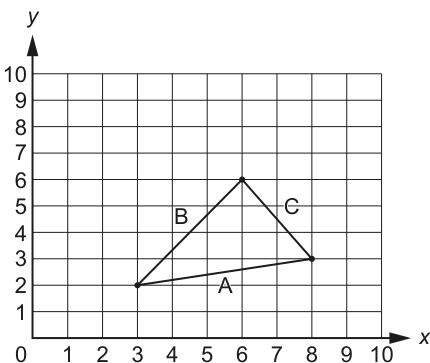
A triangle is said to be right-angled if the following test is true (where A is the length of the longest side):
means A multiplied by A, for example means which evaluates to 9
You can calculate , and by using the coordinates of the endpoints of each line.
For example, is calculated as follows:
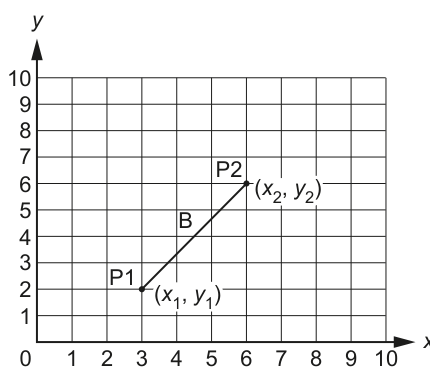
The endpoints, P1 and P2, have the coordinates (3, 2) and (6, 6).
The value is given by the formula:
In this example:
A function IsRA() will:
- take three sets of integers as parameters representing the coordinates of the three endpoints that form a triangle
- return
TRUEif the endpoints form a right-angled triangle, otherwise returnFALSE.
In pseudocode, the operator '^' represents an exponent, which is the number of times a value is multiplied by itself. For example, the expression may be written in pseudocode as Value ^ 2.
Complete the pseudocode for the function IsRA().
FUNCTION IsRA(x1, y1, x2, y2, x3, y3 : INTEGER) RETURNS BOOLEAN
.....................................................
.....................................................
.....................................................
.....................................................
.....................................................
.....................................................
.....................................................
.....................................................
.....................................................
.....................................................
.....................................................
.....................................................
.....................................................
.....................................................
.....................................................
.....................................................
ENDFUNCTION
Answer
FUNCTION IsRA(x1, y1, x2, y2, x3, y3 : INTEGER) RETURNS BOOLEAN
   DECLARE A2, B2, C2 : INTEGER
   A2 ← (x1 - x2) ^ 2 + (y1 - y2) ^ 2
   B2 ← (x1 - x3) ^ 2 + (y1 - y3) ^ 2
   C2 ← (x2 - x3) ^ 2 + (y2 - y3) ^ 2
   IF A2 >= B2 AND A2 >= C2 THEN
      RETURN A2 = B2 + C2
   ELSE
      IF B2 >= A2 AND B2 >= C2 THEN
         RETURN B2 = A2 + C2
      ELSE
         RETURN C2 = A2 + B2
      ENDIF
   ENDIF
ENDFUNCTION
See completed pseudocode
Background Concept
A triangle is right-angled when the square of the longest side is equal to the sum of the squares of the other two sides. This is Pythagoras' theorem.
For points on a grid, the squared length of a side between two coordinates (x1, y1) and (x2, y2) is found using:
(x1 - x2) ^ 2 + (y1 - y2) ^ 2
Notice that this gives the length squared directly, so there is no need to find the actual side length with a square root. That is useful because the right-angle test is written in squared form anyway.
This question also uses a function. A function should return a value, and here that return value is TRUE or FALSE, so the function returns a BOOLEAN.
Understanding the Question
You are given three vertices of a triangle as six integer parameters: x1, y1, x2, y2, x3, y3.
The function must:
- work out the three side lengths squared
- decide which side is the longest
- test whether that longest side squared equals the sum of the other two squared lengths
- return
TRUEif it is a right-angled triangle, otherwiseFALSE
The key clue is that the question already gives the formula in squared form, so the most direct method is to calculate A2, B2 and C2 rather than actual distances.
Approach
A good method is:
- Calculate the squared length of each of the three sides.
- Compare those three values to find the largest one.
- Apply the right-angle test using the largest squared value.
- Return the result of that comparison.
Using squared lengths avoids unnecessary square roots and keeps everything as integers, which is simpler and more reliable.
Step-by-Step Reasoning
First, declare three integer variables to hold the three side lengths squared:
A2for the side from(x1, y1)to(x2, y2)B2for the side from(x1, y1)to(x3, y3)C2for the side from(x2, y2)to(x3, y3)
Then calculate each one using the distance-squared formula:
A2 ← (x1 - x2) ^ 2 + (y1 - y2) ^ 2B2 ← (x1 - x3) ^ 2 + (y1 - y3) ^ 2C2 ← (x2 - x3) ^ 2 + (y2 - y3) ^ 2
At this point, you know the three side lengths squared, but the test only works when the left-hand side is the longest side.
So the next job is to identify the largest of A2, B2 and C2.
- If
A2is at least as large as both others, testA2 = B2 + C2. - Otherwise, if
B2is at least as large as both others, testB2 = A2 + C2. - Otherwise
C2must be the largest, so testC2 = A2 + B2.
The function returns the result of that equality test directly. If the equality is true, the function returns TRUE; if not, it returns FALSE.
Using >= instead of > is fine here because if two sides are equal, the code still picks one of the largest values and the equality test still decides correctly.
Key Takeaways
- For coordinate geometry in pseudocode, you can often work with squared distances instead of actual distances.
- A Boolean function should return
TRUEorFALSE. - When applying Pythagoras' theorem, make sure the longest side is the one being compared to the sum of the other two.
- Nested
IFstatements are a standard way to choose the maximum of three values.
Common Mistakes
- Calculating only two sides instead of all three.
- Using the wrong point pairs when finding the side lengths.
- Testing
A2 = B2 + C2without first making sureA2is the largest side. - Writing assignment with
=instead of the assignment arrow←. - Using actual side lengths with square roots when the squared form is easier and more accurate.
- Returning text such as
"TRUE"instead of the Boolean valueTRUE.
Things to Be Careful About
- Every side must join a different pair of the three points.
^ 2means square the whole difference, so keep the brackets around(x1 - x2)and(y1 - y2).- Do not
OUTPUTthe result; this is a function, so it mustRETURNa value. - Keep the parameter names exactly as given in the question.
- Make sure all three temporary variables are declared as
INTEGERbefore they are used.
The test used to check if a triangle is right-angled can be written in two ways:
or
The symbol represents the square root operation. For example,
A new function SQRT() is written to perform the square root operation. The function takes an integer number as a parameter and returns a positive real value representing the square root of the number.
During testing it is found that the SQRT() function returns a value that is only accurate to 4 decimal places.
For example, SQRT(25) returns 5.0000125 rather than the correct value of 5.0
The function IsRA() from part (a) is modified to use the new SQRT() function to test if a triangle is right-angled.
Describe a problem that might occur when using the modified IsRA() function and suggest a solution that still allows the SQRT() function to be used.
Problem ....................................................................................................................................
...................................................................................................................................................
Solution .....................................................................................................................................
...................................................................................................................................................
Answer
- Problem: the
SQRT()value may be slightly inaccurate, so an exact comparison can fail. A right-angled triangle could be returned asFALSE, for example comparing5with5.0000125. - Solution: round both values to the same number of decimal places, for example 4 decimal places, before comparing them.
See explanation
Background Concept
Square root calculations on a computer often produce approximate real values rather than perfectly exact ones. This happens because real numbers are stored with limited precision.
That means comparing two real values with exact equality can be unsafe. Two values that should be mathematically equal may differ by a very small amount, such as 5.0 and 5.0000125.
When that happens, a logical test using = may produce the wrong result even though the mathematics is correct.
Understanding the Question
In part (a), the function could avoid square roots by comparing squared lengths. In this part, the function has been changed to use:
A = SQRT(B^2 + C^2)
The new SQRT() function is not exact. The question even gives an example where SQRT(25) returns 5.0000125 instead of 5.0.
You are asked to:
- describe what problem this causes in the modified
IsRA()function - suggest a fix that still uses
SQRT()
So the focus is not rewriting the whole function, but explaining the effect of inaccuracy and how to make the comparison safer.
Approach
Think about what happens in a known right-angled triangle such as one with side lengths 3, 4 and 5.
Mathematically:
B^2 + C^2 = 25SQRT(25)should be5
But if the function returns 5.0000125, then the comparison becomes:
5 = 5.0000125
That is false, even though the triangle really is right-angled.
A good fix is to round both values to the same precision before comparing. Another acceptable fix is to allow a small tolerance, but rounding to 4 decimal places matches the information given in the question most directly.
Step-by-Step Reasoning
Suppose the longest side has length 5.
The modified test does this:
- Calculate
B^2 + C^2. - Pass that number to
SQRT(). - Compare the result with
Ausing equality.
If SQRT() returns 5.0000125, then the equality test fails because 5 is not exactly equal to 5.0000125.
So the problem is a false negative: a triangle that really is right-angled may be reported as not right-angled.
A suitable solution is to round both sides of the comparison to the same number of decimal places, for example 4 decimal places:
- round
A - round
SQRT(B^2 + C^2) - then compare those rounded values
After rounding, 5.0000125 becomes 5.0000, which matches 5.0000, so the correct result is produced.
Another valid approach would be to test whether the difference between the two values is very small, rather than exactly zero. For example, check whether the absolute difference is less than a small tolerance such as 0.0001. But if only one solution is needed, rounding is the clearest match to the wording of the question.
Key Takeaways
- Real-number results from functions such as square root may be approximate.
- Exact equality is risky when comparing real values.
- A common fix is to round both values to the same precision before comparing.
- Testing can reveal logic problems caused by representation and precision, not just by incorrect formulas.
Common Mistakes
- Saying there is no problem because
SQRT(25)should be5mathematically; the question is about the computer's approximate result. - Suggesting exact equality is still safe for real numbers.
- Rounding only one of the two values before comparing.
- Suggesting not to use
SQRT()at all, when the question specifically says the solution must still allowSQRT()to be used. - Describing this as a syntax error or run-time error rather than a logic/precision issue.
Things to Be Careful About
- Both values must be compared at the same precision.
- The inaccuracy can make correct triangles fail the test, not just incorrect triangles pass it.
- If using a tolerance instead of rounding, choose a small sensible value.
- Keep the explanation focused on the comparison problem caused by approximate real values, because that is what earns the marks here.
A fitness club has a computerised membership system. The fitness club offers a number of different exercise classes.
The following information is stored for each club member: name, home address, email address, mobile phone number, date of birth and the exercise(s) they are interested in.
When an exercise class is planned, a new module will send personalised text messages to each member who has expressed an interest in that exercise. Members wishing to join the class send a text message back. Members may decide not to receive future text messages by replying with the message 'STOP'.
The process of abstraction is used to filter out unnecessary information.
Answer
- It simplifies the problem by ignoring unnecessary details so the module is easier to design and implement.
It simplifies the problem by ignoring unnecessary details.
Background Concept
Abstraction means concentrating on the important features of a problem and leaving out details that are not needed for the current task. In program design, this helps a programmer avoid being distracted by information that does not affect the module being built.
For example, if a module only has to send text messages about classes, it does not need every detail stored about a member. It only needs the details that matter to sending the message and processing the reply.
Understanding the Question
The question says a new module is being added to a membership system. This module is only concerned with sending personalised text messages about exercise classes and handling replies. It then asks for one advantage of applying abstraction.
So the answer should not describe the whole system. It should explain why filtering out irrelevant information is helpful for this specific module.
Approach
Think about what abstraction does in practice:
- It reduces complexity.
- It lets the designer focus only on the necessary data and operations.
- That makes the solution easier to understand, write and test.
Any one of those valid advantages would gain the mark.
Step-by-Step Reasoning
The full membership system stores many details about each member, including home address, email address, date of birth and exercise interests.
However, for a text-message module, not all of that is relevant. By abstracting the problem, the programmer can ignore unnecessary items and focus only on the information needed to:
- choose the correct members
- send the message
- deal with replies
That makes the module simpler. A simpler module is easier to design and implement, and there is less chance of confusion or error.
Key Takeaways
- Abstraction means keeping relevant detail and discarding irrelevant detail.
- Its main benefit is simplification.
- In exam answers, link the advantage directly to the scenario given.
Common Mistakes
- Giving a vague answer such as "it makes it better" without saying how.
- Describing decomposition instead of abstraction. Decomposition is splitting a problem into parts; abstraction is filtering out unnecessary detail.
- Referring to unrelated benefits such as faster hardware performance.
Things to Be Careful About
- The question asks for one advantage, so one clear point is enough.
- Make sure the advantage is about abstraction itself, not just about computers in general.
- A short, precise answer scores better than a long, unfocused one here.
Identify three items of information that will be required by the new module. Justify your choices with reference to the given scenario.
Item 1 required ..................................................................................................................
Justification .......................................................................................................................
...........................................................................................................................................
Item 2 required ..................................................................................................................
Justification .......................................................................................................................
...........................................................................................................................................
Item 3 required ..................................................................................................................
Justification .......................................................................................................................
...........................................................................................................................................
Answer
-
Item 1 required:
MobilePhoneNumber
Justification: needed to send the text message to the member and to identify which member sent a reply. -
Item 2 required:
Name
Justification: needed to personalise the text message. -
Item 3 required:
ExerciseInterest
Justification: needed to select only the members who have expressed an interest in that exercise.
Mobile phone number, name, and exercise interest.
Background Concept
When abstraction is applied, the programmer decides which data is relevant to the module being designed. A well-designed module should use only the information needed for its purpose.
In this question, the module has two main jobs:
- send personalised class text messages to suitable members
- process the reply messages that come back
So the important skill is selecting data that directly supports those jobs.
Understanding the Question
The system stores several items for each member:
- name
- home address
- email address
- mobile phone number
- date of birth
- exercise interests
But the new module is not doing everything. It is only handling text messages about exercise classes. The question asks for three items of information required by that module and a justification for each.
That means each item must be chosen because it is useful to the text-message process, not just because it exists in the database.
Approach
Work through what the module must do:
- Decide who should receive the message.
- Send the message.
- Personalise the message.
- Handle a reply from a member.
Then pick data items that support those actions.
The best choices are:
- the member's mobile phone number
- the member's name
- the exercise(s) they are interested in
Each one has an obvious role in the scenario.
Step-by-Step Reasoning
MobilePhoneNumber is needed because the messages are sent by text. Without a mobile number, the system cannot send the outgoing message. It is also useful when a reply comes back, because the system can match the sender's number to the correct member record.
Name is needed because the question says the messages are personalised. A personalised message normally includes the member's name, so the module must have access to it.
ExerciseInterest is needed because only members who have expressed an interest in that exercise should receive the message. The module must therefore check each member's interests and filter the members accordingly.
Notice that other stored details are less relevant here:
HomeAddressis not needed for texting.EmailAddressis not needed because the communication method is SMS, not email.DateOfBirthis not needed to send or process these class messages.
Key Takeaways
- Choose data items by matching them to the job the module performs.
- In justification questions, always explain exactly what the item is used for.
- Ignore stored data that does not support the module's purpose.
Common Mistakes
- Listing items without justification.
- Choosing irrelevant fields such as home address when the module uses text messaging.
- Repeating the same justification for different items.
- Giving a very broad answer like "member details" instead of naming a specific item.
Things to Be Careful About
- The question asks for information required by the new module, not all information in the whole system.
- Make sure each justification links clearly to the scenario wording such as "personalised text messages" or "expressed an interest".
- Be specific: write the actual item, not a vague category.
Identify two operations that would be required to process data when the new module receives a text message back from a member.
Operation 1 .......................................................................................................................
...........................................................................................................................................
Operation 2 .......................................................................................................................
...........................................................................................................................................
Answer
-
Operation 1: Search for the member record using the mobile phone number of the sender.
-
Operation 2: Check the reply message and update the data, for example set a do-not-text flag if the message is
STOP, otherwise add the member to the class list.
Search for the member record; check the reply and update the records.
Background Concept
Processing data means carrying out operations on input so that the system can make decisions and update stored information. In a message-processing module, common operations include:
- searching for the relevant record
- comparing input with expected values
- updating fields or lists
These are standard algorithmic tasks.
Understanding the Question
A member sends a text message back after receiving a class invitation. The question asks for two operations required when the module receives that message.
So this is not asking for data items. It is asking what the program would do to process the reply.
From the scenario, replies can mean at least two things:
- the member wants to join the class
- the member wants to stop receiving future messages by replying
STOP
Approach
Think of the reply-handling process as a short algorithm:
- Identify who sent the message.
- Interpret the message content.
- Update the stored information appropriately.
Any two sensible operations from that process are valid, as long as they clearly relate to the scenario.
Step-by-Step Reasoning
A sensible first operation is to identify the member. The easiest way is to use the sender's mobile phone number and search the membership records. The system must know which member record to change.
A sensible second operation is to inspect the text of the reply. The program could compare the message with STOP. If it matches, the system updates the member's record so that no future text messages are sent. If it does not match and it is intended as a booking response, the member can be added to the list for that class.
These are clear data-processing actions:
- search
- compare
- update
Key Takeaways
- Message processing often involves search, comparison and update operations.
- A reply has to be linked to a record before the system can act on it.
- Keywords such as
STOPusually trigger a conditional action.
Common Mistakes
- Writing a data item instead of an operation.
- Saying only "store the message" without explaining how it is processed.
- Forgetting that the sender must be identified before the member's data can be updated.
- Ignoring the special
STOPinstruction mentioned in the scenario.
Things to Be Careful About
- The question asks for operations, so use action words such as search, compare, validate or update.
- Keep your answer tied to the scenario given.
- A good answer makes it clear what is being searched or updated, not just that "processing happens".
The structure chart illustrates part of the membership program:
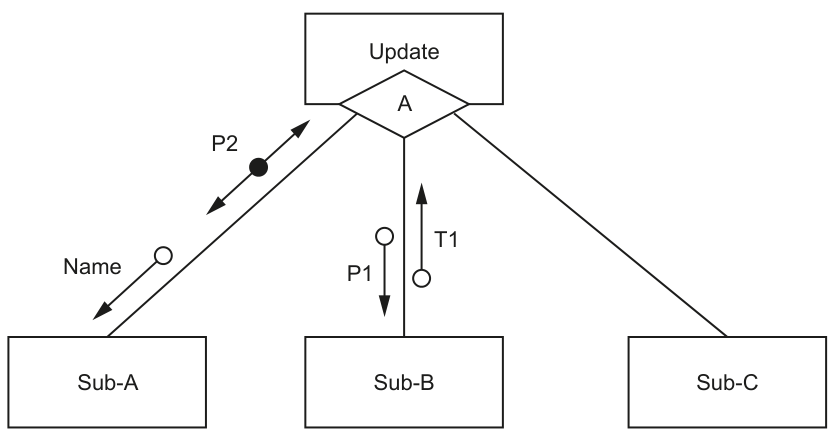
Data item notes:
Namecontains the name of a club memberP1andT1are of type real.
Answer
- The diamond shows selection.
- It means
Updatechooses which one of the subordinate modules to call, depending on conditionA.
It shows selection: Update chooses which sub-module to call depending on condition A.
Background Concept
A structure chart shows the modular structure of a program: which module calls which sub-modules, and what data or control information is passed between them.
One important symbol is the diamond. In a structure chart, a diamond indicates selection. That means the parent module does not necessarily call every sub-module in that branch. Instead, it chooses one according to a condition.
Understanding the Question
In Fig. 7.1, the module Update is at the top. Under it is a diamond labelled A, with branches leading to Sub-A, Sub-B and Sub-C.
The question asks specifically for the meaning of the diamond labelled A.
So the answer must explain:
- what the diamond symbol means in general
- what that means for these modules in this particular chart
Approach
First identify the symbol: diamond means selection.
Then apply that meaning to the diagram: Update makes a decision based on condition A, and that decision determines which sub-module is used.
Step-by-Step Reasoning
The top module Update controls the branch below it.
The presence of the diamond means this is not simple sequence. If it were sequence, the sub-modules would just be called one after another. Instead, the diamond tells us there is a choice.
So Update evaluates condition A. Based on that condition, it selects a branch. Therefore only the appropriate subordinate module is called.
In this diagram, that means Sub-A, Sub-B or Sub-C is chosen according to the condition.
Key Takeaways
- A diamond in a structure chart means selection.
- Selection means one branch is chosen depending on a condition.
- Always explain the symbol in general and then apply it to the given chart.
Common Mistakes
- Saying the diamond means iteration or repetition. It does not here; it means selection.
- Saying all three sub-modules are called. The symbol shows a choice, not automatic execution of every branch.
- Explaining data flow instead of the meaning of the diamond symbol.
Things to Be Careful About
- Read the question carefully: it asks about the diamond, not the circles or arrows.
- Mention the condition label
Abecause it is part of the meaning in this specific chart. - Use the word selection or choice clearly to earn the mark.
Write the pseudocode module headers for Sub-A and Sub-B.
Sub-A
...........................................................................................................................................
...........................................................................................................................................
Sub-B
...........................................................................................................................................
...........................................................................................................................................
Answer
FUNCTION Sub-A(BYVAL Name : STRING) RETURNS BOOLEAN

FUNCTION Sub-B(BYVAL P1 : REAL) RETURNS REAL
See completed pseudocode
Background Concept
A structure chart can be used to derive the headers of procedures or functions.
To do this, you read:
- what information is passed from parent to child
- what information comes back from child to parent
- whether the returned item is data or a control value
A module with an input and a single returned result is often best written as a function.
A header must show:
- the module name
- any parameters passed in
- the parameter type
- the return type if it is a function
Understanding the Question
The chart shows:
Namegoing fromUpdatetoSub-AP2coming back fromSub-AtoUpdateP1going fromUpdatetoSub-BT1coming back fromSub-BtoUpdate
The notes tell us:
Namecontains a club member's name, so it should beSTRINGP1isREALT1isREAL
The symbol for P2 is a filled circle, which represents control information, so a Boolean result is appropriate.
Approach
For each sub-module:
- Look at what goes in from
Update. - Look at what comes back.
- If one value comes back, express the module neatly as a function.
- Use
BYVALfor the incoming parameter. - Use the correct return type.
Step-by-Step Reasoning
For Sub-A:
UpdatesendsNametoSub-A, soNameis an input parameter.Nameis textual data, so its type isSTRING.P2comes back fromSub-AtoUpdate.- Because
P2is shown as a control couple, it represents a true/false style control result. - Therefore
Sub-Acan be written as a function that takesNameby value and returnsBOOLEAN.
So the header is:
FUNCTION Sub-A(BYVAL Name : STRING) RETURNS BOOLEAN
For Sub-B:
UpdatesendsP1toSub-B, soP1is an input parameter.- The notes say
P1isREAL. T1comes back fromSub-BtoUpdate.- The notes say
T1isREAL. - Therefore
Sub-Bcan be written as a function that takes a real value and returns a real value.
So the header is:
FUNCTION Sub-B(BYVAL P1 : REAL) RETURNS REAL
This is a clean translation of the structure chart into pseudocode headers.
Key Takeaways
- Read structure-chart arrows carefully: downwards usually means input to the sub-module; upwards means a result returned.
- Use data type notes given in the question.
- A single returned result is often best represented as a function.
- Control information is commonly represented as
BOOLEAN.
Common Mistakes
- Writing full module bodies instead of just the headers.
- Omitting
BYVALfor the input parameter. - Using the wrong type, such as making
Namea numeric type. - Missing the return type of the function.
- Treating control information like ordinary text or numeric data instead of a Boolean-style result.
Things to Be Careful About
- The question asks for module headers only, so do not add extra pseudocode statements.
- Use the given identifier names exactly.
- Distinguish input parameters from returned values by the direction of the arrows.
- Use the type notes:
P1andT1are explicitlyREAL, whileNameshould beSTRINGbecause it is a name.
A teacher is designing a program to process pseudocode projects written by her students.
Each student project is stored in a text file.
The process is split into a number of stages. Each stage performs a different task and creates a new file named as shown:
| File name | Comment |
|---|---|
MichaelAday_src.txt | student project file produced by student Michael Aday |
MichaelAday_S1.txt | file produced by stage 1 |
MichaelAday_S2.txt | file produced by stage 2 |
The teacher has defined the first program module as follows:
| Module | Description |
|---|---|
DeleteComment() | • called with a parameter of type string representing a line of pseudocode from a student's project file • returns the line after removing any comments Note on comments: A comment starts with two forward slash characters and includes all the remaining characters on the line. The following example shows a string before and after the comment has been removed: Before: IF X2 > 13 THEN //check if limit exceededAfter: IF X2 > 13 THEN |
Complete the pseudocode for module DeleteComment().
FUNCTION DeleteComment(Line : STRING) RETURNS STRING
.....................................................
.....................................................
.....................................................
.....................................................
.....................................................
.....................................................
.....................................................
.....................................................
.....................................................
.....................................................
.....................................................
.....................................................
.....................................................
.....................................................
.....................................................
.....................................................
.....................................................
.....................................................
.....................................................
.....................................................
.....................................................
.....................................................
ENDFUNCTION
Answer
FUNCTION DeleteComment(Line : STRING) RETURNS STRING
   DECLARE Position : INTEGER
   Position ← 1

   WHILE Position < LENGTH(Line)
      IF MID(Line, Position, 2) = "//" THEN
         IF Position = 1 THEN
            RETURN ""
         ELSE
            RETURN LEFT(Line, Position - 1)
         ENDIF
      ENDIF
      Position ← Position + 1
   ENDWHILE

   RETURN Line
ENDFUNCTION
See completed pseudocode
Background Concept
This task is about processing a string to remove a comment. In the question, a comment begins when the two-character sequence // appears, and from that point to the end of the line everything must be ignored.
A common way to do this in pseudocode is to scan through the string from left to right and check each pair of adjacent characters. If the pair is //, the function returns only the part before that position. If no such pair is found, the whole line is returned unchanged.
This is a good use of a function because the module receives one value (Line) and returns one processed value (the line with any comment removed). Useful string functions here are:
LENGTH(Line)to know how many characters are in the stringMID(Line, Position, 2)to read two characters starting at a particular positionLEFT(Line, n)to take the leftmostncharacters
Understanding the Question
You are given the specification of DeleteComment() and must complete its pseudocode.
The function takes one line of pseudocode as a string. It must:
- look for the first occurrence of
// - remove that
//and everything after it - return the remaining part of the line
From the example:
- Before:
IF X2 > 13 THEN //check if limit exceeded - After:
IF X2 > 13 THEN
So this is not about removing all / characters. It is specifically about detecting the two-character delimiter //.
Approach
The simplest reliable method is:
- Start at the first character.
- While there is still room to inspect two characters, test
MID(Line, Position, 2). - If that two-character slice is
//, return everything before it. - If the loop finishes without finding
//, return the original line.
An extra edge case is when the line begins with //. In that case, the whole line is a comment, so the function should return an empty string.
Step-by-Step Reasoning
The function begins by declaring Position as an integer and setting it to 1.
The loop condition is:
WHILE Position < LENGTH(Line)
This is important because we are reading two characters at a time with MID(Line, Position, 2). If Position were equal to LENGTH(Line), there would not be a full two-character pair starting there.
Inside the loop, the code checks:
MID(Line, Position, 2) = "//"
That means:
- at position 1, check characters 1 and 2
- at position 2, check characters 2 and 3
- and so on
If the pair is //, the comment starts there.
There are then two cases:
-
Position = 1- The line starts with
// - So there is no code before the comment
- The correct return value is
""
- The line starts with
-
Otherwise
- The comment starts later in the line
- So return the left part only:
LEFT(Line, Position - 1)
For example, if the string is:
IF X2 > 13 THEN //check if limit exceeded
and the first / is at position 18, then:
LEFT(Line, 17)returnsIF X2 > 13 THEN
That is exactly the line with the comment removed.
If the loop ends and no // has been found, then the line had no comment, so the whole original line should be returned unchanged with:
RETURN Line
Key Takeaways
- To detect a delimiter of two characters, scan the string and inspect adjacent pairs.
MID(..., ..., 2)is useful when the marker is two characters long.- A function is appropriate when one processed result must be returned.
- Always handle edge cases such as the delimiter appearing at the start or not appearing at all.
Common Mistakes
- Checking for a single
/instead of//. That would remove text incorrectly. - Stopping at the first
/without confirming the next character is also/. - Forgetting to return the original line when no comment exists.
- Using
LEFT(Line, Position)instead ofLEFT(Line, Position - 1), which would keep the first/. - Looping too far and trying to read past the end of the string.
Things to Be Careful About
- Use a function, not a procedure, because the module must return a string.
- Use the correct assignment arrow
←, not=. - Make sure the loop only checks valid two-character positions.
- If the line starts with
//, return an empty string, not the original line. - Keep to CIE pseudocode style:
DECLARE,WHILE,IF,RETURN,ENDFUNCTION.
A second module is defined:
| Module | Description |
|---|---|
Stage_1() | • called with a parameter of type string representing a student name • creates a new stage 1 file • copies each line from the student's project file to the stage 1 file after removing any comment from each line • does not write blank lines to the stage 1 file • returns the number of lines written to the stage 1 file |
Write pseudocode for module Stage_1().
Module DeleteComment() must be used in your solution.
Answer
FUNCTION Stage_1(StudentName : STRING) RETURNS INTEGER
   DECLARE SourceFileName, Stage1FileName, Line, NoCommentLine : STRING
   DECLARE Count : INTEGER

   SourceFileName ← StudentName & "_src.txt"
   Stage1FileName ← StudentName & "_S1.txt"
   Count ← 0

   OPENFILE SourceFileName FOR READ
   OPENFILE Stage1FileName FOR WRITE

   WHILE NOT EOF(SourceFileName)
      READFILE SourceFileName, Line
      NoCommentLine ← DeleteComment(Line)
      IF NoCommentLine <> "" THEN
         WRITEFILE Stage1FileName, NoCommentLine
         Count ← Count + 1
      ENDIF
   ENDWHILE

   CLOSEFILE SourceFileName
   CLOSEFILE Stage1FileName

   RETURN Count
ENDFUNCTION
See completed pseudocode
Background Concept
This task is about text file processing. A standard pattern for this in CIE pseudocode is:
- open an input file for reading
- open an output file for writing
- repeat until end of file
- read one line at a time
- process that line
- optionally write a result line
- close both files
The question also requires modular design. That means one module should reuse another module rather than duplicating its logic. Here, Stage_1() must use DeleteComment() to remove comments from each line before deciding whether to write it.
Because Stage_1() must return the number of lines written, it should be written as a function returning an integer.
Understanding the Question
You must write pseudocode for Stage_1().
From the stem, the student source file is named like:
MichaelAday_src.txt
and the stage 1 output file is named like:
MichaelAday_S1.txt
So the student name parameter must be used to build those filenames.
The module must:
- receive a student name
- open that student's source file
- create the matching stage 1 file
- read every line from the source file
- call
DeleteComment()on each line - write the processed line only if it is not blank
- return how many lines were written
The phrase “Module DeleteComment() must be used in your solution” is a direct instruction: you should not repeat the comment-removal logic inside Stage_1().
Approach
The best structure is:
- Build the two filenames from
StudentName. - Initialise a counter to 0.
- Open the source file for reading and the stage 1 file for writing.
- Use a
WHILE NOT EOF(...)loop to process every line. - For each line:
- read it
- pass it to
DeleteComment() - if the result is not empty, write it and increment the counter
- Close both files.
- Return the counter.
This directly matches the specification point by point.
Step-by-Step Reasoning
First, the function declaration must show that it takes a string parameter and returns an integer:
FUNCTION Stage_1(StudentName : STRING) RETURNS INTEGER
Next, declare variables:
- two strings for the filenames
- one string for the input line
- one string for the processed line
- one integer counter
The filenames are built using the naming pattern from the question:
- source file:
StudentName & "_src.txt" - stage 1 file:
StudentName & "_S1.txt"
So if StudentName is MichaelAday, the filenames become:
MichaelAday_src.txtMichaelAday_S1.txt
Then initialise:
Count ← 0
This is essential because the function must return the number of lines written, and the count starts at zero before anything is written.
Open the files:
- source file for reading
- stage 1 file for writing
The main processing loop is:
WHILE NOT EOF(SourceFileName)
That means keep going until the input file has no more lines.
Inside the loop:
-
READFILE SourceFileName, Line- gets the next line from the student's source file
-
NoCommentLine ← DeleteComment(Line)- removes any comment from that line by calling the first module
- this satisfies the requirement to use
DeleteComment()
-
IF NoCommentLine <> "" THEN- checks whether the result is blank
- if it is blank, do not write it
- if it is not blank, write it to the stage 1 file
-
WRITEFILE Stage1FileName, NoCommentLine- outputs the cleaned line
-
Count ← Count + 1- increases the number of lines written
After the loop finishes, both files should be closed. This is standard good file handling and is normally expected in exam solutions.
Finally:
RETURN Count
This gives the required result: the number of lines actually written to the stage 1 file.
Key Takeaways
- File processing questions usually follow a fixed read-process-write pattern.
- When a question says one module must be used, call it instead of rewriting its logic.
- A returned count needs correct initialisation and incrementing only at the right moment.
- Conditions such as “do not write blank lines” must be implemented explicitly with an
IFstatement.
Common Mistakes
- Forgetting to use
DeleteComment()and instead removing comments again insideStage_1(). - Writing every processed line without checking whether it is blank.
- Incrementing the counter for every line read instead of every line written.
- Using the wrong filename suffix, such as
_S2.txtinstead of_S1.txt. - Forgetting to close one or both files.
- Writing a procedure instead of a function even though a value must be returned.
Things to Be Careful About
- The input file suffix is
_src.txt, not_Src.txtor anything else. - The output file suffix for this stage is
_S1.txt. - Use
WHILE NOT EOF(...)so every line is processed exactly once. - Initialise
Countbefore the loop starts. - Increment
Countonly after a line is actually written. - Keep the file variables and string variables clearly named so the read and write operations are not mixed up.
- Stay in CIE pseudocode form:
OPENFILE,READFILE,WRITEFILE,CLOSEFILE,RETURN.