Computer Science 9618/12 — May/June 2024
Cambridge AS Level · Theory Fundamentals · worked solutions for every part, with the mark scheme
Topics Hardware · Information Representation · Communication · System Software · Security, Privacy and Data Integrity · Databases · +1 more
Describe the operation of each of the following logic gates:
NAND .......................................................................................................................................
...................................................................................................................................................
NOR ..........................................................................................................................................
...................................................................................................................................................
XOR ..........................................................................................................................................
...................................................................................................................................................
OR ............................................................................................................................................
...................................................................................................................................................
Answer
- NAND: output is
0only when both inputs are1; otherwise output is1. - NOR: output is
1only when both inputs are0; otherwise output is0. - XOR: output is
1when the inputs are different; output is0when the inputs are the same. - OR: output is
1when one or both inputs are1; output is0only when both inputs are0.
See explanation
Background Concept
A logic gate is an electronic circuit that performs a Boolean operation on one or more binary inputs. Each input can only be 0 or 1, and the output is also 0 or 1.
For this question, the important idea is the function of each named gate:
- OR gives
1if at least one input is1. - XOR means exclusive OR. It gives
1only when the two inputs are different. - NAND means NOT AND. First imagine an AND gate, then invert its result.
- NOR means NOT OR. First imagine an OR gate, then invert its result.
A quick way to remember them:
- AND is true only for
1 AND 1 - OR is true for any input containing a
1 - NAND is the opposite of AND
- NOR is the opposite of OR
- XOR is true for exactly one
1
Understanding the Question
This part asks you to describe the operation of four gates: NAND, NOR, XOR and OR. That means you do not need to draw symbols or make a truth table unless you want to think with one. You just need a correct statement of when each gate outputs 1 or 0.
Each gate is worth one mark, so each description should be short and exact.
Approach
The best approach is to define each gate by its output condition:
- Say when the output is
1, or - Say when the output is
0, if that is simpler.
For NAND and NOR, it helps to think of the underlying gate first:
- NAND = NOT AND
- NOR = NOT OR
For XOR, the key word is exclusive: it does not behave like normal OR. It only outputs 1 when the inputs are different.
Step-by-Step Reasoning
Start with OR because it is one of the basic gates.
- If input A is
1and input B is0, OR outputs1. - If input A is
0and input B is1, OR outputs1. - If both are
1, OR still outputs1. - Only
0 OR 0gives0.
So the correct description is: output is 1 when one or both inputs are 1.
Now consider XOR.
0 XOR 0 = 00 XOR 1 = 11 XOR 0 = 11 XOR 1 = 0
So XOR outputs 1 only when the inputs are different. That is why it is called exclusive OR.
Next, NAND.
First think of AND:
- AND only gives
1when both inputs are1.
NAND is the opposite of that result, so:
- if both inputs are
1, NAND gives0 - in every other case, NAND gives
1
So the best description is: output is 0 only when both inputs are 1.
Finally, NOR.
First think of OR:
- OR gives
1when one or both inputs are1 - OR gives
0only when both inputs are0
NOR reverses that, so:
- if both inputs are
0, NOR gives1 - otherwise NOR gives
0
So the correct description is: output is 1 only when both inputs are 0.
Key Takeaways
- Learn the output condition of each standard logic gate.
- NAND and NOR are simply inverted versions of AND and OR.
- XOR is different from OR: XOR needs the inputs to be different.
- In short written answers, describing exactly when the output is
1or0is usually enough.
Common Mistakes
- Saying XOR is the same as OR. This is wrong because OR gives
1for1,1, but XOR gives0for1,1. - Saying NAND gives
1when both inputs are1. That is AND, not NAND. - Saying NOR gives
1when either input is1. That is the opposite of NOR. - Giving vague descriptions such as "it combines two inputs" without stating the actual output condition.
Things to Be Careful About
- Use the exact gate name: XOR means exclusive OR, not ordinary OR.
- For NAND and NOR, remember the NOT changes the final output.
- If you describe a gate by when the output is
0, make sure the statement is complete and unambiguous. - Keep the answer brief: one accurate sentence per gate is enough for full marks.
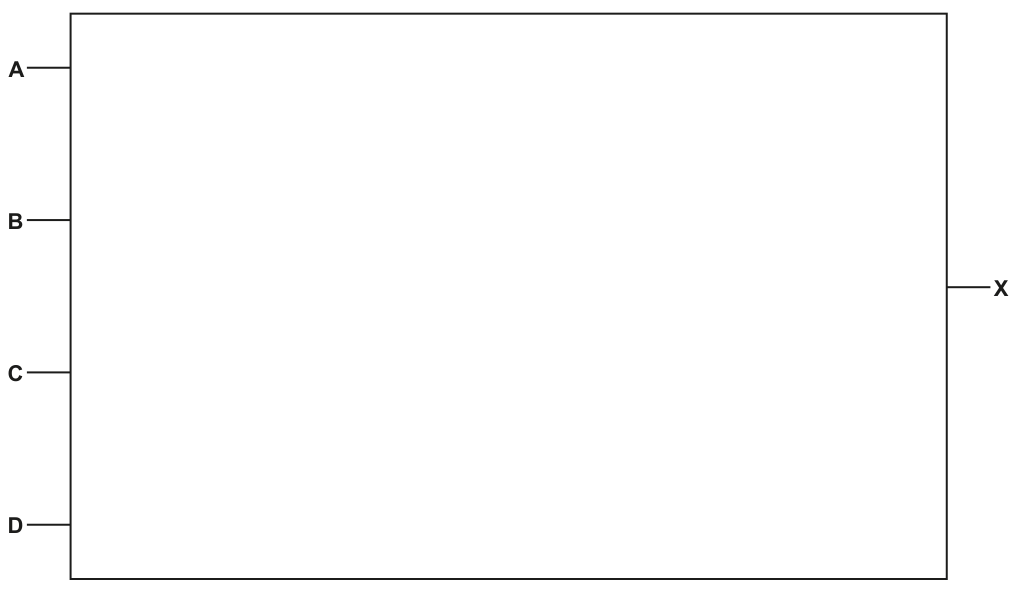
Answer
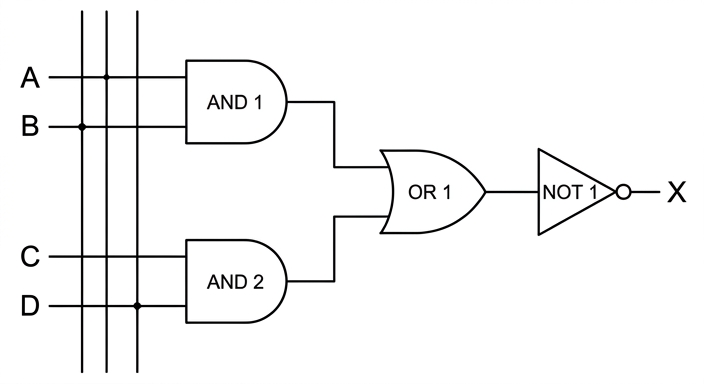
See logic circuit
Background Concept
A Boolean expression can be turned into a logic circuit by replacing each operation with its matching gate and following the bracket structure carefully.
The basic mappings are:
AND→ AND gateOR→ OR gateNOT→ NOT gate
The most important rule is to work from the inside of the brackets outward. Each bracketed part becomes a smaller sub-circuit, and then those sub-circuits are connected together.
For the expression
there are three stages:
- Find
A AND B - Find
C AND D - OR those two results together, then NOT the final result
So the circuit is built in layers, not all at once.
Understanding the Question
This part asks you to draw the circuit for the given expression, not to simplify it.
You are given four inputs: A, B, C and D, and one output: X.
The expression is:
This tells you exactly what operations must happen:
AandBmust go into an AND gateCandDmust go into another AND gate- the outputs of those two AND gates must go into an OR gate
- the output of the OR gate must go through a NOT gate
- the final output is
X
The brackets are the clue to the correct structure.
Approach
A safe method for these questions is:
- Identify each smallest bracketed expression.
- Draw a gate for each of those parts.
- Connect those outputs to the next gate.
- Apply any outer NOT last.
Here, the smallest parts are (A AND B) and (C AND D). Since they are separate, you need two AND gates. Their outputs are then combined by one OR gate. Because the whole expression is wrapped in NOT, the OR output must finally go into a NOT gate.
Step-by-Step Reasoning
Take the first sub-expression:
A AND B
This means input A and input B both feed into the first AND gate. That gate produces an intermediate output.
Now take the second sub-expression:
C AND D
This means input C and input D feed into a second AND gate. That gate produces another intermediate output.
Now look at the next level:
(A AND B) OR (C AND D)
So the two intermediate outputs from the AND gates become the two inputs of an OR gate.
Finally, the whole expression begins with NOT, so the output from the OR gate must be inverted.
That means the OR output is connected to a NOT gate, and the output from that NOT gate is labelled X.
So the finished circuit has:
- two 2-input AND gates on the left
- one OR gate receiving the outputs of those AND gates
- one NOT gate after the OR gate
- output labelled
X
A common check is to read your completed circuit from left to right:
- first AND, AND
- then OR
- then NOT
That matches the expression exactly.
Key Takeaways
- Translate Boolean expressions into circuits by following the brackets.
- Each inner bracket usually becomes a separate intermediate gate output.
- Apply an outer
NOTat the end if it covers the whole expression. - Reading the circuit left to right should reproduce the original expression structure.
Common Mistakes
- Drawing one large gate instead of separate gates for the two bracketed AND terms.
- Putting the NOT on one of the inputs instead of on the final OR output.
- Using a NAND gate directly without showing the required OR stage. Even if a simplified equivalent exists, the question asks for the given expression.
- Connecting
A,B,CandDall directly into an OR gate, which ignores the bracketed AND operations.
Things to Be Careful About
- Follow the brackets exactly; they determine the order of operations.
- Make sure
Apairs withB, andCpairs withD. - The NOT applies to the whole result of the OR stage, not to the individual AND outputs.
- Label the final output as
X, matching the expression and the diagram space provided.
A computer game is being designed that users will be able to play using a virtual reality (VR) headset.
Complete the description of the principal operation of a VR headset.
A headset can have one or two .......................................................... that output the image to the user. The headset has speakers that output surround sound to give a realistic experience.
The user’s head movements are detected using a sensor.
This sensor is a .......................................................... . The data is transmitted to a microprocessor that analyses the data to identify the .......................................................... of movement. Some headsets use .......................................................... that record the user’s eye movements for analysis.
Answer
- displays / screens
- gyroscope
- direction
- cameras
displays/screens; gyroscope; direction; cameras
Background Concept
A virtual reality headset combines output devices and input sensors to create an immersive environment. The output side usually includes small displays, one for each eye or sometimes a shared display arrangement, plus speakers for audio. The input side includes sensors that detect how the user's head is moving so that the image can be updated to match the user's viewpoint.
A common movement sensor in VR equipment is a gyroscope. A gyroscope measures rotational movement, so it helps the system detect how the user's head is turning. Some systems also use additional sensors such as accelerometers, but where a single sensor is asked for in this sort of question, gyroscope is the standard answer.
Many VR headsets also include eye-tracking hardware. This is commonly done with cameras or infrared camera systems that observe where the user's eyes are looking.
Understanding the Question
This part is a fill-in-the-blanks question about the main operation of a VR headset. The stem already tells you that:
- the headset outputs images and sound
- head movements are detected by a sensor
- a microprocessor analyses the sensor data
- some headsets also record eye movements
So each blank is asking for a hardware term or a simple description:
- what outputs the image
- which sensor detects movement
- what aspect of movement is identified
- what records eye movement
Approach
Use the clues in the sentence around each blank.
- “output the image to the user” points to displays or screens
- “sensor” plus “head movements” points to a gyroscope
- the processor uses the data to work out the direction of movement
- “record the user’s eye movements” points to cameras
This is mainly a recognition question: match each VR function to the correct hardware/component term.
Step-by-Step Reasoning
The first blank says the headset can have one or two things that output the image. The image is shown on displays or screens, so displays / screens fits.
The second blank asks for the type of sensor that detects the user's head movement. In VR, this is typically a gyroscope, which detects rotational movement.
The third blank asks what the microprocessor identifies from the sensor data. From movement data, it can determine the direction of movement.
The fourth blank asks what some headsets use to record eye movements. Eye tracking is done using cameras.
So the completed description uses:
- displays / screens
- gyroscope
- direction
- cameras
Key Takeaways
- VR headsets use displays/screens to show images.
- A gyroscope is a standard sensor for detecting head rotation/movement in VR contexts.
- Sensor data is analysed to determine movement direction.
- Eye tracking is commonly carried out using cameras.
Common Mistakes
- Writing a vague term like “sensor” for the second blank. The question already says it is a sensor, so the missing word needs the specific type.
- Giving “monitor” instead of display/screen if the wording suggests built-in headset hardware rather than a separate desktop device.
- Writing “speed” or “position” for the third blank when the sentence is asking what is identified from movement in a simple way;
directionis the expected idea. - Giving “infrared” alone for the final blank. Infrared may be part of the system, but the device doing the recording is typically a camera.
Things to Be Careful About
- In fill-in questions, keep the answer to the exact term needed rather than writing a long sentence.
- Use specific hardware names when the question asks for a device type.
- Where a mark scheme is likely to allow close alternatives, choose the clearest standard textbook term, such as
gyroscopeandcameras.
The computer uses a buffer when transmitting data to the VR headset.
Explain how a buffer is used when data is transmitted between the computer and the VR headset.
...................................................................................................................................................
...................................................................................................................................................
...................................................................................................................................................
...................................................................................................................................................
...................................................................................................................................................
.............................................................................................................................................
Answer
- A buffer is a temporary memory area used to hold data while it is being transferred.
- Data from the computer is placed in the buffer, then sent from the buffer to the VR headset.
- This allows transmission when the computer and headset work at different speeds, so data is not lost and the output remains continuous.
A buffer temporarily stores data during transfer so data can be sent from the computer to the headset at different rates without loss or interruption.
Background Concept
A buffer is a temporary holding area in memory used during data transfer. Buffers are needed when two devices do not operate at exactly the same speed. One device may produce data faster than the other can accept it, or the receiving device may briefly pause while processing earlier data.
Instead of forcing both devices to work at identical rates, the system places data into a buffer first. The receiving device can then read from that buffer as it becomes ready. This smooths out differences in speed and helps keep the data stream continuous.
In multimedia systems such as VR, this is especially important because images and sound need to arrive in time. Delays, gaps or lost data would reduce realism and could make the experience uncomfortable.
Understanding the Question
The question says the computer uses a buffer when transmitting data to a VR headset. It asks you to explain how the buffer is used during transmission.
So you need to do more than define a buffer. You must connect the idea of temporary storage to the actual transmission process between the computer and the headset, and explain why that helps.
The likely marking points are:
- what a buffer is
- where the data goes during transfer
- why buffering is needed in this situation
Approach
A good three-mark explanation follows a clear structure:
- define the buffer as temporary storage
- say that data is written to the buffer before the headset reads it
- explain that this handles different transfer/processing speeds and prevents interruption or loss
That gives both the process and the purpose.
Step-by-Step Reasoning
First, identify the role of a buffer. It is not permanent storage, and it is not the final destination. It is a temporary memory area used during transfer.
Next, apply that to the VR scenario. The computer generates data for the headset, such as image frames and audio. Instead of sending every bit directly with perfect timing, the system places the data into the buffer.
Then the VR headset reads the data from the buffer. If the computer sends data slightly faster than the headset can process it, the extra data can wait in the buffer. If the headset is ready, it can continue reading from the buffer without needing the computer to supply every item at exactly that instant.
This matters because the two devices may operate at different speeds. The computer and VR headset may have different processing rates or timing. Without a buffer, data could be lost, or the display/audio could pause or break up.
So the complete explanation is that the buffer temporarily stores data between the computer and the headset, allowing them to operate at different rates while maintaining continuous transfer.
Key Takeaways
- A buffer is temporary memory used during transfer.
- Buffers are used when sender and receiver work at different speeds.
- Buffering helps avoid data loss, pauses and uneven output.
- VR systems benefit from buffering because smooth real-time output matters.
Common Mistakes
- Saying a buffer is “permanent storage.” It is temporary.
- Only defining a buffer without explaining the transmission process between the computer and headset.
- Saying the buffer “speeds up” the headset. Its main role is to smooth transfer, not to make processing inherently faster.
- Forgetting to mention different data rates or prevention of interruption/data loss.
Things to Be Careful About
- Link the answer to transmission, not just storage in general.
- Make it clear that data goes into the buffer before being read by the headset.
- For full marks, include the reason buffering is necessary: different operating speeds or timing differences between devices.
The VR headset has Electrically Erasable Programmable Read Only Memory (EEPROM).
Explain the benefits of using EEPROM instead of other types of Read Only Memory (ROM) in the VR headset.
...................................................................................................................................................
...................................................................................................................................................
...................................................................................................................................................
...................................................................................................................................................
...................................................................................................................................................
.............................................................................................................................................
Answer
- EEPROM can be erased and rewritten electrically.
- It can be updated without removing the chip from the headset.
- The firmware/settings can therefore be changed or upgraded without replacing the ROM chip.
EEPROM can be electrically erased and rewritten in place, so firmware can be updated without removing or replacing the chip.
Background Concept
ROM is non-volatile memory, meaning it keeps its contents when power is switched off. Different types of ROM differ mainly in whether, and how easily, their contents can be changed.
- PROM is programmed once.
- EPROM can be erased and reprogrammed, but usually needs ultraviolet light and removal from the circuit.
- EEPROM can be erased and rewritten electrically while still in the device.
In embedded devices such as VR headsets, ROM is commonly used to store firmware: the low-level software that controls the hardware.
Understanding the Question
The question asks for the benefits of using EEPROM instead of other ROM types in a VR headset. So you should compare EEPROM with alternatives such as PROM or EPROM and explain what advantage EEPROM gives in this device.
The key clue is the phrase “instead of other types of ROM.” That means the answer should focus on what EEPROM uniquely improves, not general ROM properties that all ROM types share.
Approach
To answer well:
- state that EEPROM can be erased and rewritten electrically
- explain that this can be done without physically removing the chip
- connect that to a practical benefit for the headset, such as firmware updates or corrections
These are the standard mark-scheme points for EEPROM questions.
Step-by-Step Reasoning
EEPROM stands for Electrically Erasable Programmable Read Only Memory. The important part here is that it is electrically erasable.
Compared with PROM, which is programmed once, EEPROM can be changed again after manufacture.
Compared with EPROM, EEPROM does not need a special ultraviolet-light erasure process and usually does not need to be removed from the device first.
That gives a clear benefit in a VR headset. If the manufacturer wants to fix a bug, improve performance, or update firmware, the memory contents can be rewritten while the chip remains installed. This makes maintenance easier and avoids replacing hardware.
So the practical advantages are:
- electrical erasure and rewriting
- no need to remove the chip
- easy updating of firmware/settings
Key Takeaways
- EEPROM is non-volatile ROM that can be erased and rewritten electrically.
- It is more flexible than PROM and more convenient than EPROM.
- It is useful in embedded devices because firmware can be updated without replacing components.
Common Mistakes
- Saying EEPROM is better because it is non-volatile. Other ROM types are also non-volatile, so that is not a distinguishing benefit here.
- Confusing EEPROM with RAM and saying data is lost when power is off. EEPROM retains its contents.
- Describing only what EEPROM stands for without explaining the practical benefit to the headset.
- Writing that EEPROM is faster than all other ROM. Speed is not the key expected point here.
Things to Be Careful About
- Focus on benefits relative to other ROM types, not relative to RAM.
- Mention that rewriting is electrical and can happen in place.
- A good answer should connect the memory feature to firmware updates or maintenance in the VR headset.
The computer can transmit a video made from bitmap images and vector graphic animations to the VR headset.
Describe how the data for a bitmapped image is encoded.
...........................................................................................................................................
...........................................................................................................................................
...........................................................................................................................................
...........................................................................................................................................
...........................................................................................................................................
.....................................................................................................................................
Answer
- A bitmapped image is stored as a grid of pixels.
- Each pixel has a binary value stored for it, representing its colour.
- The number of bits used for each pixel depends on the colour depth, and the values are stored in order for the pixel positions in the image.
A bitmap is encoded as pixel data: a grid of pixels where each pixel position stores a binary colour value determined by the colour depth.
Background Concept
A bitmap image stores an image as individual picture elements called pixels. Each pixel represents one tiny part of the image at a specific position in a rectangular grid.
For each pixel, the computer stores a binary value. That value either directly represents the colour or acts as an index into a colour table, depending on the bitmap format. The number of bits used for each pixel is determined by the colour depth. For example, a 1-bit image stores two possible colours, while a 24-bit image can represent many more colours.
So bitmap encoding depends on two main ideas:
- the image is broken into a grid of fixed positions
- each position stores binary data for its colour
Understanding the Question
The question asks how the data for a bitmapped image is encoded. It is not asking about file size calculation, compression, or vector graphics. It wants the basic storage method for bitmap data.
To get the marks, you need to explain:
- that the image is made of pixels arranged in a grid
- that each pixel's colour is stored as binary data
- that the bit pattern depends on colour depth and corresponds to the pixel positions
Approach
A clear description starts from the structure of the image, then moves to how each element is stored:
- say the image is a grid of pixels
- say each pixel stores a binary code for colour
- say the number of bits per pixel depends on the colour depth and the stored sequence matches the pixel positions
That covers the representation properly.
Step-by-Step Reasoning
A bitmap does not store shapes such as circles or lines mathematically. Instead, it stores the final image as lots of tiny dots arranged in rows and columns.
Each dot is a pixel. Because the computer stores data in binary, each pixel must have a binary value associated with it.
That stored value represents the colour of that pixel. In a simple image, a small number of bits may be enough. In a higher-quality image, more bits are needed so that more colours can be represented. This is the colour depth.
The set of pixel values is stored in an order corresponding to their positions in the image, typically row by row. That means the computer can reconstruct the image by reading the pixel values and placing each one back into its correct position in the grid.
Key Takeaways
- A bitmap stores an image as pixels in a grid.
- Each pixel has a binary value for its colour.
- Colour depth determines how many bits are used for each pixel.
- Pixel positions matter because the stored values must map back to the image layout.
Common Mistakes
- Describing vector graphics instead, such as saying the image is stored as lines and shapes.
- Forgetting to mention pixels.
- Saying only “the image is stored in binary” without explaining what the binary values represent.
- Confusing resolution with colour depth. Resolution is the number of pixels; colour depth is the number of bits per pixel.
Things to Be Careful About
- Use the term
pixelsexplicitly. - Mention both colour values and pixel positions/order.
- If you mention colour depth, keep it correctly linked to bits per pixel, not number of pixels.
Describe the contents of a vector graphic drawing list.
...........................................................................................................................................
...........................................................................................................................................
...........................................................................................................................................
.....................................................................................................................................
Answer
- A vector graphic drawing list stores the objects/shapes that make up the image, for example lines, rectangles or circles.
- For each object it stores properties such as coordinates/position, size and colour (and other formatting such as line thickness or fill).
A vector drawing list contains the shapes/objects in the image and the properties of each one, such as coordinates, size and colour.
Background Concept
Vector graphics store an image as a set of drawing instructions rather than as individual pixels. The computer keeps a list of objects such as lines, circles, rectangles and curves, together with their properties.
This list is called a drawing list. When the image needs to be displayed, the system reads the list and draws each object according to its stored properties.
Typical properties include:
- position or coordinates
- size or dimensions
- line colour
- fill colour
- line thickness
Understanding the Question
The question asks specifically for the contents of a vector graphic drawing list. That means it wants the kind of information stored in the list, not the advantages of vector graphics and not how bitmap images work.
A two-mark answer usually needs:
- the types of graphic objects stored
- the attributes or parameters stored for each object
Approach
Answer this by thinking of vector graphics as instructions for drawing. Ask:
- what needs to be drawn?
- what details are needed to draw it accurately?
The first gives the objects or shapes. The second gives the attributes like coordinates, size and colour.
Step-by-Step Reasoning
A vector image does not save every pixel. Instead, it saves a list of components of the drawing.
So one part of the drawing list is the objects themselves: for example, a line, a circle, a rectangle or a curve.
But just naming the object is not enough. The computer also needs to know how to draw it. That means the list must include each object's properties, such as where it is placed, how large it is, and what colour or style it has.
Therefore the contents of the drawing list are:
- the objects/shapes in the picture
- the stored attributes for each object
Key Takeaways
- Vector graphics are object-based, not pixel-based.
- A drawing list stores shapes and their properties.
- Coordinates, size and colour are common properties in a vector representation.
Common Mistakes
- Saying vector graphics are made of pixels. That describes bitmaps, not vectors.
- Listing only the shapes but not their attributes.
- Giving advantages like “can be resized without pixelation” instead of answering what the list contains.
Things to Be Careful About
- Use examples of shapes only as examples; the main point is that vector graphics store objects.
- Include at least one or two properties such as coordinates, size or colour for full detail.
The bitmap video is not compressed before transmission to the VR headset.
Give two reasons why the video does not need to be compressed.
1 ........................................................................................................................................
...........................................................................................................................................
2 ........................................................................................................................................
...........................................................................................................................................
Answer
-
Compression is not needed if the connection to the headset has sufficient bandwidth / data transfer speed to send the video uncompressed.
-
Leaving the video uncompressed avoids compression loss and avoids extra processing/decompression delay, which helps maintain image quality and reduce latency.
Sufficient bandwidth means compression is unnecessary, and avoiding compression/decompression preserves quality and reduces delay.
Background Concept
Compression reduces the amount of data that needs to be stored or transmitted. This is useful when bandwidth is limited, storage space is limited, or transfer time needs to be reduced.
However, compression is not always necessary. If there is enough bandwidth available, data can be sent uncompressed. Also, compression and decompression may add processing time. In real-time systems, that added delay can be a disadvantage.
Some compression methods are lossy, meaning some image detail is permanently discarded. In a VR system, visible artefacts or reduced quality can make the visual experience worse.
Understanding the Question
The question asks for two reasons why bitmap video sent to the VR headset does not need to be compressed before transmission.
The important clues are:
- this is about
transmission, not storage - it is being sent to a
VR headset, where real-time smooth output matters - the answer needs
two reasons
So the best reasons are ones tied to transmission conditions and VR requirements.
Approach
Think of why compression is normally used, then reverse that logic.
Compression is usually used because:
- bandwidth is limited
- storage is limited
- transfer takes too long
If those problems are not serious, compression may be unnecessary. Then consider the disadvantages of compression in VR:
- possible loss of image quality
- extra processing/decompression delay
Pick two strong reasons from these.
Step-by-Step Reasoning
Reason 1: enough bandwidth
If the computer is connected to the headset by a fast link, there may be enough data transfer capacity to send the video as it is. In that case, compression is not needed to make the data fit through the connection.
Reason 2: avoid quality loss and latency
Compression can reduce quality, especially if it is lossy. In VR, image quality matters because the display is close to the user's eyes. Also, compressed video usually has to be decompressed before display. That adds processing overhead and can introduce delay. In VR, delay between movement and updated display is especially undesirable.
So two strong reasons are:
- the transmission link is fast enough already
- uncompressed data avoids quality reduction and decompression delay
Key Takeaways
- Compression is only necessary when it solves a problem such as limited bandwidth or large data size.
- If bandwidth is sufficient, uncompressed transmission may be acceptable.
- In VR, low latency and high image quality are especially important.
- Compression can trade data size for lower quality or extra processing time.
Common Mistakes
- Saying “video can never be compressed” or “all video must be compressed.” Neither is true.
- Giving storage-based reasons only, when the question is specifically about transmission to the headset.
- Stating just “it is faster” without explaining that this is because there is no compression/decompression overhead or because bandwidth is sufficient.
- Forgetting that lossy compression may reduce image quality.
Things to Be Careful About
- Give two distinct reasons, not the same idea worded twice.
- Keep the answer tied to the VR context: smooth real-time output and good visual quality matter.
- If you mention quality, make it clear that compression may reduce it; if you mention speed, make it clear whether you mean transfer bandwidth or processing delay.
An assessment board scans exam papers and stores the digitised papers on a server. Exam markers download the digitised papers to mark. The exam markers then upload the mark for each paper.
The assessment board needs to make sure the data stored on the server is secure.
Authentication methods can help to protect the server against hackers.
Identify one other security measure that helps to protect the server from hackers.
Describe how the security measure works.
Security measure ..............................................................................................................
Description ........................................................................................................................
...........................................................................................................................................
...........................................................................................................................................
...........................................................................................................................................
Answer
- Security measure: Firewall
- Description: A firewall monitors data entering and leaving the server and checks it against a set of security rules.
- It blocks unauthorised or suspicious connections/packets and only allows permitted traffic to reach the server.
Firewall
Background Concept
A server that stores important files, such as digitised exam papers and marks, must be protected from unauthorised access. A security measure is a method used to reduce the risk of attack. In this question, authentication has already been mentioned, so we need a different measure.
A firewall is a very common network security measure. It sits between a computer or server and the network, and it checks incoming and outgoing traffic. It uses rules to decide what traffic is allowed through and what traffic should be blocked. For example, it may allow requests on approved ports or from approved addresses, and reject unexpected or suspicious traffic.
Understanding the Question
The scenario is an assessment board storing scanned exam papers on a server. That server is valuable because it contains confidential scripts and marks. The question asks for one other security measure besides authentication that helps protect the server from hackers, and then asks for how it works.
So two things are required:
- name a suitable security measure
- describe its mechanism, not just its purpose
A vague answer such as "it keeps hackers out" is not enough on its own. The best answer is one that shows what the measure actually does.
Approach
A strong approach is to choose a standard syllabus security measure that clearly protects a server from external attack. A firewall is the clearest fit because it directly controls network traffic to and from the server.
Then explain the mechanism in two steps:
- it examines traffic attempting to pass through
- it permits approved traffic and blocks unauthorised or suspicious traffic
That gives both identification and description.
Step-by-Step Reasoning
First, we need a measure other than authentication. Acceptable ideas in general might include a firewall, anti-malware software, or access rights, but firewall is the most direct answer for protection from hackers over a network.
Now explain how it works.
- A firewall is placed between the server and the wider network/internet.
- When data packets or connection requests arrive, the firewall checks them against predefined rules.
- These rules may be based on things such as IP address, port number, protocol, or whether the traffic was expected.
- If the traffic matches an allowed rule, it is passed on to the server.
- If it is unauthorised, suspicious, or does not match the rules, it is blocked.
That is why the answer gains marks: it does not just name the firewall, it explains the filtering action.
Key Takeaways
- A firewall is a standard method of protecting a server from network-based attacks.
- Good security answers should explain how the measure works, not just what it is called.
- For hacker-related questions, traffic filtering and blocking unauthorised access are key ideas.
Common Mistakes
- Repeating authentication even though the question says "one other" measure.
- Naming a measure but not describing its operation.
- Giving a very vague description such as "it stops hackers" without saying how.
- Confusing a firewall with encryption. A firewall controls access; encryption protects the contents of data.
Things to Be Careful About
- Make sure the measure fits protecting the server, not just protecting data in transit.
- Use precise wording such as checks traffic against rules, allows authorised traffic, and blocks unauthorised traffic.
- Do not drift into unrelated security areas such as physical locks unless the question is specifically about physical security.
Identify one security measure that helps to protect the data when it is being transmitted to its destination. Describe how the security measure works.
Security measure ..............................................................................................................
Description ........................................................................................................................
...........................................................................................................................................
...........................................................................................................................................
...........................................................................................................................................
Answer
- Security measure: Encryption
- Description: The data is converted into an unreadable form before it is transmitted.
- If the data is intercepted, it cannot be understood without the correct decryption key, and the receiver uses the key to convert it back to the original data.
Encryption
Background Concept
Data being sent across a network can potentially be intercepted while it is travelling. Protecting data in transit is different from protecting a stored server. The main concern here is confidentiality during transmission.
The standard method is encryption. Encryption changes readable data, called plaintext, into unreadable data, called ciphertext, using an algorithm and a key. Only someone with the correct key can turn it back into its original form using decryption.
Understanding the Question
The exam markers download scanned papers and upload marks. That means the data travels across a network or the internet. The question asks for one security measure that protects the data while it is being transmitted to its destination.
That wording points directly to a method that protects the contents of the data even if someone manages to intercept it. So the best answer is encryption.
Approach
Choose encryption and explain it as a before-during-after process:
- before transmission, the data is encrypted
- during transmission, intercepted data appears unreadable
- at the destination, it is decrypted with the correct key
This directly answers both the identification and description parts of the question.
Step-by-Step Reasoning
The question is about transmitted data, so we want a method that protects the contents rather than one that merely blocks access.
- The sender takes the original data, such as a mark or a scanned paper reference.
- Encryption is applied to that data.
- The result is ciphertext, which does not make sense to a person who sees it without permission.
- The ciphertext is then transmitted over the network.
- If an attacker intercepts it, they do not get the original meaning unless they also have the correct key.
- When the data reaches the destination, the recipient uses the decryption key to restore the original readable data.
That is the exact mechanism the mark is looking for.
Key Takeaways
- Encryption protects data contents during transmission.
- Encrypted data is unreadable without the proper key.
- For transmission-security questions, explaining both encryption and decryption is often enough for full marks.
Common Mistakes
- Giving firewall for a data-in-transit question. A firewall manages access, but it does not by itself make the transmitted data unreadable.
- Saying only "the data is secure" without describing unreadable ciphertext and decryption.
- Forgetting to mention the key.
- Confusing encryption with compression.
Things to Be Careful About
- Focus on while the data is being transmitted. That wording matters.
- Make clear that the receiver must be able to turn the data back into its original form.
- Avoid saying encryption prevents interception; it mainly prevents intercepted data from being understood.
The exam markers use software that operates as a thin-client to mark the exam papers.
Complete the table by identifying two characteristics of a thin-client.
Describe how each characteristic will be used in this software.
| Thin-client characteristic | Description of use in this software | |
|---|---|---|
| 1 | ||
| 2 |
Answer
| Thin-client characteristic | Description of use in this software | |
|---|---|---|
| 1 | Processing is done on the server / software runs on the server | The exam marker's computer mainly displays the digitised paper and sends the entered mark, while the main processing is carried out by the server. |
| 2 | Data is stored centrally on the server / little local storage is needed | The digitised papers and marks are kept on the server, so little or no permanent data needs to be stored on the exam marker's computer. |
See completed table
Background Concept
A thin client is a client device that depends heavily on a server. In a client-server system, the server does most of the processing, storage, or application management, while the client mainly provides the user interface.
Typical thin-client characteristics include:
- most processing happens on the server
- software may run centrally on the server
- little local storage is needed
- the client device can be lower specification
- a reliable network connection is important
This is different from a thick client, where much more processing and storage happen on the user's own computer.
Understanding the Question
The question says the exam markers use software that operates as a thin client to mark exam papers. It then asks for two characteristics of a thin client and for each one, a description of how it is used in this software.
So you cannot just list two general facts. Each fact must be linked to the exam-marking situation:
- scanned papers are stored on a server
- markers download papers to mark
- markers upload marks
That means the answer must apply the thin-client idea directly to this scenario.
Approach
Choose two classic thin-client characteristics that are easy to apply:
- server-side processing / software runs on the server
- centralised storage / little local storage on the client
Then connect them to the given system:
- the marker's machine mainly shows the paper and captures the entered marks
- the actual papers and marks are kept centrally on the server
Step-by-Step Reasoning
First characteristic: processing is done on the server.
Why this fits:
- In a thin-client model, the client machine is not expected to do the main work.
- For exam marking, the software can be hosted centrally.
- The marker's device mainly needs to display the digitised paper on screen and send the mark entered by the user.
- The server handles the main processing and management of the system.
Second characteristic: data is stored centrally on the server.
Why this fits:
- The question states that digitised papers are stored on a server.
- Markers download papers and upload marks, which suggests central control of files and results.
- A thin client usually does not need large amounts of permanent local storage.
- The marker's computer may only hold temporary copies while the files are being viewed or transferred, but the master copies remain on the server.
These two characteristics are both valid and clearly linked to the scenario.
Key Takeaways
- Thin clients rely on servers for most of the work.
- Good answers must not just name characteristics; they must apply them to the given system.
- Central processing and central storage are two of the most common thin-client features.
Common Mistakes
- Listing thin-client characteristics with no application to the exam-marking software.
- Giving characteristics of a thick client instead.
- Saying only "it is cheaper" or "it is easier to maintain". Those are benefits, not the clearest characteristics for this table.
- Writing the same idea twice in different words.
Things to Be Careful About
- The question asks for two characteristics, so give two distinct points.
- Make the description specific to the scenario: scanned papers, display, entering marks, central server.
- If you mention local storage, make clear that the important permanent storage is centralised on the server.
Data transmitted on the internet passes through multiple different systems.
Describe the role of routers in the transmission of data through the internet.
...........................................................................................................................................
...........................................................................................................................................
...........................................................................................................................................
.....................................................................................................................................
Answer
- Routers receive data packets and examine the destination IP address.
- They use routing information to choose the best/next route and forward the packets to another network towards their destination.
Routers examine destination IP addresses and forward packets along the next best route.
Background Concept
The internet is a network of networks. Data sent across it is broken into packets, and those packets travel through many devices before arriving at the destination. A router is the device responsible for moving packets from one network to another.
Routers work using IP addresses. Each packet contains addressing information. A router reads the destination IP address, checks its routing information, and decides where the packet should go next.
Understanding the Question
The question says that data transmitted on the internet passes through multiple different systems, then asks for the role of routers. This means it is asking what routers do during the journey of data across the internet.
For 2 marks, the key points are usually:
- routers inspect destination address information
- routers forward packets along an appropriate route
Approach
A concise full-mark answer should mention both the decision and the action:
- the router examines the destination IP address
- the router chooses the next/best route and forwards the packet
That is more complete than simply saying "it sends data".
Step-by-Step Reasoning
When a packet reaches a router:
- the router receives the packet from a connected network
- it reads the destination IP address in the packet header
- it checks its routing table or stored routing information
- from this, it determines which next hop or path should be used
- it forwards the packet towards another router or the destination network
Because the internet is made of many interconnected networks, this process can happen many times. Different packets from the same file may even take different routes if that is the most suitable path available.
Key Takeaways
- Routers connect networks together.
- Routers examine destination IP addresses.
- Routers forward packets along a suitable path towards the destination.
Common Mistakes
- Saying a router "stores all the data". Its main role is forwarding, not long-term storage.
- Describing a switch instead of a router.
- Forgetting to mention the use of destination addressing or route selection.
Things to Be Careful About
- Use the word packets rather than speaking vaguely about "files" or "messages".
- Mention IP address if possible, because that shows how the router makes its decision.
- For a 2-mark answer, do not overcomplicate it with unnecessary protocol detail.
Describe the role of the PSTN (Public Switched Telephone Network) in the transmission of data through the internet.
...........................................................................................................................................
...........................................................................................................................................
...........................................................................................................................................
.....................................................................................................................................
Answer
- The PSTN provides the telephone-line connection between the user and the ISP so data can be carried from the user's system onto the internet.
- A modem converts the computer's digital data into a form suitable for transmission over the PSTN and converts it back again at the other end.
The PSTN provides the telephone-line link to the ISP, with a modem converting the data for transmission.
Background Concept
The PSTN stands for Public Switched Telephone Network. It is the traditional telephone system, originally designed for voice communication over telephone lines. In internet access, especially older or telephone-line-based connections, the PSTN can provide the link between a user's location and an internet service provider (ISP).
Because computers use digital data but telephone systems were designed around voice signals, a modem is used. A modem converts data into a suitable form for transmission over the telephone network and converts received signals back again.
Understanding the Question
The question asks for the role of the PSTN in the transmission of data through the internet. It is not asking about the whole internet backbone. It is asking how the PSTN contributes to getting data from one end system into the internet.
The key idea is that the PSTN can provide the telephone-line part of the connection between the user and the ISP.
Approach
A good answer should mention two linked points:
- the PSTN provides the communication link using telephone lines
- a modem is needed to convert the data to a suitable form and back again
That gives a complete explanation for a short 2-mark question.
Step-by-Step Reasoning
Here is the role of the PSTN in simple stages:
- A user's computer or device needs a way to reach the ISP.
- If the connection uses the telephone network, the PSTN provides that link through the telephone infrastructure.
- The computer's data must be prepared for travel over this system, so a modem performs signal conversion.
- The data can then travel over the PSTN to the ISP, where it enters the wider internet.
- At the receiving side of that telephone-based link, the signals are converted back so the digital data can be processed normally.
So the PSTN is not "the internet" itself. It is part of the connection path that can carry data to or from the internet.
Key Takeaways
- The PSTN is the public telephone network.
- It can provide the line used to connect a user to an ISP.
- A modem is used to convert data into a form suitable for transmission over that network.
Common Mistakes
- Saying the PSTN is the same thing as the internet.
- Describing routers again instead of explaining the telephone network's role.
- Forgetting the need for a modem or signal conversion.
- Saying the PSTN stores data rather than carries it.
Things to Be Careful About
- Keep the role focused on providing the connection path between the user and the ISP.
- Do not imply that the entire internet operates through the PSTN.
- If you mention analogue signals, do so carefully: the essential mark is the need for conversion to a form suitable for transmission over the telephone network.
An assessment board wants to store the marks students achieved in exams in a database named RECORDS.
Part of the database design includes these two tables:
EXAM(ExamID, Subject, Level, TotalMarks)
EXAM_QUESTION(ExamQuestionID, ExamID, QuestionNumber, Question, MaxMark)
Identify the relationship between EXAM and EXAM_QUESTION.
...................................................................................................................................................
.............................................................................................................................................
Answer
- One-to-many relationship: one
EXAMcan have manyEXAM_QUESTIONrecords.
One-to-many
Background Concept
In a relational database, tables are linked by relationships. A relationship describes how many records in one table can be associated with records in another table.
The common types are:
- one-to-one
- one-to-many
- many-to-many
A one-to-many relationship means one record in the first table can match several records in the second table. This is usually implemented by putting the primary key from the first table into the second table as a foreign key.
Here, ExamID is the key link. If EXAM stores one row per exam paper, then EXAM_QUESTION stores the separate questions belonging to that paper.
Understanding the Question
You are given two tables:
EXAM(ExamID, Subject, Level, TotalMarks)EXAM_QUESTION(ExamQuestionID, ExamID, QuestionNumber, Question, MaxMark)
The important clue is that EXAM_QUESTION contains ExamID. That means each question record belongs to a particular exam. The question asks only for the relationship type between the two tables.
Approach
Think about the real-world situation:
- one exam paper contains several questions
- each question belongs to one exam paper
So we decide the relationship by counting how many question rows can be linked to one exam row.
Step-by-Step Reasoning
EXAM represents a complete exam.
EXAM_QUESTION represents individual questions in that exam.
If an exam has, for example, Question 1, Question 2, Question 3, and so on, then several EXAM_QUESTION rows will all have the same ExamID.
That means:
- one
EXAMrecord matches manyEXAM_QUESTIONrecords - each
EXAM_QUESTIONrecord matches oneEXAMrecord
So the relationship is one-to-many from EXAM to EXAM_QUESTION.
Key Takeaways
- A foreign key usually shows how tables are linked.
- If many rows in one table can share the same key from another table, that is one-to-many.
- Database relationships should match the real-world situation being modelled.
Common Mistakes
- Saying many-to-many: that would mean one question could belong to many exams, which is not what this structure shows.
- Writing only "linked by
ExamID" without naming the relationship type. - Reversing the wording and saying one
EXAM_QUESTIONhas manyEXAMrecords.
Things to Be Careful About
- State the direction clearly: one
EXAMto manyEXAM_QUESTION. - Do not confuse the existence of a foreign key with the relationship name itself.
- Keep the table names exact as given in the question.
Sample data for the table EXAM is shown:
| ExamID | Subject | Level | TotalMarks |
|---|---|---|---|
| 00956124 | Computer Science | 2 | 75 |
| 00956125 | Computer Science | 3 | 120 |
| 00956126 | Mathematics | 2 | 100 |
| 00956127 | Mathematics | 3 | 150 |
| 00956128 | Physics | 2 | 70 |
| 00956129 | Physics | 3 | 80 |
Write a Structured Query Language (SQL) script to define the table EXAM.
...................................................................................................................................................
...................................................................................................................................................
...................................................................................................................................................
...................................................................................................................................................
...................................................................................................................................................
.............................................................................................................................................
Answer
CREATE TABLE EXAM (
  ExamID CHAR(8),
  Subject VARCHAR(20),
  Level INTEGER,
  TotalMarks INTEGER,
  PRIMARY KEY (ExamID)
);
See SQL script
Background Concept
SQL DDL, or Data Definition Language, is used to create and change the structure of database tables. The most common statement for this is CREATE TABLE.
When defining a table, you must specify:
- the table name
- each field name
- a suitable data type for each field
- the key field or fields
A primary key uniquely identifies each record in the table. It cannot be duplicated. Data types should fit the data being stored:
- fixed-length text such as an ID with leading zeros can use
CHAR - variable-length text such as a subject name can use
VARCHAR - whole numbers such as levels and totals can use
INTEGER
Understanding the Question
You must define the table EXAM from the sample data shown. The fields are:
ExamIDSubjectLevelTotalMarks
The sample values help you choose sensible data types. For example, ExamID begins with 0, so treating it as pure numeric data can be risky because leading zeros may be lost.
Approach
Build a CREATE TABLE statement that:
- uses the exact field names from the table
- assigns suitable SQL types
- identifies
ExamIDas the primary key
The most important design decision here is that ExamID should be stored as text, not as an integer, because IDs are identifiers rather than values used in calculation.
Step-by-Step Reasoning
Start with the table name:
CREATE TABLE EXAM
Now define each field:
ExamID CHAR(8)because all example IDs are 8 characters long and include a leading zeroSubject VARCHAR(20)because subject names are text and may vary in lengthLevel INTEGERbecause values like2and3are whole numbersTotalMarks INTEGERbecause marks such as75,120, and150are whole numbers
Finally, set the primary key:
PRIMARY KEY (ExamID)
That completes a valid table definition.
Key Takeaways
- Use
CREATE TABLEto define a new table. - Choose data types based on the nature of the data, not just how it looks at first glance.
- IDs with leading zeros are usually better stored as text.
- A primary key uniquely identifies each record.
Common Mistakes
- Using
INTEGERforExamID: this can lose the leading zero. - Forgetting the primary key.
- Misspelling field names so they no longer match the required schema.
- Using a text type for numeric fields like
LevelorTotalMarks.
Things to Be Careful About
- Keep the identifier names exactly as given:
ExamID,Subject,Level,TotalMarks. - A different reasonable text length for
Subjectmay still work, but the type must clearly be suitable for text. ExamIDis an identifier, so do not choose its type based only on the fact that it contains digits.- In exams, include both the field definitions and the primary key, because both are usually credited.
The table EXAM_QUESTION has been created but the foreign key has not been linked.
Write an SQL script to update EXAM_QUESTION and link the foreign key to EXAM.
...................................................................................................................................................
...................................................................................................................................................
...................................................................................................................................................
.............................................................................................................................................
Answer
ALTER TABLE EXAM_QUESTION
ADD FOREIGN KEY (ExamID) REFERENCES EXAM(ExamID);
See SQL script
Background Concept
A foreign key is a field in one table that refers to the primary key in another table. It is used to enforce referential integrity, meaning the database will only allow linked values that actually exist in the parent table.
To add a foreign key after a table has already been created, SQL commonly uses ALTER TABLE.
The pattern is:
- choose the existing table to change
- add the foreign key field or constraint
- state which table and key it references
Understanding the Question
The question says EXAM_QUESTION already exists, but the foreign key has not yet been linked. So you do not create the whole table again. You must update the existing table structure so that ExamID in EXAM_QUESTION points to ExamID in EXAM.
Approach
Use an ALTER TABLE statement, because the table already exists.
Then add a foreign key on ExamID, referencing the matching primary key in EXAM.
The logic is:
- child table:
EXAM_QUESTION - foreign key field in child:
ExamID - parent table:
EXAM - primary key in parent:
ExamID
Step-by-Step Reasoning
Start with the table being changed:
ALTER TABLE EXAM_QUESTION
Now add the constraint:
ADD FOREIGN KEY (ExamID)
Then specify the referenced table and field:
REFERENCES EXAM(ExamID)
This means every ExamID placed into EXAM_QUESTION must already exist in EXAM.
That creates the link between the tables and enforces valid references.
Key Takeaways
- Use
ALTER TABLEwhen changing an existing table definition. - A foreign key in the child table refers to the primary key in the parent table.
- Foreign keys help keep linked data valid.
Common Mistakes
- Using
CREATE TABLEinstead ofALTER TABLE. - Reversing the reference and trying to make
EXAMpoint toEXAM_QUESTION. - Referencing the wrong field name.
- Forgetting the
REFERENCESclause.
Things to Be Careful About
- The field names must match exactly:
ExamIDandExamID. - The foreign key is added to
EXAM_QUESTION, not toEXAM. - The referenced field should be the primary key in the parent table.
- In many SQL dialects you can optionally name the constraint, but that is not necessary unless asked.
The database also needs to store data about the students, the exams the students have taken and the marks the students achieved in each question of each exam.
Describe the additional tables that will need to be included in the database and explain how all the tables in the database will be linked.
...................................................................................................................................................
...................................................................................................................................................
...................................................................................................................................................
...................................................................................................................................................
...................................................................................................................................................
...................................................................................................................................................
...................................................................................................................................................
...................................................................................................................................................
...................................................................................................................................................
.............................................................................................................................................
Answer
- Add a
STUDENTtable, for exampleSTUDENT(StudentID, ...), withStudentIDas the primary key. - Add a linking table to store which exams each student has taken, for example
STUDENT_EXAM(StudentExamID, StudentID, ExamID). - This linking table resolves the many-to-many relationship between students and exams, because one student can take many exams and one exam can be taken by many students.
- Add a table to store the mark for each question in each exam taken, for example
STUDENT_EXAM_QUESTION(StudentExamID, ExamQuestionID, MarkAchieved). - Link
EXAMtoEXAM_QUESTIONbyExamID, linkSTUDENTtoSTUDENT_EXAMbyStudentID, linkEXAMtoSTUDENT_EXAMbyExamID, and linkSTUDENT_EXAM_QUESTIONtoSTUDENT_EXAMbyStudentExamIDand toEXAM_QUESTIONbyExamQuestionID.
See explanation
Background Concept
Database design starts by identifying entities, attributes, and relationships.
An entity is something you store data about, such as a student or an exam. A table is usually created for each entity.
A many-to-many relationship cannot usually be stored directly in a relational database. It must be resolved using a linking table, sometimes called a junction table or associative table.
For example:
- one student can take many exams
- one exam can be taken by many students
That is many-to-many, so a linking table is needed.
If you also need marks for each question, then you need another table that connects a student's exam entry to the individual questions for that exam.
Understanding the Question
The existing database already has:
EXAMEXAM_QUESTION
The question says the database must also store:
- the students
- the exams the students have taken
- the marks the students achieved in each question of each exam
So the answer must go beyond naming one extra table. You need to think about the full structure needed to record all those facts without duplication and with proper links.
Approach
Break the problem into separate pieces of information:
- information about students themselves
- which student took which exam
- the mark achieved by that student for each question in that exam
Then translate each piece into a table.
The relationship between students and exams is many-to-many, so create a linking table for that.
After that, create a table for per-question marks, linked both to the student-exam record and to the question definition.
Step-by-Step Reasoning
First, add a table for students.
A table such as STUDENT(StudentID, ...) is needed because the system must store details about each student. StudentID would be the primary key.
Second, think about students and exams.
A student can take more than one exam. Also, the same exam can be taken by many students. That means STUDENT and EXAM have a many-to-many relationship.
In a relational database, this is resolved with a linking table, for example:
STUDENT_EXAM(StudentExamID, StudentID, ExamID)
Here:
StudentExamIDcan be the primary keyStudentIDis a foreign key toSTUDENTExamIDis a foreign key toEXAM
Each record in STUDENT_EXAM means one particular student took one particular exam.
Third, store the marks for each question.
One student taking one exam will have several question marks, one for each question in that paper. So add another table such as:
STUDENT_EXAM_QUESTION(StudentExamID, ExamQuestionID, MarkAchieved)
This table records the mark a student got for one specific question in one specific exam sitting.
The links are:
EXAM.ExamIDtoEXAM_QUESTION.ExamIDfor the exam's list of questionsSTUDENT.StudentIDtoSTUDENT_EXAM.StudentIDEXAM.ExamIDtoSTUDENT_EXAM.ExamIDSTUDENT_EXAM.StudentExamIDtoSTUDENT_EXAM_QUESTION.StudentExamIDEXAM_QUESTION.ExamQuestionIDtoSTUDENT_EXAM_QUESTION.ExamQuestionID
This structure lets you answer questions such as:
- which exams has a student taken?
- which students took a given exam?
- what did a student score on Question 4 of a particular exam?
It also avoids repeating full exam or student details in many places.
Key Takeaways
- Add a new table for each new entity you need to store.
- Resolve many-to-many relationships using a linking table.
- Use another table when a many-to-many relationship also needs its own data, such as
MarkAchieved. - Primary keys identify records; foreign keys link records across tables.
Common Mistakes
- Adding only a
STUDENTtable and forgetting how students link to exams. - Trying to put multiple exam IDs into one student record.
- Storing all question marks as separate columns instead of separate rows.
- Forgetting that
EXAMandEXAM_QUESTIONare already in a one-to-many relationship. - Not explaining how the tables are linked, even if the table names are correct.
Things to Be Careful About
- A student-exam link is needed because students and exams are many-to-many.
- Per-question marks need a separate table if you want one record per question attempt.
- Use foreign keys that reference the correct parent table.
- Keep the design normalised so that exam details, question details, and student details are not unnecessarily duplicated.
- In an exam answer, it is acceptable to give sensible example table names and key fields as long as the structure and links are correct.
The following table shows part of the instruction set for a processor. The processor has two registers: the Accumulator (ACC) and an Index Register (IX).
| Instruction | Explanation | |
|---|---|---|
| Opcode | Operand | |
| LDM | #n | Immediate addressing. Load the number n to ACC |
| LDD | <address> | Direct addressing. Load the contents of the location at the given address to ACC |
| LDI | <address> | Indirect addressing. The address to be used is at the given address. Load the contents of this second address to ACC |
| LDX | <address> | Indexed addressing. Form the address from <address> + the contents of the index register. Copy the contents of this calculated address to ACC |
| LDR | #n | Immediate addressing. Load the number n to IX |
| ADD | #n/Bn/&n | Add the number n to the ACC |
| ADD | <address> | Add the contents of the given address to the ACC |
| SUB | #n/Bn/&n | Subtract the number n from the ACC |
| SUB | <address> | Subtract the contents of the given address from the ACC |
| INC | <register> | Add 1 to the contents of the register (ACC or IX) |
<address> can be an absolute or a symbolic address
denotes a denary number, e.g. #123
B denotes a binary number, e.g. B01001010
& denotes a hexadecimal number, e.g. &4A
The current contents of memory are shown:
| Address | Data |
|---|---|
| 10 | 1 |
| 11 | 3 |
| 12 | 5 |
| 13 | 11 |
| 14 | 10 |
| 15 | 16 |
| 16 | 12 |
The current contents of the ACC and IX are shown:
ACC: 10
IX: 0
Complete the table by writing the content of the ACC after each program has run.
| Program number | Code | ACC content |
|---|---|---|
| 1 | LDI 15 SUB #1 | |
| 2 | LDD 14 ADD 11 | |
| 3 | LDM #11 ADD #3 SUB 16 | |
| 4 | LDR #2 LDX 14 ADD #2 |
Working
LDI 15→ address15contains16, so ACC ← contents of16=12;SUB #1→11LDD 14→ ACC ← contents of14=10;ADD 11→10 +contents of11=10 + 3 = 13LDM #11→ ACC ←11;ADD #3→14;SUB 16→14 -contents of16=14 - 12 = 2LDR #2→ IX ←2;LDX 14→ use address14 + 2 = 16, so ACC ← contents of16=12;ADD #2→14
Answer
| Program number | ACC content |
|---|---|
| 1 | 11 |
| 2 | 13 |
| 3 | 2 |
| 4 | 14 |
See completed trace table
Background Concept
This question tests tracing simple assembly-language instructions using different addressing modes.
The processor has two registers here:
ACC(Accumulator), used for the main data value being worked on.IX(Index Register), used when indexed addressing is needed.
The key addressing modes are:
- Immediate addressing: the value is given directly in the instruction, for example
LDM #11loads the literal value 11. - Direct addressing: the operand is a memory address, so you go to that address and use the data stored there, for example
LDD 14loads the contents of address 14. - Indirect addressing: the given address does not hold the data itself; it holds another address. You must follow that second address to get the data, for example
LDI 15means "look in address 15 to find the real address, then load the contents of that real address". - Indexed addressing: the effective address is formed by adding the given address to the value currently in
IX, for exampleLDX 14withIX = 2means use address16.
Arithmetic instructions then use whatever is currently in ACC:
ADDadds toACCSUBsubtracts fromACC
Understanding the Question
You are given:
- a memory table showing what data is stored at addresses 10 to 16
- the starting contents of
ACCandIX - four small programs
You must work out the final content of ACC after each program finishes.
A very important reading point is that these are separate program traces. You do not carry the result of Program 1 into Program 2. Each one is considered using the starting memory and starting register contents shown in the question.
The main skill being tested is whether you can read each instruction correctly and tell the difference between:
- a number itself
- an address
- an address that contains another address
Approach
The safest approach is:
- Start each program from the stated initial register values.
- Read one instruction at a time, in order.
- If the operand has
#, use it as a literal number. - If the operand has no
#, treat it as an address unless the instruction definition says otherwise. - For
LDI, do two memory lookups. - For
LDX, calculate the effective address by adding the base address andIX. - Record only the final
ACCvalue.
This avoids the most common source of mistakes: confusing values with addresses.
Step-by-Step Reasoning
Program 1
Code:
LDI 15SUB #1
Start with the given memory.
For LDI 15:
- Go to address
15 - The contents of address
15are16 - That means the real address to use is
16 - The contents of address
16are12 - So
ACCbecomes12
Then SUB #1 means subtract the literal value 1:
12 - 1 = 11
Final ACC = 11
Program 2
Code:
LDD 14ADD 11
LDD 14 is direct addressing:
- Address
14contains10 - So
ACC = 10
ADD 11 has no #, so it means add the contents of address 11:
- Address
11contains3 10 + 3 = 13
Final ACC = 13
Program 3
Code:
LDM #11ADD #3SUB 16
LDM #11 loads the literal value 11 directly:
ACC = 11
ADD #3 adds the literal value 3:
11 + 3 = 14
SUB 16 means subtract the contents of address 16:
- Address
16contains12 14 - 12 = 2
Final ACC = 2
Program 4
Code:
LDR #2LDX 14ADD #2
LDR #2 loads the index register, not the accumulator:
IX = 2ACCis unchanged by this instruction
LDX 14 uses indexed addressing:
- Effective address =
14 + IX = 14 + 2 = 16 - Address
16contains12 - So
ACC = 12
ADD #2 adds literal 2:
12 + 2 = 14
Final ACC = 14
Key Takeaways
- In assembly tracing, the exact addressing mode matters as much as the opcode.
#means immediate data, not a memory location.- Direct addressing uses the contents of the stated address.
- Indirect addressing follows a pointer stored in memory.
- Indexed addressing forms a new address using the index register.
- Always trace one instruction at a time in order.
Common Mistakes
- Treating
ADD 11as adding the number 11 instead of the contents of address 11. Here it should add3, not11. - Treating
LDI 15likeLDD 15.LDD 15would load16, butLDI 15must continue and load the contents of address16, which is12. - Forgetting that
LDR #2changesIX, notACC. - Forgetting to calculate
14 + IXforLDX 14. - Carrying the result of one program into the next. Each line in the table is a separate trace.
Things to Be Careful About
- Watch for the
#symbol very carefully. - Keep addresses and data separate in your working.
- For indexed addressing, use the current value of
IXat that moment. - Unless an instruction says it changes memory, memory contents stay the same throughout the trace.
- The question asks for the ACC content after each whole program, not after every individual instruction.
The processor includes these bit manipulation instructions:
| Instruction | Explanation | |
|---|---|---|
| Opcode | Operand | |
| AND | #n/Bn/&n | Bitwise AND operation of the contents of ACC with the operand |
| AND | <address> | Bitwise AND operation of the contents of ACC with the contents of <address> |
| XOR | #n/Bn/&n | Bitwise XOR operation of the contents of ACC with the operand |
| XOR | <address> | Bitwise XOR operation of the contents of ACC with the contents of <address> |
| OR | #n/Bn/&n | Bitwise OR operation of the contents of ACC with the operand |
| OR | <address> | Bitwise OR operation of the contents of ACC with the contents of <address> |
<address> can be an absolute or a symbolic address
denotes a denary number, e.g. #123
B denotes a binary number, e.g. B01001010
& denotes a hexadecimal number, e.g. &4A
The current contents of memory are shown:
| Address | Data |
|---|---|
| 25 | 11000110 |
| 26 | 11100001 |
| 27 | 10000001 |
| 28 | 11001101 |
| 29 | 00001111 |
The current content of the ACC is shown:
| 0 | 1 | 0 | 0 | 0 | 1 | 1 | 0 |
Complete the table by writing the content of the ACC after each program has run.
The binary number 01000110 is reloaded into the ACC before each program is run.
| Program number | Code | ACC content |
|---|---|---|
| 1 | XOR 29 | |
| 2 | AND #29 | |
| 3 | OR B11111111 |
Working
Initial ACC for each program: 01000110
XOR 29→ contents of address29=00001111
01000110 XOR 00001111 = 01001001
AND #29→29in 8-bit binary =00011101
01000110 AND 00011101 = 00000100
OR B11111111
01000110 OR 11111111 = 11111111
Answer
| Program number | ACC content |
|---|---|
| 1 | 01001001 |
| 2 | 00000100 |
| 3 | 11111111 |
See completed trace table
Background Concept
This question is about bitwise logical operations on the contents of the accumulator.
A bitwise operation compares two binary numbers one bit at a time.
The three operations here are:
- AND: result bit is
1only if both input bits are1 - OR: result bit is
1if at least one input bit is1 - XOR: result bit is
1if the two input bits are different
Useful one-bit rules:
1 AND 1 = 1, otherwise AND gives01 OR 0 = 1,0 OR 1 = 1,1 OR 1 = 1, only0 OR 0 = 01 XOR 1 = 0,0 XOR 0 = 0, but1 XOR 0 = 1and0 XOR 1 = 1
The addressing still matters here:
XOR 29means use the contents of memory location29AND #29means use the literal denary number 29, not memory address 29OR B11111111means use the literal binary number11111111
Understanding the Question
You are given:
- five memory locations containing 8-bit binary values
- an initial
ACCvalue of01000110 - three short programs using bitwise instructions
The key sentence is: "The binary number 01000110 is reloaded into the ACC before each program is run."
That means each program starts with exactly the same accumulator value. The result of Program 1 does not carry into Program 2.
You must write the final 8-bit contents of ACC after each separate program.
Approach
For each program:
- Reset
ACCmentally to01000110. - Identify the second operand correctly.
- If it is an address, look up memory.
- If it is
#29, convert denary 29 to 8-bit binary.
- Line up the two 8-bit values.
- Apply the logical operation column by column.
- Write the resulting 8-bit binary value.
This method is reliable and avoids mixing up immediate operands with memory contents.
Step-by-Step Reasoning
The starting accumulator each time is:
01000110
Program 1: XOR 29
Because there is no #, 29 is a memory address.
From the table:
- address
29contains00001111
Now do the XOR:
0 XOR 0 = 01 XOR 0 = 10 XOR 0 = 00 XOR 0 = 00 XOR 1 = 11 XOR 1 = 01 XOR 1 = 00 XOR 1 = 1
So:
01000110 XOR 00001111 = 01001001
Final ACC = 01001001
Program 2: AND #29
Because of #, this is the literal denary value 29.
Convert 29 to 8-bit binary:
29 = 16 + 8 + 4 + 1- so binary is
00011101
Now do the AND:
01000110
00011101
Compare bit by bit:
- only positions where both bits are
1stay1 - all other positions become
0
This gives:
00000100
Final ACC = 00000100
Program 3: OR B11111111
This time the second operand is already given as the binary literal 11111111.
With OR, if either bit is 1, the result is 1.
Since the second operand is all ones, every result bit becomes 1.
So:
01000110 OR 11111111 = 11111111
Final ACC = 11111111
Key Takeaways
- Bitwise logic works on each bit position independently.
- Always identify whether the operand is a literal value or a memory address.
#29and29do not mean the same thing.- Converting denary to binary correctly is often part of bit-manipulation questions.
- OR with all ones always produces all ones.
Common Mistakes
- Using the contents of address
29forAND #29. That would be wrong because#29is immediate data, not an address. - Forgetting to convert denary 29 into binary before doing the AND.
- Not reloading
ACCto01000110before each new program. - Confusing XOR with OR. XOR gives
1only when bits are different, not whenever either one is1. - Writing a result with the wrong number of bits. Keep all answers as 8-bit values here.
Things to Be Careful About
- Keep leading zeroes in binary answers:
00000100is not the same presentation as100in this context. - Read operand prefixes carefully: no prefix can mean an address,
#means denary immediate,Bmeans binary immediate. - Make sure the memory lookup is from the correct address.
- When converting denary to binary, ensure it is written to the correct bit width used by the question.
- Work systematically from left to right so you do not drop or swap bits.
A computer has an Operating System (OS).
Memory management and process management are two OS tasks.
Explain how memory management and process management support multi-tasking.
..........................................................................................................................................................
..........................................................................................................................................................
..........................................................................................................................................................
..........................................................................................................................................................
..........................................................................................................................................................
..........................................................................................................................................................
..........................................................................................................................................................
..........................................................................................................................................................
..........................................................................................................................................................
....................................................................................................................................................
Answer
- Memory management allocates RAM to each program/process and prevents one process from overwriting another process's memory.
- It can move data/processes between RAM and backing storage / use virtual memory so more than one program can be held while others wait to run.
- Process management schedules processes, for example by giving each process a time slice and deciding the order they use the CPU.
- The OS saves and restores the state of processes during context switching, so the processor switches quickly between tasks and multi-tasking appears to happen at the same time.
Memory management allocates/protects memory and can use virtual memory/swapping so several programs can be held; process management schedules CPU time and performs context switching so tasks take turns running and multi-tasking appears simultaneous.
Background Concept
An operating system manages the computer's resources so programs can run correctly and efficiently. Two important OS duties are memory management and process management.
Memory management is about controlling main memory (RAM). The OS must decide:
- which process gets which area of memory
- how much memory each process may use
- how to stop processes interfering with each other
- what to do when there is not enough RAM, for example by using virtual memory or swapping
Process management is about controlling programs that are running, called processes. The OS must:
- keep track of processes that are ready, running, or waiting
- decide which process gets the CPU next
- give CPU time fairly or according to priority
- save and restore process information when changing from one process to another
Multi-tasking means more than one process appears to run at the same time. On a single-core processor, this usually happens because the OS switches the CPU rapidly between tasks.
Understanding the Question
The question is not asking for simple definitions of memory management and process management. It asks how they support multi-tasking.
So the answer must connect each OS task to the idea that several programs are active together.
You need to explain two links:
- Memory management helps multi-tasking because multiple programs need memory at the same time.
- Process management helps multi-tasking because multiple programs need turns on the CPU.
A strong 4-mark answer will usually make at least one clear, developed point about memory and one about processes, both tied directly to multi-tasking.
Approach
A good way to answer is:
- first explain how the OS handles memory so several programs can coexist safely
- then explain how the OS shares processor time between those programs
- make the final connection that these mechanisms together allow multi-tasking
Useful ideas for memory management:
- allocation of RAM
- protection of one process from another
- virtual memory / swapping if RAM is full
Useful ideas for process management:
- scheduling
- time slicing
- priorities
- context switching
Step-by-Step Reasoning
Start with memory management.
If several tasks are open at once, each one needs storage for its instructions, data, and current state. The OS must therefore allocate memory to each process. Without this, programs would clash or overwrite each other's data.
So one valid point is:
- the OS gives each process its own area of RAM
A second useful memory point is protection:
- the OS keeps one process from accessing or corrupting another process's memory
This matters for multi-tasking because many programs are resident in memory together. Safe separation is essential.
Another valid development is what happens when RAM is limited. If many tasks are open, there may not be enough physical RAM for all of them fully at once. The OS can therefore:
- move some processes or parts of processes to backing storage
- use virtual memory so inactive parts are kept on disk and brought back when needed
This supports multi-tasking because more than one program can remain active overall, even if not all of them fit fully in RAM at the same moment.
Now move to process management.
Even if several programs are in memory, they still need the CPU. A single CPU cannot truly execute all of them at the exact same instant, so the OS manages this by scheduling.
Scheduling means choosing:
- which process runs next
- how long it runs for
- whether some processes should have higher priority
A common method is time slicing. The OS gives one process a small time slice, then switches to another. Because this switching happens very quickly, the user experiences several tasks progressing together.
To make that possible, the OS performs context switching. This means it saves the current process's state, such as register values and the program counter, then loads the saved state of the next process. That allows a process to continue from where it stopped instead of starting again.
So the combined reasoning is:
- memory management lets multiple processes exist in memory safely
- process management shares CPU time between them efficiently
- together these allow multi-tasking
Key Takeaways
- Multi-tasking needs both memory sharing and CPU sharing.
- Memory management allocates, protects, and may swap memory for multiple processes.
- Process management schedules processes and switches between them.
- Context switching and time slicing are central to the appearance of simultaneous running.
Common Mistakes
- Only defining memory management and process management without linking them to multi-tasking. The question asks for the support they provide, not just what they are.
- Talking only about one of the two tasks. A balanced answer should cover both memory management and process management.
- Saying programs run at exactly the same time on one CPU. In typical multi-tasking on a single-core CPU, tasks usually take turns very quickly.
- Confusing memory management with file management. This question is about RAM and active processes, not storing files on secondary storage.
- Missing the protection idea. Preventing one process from overwriting another is an important role of memory management in multi-tasking.
Things to Be Careful About
- Use the term process rather than just "program" when discussing something that is actively running.
- If mentioning virtual memory, make clear it is used when RAM is insufficient; do not imply it makes the computer faster.
- If mentioning context switching, make clear that the OS saves and restores the process state.
- Keep the answer focused on support for multi-tasking, not general OS features like user interface, security, or device drivers unless they directly relate.
- For a 4-mark theory answer, concise developed points are better than a long vague paragraph.
A computer stores binary data.
Tick (✓) one box only to identify the largest file size.
| 3300 kibibytes | |
| 0.3 megabytes | |
| 3 mebibytes | |
| 3300 kilobytes |
Answer
- 3300 kibibytes
3300 kibibytes
Background Concept
File sizes can be written using either decimal prefixes or binary prefixes, and the difference matters.
kilobyte (kB)means bytes.megabyte (MB)means bytes.kibibyte (KiB)means bytes.mebibyte (MiB)means bytes.
In computer science exam questions, kilo and mega are decimal prefixes, while kibi and mebi are binary prefixes. Because , a value written in kibibytes or mebibytes is not exactly the same size as the same number of kilobytes or megabytes.
Understanding the Question
The question gives four file sizes written in mixed units:
- 3300 kibibytes
- 0.3 megabytes
- 3 mebibytes
- 3300 kilobytes
You must identify which one is the largest. The key clue is that the units are different, so you cannot compare just the numbers 3300, 0.3, 3 and 3300 directly. You must compare the actual sizes.
Approach
Convert every option into the same unit, such as bytes, then compare them.
That is the safest method because it removes any confusion between decimal and binary prefixes.
Step-by-Step Reasoning
Convert each option to bytes:
-
3300 kibibytes
- bytes
- bytes
-
0.3 megabytes
- bytes
- bytes
-
3 mebibytes
- bytes
- bytes
-
3300 kilobytes
- bytes
- bytes
Now compare the byte totals:
- 3300 KiB = 3,379,200 bytes
- 0.3 MB = 300,000 bytes
- 3 MiB = 3,145,728 bytes
- 3300 kB = 3,300,000 bytes
The largest is 3300 kibibytes.
Key Takeaways
- Always check whether a storage unit uses decimal prefixes (
kB,MB) or binary prefixes (KiB,MiB). - To compare file sizes reliably, convert them all to the same unit.
KiBandMiBare based on powers of 2, whilekBandMBare based on powers of 10.
Common Mistakes
- Treating
kBandKiBas the same unit. - Assuming the largest written number must be the largest file size.
- Comparing
3 MiBwith3300 kBwithout converting them first.
Things to Be Careful About
- The spelling of the prefix matters:
kilois not the same askibi, andmegais not the same asmebi. - In exam questions, use the exact standard values: 1000 for decimal prefixes and 1024 for binary prefixes.
- A smaller-looking number in a larger unit can still represent a bigger file size, so always convert before deciding.
Subtract the denary number 10 from the denary number 100 using binary subtraction.
Show your working.
Working .....................................................................................................................................
...................................................................................................................................................
...................................................................................................................................................
...................................................................................................................................................
...................................................................................................................................................
...................................................................................................................................................
Answer ....................................
Working
100 = 1100100
10 = 0001010
  1100100
- 0001010
  -------
  1011010
Answer
1011010
1011010
Background Concept
Binary subtraction works in the same way as denary subtraction, but each column can contain only 0 or 1.
Useful binary subtraction facts are:
0 - 0 = 01 - 0 = 11 - 1 = 00 - 1needs a borrow from the next column to the left
When you borrow in binary, you borrow 1, but that borrowed 1 is worth 10₂ in the current column, which is 2 in denary.
For questions like this, the normal method is:
- Convert the denary numbers to binary.
- Write them with the same number of bits.
- Subtract bit by bit from right to left.
Understanding the Question
The question asks you to subtract the denary number 10 from the denary number 100, but to do it using binary subtraction.
So the important point is that you should not just write 90. You first convert both denary values into binary, then show the subtraction working in binary.
Approach
First convert:
- 100 to binary
- 10 to binary
Then line them up to the same bit length so each place value matches correctly. After that, subtract from right to left, borrowing where necessary.
Step-by-Step Reasoning
1. Convert 100 to binary
Find the powers of 2 that make 100:
So the binary for 100 is:
1100100
2. Convert 10 to binary
Find the powers of 2 that make 10:
So the binary for 10 is:
1010
To subtract properly, write it with the same number of bits as 1100100:
0001010
3. Subtract the binary numbers
Set them out:
  1100100
- 0001010
Now work from right to left:
- Rightmost column:
0 - 0 = 0 - Next column:
0 - 1so borrow from the left, giving result1 - Next column becomes
0 - 0 = 0 - Next column:
0 - 1so borrow across from a later1, giving result1 - Remaining columns give
1,0,1
So the result is:
1011010
You can check it by converting back to denary:
1011010 = 64 + 16 + 8 + 2 = 90
And , so the subtraction is correct.
Key Takeaways
- Convert denary numbers to binary before carrying out binary arithmetic.
- Make sure both binary numbers are written to the same bit width before subtracting.
- Borrowing in binary works like denary borrowing, but the borrowed amount is
10₂.
Common Mistakes
- Writing the denary answer
90instead of the binary result. - Forgetting to pad the smaller binary number with leading zeros.
- Misaligning the place values, which causes subtraction in the wrong columns.
- Making an error when borrowing across a
0.
Things to Be Careful About
- The question asks for binary subtraction, so your working should show binary numbers, not only denary arithmetic.
- Leading zeros do not change the value, but they help line up the subtraction correctly.
- Check the final answer by converting it back to denary if you have time.
Convert the hexadecimal number C0F into denary.
Show your working.
Working .....................................................................................................................................
...................................................................................................................................................
...................................................................................................................................................
Answer ....................................
Working
C0F = 12 × 16² + 0 × 16¹ + 15 × 16⁰
= 12 × 256 + 0 × 16 + 15 × 1
= 3072 + 0 + 15
= 3087
Answer
3087
3087
Background Concept
Hexadecimal is base 16, so each digit position represents a power of 16.
The hexadecimal digits are:
0to9for values 0 to 9A= 10B= 11C= 12D= 13E= 14F= 15
When converting a hexadecimal number to denary, multiply each digit by its place value and add the results.
For a 3-digit hexadecimal number:
- left digit is multiplied by
- middle digit is multiplied by
- right digit is multiplied by
Understanding the Question
You are given the hexadecimal number C0F and asked to convert it to denary.
That means you must:
- change the letter digits into their denary values
- use the correct powers of 16 for each position
- add the totals
Approach
Use place value expansion.
Write C0F as:
C × 16²0 × 16¹F × 16⁰
Then replace C with 12 and F with 15, calculate each part, and add them.
Step-by-Step Reasoning
The number is C0F.
1. Convert the hexadecimal digits
C = 120 = 0F = 15
2. Apply place values
From left to right, the powers of 16 are:
So:
C0F = 12 × 16² + 0 × 16¹ + 15 × 16⁰
3. Calculate each term
4. Add the terms
So the denary value is 3087.
Key Takeaways
- Hexadecimal is base 16, so place values are powers of 16.
- Letter digits must be converted correctly: for example,
C = 12,F = 15. - The standard method is digit value × place value, then add all parts.
Common Mistakes
- Treating
CorFas if they were ordinary decimal digits. - Using powers of 10 instead of powers of 16.
- Forgetting that the middle
0still has a place value, even though its contribution is 0. - Writing
16 × 16 × 12 + 15incorrectly because of arithmetic slips.
Things to Be Careful About
- Count the place values from right to left starting at .
- Include every digit, even if one of them is
0. - If a question asks for denary, the final answer should be a decimal number, not a hexadecimal or binary one.
A programmer uses an Integrated Development Environment (IDE) to write a computer program. The IDE has both a compiler and an interpreter as built-in translators.
The programmer decides to use the compiler when testing the final program.
Describe the benefits of using the compiler during testing.
...................................................................................................................................................
...................................................................................................................................................
...................................................................................................................................................
.............................................................................................................................................
Answer
- The whole program is translated before it is run, so syntax errors throughout the program can be found before testing starts.
- The compiled program executes faster than an interpreted program, so testing runs are quicker.
See explanation
Background Concept
A translator converts source code into a form the computer can execute. Two common translators are a compiler and an interpreter.
A compiler translates the whole source program into object/executable code before the program is run. After successful compilation, the program can be executed directly.
An interpreter translates and executes the program one statement at a time while the program is running.
For testing, the important differences are:
- a compiler checks the whole program before execution
- a compiled program usually runs faster
- an interpreted program is often more convenient while still developing small parts, but slower when repeatedly running the finished program
Understanding the Question
The question says the programmer is testing the final program, not writing the first draft. That wording is important.
At the final testing stage, the program is likely to be mostly complete, so the programmer wants:
- quick execution for repeated test runs
- a full check of the whole program before running it
So the answer should focus on why a compiler is useful at that stage, not just define what a compiler is.
Approach
A good way to answer is to think of the two most exam-worthy benefits of compilation during testing:
- the compiler translates the whole program, so errors can be found across the full code before execution
- the resulting compiled code runs faster, so repeated tests take less time
These are direct, descriptive benefits and fit a 2-mark answer well.
Step-by-Step Reasoning
First, consider what happens when using a compiler.
- The source code is processed as a complete program.
- If there are syntax errors, these are reported during compilation.
- Only after successful compilation is the program run.
That gives the first benefit:
- the programmer can identify syntax errors in the program before running test cases
- because the whole program is checked, errors are not discovered only when execution reaches a particular line
Next, think about repeated testing.
- Final testing often means running the same program many times with different data
- A compiled program has already been translated
- So the processor runs machine/object code directly rather than translating each line as it goes
That gives the second benefit:
- execution is faster
- therefore testing is more efficient, especially for larger programs or many test cases
These are stronger answers than vague statements like "it is better" or "it is easier to use", because they explain exactly how the compiler helps.
Key Takeaways
- A compiler translates the whole program before execution.
- This helps testing because syntax errors can be found before running test data.
- Compiled code usually runs faster, which is useful when the final program is tested many times.
Common Mistakes
- Giving interpreter benefits instead: for example, saying errors are found one line at a time describes an interpreter, not a compiler.
- Only defining a compiler: the question asks for benefits during testing, so you must link the feature to why it helps the programmer.
- Saying "it finds all errors": a compiler mainly finds syntax and some compile-time errors, not every possible logic error.
Things to Be Careful About
- Use wording such as whole program is translated before running.
- Do not claim the compiler removes the need for testing; logic errors can still remain.
- Keep the answer focused on benefits during testing, especially speed and whole-program checking.
IDEs have many features other than built-in translators.
Complete the table by identifying one other common IDE feature that can be used for each purpose. Describe how each feature helps the user during program development.
Each feature must be different. Do not give translator as one of your features.
| Purpose | IDE feature | Description |
|---|---|---|
| for coding | ||
| for presentation | ||
| for debugging |
Answer
| Purpose | IDE feature | Description |
|---|---|---|
| for coding | Auto-completion | Predicts or completes keywords and identifier names, so code is entered faster and with fewer typing errors. |
| for presentation | Pretty printer / automatic indentation | Formats the program layout consistently, making the code easier to read. |
| for debugging | Breakpoint | Stops execution at a chosen line so the programmer can inspect program state and locate errors. |
See explanation
Background Concept
An Integrated Development Environment (IDE) is software that helps a programmer develop programs in one place. It usually includes an editor, translation tools, and many other support features.
In this syllabus, IDE features are often grouped by purpose:
- coding features help write source code more quickly and accurately
- presentation features improve the appearance and readability of code
- debugging features help find and correct errors
Common examples include:
- auto-completion
- syntax highlighting
- automatic indentation
- pretty printing
- breakpoints
- single stepping
- watch windows / variable display
- error diagnostics
Understanding the Question
The table gives three purposes:
- for coding
- for presentation
- for debugging
You must name one suitable IDE feature for each purpose and describe how it helps. The question also says:
- each feature must be different
- you must not use translator as one of the features
So you cannot repeat the same tool in more than one row, and you cannot answer with compiler or interpreter.
Approach
The safest approach is to choose one very standard feature for each category:
- coding: auto-completion
- presentation: pretty printer or automatic indentation
- debugging: breakpoint
Then, for each one, explain the practical benefit to the programmer.
A strong description should say both:
- what the feature does
- why that helps during development
Step-by-Step Reasoning
1. Coding purpose
A coding feature should help the programmer write code.
Auto-completion is a strong choice because:
- it suggests or finishes keywords, function names, or identifiers
- this reduces typing
- it also reduces spelling mistakes in identifiers and keywords
That is why the description says it makes code entry faster and reduces typing errors.
Other acceptable coding features in principle could include syntax highlighting or context-sensitive help, but auto-completion is especially clear.
2. Presentation purpose
A presentation feature should improve how the code looks.
Pretty printer or automatic indentation is a very suitable answer because:
- it lays out code consistently
- it aligns nested blocks properly
- it makes the structure of IF statements, loops, and procedures easier to see
That is why the description says it makes code easier to read.
This category is about readability, not about correcting logic.
3. Debugging purpose
A debugging feature should help find faults.
A breakpoint is a standard debugging tool because:
- the programmer chooses a line where execution should pause
- when the program stops there, the programmer can inspect variable values and program flow
- this helps locate the part of the program causing the error
That is why the description focuses on stopping execution and inspecting state.
A watch window or single-step execution could also be valid debugging answers, but the key is that the feature must be clearly linked to finding errors.
Key Takeaways
- IDE features can be grouped by what they help with: writing code, presenting code, or debugging code.
- A good exam answer names a specific feature and explains exactly how it helps.
- Typical safe examples are auto-completion, automatic indentation/pretty printer, and breakpoints.
Common Mistakes
- Using translator as an answer: the question specifically forbids this.
- Repeating one feature in more than one row: the features must all be different.
- Naming a feature without describing it: the description is needed for full marks.
- Giving a vague description: for example, "helps the programmer" is too weak unless you say how.
- Putting a debugging feature in the presentation row: make sure the feature matches the purpose given.
Things to Be Careful About
- If you use pretty printer and automatic indentation, treat them carefully since they are closely related; using one clear presentation feature is safest.
- For debugging, explain that execution pauses at a breakpoint; do not say it automatically fixes the error.
- For coding, link the feature to speed and/or accuracy of writing code.
- Keep the three features distinct and appropriate to their categories.
The programmer uses program libraries when developing the program.
Describe two benefits to the programmer of using program libraries.
1 ................................................................................................................................
...................................................................................................................................................
2 ................................................................................................................................
...................................................................................................................................................
Answer
- Program libraries contain pre-written routines, so the programmer does not need to write all code from scratch, which saves development time.
- Library routines are usually already tested/debugged, so they are more reliable and reduce the chance of errors in the program.
See explanation
Background Concept
A program library is a collection of pre-written program code that a programmer can use in their own software. The library may contain routines, procedures, functions, classes, or modules for common tasks.
Instead of writing every feature from the beginning, a programmer can call code from the library when needed.
The main benefits usually relate to:
- reuse of existing code
- saving development time
- reliability, because library code is often well tested
- sometimes access to complex functionality without needing to implement it personally
Understanding the Question
The question asks for two benefits to the programmer of using program libraries.
So the focus is not on the computer system or the user of the final program. It is specifically on how libraries help the programmer while developing software.
The two clearest benefits are:
- less code has to be written from scratch
- the reused code is often already tested, so it is less error-prone
Approach
A good answer should give two separate points. The easiest high-value pair is:
- time saving through code reuse
- improved reliability because the code has already been tested/debugged
These are distinct and directly related to the programmer's work.
Step-by-Step Reasoning
Benefit 1: saves time
If a library already contains a routine the programmer needs, they can use it directly instead of designing, writing, and testing that routine themselves.
That means:
- fewer lines of new code to create
- less time spent implementing common tasks
- faster overall development
So the first benefit is not just "uses existing code"; the real benefit is that this saves development time and effort.
Benefit 2: improves reliability
Library code is often:
- pre-written by experienced developers
- used by many programs
- already tested and debugged
Because of that, it is less likely to contain mistakes than brand-new code written from scratch under time pressure.
So the programmer benefits because:
- there is less chance of introducing errors
- testing may be easier because trusted components are reused
This is why "already tested/debugged" is a strong second point.
Key Takeaways
- Program libraries support code reuse.
- Reusing library code helps programmers work faster.
- Libraries can improve program reliability because routines are often already tested.
Common Mistakes
- Giving two versions of the same benefit: for example, "saves time" and "less work" may be too similar unless clearly distinguished.
- Talking only about users: the question asks for benefits to the programmer.
- Saying libraries are always error-free: tested code is usually more reliable, but not guaranteed perfect.
Things to Be Careful About
- Make sure each benefit is distinct.
- Explain the advantage, not just the feature. For example, "pre-written code" should lead to "saves time".
- Keep the answer focused on development benefits such as time, effort, and reliability.