Computer Science 9618/11 — May/June 2024
Cambridge AS Level · Theory Fundamentals · worked solutions for every part, with the mark scheme
Topics Communication · Hardware · Information Representation · System Software · Processor Fundamentals · Security, Privacy and Data Integrity · +2 more
Tick (✓) one box to identify the correct logic statement for this truth table.
| A | B | C | X |
|---|---|---|---|
| 0 | 0 | 0 | 1 |
| 0 | 0 | 1 | 0 |
| 0 | 1 | 0 | 0 |
| 0 | 1 | 1 | 0 |
| 1 | 0 | 0 | 0 |
| 1 | 0 | 1 | 0 |
| 1 | 1 | 0 | 1 |
| 1 | 1 | 1 | 0 |
| Statement | |
|---|---|
| NOT (A AND B AND C) | |
| (A XOR B) NOR C | |
| (A OR B OR C) NOR C | |
| NOT A AND NOT B AND NOT C |
Answer
- ✓
(A XOR B) NOR C
(A XOR B) NOR C
Background Concept
A truth table shows every possible combination of input values and the corresponding output. For three inputs A, B and C, there are 8 possible rows.
To match a logic statement to a truth table, you need to understand what each operator does:
XORgives 1 only when its two inputs are different.ORgives 1 if at least one input is 1.NORmeans NOT OR, so it gives 1 only when the OR result is 0.ANDgives 1 only when all inputs are 1.NOTreverses a value.
A very useful exam method is to focus first on the rows where the output is 1, because these rows are usually the quickest way to eliminate wrong options.
Understanding the Question
You are given a completed truth table for inputs A, B and C and output X. You must choose which one of the four given logic statements produces exactly that pattern.
From the table, X is 1 only for these two rows:
A=0, B=0, C=0A=1, B=1, C=0
Every other row gives 0.
So the correct expression must produce 1 in exactly those two cases and nowhere else.
Approach
The best approach is not to calculate every option fully for all 8 rows unless you need to. Instead:
- Notice the rows where X = 1.
- Check each option against those rows.
- Eliminate expressions that would create extra 1s.
- Confirm the remaining choice against a few 0 rows.
This is faster and less error-prone than building four full truth tables.
Step-by-Step Reasoning
The truth table gives X = 1 only at 000 and 110.
Now test the options.
-
NOT (A AND B AND C)A AND B AND Cis 1 only for111.- So
NOT (A AND B AND C)would be 1 for all rows except111. - That does not match the table, so this is wrong.
-
(A XOR B) NOR CNORmeans NOT of an OR result.- So this is
NOT ((A XOR B) OR C). - If
C = 1, then(... OR C)becomes 1, so the output must be 0. This matches all rows withC=1in the table. - If
C = 0, then the expression becomesNOT (A XOR B). A XOR Bis 0 when A and B are equal.- So
NOT (A XOR B)is 1 when A and B are equal. - With
C=0, that gives 1 forA=B=0andA=B=1, which are exactly000and110. - This matches perfectly.
-
(A OR B OR C) NOR C- This simplifies to
NOT ((A OR B OR C) OR C), which is justNOT (A OR B OR C). - That gives 1 only for
000. - But the table also has 1 for
110, so this is wrong.
- This simplifies to
-
NOT A AND NOT B AND NOT C- This is 1 only when all three inputs are 0.
- So it gives 1 only for
000. - It misses
110, so it is wrong.
Therefore the only matching statement is (A XOR B) NOR C.
Key Takeaways
- Use the rows where the output is 1 to identify the correct expression quickly.
XORchecks whether two inputs are different.NORmeans you perform OR first, then invert the result.- A correct logic expression must match every row, not just some of them.
Common Mistakes
- Confusing
XORwithOR.ORis 1 when either or both inputs are 1, butXORis 1 only when they are different. - Forgetting that
NORmeans OR followed by NOT. - Checking only one row and assuming the answer is correct.
- Choosing
NOT A AND NOT B AND NOT Cbecause it matches000, without noticing that the table also has110as 1.
Things to Be Careful About
- Read compound operators in the correct order:
A XOR Bhappens before theNORwith C. - Do not stop after finding one matching row; the expression must fit all 8 rows.
- In multiple-choice-style logic matching, eliminate answers that produce too many 1s or too few 1s before doing full checking.
Answer
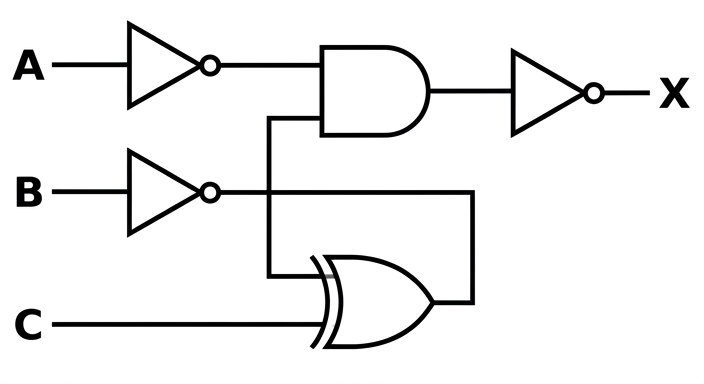
See logic circuit
Background Concept
To draw a logic circuit from a Boolean expression, you translate each part of the expression into gates.
Useful gate meanings here are:
NOT Ameans input A passes through a NOT gate.NOT Bmeans input B passes through a NOT gate.NOT B XOR Cmeans the output from the NOT gate on B and the input C feed into an XOR gate.NOT A AND (NOT B XOR C)means those two intermediate results feed into an AND gate.NOT (...)around the whole expression means invert the final result, so put a NOT gate after the AND gate.
A good rule is to work from the inside out, just as you would evaluate brackets in arithmetic.
Understanding the Question
You must draw the circuit for:
X = NOT (NOT A AND (NOT B XOR C))
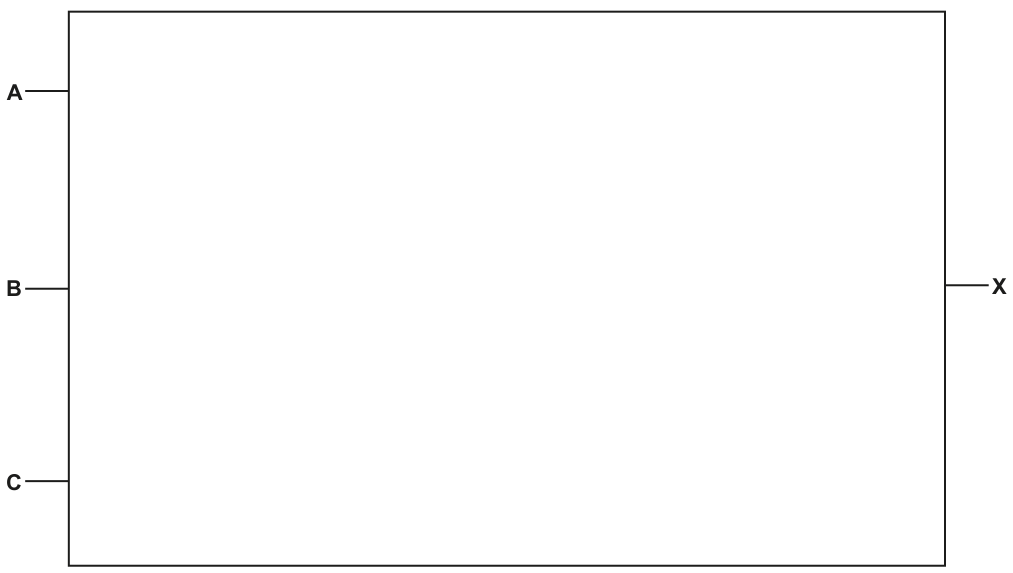
The blank figure already provides three inputs on the left, labelled A, B and C, and one output on the right, labelled X. Your job is to insert the correct gates and connect them in the correct order.
The important clue is the structure of the brackets:
- first make
NOT A - first make
NOT B - then combine
NOT BwithCusing XOR - then combine that result with
NOT Ausing AND - then invert the final result
Approach
Break the expression into smaller pieces:
NOT ANOT B(NOT B XOR C)NOT A AND (NOT B XOR C)NOT (...)
This tells you exactly which gates are needed and in what order. If you draw it in this sequence, the circuit is much easier to build correctly.
Step-by-Step Reasoning
Start with the expression:
X = NOT (NOT A AND (NOT B XOR C))
Now convert each part.
-
NOT A- Send input A through a NOT gate.
- This produces the signal
NOT A.
-
NOT B- Send input B through a NOT gate.
- This produces the signal
NOT B.
-
(NOT B XOR C)- Take the output from the NOT gate on B.
- Feed that and input C into an XOR gate.
- The XOR output now represents
(NOT B XOR C).
-
NOT A AND (NOT B XOR C)- Feed the output from the NOT gate on A into one input of an AND gate.
- Feed the output from the XOR gate into the other input of the AND gate.
- The AND output now represents
NOT A AND (NOT B XOR C).
-
NOT (...)- Because the whole expression is negated, pass the AND output through a final NOT gate.
- Label the final output
X.
So the completed circuit is:
This matches the intended logic exactly.
Key Takeaways
- Translate Boolean expressions into circuits by working from the innermost brackets outward.
- Each
NOTon a single variable needs its own inverter on that input. - Intermediate sub-expressions such as
(NOT B XOR C)become separate gate outputs that feed later gates. - A
NOTaround the entire expression means invert only at the very end.
Common Mistakes
- Putting the final NOT on A or B instead of on the whole expression.
- Feeding B directly into the XOR gate instead of
NOT B. - Using OR instead of XOR.
- Connecting
NOT Adirectly to the final NOT gate and skipping the AND stage. - Ignoring the bracket structure and drawing gates in the wrong order.
Things to Be Careful About
NOT AandNOT Bare separate operations, so they need separate NOT gates.- The XOR gate must take
NOT BandC, not A and B. - The AND gate must combine exactly two intermediate results:
NOT Aand(NOT B XOR C). - The final output X is the inversion of the AND result, so the last gate must be a NOT gate.
- Some mark schemes also accept the last two gates drawn as a single NAND gate, because
NOT (P AND Q)is equivalent toP NAND Q.
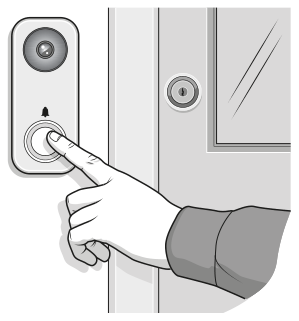
A video doorbell is attached to the front door of a house. The doorbell uses a motion sensor to detect when a visitor walks in front of the door. When the motion sensor is activated:
- The digital camera in the doorbell starts recording a video.
- A message is transmitted to a smartphone so that the person who lives in the house can watch the video.
The doorbell also has a button that can be pressed. When the button is pressed, a message is transmitted to a smartphone to play the doorbell sound.
The videos are stored on the doorbell’s internal secondary storage device and overwritten when the secondary storage device is full.
The video doorbell can be considered an example of an embedded system.
Identify two characteristics of the doorbell that suggest it is an embedded system.
1 ................................................................................................................................................
...................................................................................................................................................
2 ................................................................................................................................................
...................................................................................................................................................
Answer
- It performs a specific dedicated task only, such as detecting motion, recording video and sending alerts.
- It is built into a larger physical device at the door and works automatically with little or no user interaction.
Dedicated specific-purpose device built into another device and operating automatically.
Background Concept
An embedded system is a computer system built into a larger device to carry out a specific purpose. Unlike a general-purpose computer, it is not designed to run many unrelated applications. It usually has a processor, memory and input/output components, but these are all dedicated to one job. Embedded systems often operate automatically, respond to sensors, and have limited user interfaces.
Understanding the Question
The question describes a video doorbell that detects motion, records video, sends messages to a smartphone and plays a doorbell sound when the button is pressed. You are being asked for two features that make this device look like an embedded system.
The key clue is that the doorbell is not acting like a full general-purpose computer. It is a specialist device designed for a narrow set of tasks.
Approach
Think of the standard characteristics of embedded systems and match them to the doorbell. Good answers are features such as:
- it has a specific purpose
- it is built into another device
- it operates automatically
- it has limited user interaction
Any two valid characteristics that clearly fit the scenario would gain the marks.
Step-by-Step Reasoning
The doorbell does not let the user install many different programs or use it for unrelated tasks like word processing or gaming. That tells us it is not general-purpose. Instead, it is dedicated to a small set of functions: detecting motion, recording, storing and transmitting alerts.
Also, the computer components are inside the doorbell unit itself. That means the computer system is embedded within the device rather than existing as a separate standalone computer.
A further sign is that it works automatically. When motion is detected, recording starts without the user having to control each step manually. Automatic reaction to inputs is typical of embedded devices.
So two strong characteristics are:
- dedicated to a specific task
- built into another device and operating automatically
Key Takeaways
- An embedded system is designed for a specific job.
- It is usually built into a larger product.
- Automatic operation in response to inputs is a common sign of an embedded system.
Common Mistakes
- Saying only that it is "electronic" or "uses a sensor". That alone does not prove it is embedded.
- Describing what the device does without linking it to an embedded-system characteristic.
- Giving features of a general-purpose computer instead.
Things to Be Careful About
Use characteristics, not just examples. For instance, "it records video" is weaker on its own than "it performs a specific dedicated function". Make sure each point clearly explains why the doorbell fits the idea of an embedded system.
State whether the video doorbell is a monitoring system or a control system.
Justify your choice.
Monitoring or control system ....................................................................................................
Justification ...............................................................................................................................
...................................................................................................................................................
...................................................................................................................................................
...................................................................................................................................................
...................................................................................................................................................
Answer
- Monitoring system
- It uses a sensor to detect motion and then records and sends information to the user.
- It does not automatically control or change a physical condition using an actuator.
Monitoring system because it senses conditions and reports them without using an actuator to alter the environment.
Background Concept
A monitoring system uses sensors to collect data about conditions and then reports, displays or stores that data. A control system also uses sensors, but it goes further by automatically changing something in the physical environment through an actuator. Control systems often use feedback to keep a condition within limits.
Examples:
- Monitoring: burglar alarm, weather station, heart-rate monitor
- Control: central heating, traffic lights, automatic greenhouse watering
Understanding the Question
You must decide whether the video doorbell is a monitoring system or a control system, then justify that decision. The device detects motion, records video and sends messages to a smartphone.
The important detail is what happens after the sensor is triggered. Does the system merely report/store information, or does it physically change the environment by driving an actuator?
Approach
Check for the three key parts of a control system:
- sensor input
- processing
- actuator output that changes something physical
The doorbell clearly has sensor input and processing. The deciding issue is whether it has an actuator carrying out automatic control. In this scenario it records and sends alerts, which is monitoring behaviour.
Step-by-Step Reasoning
The motion sensor detects that someone is near the door. That is the sensing stage.
The doorbell then starts recording and sends a message to a smartphone. These actions collect and communicate information. They do not change the outside world in the way a control system would.
A true control system would do something like unlock a door, switch on lights or move a mechanism through an actuator. None of that is described here.
Therefore the correct classification is a monitoring system. The justification is that the system senses and reports/stores data but does not use an actuator to control physical conditions.
Key Takeaways
- Monitoring systems gather and report data.
- Control systems gather data and then act on the environment.
- The presence or absence of an actuator is often the clearest difference.
Common Mistakes
- Calling it a control system just because it reacts to an input. Reacting is not enough; there must be physical control of something.
- Forgetting the justification and giving only the label.
- Confusing sending an alert with controlling the environment.
Things to Be Careful About
Mention both sides of the distinction if possible: it uses a sensor and reports information, but it does not use an actuator to change conditions. That makes the justification complete and precise.
The video doorbell has both primary memory and secondary storage.
Identify two items of data that the video doorbell will store in primary memory.
1 ........................................................................................................................................
...........................................................................................................................................
2 ........................................................................................................................................
...........................................................................................................................................
Answer
- The video and audio data currently being recorded or processed.
- Temporary data such as the motion-sensor or button status, or the alert message waiting to be sent.
Current video or audio being processed, and temporary sensor or alert data.
Background Concept
Primary memory is memory that the processor can access directly while the system is running. It is used for data and instructions that are needed immediately. In practice this usually means RAM for active data and program storage while the device is operating. Primary memory is fast but limited in size and usually volatile.
Secondary storage is used for long-term retention of data, such as saved video files.
Understanding the Question
The question asks for two items of data that would be stored in the doorbell's primary memory. Since primary memory holds data currently in use, you should think about what the device needs right now while it is detecting motion, recording and transmitting.
Approach
Look at the live tasks the doorbell performs:
- monitoring the sensor and button
- recording sound and video
- sending a message to the smartphone
Data involved in these immediate activities is likely to be kept in primary memory temporarily.
Step-by-Step Reasoning
When the camera and microphone are active, the incoming video frames and audio samples need to be held briefly while they are processed, buffered, compressed or prepared for storage/transmission. That makes current video/audio data a valid answer.
The system also needs to keep temporary status information such as whether the motion sensor has been triggered or whether the button has been pressed. It may also keep the alert data waiting to be transmitted. These are short-term active data items, so they belong in primary memory.
These answers fit primary memory because they are needed immediately by the processor and do not need to remain permanently once processed.
Key Takeaways
- Primary memory stores data currently being used by the processor.
- Good examples are temporary sensor values, active program data and media currently being processed.
- Secondary storage is for longer-term saved files such as recorded videos.
Common Mistakes
- Giving a storage device name such as SSD instead of naming the data stored.
- Naming permanent saved video files only; those belong more naturally in secondary storage.
- Writing only "the program" when the question specifically asks for items of data.
Things to Be Careful About
Choose examples that are temporary and active. In this context, "current recording data" and "sensor/button status" are safer than vague answers such as "files" or "memory addresses".
The video doorbell has a solid state (flash) secondary storage device.
Complete the table by writing the answer or answers to each statement about the principal operation of solid state (flash) memory.
| Statement | Answer |
|---|---|
| the two types of logic gate that can be used to create solid state devices | 1 ................................................................................. 2 ................................................................................. |
| the number of transistors contained in each cell | .................................................................................... |
| the type of gate that can retain electrons without power | .................................................................................... |
| the type of gate that allows or stops current from passing through | .................................................................................... |
Answer
| Statement | Answer |
|---|---|
| the two types of logic gate that can be used to create solid state devices | 1 NAND 2 NOR |
| the number of transistors contained in each cell | 1 |
| the type of gate that can retain electrons without power | floating gate |
| the type of gate that allows or stops current from passing through | control gate |
NAND, NOR, 1, floating gate, control gate
Background Concept
Flash memory is a type of non-volatile solid state storage. Non-volatile means it keeps its contents even when power is removed. It is built from memory cells based on floating-gate transistor technology. The stored charge affects whether current can flow, which represents binary data.
Flash memory is commonly organised using NAND flash or NOR flash designs. The names come from the logic-gate style arrangement used in the memory structure.
Inside a flash cell, the floating gate traps electrons. Because it is insulated, the charge remains even with no power. The control gate is used when reading, writing or erasing because it influences whether current is allowed through the transistor.
Understanding the Question
This table asks for key facts about the principal operation of flash memory:
- the two logic-gate style types used
- how many transistors are in each cell
- which gate stores the electrons
- which gate controls current flow
So this is mainly a precise recall question about the construction of flash storage.
Approach
Answer each row directly from standard flash-memory theory:
- flash types: NAND and NOR
- cell structure: one transistor per cell
- storage of charge: floating gate
- current control: control gate
Step-by-Step Reasoning
The first row asks for the two gate-based types used to create solid state flash devices. These are NAND and NOR.
The next row asks how many transistors are in each cell. A flash memory cell is based on a floating-gate transistor, so the accepted value is 1.
The floating gate is the part that traps electrons. Because it is insulated, the electrons remain there even without power, which is why flash memory is non-volatile.
The control gate is the gate used to influence whether current passes through the transistor during reading and writing.
That gives the completed table:
- NAND
- NOR
- 1 transistor
- floating gate
- control gate
Key Takeaways
- Flash memory is non-volatile solid state storage.
- The two common flash organisations are NAND and NOR.
- The floating gate stores charge; the control gate affects current flow.
- A flash cell is based on a single floating-gate transistor.
Common Mistakes
- Mixing up NAND/NOR with AND/OR.
- Reversing the roles of the floating gate and control gate.
- Giving "volatile" ideas such as RAM behaviour instead of flash-memory behaviour.
Things to Be Careful About
This is a terminology question, so exact names matter. Write "floating gate" and "control gate" clearly. Do not invent broader answers such as "transistor gate" or "memory gate" because they are too vague.
The video doorbell uses a buffer.
Describe how the video doorbell will use the buffer.
...........................................................................................................................................
...........................................................................................................................................
...........................................................................................................................................
.....................................................................................................................................
Answer
- The buffer temporarily stores video or audio data while it is being transferred.
- This allows data from the camera or microphone to be held while it is written to storage or sent to the smartphone.
- It prevents data being lost if one part of the system is working faster than another.
A buffer temporarily holds video or audio data during transfer so speed differences do not cause data loss.
Background Concept
A buffer is a temporary area of primary memory used when data is moving between components that work at different speeds. One device may produce data quickly while another device stores, processes or transmits it more slowly. The buffer smooths out this mismatch by holding data briefly.
Common examples include keyboard buffers, printer buffers and streaming buffers.
Understanding the Question
The video doorbell records media and sends information to a smartphone. The question asks how the buffer would be used in this situation.
You should connect the idea of temporary storage to the movement of video/audio data between the camera or microphone, the processor, the flash storage and the network connection.
Approach
State three linked points:
- what the buffer stores temporarily
- when it is used
- why it is needed
For this device, the likely data is video/audio. The likely reason is that recording can happen faster than writing to storage or transmitting over a network.
Step-by-Step Reasoning
When the camera captures frames and the microphone captures sound, data arrives continuously. The system cannot always write every piece of that data instantly to flash storage or transmit it instantly to the smartphone.
So the doorbell places the incoming data into a buffer first. The buffer holds it for a short time while the rest of the system catches up.
This is important because the camera or microphone may produce data at a steady high rate, while storage writing or wireless transmission may be slower or momentarily delayed. Without a buffer, some data could be missed or lost.
Therefore, the buffer acts as temporary storage that keeps the transfer smooth and reliable.
Key Takeaways
- A buffer is temporary storage in primary memory.
- It is used during data transfer between components with different speeds.
- It helps prevent data loss and supports continuous capture or playback.
Common Mistakes
- Saying a buffer stores data permanently. It does not.
- Describing the buffer as the same thing as secondary storage.
- Forgetting to mention the reason for the buffer: different transfer speeds.
Things to Be Careful About
Tie your answer to the scenario. In this question, mention video/audio data, storage and transmission rather than giving only a general definition of a buffer.
The digital camera has a microphone which is used to record the sound for the video.
The user changes the sampling rate that the microphone uses from 44.1kHz to 88.2kHz.
Describe how this change in sampling rate will affect the performance of the video doorbell.
...................................................................................................................................................
...................................................................................................................................................
...................................................................................................................................................
...................................................................................................................................................
...................................................................................................................................................
.............................................................................................................................................
Answer
- The sampling rate has doubled, so twice as many sound samples are taken each second.
- The recorded sound quality will improve because the sound is represented more accurately.
- More data will be produced, so more memory and storage space are needed and more bandwidth or processing is required when saving or streaming the video.
Sound quality improves, but the audio data size and storage, transmission and processing requirements increase.
Background Concept
Sampling is the process of measuring an analogue sound wave at regular time intervals so it can be stored digitally. The sampling rate is the number of samples taken per second, measured in hertz. A higher sampling rate means the system captures more detail from the original sound wave.
In general:
- higher sampling rate -> better sound quality
- higher sampling rate -> larger file size
- larger file size -> more storage, bandwidth and processing demands
Understanding the Question
The microphone's sampling rate changes from 44.1 kHz to 88.2 kHz. You need to describe how that affects the performance of the video doorbell.
The wording is important: it is not asking only about sound quality. It asks about performance, so you should consider both benefits and costs.
Approach
First compare the two values. 88.2 kHz is double 44.1 kHz. Then apply the standard effects of increasing sampling rate:
- more samples per second
- more accurate sound capture
- more data to store, process and transmit
Step-by-Step Reasoning
At 44.1 kHz, the microphone records 44 100 samples every second. At 88.2 kHz, it records 88 200 samples every second. So the number of samples per second doubles.
Because the system measures the sound wave more often, the digital version is a closer representation of the original sound. That improves audio quality.
However, every extra sample is extra data. Doubling the sampling rate means the audio part of the recording becomes larger if the sample resolution and number of channels stay the same.
For the doorbell, that means:
- more primary memory or buffer use while recording
- more secondary storage used by each video
- the storage fills sooner
- more data must be transmitted to the smartphone
- the processor may have more work handling the extra audio data
So the performance effect is a trade-off: better sound quality but greater use of resources.
Key Takeaways
- Increasing sampling rate improves the accuracy of digital sound.
- Higher quality comes at the cost of larger files.
- Bigger files affect storage, transmission speed and processing demand.
Common Mistakes
- Saying only that the sound gets louder. Sampling rate affects detail, not loudness.
- Mentioning file size but not quality, or quality but not file size.
- Forgetting that the rate doubled, so the amount of audio data also increases significantly.
Things to Be Careful About
Do not confuse sampling rate with bit depth. Sampling rate is how often samples are taken; bit depth is how many bits are used per sample. This question is only about the effect of changing sampling rate.
The video doorbell allows both real-time and on-demand bit streaming.
State what is meant by bit streaming.
...........................................................................................................................................
.....................................................................................................................................
Answer
- Bit streaming is the transmission of audio or video data in a continuous stream so it can be played as it is received, without waiting for the whole file to download.
Continuous transmission of media data so it can be played before the whole file is downloaded.
Background Concept
Bit streaming means sending digital media data, such as audio or video, as a continuous flow of bits over a network. Instead of downloading the entire file first, the receiving device can begin playback once enough data has arrived.
Streaming is common for music, video calls, live broadcasts and online video platforms.
Understanding the Question
You are asked what is meant by bit streaming. This is a definition question, so the answer should be short and precise.
The important ideas are:
- media data is sent continuously
- playback can begin while data is still arriving
Approach
Give a concise definition that includes both transmission and playback. That makes the meaning clear and complete.
Step-by-Step Reasoning
The word "streaming" suggests a flow rather than a one-off transfer. Media data is broken into a sequence of bits or packets and sent continuously across the network.
Because the data arrives in order over time, the receiving smartphone can start playing the audio or video before the entire media item has arrived. That is the key advantage over waiting for a full download.
Key Takeaways
- Streaming is continuous delivery of media data.
- Playback starts before the entire file is present.
- It is commonly used for audio and video over networks.
Common Mistakes
- Describing streaming as simply "sending data" without mentioning continuous flow or early playback.
- Saying the whole file must be downloaded first, which is the opposite of streaming.
Things to Be Careful About
A one-mark definition should be concise. Include the core idea of continuous transfer and playback during receipt, not a long explanation about networks in general.
Give two differences between real-time and on-demand bit streaming.
1 ........................................................................................................................................
...........................................................................................................................................
...........................................................................................................................................
2 ........................................................................................................................................
...........................................................................................................................................
...........................................................................................................................................
Answer
- Real-time streaming sends video as it is being recorded or broadcast live, whereas on-demand streaming sends video that has already been stored.
- On-demand streaming can usually be started whenever the user chooses and can be paused or replayed, whereas real-time streaming normally has to be watched as it happens and has limited playback control.
Real-time is live as created, while on-demand is from stored media; on-demand allows user-controlled playback such as starting later, pausing or replaying.
Background Concept
There are two common forms of media streaming:
- real-time streaming: live media is delivered as it is created
- on-demand streaming: previously stored media is delivered whenever requested
Both use continuous transmission of data, but they differ in timing and user control.
Understanding the Question
The question asks for two differences between real-time and on-demand bit streaming. So you need two comparisons, not just two separate facts about streaming.
The strongest differences are:
- live creation versus stored content
- limited control versus flexible playback
Approach
Build each answer as a direct contrast:
- real-time does X, on-demand does Y
This makes the difference explicit and earns the mark more reliably than describing only one side.
Step-by-Step Reasoning
First difference: timing of the source.
In real-time streaming, the media is being produced and sent immediately, such as in a live camera feed from the doorbell. In on-demand streaming, the media has already been recorded and stored, so the user requests it later.
Second difference: user control.
Because on-demand content already exists as a stored file, the user can usually choose when to start it and often pause, rewind or replay it. Real-time streams normally follow the live event, so the viewer usually has much less control and cannot truly go back in the same way while the event is happening.
These are clean, standard differences and match the doorbell scenario well.
Key Takeaways
- Real-time streaming is live; on-demand streaming is from stored media.
- On-demand gives more playback flexibility.
- When comparing two concepts, write each difference as a direct contrast.
Common Mistakes
- Giving two features of real-time only, without comparing them to on-demand.
- Repeating the same idea twice in different words.
- Saying on-demand is always downloaded fully before playback; it is still streaming.
Things to Be Careful About
Make sure each difference is genuinely separate. "Live versus stored" is one difference. "Pause/rewind/start anytime versus limited live control" is a second distinct difference.
A software developer is writing a computer program.
The developer uses an interpreter while writing the program code because it is easier for debugging.
Explain one reason why it is easier to debug the program code using an interpreter instead of a compiler.
...................................................................................................................................................
...................................................................................................................................................
...................................................................................................................................................
.............................................................................................................................................
Answer
- An interpreter translates and executes the program one line at a time.
- If there is an error, it stops at that line and reports it immediately, so the programmer can find and correct the error more easily without recompiling the whole program.
See explanation
Background Concept
A translator converts source code written by a programmer into a form the computer can run. Two common translators are a compiler and an interpreter.
An interpreter translates and executes the program one statement at a time. This means translation and execution happen together as the program runs. If an error is reached, execution stops at that point.
A compiler translates the whole source program before execution. The output is usually object code or an executable file. If there are errors, they are reported after compilation, and the program usually cannot run until the errors are fixed and the program is compiled again.
For debugging, the key idea is how quickly the programmer can locate an error and test a correction.
Understanding the Question
The question says the developer is still writing the program and chooses an interpreter because it is easier for debugging. You are asked for one reason why debugging is easier with an interpreter than with a compiler.
So this is not asking for a list of general differences. It wants a debugging-focused explanation. The most direct point is that the interpreter works line by line and stops as soon as it finds an error, making the location of the problem easier to identify.
Approach
Use a direct comparison:
- State how an interpreter works.
- Link that behaviour to debugging.
- Make the advantage explicit by mentioning immediate error location or avoiding recompiling the whole program.
That gives a full explanation rather than just a definition.
Step-by-Step Reasoning
A good answer begins with the interpreter's behaviour:
- It translates one line or statement at a time.
- It executes each line immediately after translating it.
Now connect that to debugging:
- If an error occurs, the interpreter stops at the line containing the error, or at least very close to where the error is detected.
- Because the programmer gets feedback immediately during the run, it is easier to identify which part of the code caused the problem.
Then complete the explanation by contrasting with compilation:
- With a compiler, the programmer typically compiles the whole program first.
- After changes, the whole program must be compiled again before testing.
- That makes the edit-test cycle slower during development.
The question asks for one reason, so the cleanest answer is the immediate line-by-line error identification point.
Key Takeaways
- An interpreter is useful during development because it gives immediate feedback.
- Debugging is easier when errors can be traced to a specific line as the program runs.
- A compiler is less convenient during debugging because the whole program usually needs recompiling after changes.
Common Mistakes
- Saying only that an interpreter is "faster" for debugging. That is too vague and may be inaccurate unless you explain the faster edit-test cycle.
- Giving a general definition of interpreter and compiler without linking it to debugging.
- Saying a compiler executes line by line. It does not; it translates the whole program first.
- Mixing up translation and execution, for example claiming the interpreter creates an executable file.
Things to Be Careful About
- The question asks for one reason, so one explained point is enough if it is complete.
- Make sure the answer includes why debugging is easier, not just how an interpreter works.
- Use the correct contrast: interpreter = line by line and immediate feedback; compiler = whole program translation first.
- Do not drift into advantages for finished software, because that belongs to part (b), not part (a).
The program is ready to be sold to customers.
The developer uses a compiler because it creates an executable file.
Explain the reasons why the need to create an executable file makes the complier the appropriate choice when the program is complete.
...................................................................................................................................................
...................................................................................................................................................
...................................................................................................................................................
...................................................................................................................................................
...................................................................................................................................................
.............................................................................................................................................
Answer
- A compiler translates the whole program and produces an executable file.
- The customer can run the executable directly without needing the interpreter or the source code.
- Because the program has already been translated, it can be run many times without being translated each time, so it is more suitable for a completed program being sold.
See explanation
Background Concept
A compiler translates an entire source program into machine code, or into code that can be linked to form an executable file. An executable file is a file the computer can run directly.
An interpreter does not usually create a separate executable file. Instead, it reads the source code and translates it as the program runs. That means the source program, and usually the interpreter itself, are needed each time the program is executed.
When software is complete and ready for customers, the priorities change. Debugging convenience matters less, and distribution, ease of use, performance, and protection of the original source code become more important.
Understanding the Question
The question says the program is finished and ready to be sold. The developer now uses a compiler because it creates an executable file. You must explain why the need for an executable makes the compiler the correct choice.
This wording is important: it is not just asking for any advantage of a compiler. The answer should focus on why a finished program that will be given to customers benefits from being compiled into an executable.
Approach
Build the answer around the executable file:
- State that the compiler creates the executable.
- Explain the customer benefit: they can run the program directly.
- Add why this matters for completed software: no repeated translation each run, and no need to distribute the source code.
These points directly connect the executable file to real-world software distribution.
Step-by-Step Reasoning
First, identify what the compiler provides:
- A compiler translates the whole completed program.
- The output is an executable file.
Now explain why that matters when selling software:
- The customer receives a ready-to-run program.
- They do not need the original source code in order to use it.
- They also do not need an interpreter to translate the code every time they want to run it.
Next, explain the practical advantage of that:
- Since translation has already been done, the executable can be run directly.
- This is more convenient for customers because installation and use are simpler.
- It is also more efficient for repeated use because the program does not need to be retranslated on each execution.
A further linked reason is protection:
- If only the executable is distributed, the developer does not have to give customers the source code.
- This helps protect the program from being easily copied or altered.
For a 3-mark answer, the strongest three linked points are:
- compiler creates executable,
- customer runs it directly without interpreter/source,
- no need for translation each time, so it suits finished software.
Key Takeaways
- A compiler is preferred for finished software because it creates an executable file.
- Executables are easier to distribute to end users than source code.
- Compiled programs can be run repeatedly without retranslation.
- Releasing an executable also helps keep the source code private.
Common Mistakes
- Saying only "a compiler is faster" without explaining that the executable runs without being translated each time.
- Repeating the debugging advantage of an interpreter from part (a). That does not answer this part.
- Saying customers need the compiler to run the executable. They do not; the whole point is that the executable runs directly.
- Confusing source code with executable code.
- Writing that an interpreter creates an executable file. It normally does not.
Things to Be Careful About
- Link every point to the phrase "create an executable file" because that is the focus of the question.
- Keep the context in mind: the program is complete and being sold, so think about customer use rather than development.
- Do not overstate the point as "completely impossible" to distribute interpreted code; the exam wants the normal textbook comparison that compiled executables are more appropriate.
- A strong answer explains both what the compiler does and why that matters for end users.
The following table shows part of the instruction set for a processor. The processor has two registers: the Accumulator (ACC) and an Index Register (IX).
| Instruction | Explanation | |
|---|---|---|
| Opcode | Operand | |
| LDM | #n | Immediate addressing. Load the number n to ACC |
| LDD | <address> | Direct addressing. Load the contents of the location at the given address to ACC |
| LDI | <address> | Indirect addressing. The address to be used is at the given address. Load the contents of this second address to ACC |
| LDX | <address> | Indexed addressing. Form the address from <address> + the contents of the Index Register. Copy the contents of this calculated address to ACC |
| LDR | #n | Immediate addressing. Load the number n to IX |
| ADD | #n/Bn/&n | Add the number n to the ACC |
| ADD | <address> | Add the contents of the given address to the ACC |
| SUB | #n/Bn/&n | Subtract the number n from the ACC |
| SUB | <address> | Subtract the contents of the given address from the ACC |
| INC | <register> | Add 1 to the contents of the register (ACC or IX) |
<address> can be an absolute or a symbolic address
denotes a denary number, e.g. #123
B denotes a binary number, e.g. B01001010
& denotes a hexadecimal number, e.g. &4A
The current contents of memory are shown:
| Address | Data |
|---|---|
| 19 | 24 |
| 20 | 2 |
| 21 | 1 |
| 22 | 3 |
| 23 | 5 |
| 24 | 4 |
| 25 | 22 |
The current contents of the ACC and IX are shown:
| ACC | 12 |
|---|---|
| IX | 1 |
Complete the table by writing the content of the ACC after each program has run.
| Program number | Code | ACC content |
|---|---|---|
| 1 | LDD 20 ADD #2 | |
| 2 | LDX 22 | |
| 3 | LDI 25 INC ACC SUB 22 | |
| 4 | LDD 19 LDM #5 LDM #25 |
Working
LDD 20gives2, thenADD #2gives4.LDX 22uses22 + IX = 22 + 1 = 23, so ACC becomes contents of address23=5.LDI 25uses contents of address25=22, then loads contents of address22=3;INC ACCgives4;SUB 22gives4 - 3 = 1.LDD 19gives24;LDM #5replaces this with5;LDM #25replaces this with25.
Answer
| Program number | ACC content |
|---|---|
| 1 | 4 |
| 2 | 5 |
| 3 | 1 |
| 4 | 25 |
See completed table
Background Concept
This question is about tracing simple assembly-language instructions and, especially, understanding addressing modes.
The accumulator (ACC) is the main working register. Most load, add and subtract instructions change the value in ACC.
The index register (IX) is used with indexed addressing. Instead of using the address written in the instruction directly, the processor adds that address to the current value in IX to form the real memory address.
The important addressing modes here are:
- Immediate addressing: the operand is the actual value. Example:
LDM #5puts5intoACC. - Direct addressing: the operand is a memory address. Example:
LDD 20loads the contents of address20. - Indirect addressing: the operand is an address containing another address. Example:
LDI 25means look in address25first, then use that second address. - Indexed addressing: add the operand address to
IX, then use the result as the memory address.
When tracing assembly, always ask: "Is this number a value, or is it an address?" That is what usually decides the mark.
Understanding the Question
You are given:
- a small instruction set
- the current contents of some memory addresses
- the starting values of
ACCandIX - four short programs
You must work out the final content of ACC after each program runs.
The key skill is reading each instruction correctly:
LDDmeans direct load from memoryLDImeans indirect load through a pointer addressLDXmeans indexed load usingIXLDMmeans load a literal value straight intoACCADDandSUBchangeACCINC ACCadds 1 toACC
The wording "complete the table by writing the content of the ACC after each program has run" means only the final accumulator value is needed for each row.
Approach
For each program:
- Start from the given register values.
- Read the first instruction and update
ACCorIXif needed. - Continue instruction by instruction in order.
- For any memory access, check the table carefully.
- For indirect or indexed addressing, calculate the effective address before loading.
- Record the final value left in
ACC.
A good tracing habit is to write one short line per instruction, showing what ACC becomes after that instruction.
Step-by-Step Reasoning
Program 1: LDD 20 then ADD #2
LDD 20uses direct addressing.- Address
20contains2. - So
ACCbecomes2. ADD #2uses immediate addressing, so add the literal value2.2 + 2 = 4.
Final ACC = 4.
Program 2: LDX 22
LDXuses indexed addressing.- The instruction gives base address
22. IX = 1.- Effective address =
22 + 1 = 23. - Address
23contains5. - So
ACCbecomes5.
Final ACC = 5.
Program 3: LDI 25, INC ACC, SUB 22
LDI 25uses indirect addressing.- First look at address
25. - Address
25contains22. - Now use address
22. - Address
22contains3. - So
ACCbecomes3. INC ACCadds 1, soACC = 4.SUB 22uses direct addressing, so subtract contents of address22.- Address
22contains3. 4 - 3 = 1.
Final ACC = 1.
Program 4: LDD 19, LDM #5, LDM #25
LDD 19loads contents of address19.- Address
19contains24, soACC = 24. LDM #5loads the literal value5, replacing the old value. NowACC = 5.LDM #25again loads a literal value, replacing the old value. NowACC = 25.
Final ACC = 25.
So the completed results are:
- Program 1:
4 - Program 2:
5 - Program 3:
1 - Program 4:
25
Key Takeaways
- Immediate addressing uses the value itself.
- Direct addressing uses the contents of the stated address.
- Indirect addressing means one extra memory lookup.
- Indexed addressing means add
IXto the address first. - Load instructions replace the current value in
ACC; they do not add to it.
Common Mistakes
- Treating
LDM #25as "load contents of address 25". It does not; it loads the literal value25. - Doing indirect addressing in one step only. For
LDI 25, you must look up address25, then use that result as another address. - Forgetting to add
IXfor indexed addressing. - Subtracting the address number instead of the contents of the address.
SUB 22means subtract the value stored in address22, not subtract22. - Thinking earlier
LDMorLDDvalues still matter after a later load. Each new load overwritesACC.
Things to Be Careful About
- Read the symbol in the operand carefully:
#means immediate denary value. - Keep direct and indirect addressing separate in your mind.
- In indexed addressing, add the address and
IXfirst, then read memory. - The question asks for the final
ACCvalue only, not every intermediate value. - Even when a program starts with an existing
ACC, a later load instruction may completely replace it, so do not carry forward old values unnecessarily.
The processor includes these bit manipulation instructions:
| Instruction | Explanation | |
|---|---|---|
| Opcode | Operand | |
| AND | #n/Bn/&n | Bitwise AND operation of the contents of ACC with the operand |
| AND | <address> | Bitwise AND operation of the contents of ACC with the contents of <address> |
| XOR | #n/Bn/&n | Bitwise XOR operation of the contents of ACC with the operand |
| XOR | <address> | Bitwise XOR operation of the contents of ACC with the contents of <address> |
| OR | #n/Bn/&n | Bitwise OR operation of the contents of ACC with the operand |
| OR | <address> | Bitwise OR operation of the contents of ACC with the contents of <address> |
<address> can be an absolute or a symbolic address
denotes a denary number, e.g. #123
B denotes a binary number, e.g. B01001010
& denotes a hexadecimal number, e.g. &4A
The current contents of memory are shown:
| Address | Data |
|---|---|
| 30 | 01110101 |
| 31 | 11111111 |
| 32 | 00000000 |
| 33 | 11001100 |
| 34 | 10101010 |
The current content of the ACC is shown:
| 1 | 0 | 0 | 1 | 1 | 0 | 1 | 0 |
|---|
Complete the table by writing the content of the ACC after each program has run.
The binary number 10011010 is reloaded into the ACC before each program is run.
| Program number | Code | ACC content |
|---|---|---|
| 1 | AND 31 | |
| 2 | XOR B01001111 | |
| 3 | OR #30 |
Working
Initial ACC for each program: 10011010
AND 31uses contents of address31=11111111.
10011010 AND 11111111 = 10011010
XOR B01001111
10011010 XOR 01001111 = 11010101
OR #30where30 = 00011110
10011010 OR 00011110 = 10011110
Answer
| Program number | ACC content |
|---|---|
| 1 | 10011010 |
| 2 | 11010101 |
| 3 | 10011110 |
See completed table
Background Concept
This question is about bitwise operations on binary values stored in the accumulator.
A bitwise operation compares corresponding bits in two binary numbers:
- AND gives
1only if both bits are1. - OR gives
1if at least one bit is1. - XOR gives
1if the bits are different.
Useful reminders:
x AND 1 = xx AND 0 = 0x OR 0 = xx OR 1 = 1x XOR 0 = xx XOR 1flips the bit
These operations are often used for masking, setting bits, clearing bits, and toggling bits.
Understanding the Question
You are given:
- the bit manipulation instructions
AND,XORandOR - memory contents at addresses
30to34 - the starting accumulator value
10011010
The important sentence is: "The binary number 10011010 is reloaded into the ACC before each program is run."
That means each of the three programs starts from exactly the same accumulator value. You must not carry the answer from one row into the next row.
You then find the result of each bitwise operation and write the final binary content of ACC.
Approach
For each row:
- Start with
ACC = 10011010. - Work out the second operand.
- If it is an address, look up the contents at that address.
- If it is denary, convert it to binary first.
- If it is already binary, use it directly.
- Perform the bitwise operation column by column from left to right.
- Write the resulting 8-bit binary value.
Step-by-Step Reasoning
Program 1: AND 31
- This uses the contents of address
31. - Address
31contains11111111. - So calculate:
10011010 AND 11111111
Because AND with 1 leaves each bit unchanged, every bit stays the same.
Bit by bit:
1 AND 1 = 10 AND 1 = 00 AND 1 = 01 AND 1 = 11 AND 1 = 10 AND 1 = 01 AND 1 = 10 AND 1 = 0
Result: 10011010
Program 2: XOR B01001111
- The second operand is already given in binary:
01001111. - So calculate:
10011010 XOR 01001111
Bit by bit, XOR gives 1 when the bits are different:
1 XOR 0 = 10 XOR 1 = 10 XOR 0 = 01 XOR 0 = 11 XOR 1 = 00 XOR 1 = 11 XOR 1 = 00 XOR 1 = 1
Result: 11010101
Program 3: OR #30
#30is denary30, so convert it to 8-bit binary.30in binary is11110.- As an 8-bit value this is
00011110.
Now calculate:
10011010 OR 00011110
Bit by bit, OR gives 1 if either bit is 1:
1 OR 0 = 10 OR 0 = 00 OR 0 = 01 OR 1 = 11 OR 1 = 10 OR 1 = 11 OR 1 = 10 OR 0 = 0
Result: 10011110
So the completed table entries are:
- Program 1:
10011010 - Program 2:
11010101 - Program 3:
10011110
Key Takeaways
- Bitwise operations compare matching bit positions.
ANDwith all1s leaves a binary value unchanged.XORhighlights differences and can flip bits.ORcan force bits to1.- When an operand is given in denary, convert it to binary before doing the bitwise operation.
Common Mistakes
- Forgetting that
ACCis reloaded before each program. That would make rows 2 and 3 wrong. - Using the address number itself instead of the contents at that address.
AND 31means use the bits stored in address31. - Converting
30incorrectly to binary, or not padding it to 8 bits. - Confusing
ORandXOR: OR gives1when either bit is1, while XOR gives1only when the bits differ. - Dropping leading zeros. The question expects full 8-bit results.
Things to Be Careful About
- Keep all values aligned as 8-bit binary numbers.
- Read the operand format carefully:
B...is binary,#...is denary, and a plain address means read from memory. - Write results bit by bit rather than trying to do the whole byte mentally if you are unsure.
- Preserve the bit order exactly from leftmost bit to rightmost bit.
- Do not mix arithmetic addition with bitwise OR or XOR; these are logical bit operations, not ordinary number addition.
A bank allows customers to access their accounts using an application that they can download onto a device such as a smartphone.
The system that allows customers to access their accounts using the application is a client-server model.
Describe the roles of the different devices in this model.
...................................................................................................................................................
...................................................................................................................................................
...................................................................................................................................................
...................................................................................................................................................
...................................................................................................................................................
...................................................................................................................................................
...................................................................................................................................................
.............................................................................................................................................
Answer
- The customer’s smartphone is the client; it runs the banking application and provides the user interface for entering requests.
- The client sends requests for data or transactions to the bank’s server over the network.
- The bank’s server centrally stores the customers’ account data and the application services.
- The server processes the request, such as checking login details and retrieving or updating account data, then sends the result back to the client.
See explanation
Background Concept
A client-server model is a network model in which different computers have different roles.
- A client is the device used by the end user. It requests services or data.
- A server is a computer that provides those services or data.
The key idea is that the data and processing are usually centralised on the server, while the client gives the user a way to interact with that service. In banking, this is very important because the bank wants one central, controlled place for customer records rather than copies of the data stored on many customer devices.
Understanding the Question
The question gives a banking app downloaded onto a smartphone and tells you this is a client-server model. It asks for the roles of the different devices.
So you need to identify:
- what the customer device does
- what the bank’s server does
- how they interact
This is not asking for general network features such as speed or topology. It is specifically about the job of each side in the model.
Approach
A good way to answer is to separate the system into two devices:
- Client device: what the user has and what it does.
- Server: what the bank has and what it does.
Then link them with the flow of data:
- client sends request
- server processes request
- server returns result
For full marks, include both storage/processing on the server and the user interface/request role on the client.
Step-by-Step Reasoning
The smartphone or similar device is the client because it is the device the customer uses directly. It runs the banking app, displays screens, accepts input such as login details or transfer requests, and sends those requests across the network.
The bank’s central computer system is the server. It is responsible for holding the account database and the software or services that deal with banking operations. When a request arrives, the server checks what the customer is allowed to do, processes the request, reads or updates the stored data, and sends back the response.
For example:
- a customer opens the app and requests their balance
- the client sends that request to the server
- the server finds the correct account details in the database
- the server sends the balance back
- the client displays it on screen
A strong answer usually mentions that the server can also deal with many different clients at once, because many customers may access the service simultaneously.
Key Takeaways
- In a client-server system, the client requests and the server provides.
- The client usually handles the interface for the user.
- The server usually handles central storage, processing and control.
- Banking systems use client-server because the bank needs centralised, secure data management.
Common Mistakes
- Saying the client stores the main customer database. In this model, the bank’s central server stores the authoritative data.
- Describing only one side, for example only the smartphone. The question asks for the roles of the different devices.
- Confusing client-server with peer-to-peer. In peer-to-peer, devices act more equally; here the bank server has the central service role.
- Giving vague points such as “they communicate” without explaining what each device actually does.
Things to Be Careful About
- Use the terms client and server correctly.
- Make sure you mention both requesting and responding.
- Include at least one clear server role such as stores data, processes requests, or authenticates users.
- Keep the answer focused on device roles, not unrelated security features unless they support the server’s role.
The bank wants to protect the integrity of its data while transferring the data to other banks. Parity check is one example of data verification.
Complete the description of parity check when Computer A is transmitting data to Computer B.
Computer A and Computer B agree on whether to use ...................................................... parity. Computer A divides the data into groups of ...................................................... . The number of 1s in each group is counted. If the agreed parity is ................................................ and the group has an even number of 1s, a parity bit of 1 is appended, otherwise a parity bit of 0 is appended.
In a parity ...................................................... check the bytes are grouped together, for example in a grid. The number of 1s in each column (bit position) is counted. A bit is assigned to each column to make the column match the parity. These parity bits are transmitted with the data as a parity ...................................................... .
Answer
Computer A and Computer B agree on whether to use odd or even parity. Computer A divides the data into groups of bytes. The number of 1s in each group is counted. If the agreed parity is odd and the group has an even number of 1s, a parity bit of 1 is appended, otherwise a parity bit of 0 is appended.
In a parity block check the bytes are grouped together, for example in a grid. The number of 1s in each column (bit position) is counted. A bit is assigned to each column to make the column match the parity. These parity bits are transmitted with the data as a parity byte.
odd or even, bytes, odd, block, byte
Background Concept
Parity checking is a verification method used when data is transmitted. Its purpose is to help detect whether a bit may have changed during transfer.
There are two common parity choices:
- even parity: the total number of 1s, including the parity bit, should be even
- odd parity: the total number of 1s, including the parity bit, should be odd
A parity bit is an extra bit added to a group of data bits. The receiver counts the 1s again. If the total does not match the agreed parity, an error is detected.
A stronger form is parity block check, where several units are arranged like rows in a grid and an extra set of parity bits is added for the columns as well. This can detect more errors than checking each unit separately.
Understanding the Question
This question gives you a partly written description and asks you to complete the missing technical terms.
The clues are:
- “agree on whether to use ... parity” points to odd or even
- “if ... has an even number of 1s, a parity bit of 1 is appended” means the chosen parity must be odd
- “bytes are grouped together, for example in a grid” points to parity block check
- “transmitted with the data as a parity ...” refers to the extra row of parity bits, a parity byte
Approach
Treat each blank separately and use the wording around it as a clue.
- First identify the possible parity choices.
- Then decide which parity type fits the rule given about appending a 1 when there is already an even number of 1s.
- Recognise that grouping bytes into a grid is block parity.
- Name the extra transmitted group of parity bits.
Step-by-Step Reasoning
The first blank is the general choice of parity. Before transmission, the two computers must agree whether they are using odd parity or even parity, so the phrase is odd or even.
The second blank asks what the data is divided into. In standard exam wording for parity at this level, the data is divided into bytes for checking.
The third blank is decided from the rule:
- if the group has an even number of 1s
- and a parity bit of 1 is added
then the total number of 1s becomes odd. So the agreed parity must be odd.
The fourth blank refers to a “parity ... check” where the bytes are placed in a grid and each column is checked. That is a parity block check.
The last blank asks what the set of column parity bits is called. Because those bits form an extra byte sent with the data, it is a parity byte.
So the completed terms are:
- odd or even
- bytes
- odd
- block
- byte
Key Takeaways
- Odd parity means the total number of 1s should be odd.
- Even parity means the total number of 1s should be even.
- A single parity bit helps detect some transmission errors.
- Parity block check adds another layer by checking columns as well as individual units.
Common Mistakes
- Writing even for the third blank. If a group already has an even number of 1s and you add 1, the total becomes odd, not even.
- Confusing validation with verification. Parity check verifies that transferred data has not changed; it does not check whether the data is sensible.
- Saying parity check corrects all errors. It mainly helps detect errors and is limited.
- Mixing up parity bit and parity byte. A parity bit is added to one group; a parity byte is the extra set of column parity bits in block parity.
Things to Be Careful About
- Read the condition carefully: “even number of 1s” plus “append 1” is the key clue for odd parity.
- Use the exact technical phrase parity block check.
- Remember that parity is about counting 1s, not counting all bits.
- In exam questions like this, one wrong blank does not automatically make the others wrong, so solve each clue independently.
The bank also needs to keep its customers’ data private and secure.
The bank’s network has a firewall.
Explain how a firewall can help protect the customers’ data.
...........................................................................................................................................
...........................................................................................................................................
...........................................................................................................................................
...........................................................................................................................................
...........................................................................................................................................
...........................................................................................................................................
...........................................................................................................................................
.....................................................................................................................................
Answer
- A firewall monitors incoming and outgoing network traffic.
- It checks data packets against a set of security rules, for example source, destination, port or protocol.
- It blocks unauthorised or suspicious traffic, helping prevent hackers or malware from accessing customers’ data on the bank’s network.
See explanation
Background Concept
A firewall is a security system placed between a network or computer and other networks, such as the internet. Its job is to control which network traffic is allowed through.
A firewall works by applying rules. These rules can be based on things such as:
- source IP address
- destination IP address
- port number
- protocol
- whether the traffic matches known suspicious patterns
If traffic is allowed, it passes through. If it breaks the rules, it is blocked. This reduces the chance of unauthorised access.
Understanding the Question
The question says the bank’s network has a firewall and asks how this helps protect customers’ data.
So you need to explain the mechanism:
- the firewall checks traffic
- it decides what is safe or unsafe based on rules
- unsafe traffic is blocked
- that helps stop unauthorised access to sensitive data
Because the question is about customer data, link the firewall’s action to privacy and security, not just say “it keeps the network safe”.
Approach
A complete answer for 3 marks should usually include:
- what a firewall examines
- how it makes its decision
- how that protects the data
That creates a clear cause-and-effect explanation rather than just a definition.
Step-by-Step Reasoning
A firewall sits at the boundary of the bank’s network. When data tries to enter or leave, the firewall examines that traffic.
It compares the traffic with stored rules. For example, the rules may allow traffic only from certain sources, only to certain services, or only on approved ports.
If the traffic matches the allowed rules, it may pass. If it is suspicious or unauthorised, it is blocked.
This helps protect customer data because attackers cannot freely reach the internal network or services. It also reduces the chance of malware getting in and stealing or changing data.
In a banking context, that matters because account details and transaction data are sensitive and must not be accessed by unauthorised people.
Key Takeaways
- A firewall filters network traffic.
- It uses rules to decide what to allow or block.
- Its security benefit is that it helps prevent unauthorised access to systems and data.
Common Mistakes
- Saying a firewall encrypts data. Encryption is a different security measure.
- Saying a firewall checks usernames and passwords. That is authentication, not the firewall’s main job.
- Giving only a definition such as “a firewall protects the network” without explaining how.
- Saying it blocks all traffic. A firewall allows authorised traffic and blocks disallowed traffic.
Things to Be Careful About
- Mention incoming and/or outgoing traffic, not just files in storage.
- Make the link to customers’ data explicit.
- Use the idea of rules or filtering, because that is the key operation.
- Do not overclaim: a firewall improves security, but it does not guarantee total protection on its own.
Customers need to use biometric authentication to access their accounts. One biometric authentication method is facial recognition.
Facial recognition uses Artificial Intelligence (AI).
Describe how AI is used in facial recognition.
...........................................................................................................................................
...........................................................................................................................................
...........................................................................................................................................
...........................................................................................................................................
...........................................................................................................................................
...........................................................................................................................................
...........................................................................................................................................
.....................................................................................................................................
Answer
- AI is trained using many facial images so it learns patterns and distinguishing facial features.
- When a customer tries to log in, the system captures an image of the face and extracts key features from it.
- The AI compares these features with stored facial data for the authorised customer.
- It calculates how closely they match and accepts access if the match is above a set threshold.
See explanation
Background Concept
Facial recognition is a form of biometric authentication. Biometric authentication uses a person’s physical characteristics to verify identity. In this case, the characteristic is the face.
Artificial Intelligence, especially machine learning, is useful here because faces are not always presented in exactly the same way. Lighting, angle, expression, hairstyle, glasses and camera quality can vary. AI systems are trained to recognise important facial patterns despite these variations.
A typical facial recognition system does not simply store a normal photograph and compare pixels one by one. Instead, it extracts features or creates a numerical representation of the face, sometimes called a template or feature vector.
Understanding the Question
The question is not asking you to discuss whether facial recognition is good or bad. It asks specifically how AI is used in facial recognition for customers accessing bank accounts.
So your answer should describe the process:
- AI learns from examples
- the system scans the customer’s face
- important features are identified
- those features are compared with stored data
- a decision is made about whether it is a match
Because this is in an authentication context, the end point is allowing or denying access.
Approach
A strong 4-mark answer should cover the whole recognition pipeline in order:
- training/learning from many examples
- capturing the live face image
- extracting features from that image
- comparing with stored authorised data and deciding if it matches
That gives enough detail to show the role of AI rather than just saying “AI recognises faces”.
Step-by-Step Reasoning
First, the AI system is trained using many face images. During training, it learns which patterns are useful for telling one face from another. These may include relative positions and shapes of facial features such as the eyes, nose, mouth and jawline.
When a customer tries to log in, the device camera captures a current image of the face. The AI system detects the face in the image and extracts its important features. Rather than using every pixel equally, it converts the face into a form that makes comparison easier and more reliable.
The system then compares this extracted facial data with the stored facial template for the authorised customer. The AI measures similarity between the live sample and the stored sample.
If the similarity score is high enough, meaning it passes a predefined threshold, the system treats it as a match and grants access. If not, access is denied.
The reason AI is useful is that it can cope better with natural variation. A person’s face may look slightly different each time, but the AI has learned the stable patterns that still identify that person.
Key Takeaways
- Facial recognition is a biometric method of authentication.
- AI is used to learn patterns from many examples.
- The system extracts facial features rather than just comparing raw images directly.
- Authentication is based on whether the live face matches the stored authorised template closely enough.
Common Mistakes
- Saying the system just stores a photo and checks if the new photo is identical. Real systems allow for variation, which is why AI is useful.
- Describing only the camera capture and not the AI part. The question is specifically about how AI is used.
- Forgetting the comparison stage with stored customer data.
- Forgetting the decision stage, such as using a threshold to accept or reject the match.
Things to Be Careful About
- Keep the answer in the context of authentication, not general image editing or face detection alone.
- Mention learning/training if possible, because that is a key AI idea.
- Use careful wording: the system decides based on a degree of similarity, not necessarily an exact match.
- Do not confuse identification and authentication. Here the purpose is to verify that the person trying to log in is the authorised customer.
A company is developing a website that will allow users to create an account and then play a quiz every day. The data about the users and the quizzes are stored in a database.
A user must select a unique username and enter a valid email address to create an account. All users must be over the age of 16. A new quiz is given to the users every day. Each quiz is stored in its own text file.
The database stores the filename of each quiz and the date it can be played. The user gets a score for each quiz they complete, which is stored in the database. The scores are used to give each user a rating, for example Gold.
Create a 3-table design for this database normalised to Third Normal Form (3NF).
Give your table design in the format:
TableName(PrimaryKey, Field1, Field2, …)
...................................................................................................................................................
...................................................................................................................................................
...................................................................................................................................................
...................................................................................................................................................
...................................................................................................................................................
...................................................................................................................................................
...................................................................................................................................................
...................................................................................................................................................
...................................................................................................................................................
.............................................................................................................................................
Answer
USER(Username, EmailAddress, DateOfBirth, Rating)QUIZ(QuizID, FileName, PlayDate)USERQUIZ(Username, QuizID, Score)
Primary keys:
USER:UsernameQUIZ:QuizIDUSERQUIZ: (Username,QuizID)
Foreign keys:
USERQUIZ.Username→USER.UsernameUSERQUIZ.QuizID→QUIZ.QuizID
See table design
Background Concept
A database is in Third Normal Form (3NF) when data is organised so that:
- each table stores data about one entity or relationship
- each record can be uniquely identified by a primary key
- there are no repeating groups
- non-key attributes depend on the key, the whole key, and nothing but the key
In practice, this means you split the data into sensible tables and avoid duplication. If two entities have a many-to-many relationship, you normally create a linking table between them. In this question, a user can complete many quizzes, and each quiz can be completed by many users, so that relationship needs a separate table.
A good database design also chooses suitable fields:
Usernamecan identify a user because it must be unique.DateOfBirthis better than storing age, because age changes over time.- quiz information should be stored once per quiz.
- the score belongs to the relationship between a particular user and a particular quiz.
Understanding the Question
The question describes a website where:
- users create accounts
- each user has a unique username
- each user enters an email address
- users must be over 16
- a new quiz is available each day
- each quiz has a file name and a playable date
- each user gets a score for each quiz completed
- users are given a rating such as Gold
You are asked to create exactly three tables, normalised to 3NF, and write them in the format TableName(PrimaryKey, Field1, Field2, ...).
The important clue is that there are really three different kinds of data here:
- data about users
- data about quizzes
- data about a user's result on a quiz
That naturally leads to three tables.
Approach
Start by identifying the entities:
USERfor account details.QUIZfor quiz details.- a linking table for which user completed which quiz and what score they got.
Then choose keys:
Usernameis suitable as the primary key for users because it must be unique.QuizIDis a simple primary key for quizzes.- the linking table needs both the user and the quiz to identify one result, so a composite key of (
Username,QuizID) is appropriate.
Finally, place each attribute where it belongs:
- user details in
USER - quiz details in
QUIZ Scorein the linking table because it depends on both the user and the quiz
Step-by-Step Reasoning
USER(Username, EmailAddress, DateOfBirth, Rating)
Usernameis the primary key because usernames must be unique.EmailAddressbelongs here because it is a property of the user.DateOfBirthshould be stored instead of age. The requirement is that all users must be over 16, but age is calculated from date of birth and changes with time.Ratingis a property of the user.
QUIZ(QuizID, FileName, PlayDate)
- each quiz needs its own record
QuizIDis used as the primary keyFileNameis stored because each quiz is in its own text filePlayDateis stored because the database stores the date the quiz can be played
USERQUIZ(Username, QuizID, Score)
- this table links users to quizzes
- one user can appear many times, once for different quizzes
- one quiz can appear many times, once for different users
Scorebelongs here because it is the score for one specific user on one specific quiz- the natural primary key is the combination of
UsernameandQuizID
Why this is 3NF:
- user details are not repeated in every score record
- quiz details are not repeated in every score record
- score depends on the whole composite key in
USERQUIZ - there are no partial dependencies such as storing
EmailAddressorFileNamein the linking table
Foreign keys are needed so that the relationship works correctly:
USERQUIZ.Usernamerefers toUSER.UsernameUSERQUIZ.QuizIDrefers toQUIZ.QuizID
Key Takeaways
- Use separate tables for separate entities.
- Resolve a many-to-many relationship with a linking table.
- Store
DateOfBirthrather than age. - Put attributes in the table where they depend on that table's key.
- In 3NF, avoid repeating data and avoid attributes depending on only part of a composite key.
Common Mistakes
- Storing everything in one large table. This causes duplication and is not properly normalised.
- Storing
Ageinstead ofDateOfBirth. Age changes and should normally be calculated. - Putting
ScoreinUSERorQUIZ. A score is not just about the user or just about the quiz; it is about both together. - Missing the linking table. Since users and quizzes have a many-to-many relationship, a separate table is needed.
- Forgetting primary keys or foreign keys. The relationships must be identifiable and enforceable.
Things to Be Careful About
- If you use
Usernameas the primary key, it must be unique. - If you use a composite key in the linking table, make sure
Scoredepends on both parts of that key. - Keep the table design in the requested format.
- Validation rules such as "valid email" and "over 16" are important, but they do not necessarily mean extra tables are required.
- A different valid 3NF design could use surrogate keys such as
UserID; what matters is that the design is correctly normalised and the relationships are clear.
The company is using a Database Management System (DBMS) to set up the database.
Describe what is meant by the following DBMS features:
Data dictionary ..........................................................................................................................
...................................................................................................................................................
...................................................................................................................................................
...................................................................................................................................................
Logical schema .........................................................................................................................
...................................................................................................................................................
...................................................................................................................................................
...................................................................................................................................................
Answer
- Data dictionary: a store of metadata about the database, such as table names, field names, data types, field sizes, keys, validation rules and relationships.
- Logical schema: the logical structure of the database showing the tables, fields, primary keys, foreign keys and relationships, independent of how the data is physically stored.
See explanation
Background Concept
A Database Management System (DBMS) provides tools to create, maintain and manage a database. As part of this, it keeps information not only about the data itself, but also about how the database is structured.
Two important terms are:
- data dictionary: metadata about the database
- logical schema: the logical design of the database
Metadata means "data about data". For example, the DBMS needs to know a field's name, data type, size, whether it is a primary key, and what validation rules apply.
The logical schema is the planned structure of the database. It describes what tables exist and how they relate, without talking about where the files are physically stored on disk.
Understanding the Question
You are asked to describe what two DBMS features mean:
- data dictionary
- logical schema
This is not asking for examples from the quiz database in part (a), although you can think of that database while answering. It wants short, accurate descriptions of the terms themselves.
Approach
For each term:
- state what it is
- say what kind of information it contains or shows
- make the distinction clear
The key difference is:
- the data dictionary stores detailed metadata entries
- the logical schema shows the overall logical organisation of the database
Step-by-Step Reasoning
For data dictionary:
- the phrase means a collection of metadata
- metadata describes the structure of the database rather than the actual user records
- good points to include are field names, data types, sizes, keys, validation and relationships
So a strong description is that it is a store of metadata about the database structure.
For logical schema:
- this is the blueprint of the database at the logical level
- it shows the tables and the relationships between them
- it includes items such as fields, primary keys and foreign keys
- it does not describe the physical storage details
So a strong description is that it is the logical structure of the database, independent of physical implementation.
Key Takeaways
- A data dictionary stores metadata.
- Metadata includes technical details about fields and tables.
- A logical schema shows how the database is organised logically.
- Logical design is different from physical storage.
Common Mistakes
- Saying the data dictionary stores the actual records. It stores metadata, not the user data itself.
- Describing the logical schema as the physical file layout. That would be physical design, not logical schema.
- Giving vague answers such as "it helps the database work" without saying what information it contains.
Things to Be Careful About
- Use the term metadata correctly.
- Mention enough detail to show understanding, for example keys, data types or relationships.
- Make sure your logical schema answer refers to logical structure, not storage devices or file locations.
- In exam questions that say "describe", give a little more than a one-word definition.
The company has another database, FARMING, for a different game.
The database FARMING has a table named EVENT which is shown with some sample data.
| PlayerID | EventID | Category | Points |
|---|---|---|---|
| 000123 | 3 | Build | 100 |
| 000124 | 1 | Grow | 36 |
| 000123 | 4 | Grow | 22 |
| 000123 | 7 | Create | 158 |
| 000125 | 3 | Grow | 85 |
| 000125 | 4 | Build | 69 |
The database FARMING has a second table created named PLAYER that has the primary key PlayerID.
The field PlayerID in EVENT needs to be set up as a foreign key to link to PlayerID in PLAYER.
Write a Structured Query Language (SQL) script to change the table definition for EVENT to link the foreign key to PLAYER.
...........................................................................................................................................
...........................................................................................................................................
...........................................................................................................................................
.....................................................................................................................................
Answer
ALTER TABLE EVENT
ADD FOREIGN KEY (PlayerID) REFERENCES PLAYER(PlayerID);
See SQL script
Background Concept
A foreign key is a field in one table that refers to the primary key of another table. It creates a relationship between the two tables and helps maintain referential integrity.
In SQL, if a table already exists and you want to change its structure, you use ALTER TABLE. One common change is to add a foreign key constraint.
A foreign key means:
- every value in the foreign key field must match a valid primary key value in the referenced table, or be null if allowed
- the DBMS can prevent invalid records being entered
- tables can be linked for queries and consistency
Understanding the Question
The table PLAYER already exists and has primary key PlayerID.
The table EVENT also has a field called PlayerID, and the question asks you to set it up as a foreign key that links to PLAYER.PlayerID.
So you are not creating a new table. You are modifying the existing EVENT table definition.
Approach
Because the table already exists, the correct SQL command starts with ALTER TABLE EVENT.
Then you add a foreign key constraint on the field PlayerID and reference the field PlayerID in the PLAYER table.
The basic pattern is:
ALTER TABLE child_table
ADD FOREIGN KEY (field) REFERENCES parent_table(parent_key)
Here:
- child table =
EVENT - field =
PlayerID - parent table =
PLAYER - parent key =
PlayerID
Step-by-Step Reasoning
ALTER TABLE EVENT
- tells the DBMS to change the definition of the existing
EVENTtable
ADD FOREIGN KEY (PlayerID)
- says that the field
PlayerIDinEVENTwill now be treated as a foreign key
REFERENCES PLAYER(PlayerID)
- tells the DBMS that the foreign key values must match values in
PLAYER.PlayerID
Putting it together gives:
ALTER TABLE EVENT
ADD FOREIGN KEY (PlayerID) REFERENCES PLAYER(PlayerID);
This creates the link from the EVENT table to the PLAYER table.
Key Takeaways
- Use
ALTER TABLEto change an existing table definition. - A foreign key links one table to another table's primary key.
- Foreign keys help enforce referential integrity.
Common Mistakes
- Using
CREATE TABLEinstead ofALTER TABLE. The question says the table already exists. - Reversing the relationship and making
PLAYERreferenceEVENT. The foreign key should be inEVENT. - Writing the referenced table or field names incorrectly.
- Forgetting the
REFERENCESclause.
Things to Be Careful About
- Copy the table and field names exactly:
EVENT,PLAYER,PlayerID. - Make sure the foreign key is added to the child table, not the parent table.
- Different SQL systems sometimes allow naming the constraint, but the essential part is the foreign key reference itself.
- The field data types must be compatible for the relationship to work properly.
Write an SQL script to return the number of events that each player has completed.
...........................................................................................................................................
...........................................................................................................................................
...........................................................................................................................................
...........................................................................................................................................
...........................................................................................................................................
.....................................................................................................................................
Answer
SELECT PlayerID, COUNT(EventID) AS NumberOfEvents
FROM EVENT
GROUP BY PlayerID;
See SQL script
Background Concept
SQL aggregate functions are used to calculate summary values from rows in a table. One of the most common is COUNT, which counts rows or non-null values.
When you want a summary for each value in a field, you use GROUP BY. The DBMS groups together rows with the same value in that field, then applies the aggregate function to each group.
So:
COUNT(...)gives the number of records in each groupGROUP BY PlayerIDmeans one result row per player
Understanding the Question
You need an SQL script to return the number of events that each player has completed.
The table EVENT already contains one row per event completed, with fields:
PlayerIDEventIDCategoryPoints
To find how many events each player completed, count how many EVENT records belong to each PlayerID.
Approach
The query needs to:
- show which player the count belongs to
- count the events for that player
- group the rows by player
That means:
SELECT PlayerIDCOUNT(EventID)FROM EVENTGROUP BY PlayerID
An alias such as AS NumberOfEvents makes the output clearer, though the key credited feature is the grouping and count.
Step-by-Step Reasoning
SELECT PlayerID, COUNT(EventID) AS NumberOfEvents
PlayerIDidentifies the player in each output rowCOUNT(EventID)counts how many event records that player hasAS NumberOfEventsgives the result column a sensible name
FROM EVENT
- the data comes from the
EVENTtable
GROUP BY PlayerID
- rows are grouped by player
- the count is calculated separately for each player
Using the sample data:
000123appears 3 times, so count = 3000124appears 1 time, so count = 1000125appears 2 times, so count = 2
So the query structure is correct for returning the number of completed events per player.
Key Takeaways
- Use
COUNTto count rows in a group. - Use
GROUP BYwhen you need one summary result per field value. - Include the grouped field in the
SELECTlist.
Common Mistakes
- Forgetting
GROUP BY PlayerID. Without it, the query returns one total count for the whole table. - Counting the wrong thing without grouping. The grouping is the crucial part.
- Selecting
PlayerIDwithout grouping by it, which is invalid in standard SQL. - Trying to use
WHEREinstead ofGROUP BYfor this task.
Things to Be Careful About
- The grouped field must match the field you want one result row per player for:
PlayerID. - Use
COUNT(EventID)orCOUNT(*); both can work here because each row represents one completed event. - Keep SQL keywords in upper case and table/field names exactly as given.
- An alias is helpful for readability, even if not always essential for marks.
Complete the binary addition. Show your working.
  1 0 0 1 1 1 1 0
  0 1 1 0 0 0 0 1
+ 0 0 0 1 1 0 0 1
-----------------
Working
  11111111
  10011110
  01100001
+ 00011001
---------
1 00011000
Answer
100011000
100011000
Background Concept
Binary addition works in exactly the same way as denary addition, except each column can only contain 0 or 1.
The key binary addition facts are:
0 + 0 = 00 + 1 = 11 + 1 = 10→ write0, carry11 + 1 + 1 = 11→ write1, carry1
When adding several binary numbers, you start at the rightmost bit (least significant bit) and move left. If the total in a column is 2 or 3, you carry 1 into the next column. If there is still a carry after the leftmost column, that becomes a new extra bit at the front of the answer.
Understanding the Question
You are given three 8-bit binary numbers:
100111100110000100011001
The task is to complete the binary addition and show working. That means the examiner expects more than just the final answer: they want to see the carry process or some clear intermediate working.
Because three numbers are being added, several columns will produce carries. The important point is to keep track of each carry carefully from right to left.
Approach
Use standard column addition in binary:
- Start from the rightmost column.
- Add the three bits in that column, plus any carry from the previous column.
- Write the result bit for that column.
- Pass a carry of
1to the next column if needed. - Continue until the leftmost column is done.
- If one carry remains at the end, write it at the front.
A neat way to show working is to place the carry values above the numbers.
Step-by-Step Reasoning
Let us add from right to left.
Numbers:
  10011110
  01100001
+ 00011001
Rightmost column
Bits are 0 + 1 + 1 = 2.
2 in binary is 10, so:
- write
0 - carry
1
Next column
Bits are 1 + 0 + 0, plus carry 1.
Total = 2 → binary 10, so:
- write
0 - carry
1
Next column
Bits are 1 + 0 + 0, plus carry 1.
Again total = 2, so:
- write
0 - carry
1
Next column
Bits are 1 + 0 + 1, plus carry 1.
Total = 3 → binary 11, so:
- write
1 - carry
1
Next column
Bits are 1 + 0 + 1, plus carry 1.
Total = 3, so:
- write
1 - carry
1
Next column
Bits are 0 + 1 + 0, plus carry 1.
Total = 2, so:
- write
0 - carry
1
Next column
Bits are 0 + 1 + 0, plus carry 1.
Total = 2, so:
- write
0 - carry
1
Leftmost column
Bits are 1 + 0 + 0, plus carry 1.
Total = 2, so:
- write
0 - carry
1
Now there are no more original columns, but the carry remains, so place it at the front.
That gives:
1 00011000
Without the spacing, the answer is:
100011000
You can also verify in denary if you want:
10011110= 15801100001= 9700011001= 25
Total:
And 280 in binary is 100011000, so the result is consistent.
Key Takeaways
- Binary addition is done column by column from right to left.
1 + 1gives0with a carry of1.1 + 1 + 1gives1with a carry of1.- A final carry after the leftmost column must be written as an extra bit.
- Showing carries clearly is the safest way to earn method marks.
Common Mistakes
- Forgetting to include the carry in the next column. This changes all later bits.
- Writing
1 + 1 = 2directly in binary form. In binary, you must write10, not2. - Losing the final carry. Here the answer is 9 bits long, not 8 bits.
- Mixing up left-to-right and right-to-left working. Binary addition should start at the rightmost bit.
Things to Be Careful About
- Keep each column aligned correctly.
- If you show carry digits above the numbers, make sure they sit over the correct columns.
- Do not drop the most significant carry at the end.
- The result may need more bits than the original numbers, as it does here.
- In an exam, if the question says "show your working", include carries or a clear step-by-step addition, not just the final binary number.
A business is creating a local area network (LAN) in its office.
The business is deciding which topology to use.
Tick (✓) one or more boxes in each row to identify the topology, or topologies, each statement describes.
| Statement | Bus | Star | Mesh |
|---|---|---|---|
| all devices connect to one central device | |||
| all devices connect to a central cable | |||
| multiple paths for the packets to travel along | |||
| robust against damage because if any line fails, the rest of the network retains full functionality | |||
| most likely to lose data through collisions |
Answer
| Statement | Bus | Star | Mesh |
|---|---|---|---|
| all devices connect to one central device | ✓ | ||
| all devices connect to a central cable | ✓ | ||
| multiple paths for the packets to travel along | ✓ | ||
| robust against damage because if any line fails, the rest of the network retains full functionality | ✓ | ||
| most likely to lose data through collisions | ✓ |
See completed table
Background Concept
A network topology is the physical or logical arrangement of devices and connections in a network.
The three topologies in this question have standard features:
- Bus topology: all devices share one main cable (the backbone). Because they share the same transmission medium, collisions are more likely.
- Star topology: each device connects to one central device, usually a switch or hub.
- Mesh topology: devices are connected by multiple links, so there can be several possible routes between devices. This gives high fault tolerance.
The key exam skill is to recognise the defining feature of each topology from a short description.
Understanding the Question
You are given five statements, and for each one you must decide which topology or topologies it describes.
The wording gives clues:
- central device points to star
- central cable points to bus
- multiple paths points to mesh
- line fails but network still works fully points to mesh
- collisions strongly points to bus
Because the question says "one or more boxes", you should consider whether a statement could apply to more than one topology. In this set, each statement matches one topology clearly.
Approach
For each row:
- Identify the key phrase.
- Recall which topology is known for that feature.
- Tick only the topology that matches that description.
A good way to think about it is to compare the defining structure:
- one shared cable -> bus
- one central connecting device -> star
- many interconnections / alternative routes -> mesh
Step-by-Step Reasoning
-
all devices connect to one central device
- In a star network, every device has its own connection to a central switch or hub.
- So this is Star.
-
all devices connect to a central cable
- In a bus network, every device is attached to one main backbone cable.
- So this is Bus.
-
multiple paths for the packets to travel along
- Mesh networks have redundant connections.
- This means packets can often take different routes.
- So this is Mesh.
-
robust against damage because if any line fails, the rest of the network retains full functionality
- This describes fault tolerance caused by redundancy.
- In a mesh network, one failed link does not stop communication because other paths exist.
- So this is Mesh.
-
most likely to lose data through collisions
- Collisions happen when devices try to send on the same shared medium at the same time.
- A bus topology uses one shared cable, so it is the most associated with collisions.
- So this is Bus.
Key Takeaways
- Bus = one backbone cable, shared medium, collisions more likely.
- Star = one central device.
- Mesh = many links, multiple routes, strong fault tolerance.
- In topology questions, the wording usually points to one defining feature.
Common Mistakes
- Confusing central device with central cable. A device means star; a cable means bus.
- Ticking star for the fault-tolerance statement. Star is easier to manage, but if the central device fails, the whole network can fail.
- Forgetting that collisions are mainly a problem where devices share the same transmission path, which is typical of bus networks.
Things to Be Careful About
- Read each phrase exactly: "device" and "cable" are not interchangeable.
- "Retains full functionality" is stronger than simply "still partly works"; that points to mesh because of alternative paths.
- Since the instruction says "one or more boxes", always consider multiple answers, but only tick extra boxes when the statement genuinely applies.
The LAN will connect to the internet through a router. The router has a public IPv6 address.
State why the router has a public IP address.
...........................................................................................................................................
.....................................................................................................................................
Answer
- The router needs a public IP address so it can be uniquely identified and contacted on the internet.
The router needs a public IP address so it can be uniquely identified and contacted on the internet.
Background Concept
An IP address identifies a device on a network. A public IP address is globally unique and can be routed across the internet. A private IP address is used only inside a local network and is not directly routable on the public internet.
A router that connects a LAN to the internet sits at the boundary between the internal network and the wider internet. Because outside systems must be able to send data to that router, it needs a public address.
Understanding the Question
The question says the LAN connects to the internet through a router, and that the router has a public IPv6 address. You are asked to state why.
The important clue is connect to the internet. That means the router is not only part of the LAN; it is also the device visible to external networks.
Approach
Recall the purpose of a public IP address:
- it is unique across the internet
- it can be routed to from outside the LAN
So the answer should link the router's public address to internet communication.
Step-by-Step Reasoning
- Devices on the internet need some destination address to send packets to.
- A private internal address would not be valid for direct routing across the public internet.
- Therefore, the router needs a public IP address so that other devices and servers on the internet can identify it and send data to it.
A concise full-mark answer is that it must be uniquely identifiable or reachable on the internet.
Key Takeaways
- Public IP = globally unique, internet-routable.
- Routers connecting a LAN to the internet need a public-facing address.
- Internal devices often use private addresses, but the edge router needs a public one.
Common Mistakes
- Saying only that the router "has an IP address" without mentioning the internet or public access. That is too vague.
- Describing IPv6 features instead of explaining why the address must be public.
- Confusing a router's public address with the private addresses used by devices inside the LAN.
Things to Be Careful About
- The question asks why public, not why IPv6.
- Mention internet visibility, reachability, or unique identification.
- Keep the answer focused on routing/communication with external networks.
One difference between an IPv4 and IPv6 address is that the numbers in an IPv4 address are separated by full stops and in an IPv6 address they are separated by colons.
Identify two other differences between an IPv4 and IPv6 address.
1 ........................................................................................................................................
...........................................................................................................................................
...........................................................................................................................................
2 ........................................................................................................................................
...........................................................................................................................................
...........................................................................................................................................
Answer
-
IPv4 addresses are 32 bits long, whereas IPv6 addresses are 128 bits long.
-
IPv4 uses denary values in each section, whereas IPv6 uses hexadecimal values.
- IPv4 addresses are 32 bits long, whereas IPv6 addresses are 128 bits long. 2. IPv4 uses denary values in each section, whereas IPv6 uses hexadecimal values.
Background Concept
IPv4 and IPv6 are two versions of the Internet Protocol addressing system.
- IPv4 uses a 32-bit address.
- IPv6 uses a 128-bit address.
Because IPv6 has many more bits, it can provide vastly more unique addresses.
Their written forms also differ:
- IPv4 is usually written as four denary numbers.
- IPv6 is usually written as eight groups of hexadecimal digits.
The question already gave one formatting difference: full stops versus colons. So you must not repeat that one.
Understanding the Question
You need to give two other differences between IPv4 and IPv6 addresses, not the separator difference.
So acceptable answers should compare features such as:
- length in bits
- number of sections/groups
- decimal versus hexadecimal representation
The safest answers are the standard textbook differences: 32-bit vs 128-bit and denary vs hexadecimal.
Approach
Pick two clearly different comparison points:
- Compare the number of bits.
- Compare the number format used in each group.
This avoids accidentally giving the same idea twice.
Step-by-Step Reasoning
First difference:
- IPv4 has 32 bits.
- IPv6 has 128 bits.
- This is a direct structural difference and is one valid mark.
Second difference:
- IPv4 sections are written using denary numbers.
- IPv6 groups are written using hexadecimal digits.
- This is a different kind of comparison from the bit length, so it gives the second mark.
You could also have described IPv4 as four groups and IPv6 as eight groups, but the two used in the solution are usually the clearest.
Key Takeaways
- IPv4 = 32-bit addressing.
- IPv6 = 128-bit addressing.
- IPv4 is written in denary sections.
- IPv6 is written in hexadecimal groups.
- When a question says "two differences", make sure they are genuinely separate differences.
Common Mistakes
- Repeating the given separator difference of full stops versus colons. The question explicitly says to give other differences.
- Saying only that IPv6 is "longer" without giving the precise bit lengths.
- Mixing up hexadecimal and denary, for example claiming IPv4 uses hexadecimal.
- Giving two answers that are really the same point stated differently, such as "IPv6 is longer" and "IPv6 has more bits".
Things to Be Careful About
- State exact values: 32 bits and 128 bits.
- Use correct terminology: denary for IPv4 and hexadecimal for IPv6.
- Make sure your two differences are distinct enough to be credited separately.