Computer Science 9618/11 — October/November 2023
Cambridge AS Level · Theory Fundamentals · worked solutions for every part, with the mark scheme
Topics Hardware · Processor Fundamentals · Information Representation · Communication · Security, Privacy and Data Integrity · Databases · +1 more
Draw one line from each vector graphic term to its most appropriate description.
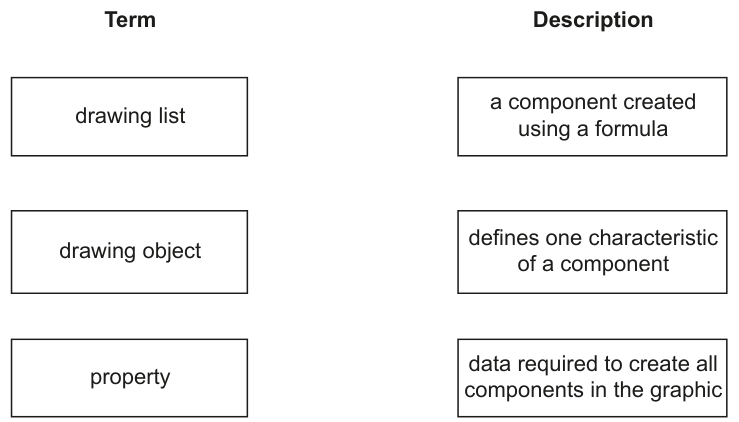
Answer
- drawing list → data required to create all components in the graphic
- drawing object → a component created using a formula
- property → defines one characteristic of a component
drawing list → data required to create all components in the graphic; drawing object → a component created using a formula; property → defines one characteristic of a component
Background Concept
Vector graphics store an image as a set of mathematically defined objects rather than as individual coloured pixels. Each shape in the image is described by data such as its type, position, size, colour and line thickness.
A drawing object is one individual component of the image, for example a circle, line or rectangle. It is created from formulas or coordinates.
A property is one attribute of that object, such as its fill colour, width, height, radius or position.
A drawing list is the full collection of data needed to recreate the entire image. It contains all the objects and the properties for each one.
Understanding the Question
This question gives three vector graphics terms and three descriptions. The task is simply to pair each term with the correct meaning.
The key is to think about scale:
- one characteristic of one component = property
- one whole component = drawing object
- all the information for the whole graphic = drawing list
Approach
Match each term by asking what level of information it represents:
- Does it describe a single feature? That is a property.
- Does it describe one shape/component? That is a drawing object.
- Does it describe the complete set of instructions for the image? That is the drawing list.
Step-by-Step Reasoning
- A drawing object is a single item in the image, such as a shape. In vector graphics, shapes are generated using mathematical descriptions, so it matches "a component created using a formula".
- A property is an attribute of an object. For example, colour or line thickness is one characteristic, so it matches "defines one characteristic of a component".
- The drawing list must therefore be the remaining description. It is the set of data used to build the whole image, so it matches "data required to create all components in the graphic".
Key Takeaways
- Vector graphics are stored as objects, not pixels.
- A drawing object is one shape or component.
- A property is one characteristic of that shape.
- A drawing list is the complete set of information for the whole graphic.
Common Mistakes
- Confusing drawing object with drawing list: a drawing object is one component, while the drawing list is the full collection of all components.
- Thinking a property is the whole shape: it is only one feature of the shape.
- Mixing up bitmap ideas with vector ideas: vector graphics use formulas and object data, not a grid of pixels.
Things to Be Careful About
- Read each description precisely: "one characteristic" points to property.
- "All components in the graphic" shows that the answer must be drawing list, not drawing object.
- In vector graphics questions, words like formula, coordinates and object usually signal vector storage rather than bitmap storage.
State what is meant by the bit depth of a bitmap image and explain how changing the bit depth affects the image.
Definition ...................................................................................................................................
...................................................................................................................................................
Explanation ...............................................................................................................................
...................................................................................................................................................
...................................................................................................................................................
...................................................................................................................................................
Answer
- Definition: Bit depth is the number of bits used to store the colour of each pixel.
- Explanation: Increasing the bit depth allows more colours or shades to be represented, so the image is more detailed and realistic, but the file size becomes larger. Decreasing the bit depth gives fewer colours or shades, so image quality is reduced and the file size becomes smaller.
Bit depth is the number of bits used for each pixel. A higher bit depth gives more colours/shades and better image quality but a larger file size; a lower bit depth gives fewer colours/shades and lower quality but a smaller file size.
Background Concept
A bitmap image is made from pixels arranged in a grid. Each pixel stores colour information. Bit depth tells us how many bits are available to represent the colour of one pixel.
Because bits are binary, the number of possible colours or shades depends on powers of 2:
- 1 bit gives 2 possibilities
- 8 bits gives 256 possibilities
- 24 bits gives over 16 million possibilities
So bit depth controls how accurately colours can be represented. More bits per pixel means a wider range of colours and smoother shading. It also means more data must be stored for the image.
Understanding the Question
This question has two parts hidden inside one sentence:
- State what bit depth means.
- Explain what happens when the bit depth changes.
So a complete answer must not stop at the definition. It must also link bit depth to the effect on the image itself.
Approach
Give the definition first in the standard exam wording: bits per pixel.
Then explain both effects of changing it:
- visual effect: more or fewer colours/shades, affecting realism/detail
- storage effect: more or fewer bits per pixel, affecting file size
That gives a full explanation rather than a one-point definition.
Step-by-Step Reasoning
- A bitmap stores each pixel separately.
- The bit depth is therefore about one pixel at a time.
- If each pixel has more bits available, it can represent more different colour values.
- More available colour values means the image can show finer colour changes, smoother gradients and more realistic detail.
- However, because every pixel now uses more bits, the total amount of data in the file increases.
- If the bit depth is reduced, the reverse happens: fewer colours can be stored, the image may look less realistic or more blocky/posterised, but the file size is smaller.
A strong answer normally mentions both quality and file size.
Key Takeaways
- Bit depth = number of bits used to represent one pixel.
- Higher bit depth means more colours/shades.
- More colours usually improve realism and detail.
- Higher bit depth also increases file size.
Common Mistakes
- Defining bit depth as number of pixels: that is resolution, not bit depth.
- Saying bit depth changes the physical size of the image: it changes colour detail, not image dimensions.
- Mentioning only quality or only file size: good exam answers usually link both.
- Confusing bit depth with resolution: resolution is how many pixels there are, while bit depth is how much data each pixel stores.
Things to Be Careful About
- Use the phrase "bits per pixel" in the definition.
- If you say "more colours", make sure you link it to increased bit depth.
- If you mention file size, explain why: each pixel uses more bits.
- Avoid vague statements like "the image gets better" without saying that it is because more colours or shades can be represented.
Explain why a bitmap image is often compressed before it is attached to an email.
...................................................................................................................................................
...................................................................................................................................................
...................................................................................................................................................
Answer
- Compression reduces the file size of the bitmap image.
- A smaller file takes less time to upload, send and download in an email.
- It is also more likely to fit within email attachment size limits and uses less storage/bandwidth.
A bitmap is compressed to reduce its file size so it can be sent faster by email and is more likely to fit attachment size limits.
Background Concept
Compression reduces the amount of data needed to store a file. Images are often large, especially bitmap images, because every pixel must be stored. Compression helps make the file smaller.
There are two main types:
- lossless compression: reduces size without losing original data
- lossy compression: reduces size by discarding some data, usually data that has less visible effect on the image
For email, the main reason compression matters is practical transmission and storage.
Understanding the Question
The question asks why a bitmap image is often compressed before being attached to an email. This means the answer should focus on sending the file, not just on storage in general.
The important idea is that bitmap images can be large, and email systems have limits and transmission time considerations.
Approach
Start from the immediate effect of compression: smaller file size.
Then link that smaller size to email use:
- quicker to upload and send
- quicker for the receiver to download
- more likely to stay within attachment limits
- less bandwidth/storage used
For a short 2-mark answer, the most valuable linked points are file size and transmission/attachment limits.
Step-by-Step Reasoning
- A bitmap image stores colour data for many individual pixels.
- That can create a large file, especially if the image has high resolution or high bit depth.
- Compression removes some redundancy or reduces the amount of data stored.
- The result is a smaller file.
- Smaller files are easier to email because they upload more quickly from the sender's device.
- They also download more quickly for the recipient.
- Many email services limit the maximum attachment size, so compression helps keep the file within that limit.
So the full logic is: bitmap files can be large, compression makes them smaller, and smaller files are better suited to email transmission.
Key Takeaways
- Bitmap images are often large because they store pixel-by-pixel data.
- Compression reduces the amount of data in the file.
- Smaller files are faster to send and receive.
- Email attachment size limits make compression useful.
Common Mistakes
- Saying compression improves image quality: compression is mainly used to reduce size; lossy compression may reduce quality.
- Giving only "to save space" with no link to email: the question is specifically about attachment to an email.
- Confusing compression with encryption: compression reduces size, while encryption protects the data.
Things to Be Careful About
- Link your answer to email, not just to images in general.
- If you mention faster sending, remember this is because the file size is smaller.
- Do not claim that all compression keeps the image identical; only lossless compression does that.
- A concise explanation is enough, but it should include both reduced size and the benefit when emailing.
The rest of this paper
8 more questions- Q2Communication · Security, Privacy and Data Integrity10M
- Q3Databases11M
- Q4Hardware4M
- Q5Processor Fundamentals12M
- Q6System Software9M
- Q7Hardware7M
- Q8Processor Fundamentals10M
- Q9Hardware5M