Computer Science 9618/43 — October/November 2025
Cambridge A-Level · Practical · worked solutions for every part, with the mark scheme
Topics Programming Paradigms (Procedural and Object-oriented) · File Processing and Exception Handling · Algorithms and Abstract Data Types · Recursion
A program stores data for a board game using Object-Oriented Programming (OOP). The game has objects that are placed on the board. Each object has a string code (for example "A") and an integer value (for example, 2).
The class BoardObject stores the data about the objects that can be placed on the board:
| BoardObject | |
|---|---|
Code : String | stores the board object's code |
Value : Integer | stores the integer value of the board object |
Constructor() | initialises the attributes to the parameter values |
GetCode() | returns Code |
GetValue() | returns Value |
Write program code to declare the class BoardObject and its constructor.
Do not declare the other methods.
Use your programming language appropriate constructor.
If you are writing in Python, include attribute declarations using comments.
Save your program as Question1_N25.
Copy and paste the program code into part 1(a)(i) in the evidence document.
Answer
class BoardObject:
    # Code : str
    # Value : int

    def __init__(self, Code, Value):
        self.Code = Code
        self.Value = Value
See program code
Background Concept
In object-oriented programming, a class is a blueprint for creating objects. The class defines the attributes each object stores and the methods that operate on that data. A constructor is the special method that runs when an object is created. Its job is to initialise the object's attributes.
In Python, the constructor is __init__(). Instance attributes are usually stored using self.AttributeName. For this paper, Python candidates are also asked to include attribute declarations as comments so the examiner can clearly see the intended data types.
Understanding the Question
You are asked to write only the BoardObject class declaration and its constructor. The class must store two pieces of data:
Codeas a stringValueas an integer
The constructor must receive parameter values and copy them into the object's attributes. You are specifically told not to declare the other methods yet, so the answer should contain only the class header, the attribute comments, and the constructor.
Approach
The simplest approach is:
- Declare the class
BoardObject. - Add comment lines showing the two attributes and their Python types.
- Write
__init__(self, Code, Value). - Store the parameter values into
self.Codeandself.Value.
That exactly matches what the class table describes.
Step-by-Step Reasoning
class BoardObject: creates the class definition.
The comments:
# Code : str# Value : int
are included because the question explicitly asks Python candidates to show attribute declarations using comments.
The constructor line:
def __init__(self, Code, Value):
means that whenever a new BoardObject is created, two values must be supplied: one for the code and one for the value.
Inside the constructor:
self.Code = Codestores the incoming code in the objectself.Value = Valuestores the incoming integer value in the object
So if the program later creates BoardObject("A", 2), that new object will have Code equal to "A" and Value equal to 2.
Key Takeaways
- A class groups related data and methods.
- A constructor initialises each new object.
- In Python OOP, instance data is stored with
self.. - For this syllabus, attribute comments may be required in Python answers.
Common Mistakes
- Omitting
selffrom the constructor definition. - Writing the constructor name incorrectly instead of
__init__. - Forgetting to assign both attributes.
- Using local variables only, such as
Code = Code, which does not store data in the object. - Adding extra methods even though the question says not to declare them here.
Things to Be Careful About
- Use the exact class name
BoardObject. - Keep the attribute names consistent with the question:
CodeandValue. - The constructor must take parameter values and copy them into the object, not hard-code values.
- In Python, the comments are not executable declarations, but they are included to satisfy the exam instruction.
The methods GetCode() and GetValue() return the appropriate attribute.
Write program code for GetCode() and GetValue().
Save your program.
Copy and paste the program code into part 1(a)(ii) in the evidence document.
Answer
def GetCode(self):
    return self.Code

def GetValue(self):
    return self.Value
See program code
Background Concept
Getter methods, also called accessor methods, provide controlled access to an object's attributes. Instead of reading the attribute directly from outside the class, the program calls a method that returns the value.
In this question, GetCode() and GetValue() are simple getters. They do not change the object. They only return existing data.
Understanding the Question
The question already tells you what each method should do:
GetCode()returnsCodeGetValue()returnsValue
You do not need to redesign the class. You only need to add the two methods that return the correct attribute.
Approach
For each method:
- Write the method header with
self. - Use a
returnstatement. - Return the matching attribute from the current object.
No parameters other than self are needed because the methods simply access data already stored in the object.
Step-by-Step Reasoning
def GetCode(self): defines a method that belongs to a BoardObject.
return self.Code sends back the string stored in that object.
Similarly, def GetValue(self): defines the second accessor.
return self.Value sends back the integer stored in that object.
If Object1 was created as BoardObject("A", 2), then:
Object1.GetCode()returns"A"Object1.GetValue()returns2
That is exactly what the class specification requires.
Key Takeaways
- A getter returns data from an object.
- The method must return the correct attribute.
self.AttributeNamerefers to the current object's stored value.
Common Mistakes
- Returning the wrong attribute, such as
GetCode()returningself.Value. - Forgetting the
returnkeyword. - Omitting
selfin the method definition. - Writing these as separate functions outside the class context in a way that would not belong to
BoardObject.
Things to Be Careful About
- Keep the method names exactly as given:
GetCodeandGetValue. - Use the same attribute names as in part (a)(i).
- These methods do not print anything; they return values for use elsewhere in the program.
The table shows the code and value of five board objects. The table has the variable identifier where each of the objects are stored.
| Variable identifier | Code | Value |
|---|---|---|
| Object1 | "A" | 2 |
| Object2 | "B" | 3 |
| Object3 | "C" | 5 |
| Object4 | "D" | 2 |
| Object5 | "E" | 7 |
Write program code for the main program to instantiate each of the five board objects and store them in the variables with the identifiers given.
Save your program.
Copy and paste the program code into part 1(a)(iii) in the evidence document.
Answer
Object1 = BoardObject("A", 2)
Object2 = BoardObject("B", 3)
Object3 = BoardObject("C", 5)
Object4 = BoardObject("D", 2)
Object5 = BoardObject("E", 7)
See program code
Background Concept
Instantiating an object means creating a real object from a class. When an object is instantiated, the constructor runs and stores the supplied data inside that object.
A variable such as Object1 can then hold a reference to that object so the program can use it later.
Understanding the Question
You are given five board objects, each with:
- a variable identifier
- a code
- a value
You must create exactly those five objects and store each one in the variable name shown in the table.
Approach
For each row in the table:
- Use the variable identifier on the left.
- Call
BoardObject(...)with the given code and value. - Store the new object in that variable.
Because the constructor from part (a)(i) already takes a code and value, each object can be created in one line.
Step-by-Step Reasoning
Object1 = BoardObject("A", 2) creates a new object whose Code is "A" and Value is 2.
The same pattern is repeated for the remaining four objects:
Object2stores"B",3Object3stores"C",5Object4stores"D",2Object5stores"E",7
This matches the data table exactly. These variables can now be used later when placing objects onto the board.
Key Takeaways
- Instantiation uses the class name followed by constructor arguments.
- The values passed must match the constructor's parameter order.
- Variable names matter because later parts refer to these exact objects.
Common Mistakes
- Swapping the constructor arguments, for example using
BoardObject(2, "A"). - Using the wrong variable names.
- Missing one of the five objects.
- Typing a value incorrectly from the table.
Things to Be Careful About
- Copy the codes and values exactly.
- Keep the variable identifiers exactly as shown:
Object1toObject5. - Make sure string codes use quotation marks, while integer values do not.
The board objects are placed on a board that is represented by a 0-indexed 2D array:
- the board is a 10 x 10 grid
- each position on the board is identified by a row and column number
- rows are numbered 0 to 9
- columns are numbered 0 to 9
- board objects can be placed at a row and column position
- each board position is initialised with an empty
BoardObject, an emptyBoardObjecthasCode = "-"andValue = 0
For example, the element highlighted in the given board is in row 1 and column 3.
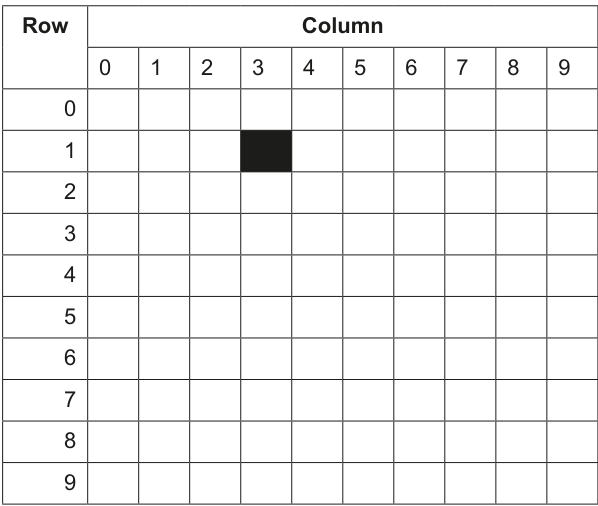
The class Board stores the data about the board and where the board objects are placed.
| Board | |
|---|---|
TheBoard : ARRAY[0:9, 0:9] of BoardObject | stores the board contents as a 2D array of 10 x 10 elements of type BoardObject |
Constructor() | initialises each of TheBoard elements to an empty BoardObject with Code = "-" and Value = 0 |
GetObject() | takes a row and column number as parameters and returns the BoardObject at the row, column position |
SetObject() | takes a BoardObject, row number and column number as parameters. Stores the BoardObject in TheBoard at the given row, column position |
DisplayBoard() | outputs the code of each BoardObject stored in TheBoard, one row at a time |
Write program code to declare the class Board and its constructor.
Do not declare the other methods.
Use your programming language appropriate constructor.
If you are writing in Python, include attribute declarations using comments.
Save your program.
Copy and paste the program code into part 1(b)(i) in the evidence document.
Answer
class Board:
    # TheBoard : list[list[BoardObject]]

    def __init__(self):
        self.TheBoard = [[BoardObject("-", 0) for Column in range(10)] for Row in range(10)]
See program code
Background Concept
A two-dimensional array stores data in rows and columns. In this question, the board is a 10 by 10 grid, so there are 100 positions altogether. Each position stores a BoardObject, not a simple character or number.
The Board class therefore needs one attribute that represents the whole grid. Its constructor must initialise every cell before the board is used.
Understanding the Question
The board has these requirements:
- 10 rows numbered 0 to 9
- 10 columns numbered 0 to 9
- each position contains a
BoardObject - every position starts as an empty object with
Code = "-"andValue = 0
You are asked only for the class declaration and constructor, not the other methods.
Approach
The constructor must create a 10 by 10 collection and put a new empty BoardObject into each element. In Python, a nested list comprehension is a compact way to do this.
The important idea is that each cell must hold a BoardObject("-", 0) so later methods can call GetCode() and GetValue() on every board position.
Step-by-Step Reasoning
class Board: starts the class definition.
The comment # TheBoard : list[list[BoardObject]] shows the attribute type for the examiner.
The constructor def __init__(self): runs whenever a new board is created.
self.TheBoard = [[BoardObject("-", 0) for Column in range(10)] for Row in range(10)]
builds the full 10 by 10 board:
- the inner comprehension creates one row of 10 empty
BoardObjectvalues - the outer comprehension repeats that for 10 rows
- the result is assigned to
self.TheBoard
So self.TheBoard[0][0], self.TheBoard[4][5], and every other position begin as empty objects.
Key Takeaways
- A 2D board is naturally represented as rows and columns.
- The constructor should initialise all elements before use.
- Each board position stores an object, not just a code character.
Common Mistakes
- Creating a 10 by 10 grid but filling it with strings like
"-"instead ofBoardObjectinstances. - Using the wrong size, such as 9 by 9.
- Forgetting that rows and columns run from 0 to 9.
- Declaring the class but not initialising
TheBoardin the constructor.
Things to Be Careful About
- Each element must be a
BoardObject("-", 0)because later methods use object methods on those elements. - Keep the attribute name exactly as
TheBoard. - In Python, the nested structure must truly be 10 rows of 10 elements each.
The method GetObject() takes a row number and column number as parameters.
The method returns the BoardObject stored at the parameter position.
Write program code for GetObject()
Save your program.
Copy and paste the program code into part 1(b)(ii) in the evidence document.
Answer
def GetObject(self, Row, Column):
    return self.TheBoard[Row][Column]
See program code
Background Concept
A getter method for a collection returns the item stored at a specified position. In a 2D array, two indices are needed:
- one for the row
- one for the column
Because the board is 0-indexed, position (0, 0) is the top-left cell and (9, 9) is the bottom-right cell.
Understanding the Question
GetObject() must take a row number and a column number and return the BoardObject stored there. It does not print anything and it does not modify the board.
Approach
Use the two parameters to index the 2D array attribute TheBoard, then return the object found at that location.
Step-by-Step Reasoning
def GetObject(self, Row, Column): defines a method that receives the two coordinates.
return self.TheBoard[Row][Column] looks inside the board:
self.TheBoard[Row]selects one row[Column]then selects one element from that row
The returned value is a BoardObject, so the caller can then use methods such as GetCode() or GetValue() on it.
Key Takeaways
- A 2D array access uses two indices.
- Getter methods can return complex objects, not only simple values.
- Returning the object allows later code to inspect its attributes through methods.
Common Mistakes
- Reversing row and column.
- Returning
self.TheBoardinstead of one element. - Printing the object instead of returning it.
Things to Be Careful About
- Use the method name exactly as given:
GetObject. - The board is 0-indexed, so valid positions are 0 to 9 inclusive in both directions.
- This method assumes the caller provides valid coordinates.
The method SetObject() takes three parameters: a BoardObject, row number and column number.
The method stores the BoardObject parameter in the row, column position in TheBoard
Write program code for SetObject()
Save your program.
Copy and paste the program code into part 1(b)(iii) in the evidence document.
Answer
def SetObject(self, ObjectToStore, Row, Column):
    self.TheBoard[Row][Column] = ObjectToStore
See program code
Background Concept
A setter method updates data stored inside an object. In this case, the Board object owns the 2D array, so changing a board position should be done through a board method.
The setter must know:
- which object to place
- which row to place it in
- which column to place it in
Understanding the Question
SetObject() takes three parameters:
- a
BoardObject - a row number
- a column number
It must store that object at the given position in TheBoard.
Approach
Use the row and column to locate the correct element in the 2D array, then assign the supplied BoardObject to that element.
Step-by-Step Reasoning
def SetObject(self, ObjectToStore, Row, Column): defines the method with all required information.
self.TheBoard[Row][Column] = ObjectToStore replaces the current contents of that cell with the new object.
For example, if ObjectToStore is Object1 and the coordinates are 0, 0, then the top-left board cell will now hold Object1 instead of an empty object.
Key Takeaways
- Setter methods update internal data structures.
- A board position can store a whole object.
- Assignment into a 2D array uses
[row][column].
Common Mistakes
- Putting the parameters in the wrong order.
- Reversing row and column.
- Assigning only the code instead of the whole object.
Things to Be Careful About
- The question requires storing the
BoardObjectparameter itself. - Keep the array name exactly as
TheBoard. - The coordinates used by this method should already be valid.
The method DisplayBoard() outputs the Code of each BoardObject stored in TheBoard using GetCode()
Each row in TheBoard is output on one line with a space between each Code
For example, the following board contains these four board objects:
- one object has code "A" in row 0 column 7
- one object has code "B" in row 0 column 9
- one object has code "C" in row 1 column 1
- one object has code "E" in row 6 column 5
The other board objects are empty. The output for this board will be:
- - - - - - - A - B
- C - - - - - - - -
- - - - - - - - - -
- - - - - - - - - -
- - - - - - - - - -
- - - - - - - - - -
- - - - - E - - - -
- - - - - - - - - -
- - - - - - - - - -
- - - - - - - - - -
Write program code for DisplayBoard()
Save your program.
Copy and paste the program code into part 1(b)(iv) in the evidence document.
Answer
def DisplayBoard(self):
    for Row in range(10):
        Line = ""
        for Column in range(10):
            Line = Line + self.TheBoard[Row][Column].GetCode() + " "
        print(Line.strip())
See program code
Background Concept
To process every element of a 2D array, nested loops are used:
- the outer loop moves through rows
- the inner loop moves through columns within each row
When formatted output is needed, a common technique is to build a string for one row and then print it once.
Understanding the Question
DisplayBoard() must output the code of every BoardObject on the board. The rules are:
- use
GetCode()to obtain each code - output one row per line
- place a space between each code
So the method is not displaying the full object, only its code.
Approach
Use nested loops to visit all 100 cells in row order. For each row:
- start with an empty line string
- append each cell's code and a space
- print the completed row line
Using GetCode() is important because the question explicitly asks for it.
Step-by-Step Reasoning
for Row in range(10): loops through row numbers 0 to 9.
Line = "" starts a fresh output string for the current row.
for Column in range(10): loops through column numbers 0 to 9 within that row.
self.TheBoard[Row][Column].GetCode() gets the code from the BoardObject stored at that position.
Line = Line + ... + " " adds the code and a separating space to the row output.
After all 10 columns have been processed, print(Line.strip()) outputs the row while removing the final extra space at the end.
This repeats for all 10 rows, producing the full board layout.
Key Takeaways
- Nested loops are the standard way to traverse a 2D array.
- Build one line per row when the output format is row-based.
- Use object methods when the question specifically requires them.
Common Mistakes
- Printing all 100 codes on one line.
- Forgetting to reset the row string at the start of each row.
- Accessing
Codedirectly instead of usingGetCode(). - Swapping row and column indices.
Things to Be Careful About
- The board is 10 by 10, so both loops must run 10 times.
- There must be spaces between codes.
- Each row must end with a line break, not continue onto the next row.
The table gives the row and column position on the board to store each of the five objects created in part 1(a)(iii).
| Object identifier | row position | column position |
|---|---|---|
| Object1 | 0 | 0 |
| Object2 | 9 | 9 |
| Object3 | 4 | 5 |
| Object4 | 2 | 2 |
| Object5 | 8 | 7 |
Write program code to amend the main program to:
- declare a new instance of
Board() - store each
BoardObjectin the position given in the table - call
DisplayBoard()for the new board object.
Save your program.
Copy and paste the program code into part 1(c)(i) in the evidence document.
Answer
GameBoard = Board()

GameBoard.SetObject(Object1, 0, 0)
GameBoard.SetObject(Object2, 9, 9)
GameBoard.SetObject(Object3, 4, 5)
GameBoard.SetObject(Object4, 2, 2)
GameBoard.SetObject(Object5, 8, 7)

GameBoard.DisplayBoard()
See program code
Background Concept
The main program is responsible for creating objects and coordinating method calls between them. Once classes have been defined, the main program typically:
- creates instances
- passes objects into methods
- calls display or processing methods
This is how object-oriented components are put together into a complete program.
Understanding the Question
You already have five BoardObject instances from part (a)(iii). Now you must:
- create a new
Boardinstance - place each object at the row and column given in the table
- display the board
So this part is about using the existing classes and methods, not redefining them.
Approach
The required sequence is:
- create the board
- call
SetObject()once for each object using the table coordinates - call
DisplayBoard()to show the final board contents
This order matters because the board must exist before objects can be placed on it.
Step-by-Step Reasoning
GameBoard = Board() creates the new board and runs the constructor, so every cell starts as an empty object.
Each SetObject() call then replaces one empty cell with one of the previously created objects:
Object1goes to(0, 0)Object2goes to(9, 9)Object3goes to(4, 5)Object4goes to(2, 2)Object5goes to(8, 7)
Finally, GameBoard.DisplayBoard() outputs the 10 rows showing where each object has been placed.
Key Takeaways
- Main programs often combine several class instances.
- Setter methods are used to place data into a larger structure.
- Display methods let you verify that earlier updates worked correctly.
Common Mistakes
- Forgetting to create the
Boardinstance. - Calling
DisplayBoard()before placing the objects. - Using the wrong coordinates for one or more objects.
- Recreating the
BoardObjectvalues instead of using the existing variables.
Things to Be Careful About
- Use the exact coordinates from the table.
- Rows and columns are 0-indexed.
- The object variables from part (a)(iii) must already exist before these statements run.
Test your program.
Take a screenshot of the output(s).
Save your program.
Copy and paste the screenshot(s) into part 1(c)(ii) in the evidence document.
Answer
Using the objects placed in part 1(c)(i), the expected output is:
A - - - - - - - - -
- - - - - - - - - -
- - D - - - - - - -
- - - - - - - - - -
- - - - - C - - - -
- - - - - - - - - -
- - - - - - - - - -
- - - - - - - - - -
- - - - - - - E - -
- - - - - - - - - B
See expected console output
Background Concept
Testing display output often means tracing the program state and converting internal data into the exact text that would appear on screen. For a board, that means checking each coordinate and placing the correct code into the correct row and column position.
Understanding the Question
This part asks for a screenshot of the output after the board has been created and the five objects have been placed. Since we are deriving the expected result, we must work out exactly what DisplayBoard() prints.
The objects are placed at:
Aat(0, 0)Bat(9, 9)Cat(4, 5)Dat(2, 2)Eat(8, 7)
All other cells remain "-".
Approach
Consider the board row by row from 0 to 9. In each row, place the given code in the specified column and put - everywhere else. Then write each row as a space-separated line.
Step-by-Step Reasoning
Row 0 has A in column 0, so row 0 is:
A - - - - - - - - -
Row 1 contains no placed object, so all entries are -.
Row 2 has D in column 2, so it becomes:
- - D - - - - - - -
Row 3 is all -.
Row 4 has C in column 5, so it becomes:
- - - - - C - - - -
Rows 5, 6 and 7 are all -.
Row 8 has E in column 7, giving:
- - - - - - - E - -
Row 9 has B in column 9, giving:
- - - - - - - - - B
Putting all 10 rows together gives the final console output.
Key Takeaways
- To predict output, trace the internal data structure carefully.
- For a 2D board, always work row by row.
- Coordinates must be translated into the correct output position.
Common Mistakes
- Mixing up row and column.
- Placing
EorCin the wrong position within the row. - Forgetting that rows and columns start at 0.
- Producing only the non-empty rows instead of all 10 rows.
Things to Be Careful About
- Every row must contain exactly 10 entries.
- Empty positions remain as
-because the constructor initialised them that way. - The order of rows in the output is from row 0 down to row 9.
Amend the main program to:
- repeatedly take a row position as input until it is between 0 and 9 inclusive
- repeatedly take a column position as input until it is between 0 and 9 inclusive
- use the appropriate method(s) to identify if there is an object in the array position input
- output "Miss" if there is an empty
BoardObjectin that position - output the
CodeandValueif there is a non-emptyBoardObjectin that position.
All outputs must include appropriate messages.
Save your program.
Copy and paste the program code into part 1(d)(i) in the evidence document.
Answer
Row = int(input("Enter row position: "))
while Row < 0 or Row > 9:
    print("Invalid row position")
    Row = int(input("Enter row position: "))

Column = int(input("Enter column position: "))
while Column < 0 or Column > 9:
    print("Invalid column position")
    Column = int(input("Enter column position: "))

SelectedObject = GameBoard.GetObject(Row, Column)

if SelectedObject.GetCode() == "-":
    print("Miss")
else:
    print("Code:", SelectedObject.GetCode())
    print("Value:", SelectedObject.GetValue())
See program code
Background Concept
Input validation checks that data is acceptable before the program uses it. A common pattern is repetition validation: keep asking until the value is within the required range.
This question also uses object-oriented access:
GetObject()retrieves the board cell objectGetCode()andGetValue()inspect that object
An empty board position is represented by a special BoardObject whose code is "-" and value is 0.
Understanding the Question
You must amend the main program so it:
- repeatedly inputs a row until it is between 0 and 9 inclusive
- repeatedly inputs a column until it is between 0 and 9 inclusive
- checks the object at that position
- outputs
Missif the object is empty - otherwise outputs the object's code and value
The phrase "appropriate method(s)" is a clue that the answer should use the class methods already written, especially GetObject(), GetCode() and GetValue().
Approach
Use two validation loops, one for the row and one for the column. After valid coordinates have been entered:
- call
GameBoard.GetObject(Row, Column) - store the returned object in a variable
- inspect its code
- if the code is
"-", it is empty, so outputMiss - otherwise output the code and value
Step-by-Step Reasoning
Row = int(input("Enter row position: ")) gets the first row entry.
while Row < 0 or Row > 9: checks whether the row is outside the valid range. If it is invalid, the program prints a message and asks again.
The same pattern is then repeated for Column, again enforcing the valid range 0 to 9 inclusive.
Once both coordinates are valid:
SelectedObject = GameBoard.GetObject(Row, Column) retrieves the BoardObject stored at that position.
To decide whether the position is empty, the code checks:
SelectedObject.GetCode() == "-"
This works because the constructor for the board filled all empty cells with BoardObject("-", 0).
If the condition is true, the cell is empty, so the correct output is Miss.
Otherwise, the position contains a real object, so the program outputs:
- its code using
GetCode() - its value using
GetValue()
Key Takeaways
- Repetition validation is used when invalid input must be re-entered.
- Sentinel values like
"-"can represent an empty object. - A method can return an object, and then other methods can be called on that returned object.
Common Mistakes
- Using
andinstead oforin the validation condition, which would fail to catch invalid values correctly. - Checking the board cell directly against
"-"instead of checkingGetCode(). - Forgetting to re-input the value inside the validation loop.
- Printing the whole object instead of its code and value.
Things to Be Careful About
- The valid range is inclusive: 0 and 9 are both allowed.
- Validation for row and column must be done separately.
- The program should only access
GameBoard.GetObject(Row, Column)after both inputs are valid. - The output for an empty cell must be
Miss.
Test your program by entering this test data in the order given:
Row position first input: 10
Row position second input: 4
Column position first input: -1
Column position second input: 5
Take a screenshot of the output(s).
Save your program.
Copy and paste the screenshot(s) into part 1(d)(ii) in the evidence document.
Answer
For the inputs 10, 4, -1, 5, the expected output is:
Enter row position: 10
Invalid row position
Enter row position: 4
Enter column position: -1
Invalid column position
Enter column position: 5
Code: C
Value: 5
See expected console output
Background Concept
When testing validated input, you must follow the program exactly as a user would experience it. Every invalid input causes the validation loop to repeat, so the final output includes both the error messages and the later successful result.
Understanding the Question
The test data is given in order:
- first row input:
10 - second row input:
4 - first column input:
-1 - second column input:
5
You must determine what the program would show on screen when these values are entered.
Approach
Trace the input section first:
- check whether
10is a valid row - check whether
4is a valid row - check whether
-1is a valid column - check whether
5is a valid column
After valid coordinates are accepted, look up that position on the board. From part (c), row 4 column 5 contains Object3, which has code C and value 5.
Step-by-Step Reasoning
The program first asks for the row.
Input 10 is invalid because the allowed range is 0 to 9, so the program outputs Invalid row position and asks again.
The second row input is 4. This is valid, so row validation ends.
The program then asks for the column.
Input -1 is invalid because it is below 0, so the program outputs Invalid column position and asks again.
The second column input is 5. This is valid, so column validation ends.
Now the program retrieves the object at (4, 5). From the earlier board setup, this contains code C and value 5.
Because the code is not "-", the program does not output Miss. Instead it outputs:
Code: CValue: 5
Key Takeaways
- Test traces must include repeated prompts caused by invalid input.
- After validation, use the accepted values only.
- The final output depends both on the validation logic and the stored board data.
Common Mistakes
- Forgetting the invalid input messages.
- Using the first row or column value even though it was rejected.
- Looking up the wrong board position.
- Outputting
Misseven though(4, 5)contains an object.
Things to Be Careful About
- The inputs must be processed in the exact order given.
- Only the accepted coordinates
4and5are used for the board lookup. - The expected output depends on the exact messages used in the program code; it must match the chosen solution consistently.
A program reads string data from a text file into a linear queue and then compresses the data.
The queue is created using the global 1D array Queue. The queue can store up to 100 elements. Each element is initialised to the empty string ""
The queue has two pointers that are global to the program:
QueueHeadthat points to the index of the first element in the queue, initialised to -1QueueTailthat points to the index of the last element in the queue, initialised to -1
The global variable NumberItems stores the number of elements stored in the queue, initialised to 0
Write program code to declare and initialise Queue, QueueHead, QueueTail and NumberItems
Save your program as Question2_N25.
Copy and paste the program code into part 2(a) in the evidence document.
Answer
Queue = [""] * 100
QueueHead = -1
QueueTail = -1
NumberItems = 0
See program code
Background Concept
A linear queue stores items in first-in, first-out order. In this question, the queue is implemented using a 1D array, so the program must also keep track of where the queue starts and ends. QueueHead points to the first item currently in the queue, QueueTail points to the last item currently in the queue, and NumberItems records how many elements are stored.
When the queue is empty, there is no valid first or last item, so both pointers are usually set to a special value such as -1. The array itself is created with a fixed maximum size, here 100 elements.
Understanding the Question
You are asked only to declare and initialise the global data used by the queue. That means:
- creating the array
Queuewith space for 100 strings - setting every element initially to the empty string
"" - setting both pointers to
-1 - setting
NumberItemsto0
This part is not asking for any queue operations yet, just the starting state before any data is read.
Approach
Use Python code to create a list of length 100 filled with empty strings. Then assign the three global variables their starting values. These values must match the question stem exactly, because later parts depend on them.
Step-by-Step Reasoning
Queue = [""] * 100
creates a list with 100 elements. Every element starts as the empty string, which matches the requirement.
QueueHead = -1
means there is currently no first element.
QueueTail = -1
means there is currently no last element.
NumberItems = 0
means the queue contains no stored items at the start.
These four lines fully establish an empty queue ready for Enqueue() and Dequeue() later.
Key Takeaways
- A queue implemented with an array needs both storage and pointer variables.
-1is a common empty-queue marker for head and tail pointers.- Initial values matter because later procedures assume this starting state.
Common Mistakes
- Creating an empty list instead of a list with 100 elements.
- Forgetting that each element must start as
""rather thanNoneor0. - Setting only one pointer to
-1and not the other. - Initialising
NumberItemsincorrectly.
Things to Be Careful About
- The queue stores strings, not integers.
- The maximum size is exactly 100.
- Use the variable names exactly as given:
Queue,QueueHead,QueueTail,NumberItems. - This is global setup code, so it should exist outside the functions.
The function Enqueue() takes a string as a parameter. The function checks if the queue is full, and returns Boolean FALSE if the queue is full.
If the queue is not full, the parameter is inserted into the next position in Queue. The function updates the appropriate pointer(s), updates NumberItems and then returns Boolean TRUE
Write program code for Enqueue()
Save your program.
Copy and paste the program code into part 2(b) in the evidence document.
Answer
def Enqueue(DataToInsert):
    global Queue, QueueHead, QueueTail, NumberItems
    if QueueTail == 99:
        return False
    if NumberItems == 0:
        QueueHead = 0
    QueueTail += 1
    Queue[QueueTail] = DataToInsert
    NumberItems += 1
    return True
See program code
Background Concept
An Enqueue operation inserts a new item at the tail of a queue. In an array-based linear queue, the tail moves one position to the right whenever a new item is added. If the queue is empty before insertion, the head must also be set to the first valid position.
A linear queue becomes full when there is no next array position available at the tail. Since the array indices run from 0 to 99, the last possible tail position is 99.
Understanding the Question
This function receives one string parameter and must:
- check whether the queue is full
- return Boolean
Falseif it is full - otherwise insert the new item in the next position
- update the correct pointer or pointers
- increase
NumberItems - return Boolean
True
The important clue is that this is a linear queue, so insertion always happens at the tail end.
Approach
First test for the full-queue condition. If the tail is already at index 99, no more items can be inserted.
If insertion is possible, handle the special case where the queue is currently empty. In that case, the head must move from -1 to 0 because the new item will become both the first and last item.
Then move the tail forward, store the new item, increase the item count, and return True.
Step-by-Step Reasoning
The function header def Enqueue(DataToInsert): defines a function that receives the string to add.
global Queue, QueueHead, QueueTail, NumberItems
is needed because the function updates the global queue structure.
if QueueTail == 99:
checks whether the tail is already at the final array position. If so, the queue is full.
return False
stops the function immediately and reports that insertion failed.
if NumberItems == 0:
checks whether the queue is empty before insertion.
QueueHead = 0
sets the head to the first valid array position because the new item will be the first item in the queue.
QueueTail += 1
moves the tail to the next free position.
Queue[QueueTail] = DataToInsert
stores the new item at that position.
NumberItems += 1
updates the item count.
return True
confirms that insertion succeeded.
Key Takeaways
Enqueuealways inserts at the tail.- In an array-based queue, pointer updates are just as important as storing the value.
- Empty-queue insertion is a special case because the head must be set.
- Returning a Boolean status is a useful way to report success or failure.
Common Mistakes
- Forgetting to check for a full queue before inserting.
- Updating
QueueTailafter writing the item, which can cause the value to be stored in the wrong place. - Forgetting to set
QueueHeadwhen the first item is inserted. - Not increasing
NumberItems. - Returning the string
"False"instead of the Boolean valueFalsehere. This part wants a Boolean.
Things to Be Careful About
- The last valid index is
99, not100. - This is a linear queue, so insertion is always at the next tail position.
- The function must return Boolean
TrueorFalse, not print them. - Use the exact global variable names so later parts work with the same queue.
The function Dequeue() returns the string "False" if the queue is empty.
If the queue is not empty, the function returns the next element in the queue. The function updates the appropriate pointer(s) and updates NumberItems
Write program code for Dequeue()
Save your program.
Copy and paste the program code into part 2(c) in the evidence document.
Answer
def Dequeue():
    global Queue, QueueHead, QueueTail, NumberItems
    if NumberItems == 0:
        return "False"
    Item = Queue[QueueHead]
    Queue[QueueHead] = ""
    NumberItems -= 1
    if NumberItems == 0:
        QueueHead = -1
        QueueTail = -1
    else:
        QueueHead += 1
    return Item
See program code
Background Concept
A Dequeue operation removes and returns the item at the head of a queue. Because a queue is first-in, first-out, the oldest item is always removed first.
In an array-based implementation, deleting from the queue usually means reading the value at QueueHead and then moving the head pointer forward. If removing that item makes the queue empty, both head and tail should be reset to the empty value.
Understanding the Question
This function must:
- return the string
"False"if the queue is empty - otherwise return the next item from the queue
- update the correct pointer or pointers
- update
NumberItems
The wording matters here: it says the string "False", not the Boolean value False.
Approach
Start by checking whether the queue is empty using NumberItems. If it is empty, return the required sentinel string.
If not empty, store the front item so it can be returned later. Reduce the count. Then decide whether the queue has become empty after removal:
- if yes, reset both pointers to
-1 - if no, move the head forward by one
Step-by-Step Reasoning
def Dequeue():
defines the function.
global Queue, QueueHead, QueueTail, NumberItems
is needed because the function changes the queue state.
if NumberItems == 0:
checks for an empty queue.
return "False"
returns exactly the value the question requires in that case.
Item = Queue[QueueHead]
retrieves the value at the front of the queue.
Queue[QueueHead] = ""
clears the position. This is not strictly required for queue behaviour, but it keeps the array consistent with the initial representation.
NumberItems -= 1
updates the number of stored items.
if NumberItems == 0:
checks whether the queue has become empty after the deletion.
QueueHead = -1 and QueueTail = -1
reset the pointers to the empty-queue state.
else: QueueHead += 1
moves the head to the next item when items still remain.
Finally, return Item gives back the removed value.
Key Takeaways
Dequeuealways removes from the head.- The empty queue and last-item-removed cases must both be handled correctly.
- The return value type matters: here the empty case is a string.
Common Mistakes
- Returning Boolean
Falseinstead of the string"False". - Forgetting to decrease
NumberItems. - Moving the head pointer before storing the item to return.
- Forgetting to reset both pointers when the last item is removed.
Things to Be Careful About
- The function must return the front value before the pointer moves on.
NumberItemsshould be decreased exactly once per successful dequeue.- Only increment
QueueHeadif the queue still contains items afterwards. - Use consistent empty-state values: both pointers should be
-1.
The text file BinaryData.txt stores individual binary digits, '1' and '0'. Each digit is on a new line. For example, the first line in the text file stores '1', the second line stores '1'
The procedure ReadData() reads in each line from the text file BinaryData.txt and inserts it into the queue using the appropriate method.
The procedure needs to work for a text file with any number of lines up to a maximum of 100.
Write program code for ReadData()
Save your program.
Copy and paste the program code into part 2(d) in the evidence document.
Answer
def ReadData():
    FileHandle = open("BinaryData.txt", "r")
    for Line in FileHandle:
        Enqueue(Line.strip())
    FileHandle.close()
See program code
Background Concept
Sequential text-file processing reads one record after another from the start of the file to the end. In Python, iterating through a file with a for loop is a simple way to process each line in turn.
Because each binary digit is stored on its own line, every line read from the file will normally include a newline character at the end. That newline should be removed before storing the value in the queue.
Understanding the Question
The procedure must read every line from BinaryData.txt and insert each line into the queue using the correct method, which is Enqueue(). The file may have any number of lines from 1 up to 100, so the code must not assume a fixed number of reads.
The key points are:
- open the file
- process every line
- remove the newline
- enqueue the digit
- close the file
Approach
Use a file handle to open the file in read mode. Loop through the file line by line. For each line, strip the newline and pass the cleaned string to Enqueue(). After the loop finishes, close the file.
This works for any file length up to the queue maximum because the loop continues until the file ends.
Step-by-Step Reasoning
def ReadData():
defines the procedure.
FileHandle = open("BinaryData.txt", "r")
opens the file for reading.
for Line in FileHandle:
reads one line at a time until there are no more lines left. This is why the procedure works for any number of lines.
Enqueue(Line.strip())
removes the newline character and inserts the remaining string, either "1" or "0", into the queue.
FileHandle.close()
closes the file when all data has been read.
This means every digit from the file is transferred into the queue in the same order as in the file.
Key Takeaways
- Sequential file processing is ideal when records are read one after another in order.
.strip()is useful to remove newline characters from lines read from a text file.- Reusing
Enqueue()keeps the queue logic in one place.
Common Mistakes
- Reading only one line instead of all lines.
- Forgetting to remove the newline, which would store values like
"1\n". - Appending directly to the list instead of using
Enqueue(). - Forgetting to close the file.
Things to Be Careful About
- The filename must match exactly:
BinaryData.txt. - Open the file in read mode.
- Each line is a string already, so there is no need to convert it to an integer.
- The queue stores the digits in file order, so do not reverse or sort the data.
The string data in the text file is compressed.
The compression algorithm counts the number of times each binary digit appears consecutively, then stores the binary digit followed by the number of times it appears. The algorithm stores the compressed data in a single string.
For example, if the text file contains the data:
1
1
0
0
0
1
1
1
The compression algorithm will create the string "120313" because there are two '1' digits, followed by three '0' digits, followed by three '1' digits.
The procedure Compress() uses Dequeue() to remove each element from the queue in turn. The procedure then compresses the data following the compression algorithm described. The new compressed string is stored in the global variable NewString
You can assume that one binary digit will never appear more than nine times consecutively in the sequence.
You can assume that there will always be at least one item in the queue.
Write program code for Compress()
Save your program.
Copy and paste the program code into part 2(e) in the evidence document.
Answer
def Compress():
    global NewString, NumberItems
    NewString = ""
    CurrentDigit = Dequeue()
    Count = 1

    while NumberItems > 0:
        NextDigit = Dequeue()
        if NextDigit == CurrentDigit:
            Count += 1
        else:
            NewString = NewString + CurrentDigit + str(Count)
            CurrentDigit = NextDigit
            Count = 1

    NewString = NewString + CurrentDigit + str(Count)
See program code
Background Concept
The compression described here is a simple form of run-length encoding. Instead of storing every digit individually, the algorithm stores each digit followed by how many times it appears consecutively.
For example, 1 1 1 0 0 becomes 13 02, often written as the string 1302. The important idea is that the algorithm works with runs of repeated values, not total counts across the whole file.
Because the data is already in a queue, the procedure should process it in order by repeatedly calling Dequeue().
Understanding the Question
You must write Compress() so that it:
- removes items from the queue using
Dequeue() - counts consecutive repeated digits
- builds one compressed string in the global variable
NewString
You are told there will always be at least one item in the queue, so it is safe to dequeue the first item before starting the loop. You are also told no run will be longer than nine, which means the count will always fit as a single digit in the output string.
Approach
A standard way to solve this is:
- Dequeue the first digit and treat it as the current run.
- Set the count for that run to 1.
- While there are still items in the queue, dequeue the next digit.
- If it matches the current digit, increase the count.
- If it does not match, append the current digit and count to
NewString, then start a new run. - After the loop, append the final run, because the loop ends without automatically saving it.
That final step is the most important subtlety.
Step-by-Step Reasoning
global NewString, NumberItems
allows the procedure to update the global compressed string and check how many items remain.
NewString = ""
starts with an empty result.
CurrentDigit = Dequeue()
removes the first item from the queue and begins the first run.
Count = 1
starts the count at 1 because that first digit has already been seen once.
while NumberItems > 0:
continues until the queue has been emptied by repeated calls to Dequeue().
NextDigit = Dequeue()
gets the next value in sequence.
If NextDigit == CurrentDigit, the run is continuing, so Count += 1.
Otherwise, the run has ended. At that point:
- append
CurrentDigitandCounttoNewString - make
CurrentDigitequal to the new digit - reset
Countto 1 for the new run
After the loop finishes, one run is still waiting to be added. That is why the final line
NewString = NewString + CurrentDigit + str(Count)
is needed.
Without that line, the last group of digits would be lost.
Key Takeaways
- This is run-length encoding of consecutive values.
- Queue processing preserves the original order of the data.
- A common pattern is to initialise from the first item, then compare each later item to the current run.
- Final-run handling is essential in compression questions like this.
Common Mistakes
- Counting total numbers of
1s and0s instead of consecutive runs. - Forgetting to initialise with the first dequeued value.
- Forgetting to append the last run after the loop.
- Resetting the count incorrectly when the digit changes.
- Not converting the count to a string before concatenation.
Things to Be Careful About
- The procedure must use
Dequeue()rather than reading the queue array directly. NewStringis global, so it must be assigned through the global name.- The condition
while NumberItems > 0works becauseDequeue()decreasesNumberItemseach time. - The empty-queue case does not need extra handling here because the question guarantees at least one item at the start.
Write program code for the main program to:
- call
ReadData() - call
Compress() - output the content of the compressed string.
Save your program.
Copy and paste the program code into part 2(f)(i) in the evidence document.
Answer
ReadData()
Compress()
print(NewString)
See program code
Background Concept
The main program coordinates the overall sequence of operations. In a procedural solution, the individual tasks are usually written as separate functions or procedures, and the main program simply calls them in the correct order.
Output is then produced once the required processing has finished.
Understanding the Question
This part asks for the main program only. It must:
- call
ReadData()to load the queue from the file - call
Compress()to process the queue contents - output the compressed string
So the answer is just the control sequence, not the function definitions again.
Approach
Write the three statements in the same order as the required processing steps. Data must be read before it can be compressed, and compression must happen before the result can be displayed.
Step-by-Step Reasoning
ReadData()
loads the binary digits from the file into the queue.
Compress()
removes those queued values in order and builds the compressed result in NewString.
print(NewString)
outputs the final compressed string to the console.
That is the complete main program logic for this task.
Key Takeaways
- The main program should call subprograms in a logical order.
- Separating tasks into procedures makes the main program short and clear.
- Output belongs after all necessary processing has completed.
Common Mistakes
- Calling
Compress()beforeReadData(). - Printing the queue instead of printing
NewString. - Rewriting the function bodies instead of just the main program statements.
Things to Be Careful About
- Use the exact procedure names given.
NewStringmust already have been set byCompress()before it is printed.- The output statement should display the compressed string itself, not a label unless the question asks for one.
Test your program.
Take a screenshot of the output(s).
Save your program.
Copy and paste the screenshot(s) into part 2(f)(ii) in the evidence document.
Answer
Using the supplied BinaryData.txt, the program outputs:
19051306
19051306
Background Concept
Testing a program means checking that the actual output matches the expected output for known input data. For a file-processing program, the file contents act as the input.
Here, the expected result comes from tracing the compression algorithm over the sequence of binary digits stored in the file.
Understanding the Question
This part asks for evidence of testing, normally a screenshot. Since the supplied file contents are known, the important thing is to work out exactly what the program should print.
The file contains these runs of digits:
- nine
1s - five
0s - three
1s - six
0s
The compression format is digit followed by count.
Approach
Read the file values in order, group consecutive equal digits, convert each group into digit-plus-count, then join those pieces together into one string.
Step-by-Step Reasoning
From the supplied BinaryData.txt:
- The first 9 lines are
1, so the first compressed part is19. - The next 5 lines are
0, so the next part is05. - The next 3 lines are
1, so the next part is13. - The final 6 lines are
0, so the last part is06.
Joining these parts gives:
19 + 05 + 13 + 06 = 19051306
So the console output should be exactly:
19051306
Key Takeaways
- Expected output can be worked out by tracing the algorithm with the given input data.
- Run-length compression depends on consecutive groups, not total counts.
- A screenshot mark is still based on whether the output is correct.
Common Mistakes
- Counting the total number of
1s and0s in the whole file instead of counting each consecutive run. - Missing one digit when counting repeated values.
- Reversing the order to count then digit, when this question wants digit then count.
Things to Be Careful About
- The output is a single string with no spaces.
- The order of the groups must match the original file order.
- Only the file data given in the question should be used to derive this test output.
A program is written to perform different individual processes using arrays.
A 1D array stores 10 integers.
A recursive function RecursiveCount() takes three parameters:
ArrayCopy, an array of integersNumberElements, the number of elements in the array of integersDataToFind, an integer data to find in the array.
The function counts and returns the number of times DataToFind is in ArrayCopy
The recursive algorithm:
- returns 0 if there are no elements in
ArrayCopy - compares the first element in
ArrayCopywithDataToFind- if the element matches, the function returns 1 added to the return value from a recursive call (passing the array without the first element)
- if the element does not match, the function returns the return value from a recursive call (passing the array without the first element).
Write program code for RecursiveCount()
Save your program as Question3_N25.
Copy and paste the program code into part 3(a)(i) in the evidence document.
Answer
def RecursiveCount(ArrayCopy, NumberElements, DataToFind):
    if NumberElements == 0:
        return 0
    if ArrayCopy[0] == DataToFind:
        return 1 + RecursiveCount(ArrayCopy[1:], NumberElements - 1, DataToFind)
    else:
        return RecursiveCount(ArrayCopy[1:], NumberElements - 1, DataToFind)
See program code
Background Concept
A recursive function solves a problem by calling itself on a smaller version of the same problem. To work correctly, it must have:
- a base case that stops the recursion
- a recursive case that reduces the problem size each time
Here, the task is to count how many times a value appears in an array. A recursive way to do that is:
- If there are no elements left, the count is
0. - Look at the first element.
- If it matches the value being searched for, count
1and then recurse on the rest of the array. - If it does not match, just recurse on the rest of the array.
In Python, ArrayCopy[1:] means "a copy of the array without the first element". That matches the algorithm given in the question.
Understanding the Question
The question gives the recursive algorithm in words and asks you to write the Python function RecursiveCount().
The function takes:
ArrayCopy- the array of integersNumberElements- how many elements are currently being consideredDataToFind- the integer to count
It must return the number of times DataToFind appears in the array.
The wording is very important because it already tells you exactly what the function must do:
- return
0when there are no elements - compare the first element with the target value
- recurse using the array without its first element
So this is a direct code translation of the stated algorithm.
Approach
Use a function with two return paths after the base case:
- Check whether
NumberElementsis0. - If so, stop and return
0. - Otherwise compare the first item,
ArrayCopy[0], withDataToFind. - If it matches, return
1 +the result of the recursive call. - If it does not match, return just the recursive call result.
Each recursive call must reduce the problem by:
- passing
ArrayCopy[1:]instead of the whole array - passing
NumberElements - 1
That guarantees progress toward the base case.
Step-by-Step Reasoning
The function header is:
def RecursiveCount(ArrayCopy, NumberElements, DataToFind):
This defines the function with the three required parameters.
Next, the base case:
if NumberElements == 0:
    return 0
If there are no elements left to inspect, there cannot be any matches, so the count is 0.
Then the first comparison:
if ArrayCopy[0] == DataToFind:
This checks the first element of the current array copy.
If it matches:
return 1 + RecursiveCount(ArrayCopy[1:], NumberElements - 1, DataToFind)
Why 1 +? Because the current first element is one confirmed match. Then the function still has to count any further matches in the rest of the array.
Why ArrayCopy[1:]? Because the question says to pass the array without the first element.
Why NumberElements - 1? Because one element has now been processed, so one fewer remains.
If it does not match:
return RecursiveCount(ArrayCopy[1:], NumberElements - 1, DataToFind)
No 1 is added here because the current element does not count as a match.
The recursion keeps shrinking the array until NumberElements becomes 0, and then all the return values combine on the way back up.
For example, if the current array began [0, 5, 1] and the value to find was 0:
- first element is
0, so return1 +recursive result on[5, 1] 5does not match, so return recursive result on[1]1does not match, so return recursive result on[]- empty array returns
0 - total becomes
1 + 0 = 1
Key Takeaways
- Every recursive function needs a clear base case.
- The recursive call must make the problem smaller each time.
- Counting recursively often means returning
1 + recursive_call(...)for a match, and justrecursive_call(...)otherwise. - In Python, slicing such as
ArrayCopy[1:]is a simple way to pass the remaining elements.
Common Mistakes
- Missing the base case: this causes infinite recursion or a run-time error.
- Not reducing the problem size: if you recurse on the same array again, the function never finishes.
- Forgetting
return: if you call the function recursively without returning its value, the final answer is lost. - Using the wrong element: the algorithm specifically says compare the first element, so
ArrayCopy[0]is required. - Adding
1in both cases: only add1when the current element matches the value being searched for.
Things to Be Careful About
- Keep the parameter order consistent with the function definition: array, number of elements, value to find.
- Reduce
NumberElementsby exactly1on every call. - Use
ArrayCopy[1:], notArrayCopy[:-1]; the latter removes the last element, not the first. - Return an integer in every path through the function.
- The question asks for a function that returns the count, not one that prints it.
The main program stores the following data in a 1D array of integers in the order given:
0 5 1 2 5 9 9 6 5 0
The main program calls RecursiveCount() with the parameters:
- 0 as the data to find
- 10 as the number of elements
- the array of 10 integers.
The return value is output.
Write program code for the main program.
Save your program.
Copy and paste the program code into part 3(a)(ii) in the evidence document.
Answer
ArrayData = [0, 5, 1, 2, 5, 9, 9, 6, 5, 0]
Count = RecursiveCount(ArrayData, 10, 0)
print(Count)
See program code
Background Concept
The main program is the part that prepares data, calls functions and displays results. In Paper 4, this usually means:
- storing data in a list or variable
- calling a function with the correct arguments
- printing the returned result
A function call must match the function definition. Even if the question lists the test values in bullet points, the arguments still need to be passed in the order required by the function.
Understanding the Question
You are given the 10 integers:
0 5 1 2 5 9 9 6 5 0
The main program must:
- store them in a 1D array
- call
RecursiveCount() - search for the value
0 - use
10as the number of elements - output the returned value
So this part is not about rewriting the recursive function. It is about setting up the data and calling the function correctly.
Approach
The steps are:
- Create a Python list containing the 10 integers in the exact order given.
- Call
RecursiveCount(). - Pass the arguments in the function's parameter order:
- the array
- the number of elements
- the value to find
- Store the returned count in a variable.
- Print the result.
Step-by-Step Reasoning
First, store the array data:
ArrayData = [0, 5, 1, 2, 5, 9, 9, 6, 5, 0]
This preserves the exact order required by the question.
Next, call the function:
Count = RecursiveCount(ArrayData, 10, 0)
This is important:
ArrayDatais passed first because the function expects the array first.10is passed second because there are 10 elements.0is passed third because that is the value to count.
Then output the return value:
print(Count)
The function will count how many zeros are in the array and return that number.
Looking at the list, 0 appears:
- once at the beginning
- once at the end
So the printed result will be 2.
Key Takeaways
- The main program prepares the test data and calls the function.
- Function arguments must be passed in the order the function expects.
- A returned value should normally be stored and then printed.
Common Mistakes
- Passing arguments in the wrong order: for example, putting
0first because it is listed first in the bullet points. The function definition still controls the correct order. - Entering the array values in the wrong order: that changes the data being tested.
- Printing the function name instead of calling it: you must include parentheses and arguments.
- Forgetting to print the result: the function may work but nothing appears on screen.
Things to Be Careful About
- Use exactly 10 integers.
- Keep the list in the order given by the question.
- Call
RecursiveCount(ArrayData, 10, 0), notRecursiveCount(0, 10, ArrayData). - Make sure the variable receiving the result is printed afterward.
Test your program.
Take a screenshot of the output(s).
Save your program.
Copy and paste the screenshot(s) into part 3(a)(iii) in the evidence document.
Answer
Using the array 0 5 1 2 5 9 9 6 5 0 and searching for 0, the output is:
2
2
Background Concept
Testing a program means running it with known data and checking that the actual output matches the expected output. For a counting function, the simplest check is to inspect the original data manually and count the matches yourself.
Understanding the Question
The earlier parts created a program that:
- stores 10 integers
- calls
RecursiveCount()to count how many times0appears - outputs the returned value
This part asks for the output you should see when the program is tested.
Approach
Do a manual check of the array before considering the console output:
- Scan the 10 values.
- Count how many are equal to
0. - The printed result should equal that count.
Step-by-Step Reasoning
The array is:
0 5 1 2 5 9 9 6 5 0
Now count the zeros:
- first value =
0-> one match - middle values are not
0 - last value =
0-> second match
Total matches = 2.
So when the main program prints the return value from RecursiveCount(), the console output should be:
2
That is the output the screenshot should show for this test.
Key Takeaways
- Expected output should be worked out from the input data before running the program.
- A good test uses data where you can easily verify the answer.
- Counting outputs are easy to validate by manual inspection.
Common Mistakes
- Miscounting the values manually: this leads to thinking the program is wrong when it is actually correct.
- Showing code instead of output: this part wants the test result, not the program listing.
- Including unrelated output: for this specific test, the key result is the count
2.
Things to Be Careful About
- Check the exact value being searched for: it is
0, not5. - Count all 10 elements, including the last one.
- The screenshot should clearly show the program output, not just the editor window.
The program stores the following string. The string has four statements that are each terminated by a semi-colon ';'
"x=0;y=1;x=x+y;y++;"
Write program code to amend the main program to store the string "x=0;y=1;x=x+y;y++;" in a local variable.
Save your program.
Copy and paste the program code into part 3(b)(i) in the evidence document.
Answer
CodeString = "x=0;y=1;x=x+y;y++;"
See program code
Background Concept
A string variable stores a sequence of characters exactly as written, including symbols such as =, + and ;. When a later function depends on delimiters, those delimiter characters must be preserved exactly in the stored value.
Understanding the Question
You must amend the main program so that it stores this exact string in a local variable:
"x=0;y=1;x=x+y;y++;"
The semicolons matter because the next part will use them to split the string into separate statements.
Approach
Use a simple assignment statement in Python:
- choose a sensible variable name
- assign the full string exactly as given
- keep the semicolons inside the string
Step-by-Step Reasoning
The required line is:
CodeString = "x=0;y=1;x=x+y;y++;"
This creates a variable called CodeString and stores the whole text as one string value.
Why the exact text matters:
x=0is the first statementy=1is the second statementx=x+yis the third statementy++is the fourth statement- each statement ends with
;
If any semicolon were missing, the later splitting function would not work properly.
Key Takeaways
- String-processing tasks depend on the original string being stored exactly.
- Delimiters such as semicolons are part of the data and must not be removed at this stage.
Common Mistakes
- Omitting the final semicolon: this changes the input data.
- Changing the contents slightly: even a small difference can affect later processing.
- Using multiple strings instead of one string: the next function expects a single string parameter.
Things to Be Careful About
- Keep the quotation marks around the whole string.
- Keep every semicolon exactly where it appears.
- Do not insert extra spaces unless the question includes them.
The function SplitData() splits a string parameter into four individual lines of code.
The function creates an array of the strings where each line is stored in a new array element without the semi-colon.
The function returns the array of strings.
Do not use an inbuilt function to split the string.
Write program code for SplitData()
Save your program.
Copy and paste the program code into part 3(b)(ii) in the evidence document.
Answer
def SplitData(CodeString):
    Lines = []
    CurrentLine = ""

    for Character in CodeString:
        if Character == ";":
            Lines.append(CurrentLine)
            CurrentLine = ""
        else:
            CurrentLine += Character

    return Lines
See program code
Background Concept
String splitting means breaking one long string into smaller pieces using a delimiter character. Many programming languages have an inbuilt split() function, but this question explicitly says do not use an inbuilt function to split the string. That means you must implement the logic manually.
The standard manual method is:
- Start with an empty temporary string.
- Read the original string one character at a time.
- If the character is not the delimiter, add it to the temporary string.
- If the character is the delimiter, store the temporary string in an array and reset it.
- Continue until the whole string has been processed.
Understanding the Question
The input string is:
"x=0;y=1;x=x+y;y++;"
The semicolon ; is the delimiter between statements. The function SplitData() must:
- take the string as a parameter
- split it into four separate statements
- remove the semicolons from the stored results
- return an array of strings
- avoid using an inbuilt split function
So the key skill being tested is manual string parsing.
Approach
Use a function with:
- a list to hold the finished statements
- a temporary string to build the current statement
- a loop that reads each character in the input string
Within the loop:
- if the character is
;, add the built-up statement to the list and clear the temporary string - otherwise, add the character to the temporary string
Because the input string already ends with a semicolon, each statement will be appended at the correct point.
Step-by-Step Reasoning
The function starts with:
def SplitData(CodeString):
This defines a function that receives the string to process.
Next, create the result array and the current-building string:
Lines = []
CurrentLine = ""
Lineswill store the separated statements.CurrentLinecollects characters until a semicolon is found.
Now loop through the string one character at a time:
for Character in CodeString:
This is a simple and clear way to inspect every character.
If the current character is a semicolon:
if Character == ";":
    Lines.append(CurrentLine)
    CurrentLine = ""
This means the current statement has ended.
Lines.append(CurrentLine)stores the statement without the semicolon.CurrentLine = ""resets the temporary string so the next statement can be built.
If the character is not a semicolon:
else:
    CurrentLine += Character
The character belongs to the current statement, so it is added.
Finally:
return Lines
This sends the completed array of four strings back to the main program.
For the input "x=0;y=1;x=x+y;y++;", the process is:
- build
x=0, then;found -> storex=0 - build
y=1, then;found -> storey=1 - build
x=x+y, then;found -> storex=x+y - build
y++, then;found -> storey++
Returned list:
x=0y=1x=x+yy++
Key Takeaways
- Manual string splitting is done by scanning character by character.
- A delimiter marks the end of one item and the start of the next.
- Using an accumulator string plus a result list is a standard pattern.
Common Mistakes
- Using
split(): the question explicitly forbids an inbuilt split function. - Appending the semicolon as part of the string: the returned strings should not include it.
- Forgetting to reset the accumulator: then all statements merge together.
- Returning the current string instead of the list: the function must return the array of strings.
- Not storing each completed statement: if you skip the append step, the result array stays empty.
Things to Be Careful About
- Test for
";"exactly. - Append the accumulated string before clearing it.
- Because this input ends with a semicolon, no extra append is needed after the loop. If the string did not end with a delimiter, an extra final append would be necessary.
- Keep the function separate from the main program so it can be called and reused cleanly.
The main program needs to call SplitData() with the string from part 3(b)(i). The main program then needs to output each element from the returned array on a new line.
Write program code to amend the main program.
Save your program.
Copy and paste the program code into part 3(b)(iii) in the evidence document.
Answer
SplitLines = SplitData(CodeString)
for Line in SplitLines:
    print(Line)
See program code
Background Concept
When a function returns a list or array, the main program usually:
- calls the function
- stores the returned structure in a variable
- loops through that structure to process or display each item
Printing each item in a separate print() call produces a new line for each element in Python.
Understanding the Question
The string from part (b)(i) has already been stored in the main program, and the function SplitData() from part (b)(ii) returns the separated statements.
This part asks you to amend the main program so that it:
- calls
SplitData()using that string - stores the returned array
- outputs each element on a new line
So the task is to connect the function to the main program and display the results correctly.
Approach
Use two steps:
- Assign the return value of
SplitData(CodeString)to a variable. - Loop through that returned list and print each string.
A for loop is the clearest Python choice because you want to visit every element once.
Step-by-Step Reasoning
First, call the function and store the result:
SplitLines = SplitData(CodeString)
CodeString is the original string, and SplitData() returns a list of four separate strings.
Then output each element:
for Line in SplitLines:
    print(Line)
This loop takes each element of the returned list in turn and prints it.
Because print() moves to a new line after each output, the final display becomes:
x=0y=1x=x+yy++
That matches the requirement to output each element on a new line.
Key Takeaways
- Store the return value from a function before using it.
- A
forloop is a simple way to output every element in a list. - Repeated
print()calls naturally produce line-by-line output in Python.
Common Mistakes
- Calling the function but not storing the result: then there is no list to loop through.
- Printing the whole list at once: that shows Python list formatting rather than one item per line.
- Looping over the original string instead of the returned list: that would print one character at a time.
- Using the wrong variable name: then the loop may fail or use the wrong data.
Things to Be Careful About
CodeStringmust already contain the string from part (b)(i).SplitData()must return the list correctly from part (b)(ii).- Print each element individually to satisfy the "new line" requirement.
- Keep identifier names consistent across the function and main program.
Test your program.
Take a screenshot of the output(s).
Save your program.
Copy and paste the screenshot(s) into part 3(b)(iv) in the evidence document.
Answer
Using the string "x=0;y=1;x=x+y;y++;", the output from SplitData() is:
x=0
y=1
x=x+y
y++
x=0
y=1
x=x+y
y++
Background Concept
For string-processing code, testing should confirm that:
- the delimiter has been detected correctly
- each section has been extracted correctly
- unwanted delimiter characters have been removed
- the output order matches the original order
Here, each semicolon marks the end of one statement, so the expected output is the original string broken into separate lines without semicolons.
Understanding the Question
After adding SplitData() and calling it from the main program, you must test the program and show the output.
The input string is:
"x=0;y=1;x=x+y;y++;"
The required result is the four statements, each displayed on its own line.
Approach
Work out the expected lines manually by splitting at each semicolon:
x=0y=1x=x+yy++
Then check that the program prints those four lines exactly.
Step-by-Step Reasoning
Start from the original string:
x=0;y=1;x=x+y;y++;
Break it at each semicolon:
- before first
;->x=0 - before second
;->y=1 - before third
;->x=x+y - before fourth
;->y++
The semicolons are delimiters only, so they are not included in the output strings.
When the main program loops through the returned list and prints each element, the console should show:
x=0
y=1
x=x+y
y++
If your full program still includes the earlier output from part (a), you may also see the count printed before these lines. The important output for this part is that the four split statements appear correctly, one per line.
Key Takeaways
- Expected output can often be derived directly from the input data.
- A delimiter-based split should preserve the content but remove the delimiter itself.
- Printing list elements one by one is a standard way to verify string-processing code.
Common Mistakes
- Leaving semicolons in the output: the question says each line is stored without the semicolon.
- Printing the entire list structure: that does not match the required line-by-line display.
- Missing the last item: this can happen if the split logic is incomplete.
- Changing the order of the statements: the output should stay in the original sequence.
Things to Be Careful About
- Check that there are exactly four output lines for the split data.
- Make sure each line matches the original text exactly apart from the removed semicolon.
- The screenshot should clearly show the console output after running the amended program.