Computer Science 9618/41 — October/November 2025
Cambridge A-Level · Practical · worked solutions for every part, with the mark scheme
Topics Programming Paradigms (Procedural and Object-oriented) · Algorithms and Abstract Data Types · File Processing and Exception Handling
A program stores integers in a stack. The stack is represented as a 1D array of 30 elements with the identifier Stack
The global pointer TopOfStack stores the index of the last element inserted into the stack. TopOfStack is initialised to –1
Write program code to declare Stack, initialise each element in the array with a null value and declare and initialise TopOfStack
Save your program as Question1_N25.
Copy and paste the program code into part 1(a) in the evidence document.
Answer
Stack = [None] * 30
TopOfStack = -1
See program code
Background Concept
A stack is a last-in, first-out (LIFO) data structure. When it is implemented using a fixed-size array, one extra variable is needed to record where the current top item is stored. In this question that variable is TopOfStack.
If the stack is empty, there is no valid top element yet, so the pointer is set to -1. With a 30-element Python list, the valid indices used for stack storage are 0 to 29.
It is also good practice to initialise every array element to a null value before the stack is used. In Python, None is the natural null value.
Understanding the Question
This part only asks for the initial declarations needed before any stack operations can happen:
- a stack called
Stack - 30 elements in that stack
- every element starting as a null value
- a variable
TopOfStackinitialised to-1
So the task is to create the storage and set the stack to its empty state.
Approach
Use a Python list of length 30 to represent the stack. Fill it with None so every position starts empty. Then set TopOfStack to -1 to mean that no item has been pushed yet.
Step-by-Step Reasoning
Stack = [None] * 30
[None]creates a one-element list containing the null value.* 30repeats that value 30 times.- The result is a list with positions ready for indices
0to29.
TopOfStack = -1
- This is the standard empty-stack value in an array-based stack when the first inserted item will go into index
0. - After the first successful push,
TopOfStackwill become0.
Together, these two lines completely initialise the stack.
Key Takeaways
- A fixed-size stack needs both an array and a top pointer.
-1is a common empty value for the top pointer when array indices start at0.Noneis an appropriate null value in Python.
Common Mistakes
- Setting
TopOfStackto0at the start. That wrongly suggests there is already an item in the stack. - Creating only 29 elements or 31 elements instead of 30.
- Forgetting to initialise the array contents.
- Using a different identifier from the one given in the question.
Things to Be Careful About
- The stack size is 30, so the last valid index is
29. - Later functions will rely on
TopOfStack = -1meaning empty. - Keep the identifier names exactly as given:
StackandTopOfStack.
The function Push() takes an integer parameter. If the stack is full, the function returns FALSE. If the stack is not full, the parameter is inserted into the stack, the pointer is updated and the function returns TRUE
Write the program code for Push()
Save your program.
Copy and paste the program code into part 1(b) in the evidence document.
Answer
def Push(DataToPush):
    global Stack, TopOfStack
    if TopOfStack == 29:
        return False
    TopOfStack += 1
    Stack[TopOfStack] = DataToPush
    return True
See program code
Background Concept
A push operation adds a new item onto the top of a stack. In an array-based stack, this means:
- check whether there is space left
- move the top pointer up by one
- store the new value at that new top position
Because the stack has 30 elements, the highest valid index is 29. So the stack is full when TopOfStack is already 29.
Returning a Boolean value is useful because the calling code can immediately see whether the push succeeded.
Understanding the Question
The question says Push() takes one integer parameter. It must:
- return
Falseif the stack is full - otherwise insert the value into the stack
- update
TopOfStack - return
True
So this is not just a storage action; it is also a status-checking function.
Approach
Write a Python function with one parameter. Since Stack and TopOfStack are global, declare them as global inside the function. Check the full condition first. If full, return immediately. Otherwise increment the pointer, place the data into the array, and return True.
Step-by-Step Reasoning
def Push(DataToPush):
- Defines the function.
DataToPushis the integer value to be inserted.
global Stack, TopOfStack
- Needed because the function changes the global pointer and the global array contents.
if TopOfStack == 29:
29is the last valid position in a 30-element list indexed from0.- If the top is already there, there is no room for another item.
return False
- The push failed because the stack is full.
TopOfStack += 1
- Move the top pointer to the next free position.
- This must happen before storing the item.
Stack[TopOfStack] = DataToPush
- Store the new item at the new top position.
return True
- Confirms that the push succeeded.
The order matters. If you store first and increment later, you would overwrite the current top element instead of adding a new one above it.
Key Takeaways
- Check for overflow before pushing onto a fixed-size stack.
- In a 30-element stack indexed from
0, full meansTopOfStack == 29. - The correct push sequence is: test full, increment pointer, store value.
Common Mistakes
- Using
TopOfStack == 30as the full condition. Index30is outside the array. - Storing the item before increasing
TopOfStack. - Forgetting to return
TrueorFalse. - Forgetting
global, which would stop the global pointer from being updated correctly.
Things to Be Careful About
- Keep the function name exactly as
Push(). - The parameter should be the value to insert, not an index.
- The stack uses indices
0to29, so the full test must match that exactly. - In Python, use
TrueandFalse, not uppercase pseudocode forms.
The function Pop() returns the next integer in the stack and updates the pointer as appropriate. If there is no data in the stack, the function returns the value –999
Write the program code for Pop()
Save your program.
Copy and paste the program code into part 1(c) in the evidence document.
Answer
def Pop():
    global Stack, TopOfStack
    if TopOfStack == -1:
        return -999
    ReturnData = Stack[TopOfStack]
    Stack[TopOfStack] = None
    TopOfStack -= 1
    return ReturnData
See program code
Background Concept
A pop operation removes the top item from a stack and returns it. Because a stack is LIFO, the item returned must always be the most recently pushed item that has not yet been removed.
For an array-based stack:
- the stack is empty when
TopOfStack == -1 - otherwise the top item is at
Stack[TopOfStack] - after removing it,
TopOfStackmust decrease by 1
The question specifies a sentinel return value of -999 when no data is available.
Understanding the Question
This function must do two jobs:
- return the next integer from the stack
- update the pointer correctly
If the stack has no items, it must return -999 instead.
That means the function has to detect underflow before trying to read from the array.
Approach
Check the empty condition first. If empty, return -999. Otherwise read the top value into a temporary variable, optionally clear that array position, move the top pointer down, and return the saved value.
Step-by-Step Reasoning
def Pop():
- Defines a function with no parameter because it always removes the current top item.
global Stack, TopOfStack
- Needed because the function changes the global stack and pointer.
if TopOfStack == -1:
- This is the empty-stack condition.
return -999
- Matches the exact value required by the question for an empty stack.
ReturnData = Stack[TopOfStack]
- Save the current top value before changing the pointer.
- This is essential. If you decrement first, you lose track of which item to return.
Stack[TopOfStack] = None
- Clears the old position so it becomes null again.
- This is not always strictly required for the stack to work, but it is a tidy and valid update.
TopOfStack -= 1
- Moves the pointer down to the next item below.
- If there was only one item, the pointer becomes
-1, meaning empty.
return ReturnData
- Returns the value that was popped.
Key Takeaways
- Pop must return the top value and then update the pointer.
- Always check for empty before accessing the array.
- Save the top item before decrementing the pointer.
Common Mistakes
- Decrementing
TopOfStackbefore reading the data. - Returning
Noneor0instead of the required-999. - Forgetting to update the pointer after a successful pop.
- Using the wrong empty condition, such as
TopOfStack == 0.
Things to Be Careful About
- The empty value is specifically
-1forTopOfStack. - The sentinel
-999is part of the function specification, so it must match exactly. - If you choose to clear the array slot, do it before changing the pointer or use the saved index/value carefully.
The main program generates 40 random integers between 0 and 1000 (inclusive) and attempts to insert each one into the stack using the appropriate function. If the return value from the function call indicates the stack is full, no more integers are generated and "Stack full" is output.
Write program code for the main program.
Save your program.
Copy and paste the program code into part 1(d) in the evidence document.
Answer
import random

for Count in range(40):
    Number = random.randint(0, 1000)
    if not Push(Number):
        print("Stack full")
        break
See program code
Background Concept
In a main program, a loop is often used to generate or process a fixed number of values. Here the intended number is 40. However, the loop may need to stop early if a condition is met. In Python, break exits the loop immediately.
The function random.randint(a, b) generates an integer from a to b inclusive. So random.randint(0, 1000) matches the question exactly.
Because the stack only has room for 30 items, trying to push up to 40 values means the program must eventually detect that the stack is full.
Understanding the Question
The task is to write the main program code that:
- generates up to 40 random integers
- each integer is between
0and1000inclusive - tries to push each one onto the stack
- stops generating more values once the stack is full
- outputs
Stack full
The important clue is that the return value from Push() tells the main program whether insertion succeeded.
Approach
Use a loop that can run 40 times. On each iteration:
- generate a random integer
- call
Push()with that integer - if
Push()returnsFalse, output the message andbreak
That directly follows the contract of the Push() function written earlier.
Step-by-Step Reasoning
import random
- Needed to use Python's random number generator.
for Count in range(40):
- Creates a loop with 40 iterations.
- The loop variable itself is not important here; it just counts the attempts.
Number = random.randint(0, 1000)
- Generates one random integer.
- Both
0and1000are possible values becauserandintis inclusive.
if not Push(Number):
- Calls the stack insertion function.
- If the function returns
False, the stack is full.
print("Stack full")
- Outputs exactly the required message.
break
- Stops the loop, so no more numbers are generated.
Given the stack size is 30, the first 30 pushes can succeed. The 31st failed push causes the message to appear and the loop ends.
Key Takeaways
- Use
random.randint(0, 1000)for an inclusive range in Python. - A Boolean return value from a function is useful for controlling the main program.
breakis the correct way to stop a loop early once a condition is met.
Common Mistakes
- Using
random.randrange(0, 1000), which would exclude1000. - Printing
Stack fullbut forgetting to stop the loop. - Generating 30 values instead of the required 40 attempts.
- Ignoring the return value from
Push().
Things to Be Careful About
- The message must be exactly
Stack full. - The range must be inclusive at both ends.
- Do not keep generating numbers after the stack is reported full.
- Make sure
Push(Number)is actually called inside the loop.
The procedure FindValues():
- pops each integer from the stack until the stack is empty
- finds and outputs the largest number that was in the stack in an appropriate message
- finds and outputs the smallest number that was in the stack in an appropriate message.
Write program code for FindValues()
Save your program.
Copy and paste the program code into part 1(e) in the evidence document.
Answer
def FindValues():
    Value = Pop()
    if Value == -999:
        return

    Largest = Value
    Smallest = Value

    while True:
        Value = Pop()
        if Value == -999:
            break
        if Value > Largest:
            Largest = Value
        if Value < Smallest:
            Smallest = Value

    print("Largest number in the stack:", Largest)
    print("Smallest number in the stack:", Smallest)
See program code
Background Concept
To find the largest and smallest values in a collection, a common method is to keep two running values:
- current largest
- current smallest
Each new item is compared with both and updates one or both if necessary.
When data is stored in a stack, accessing all values usually means repeatedly popping items until the stack becomes empty. In this question, Pop() signals an empty stack by returning -999.
A very important programming technique is proper initialisation of maximum and minimum values. The safest method is to set both from the first real item popped, rather than guessing a starting value.
Understanding the Question
The procedure FindValues() must:
- remove every integer from the stack
- determine the largest value that was in the stack
- determine the smallest value that was in the stack
- output both values with suitable messages
The phrase "pops each integer from the stack until the stack is empty" tells you that the procedure must repeatedly call Pop().
Approach
Call Pop() once first. If the stack is empty immediately, stop. Otherwise use that first real value to initialise both Largest and Smallest.
Then keep popping values in a loop until Pop() returns -999. For every real value:
- if it is bigger than
Largest, updateLargest - if it is smaller than
Smallest, updateSmallest
Finally print the two results.
Step-by-Step Reasoning
def FindValues():
- Defines the required procedure.
Value = Pop()
- Takes the first item from the stack.
- This is used to decide whether there is data at all.
if Value == -999:
- If this happens immediately, the stack was empty.
- There are no values to compare, so the procedure returns.
Largest = Value
Smallest = Value
- This is the safest possible initialisation.
- Now both values are guaranteed to come from actual stack data.
while True:
- Starts a loop that continues until a
breakis reached.
Value = Pop()
- Removes the next item from the stack.
if Value == -999:
break
- When the sentinel appears, the stack is empty and all items have been processed.
if Value > Largest:
Largest = Value
- Standard running maximum update.
if Value < Smallest:
Smallest = Value
- Standard running minimum update.
print("Largest number in the stack:", Largest)
print("Smallest number in the stack:", Smallest)
- Outputs both results in clear messages.
This procedure also leaves the stack empty afterwards, because every item has been popped.
Key Takeaways
- When finding a maximum and minimum, initialise from the first real data item.
- Sentinel values such as
-999are often used to signal "no more data". - Repeated popping is the correct way to process every value in a stack.
Common Mistakes
- Initialising
LargestandSmallestto arbitrary values without thinking about valid data ranges. - Forgetting to stop when
Pop()returns-999. - Updating only the largest or only the smallest value.
- Calling
Pop()in the loop condition and then again inside the loop, which skips values.
Things to Be Careful About
Pop()removes values, so after this procedure the stack is empty.- Use the first valid popped value to set both
LargestandSmallest. - Make sure the sentinel
-999is not treated as a real stack value. - The messages should clearly identify which result is the largest and which is the smallest.
Extend the main program to call FindValues()
Save your program.
Copy and paste the program code into part 1(f)(i) in the evidence document.
Answer
FindValues()
FindValues()
Background Concept
A procedure call transfers control to a named block of code so that the task it performs can be reused when needed. In a structured program, the main program usually performs overall control, while procedures carry out specific subtasks.
Here, FindValues() is responsible for emptying the stack and displaying the largest and smallest values.
Understanding the Question
This part says to extend the main program to call FindValues(). That means once the program has finished attempting to push random numbers, it must then execute the procedure that processes the stack contents.
Approach
Add a single procedure call after the loop in the main program. That location is important because the stack must first be filled as far as possible before the values are popped and analysed.
Step-by-Step Reasoning
FindValues()
- Calls the procedure defined in part (e).
- It should come after the random-number loop, not before it.
- If called before the stack is populated, there would be nothing useful to process.
So the extension required is simply the procedure call in the correct place in the main program.
Key Takeaways
- A procedure is executed by calling its name followed by parentheses.
- The position of the call matters because it determines when the procedure runs.
- Main programs often coordinate several smaller procedures and functions.
Common Mistakes
- Forgetting the parentheses and writing only
FindValues. - Placing the call inside the generation loop, which would empty the stack too early.
- Calling
FindValues()before any values have been pushed.
Things to Be Careful About
- The procedure name must match exactly:
FindValues(). - It should be called after the push loop has finished.
- Because
FindValues()pops all values, it should normally only be called once here.
Test your program.
Take a screenshot of the output(s).
Save your program.
Copy and paste the screenshot(s) into part 1(f)(ii) in the evidence document.
Answer
Run the completed program and capture a screenshot showing output in this form:
Stack full
Largest number in the stack: <generated value>
Smallest number in the stack: <generated value>
The two numeric values will vary because the program generates random integers.
See expected output pattern
Background Concept
Testing a console program means running it and checking that the output matches what the logic of the code should produce. When random numbers are involved, the exact values change from run to run, but the pattern of the output can still be predicted.
This program uses a 30-element stack and tries to push up to 40 random numbers. Therefore the stack must eventually become full, and the program should report that. After that, FindValues() removes all items and prints the largest and smallest values found.
Understanding the Question
This part does not ask for new code. It asks for evidence that the program works. The screenshot should show the actual output from running the finished program.
Because the values are random, there is no single fixed pair of answers for largest and smallest. What matters is that the output includes:
Stack full- a line for the largest value
- a line for the smallest value
Approach
Run the complete program after adding all earlier parts, including the call to FindValues(). Then take a screenshot of the console output.
The screenshot should clearly demonstrate that:
- the stack filled up
- the program stopped generating more values
- the largest and smallest values were calculated and displayed
Step-by-Step Reasoning
When the program starts, it attempts to push random integers into a stack of size 30.
- The first 30 successful pushes fill indices
0to29. - On the next attempted push,
Push()returnsFalse. - The main program prints
Stack fulland stops generating further values.
Then FindValues() runs.
- It pops every value from the stack.
- While doing so, it keeps track of the largest and smallest numbers seen.
- It finally prints both results.
So a correct test run must show the full-stack message followed by the two result lines. The numbers themselves depend on the random data, so they will not be the same every time.
Key Takeaways
- Random-data testing often gives variable exact values but a fixed output pattern.
- A good test screenshot proves that each major stage of the program executed.
- For this program, the expected stages are: fill stack, detect full, find max/min.
Common Mistakes
- Expecting the exact largest and smallest values to match someone else's run.
- Taking a screenshot before
FindValues()is called. - Showing output without the
Stack fullline, which may indicate the main program was not completed correctly.
Things to Be Careful About
- Make sure the final version of the program includes the call to
FindValues(). - The screenshot should be readable and show the actual console output.
- Since values are random, do not worry if your numbers differ from another valid run; focus on the correct structure of the output.
A program stores data about trains and train stations using Object-Oriented Programming (OOP).
The class Train stores the data about the trains:
| Train | |
|---|---|
TrainIDNumber : String | stores the train ID number |
Route : Integer | stores the route number the train is travelling |
Constructor() | initialises TrainIDNumber and Route to the parameter values |
GetTrainIDNumber() | returns the train ID number |
GetRoute() | returns the route number the train is travelling |
Write program code to declare the class Train and its constructor.
Do not declare the other methods.
All attributes should be private.
Use your programming language appropriate constructor.
If you are writing in Python, include attribute declarations using comments.
Save your program as Question2_N25.
Copy and paste the program code into part 2(a)(i) in the evidence document.
Answer
class Train:
    # __TrainIDNumber: str
    # __Route: int

    def __init__(self, TrainIDNumber, Route):
        self.__TrainIDNumber = TrainIDNumber
        self.__Route = Route
See program code
Background Concept
In object-oriented programming, a class is a template for creating objects. The class defines the attributes that store data and the methods that operate on that data. A constructor is a special method that runs automatically when an object is created, and its job is to initialise the object's attributes.
This question also requires the attributes to be private. In Python, true access control is limited compared with some other languages, but the usual exam-standard way to show private attributes is to use a double underscore prefix, such as self.__TrainIDNumber. That shows clearly that the data should be accessed through class methods rather than directly.
Because the question specifically mentions Python, it also asks for attribute declarations using comments. This is often done in Cambridge practical questions because Python does not require separate attribute declarations before use.
Understanding the Question
You are asked to write only the Train class declaration and its constructor. The class stores two pieces of data:
TrainIDNumber : StringRoute : Integer
The constructor must initialise those two attributes from parameters. You are also told not to declare any other methods yet, so you should not include GetTrainIDNumber() or GetRoute() in this part.
Approach
The simplest correct Python answer is:
- Declare
class Train: - Add Python comment lines to show the private attributes and their types
- Write the constructor
__init__(self, TrainIDNumber, Route) - Store the parameter values in private attributes using
self.__TrainIDNumberandself.__Route
That gives exactly what the question asks for, with no extra methods.
Step-by-Step Reasoning
class Train: starts the class definition.
The comment lines:
# __TrainIDNumber: str# __Route: int
show the attribute names and types, which the question requests for Python.
The constructor is written as:
def __init__(self, TrainIDNumber, Route):
In Python, __init__ is the appropriate constructor. The self parameter refers to the new object being created. The other two parameters carry the values passed in when a Train object is made.
Inside the constructor:
self.__TrainIDNumber = TrainIDNumber
self.__Route = Route
These two lines copy the parameter values into the object's private attributes. That means each Train object keeps its own train ID number and route number.
Nothing else should be added here, because the question explicitly says not to declare the other methods.
Key Takeaways
- A constructor sets up an object's initial state.
- In Python,
__init__is the constructor. - Private attributes are shown in exam code using a double underscore prefix.
- If a Python question asks for attribute declarations, comments are an accepted way to show them.
Common Mistakes
- Declaring the getters in this part even though the question says not to.
- Using public attributes such as
self.TrainIDNumberinstead of private ones. - Forgetting
selfin the constructor parameter list. - Writing the constructor name incorrectly, for example
Constructor()instead of Python's__init__().
Things to Be Careful About
- Keep the attribute names exactly aligned with the stem:
TrainIDNumberandRoute. - Use double underscores consistently in the attribute names so they are clearly private.
- Make sure the constructor parameters are assigned to the object's attributes, not just declared.
- Do not add unnecessary code, because this part only asks for the class and constructor.
The methods GetTrainIDNumber() and GetRoute() return the appropriate attribute.
Write program code for GetTrainIDNumber() and GetRoute()
Save your program.
Copy and paste the program code into part 2(a)(ii) in the evidence document.
Answer
class Train:
    def GetTrainIDNumber(self):
        return self.__TrainIDNumber

    def GetRoute(self):
        return self.__Route
See program code
Background Concept
A getter method is a method whose job is to return the value of an attribute. Getter methods are commonly used in object-oriented programming when attributes are private, because other parts of the program should not access the data directly.
This is part of encapsulation: the object keeps control over its own data, and outside code uses methods to obtain values.
Understanding the Question
The question tells you that GetTrainIDNumber() and GetRoute() return the appropriate attribute. So this is not asking for any processing, validation or formatting. Each method simply returns one value stored in the Train object.
Because the attributes are private, the methods must return self.__TrainIDNumber and self.__Route.
Approach
For each method:
- Write the method header with
self - Return the matching private attribute
That is all that is needed for full credit.
Step-by-Step Reasoning
The first method is:
def GetTrainIDNumber(self):
    return self.__TrainIDNumber
This returns the train ID number stored in the object.
The second method is:
def GetRoute(self):
    return self.__Route
This returns the route number stored in the object.
The method names match the question exactly, which is important because later code will call them using those names.
Key Takeaways
- Getter methods are used to access private data.
- A getter usually contains only a
returnstatement. - Encapsulation means outside code uses methods rather than direct attribute access.
Common Mistakes
- Returning the wrong attribute from a method.
- Forgetting
self.before the private attribute name. - Using the parameter name instead of the stored attribute.
- Changing the method name, which can break later calls in the program.
Things to Be Careful About
- The attribute names are private, so they must still use the double underscore form inside the class.
GetTrainIDNumber()must return the string ID, whileGetRoute()must return the integer route.- Do not add parameters other than
self, because getters do not need extra input.
The program is tested with four trains:
| train ID number | route |
|---|---|
| 12ADV | 134 |
| 33ART | 20 |
| 9FKF | 3 |
| 21VBC | 24 |
Write program code to declare an instance of Train for each of the four trains.
Save your program.
Copy and paste the program code into part 2(b) in the evidence document.
Answer
Train12ADV = Train("12ADV", 134)
Train33ART = Train("33ART", 20)
Train9FKF = Train("9FKF", 3)
Train21VBC = Train("21VBC", 24)
See program code
Background Concept
Creating an object from a class is called instantiation. When you instantiate an object, the constructor runs and stores the values passed to it.
If a constructor takes parameters in a particular order, the arguments in each object creation statement must match that order exactly.
Understanding the Question
You are given four sets of train data, each with:
- a train ID number
- a route number
You must declare one Train instance for each row of data. Since the Train constructor takes TrainIDNumber and Route, each object creation must pass those two values in that order.
Approach
For each of the four trains:
- Choose a sensible variable name
- Call
Train(...) - Pass the ID string first, then the route integer
This directly turns the test table into object declarations.
Step-by-Step Reasoning
For the train with ID 12ADV and route 134, the object is created as:
Train12ADV = Train("12ADV", 134)
The same pattern is repeated for the other three rows:
Train33ART = Train("33ART", 20)Train9FKF = Train("9FKF", 3)Train21VBC = Train("21VBC", 24)
Each variable now refers to a different Train object containing its own data.
Key Takeaways
- Instantiation means creating objects from a class.
- Constructor arguments must match the expected order and type.
- Test data tables often map directly to object creation lines.
Common Mistakes
- Reversing the constructor arguments, for example putting the route before the ID.
- Forgetting quotation marks around the train ID strings.
- Reusing the same variable name and overwriting an earlier object.
Things to Be Careful About
- The route values are integers, so they should not be put in quotes.
- The train IDs are strings, so they must be in quotes.
- Use the class name
Trainexactly as declared earlier.
The class Station stores the data about the stations:
| Station | |
|---|---|
StationID : String | stores the station ID |
NumberPlatforms : Integer | stores the number of platforms at the station |
Trains[0:9] : Train | stores the trains currently at the station platforms |
NumberTrains : Integer | stores the number of trains currently at the station platforms |
Constructor() | initialises StationID and NumberPlatforms to the parameter values, initialises Trains to an empty array and NumberTrains to 0 |
GetTrains() | returns a string containing data about the trains currently at the station platforms |
AddTrain() | takes a Train parameter and stores it if there is a platform available; each platform can only have one train |
Write program code to declare the class Station and its constructor.
Do not declare the other methods.
All attributes should be private.
Use your programming language appropriate constructor.
If you are writing in Python, include attribute declarations using comments.
Save your program.
Copy and paste the program code into part 2(c)(i) in the evidence document.
Answer
class Station:
    # __StationID: str
    # __NumberPlatforms: int
    # __Trains: list
    # __NumberTrains: int

    def __init__(self, StationID, NumberPlatforms):
        self.__StationID = StationID
        self.__NumberPlatforms = NumberPlatforms
        self.__Trains = []
        self.__NumberTrains = 0
See program code
Background Concept
A class can contain simple attributes such as strings and integers, and also collection attributes such as arrays or lists. When a constructor is called, every attribute that the object needs should be set to a sensible starting value.
Here, Station contains:
- a station ID
- a number of platforms
- a collection of trains currently at the station
- a count of how many trains are currently present
The collection starts empty, and the count starts at 0.
Understanding the Question
This part asks only for the Station class declaration and constructor. The constructor must:
- set
StationIDfrom the parameter - set
NumberPlatformsfrom the parameter - initialise
Trainsto an empty array - initialise
NumberTrainsto 0
You are told not to declare the other methods yet.
Approach
Write the Station class in the same style as Train:
- Declare the class
- Add attribute comments for Python
- Write
__init__(self, StationID, NumberPlatforms) - Store the first two parameter values in private attributes
- Set the train collection to an empty list
- Set the count of trains to 0
Step-by-Step Reasoning
The class header is:
class Station:
The attribute comments show what the object stores:
__StationID: str__NumberPlatforms: int__Trains: list__NumberTrains: int
The constructor is:
def __init__(self, StationID, NumberPlatforms):
This takes the station ID and the number of platforms as input.
Then:
self.__StationID = StationID
self.__NumberPlatforms = NumberPlatforms
store the parameter values.
Next:
self.__Trains = []
creates an empty list. That represents the fact that when the station object is first created, there are no trains stored in it.
Finally:
self.__NumberTrains = 0
sets the count of currently stored trains to zero.
Key Takeaways
- Constructors should initialise every attribute the object needs.
- Collection attributes often start as empty lists in Python.
- Counter attributes should normally start at 0 if nothing has been stored yet.
Common Mistakes
- Forgetting to initialise the train array/list.
- Forgetting to set
NumberTrainsto 0. - Adding the other methods even though this part does not ask for them.
- Using public attributes instead of private ones.
Things to Be Careful About
- Keep the attribute names consistent with later methods such as
AddTrain()andGetTrains(). __Trainsmust begin empty, not with a train already inside it.- The constructor parameters must be assigned to the station object's private attributes.
The method AddTrain() takes a Train parameter. The method compares the attributes NumberTrains and NumberPlatforms to identify if there is a platform available (a platform currently with no train).
The method returns FALSE if there are no platforms available.
If there is a platform available, the method:
- stores the
Trainparameter in the arrayTrains - updates the appropriate attribute(s)
- returns
TRUE
Write program code for AddTrain()
Save your program.
Copy and paste the program code into part 2(c)(ii) in the evidence document.
Answer
class Station:
    def AddTrain(self, NewTrain):
        if self.__NumberTrains >= self.__NumberPlatforms:
            return False
        self.__Trains.append(NewTrain)
        self.__NumberTrains += 1
        return True
See program code
Background Concept
When an object manages a collection with a fixed practical capacity, a common pattern is:
- check whether there is space
- if not, return failure
- otherwise store the item
- update the count
- return success
This is similar to adding data to an array-based structure with a current item count. The count tells you how many items are in use, while the maximum capacity tells you whether another item can be stored.
Understanding the Question
AddTrain() takes a Train object as a parameter. A train can only be stored if the station still has a free platform. The question tells you exactly how to detect that: compare NumberTrains with NumberPlatforms.
If no platform is available, return FALSE.
If a platform is available:
- store the train in
Trains - update the appropriate attribute or attributes
- return
TRUE
Approach
The required method is a standard capacity-check method:
- If
NumberTrainsis already equal to or greater thanNumberPlatforms, the station is full. - Otherwise add the train to the list, increase the count, and return success.
Using >= is safe because it also protects against any accidental overfill.
Step-by-Step Reasoning
The method header is:
def AddTrain(self, NewTrain):
NewTrain is the Train object being passed in.
The first decision is:
if self.__NumberTrains >= self.__NumberPlatforms:
    return False
If the number of trains already stored is the same as the number of available platforms, there is no free platform. Returning False tells the main program the add failed.
If the station is not full, the train is stored:
self.__Trains.append(NewTrain)
This adds the Train object to the list of trains currently at the station.
Then the count is updated:
self.__NumberTrains += 1
This is essential, because the object must now reflect that one more train is stored.
Finally:
return True
signals that the add was successful.
Key Takeaways
- Capacity checks are often done by comparing a current count with a maximum allowed value.
- After storing an item, any related counter must also be updated.
- Boolean return values are useful for reporting success or failure to the calling code.
Common Mistakes
- Adding the train before checking whether the station is full.
- Forgetting to increment
NumberTrainsafter storing the train. - Returning the wrong Boolean value.
- Comparing the wrong attributes.
Things to Be Careful About
- The order matters: check first, then store, then update the count.
- Make sure the object stored is the
Trainparameter itself, not just its ID or route. - Use the same collection attribute that was initialised in the constructor.
- The method must return a Boolean so that part (d) can test whether the station was full.
The method GetTrains() returns the string "There are no trains" if there are no trains at the station platforms.
If there are trains at the station platforms, the method returns a string in the format:
The trains at station <StationID> are:
<TrainIDNumber> on route number <Route>
The line <TrainIDNumber> on route number <Route> is repeated for each train at the station platforms.
For example: If the station with the station ID "NT1" has two trains with the train ID numbers "48RTG", "6UFH", the method will produce this output:
The trains at station NT1 are:
48RTG on route number 43
6UFH on route number 12
Write program code for GetTrains()
Save your program.
Copy and paste the program code into part 2(c)(iii) in the evidence document.
Answer
class Station:
    def GetTrains(self):
        if self.__NumberTrains == 0:
            return "There are no trains"
        lines = [f"The trains at station {self.__StationID} are:"]
        for TrainItem in self.__Trains:
            lines.append(f"{TrainItem.GetTrainIDNumber()} on route number {TrainItem.GetRoute()}")
        return "\n".join(lines)
See program code
Background Concept
A method that returns formatted output from stored data usually has two jobs:
- handle any special case such as empty data
- build the output in exactly the required format
When objects are stored inside another object, you often need to loop through them and call their methods to retrieve their data. Here, each Station contains a list of Train objects, so GetTrains() must visit each stored train and use the train's getter methods.
Understanding the Question
The method has two different cases.
If there are no trains, it must return exactly:
There are no trains
Otherwise, it must return a multi-line string starting with:
The trains at station <StationID> are:
Then it must add one line per train in the form:
<TrainIDNumber> on route number <Route>
So this is a formatting question as well as an OOP question. The wording and line breaks matter.
Approach
Use the following structure:
- Check whether
NumberTrainsis 0 - If so, return the special message
- Otherwise start a list with the heading line
- Loop through the stored train objects
- For each train, use
GetTrainIDNumber()andGetRoute()to create one line - Join the lines with newline characters and return the final string
Using a list of lines and "\n".join(...) is a clean Python way to create an exact multi-line string.
Step-by-Step Reasoning
The method begins:
def GetTrains(self):
First, check the empty case:
if self.__NumberTrains == 0:
    return "There are no trains"
This is important because the required output is completely different when there are no trains.
If there are trains, start building the output:
lines = [f"The trains at station {self.__StationID} are:"]
This creates the first line using the station ID stored in the object.
Next, loop through each stored Train object:
for TrainItem in self.__Trains:
For each one, create the correct line format using the train's getter methods:
lines.append(f"{TrainItem.GetTrainIDNumber()} on route number {TrainItem.GetRoute()}")
This produces lines such as 12ADV on route number 134.
Finally, join all lines with newline characters:
return "\n".join(lines)
This returns one single string containing all the lines in the required order.
Key Takeaways
- Always handle special cases like empty data first.
- When formatting output from objects, use getters to obtain private data.
- Building a list of lines and joining it is often easier than repeatedly concatenating strings.
Common Mistakes
- Forgetting the special return value
There are no trains. - Accessing train attributes directly instead of using
GetTrainIDNumber()andGetRoute(). - Missing or incorrect newline placement.
- Returning only one train instead of all trains.
Things to Be Careful About
- The heading text must match the question's format exactly.
- The loop must include every train currently stored at the station.
- If you use
print()inside the method instead ofreturn, the method no longer matches the specification. - Be careful not to add extra spaces or miss words such as
on route number.
The program is tested with two stations:
| station ID | number of platforms |
|---|---|
| STH | 2 |
| NTH | 1 |
Write program code to amend the main program to declare an instance of Station for each of the two stations.
Save your program.
Copy and paste the program code into part 2(d)(i) in the evidence document.
Answer
STH = Station("STH", 2)
NTH = Station("NTH", 1)
See program code
Background Concept
Just like Train, the Station class is instantiated by calling its constructor with the required parameter values. Each object then stores its own station ID, platform count, train list and train count.
Understanding the Question
You are given two station records:
STH, 2 platformsNTH, 1 platform
You must amend the main program by creating one Station object for each row. These objects are needed for the later testing in part (d)(ii).
Approach
Use one line per station:
- variable name
=Station(...)
The constructor parameters are StationID first and NumberPlatforms second.
Step-by-Step Reasoning
For the first row, create:
STH = Station("STH", 2)
This makes a station object with ID STH and two platforms.
For the second row, create:
NTH = Station("NTH", 1)
This makes a station object with ID NTH and one platform.
These variable names also make the later code clearer, because they match the station IDs.
Key Takeaways
- Object creation in the main program uses the class constructor.
- Constructor arguments should match the data table and expected parameter order.
- Choosing meaningful variable names makes later code easier to read.
Common Mistakes
- Reversing the constructor arguments.
- Putting the number of platforms in quotes even though it is an integer.
- Using the wrong class name.
Things to Be Careful About
- Station IDs are strings, so they need quotation marks.
- The platform counts are integers, so they should not be in quotation marks.
- These objects need to exist before you call
AddTrain()on them in the next part.
The four trains attempt to stop at the following stations in the order given:
- Train 12ADV, station STH
- Train 33ART, station STH
- Train 9FKF, station STH
- Train 21VBC, station NTH
Write program code to amend the main program to:
- add each train to the given station using
AddTrain() - output "Station is full" for any train where the return value indicates it cannot be added to the station
- output the trains at each station using
GetTrains()
Save your program.
Copy and paste the program code into part 2(d)(ii) in the evidence document.
Answer
if not STH.AddTrain(Train12ADV):
    print("Station is full")
if not STH.AddTrain(Train33ART):
    print("Station is full")
if not STH.AddTrain(Train9FKF):
    print("Station is full")
if not NTH.AddTrain(Train21VBC):
    print("Station is full")

print(STH.GetTrains())
print(NTH.GetTrains())
See program code
Background Concept
In object-oriented programs, the main program often coordinates several objects by calling methods on them. A method can return a Boolean value to show whether an operation succeeded. The calling code then uses selection to decide what to do next.
This is a common pattern:
- call a method
- if the result indicates failure, output an error message
- continue with the remaining processing
Understanding the Question
You are given the exact order in which the four trains attempt to stop:
12ADVatSTH33ARTatSTH9FKFatSTH21VBCatNTH
You must:
- call
AddTrain()for each one in that order - print
Station is fullwhenever the return value shows the add failed - then output the trains at each station using
GetTrains()
This means you must use both AddTrain() and GetTrains() correctly.
Approach
The direct approach is best here:
- Attempt each add in the stated order
- Use
if not ...to detect aFalsereturn value - Print
Station is fullonly when needed - After all attempts, print the results for
STHandNTH
This mirrors the wording of the question exactly.
Step-by-Step Reasoning
The first add is:
if not STH.AddTrain(Train12ADV):
    print("Station is full")
STH has 2 platforms and currently 0 trains, so this succeeds and nothing is printed.
The second add:
if not STH.AddTrain(Train33ART):
    print("Station is full")
also succeeds, because STH now goes from 1 train to 2 trains.
The third add:
if not STH.AddTrain(Train9FKF):
    print("Station is full")
fails, because STH already has 2 trains and only 2 platforms. So AddTrain() returns False, and the message Station is full is printed.
The fourth add:
if not NTH.AddTrain(Train21VBC):
    print("Station is full")
succeeds, because NTH has 1 platform and currently 0 trains.
Finally, print the station reports:
print(STH.GetTrains())
print(NTH.GetTrains())
These method calls return the formatted strings created in part (c)(iii).
Key Takeaways
- A Boolean return value is useful for handling success and failure cleanly.
if not ...is a clear Python way to detect aFalseresult.- Following the exact given order matters when capacity can be reached.
Common Mistakes
- Adding the trains in the wrong order.
- Printing
Station is fulleven when an add succeeds. - Forgetting to output the results from
GetTrains()at the end. - Calling
GetTrainswithout parentheses.
Things to Be Careful About
- The full-station message must be exactly
Station is full. STHreaches capacity after the second successful train, so the third attempt must fail.- Make sure the train and station variable names match the ones created earlier.
GetTrains()returns a string, so it must be printed by the main program.
Test your program.
Take a screenshot of the output(s).
Save your program.
Copy and paste the screenshot(s) into part 2(d)(iii) in the evidence document.
Answer
Using the four train objects and two station objects from the previous parts, the output is:
Station is full
The trains at station STH are:
12ADV on route number 134
33ART on route number 20
The trains at station NTH are:
21VBC on route number 24
See expected output
Background Concept
Testing a program means running it with known data and checking that the actual output matches the expected output. For an OOP program like this one, you often work out the expected result by tracing the effect of each method call on each object's internal state.
Here, the important state is:
- how many platforms each station has
- how many trains are currently stored at each station
- which train objects are stored there
Understanding the Question
This part asks for a screenshot of the output after testing the completed program. Since a text answer is needed here, the correct response is the console output that the program should produce when run with the specified stations and train attempts.
So you must work out exactly:
- which train additions succeed
- which fail and print
Station is full - what
GetTrains()returns for each station afterwards
Approach
Trace the station contents in order:
- Start with
STHempty, capacity 2 - Start with
NTHempty, capacity 1 - Process each train-stop attempt in sequence
- Record whether the add succeeds or fails
- Build the final output lines
Step-by-Step Reasoning
Initially:
STH: 0 trains, 2 platformsNTH: 0 trains, 1 platform
First attempt: 12ADV to STH
STHhas space- add succeeds
STHnow contains12ADV- no message printed
Second attempt: 33ART to STH
STHstill has one free platform- add succeeds
STHnow contains12ADV,33ART- no message printed
Third attempt: 9FKF to STH
STHalready has 2 trains and only 2 platforms- add fails
- the program prints
Station is full 9FKFis not stored atSTH
Fourth attempt: 21VBC to NTH
NTHhas 1 free platform- add succeeds
NTHnow contains21VBC- no full-station message printed
Now the program prints STH.GetTrains(). That station contains two trains, so the output is:
- heading line for station
STH 12ADV on route number 13433ART on route number 20
Then the program prints NTH.GetTrains(). That station contains one train, so the output is:
- heading line for station
NTH 21VBC on route number 24
Putting those together gives the final console output shown in the answer.
Key Takeaways
- Expected output can be derived by tracing object state changes step by step.
- Capacity constraints affect both stored data and printed messages.
- Testing is easier when you follow the sequence exactly as the program does.
Common Mistakes
- Including
9FKFin theSTHoutput even though the station was already full. - Forgetting the
Station is fullmessage. - Printing the trains in the wrong order.
- Writing output for a station that does not match the actual stored trains.
Things to Be Careful About
STHonly has room for two trains, so the third attempt there must fail.GetTrains()only shows trains that were actually added successfully.- The route numbers must match the original train objects.
- Output text must match the method format exactly, including the wording
on route number.
A program stores records in the 2D array HashTable. Each record is stored at a specific index of the array that is calculated using a hashing algorithm with the record’s key field.
The array has 100 × 10 elements. The hashing algorithm uses the key to generate an index between 0 and 99 (inclusive). If two key fields generate the same index, there is a collision. Any records that have a collision are stored in the next space in the same index.
For example: In this table two record keys generated the same hash value of 1. Four record keys generated the same hash value of 3.
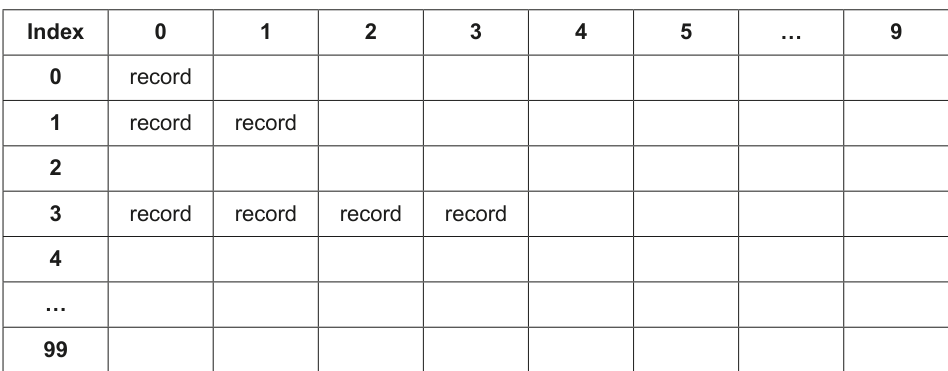
The program uses Object-Oriented Programming (OOP).
The class Record stores data about the records:
| Record | |
|---|---|
Key : Integer | stores the integer key field for the data |
Data : String | stores the string data |
Constructor() | initialises Key and Data to its parameter values |
The attributes Key and Data are public.
Write program code to declare the class Record and its constructor.
Use your programming language appropriate constructor.
Save your program as Question3_N25.
Copy and paste the program code into part 3(a) in the evidence document.
Answer
class Record:
    def __init__(self, Key, Data):
        self.Key = Key
        self.Data = Data
See program code
Background Concept
A class is a blueprint for creating objects. In this question, each object represents one record from the file. The class needs two attributes: Key for the integer key field and Data for the string value.
A constructor is the method that runs when a new object is created. Its job is to initialise the attributes of that object. In Python, the constructor is written as __init__().
The question says the attributes are public. In Python, attributes such as self.Key and self.Data are accessible directly, so this matches the requirement.
Understanding the Question
You are asked only to declare the Record class and its constructor.
The stem tells you exactly what the class must contain:
Key : IntegerData : String- a constructor that initialises both from parameter values
So the answer needs a class definition and a constructor that stores the two parameters into object attributes.
Approach
Use Python class syntax:
- Define
class Record: - Add
def __init__(self, Key, Data): - Store the parameter values in
self.Keyandself.Data
Nothing else is needed for full marks.
Step-by-Step Reasoning
class Record: creates the class.
def __init__(self, Key, Data): defines the constructor. The self parameter refers to the object being created. Key and Data are the values passed in when a Record object is made.
self.Key = Key stores the integer key in the object.
self.Data = Data stores the associated string in the object.
So if the program later does Record(528, "permission"), the new object will contain:
Key = 528Data = "permission"
Key Takeaways
- A class groups related data together in one object.
- A constructor initialises the attributes when the object is created.
- In Python, public object attributes are usually written as
self.AttributeName.
Common Mistakes
- Forgetting
selfin the constructor parameter list. - Writing
Key = Keyinstead ofself.Key = Key, which does not store the value in the object. - Using the wrong constructor name. In Python it must be
__init__. - Declaring local variables instead of object attributes.
Things to Be Careful About
- Use the exact attribute names
KeyandDatabecause later parts use them. - Keep the indentation correct in Python.
- The constructor should take parameter values and assign them directly; do not hard-code values.
The procedure InitialiseHashTable() initialises each element in the array to an empty or null record.
Write program code to declare the global 2D array HashTable and the procedure InitialiseHashTable()
Save your program.
Copy and paste the program code into part 3(b) in the evidence document.
Answer
HashTable = [[None for Col in range(10)] for Row in range(100)]


def InitialiseHashTable():
    for Row in range(100):
        for Col in range(10):
            HashTable[Row][Col] = None
See program code
Background Concept
A 2D array stores data in rows and columns. Here, the first index is the hash value from 0 to 99, so there are 100 rows. The second index is used to store collisions in the same hash position, so there are 10 columns.
An empty slot must be recognisable, so each element should start as a null or empty value. In Python, None is the natural null value.
Understanding the Question
You must do two things:
- declare the global 2D array
HashTable - write
InitialiseHashTable()so every cell becomes an empty or null record
The stem says the structure is 100 × 10, so the answer must reflect exactly that size.
Approach
Use a list comprehension to declare a 100 by 10 table filled with None. Then write a procedure that loops through every row and column and resets each cell to None.
Using None is useful because later parts can test whether a slot is empty with is None.
Step-by-Step Reasoning
HashTable = [[None for Col in range(10)] for Row in range(100)] creates:
- 100 rows
- each row containing 10 columns
- every cell initially set to
None
Then InitialiseHashTable() uses nested loops.
The outer loop goes through each row from 0 to 99.
The inner loop goes through each column from 0 to 9.
HashTable[Row][Col] = None resets that cell to the empty value.
This matches the description in the question: every element becomes an empty or null record.
Key Takeaways
- A 2D array can model a table of buckets and collision positions.
- Nested loops are the standard way to process every element in a 2D structure.
Noneis a practical marker for an unused slot in Python.
Common Mistakes
- Reversing the dimensions and making 10 rows of 100 columns.
- Initialising only one row or one column.
- Forgetting that collisions stay in the same row, so 10 columns are needed.
- Using
[[None] * 10] * 100without understanding that it duplicates references to the same row.
Things to Be Careful About
- The size must be exactly
100 × 10. - Use
Noneconsistently, because later searches and insertions rely on checking for empty slots. - In Python, list comprehensions create separate rows, which is safer than repeated row references.
The function Hash():
- takes an integer key field as a parameter
- calculates and returns the hash value of the key field.
The hash value is the result from the formula: key MOD 100
Write program code for Hash()
Save your program.
Copy and paste the program code into part 3(c) in the evidence document.
Answer
def Hash(Key):
    return Key % 100
See program code
Background Concept
A hash function converts a key into an index that can be used to access a table quickly. In this question, the table has 100 possible hash rows, so the result must be between 0 and 99.
The modulus operator gives the remainder after division. key % 100 always produces a value from 0 to 99, which makes it suitable here.
Understanding the Question
The question tells you exactly what Hash() must do:
- take an integer key as a parameter
- calculate
key MOD 100 - return the result
So this is not a design problem. It is just a direct translation of the given rule into code.
Approach
Write a function called Hash with one parameter, Key, and return Key % 100.
Step-by-Step Reasoning
def Hash(Key): defines the function with the required parameter.
return Key % 100 performs the hash calculation.
Examples:
528 % 100 = 281128 % 100 = 2839 % 100 = 39
This is why collisions occur: different keys can produce the same remainder.
Key Takeaways
- A hash function maps keys to table positions.
MODor%is commonly used when the table size is fixed.- The function should return the computed value, not print it.
Common Mistakes
- Using division instead of modulus.
- Using
10instead of100. - Printing the value instead of returning it.
- Forgetting that the result must be an integer index.
Things to Be Careful About
- Use the exact formula from the question:
key MOD 100. - In Python, the operator is
%. - The function name should remain
Hashbecause later parts call it.
The procedure InsertData():
- takes an object of type
Recordas a parameter - calculates the hash value for the parameter using the appropriate function
- stores the parameter in the correct position in
HashTable
You can assume there will be no more than 10 objects that generate the same hash value.
Write program code for InsertData()
Save your program.
Copy and paste the program code into part 3(d) in the evidence document.
Answer
def InsertData(NewRecord):
    HashValue = Hash(NewRecord.Key)
    Position = 0
    while HashTable[HashValue][Position] is not None:
        Position += 1
    HashTable[HashValue][Position] = NewRecord
See program code
Background Concept
A hash table stores records using a key. The key is passed through a hash function to decide where the record should go.
Here, collisions are handled by storing all records with the same hash value in the same row, moving across the columns until an empty space is found. This is sometimes called bucket-style collision handling.
So the insertion algorithm is:
- compute the row using the hash value
- check column 0 in that row
- if it is occupied, move to the next column
- continue until an empty slot is found
- store the record there
Understanding the Question
The procedure InsertData() takes a Record object, not separate key and data values.
It must:
- use the record's key to calculate the hash row
- place the record into
HashTable - handle collisions by using the next free space in that same row
The question also says you can assume no more than 10 objects generate the same hash value, so a free column will always exist.
Approach
Use the object's key with Hash() to get the row number. Start at column 0 and move right until a None slot is found. Then store the whole object there.
This is better than scanning the whole table, because only one row can contain records with that hash value.
Step-by-Step Reasoning
HashValue = Hash(NewRecord.Key) calculates the row from the key stored inside the Record object.
Position = 0 means start checking at the first collision slot in that row.
while HashTable[HashValue][Position] is not None: means:
- if the slot already contains a record, a collision has occurred
- move to the next column
Position += 1 advances across the row.
When the loop stops, HashTable[HashValue][Position] is empty, so
HashTable[HashValue][Position] = NewRecord
stores the record in the first available slot.
Example using the data file:
528 % 100 = 28, so the record goes into row 28, first free column1128 % 100 = 28, so it collides and goes into the next free column in row 281828 % 100 = 28, so it goes into the next free column after that
Key Takeaways
- Insert into a hash table by hashing the key first.
- For collisions, search only within the relevant bucket or row.
- Store the complete object once the correct position is found.
Common Mistakes
- Hashing the string data instead of the key.
- Searching every row instead of staying in the hashed row.
- Overwriting the first record in a row instead of moving to the next free slot.
- Storing only the data string instead of the full
Recordobject.
Things to Be Careful About
- Use
NewRecord.Keyto access the key field from the object. - Test for emptiness consistently with
None. - The collision search moves across columns, not down to another row.
- The question guarantees at most 10 collisions, so the loop does not need extra overflow handling.
The file HashTableData.txt stores 200 key values and string data items in the format:
key,string
For example, the first row in the text file is:
528,permission
The key is 528 and the string data is "permission"
The procedure ReadData():
- opens the text file and reads each line
- splits each line into the key and data
- calls
InsertData()with an object containing each key and matching data.
Write program code for ReadData()
Save your program.
Copy and paste the program code into part 3(e) in the evidence document.
Answer
def ReadData():
    File = open("HashTableData.txt", "r")
    for Line in File:
        Line = Line.strip()
        Values = Line.split(",")
        Key = int(Values[0])
        Data = Values[1]
        InsertData(Record(Key, Data))
    File.close()
See program code
Background Concept
Sequential file processing means reading a file from the start to the end, one line after another. A text file often stores values as strings, so the program may need to split each line and convert some parts into the correct data type.
In this file, each line is in the form:
key,string
That means each line contains two pieces of data separated by a comma:
- the first is an integer key
- the second is the string data
Understanding the Question
ReadData() must:
- open
HashTableData.txt - read every line
- separate the key from the string
- create an object containing both values
- pass that object to
InsertData()
So this procedure is the bridge between the external file and the internal hash table.
Approach
Read the file line by line. For each line:
- remove the newline character
- split around the comma
- convert the first part to an integer
- keep the second part as a string
- create
Record(Key, Data) - call
InsertData() - close the file when finished
Step-by-Step Reasoning
File = open("HashTableData.txt", "r") opens the text file for reading.
for Line in File: processes each line one at a time.
Line = Line.strip() removes the newline character at the end of the line. This is important so the data value does not accidentally include \n.
Values = Line.split(",") separates the line into two parts. For example:
- input line:
528,permission - result:
Values[0] = "528",Values[1] = "permission"
Key = int(Values[0]) converts the key from text to an integer.
Data = Values[1] stores the string part.
InsertData(Record(Key, Data)) creates a Record object and inserts it into the hash table.
File.close() closes the file once all records have been processed.
Key Takeaways
- Text files usually provide raw strings, so parsing and type conversion are often needed.
split(",")is a standard way to separate comma-separated fields.- A file-reading routine often passes parsed data to another routine rather than storing it directly.
Common Mistakes
- Forgetting to convert the key to an integer.
- Forgetting to strip the newline, leaving extra characters in the data.
- Passing two separate values to
InsertData()when it expects aRecordobject. - Not closing the file.
Things to Be Careful About
- Use the exact filename
HashTableData.txt. - The key must be an integer before hashing it.
- The data stays as a string.
- Because the file format is fixed as
key,string, splitting once at the comma is sufficient here.
The function GetRecord():
- takes an integer key field as a parameter
- calculates the hash value for the key field using the appropriate function
- searches the hash table for the record with the matching key field
- returns the data for the record if the record is found
- returns "Not found" if the record is not found.
Write program code for GetRecord()
Save your program.
Copy and paste the program code into part 3(f) in the evidence document.
Answer
def GetRecord(SearchKey):
    HashValue = Hash(SearchKey)
    Position = 0
    while Position < 10 and HashTable[HashValue][Position] is not None:
        if HashTable[HashValue][Position].Key == SearchKey:
            return HashTable[HashValue][Position].Data
        Position += 1
    return "Not found"
See program code
Background Concept
Searching in a hash table normally begins by hashing the key. That tells you which bucket or row could contain the record. If collisions have been stored in extra slots in that row, you then do a short linear search across those collision positions.
So lookup here is a two-stage process:
- use hashing to narrow the search to one row
- use linear search across the columns of that row
This is much more efficient than scanning the whole 100 by 10 table.
Understanding the Question
GetRecord() takes an integer key and must:
- calculate the hash value using the correct function
- search the correct row in
HashTable - compare keys until the matching record is found
- return the corresponding data
- return
"Not found"if no matching key exists
So the result of the function is a string, either the data value or the exact message "Not found".
Approach
Hash the search key first. Then examine the row from column 0 onwards. For each non-empty slot, compare the stored Key with SearchKey. If they match, return the stored Data. If you reach an empty slot or the end of the row without a match, return "Not found".
Step-by-Step Reasoning
HashValue = Hash(SearchKey) finds the row where this key would have been inserted.
Position = 0 starts the search at the first slot in that row.
The loop condition
while Position < 10 and HashTable[HashValue][Position] is not None:
means:
- stay within the 10 possible collision slots
- stop if an empty slot is reached, because later positions in that row will also be unused
Inside the loop:
if HashTable[HashValue][Position].Key == SearchKey: checks whether the current stored record has the required key.
If yes:
return HashTable[HashValue][Position].Data
returns the associated string immediately.
If not:
Position += 1
moves to the next collision slot.
If the loop finishes without a match, the function returns "Not found".
Example with 1128:
1128 % 100 = 28- search row 28
- compare keys in that row until
1128is found - return
"peace"
Example with 39:
39 % 100 = 39- search row 39
- no record with key 39 is found
- return
"Not found"
Key Takeaways
- Hashing reduces the search area to one row or bucket.
- Collisions are handled by a short linear search within that row.
- A function should return the required value directly as soon as it is found.
Common Mistakes
- Searching the whole table instead of the hashed row.
- Comparing the data string instead of the key.
- Returning the whole object rather than the data field.
- Forgetting the
"Not found"return when the search fails.
Things to Be Careful About
- Use the exact string
"Not found". - Check that the slot is not
Nonebefore trying to access.Key. - The row index comes from
Hash(SearchKey), not from the raw key itself. - Stop at 10 columns because the table has only 10 collision positions per hash value.
The main program:
- calls
InitialiseHashTable()andReadData() - takes five integer key fields as input from the user
- calls
GetRecord()with each input and outputs the return value.
Write program code for the main program.
Save your program.
Copy and paste the program code into part 3(g)(i) in the evidence document.
Answer
InitialiseHashTable()
ReadData()

for Count in range(5):
    Key = int(input())
    print(GetRecord(Key))
See program code
Background Concept
The main program controls the overall sequence of execution. It usually performs setup first, then processes user input, then displays output.
In this task, the setup is essential:
- the hash table must be initialised before use
- the file data must be loaded before any searches are attempted
After that, a fixed loop is appropriate because the question states exactly five inputs.
Understanding the Question
The main program must:
- call
InitialiseHashTable() - call
ReadData() - take five integer keys from the user
- call
GetRecord()for each one - output each returned value
The order matters. If the table is not set up and filled first, the later searches will fail.
Approach
Write the two setup calls first. Then use a count-controlled loop that repeats five times. In each repetition:
- read an integer from the user
- call
GetRecord()with that key - print the returned string
Step-by-Step Reasoning
InitialiseHashTable() resets the whole 2D array so that every slot starts empty.
ReadData() opens the text file, creates Record objects and inserts them into the hash table.
for Count in range(5): repeats exactly five times, which matches the wording of the question.
Key = int(input()) reads one user entry and converts it to an integer, because GetRecord() expects an integer key.
print(GetRecord(Key)) performs the lookup and outputs the returned data or "Not found".
That is all the main program needs to do.
Key Takeaways
- Main programs usually perform setup before processing input.
- A count-controlled loop is suitable when the number of repetitions is known in advance.
- It is common to pass input directly into a function and print the returned result.
Common Mistakes
- Calling
ReadData()beforeInitialiseHashTable()and risking old data remaining in the table. - Forgetting to convert the input to an integer.
- Taking the wrong number of inputs.
- Calling
GetRecord()without printing the returned value.
Things to Be Careful About
- The question specifies five inputs, so the loop must run exactly five times.
- Do the setup calls once only, before the loop.
- Keep the input as an integer, not a string.
Test your program with the following five inputs in the order given:
528
1128
1828
1062
39
Take a screenshot of the output(s).
Save your program.
Copy and paste the screenshot(s) into part 3(g)(ii) in the evidence document.
Answer
For the inputs 528, 1128, 1828, 1062, 39, the output is:
permission
peace
precedent
up
Not found
permission, peace, precedent, up, Not found
Background Concept
Testing a lookup program means checking both successful and unsuccessful searches. A successful test confirms that the record can be found and the correct data is returned. An unsuccessful test confirms that the program produces the required fallback message.
Because this program uses a hash table, collisions do not change the final answer. They only affect where in the row the record is stored and how many comparisons are needed during lookup.
Understanding the Question
You are not being asked to write more code here. You are being asked to run or predict the outputs for five given inputs, using the records loaded from HashTableData.txt.
The five keys are:
52811281828106239
You must give the outputs in the same order.
Approach
Look up each key in the supplied file data:
- if the key exists, output the matching string
- if the key does not exist, output
"Not found"
Step-by-Step Reasoning
From the file contents:
528,permissionso input528returnspermission1128,peaceso input1128returnspeace1828,precedentso input1828returnsprecedent1062,upso input1062returnsup- there is no line beginning
39,so input39returnsNot found
So the outputs, in order, are:
permissionpeaceprecedentupNot found
Notice that 528, 1128 and 1828 all hash to 28, because each gives remainder 28 when divided by 100. That creates collisions, but GetRecord() still finds the correct record by searching across that row.
Key Takeaways
- Test data should include both found and not-found cases.
- A collision in a hash table does not mean the wrong answer is returned if collision handling is correct.
- When asked for output, preserve the exact order of the inputs.
Common Mistakes
- Outputting the hash values instead of the stored data.
- Returning the wrong string for a key involved in a collision.
- Writing
not foundin the wrong case instead ofNot found. - Giving the right values in the wrong order.
Things to Be Careful About
- Use the exact text from the file for successful searches.
- Use the exact failure message
Not found. - Read the provided test inputs carefully and do not reorder them.