Computer Science 9618/33 — October/November 2025
Cambridge A-Level · Advanced Theory · worked solutions for every part, with the mark scheme
Topics Data Representation · Communication and Internet Technologies · System Software · Computational Thinking and Problem-solving · Further Programming · Hardware and Virtual Machines · +2 more
An enumerated data type, Spectrum, is required to hold the names of colours.
Write the pseudocode statement for the type declaration of Spectrum to hold the names of the colours available:
Red, Orange, Yellow, Green, Blue, Indigo, Violet.
...........................................................................................................................................
.....................................................................................................................................
Answer
TYPE Spectrum = (Red, Orange, Yellow, Green, Blue, Indigo, Violet)
See completed pseudocode
Background Concept
An enumerated data type is a non-composite user-defined type. It is used when a variable should only be allowed to take one value from a small, fixed set of named values. Instead of storing any text at all, the program restricts the variable to one of the permitted items.
For example, a colour field might be limited to Red, Orange, Yellow, Green, Blue, Indigo or Violet. This improves validation and makes the program clearer because invalid values such as Purple or misspellings such as Grenn are not part of the type.
Understanding the Question
The question says that an enumerated data type called Spectrum is required to hold the names of colours. It already gives the complete list of allowed colours, so the task is simply to write the pseudocode declaration for that type.
The important clue is the phrase "enumerated data type". That tells you the answer should be a type declaration containing a list of named values.
Approach
To answer this, write a user-defined type declaration named Spectrum, then place the allowed colour names inside brackets in the order given.
Because the values are already provided, no extra fields, variables or data types are needed. This is not a record or composite structure; it is just one enumerated type.
Step-by-Step Reasoning
- The type name must be
Spectrumbecause the question specifies it. - Since it is an enumerated type, the declaration must list every valid value explicitly.
- The values given are:
RedOrangeYellowGreenBlueIndigoViolet
- These are written as the permitted values of the type in a single declaration.
So the completed declaration is:
TYPE Spectrum = (Red, Orange, Yellow, Green, Blue, Indigo, Violet)
Key Takeaways
- An enumerated type stores one value chosen from a fixed list.
- It is a non-composite user-defined type.
- In pseudocode, you must name the type and list all allowed values exactly.
Common Mistakes
- Writing a variable declaration instead of a type declaration. The question asks for the type itself, not a variable of that type.
- Missing one of the colours from the list. An enumeration should contain all allowed values.
- Replacing the colour names with strings such as
"Red". In this context they are the enumeration values themselves. - Turning it into a record with multiple fields. An enumerated type is not a composite type.
Things to Be Careful About
- Use the exact type name
Spectrum. - Keep the values in the declaration clearly separated by commas.
- Do not invent extra values.
- Match the given identifiers exactly as far as possible, because exam questions often reward correct pseudocode form as well as the right idea.
Identify two characteristics of the list of values given in an enumerated data type declaration.
1 .........................................................................................................................................
...........................................................................................................................................
2 .........................................................................................................................................
...........................................................................................................................................
Answer
- The list is finite and fixed, giving all the allowed values for the type.
- The values are distinct and arranged in a defined order.
finite fixed list; distinct values in a defined order
Background Concept
An enumerated data type is defined by listing every allowed value. Unlike a general STRING or INTEGER, it does not allow any arbitrary value of that broad type. Instead, the declaration creates a restricted set of named constants.
The important characteristics of the list in an enumeration are that it is limited, explicit and ordered. The program knows exactly which values are valid, and each value is a separate named item.
Understanding the Question
This part is not asking you to write code. It asks for two characteristics of the list of values used in an enumerated type declaration.
So you need two clear properties of that list itself, not examples of colours and not advantages of using colour names in general.
Approach
Think about what makes an enumeration different from a normal unrestricted type:
- It has a fixed, complete list of allowed values.
- The values in that list are separate named items and are placed in an order.
Those are the sort of features the examiner wants.
Step-by-Step Reasoning
An enumerated declaration works by explicitly naming every permitted value. That means:
- The list must be finite and fixed. You can count the possible values, and no other value is allowed unless the type declaration is changed.
- The values must be distinct. If the same item appeared twice, the list would be ambiguous and pointless.
- The values are considered to be in a defined order. In many languages and pseudocode contexts, enumerated values have an implied sequence based on the order listed.
Since the question asks for two characteristics, a good pair is:
- the list is finite and fixed
- the values are distinct and ordered
Key Takeaways
- Enumeration means choosing from a fixed set of named values.
- The declaration lists all valid values explicitly.
- The values are not arbitrary; they are controlled by the type definition.
Common Mistakes
- Giving examples from the colour list instead of characteristics of the list.
- Saying only that the values are "colours". That describes this example, not enumerated types in general.
- Writing advantages such as "easier to understand" without stating an actual characteristic of the list.
- Forgetting that the list is fixed and complete.
Things to Be Careful About
- Make sure each point is about the list of values, not about variables that use the type.
- Avoid vague statements like "they are related values" unless you also state the formal property such as fixed, finite, unique or ordered.
- Since only two marks are available, give two concise, precise points rather than a long explanation.
ColourData is a composite data type to store definitions of colours.
Write pseudocode statements to declare ColourData to hold the following fields:
| Field | Example data |
|---|---|
| ColourCode | XYZ12345 |
| Colour | Red |
| Wavelength | 650 |
| Frequency | 4.62 |
| PrimaryColour | Yes |
Use the most appropriate data type in each case, including the enumerated data type Spectrum from part a(i).
...................................................................................................................................................
...................................................................................................................................................
...................................................................................................................................................
...................................................................................................................................................
...................................................................................................................................................
...................................................................................................................................................
...................................................................................................................................................
.............................................................................................................................................
Answer
TYPE ColourData
   DECLARE ColourCode : STRING
   DECLARE Colour : Spectrum
   DECLARE Wavelength : INTEGER
   DECLARE Frequency : REAL
   DECLARE PrimaryColour : BOOLEAN
ENDTYPE
See completed pseudocode
Background Concept
A composite user-defined type groups several related fields into one structured item. In many programming languages this is similar to a record or struct. Each field can have its own data type, so one composite type can contain strings, numbers, Booleans and even other user-defined types.
This is useful when one real-world item has several properties. Here, one colour definition has a code, a colour name, a wavelength, a frequency and a flag showing whether it is a primary colour.
Understanding the Question
The question says ColourData is a composite data type to store definitions of colours. It gives a table of field names and example data, and tells you to use the most appropriate data type for each field. It also specifically says to include the enumerated type Spectrum from part a(i).
So the task is to write a record-style type declaration called ColourData with five fields:
ColourCodeColourWavelengthFrequencyPrimaryColour
Each field must be assigned the most suitable type.
Approach
Look at each example value and infer its most suitable type:
XYZ12345is text, soSTRINGRedis one of the defined spectrum values, soSpectrum650is a whole number, soINTEGER4.62has a decimal part, soREALYesis really a true/false condition, soBOOLEAN
Then place these inside a composite type declaration using TYPE ... ENDTYPE.
Step-by-Step Reasoning
We build the structure field by field.
-
ColourCodehas example dataXYZ12345.- This is alphanumeric text.
- The best type is
STRING.
-
Colourhas example dataRed.- From part a(i),
Redis one of the allowed values in the enumerated typeSpectrum. - So this field should be declared as
Spectrum, notSTRING.
- From part a(i),
-
Wavelengthhas example data650.- This is a whole number with no decimal part.
- The best type is
INTEGER.
-
Frequencyhas example data4.62.- This includes a decimal part.
- The best type is
REAL.
-
PrimaryColourhas example dataYes.- This represents a yes/no condition.
- In data-type terms, that is best stored as
BOOLEAN.
Now place them into one composite type:
TYPE ColourData
   DECLARE ColourCode : STRING
   DECLARE Colour : Spectrum
   DECLARE Wavelength : INTEGER
   DECLARE Frequency : REAL
   DECLARE PrimaryColour : BOOLEAN
ENDTYPE
That gives one structured definition capable of storing all the information for a colour.
Key Takeaways
- A composite type groups related fields into one structure.
- Choose each field type from the nature of the data: text, integer, real, Boolean or another user-defined type.
- Reusing an enumerated type inside a composite type improves validation and clarity.
Common Mistakes
- Declaring
ColourasSTRINGinstead ofSpectrum. The question specifically asks you to use the enumerated type from part a(i). - Declaring
FrequencyasINTEGER. The example value has a decimal part, so it should beREAL. - Declaring
PrimaryColourasSTRINGbecause the example showsYes. Conceptually it is a true/false field, soBOOLEANis more appropriate. - Forgetting
ENDTYPEor not naming the composite typeColourData.
Things to Be Careful About
- Use the exact field names given in the table.
- Distinguish between example data and storage type. For example,
Yesis shown as text, but the underlying type should still beBOOLEAN. WavelengthandFrequencyneed different numeric types because one is whole-number and the other is fractional.- Since the question asks for pseudocode statements, write a type definition, not a sample record value.
Numbers are stored in a computer system using binary floating-point representation with:
• 12 bits for the mantissa
• 4 bits for the exponent
• two’s complement form for both the mantissa and the exponent
• 2 bytes in total.
Outline the effect of changing the number of bits used to store the mantissa to 10 bits, in this system.
...................................................................................................................................................
...................................................................................................................................................
...................................................................................................................................................
...................................................................................................................................................
...................................................................................................................................................
.............................................................................................................................................
Answer
- Using 10 bits for the mantissa gives fewer bits for the fractional/significant part, so numbers are stored with less precision.
- This increases rounding error because fewer significant binary digits can be kept.
- As the total size is still 2 bytes, more bits are available for the exponent, so a wider range of very large and very small values can be represented.
Less precision and more rounding error, but a larger exponent range so a wider range of values can be stored.
Background Concept
In binary floating-point representation, a value is stored using two main parts:
- the mantissa (sometimes called the significand), which stores the significant digits of the number
- the exponent, which stores the power of 2 needed to scale the mantissa
The mantissa controls precision. More mantissa bits means more significant binary digits can be stored, so the stored value is closer to the real value.
The exponent controls range. More exponent bits means the computer can represent much larger positive powers and much smaller negative powers, so it can store much larger and much smaller numbers.
When the total number of bits is fixed, there is a trade-off:
- more bits for the mantissa → better precision, smaller range
- more bits for the exponent → larger range, lower precision
This trade-off is a standard feature of floating-point systems.
Understanding the Question
The original system uses:
- 12 bits for the mantissa
- 4 bits for the exponent
- a total of 16 bits
The question asks what happens if the mantissa is reduced from 12 bits to 10 bits.
Because the total is still 2 bytes, the 2 bits removed from the mantissa must go elsewhere, so the exponent would become larger. That means we must discuss both:
- the effect on precision
- the effect on range
Approach
The best way to answer is to use the floating-point trade-off.
- Fewer mantissa bits means fewer significant bits can be stored.
- That means the stored value is less accurate and rounding becomes more likely.
- Since the total size stays at 16 bits, the exponent gets more bits.
- A larger exponent field means a wider range of magnitudes can be represented.
That gives the full effect the examiner is looking for.
Step-by-Step Reasoning
Originally:
- mantissa = 12 bits
- exponent = 4 bits
- total = 16 bits
After the change:
- mantissa = 10 bits
- exponent = 6 bits
- total still = 16 bits
Now consider each part separately.
1. Effect on the mantissa
The mantissa stores the significant part of the number. If it is shortened from 12 bits to 10 bits:
- fewer binary digits of the value can be kept
- the number must often be rounded sooner
- the stored result is less exact
So the system loses precision.
For example, if a binary fraction needs many bits after the point, a shorter mantissa means some of those bits cannot be stored. The final value is then only an approximation.
2. Effect on rounding
Because fewer significant bits are available:
- more values must be rounded to the nearest representable form
- rounding error becomes more noticeable
So a shorter mantissa increases the chance of rounding errors.
3. Effect on the exponent
Those 2 bits do not disappear, because the question says the whole number still uses 2 bytes in total. So the exponent field gains them.
A larger exponent field means:
- more positive exponent values can be stored, allowing larger numbers
- more negative exponent values can be stored, allowing smaller numbers closer to zero
So the range of numbers increases.
This means the system is less likely to overflow on very large numbers and less likely to underflow on very small numbers.
Key Takeaways
- Mantissa bits determine precision.
- Exponent bits determine range.
- With a fixed total size, increasing one part means reducing the other.
- Reducing mantissa size makes representation less accurate and increases rounding error.
- Increasing exponent size allows a wider range of values to be represented.
Common Mistakes
- Saying only "the number gets smaller". The issue is not the size of the stored number, but the balance between precision and range.
- Forgetting that the total is still 16 bits. If the mantissa drops to 10 bits, the exponent must increase.
- Mentioning only precision and not range, or only range and not precision. Good answers usually cover both.
- Confusing mantissa with exponent. The mantissa does not control how large the number can be; the exponent does.
Things to Be Careful About
- Use the word precision for the mantissa effect, not just "size" or "memory".
- Use the word range for the exponent effect.
- If you mention overflow or underflow here, tie them correctly to the larger exponent range.
- Do not claim the representation becomes more accurate; reducing mantissa bits does the opposite.
Describe one example of a situation that could cause an overflow to occur and the consequences of such an overflow.
...................................................................................................................................................
...................................................................................................................................................
...................................................................................................................................................
...................................................................................................................................................
...................................................................................................................................................
.............................................................................................................................................
Answer
- Overflow could occur if an arithmetic operation such as multiplying two very large numbers produces a result that needs an exponent larger than can be stored.
- After normalisation, the exponent is outside the range available in the 4-bit exponent field.
- The result cannot be represented correctly, so an incorrect value is stored or an overflow error is produced, causing incorrect program output.
Multiplying two very large numbers can make the exponent too large to store; the result cannot be represented correctly, so an incorrect value or overflow error occurs.
Background Concept
Overflow happens when a value is too large in magnitude to fit into the available number representation.
In floating-point, overflow usually occurs when the result of a calculation must be normalised using an exponent that is outside the range that the exponent field can store.
For this system, the exponent uses 4 bits in two's complement, so only a limited range of exponent values is possible. If a calculation produces a number needing an exponent larger than that maximum, the number cannot be represented.
The opposite problem is underflow, where a number is too small in magnitude to be represented accurately.
Understanding the Question
The question asks for:
- one example of a situation that causes overflow
- the consequences of that overflow
So the answer needs both parts:
- a suitable example, such as adding or multiplying very large numbers
- what then happens to the result or the program
A good answer should make clear that the number becomes too large for the floating-point format, not just vaguely say "an error happens".
Approach
A clean way to answer is:
- choose a calculation involving very large values
- explain that the final normalised result needs an exponent that is too large
- state that the value cannot be stored correctly
- give the consequence: wrong result, overflow flag, or program error
This matches what overflow means in a floating-point system.
Step-by-Step Reasoning
Take a simple example: multiplying two very large floating-point numbers.
Suppose each number already has a large exponent. When they are multiplied:
- the mantissas are multiplied
- the exponents are effectively combined, making the final exponent even larger
After the result is normalised, the exponent may be bigger than the maximum value available in the 4-bit exponent field.
At that point, the system has a problem:
- the correct result exists mathematically
- but the hardware format has no valid bit pattern large enough to store it
That is overflow.
Consequences
If overflow occurs, one of the following happens depending on the system design:
- an overflow error or exception is raised
- an incorrect value is stored
- the program continues with a wrong value, so later calculations are also wrong
In exam answers, it is usually enough to say that the result cannot be represented correctly, so the stored value or output becomes incorrect.
A different valid example would be adding two large positive numbers. If the sum needs a larger exponent than the field allows, overflow still occurs. So the exact arithmetic example can vary, but the principle is the same.
Key Takeaways
- Overflow means the result is too large to fit in the representation.
- In floating-point, overflow is usually caused by the exponent exceeding its allowed range.
- Large arithmetic operations such as multiplying or adding large values are common causes.
- The main consequence is that the correct result cannot be stored, so the program gets an incorrect value or error.
Common Mistakes
- Giving only a cause and not a consequence. The question asks for both.
- Saying the mantissa is too large. In floating-point overflow, the key issue is usually the exponent range after normalisation.
- Describing underflow instead of overflow.
- Saying simply "the computer crashes". That is too vague unless linked to overflow handling.
Things to Be Careful About
- Mention that the problem occurs because the value is outside the representable range of the format.
- If you use an example, make sure it is one that can genuinely increase the magnitude, such as multiplying large numbers or adding large positives.
- Keep the consequence realistic: wrong stored value, overflow error, or incorrect output are safe answers.
- Do not confuse normal program logic errors with representation overflow; this is specifically about number storage limits.
Describe how packet switching is used to pass messages across a network. Do not include checking for completeness and resending packets in your answer.
..........................................................................................................................................................
..........................................................................................................................................................
..........................................................................................................................................................
..........................................................................................................................................................
..........................................................................................................................................................
..........................................................................................................................................................
..........................................................................................................................................................
....................................................................................................................................................
Answer
- The message is split into a number of smaller packets before transmission.
- Each packet carries the data plus control information in its header, such as the destination address and sequence number.
- Routers read the destination address and forward each packet independently across the network; packets may take different routes depending on network traffic.
- When the packets reach the destination, they are put back together in the correct order using the sequence numbers.
See explanation
Background Concept
Packet switching is a method of sending data across a network by breaking a message into smaller units called packets. Instead of reserving one fixed path for the whole communication, the network can send each packet separately.
A packet normally contains:
- a payload, which is part of the original message
- header data, such as the destination address
- often a sequence number, so packets can be reordered correctly at the destination
In a packet-switched network, routers help move packets from one network to another. A router examines the destination address in the packet header and decides where to send the packet next. Because the network is shared, different packets from the same message do not have to follow the same route.
Understanding the Question
The question asks for a description of how packet switching passes messages across a network. So the answer should focus on the journey of the message:
- how the message starts
- what happens to it during transmission
- how it reaches the destination
The wording "Do not include checking for completeness and resending packets" is important. That means you should not talk about missing packets, acknowledgements, error recovery, or retransmission. You should stay focused on splitting, addressing, routing, and reassembling.
Approach
A good way to answer this is to describe packet switching in time order:
- The message is divided into packets.
- Each packet is given the information needed to travel through the network.
- Routers forward packets towards the destination.
- The destination rebuilds the original message.
That sequence covers the main idea clearly and matches what examiners usually want for a short description question.
Step-by-Step Reasoning
First, the original message is too large to be sent as one single block in packet switching, so it is divided into smaller packets. Each packet contains just part of the whole message.
Next, each packet needs information that allows the network to handle it properly. The most important item is the destination address, because routers use this to know where the packet must go. A sequence number is also useful, because packets may not arrive in the same order they were sent.
Then the packets travel across the network. At each router, the router reads the packet header and decides the next hop. Because packet-switched networks do not reserve one dedicated route, one packet can go one way while another packet from the same message can go a different way. This is one of the defining features of packet switching.
Finally, when the packets arrive at the destination, the receiving device uses the sequence numbers to place them back into the correct order and reconstruct the original message.
Notice what is deliberately left out: the question specifically says not to include checking whether all packets arrived or describing resending missing ones. So even though those ideas are related to real networking, they are outside the scope of this answer.
Key Takeaways
- Packet switching sends a message by splitting it into smaller packets.
- Packets carry addressing information in their headers.
- Routers forward packets independently based on destination addresses.
- Packets may travel by different routes.
- The destination reassembles the original message using sequence numbers.
Common Mistakes
- Describing circuit switching instead of packet switching: circuit switching uses a dedicated path, which is not the method asked here.
- Talking about retransmission or missing packets: the question explicitly says not to include this.
- Saying all packets must take the same route: in packet switching, they can take different routes.
- Forgetting the role of the router: routers are central to forwarding packets through the network.
- Not mentioning reassembly: packet switching is not complete unless you explain how the original message is reconstructed.
Things to Be Careful About
- Use the term "packet" accurately; do not confuse it with a frame or a whole message.
- Make sure the header information you mention is relevant, especially the destination address and sequence number.
- If you mention sequence numbers, use them only to explain ordering at the destination, not completeness checking, because that would go beyond the instruction.
- Keep the answer as a process description, not a general discussion of network advantages and disadvantages.
- For a 4-mark question, aim for four clear marking points rather than one long paragraph with repeated ideas.
Identify and describe three protocols that are used in the Application Layer of the TCP/IP protocol suite.
Protocol 1 .........................................................................................................................................
Description .......................................................................................................................................
..........................................................................................................................................................
..........................................................................................................................................................
Protocol 2 .........................................................................................................................................
Description .......................................................................................................................................
..........................................................................................................................................................
..........................................................................................................................................................
Protocol 3 .........................................................................................................................................
Description .......................................................................................................................................
..........................................................................................................................................................
..........................................................................................................................................................
Answer
- HTTP — used to transfer web pages and other web resources between a web server and a web browser.
- FTP — used to transfer files between computers over a network.
- SMTP — used to send email messages between mail servers or from a client to a mail server.
HTTP – transfers web pages; FTP – transfers files; SMTP – sends email
Background Concept
In the TCP/IP protocol suite, the Application Layer provides services directly for user applications. A protocol is a set of rules that defines how data is formatted, transmitted and received between devices.
Application-layer protocols are designed for particular tasks, for example:
- HTTP for web pages
- FTP for file transfer
- SMTP for sending email
- POP3 or IMAP for receiving/managing email
- BitTorrent for peer-to-peer file sharing
The question is not asking for lower-layer protocols such as IP or TCP. Those belong to other layers in the TCP/IP stack.
Understanding the Question
You must give three protocols used at the Application Layer and describe each one. That means each answer needs:
- the correct protocol name
- a short description of what it is used for
Because the question says “identify and describe”, naming a protocol alone is not enough for full marks. Equally, giving a description without the protocol name would not be enough.
Approach
The best approach is to choose three well-known application-layer protocols and state their main purpose clearly.
A safe method is:
- pick protocols that are definitely at the Application Layer
- avoid overlap or vague descriptions
- give one precise use for each protocol
For example:
- web access -> HTTP
- file transfer -> FTP
- email sending -> SMTP
These are standard textbook examples and are easy to describe accurately.
Step-by-Step Reasoning
First, think of protocols that belong specifically to the Application Layer. From the syllabus, valid examples include HTTP, FTP, POP3, IMAP, SMTP, BitTorrent.
Now match each one to its function:
- HTTP stands for HyperText Transfer Protocol. It is used when a browser requests web pages or other web content from a web server.
- FTP stands for File Transfer Protocol. Its purpose is moving files from one computer to another across a network.
- SMTP stands for Simple Mail Transfer Protocol. It is used to send email, either from a user device to a mail server or between mail servers.
Any other correct three from the application-layer list could also gain marks if described properly. For example:
- POP3 — retrieves/downloads email from a mail server to a client
- IMAP — allows email to be accessed and managed while remaining on the server
- BitTorrent — supports peer-to-peer sharing of files in small pieces between users
So the scoring pattern is effectively one mark for each correct protocol and one mark for each correct description.
Key Takeaways
- The Application Layer contains protocols used directly by software applications.
- You should be able to link common protocols to their main purpose.
- Typical pairings to remember are:
- HTTP -> web pages
- FTP -> file transfer
- SMTP -> sending email
- POP3/IMAP -> receiving or managing email
Common Mistakes
- Naming protocols from the wrong layer, such as TCP, IP or Ethernet. These are not Application Layer protocols.
- Giving only the protocol name with no description.
- Mixing up email protocols, for example saying SMTP receives email. SMTP is mainly for sending email.
- Writing vague descriptions such as “used on the internet” instead of stating the actual service.
Things to Be Careful About
- Make sure the protocol is definitely in the Application Layer.
- The description should state the purpose of the protocol, not how the whole internet works.
- If you use POP3 and IMAP, distinguish them carefully: POP3 typically downloads mail, while IMAP manages mail on the server.
- Since the question asks for three, provide exactly three clear protocol-description pairs rather than a long list with weak explanations.
State the purpose of multi-tasking.
...................................................................................................................................................
.............................................................................................................................................
Answer
- To allow more than one task/program to be in progress apparently at the same time by sharing processor time between them.
To allow more than one task/program to run apparently at the same time by sharing processor time.
Background Concept
Multitasking is an operating system feature that lets several tasks or programs make progress during the same overall period of time. On a single-processor system, the CPU is not truly executing all tasks at exactly the same instant; instead, the operating system shares processor time between them very quickly. Because this switching happens so fast, the user experiences it as if multiple programs are running at once.
This is part of process management. The operating system keeps track of which process is running, which are waiting, and which should get CPU time next.
Understanding the Question
This part asks only for the purpose of multitasking, not for the detailed method. So the answer needs to say why multitasking exists: to let several programs/tasks proceed during the same time period, giving the effect of simultaneous execution and making better use of the computer.
Because it is only 1 mark, one clear statement is enough.
Approach
For a one-mark "state" question, give the direct definition-purpose link:
- what multitasking allows
- how it appears to the user
A concise phrase such as "several tasks apparently at the same time" is exactly the key idea.
Step-by-Step Reasoning
The purpose is not to describe scheduling or time slices yet. The essential idea is:
- A user may want to use more than one program or task in one session.
- The operating system allows each task to get some processor time.
- As a result, all tasks appear to run at the same time.
So a full-mark answer is a short statement saying that multitasking allows multiple tasks/programs to run apparently simultaneously by sharing CPU time.
Key Takeaways
- Multitasking is about multiple tasks making progress in the same period.
- On one CPU, this is usually achieved by rapid sharing of processor time.
- In short answers, mention the apparent simultaneous running of tasks.
Common Mistakes
- Saying only "it makes the computer faster". That is too vague and is not the main purpose.
- Saying "it allows many users to use the computer". That describes multi-user systems, not specifically multitasking.
- Describing the method in too much detail without stating the actual purpose.
Things to Be Careful About
- Use the idea of tasks or programs, not hardware components.
- "Apparently at the same time" is safer than claiming true simultaneous execution on a single CPU.
- Keep the answer short; this is a 1-mark definition-style item.
Explain how an operating system ensures that multi-tasking operates efficiently.
...................................................................................................................................................
...................................................................................................................................................
...................................................................................................................................................
...................................................................................................................................................
...................................................................................................................................................
.............................................................................................................................................
Answer
- The operating system uses a scheduler to decide which process gets the processor next.
- Each process is given a short time slice; when the time slice ends, or the process is waiting for I/O, the operating system saves its state and switches to another process.
- It can use priorities so more important processes are run sooner, keeping the CPU busy and making multitasking efficient.
The OS uses scheduling with time slices, context switching and priorities to share CPU time efficiently between processes.
Background Concept
Efficient multitasking is mainly handled by the operating system's process management and scheduling functions. A process is a program that is currently being executed. Since many processes may need the CPU, the operating system must decide:
- which process runs now
- which processes wait
- when to switch from one process to another
Important ideas here are:
- Scheduling: choosing the next process to run.
- Time slicing: giving each process a small amount of CPU time.
- Context switching: saving the current process state and restoring another process state.
- Priority: letting more urgent or important processes run sooner.
Typical process states include ready, running and blocked/waiting. A process may leave the CPU because its time slice expires, because it requests input/output, or because a higher-priority process becomes ready.
Understanding the Question
This question is not asking what multitasking is; it is asking how the operating system makes it work efficiently. So the answer must describe the mechanism.
The key clue is the word efficiently. That points to ideas such as:
- good scheduling
- fast switching between tasks
- not wasting CPU time
- letting important tasks run when needed
A strong 3-mark answer therefore needs about three connected points rather than one vague sentence.
Approach
The best structure is:
- Start with the scheduler deciding which task gets the processor.
- Explain that CPU time is divided into time slices and the OS switches between tasks.
- Add how priorities or waiting-for-I/O improve efficiency.
That covers both fairness and efficient CPU use. It also explains why multitasking seems smooth to the user.
Step-by-Step Reasoning
First, the operating system keeps a list or queue of processes that are ready to run. It cannot run them all on one CPU at the same instant, so it must choose one. That choice is made by the scheduler.
Second, the chosen process is allowed to run for a short time slice. This is a small block of CPU time. After that slice finishes, the operating system interrupts the process so another process can have a turn.
Before changing process, the operating system performs a context switch:
- it saves the current process state, such as register contents and the current instruction position
- it loads the saved state of the next process
- the new process continues from where it previously stopped
This is what makes multitasking practical. Without saving and restoring state, each process would lose its place.
Third, efficiency is improved because the OS does not just switch randomly. It may use priorities so that more important or urgent processes are run sooner. Also, if one process is waiting for input/output, the CPU does not sit idle; the OS gives the processor to another ready process. That improves CPU utilisation.
So the full explanation is:
- scheduling chooses the next process
- time slices share processor time
- context switching lets each process resume correctly
- priorities and switching away from waiting tasks help use the CPU efficiently
Any answer built from these ideas is targeting the marking points.
Key Takeaways
- Efficient multitasking depends on process scheduling.
- Time slicing lets many tasks share one CPU.
- Context switching preserves each process so it can continue later.
- Priorities and using the CPU while other tasks wait for I/O improve performance.
Common Mistakes
- Saying only "the OS runs many tasks at once". That states the effect, not how efficiency is achieved.
- Forgetting the scheduler. The OS must actively decide which process runs next.
- Ignoring time slices and context switching. These are central to CPU sharing.
- Saying the CPU literally executes every process simultaneously on a single-core processor. Usually it only appears simultaneous because of rapid switching.
- Confusing multitasking with multiprocessing. Multiprocessing uses multiple processors/cores; multitasking can happen on one processor through scheduling.
Things to Be Careful About
- If you mention switching, make clear that the process state is saved and restored; otherwise the explanation is incomplete.
- If you mention priorities, do not imply that low-priority tasks never run unless starvation is being discussed. The main point is that priorities help allocate CPU time sensibly.
- If you mention I/O, note that a process waiting for I/O does not need the CPU at that moment, so another process can use it.
- Use the term time slice accurately: it is a short allocated period of CPU time, not the whole execution time of the process.
- For a 3-mark explanation, separate the ideas into distinct points rather than giving one long vague sentence.
The Karnaugh map (K-map) represents a logic circuit with four inputs.
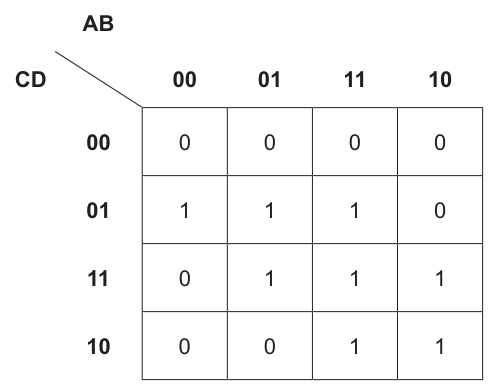
Draw loop(s) around appropriate group(s) in the K-map to produce an optimal sum-of-products.
Answer
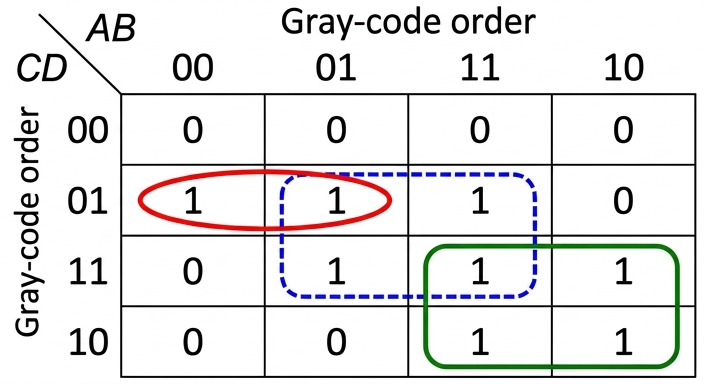
See K-map loops
Background Concept
A 4-variable Karnaugh map is a visual method for simplifying Boolean expressions. Each cell represents one minterm, and the row and column labels are written in Gray-code order so that adjacent cells differ by only one bit. To produce a sum-of-products expression, you group together the 1 cells.
The grouping rules are:
- each group must contain , , , , ... cells
- each group must be rectangular
- only
1cells may be grouped - groups should be as large as possible
- overlap is allowed if it leads to a simpler final expression
- every
1must be covered by at least one group
Each group gives one product term. Variables that stay the same throughout the group are kept; variables that change are removed.
Understanding the Question
You are given a completed 4-variable K-map with columns labelled by AB in the order 00, 01, 11, 10 and rows labelled by CD in the order 00, 01, 11, 10. The question is not asking for the expression yet; it is asking you to draw the loop or loops that give the optimal sum-of-products.
So the task is to choose the best covering of the 1 cells using valid K-map groups.
Approach
Start by looking for the largest possible groups of adjacent 1s. If a 1 cannot be included in a larger group, it may need a smaller group. Also check whether overlapping groups help reduce the number of literals in the final expression.
For this map:
- the
1at row01, column00is awkward and must be grouped with the adjacent1at row01, column01 - the central four
1s form a 2-by-2 block - the lower-right four
1s form another 2-by-2 block
That covers every 1 and gives the optimal result.
Step-by-Step Reasoning
The 1 cells are:
- row
01: columns00,01,11 - row
11: columns01,11,10 - row
10: columns11,10
Now form the groups:
-
A horizontal pair on row
01, columns00and01.- This is needed to cover the leftmost
1at row01, column00.
- This is needed to cover the leftmost
-
A 2-by-2 block using rows
01and11, columns01and11.- This is larger than making separate pairs, so it is better.
-
A 2-by-2 block using rows
11and10, columns11and10.- Again, this is the largest valid group for those
1s.
- Again, this is the largest valid group for those
These groups overlap, which is allowed and useful.
Key Takeaways
- In a K-map, always try to make the largest possible valid groups.
- Overlapping groups are allowed and often necessary for an optimal simplification.
- Gray-code ordering matters:
00, 01, 11, 10means adjacency is not simple left-to-right binary counting.
Common Mistakes
- Making a group of 3 cells. K-map groups must have sizes that are powers of 2.
- Leaving a
1uncovered. Every1must appear in at least one loop. - Drawing smaller groups than necessary. This gives a less simplified expression.
- Forgetting that overlap is allowed. Students sometimes avoid overlap even when it gives a better answer.
- Treating the headings as ordinary binary order instead of Gray-code order.
Things to Be Careful About
- The row and column order is
00, 01, 11, 10, not00, 01, 10, 11. - Groups must be rectangular and contain only
1s. - The question asks for an optimal sum-of-products, so grouping should minimise the final expression.
- Do not group diagonally; only horizontal and vertical adjacency counts.
Write the Boolean expression from your answer to part a(i) as a simplified sum-of-products. Do not carry out any further simplification.
...........................................................................................................................................
.....................................................................................................................................
Working
- Loop across row
01, columns00and01: - 2-by-2 loop across rows
01,11and columns01,11: - 2-by-2 loop across rows
11,10and columns11,10:
Answer
X = A'C'D + BD + AC
Background Concept
After drawing loops on a Karnaugh map, each loop is turned into one product term. The rule is:
- if a variable stays
1throughout the loop, write it uncomplemented - if a variable stays
0throughout the loop, write it complemented - if a variable changes within the loop, omit it
A sum-of-products expression is then formed by OR-ing all the product terms together.
Understanding the Question
This part uses the looping from part (i). You now need to translate those loops into a simplified Boolean expression. The instruction says, "Do not carry out any further simplification," so the answer should be written directly from the groups you chose.
Approach
Take each loop one at a time:
- identify which row and column labels are involved
- see which of
A,B,C,Dstay fixed - write the corresponding product term
- join the terms with
+
Step-by-Step Reasoning
From the chosen loops:
-
Loop on row
CD = 01, columnsAB = 00and01A = 0throughout, so useBchanges, so omit itC = 0throughout, so useD = 1throughout, so use- term:
-
2-by-2 loop on rows
01,11and columns01,11Achanges, so omit itB = 1throughout, so useCchanges, so omit itD = 1throughout, so use- term:
-
2-by-2 loop on rows
11,10and columns11,10A = 1throughout, so useBchanges, so omit itC = 1throughout, so useDchanges, so omit it- term:
Now join the three terms with OR:
That is already the required simplified sum-of-products from the selected loops.
Key Takeaways
- Each K-map group becomes one product term.
- Only the variables that stay constant across the whole group are kept.
- Sum-of-products means all product terms are joined by OR.
Common Mistakes
- Including a variable that changes within the loop. Changing variables must be omitted.
- Complementing the wrong variable because the row or column label was misread.
- Simplifying further when the question explicitly says not to.
- Writing a term from individual cells instead of from the whole group.
Things to Be Careful About
- Use the correct Gray-code labels from the map.
- A
0in the fixed position gives a complemented variable; a1gives an uncomplemented variable. - The expression must match the loops from part (i). Different valid loops may give an equivalent expression, but it must come from the grouping used.
Simplify the following expression using De Morgan’s laws and Boolean algebra.
Show all the stages in your simplification.
...................................................................................................................................................
...................................................................................................................................................
...................................................................................................................................................
...................................................................................................................................................
...................................................................................................................................................
.............................................................................................................................................
Working
Answer
X = 0
Background Concept
De Morgan's laws tell you how to remove a NOT from a bracketed Boolean expression:
For a sum inside the bar, every term becomes complemented and the + signs change to \cdot.
Other Boolean laws used here are:
- double negation:
- complement law:
- annihilation law:
These are standard tools for simplifying Boolean expressions.
Understanding the Question
You are given:
The question specifically says to use De Morgan's laws and Boolean algebra, and to show all stages. So you should not jump straight to the answer without showing the intermediate transformations.
Approach
The cleanest approach is:
- apply De Morgan's law to the whole bracket
- simplify the double negation on
- spot the pair
- replace that pair with
0 - use the fact that anything AND
0is0
An alternative shortcut is to simplify inside the bracket first, but the question points you toward showing De Morgan's law explicitly.
Step-by-Step Reasoning
Start with the given expression:
Apply De Morgan's law to every term inside the sum:
Now simplify the double negation:
Rearrange to make the complementary pair clear:
Use the complement law:
So:
Anything AND 0 is 0, therefore:
A quick check using a different route gives the same result: inside the bar, , so the whole bracket becomes 1, and $\overline{1} = 0`.
Key Takeaways
- De Morgan's law changes OR to AND when a whole sum is complemented.
- Double negation must be simplified carefully.
- A variable AND its complement always gives
0. - Once a product contains
0, the whole product is0.
Common Mistakes
- Changing the
+signs incorrectly when applying De Morgan's law. - Forgetting that .
- Writing instead of
0. That is wrong;B + \overline{B} = 1, butB \cdot \overline{B} = 0. - Skipping too many steps when the question asks to show the stages.
Things to Be Careful About
- De Morgan's law must be applied to every term inside the complemented bracket.
- Repeated terms such as the two
Cterms do not change the final result here, but do not lose track of them during the working. - Keep the operators clear:
+means OR and\cdotmeans AND. - The final answer is a Boolean value, not a variable expression, so write clearly.
Outline the process of optimisation during the compilation of a program.
...................................................................................................................................................
...................................................................................................................................................
...................................................................................................................................................
.............................................................................................................................................
Answer
- During optimisation, the compiler analyses the program and rewrites parts of it into an equivalent form that is more efficient.
- It removes unnecessary or redundant operations and may choose a form that uses fewer instructions, less memory, or gives faster execution before the object code is produced.
See explanation
Background Concept
A compiler translates high-level source code into object code in a series of stages. One of these stages is optimisation. Optimisation means improving the generated code without changing what the program actually does.
The important idea is that the output of the program must stay the same, but the compiled code may be made more efficient. Efficiency usually means one or more of:
- fewer instructions
- less memory use
- fewer accesses to memory
- faster execution
Typical optimisation examples include removing repeated calculations, removing code that can never be reached, and choosing a shorter or faster sequence of machine instructions.
Understanding the Question
This question asks for an outline of the process of optimisation during compilation. The word "outline" means a brief description is enough. You do not need a long list of examples or a detailed description of every compilation stage.
For 2 marks, the examiner is usually looking for:
- what optimisation is
- what its purpose/effect is
So the answer should say that the compiler changes the code into an equivalent but more efficient form, and that this happens before final object code is produced.
Approach
A good approach is to give two clear points:
- State what the compiler does during optimisation.
- State why it does it or what improvement results.
That directly matches the likely marking points.
Step-by-Step Reasoning
The first key point is that optimisation is part of compilation. So we should describe the compiler doing something to the program code.
The second key point is that the compiler is not changing the meaning of the program. It is changing the form of the code so that it runs better.
So a strong answer says:
- the compiler analyses the program
- it rewrites or replaces parts with equivalent code
- it removes unnecessary or redundant operations
- the result is code that executes faster or uses less memory
For a 2-mark response, that is enough. There is no need to go into specific advanced techniques such as loop unrolling or register allocation unless the question asks for them.
Key Takeaways
- Optimisation is a stage of compilation.
- The compiler keeps the same program meaning but improves efficiency.
- The improvement may be in speed, memory use, or number of instructions.
Common Mistakes
- Saying optimisation means "finding errors". That is wrong because error detection belongs to earlier analysis stages, not optimisation.
- Saying optimisation changes what the program does. That is wrong because optimised code must still produce the same result.
- Only giving a benefit such as "faster" without explaining that the compiler rewrites the code. That may miss part of the mark.
Things to Be Careful About
- Use wording like "equivalent code" or "same result" to show the program behaviour is unchanged.
- Keep the focus on compilation, not interpretation.
- Do not confuse optimisation with linking or loading.
Write the Reverse Polish Notation (RPN) for the given infix expression:
((6 + 12) / (16 – 10)) * 18
...................................................................................................................................................
...................................................................................................................................................
...................................................................................................................................................
...................................................................................................................................................
...................................................................................................................................................
.............................................................................................................................................
Working
(6 + 12) becomes 6 12 +
(16 - 10) becomes 16 10 -
So ((6 + 12) / (16 - 10)) becomes 6 12 + 16 10 - /
Then multiply by 18:
6 12 + 16 10 - / 18 *
Answer
6 12 + 16 10 - / 18 *
6 12 + 16 10 - / 18 *
Background Concept
Reverse Polish Notation (RPN), also called postfix notation, writes operators after their operands. For example:
- infix:
6 + 12 - RPN:
6 12 +
The advantage of RPN is that brackets are not needed during evaluation. A stack can be used to process the expression from left to right.
When converting from infix to RPN:
- operands stay in their original order
- each operator is moved to after the operands it acts on
- brackets are used only to understand the original structure, not written in the final RPN
Understanding the Question
The expression is:
((6 + 12) / (16 - 10)) * 18
You must rewrite this in RPN. The double brackets make the grouping very clear, so the task is mainly about translating each subexpression in the correct order.
Approach
Break the infix expression into smaller parts using the brackets:
- Convert
6 + 12into RPN. - Convert
16 - 10into RPN. - Combine those two results with
/. - Then append
18and*.
This is the safest method because it follows the exact grouping of the original expression.
Step-by-Step Reasoning
Start with the first bracketed part:
(6 + 12)
In RPN, the operator goes after the operands:
6 12 +
Now do the second bracketed part:
(16 - 10)
So this becomes:
16 10 -
Now combine those two bracketed results with division:
(6 + 12) / (16 - 10)
becomes:
6 12 + 16 10 - /
Finally, the whole result is multiplied by 18, so place 18 next and then *:
6 12 + 16 10 - / 18 *
That is the completed RPN expression.
Key Takeaways
- In RPN, operators come after their operands.
- Brackets disappear in the final postfix form.
- Converting one bracketed subexpression at a time is a reliable method.
Common Mistakes
- Leaving brackets in the final answer. RPN does not use brackets here.
- Writing the operator too early, such as
+ 6 12. That is prefix, not postfix. - Misplacing the final
*before18. The operator must come after both operands. - Reversing the order of
16and10in the subtraction part. Operand order still matters in RPN.
Things to Be Careful About
- Keep every operand in the same left-to-right order as the original expression.
- For subtraction and division, the order of operands is crucial.
- Check the final structure: first the two bracketed expressions, then
/, then18, then*.
The RPN expression
c a – b d + * b c + /
is to be evaluated, where:
a = 4, b = 12, c = 24 and d = 6.
Show the changing contents of the stack as the RPN expression is evaluated.
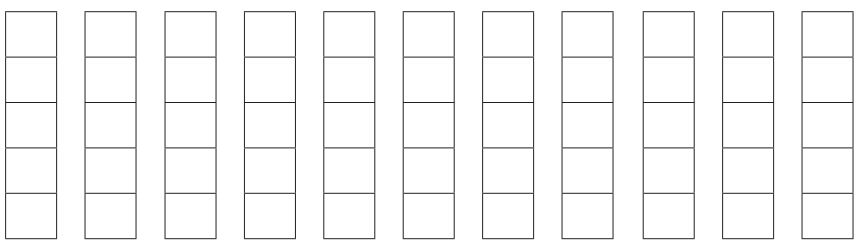
Answer
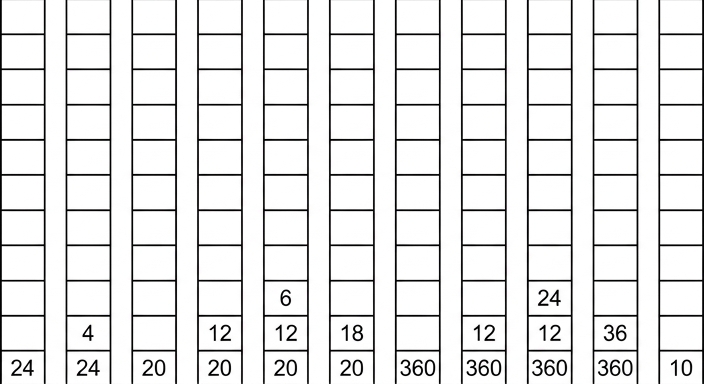
See stack diagram; final value 10
Background Concept
RPN expressions are evaluated using a stack.
The rule is:
- if the next token is an operand, push it onto the stack
- if the next token is an operator, pop the top two values, apply the operator, then push the result back
The order of the two popped values matters:
- the first value popped is the right operand
- the second value popped is the left operand
So if the stack top holds 4 and below it is 24, then for - you calculate 24 - 4, not 4 - 24.
This is especially important for subtraction and division.
Understanding the Question
The RPN expression is:
c a - b d + * b c + /
and the values are:
a = 4b = 12c = 24d = 6
You are asked to show the changing contents of the stack as the expression is evaluated. That means after each token is processed, the stack should be updated.
Approach
First substitute the variable values mentally:
24 4 - 12 6 + * 12 24 + /
Then process one token at a time from left to right:
- push numbers
- when an operator appears, pop two values
- calculate the result
- push the result back
- record the new stack state
A clear way to think about the stack is from bottom to top.
Step-by-Step Reasoning
We evaluate the expression token by token.
| Token processed | Action | Stack after step (bottom → top) |
|---|---|---|
c = 24 | push 24 | 24 |
a = 4 | push 4 | 24, 4 |
- | pop 4 and 24, calculate 24 - 4 = 20, push 20 | 20 |
b = 12 | push 12 | 20, 12 |
d = 6 | push 6 | 20, 12, 6 |
+ | pop 6 and 12, calculate 12 + 6 = 18, push 18 | 20, 18 |
* | pop 18 and 20, calculate 20 * 18 = 360, push 360 | 360 |
b = 12 | push 12 | 360, 12 |
c = 24 | push 24 | 360, 12, 24 |
+ | pop 24 and 12, calculate 12 + 24 = 36, push 36 | 360, 36 |
/ | pop 36 and 360, calculate 360 / 36 = 10, push 10 | 10 |
So the final value left on the stack is 10.
The required stack sequence is shown here:
Key Takeaways
- RPN is evaluated left to right using a stack.
- Operands are pushed; operators cause two values to be popped and combined.
- For
-and/, operand order matters: second popped is the left operand. - The final answer is the single value left on the stack.
Common Mistakes
- Doing subtraction in the wrong order, for example
4 - 24instead of24 - 4. - Doing division in the wrong order, for example
36 / 360instead of360 / 36. - Forgetting to push the result of an operation back onto the stack.
- Skipping intermediate stack states, which loses marks in a trace question.
- Treating RPN like infix and trying to use brackets.
Things to Be Careful About
- Always read the expression strictly from left to right.
- Keep track of stack order from bottom to top.
- After each operator, the stack becomes shorter by one overall because two values are removed and one result is pushed.
- Check that only one value remains at the end; that confirms the evaluation is complete.
- Use the given variable values accurately before tracing.
Calculate the shortest distance between the Start node and each of the nodes in the graph using Dijkstra’s algorithm.
Show your working on the graph or in the working space. Write your answers in the table provided.
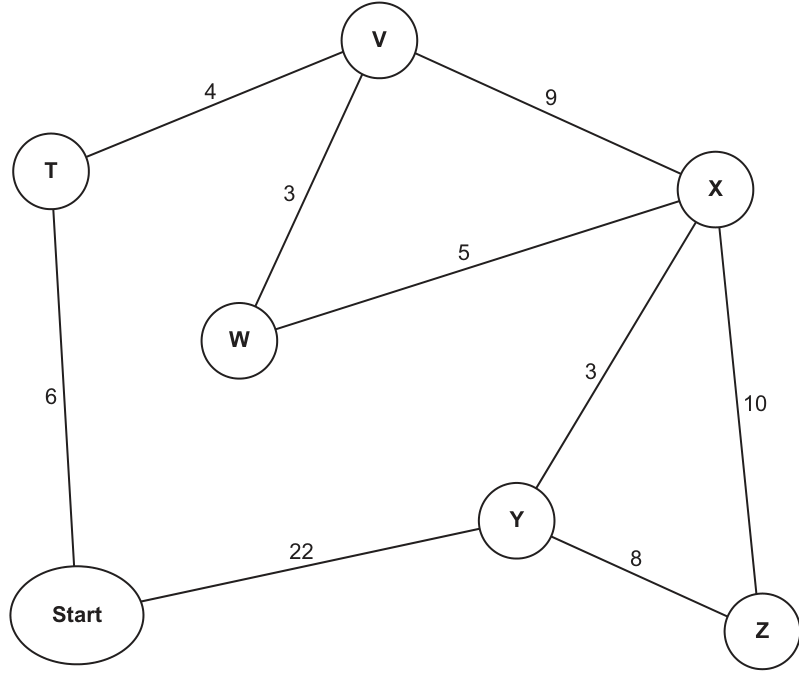
Working ............................................................................................................................................
..........................................................................................................................................................
..........................................................................................................................................................
..........................................................................................................................................................
..........................................................................................................................................................
..........................................................................................................................................................
Answers:
| T | V | W | X | Y | Z |
|---|---|---|---|---|---|
Working
Start at Start.
T = 6,Y = 22- Choose
T(6)→V = 10 - Choose
V(10)→W = 13,X = 19 - Choose
W(13)→X = 18 - Choose
X(18)→Y = 21,Z = 28 - Choose
Y(21)→Zstays28 - Choose
Z(28)
Answer
| T | V | W | X | Y | Z |
|---|---|---|---|---|---|
| 6 | 10 | 13 | 18 | 21 | 28 |
T=6, V=10, W=13, X=18, Y=21, Z=28
Background Concept
Dijkstra's algorithm finds the shortest path from one start node to every other node in a weighted graph, provided the edge weights are non-negative. It works by keeping a tentative distance for each node.
- The start node begins with distance
0. - All other nodes begin with infinity (or treated as unknown/very large).
- At each step, choose the unvisited node with the smallest tentative distance.
- That distance is then finalised, because Dijkstra's algorithm guarantees no shorter route to that node will appear later.
- Then update, or relax, all edges leaving that node:
- new distance = current node distance + edge weight
- if this is smaller than the existing tentative distance, replace it.
This repeats until all nodes have been visited or finalised.
Understanding the Question
The graph shows Start connected to other nodes by weighted edges. The question asks for the shortest distance from Start to each of T, V, W, X, Y, Z.
So this is not asking for just one shortest route to one destination. It wants the final shortest distance to every node from the start. The instruction "using Dijkstra's algorithm" is the clue that you should work systematically by choosing the smallest temporary value each time, not by guessing routes.
From the graph, the relevant edges are:
Start-T = 6Start-Y = 22T-V = 4V-W = 3V-X = 9W-X = 5X-Y = 3X-Z = 10Y-Z = 8
The graph is undirected, so each edge can be travelled both ways.
Approach
The best approach is to create tentative distances and update them step by step.
- Set
Start = 0. - Give directly connected nodes their first tentative distances.
- Repeatedly pick the unvisited node with the smallest current distance.
- Use that node to try to improve neighbouring distances.
- Stop when all nodes have been finalised.
A good habit is to write the nodes chosen in order, because this shows the Dijkstra process clearly and helps avoid missing an update.
Step-by-Step Reasoning
We begin with:
Start = 0T = ∞,V = ∞,W = ∞,X = ∞,Y = ∞,Z = ∞
1. Visit Start
From Start there are two edges:
- to
Twith weight6, soT = 6 - to
Ywith weight22, soY = 22
Now the tentative distances are:
T = 6Y = 22- all others still infinity
The smallest unvisited node is T(6).
2. Visit T(6)
From T, we can go to V with weight 4.
Distance to V through T is:
So V = 10.
Start is already finalised, so we ignore going back there.
Now we have:
T = 6finalV = 10Y = 22
The smallest unvisited node is V(10).
3. Visit V(10)
From V:
- to
Wwith weight3 - to
Xwith weight9
So:
Now tentative distances are:
W = 13X = 19Y = 22
The smallest unvisited node is W(13).
4. Visit W(13)
From W, the useful edge is to X with weight 5.
Distance to X via W is:
Current X is 19, so 18 is better. Update:
X = 18
Now tentative distances are:
X = 18Y = 22
The smallest unvisited node is X(18).
5. Visit X(18)
From X:
- to
Ywith weight3 - to
Zwith weight10
For Y:
Current Y is 22, so update to:
Y = 21
For Z:
So:
Z = 28
Now tentative distances are:
Y = 21Z = 28
The smallest unvisited node is Y(21).
6. Visit Y(21)
From Y, check whether Z can be improved using edge Y-Z = 8.
Distance to Z via Y is:
But current Z = 28, so 29 is worse. Do not change it.
So Z stays:
Z = 28
7. Visit Z(28)
This is the last node. All shortest distances are now final.
So the completed table is:
T = 6V = 10W = 13X = 18Y = 21Z = 28
Key Takeaways
- Dijkstra's algorithm always chooses the smallest tentative unvisited distance next.
- Once a node is selected in Dijkstra's algorithm, its shortest distance is final.
- Each time you visit a node, you must check whether paths through it improve neighbouring nodes.
- The answer to this type of question is usually the final shortest distance to each node, not necessarily the actual route.
Common Mistakes
- Choosing the next node in the wrong order. You must always pick the smallest tentative distance.
- Forgetting to update a node when a shorter route is found later, such as changing
Xfrom19to18throughW. - Updating a node even when the new route is longer, such as changing
Zfrom28to29throughY; that would be incorrect. - Treating the question as if it only asks for one destination instead of all listed nodes.
- Adding weights incorrectly or missing one edge in the route.
Things to Be Careful About
- Check whether the graph is directed or undirected. Here it is undirected, so each edge works both ways.
- Keep visited/finalised nodes separate from tentative ones so you do not accidentally revisit them as if they were still changeable.
- Write each new tentative value clearly after every step.
- If two routes to a node exist, compare them numerically before deciding whether to update.
- Make sure the final table entries are shortest distances from
Start, not just the last values you happened to write down during working.
A company requires a digital certificate to ensure the authenticity of its online communications.
Outline the process followed to acquire a digital certificate.
..........................................................................................................................................................
..........................................................................................................................................................
..........................................................................................................................................................
..........................................................................................................................................................
..........................................................................................................................................................
..........................................................................................................................................................
..........................................................................................................................................................
..........................................................................................................................................................
..........................................................................................................................................................
....................................................................................................................................................
Answer
- The company generates a public/private key pair and sends a certificate signing request to a trusted Certificate Authority (CA), including its public key and organisation details.
- The CA checks the identity and ownership details of the company.
- If the checks are successful, the CA creates a digital certificate containing the company details and public key.
- The CA digitally signs the certificate and issues it to the company for use on its server/website.
The company sends a certificate request with its public key and details to a trusted CA; the CA verifies the company's identity, creates a certificate containing the company details and public key, then digitally signs and issues the certificate.
Background Concept
A digital certificate is an electronic document used to prove that a public key belongs to a particular organisation, server or person. It is central to secure web communication because users need a way to trust that they are really connecting to the genuine company and not an attacker pretending to be it.
The trusted third party involved is a Certificate Authority (CA). A CA is responsible for checking identity information and then issuing a certificate. The certificate normally contains:
- the organisation or server identity
- the public key
- validity dates
- details of the CA
- the CA's digital signature
That digital signature is important because it allows browsers and other systems to verify that the certificate was issued by a trusted CA and has not been altered.
Understanding the Question
The question asks for the process used to acquire a digital certificate, not just what a certificate is. So the answer needs to be written as a sequence of steps.
The key ideas the examiner is looking for are:
- the company must apply for one
- a trusted CA is involved
- the CA verifies the company's identity
- the CA creates and signs the certificate before issuing it
This is about obtaining the certificate, so the focus is on request, verification, issue and signing rather than on later use during encryption.
Approach
A good way to answer this is to think of the certificate as something you cannot create and trust by yourself. The company can generate its own keys, but trust comes from the CA.
So the process is:
- Generate keys and apply.
- Send company details and public key to the CA.
- CA validates that the company is genuine.
- CA creates and digitally signs the certificate.
- Certificate is issued back to the company for use.
For a 4-mark outline, four clear points covering these stages are enough.
Step-by-Step Reasoning
First, the company needs a public/private key pair. The private key stays secret, while the public key is the one that will appear in the certificate.
Next, the company sends a certificate request to a trusted CA. This is often called a certificate signing request. It includes the public key and identifying information such as the company or domain details.
Then the CA performs checks. The exact checks depend on the type of certificate, but the general idea is that the CA must confirm that the applicant is really the company it claims to be. This is the step that creates trust.
After successful verification, the CA produces the digital certificate. It includes the company's identity information and the public key.
Finally, the CA digitally signs the certificate using the CA's private key and issues it to the company. Because devices already trust the CA, they can verify the CA's signature on the certificate and therefore trust that the public key really belongs to that company.
In an exam answer, you do not need to go into deep technical detail about the certificate file format. What matters is the correct sequence: request, verification, creation, signing, issue.
Key Takeaways
- A digital certificate links an identity to a public key.
- Trust comes from a Certificate Authority, not from the company alone.
- The company submits its public key and identifying details.
- The CA verifies the identity, signs the certificate and issues it.
Common Mistakes
- Saying the company signs its own certificate as the main method. That would not provide independent trust; the key point is that a trusted CA signs it.
- Confusing the public key and private key. The public key is included in the certificate; the private key remains secret.
- Describing how encrypted communication works instead of how the certificate is acquired. The question is about obtaining the certificate.
- Missing the verification stage. Without identity checks, the CA would not be establishing authenticity.
Things to Be Careful About
- Mention the CA explicitly. That is usually essential for full credit.
- Use the idea of verification of identity, not just 'the CA receives the request'.
- Make it clear that the certificate contains the public key, not the private key.
- Distinguish between creating the certificate and digitally signing it; both are valuable steps in the process.
- Since the question says 'outline', keep the answer as short sequenced points rather than a long discussion of SSL/TLS handshakes.
A stack, StackArray, is to be implemented using pseudocode, to store a maximum of 100 string items in an appropriate array. Declarations are required so that the stack has a beginning, an end and a maximum size. An array is also required to store the data.
Write pseudocode to declare the variables, constant and array required to implement the stack.
...................................................................................................................................................
...................................................................................................................................................
...................................................................................................................................................
...................................................................................................................................................
...................................................................................................................................................
.............................................................................................................................................
Answer
CONSTANT MaxSize = 100
DECLARE BottomPointer, TopPointer : INTEGER
DECLARE StackArray : ARRAY[1:MaxSize] OF STRING
See completed pseudocode
Background Concept
A stack is a last-in, first-out (LIFO) abstract data type. The item added most recently is the first one removed. When a stack is implemented using an array, the program needs:
- a fixed-size array to hold the data
- a way to know where the stack starts
- a way to know where the current top item is
- a maximum size so the program can detect when the stack is full
In Cambridge pseudocode, declarations must clearly show the data type of each item. Because this stack stores string items, the array must be declared as an array of STRING. Pointer values such as the top and bottom positions are integers, so they must be declared as INTEGER.
Understanding the Question
The question says a stack called StackArray must store up to 100 strings. It specifically asks for:
- the variables
- the constant
- the array
needed to implement that stack.
So this is not asking for push or pop operations yet. It is only asking for the storage structure and the pointer information. The wording about a beginning, an end and a maximum size tells you that you need two pointer-style variables and one constant for capacity.
Approach
Use the standard array-based stack design:
- Declare a constant for the maximum number of items.
- Declare two integer pointers: one for the bottom and one for the top.
- Declare the array itself with enough positions to store 100 strings.
A neat way to do this is to use the constant in the array bounds, because that links the array size directly to the named maximum.
Step-by-Step Reasoning
CONSTANT MaxSize = 100
- The question says the stack stores a maximum of 100 items.
- A constant is appropriate because this capacity should not change while the program runs.
- In CIE pseudocode, constants are declared with
CONSTANTand use=.
DECLARE BottomPointer, TopPointer : INTEGER
- These are positions in the array, so they must be integers.
BottomPointerrepresents the beginning of the stack.TopPointerrepresents the current end, meaning the topmost item actually in the stack.
DECLARE StackArray : ARRAY[1:MaxSize] OF STRING
StackArrayis the name given in the question, so it must be used exactly.- It must be an array because the question states that the stack is implemented using an array.
- It stores strings, so the element type is
STRING. - The bounds
1:MaxSizegive 100 storage locations.
This gives all the required structural parts of the stack implementation.
Key Takeaways
- An array-based stack needs storage plus position-tracking variables.
- The stored item type determines the array element type.
- The top and bottom positions are integers because they refer to array indices.
- A named constant makes the maximum size clear and easy to reuse.
Common Mistakes
- Declaring
StackArraywith the wrong data type, such asINTEGERinstead ofSTRING. - Forgetting one of the pointers and only declaring the top pointer.
- Writing
MaxSize ← 100instead of using a constant declaration with=. - Not using the given identifier
StackArrayfrom the question.
Things to Be Careful About
- Keep to CIE pseudocode, not Python, Java or another real language.
- Use
CONSTANTfor the maximum size andDECLAREfor variables. - Make sure the array bound allows 100 items exactly.
- Use meaningful pointer names consistent with the stack idea, such as
BottomPointerandTopPointer.
Write pseudocode for a procedure to initialise the top and bottom pointers of the stack to appropriate values.
...................................................................................................................................................
...................................................................................................................................................
...................................................................................................................................................
...................................................................................................................................................
...................................................................................................................................................
.............................................................................................................................................
Answer
PROCEDURE InitialiseStack()
   BottomPointer ← 1
   TopPointer ← 0
ENDPROCEDURE
See completed pseudocode
Background Concept
Initialisation means setting up a data structure so that it starts in a known valid state. For a stack, this is especially important because later operations such as PUSH and POP depend on the pointer values being correct.
With an array-based stack using indices 1 to 100:
- the bottom of the stack is at position
1 - the stack is empty before any items are pushed
- an empty stack is commonly represented by setting the top pointer to one position before the first usable slot, which is
0
That way, after the first push, the top pointer can move to 1 and the first item is stored at StackArray[1].
Understanding the Question
This part asks for a procedure, not just isolated assignment statements. The purpose of the procedure is to initialise the stack pointers.
Because part (a) has already declared the array and pointer variables, this procedure only needs to set the two pointers to the correct starting values for an empty stack.
Approach
Use a short procedure with two assignment statements:
- Set the bottom pointer to the first valid position in the array.
- Set the top pointer to the empty-stack position.
Since the array was declared from 1 to MaxSize, the correct initial values are 1 for the bottom and 0 for the top.
Step-by-Step Reasoning
PROCEDURE InitialiseStack()
- The question explicitly asks for a procedure, so the answer should be written as one.
- No parameters are needed here because the stack variables can be treated as global in this simple pseudocode design.
BottomPointer ← 1
- The bottom of the stack is the first valid array location.
- Since the array starts at index
1, the bottom pointer should be1.
TopPointer ← 0
- At the start, the stack is empty.
- There is no top item yet, so the top pointer is set to the position before the first valid element.
- This makes later stack tests easy:
- empty stack:
TopPointer = 0 - after one push:
TopPointer = 1
- empty stack:
ENDPROCEDURE
- This closes the procedure properly in CIE pseudocode.
So the procedure correctly sets up an empty stack ready for use.
Key Takeaways
- Initialisation puts a data structure into a valid starting state.
- For a 1-based array stack, the bottom pointer is usually
1. - An empty stack is often shown by setting the top pointer to
0. - A procedure is a good way to package repeated setup code.
Common Mistakes
- Setting both pointers to
1, which would suggest there is already an item at the top. - Setting the bottom pointer to
0when the array starts at1. - Forgetting to write the answer as a procedure.
- Using
=instead of the assignment arrow←in pseudocode.
Things to Be Careful About
- The pointer values depend on the array bounds chosen in part (a). Here they match
ARRAY[1:MaxSize]. - If a candidate had used
ARRAY[0:99], the initialisation would be different; consistency matters. - Make sure the procedure name is sensible and the pseudocode closes with
ENDPROCEDURE. - Do not add unnecessary code such as push/pop logic when the question asks only for initialisation.
Describe when the use of recursion would be beneficial and give an example.
Description .......................................................................................................................................
..........................................................................................................................................................
..........................................................................................................................................................
..........................................................................................................................................................
Example ...........................................................................................................................................
..........................................................................................................................................................
Answer
- Recursion is beneficial when a problem can be split into smaller instances of the same problem.
- It is useful when the structure is naturally repetitive or hierarchical, so a recursive solution is simpler than an iterative one.
- A base case is needed so that the calls stop.
- Example: traversing a binary tree, where the left and right subtrees are processed recursively.
Recursion is beneficial when a problem can be broken into smaller versions of itself with a base case; for example, traversing a binary tree.
Background Concept
Recursion is a programming technique where a procedure or function calls itself. Each call works on a smaller or simpler version of the original problem. For recursion to work correctly, there must be:
- a base case: the stopping condition
- a recursive case: the step that reduces the problem and calls the function again
Recursion is especially suitable for problems that are self-similar. That means the whole problem has the same form as its smaller parts. It is also common in hierarchical structures such as trees, nested folders, or expressions made from sub-expressions.
At runtime, recursive calls are managed using a stack. Each call stores its own local data, and when the base case is reached, the calls return one by one. This returning phase is sometimes called unwinding the recursion.
Understanding the Question
The question asks for two things:
- a description of when recursion is beneficial
- one example of such a problem
So this is not asking you to write code. It wants the situation in which recursion is a good choice. The key clue is the word beneficial: you should explain why recursion helps, not just define it.
A strong answer therefore mentions that recursion is useful when a problem can be divided into smaller versions of itself, often in a naturally nested or branching structure, and then gives a clear example such as binary tree traversal, factorial, or directory searching.
Approach
To answer this well:
- start by describing the type of problem recursion suits
- mention that the problem must get smaller each time
- mention the base case, because without it recursion would not stop
- finish with one example that is clearly recursive
A very common high-scoring example is traversing a binary tree, because each subtree is itself a binary tree, so the problem is naturally self-similar.
Step-by-Step Reasoning
First, identify the main idea behind recursion:
- a function solves a problem by calling itself on a smaller part
So recursion is beneficial when this matches the structure of the problem. That happens when:
- the original problem can be split into smaller subproblems of the same type
- each step moves closer to a stopping point
- writing the solution recursively is clearer or more natural than using a loop
Next, explain the stopping point:
- a recursive solution must include a base case
- the base case handles the simplest version of the problem directly
- this prevents infinite recursion
Then give an example.
For binary tree traversal:
- a tree consists of a root, a left subtree, and a right subtree
- each subtree is itself a tree
- so the same traversal process can be applied repeatedly to smaller subtrees
- the base case is when a subtree is empty
That makes tree traversal an excellent example of when recursion is beneficial.
Other valid examples could include:
- calculating factorial
- Fibonacci sequence definitions
- searching through nested folders
- evaluating nested expressions
But binary trees are often the clearest example because the recursive structure is obvious.
Key Takeaways
- Recursion means a function or procedure calls itself.
- It is best used when a problem can be broken into smaller versions of the same problem.
- It is particularly useful for hierarchical or branching structures.
- A base case is essential to stop the recursion.
- Typical examples include tree traversal, factorial, and nested directory processing.
Common Mistakes
- Only defining recursion: the question asks when it is beneficial, so you must say what kind of problem it suits.
- Forgetting the base case: recursion without a stopping condition is incomplete and conceptually incorrect.
- Giving an iterative-only example: choose an example that is naturally recursive, not just any repeated process.
- Being too vague: saying “when a problem is difficult” is not enough; you need “when it can be divided into smaller instances of itself.”
Things to Be Careful About
- Make sure your description focuses on self-similar or hierarchical problems.
- Do not confuse recursion with simply using repetition in general; loops can also repeat, but recursion is specifically self-calling.
- If you give an example like factorial, it is safer to mention the smaller version idea, for example with a base case such as .
- Keep the answer concise: one clear description and one valid example is enough for full marks in a short question.
An exception can occur when running a program.
Explain what is meant by an exception.
...................................................................................................................................................
...................................................................................................................................................
...................................................................................................................................................
...................................................................................................................................................
...................................................................................................................................................
.............................................................................................................................................
Answer
- An exception is an error or unexpected event that occurs while the program is running.
- It interrupts the normal flow of execution and control is passed to an exception-handling routine.
- If it is not handled, the program may stop or crash.
An exception is an error or unexpected event that occurs during program execution, interrupts normal flow, and if unhandled may cause the program to stop.
Background Concept
An exception is a problem detected during program execution, not while the source code is being typed or translated. In other words, the program starts running, then reaches a situation it cannot deal with normally.
This is different from a syntax error. A syntax error prevents the program from being translated or compiled correctly. An exception happens at run time.
In many languages, when an exception occurs, the normal sequence of instructions is interrupted. The system or language runtime then looks for exception-handling code, such as a handler designed to deal with that kind of error. If no suitable handler exists, the program may terminate.
Understanding the Question
This part asks for the meaning of the term exception. So the answer should not just give an example such as divide by zero. It needs to explain what an exception is in general.
The key ideas the examiner is looking for are:
- it happens while the program is running
- it is an error or unexpected event
- it disrupts normal execution
- it may be handled, or otherwise the program may stop
Approach
A good 3-mark explanation usually needs three linked points:
- define it as a runtime error or unexpected event
- state its effect on the normal flow of the program
- state what happens if it is not handled
That gives a complete explanation instead of only a vague definition.
Step-by-Step Reasoning
First, say when it happens: during execution. That separates exceptions from compile-time or syntax errors.
Second, describe what it is: an error condition or unexpected event. Examples exist, but here the focus is the general meaning.
Third, explain its effect: the normal flow of instructions is interrupted. The program cannot simply continue as if nothing happened.
Fourth, mention handling: control is transferred to exception-handling code if one is available. If not, the program may stop, crash, or terminate abnormally.
So a full explanation is: an exception is an error or unexpected event that arises at run time, interrupts normal execution, and may cause the program to stop if it is not handled.
Key Takeaways
- Exceptions occur at run time.
- They are different from syntax or compile-time errors.
- They interrupt normal program execution.
- Exception-handling code is used to deal with them safely.
Common Mistakes
- Saying it is "a syntax error". That is wrong because syntax errors are found before execution.
- Giving only an example, such as "divide by zero", without explaining what an exception means.
- Saying only that it is "an error" without mentioning that it happens during execution.
- Forgetting that the normal flow of the program is interrupted.
Things to Be Careful About
- Use the phrase "while the program is running" or "at run time".
- Do not confuse exception handling with debugging; handling is how the running program responds.
- If you mention the program crashing, make it clear this happens if the exception is not handled.
Identify one example of an exception and give one reason why the exception may cause a problem.
Example ....................................................................................................................................
...................................................................................................................................................
Reason ......................................................................................................................................
...................................................................................................................................................
Answer
- Example: division by zero.
- Reason: the calculation cannot be completed, so the program may stop unless the exception is handled.
Example: division by zero. Reason: the calculation cannot be completed, so the program may stop unless the exception is handled.
Background Concept
Programs can encounter many types of exceptions at run time. Common examples include division by zero, file not found, array index out of bounds, invalid type conversion, or attempting to open a file that does not exist.
An exception matters because it prevents the program from carrying out the instruction normally. If nothing is done to handle it, the program may terminate, produce no output, or leave data incomplete.
Understanding the Question
This part asks for two things:
- one valid example of an exception
- one reason why that exception causes a problem
The reason must match the example. So if the example is file not found, the reason should be that the program cannot read the required data. If the example is division by zero, the reason should be that the arithmetic operation is impossible and execution may stop.
Approach
Choose a clear, standard runtime exception. Then explain one direct effect of that exception on the program.
A good answer is short and specific. There is no need to list many examples because the question asks for one.
Step-by-Step Reasoning
A strong choice is division by zero.
Why is it an exception? Because it occurs when the program tries to perform an arithmetic operation with zero as the divisor during execution.
Why is it a problem? Division by zero has no valid arithmetic result in normal program processing, so the instruction cannot be completed correctly. That interrupts execution and may cause the program to stop if the exception is not handled.
Other valid examples could also have been used:
- file not found → the program cannot read input data
- array index out of bounds → the program tries to access memory outside the valid range
- invalid input format → conversion to number may fail
The key is that the reason must clearly explain the consequence of the chosen exception.
Key Takeaways
- A correct example must be a runtime exception, not a syntax mistake.
- The reason should explain the practical effect on execution or data.
- Matching the reason to the example is essential.
Common Mistakes
- Giving an example that is not an exception, such as a spelling mistake in code.
- Writing a reason that is too vague, for example "it is bad".
- Giving a reason unrelated to the example.
- Naming a hardware failure or user mistake without showing how it becomes a runtime exception.
Things to Be Careful About
- Keep the example realistic and standard.
- Make sure the consequence is specific, such as stopping execution, preventing data from being read, or causing invalid memory access.
- One example and one reason are enough; do not waste time over-explaining in the exam.
The table shows assembly language instructions for a processor that has one register, the Accumulator (ACC).
| Label | Instruction | Explanation | |
|---|---|---|---|
| Opcode | Operand | ||
| LDM | #n | Load the number n to the ACC | |
| LDD | <address> | Load the contents of the location at the given address to the ACC | |
| LDI | <address> | The address to be used is at the given address. Load the contents of this second address to the ACC | |
| ADD | <address> | Add the contents of the given address to the ACC | |
| ADD | #n | Add the number n to the ACC | |
| SUB | <address> | Subtract the contents of the given address from the ACC | |
| SUB | #n | Subtract the number n from the ACC | |
| STO | <address> | Store the contents of the ACC at the given address | |
| <label>: | <data> | Gives a symbolic address <label> to the memory location with the contents <data> |
denotes a denary number, e.g. #123
<label> can be used in place of <address>
The current contents of memory are:
| Address | Contents |
|---|---|
| 563 | 125 |
| 899 | 63 |
Write assembly language code, using only the given instruction set to:
• store the denary value 250 as labelled variable X
• store the value stored in location 563 as labelled variable Y
• add the value stored in variable X to the value stored in variable Y
• subtract the value stored in location 899 from the current value in the Accumulator
• store the result in variable Total.
Show the initialisation and values of the variables X, Y and Total in the table provided.
..........................................................................................................................................................
..........................................................................................................................................................
..........................................................................................................................................................
..........................................................................................................................................................
..........................................................................................................................................................
..........................................................................................................................................................
..........................................................................................................................................................
..........................................................................................................................................................
| Label | Content |
|---|---|
Answer
LDM #250
STO X
LDD 563
STO Y
ADD X
SUB 899
STO Total
| Label | Content |
|---|---|
| X | 0 |
| Y | 0 |
| Total | 0 |
See assembly code
Background Concept
This question uses simple accumulator-based assembly language. In an accumulator machine, most operations happen through one main register: the Accumulator, or ACC.
The key instructions here are:
LDM #nloads an immediate denary value directly intoACC.LDD addressloads the contents stored at a memory address intoACC.ADD addressadds the contents of a memory location to the current value inACC.SUB addresssubtracts the contents of a memory location from the current value inACC.STO addressstores the currentACCvalue into a memory location.
A label such as X: or Total: is a symbolic name for a memory location. Instead of remembering a numeric address, the program can refer to that memory location by label.
So, to solve a question like this, you must keep track of two things:
- what value is currently in
ACC - what values are stored in each labelled variable
Understanding the Question
You are given:
- a small instruction set
- two existing memory locations:
- address
563contains125 - address
899contains63
- address
You must write assembly code to do these tasks in order:
- store
250in variableX - store the value from address
563in variableY - add the value in
Xto the value inY - subtract the value at address
899 - store the final result in
Total
You must also show the labelled variables X, Y and Total in the label/content table. In this kind of assembly question, that table is used to show the variable declarations and their initial contents. A standard way is to initialise them all to 0.
Approach
The easiest way is to follow the required actions exactly in sequence while tracking ACC.
- First, load
250directly and store it inX. - Next, load the contents of address
563, which is125, and store that inY. - At that point,
ACCstill holds125, so you can addXdirectly. - Then subtract the contents of address
899, which is63. - Finally, store the result in
Total.
The labels table is then filled with the variables and initial values such as 0.
Step-by-Step Reasoning
Start with the first requirement: store the denary value 250 as X.
LDM #250
- This places
250intoACC.
STO X
- This stores the current
ACCvalue,250, into variableX.
Now the second requirement: store the value from location 563 as Y.
LDD 563
- Address
563contains125, soACCbecomes125.
STO Y
- This stores
125into variableY.
Now add the value stored in X to the value stored in Y.
At this moment:
Ycontains125ACCis also125Xcontains250
So:
ADD X
- Adds the contents of
X(250) toACC(125) ACC = 125 + 250 = 375
Now subtract the contents of location 899.
SUB 899
- Address
899contains63 ACC = 375 - 63 = 312
Finally store the result.
STO Total
Totalreceives the value312
So the final values after running the code would be:
X = 250Y = 125Total = 312
But the table in the question is for declaring the labelled variables, so the normal assembly-style entries are the labels with initial contents, for example 0.
Key Takeaways
- In accumulator assembly language, arithmetic is performed using the current value in
ACC. LDMloads a literal number;LDDloads from memory.STOwrites the currentACCvalue into a variable or memory location.- Labels such as
XandTotalare symbolic memory addresses. - Solving these questions depends on carefully tracking both memory contents and the current
ACCvalue.
Common Mistakes
- Using
LDM 563instead ofLDD 563.LDMis for an immediate value, whileLDDloads the contents stored at an address. - Forgetting to store
250intoXbefore usingXlater. - Subtracting
899instead of subtracting the contents of address899. The instructionSUB 899means subtract the value stored there, which is63. - Writing labels without initial contents in the variable table.
- Losing track of what is in
ACCafter each instruction.
Things to Be Careful About
#must be used only for immediate denary values, such as#250.- A label can be used in place of an address only after it has been declared as a variable in the table.
STOstores the value currently inACC; it does not create a value by itself.- The order of instructions matters. If you change the sequence, the
ACCvalue may no longer be the one needed for the next step. - Even though the final computed value is
312, the label/content table is for initialising the variables, so entries such as0are appropriate there.