Computer Science 9618/32 — October/November 2025
Cambridge A-Level · Advanced Theory · worked solutions for every part, with the mark scheme
Topics Data Representation · Communication and Internet Technologies · System Software · Hardware and Virtual Machines · Further Programming · Security · +2 more
The composite data type, Car, is defined in pseudocode as:
TYPE Car
  DECLARE RegNumber : STRING
  DECLARE Make : STRING
  DECLARE Model : STRING
  DECLARE BodyStyle : STRING
  DECLARE Colour : STRING
  DECLARE IntoStock : DATE
  DECLARE Price : REAL
ENDTYPE
Write the pseudocode statement to set up a variable for one record of the composite data type, Car.
Answer
DECLARE ThisCar : Car
DECLARE ThisCar : Car
Background Concept
A composite data type groups several related fields together into one structure. In this question, Car is a user-defined composite type because it contains multiple named items such as RegNumber, Make, Model, Colour and Price.
Once a type has been defined, a program can declare variables of that type. A variable declared as type Car represents one whole record, with all of those fields inside it.
In Cambridge pseudocode, declaring a variable uses the form:
DECLARE VariableName : TypeName
So if the type name is Car, any one-record variable must be declared with : Car.
Understanding the Question
The question is not asking you to redefine the whole Car type. That has already been given in the stem. It is asking for one pseudocode statement to create a variable that can hold one Car record.
So the task is simply: choose a suitable variable name and declare it as type Car.
Approach
Use the standard declaration syntax for pseudocode:
- Choose an identifier for the variable.
- Use
DECLARE. - Put the variable name, then
:, then the type nameCar.
Because the type already exists, you do not write all the fields again.
Step-by-Step Reasoning
The type has already been defined as:
TYPE Car
  ...
ENDTYPE
That means Car can now be used as a data type in a declaration.
A valid declaration is therefore:
DECLARE ThisCar : Car
DECLAREintroduces a variable.ThisCaris just the chosen variable name.: Carsays that this variable stores one record of the composite typeCar.
Any sensible variable name would normally be acceptable, as long as the type is Car.
Key Takeaways
- A composite type can be used like any other data type once it has been defined.
- To create one record of that type, declare a variable with
DECLARE name : TypeName. - You do not repeat the field list when declaring a variable.
Common Mistakes
- Rewriting the full
TYPE Car ... ENDTYPEdefinition instead of declaring a variable. - Declaring a field such as
DECLARE Colour : STRINGrather than a wholeCarrecord. - Omitting the type name
Carafter the colon. - Using incorrect pseudocode syntax such as
Car ThisCarorThisCar = Car.
Things to Be Careful About
- The question asks for pseudocode, so use
DECLAREand:exactly. Caris the type name; the variable name can be different.- Do not use assignment syntax here, because this is a declaration, not giving the variable a value.
Write the pseudocode statements to assign the following values to the variable set up in part (a)(i):
- "Blue" to
Colour - 21/10/2025 to
IntoStock
Answer
ThisCar.Colour ← "Blue"
ThisCar.IntoStock ← 21/10/2025
ThisCar.Colour ← "Blue"
ThisCar.IntoStock ← 21/10/2025
Background Concept
When a variable is a record or composite type, each individual item inside it is accessed by field name. The usual notation is:
RecordVariable.FieldName
To store a value in one field, you use assignment with the arrow ←.
For example, if ThisCar is a Car, then:
ThisCar.Colourrefers to theColourfieldThisCar.IntoStockrefers to theIntoStockfield
This lets you update individual parts of the record without changing the rest.
Understanding the Question
The question says to assign two values to the variable created in part (a)(i):
"Blue"toColour21/10/2025toIntoStock
So you must write two assignment statements, each using the variable name from part (a)(i) followed by the correct field name.
Approach
For each value:
- Start with the record variable name.
- Add a dot and the field name.
- Use the assignment arrow
←. - Put the required value on the right.
One statement is needed for Colour, and one for IntoStock.
Step-by-Step Reasoning
Assume the variable from part (a)(i) was declared as:
DECLARE ThisCar : Car
Now update the required fields.
First assignment:
ThisCar.Colour ← "Blue"
ThisCaris the record variable..Colourselects theColourfield.← "Blue"stores the string value in that field.
Second assignment:
ThisCar.IntoStock ← 21/10/2025
.IntoStockselects the date field.- The value
21/10/2025is assigned to that field.
Together these two statements change only those two components of the record.
Key Takeaways
- Use dot notation to access a field inside a composite variable.
- Use
←to assign a value to that field. - Each separate field update needs its own statement.
Common Mistakes
- Writing
Colour ← "Blue"without the record variable name. - Using the wrong field name, such as
BodyStyleinstead ofColour. - Using
=instead of←for assignment in pseudocode. - Putting the date into the wrong field.
- Changing the type definition instead of assigning values to a variable.
Things to Be Careful About
- The field names must match the definition exactly:
ColourandIntoStock. - String data such as
Blueshould be in quotation marks. - Keep the same variable name you used in part (a)(i).
- Do not confuse declaring a variable with assigning values to its fields.
The data type for BodyStyle is changed to an enumerated type, Body.
Write the pseudocode statement for the type declaration of Body to hold the names of the available choices:
Convertible, Hatchback, Saloon, SUV
Answer
TYPE Body = (Convertible, Hatchback, Saloon, SUV)
TYPE Body = (Convertible, Hatchback, Saloon, SUV)
Background Concept
An enumerated type is a user-defined type that can only take one value from a fixed list of named choices. It is useful when a field should not accept any possible string, but only one of several valid options.
For example, a car body style should not be any random text. It should be one of a known set such as Convertible, Hatchback, Saloon or SUV.
Using an enumerated type improves data integrity because it restricts values to the allowed set.
In pseudocode, the declaration of an enumerated type is written as a type name followed by the list of permitted values.
Understanding the Question
Originally, BodyStyle was declared as STRING, which means any text could be stored there. The question says this is changed to an enumerated type called Body.
So here you must define the new type Body itself and include exactly the available choices named in the question:
ConvertibleHatchbackSaloonSUV
Approach
Write the enumerated type declaration in one line:
- Start with
TYPE Body. - Use
=. - Put the allowed values in brackets, separated by commas.
This creates a new type named Body that can later be used in the Car record.
Step-by-Step Reasoning
The question provides the name of the type: Body.
It also provides the only valid values:
ConvertibleHatchbackSaloonSUV
So the type declaration is:
TYPE Body = (Convertible, Hatchback, Saloon, SUV)
This means a variable or field of type Body can hold exactly one of those four named values.
The important point is that these are enumerated options, not free-text strings.
Key Takeaways
- An enumerated type limits data to a fixed set of allowed values.
- It is useful when only certain named choices are valid.
- The type must be defined before it can be used in another type declaration.
Common Mistakes
- Writing the values as strings in quotes when defining the enumeration.
- Missing one of the listed choices.
- Using the field name
BodyStyleinstead of the new type nameBody. - Rewriting the whole
Cartype instead of just definingBody.
Things to Be Careful About
- Include all four values exactly as given.
- Keep the type name as
Body, because the next part depends on it. - Do not mix up a type declaration with a variable declaration.
- An enumerated type defines permitted labels, not a string field containing any text.
Write the new pseudocode statement required to update the declaration of BodyStyle in the definition of Car.
Answer
DECLARE BodyStyle : Body
DECLARE BodyStyle : Body
Background Concept
Once a user-defined type has been created, it can be used as the type of a field inside another composite type. This is exactly like using built-in types such as STRING or REAL, except the field now has a restricted set of possible values.
Originally the field was:
DECLARE BodyStyle : STRING
After defining the enumerated type Body, the field should use that type instead of STRING.
Understanding the Question
This part is not asking you to rewrite the whole Car definition. It wants only the one new declaration line that replaces the old BodyStyle line.
So you keep the field name BodyStyle, but change its type from STRING to Body.
Approach
Take the original declaration and replace only the type:
- field name stays
BodyStyle - new data type becomes
Body
So the structure is still DECLARE fieldName : typeName.
Step-by-Step Reasoning
Original field:
DECLARE BodyStyle : STRING
Because Body has now been defined as an enumerated type, the field should use that type instead.
So the updated line is:
DECLARE BodyStyle : Body
This means BodyStyle can now hold only one of the allowed body-style values from the enumeration.
Key Takeaways
- User-defined types can be used inside composite types.
- Updating a field declaration often means changing only the type name.
- Enumerated types help restrict a field to valid choices.
Common Mistakes
- Writing
DECLARE Body : BodyStyle, which reverses the field name and type. - Leaving the type as
STRING. - Writing a value such as
Convertibleinstead of a declaration. - Rewriting the full
TYPE Car ... ENDTYPEblock when only one line is needed.
Things to Be Careful About
BodyStyleis still the field name.Bodyis the new data type.- Use the exact pseudocode declaration format with
DECLAREand:. - Do not confuse the enumeration definition from part (b)(i) with the field declaration in this part.
Numbers are stored in a computer system using binary floating-point representation with:
- 10 bits for the mantissa
- 6 bits for the exponent
- two’s complement form for both the mantissa and the exponent.
Calculate the denary value of the given normalised binary floating-point number.
Show your working.

Working
Mantissa 0111100101 = 0.111100101
Exponent 001011 = 11
So the value is:
Answer
Denary value = 1940
1940
Background Concept
Binary floating-point stores a number in two parts: a mantissa and an exponent. The mantissa holds the significant digits of the number, and the exponent tells us how far to shift the binary point.
In this question, both parts use two's complement. For a positive mantissa in two's complement floating-point, the number is usually written as a signed binary fraction with the binary point immediately after the sign bit. So a 10-bit mantissa such as 0111100101 is read as 0.111100101.
The value of the whole floating-point number is:
A normalised positive mantissa in two's complement begins 01..., which this one does, so it is already in normalised form.
Understanding the Question
You are given a complete floating-point number in this format:
- 10-bit mantissa
- 6-bit exponent
- two's complement for both
You must convert that stored binary value into an ordinary denary number and show the working. That means:
- decode the mantissa,
- decode the exponent,
- combine them using the floating-point rule.
The mantissa shown is 0111100101 and the exponent shown is 001011.
Approach
First treat the mantissa as a binary fraction with the point after the sign bit. Because the sign bit is 0, the mantissa is positive.
Then convert the exponent from 6-bit two's complement into denary. Since its first bit is also 0, it is a positive exponent and can be read directly.
Finally multiply the mantissa value by .
Step-by-Step Reasoning
The mantissa is:
0111100101
Because this is a positive two's complement mantissa, read it as:
0.111100101
Now convert that binary fraction to denary:
- first
1= - second
1= - third
1= - fourth
1= - fifth bit is
0, so add nothing - sixth bit is
0, so add nothing - seventh
1= - eighth bit is
0, so add nothing - ninth
1=
So:
Now decode the exponent:
001011
This is a 6-bit two's complement number. Since the first bit is 0, it is positive, so its denary value is simply:
Now apply the floating-point rule:
Since :
So the denary value represented by this floating-point number is 1940.
Key Takeaways
- In this syllabus, the mantissa is treated as a signed binary fraction.
- For a positive two's complement exponent, you can read it directly as an ordinary binary integer.
- Floating-point conversion always follows the pattern: decode mantissa, decode exponent, then multiply by .
- A normalised positive mantissa in two's complement starts with
01.
Common Mistakes
- Reading the mantissa as an integer instead of a fraction. The binary point is after the sign bit, not at the end.
- Forgetting that the exponent is in two's complement and just assuming all exponents are unsigned.
- Using the wrong power, for example multiplying by instead of .
- Misreading the mantissa bits and missing one of the fractional place values.
Things to Be Careful About
- Keep the mantissa and exponent separate; they are decoded differently.
- Check the first bit of each part before deciding how to interpret it in two's complement.
- Do not try to renormalise the number here; the question says it is already normalised.
- When converting binary fractions, line up each bit with the correct place value:
Calculate the normalised binary floating-point representation of +26.6875 in this system.
Show your working.

Working
Normalised form:
Mantissa = 0110101011
Exponent +5 in 6-bit two's complement = 000101
Answer
Mantissa: 0110101011
Exponent: 000101
Mantissa 0110101011, Exponent 000101
Background Concept
To store a denary number in binary floating-point form, you first convert the number to binary, then rewrite it in normalised form, and finally store the mantissa and exponent in the required bit lengths.
In this system:
- the mantissa has 10 bits,
- the exponent has 6 bits,
- both use two's complement.
For a positive normalised mantissa in two's complement, the first two bits are 01. The mantissa is stored as a signed binary fraction, so the binary point sits after the sign bit.
Understanding the Question
You must represent +26.6875 in the given floating-point format. That means you need to:
- convert
26.6875to binary, - normalise it so it fits the mantissa format,
- write the exponent in 6-bit two's complement.
Because the number is positive, both the mantissa sign and the exponent sign will be positive as well.
Approach
Start by converting the whole-number part and the fractional part separately:
26to binary,0.6875to binary.
Then combine them into one binary number.
Next, shift the binary point until the mantissa is in normalised two's complement form for a positive number, which means starting 0.1... and specifically 01... in the stored bits.
Count how many places the point moved: that becomes the exponent. Finally write the mantissa as 10 bits and the exponent as a 6-bit two's complement value.
Step-by-Step Reasoning
First convert 26 to binary:
Now convert 0.6875 to binary. Using binary fraction place values:
- fits, so first fractional bit is
1 - remainder is
- does not fit, so next bit is
0 - fits, so next bit is
1 - remainder is
- fits, so next bit is
1
So:
Combine the integer and fraction parts:
Now normalise it for this floating-point system. We want the mantissa to be a signed fraction. Move the binary point left until the value is between and for a positive number:
Why exponent 5? Because the binary point moved 5 places to the left.
Now write the mantissa bits. The sign bit is 0 because the number is positive, followed by the fractional bits 110101011.
So the 10-bit mantissa is:
0110101011
Now write the exponent +5 in 6-bit two's complement. Since it is positive, this is ordinary binary padded to 6 bits:
000101
So the final floating-point representation is:
- Mantissa:
0110101011 - Exponent:
000101
Key Takeaways
- Convert the integer and fractional parts separately when changing denary to binary.
- For this floating-point format, the mantissa is stored as a signed binary fraction.
- Normalising means shifting the binary point and recording that shift in the exponent.
- Positive exponents in two's complement are just ordinary binary with leading zeros.
Common Mistakes
- Writing the mantissa as
1101010110or another integer-like form instead of as a signed fraction. - Using the wrong exponent because of miscounting how many places the binary point moved.
- Forgetting to pad the exponent to the full 6 bits.
- Stopping the fraction conversion too early and losing the exact
.1011part. - Giving an unnormalised mantissa such as
11010.1011directly in the mantissa field.
Things to Be Careful About
- Count mantissa bits exactly: 10 bits total, including the sign bit.
- The exponent must be exactly 6 bits.
- Make sure the positive normalised mantissa begins
01, which0110101011does. - Do not add extra trailing bits beyond the mantissa length unless rounding is required; here the value fits exactly.
HTTP and IMAP are examples of protocols used in the Application Layer of the TCP/IP protocol suite.
State the purpose of the HTTP and IMAP protocols.
HTTP ........................................................................................................................................
...................................................................................................................................................
IMAP .........................................................................................................................................
...................................................................................................................................................
Answer
- HTTP: used to request and transfer web pages/web resources between a web server and a client browser.
- IMAP: used to access and manage email messages stored on a mail server.
HTTP: transfers web pages/resources between server and browser; IMAP: accesses/manages email stored on a mail server.
Background Concept
Protocols are agreed sets of rules that allow devices and software to communicate correctly. In the TCP/IP protocol suite, the Application Layer provides services directly used by user applications such as web browsers and email clients.
Each application-layer protocol has a specific purpose:
- HTTP stands for HyperText Transfer Protocol. It is used for requesting and delivering web pages and other web resources.
- IMAP stands for Internet Message Access Protocol. It is used by an email client to access email messages stored on a mail server.
The key idea is that a protocol is not just "for the Internet" in general; it has a particular job.
Understanding the Question
This question names two protocols, HTTP and IMAP, and asks you to state the purpose of each one.
That wording is a clue that the answer should be short and precise. You do not need to explain packet structure, layers in detail, or how the protocols work internally. You just need to say what each protocol is used for.
Approach
The best approach is:
- Recognise both as application-layer protocols.
- Match each protocol to the service it provides.
- Write one clear purpose statement for each.
A good answer uses the correct context:
- HTTP -> web pages / web resources / browser-server communication
- IMAP -> email access / messages on a mail server
Step-by-Step Reasoning
For HTTP:
- A browser needs a way to ask a web server for a page.
- The server then sends the requested page or other resource back.
- So the purpose of HTTP is to allow requesting and transferring web content.
For IMAP:
- An email client needs a way to view and organise messages that are stored on a mail server.
- IMAP lets the user access those messages without necessarily downloading and removing them from the server.
- So the purpose of IMAP is to access and manage email on the mail server.
A concise exam answer does not need all of those supporting details, but that is the reasoning behind the correct statements.
Key Takeaways
- HTTP is for web page and web resource transfer.
- IMAP is for accessing and managing email stored on a server.
- When a question says state the purpose, give a short functional description, not a long explanation.
Common Mistakes
- Saying HTTP is used to send emails. That is incorrect; email protocols include SMTP, POP3, and IMAP.
- Saying IMAP sends emails. IMAP is mainly for accessing and managing received email; SMTP is used for sending.
- Giving only vague answers such as used on the Internet. That is too general to earn the mark.
- Confusing IMAP with POP3. POP3 usually downloads email from the server, whereas IMAP is focused on server-based access and synchronisation.
Things to Be Careful About
- Mention web pages/resources for HTTP, not just "data".
- Mention email messages on a mail server for IMAP, not just "communication".
- Keep the answer specific to the protocol named.
- Do not drift into lower-layer protocols such as TCP or IP, because the question is about the Application Layer.
Answer
- The file is split into many small pieces/chunks.
- A user downloads pieces from multiple other computers (peers) rather than from one central server.
- As pieces are received, the user can also upload/share those pieces with other peers.
- When all pieces have been downloaded, they are reassembled to form the complete file.
File split into chunks; chunks downloaded from multiple peers; peers also upload chunks while downloading; chunks are reassembled into the full file.
Background Concept
BitTorrent is an application-layer protocol used for peer-to-peer (P2P) file sharing. In peer-to-peer sharing, each computer in the network can act as both a client and a server.
This is different from the traditional client-server model, where one central server sends the whole file to every user. In BitTorrent:
- a file is broken into small pieces or chunks
- users obtain different chunks from different peers
- users also share chunks they already have with others
This makes distribution efficient, especially for large files and many users.
Understanding the Question
The question asks you to describe how files are shared using the BitTorrent protocol.
So you are not being asked to define BitTorrent in one phrase. You need to explain the process of sharing:
- what happens to the file first
- who the file is downloaded from
- how peers help one another
- what happens at the end
Those process steps are what usually earn the marks.
Approach
A strong way to answer is to describe the sharing process in sequence:
- The file is divided into chunks.
- The user connects to other peers who have some or all of the file.
- Different chunks are downloaded from different peers.
- The user also uploads chunks to others while downloading.
- The chunks are put back together into the complete file.
That sequence matches how BitTorrent works and covers the main examinable ideas.
Step-by-Step Reasoning
-
The original file is split into pieces
- BitTorrent does not normally send the whole file in one uninterrupted stream from one machine.
- Instead, the file is divided into many smaller chunks.
- This allows separate parts to be distributed independently.
-
Peers are used instead of one central source
- A user wanting the file joins a set of computers sharing it.
- These computers are called peers.
- Some peers may already have the whole file; others may only have certain chunks.
-
Different chunks can come from different peers
- The user can download multiple chunks from multiple sources.
- This often makes downloading faster than relying on one server.
- It also spreads the load across many machines.
-
Uploading happens at the same time
- Once a peer has received a chunk, it can start sharing that chunk with other peers.
- So participants are not just receiving data; they are also contributing data.
- This is one of the main defining features of peer-to-peer systems.
-
The file is reassembled
- After all chunks have been received, the software combines them in the correct order.
- The result is the original complete file.
Some longer explanations also mention a tracker or metadata file that helps locate peers, or seeds that have the entire file. Those points are correct, but the core marks are usually for the chunking, peer-to-peer downloading, simultaneous uploading, and reassembly process.
Key Takeaways
- BitTorrent is a peer-to-peer file-sharing protocol.
- Files are shared as chunks, not usually as one single transfer.
- A user can download from many peers at once.
- A user also uploads chunks to others while downloading.
- The chunks are reassembled to recreate the complete file.
Common Mistakes
- Describing BitTorrent as if it were a single central server sending the file to everyone. That misses the peer-to-peer nature.
- Forgetting to mention that the file is split into chunks. This is a key idea.
- Saying users only download and never upload. In BitTorrent, peers typically do both.
- Not stating that the chunks are combined to form the original file at the end.
- Confusing BitTorrent with protocols like HTTP or FTP, which are not peer-to-peer file-sharing protocols in the same way.
Things to Be Careful About
- Use the term peers correctly: these are the computers sharing the file.
- Make clear that pieces can come from multiple peers, not just one.
- If you mention seeds, remember a seed has the complete file; if you mention a tracker, it helps peers find each other.
- Keep the explanation about how sharing works, not about whether BitTorrent is legal or illegal; the protocol itself is just a method of distribution.
Identify one benefit of circuit switching and one benefit of packet switching.
Circuit switching ........................................................................................................................
...................................................................................................................................................
Packet switching .......................................................................................................................
...................................................................................................................................................
Answer
- Circuit switching: a dedicated path is reserved, so bandwidth is guaranteed and transmission is continuous.
- Packet switching: bandwidth is used more efficiently because the line is shared and only used when packets are sent.
See explanation
Background Concept
Circuit switching and packet switching are two different ways of sending data across a network.
In circuit switching, a complete route is set up before data is sent. That route stays reserved for the whole communication session. This means the sender and receiver effectively have a dedicated connection for that period.
In packet switching, the message is broken into packets. Each packet is sent separately across the network and may share links with packets from many other users. The network does not keep one path permanently reserved.
A benefit is an advantage of a method, not just a feature. So for this kind of question, you need to turn the feature into a useful outcome.
Understanding the Question
This part asks for:
- one benefit of circuit switching
- one benefit of packet switching
So you must give one correct advantage for each method. You do not need a long explanation, but the point must clearly be a benefit.
For circuit switching, the key clue is the idea of a dedicated path. For packet switching, the key clue is shared use of network links.
Approach
Use the main feature of each method and convert it into an advantage:
- Circuit switching: dedicated route (\rightarrow) guaranteed bandwidth / continuous transmission / predictable performance.
- Packet switching: shared route (\rightarrow) better use of bandwidth / more efficient / suitable for many users.
Then state each benefit clearly in one line.
Step-by-Step Reasoning
For circuit switching:
- A route is established before communication starts.
- That route stays reserved for the connection.
- Because nobody else uses that reserved path during the session, the connection has predictable capacity.
- So a valid benefit is that bandwidth is guaranteed or that transmission is continuous with little delay variation.
For packet switching:
- Data is split into packets.
- Packets share network links with other traffic.
- The link is not reserved for one user all the time.
- Therefore the network can be used more efficiently.
- So a valid benefit is that bandwidth is used more efficiently.
That is why the answer gives one advantage linked to each switching method.
Key Takeaways
- Circuit switching is associated with a dedicated path and predictable transmission.
- Packet switching is associated with shared paths and efficient use of network resources.
- In short-answer questions, turn a feature into a clear benefit.
Common Mistakes
- Giving only a feature, such as "circuit switching uses a dedicated path," without stating why that is useful.
- Giving a disadvantage instead of a benefit.
- Mixing the two methods up, for example saying circuit switching shares bandwidth.
- Writing about unrelated topics such as encryption or protocols instead of the switching method.
Things to Be Careful About
- The question asks for one benefit of each, so one clear point per method is enough.
- Make sure the benefit is attached to the correct switching type.
- If you say packet switching is "faster," that is unsafe because it is not always true; efficiency is the safer marking-point.
- If you say packets "take different routes," remember that this is a feature and needs linking to a benefit such as resilience or flexible routing.
Identify two differences between circuit switching and packet switching.
1 ................................................................................................................................................
...................................................................................................................................................
2 ................................................................................................................................................
...................................................................................................................................................
Answer
- 1 Circuit switching sets up a dedicated connection before data is sent; packet switching does not set up a dedicated connection.
- 2 In circuit switching all data follows the same route; in packet switching different packets can take different routes.
See explanation
Background Concept
The key difference between circuit switching and packet switching is how the network handles the path used by the data.
In circuit switching:
- a complete path is established first
- the path is reserved for the whole session
- data travels along that same path
In packet switching:
- data is broken into packets
- no single path is permanently reserved
- packets may be routed independently through the network
A question asking for differences wants a comparison, so each point should mention both methods or clearly contrast them.
Understanding the Question
This part asks for two differences. That means two separate comparisons between circuit switching and packet switching.
Strong answers usually compare:
- whether a dedicated path is set up
- whether all data follows one route or packets can take different routes
Other valid comparisons could include reserved bandwidth versus shared bandwidth, or setup required versus no setup.
Approach
Choose two standard textbook contrasts and state each one in a paired way:
- what happens before transmission begins
- how the route is used during transmission
This makes each difference complete and easy for the examiner to credit.
Step-by-Step Reasoning
First difference:
- In circuit switching, the network creates a connection before any real data is transferred.
- This connection is dedicated to that communication.
- In packet switching, the network does not reserve one dedicated end-to-end connection in advance.
- So the first valid difference is:
- circuit switching sets up a dedicated connection first, packet switching does not.
Second difference:
- Once a circuit-switched connection exists, the data uses that same route throughout the session.
- In packet switching, packets are handled separately by the network.
- Different packets from the same message may travel by different routes.
- So the second valid difference is:
- circuit switching uses one fixed route, packet switching can use different routes for different packets.
These are strong answers because they are precise, clearly contrasted, and directly about switching methods.
Key Takeaways
- Differences questions should be answered as direct comparisons.
- Circuit switching: dedicated path, fixed route during communication.
- Packet switching: no dedicated path, packets may be routed independently.
- Good comparison points are setup, path usage, bandwidth use, and routing behaviour.
Common Mistakes
- Writing two facts about one method without comparing it to the other.
- Repeating the same idea twice in different wording, such as "dedicated path" and "reserved line," which may only count once.
- Saying packet switching always uses different routes; packets can take different routes, not necessarily always.
- Giving benefits instead of differences when the question specifically asks for differences.
Things to Be Careful About
- Make sure the two differences are genuinely distinct.
- Use comparison language such as "whereas", "in contrast", or give both methods in the same sentence.
- Avoid vague statements like "packet switching is better" because that is not a difference in method.
- Be precise: a circuit-switched path is established before transmission, which is a key exam point.
Answer
- A timer interrupt occurs when the current process has used its time slice.
- The CPU saves the current process state/context and transfers control to the scheduler/dispatcher.
- The scheduler selects the next ready process and its saved context is restored so it can run.
Timer interrupt at end of time slice causes the current process context to be saved, the scheduler to run, and the next ready process context to be restored.
Background Concept
Low-level scheduling is the operating system activity that decides which ready process gets the CPU next. In a multitasking system, one process does not usually keep the processor forever. Instead, the OS uses time slicing: each running process is allowed to run for a short quantum of time.
An interrupt is a signal that makes the processor stop its current sequence temporarily and deal with something else. For scheduling, the important interrupt is commonly the timer interrupt. When the timer says the current time slice has expired, the processor must switch attention from the running process to the operating system.
To make process switching possible, the current process context must be saved. The context is the information needed to resume the process later, such as register contents, program counter and other state information stored in its process control block.
Understanding the Question
This question is not asking for a general definition of an interrupt. It is asking specifically how interrupt handling is used in low-level scheduling. So the answer needs to connect interrupts to CPU scheduling.
The key chain is:
- an interrupt occurs,
- the current process state is saved,
- the scheduler gets control,
- another process is chosen and resumed.
Those are the ideas that earn the marks.
Approach
A good approach is to describe the scheduling cycle in the correct order. Start with the trigger, which is normally a timer interrupt when the time slice ends. Then state what the processor/OS does with the currently running process. Finally, explain that the scheduler picks another ready process and restores its state.
For a 2-mark answer, concise linked points are better than a long explanation.
Step-by-Step Reasoning
A process is running on the CPU.
After a short period, the timer generates an interrupt. This is important because it gives the operating system a controlled way to take the CPU away from the running process.
When the interrupt is handled, the current process cannot just be abandoned. Its state must be saved so that it can continue later from the correct instruction with the correct register values. That saved information is its context.
Once the context has been saved, control passes to the operating system's scheduler or dispatcher. The scheduler looks at the ready processes and decides which one should run next.
The chosen process then has its previously saved context restored. That means the processor registers and program counter are put back to the values for that process, and execution continues.
So interrupt handling is what allows the operating system to interrupt a running process safely and switch the CPU to another process.
Key Takeaways
- Low-level scheduling decides which ready process gets the CPU.
- Timer interrupts are commonly used to end a time slice.
- Context saving and restoring are essential for process switching.
- Interrupt handling gives the OS control so it can perform scheduling.
Common Mistakes
- Saying only that an interrupt "stops the process" without mentioning scheduling. The question is about how interrupts are used in scheduling.
- Forgetting to mention saving the current process state/context. Without this, the process could not resume correctly later.
- Describing I/O interrupts instead of the timer interrupt used for time slicing. I/O interrupts exist, but the scheduling link here is usually the timer.
- Giving a vague answer like "the OS handles the interrupt and chooses something else" with no indication of context switching.
Things to Be Careful About
- Keep the sequence correct: interrupt, save context, run scheduler, restore next process.
- Use process-management language such as time slice, ready process, context and scheduler.
- Do not confuse low-level scheduling with high-level scheduling; here the focus is immediate CPU allocation among ready processes.
- If you mention the dispatcher as well as the scheduler, make sure the role is still clear: the scheduler chooses, and the selected process is then restored and run.
In process management, a process can be in one of three process states: running, ready or blocked.
Complete the table to identify one reason why a process could be in each of the three states.
| Process state | Reason |
|---|---|
| running | |
| ready | |
| blocked |
Answer
| Process state | Reason |
|---|---|
| running | It currently has the CPU and is being executed. |
| ready | It is able to run but is waiting for the CPU to become available. |
| blocked | It is waiting for an event such as completion of an I/O operation. |
running: currently being executed; ready: waiting for CPU; blocked: waiting for I/O or another event
Background Concept
In process management, the operating system keeps track of the state of every process. The three basic states named here are:
- running: the process is currently executing on the CPU
- ready: the process could run, but the CPU is not currently assigned to it
- blocked: the process cannot continue yet because it is waiting for something
These states help the operating system manage multitasking efficiently. A process can move between them as events happen. For example, a running process may become blocked if it requests input from a device, or it may return to ready if its time slice expires.
Understanding the Question
The table already gives the three process states. Your job is to give one valid reason why a process could be in each state.
That means you do not need a full explanation of all state transitions. You just need one correct cause or description per row:
- why it would be running
- why it would be ready
- why it would be blocked
The safest answers are the standard textbook meanings of each state.
Approach
Treat each state separately.
For running, think: what must be true? The process has the CPU.
For ready, think: can it run right now? Yes, but it is waiting its turn because the CPU is busy with another process.
For blocked, think: what is stopping it? It is waiting for some external event, commonly I/O completion, data arrival or resource availability.
Then write one precise reason for each row.
Step-by-Step Reasoning
Running
A process is in the running state when the processor is actually executing its instructions. So a correct reason is that it has been selected by the scheduler and currently has control of the CPU.
Ready
A process is in the ready state when it is not blocked and has everything it needs except processor time. So a correct reason is that it is waiting in the ready queue until the CPU becomes available.
Blocked
A process is in the blocked state when it cannot continue until some event happens. The most common example is waiting for an input/output operation to finish. Other acceptable examples might include waiting for data, a message, or a resource.
So the completed table uses one valid reason for each state:
- running -> currently being executed
- ready -> waiting for CPU time
- blocked -> waiting for I/O completion or another event
Key Takeaways
Runningmeans the process has the CPU now.Readymeans the process can run but is waiting for CPU allocation.Blockedmeans the process cannot proceed until an event/resource is available.- Knowing the difference between ready and blocked is essential in process-state questions.
Common Mistakes
- Confusing
readywithblocked. A ready process is able to run; a blocked process is not. - Saying a blocked process is "waiting for the CPU". That describes ready, not blocked.
- Giving a vague reason like "it is waiting" without saying what it is waiting for.
- Saying a running process is "about to run". That would fit ready more than running.
Things to Be Careful About
- For
running, refer to actual execution, not just selection. - For
ready, make it clear that the only missing resource is CPU time. - For
blocked, give a real event such as I/O completion, not just "not chosen yet". - The question asks for one reason only for each state, so one clear valid statement per row is enough.
The diagram shows a logic circuit.
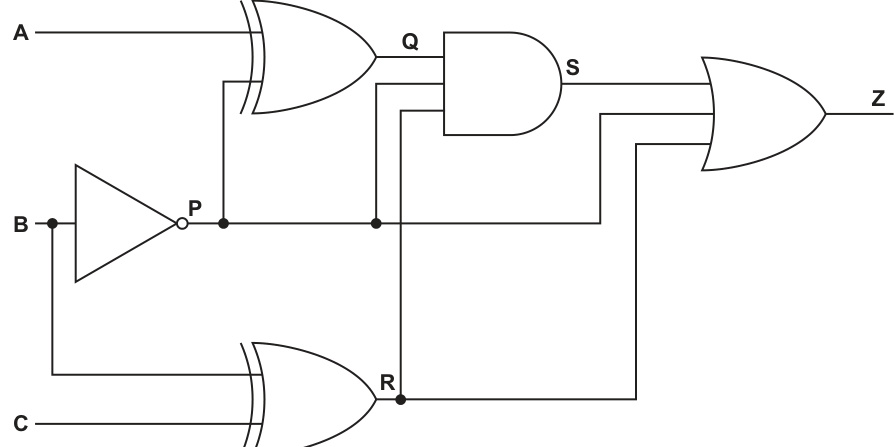
Complete the truth table for the given logic circuit.
Show your working.
| A | B | C | P | Q | R | S | Z |
|---|---|---|---|---|---|---|---|
| 0 | 0 | 0 | |||||
| 0 | 0 | 1 | |||||
| 0 | 1 | 0 | |||||
| 0 | 1 | 1 | |||||
| 1 | 0 | 0 | |||||
| 1 | 0 | 1 | |||||
| 1 | 1 | 0 | |||||
| 1 | 1 | 1 |
Working
Answer
| A | B | C | P | Q | R | S | Z |
|---|---|---|---|---|---|---|---|
| 0 | 0 | 0 | 1 | 1 | 0 | 1 | 1 |
| 0 | 0 | 1 | 1 | 1 | 1 | 1 | 1 |
| 0 | 1 | 0 | 0 | 0 | 1 | 0 | 1 |
| 0 | 1 | 1 | 0 | 0 | 1 | 0 | 1 |
| 1 | 0 | 0 | 1 | 0 | 0 | 0 | 1 |
| 1 | 0 | 1 | 1 | 0 | 1 | 0 | 1 |
| 1 | 1 | 0 | 0 | 1 | 1 | 0 | 1 |
| 1 | 1 | 1 | 0 | 1 | 1 | 0 | 1 |
See completed truth table
Background Concept
A truth table shows the output of a logic circuit for every possible combination of its inputs. To complete one, work through the circuit in the order the signals flow. For each gate, apply its rule:
- NOT reverses the input: 0 becomes 1, 1 becomes 0.
- OR outputs 1 if at least one input is 1.
- AND outputs 1 only if all inputs are 1.
- XOR outputs 1 only when its two inputs are different.
When a circuit has labelled intermediate points such as P, Q, R and S, these are usually included in the table so you can show your working clearly.
Understanding the Question
You are given a logic circuit with inputs A, B and C, and intermediate signals P, Q, R and S. The question asks you to complete the truth table and show working.
From the circuit:
Pis the output of a NOT gate onB, so .Qis the output of an XOR gate usingAandP, so .Ris the output of an OR gate usingBandC, so .Sis the output of an AND gate usingQandP, so .Zis the output of a 3-input OR gate usingS,PandR, so .
So the task is really to calculate these five derived values for each of the eight possible input rows.
Approach
The safest method is:
- Copy the input rows in the given order.
- Fill column
Pfirst because it depends only onB. - Use
Pto findQ. - Find
RfromBandC. - Find
SfromQandP. - Find
ZfromS,PandR.
This left-to-right method prevents mistakes because each later signal uses earlier ones.
Step-by-Step Reasoning
Start with the definitions:
Now go row by row.
Row 1: A=0, B=0, C=0
Row 2: A=0, B=0, C=1
Row 3: A=0, B=1, C=0
Row 4: A=0, B=1, C=1
Row 5: A=1, B=0, C=0
Row 6: A=1, B=0, C=1
Row 7: A=1, B=1, C=0
Row 8: A=1, B=1, C=1
A useful observation is that Z is always 1 here. If B=0, then P=1, so the final OR gate must output 1. If B=1, then R=1 because , so the final OR gate again must output 1.
Key Takeaways
- Work through a logic circuit in signal order, not input-row order alone.
- Use intermediate columns to avoid losing track of internal signals.
- XOR means “different”, not simply “OR”.
- A final OR gate can make a pattern obvious, such as
Zalways being 1.
Common Mistakes
- Treating XOR as ordinary OR. XOR only gives 1 when the two inputs differ.
- Forgetting that
Pis the inverse ofB, so whenB=0,P=1. - Filling
Sfrom the wrong inputs.Scomes fromQANDP, not fromQandR. - Missing that
Zis a 3-input OR, so any one ofS,PorRbeing 1 makesZ=1.
Things to Be Careful About
- Keep the row order exactly as given in the table.
- Calculate columns in dependency order:
P, thenQandR, thenS, thenZ. - Do not skip intermediate columns even if you notice a shortcut.
- Make sure every cell is filled; a single wrong intermediate value can affect later columns.
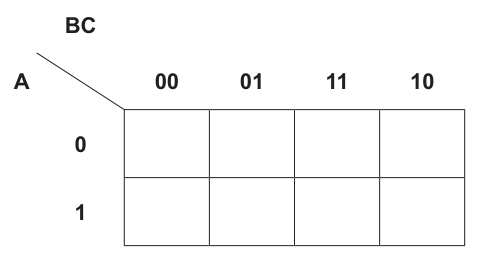
Answer
| A\BC | 00 | 01 | 11 | 10 |
|---|---|---|---|---|
| 0 | 0 | 1 | 1 | 0 |
| 1 | 0 | 1 | 0 | 1 |
See completed K-map
Background Concept
A Karnaugh map is a grid used to represent a Boolean expression visually. Each cell corresponds to one minterm, and for a 3-variable K-map the cells are arranged in Gray-code order so that adjacent cells differ by only one variable.
For this question:
- rows are
A = 0andA = 1 - columns are
BC = 00, 01, 11, 10
A cell gets a 1 if the corresponding combination appears in the Boolean expression. Otherwise it gets 0.
Understanding the Question
You are given the expression
and asked to complete the K-map. So you must locate the four combinations described by the four product terms and place 1 in those cells.
Approach
Take each product term one at a time:
- read the value of
Afrom whether it is complemented or not - read the values of
BandC - convert
BandCinto the appropriate column label - place a
1in that cell
After all terms have been placed, fill every other cell with 0.
Step-by-Step Reasoning
The expression has four product terms.
1.
A=0B=0C=1- so this is row
A=0, columnBC=01
Place 1 at (A=0, BC=01).
2.
A=0B=1C=1- so this is row
A=0, columnBC=11
Place 1 at (A=0, BC=11).
3.
A=1B=0C=1- so this is row
A=1, columnBC=01
Place 1 at (A=1, BC=01).
4.
A=1B=1C=0- so this is row
A=1, columnBC=10
Place 1 at (A=1, BC=10).
Now every remaining cell must be 0.
So the completed K-map is:
- row
A=0:0 1 1 0 - row
A=1:0 1 0 1
Key Takeaways
- A K-map is filled from minterms, not by simplification first.
- Gray-code column order is essential:
00, 01, 11, 10. - Complemented variables mean value
0; uncomplemented variables mean value1.
Common Mistakes
- Using the column order
00, 01, 10, 11, which is wrong for a K-map. - Reading as
B=1instead ofB=0. - Forgetting to fill the unused cells with
0. - Mixing up rows and columns, for example placing
Ain the columns instead of the rows.
Things to Be Careful About
- Keep the exact K-map layout from the figure.
- Check each product term independently before combining anything.
- Do not simplify at this stage; part (i) only asks for the completed map.
- Overlapping later groups do not matter yet; first make sure the cell values themselves are correct.
Draw loop(s) around appropriate group(s) in the K-map to produce an optimal sum-of-products.
Answer
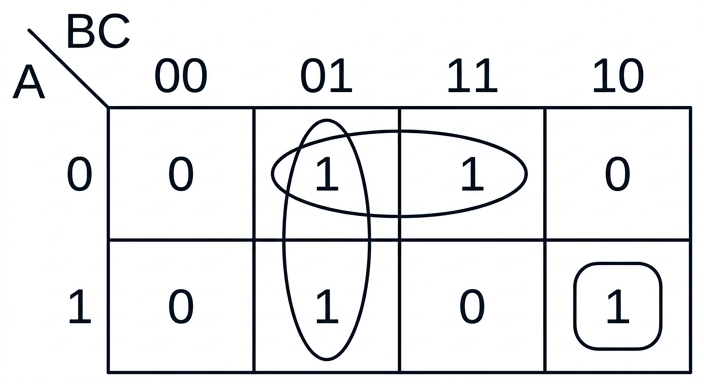
See K-map loops
Background Concept
In a Karnaugh map, you simplify a Boolean expression by grouping adjacent 1 cells. Valid group sizes are powers of 2: 1, 2, 4, 8, .... The aim is to cover every 1 with the largest possible groups, because larger groups remove more variables from the final expression.
Important rules:
- Groups must be rectangular.
- Groups can wrap around edges of the map.
- Groups may overlap if that helps produce a simpler result.
- Every
1must be covered by at least one group. - If a
1has no adjacent1, it must remain as a single-cell group.
Understanding the Question
You already have the completed 3-variable K-map from part (i):
- row
A=0:0 1 1 0 - row
A=1:0 1 0 1
The question now asks you to draw loops around the appropriate groups to obtain an optimal sum-of-products. That means you should make the largest valid groups while still covering all the 1s.
Approach
Look for adjacent 1s first:
- The two
1s in column01form a vertical pair. - The two
1s in rowA=0, columns01and11, form a horizontal pair. - The
1in rowA=1, column10has no adjacent1, so it must be a singleton.
Using overlap is correct here, because the cell at (A=0, BC=01) helps form two separate larger groups.
Step-by-Step Reasoning
Start from the filled K-map.
Group 1: vertical pair in column 01
This covers:
(A=0, BC=01)(A=1, BC=01)
These two cells differ only in A, so A will disappear when the expression is written.
Group 2: horizontal pair in row A=0
This covers:
(A=0, BC=01)(A=0, BC=11)
These two cells differ only in B, so B will disappear later.
Group 3: singleton at (A=1, BC=10)
This 1 has no adjacent 1 above, below, left or right, so it cannot be part of a pair or larger group. It must be left as a group of one.
That means a complete optimal cover uses:
- one vertical pair
- one horizontal pair
- one single-cell group
If you do not include the singleton, one 1 is uncovered and the final simplified expression would not match the original function.
Key Takeaways
- Every
1must be covered. - Use the largest valid groups first.
- Overlap is allowed and often necessary.
- Isolated
1s must remain as singletons.
Common Mistakes
- Grouping diagonally. Diagonal cells are not adjacent in a K-map.
- Forgetting that a single uncovered
1still needs its own group. - Using column order incorrectly, which changes which cells are adjacent.
- Avoiding overlap when overlap actually produces a better simplification.
Things to Be Careful About
- Group sizes must be
1, 2, 4, ..., never3. - Only adjacent cells that differ by one variable may be grouped.
- Draw loops neatly so it is clear exactly which cells are included.
- Do not force a larger group by including a
0; groups may contain only1s.
Write the Boolean expression from your answer to part b(ii) as a simplified sum-of-products. Do not carry out any further simplification.
Working
From the groups:
- column
01vertically gives - row
A=0, columns01and11gives - cell
A=1, BC=10gives
Answer
NOT A.C + NOT B.C + A.B.NOT C
Background Concept
After drawing groups on a Karnaugh map, you convert each group into one product term.
The rule is:
- if a variable stays
1throughout the whole group, write it uncomplemented - if a variable stays
0throughout the whole group, write it complemented - if a variable changes within the group, leave it out
Then add all the product terms together to form the simplified sum-of-products expression.
Understanding the Question
This part asks you to write the simplified Boolean expression that comes directly from the groups chosen in part (ii). The instruction “Do not carry out any further simplification” means you should stop once you have translated each group into a product term. Do not factorise or manipulate the expression beyond that.
Approach
Take each group separately:
- Find which variables stay fixed in that group.
- Write the corresponding product term.
- Join the terms with OR.
Because the groups in part (ii) are:
- a vertical pair in column
01 - a horizontal pair in row
A=0, columns01and11 - a singleton at
A=1, BC=10
you will get three product terms.
Step-by-Step Reasoning
Group 1: column 01 vertically
Column 01 means:
B=0C=1
The group spans both rows, so A changes from 0 to 1 and disappears.
So this group gives:
Group 2: top row, columns 01 and 11
Top row means:
A=0
Across columns 01 and 11:
C=1stays fixedBchanges from0to1, soBdisappears
So this group gives:
Group 3: singleton at A=1, BC=10
A single cell keeps all variables fixed:
A=1B=1C=0
So this group gives:
Combine the terms
Add the three product terms together:
That is already the required simplified sum-of-products from the chosen groups.
Key Takeaways
- A grouped pair removes one variable.
- A singleton removes no variables.
- Variables that change across the group are omitted.
- “Do not simplify further” means stop once the SOP has been read from the map.
Common Mistakes
- Keeping a variable that changes within the group. If it changes, it must be omitted.
- Writing
Binstead of for column01. - Forgetting the singleton term, which would make the final expression incomplete.
- Factorising to something like even though the question specifically asks for sum-of-products.
Things to Be Careful About
- Read the columns in Gray-code order, not ordinary binary order.
- For a top-row group,
A=0, so use . - For the singleton at
10,C=0, so use . - Keep the final answer as separate product terms joined by
+, because that is what sum-of-products means.
Asymmetric encryption is a type of cryptography.
Identify one other type of cryptography.
Answer
- Symmetric encryption
Symmetric encryption
Background Concept
Cryptography is the use of mathematical methods to protect data so that unauthorised people cannot read or alter it. At this level, the main named types you are expected to know are symmetric encryption and asymmetric encryption.
- Symmetric encryption uses the same key for encryption and decryption.
- Asymmetric encryption uses a pair of keys: a public key and a private key.
Questions that say "identify" or "state" usually want only the correct technical term, not an explanation.
Understanding the Question
The question tells you that asymmetric encryption is one type of cryptography and asks for one other type. So you only need to name another valid type.
The most standard answer in this syllabus is symmetric encryption.
Approach
Use recall from the encryption topic:
- Think of the named types of encryption/cryptography you know.
- Exclude the one already given in the question.
- State one valid alternative.
Step-by-Step Reasoning
The question already gives asymmetric encryption.
Another standard type is symmetric encryption, where the same key is used to both encrypt and decrypt the data.
Because the command word is Identify, no further detail is needed for full credit.
Key Takeaways
- Know the two core named encryption types: symmetric and asymmetric.
- For a one-mark identification question, a correct term is enough.
Common Mistakes
- Giving an example of software or a protocol instead of a cryptography type.
- Describing encryption without naming a type.
- Repeating asymmetric encryption, which the question already gave.
Things to Be Careful About
- Read the wording carefully: it asks for one other type.
- Keep the answer short and precise.
- Use the exact technical term symmetric encryption.
An organisation holds two asymmetric encryption keys, which they intend to use to receive secure transmissions.
Explain how the organisation makes use of the two keys to receive a secure transmission.
Answer
- The organisation makes its public key available to the sender.
- The sender uses this public key to encrypt the message.
- The encrypted message is sent to the organisation.
- The organisation uses its private key to decrypt the message.
- The private key is kept secret, so only the organisation can decrypt the transmission.
Public key is shared and used by the sender to encrypt the message; the organisation keeps its private key secret and uses it to decrypt the received transmission.
Background Concept
In asymmetric encryption, each user or organisation has a key pair:
- a public key, which can be shared openly
- a private key, which must be kept secret
The keys are mathematically related, but they do different jobs. For confidentiality when sending data to someone:
- the sender encrypts using the recipient's public key
- the recipient decrypts using their private key
This works because data encrypted with the public key can only be decrypted by the matching private key. That is what makes it suitable for receiving secure transmissions.
Understanding the Question
The organisation wants to receive secure transmissions. That means the focus is on privacy/confidentiality of incoming messages, not proving who sent them.
So the question is really asking:
- which key does the organisation share?
- which key does the sender use?
- which key does the organisation keep secret?
- how does this arrangement keep the transmission secure?
The key clue is the word receive. When someone wants others to send them confidential data, they publish the public key and keep the private key secret.
Approach
Use the standard asymmetric-encryption pattern for confidentiality:
- The organisation shares its public key.
- A sender uses that public key to encrypt the message.
- The sender transmits the encrypted data.
- The organisation decrypts it with its private key.
- Security comes from the fact that only the private key can decrypt the message.
This gives a clear sequence and covers all likely marking points.
Step-by-Step Reasoning
The organisation has two keys.
1. Decide which key can be shared
The public key is the one that may be given to anyone who needs to send a secure message to the organisation. It is designed to be distributed openly.
2. Decide which key must stay secret
The private key belongs only to the organisation. It must not be shared, because it is the key needed to recover the original message.
3. What the sender does
When someone wants to send a confidential transmission to the organisation, they take the organisation's public key and use it to encrypt the plaintext message.
After encryption, the message becomes ciphertext, which is unreadable without the correct corresponding key.
4. What happens during transmission
The encrypted message is then sent across the network. Even if it is intercepted, it should not be readable by an attacker because the attacker does not have the organisation's private key.
5. What the organisation does on receipt
When the organisation receives the ciphertext, it uses its private key to decrypt it and recover the original message.
6. Why this is secure
The important idea is that the two keys have different roles:
- public key for encryption by the sender
- private key for decryption by the recipient
So anyone may send a secure message using the public key, but only the organisation can read it because only the organisation has the private key.
Key Takeaways
- In asymmetric encryption, the two keys are not interchangeable.
- For confidentiality, encrypt with the recipient's public key and decrypt with the recipient's private key.
- The private key must remain secret.
- The public key can be distributed openly without breaking the system.
Common Mistakes
- Reversing the keys and saying the sender encrypts with the private key for confidentiality. That is not the normal method for private transmission.
- Saying both keys are secret. In asymmetric encryption, the public key is intended to be shared.
- Saying the organisation decrypts with the public key. For a confidential received message, decryption is done with the private key.
- Talking about passwords instead of encryption keys.
- Explaining digital signatures instead of secure message receipt. Signatures are about verification/authentication, whereas this question is about receiving a secure transmission.
Things to Be Careful About
- The question is specifically about receiving a secure transmission, so describe the process from the sender to the organisation.
- Use the correct key names exactly: public key and private key.
- Make clear that the public key is shared and the private key is kept secret.
- Do not confuse encryption with decryption.
- If you mention security, tie it to the fact that only the private key can decrypt the message.
Answer
- To produce object code that runs more efficiently, for example faster and/or using less memory.
To produce object code that runs more efficiently, for example faster and/or using less memory.
Background Concept
A compiler translates source code into object code in several stages. Typical stages include lexical analysis, syntax analysis, code generation and optimisation. The optimisation stage does not change what the program does; instead, it tries to improve how efficiently the generated code will run.
Optimisation may remove unnecessary instructions, simplify repeated calculations, reduce memory usage or rearrange code so execution is faster. The key idea is that the output should behave the same as before, but be more efficient.
Understanding the Question
This question asks for the purpose of the optimisation stage during compilation. It is not asking for a description of all compilation stages, and it is not asking how optimisation is done in detail. For 1 mark, the answer needs one clear idea: optimisation improves the generated code so it executes more efficiently.
Approach
For a one-mark theory question like this, give the core purpose directly. The safest wording is to mention efficiency of the object code, such as faster execution or lower memory use.
Step-by-Step Reasoning
The optimisation stage happens after the compiler has already understood the source program and is generating machine-level or object code.
Its purpose is:
- not to change the program's result
- but to improve the generated code
- so the code executes more efficiently
"More efficiently" usually means one or both of:
- faster execution time
- less memory usage
So a full-credit answer is a short statement such as: the compiler optimises the object code to make it run faster or use less memory.
Key Takeaways
- Optimisation is a compilation stage.
- Its job is to improve efficiency, not change the program's meaning.
- Good short-answer wording is "faster execution" and/or "less memory".
Common Mistakes
- Saying it "finds errors": that is not the purpose of optimisation.
- Saying it "translates the code": that describes compilation in general, not optimisation specifically.
- Giving vague wording like "makes it better" without saying in what way.
Things to Be Careful About
- Mention efficiency of the generated code, not just the source code.
- Do not imply the program's output changes.
- For a 1-mark answer, keep it brief and precise.
Convert this Reverse Polish Notation (RPN) back to its original infix form:
a b - c + c a - * d /
Working
a b - gives (a - b)
(a - b) c + gives ((a - b) + c)
c a - gives (c - a)
((a - b) + c) (c - a) * gives (((a - b) + c) * (c - a))
(((a - b) + c) * (c - a)) d / gives ((((a - b) + c) * (c - a)) / d)
Answer
((((a - b) + c) * (c - a)) / d)
((((a - b) + c) * (c - a)) / d)
Background Concept
Reverse Polish Notation (RPN), also called postfix notation, writes operators after their operands. For example, instead of writing a + b, RPN writes a b +.
RPN is useful because it removes the need for precedence rules and most brackets during evaluation. A stack is the standard tool for both evaluating an RPN expression and converting it back into infix form.
To convert RPN back to infix:
- read the expression from left to right
- when you see an operand, push it onto the stack
- when you see an operator, pop the top two items
- combine them as
(left operator right) - push the new sub-expression back onto the stack
The order matters very carefully:
- first popped item = right operand
- second popped item = left operand
Understanding the Question
The question gives the RPN expression:
a b - c + c a - * d /
and asks for the original infix form. That means we must rebuild the bracketed algebraic expression in the correct order.
Because the operators include subtraction and division, operand order is important. For example, a b - means (a - b), not (b - a).
Approach
Use a stack of partial expressions.
Each variable such as a, b, c, d is pushed as an operand. Every time an operator appears, take the most recent two items, combine them with brackets, and push the result back. Continue until one full expression remains.
Brackets are important here because the question asks for the original infix form, and the grouping must be unambiguous.
Step-by-Step Reasoning
Start reading left to right.
-
Read
a- push
a
- push
-
Read
b- push
b
- push
-
Read
-- pop
bthena - combine as
(a - b) - push
(a - b)
- pop
-
Read
c- push
c
- push
-
Read
+- pop
cthen(a - b) - combine as
((a - b) + c) - push that result
- pop
-
Read
c- push
c
- push
-
Read
a- push
a
- push
-
Read
-- pop
athenc - combine as
(c - a) - push that result
- pop
-
Read
*- pop
(c - a)then((a - b) + c) - combine as
(((a - b) + c) * (c - a)) - push it back
- pop
-
Read
d- push
d
- push
-
Read
/- pop
dthen(((a - b) + c) * (c - a)) - combine as
((((a - b) + c) * (c - a)) / d)
- pop
Only one expression is left, so that is the infix form.
Key Takeaways
- RPN is converted back to infix using a stack.
- For every operator, pop two items and combine them.
- The first item popped becomes the right operand.
- Brackets help preserve the exact original grouping.
Common Mistakes
- Reversing operand order for
-or/, for example writing(b - a)instead of(a - b). - Missing brackets and producing an expression whose order of operations is ambiguous.
- Combining the wrong pair of sub-expressions when an operator appears.
Things to Be Careful About
- Always read left to right.
- For subtraction and division, the order of the two popped items is critical.
- Even if a simplified infix expression might still be mathematically acceptable, exam answers are safest when fully bracketed.
- Keep each sub-expression intact when it is pushed back onto the stack.
The RPN expression:
c a / b d – * b +
is to be evaluated, where:
a = 3, b = 16, c = 9 and d = 6.
Show the changing contents of the stack as the RPN expression is evaluated.

Working
c → push 9
a → push 3
/ → 9 / 3 = 3
b → push 16
d → push 6
- → 16 - 6 = 10
* → 3 * 10 = 30
b → push 16
+ → 30 + 16 = 46
Answer
Stack contents after each symbol, shown bottom → top:
| Symbol | Stack contents |
|---|---|
c | 9 |
a | 9, 3 |
/ | 3 |
b | 3, 16 |
d | 3, 16, 6 |
- | 3, 10 |
* | 30 |
b | 30, 16 |
+ | 46 |
See completed trace table
Background Concept
To evaluate an RPN expression, we use a stack. A stack follows LIFO order: last in, first out. That means the most recently pushed value is the first one removed.
The basic RPN evaluation rule is:
- if the next symbol is an operand, push it onto the stack
- if the next symbol is an operator, pop the top two values, apply the operator, then push the result back
For binary operators such as +, -, * and /, the order of the two popped values matters:
- first popped = right operand
- second popped = left operand
So if the stack top contains 6 above 16 and the operator is -, the calculation is 16 - 6, not 6 - 16.
Understanding the Question
The expression is:
c a / b d - * b +
with values:
a = 3b = 16c = 9d = 6
The question does not just want the final answer. It specifically asks to show the changing contents of the stack as the RPN expression is evaluated. So we must track the stack after each symbol is processed.
Approach
First replace each variable by its value:
9 3 / 16 6 - * 16 +
Then process the expression one symbol at a time:
- push numbers onto the stack
- when an operator appears, pop two values
- perform the calculation in the correct order
- push the result
- record the stack after every step
Because the question is about stack contents, it is best to show the state after each symbol.
Step-by-Step Reasoning
We will write the stack from bottom to top.
Start with an empty stack.
-
Symbol
cc = 9- push
9 - stack:
9
-
Symbol
aa = 3- push
3 - stack:
9, 3
-
Symbol
/- pop
3then9 - calculate
9 / 3 = 3 - push
3 - stack:
3
- pop
-
Symbol
bb = 16- push
16 - stack:
3, 16
-
Symbol
dd = 6- push
6 - stack:
3, 16, 6
-
Symbol
-- pop
6then16 - calculate
16 - 6 = 10 - push
10 - stack:
3, 10
- pop
-
Symbol
*- pop
10then3 - calculate
3 * 10 = 30 - push
30 - stack:
30
- pop
-
Symbol
bb = 16- push
16 - stack:
30, 16
-
Symbol
+- pop
16then30 - calculate
30 + 16 = 46 - push
46 - stack:
46
- pop
The final value left on the stack is 46, so the whole expression evaluates to 46.
Key Takeaways
- RPN evaluation is done with a stack.
- Operands are pushed; operators pop two values and push one result.
- For
-and/, operand order is crucial. - The final result is the single value left on the stack.
Common Mistakes
- Doing division as
3 / 9instead of9 / 3. - Doing subtraction as
6 - 16instead of16 - 6. - Forgetting to push the result back after an operation.
- Giving only the final answer
46and not showing the changing stack contents.
Things to Be Careful About
- Record the stack after every symbol, not just after each operator.
- Be consistent about whether you write the stack bottom-to-top or top-to-bottom.
- When an operator appears, the top of the stack is the right operand.
- Check that one final value remains on the stack at the end; if more than one remains, a step has gone wrong.
Deep Learning is a form of Machine Learning.
Answer
- Face recognition
Face recognition
Background Concept
Deep Learning is a type of Machine Learning based on artificial neural networks with multiple layers, especially hidden layers. These layers allow the system to learn complex patterns from large amounts of data. Deep learning is especially strong at tasks where patterns are difficult to define with simple rules, such as recognising images, speech or natural language.
Understanding the Question
This part asks for one example of where deep learning is used. Since it is only 1 mark, the examiner is not asking for an explanation, just one correct application area.
Approach
Think of a task where a computer has to learn patterns from lots of examples rather than follow a fixed set of instructions. Common deep learning uses include image recognition, speech recognition, self-driving systems and language translation. Any one valid example gains the mark.
Step-by-Step Reasoning
A good example is face recognition. In face recognition, a deep learning model is trained on many images of faces. It learns patterns such as the relative positions of eyes, nose and mouth, and then uses those patterns to identify or verify a person.
Because this is a "state one example" question, simply writing "Face recognition" is enough.
Key Takeaways
- Deep learning is used for tasks involving complex pattern recognition.
- Image-based and speech-based applications are common examples.
- For a 1-mark "state" question, a short correct example is sufficient.
Common Mistakes
- Giving a vague answer such as "computers" or "technology" which is not a specific application.
- Naming a general field like "AI" instead of an actual use.
- Explaining too much and still failing to give a clear example.
Things to Be Careful About
- Make sure the example is genuinely a use of deep learning.
- A single clear phrase is usually best in a 1-mark response.
- Do not overcomplicate the answer when only one example is required.
Answer
- Use a larger amount of training data.
Use a larger amount of training data.
Background Concept
Deep learning systems improve by learning from data. During training, the model adjusts internal weights so that its outputs become closer to the correct answers. In general, deep learning becomes more effective when it has enough good-quality training data to learn from, because more examples help it detect patterns more accurately.
Understanding the Question
This part asks for one way deep learning can be made more effective. It does not ask for a full explanation, only a valid improvement factor.
Approach
Choose one accepted factor that improves learning quality. A strong answer is to say that more training data can be used. This is a common and widely accepted reason because deep learning models usually perform better when trained on large datasets.
Step-by-Step Reasoning
Deep learning works by finding patterns across many examples. If the system is trained on only a small amount of data, it may not learn the patterns well. If it is trained on a larger amount of relevant data, it has more examples to learn from and can usually make more accurate predictions or classifications.
So a correct answer is:
- Use a larger amount of training data.
Key Takeaways
- Deep learning relies heavily on training data.
- More suitable training data usually improves the quality of the learned model.
- In short identification questions, one correct improvement factor is enough.
Common Mistakes
- Giving an answer that is too vague, such as "make it better".
- Describing what deep learning is instead of how to improve it.
- Naming something unrelated to effectiveness, such as just "use a computer".
Things to Be Careful About
- The question asks for one way, so a single valid point is enough.
- Keep the answer focused on improvement of learning, not on unrelated hardware or general AI ideas.
- Make sure the factor you give clearly affects how well the model learns.
Answer
- The neural network produces an output for a training example.
- This output is compared with the expected output and the error is calculated.
- The error is passed back through the network from the output layer towards the input layer.
- The weights of the connections are adjusted to reduce the error, and this is repeated for many training examples until the error is minimised.
Compare output with expected result, calculate error, propagate it backwards and adjust weights repeatedly to reduce the error.
Background Concept
Back propagation of errors is a training method used with artificial neural networks. A neural network contains layers of nodes connected by weighted links. When input data is fed into the network, values pass forward through the layers and an output is produced.
If the network is being trained using supervised learning, the correct output is already known for each training example. Back propagation is then used to measure how wrong the network's answer is and to adjust the connection weights so that future answers are better.
The key idea is simple:
- send data forward through the network,
- measure the error,
- send information about that error backwards,
- change the weights to reduce the error.
Understanding the Question
This question asks you to describe the back propagation of errors method in machine learning. It is not asking for code or a mathematical derivation. It wants the main stages of the method in a clear sequence.
Because it is 4 marks, you should include several linked points rather than a one-line definition. The important ideas are output, comparison with expected result, backward passing of error, and weight adjustment.
Approach
The best approach is to describe the training cycle in order:
- produce an output,
- compare it with the correct output,
- calculate the error,
- move that error backwards through the network,
- alter weights,
- repeat until performance improves.
This gives a complete description that matches what examiners usually reward.
Step-by-Step Reasoning
First, the network is given a training example as input. The values move forward through the layers and the network produces an output.
Next, that output is compared with the expected or target output. If they are different, the system calculates an error value. This error shows how far the network's answer is from the correct answer.
Then the network works backwards from the output layer through the hidden layers. This is the "back propagation" stage. The error information is passed back through the network so the system can work out which weights contributed to the wrong result.
After that, the weights of the connections are adjusted. The aim is to reduce the error next time the same or similar input is processed. Larger errors usually lead to larger changes, while smaller errors lead to smaller adjustments.
This process is repeated over many training examples, often many times. Repeated adjustment gradually improves the network so that the total error becomes smaller and the outputs become more accurate.
A good 4-mark description therefore includes:
- output produced from training data,
- comparison with expected output,
- error calculated and sent backwards,
- weights changed and process repeated.
Key Takeaways
- Back propagation is a supervised learning training method for neural networks.
- The network learns by reducing the difference between actual and expected output.
- Errors are used to update the weights of connections.
- Training is iterative: the process is repeated many times.
Common Mistakes
- Describing only the forward pass and not mentioning the backward pass.
- Saying the network "stores the answer" instead of explaining that it adjusts weights.
- Forgetting that the output must be compared with a known correct output.
- Treating back propagation as a search algorithm rather than a training method.
Things to Be Careful About
- Use the correct sequence: forward output first, then error calculation, then backward adjustment.
- Mention weights specifically, because changing the weights is how learning occurs.
- The word "back" in back propagation matters: the error is sent from output layer towards earlier layers.
- Since this is a description question, clear ordered points score better than vague general statements.
An exception is an error that may cause a program to halt unexpectedly.
Answer
- Use exception handling, for example a
TRY ... CATCH/EXCEPTblock, to trap the error. - Handle the error with suitable code, such as displaying a message or asking for new input, so the program does not halt unexpectedly.
Use exception handling to trap the error and run handling code so the program continues instead of halting.
Background Concept
An exception is a run-time error condition that occurs while a program is executing. Unlike a syntax error, which is found before the program runs, an exception happens during execution. Common examples are dividing by zero, trying to open a file that does not exist, or using an invalid array index.
If a program does not deal with the exception, the default behaviour is often that the program stops abruptly. Exception handling is the mechanism used to prevent that. A section of code is placed inside a construct such as TRY ... CATCH, TRY ... EXCEPT, or similar. If an exception occurs, control is transferred to the handling code instead of the whole program simply terminating.
Understanding the Question
The question is not asking for examples of exceptions yet; it is asking how termination can be avoided when an exception happens. So the key idea is not "remove all errors" but "catch the error and deal with it safely".
For 2 marks, the answer normally needs two linked ideas:
- the program must trap or catch the exception
- the program must then handle it in some way so that execution can continue or end in a controlled way
Approach
The best approach is to state the general method first: use exception-handling code. Then state what that code does: it intercepts the error and runs alternative instructions such as showing an error message, ignoring the faulty action, using a default value, or asking the user to re-enter data.
That directly answers both parts of the idea the examiner is looking for.
Step-by-Step Reasoning
- The program reaches a statement that may cause a run-time problem.
- That statement is placed inside an exception-handling structure such as
TRY. - If no error occurs, execution continues normally.
- If an exception occurs, the program does not immediately crash.
- Instead, control jumps to the matching handler such as
CATCHorEXCEPT. - The handler contains code to deal with the problem, for example:
- output an error message
- request valid input again
- skip the invalid operation
- use a safe default action
- close files or clean up resources
- Because the exception was handled, the program can continue running or end gracefully rather than halting unexpectedly.
So the essential description is: trap the exception, then provide handling code.
Key Takeaways
- Exceptions are run-time errors, not syntax errors.
- Unhandled exceptions can cause abrupt program termination.
- Exception handling works by trapping the error and running alternative code.
- A good answer must mention both catching the exception and handling it.
Common Mistakes
- Saying only "debug the program". That is not what the question asks; it asks how termination due to an exception is avoided during execution.
- Saying only "use validation". Validation can reduce some exceptions, but it is not the direct mechanism for handling an exception once it occurs.
- Mentioning
TRYwithout saying what happens next. To score fully, you should also say the exception is handled so the program does not halt. - Confusing syntax errors with exceptions. Syntax errors are usually found before execution, whereas exceptions occur at run time.
Things to Be Careful About
- Use the term exception handling accurately.
- Make clear that the error is trapped before termination.
- Make clear that there is handling code, not just detection.
- Do not drift into giving causes of exceptions here; that belongs to part (b).
Identify two possible causes of exceptions.
1 ................................................................................................................................................
...................................................................................................................................................
2 ................................................................................................................................................
...................................................................................................................................................
Answer
- Division by zero.
- Attempting to open or read a file that does not exist.
- Division by zero. 2. Attempting to open or read a file that does not exist.
Background Concept
An exception is caused by a run-time condition that the program cannot complete normally. These are situations where the instruction is valid in general, but the specific data or environment makes it fail.
Typical causes include:
- division by zero
- file not found
- invalid data type entered by a user
- array index out of bounds
- numeric overflow
- attempting an invalid operation on a null or uninitialised object
The exact examples accepted can vary, but they must be genuine run-time causes of exceptions.
Understanding the Question
This part asks for two possible causes, so the task is simply to name two valid situations that would raise an exception. No long explanation is needed. The safest approach is to choose very common, unambiguous examples.
Approach
Pick two standard run-time errors that are widely recognised:
- division by zero
- trying to access a file that is missing
These are strong choices because they are clearly exceptions and are unlikely to be disputed.
Step-by-Step Reasoning
For the first example:
- If a program evaluates an expression where the divisor is zero, the arithmetic operation cannot be completed.
- This raises an exception at run time.
For the second example:
- If a program attempts to open or read a file that is not present at the specified location, the operating system cannot complete the file access request.
- This raises a file-handling exception.
Since the question asks for two causes, listing these two is enough.
Key Takeaways
- Causes of exceptions are run-time problems.
- Good examples are specific situations, not vague statements like "there is an error".
- Division by zero and missing files are standard examples to remember.
Common Mistakes
- Giving syntax errors, such as a missing bracket. That is usually detected before the program runs, so it is not a run-time exception.
- Writing a vague answer such as "bad input" without making clear what the run-time problem is.
- Repeating the same idea twice in different words.
- Naming logic errors. A logic error may produce the wrong output without necessarily causing an exception.
Things to Be Careful About
- The question says identify two, so give exactly two clear examples.
- Make sure each example is definitely a cause of a run-time exception.
- Choose examples that are easy for an examiner to credit without extra explanation.
- Avoid over-explaining; this is a short identification question.
The table shows assembly language instructions for a processor that has one register, the Accumulator (ACC).
| Label | Opcode | Operand | Explanation |
|---|---|---|---|
| LDM | #n | Load the number n to the ACC | |
| LDD | <address> | Load the contents of the location at the given address to ACC | |
| LDI | <address> | The address to be used is at the given address. Load the contents of this second address to the ACC. | |
| ADD | <address> | Add the contents of the given address to the ACC | |
| SUB | <address> | Subtract the contents of the given address from the ACC | |
| STO | <address> | Store the contents of the ACC at the given address | |
| <label>: | <data> | Gives a symbolic address <label> to the memory location with the contents <data> |
denotes a denary number, e.g. #123
<label> can be used in place of <address>
The current contents of memory are:
| Address | Contents |
|---|---|
| 150 | 26 |
| 300 | 86 |
| 420 | 150 |
Write assembly language code, using only the given instruction set to:
- store the contents of location 300 as labelled variable
A - store the contents of location 420 as labelled variable
B - add the value stored in the address contained in variable
Bto the value contained in variableA - store the result in variable
Answer.
Show the initialisation and values of the variables A, B and Answer in the table provided.
| Label | Content |
|---|---|
Answer
        LDD 300
        STO A
        LDD 420
        STO B
        LDI B
        ADD A
        STO Answer
| Label | Content |
|---|---|
| A | 0 |
| B | 0 |
| Answer | 0 |
See assembly code and variable table
Background Concept
This question is about low-level programming using an accumulator-based instruction set. In this kind of processor, there is one main working register, the ACC, and nearly every calculation happens through it.
The important instructions here are:
LDD addressloads into the ACC the contents of the named memory location.STO addressstores the current ACC value into the named memory location.ADD addressadds the contents of the named memory location to the ACC.LDI addressis indirect addressing. It does not use the given address directly. Instead:- go to the given address
- read the value stored there
- treat that value as a second address
- load the contents of that second address into the ACC
So if B contains 150, then LDI B means “look at B, find 150, then load the contents of address 150”. If address 150 contains 26, then LDI B loads 26 into the ACC.
The labelled-variable lines such as A: 0 are memory locations reserved for storing data. The label gives the symbolic address, and the number is the initial content.
Understanding the Question
You are given three memory contents:
- address
150contains26 - address
300contains86 - address
420contains150
You must write assembly code that does four things:
- copy the contents of location
300into variableA - copy the contents of location
420into variableB - use the address stored in
Bto find another value and add that to the value inA - store the final result in
Answer
The key wording is:
- “contents of location 300” means use direct addressing:
LDD 300 - “contents of location 420” also means direct addressing:
LDD 420 - “value stored in the address contained in variable
B” means indirect addressing, soLDI Bis the correct instruction
This is exactly the sort of situation where you must distinguish between:
- the value in a variable
- an address stored in a variable
- the value found at that stored address
Approach
A good strategy is to follow the bullet points in order.
First, load the value from address 300 and store it in A.
Then, load the value from address 420 and store it in B.
At that point:
Awill contain86Bwill contain150
Now the question wants the value stored at the address contained in B.
Since B = 150, we need the contents of address 150, which is 26.
That is exactly what LDI B does.
Once 26 is in the ACC, we can add the contents of A to it using ADD A, giving 112, and then store that in Answer.
Finally, because A, B and Answer are variables, they need to be declared as labelled memory locations, usually initialised to 0.
Step-by-Step Reasoning
Start with the known memory:
[150] = 26[300] = 86[420] = 150
Now follow the code.
-
LDD 300- Load contents of address
300into ACC - ACC becomes
86
- Load contents of address
-
STO A- Store ACC into variable
A Anow contains86
- Store ACC into variable
-
LDD 420- Load contents of address
420into ACC - ACC becomes
150
- Load contents of address
-
STO B- Store ACC into variable
B Bnow contains150
- Store ACC into variable
-
LDI B- Look at variable
B Bcontains150- So now go to address
150 - Address
150contains26 - ACC becomes
26
- Look at variable
-
ADD A- Add contents of
Ato the ACC Acontains86- ACC becomes
26 + 86 = 112
- Add contents of
-
STO Answer- Store ACC into
Answer Answernow contains112
- Store ACC into
So after execution:
A = 86B = 150Answer = 112
The initialisation table, however, is normally showing the starting contents for those labelled memory locations before the program runs, so using 0 for each variable is appropriate unless the question says otherwise.
That is why the variable declarations are:
A: 0B: 0Answer: 0
Key Takeaways
LDDuses direct addressing: it loads from the stated address.LDIuses indirect addressing: it follows an address stored in memory.- In accumulator machines, intermediate values must pass through the ACC.
- Labelled variables such as
A,BandAnswerare memory locations that should be initialised. - Always read carefully whether a question wants a value, an address, or the contents of an address stored somewhere else.
Common Mistakes
-
Using
LDD Binstead ofLDI B.LDD Bwould load the contents of variableBitself, which is150, not the contents of address150.
-
Trying to use a non-existent instruction such as
ADDI.- The question says to use only the given instruction set, and
ADDIis not provided.
- The question says to use only the given instruction set, and
-
Adding
Binstead of the value pointed to byB.ADD Bwould add150, but the question wants the value at address150, which is26.
-
Forgetting to store the values into
AandBfirst.- The task explicitly says to store the contents of locations
300and420as labelled variables.
- The task explicitly says to store the contents of locations
-
Writing the variable labels without initial values.
- The labelled-data format shown in the instruction table includes contents, so
A,BandAnswershould be initialised.
- The labelled-data format shown in the instruction table includes contents, so
Things to Be Careful About
- The variable table is for initial values, not the final values after execution, unless the question explicitly asks for final contents.
LDI Bmeans two memory lookups: first atB, then at the address stored inB.ADD Aadds the contents of memory locationA, not the letterAitself.- Keep the instruction order correct. If you use
LDI Bbefore storing intoB, the program will not work as intended. - Use only the instructions listed in the question. In low-level programming questions, inventing extra instructions loses marks even if the logic seems reasonable.
A stack has been implemented using pseudocode to store a maximum of 100 string items using the global variables in the following table:
| Identifier | Data type | Description | Initialisation value |
|---|---|---|---|
| Base | INTEGER | pointer for the bottom of the stack | 0 |
| Top | INTEGER | pointer for the top of the stack | -1 |
| StackArray | STRING | 1D array to implement the stack | [0:99] |
| Max | INTEGER | maximum number of items in the stack | 100 |
The value of Top is incremented each time a data item is added to the stack and decremented each time a data item is removed. If the stack is full, an appropriate error message is output.
Complete the pseudocode for the procedure to add a data item onto the stack.
PROCEDURE Push(.........................................................................................)
  IF Top < Max – 1 THEN
    Top ← ...............................................................................................
    ...................................................................................... ← NewData
  ELSE
    OUTPUT ...............................................................................................
  ENDIF
ENDPROCEDURE
Answer
PROCEDURE Push(BYVAL NewData : STRING)
  IF Top < Max - 1 THEN
    Top ← Top + 1
    StackArray[Top] ← NewData
  ELSE
    OUTPUT "Stack full"
  ENDIF
ENDPROCEDURE
See completed pseudocode
Background Concept
A stack is a last-in, first-out (LIFO) abstract data type. This means the most recent item added is the first one removed. In an array-based stack, a pointer such as Top keeps track of the current top item.
For a Push operation:
- first check whether there is space in the stack
- if there is space, move
Topup by one - store the new item in the array position indicated by
Top - if there is no space, report overflow with an error message
In this question, the stack uses positions 0 to 99, so a maximum of 100 items can be stored. A full stack therefore has Top = 99, which is the same as Max - 1.
Understanding the Question
You are given the global variables already used to implement the stack:
Topstarts at-1, meaning the stack is emptyStackArraystores the itemsMaxis100
The incomplete procedure is for adding one new string item to the stack. So the missing parts must:
- accept the new string item as a parameter
- check that the stack is not full
- increase
Top - store the new item in
StackArray[Top] - otherwise output an error message
The wording says the item is added "onto the stack", so this is the standard Push operation.
Approach
Use the normal array-based stack algorithm.
Because Top points to the current top item, when a new item is pushed:
- the new free position is one above the current top
- so
Topmust be incremented first - then the value can be stored at that new position
The full condition is checked using Top < Max - 1. If that condition is false, the array has no free position left.
Step-by-Step Reasoning
The procedure header needs a parameter for the item to be added. Since the stack stores strings, the parameter should be a STRING:
PROCEDURE Push(BYVAL NewData : STRING)
BYVAL is suitable because the procedure only needs to receive the value; it does not need to change the caller's variable.
The condition is already given:
IF Top < Max - 1 THEN
This means there is still at least one free position in the array. With Max = 100, the highest valid index is 99.
If there is space, the top pointer moves up one position:
Top ← Top + 1
This is essential. If you stored first and incremented second, you would overwrite the current top item or use the wrong position.
Next, place the new data item in the array at the new top position:
StackArray[Top] ← NewData
If the stack is full, an error message is output:
OUTPUT "Stack full"
The exact wording of the message is not usually important as long as it clearly indicates overflow or that the stack is full.
Putting it all together gives the complete Push procedure.
Key Takeaways
- A stack uses LIFO order.
- In an array-based stack,
Topidentifies the current top item. - For
Push, check for overflow, incrementTop, then store the item. - A full stack occurs when
Tophas reached the highest valid index.
Common Mistakes
- Writing
Top ← Top - 1instead of incrementing it. That would move in the wrong direction. - Storing into
StackArray[Top]before updatingTop. That would use the old top position. - Using
Top <= Max - 1as the condition. That would allow one invalid extra insertion when the stack is already full. - Forgetting that the array indices are
0to99, not1to100. - Omitting the parameter type or using the wrong type when the stack stores strings.
Things to Be Careful About
- The stack is zero-indexed here, so the last valid element is
StackArray[99]. Top = -1means empty; it does not mean the first element is at-1.- Use the assignment arrow
←, not=. - Keep the identifier names exactly as given:
Top,Max,StackArray,NewData. - The overflow message can vary, but it must clearly show that the stack is full.
Answer
DECLARE NewData : STRING
INPUT NewData
CALL Push(NewData)
See completed pseudocode
Background Concept
Once a procedure has been written, it can be reused by calling it from elsewhere in the program. For a stack, the main program or another procedure often:
- reads a value from the user
- passes that value to
Push()
A procedure call sends an argument into the parameter of the procedure. Here, the new string item entered by the user becomes the NewData parameter inside Push().
Understanding the Question
This part is not asking you to rewrite Push(). It asks you to write pseudocode that:
- inputs a new data item
- adds it to the stack using
Push()
So the answer only needs the code to get the data from the user and then call the existing procedure.
Approach
Use a temporary variable to hold the input value. Since the stack stores string items, that variable should be declared as STRING.
Then:
INPUTthe valueCALL Push(...)with that value as the argument
This matches how procedures are used in CIE pseudocode.
Step-by-Step Reasoning
First declare a variable to store the user's new item:
DECLARE NewData : STRING
The data type must match what the stack stores.
Next read in the value:
INPUT NewData
At this point, the variable contains the item the user wants to add.
Finally call the procedure:
CALL Push(NewData)
This sends the input value into the Push() procedure, which then handles the stack full check and the insertion.
Key Takeaways
- Reuse an existing procedure instead of rewriting its logic.
- Match the input variable type to the data being stored.
- A procedure call passes the argument into the procedure parameter.
Common Mistakes
- Calling
Push()without first inputting a value. - Forgetting to declare
NewData. - Using the wrong data type for
NewData. - Trying to write the whole push algorithm again instead of calling the existing procedure.
Things to Be Careful About
- Use
CALL Push(NewData)in CIE pseudocode. - Keep the identifier
NewDataconsistent with the procedure parameter. - The question asks for pseudocode, not a real programming language.
- Do not add unnecessary code such as loops or extra validation unless asked.
Answer
- Each recursive call must store its own return address and its own local variables/parameter values.
- A stack is suitable because recursion works in last-in, first-out order: the most recent call must finish first.
- When a call finishes, its data is popped from the stack and control returns to the previous call, allowing the recursion to unwind correctly.
See explanation
Background Concept
Recursion happens when a procedure or function calls itself. Every time that happens, the program must keep track of the current call so that it can return to it later.
The data saved for a call typically includes:
- the return address, so the program knows where to continue afterwards
- the parameter values for that call
- any local variables created during that call
This stored block of information is often called a stack frame or activation record. These frames are kept on a stack.
A stack is ideal because it is last-in, first-out (LIFO). The newest recursive call is always the next one that must complete, so the newest frame should be removed first.
Understanding the Question
The question asks why a stack is used when a recursive algorithm is executed. It is not asking how to write recursion. It wants the reason the computer uses a stack behind the scenes.
To answer well, you need to connect:
- what recursion does: many nested calls to the same routine
- what must be remembered for each call: address, parameters, local variables
- why the stack structure fits: the most recent call returns first
Approach
Give three linked points:
- each recursive call needs its own stored context
- that context is stored on a stack
- the stack's LIFO behaviour matches the order in which recursive calls return and unwind
This directly addresses both the storage need and the reason the stack data structure is appropriate.
Step-by-Step Reasoning
Suppose a function calls itself several times. The first call cannot finish immediately because it pauses while the second call runs. Then the second may pause while a third call runs, and so on.
That creates a chain of unfinished calls. For the program to work correctly, each unfinished call must have its state saved somewhere. That state includes:
- where execution should resume after the inner call ends
- what argument values belong to that level of recursion
- what local variables belong to that level of recursion
A stack is used to store these separate call records.
Why a stack specifically?
Because the most recent recursive call is the first one that can complete. For example:
- Call 1 creates a frame and waits
- Call 2 creates a frame and waits
- Call 3 creates a frame and reaches the base case
Now Call 3 finishes first. Its frame is removed first. Control returns to Call 2. Then Call 2 finishes and its frame is removed. Then Call 1 finishes.
That order is exactly LIFO:
- last call made = first call removed
- earliest call made = last call removed
This is why recursion is naturally handled using a stack.
Key Takeaways
- Recursive calls create multiple unfinished instances of the same routine.
- Each call needs its own stored context, including return address and local data.
- A stack is used because recursive calls unwind in last-in, first-out order.
- Understanding recursion includes understanding what happens at runtime, not just the code itself.
Common Mistakes
- Saying only that "a stack stores data" without explaining what data or why that helps recursion.
- Describing a normal programmer-defined stack ADT instead of the call stack used by the system.
- Forgetting to mention return addresses or local variables/parameters.
- Saying recursion works in first-in, first-out order. That would describe a queue, not recursion.
Things to Be Careful About
- The question is about execution of recursion, so focus on runtime storage of calls.
- Use the idea of LIFO explicitly, because that is the key reason a stack is suitable.
- Distinguish between the recursive algorithm itself and the system mechanism used to manage it.
- The process of returning from deeper calls is often called unwinding; this is a useful term to know.