Computer Science 9618/31 — October/November 2025
Cambridge A-Level · Advanced Theory · worked solutions for every part, with the mark scheme
Topics Data Representation · System Software · Further Programming · Communication and Internet Technologies · Security · Hardware and Virtual Machines · +2 more
The composite record data type, ClubMember, is defined in pseudocode as:
TYPE ClubMember
  DECLARE Code : INTEGER
  DECLARE LastName : STRING
  DECLARE FirstName : STRING
  DECLARE Telephone : STRING
  DECLARE JoinDate : DATE
  DECLARE Fees : REAL
  DECLARE FeesPaid : BOOLEAN
ENDTYPE
Write the pseudocode statement to set up a variable for one record of the composite data type, ClubMember.
...........................................................................................................................................
.....................................................................................................................................
Answer
DECLARE Member : ClubMember
DECLARE Member : ClubMember
Background Concept
A composite user-defined data type groups several related fields into one record. In this question, ClubMember is a record type containing fields such as Code, LastName, JoinDate and FeesPaid.
Once a type has been defined, you can declare variables of that type. Declaring a variable of type ClubMember creates one record that has all of those fields inside it.
The general form is:
DECLARE VariableName : TypeName
So if the type name is ClubMember, the variable must be declared with : ClubMember.
Understanding the Question
The question is not asking you to redefine the whole ClubMember type. That has already been given in the stem.
It is asking for one pseudocode statement that sets up a variable which can store one ClubMember record. In other words, you need a declaration statement for a single record variable.
Approach
Use the normal CIE pseudocode declaration format:
- choose a sensible variable name
- write
DECLARE - put the variable name
- follow it with
: ClubMember
Any valid variable name would normally be acceptable, provided the type is ClubMember.
Step-by-Step Reasoning
The type already exists:
TYPE ClubMember
  ...
ENDTYPE
So now we declare one variable based on that type.
DECLAREstarts a variable declaration.Memberis the chosen variable name.: ClubMembersays that this variable stores one record of the composite typeClubMember.
That gives:
DECLARE Member : ClubMember
This means Member now contains fields such as Member.Code, Member.FirstName and Member.FeesPaid.
Key Takeaways
- A composite type stores several related fields together.
- After defining a type, you declare a variable of that type with
DECLARE VariableName : TypeName. - A single record variable represents one complete instance of that record structure.
Common Mistakes
- Rewriting the whole
TYPE ClubMember ... ENDTYPEdefinition instead of declaring a variable. - Omitting
DECLARE. - Using a built-in type such as
INTEGERinstead ofClubMember. - Writing only a variable name without its type.
Things to Be Careful About
- The type name must match the one given in the question exactly:
ClubMember. - This part asks for one record variable, not an array of records.
- Keep to CIE pseudocode declaration style, not a programming-language-specific syntax such as
ClubMember Member;.
Write the pseudocode statements to assign the following values to the variable set up in part (a)(i):
- 984632 to
Code TRUEtoFeesPaid
...........................................................................................................................................
...........................................................................................................................................
...........................................................................................................................................
.....................................................................................................................................
Answer
Member.Code ← 984632
Member.FeesPaid ← TRUE
Member.Code ← 984632; Member.FeesPaid ← TRUE
Background Concept
A record variable stores several named fields. To access one field inside the record, pseudocode uses dot notation:
RecordVariable.FieldName
For example, if Member is a ClubMember, then:
Member.Coderefers to theCodefieldMember.FeesPaidrefers to theFeesPaidfield
To place data into those fields, use the assignment arrow ←.
Understanding the Question
This part follows on from part (a)(i), where a variable for one ClubMember record was declared.
You are asked to assign two given values to two specific fields in that record:
984632must go intoCodeTRUEmust go intoFeesPaid
So the answer needs two assignment statements, one for each field.
Approach
Start from the record variable created in part (a)(i), here named Member.
Then for each field:
- write the record variable name
- add a full stop and the field name
- use
← - place the given value on the right-hand side
Step-by-Step Reasoning
The first value is for the Code field.
Since Code is a field inside the Member record, write:
Member.Code ← 984632
The second value is for the FeesPaid field.
Since FeesPaid is a Boolean field, the value TRUE is assigned directly:
Member.FeesPaid ← TRUE
Together, the complete answer is:
Member.Code ← 984632
Member.FeesPaid ← TRUE
Key Takeaways
- Use dot notation to access fields in a record.
- Use
←for assignment in CIE pseudocode. - Match the value type to the field type: integer to
Code, Boolean toFeesPaid.
Common Mistakes
- Writing
Code ← 984632without the record variable name. - Using
=instead of←for assignment. - Misspelling field names such as
FeePaidinstead ofFeesPaid. - Writing
"TRUE"as a string instead of the Boolean valueTRUE.
Things to Be Careful About
- The field names must match the record definition exactly:
CodeandFeesPaid. TRUEis a Boolean literal, so do not put it in quotes.- Stay consistent with the variable name chosen in part (a)(i). If you declared
Member, useMemberagain here.
An enumerated data type, Activity, is required, so that a new field, Choice, can be added to the composite data type, ClubMember, to allow members to choose an activity.
Write the pseudocode statement for the type declaration of Activity to hold the names of the available activities:
Badminton, Football, Golf, Snooker, Swimming, Tennis.
...........................................................................................................................................
...........................................................................................................................................
...........................................................................................................................................
.....................................................................................................................................
Answer
TYPE Activity = (Badminton, Football, Golf, Snooker, Swimming, Tennis)
TYPE Activity = (Badminton, Football, Golf, Snooker, Swimming, Tennis)
Background Concept
An enumerated data type is a user-defined type whose values are limited to a fixed list of named items. It is useful when a field should only hold one value from a known set.
For example, an Activity field should not contain any random string. It should contain only one of the allowed activity names. An enumeration enforces that idea at the design level.
In pseudocode, the type is declared by naming the type and listing all allowed values.
Understanding the Question
The question says a new field called Choice will be added to ClubMember so that each member can choose an activity.
Before that field can be declared, the type Activity must first be created. The available activities are given explicitly:
- Badminton
- Football
- Golf
- Snooker
- Swimming
- Tennis
So this part asks for the type declaration that defines exactly those allowed values.
Approach
Use an enumerated type declaration:
- write the new type name
Activity - assign it to a list of values in brackets
- include every activity given in the question
- do not add extra values or miss any out
Step-by-Step Reasoning
The type name required is Activity.
The allowed values are the six activity names supplied in the question. So the declaration must show that Activity can take one of those six values only.
That gives:
TYPE Activity = (Badminton, Football, Golf, Snooker, Swimming, Tennis)
This means any variable or field declared as Activity can hold only one of those named options.
Key Takeaways
- An enumerated type restricts data to a fixed set of valid values.
- It is useful for fields with a controlled choice list.
- The declaration must include all allowed values exactly as required.
Common Mistakes
- Declaring
ActivityasSTRINGinstead of as an enumerated type. - Missing one of the activities from the list.
- Adding quotes around the activity names when the pseudocode format expects enumeration values.
- Writing a variable declaration instead of a type declaration.
Things to Be Careful About
- This part asks for the type declaration, not the field declaration inside
ClubMember. - Include all six activities and keep the spelling correct.
- Use the type name
Activityexactly, because part (b)(ii) depends on it.
Write the new pseudocode statement required to update the declaration of Choice in the definition of ClubMember.
...........................................................................................................................................
.....................................................................................................................................
Answer
DECLARE Choice : Activity
DECLARE Choice : Activity
Background Concept
Once a user-defined type has been created, it can be used in declarations just like built-in types such as INTEGER or BOOLEAN.
Here, Activity is an enumerated type. That means any field declared as Activity can store only one of the listed activity values.
Inside a composite record definition, each field is declared with:
DECLARE FieldName : TypeName
Understanding the Question
The question says that the ClubMember record is being updated to include a new field called Choice.
Since part (b)(i) created the type Activity, this field should now use that type. So the task is simply to write the one new line that would appear inside the ClubMember type definition.
Approach
Use the standard field declaration format:
- write
DECLARE - use the field name
Choice - follow with
: Activity
That shows that Choice stores one of the enumerated activity values.
Step-by-Step Reasoning
The field name required is Choice.
The type that has just been defined is Activity.
So the new declaration line is:
DECLARE Choice : Activity
If this line is inserted into the ClubMember type definition, each record will then have a Choice field whose value must be one of the allowed activities.
Key Takeaways
- User-defined types can be used in record fields just like built-in types.
- A field declaration always names the field first, then its type.
- Enumerated types are a good way to restrict a field to valid choices.
Common Mistakes
- Writing
DECLARE Activity : Choice, which reverses the field and type. - Declaring
ChoiceasSTRINGinstead ofActivity. - Writing the whole
Activityenumeration again instead of using the type name.
Things to Be Careful About
Choiceis the field name;Activityis the type name.- This is a single declaration line to add into the existing
ClubMemberdefinition. - Keep the identifier casing exactly as given in the question:
ChoiceandActivity.
Numbers are stored in a computer system using binary floating-point representation with:
- 12 bits for the mantissa
- 4 bits for the exponent
- two’s complement form for both the mantissa and the exponent.
Write the normalised floating-point representation of the following positive binary number using this system.
0.00000001110101101

Working
0.00000001110101101
Shift the binary point 7 places right to normalise:
0.1110101101
12-bit mantissa: 011101011010
Exponent = -7 = 1001 in 4-bit two's complement.
Answer
Mantissa: 011101011010
Exponent: 1001
Mantissa 011101011010, Exponent 1001
Background Concept
In binary floating-point representation, a number is stored as two parts:
- the mantissa (also called significand), which stores the significant bits of the number
- the exponent, which stores how far the binary point has been moved
In this question, both mantissa and exponent use two's complement.
For a normalised two's complement mantissa:
- a positive number must begin
01 - a negative number must begin
10
That rule means the first two bits must be different. For a positive value, we shift the binary point until the first 1 is immediately after the sign bit 0.
The exponent records how many places the binary point was moved:
- shift left to normalise → positive exponent
- shift right to normalise → negative exponent
The exponent itself must then be written in the allowed number of bits, here 4 bits, using two's complement.
Understanding the Question
You are given a very small positive binary fraction:
0.00000001110101101
You must write it in this floating-point system with:
- a 12-bit mantissa
- a 4-bit exponent
- normalised form
So you need to:
- move the binary point until the mantissa is normalised
- count how many places you moved it
- write the mantissa in 12 bits
- write the exponent in 4-bit two's complement
Approach
Because the number is positive, the normalised mantissa must start 01....
So the method is:
- find the first
1in the fraction - move the binary point so that this
1becomes the first fractional bit after the sign bit - count the shift
- pad or trim the mantissa to 12 bits total
- convert the exponent into 4-bit two's complement
Step-by-Step Reasoning
Start with:
0.00000001110101101
The first 1 appears after six 0s. To make the number normalised, move the binary point 7 places to the right so the number becomes:
0.1110101101
This is normalised because it starts with 0.1, so the first two bits are different: 01.
Now write the mantissa using 12 bits total. Since the sign bit is included, we need:
0as the sign bit11101011010as the next 11 bits
So the mantissa is:
011101011010
Because the binary point was moved 7 places to the right, the exponent is -7.
Now convert -7 to 4-bit two's complement:
+7in 4 bits is0111- invert →
1000 - add 1 →
1001
So the exponent is:
1001
Final representation:
- Mantissa:
011101011010 - Exponent:
1001
Key Takeaways
- In two's complement floating-point, a normalised positive mantissa starts
01. - The exponent tells you how many places the binary point moved.
- Shifting the binary point right gives a negative exponent.
- Always check the mantissa length carefully, including the sign bit.
Common Mistakes
- Using an unnormalised mantissa: for example leaving leading zeros after the sign bit.
- Wrong sign on the exponent: moving the binary point right means the exponent is negative here.
- Forgetting the sign bit in the mantissa length: 12 bits means all 12 stored bits, not 12 bits after the point.
- Writing
-7in ordinary binary instead of two's complement: the exponent must be1001, not0111.
Things to Be Careful About
- Count the binary-point shifts exactly; one extra or one fewer changes the exponent.
- Make sure the mantissa has exactly 12 bits.
- The exponent has exactly 4 bits, so you must use 4-bit two's complement, not 8-bit or ordinary signed notation.
- For positive mantissas in this syllabus, the first two bits in normalised form should be
01.
Calculate the normalised binary floating-point representation of –76.1875 in this system. Show your working.

Working .....................................................................................................................................
...................................................................................................................................................
...................................................................................................................................................
...................................................................................................................................................
...................................................................................................................................................
...................................................................................................................................................
...................................................................................................................................................
...................................................................................................................................................
Working
76.1875
76 = 1001100
0.1875 = 0.0011
So:
76.1875 = 1001100.0011
Normalised positive form:
0.10011000011 × 2^7
12-bit positive mantissa: 010011000011
Two's complement mantissa for negative number:
101100111101
Exponent +7 in 4-bit two's complement:
0111
Answer
Mantissa: 101100111101
Exponent: 0111
Mantissa 101100111101, Exponent 0111
Background Concept
To store a denary value in binary floating-point form, you normally do three jobs:
- convert the denary number to binary
- normalise it so the mantissa has the correct form
- store mantissa and exponent in the required bit lengths
Here the system uses:
- 12 bits for the mantissa
- 4 bits for the exponent
- two's complement for both
A normalised two's complement mantissa must have its first two bits different:
- positive:
01... - negative:
10...
For negative values, a common method is:
- first find the normalised positive mantissa
- then convert that 12-bit mantissa into two's complement to get the negative mantissa
The exponent just stores the power of 2 needed after normalisation.
Understanding the Question
You must represent -76.1875 in this floating-point system and show working.
That means you are expected to show:
- the binary conversion of
76.1875 - the normalised form
- the negative mantissa in two's complement
- the exponent in 4-bit two's complement
Because the number is negative, you must be especially careful not to leave the mantissa as a positive one.
Approach
A reliable approach is:
- ignore the minus sign for a moment and convert
76.1875to binary - normalise the positive binary value
- write the 12-bit positive mantissa
- convert that mantissa to two's complement to make it negative
- convert the exponent to 4-bit two's complement
This works well because the normalisation step is easier to see with the positive version first.
Step-by-Step Reasoning
First convert the integer part:
76 = 64 + 8 + 4
So:
76 = 1001100
Now convert the fractional part 0.1875:
0.1875 = 0.125 + 0.06250.125 = 2^-30.0625 = 2^-4
So:
0.1875 = 0.0011
Combine them:
76.1875 = 1001100.0011
Now normalise the positive value. Move the binary point 7 places left:
1001100.0011 = 0.10011000011 × 2^7
This is normalised because the mantissa begins 01.
Now write the positive mantissa in 12 bits total:
010011000011
That is:
- sign bit
0 - followed by
10011000011
But the original number is negative, so the mantissa must be the two's complement negative version of this 12-bit pattern.
Take two's complement of 010011000011:
- invert bits:
101100111100 - add 1:
101100111101
So the negative mantissa is:
101100111101
Now write the exponent. The shift was 7 places, so the exponent is +7.
In 4-bit two's complement, +7 is simply:
0111
So the final representation is:
- Mantissa:
101100111101 - Exponent:
0111
This is valid because the mantissa starts 10, which is the correct normalised form for a negative two's complement mantissa.
Key Takeaways
- Convert the denary number to binary before worrying about normalisation.
- For mixed numbers, convert the integer part and fractional part separately, then combine them.
- In two's complement floating-point, a negative normalised mantissa starts
10. - A good method for a negative value is to normalise the positive version first, then take the two's complement of the mantissa.
Common Mistakes
- Using sign-and-magnitude instead of two's complement: simply putting a
1at the front is not enough. - Normalising incorrectly:
1001100.0011is not already normalised in this format. - Using the wrong exponent: after moving the binary point left by 7 places, the exponent is
+7, not-7. - Forgetting the fractional binary conversion:
0.1875must become0.0011. - Writing a positive mantissa for a negative number: the final mantissa must be the two's complement negative pattern.
Things to Be Careful About
- Keep the mantissa to exactly 12 bits.
- Do not forget that the sign bit is part of the mantissa length.
- Use 4-bit two's complement for the exponent, not a larger size.
- Check the normalisation rule at the end: positive should begin
01, negative should begin10. - In questions like this, if the binary value fits exactly, do not invent extra rounding.
Explain why protocols are essential for communication between computer systems.
...................................................................................................................................................
...................................................................................................................................................
...................................................................................................................................................
.............................................................................................................................................
Answer
- Protocols provide a common set of rules/standards for communication, such as the format, timing and checking of data.
- Because both systems follow the same rules, data can be transmitted, interpreted and processed correctly between different computer systems.
Protocols provide agreed rules for communication so different systems can send, receive and interpret data correctly.
Background Concept
A protocol is an agreed set of rules used when devices communicate over a network. These rules cover things such as how data is formatted, when it is sent, how errors are checked, and what should happen if something goes wrong.
Computer systems are often made by different manufacturers and may use different hardware or software internally. Communication only works reliably if both ends agree on the same standards. Protocols are what make that possible.
In networking, protocols are often organised into layers. Each layer handles a particular part of the communication process, for example application services, addressing, routing, or transmission.
Understanding the Question
This question asks why protocols are essential, not just what a protocol is. So the answer needs to explain why communication would fail or be unreliable without them.
For 2 marks, the likely marking points are:
- protocols are a set of agreed rules or standards
- those rules allow different systems to exchange and understand data correctly
Approach
A good approach is:
- State that protocols define the rules for communication.
- Explain the effect of having those rules: both devices can send, receive and interpret the data properly.
That is enough for a focused 2-mark response.
Step-by-Step Reasoning
The first idea is that communication needs structure. If one computer sends data in one format and another expects a different format, the message may be unreadable or misinterpreted.
So protocols are essential because they define things like:
- data format
- timing
- error checking
- how messages begin and end
The second idea is interoperability. Different computer systems can still communicate if they all use the same protocol. That means the receiver knows how to decode the message and what actions to take.
Putting those together gives the full explanation:
- protocols provide agreed rules
- agreed rules allow accurate and reliable communication between systems
Key Takeaways
- A protocol is a standard set of communication rules.
- Protocols are necessary so devices can exchange data in a form both sides understand.
- Without protocols, communication between systems would be unreliable or impossible.
Common Mistakes
- Saying only "protocols are used on networks". That names the topic but does not explain why they are essential.
- Giving examples such as HTTP or SMTP without explaining the general purpose of protocols.
- Talking only about security. Some protocols include security, but the core idea here is agreed communication rules.
Things to Be Careful About
- Use the word "rules" or "standards" clearly.
- Make sure you mention that both systems must follow the same rules.
- Focus on communication and interpretation of data, not unrelated network hardware details.
POP3 is an email communication protocol.
Identify and describe two other communication protocols that are used when sending or receiving emails.
Protocol 1 ..................................................................................................................................
Description ................................................................................................................................
...................................................................................................................................................
...................................................................................................................................................
Protocol 2 ..................................................................................................................................
Description ................................................................................................................................
...................................................................................................................................................
...................................................................................................................................................
Answer
-
Protocol 1: SMTP
Used to send emails from a client to a mail server and between mail servers. -
Protocol 2: IMAP
Used to receive/access emails while keeping the messages on the mail server, allowing folders and message status to be synchronised across devices.
SMTP — sends emails; IMAP — receives/accesses emails while keeping them on the server.
Background Concept
Email uses application-layer protocols. Different protocols are designed for different tasks in the email process.
The main ones in this syllabus are:
- SMTP: Simple Mail Transfer Protocol, used for sending email
- POP3: Post Office Protocol version 3, used for retrieving email, often by downloading it from the server
- IMAP: Internet Message Access Protocol, used for accessing and managing email on the server
The question already gives POP3, so it wants two other protocols involved in sending or receiving email.
Understanding the Question
You must identify and describe two protocols other than POP3 that are used in email communication.
That means each protocol needs:
- its name
- what it is used for
The best pair is:
- SMTP for sending
- IMAP for receiving/accessing
This gives clear coverage of both directions of email communication.
Approach
Choose two valid protocols from the email set in the syllabus. Then give a precise description of each one.
A strong answer avoids vague descriptions such as "used for email" and instead says what part of the process the protocol handles.
Step-by-Step Reasoning
First, think about the email process.
When an email is sent:
- the user's device sends the message to a mail server
- mail servers may then pass it on to other mail servers
- this is handled by SMTP
So SMTP should be described as a sending protocol.
When an email is received or checked:
- the user needs to access messages stored on the mail server
- with IMAP, messages stay on the server and can be synchronised across multiple devices
So IMAP should be described as a receiving/access protocol.
A concise full-mark pair is therefore:
- SMTP: used for sending email from client to server and server to server
- IMAP: used for receiving/accessing email while keeping messages on the server
Key Takeaways
- SMTP is for sending mail.
- POP3 and IMAP are for receiving/accessing mail.
- IMAP is especially associated with leaving messages on the server and synchronising across devices.
Common Mistakes
- Giving POP3 as one of the answers even though the question says "two other" protocols.
- Naming non-email protocols such as HTTP or FTP.
- Saying IMAP "sends" email. It is used for accessing received mail.
- Writing only the protocol name with no description.
Things to Be Careful About
- Make sure each protocol is actually related to email.
- Be precise with the role: SMTP sends; IMAP retrieves/accesses.
- For IMAP, mentioning that messages remain on the server is a strong descriptive point.
Describe two ways in which packet switching ensures a complete message is received when passing messages across a network.
1 ................................................................................................................................................
...................................................................................................................................................
...................................................................................................................................................
...................................................................................................................................................
2 ................................................................................................................................................
...................................................................................................................................................
...................................................................................................................................................
...................................................................................................................................................
Answer
- Each packet contains control information such as a sequence number, so the destination can detect missing packets and reassemble the packets in the correct order.
- Packets include error-checking information, so damaged or lost packets can be identified and requested again/retransmitted until the full message is received.
Sequence numbers allow reassembly and detection of missing packets; error checking allows lost or corrupt packets to be retransmitted.
Background Concept
In packet switching, a message is broken into smaller units called packets before being sent across a network. Each packet can travel independently, sometimes even by different routes.
A packet normally contains:
- the data payload
- source and destination addresses
- sequence information
- error-checking information such as a checksum
At the destination, the packets are collected, checked and reassembled into the original message.
Understanding the Question
The question is specifically asking for two ways packet switching ensures a complete message is received. So the answer should focus on reliability features, not just on speed or efficient use of the network.
The strongest two points are:
- sequence numbers or packet numbers for reordering and spotting missing packets
- error checking with retransmission of missing/corrupt packets
Approach
Think about what could go wrong when packets travel separately:
- they may arrive out of order
- some may be lost
- some may be corrupted
Then identify which packet-switching features solve those problems.
Step-by-Step Reasoning
Because packets travel independently, the destination cannot assume they will arrive in the same order they were sent.
So packets include a sequence number or similar control field. This lets the receiving system:
- place packets back into the correct order
- notice if a packet in the sequence is missing
That is one way a complete message can be ensured.
Next, packets may be damaged during transmission or may never arrive.
So packets also use error checking, for example a checksum. The receiving system can test whether the packet is correct. If a packet is missing or fails the check, it can be requested again or retransmitted.
That is the second reliability feature.
Together, these features mean the receiver can:
- detect missing parts
- reject damaged parts
- obtain replacement packets
- rebuild the full original message correctly
Key Takeaways
- Packet switching breaks messages into packets that travel independently.
- Sequence numbers help with ordering and detecting missing packets.
- Error checking and retransmission help ensure the final message is complete and correct.
Common Mistakes
- Saying only that packets can take different routes. That explains flexibility, but not directly how a complete message is ensured.
- Describing destination addresses only. Addresses help delivery, but the question is about receiving the complete message.
- Forgetting to mention retransmission after error detection.
- Giving two points that are really the same idea stated twice.
Things to Be Careful About
- Focus on completeness and reliability, not just efficiency.
- Use clear wording such as "sequence number", "missing packet", "error checking", and "retransmission".
- If mentioning headers, explain what information in the header actually helps ensure completeness.
A scheduling routine determines how processes are managed by the operating system.
Identify two scheduling routines.
1 ................................................................................................................................................
2 ................................................................................................................................................
Answer
- First come, first served (FCFS)
- Round robin
First come, first served (FCFS); Round robin
Background Concept
A scheduling routine is the rule the operating system uses to decide which process gets the CPU next. In a multitasking system, several processes may be ready to run at the same time, so the scheduler must choose an order.
Common scheduling routines include:
- First come, first served (FCFS): processes are run in the order they arrive.
- Round robin: each process gets a small fixed time slice, then the CPU moves to the next process.
- Shortest job first: the process needing the least CPU time is chosen first.
- Priority scheduling: the process with the highest priority is chosen first.
For an "identify" question, the examiner usually wants just valid names, not descriptions.
Understanding the Question
This part asks for two scheduling routines used by an operating system. Since it says identify, you only need to name them correctly. No explanation is required unless the question explicitly says describe or explain.
Approach
The best approach is to recall standard CPU scheduling methods from the syllabus and give any two accepted examples. Choose the most common ones to avoid ambiguity.
Step-by-Step Reasoning
Two well-known scheduling routines are:
-
First come, first served (FCFS)
- Processes are dealt with in arrival order.
- This is a valid scheduling routine.
-
Round robin
- Each process gets a time slice in turn.
- This is also a valid scheduling routine.
Since the question only asks to identify two, listing these two names is enough for full marks.
Key Takeaways
- A scheduling routine is a method the OS uses to choose the next process for the CPU.
- For identify questions, correct names are enough.
- Learn the standard scheduling methods by name.
Common Mistakes
- Describing instead of naming: this wastes time when only identification is needed.
- Giving non-scheduling OS functions: for example, memory management or file handling are OS functions, but they are not scheduling routines.
- Using vague terms: writing "time sharing" may be too imprecise unless clearly accepted; specific routine names are safer.
Things to Be Careful About
- Make sure each answer is actually a scheduling routine.
- Give two different routines, not the same idea written twice.
- Use standard terminology such as FCFS and round robin.
Describe two ways in which the complexities of the computer hardware are hidden from the user.
1 ................................................................................................................................................
...................................................................................................................................................
...................................................................................................................................................
...................................................................................................................................................
2 ................................................................................................................................................
...................................................................................................................................................
...................................................................................................................................................
...................................................................................................................................................
Answer
-
The operating system provides a user interface, for example a GUI, so the user can choose commands with icons and menus instead of needing to know the low-level hardware operations or machine instructions.
-
Device drivers act as an interface between the operating system and hardware peripherals, so the user does not need to know the specific control details for each device.
The OS hides hardware complexity through a user interface such as a GUI and through device drivers.
Background Concept
One important role of an operating system is to hide hardware complexity. This is called abstraction. The user should be able to use the computer without needing to know exactly how the processor, memory, storage devices, or peripherals work at a low level.
The OS sits between the user/application software and the hardware. It provides simpler, standard ways to interact with the system.
Two major ways it does this are:
- User interface: gives the user a simple way to issue commands.
- Device drivers: allow software to communicate with hardware without the user needing device-specific knowledge.
Understanding the Question
This part asks for two ways that hardware complexity is hidden from the user, and it says describe, so naming a feature is not enough. Each point needs development: what the OS feature is and how it hides the hardware detail.
The focus is not just "what the OS does" in general, but specifically how the OS prevents the user from having to deal directly with hardware-level details.
Approach
Choose two clear examples of abstraction provided by the operating system, then explain the hardware detail each one hides.
A strong pair of examples is:
- GUI / user interface
- Device drivers
These are both standard syllabus examples and directly answer the question.
Step-by-Step Reasoning
1. User interface / GUI
A computer's hardware works through electrical signals, machine instructions, memory addresses, and device control operations. An ordinary user cannot realistically work at that level.
The operating system hides this complexity by providing a user interface, such as a GUI:
- the user clicks icons, selects menus, and types simple commands
- the OS translates these actions into the necessary low-level operations
- the user does not need to know how the processor executes instructions or how devices are controlled internally
So the GUI hides the underlying hardware processes behind an easier visual interface.
2. Device drivers
Different printers, keyboards, storage devices, and other peripherals all work in different ways. Their control signals and commands are hardware-specific.
The operating system uses device drivers to hide this complexity:
- a driver is software that knows how to communicate with a particular device
- the OS or application sends a general request, such as print or read
- the driver translates that request into the exact low-level instructions needed by that hardware
This means the user does not need to know anything about the internal working of the device.
These two examples both show the OS acting as a layer between the user and the hardware.
Key Takeaways
- The OS provides abstraction, hiding low-level hardware detail.
- A GUI hides machine-level and hardware-level operations behind icons, menus, and windows.
- Device drivers hide the specific control methods of individual peripherals.
- When a question says describe, explain both the feature and how it hides complexity.
Common Mistakes
- Only naming the feature: for example, writing just "GUI" or "drivers" without saying how they hide hardware complexity.
- Giving general OS tasks without linking to abstraction: for example, saying "memory management" without explaining what complexity is hidden from the user.
- Describing application software instead of the OS: the question is about the operating system's role.
- Talking about speed or security: these may be true benefits, but they do not directly answer how hardware complexity is hidden.
Things to Be Careful About
- Make sure each point is a way hardware complexity is hidden, not just any OS function.
- Include the idea that the user does not need to know low-level details.
- Use precise wording such as user interface/GUI and device drivers.
- Since the question asks for two ways, give two separate developed points rather than repeating the same idea in different words.
Identify two items commonly found within a digital certificate.
1 ................................................................................................................................................
...................................................................................................................................................
2 ................................................................................................................................................
...................................................................................................................................................
Answer
- The owner's public key
- The identity/name of the certificate owner
Owner's public key; certificate owner's identity/name
Background Concept
A digital certificate is an electronic document used to link a public key to a particular person, organisation or server. It is normally issued by a trusted Certificate Authority (CA). The purpose of the certificate is to let other users trust that a public key really belongs to the claimed owner.
Common contents of a digital certificate include:
- the public key
- the name or identity of the owner
- the name of the issuing Certificate Authority
- an expiry date or validity period
- a serial number
- the CA's digital signature
The exact list can vary, so in questions like this there are usually several acceptable answers.
Understanding the Question
This part asks for two items that are commonly found in a digital certificate. It does not ask for a full definition of a certificate or for an explanation of how it works. So the best approach is to give two clear examples of certificate contents.
Approach
Recall the main job of a certificate: it binds an identity to a public key. That immediately suggests two very safe answers:
- the owner's public key
- the owner's identity or name
These are among the most central fields and are very likely to be credited.
Step-by-Step Reasoning
A certificate must contain the public key, because that is the key other people need in order to encrypt to the owner or verify the owner's digital signature.
A certificate must also contain the identity of the owner, because without that, the public key would not be linked to any named person or organisation.
So two valid items are:
- the owner's public key
- the owner's identity/name
Other answers could also be valid in many mark schemes, such as the issuing CA, expiry date, serial number or CA signature.
Key Takeaways
- A digital certificate links a public key to an identity.
- The most important certificate fields are usually the public key and owner identity.
- Several other administrative and security fields may also appear.
Common Mistakes
- Giving items that are not normally certificate contents, such as a private key. A private key is never placed in a digital certificate.
- Writing vague answers like "security details" without naming an actual field.
- Describing what a certificate does instead of naming what it contains.
Things to Be Careful About
- The question says "Identify two", so short item names are enough.
- Do not include the private key.
- Choose standard fields that are definitely part of a certificate, such as the public key, owner name, CA name or expiry date.
Explain why a digital certificate is required to validate a digital signature.
...................................................................................................................................................
...................................................................................................................................................
...................................................................................................................................................
...................................................................................................................................................
...................................................................................................................................................
.............................................................................................................................................
Answer
- A digital signature is checked using the sender's public key.
- The digital certificate provides that public key and identifies who it belongs to.
- Because the certificate is signed by a trusted Certificate Authority, the receiver can trust that the public key is genuine and has not been altered.
A certificate is needed because it provides a trusted public key linked to the sender's identity, allowing the digital signature to be verified.
Background Concept
A digital signature is used to prove authenticity and integrity. The sender creates the signature using their private key, and the receiver verifies it using the sender's public key.
That creates an important problem: how does the receiver know that the public key being used really belongs to the claimed sender? If an attacker substituted a different public key, the receiver could be misled.
This is where a digital certificate is used. A digital certificate contains the owner's public key and identity, and it is digitally signed by a trusted Certificate Authority (CA). The CA acts as a trusted third party that confirms the link between that identity and that public key.
Understanding the Question
This part asks why a digital certificate is required to validate a digital signature. The key phrase is "validate a digital signature". Validation is not just the mechanical act of checking the mathematics of the signature; it also means being confident that the public key used for checking is the correct, trusted one.
So the explanation needs to connect three ideas:
- a digital signature is verified with a public key
- the certificate supplies and identifies that public key
- the CA's signature makes the public key trustworthy
Approach
Start from the verification process. A signature must be checked with the sender's public key. Then explain the trust issue: without a certificate, anyone could claim a public key belongs to the sender. Finally explain how the certificate solves that by being issued and signed by a trusted CA.
Step-by-Step Reasoning
To validate a digital signature, the receiver uses the sender's public key.
However, simply having a public key is not enough. The receiver must know that:
- it really belongs to the claimed sender
- it has not been changed or replaced
A digital certificate provides the sender's public key together with identity information about the owner.
The certificate is itself digitally signed by a trusted Certificate Authority. Because the CA is trusted, the receiver can check the certificate and trust that the public key inside it is genuine.
So the certificate is required because it proves the connection between the sender and the public key used to verify the signature. Without that, the signature check could be performed using a false public key and would not be trustworthy.
Key Takeaways
- Digital signatures are verified using a public key.
- A certificate links that public key to a named owner.
- Trust comes from the Certificate Authority's signature on the certificate.
- Signature validation depends not only on the algorithm, but also on trusting the key.
Common Mistakes
- Saying the certificate contains the private key. It does not; only the public key is shared.
- Saying the certificate creates the digital signature. The sender's private key creates the signature; the certificate only helps others trust the corresponding public key.
- Explaining encryption instead of signature verification. This question is about proving authenticity, not keeping data secret.
- Missing the role of the Certificate Authority. Without mentioning trust in the public key, the explanation is incomplete.
Things to Be Careful About
- Use the correct key roles: private key signs, public key verifies.
- Make it clear that the certificate identifies who owns the public key.
- The strongest explanation includes the idea of trust or authenticity provided by the CA.
- Do not confuse "validation" of the signature with "validation" of user input or data checking; here it means confirming the signature is genuine.
The diagram shows a logic circuit.
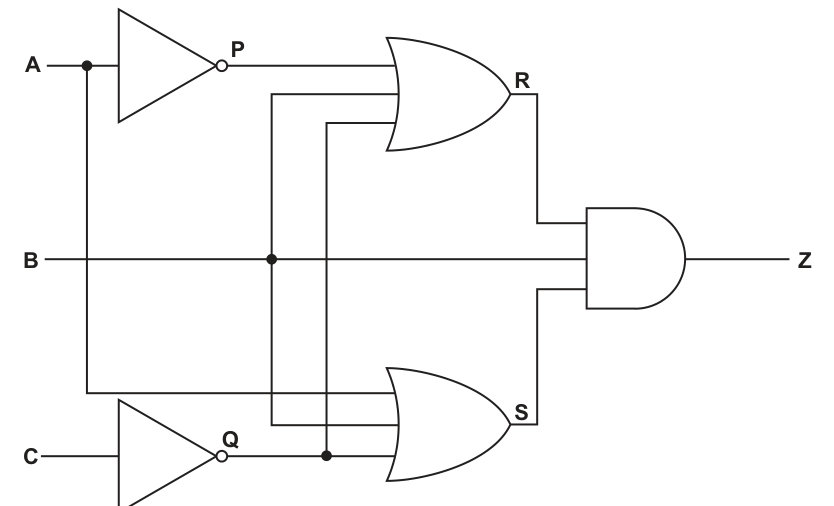
Complete the truth table for the given logic circuit. Show your working.
| Working space | |||||||
|---|---|---|---|---|---|---|---|
| A | B | C | P | Q | R | S | Z |
| 0 | 0 | 0 | |||||
| 0 | 0 | 1 | |||||
| 0 | 1 | 0 | |||||
| 0 | 1 | 1 | |||||
| 1 | 0 | 0 | |||||
| 1 | 0 | 1 | |||||
| 1 | 1 | 0 | |||||
| 1 | 1 | 1 |
Working
Answer
| A | B | C | P | Q | R | S | Z |
|---|---|---|---|---|---|---|---|
| 0 | 0 | 0 | 1 | 1 | 1 | 1 | 0 |
| 0 | 0 | 1 | 1 | 0 | 1 | 0 | 0 |
| 0 | 1 | 0 | 1 | 1 | 1 | 1 | 1 |
| 0 | 1 | 1 | 1 | 0 | 1 | 1 | 1 |
| 1 | 0 | 0 | 0 | 1 | 1 | 1 | 0 |
| 1 | 0 | 1 | 0 | 0 | 0 | 1 | 0 |
| 1 | 1 | 0 | 0 | 1 | 1 | 1 | 1 |
| 1 | 1 | 1 | 0 | 0 | 1 | 1 | 1 |
See completed truth table
Background Concept
A truth table shows the output of a logic circuit for every possible combination of inputs. With three inputs, there are possible rows.
To complete a truth table for a circuit, the safest method is to work from left to right through the circuit:
- find the outputs of any NOT gates first
- use those values to find the outputs of the OR gates
- use those results at the final gate
In this circuit, the labelled intermediate values are important:
- is the output of the NOT gate on
- is the output of the NOT gate on
- is the output of the upper OR gate
- is the output of the lower OR gate
- is the final output
Understanding the Question
You are given the circuit and a partly blank truth table. The table already lists the eight possible combinations of , and . Your task is to calculate the internal signals , , , and then the final output for each row.
The working-space columns are a clue that you should not jump straight to . You should calculate the intermediate gate outputs first.
From the circuit:
- the top OR gate gives
- the bottom OR gate gives
- the final AND gate gives
Approach
Use one row at a time.
- Copy the input values , , .
- Invert to get .
- Invert to get .
- Use , , in the top OR gate to get .
- Use , , in the bottom OR gate to get .
- AND together , and to get .
A useful shortcut appears once you start: because goes directly into the final AND gate, if then must be 0. Also, when , both OR gates must output 1, so becomes 1. That means this whole circuit behaves like .
Step-by-Step Reasoning
Start with the first row, .
Second row, .
Third row, .
Fourth row, .
Fifth row, .
Sixth row, .
Seventh row, .
Eighth row, .
So the completed truth table is correct.
Key Takeaways
- Complete logic-circuit truth tables by finding intermediate gate outputs first.
- NOT gates are usually the easiest starting point.
- OR outputs are 1 if any input is 1.
- AND outputs are 1 only if all inputs are 1.
- A direct input into a final AND gate can sometimes reveal a shortcut for the final output.
Common Mistakes
- Forgetting to invert or before using them in later gates.
- Treating OR like AND and writing 1 only when all inputs are 1.
- Missing that the final gate has three inputs, not two.
- Copying one wrong value in the working columns and then carrying the error through the row.
Things to Be Careful About
- Use the actual labelled signals from the diagram: , , , , then .
- Read the wires carefully so you know which signals feed each gate.
- Make sure you complete all 8 rows because three inputs always give eight combinations.
- Keep the row order exactly as given in the table.
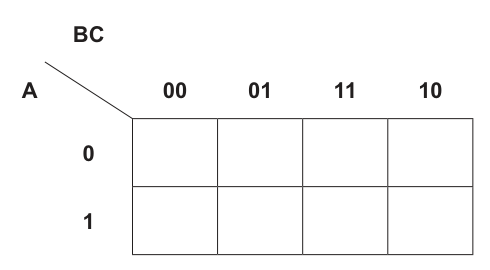
Answer
| A \ BC | 00 | 01 | 11 | 10 |
|---|---|---|---|---|
| 0 | 0 | 0 | 1 | 1 |
| 1 | 0 | 1 | 0 | 1 |
See completed K-map
Background Concept
A Karnaugh map is a visual way to organise the rows of a truth table so that adjacent cells differ by only one variable. For three variables, the usual layout is:
- rows for : 0 and 1
- columns for in Gray-code order: 00, 01, 11, 10
Gray-code order matters because neighbouring columns must differ by just one bit.
Each product term in a sum-of-products expression tells you exactly one cell to mark with a 1, because every variable is fixed in that term.
Understanding the Question
You are given the Boolean expression
and an empty 3-variable K-map. You must place 1s in the cells represented by those four product terms and leave all other cells as 0.
Approach
Take each term separately.
- Decide whether is 0 or 1 from whether it is complemented.
- Decide the values of and .
- Convert into the correct K-map column.
- Put a 1 in that cell.
After all four terms are placed, every unused cell stays 0.
Step-by-Step Reasoning
The K-map has rows and , and columns .
Now place each term:
-
- , ,
- so this is row , column
- place a 1 there
-
- , ,
- so this is row , column
- place a 1 there
-
- , ,
- so this is row , column
- place a 1 there
-
- , ,
- so this is row , column
- place a 1 there
All remaining cells are 0.
That gives:
- row :
- row :
Key Takeaways
- Each fully specified product term corresponds to one K-map cell.
- Complemented variable means 0; uncomplemented variable means 1.
- Always use Gray-code order for the columns: 00, 01, 11, 10.
- Unused cells are filled with 0.
Common Mistakes
- Writing the columns in binary order 00, 01, 10, 11 instead of Gray-code order.
- Reversing the meaning of complemented and uncomplemented variables.
- Putting a 1 in more than one cell for a single product term.
- Forgetting to fill the remaining cells with 0.
Things to Be Careful About
- The column heading is the pair , not .
- means , so when .
- A K-map is only useful if the positions are correct, so keep the layout exact.
Draw loop(s) around appropriate group(s) in the K-map to produce an optimal sum-of-products.
Answer
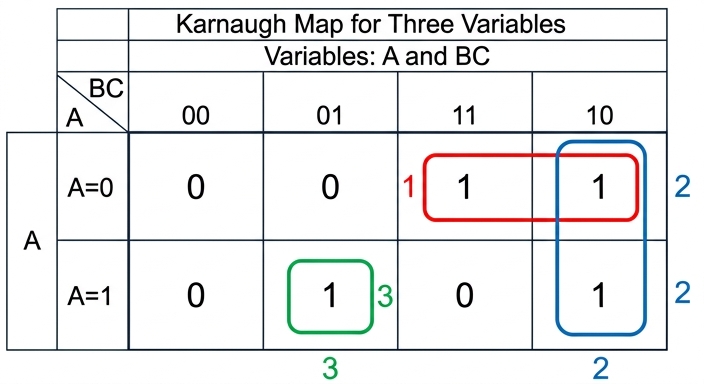
See K-map loops
Background Concept
In a Karnaugh map, loops are drawn around groups of 1s to simplify a Boolean expression. Valid groups:
- must contain cells
- must be rectangular
- must contain only 1s
- should be as large as possible
- may overlap if that gives a simpler result
Every 1 must be covered by at least one loop. If a 1 has no adjacent 1s, it must stay as a single-cell loop.
Understanding the Question
You are not being asked to write the expression yet. This part only asks you to draw the loop or loops on the completed K-map so that the sum-of-products is optimal.
From part (i), the 1s are at:
Now you must group them in the best way.
Approach
Look for the biggest valid groups first.
- Check whether two neighbouring 1s can form a pair.
- If a 1 belongs to two useful groups, overlap is allowed.
- If a 1 has no neighbour, it must remain alone.
Here, there are two obvious pairs and one isolated cell.
Step-by-Step Reasoning
Start with the top row.
- The 1 at is adjacent to the 1 at .
- These two cells form a horizontal pair.
Next look at column .
- The 1 at is also adjacent vertically to the 1 at .
- These two cells form a vertical pair.
Now consider the remaining 1 at .
- Its neighbours are , and .
- All of those are 0.
- So it cannot be paired and must stay as a single-cell group.
That is the optimal coverage:
- one horizontal pair across row for columns 11 and 10
- one vertical pair in column 10 across rows and
- one singleton at row , column 01
This covers every 1 while keeping the groups as large as possible.
Key Takeaways
- Make the largest valid groups possible.
- Overlapping groups are allowed when they help simplification.
- Not every 1 can always be paired.
- An isolated 1 must be kept as a singleton group.
Common Mistakes
- Leaving a 1 uncovered because it does not fit into a pair.
- Grouping diagonally, which is not allowed.
- Drawing a group that includes a 0.
- Missing that overlap is allowed, so a useful cell can belong to more than one group.
Things to Be Careful About
- The map wraps horizontally, but that is not needed here.
- A single-cell loop is valid if no larger group is possible.
- Since the next part asks for the expression, every 1 must be represented by a loop, including the isolated one.
Write the Boolean expression from your answer to part b(ii) as a simplified sum-of-products. Do not carry out any further simplification.
...................................................................................................................................................
.............................................................................................................................................
Answer
ĀB + BĈ + AB̄C
Background Concept
After drawing loops on a Karnaugh map, you read off the simplified sum-of-products expression by finding which variables stay constant within each group.
Rules:
- if a variable is always 1 in a group, write it uncomplemented
- if a variable is always 0 in a group, write it complemented
- if a variable changes within the group, leave it out
Each loop gives one product term. Then the full simplified expression is the OR of those terms.
Understanding the Question
This part asks you to convert your K-map groups into a Boolean expression. The instruction "Do not carry out any further simplification" means you should write exactly the expression represented by the loops you drew, and stop there.
From part (ii), there are three groups:
- a horizontal pair on row across columns 11 and 10
- a vertical pair in column 10
- a singleton at row , column 01
Approach
For each group:
- check which variables remain the same throughout the group
- omit any variable that changes
- write the product term
- join all product terms with plus signs
Step-by-Step Reasoning
Group 1: top-row pair across columns 11 and 10.
- row is , so stays constant
- in columns 11 and 10, stays constant
- changes from 1 to 0, so is omitted
This group gives:
Group 2: vertical pair in column 10.
- column 10 means and
- so stays 1 and stays 1
- changes between 0 and 1, so is omitted
This group gives:
Group 3: singleton at row , column 01.
- , so
This group gives:
Now OR the three terms together:
That is the simplified sum-of-products from the K-map, with no further simplification carried out.
Key Takeaways
- One K-map loop gives one product term.
- Variables that change within a group are omitted.
- Variables that stay 0 are complemented; variables that stay 1 are uncomplemented.
- The final answer is the sum (OR) of all loop terms.
Common Mistakes
- Including a variable even though it changes within the group.
- Forgetting the singleton loop term completely.
- Writing the vertical-pair term as involving , even though changes.
- Carrying out extra algebraic simplification when the question says not to.
Things to Be Careful About
- Use the loops actually drawn in part (ii), not the original unsimplified expression.
- For the top-row pair, changes, so it must not appear in the term.
- For the column-10 pair, changes, so it must not appear in the term.
- Keep the answer in sum-of-products form: product terms joined by plus signs.
Identify one Artificial Intelligence (AI) algorithm to find the shortest distance between two points on a graph.
...................................................................................................................................................
.............................................................................................................................................
Answer
- Dijkstra's algorithm
Dijkstra's algorithm
Background Concept
A graph consists of vertices (points or nodes) connected by edges. If the edges have weights, those weights can represent distance, time or cost. A shortest-path algorithm is used to find the path with the smallest total weight between two vertices.
In this syllabus, common AI graph-search algorithms include Dijkstra's algorithm and A* search. Dijkstra's algorithm finds the shortest path in a weighted graph by repeatedly selecting the unvisited vertex with the smallest current distance and updating neighbouring distances.
Understanding the Question
The question asks for one AI algorithm that can find the shortest distance between two points on a graph. It does not ask for a description, only the name of one suitable algorithm.
So the task is simply to recall one correct algorithm from this topic.
Approach
Recognise that “shortest distance between two points on a graph” means a shortest-path problem. Then name a valid algorithm from the AI graph-search topic.
A correct choice is Dijkstra's algorithm.
Step-by-Step Reasoning
The key clue is the phrase “shortest distance” on a “graph”. That immediately points to shortest-path algorithms.
From the syllabus, acceptable algorithms include:
- Dijkstra's algorithm
- A* search
Only one is needed. Writing “Dijkstra's algorithm” is enough for the mark.
Key Takeaways
- A graph shortest-path problem is solved using algorithms such as Dijkstra's or A*.
- For a one-mark identify question, the algorithm name alone is usually sufficient.
Common Mistakes
- Naming a general AI method such as machine learning or a neural network. These are AI techniques, but they are not shortest-path algorithms.
- Giving a search method that does not guarantee the shortest weighted path, unless the mark scheme allows it.
- Describing the algorithm instead of naming it, but forgetting to include the actual algorithm name.
Things to Be Careful About
- The question asks for one algorithm, so one correct name is enough.
- Make sure the algorithm is specifically suitable for graph path-finding.
- Read the wording carefully: “shortest distance” suggests a weighted shortest-path method, not just any traversal of a graph.
Describe Deep Learning.
...................................................................................................................................................
...................................................................................................................................................
...................................................................................................................................................
...................................................................................................................................................
...................................................................................................................................................
...................................................................................................................................................
...................................................................................................................................................
...................................................................................................................................................
...................................................................................................................................................
.............................................................................................................................................
Answer
- Deep Learning is a type of machine learning based on artificial neural networks.
- It uses many layers of neurons, including multiple hidden layers.
- The network is trained using large amounts of data.
- During training, weights are adjusted, typically using back propagation, so the output becomes more accurate.
- It can automatically learn complex patterns or features in the data without all features being explicitly programmed.
See explanation
Background Concept
Deep Learning is a branch of machine learning. Machine learning is where a computer system learns patterns from data instead of having every rule written explicitly by a programmer.
Deep Learning specifically uses artificial neural networks with many layers. A neural network is made of connected processing units called neurons. These connections have weights, and the values of those weights determine how strongly signals influence the next layer.
A simple neural network may have an input layer, one hidden layer and an output layer. A deep neural network has multiple hidden layers. These extra layers allow the system to learn more complex and abstract patterns.
Training usually involves presenting many examples to the network, comparing the output with the correct answer, calculating the error, and then adjusting the weights. A common method for this is back propagation.
Understanding the Question
The question asks you to describe Deep Learning, not just name it. That means you need several clear points about what it is and how it works.
Good answers should cover:
- what Deep Learning is
- what structure it uses
- how it learns
- what makes it useful
Because it is worth 5 marks, one short sentence is not enough. You need a fuller description with several separate valid ideas.
Approach
A strong way to answer is to build the description in layers:
- Define Deep Learning as a type of machine learning.
- State that it uses artificial neural networks.
- Explain that it is “deep” because it has many hidden layers.
- Explain that it is trained using data by adjusting weights.
- State that it can learn complex features or patterns automatically.
This structure gives enough separate points for a 5-mark answer.
Step-by-Step Reasoning
Start with the definition:
- Deep Learning is a type of machine learning. This is important because it places it in the correct area of AI.
Then explain the model used:
- It is based on artificial neural networks. That tells the examiner what computational structure is being used.
Next explain why it is called “deep”:
- The network contains many layers, especially multiple hidden layers between input and output. These layers allow the network to process data in stages.
Then explain learning or training:
- The network is trained using large amounts of data.
- It produces an output, compares that output with the expected result, and measures the error.
- The weights between neurons are then adjusted, often by back propagation, so future outputs are more accurate.
Finally explain the benefit:
- Because of its layered structure, Deep Learning can automatically detect and learn complex patterns in data.
- This means the programmer does not need to manually specify every feature or rule.
- It is especially useful for tasks such as image recognition, speech recognition and natural language processing.
For this question, you do not need to go into mathematical detail. The key is to describe the idea clearly and include several distinct facts.
Key Takeaways
- Deep Learning is a subset of machine learning.
- It uses artificial neural networks with multiple hidden layers.
- It learns by training on data and adjusting connection weights.
- Back propagation is a common training method.
- Its strength is automatic learning of complex features and patterns.
Common Mistakes
- Saying Deep Learning is the same as all AI. It is only one area within AI.
- Describing a normal program with fixed rules instead of a system that learns from data.
- Forgetting to mention the multiple hidden layers, which is the key idea behind “deep”.
- Saying it stores all answers directly rather than learning by changing weights.
- Giving examples like robots or chatbots without actually describing the Deep Learning method.
Things to Be Careful About
- Distinguish between machine learning in general and Deep Learning in particular.
- Use the term “artificial neural network” accurately.
- Make sure you mention learning from data, not just producing outputs.
- If you mention back propagation, spell out that it is used to adjust weights based on error.
- For a describe question, include several linked points rather than one vague definition.
Outline the purpose of lexical analysis during the compilation of a program.
...................................................................................................................................................
...................................................................................................................................................
...................................................................................................................................................
.............................................................................................................................................
Answer
- Lexical analysis scans the source code character by character and groups characters into tokens such as identifiers, keywords, operators and constants.
- These tokens are passed to the next stage of the compiler for syntax analysis, with invalid lexical items detected at this stage.
Scans source code into tokens and passes them to syntax analysis, detecting invalid lexical items.
Background Concept
Compilation happens in stages. One early stage is lexical analysis. The lexical analyser reads the raw source code as a stream of characters and breaks it into meaningful units called tokens. Examples of tokens are keywords, variable names, numeric constants, operators and punctuation symbols.
For example, a line such as Total = Count + 1 is not most useful to the compiler as individual characters. The lexical analyser groups it into token-sized pieces such as identifier, assignment symbol, identifier, plus symbol and integer constant. Once the code has been tokenised, the next stage, usually syntax analysis, can check whether those tokens appear in a valid order.
Understanding the Question
This question asks for the purpose of lexical analysis, not a full description of the whole compiler. So the answer should focus on what this stage does and why it is needed.
For 2 marks, the safest response is usually:
- what lexical analysis does to the source code
- what happens to the result of that process
Approach
A good way to answer is to name the two core ideas:
- scan and split into tokens
- provide those tokens for later compiler stages / detect invalid items
That gives a complete but concise outline.
Step-by-Step Reasoning
The source program begins as plain text. The compiler cannot efficiently work on it character by character all the way through, so lexical analysis is used.
First, the lexical analyser reads the characters of the source code.
Next, it groups sequences of characters into valid lexical units. For example:
IFbecomes a keyword tokenCounterbecomes an identifier token+becomes an operator token25becomes a numeric constant token
If something does not form a valid token, that is a lexical error and can be reported at this stage.
After tokenisation, those tokens are passed on to the next compiler stage, typically syntax analysis, which checks whether the token sequence follows the language grammar.
So the purpose is both to turn raw source text into tokens and to prepare the program for further compilation checks.
Key Takeaways
- Lexical analysis is an early stage of compilation.
- It converts a stream of characters into tokens.
- These tokens are then used by later stages such as syntax analysis.
- Invalid lexical items can be detected here.
Common Mistakes
- Confusing lexical analysis with syntax analysis. Lexical analysis identifies tokens; syntax analysis checks whether the token sequence fits the grammar.
- Saying it "executes the program". Compilation stages translate and analyse code; they do not run the finished program.
- Giving only examples of tokens without explaining the actual purpose.
Things to Be Careful About
- Use the word tokens explicitly, because that is the key technical term.
- Keep the answer about compilation stages, not interpretation.
- If you mention errors, make sure they are invalid lexical items, not general logic errors in the program.
Write the Reverse Polish Notation (RPN) for the given infix expression:
(2 – 6) * (13 + 7) / 5
...................................................................................................................................................
...................................................................................................................................................
...................................................................................................................................................
.............................................................................................................................................
Working
(2 - 6)becomes2 6 -(13 + 7)becomes13 7 +- Multiply the two results:
2 6 - 13 7 + * - Then divide by
5:2 6 - 13 7 + * 5 /
Answer
2 6 - 13 7 + * 5 /
2 6 - 13 7 + * 5 /
Background Concept
Reverse Polish Notation (RPN), also called postfix notation, writes each operator after its operands. This removes the need for brackets when the expression order is fixed.
Examples:
A + BbecomesA B +(A + B) * CbecomesA B + C *
RPN is useful because it can be evaluated easily using a stack. Operands are pushed onto the stack, and when an operator is reached, the required operands are popped, the operation is carried out, and the result is pushed back.
Understanding the Question
The question gives the infix expression:
(2 - 6) * (13 + 7) / 5
and asks for the RPN form. The brackets are important because they show which operations happen first. The task is not to evaluate the expression; it is to rewrite it so that each operator appears after the values it works on.
Approach
Break the infix expression into smaller parts:
- convert the first bracketed expression
- convert the second bracketed expression
- combine them with the multiplication operator
- place the division by
5at the end
This works because RPN follows the execution order directly.
Step-by-Step Reasoning
Start with the first bracket:
(2 - 6)
In RPN, the operands come first, then the operator:
2 6 -
Now the second bracket:
(13 + 7)
In RPN:
13 7 +
Now these two bracketed results are multiplied together:
(2 - 6) * (13 + 7)
So write the RPN for the first result, then the RPN for the second result, then *:
2 6 - 13 7 + *
Finally, the whole result is divided by 5, so append 5 /:
2 6 - 13 7 + * 5 /
That is the complete postfix form.
Key Takeaways
- In RPN, operators come after their operands.
- Convert bracketed sections first.
- When combining subexpressions, write both completed operand expressions before the operator.
- Division and subtraction still keep operand order, so the sequence matters.
Common Mistakes
- Writing the operator too early, for example
2 - 6instead of2 6 -. - Losing the effect of brackets and treating the expression as simple left-to-right text.
- Reversing subtraction or division order.
2 6 -means2 - 6, not6 - 2. - Forgetting the final
/ 5part.
Things to Be Careful About
- Preserve the original operand order for non-commutative operations like
-and/. - Do not include brackets in the final RPN expression.
- Make sure the final operator
/comes after the5, because it divides the previous whole result by5.
The RPN expression:
d a b + * c a - /
is to be evaluated, where:
a = 6, b = 12, c = 15 and d = 5.
Show the changing contents of the stack as the RPN expression is evaluated.

Answer
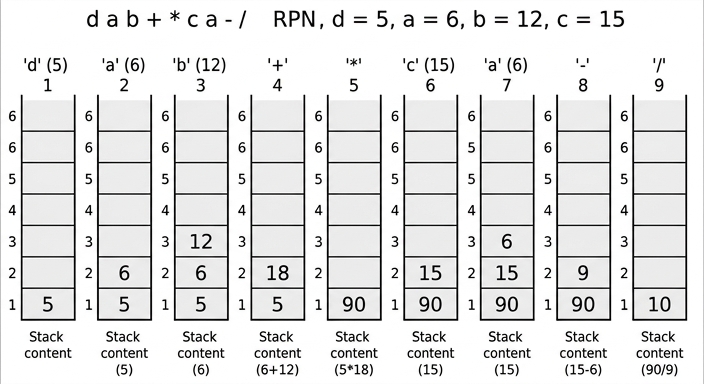
See stack-evolution diagram
Background Concept
RPN expressions are evaluated using a stack.
The rule is:
- if the next item is an operand, push it onto the stack
- if the next item is an operator, pop the top two values, apply the operator in the correct order, then push the result
Order matters for subtraction and division:
- if the stack pops
xtheny, the calculation isy - xory / x - it is not
x - yorx / y
This is why stack tracing must be done carefully.
Understanding the Question
The RPN expression is:
d a b + * c a - /
with:
a = 6b = 12c = 15d = 5
So the expression actually becomes:
5 6 12 + * 15 6 - /
The question specifically asks to show the changing contents of the stack as the expression is evaluated. That means we should show the state of the stack after each token is processed.
Approach
Work left to right through the RPN expression.
For each symbol:
- if it is a value, push it
- if it is
+,-,*or/, pop the top two values, calculate the result, then push the result back
After every step, record the stack contents from bottom to top.
Step-by-Step Reasoning
First substitute the values:
d a b + * c a - /
becomes:
5 6 12 + * 15 6 - /
Now trace it.
-
Read
5- push
5 - stack:
[5]
- push
-
Read
6- push
6 - stack:
[5, 6]
- push
-
Read
12- push
12 - stack:
[5, 6, 12]
- push
-
Read
+- pop
12and6 - calculate
6 + 12 = 18 - push
18 - stack:
[5, 18]
- pop
-
Read
*- pop
18and5 - calculate
5 * 18 = 90 - push
90 - stack:
[90]
- pop
-
Read
15- push
15 - stack:
[90, 15]
- push
-
Read
6- push
6 - stack:
[90, 15, 6]
- push
-
Read
-- pop
6and15 - calculate
15 - 6 = 9 - push
9 - stack:
[90, 9]
- pop
-
Read
/- pop
9and90 - calculate
90 / 9 = 10 - push
10 - stack:
[10]
- pop
So the final value of the whole RPN expression is 10.
Key Takeaways
- RPN is naturally evaluated with a stack.
- Operands are pushed; operators cause two pops and one push.
- For subtraction and division, preserve the correct operand order.
- A stack trace shows the changing state after each token.
Common Mistakes
- Reversing the operand order for
-or/. For example, using6 - 15instead of15 - 6. - Forgetting to push the result back after an operation.
- Recording too many or too few stack states. The stack should change after each symbol processed.
- Mixing up top and bottom of the stack in the diagram.
Things to Be Careful About
- Substitute the variable values correctly before tracing.
- After an operator, two values are removed and only one result is returned, so the stack height usually decreases by one.
- Keep the stack contents in order from bottom to top.
- The final stack should contain exactly one value if the RPN expression is valid.
A stack has been implemented using pseudocode to store a maximum of 100 string items using the global variables in the following table:
| Identifier | Data type | Description | Initialisation value |
|---|---|---|---|
Base | INTEGER | pointer for the bottom of the stack | 0 |
Top | INTEGER | pointer for the top of the stack | -1 |
StackArray | STRING | 1D array to implement the stack | [0:99] |
Max | INTEGER | maximum number of items in the stack | 100 |
The value of Top is incremented each time a data item is added to the stack and decremented every time a data item is removed.
Complete the pseudocode for the function to remove a data item from the stack.
FUNCTION Pop() ...........................................................................................................
  DECLARE DataItem : STRING
  DataItem ← ""
  IF .................................................................................................................... THEN
    DataItem ← .......................................................................................................
    Top ← ..................................................................................................................
  ELSE
    DataItem ← "You cannot remove data; the stack is empty"
  ENDIF
  ......................................................................................................................................
ENDFUNCTION
Answer
FUNCTION Pop() RETURNS STRING
  DECLARE DataItem : STRING
  DataItem ← ""
  IF Top >= Base THEN
    DataItem ← StackArray[Top]
    Top ← Top - 1
  ELSE
    DataItem ← "You cannot remove data; the stack is empty"
  ENDIF
  RETURN DataItem
ENDFUNCTION
See completed pseudocode
Background Concept
A stack is a last-in, first-out (LIFO) data structure. This means the most recently added item is the first one removed. The two standard stack operations are Push to add an item and Pop to remove an item.
In an array implementation of a stack, a pointer such as Top keeps track of where the current top item is stored. When an item is pushed, Top is increased first or after storing, depending on the design. When an item is popped, the program reads the item currently at Top, then decreases Top.
A stack can also be empty, so a Pop operation must check for underflow before trying to remove an item. Underflow means an attempt is made to remove data from an empty stack.
Understanding the Question
The question gives the global variables already used in the stack implementation:
Base = 0is the bottom index of the stack.Top = -1means the stack starts empty.StackArray[0:99]stores up to 100 string items.Max = 100is the maximum size.
You are asked to complete the pseudocode for Pop(), which removes one string item from the stack and returns it. So the function must:
- have the correct return type,
- check whether the stack contains any data,
- if it does, copy the top item into
DataItem, - decrease
Top, - otherwise return the given error message,
- return
DataItemat the end.
Approach
The key idea is to use the Top pointer to decide whether the stack is empty.
Because Base is 0 and the empty stack starts with Top = -1, the stack contains at least one item exactly when Top >= Base.
So the method is:
- if
Top >= Base, there is an item to remove, - take
StackArray[Top], - then move
Topdown by 1, - otherwise keep the error message,
- return the result.
Step-by-Step Reasoning
First, the function header must state what type is returned:
FUNCTION Pop() RETURNS STRING
That is needed because the function sends back the removed stack item as a string.
Next, the local variable is already declared:
DECLARE DataItem : STRING
It is initialised to the empty string:
DataItem ← ""
Now the empty-stack test is needed. Since the stack is empty when Top = -1, and Base = 0, the stack is not empty when Top >= Base.
So:
IF Top >= Base THEN
Inside this branch, the item currently at the top of the stack is the one to remove:
DataItem ← StackArray[Top]
That copies the value before changing the pointer.
Then the stack shrinks by one item, so:
Top ← Top - 1
If the stack was empty, the ELSE branch is used:
DataItem ← "You cannot remove data; the stack is empty"
Finally, whether a real item or the error message was stored in DataItem, the function must return it:
RETURN DataItem
That completes a valid Pop() function.
Key Takeaways
- A
Popoperation removes the current top item from a stack. - In an array-based stack, the
Toppointer tells you where that item is. - Always check for an empty stack before removing an item.
- Read the item first, then decrement
Top. - A function must explicitly
RETURNthe value it is meant to send back.
Common Mistakes
- Using the wrong empty-stack test, such as
Top = Base. Here the first valid item is at index 0, soTop = 0means there is one item, not zero. - Decrementing
Topbefore reading the value. That would remove the wrong item or access the wrong index. - Forgetting the
RETURN DataItemline. Without it, the function does not produce the result expected. - Writing
StackArray[Top - 1]instead ofStackArray[Top]. The top item is stored exactly atTop. - Returning the error message directly without keeping the structure of the given skeleton.
Things to Be Careful About
- The array is indexed from
0to99, not1to100. Top = -1is the empty condition in this implementation.- The question says
Topis decremented every time a data item is removed, so the pointer update is essential. - On Paper 3, use CIE pseudocode conventions:
RETURNS STRING,←for assignment, andENDIF/ENDFUNCTIONin upper case. - Keep the identifiers exactly as given:
Top,Base,StackArray,DataItem.
Write the pseudocode to output the data item removed from the stack with an appropriate message.
...........................................................................................................................................
.....................................................................................................................................
Answer
OUTPUT "Data item removed from stack: ", Pop()
OUTPUT "Data item removed from stack: ", Pop()
Background Concept
Once a stack function has been written, it can be called wherever needed in the program. If the function returns a value, that return value can be output directly or stored in a variable first.
Here, Pop() is a function, not a procedure, so it returns a string. That returned string is either:
- the item removed from the top of the stack, or
- the error message if the stack is empty.
Understanding the Question
The question asks for pseudocode to output the data item removed from the stack with an appropriate message.
So the task is not to rewrite the Pop() function. It is simply to call it and display what it returns with some explanatory text.
Approach
Since Pop() already returns the removed item, the shortest correct approach is to call Pop() directly inside an OUTPUT statement.
That produces both actions at once:
- remove the item from the stack,
- display the returned value with a label.
Step-by-Step Reasoning
The message should make it clear what is being displayed, for example:
OUTPUT "Data item removed from stack: ", Pop()
This works because:
OUTPUTdisplays text and values,Pop()returns a string,- that string is shown after the message.
If the stack contains data, the removed top item is displayed.
If the stack is empty, the error message from Pop() is displayed instead.
The question is only worth 1 mark, so a short correct line is all that is needed.
Key Takeaways
- A function call can be placed directly inside an
OUTPUTstatement. - When a function returns a value, you do not always need a separate variable to hold it first.
- Reusing the previously written function avoids duplicating stack-removal logic.
Common Mistakes
- Writing a call to
Push()instead ofPop(). - Outputting only the message and not the returned item.
- Rewriting the whole
Pop()function instead of just showing the output statement. - Using procedure-style syntax for a function that should return a value.
Things to Be Careful About
- Use an appropriate message, not just
OUTPUT Pop()on its own, because the question asks for a message as well. - Keep to CIE pseudocode style.
- The function name and capitalization should match the earlier part exactly:
Pop().
A stack is used to implement recursion.
State the three essential features of recursion.
1 ................................................................................................................................................
...................................................................................................................................................
2 ................................................................................................................................................
...................................................................................................................................................
3 ................................................................................................................................................
...................................................................................................................................................
Answer
- The subroutine calls itself.
- There is a base case (stopping condition).
- Each call works on a smaller or simpler version of the problem so it moves towards the base case.
- The subroutine calls itself. 2. There is a base case. 3. Each call reduces the problem towards the base case.
Background Concept
Recursion is a programming technique where a subroutine solves a problem by calling itself. Instead of solving the whole problem in one step, it repeatedly solves smaller versions of the same problem until it reaches a case that can be answered immediately.
Recursive calls are normally managed using a stack. Each time the function is called, the current state is stored so that when the deeper call finishes, execution can return to the earlier call. This is why recursion is closely linked to stacks.
For recursion to work correctly, three ideas are essential:
- the routine must call itself,
- there must be a base case to stop further calls,
- each call must move closer to that base case.
Understanding the Question
The question says that a stack is used to implement recursion and asks for the three essential features of recursion.
This means it is not asking for an example program, nor for a description of stack frames in detail. It wants the fundamental characteristics that make a recursive algorithm valid.
Because the question specifically asks for three features, the safest answer is to give the standard three core points.
Approach
Think of what must be true for any recursive solution:
- it repeats by calling itself,
- it must not continue forever, so it needs a stopping condition,
- it must get closer to that stopping condition each time.
These three points are general and apply no matter what the recursive problem is, such as factorial, tree traversal or binary search written recursively.
Step-by-Step Reasoning
First, recursion requires self-reference:
- a procedure or function must call itself, directly or indirectly.
Without this, it is not recursion.
Second, it needs a base case:
- this is the simplest case of the problem, where the answer is known immediately and no further recursive call is made.
For example, in factorial, 0! = 1 is a base case.
Third, each recursive call must reduce the problem:
- the input or state must become smaller, simpler or closer to the stopping condition.
For example, factorial changes n to n - 1; a tree traversal moves to a subtree; a recursive search reduces the search interval.
If this progress does not happen, the routine may never reach the base case and will recurse forever until stack overflow occurs.
So the three essential features are exactly those three points.
Key Takeaways
- Recursion means a routine calls itself.
- A valid recursive solution must include a base case.
- Each recursive step must reduce the problem so the base case is eventually reached.
- Stacks are used to remember earlier calls while deeper calls are running.
Common Mistakes
- Saying only "uses a stack" as one of the essential features. That is related to implementation, but the core features of recursion are the self-call, base case and progress towards that base case.
- Giving an example such as factorial instead of stating the general features.
- Mentioning a loop as a feature of recursion. Recursion does not require a loop.
- Forgetting that the problem must get smaller each time. Without that, the recursion may not terminate.
Things to Be Careful About
- The question asks for features of recursion, not advantages or disadvantages.
- "Calls itself" alone is not enough for full marks; you also need the stopping condition and reduction of the problem.
- When wording the third point, make it clear that each call moves towards the base case, not just that it repeats.
- If you mention the stack, treat it as supporting detail rather than one of the three essential features unless the mark scheme specifically asks about implementation.
Explain what is meant by exception handling.
Include an example of a possible cause of an exception in your answer.
Explanation .......................................................................................................................................
..........................................................................................................................................................
..........................................................................................................................................................
..........................................................................................................................................................
Example ...........................................................................................................................................
Answer
- Exception handling is the use of code to detect and deal with an error that occurs while a program is running, so the program can respond in a controlled way instead of crashing.
- When the exception occurs, control is passed to an exception-handling routine which may display an error message, recover, or end the program safely.
- Example: trying to open a file that does not exist.
See explanation
Background Concept
An exception is an event that disrupts the normal flow of a program while it is running. This is usually caused by a runtime error, meaning the program starts correctly but then encounters a problem during execution.
Exception handling is the mechanism used to trap, detect, and respond to these errors. Instead of letting the program stop suddenly, the program includes special code that handles the problem in a controlled way.
Typical actions in exception handling include:
- displaying a suitable error message
- preventing the program from crashing unexpectedly
- allowing the program to continue if possible
- closing files or freeing resources safely
- ending the program in an orderly way if recovery is not possible
Common causes of exceptions include:
- dividing by zero
- trying to open a file that does not exist
- entering data of the wrong type
- accessing an item outside the valid array bounds
Understanding the Question
The question asks for what is meant by exception handling, so you must define the term, not just give an example.
It also says include an example of a possible cause of an exception, so one named runtime problem must be included as well.
So a full answer needs two things:
- a clear explanation that exception handling deals with errors that happen while the program is running
- one valid example of something that could trigger such an exception
Approach
For a 3-mark definition question like this, the safest approach is:
- state that an exception is a runtime error or abnormal event
- explain that exception handling is code used to catch and deal with it in a controlled way
- give one concrete example
That structure matches what examiners usually reward: definition, purpose, and example.
Step-by-Step Reasoning
Start with the key idea: the error happens during execution. That distinguishes an exception from a syntax error, which is found before the program runs.
Then explain what handling means. The important point is that the program does not just fail immediately; instead, it uses a handler to manage the problem.
A strong explanation includes these ideas:
- the program detects that an exception has occurred
- control passes to exception-handling code
- the program can then respond appropriately
Appropriate responses might be:
- showing an error message to the user
- asking for the input again
- skipping the faulty action
- saving work or closing files before ending
For the example, you need a cause, not just the words “a runtime error”. A good example is:
- trying to open a file that does not exist
This is valid because the program may be correct in general, but at runtime the required file is missing, so an exception occurs.
Another acceptable example would be dividing by zero or entering text where a number is expected.
So the finished answer combines the definition and the example clearly.
Key Takeaways
- Exception handling is used for runtime errors.
- Its purpose is to let a program respond to errors in a controlled way.
- A good exam answer should include both the definition and one example cause.
- Typical example causes are divide-by-zero, missing files, invalid input, or array index errors.
Common Mistakes
- Giving only an example and no definition: this does not explain what exception handling means.
- Describing syntax errors instead of runtime errors: exception handling deals with problems during execution, not compile-time mistakes.
- Saying only “it stops errors”: that is too vague; the answer should mention detecting and handling the error.
- Giving a preventive measure instead of a cause: for example, “validation” is not itself an exception cause.
Things to Be Careful About
- Use the phrase while the program is running or runtime.
- Make it clear that the error is handled by special code rather than ignored.
- The example must be a possible cause of an exception, not just a general programming problem.
- Keep the answer focused: a short, precise explanation plus one valid example is enough for full marks.
The table shows assembly language instructions for a processor that has one register, the Accumulator (ACC).
| Instruction | |||
|---|---|---|---|
| Label | Opcode | Operand | Explanation |
| LDM | #n | Load the number n to ACC | |
| LDD | <address> | Load the contents of the location at the given address to the ACC | |
| LDI | <address> | The address to be used is at the given address. Load the contents of this second address to the ACC | |
| ADD | <address> | Add the contents of the given address to the ACC | |
| SUB | <address> | Subtract the contents of the given address from the ACC | |
| STO | <address> | Store the contents of the ACC at the given address | |
| <label>: | <data> | Gives a symbolic address <label> to the memory location with contents <data> |
denotes a denary number, e.g. #123
<label> can be used in place of <address>
Write assembly language code, using only the given instruction set to:
- store the denary value 100 as a named constant
- subtract the constant from the value contained in address 632
- store the result in variable
Answer.
Show the initialisation of the constant and Answer in the table provided.
...................................................................................................................................................
...................................................................................................................................................
...................................................................................................................................................
...................................................................................................................................................
...................................................................................................................................................
...................................................................................................................................................
| Label | Contents |
|---|---|
Answer
        LDD 632
        SUB Constant
        STO Answer

Label      Contents
Constant   100
Answer     0
See assembly code
Background Concept
This question uses simple accumulator-based assembly language. An accumulator processor has one main working register, ACC. Most arithmetic happens in ACC, so the usual pattern is:
- load a value into
ACC - carry out an operation on
ACC - store the result back to memory
The instructions given here are enough for a basic calculation:
LDM #nloads an immediate denary value intoACCLDD addressloads the contents stored at that address intoACCSUB addresssubtracts the contents of that address fromACCSTO addressstores the currentACCvalue into that address
A label can stand for a memory address. That means a line such as Constant: 100 creates a named memory location containing 100. This is how constants and variables are usually initialised in such questions.
Understanding the Question
You are asked to do three things:
- create a named constant containing the denary value
100 - subtract that constant from the value stored at address
632 - store the result in a variable called
Answer
The question also specifically says to show the initialisation of the constant and Answer in the table. That means the constant and Answer should be shown as labelled memory locations with starting contents.
The value at address 632 must be read from memory, not typed in directly, so LDD 632 is needed.
Approach
Use the normal accumulator sequence:
- load the value stored at address
632intoACC - subtract the contents of the constant's address from
ACC - store the result in
Answer
Then define the two labelled data items:
- a constant label holding
100 Answerinitialised to0
There is no need to use LDM #100 here, because the question asks for the constant to be shown in the initialisation table, so the value can simply be stored as labelled data.
Step-by-Step Reasoning
First, define a constant label. Any sensible name is acceptable, such as Constant or Hundred. The important point is that it stores the value 100.
So the data declaration is:
Constant 100
Next, define Answer as a variable. Before the program runs, it needs an initial value in memory. 0 is the normal initial value.
So the second data declaration is:
Answer 0
Now write the instructions.
-
LDD 632- This loads into
ACCwhatever value is stored at memory address632. - It is correct because the question says the value is contained in address
632.
- This loads into
-
SUB Constant- This subtracts the contents of the labelled memory location
ConstantfromACC. - Since
Constantstores100, the machine performs:
- This subtracts the contents of the labelled memory location
-
STO Answer- This stores the result now in
ACCinto the memory location labelledAnswer.
- This stores the result now in
So the full solution is a three-instruction sequence plus the two initialised memory locations.
Key Takeaways
- In accumulator assembly, arithmetic is usually load, operate, then store.
- A label can be used as a named memory address for a constant or variable.
LDDis used when the value must be fetched from a memory address.SUB labelsubtracts the contents stored at that labelled location, not the label name itself.
Common Mistakes
- Using
LDM #632instead ofLDD 632. That would load the number632, not the contents of address632. - Writing
SUB #100. The given instruction set does not include immediate subtraction. - Forgetting to store the result with
STO Answer. - Not initialising
Answerin the table when the question explicitly asks for it. - Treating the constant as an instruction rather than a labelled data value.
Things to Be Careful About
#means an immediate denary value, so only use it withLDMhere.Constantmust be a labelled memory location containing100, not just a comment or name in the code.Answeris a variable name, so it must also correspond to a memory location.- Follow the exact order: load from
632, subtract the constant, then store the result.
The address 632 contains the value 45.
State the value of Answer after the code described in part (a) has executed.
.............................................................................................................................................
Working
Answer
Answer = -55
-55
Background Concept
After assembly instructions are written, you may be asked to work out the final contents of memory. On an accumulator machine, that means following the instruction sequence and updating ACC step by step.
If the program does:
- load a value into
ACC - subtract another stored value
- store the result
then the final variable contains the arithmetic result left in ACC.
Understanding the Question
Part (b) tells you that address 632 contains 45. In part (a), the program subtracts the constant 100 from whatever is in address 632 and stores the result in Answer.
So here you are simply evaluating:
and stating the final value in Answer.
Approach
Take the instructions from part (a) mentally:
LDD 632puts45inACCSUB Constantsubtracts100STO Answerstores the result
So just calculate the subtraction carefully, including the sign.
Step-by-Step Reasoning
Start with:
- address
632contains45 Constantcontains100
Execute the steps:
-
LDD 632ACC = 45
-
SUB Constant- subtract
100fromACC - now
ACC = -55
- subtract
-
STO Answer- store
-55inAnswer
- store
So the final value of Answer is -55.
Key Takeaways
- To find the result of assembly code, follow each instruction in order.
- Always distinguish between an address and the value stored at that address.
- Subtracting a larger number from a smaller one gives a negative result.
Common Mistakes
- Writing
55instead of-55. The sign matters. - Subtracting in the wrong order as
100 - 45. - Forgetting that address
632contains45; the program uses the contents, not the address number itself.
Things to Be Careful About
- The operation is
value at 632 minus constant, not the other way round. - Keep track of the accumulator after each instruction.
- Give the final stored value in
Answer, not just the intermediateACCwithout context.