Computer Science 9618/43 — May/June 2025
Cambridge A-Level · Practical · worked solutions for every part, with the mark scheme
Topics Programming Paradigms (Procedural and Object-oriented) · Algorithms and Abstract Data Types · File Processing and Exception Handling
You have been supplied with the following source files:
QueueData.txt
Open the evidence document, evidence.doc
Make sure that your name, centre number and candidate number will appear on every page of this document. This document must contain your answers to each question.
Save this evidence document in your work area as:
evidence_ followed by your centre number_candidate number, for example: evidence_zz999_9999
A class declaration can be used to declare a record. If the programming language used does not support arrays, a list can be used instead.
One source file is used to answer Question 1. The file is called QueueData.txt
A program reads data from a text file and stores it in a queue. The linear queue Queue is stored as a 1D array of up to 50 elements. The queue has the following pointers:
HeadPointer– this stores the index of the first element in the queue, initialised to -1TailPointer– this stores the index of the last element in the queue, initialised to -1
Queue is a global array of 50 integers with all elements initialised to -1 in the main program.
The two pointers are declared as global variables and initialised to -1
Write program code to declare and initialise Queue, HeadPointer and TailPointer
Save your program as Question1_J25.
Copy and paste the program code into part 1(a) in the evidence document.
Answer
Queue = [-1] * 50
HeadPointer = -1
TailPointer = -1
See program code
Background Concept
A linear queue stores items in first-in, first-out order. In this question, the queue is represented using a 1D array with two pointers:
HeadPointerpoints to the first item currently in the queue.TailPointerpoints to the last item currently in the queue.
When the queue is empty, both pointers are set to -1. The array itself is also initialised so every position starts with a known value. Here, -1 is used as a placeholder value to show an unused slot.
In Python, a fixed-size array is usually represented using a list of a chosen length.
Understanding the Question
This part only asks for the global declarations and initial values. The question already tells you:
Queuemust hold up to 50 integers.- all elements must start as
-1 HeadPointerstarts at-1TailPointerstarts at-1
So the answer is just the initial setup code, not the queue operations.
Approach
Use a Python list of length 50 and fill every position with -1. Then declare the two pointer variables and assign -1 to both of them.
Step-by-Step Reasoning
Queue = [-1] * 50
- creates a list with 50 elements
- each element is
-1 - this matches the requirement that the queue is a global array of 50 integers initialised to
-1
HeadPointer = -1
- means the queue is empty
- there is no first item yet
TailPointer = -1
- also means the queue is empty
- there is no last item yet
These three lines provide the complete initial state needed before Enqueue() and Dequeue() can be used.
Key Takeaways
- A list can be used to model a fixed-size queue in Python.
-1is a useful sentinel value for empty pointers and unused slots when the valid data is positive integers.- Initialisation matters because later queue operations depend on these starting values.
Common Mistakes
- Declaring a list of the wrong size, such as 49 or 51 elements.
- Forgetting to initialise all queue elements to
-1. - Setting one pointer to
0instead of-1, which would incorrectly suggest the queue already contains data.
Things to Be Careful About
- Keep the variable names exactly as given:
Queue,HeadPointer,TailPointer. - The question says the variables are global, so later functions can access and update them.
- Do not use an empty list for this task, because the question specifically says the queue is stored as up to 50 elements.
The function Enqueue():
- takes an integer parameter to store in the next position in the queue
- returns
FALSEif the queue is full and the parameter cannot be stored in the queue - returns
TRUEif the parameter is stored in the queue - updates the pointers where appropriate.
Write program code for Enqueue()
Save your program.
Copy and paste the program code into part 1(b) in the evidence document.
Answer
def Enqueue(DataToStore):
    global Queue, HeadPointer, TailPointer
    if TailPointer == 49:
        return False
    if HeadPointer == -1:
        HeadPointer = 0
    TailPointer += 1
    Queue[TailPointer] = DataToStore
    return True
See program code
Background Concept
An Enqueue operation adds an item to the rear of a queue. In a linear queue stored in an array:
- the new item is placed at the position after the current tail
TailPointermust be updated to the new last position- if the queue was empty before insertion,
HeadPointermust also be set - if there is no space left at the end of the array, the queue is full
Because this is a linear queue, once TailPointer reaches the last array position, no more items can be added, even if there are empty spaces at the front caused by dequeues.
Understanding the Question
The function must:
- take one integer parameter
- try to store it in the next queue position
- return
Falseif the queue is full - return
Trueif the item is stored - update pointers correctly
So you need to code both the failure case and the successful insertion case.
Approach
Check whether the queue is full first. For a 50-element Python list indexed from 0 to 49, the queue is full when TailPointer == 49.
If it is not full:
- if the queue is currently empty, set
HeadPointerto0 - move
TailPointeron by one - store the new data at
Queue[TailPointer] - return
True
Step-by-Step Reasoning
def Enqueue(DataToStore):
- defines a function with one parameter, the integer to add
global Queue, HeadPointer, TailPointer
- needed in Python because the function changes the global queue and pointers
if TailPointer == 49:
- checks whether the rear of the queue is already at the last valid index
- if so, there is no space for another item
return False
- tells the caller the insertion failed
if HeadPointer == -1:
- this means the queue is empty before insertion
HeadPointer = 0
- after adding the first item, both head and tail will refer to a real queue position
TailPointer += 1
- moves the tail to the next free position
- when the queue was empty,
TailPointerchanges from-1to0
Queue[TailPointer] = DataToStore
- stores the new item in the queue
return True
- confirms successful insertion
This solution handles both the very first insertion and later insertions using the same structure.
Key Takeaways
- Always check for a full queue before inserting.
- In an empty queue, the head pointer must be set when the first item is added.
- Queue operations often combine data storage with pointer movement.
Common Mistakes
- Storing the item before increasing
TailPointer, which can overwrite the wrong slot. - Forgetting to set
HeadPointerwhen the first item is inserted. - Using
TailPointer == 50as the full condition, which is too late because index 50 is outside the list. - Returning nothing instead of
TrueorFalse.
Things to Be Careful About
- Python list indexes run from
0to49for 50 elements. - The check for full must happen before increasing
TailPointer. - Because this is a linear queue, the full condition is based on the tail reaching the end, not on the number of current items.
- Keep the exact function name
Enqueue()as required by the question.
The function Dequeue():
- returns the next item in the queue, if the queue is not empty
- returns -1 if the queue is empty
- updates the pointers where appropriate.
Write program code for Dequeue()
Save your program.
Copy and paste the program code into part 1(c) in the evidence document.
Answer
def Dequeue():
    global Queue, HeadPointer, TailPointer
    if HeadPointer == -1:
        return -1
    Item = Queue[HeadPointer]
    Queue[HeadPointer] = -1
    if HeadPointer == TailPointer:
        HeadPointer = -1
        TailPointer = -1
    else:
        HeadPointer += 1
    return Item
See program code
Background Concept
A Dequeue operation removes and returns the item at the front of the queue. In a queue, the oldest item leaves first, so removal always happens at HeadPointer.
There are three cases to think about:
- the queue is empty
- the queue has exactly one item
- the queue has more than one item
The pointer updates are slightly different in each case, especially when removing the last remaining item.
Understanding the Question
This function must:
- return the next item if the queue is not empty
- return
-1if the queue is empty - update pointers correctly
Since the file contains only positive integers, -1 is safe to use as the special value meaning “nothing could be removed”.
Approach
Start by checking whether HeadPointer is -1. If it is, the queue is empty, so return -1.
Otherwise:
- take the value from the head position
- optionally reset that queue slot back to
-1 - if head and tail are the same, this was the last item, so set both pointers back to
-1 - otherwise move
HeadPointerforward by one - return the removed item
Step-by-Step Reasoning
def Dequeue():
- defines the queue-removal function
global Queue, HeadPointer, TailPointer
- required because the queue structure and pointers are updated
if HeadPointer == -1:
- identifies an empty queue
return -1
- signals that there was no item to remove
Item = Queue[HeadPointer]
- stores the front item before changing anything
- this value is what the function will return
Queue[HeadPointer] = -1
- resets that array position to the unused marker
- not essential for queue logic, but good for keeping the structure clear
if HeadPointer == TailPointer:
- means there was only one item in the queue
HeadPointer = -1
TailPointer = -1
- after removing the only item, the queue becomes empty again
else:
- this is the case where more than one item remains
HeadPointer += 1
- move the head to the next item in the queue
return Item
- give the caller the value that was removed
Key Takeaways
- Dequeue removes from the head, not the tail.
- The last-item case is important because both pointers must be reset.
- A sentinel return value is useful when an operation cannot be completed.
Common Mistakes
- Incrementing
HeadPointerbefore reading the item, which skips the correct value. - Forgetting to reset
TailPointerwhen the final item is removed. - Returning the array slot after pointer changes rather than the original front item.
- Testing the wrong empty condition, such as
TailPointer == -1only, instead of using the agreed queue-empty state consistently.
Things to Be Careful About
- Save the dequeued value before changing pointers.
-1works here only because the stored data is positive integers.- In Python, if you modify globals inside a function, declare them with
global. - Keep the logic for the one-item queue separate from the multi-item queue.
The text file QueueData.txt stores positive integers. Each integer is on a new line in the file.
The procedure CreateQueue():
- opens the file
QueueData.txt - reads in each line from the text file and uses
Enqueue()to insert each line into the queue - outputs
"Queue full"if any item cannot be inserted into the queue - uses exception handling when opening and reading from the text file.
The procedure needs to work for a file that contains an unknown number of lines.
Write program code for CreateQueue()
Save your program.
Copy and paste the program code into part 1(d) in the evidence document.
Answer
def CreateQueue():
    try:
        with open("QueueData.txt", "r") as QueueData:
            for Line in QueueData:
                Number = int(Line.strip())
                if not Enqueue(Number):
                    print("Queue full")
    except Exception:
        print("Error reading file")
See program code
Background Concept
Sequential text-file processing means reading the file from the beginning to the end, one line at a time. This is useful when the number of lines is not known in advance.
Exception handling is used to stop the program from crashing if something goes wrong while opening or reading the file. In Python, a try / except structure is used for this.
This task also connects file processing to an abstract data type: every value read from the file must be inserted into the queue using Enqueue().
Understanding the Question
The procedure must:
- open
QueueData.txt - read every line, even though the number of lines is unknown
- convert each line to an integer
- insert each integer into the queue using
Enqueue() - print
"Queue full"if any insertion fails - use exception handling while opening and reading
So this is not just file reading. It is file reading plus queue loading plus error handling.
Approach
The best Python approach is:
- place the file access inside a
tryblock - use
with open(...)so the file is handled safely - loop through the file line by line with
for Line in QueueData - strip the line ending and convert the text to an integer
- call
Enqueue() - if
Enqueue()returnsFalse, print"Queue full" - use
exceptto catch problems such as missing file or invalid read
Step-by-Step Reasoning
def CreateQueue():
- defines the procedure that loads the queue from the file
try:
- begins exception handling
- any error in opening or reading can be caught by the
exceptblock
with open("QueueData.txt", "r") as QueueData:
- opens the text file for reading
withalso ensures the file is closed automatically
for Line in QueueData:
- reads one line at a time
- this is ideal because the file may contain any number of lines
Number = int(Line.strip())
- removes the newline character from the end of the line
- converts the remaining text into an integer
if not Enqueue(Number):
- attempts to insert the number into the queue
Enqueue()returnsFalseif the queue is full
print("Queue full")
- outputs the exact message required if an item cannot be inserted
except Exception:
- catches an error such as failing to open or read the file
- the question does not require a specific error message, only that exception handling is used
print("Error reading file")
- gives a simple message instead of letting the program crash
For the supplied file, there are 46 values, so the queue will not become full because the queue holds 50 items.
Key Takeaways
- Use line-by-line reading when the file length is unknown.
strip()is important because text lines usually include a newline character.- Returning
TrueorFalsefromEnqueue()allows the calling procedure to respond to a full queue. - Exception handling is part of robust file processing.
Common Mistakes
- Reading only one line instead of looping through the whole file.
- Forgetting to convert the line from text to integer.
- Appending directly to the list instead of using
Enqueue(), which ignores the queue design in the question. - Omitting exception handling entirely.
- Printing
"Queue full"for every file error instead of using it specifically for insertion failure.
Things to Be Careful About
- Keep the filename exactly as
QueueData.txt. - Use the returned value from
Enqueue()to decide whether to print"Queue full". - The file contains positive integers, one per line, so
int(Line.strip())is appropriate. - In an exam answer, the presence of
try/exceptis important because it is explicitly required.
The main program needs extending to call CreateQueue(). The main program then adds together all of the integers stored in the queue, using Dequeue() to access each integer. The total is then output.
Write program code to extend the main program.
Save your program.
Copy and paste the program code into part 1(e)(i) in the evidence document.
Answer
CreateQueue()
Total = 0
Item = Dequeue()
while Item != -1:
    Total += Item
    Item = Dequeue()
print(Total)
See program code
Background Concept
A queue is processed from the front, so if you want to use every value that was loaded into it, you repeatedly call Dequeue() until the queue becomes empty.
A running total is a standard programming pattern:
- initialise an accumulator variable, here
Total, to0 - add each value to it as it is processed
- output the accumulator when the loop finishes
Because Dequeue() returns -1 when the queue is empty, that value can be used as the loop stopping condition.
Understanding the Question
The main program must now do three things:
- call
CreateQueue()so the queue is filled from the file - remove each item from the queue using
Dequeue() - add all dequeued values together and output the sum
The wording “using Dequeue() to access each integer” is important. It means you should not loop directly through the array; you should use the queue operation.
Approach
Use this pattern:
- load the queue by calling
CreateQueue() - set
Totalto0 - call
Dequeue()once before the loop to get the first value - while the returned value is not
-1, add it toTotaland dequeue the next value - after the loop, print the total
This is a common sentinel-controlled loop.
Step-by-Step Reasoning
CreateQueue()
- reads all numbers from the file and enqueues them
Total = 0
- initialises the accumulator
Item = Dequeue()
- gets the first item from the queue
- if the queue were empty,
Itemwould immediately be-1
while Item != -1:
- continue only while a real queued value has been returned
- this works because the file stores positive integers, so
-1cannot be genuine data
Total += Item
- adds the dequeued value to the running total
Item = Dequeue()
- gets the next value ready for the next loop test
print(Total)
- outputs the completed sum after all items have been removed and processed
With the supplied file, all 46 values are loaded into the queue, then removed one by one and added into Total.
Key Takeaways
- Use the abstract data type operations, not direct array access, when the question asks for queue processing.
- A sentinel value such as
-1is a common way to end a loop. - Accumulator patterns are essential for totals, counts and averages.
Common Mistakes
- Iterating through
Queuedirectly instead of usingDequeue(). - Forgetting to initialise
Totalto0. - Writing the loop so that the first item is skipped.
- Calling
Dequeue()twice inside one loop cycle and accidentally missing values.
Things to Be Careful About
- The loop condition depends on
Dequeue()returning-1only when the queue is empty. - This sentinel method is safe here because the stored data is positive integers.
- Make sure the next
Dequeue()call is inside the loop, or the loop will never progress. - The question says extend the main program, so this code is added after the earlier declarations and routines.
Test your program.
Take a screenshot of the output(s).
Save your program.
Copy and paste the screenshot into part 1(e)(ii) in the evidence document.
Answer
Using the supplied file QueueData.txt, the program outputs:
3059
3059
Background Concept
A Paper 4 test-output part checks whether the completed program behaves as expected with the supplied data. Here, the program:
- reads numbers from a file into a queue
- removes them from the queue in FIFO order
- adds them all together
- prints the total
Since addition does not depend on order, the final total is the sum of every integer in QueueData.txt.
Understanding the Question
This part asks for the screenshot of the output after testing the program. Because the supplied file contains the actual test data, we can determine the expected output by adding all the numbers in that file.
The file contains 46 integers, which is fewer than the queue capacity of 50, so "Queue full" is not displayed.
Approach
Add all integers from QueueData.txt. Since the program enqueues every value successfully and then dequeues every value into a running total, the final console output is exactly that sum.
Step-by-Step Reasoning
The numbers in QueueData.txt are:
15, 8, 65, 32, 15, 4, 8, 5, 1, 265, 56, 9, 45, 12, 21, 32, 65, 98, 5, 12, 45, 62, 65, 98, 62, 21, 5, 54, 21, 56, 98, 8, 54, 45, 2, 21, 56, 564, 645, 9, 65, 32, 12, 45, 87, 54.
Adding them gives a total of 3059.
Because:
- all 46 items fit into the queue
- no file error occurs with the supplied data
Dequeue()removes and returns every stored item
the displayed output is just:
3059
Key Takeaways
- For test-output questions, work from the exact supplied file contents.
- If the queue capacity is not exceeded, no queue-full message should appear.
- The expected output is often a direct check that earlier routines are working together correctly.
Common Mistakes
- Forgetting to include all numbers from the file when calculating the total.
- Assuming
"Queue full"appears even though only 46 values are loaded into a 50-element queue. - Giving a description of the output instead of the actual displayed value.
Things to Be Careful About
- The screenshot in the real exam would show the console output, but in a written solution the key expected output is
3059. - This answer depends on the supplied reference file, not on a general case.
- If a candidate's earlier code was wrong, their test output could differ, but the correct expected result for the supplied data is
3059.
A program sorts the data in the 1D array DataArray and searches DataArray for specific values.
DataArray stores 14 integer values and is declared local to the main program.
Write program code to create DataArray and initialise it with the following data values in the order they are written:
0 3 4 56 67 44 43 32 31 345 45 6 54 1
Save your program as Question2_J25.
Copy and paste the program code into part 2(a) in the evidence document.
Answer
DataArray = [0, 3, 4, 56, 67, 44, 43, 32, 31, 345, 45, 6, 54, 1]
See program code
Background Concept
An array or list is used to store multiple values under one variable name. In Python, the simplest way to create and initialise a 1D array-like structure is with a list literal. The order matters: position 0 stores the first value, position 1 stores the second, and so on.
Understanding the Question
You are given 14 integer values and asked to create DataArray in the main program with those exact values in the order shown. Nothing is being sorted yet, so the original sequence must be preserved exactly.
Approach
Use one Python assignment statement that creates DataArray and places all 14 integers inside square brackets. Make sure the numbers are written in exactly the same order as in the question.
Step-by-Step Reasoning
DataArray must contain 14 integers. In Python, writing:
DataArray = [ ... ]
creates the list and initialises it at the same time. The values must be entered as:
0, 3, 4, 56, 67, 44, 43, 32, 31, 345, 45, 6, 54, 1
The first value 0 becomes index 0, 3 becomes index 1, and so on. Because later parts sort and search this data, getting the original contents exactly right is important.
Key Takeaways
- A Python list can be created and initialised in one statement.
- The order of items in an array/list is significant.
- Later algorithms depend on the starting data being correct.
Common Mistakes
- Changing the order of the numbers.
- Omitting one of the 14 values.
- Writing the values as strings like
"56"instead of integers like56.
Things to Be Careful About
Use the exact variable name DataArray. Keep the values as integers, separated by commas, and ensure there are 14 items in total.
The function InsertionSort() takes an array of integers as a parameter. The function sorts the data in the array into ascending numerical order using an insertion sort. The function returns the sorted array.
Write program code for InsertionSort()
You must not use any inbuilt sorting functions for your programming language.
Save your program.
Copy and paste the program code into part 2(b) in the evidence document.
Answer
def InsertionSort(DataArray):
    for Pointer in range(1, len(DataArray)):
        CurrentValue = DataArray[Pointer]
        Position = Pointer - 1

        while Position >= 0 and DataArray[Position] > CurrentValue:
            DataArray[Position + 1] = DataArray[Position]
            Position = Position - 1

        DataArray[Position + 1] = CurrentValue

    return DataArray
See program code
Background Concept
Insertion sort builds a sorted section of the array from left to right. At each step, it takes the next unsorted item, compares it with values to its left, shifts any larger values one position to the right, and inserts the item into the gap created. It is a standard algorithm that does not rely on any inbuilt sort routine.
Understanding the Question
You must write a function called InsertionSort() that takes an array of integers, sorts it into ascending numerical order, and returns the sorted array. The instruction not to use inbuilt sorting means you must code the insertion sort logic yourself.
Approach
Start from the second element, because a single first element is already sorted by itself. Save the current value, then move left through the already-sorted section while earlier elements are larger. Shift those larger elements right. When the correct place is found, insert the saved value there. Repeat until the whole array has been processed.
Step-by-Step Reasoning
The outer loop starts at index 1 and runs to the end of DataArray.
CurrentValue = DataArray[Pointer]stores the item we want to insert.Position = Pointer - 1starts checking immediately to the left.- The
whilecondition has two parts:Position >= 0stops the search going past the first element.DataArray[Position] > CurrentValuemeans only larger values are shifted.
- Inside the loop,
DataArray[Position + 1] = DataArray[Position]moves the larger item one place right. Position = Position - 1keeps scanning left.- When the loop finishes, the correct insertion point is one position to the right of
Position, soDataArray[Position + 1] = CurrentValuestores the saved item. - After all passes, the array is fully sorted, so the function returns
DataArray.
This is a proper insertion sort because it repeatedly inserts one value into the correct place in the sorted portion.
Key Takeaways
- Insertion sort uses a sorted left-hand section and an unsorted right-hand section.
- The current value must be saved before shifting starts.
- The final insertion position is
Position + 1.
Common Mistakes
- Starting the outer loop at index 0 instead of 1.
- Forgetting to save the current value before overwriting positions.
- Using the wrong comparison so the result is descending instead of ascending.
- Forgetting to return the sorted array.
Things to Be Careful About
Be precise with indexes. The inner loop must stop when Position becomes -1 or when a smaller/equal value is found. The insertion must happen after the shifting loop, not inside it.
The procedure OutputArray() takes an array of integers as a parameter. The procedure outputs each element in the array from the first element to the last element. The output is on one line with a space between each number.
An example output is:
"0 3 4 56 67 44 43 32 31 345 45 6 54 1"
Write program code for OutputArray()
Save your program.
Copy and paste the program code into part 2(c) in the evidence document.
Answer
def OutputArray(DataArray):
    for Number in DataArray:
        print(Number, end=" ")
    print()
See program code
Background Concept
A procedure carries out an action without returning a value. Here, the action is outputting all elements of an array. When formatting output, you often need control over separators and line endings so the display matches the specification.
Understanding the Question
The procedure OutputArray() receives an array of integers and must display every element from the first to the last on one line, with spaces between numbers. So the key requirements are: traverse the whole array in order, stay on one line, and separate the values with spaces.
Approach
Use a loop that visits each item in DataArray. Print each value with end=" " so the next print stays on the same line and a space is added after each number. After the loop, print a blank print() to move to the next line.
Step-by-Step Reasoning
def OutputArray(DataArray): defines a procedure-like function in Python.
for Number in DataArray: processes the array from first element to last element in order.
print(Number, end=" ") outputs the number and then a space instead of a newline. That keeps all numbers on one line.
After the loop, print() outputs just a newline so the cursor moves to the next line after the whole array has been displayed.
This satisfies the question because every value is shown, the order is preserved, and the values are separated by spaces.
Key Takeaways
- A procedure can be used for output even when nothing is returned.
- Iterating directly over a list is a simple way to access items in order.
end=" "changes Python's normal printing behaviour.
Common Mistakes
- Using
print(Number)inside the loop, which puts each number on a separate line. - Missing the final
print(), which can make later output appear on the same line. - Printing the whole list directly, which gives brackets and commas rather than the required format.
Things to Be Careful About
Make sure the parameter name matches the array being passed. The output must be first-to-last order, not reversed, and must be on one line rather than multiple lines.
The main program needs extending to:
- output the content of the unsorted array using
OutputArray() - sort the array using
InsertionSort() - output the content of the sorted array using
OutputArray()
Write program code to extend the main program.
Save your program.
Copy and paste the program code into part 2(d)(i) in the evidence document.
Answer
OutputArray(DataArray)
DataArray = InsertionSort(DataArray)
OutputArray(DataArray)
See program code
Background Concept
In a main program, procedures and functions are called in sequence to perform larger tasks. A procedure such as OutputArray() carries out an action, while a function such as InsertionSort() returns a value that usually needs to be assigned back to a variable.
Understanding the Question
You are extending the main program so that it first shows the original unsorted data, then sorts the array, then shows the sorted result. The order of these three steps is important because the first output must be the unsorted version.
Approach
Call OutputArray(DataArray) before sorting. Then call InsertionSort(DataArray) and store the returned array back into DataArray. Finally, call OutputArray(DataArray) again so the sorted contents are displayed.
Step-by-Step Reasoning
The first statement:
OutputArray(DataArray)
prints the array as it was originally entered.
The second statement:
DataArray = InsertionSort(DataArray)
passes the array into the sorting function and stores the returned sorted array back in DataArray.
The third statement:
OutputArray(DataArray)
now prints the sorted order.
This sequence is exactly what the question asks: unsorted output, sorting, then sorted output.
Key Takeaways
- The order of procedure/function calls matters.
- A function return value should be assigned if later code needs the updated result.
- Main programs often coordinate smaller reusable routines.
Common Mistakes
- Sorting the array before showing the unsorted version.
- Calling
InsertionSort(DataArray)without assigning the result back. - Omitting one of the two output calls.
Things to Be Careful About
Use the same variable name consistently. Because InsertionSort() returns the sorted array, the main program should capture that return value before the second output.
Test your program.
Take a screenshot of the output(s).
Save your program.
Copy and paste the screenshot into part 2(d)(ii) in the evidence document.
Answer
Running the program after part 2(d)(i) gives:
0 3 4 56 67 44 43 32 31 345 45 6 54 1
0 1 3 4 6 31 32 43 44 45 54 56 67 345
See expected console output
Background Concept
Testing a sorting program involves checking both the original data and the final sorted data. For an ascending sort, each number in the output should be greater than or equal to the one before it.
Understanding the Question
This part is not asking for new code. It is asking what should appear when the program is run after you added the two output calls and the sort call in part 2(d)(i).
Approach
Start with the original contents of DataArray, which are printed unchanged on the first line. Then apply insertion sort mentally or using the program, and write the sorted numbers in ascending order on the second line.
Step-by-Step Reasoning
The first output line is exactly the data as entered:
0 3 4 56 67 44 43 32 31 345 45 6 54 1
Now sort those values into ascending order. The smallest is 0, followed by 1, then 3, 4, 6, 31, 32, 43, 44, 45, 54, 56, 67, and 345.
So the second line must be:
0 1 3 4 6 31 32 43 44 45 54 56 67 345
If the program shows these two lines, the sort and output routines are working correctly for this test.
Key Takeaways
- Good testing checks both before and after states.
- Sorted ascending output should be easy to verify visually.
- The exact console output is part of the evidence in Paper 4.
Common Mistakes
- Writing the sorted line incorrectly, especially around the middle values such as
43,44,45. - Forgetting that
345is the largest value and must end up last. - Showing only the sorted line and not the original unsorted line.
Things to Be Careful About
The output must reflect the original input order on the first line and true ascending numerical order on the second. Do not add brackets, commas or quote marks if the program does not print them.
The function Search() performs a binary search to find ItemToFind in DataArray
The function takes two parameters:
DataArray, an array of integersItemToFind, an integer to find inDataArray
The function returns:
- the index of
ItemToFindif it is inDataArray - -1 if
ItemToFindis not inDataArray
Write program code for Search()
You must not use any inbuilt searching functions for your programming language.
Save your program.
Copy and paste the program code into part 2(e) in the evidence document.
Answer
def Search(DataArray, ItemToFind):
    First = 0
    Last = len(DataArray) - 1

    while First <= Last:
        Middle = (First + Last) // 2

        if DataArray[Middle] == ItemToFind:
            return Middle
        elif DataArray[Middle] < ItemToFind:
            First = Middle + 1
        else:
            Last = Middle - 1

    return -1
See program code
Background Concept
Binary search is an efficient searching algorithm for sorted data. Instead of checking every element one by one, it repeatedly looks at the middle element and discards half of the remaining search area. This gives much better performance than linear search for large sorted arrays.
Understanding the Question
You must write Search() to search for ItemToFind in DataArray. It takes the sorted array and the target value as parameters. If the item is present, the function returns its index. If not, it returns -1. Because the question specifically says binary search, the array must already be sorted before this function is used.
Approach
Keep two boundaries: First and Last. While there is still a valid section to search, calculate the middle index. Compare the middle value with ItemToFind:
- if equal, return the middle index
- if the middle value is smaller, search the right half
- if the middle value is larger, search the left half
If the loop finishes, the item is absent, so return-1.
Step-by-Step Reasoning
First = 0 sets the left boundary to the first index.
Last = len(DataArray) - 1 sets the right boundary to the final index.
while First <= Last: means continue searching while at least one possible element remains.
Middle = (First + Last) // 2 calculates the midpoint as an integer index.
Three cases follow:
DataArray[Middle] == ItemToFind: the target has been found, so returnMiddle.DataArray[Middle] < ItemToFind: everything at or left ofMiddleis too small, so moveFirsttoMiddle + 1.- otherwise the middle value is too large, so move
LasttoMiddle - 1.
If no match is found, eventually First becomes greater than Last. That means no valid search range remains, so the function returns -1.
Key Takeaways
- Binary search only works correctly on sorted data.
- Each comparison removes half of the remaining search area.
- Returning
-1is a common way to mean "not found".
Common Mistakes
- Trying to use binary search on the unsorted array.
- Using
while First < Lastand missing a final single-element check. - Updating the wrong boundary after a comparison.
- Returning the value instead of the index.
Things to Be Careful About
Use integer division // for the midpoint. The right boundary must start at len(DataArray) - 1, not len(DataArray). The function must return -1 only after the search loop ends without success.
The main program needs extending to call Search() with the sorted array four times:
- the first time to find the index of the integer 0
- the second time to find the index of the integer 345
- the third time to find the index of the integer 67
- the fourth time to find the index of the integer 2
If the integer is found in the array, output an appropriate message that includes the index. If the integer is not found, output that it was not found.
Write program code to extend the main program.
Save your program.
Copy and paste the program code into part 2(f)(i) in the evidence document.
Answer
for ItemToFind in [0, 345, 67, 2]:
    Index = Search(DataArray, ItemToFind)
    if Index == -1:
        print(f"{ItemToFind} not found")
    else:
        print(f"{ItemToFind} found at index: {Index}")
See program code
Background Concept
After a search function returns a result, the main program usually decides what message to show to the user. A found item and a missing item need different outputs. In this question, the search function returns either a valid index or -1.
Understanding the Question
You must extend the main program so that it searches the already sorted array four times, for 0, 345, 67 and 2. Each search must produce an appropriate message. If the value is present, the message must include the index. If absent, the program must say it was not found.
Approach
Use a loop over the four required target values. For each one, call Search(DataArray, ItemToFind) and store the result in Index. Then test whether Index is -1. If it is, print a not-found message. Otherwise, print a found message including the index.
Step-by-Step Reasoning
The list [0, 345, 67, 2] contains exactly the four search values required.
For each target:
Index = Search(DataArray, ItemToFind)runs the binary search on the sorted array.if Index == -1:checks whether the search failed.print(f"{ItemToFind} not found")outputs the failure message.else:handles the successful case.print(f"{ItemToFind} found at index: {Index}")outputs the item and its position.
This produces four lines of output, one for each required search.
Key Takeaways
- A search routine is often combined with decision logic in the main program.
- Sentinel values such as
-1must be checked explicitly. - Repetition can be handled neatly with a loop over test values.
Common Mistakes
- Searching before the array has been sorted.
- Forgetting to include the index in the success message.
- Testing the wrong condition, such as
Index == 0, instead ofIndex == -1. - Printing the same message for all cases.
Things to Be Careful About
Make sure DataArray is the sorted version before these calls are made. Use the returned index exactly as given by Search(), and keep the not-found test as -1.
Test your program.
Take a screenshot of the output(s).
Save your program.
Copy and paste the screenshot into part 2(f)(ii) in the evidence document.
Answer
Running the search section of the program gives:
0 found at index: 0
345 found at index: 13
67 found at index: 12
2 not found
See expected console output
Background Concept
A binary search result is verified by checking the sorted array positions. Once the data has been sorted, each found value should match the index reported by the search routine, and missing values should return -1, leading to a not-found message.
Understanding the Question
This part asks for the expected output after the main program has been extended to perform the four searches. The marking scheme image shows exactly the lines that should appear.
Approach
Use the sorted array:
0 1 3 4 6 31 32 43 44 45 54 56 67 345
Then identify the indexes of the target values:
0is at index 0345is at index 1367is at index 122is not present
Convert those results into the required messages.
Step-by-Step Reasoning
Because Python uses zero-based indexing, the first element has index 0.
In the sorted array:
0is the first element, so the message is0 found at index: 0345is the last element, so its index is 1367appears just before345, so its index is 122does not appear anywhere in the array, so the program prints2 not found
These match the expected console output shown in the marking scheme figure.
Key Takeaways
- Always verify search results against the sorted data.
- Zero-based indexing matters in Python.
- A missing value should trigger the not-found path.
Common Mistakes
- Using one-based indexes, which would make all found positions too large by 1.
- Searching the unsorted data and getting incorrect results.
- Claiming
2is found because it lies numerically between1and3even though it is not actually stored.
Things to Be Careful About
The required output format includes the exact wording found at index: and not found. Keep the index values consistent with zero-based array positions.
A program stores data in a linked list that is designed using Object-Oriented Programming (OOP).
The class Node stores data about the nodes.
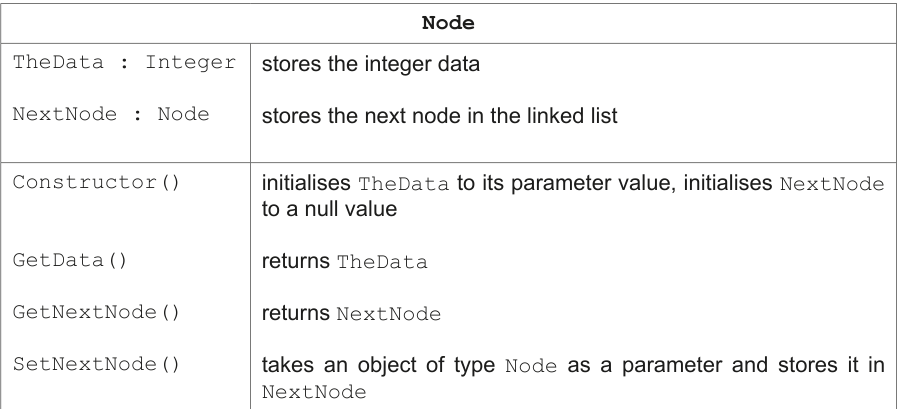
Write program code to declare the class Node and its constructor.
Do not declare the other methods.
Use your programming language appropriate constructor.
If you are writing in Python, include attribute declarations using comments.
Save your program as Question3_J25.
Copy and paste the program code into part 3(a)(i) in the evidence document.
Answer
class Node:
    # TheData : INTEGER
    # NextNode : Node

    def __init__(self, Data):
        self.TheData = Data
        self.NextNode = None
See program code
Background Concept
In OOP, a class is a blueprint for creating objects. A constructor is the method that runs when a new object is created, so its job is to give the object sensible starting values. In a linked list, each node normally stores two things:
- the data item
- a reference to the next node
Because this is a singly linked list, the NextNode reference either points to another Node object or has a null value. In Python, the null value is None.
Understanding the Question
You are asked to declare the Node class and write only its constructor. The class table tells you exactly what the constructor must do:
- store the integer parameter in
TheData - initialise
NextNodeto a null value
Because the question specifically mentions Python, attribute declarations should be shown as comments.
Approach
The simplest way is:
- declare the class
Node - add comment lines for the two attributes
- write
__init__as the Python constructor - assign the parameter to
self.TheData - set
self.NextNodetoNone
That matches the class table exactly.
Step-by-Step Reasoning
class Node: declares the class.
The comment lines:
# TheData : INTEGER# NextNode : Node
show the attribute declarations the exam expects for Python.
def __init__(self, Data): is the Python constructor. The parameter Data is the value that will be stored in the node.
self.TheData = Data stores the integer data inside the node.
self.NextNode = None means this new node does not yet link to another node. That is the correct starting state for a newly created node.
Key Takeaways
- A node in a linked list stores data and a link.
- A constructor must initialise all attributes.
- In Python, a null reference is written as
None.
Common Mistakes
- Using the wrong constructor name, such as
Constructor()instead of Python's__init__. - Forgetting
self.before attribute names. - Not setting
NextNodetoNone. - Using different attribute names from the class table, such as
datainstead ofTheData.
Things to Be Careful About
- The class name must be
Nodeexactly. - The attribute names must be
TheDataandNextNodeexactly. - Python is case-sensitive, so
NextNodeis different fromnextnode. - The comments are important here because the question explicitly asks Python candidates to include attribute declarations using comments.
Write program code for the two get methods.
Save your program.
Copy and paste the program code into part 3(a)(ii) in the evidence document.
Answer
class Node:
    def GetData(self):
        return self.TheData

    def GetNextNode(self):
        return self.NextNode
See program code
Background Concept
Getter methods are used in OOP to return the value of an attribute. They are part of encapsulation: instead of accessing an attribute directly from outside the class, the program can call a method to retrieve it.
In this question, the two getter methods are:
GetData()to return the integer stored in the nodeGetNextNode()to return the reference to the next node
Understanding the Question
You are not being asked to change data or link nodes here. You only need to write the two methods that return existing attribute values from a Node object.
So each method should contain just a return statement for the correct attribute.
Approach
For each getter:
- write the method header with
self - return the matching attribute
There is no loop, no condition, and no parameter other than self.
Step-by-Step Reasoning
def GetData(self):
This defines a method belonging to the Node class.
return self.TheData
This sends back the integer stored in the node.
def GetNextNode(self):
This defines the second getter.
return self.NextNode
This returns the reference to the next node. If the node is the last one in the list, that value may be None.
Key Takeaways
- A getter returns an attribute value.
- Getter methods help keep class access organised.
- The method names and returned attributes must match exactly.
Common Mistakes
- Returning the wrong attribute, such as returning
self.NextNodeinGetData(). - Forgetting the
returnkeyword. - Omitting
selfin the method header. - Trying to pass a parameter to a getter when none is needed.
Things to Be Careful About
- Use the exact method names from the class table:
GetDataandGetNextNode. - Use the exact attribute names:
TheDataandNextNode. GetNextNode()returns a node reference, not the node's data.
The method SetNextNode() takes an object of type Node as a parameter. The method stores the parameter in the attribute NextNode
Write program code for SetNextNode()
Save your program.
Copy and paste the program code into part 3(a)(iii) in the evidence document.
Answer
class Node:
    def SetNextNode(self, NextNode):
        self.NextNode = NextNode
See program code
Background Concept
A setter method changes the value of an attribute. In a linked list, the link field is especially important because it determines which node comes next.
For a singly linked list node, NextNode should store either:
- a reference to another
Nodeobject, or Noneif there is no next node
Understanding the Question
This method takes a Node object as a parameter and stores it in the attribute NextNode. So the method does not return anything; it simply updates the link.
Approach
The method needs only two parts:
- a parameter to receive the node reference
- an assignment that stores that reference in
self.NextNode
Step-by-Step Reasoning
def SetNextNode(self, NextNode):
This declares a method in the Node class. The parameter NextNode is the node object that should become the next node in the list.
self.NextNode = NextNode
This updates the current node's link so it now points to the parameter node.
That is all the question requires.
Key Takeaways
- A setter changes an attribute value.
- In linked lists, updating the next reference changes the structure of the list.
SetNextNode()is used later when inserting or removing nodes.
Common Mistakes
- Returning the parameter instead of storing it.
- Writing
NextNode = self.NextNode, which does nothing useful. - Forgetting
self.before the attribute name.
Things to Be Careful About
- The method name must be
SetNextNodeexactly. - The attribute being changed is
self.NextNode, notself.TheData. - The parameter represents a node reference, not an integer value.
The class LinkedList stores the linked list.
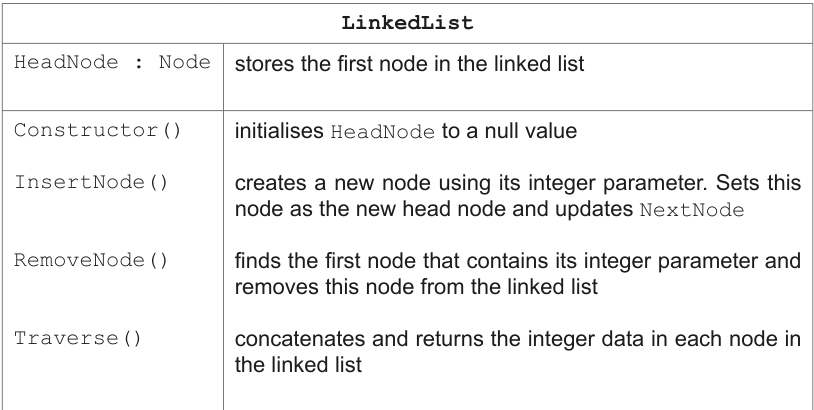
Write program code to declare the class LinkedList and its constructor.
Do not declare the other methods.
Use your programming language appropriate constructor.
If you are writing in Python, include attribute declarations using comments.
Save your program.
Copy and paste the program code into part 3(b)(i) in the evidence document.
Answer
class LinkedList:
    # HeadNode : Node

    def __init__(self):
        self.HeadNode = None
See program code
Background Concept
A linked list object usually needs one main reference: the head pointer. The head pointer stores the first node in the list. If the list is empty, the head pointer has a null value.
In Python, that null value is None.
Understanding the Question
You need to declare the LinkedList class and write only its constructor. The class table tells you that the class has one attribute, HeadNode, and the constructor must initialise it to a null value.
Approach
The required code is:
- declare the class
LinkedList - include a comment for the attribute declaration
- write the constructor
__init__ - set
self.HeadNodetoNone
Step-by-Step Reasoning
class LinkedList: creates the class.
# HeadNode : Node is the Python comment showing the attribute declaration.
def __init__(self): is the constructor. This constructor does not need a parameter because an empty linked list starts with no first node.
self.HeadNode = None sets the list to empty.
Key Takeaways
- The head pointer is how a linked list is accessed.
- An empty linked list has no first node.
- In Python, that empty reference is
None.
Common Mistakes
- Giving the constructor an unnecessary parameter.
- Forgetting to initialise
HeadNode. - Using a different attribute name such as
Headinstead ofHeadNode.
Things to Be Careful About
- The class name must be
LinkedListexactly. - The attribute name must be
HeadNodeexactly. - The question specifically asks Python candidates to include attribute declarations using comments.
The method InsertNode():
- takes an integer as a parameter
- creates a new node with the parameter as the integer data
- uses the new node’s method
SetNextNode()to store the currentHeadNodeas the next node - replaces
HeadNodewith the current node.
Write program code for InsertNode()
Save your program.
Copy and paste the program code into part 3(b)(ii) in the evidence document.
Answer
class LinkedList:
    def InsertNode(self, Data):
        NewNode = Node(Data)
        NewNode.SetNextNode(self.HeadNode)
        self.HeadNode = NewNode
See program code
Background Concept
Inserting at the head of a singly linked list is a standard operation. The new node becomes the first node, so:
- a new node is created
- that new node must point to the old head
- the head pointer is updated to the new node
This order matters. If the head pointer is changed too early, the original list may be lost.
Understanding the Question
The question gives the exact behaviour of InsertNode():
- it takes an integer parameter
- creates a new node containing that value
- uses
SetNextNode()to store the currentHeadNodeas the next node - replaces
HeadNodewith the new node
So this is a head insertion method.
Approach
Use one temporary variable for the new node:
- create
NewNode - connect
NewNodeto the current head - move
HeadNodetoNewNode
That preserves the rest of the list.
Step-by-Step Reasoning
NewNode = Node(Data) creates a new Node object containing the integer parameter.
NewNode.SetNextNode(self.HeadNode) makes the new node point to what was previously the first node. If the list was empty, self.HeadNode is None, which is still correct.
self.HeadNode = NewNode now makes the new node the first node in the list.
After these three steps, insertion is complete.
Key Takeaways
- Head insertion is efficient because it does not require traversal.
- The new node must link to the old head before the head pointer is changed.
- Setter methods can be used to update links cleanly.
Common Mistakes
- Setting
self.HeadNode = NewNodebefore linkingNewNodeto the old head, which loses the original list. - Forgetting to create a
Nodeobject and trying to store the integer directly inHeadNode. - Writing
self.HeadNode.SetNextNode(NewNode), which reverses the link direction.
Things to Be Careful About
- The method parameter is an integer, not a node.
SetNextNode()is called on the new node, not on the old head.- The order of the three statements is the most important detail in this question.
The method Traverse() concatenates the integer data from the nodes in the linked list, starting with the node stored in HeadNode. The method returns the final string with each integer data separated with a space.
Write program code for Traverse()
Save your program.
Copy and paste the program code into part 3(b)(iii) in the evidence document.
Answer
class LinkedList:
    def Traverse(self):
        Result = ""
        CurrentNode = self.HeadNode
        while CurrentNode is not None:
            if Result != "":
                Result = Result + " "
            Result = Result + str(CurrentNode.GetData())
            CurrentNode = CurrentNode.GetNextNode()
        return Result
See program code
Background Concept
Traversing a linked list means starting at the head node and following the links one by one until there are no more nodes. In a singly linked list, you move forward using the next reference.
Because the method must return a string, the integer data from each node has to be converted to text before concatenation.
Understanding the Question
Traverse() must:
- start from
HeadNode - visit each node in order
- concatenate each integer data value into one string
- separate values with a space
- return the final string
So the task is not to print directly, but to build and return a string.
Approach
Use:
- a string accumulator,
Result - a traversal pointer,
CurrentNode - a
whileloop that continues untilCurrentNodebecomesNone
To avoid an extra space at the start or end, add a space only when Result is not empty.
Step-by-Step Reasoning
Result = "" starts with an empty string.
CurrentNode = self.HeadNode begins traversal at the first node.
while CurrentNode is not None: keeps moving through the list until there is no next node to visit.
if Result != "": checks whether something has already been added. If so, a space is added first.
Result = Result + str(CurrentNode.GetData()) appends the current node's data. str(...) is needed because string concatenation cannot directly join an integer.
CurrentNode = CurrentNode.GetNextNode() moves to the next node.
return Result sends the completed string back to the caller.
If the list is empty, the loop never runs and an empty string is returned, which is sensible.
Key Takeaways
- Traversal starts at the head pointer.
- A loop follows links until a null reference is reached.
- Integer data must be converted to strings before concatenation.
Common Mistakes
- Forgetting to move to the next node, causing an infinite loop.
- Concatenating the integer directly without
str(...)in Python. - Adding a trailing or leading space accidentally.
- Printing inside the method instead of returning the final string.
Things to Be Careful About
- Use
GetData()andGetNextNode()exactly as defined. - The loop condition should test whether the current node exists.
- The method must return a string, not a list and not printed output.
The method RemoveNode() takes an integer parameter to search for and remove from the linked list.
The method first checks if the linked list is empty. If the linked list is empty the method returns FALSE
If the linked list is not empty, the integer data in HeadNode is compared to the parameter. If it matches the parameter, HeadNode is changed to store the next node.
If the parameter does not match, the nodes are followed until either:
- the node with matching integer data is found. This node is removed, the appropriate nodes updated and
TRUEreturned
or
- none of the nodes contain matching integer data to the parameter. No nodes are removed and
FALSEis returned.
Write program code for RemoveNode()
Save your program.
Copy and paste the program code into part 3(b)(iv) in the evidence document.
Answer
class LinkedList:
    def RemoveNode(self, Data):
        if self.HeadNode is None:
            return False

        if self.HeadNode.GetData() == Data:
            self.HeadNode = self.HeadNode.GetNextNode()
            return True

        PreviousNode = self.HeadNode
        CurrentNode = self.HeadNode.GetNextNode()

        while CurrentNode is not None:
            if CurrentNode.GetData() == Data:
                PreviousNode.SetNextNode(CurrentNode.GetNextNode())
                return True
            PreviousNode = CurrentNode
            CurrentNode = CurrentNode.GetNextNode()

        return False
See program code
Background Concept
Removing a node from a singly linked list is more difficult than inserting at the head because the links must be preserved. There are three main cases:
- the list is empty
- the node to remove is the head node
- the node to remove is somewhere after the head
In case 3, you need two references while traversing:
CurrentNodefor the node being checkedPreviousNodefor the node before it
To remove CurrentNode, you do not delete by shifting data. Instead, you make PreviousNode skip over CurrentNode and point directly to CurrentNode's next node.
Understanding the Question
The method must search for the first node containing the given integer and remove it. It must return:
Falseif the list is emptyTrueif a matching node is found and removedFalseif no node contains the value
The question explicitly tells you to check the head node separately before following the rest of the links.
Approach
A safe structure is:
- check for an empty list
- check whether the head node matches
- if not, traverse the rest of the list using
PreviousNodeandCurrentNode - when a match is found, link
PreviousNodetoCurrentNode.GetNextNode() - return the correct Boolean value
This structure cleanly handles all cases.
Step-by-Step Reasoning
if self.HeadNode is None: checks whether the list is empty. If it is, there is nothing to remove, so False is returned.
if self.HeadNode.GetData() == Data: checks whether the first node contains the value.
If it does, self.HeadNode = self.HeadNode.GetNextNode() removes the first node by moving the head pointer to the next node. Then True is returned.
If the head does not match, the rest of the list must be searched.
PreviousNode = self.HeadNode means PreviousNode starts at the first node.
CurrentNode = self.HeadNode.GetNextNode() means CurrentNode starts at the second node.
while CurrentNode is not None: continues until the end of the list is reached.
Inside the loop, if CurrentNode.GetData() == Data: checks whether the current node contains the required value.
If it does, PreviousNode.SetNextNode(CurrentNode.GetNextNode()) changes the previous node so it points to the node after the matched one. That bypasses the matched node, which removes it from the list. Then True is returned immediately.
If it does not match, both pointers move forward:
PreviousNode = CurrentNodeCurrentNode = CurrentNode.GetNextNode()
If the loop finishes, no match was found, so the method returns False.
Key Takeaways
- Removal in a singly linked list often needs special handling for the head node.
- Internal-node removal uses previous and current pointers.
- Deletion is done by changing links, not by shifting all data.
- Returning a Boolean is a clear way to report success or failure.
Common Mistakes
- Forgetting the empty-list case.
- Forgetting the special case where the head node matches.
- Updating only
CurrentNodebut notPreviousNodeduring traversal. - Setting
CurrentNode = CurrentNode.GetNextNode()before fixing the previous link, which can make the logic harder or wrong. - Returning
TrueorFalsein the wrong case.
Things to Be Careful About
- Start
CurrentNodeat the second node after checking the head separately. - When a match is found in the middle, update
PreviousNode's next link, notHeadNode. - Stop as soon as the first match is removed because the question asks for the first node containing the value.
- Python uses
TrueandFalse, notTRUEandFALSE.
The main program creates a new LinkedList object and uses the appropriate method to insert five nodes with the following integer data values in the order given:
10 20 30 40 50
The main program then:
- calls
Traverse() - removes the node containing the integer data 30 using
RemoveNode() - calls
Traverse()
Write program code for the main program.
Save your program.
Copy and paste the program code into part 3(c)(i) in the evidence document.
Answer
MyList = LinkedList()

MyList.InsertNode(10)
MyList.InsertNode(20)
MyList.InsertNode(30)
MyList.InsertNode(40)
MyList.InsertNode(50)

print(MyList.Traverse())
MyList.RemoveNode(30)
print(MyList.Traverse())
See program code
Background Concept
The main program is where objects are created and methods are called. For linked lists, the order of insertion matters. This particular InsertNode() method always inserts at the head, so the most recently inserted value appears first when the list is traversed.
Understanding the Question
The main program must:
- create a
LinkedListobject - insert five integer values in the order
10 20 30 40 50 - call
Traverse() - remove the node containing
30 - call
Traverse()again
Because Traverse() returns a string, the main program should output that returned value.
Approach
The structure is:
- create the list object
- call
InsertNode()five times - print the result of
Traverse() - call
RemoveNode(30) - print the result of
Traverse()again
Step-by-Step Reasoning
MyList = LinkedList() creates a new empty linked list.
The insertions are then made in this order:
1020304050
Since insertion is at the head, the actual list order after all insertions is:
50 40 30 20 10
print(MyList.Traverse()) outputs that first traversal string.
MyList.RemoveNode(30) removes the first node containing 30.
The list then becomes:
50 40 20 10
The second print(MyList.Traverse()) outputs that updated traversal string.
Key Takeaways
- Main programs create objects and call methods on them.
- Head insertion reverses the order in which values appear.
- A method that returns a string should usually be printed if output is required.
Common Mistakes
- Expecting the first traversal to be
10 20 30 40 50instead of the reversed order. - Calling
Traverse()without printing its returned value. - Forgetting to remove
30before the second traversal.
Things to Be Careful About
- Use the correct class name
LinkedList. - Use the exact value
30inRemoveNode(30). - The question says insert the values in the order given, even though the final displayed order is reversed by the insertion method.
Test your program.
Take a screenshot of the output(s).
Save your program.
Copy and paste the screenshot into part 3(c)(ii) in the evidence document.
Answer
Expected output:
50 40 30 20 10
50 40 20 10
50 40 30 20 10
50 40 20 10
Background Concept
Testing output in a linked-list program often depends on tracing how links change after each operation. Here, the important linked-list behaviour is head insertion: every newly inserted node becomes the first node.
Understanding the Question
This part is asking for the output produced when the completed program is run. There is no user input. The output comes from two calls to Traverse():
- after inserting the five values
- after removing the node containing
30
Approach
Work out the list contents after each operation, then write the exact two lines that would appear on the console.
Step-by-Step Reasoning
Start with an empty list.
Insert 10:
10
Insert 20 at the head:
20 10
Insert 30 at the head:
30 20 10
Insert 40 at the head:
40 30 20 10
Insert 50 at the head:
50 40 30 20 10
So the first call to Traverse() outputs:
50 40 30 20 10
Now remove the node containing 30. That leaves:
50 40 20 10
So the second call to Traverse() outputs:
50 40 20 10
These are the two lines shown in the marking scheme output figure.
Key Takeaways
- Insert-at-head reverses the apparent order of inserted values.
- Traversal prints the nodes from head to tail.
- To predict output, trace the list after every update.
Common Mistakes
- Writing the first line as
10 20 30 40 50. - Forgetting that only the first matching
30is removed. - Missing the second output line.
Things to Be Careful About
- Match the spacing exactly: one space between each number.
- Do not add commas or brackets.
- The output is on two separate lines because
Traverse()is printed twice.