Computer Science 9618/42 — May/June 2025
Cambridge A-Level · Practical · worked solutions for every part, with the mark scheme
Topics Programming Paradigms (Procedural and Object-oriented) · File Processing and Exception Handling · Algorithms and Abstract Data Types
You have been supplied with the following source files:
StackData.txt
SecondStack.txt
HashData.txt
Open the evidence document, evidence.doc
Make sure that your name, centre number and candidate number will appear on every page of this document. This document must contain your answers to each question.
Save this evidence document in your work area as:
evidence_ followed by your centre number_candidate number, for example: evidence_zz999_9999
A class declaration can be used to declare a record. If the programming language used does not support arrays, a list can be used instead.
Three source files are used to answer Questions 1 and 2. The files are called StackData.txt, SecondStack.txt and HashData.txt
A program reads data from a text file and stores it in a stack. The stack Stack is stored as a 1D array of up to 20 elements. The pointer TopOfStack stores the index of the last element stored in the stack.
Stack is a global array of strings with all elements initialised to "-1"
TopOfStack is a global variable initialised to -1
Write program code to declare and initialise Stack and TopOfStack
Save your program as Question1_J25.
Copy and paste the program code into part 1(a) in the evidence document.
Answer
Stack = ["-1"] * 20
TopOfStack = -1
See program code
Background Concept
A stack is a Last In, First Out (LIFO) data structure. In this question it is implemented using a fixed-size 1D array called Stack and an integer pointer called TopOfStack.
TopOfStack stores the index of the current top item. When the stack is empty, there is no valid top item, so the pointer is set to -1. With 20 elements in Python, the valid indexes are 0 to 19.
The array elements are also initialised to the string "-1". That value acts as a placeholder so every position starts with a known value.
Understanding the Question
You are not being asked to write any stack logic yet. This part only asks you to create the two global variables that the later parts will use:
Stackas an array of 20 strings, all starting as"-1"TopOfStackas-1
Because later functions like Push() and Pop() rely on these names, the declarations must match exactly.
Approach
The easiest Python representation of a fixed-size array here is a list with 20 elements. So:
- Create a list of length 20.
- Fill every element with
"-1". - Set
TopOfStackto-1to mean empty stack.
Step-by-Step Reasoning
Stack = ["-1"] * 20
[...] * 20creates 20 entries.- Each entry is the string
"-1". - This matches the requirement that all elements are initialised to
"-1".
TopOfStack = -1
- This signals that there is currently no item in the stack.
- The first successful push will move the pointer from
-1to0.
Key Takeaways
- A fixed-size stack can be stored in an array or list.
TopOfStack = -1is a standard way to represent an empty stack.- Initial values matter because later code depends on a known starting state.
Common Mistakes
- Declaring only one
"-1"instead of 20 elements. - Setting
TopOfStackto0, which would incorrectly suggest that one item already exists. - Using a numeric
-1inside the array instead of the required string"-1".
Things to Be Careful About
- The stack elements are strings, so use
"-1"with quotes in the array. TopOfStackis an integer, so use-1without quotes.- Keep the identifier names exactly as given:
StackandTopOfStack.
The function Push() takes a string parameter and attempts to store it on the stack.
The function returns -1 if the stack is full.
The function returns 1 if the parameter is successfully pushed onto the stack.
Write program code for Push()
Save your program.
Copy and paste the program code into part 1(b) in the evidence document.
Answer
def Push(DataToPush):
    global Stack, TopOfStack
    if TopOfStack >= 19:
        return -1
    TopOfStack += 1
    Stack[TopOfStack] = DataToPush
    return 1
See program code
Background Concept
Push() is the operation that adds a new item to the top of a stack. Because this stack has a fixed size of 20 elements, Push() must first check whether there is space available.
For a 20-element stack stored in Python, the last valid index is 19. So the stack is full when TopOfStack is already 19.
The required return values are:
-1if the stack is full1if the item is successfully added
Understanding the Question
This part asks you to write the Push() function. It takes one string parameter and tries to place it on the stack.
The important clues are:
- the stack is global
- the maximum number of elements is 20
- success and failure must be reported using specific return values
Approach
Use the usual stack-push pattern:
- Check whether the stack is full.
- If full, return
-1immediately. - Otherwise move
TopOfStackup by 1. - Store the new data at that position.
- Return
1.
Step-by-Step Reasoning
def Push(DataToPush):
- The function needs one parameter: the string to be stored.
global Stack, TopOfStack
- These variables were declared outside the function.
- Without
global, Python would treat assignments toTopOfStackas local.
if TopOfStack >= 19:
- Valid indexes are
0to19. - If the pointer is already
19, the stack is full. >= 19is safe even if something has gone wrong elsewhere.
return -1
- This matches the question exactly for the full-stack case.
TopOfStack += 1
- The empty stack starts at
-1. - On the first push, it becomes
0. - On the next push, it becomes
1, and so on.
Stack[TopOfStack] = DataToPush
- Store the new item at the new top position.
return 1
- This signals that the push succeeded.
Key Takeaways
- Push means move the top pointer up, then store the item.
- A fixed-size stack must check for overflow before pushing.
- Return codes are a simple way to communicate whether an operation worked.
Common Mistakes
- Using
20as the last valid index instead of19. - Storing the item before increasing
TopOfStack, which would overwrite the current top item. - Forgetting to return
-1or1exactly as required. - Forgetting
global, so the pointer is not updated correctly.
Things to Be Careful About
- The stack has 20 elements, but the indexes are
0to19. - The parameter is a string, so do not convert it here.
- Keep the function name as
Push()because later parts call it by that name.
The function Pop() returns the next item from the stack.
The function returns "-1" if the stack is empty.
Write program code for Pop()
Save your program.
Copy and paste the program code into part 1(c) in the evidence document.
Answer
def Pop():
    global Stack, TopOfStack
    if TopOfStack == -1:
        return "-1"
    Item = Stack[TopOfStack]
    Stack[TopOfStack] = "-1"
    TopOfStack -= 1
    return Item
See program code
Background Concept
Pop() removes and returns the top item from a stack. Because a stack is LIFO, the most recently pushed item is the one that must come back first.
An empty stack is indicated by TopOfStack = -1. Attempting to pop from an empty stack is called underflow. The question says that in this case the function must return the string "-1".
Understanding the Question
You must write a function that:
- checks whether the stack is empty
- if empty, returns
"-1" - otherwise returns the top item and removes it from the stack
This is the inverse of Push().
Approach
Use the standard pop pattern:
- Check whether
TopOfStackis-1. - If it is, return
"-1". - Otherwise store the current top item in a temporary variable.
- Optionally reset that array position to
"-1". - Decrease
TopOfStackby 1. - Return the saved item.
Step-by-Step Reasoning
if TopOfStack == -1:
-1means the stack is empty.- No item can be removed.
return "-1"
- The question requires the string
"-1", not the integer-1.
Item = Stack[TopOfStack]
- Read the value before changing the pointer.
- If you moved the pointer first, you would lose access to the correct item.
Stack[TopOfStack] = "-1"
- This clears the old position.
- It is not strictly necessary for the pop to work, but it keeps the array consistent with the way the stack was initialised.
TopOfStack -= 1
- The stack now has one fewer item.
- The next lower index becomes the new top.
return Item
- This gives back the item that was removed.
Key Takeaways
- Pop means read the top item, then move the pointer down.
- Underflow happens when you try to pop from an empty stack.
- The order of operations matters: retrieve first, decrement after.
Common Mistakes
- Decrementing
TopOfStackbefore reading the item. - Returning numeric
-1instead of string"-1". - Forgetting to use
globalwhen modifyingTopOfStack. - Testing the wrong empty condition, such as
0instead of-1.
Things to Be Careful About
TopOfStack == -1is the empty check for this specific stack design.- The array contents are strings, so the empty value must be written as
"-1". - The function must return the item itself, not print it.
The text file StackData.txt stores numbers and mathematical operators. Each number and operator are on a new line in the text file.
The mathematical operators used in this program are:
| mathematical operator | meaning |
|---|---|
| + | addition |
| – | subtraction |
| / | division |
| * | multiplication |
| ^ | power of |
The procedure ReadData():
- takes a string filename as a parameter
- opens the file and reads in each line of data
- uses the
Push()function to insert each line of data onto the stack - outputs "Stack full" if any data cannot be stored on the stack because the stack is full
- uses exception handling when opening and reading from the text file.
The procedure needs to work for a file that contains an unknown number of lines.
Write program code for ReadData()
Save your program.
Copy and paste the program code into part 1(d) in the evidence document.
Answer
def ReadData(FileName):
    try:
        with open(FileName, "r") as File:
            for Line in File:
                Data = Line.strip()
                if Push(Data) == -1:
                    print("Stack full")
    except FileNotFoundError:
        print("File not found")
    except IOError:
        print("Error reading file")
See program code
Background Concept
Sequential text-file processing means reading data one line at a time from the start of the file to the end. When the number of lines is unknown, you do not use a fixed-count loop. Instead, you keep reading until the file has no more lines.
This part also requires exception handling. Exception handling is used to deal with run-time problems such as a missing file or an input/output error. In Python, this is done with try and except.
Understanding the Question
ReadData() must:
- take a filename parameter
- open the file
- read each line
- push each line onto the stack
- output
"Stack full"if a value cannot be pushed - use exception handling
- work for a file with an unknown number of lines
The file contents are strings such as numbers and operators, one per line.
Approach
A Python for loop over the file is a good fit because it naturally handles an unknown number of lines. For each line:
- remove the newline character using
.strip() - call
Push() - if
Push()returns-1, output"Stack full"
Wrap the file opening and reading in a try block so file errors are handled safely.
Step-by-Step Reasoning
def ReadData(FileName):
- The procedure needs one parameter: the file name to open.
try:
- Start exception handling.
- Any error while opening or reading the file can be caught by the
exceptblocks.
with open(FileName, "r") as File:
- Open the file in read mode.
withis useful because the file is automatically closed afterwards.
for Line in File:
- This reads one line at a time.
- It continues until the end of the file, so it works for an unknown number of lines.
Data = Line.strip()
- Each text-file line usually ends with a newline character.
.strip()removes that, leaving just the operator or number.
if Push(Data) == -1:
- Try to put the value onto the stack.
- If the stack is already full,
Push()signals failure.
print("Stack full")
- This matches the question requirement.
except FileNotFoundError:
- Handles the case where the file does not exist or the name is wrong.
except IOError:
- Handles other input/output problems during reading.
Key Takeaways
- Unknown-length text files should be read with a loop that continues to end-of-file.
- File input often needs
.strip()to remove newlines. - Exception handling prevents the program from crashing on file errors.
- ADT operations such as
Push()can be reused inside file-processing code.
Common Mistakes
- Using a fixed loop count, even though the question says the number of lines is unknown.
- Forgetting
.strip(), which would store values like"10\n"instead of"10". - Opening the file without any exception handling.
- Reading the whole file but never calling
Push(). - Ignoring the
-1return value fromPush().
Things to Be Careful About
- The filename comes from the parameter, not a hard-coded string.
Push()returns-1as an integer, so compare against-1, not"-1".- The question only asks to output
"Stack full"when the stack overflows; do not stop pushing unless you choose to, and do not change the required message.
The values stored in the stack are used to perform mathematical operations.
A total is initialised to the first value in the stack. The first value in the stack will always be a number.
The next value will be a mathematical operator and the next value will be the number to apply to the calculation. This is repeated until there are no values left in the stack. There will always be a number following a mathematical operator.
For example, the contents of a stack are:
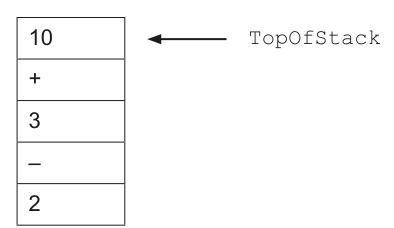
The total is initialised to the first value in the stack: 10
total = 10
The next two values are: + 3
total = 10 + 3 = 13
The next two values are: – 2
total = 13 – 2 = 11
The final total is 11 and this is returned.
Write program code for the function Calculate() to:
- take each value from the stack
- calculate and return the final total.
Save your program.
Copy and paste the program code into part 1(e) in the evidence document.
Answer
def Calculate():
    global TopOfStack
    Total = float(Pop())
    while TopOfStack != -1:
        Operator = Pop()
        Number = float(Pop())
        if Operator == "+":
            Total = Total + Number
        elif Operator == "-":
            Total = Total - Number
        elif Operator == "/":
            Total = Total / Number
        elif Operator == "*":
            Total = Total * Number
        elif Operator == "^":
            Total = Total ** Number
    if Total.is_integer():
        return int(Total)
    return Total
See program code
Background Concept
This question uses a stack to store tokens: numbers and operators. Because a stack is LIFO, the last item pushed is the first item popped.
The calculation rule here is not normal infix precedence. Instead, the question tells you exactly how to process the data:
- take the first value from the stack as the starting total
- take the next value as an operator
- take the next value as a number
- apply the operator to the running total
- repeat until the stack is empty
So the program follows the order of items in the stack, not mathematical precedence rules.
Understanding the Question
You need to write Calculate() so that it removes values from the stack and computes the final result.
Important details inherited from the earlier stem are:
- the stack stores strings, not numbers
Pop()returns the top item each time- the first value popped will always be a number
- after that, the items come in operator/number pairs
- there will always be a number after an operator
So the function must convert number strings into actual numeric values before calculating.
Approach
The cleanest structure is:
- Pop the first item and store it as
Total. - While the stack is not empty:
- pop an operator
- pop a number
- use
if/elifto apply the operator
- Return the finished total.
Using a while loop is appropriate because you do not know how many operator/number pairs there are.
Step-by-Step Reasoning
Total = float(Pop())
- The first item popped is guaranteed to be a number.
Pop()returns a string, so it must be converted before calculation.float()is used so division can produce a non-integer result if needed.
while TopOfStack != -1:
- Continue while there are still items on the stack.
- When the pointer becomes
-1, the stack is empty.
Operator = Pop()
- The next item is the operator symbol.
Number = float(Pop())
- The following item is the next number to use.
- It is stored as a string, so convert it to a number.
Then each branch performs one possible operation:
+adds to the running total-subtracts from the running total/divides the running total by the number*multiplies the running total by the number^means power, so in Python this is**
if Total.is_integer(): return int(Total)
- This is helpful so values like
131.0are returned as131. - If the result is not a whole number, the float is returned unchanged.
To see why stack order matters, use StackData.txt.
The file contains, in reading order:
3+2*2^2-10
After pushing, the top of the stack is 10, then -, then 2, then ^, then 2, then *, then 2, then +, then 3.
So Calculate() processes:
- start
Total = 10 10 - 2 = 88 ^ 2 = 6464 * 2 = 128128 + 3 = 131
Key Takeaways
- When data is in a stack, the processing order is reversed from the input order.
- Strings from files or arrays often need conversion before arithmetic.
- A running-total algorithm is a common pattern when processing repeated operator/value pairs.
- Do not assume normal operator precedence when the question gives a specific evaluation order.
Common Mistakes
- Trying to evaluate the expression using normal mathematical precedence.
- Forgetting that the stack reverses the file order.
- Not converting the popped number strings to numeric values.
- Using
^directly in Python, even though Python uses**for powers. - Stopping the loop too early or too late.
Things to Be Careful About
- The stack stores strings, so both the initial total and later numbers must be converted.
- The operator must be popped before the next number because that is the order the question specifies.
- Use
TopOfStack != -1as the empty check for this stack. - If division is used, the result may become a float, so plan for non-integer answers.
Write program code to extend the main program to:
- take a filename as input from the user
- call
ReadData()with the input filename - call
Calculate() - output the final total.
Save your program.
Copy and paste the program code into part 1(f)(i) in the evidence document.
Answer
FileName = input("Enter filename: ")
ReadData(FileName)
FinalTotal = Calculate()
print("Final total =", FinalTotal)
See program code
Background Concept
The main program is the controlling section that coordinates input, processing and output. In procedural programming, this often means:
- read a value from the user
- pass it to a procedure or function
- receive a result back
- display the result
A procedure performs an action, while a function returns a value.
Understanding the Question
This part does not ask you to rewrite earlier code. It asks you to extend the main program so that it:
- takes a filename from the user
- calls
ReadData()with that filename - calls
Calculate() - outputs the final total
So you are simply joining together the parts already written.
Approach
Follow the sequence of the specification exactly:
- get the filename from the keyboard
- pass it to
ReadData()so the stack is filled - call
Calculate()to process the stack - display the returned answer
Step-by-Step Reasoning
FileName = input("Enter filename: ")
- This reads the text the user types.
- The filename must be stored so it can be passed into
ReadData().
ReadData(FileName)
- This opens the chosen file and pushes its contents onto the stack.
FinalTotal = Calculate()
Calculate()processes the stack and returns the answer.- That returned value is stored in a variable so it can be printed.
print("Final total =", FinalTotal)
- This outputs the result clearly to the user.
Key Takeaways
- Main program code often just links together smaller, reusable routines.
- Input, processing and output should appear in a logical sequence.
- Functions return values; procedures mainly perform actions.
Common Mistakes
- Calling
Calculate()beforeReadData(), so the stack is empty. - Printing the function name instead of the returned value.
- Forgetting to store the user input in a variable.
- Passing a fixed filename instead of the user's input.
Things to Be Careful About
- Use the same variable and function names consistently.
ReadData()needs the filename as an argument.Calculate()returns the total, so its result should be assigned or printed directly.
Test your program twice with the file names:
StackData.txt
SecondStack.txt
Take a screenshot of the output(s).
Save your program.
Copy and paste the screenshot into part 1(f)(ii) in the evidence document.
Answer
Input StackData.txt
Enter filename: StackData.txt
Final total = 131
Input SecondStack.txt
Enter filename: SecondStack.txt
Final total = 320
StackData.txt → 131; SecondStack.txt → 320
Background Concept
Testing a practical program means running it with known inputs and confirming that the outputs match what the logic should produce. Here, the output depends on two earlier ideas:
- file data is read line by line and pushed onto a stack
- a stack reverses the order because it is LIFO
So to predict the output, you must first work out the top-to-bottom order of the stack, then apply Calculate() exactly as written.
Understanding the Question
You are asked to test the finished program with two supplied filenames:
StackData.txtSecondStack.txt
The evidence document would normally contain screenshots, but for a written solution we give the expected console outputs.
Approach
For each file:
- list the lines in the file in their original order
- reverse that mentally into stack pop order, because the last line pushed becomes the top
- start with the first popped number as the total
- apply each operator and following number in sequence
- write the resulting output exactly as the program would display it
Step-by-Step Reasoning
For StackData.txt, the file lines are:
3+2*2^2-10
After ReadData(), the top item is 10, then -, 2, ^, 2, *, 2, +, 3.
So Calculate() does this:
- start with
10 10 - 2 = 88 ^ 2 = 6464 * 2 = 128128 + 3 = 131
So the output is 131.
For SecondStack.txt, the file lines are:
20*4^3/5+1
After ReadData(), the top item is 1, then +, 5, /, 3, ^, 4, *, 20.
So Calculate() does this:
- start with
1 1 + 5 = 66 / 3 = 22 ^ 4 = 1616 * 20 = 320
So the output is 320.
Key Takeaways
- To predict output from a stack-based program, always think in pop order, not file order.
- Testing is strongest when you can justify exactly why a particular output appears.
- A screenshot question in Paper 4 is really checking whether the program runs correctly on supplied data.
Common Mistakes
- Evaluating the file contents in the order they appear in the file instead of the reversed stack order.
- Applying normal precedence instead of the program's left-to-right running-total method.
- Forgetting that
^means power. - Giving only one test result when the question asks for two.
Things to Be Careful About
- The exact prompt text depends on your own main program, so keep the shown output consistent with the code you wrote.
- The important mark-bearing part is the final total for each file.
- If your program prints whole-number floats such as
131.0, that is a display-choice issue, but the underlying calculated totals are131and320.
A program stores data in a 1D array of records, HashTable. The array has space for 200 records. Each data item is stored in a specific index of the array that is calculated using an algorithm. The index is calculated from the key field using the formula: Key MOD 200
If two key fields generate the same index, there is a collision. Any records that have a collision are stored in a second array, Spare. This array has space for 100 records. When a collision is detected, the record is stored in the next free space in Spare.
The pseudocode record format is:
TYPE NewRecord
    DECLARE Key : INTEGER
    DECLARE Item1 : INTEGER
    DECLARE Item2 : INTEGER
ENDTYPE
Write program code to declare the record type NewRecord
If your chosen programming language does not support record formats, a class can be used instead.
Save your program as Question2_J25.
Copy and paste the program code into part 2(a) in the evidence document.
Answer
class NewRecord:
    def __init__(self, Key, Item1, Item2):
        self.Key = Key
        self.Item1 = Item1
        self.Item2 = Item2
See program code
Background Concept
In Paper 4, a pseudocode TYPE or record is often implemented in Python using a class. A record is a single grouped item made up of several named fields. Here, each record contains three integer fields: Key, Item1 and Item2.
Python does not have a built-in record format in the same style as the pseudocode, so a class is the standard alternative. The constructor method __init__() is used to set up the fields whenever a new object is created.
Understanding the Question
The question gives the record format:
Key : INTEGERItem1 : INTEGERItem2 : INTEGER
You are asked to write program code to declare this type as NewRecord. Since Python does not use pseudocode TYPE ... ENDTYPE, you need to create a class with matching attribute names.
Approach
The direct approach is:
- Declare a class called
NewRecord. - Add a constructor.
- Store the three incoming values into attributes with the same names as the fields in the question.
This matches the pseudocode record closely and allows later parts of the question to create and store records easily.
Step-by-Step Reasoning
class NewRecord: creates a new user-defined type.
Inside it, def __init__(self, Key, Item1, Item2): defines the constructor. This runs each time a record is created.
self.Key = Keystores the key field in the object.self.Item1 = Item1stores the first item field.self.Item2 = Item2stores the second item field.
So a call such as NewRecord(646, 12, 568) creates one record object with those three values stored inside it.
Key Takeaways
- A pseudocode record can be implemented as a Python class.
- The constructor is used to initialise the fields.
- Keeping the same field names as the question makes later code clearer and safer.
Common Mistakes
- Using different attribute names from the question, which can cause errors later.
- Forgetting
self.when assigning attributes inside the constructor. - Declaring separate variables instead of a single grouped record type.
Things to Be Careful About
- The class name must be
NewRecordexactly. - The field names should match the question:
Key,Item1,Item2. - Later parts depend on this structure, so any mismatch here affects the whole program.
Write program code to declare the global arrays HashTable and Spare
Save your program.
Copy and paste the program code into part 2(b)(i) in the evidence document.
Answer
HashTable = [None for _ in range(200)]
Spare = [None for _ in range(100)]
See program code
Background Concept
A 1D array stores items in indexed positions. In Python, a list is used for this purpose. The question states that HashTable has space for 200 records and Spare has space for 100 records, so two global lists are needed.
Global means the arrays can be accessed by the procedures and functions throughout the program.
Understanding the Question
This part only asks for the declarations of the arrays, not for filling them yet. The next part handles initialisation with empty records, so here you only need to create the two arrays with the correct number of elements.
Approach
Create two lists:
HashTablewith 200 positionsSparewith 100 positions
Using None as a placeholder is suitable because the actual empty NewRecord values will be inserted later by Initialise().
Step-by-Step Reasoning
HashTable = [None for _ in range(200)] creates a list with 200 elements. Valid Python indices will be 0 to 199.
Spare = [None for _ in range(100)] creates a second list with 100 elements. Valid indices will be 0 to 99.
These arrays are global because they are declared outside any procedure or function.
Key Takeaways
- Python lists are used as arrays in Paper 4 solutions.
- The size must match the question exactly.
- Global arrays are often declared first, then initialised later.
Common Mistakes
- Declaring the wrong sizes, such as 199 or 201 elements.
- Creating only one of the two arrays.
- Trying to store records before the arrays have been initialised properly.
Things to Be Careful About
HashTablemust have 200 elements andSparemust have 100.- This part is only the declaration; the empty records are added in
Initialise(). - Keep the names exactly as given in the question because later procedures use them.
An empty record has the integer -1 stored in each field.
The procedure Initialise() stores an empty record in each element in HashTable and Spare
Write program code for Initialise()
Save your program.
Copy and paste the program code into part 2(b)(ii) in the evidence document.
Answer
def Initialise():
    for Index in range(200):
        HashTable[Index] = NewRecord(-1, -1, -1)
    for Index in range(100):
        Spare[Index] = NewRecord(-1, -1, -1)
See program code
Background Concept
Initialisation means setting a data structure to a known starting state before it is used. In this question, an empty record is defined as a record with -1 in every field. That -1 acts as a sentinel value, meaning a special value used to show that a slot is unused.
Understanding the Question
The procedure Initialise() must put an empty record into every element of both arrays:
- every element of
HashTable - every element of
Spare
The question explicitly says an empty record has -1 in each field, so each array position must become NewRecord(-1, -1, -1).
Approach
Loop through every valid index of HashTable, then every valid index of Spare, and assign a fresh empty record into each position.
A fresh record at each position is the safest approach because later the program checks .Key to determine whether a slot is empty.
Step-by-Step Reasoning
The procedure definition def Initialise(): creates the required procedure.
First loop:
for Index in range(200):visits indices0to199.HashTable[Index] = NewRecord(-1, -1, -1)stores an empty record at each position.
Second loop:
for Index in range(100):visits indices0to99.Spare[Index] = NewRecord(-1, -1, -1)stores an empty record at each position.
After the procedure runs, every slot in both arrays can be checked by looking at the Key field. If Key == -1, the slot is empty.
Key Takeaways
- Initialisation sets all storage locations to a known starting value.
- Sentinel values such as
-1are commonly used to represent an empty slot. - Loops are the standard way to initialise every element of an array.
Common Mistakes
- Initialising only one array and forgetting the other.
- Using
0orNoneinstead of the specified empty record value-1in each field. - Using the wrong loop limit, such as
range(199)orrange(99).
Things to Be Careful About
- The empty record must have
-1in all three fields, not justKey. HashTableandSparehave different sizes, so the loop ranges must be different.- Later code assumes
.Keycan be read from every element, so each element must contain aNewRecordobject after initialisation.
The hash value is calculated from the key field using the formula: Key MOD 200
The function CalculateHash() takes a key field as a parameter and calculates and returns the hash value for the key field.
Write program code for CalculateHash()
Save your program.
Copy and paste the program code into part 2(c) in the evidence document.
Answer
def CalculateHash(Key):
    return Key % 200
See program code
Background Concept
A hash function converts a key into an array index. In this question, the hash function is given explicitly as Key MOD 200. In Python, MOD is written as %.
Because the hash table has 200 positions, using modulus 200 ensures the result is always in the range 0 to 199, which matches the valid indices of the array.
Understanding the Question
You are not being asked to invent a hash algorithm. The question already tells you exactly how to calculate the hash value:
Key MOD 200
Your task is just to place that formula inside a function called CalculateHash() that takes a key as a parameter and returns the result.
Approach
Write one function with:
- a parameter for the key
- one return statement using
% 200
That is the cleanest and most direct solution.
Step-by-Step Reasoning
def CalculateHash(Key): defines a function called CalculateHash with one input parameter.
return Key % 200 calculates the remainder when Key is divided by 200 and sends that value back to the caller.
Examples:
- if
Keyis646, then646 % 200 = 46 - if
Keyis204, then204 % 200 = 4
These returned values are then used as indices into HashTable.
Key Takeaways
- A hash function maps a key to a valid table index.
- Modulus is a standard way to keep values within array bounds.
- In Python,
MODis written as%.
Common Mistakes
- Using division instead of modulus.
- Forgetting to return the value.
- Using the wrong number, such as
% 100instead of% 200.
Things to Be Careful About
- The array size is 200, so the modulus must also be 200.
- The function should return the value, not print it.
- The result is used as an index, so it must stay in the range
0to199.
The procedure InsertIntoHash():
- takes a record of type
NewRecordas a parameter - uses
CalculateHash()to calculate the hash value for the key field in the record - checks if the hash value index in
HashTablecurrently stores an empty record- if the index stores an empty record, store the parameter in this index
- if the index does not store an empty record, store the parameter in
Spare
You can assume there will always be enough space in Spare to store any collisions.
Write program code for InsertIntoHash()
Save your program.
Copy and paste the program code into part 2(d) in the evidence document.
Answer
def InsertIntoHash(Record):
    HashValue = CalculateHash(Record.Key)
    if HashTable[HashValue].Key == -1:
        HashTable[HashValue] = Record
    else:
        Index = 0
        while Spare[Index].Key != -1:
            Index += 1
        Spare[Index] = Record
See program code
Background Concept
Hashing stores a record at a position based on its key. The main advantage is fast access to likely positions. However, two different keys can produce the same hash value. That situation is called a collision.
This question uses a separate overflow area called Spare. If the calculated index in HashTable is already occupied, the new record is not placed there. Instead, it is stored in the next free slot of Spare.
Understanding the Question
The procedure must do four things:
- take a
NewRecordparameter - calculate its hash value using
CalculateHash() - check whether
HashTable[hash value]is empty - store the record either in
HashTableor, if there is a collision, in the next free element ofSpare
An empty record is recognised because its fields contain -1, so checking Key == -1 is enough.
Approach
The logic is:
- compute the target index from the record's key
- if that
HashTableslot is empty, store the record there - otherwise, linearly search through
Spareuntil an empty slot is found, then store the record there
A linear search through Spare is appropriate because the question says collisions are stored in the next free space.
Step-by-Step Reasoning
def InsertIntoHash(Record): creates the required procedure.
HashValue = CalculateHash(Record.Key) applies the given hash rule to the key in the incoming record.
The if statement checks the main hash table position:
HashTable[HashValue].Key == -1means the slot is empty- if it is empty,
HashTable[HashValue] = Recordstores the record directly there
If the slot is not empty, there is a collision. The else branch handles this.
Index = 0 starts searching from the beginning of Spare.
while Spare[Index].Key != -1: keeps moving forward while the current spare slot is already occupied.
Index += 1 advances to the next slot.
When the loop ends, Spare[Index] is the first empty slot, so Spare[Index] = Record stores the colliding record there.
This matches the wording "store in the next free space in Spare" exactly.
Key Takeaways
- Collision handling is essential in hashed storage.
- A sentinel value can be used to test whether a slot is empty.
- A linear scan is a simple way to find the next free position in an overflow array.
Common Mistakes
- Forgetting to call
CalculateHash()and trying to use the key directly as an index. - Checking the whole record against
-1instead of checking a field such asKey. - Storing collided records back into
HashTableinstead ofSpare. - Forgetting to move
Indexforward in the search loop.
Things to Be Careful About
- The search for free space in
Sparemust stop only whenKey == -1. - The question says you can assume enough space in
Spare, so no extra full-array check is needed. - The procedure stores the whole
Record, not just the key. - The hash value must come from
Record.Key, not from another field.
The text file HashData.txt stores up to 200 rows of data to be stored into the hash table. Each row contains three integer numbers separated by commas.
The first number is the key field, the second number is item 1 and the third number is item 2.
For example:
The first row in the text file contains: 646, 12, 568
The key field is 646, item 1 is 12 and item 2 is 568
The procedure CreateHashTable():
- opens the file
HashData.txt - creates a record for each row of data in the file
- calls
InsertIntoHash()with each record.
Write program code for CreateHashTable()
Save your program.
Copy and paste the program code into part 2(e) in the evidence document.
Answer
def CreateHashTable():
    with open("HashData.txt", "r") as File:
        for Line in File:
            Data = Line.strip().split(",")
            Record = NewRecord(int(Data[0]), int(Data[1]), int(Data[2]))
            InsertIntoHash(Record)
See program code
Background Concept
Sequential file processing means reading a file from the beginning to the end, one record after another. Here, each line of the text file represents one record. The values are comma-separated, so each line must be split into three parts before the record can be created.
This is a common Paper 4 pattern:
- open file
- read each line
- split the line
- convert data types
- create an object or record
- process it
Understanding the Question
HashData.txt contains up to 200 rows. Each row stores:
- key
- item 1
- item 2
all separated by commas.
The procedure CreateHashTable() must:
- open the file
- create a
NewRecordfor each row - call
InsertIntoHash()with that record
So the procedure is responsible for building the whole hash structure from the file data.
Approach
Use a with open(...) block to read the file safely. For each line:
- remove the line ending with
strip() - split at commas using
split(",") - convert the three pieces to integers
- create a
NewRecord - pass that record to
InsertIntoHash()
This follows the file row format exactly.
Step-by-Step Reasoning
with open("HashData.txt", "r") as File: opens the file for reading. Using with means the file is closed automatically afterwards.
for Line in File: reads one line at a time until the file ends.
Data = Line.strip().split(",") does two jobs:
strip()removes the newline character at the end of the linesplit(",")breaks the line into three pieces at the commas
For example, the line 646,12,568 becomes:
Data[0] = "646"Data[1] = "12"Data[2] = "568"
Record = NewRecord(int(Data[0]), int(Data[1]), int(Data[2])) converts each string to an integer and stores them in a record object.
InsertIntoHash(Record) then sends that record to the earlier procedure, which places it in HashTable or Spare depending on whether a collision occurs.
This repeats for every row in the file, so the full hash table is built automatically.
Key Takeaways
- Sequential files are processed line by line.
- Comma-separated values must be split before use.
- String values read from files usually need conversion to integers before storing in numeric fields.
- Breaking the problem into procedures makes the program clearer.
Common Mistakes
- Forgetting to convert the split strings to integers.
- Splitting the line but not removing the newline first.
- Reading only one line instead of the whole file.
- Creating the record but forgetting to call
InsertIntoHash().
Things to Be Careful About
- The file name must match exactly:
HashData.txt. - The three values are read as strings first, so
int(...)conversion is needed. split(",")is correct because the values are comma-separated.- The procedure must process every row in the file, not just the example row shown in the question.
The procedure PrintSpare() outputs the key field of each element in the array Spare that does not contain an empty record.
Write program code for PrintSpare()
Save your program.
Copy and paste the program code into part 2(f)(i) in the evidence document.
Answer
def PrintSpare():
    for Index in range(100):
        if Spare[Index].Key != -1:
            print(Spare[Index].Key)
See program code
Background Concept
Output procedures often scan through an array and print only the elements that meet a condition. Here, the condition is whether a slot in Spare contains a real record or an empty record.
An empty record has Key = -1, so any element with a key other than -1 should be output.
Understanding the Question
You must write PrintSpare() so that it outputs the key field of each element in Spare that is not empty. The question does not ask for all fields, only the key field.
Approach
Loop through all 100 positions in Spare. For each position:
- if the key is not
-1, print the key - otherwise do nothing
That matches the requirement exactly.
Step-by-Step Reasoning
def PrintSpare(): defines the procedure.
for Index in range(100): checks each spare array position from 0 to 99.
if Spare[Index].Key != -1: tests whether that slot contains a real stored record.
print(Spare[Index].Key) outputs only the key field of that record.
If the slot contains an empty record, the if condition fails and nothing is printed for that position.
Key Takeaways
- A conditional output loop is a common pattern.
- Sentinel values make it easy to test whether a record slot is empty.
- Read the question carefully to output only the requested field.
Common Mistakes
- Printing the entire record instead of just the key.
- Using
== -1instead of!= -1, which would print the empty slots. - Looping over the wrong array size.
Things to Be Careful About
Sparehas 100 elements, so userange(100).- The check is on
Key, notItem1orItem2. - The question asks for non-empty elements only.
The main program should call the procedure to initialise the arrays, call the procedure to create the hash table and then call the procedure to output the contents of the array Spare
Write program code for the main program.
Save your program.
Copy and paste the program code into part 2(f)(ii) in the evidence document.
Answer
if __name__ == "__main__":
    Initialise()
    CreateHashTable()
    PrintSpare()
See program code
Background Concept
A main program controls the order in which procedures are executed. In a program like this, order matters because later procedures depend on earlier ones having already prepared the data.
Understanding the Question
The question tells you exactly what the main program should do:
- call the procedure to initialise the arrays
- call the procedure to create the hash table
- call the procedure to output the contents of
Spare
So the answer is mainly about getting the sequence correct.
Approach
Write the three procedure calls in the required order. In Python, placing them inside if __name__ == "__main__": is a standard way to indicate the main program section.
Step-by-Step Reasoning
if __name__ == "__main__": marks the main execution block.
Initialise() must come first because both arrays need valid empty records before any insertion takes place.
CreateHashTable() must come second because it reads the file and fills HashTable and Spare.
PrintSpare() comes last because there is no useful spare output until the data has been inserted.
If these were in the wrong order, the program would either output nothing useful or fail because the arrays had not been set up properly.
Key Takeaways
- The order of procedure calls can be crucial.
- Initialisation should happen before processing.
- Output routines usually come after the data has been built.
Common Mistakes
- Calling
PrintSpare()beforeCreateHashTable(). - Forgetting to initialise the arrays first.
- Writing the procedure names without actually calling them with brackets.
Things to Be Careful About
- Use
()when calling each procedure. - Keep the order exactly as required by the question.
- The main program does not need extra processing beyond these calls.
Test your program.
Take a screenshot of the output(s).
Save your program.
Copy and paste the screenshot into part 2(f)(iii) in the evidence document.
Answer
Running the main program with the supplied HashData.txt produces:
915
136
415
55
349
775
846
469
246
752
8
889
695
292
417
181
810
972
781
46
120
95
378
433
994
946
586
365
615
580
128
944
2
689
962
704
948
435
195
981
320
658
831
408
947
830
88
362
629
986
31
823
527
141
905
965
697
15
24
977
88
See expected output
Background Concept
Testing a Paper 4 program means running it with the required data and checking that the output matches the logic of the program. For a hashing task, the output depends on which records collide.
A collision happens when two different keys give the same value for Key MOD 200. The first record for that hash value stays in HashTable; later ones for the same hash value go into Spare, in the next free slot.
So the output of PrintSpare() is the list of keys that collided, in the same order they were inserted into Spare.
Understanding the Question
This part asks for the program test output after:
- initialising the arrays
- reading every row from
HashData.txt - inserting records into
HashTableorSpare - printing the key of each non-empty element in
Spare
Because PrintSpare() prints only the spare keys, you need the exact sequence of collision keys, not the whole hash table.
Approach
For each row in the file:
- take the key
- calculate
key % 200 - if that hash index has not been used before, keep the record in
HashTable - if that hash index is already occupied, append the key to
Spare
Then list the spare keys in insertion order, one per line.
Step-by-Step Reasoning
A few examples show the pattern:
115hashes to115, so it occupiesHashTable[115].- Later,
915also hashes to115because915 % 200 = 115, so915is the first collision and goes intoSpare.
Another example:
336 % 200 = 136, so336occupies index136.- Later,
136 % 200 = 136, so136collides and goes intoSpare.
This process continues for every row in the file. Every time a hash index is already occupied in HashTable, the new key is stored in the next free spare position.
Following the file in order gives the spare keys:
915, 136, 415, 55, 349, 775, 846, 469, 246, 752, 8, 889, 695, 292, 417, 181, 810, 972, 781, 46, 120, 95, 378, 433, 994, 946, 586, 365, 615, 580, 128, 944, 2, 689, 962, 704, 948, 435, 195, 981, 320, 658, 831, 408, 947, 830, 88, 362, 629, 986, 31, 823, 527, 141, 905, 965, 697, 15, 24, 977, 88
Since PrintSpare() prints one key per line, that becomes the exact console output shown in the solution.
Key Takeaways
- To predict hash-table output, focus on collisions.
MODdetermines the main hash index.- Spare-array output preserves the order in which collisions were found.
- Testing is not just running code; it is also understanding why the output appears.
Common Mistakes
- Printing the main
HashTablecontents instead ofSpare. - Missing repeated collision values such as the second
88. - Forgetting that the first key for a hash value stays in
HashTableand only later keys go toSpare. - Reordering the output instead of keeping insertion order.
Things to Be Careful About
PrintSpare()outputs only the key field.- The order is the order of storage in
Spare, not sorted order. - Duplicate keys or duplicate hash values can both appear; they must still be handled in file order.
- The expected output assumes the program from the earlier parts is used exactly as written.
A program stores data about animals using Object-Oriented Programming (OOP).
The class Animal stores the data about animals.
| Animal | |
|---|---|
Name : String | stores the name of the animal |
Sound : String | stores the sound the animal makes |
Size : Integer | stores the size of the animal as an integer between 1 (smallest) and 10 (largest) |
Intelligence : Integer | stores the intelligence of the animal as an integer between 1 (least) and 10 (most) |
Constructor() | initialises all attributes to its parameter values |
Description() | returns a string message that contains the data from the attributes |
Write program code to declare the class Animal and its constructor.
Do not declare the other methods.
Use your programming language appropriate constructor.
If you are writing in Python, include attribute declarations using comments.
Save your program as Question3_J25.
Copy and paste the program code into part 3(a)(i) in the evidence document.
Answer
class Animal:
    # Name : String
    # Sound : String
    # Size : Integer
    # Intelligence : Integer
    def __init__(self, Name, Sound, Size, Intelligence):
        self.Name = Name
        self.Sound = Sound
        self.Size = Size
        self.Intelligence = Intelligence
See program code
Background Concept
In object-oriented programming, a class is a blueprint for creating objects. The class defines the attributes each object stores and the methods that operate on those attributes. A constructor is a special method that runs automatically when an object is created. Its job is to initialise the object's attributes using the values passed in.
In Python, the constructor is written as __init__. The parameter self refers to the current object being created. Attribute declarations are not compulsory syntax in Python, so Cambridge asks Python candidates to include them as comments.
Understanding the Question
You are asked to declare the Animal class and write only its constructor. The stem tells you exactly which attributes must exist: Name, Sound, Size, and Intelligence. It also says the constructor must initialise all attributes to its parameter values.
So the required code must:
- declare
class Animal - show the four attribute comments
- define a Python constructor
- copy each parameter into the corresponding attribute
You must not add the other methods yet.
Approach
The simplest approach is:
- Start the class with
class Animal: - Add comment lines for the four attributes because this is required in Python answers.
- Write
def __init__(self, Name, Sound, Size, Intelligence): - Inside the constructor, assign each parameter to
self.AttributeName
That directly matches the class description in the question.
Step-by-Step Reasoning
class Animal: creates the class definition.
The comment lines:
# Name : String# Sound : String# Size : Integer# Intelligence : Integer
show the intended attributes and their types, which is specifically requested for Python.
The constructor header is:
def __init__(self, Name, Sound, Size, Intelligence):
This means whenever an Animal object is created, four values must be supplied.
Each assignment stores the passed-in value inside the new object:
self.Name = Nameself.Sound = Soundself.Size = Sizeself.Intelligence = Intelligence
Using self. is essential because these are the object's own stored attributes, not just temporary local variables.
Key Takeaways
- A constructor initialises an object's attributes when the object is created.
- In Python OOP, instance attributes are usually stored with
self.AttributeName. - Python answers for this syllabus should include attribute declarations as comments when asked.
Common Mistakes
- Forgetting
selfin the constructor header, which makes the method invalid for an instance method. - Writing
Name = Nameinstead ofself.Name = Name, which does not store the value in the object. - Declaring methods other than the constructor, even though the question says not to.
- Using the wrong constructor name; in Python it must be
__init__.
Things to Be Careful About
Keep the attribute names exactly as given: Name, Sound, Size, Intelligence. Case matters. Also make sure the constructor parameters match the attributes in the same order, because later subclasses will call this constructor with those values.
The method Description() creates and returns a string of the animal’s data in the format:
"The animal's name is " <Name> ", it makes a " <Sound> ", its size is " <Size> " and its intelligence level is " <Intelligence>
For example:
The animal's name is Teddy, it makes a Bark, its size is 4 and its intelligence level is 6
Write program code for Description()
Save your program.
Copy and paste the program code into part 3(a)(ii) in the evidence document.
Answer
def Description(self):
    return f"The animal's name is {self.Name}, it makes a {self.Sound}, its size is {self.Size} and its intelligence level is {self.Intelligence}"
See program code
Background Concept
A method is a function that belongs to a class. An instance method can access the specific data stored in one object through self. When a method must produce text based on attribute values, it usually constructs a string and returns it.
In Python, an f-string is a convenient way to combine literal text with variable values. Anything inside {} is replaced by its value when the string is created.
Understanding the Question
This part asks for the Description() method of Animal. The format of the returned string is given exactly, along with an example. That means the important task is not designing a message yourself, but reproducing the required wording and inserting the correct attribute values.
The method must:
- be called
Description - use
self.Name,self.Sound,self.Size, andself.Intelligence - return the string, not print it
- match the required wording
Approach
Use a single return statement with an f-string. That is the clearest way to combine the fixed text with the four attribute values.
Because the method belongs to the class, the values must be accessed through self.
Step-by-Step Reasoning
The method header def Description(self): defines an instance method with no extra parameters.
The returned string begins with the exact phrase:
The animal's name is
Then it inserts self.Name.
Next it continues with:
, it makes a
Then it inserts self.Sound.
Then:
, its size is
Then it inserts self.Size.
Finally:
and its intelligence level is
Then it inserts self.Intelligence.
Using an f-string means integers such as size and intelligence are converted to text automatically, so no manual str() calls are needed.
The method returns the completed string. Returning is correct because later parts need to output descriptions by calling this method.
Key Takeaways
- Use
returnwhen a method must provide a value back to the caller. - Use
self.AttributeNameto access object data inside a method. - For fixed-format output, copy the wording carefully and insert values in the right places.
Common Mistakes
- Using
print(...)instead ofreturn ...; that would not satisfy a method that must return a string. - Omitting
self.before attribute names. - Changing the wording or punctuation from the required format.
- Forgetting that the animal version does not end with a full stop in the example format.
Things to Be Careful About
Match the text exactly, including apostrophe placement and commas. Also keep the method name as Description, since later code will call it with that exact name.
The class Parrot inherits from the class Animal
Parrot inherits the attributes from Animal and overrides the Description() method. The additional attributes and methods in the class Parrot are:
| Parrot | |
|---|---|
WingSpan : Integer | the width of the parrot’s wings to the nearest cm |
NumberWords : Integer | the number of words the parrot can speak |
Constructor() | calls the parent constructor using its parameter values; initialises WingSpan and NumberWords to its parameter values |
ChangeNumberWords() | takes an integer parameter and adds this to the number currently in NumberWords |
Write program code to declare the class Parrot, its constructor and the method ChangeNumberWords()
Use your programming language appropriate constructor.
If you are writing in Python, include attribute declarations using comments.
Save your program.
Copy and paste the program code into part 3(b)(i) in the evidence document.
Answer
class Parrot(Animal):
    # WingSpan : Integer
    # NumberWords : Integer
    def __init__(self, Name, Sound, Size, Intelligence, WingSpan, NumberWords):
        super().__init__(Name, Sound, Size, Intelligence)
        self.WingSpan = WingSpan
        self.NumberWords = NumberWords

    def ChangeNumberWords(self, Value):
        self.NumberWords += Value
See program code
Background Concept
Inheritance allows one class to be based on another. The subclass automatically receives the attributes and methods of the parent class, and can also add new attributes or methods of its own. In Python, a subclass is declared by placing the parent class in brackets after the subclass name.
When a subclass has its own constructor, it often still needs the parent part of the object to be initialised. This is done by calling the parent constructor with super().__init__(...).
Understanding the Question
Parrot inherits from Animal, so it already has Name, Sound, Size, and Intelligence. This subclass adds two new attributes:
WingSpanNumberWords
You must write:
- the class declaration
- the constructor
ChangeNumberWords()
The constructor must call the parent constructor and then initialise the two extra attributes. The method ChangeNumberWords() must add the given integer to the current number of words.
Approach
Start by declaring class Parrot(Animal): to show inheritance. Then write a constructor that accepts all six pieces of data. Use super().__init__(...) for the inherited four attributes and direct assignments for the new two.
For ChangeNumberWords(), do not replace the existing number. The question says to add the integer parameter to the current value, so the method must perform an increment.
Step-by-Step Reasoning
class Parrot(Animal): means Parrot is a subclass of Animal.
The comment lines declare the additional Python attributes:
# WingSpan : Integer# NumberWords : Integer
The constructor header accepts all needed values:
def __init__(self, Name, Sound, Size, Intelligence, WingSpan, NumberWords):
The line
super().__init__(Name, Sound, Size, Intelligence)
passes the four inherited values to the Animal constructor, so the parent part of the object is set up correctly.
Then the extra subclass fields are stored:
self.WingSpan = WingSpanself.NumberWords = NumberWords
The method ChangeNumberWords(self, Value) takes one integer parameter. Since the question says it adds this to the current value, the correct operation is:
self.NumberWords += Value
That means both increases and decreases are possible depending on the value passed.
Key Takeaways
- A subclass is declared with the parent class in brackets.
super().__init__(...)is used to initialise inherited attributes from the parent constructor.- Read method descriptions carefully: "adds this to the number currently in..." means update, not replace.
Common Mistakes
- Forgetting to inherit from
Animalby writingclass Parrot:instead. - Initialising only
WingSpanandNumberWordsbut not calling the parent constructor. - Writing
self.NumberWords = Valueinstead of adding to the current value. - Missing the Python attribute comments when the question asks for them.
Things to Be Careful About
The parent constructor needs only the inherited four values, not the new subclass values. Also keep the method name exactly as ChangeNumberWords, because it will be called later from the main program.
The method Description() in the class Parrot creates and returns a string of the animal’s data in the format:
"The animal's name is " <Name> ", it makes a " <Sound> ", its size is " <Size> " and its intelligence level is " <Intelligence> ". It has a wingspan of " <WingSpan> "cm and can say " <NumberWords> " words."
For example:
The animal's name is Chewie, it makes a Squawk, its size is 1 and its intelligence level is 10. It has a wingspan of 30cm and can say 29 words.
Write program code for Description()
Save your program.
Copy and paste the program code into part 3(b)(ii) in the evidence document.
Answer
def Description(self):
    return f"The animal's name is {self.Name}, it makes a {self.Sound}, its size is {self.Size} and its intelligence level is {self.Intelligence}. It has a wingspan of {self.WingSpan}cm and can say {self.NumberWords} words."
See program code
Background Concept
Overriding happens when a subclass provides its own version of a method that already exists in the parent class. This is a key OOP idea because it allows related objects to respond differently to the same method call.
Here, Parrot inherits from Animal, but its description must include extra parrot-specific information, so Parrot needs its own Description() method.
Understanding the Question
The question gives the exact required output format for a parrot. It contains:
- the inherited animal fields:
Name,Sound,Size,Intelligence - the parrot fields:
WingSpan,NumberWords
This means the method must override the simpler Animal version and return a longer string.
Approach
Write a new Description() method inside Parrot. Build one returned string that first includes the shared animal description and then adds the parrot-specific sentence.
Because all values already belong to the object, access them through self.
Step-by-Step Reasoning
The method header is still def Description(self): because it takes no extra parameters.
The start of the string matches the common animal part:
- name
- sound
- size
- intelligence
Unlike the basic Animal version, this format then continues with a full stop and a second sentence:
It has a wingspan of ... cm and can say ... words.
So the returned string must insert:
self.WingSpanself.NumberWords
The unit cm is joined directly to the wingspan number in the required format.
This is called overriding because the subclass now has its own behaviour for Description().
Key Takeaways
- Overriding lets a subclass replace a parent method with a more specific version.
- A subclass method can use both inherited attributes and subclass attributes.
- Exact string formatting matters in practical papers.
Common Mistakes
- Reusing the original
Animaldescription without adding the extra parrot details. - Forgetting the full stop before the second sentence.
- Writing a space between the number and
cmwhen the required format shows30cm. - Printing instead of returning the string.
Things to Be Careful About
Use self.WingSpan and self.NumberWords, not plain variable names. Also keep the wording exactly aligned to the format given in the question, including the final full stop.
The class Wolf inherits from the class Animal
Wolf inherits the attributes from Animal and overrides the Description() method. The additional attributes and methods in the class Wolf are:
| Wolf | |
|---|---|
TerritorySize : Integer | stores the size of the area where the wolf lives, to the nearest square mile |
Constructor() | calls the parent constructor using its parameter values; initialises TerritorySize to its parameter value |
SetTerritorySize() | takes an integer parameter and adds this to the number currently in TerritorySize |
Write program code to declare the class Wolf, its constructor and the method SetTerritorySize()
Use your programming language appropriate constructor.
If you are writing in Python, include attribute declarations using comments.
Save your program.
Copy and paste the program code into part 3(c)(i) in the evidence document.
Answer
class Wolf(Animal):
    # TerritorySize : Integer
    def __init__(self, Name, Sound, Size, Intelligence, TerritorySize):
        super().__init__(Name, Sound, Size, Intelligence)
        self.TerritorySize = TerritorySize

    def SetTerritorySize(self, Value):
        self.TerritorySize += Value
See program code
Background Concept
A subclass can extend a parent class with extra data and extra behaviour. Just like Parrot, Wolf inherits the common animal attributes and methods from Animal.
A mutator method changes the state of an object after it has been created. The important point in this question is that the method does not replace the territory size; it changes it relative to the current value.
Understanding the Question
Wolf inherits from Animal and adds one extra attribute, TerritorySize. You must write:
- the class declaration
- the constructor
SetTerritorySize()
Even though the method name begins with Set, the text says it "takes an integer parameter and adds this to the number currently in TerritorySize". That wording tells you the method should adjust the value, not assign a new absolute value.
Approach
Declare class Wolf(Animal):, use super().__init__(...) for the inherited fields, then store TerritorySize.
For the mutator method, add the parameter to the current territory size so the same method can increase or decrease the area.
Step-by-Step Reasoning
The subclass header class Wolf(Animal): establishes inheritance.
The Python attribute comment # TerritorySize : Integer records the extra field.
The constructor needs five values:
NameSoundSizeIntelligenceTerritorySize
The first four belong to the parent class, so they are passed to:
super().__init__(Name, Sound, Size, Intelligence)
Then the new field is stored with:
self.TerritorySize = TerritorySize
The method SetTerritorySize(self, Value) receives an integer adjustment. The correct implementation is:
self.TerritorySize += Value
This is important because later the main program must reduce the territory by 20, so it will pass -20.
Key Takeaways
- Inheritance avoids rewriting the common animal fields.
super()is used to reuse the parent constructor.- Always follow the method description, not just the method name.
Common Mistakes
- Writing
self.TerritorySize = Value, which would overwrite instead of adjust. - Forgetting to call the parent constructor.
- Omitting the subclass declaration from
Animal. - Using a different method name from the one specified.
Things to Be Careful About
The later main program depends on SetTerritorySize(-20) working as a decrease. So the method must add the parameter value to the current total, not replace it. Keep the identifier exactly as TerritorySize throughout.
The method Description() in the class Wolf creates and returns a string of the animal’s data in the format:
"The animal's name is " <Name> ", it makes a " <Sound> ", its size is " <Size> " and its intelligence level is " <Intelligence> ". Its territory is " <TerritorySize> " square miles."
For example:
The animal's name is Nighteyes, it makes a Howl, its size is 8 and its intelligence level is 7. Its territory is 100 square miles.
Write program code for Description()
Save your program.
Copy and paste the program code into part 3(c)(ii) in the evidence document.
Answer
def Description(self):
    return f"The animal's name is {self.Name}, it makes a {self.Sound}, its size is {self.Size} and its intelligence level is {self.Intelligence}. Its territory is {self.TerritorySize} square miles."
See program code
Background Concept
Method overriding lets different subclasses give their own version of the same method. That supports polymorphism: a program can call Description() on different animal objects, and each object can return a suitable result for its own type.
Understanding the Question
The wolf version of Description() must include the basic animal information plus one extra sentence about territory size. The wording is given exactly, so the main challenge is to use the correct attributes and punctuation.
Approach
Use a return statement with an f-string. Start with the same core animal wording, then append the wolf-specific sentence using self.TerritorySize.
Step-by-Step Reasoning
The method is still named Description, because it replaces the inherited version.
The first sentence includes:
self.Nameself.Soundself.Sizeself.Intelligence
Then the string continues:
Its territory is ... square miles.
where the ... is replaced by self.TerritorySize.
This produces the longer wolf-specific description required by the question.
Key Takeaways
- Overriding changes a method's behaviour for a subclass.
- A description method often combines fixed text with stored attribute values.
- Matching required output format is an important exam skill.
Common Mistakes
- Forgetting the full stop after the intelligence sentence.
- Using the wrong attribute name.
- Printing the string instead of returning it.
- Leaving out
square miles.
Things to Be Careful About
The question's example ends with a full stop, so your returned string should too. Also use self.TerritorySize exactly; case and spelling matter.
The main program declares instances of the classes for three animals:
- A parrot with the name ‘Chewie’; it makes a ‘Squawk’ sound. Its size is 1, intelligence is 10, wingspan is 30cm and it can say 29 words.
- A wolf with the name ‘Nighteyes’; it makes a ‘Howl’ sound. Its size is 8, intelligence is 7 and its territory is 100 square miles.
- An animal that is a horse with the name ‘Copper’; it makes a ‘Neigh’ sound. Its size is 10 and its intelligence is 6.
Write program code for the main program.
Save your program.
Copy and paste the program code into part 3(d)(i) in the evidence document.
Answer
Chewie = Parrot("Chewie", "Squawk", 1, 10, 30, 29)
Nighteyes = Wolf("Nighteyes", "Howl", 8, 7, 100)
Copper = Animal("Copper", "Neigh", 10, 6)
See program code
Background Concept
Once classes have been defined, objects are created by calling the class name like a function. The values passed in are forwarded to the constructor, which stores them in the new object.
Each variable then refers to one object instance, and methods can later be called on that object.
Understanding the Question
The main program must create exactly three objects:
- a
ParrotcalledChewie - a
WolfcalledNighteyes - an
AnimalcalledCopper
The data for each object is given in the bullet points. The job here is simply to create the objects with constructor arguments in the correct order.
Approach
Use one assignment statement per object. For each class call, pass the values in the order required by that class constructor.
For Parrot, that means the four inherited animal values first, then WingSpan, then NumberWords.
For Wolf, that means the four inherited values first, then TerritorySize.
For Animal, only the four animal values are needed.
Step-by-Step Reasoning
Chewie = Parrot("Chewie", "Squawk", 1, 10, 30, 29)
creates a parrot object with:
- name
Chewie - sound
Squawk - size
1 - intelligence
10 - wingspan
30 - number of words
29
Nighteyes = Wolf("Nighteyes", "Howl", 8, 7, 100)
creates a wolf object with:
- name
Nighteyes - sound
Howl - size
8 - intelligence
7 - territory
100
Copper = Animal("Copper", "Neigh", 10, 6)
creates a base animal object with:
- name
Copper - sound
Neigh - size
10 - intelligence
6
The variable names are then used later to change data and print descriptions.
Key Takeaways
- Object creation uses the class name and constructor arguments.
- Constructor arguments must be in the exact order expected.
- Different subclasses can require different numbers of arguments.
Common Mistakes
- Passing subclass-specific values in the wrong order.
- Using the wrong class for one of the animals.
- Omitting quote marks around string values.
- Forgetting that
Animalonly takes four parameters.
Things to Be Careful About
Make sure Chewie is created as a Parrot and Nighteyes as a Wolf, because later method calls rely on subclass behaviour. Also keep the numeric values unchanged from the question.
The main program also needs to:
- decrease the territory for the wolf Nighteyes by 20 square miles
- increase the number of words the parrot Chewie can say by 2 words
- output the description for all three animals.
Write program code to extend the main program.
Save your program.
Copy and paste the program code into part 3(d)(ii) in the evidence document.
Answer
Nighteyes.SetTerritorySize(-20)
Chewie.ChangeNumberWords(2)
print(Chewie.Description())
print(Nighteyes.Description())
print(Copper.Description())
See program code
Background Concept
After objects are created, methods can be called on them to change their state or retrieve information. In OOP, the same method name can behave differently in different classes. Here, calling Description() on a Parrot, Wolf, or basic Animal produces different strings because of overriding.
Understanding the Question
You must extend the existing main program so that it:
- decreases
Nighteyes's territory by 20 - increases
Chewie's number of words by 2 - outputs the description for all three animals
So this part is about method calls, not more class definitions.
Approach
Use the mutator methods you defined earlier:
- call
SetTerritorySize(-20)to reduce territory - call
ChangeNumberWords(2)to increase the number of words
Then print the result of Description() for each object.
Step-by-Step Reasoning
Nighteyes.SetTerritorySize(-20) works because the method adds the parameter value to the current territory. Starting from 100, adding -20 gives 80.
Chewie.ChangeNumberWords(2) increases the current number of words from 29 to 31.
The three print(...) statements each call Description() and output the returned string.
What is interesting here is that the same method call name Description() is used for all three objects, but:
Chewieuses theParrotversionNighteyesuses theWolfversionCopperuses theAnimalversion
That is exactly the kind of OOP behaviour the question is testing.
Key Takeaways
- Mutator methods change object data after construction.
- Passing a negative value is a simple way to reduce a stored total when the method adds the parameter.
- Overridden methods allow the same call name to produce class-specific output.
Common Mistakes
- Writing
SetTerritorySize(20)instead ofSetTerritorySize(-20), which would increase the territory. - Forgetting to print the returned descriptions.
- Calling the wrong method on the wrong object.
- Printing the object directly instead of calling
Description().
Things to Be Careful About
Use the existing object variables exactly as created in the main program. Also remember that Description() returns a string, so print(...) is needed to show it on screen.
Test your program.
Take a screenshot of the output(s).
Save your program.
Copy and paste the screenshot into part 3(d)(iii) in the evidence document.
Answer
Using the objects created in part 3(d)(i) and the updates in part 3(d)(ii), the output is:
The animal's name is Chewie, it makes a Squawk, its size is 1 and its intelligence level is 10. It has a wingspan of 30cm and can say 31 words.
The animal's name is Nighteyes, it makes a Howl, its size is 8 and its intelligence level is 7. Its territory is 80 square miles.
The animal's name is Copper, it makes a Neigh, its size is 10 and its intelligence level is 6
See expected output
Background Concept
Testing a program often means running it with known data and checking that the output matches what the code should produce. For OOP questions, you often need to track each object's state after constructor calls and after any mutator methods have changed attribute values.
Understanding the Question
The actual exam requires a screenshot, but for a written solution we can determine the exact expected output. To do that, we must use:
- the original constructor values from part
3(d)(i) - the updates from part
3(d)(ii) - the correct
Description()method for each class
Approach
Work through the objects one at a time:
- Start from the original data.
- Apply any update methods.
- Use the correct description format for that object's class.
- Write the final text exactly as it would appear on the console.
Step-by-Step Reasoning
For Chewie:
- created as a
ParrotwithNumberWords = 29 - then
ChangeNumberWords(2)is called - new
NumberWords = 31 - the
Parrot.Description()format is used
So Chewie's line becomes:
The animal's name is Chewie, it makes a Squawk, its size is 1 and its intelligence level is 10. It has a wingspan of 30cm and can say 31 words.
For Nighteyes:
- created as a
WolfwithTerritorySize = 100 - then
SetTerritorySize(-20)is called - new
TerritorySize = 80 - the
Wolf.Description()format is used
So Nighteyes's line becomes:
The animal's name is Nighteyes, it makes a Howl, its size is 8 and its intelligence level is 7. Its territory is 80 square miles.
For Copper:
- created as a basic
Animal - no update methods are called
- it still has name
Copper, soundNeigh, size10, intelligence6 - the
Animal.Description()format is used
So Copper's line becomes:
The animal's name is Copper, it makes a Neigh, its size is 10 and its intelligence level is 6
Putting the three print(...) statements together gives the exact console output shown in the answer.
Key Takeaways
- To predict output, trace both object creation and later method calls.
- Inheritance and overriding matter when deciding which method body is used.
- Accurate punctuation and spacing are part of the expected result.
Common Mistakes
- Forgetting to update Chewie from 29 to 31 words.
- Forgetting to update Nighteyes from 100 to 80 square miles.
- Adding a full stop to the
Animaldescription when the base format shown does not include one. - Mixing up the
Parrot,Wolf, andAnimaldescription formats.
Things to Be Careful About
The console output depends on the order of the print statements. Also make sure you use the updated values, not the original constructor values, for objects whose state has changed.