Computer Science 9618/41 — May/June 2025
Cambridge A-Level · Practical · worked solutions for every part, with the mark scheme
Topics Programming Paradigms (Procedural and Object-oriented) · Algorithms and Abstract Data Types · File Processing and Exception Handling · Recursion
A program stores positive integers in a circular queue.
The queue is stored as a global 1D array of 20 integers with the identifier Queue. Each index is initialised with the data -1
The global variable HeadPointer, initialised to -1, points to the first element in the queue.
The global variable TailPointer, initialised to -1, points to the last element in the queue.
The global variable NumberItems, initialised to 0, stores the number of items in the queue.
Write program code to declare and initialise Queue, HeadPointer, TailPointer and NumberItems
Save your program as Question1_J25.
Copy and paste the program code into part 1(a) in the evidence document.
Answer
Queue = [-1] * 20
HeadPointer = -1
TailPointer = -1
NumberItems = 0
See program code
Background Concept
A circular queue stores items in first-in, first-out order, but it uses an array in a way that lets the rear wrap back to the start when it reaches the last index. To manage the queue, the program keeps:
- an array to hold the data
- a
HeadPointerfor the first item - a
TailPointerfor the last item - a
NumberItemscount to show how many items are currently stored
In this question, the array is global, has 20 integer positions, and each position starts with -1. The value -1 is acting as an initial placeholder. The pointers also start at -1 to mean that the queue is empty.
Understanding the Question
You are not being asked to write queue operations yet. This part only wants the global data structures and variables created and given their starting values.
So you must:
- make
Queuewith 20 elements - put
-1in every element - set
HeadPointerto-1 - set
TailPointerto-1 - set
NumberItemsto0
Because this is Paper 4, the answer should be real program code, not pseudocode.
Approach
In Python, the cleanest way to create a 20-element list filled with the same value is:
[-1] * 20
Then assign the three global variables exactly as stated in the question.
Step-by-Step Reasoning
Queue = [-1] * 20
- This creates a list with 20 positions.
- Every position contains
-1. - That matches the stem exactly.
HeadPointer = -1
- This shows there is currently no first item.
- The queue is empty, so there is no valid head index yet.
TailPointer = -1
- This shows there is currently no last item.
- Again, the queue is empty, so there is no valid tail index yet.
NumberItems = 0
- No values have been inserted yet.
- So the count must start at zero.
These four lines fully satisfy the requirement for part (a).
Key Takeaways
- A queue implementation usually needs both storage and bookkeeping variables.
- Sentinel values such as
-1are often used to show that a pointer is not currently pointing at a valid item. - Initialisation must match the exact specification given in the question.
Common Mistakes
- Creating an empty list instead of a 20-element list.
- Using 19 or 21 elements instead of exactly 20.
- Setting
HeadPointerorTailPointerto0at the start, which would wrongly suggest an item already exists. - Setting
NumberItemsto-1instead of0.
Things to Be Careful About
- The queue positions are indexed from
0to19in Python. Queuemust contain integers, not strings like"-1".- Use the exact identifier names given in the question:
Queue,HeadPointer,TailPointer,NumberItems.
The function Enqueue():
- takes an integer as a parameter
- checks if the queue is full
- returns
FALSEif the queue is full - stores the parameter in the next position in the queue and returns
TRUEif the queue is not full - updates the appropriate pointers and
NumberItems
Write program code for Enqueue()
Save your program.
Copy and paste the program code into part 1(b) in the evidence document.
Answer
def Enqueue(Item):
    global Queue, HeadPointer, TailPointer, NumberItems
    if NumberItems == 20:
        return False
    if HeadPointer == -1:
        HeadPointer = 0
        TailPointer = 0
    else:
        if TailPointer == 19:
            TailPointer = 0
        else:
            TailPointer += 1
    Queue[TailPointer] = Item
    NumberItems += 1
    return True
See program code
Background Concept
Enqueue is the queue operation that inserts an item at the rear of the queue. In a circular queue, the rear does not stop at the end of the array. Instead, if it reaches the last index and there is free space at the front, it wraps back to index 0.
This question uses four global pieces of data:
Queuestores the valuesHeadPointerpoints to the first itemTailPointerpoints to the last itemNumberItemskeeps track of how many items are stored
A queue is full here when NumberItems == 20, because the array has 20 positions.
Understanding the Question
The function must:
- take one integer parameter
- detect when the queue is full
- return
Falseimmediately if no space is available - otherwise store the item
- update pointers correctly
- update
NumberItems - return
True
The important clue is that this is a circular queue, so the tail may need to move from index 19 back to index 0.
Approach
A reliable way to solve this is:
- Check whether the queue is full using
NumberItems. - If the queue is empty, this is the first insertion, so both
HeadPointerandTailPointershould become0. - Otherwise move
TailPointerone place forward, wrapping from19to0. - Store the item at
Queue[TailPointer]. - Increase
NumberItems. - Return
True.
Using NumberItems makes the full test easy and avoids ambiguity between full and empty states.
Step-by-Step Reasoning
def Enqueue(Item):
- Defines a function named exactly as required.
- It takes one parameter, the integer to insert.
global Queue, HeadPointer, TailPointer, NumberItems
- These variables were declared globally in part (a).
- Python needs
globalhere because the function changes them.
if NumberItems == 20:
- The queue has 20 spaces total.
- If 20 items are already stored, there is no room.
return False
- This matches the question exactly: return
FALSEif the queue is full.
if HeadPointer == -1:
- A
HeadPointerof-1means the queue is currently empty. - The first inserted item becomes both the first and the last item.
HeadPointer = 0
TailPointer = 0
- Both pointers must point to the first valid position.
else: followed by the tail movement
- If the queue is not empty, the tail must move before storing the new item.
if TailPointer == 19:
- Index
19is the last valid position in a 20-element Python list.
TailPointer = 0
- This is the circular wrap-around.
else: TailPointer += 1
- Normal case: move one position to the right.
Queue[TailPointer] = Item
- Store the new value in the new tail position.
NumberItems += 1
- One more item is now in the queue.
return True
- The insertion succeeded.
This satisfies all the functional requirements in the question.
Key Takeaways
Enqueueadds at the tail, not the head.- In a circular queue, reaching the end of the array does not mean insertion stops if there is free space earlier in the array.
NumberItemsis a convenient way to detect a full queue.- The first insertion is a special case because both pointers must be set.
Common Mistakes
- Forgetting the full queue check.
- Incrementing
TailPointerwithout wrapping from19to0. - Forgetting to set
HeadPointerduring the first insertion. - Storing the value before moving the tail in a way that overwrites the wrong element.
- Returning the strings
"True"or"False"instead of the Boolean valuesTrueandFalse. - Forgetting to increase
NumberItems.
Things to Be Careful About
- The queue size is exactly 20, so the full condition is
NumberItems == 20. - Python array indexing is
0to19, not1to20. - The function must modify globals, so
globalis needed. - Use the exact function name
Enqueue()and keep the return values Boolean. - The empty-queue case must be handled before ordinary tail movement.
The main program:
- attempts to store each of the integers 1 to 25 (inclusive) in the queue in ascending numerical order using
Enqueue() - outputs the integer that was passed to
Enqueue()and "Successful" if it was stored in the queue, or "Unsuccessful" if it was not stored in the queue.
For example:- if the integer 5 is passed to
Enqueue()and is stored in the queue, the output will be: "5 Successful" - if the integer 23 is passed to
Enqueue()and is not stored in the queue, the output will be: "23 Unsuccessful"
- if the integer 5 is passed to
Write program code for the main program.
Save your program.
Copy and paste the program code into part 1(c) in the evidence document.
Answer
for Count in range(1, 26):
    if Enqueue(Count):
        print(Count, "Successful")
    else:
        print(Count, "Unsuccessful")
See program code
Background Concept
A main program often controls the overall sequence of operations, while functions carry out smaller tasks. Here, the main program repeatedly calls Enqueue() and then decides what to display based on the Boolean result returned.
A for loop is appropriate because the values are known in advance: the integers from 1 to 25 inclusive.
Understanding the Question
This part says the main program must:
- attempt to store every integer from
1to25 - do this in ascending order
- use
Enqueue()for each value - output the number followed by either
SuccessfulorUnsuccessful
So the code does not need to build a new queue operation. It just needs to call the function already written and react to its return value.
Approach
The simplest structure is:
- Loop through values
1to25. - Call
Enqueue()with the current value. - If it returns
True, print the value andSuccessful. - Otherwise print the value and
Unsuccessful.
In Python, range(1, 26) is used because the stop value is not included.
Step-by-Step Reasoning
for Count in range(1, 26):
- This produces the sequence
1, 2, 3, ..., 25. - That matches the question exactly.
if Enqueue(Count):
- Calls the function for the current number.
- Because
Enqueue()returns a Boolean, it can be used directly in anifstatement.
print(Count, "Successful")
- This is used when the function returned
True. - It produces output such as
5 Successful.
else:
- This handles the case where
Enqueue()returnedFalse.
print(Count, "Unsuccessful")
- This matches the required unsuccessful format.
Since the queue capacity is 20, the first 20 values will be stored and the last 5 will fail, but the job in this part is only to write the correct control code.
Key Takeaways
- A main program often loops through test values and uses a function's return value to decide what to do next.
range(1, 26)is the correct Python way to include 25.- Required output wording matters in exam questions.
Common Mistakes
- Using
range(1, 25), which stops at 24. - Printing only
SuccessfulorUnsuccessfulwithout printing the number as well. - Printing the raw Boolean value
TrueorFalseinstead of the required words. - Calling
Enqueue()twice for the same number by mistake, once in theifand again in the print statement.
Things to Be Careful About
- The numbers must be processed in ascending order.
- The output text must match the wording in the question.
Enqueue()should be called once per value.- Put this code after the queue declarations and the
Enqueue()function definition so the program can run correctly.
The function Dequeue() returns -1 if the queue is empty. If the queue is not empty, the function returns the next item in the queue, updates the appropriate pointers and updates NumberItems
Write program code for Dequeue()
Save your program.
Copy and paste the program code into part 1(d) in the evidence document.
Answer
def Dequeue():
    global Queue, HeadPointer, TailPointer, NumberItems
    if NumberItems == 0:
        return -1
    Item = Queue[HeadPointer]
    Queue[HeadPointer] = -1
    NumberItems -= 1
    if NumberItems == 0:
        HeadPointer = -1
        TailPointer = -1
    else:
        if HeadPointer == 19:
            HeadPointer = 0
        else:
            HeadPointer += 1
    return Item
See program code
Background Concept
Dequeue is the queue operation that removes and returns the item at the front of the queue. In a first-in, first-out structure, the oldest inserted item is the one removed first.
For a circular queue stored in an array:
- the item removed is always at
HeadPointer HeadPointerthen moves forward by one- if
HeadPointerwas at the last array position, it wraps back to0 - if removing the item makes the queue empty, both pointers return to
-1
This question says the function must return -1 when the queue is empty.
Understanding the Question
You must write a function that:
- returns
-1if there is nothing to remove - otherwise returns the next item in the queue
- updates the pointers correctly
- updates
NumberItems
The phrase "next item in the queue" means the front item, not the most recently added one.
Approach
A safe pattern for Dequeue() is:
- Check if the queue is empty.
- If empty, return
-1. - Save the current front item from
Queue[HeadPointer]. - Optionally clear that array position back to
-1. - Decrease
NumberItems. - If the queue has become empty, reset both pointers to
-1. - Otherwise move
HeadPointerone step forward, wrapping if needed. - Return the saved item.
The important idea is to save the item before changing the pointer.
Step-by-Step Reasoning
def Dequeue():
- Defines the queue removal function.
global Queue, HeadPointer, TailPointer, NumberItems
- These global variables are updated inside the function.
if NumberItems == 0:
- This is the empty-queue test.
- If no items are stored, there is nothing to remove.
return -1
- This matches the requirement exactly.
Item = Queue[HeadPointer]
- Save the front item before changing anything.
- This is the value that must be returned.
Queue[HeadPointer] = -1
- This resets the array slot to its empty placeholder.
- It is not always strictly required for the queue logic, but it is sensible and consistent with the initial state.
NumberItems -= 1
- One item has now been removed.
if NumberItems == 0:
- This check comes after decrementing.
- If true, that means the removed item was the last one in the queue.
HeadPointer = -1
TailPointer = -1
- Both pointers return to the empty-queue state.
else:
- There are still items left, so the head must move to the next one.
if HeadPointer == 19:
- If the front was at the last index, the next front wraps to the start.
HeadPointer = 0
- Circular movement.
else: HeadPointer += 1
- Normal forward movement.
return Item
- Return the value that was removed.
This handles all required cases: empty queue, one-item queue, normal removal, and wrap-around.
Key Takeaways
Dequeue()removes from the head of the queue.- Always save the value before changing pointers.
- The last-item case is special because both pointers must be reset.
- Circular queues need wrap-around logic for pointer movement.
Common Mistakes
- Returning the item at the tail instead of the head.
- Moving
HeadPointerbefore saving the item, which returns the wrong value. - Forgetting to reduce
NumberItems. - Forgetting to reset both pointers when the last item is removed.
- Testing
HeadPointer == -1only, instead of usingNumberItems == 0consistently.
Things to Be Careful About
- Check for emptiness before accessing
Queue[HeadPointer]. - When one item is removed from a one-item queue, both pointers must become
-1. - Wrap from index
19back to0, not to1. - Keep the return value as an integer, with
-1for the empty case.
Write program code to extend the main program to call Dequeue() twice and output the return value each time.
Save your program.
Copy and paste the program code into part 1(e)(i) in the evidence document.
Answer
print(Dequeue())
print(Dequeue())
See program code
Background Concept
After data has been inserted into a queue, Dequeue() removes items in first-in, first-out order. That means the earliest inserted values come out first.
If the queue currently contains the successful values from the earlier part, the first two calls to Dequeue() will remove the first two numbers that were inserted.
Understanding the Question
This part does not ask for a new function. It only asks you to extend the existing main program so that:
Dequeue()is called twice- the return value is output each time
So the required code is very short.
Approach
Because Dequeue() already returns the removed item, the simplest extension is just to print the returned value twice.
These lines should come after the enqueue loop from part (c), so the queue already contains data.
Step-by-Step Reasoning
print(Dequeue())
- Calls
Dequeue()once. - The returned integer is sent straight to the screen.
The second identical line does the same thing again.
Since the main program previously tried to enqueue 1 to 25, and only 1 to 20 fit, the queue at that point contains 1, 2, 3, ..., 20 in that order. So these two lines will later output 1 and then 2.
Key Takeaways
- Once a function returns a value, it can be printed directly.
- Extending a main program often means adding a few function calls in the correct place.
- Queue removal is first-in, first-out.
Common Mistakes
- Calling
Dequeue()before the enqueue loop, which would remove from an empty queue. - Calling
Dequeue()twice but only printing one result. - Storing the results in variables but forgetting to output them.
Things to Be Careful About
- Add these lines after the code in part (c), not before it.
Dequeue()changes the queue each time it is called, so the two printed values will be different.- The output required here is the returned integers, not extra words or labels unless you deliberately add them.
Test your program.
Take a screenshot of the output(s).
Save your program.
Copy and paste the screenshot into part 1(e)(ii) in the evidence document.
Answer
Using the program from parts (a) to (e)(i), the console output is:
1 Successful
2 Successful
3 Successful
4 Successful
5 Successful
6 Successful
7 Successful
8 Successful
9 Successful
10 Successful
11 Successful
12 Successful
13 Successful
14 Successful
15 Successful
16 Successful
17 Successful
18 Successful
19 Successful
20 Successful
21 Unsuccessful
22 Unsuccessful
23 Unsuccessful
24 Unsuccessful
25 Unsuccessful
1
2
See expected console output
Background Concept
Testing a program means checking that its output matches what the logic should produce. For a queue program, you can often predict the output exactly by tracing:
- how many items can fit
- what happens when the queue becomes full
- what values are removed by dequeue operations
A circular queue does allow wrap-around, but it does not increase capacity. A 20-element queue can still store only 20 items at once.
Understanding the Question
This part asks for a screenshot of the program output after testing. Since the earlier code:
- tries to enqueue values
1to25 - reports
SuccessfulorUnsuccessfulfor each attempt - then calls
Dequeue()twice and outputs the returned values
we can work out exactly what should appear on the console.
Approach
Trace the program in two stages:
-
Enqueue attempts
- The queue starts empty and can hold 20 items.
- So values
1to20are stored successfully. - Values
21to25fail because the queue is full.
-
Dequeue operations
- The queue contents are still in FIFO order:
1, 2, 3, ..., 20. - The first dequeue returns
1. - The second dequeue returns
2.
- The queue contents are still in FIFO order:
Then write the full console output in order.
Step-by-Step Reasoning
At the start:
NumberItems = 0- the queue is empty
- capacity is 20
During the loop from 1 to 25:
1is inserted successfully2is inserted successfully- ...
20is inserted successfully
After storing 20:
NumberItems = 20- the queue is full
Now for 21, 22, 23, 24, 25:
Enqueue()checksNumberItems == 20- it returns
False - so each one prints
Unsuccessful
Then Dequeue() is called twice:
- first call removes and returns the front item, which is
1 - second call removes and returns the next front item, which is
2
So the console output must show 25 success/failure lines followed by the two dequeued values.
Key Takeaways
- A circular queue wraps its pointers, but its maximum size stays fixed.
- Once the queue reaches capacity, further
Enqueue()calls fail until items are removed. Dequeue()returns items in the same order they were originally inserted.- For screenshot questions, deriving the exact output is a good way to verify your program.
Common Mistakes
- Assuming a circular queue can hold more than 20 items because it wraps around.
- Marking
21as successful even though no dequeue happened before it. - Forgetting that the dequeued values are
1then2, not20then19. - Omitting some lines from the expected output.
Things to Be Careful About
- The enqueue attempts are from
1to25inclusive, so there are 25 status lines. - The queue becomes full after
20, not after19. - The two dequeue outputs come after all enqueue status messages.
- Your actual screenshot format may vary slightly in spacing or console prompt style, but the sequence of outputs should match these values and messages.
A program reads data from a text file, splits the data depending on its content and stores the separated data into different files.
The text file TheData.txt contains 72 lines of data. Each line of data has an integer number and a string colour that are separated by a comma. For example, the first line in the file is:
10,red
The integer is 10 and the string is "red"
The file contains six different colours: red, green, blue, orange, yellow, pink.
The function ReadData():
- prompts the user to enter a filename and reads this filename from the user
- opens the file and reads each line of data into a 1D array
- returns the populated 1D array.
The function needs to work for a file that contains an unknown number of lines.
Write program code for ReadData()
Save your program as Question2_J25.
Copy and paste the program code into part 2(a) in the evidence document.
Answer
def ReadData():
    FileName = input("Enter filename: ")
    DataArray = []

    with open(FileName, "r") as FileHandle:
        for Line in FileHandle:
            DataArray.append(Line.strip())

    return DataArray
See program code
Background Concept
When a file contains an unknown number of records, the safest approach in Python is to read it line by line and store each line in a list. A Python list is suitable here because it can grow dynamically; you do not need to know the number of items in advance.
This question is about sequential file processing. A text file is opened in read mode, each line is accessed in order, and each line is stored in a 1D array structure. In Python, that 1D array is normally a list.
The function must also return the populated array. That means it needs to create the list, fill it, and then use return so the main program can use the data later.
Understanding the Question
You are asked to write ReadData() so that it:
- asks the user for a filename
- opens that file
- reads every line from the file
- stores each line in a 1D array
- returns that array
A key clue is the sentence saying the file contains an unknown number of lines. That tells you not to use a fixed-size array with hard-coded bounds. Instead, you need a structure that can keep growing as lines are read.
Each line in TheData.txt already has the form number,colour, for example 10,red. At this stage you are not separating the number and the colour yet; you are just storing each whole line as a string.
Approach
The simplest approach is:
- Ask the user for the filename using
input(). - Create an empty list called
DataArray. - Open the file in read mode.
- Loop through the file one line at a time.
- Remove the end-of-line character with
strip(). - Append the cleaned line to the list.
- Return the completed list.
This fits the requirement for an unknown number of lines because append() adds new items as needed.
Step-by-Step Reasoning
FileName = input("Enter filename: ")
- This displays a prompt and stores the user's response.
- In the test run later, the user will enter
TheData.txt.
DataArray = []
- This creates an empty 1D array structure.
- In Python, an empty list is the natural choice.
with open(FileName, "r") as FileHandle:
- This opens the file for reading.
- The
withstatement is useful because it automatically closes the file afterwards.
for Line in FileHandle:
- This reads the file sequentially, one line at a time.
- It works no matter how many lines the file contains.
DataArray.append(Line.strip())
- Each line from a text file usually ends with a newline character.
strip()removes that newline so the stored value is just10,redrather than10,red\n.append()adds the string to the end of the list.
return DataArray
- This sends the completed array back to the caller.
- The main program can then pass that returned list into
SplitData().
If the file contains 72 lines, the returned list will contain 72 strings, each one holding one original line from the file.
Key Takeaways
- Use a list when the number of items is not known in advance.
- Read a text file line by line for sequential processing.
- Store raw lines first if later parts of the program will process them.
strip()is important when reading from text files.- A function should
returnthe finished data structure if later code needs it.
Common Mistakes
- Using a fixed-size array or hard-coded loop count even though the number of lines is unknown.
- Forgetting to return the list at the end of the function.
- Storing lines without removing the newline character, which can cause problems when splitting or comparing strings later.
- Reading only one line instead of looping through the whole file.
- Writing a procedure that prints the data instead of returning it.
Things to Be Careful About
- Open the file in read mode:
"r". - Keep each record as a single string in this part; do not split it yet.
- Make sure the function name is exactly
ReadData(). - If the user types the filename incorrectly, the program would fail here; exception handling is not required in this part, only in part (c).
- If you run later parts multiple times, remember that part (c) uses append mode, so stored files can grow unless they are cleared first.
The procedure SplitData() takes a 1D string array as a parameter with the identifier DataArray
The procedure declares six 1D arrays: one array for each colour that appears in the file (red, green, blue, orange, yellow, pink).
The procedure accesses each string in DataArray. The data in each string is split into the integer and the colour. The integer is stored in the array that matches the colour.
For example, the first string in DataArray has the integer 10 and the colour red, so the integer 10 is stored in the array for the colour red.
Write program code for SplitData()
Save your program.
Copy and paste the program code into part 2(b) in the evidence document.
Answer
def SplitData(DataArray):
    Red = []
    Green = []
    Blue = []
    Orange = []
    Yellow = []
    Pink = []

    for Item in DataArray:
        NumberText, Colour = Item.split(",")
        Number = int(NumberText)

        if Colour == "red":
            Red.append(Number)
        elif Colour == "green":
            Green.append(Number)
        elif Colour == "blue":
            Blue.append(Number)
        elif Colour == "orange":
            Orange.append(Number)
        elif Colour == "yellow":
            Yellow.append(Number)
        elif Colour == "pink":
            Pink.append(Number)
See program code
Background Concept
This task uses string processing and classification. Each item in DataArray is a string containing two pieces of data separated by a delimiter, in this case a comma. A common processing pattern is:
- read one record
- split the record into fields
- convert any field that should be numeric
- decide where that data belongs
- store it in the correct data structure
Here, the six colours act as categories. So the program needs six arrays, one for each category.
Understanding the Question
SplitData() receives a 1D string array called DataArray. Every element looks like number,colour, such as 10,red.
The procedure must:
- declare six 1D arrays
- access each string in
DataArray - split the string into the integer and the colour
- store the integer in the array that matches the colour
At this stage, you are only distributing the numbers into colour groups. Storing them into files happens later in part (d).
Approach
The correct strategy is:
- Create six empty lists:
Red,Green,Blue,Orange,Yellow,Pink. - Loop through every item in
DataArray. - Split the string at the comma.
- Convert the number part from text to an integer.
- Use
if/elifto test the colour. - Append the integer to the correct list.
This is a straightforward classification routine.
Step-by-Step Reasoning
Red = [] and the similar lines for the other colours:
- These create one 1D array for each allowed colour.
- The question specifically says there must be six arrays, one per colour.
for Item in DataArray:
- This processes every string in the input array.
- Each
Itemis a full record such as10,red.
NumberText, Colour = Item.split(",")
split(",")breaks the string into two parts using the comma as the separator.- For
10,red, the result is"10"and"red".
Number = int(NumberText)
- The number is currently a string.
- Converting it to
intmakes it an integer so it can be stored numerically.
The if / elif chain:
- This checks which colour was read.
- If the colour is
"red", the number goes intoRed. - If it is
"green", it goes intoGreen, and so on.
Red.append(Number) and the similar lines:
- The number is added to the end of the matching list.
- This preserves the order the records appeared in the original file.
For example, when the first item is 10,red:
NumberTextbecomes"10"Colourbecomes"red"Numberbecomes10- the program appends
10toRed
Key Takeaways
- Split delimited text into fields before processing.
- Convert numeric strings to integers when the data should be numeric.
- Use separate arrays when records must be grouped by category.
- Selection statements are a standard way to classify data.
Common Mistakes
- Forgetting to convert the number from string to integer.
- Appending the whole string like
10,redinstead of just the integer. - Misspelling a colour value so one branch never runs.
- Using six independent
ifstatements without care;if/elifis clearer because only one colour should match. - Declaring fewer than six arrays.
Things to Be Careful About
- The input lines contain lowercase colour names, so comparisons should match that exact case.
- Split on a comma, not a space.
- Keep the parameter name as
DataArray. - The arrays in this version are local to
SplitData(), which is fine for part (b). In part (d), the procedure is amended so those same arrays are then passed toStoreData(). - Because the input format is fixed as
integer,colour, a simple two-part split is appropriate here.
The procedure StoreData():
- takes two parameters: a 1D array
DataToStoreand a filename - opens the text file with the filename that is passed as a parameter
- appends each item of data from
DataToStoreto a new line in the text file - uses exception handling when opening and writing data to the text file.
Write program code for StoreData()
Save your program.
Copy and paste the program code into part 2(c) in the evidence document.
Answer
def StoreData(DataToStore, FileName):
    try:
        with open(FileName, "a") as FileHandle:
            for Item in DataToStore:
                FileHandle.write(str(Item) + "\n")
    except OSError:
        print("File could not be written")
See program code
Background Concept
Writing to a file is another form of sequential file processing. In this question, the program must append data to a text file. Append mode means new data is added to the end of the file instead of replacing what is already there.
This part also requires exception handling. File operations can fail at run time for reasons such as:
- the file cannot be opened
- the file path is invalid
- the user lacks permission
- the storage device has a problem
In Python, try / except is used to catch such run-time errors.
Understanding the Question
StoreData() must:
- take two parameters: a 1D array
DataToStoreand a filename - open the named text file
- append each array item to a new line in the file
- use exception handling when opening and writing
The numbers being stored are integers, but text files store characters, so each number must be converted to a string before writing.
Approach
A good method is:
- Start a
tryblock. - Open the file in append mode using the filename parameter.
- Loop through every item in
DataToStore. - Convert the item to text and write it followed by a newline.
- Catch any file-related error with
except.
Using a with block is helpful because it automatically closes the file after writing.
Step-by-Step Reasoning
def StoreData(DataToStore, FileName):
- This defines the procedure with the two required parameters.
DataToStoreis the array of numbers to be written.FileNameis the text file to receive them.
try:
- This begins the protected section.
- Any run-time file error inside this block can be handled by the matching
except.
with open(FileName, "a") as FileHandle:
- The file is opened in append mode.
- Append mode is essential because the question says to append each item to the file.
- If the file is empty, the data starts at the beginning.
- If the file already has contents, new data is added after the existing contents.
for Item in DataToStore:
- This processes the array one value at a time.
FileHandle.write(str(Item) + "\n")
Itemmay be an integer, sostr(Item)converts it to text."\n"adds a newline so each number appears on its own line.- This matches the required file format.
except OSError:
- This catches common file open/write failures.
- Using a specific file-related exception is clearer than a completely bare exception.
print("File could not be written")
- The program gives a simple error message instead of crashing.
Key Takeaways
- Use append mode when data must be added to the end of a file.
- Convert non-string data to strings before writing to a text file.
- Add a newline if each item must appear on a separate line.
- Use exception handling around file operations to deal with run-time errors safely.
Common Mistakes
- Opening the file in read mode instead of append mode.
- Forgetting the newline, which causes all values to run together on one line.
- Trying to write integers directly without converting them to strings.
- Omitting exception handling even though the question explicitly requires it.
- Opening the file separately for every item instead of once for the whole loop.
Things to Be Careful About
- Append mode is
"a", not"w". Using"w"would overwrite the file. - If you test repeatedly without clearing the file first, the same numbers will be added again because append mode keeps existing contents.
- The filename passed in part (d) must match the required file names exactly, such as
"Red.txt". - Keep the file open while writing the whole array, rather than opening and closing it for every number.
- Exception handling should cover both opening and writing, which a single
tryaround thewithand loop does.
Each of the six colours has a blank text file where the numbers will be stored. The names of these six text files are:
Blue.txtGreen.txtOrange.txtPink.txtRed.txtYellow.txt
The procedure SplitData() needs amending to call StoreData() six times, with each of the six colour arrays and the name of the text file that corresponds to that colour.
For example, StoreData() will be called with the red array and the file name "Red.txt"
Write program code to amend SplitData()
Save your program.
Copy and paste the program code into part 2(d) in the evidence document.
Answer
def SplitData(DataArray):
    Red = []
    Green = []
    Blue = []
    Orange = []
    Yellow = []
    Pink = []

    for Item in DataArray:
        NumberText, Colour = Item.split(",")
        Number = int(NumberText)

        if Colour == "red":
            Red.append(Number)
        elif Colour == "green":
            Green.append(Number)
        elif Colour == "blue":
            Blue.append(Number)
        elif Colour == "orange":
            Orange.append(Number)
        elif Colour == "yellow":
            Yellow.append(Number)
        elif Colour == "pink":
            Pink.append(Number)

    StoreData(Blue, "Blue.txt")
    StoreData(Green, "Green.txt")
    StoreData(Orange, "Orange.txt")
    StoreData(Pink, "Pink.txt")
    StoreData(Red, "Red.txt")
    StoreData(Yellow, "Yellow.txt")
See program code
Background Concept
Procedures often work together. One procedure can prepare data, and another can store it. This is a standard decomposition technique: split the problem into smaller units with clear jobs.
Here, SplitData() is responsible for classification, and StoreData() is responsible for file output. After the arrays have been filled, SplitData() must call StoreData() once for each colour.
Understanding the Question
This part does not ask for a brand new algorithm. It asks you to amend SplitData() so that, after sorting the numbers into the six colour arrays, it calls StoreData() six times.
Each call needs:
- one colour array
- the matching text filename
For example, the red array must be stored in Red.txt.
Approach
The best way to answer is to show the complete amended SplitData() routine:
- keep the earlier code that builds the six arrays
- add six procedure calls at the end
- pass the correct array and matching filename in each call
Showing the whole procedure makes the amendment self-contained and unambiguous.
Step-by-Step Reasoning
The first part of the procedure is unchanged from part (b):
- declare the six arrays
- loop through
DataArray - split each record
- convert the number
- append it to the correct colour list
After that, the new lines are the six StoreData() calls.
StoreData(Blue, "Blue.txt")
- Sends the blue numbers to the file for blue data.
StoreData(Green, "Green.txt")
- Sends the green numbers to the green file.
The same pattern continues for orange, pink, red and yellow.
This is exactly what the question asks for: the procedure is amended so each completed array is written out to the matching file.
Key Takeaways
- Decompose a program so each routine has one clear responsibility.
- After data is grouped, pass each group to a storage routine.
- Match arguments carefully when one procedure calls another.
Common Mistakes
- Forgetting one of the six calls.
- Passing the wrong filename with an array, such as storing
RedinBlue.txt. - Adding the calls inside the loop over
DataArray, which would cause repeated partial writes. - Changing the earlier splitting logic unnecessarily.
Things to Be Careful About
- The
StoreData()calls should come after the loop has finished, not during the loop. - Filenames must match the required names exactly, including capital letters:
Blue.txt,Green.txt,Orange.txt,Pink.txt,Red.txt,Yellow.txt. - Because
StoreData()appends, testing several times without clearing the files will duplicate data. - Keep the function and variable names consistent with the earlier parts so the whole program joins together correctly.
The main program calls ReadData() and then SplitData()
Write program code for the main program.
Save your program.
Copy and paste the program code into part 2(e)(i) in the evidence document.
Answer
DataArray = ReadData()
SplitData(DataArray)
See program code
Background Concept
The main program controls the sequence in which procedures and functions run. A function returns a value, while a procedure usually performs an action without returning one.
In this question:
ReadData()is a function because it returns the populated array.SplitData()is a procedure because it processes the array and stores data in files.
The main program must therefore call them in the correct order.
Understanding the Question
You are told explicitly that the main program calls ReadData() and then SplitData().
So the only job here is to:
- call
ReadData() - store its returned array
- pass that array into
SplitData()
Approach
Use one variable, DataArray, to receive the returned list from ReadData(). Then pass that list straight into SplitData().
This is the natural flow of data through the program.
Step-by-Step Reasoning
DataArray = ReadData()
- Calls the function.
- The user is prompted for the filename.
- The file contents are read into a list.
- That list is returned and stored in
DataArray.
SplitData(DataArray)
- Passes the populated array into the next routine.
SplitData()separates the records by colour.- In the amended version from part (d), it also calls
StoreData()six times to write the output files.
The order matters. If SplitData() were called first, there would be no data available to split.
Key Takeaways
- Call functions before procedures that depend on their returned values.
- Store returned data in a variable so it can be reused.
- The main program should reflect the logical flow of the problem.
Common Mistakes
- Calling
SplitData()beforeReadData(). - Forgetting to store the returned list from
ReadData(). - Calling
ReadData(DataArray)even thoughReadData()does not need an argument.
Things to Be Careful About
ReadData()returns the array, so it must appear on the right-hand side of an assignment.SplitData()needsDataArrayas its parameter.- Keep the variable name consistent with the rest of the program to avoid confusion.
Test your program. Input the text "TheData.txt" when prompted.
Take a screenshot of the output(s) and a screenshot showing the content of the file that stores the red numbers.
Save your program.
Copy and paste the screenshot(s) into part 2(e)(ii) in the evidence document.
Answer
Input used: TheData.txt
Expected console output:
Enter filename: TheData.txt
Content of Red.txt after the run:
10
9
1
76
19
38
34
46
14
45
37
43
See expected output and Red.txt contents
Background Concept
Testing a file-processing program means checking both:
- the direct console interaction
- the indirect output written to files
For this program, the main visible behaviour is the filename prompt. The more important result is the contents written into the colour files. To verify those contents, you trace the input records and collect the values that belong to each category.
Understanding the Question
You are told to test the program using the input TheData.txt. The question then asks for screenshots showing:
- the output(s)
- the contents of the file storing the red numbers
So to work out the expected result, you must scan the supplied contents of TheData.txt, pick out every record with colour red, and list the numbers in the same order they appear.
Approach
There are two parts to the expected result:
-
Console output
- With the program shown here, the only guaranteed console output is the prompt asking for the filename.
-
Red.txtcontents- Go through the input file line by line.
- Every time the colour is
red, record the number. - Keep the original order, because the program appends values as it reads them.
Because StoreData() writes one value per line, the red numbers must appear one per line in Red.txt.
Step-by-Step Reasoning
The input file begins with:
10,redso10goes to the red array20,greennot red10,bluenot red15,orangenot red9,redso9goes to the red array
Continuing through the whole supplied file, the red records are:
10,red9,red1,red76,red19,red38,red34,red46,red14,red45,red37,red43,red
So the red numbers, in order, are:
- 10
- 9
- 1
- 76
- 19
- 38
- 34
- 46
- 14
- 45
- 37
- 43
Since StoreData() writes each item followed by a newline, Red.txt should contain exactly those values, one per line.
For the console output, this program only prompts for the filename, so the expected console interaction is simply:
Enter filename: TheData.txt
That is enough for the screenshot of the run, while the file screenshot should show the red numbers listed above.
Key Takeaways
- For file-processing tests, verify saved file contents as well as screen output.
- When predicting output, preserve the order in which data is read and written.
- One append per item plus a newline means one line per value in the output file.
Common Mistakes
- Listing the red numbers in sorted order instead of original file order.
- Missing a red record while scanning the source data.
- Forgetting that the output file is one number per line.
- Assuming there must be lots of console output even though the code only prompts for a filename.
Things to Be Careful About
- These expected contents assume the colour files were blank before the test, as given in the reference materials.
- If the program is run again without clearing
Red.txt, the numbers will be appended again becauseStoreData()uses append mode. - The screenshot in the mark scheme shows the same 12 red values, confirming the trace from the source file.
- Use the exact test input
TheData.txt, because that is the file whose contents were supplied.
A program stores data in a binary tree that is designed using Object-Oriented Programming (OOP).
The tree stores data in ascending numerical order, for example:
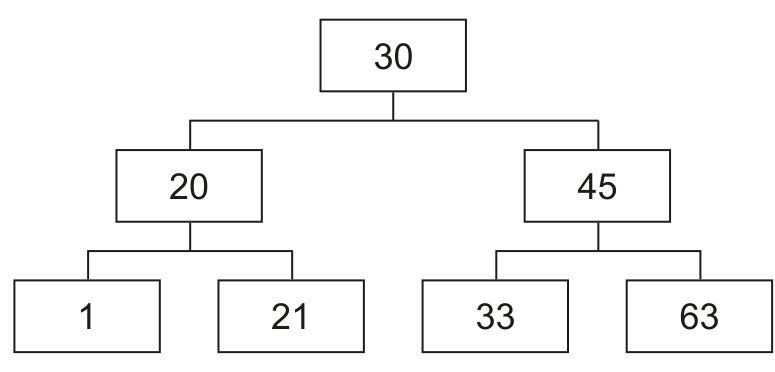
The class Node stores data about the nodes.
| Node | |
|---|---|
NodeData : Integer | stores the node’s integer data |
LeftNode : Node | stores the node that is stored to the left of the current node, or a null value if there is no node to the left |
RightNode : Node | stores the node that is stored to the right of the current node, or a null value if there is no node to the right |
Constructor() | initialises NodeData to its parameter value; initialises LeftNode and RightNode to a null value |
GetLeft() | returns LeftNode |
GetRight() | returns RightNode |
GetData() | returns NodeData |
SetLeft() | takes an object of type Node as a parameter and stores it in LeftNode |
SetRight() | takes an object of type Node as a parameter and stores it in RightNode |
Write program code to declare the class Node and its constructor.
Do not declare the other methods.
Use your programming language appropriate constructor.
If you are writing in Python, include attribute declarations using comments.
Save your program as Question3_J25.
Copy and paste the program code into part 3(a)(i) in the evidence document.
Answer
class Node:
    # NodeData : INTEGER
    # LeftNode : Node
    # RightNode : Node

    def __init__(self, NodeDataP):
        self.NodeData = NodeDataP
        self.LeftNode = None
        self.RightNode = None
See program code
Background Concept
In object-oriented programming, a class is the template used to create objects. Each object stores its own data in attributes, and the constructor is the method that runs when the object is created. In Python, the constructor is __init__().
A binary tree node usually stores three pieces of information:
- the data value in the node
- a reference to the left child
- a reference to the right child
If a child does not exist, the reference must hold a null value. In Python, that null value is None.
Understanding the Question
You are asked to write only the Node class declaration and its constructor. The table in the stem tells you exactly what the class must contain:
NodeData : IntegerLeftNode : NodeRightNode : Node- a constructor that sets the data from a parameter and sets both child references to null
The question also specifically says that, if Python is used, attribute declarations should be shown using comments.
Approach
Define the class Node, add the required attribute comments, then write a constructor with one parameter for the integer data. Inside the constructor:
- store the parameter in
self.NodeData - set
self.LeftNodetoNone - set
self.RightNodetoNone
That exactly matches the class description in the question.
Step-by-Step Reasoning
class Node: creates the class.
The three comment lines are included because Python does not declare attributes with types in the same way as some other languages, but the question asks for attribute declarations using comments.
def __init__(self, NodeDataP): is the Python constructor. The extra parameter supplies the value that will become the node's data.
self.NodeData = NodeDataP stores the passed integer in the object.
self.LeftNode = None means there is no left child when the node is first created.
self.RightNode = None means there is no right child when the node is first created.
That is all that is needed here because the question explicitly says not to declare the other methods in this part.
Key Takeaways
- A constructor sets the starting state of an object.
- Tree nodes usually contain data plus references to children.
- In Python,
Noneis used for a null reference. - For this syllabus, Python attribute declarations can be shown as comments when requested.
Common Mistakes
- Forgetting to initialise one or both child references to
None. - Writing extra methods even though the question says not to.
- Using a local variable instead of
self.NodeData,self.LeftNodeandself.RightNode. - Omitting the attribute comments in Python.
Things to Be Careful About
- Use the exact class name
Node. - The constructor must take a parameter for the node data.
LeftNodeandRightNodemust start as null values, not0or empty strings.- Keep the attribute names consistent with the rest of the program, because later methods will use these exact names.
Write program code for the three get methods.
Save your program.
Copy and paste the program code into part 3(a)(ii) in the evidence document.
Answer
    def GetLeft(self):
        return self.LeftNode

    def GetRight(self):
        return self.RightNode

    def GetData(self):
        return self.NodeData
See program code
Background Concept
Getter methods are part of encapsulation. Encapsulation means that object data is accessed through methods rather than being handled loosely from outside the class. A getter returns the current value of an attribute without changing it.
In this question, the node has three attributes, so the three getter methods simply return those values:
- left child reference
- right child reference
- data value
Understanding the Question
This part asks only for the three get methods listed in the Node class description:
GetLeft()GetRight()GetData()
No constructor or setter code is needed here. Each method should just return the matching attribute from the current object.
Approach
Write one method for each attribute. Because these are getters, each method has the same general form:
- method header with
self returnthe relevant attribute
There is no processing, no loop and no parameter apart from self.
Step-by-Step Reasoning
def GetLeft(self): defines the method that gives access to the left child reference.
return self.LeftNode returns either:
- the node object stored to the left, or
Noneif there is no left child
def GetRight(self): defines the right-child getter.
return self.RightNode returns the right child reference or None.
def GetData(self): defines the data getter.
return self.NodeData returns the integer stored in the node.
These are intentionally very small methods. Their job is not to do extra work, only to provide controlled access to the object's attributes.
Key Takeaways
- A getter returns an attribute without changing it.
- Encapsulation often uses getter and setter methods.
- In Python methods,
selfrefers to the current object. - The return value must match the attribute named in the method description.
Common Mistakes
- Returning the wrong attribute from a method.
- Forgetting the
returnkeyword. - Giving the getters parameters they do not need.
- Writing code that prints the value instead of returning it.
Things to Be Careful About
- Keep the method names exactly as given:
GetLeft,GetRight,GetData. GetLeft()andGetRight()return aNodereference, not the child node's data.GetData()returns the integer data value.- Indent these methods so they are inside the
Nodeclass.
The method SetLeft() takes an object of type Node as a parameter. The method stores the parameter in the attribute LeftNode
The method SetRight() takes an object of type Node as a parameter. The method stores the parameter in the attribute RightNode
Write program code for SetLeft() and SetRight()
Save your program.
Copy and paste the program code into part 3(a)(iii) in the evidence document.
Answer
    def SetLeft(self, LeftNodeP):
        self.LeftNode = LeftNodeP

    def SetRight(self, RightNodeP):
        self.RightNode = RightNodeP
See program code
Background Concept
Setter methods are the other side of encapsulation. Instead of directly changing an object's attributes from outside the class, code calls a setter method to update them. In a tree structure, setters are especially useful because links between nodes are created and changed by storing object references.
Here, the left and right child attributes must store objects of type Node, not integer values.
Understanding the Question
You must write two methods:
SetLeft()takes aNodeobject and stores it inLeftNodeSetRight()takes aNodeobject and stores it inRightNode
So each method needs one parameter besides self, and the method body is just an assignment.
Approach
For each setter:
- define the method header
- include one parameter for the
Nodeobject to be stored - assign that parameter to the correct attribute
No value should be returned because the method's job is to update the object.
Step-by-Step Reasoning
def SetLeft(self, LeftNodeP): defines a method that receives a node reference.
self.LeftNode = LeftNodeP stores that reference in the current node's LeftNode attribute. After this, the current node now points to its left child.
def SetRight(self, RightNodeP): defines the corresponding right-child setter.
self.RightNode = RightNodeP stores the parameter in the RightNode attribute.
These methods do not print anything and do not return anything. Their whole purpose is to update the links in the tree.
Key Takeaways
- A setter changes the value of an attribute.
- In trees, child links are object references, not plain numbers.
- The parameter passed to a setter becomes the new attribute value.
- Simple setters are often only one assignment long.
Common Mistakes
- Assigning to
LeftNodeorRightNodewithoutself. - Storing the node's data value instead of the node object itself.
- Returning the parameter instead of just storing it.
- Mixing up left and right in the assignments.
Things to Be Careful About
- Use one parameter for each setter besides
self. SetLeft()must updateLeftNodeonly.SetRight()must updateRightNodeonly.- Keep the names consistent so later code such as
Insert()can call these methods correctly.
Write the main program to declare five objects of type Node :
- Node 1 with the data 10
- Node 2 with the data 20
- Node 3 with the data 5
- Node 4 with the data 15
- Node 5 with the data 7
Save your program.
Copy and paste the program code into part 3(b) in the evidence document.
Answer
Node1 = Node(10)
Node2 = Node(20)
Node3 = Node(5)
Node4 = Node(15)
Node5 = Node(7)
See program code
Background Concept
After a class has been declared, objects are created by calling its constructor. Each constructor call makes a separate object with its own attribute values.
In this question, the Node constructor takes one integer parameter. That parameter becomes the node's data value, while the left and right references start as None.
Understanding the Question
The main program must declare five different Node objects. The question gives both the object names and the data values they must contain:
Node1with10Node2with20Node3with5Node4with15Node5with7
This part is only about object creation. It does not yet link the nodes into a tree.
Approach
Use one constructor call per object. The pattern is:
VariableName = Node(value)
Repeat that five times, matching the required names and data exactly.
Step-by-Step Reasoning
Node1 = Node(10) creates the first node object and stores the reference in Node1.
Node2 = Node(20) creates another node, separate from the first one.
The same happens for Node3, Node4 and Node5 with their required values.
At this stage, each object exists independently. Because of the constructor written earlier, each one contains:
- its own
NodeData LeftNode = NoneRightNode = None
The tree is not built here yet; that happens when the Tree object is created and insertions are performed later.
Key Takeaways
- Creating an object means calling the class constructor.
- Each call creates a separate object with its own state.
- The constructor argument determines the node's stored data.
- Object references are usually stored in variables for later use.
Common Mistakes
- Giving the wrong values to the nodes.
- Misspelling the required variable names such as
Node1. - Trying to connect the nodes manually in this part instead of just creating them.
- Forgetting that each constructor call makes a new object.
Things to Be Careful About
- Use the exact five object names requested.
- Match each name to the correct data value.
- Do not reuse one variable for multiple nodes.
- Keep the code in the main program, not inside a class definition.
The class Tree stores the tree.
| Tree | |
|---|---|
FirstNode : Node | stores the root node in the tree |
Constructor() | initialises FirstNode to its parameter value |
GetRootNode() | returns the node stored in FirstNode |
Insert() | stores its parameter node in the correct position in the tree |
Write program code to declare the class Tree and its constructor.
Do not declare the other methods.
Use your programming language appropriate constructor.
If you are writing in Python, include attribute declarations using comments.
Save your program.
Copy and paste the program code into part 3(c)(i) in the evidence document.
Answer
class Tree:
    # FirstNode : Node

    def __init__(self, FirstNodeP):
        self.FirstNode = FirstNodeP
See program code
Background Concept
A binary tree can be represented by storing a reference to its root node. Once the root is known, the rest of the structure can be reached by following left and right child links. A Tree class is often used as a wrapper around the whole structure so that the program has one place to store the root and one place to put tree methods such as insertion and traversal.
Understanding the Question
You must declare the Tree class and its constructor only. The stem tells you that Tree has one attribute:
FirstNode : Nodewhich stores the root node
The constructor must initialise FirstNode from its parameter. No other methods should be declared in this part.
Approach
Create the class Tree, add the Python attribute comment, then define a constructor that accepts a node parameter and stores it in self.FirstNode.
Step-by-Step Reasoning
class Tree: starts the class definition.
The comment # FirstNode : Node is included because the question asks Python answers to show attribute declarations using comments.
def __init__(self, FirstNodeP): is the constructor. It receives a node object that will become the root of the tree.
self.FirstNode = FirstNodeP stores that node reference in the tree object.
That is enough for this part because GetRootNode() and Insert() are asked in later parts.
Key Takeaways
- A tree object often stores just one key reference: the root.
- The constructor sets the initial root node.
- Wrapper classes are useful for grouping data and methods that belong to one structure.
- Python attribute comments can stand in for declarations when requested.
Common Mistakes
- Adding extra methods even though the question says not to.
- Forgetting to store the constructor parameter in
self.FirstNode. - Using a value instead of a
Nodereference for the root. - Omitting the Python attribute comment.
Things to Be Careful About
- Use the exact class name
Tree. FirstNodeis a node reference, not an integer.- Keep the constructor parameter separate from the attribute name to avoid confusion.
- This code defines the class only; it does not create a
Treeobject yet.
Write program code for GetRootNode()
Save your program.
Copy and paste the program code into part 3(c)(ii) in the evidence document.
Answer
    def GetRootNode(self):
        return self.FirstNode
See program code
Background Concept
A getter method returns an attribute from an object. In a tree class, the most important attribute is often the root reference, because other algorithms such as insertion, search and traversal usually start from the root.
Understanding the Question
The question asks for the GetRootNode() method of the Tree class. From the class table, its purpose is simple: return the node stored in FirstNode.
Approach
Write one method inside the Tree class that takes only self and returns self.FirstNode.
Step-by-Step Reasoning
def GetRootNode(self): defines the method.
return self.FirstNode sends the stored root node reference back to the caller. That allows code outside the class to start working with the tree from its root.
There is nothing else to compute. The method should not print the root, and it should not return the root's data value. It must return the node object itself.
Key Takeaways
- Getters return stored attributes.
- In a tree wrapper class, the root node is usually the key attribute.
- Returning the node reference allows other code to traverse the structure.
Common Mistakes
- Returning
self.FirstNode.GetData()instead of the node itself. - Printing the root instead of returning it.
- Forgetting the
returnstatement.
Things to Be Careful About
- The method belongs inside the
Treeclass. - The returned value must be the node reference in
FirstNode. - Use the exact method name
GetRootNodeso later code can call it correctly.
The method Insert() takes a node as a parameter and then searches the tree to find the position to insert the new node by:
- checking whether the node’s data is less than or greater than the root node’s data
- moving to the left node if the data is less than the root node’s data
- moving to the right node if the data is greater than or equal to the root node’s data
- repeating until the final position of the node is found and stores the node in that position.
Write program code for Insert()
Save your program.
Copy and paste the program code into part 3(c)(iii) in the evidence document.
Answer
    def Insert(self, NewNode):
        CurrentNode = self.FirstNode
        Placed = False

        while not Placed:
            if NewNode.GetData() < CurrentNode.GetData():
                if CurrentNode.GetLeft() is None:
                    CurrentNode.SetLeft(NewNode)
                    Placed = True
                else:
                    CurrentNode = CurrentNode.GetLeft()
            else:
                if CurrentNode.GetRight() is None:
                    CurrentNode.SetRight(NewNode)
                    Placed = True
                else:
                    CurrentNode = CurrentNode.GetRight()
See program code
Background Concept
In a binary search tree, each node is arranged by an ordering rule:
- values smaller than a node go to the left subtree
- values greater than or equal to a node go to the right subtree
To insert a new node, the algorithm starts at the root and repeatedly compares the new value with the current node's value. Each comparison decides which branch to follow. When the algorithm finds an empty child position, the new node is linked there.
Understanding the Question
You must write Insert() for the Tree class. The stem gives the full rule for the search:
- compare the new node's data with the current node's data
- move left if smaller
- move right if greater than or equal
- repeat until the final position is found
- store the node there
So this is not just appending a node. It is a proper binary search tree insertion.
Approach
Use an iterative traversal:
- start at the root stored in
FirstNode - use a Boolean flag to keep looping until the node is placed
- compare the new node's data with the current node's data
- if the correct child position is empty, attach the new node
- otherwise move to that child and continue
This matches the wording of the question very closely.
Step-by-Step Reasoning
CurrentNode = self.FirstNode starts the search at the root.
Placed = False means insertion has not happened yet.
while not Placed: keeps searching until a free position is found.
if NewNode.GetData() < CurrentNode.GetData(): checks whether the new value belongs on the left side.
If it does, there are two possibilities:
CurrentNode.GetLeft() is None: the left child slot is empty, soCurrentNode.SetLeft(NewNode)inserts the node there andPlaced = Trueends the loop.- otherwise, the left child already exists, so
CurrentNode = CurrentNode.GetLeft()moves down the tree and the process repeats.
The else handles values that are greater than or equal to the current node's value. The question explicitly says greater than or equal must go right, so equal values must not go left.
Again there are two possibilities:
- if the right child is empty, insert there with
SetRight()and finish - otherwise move to the right child and continue
This produces a correct binary search tree insertion routine.
Key Takeaways
- Binary search tree insertion is a repeated comparison process.
- A current pointer is moved down the tree until an empty child link is found.
- Smaller values go left; greater-than-or-equal values go right in this question.
- A flag is a simple way to control an insertion loop.
Common Mistakes
- Sending equal values to the left instead of the right.
- Forgetting to move
CurrentNodewhen the child is not empty, which causes an infinite loop. - Attaching the new node to the wrong side.
- Comparing the node objects themselves instead of their data values.
Things to Be Careful About
- Use
GetData()for the comparison, not the object reference. - Check whether the left or right child is
Nonebefore inserting. - When a child is not
None, updateCurrentNodeto keep traversing. - Once the node is inserted, make sure the loop ends by setting the flag.
The recursive procedure OutputInOrder() outputs the data stored in the binary tree in ascending numerical order.
The procedure takes a Node object as a parameter and then:
- checks if the left node is null. If there is a left node, the function calls itself with the left node
- outputs the data of the current node
- checks if the right node is null. If there is a right node, the function calls itself with the right node.
Write program code for OutputInOrder()
Save your program.
Copy and paste the program code into part 3(d) in the evidence document.
Answer
def OutputInOrder(CurrentNode):
    if CurrentNode.GetLeft() is not None:
        OutputInOrder(CurrentNode.GetLeft())
    print(CurrentNode.GetData())
    if CurrentNode.GetRight() is not None:
        OutputInOrder(CurrentNode.GetRight())
See program code
Background Concept
Recursion happens when a procedure or function calls itself. Tree traversal is one of the classic uses of recursion because every subtree is itself a smaller tree with the same structure as the whole tree.
An in-order traversal processes a binary search tree in this order:
- left subtree
- current node
- right subtree
For a binary search tree, this outputs the stored values in ascending order.
Understanding the Question
The procedure OutputInOrder() takes a Node object as a parameter. The stem tells you exactly what it must do:
- if there is a left node, call itself with the left node
- output the current node's data
- if there is a right node, call itself with the right node
So the required traversal order is left, current, right.
Approach
Write one recursive procedure with one parameter representing the current node being visited. Before each recursive call, check whether the child reference is null. That prevents trying to recurse into a non-existent child.
Step-by-Step Reasoning
def OutputInOrder(CurrentNode): defines a standalone recursive procedure that works on whichever node is passed in.
if CurrentNode.GetLeft() is not None: checks whether a left subtree exists.
If it does, OutputInOrder(CurrentNode.GetLeft()) recursively processes that whole left subtree first.
After the left subtree has finished, print(CurrentNode.GetData()) outputs the data stored in the current node.
Then if CurrentNode.GetRight() is not None: checks for a right subtree.
If it exists, OutputInOrder(CurrentNode.GetRight()) recursively processes the right subtree.
This order is exactly what makes the output sorted for a binary search tree.
Key Takeaways
- Recursion works naturally with trees because each child subtree has the same structure as the whole tree.
- In-order traversal means left, node, right.
- On a binary search tree, in-order traversal gives ascending output.
- Null checks prevent invalid recursive calls.
Common Mistakes
- Printing the node before visiting the left subtree, which gives pre-order instead of in-order.
- Forgetting one of the null checks.
- Calling the procedure with the same node again instead of its child, causing infinite recursion.
- Returning data instead of printing it when the task asks to output it.
Things to Be Careful About
- The traversal order must be exactly left, current, right.
- Use
GetLeft()andGetRight()before making recursive calls. - Output
GetData(), not the node object itself. - The parameter is a
Node, so the initial call must pass the root node from the tree.
Write program code to extend the main program to:
- create a new object of type
Treewith the node containing the data 10 as the first node - insert the nodes with the values 20, 5, 15 and 7 into the tree in the order given
- call
OutputInOrder()with the tree’s root node as a parameter.
Save your program.
Copy and paste the program code into part 3(e)(i) in the evidence document.
Answer
TheTree = Tree(Node1)
TheTree.Insert(Node2)
TheTree.Insert(Node3)
TheTree.Insert(Node4)
TheTree.Insert(Node5)

OutputInOrder(TheTree.GetRootNode())
See program code
Background Concept
Once classes and methods have been written, the main program creates objects and coordinates their use. For a binary search tree, that usually means:
- create the root node
- create the tree object using that root
- insert further nodes one by one
- traverse the tree to display or process its contents
Because insertion depends on comparisons at each node, the order of insertion affects the final shape of the tree, even though an in-order traversal will still output sorted values.
Understanding the Question
This part extends the main program. You must:
- create a
Treeobject with the node containing10as the first node - insert the nodes containing
20,5,15and7in that exact order - call
OutputInOrder()using the tree's root node
So this part is about using the classes and methods already written, not redefining them.
Approach
Use the existing node objects from part (b). First create the tree with Node1 as the root. Then call Insert() for the remaining nodes in the order given. Finally call OutputInOrder() and pass TheTree.GetRootNode().
Step-by-Step Reasoning
TheTree = Tree(Node1) creates the tree object and sets its root to the node containing 10.
TheTree.Insert(Node2) inserts the node containing 20. Since 20 is greater than 10, it becomes the right child of the root.
TheTree.Insert(Node3) inserts 5. Since 5 is less than 10, it becomes the left child of the root.
TheTree.Insert(Node4) inserts 15. It is greater than 10, so move right to 20; it is then less than 20, so it becomes the left child of 20.
TheTree.Insert(Node5) inserts 7. It is less than 10, so move left to 5; it is then greater than or equal to 5, so it becomes the right child of 5.
OutputInOrder(TheTree.GetRootNode()) starts the recursive in-order traversal at the root of the finished tree.
Key Takeaways
- Main programs coordinate the use of previously defined classes and methods.
- Tree insertion order matters to the shape of the tree.
- The root node is passed into traversal to begin processing the whole structure.
- Method calls are how object-based programs build larger behaviour from smaller parts.
Common Mistakes
- Creating a new tree with the wrong root node.
- Inserting the nodes in the wrong order.
- Passing the tree object itself to
OutputInOrder()instead of the root node. - Recreating nodes instead of using the ones already declared.
Things to Be Careful About
- The first node must be the one containing
10. - The insertion order must stay as
20,5,15,7. OutputInOrder()expects aNodeparameter, so callGetRootNode().- Make sure the tree object is created before trying to call
Insert()on it.
Test your program.
Take a screenshot of the output(s).
Save your program.
Copy and paste the screenshot into part 3(e)(ii) in the evidence document.
Answer
For the tree with 10 as the root and 20, 5, 15, 7 inserted in that order, the output is:
5
7
10
15
20
5, 7, 10, 15, 20
Background Concept
Testing a tree program often means predicting the structure produced by insertions and then applying the traversal rule. For a binary search tree, in-order traversal always visits values in ascending order because it processes:
- all smaller values in the left subtree
- then the current node
- then all larger or equal values in the right subtree
Understanding the Question
This part asks for the screenshot of the program output. Since the expected output is fully determined by the earlier code, you can work it out exactly.
The tree is built by:
- starting with
10as the root - inserting
20 - inserting
5 - inserting
15 - inserting
7
Then OutputInOrder() is called on the root.
Approach
First work out the final tree shape, then perform an in-order traversal.
Insertion gives this arrangement:
10is the root20goes to the right of105goes to the left of1015goes left of207goes right of5
Now apply left, current, right from the root.
Step-by-Step Reasoning
Start at 10.
Go left to 5 first.
5has no left child, so output5- then visit its right child
7 7has no left child, so output7
Return to the root and output 10.
Now go right to 20.
- visit its left child
15first, so output15 - then return and output
20
So the full console output is:
57101520
Each appears on a separate line because the Python print() statement outputs a new line after each value.
Key Takeaways
- You can often predict program output by tracing the data structure first.
- In-order traversal of a binary search tree gives sorted order.
- Tree shape comes from the insertion sequence.
- Testing output is really a combination of insertion logic and traversal logic.
Common Mistakes
- Listing the insertion order instead of the traversal order.
- Forgetting that
15is visited before20because it is the left child of20. - Putting
7before5, even though5is visited first in that left subtree. - Writing the values on one line when the program prints each on a separate line.
Things to Be Careful About
- Use the exact insertion order given in the question.
- Apply in-order traversal, not pre-order or post-order.
- The screenshot should show one number per line.
- Do not include extra prompts or labels unless your actual program prints them.