Computer Science 9618/33 — May/June 2025
Cambridge A-Level · Advanced Theory · worked solutions for every part, with the mark scheme
Topics Data Representation · System Software · Computational Thinking and Problem-solving · Hardware and Virtual Machines · Communication and Internet Technologies · Further Programming · +2 more
A programmer is writing a program to manage a video library. They require a user-defined data type.
Write pseudocode statements to declare the composite data type VideoLibrary to hold data about each video in the collection. This data includes:
• identity code (any combination of letters and numbers)
• title
• year released
• date purchased
• format (for example DVD, Blu-ray, 4K, MP4)
• running time (minutes)
Use the most appropriate data type in each case.
...................................................................................................................................................
...................................................................................................................................................
...................................................................................................................................................
...................................................................................................................................................
...................................................................................................................................................
...................................................................................................................................................
...................................................................................................................................................
.............................................................................................................................................
Answer
TYPE VideoLibrary
   DECLARE IdentityCode : STRING
   DECLARE Title : STRING
   DECLARE YearReleased : INTEGER
   DECLARE DatePurchased : DATE
   DECLARE Format : STRING
   DECLARE RunningTime : INTEGER
ENDTYPE
See completed pseudocode
Background Concept
A user-defined data type is created by the programmer when the built-in types alone are not enough to describe the data clearly. In this syllabus, one important kind is a composite user-defined type: a single structure that groups several related fields together.
Here, one VideoLibrary item needs to store several different pieces of information about one video, so a composite type is appropriate. Each field inside it should use the most suitable basic type:
STRINGfor text or mixed letters and numbersINTEGERfor whole numbersDATEfor calendar dates
The aim is to model the real-world data accurately and make later program processing easier.
Understanding the Question
The question asks for pseudocode declarations for a composite data type called VideoLibrary. It is not asking for variables, input statements or an array of videos. It wants the type definition itself.
The fields required are:
- identity code
- title
- year released
- date purchased
- format
- running time in minutes
The key clue is "composite data type", which means one structure containing multiple named fields.
Approach
The best approach is:
- Start a type definition called
VideoLibrary. - Add one declaration line for each required field.
- Choose the most appropriate type for each field.
- Close the type definition.
For the types:
- identity code can contain letters and numbers, so
STRING - title is text, so
STRING - year released is a whole number, so
INTEGER - date purchased is a date, so
DATE - format is text such as DVD or MP4, so
STRING - running time is counted in whole minutes, so
INTEGER
Step-by-Step Reasoning
TYPE VideoLibrary
- This begins the declaration of a new user-defined type called
VideoLibrary.
DECLARE IdentityCode : STRING
- The identity code may include both letters and numbers.
- Because it is not purely numeric data for calculation,
STRINGis the best choice.
DECLARE Title : STRING
- A title is text, possibly multiple words, so
STRINGis appropriate.
DECLARE YearReleased : INTEGER
- A year such as 1999 or 2024 is a whole number.
- No decimal places are needed, so
INTEGERis suitable.
DECLARE DatePurchased : DATE
- This is specifically a calendar date, so
DATEis the most appropriate type. - Using
DATEis better than a plain string when the language supports it, because it reflects the meaning of the data more accurately.
DECLARE Format : STRING
- Values such as DVD, Blu-ray, 4K and MP4 are text labels.
- So
STRINGis acceptable here. - In the next part of the question, this is also the field most likely to be improved further using an enumerated type.
DECLARE RunningTime : INTEGER
- Running time is given in minutes.
- Minutes are counted as whole numbers, so
INTEGERis appropriate.
ENDTYPE
- This closes the composite type definition.
That gives a complete declaration of a structured type that can hold all the required details for one video.
Key Takeaways
- A composite user-defined type groups related fields into one structure.
- Each field should use the data type that best matches the data stored.
- Textual data usually uses
STRING; whole-number quantities useINTEGER; dates useDATE. - In CIE pseudocode, a user-defined type is written using
TYPE ... ENDTYPE.
Common Mistakes
- Using
CHARinstead ofSTRINGfor fields like title or identity code.CHARstores only one character. - Declaring year released or running time as
STRINGinstead ofINTEGER. - Forgetting
ENDTYPE, which makes the type definition incomplete. - Writing a variable declaration instead of a type definition.
- Treating the identity code as an
INTEGER, even though it may contain letters.
Things to Be Careful About
- Match the required name
VideoLibraryexactly. - Make sure all six fields are included.
- Use pseudocode declaration format consistently:
DECLARE FieldName : TYPE. - Remember that an identity code may look numeric but is usually better stored as text if it is an identifier rather than a value to calculate with.
- Do not add unnecessary program statements such as
INPUT,OUTPUTor loops, because the question only asks for the type declaration.
Identify one field in VideoLibrary that could be an efficient enumerated data type and give a reason for your choice.
Field ..........................................................................................................................................
...................................................................................................................................................
Reason .....................................................................................................................................
...................................................................................................................................................
Answer
- Field:
Format - Reason: it has a small predefined set of possible values, for example DVD, Blu-ray, 4K and MP4, so an enumerated type can store these valid options efficiently.
Format — limited predefined set of values
Background Concept
An enumerated data type is a user-defined type that lists a fixed set of allowed values. Instead of allowing any text or number, it restricts the data to one value from that predefined list.
For example, if a field can only be one of a few known options, an enumerated type is useful because:
- only valid values are allowed
- the data can often be stored more efficiently internally
- the meaning of the data is clearer
An enumerated type is best when the possible values are limited and known in advance.
Understanding the Question
The question asks for one field from VideoLibrary that could be stored efficiently as an enumerated type, and it asks for a reason.
So you need to:
- choose a field from the structure
- decide whether it has a small fixed set of possible values
- explain why that makes an enumerated type suitable
The field that stands out most clearly is Format, because examples are already given: DVD, Blu-ray, 4K, MP4.
Approach
Look through the fields and ask: which one has a limited set of valid choices?
- identity code: no, this could be many different combinations
- title: no, almost unlimited possibilities
- year released: no, many possible years
- date purchased: no, many possible dates
- format: yes, usually one of a fixed list
- running time: no, many possible numbers
So Format is the best answer.
Then explain the reason: enumerated types are efficient and suitable when there is a small, predefined set of values.
Step-by-Step Reasoning
The field Format can take values such as:
- DVD
- Blu-ray
- 4K
- MP4
These are not arbitrary text entries chosen freely by the user. They come from a known set of allowed categories.
That means Format fits an enumerated type well. Instead of storing any possible string, the program can define a fixed list of legal values. This has two advantages relevant to the question:
- it is efficient, because the values can be represented internally in a compact way
- it improves validity, because only one of the listed formats can be chosen
A short exam answer only needs one reason, and the safest reason is that the field has a limited predefined set of possible values.
Key Takeaways
- Use an enumerated type when a field can only take one value from a fixed list.
Formatis a strong example because the possible values are known in advance.- Enumerated types help with both efficiency and validation.
Common Mistakes
- Choosing
TitleorIdentityCodeas an enumerated type. These do not come from a small fixed set. - Giving the field name but no reason.
- Saying only "because it is text". Being text does not make something suitable for an enumerated type.
- Confusing an enumerated type with a general
STRINGfield.
Things to Be Careful About
- The question asks for one field, so do not list several unless needed.
- Your reason should mention the limited predefined set of values.
- If you mention efficiency, make sure it is linked to the fixed list of options.
- Keep the answer focused on suitability for an enumerated type, not just a description of the field.
Numbers are stored in a computer using binary floating-point representation with:
• 8 bits for the mantissa
• 8 bits for the exponent
• two’s complement form for both the mantissa and the exponent.
Give the largest normalised positive two’s complement binary number that can be stored in this system and state its denary equivalent.
The denary answer should be expressed in terms of powers of 2.

Denary ......................................................................................................................................
Working
- Largest positive normalised mantissa:
01111111 - Largest positive exponent:
01111111=127 - Value =
0.1111111 × 2^127 - Denary =
2^126 + 2^125 + 2^124 + 2^123 + 2^122 + 2^121 + 2^120
Answer
Mantissa: 01111111
Exponent: 01111111
Denary = 2^126 + 2^125 + 2^124 + 2^123 + 2^122 + 2^121 + 2^120
Mantissa 01111111, Exponent 01111111; denary = 2^126 + 2^125 + 2^124 + 2^123 + 2^122 + 2^121 + 2^120
Background Concept
In this floating-point system, the number is stored as:
- an 8-bit mantissa
- an 8-bit exponent
- both in two's complement
For Cambridge binary floating-point questions, the mantissa is treated as a signed fractional value with the binary point immediately after the sign bit. That means:
- positive normalised mantissas begin
01 - negative normalised mantissas begin
10
Normalisation matters because it ensures the mantissa uses the available bits efficiently and gives a unique standard form.
In two's complement, the largest positive 8-bit integer pattern is 01111111, which is 127 in denary. For a mantissa, that same bit pattern represents 0.1111111 because the binary point is after the sign bit.
Understanding the Question
The question asks for the largest positive normalised number this system can store.
So we need the combination of:
- the largest possible positive normalised mantissa
- the largest possible positive exponent
Then we must give both:
- the binary floating-point representation
- the denary value, written using powers of 2
The key clue is the word normalised. That means we cannot just choose any positive mantissa; it must start with 01.
Approach
To make the stored value as large as possible:
- Use the largest positive normalised mantissa.
- Use the largest positive exponent.
- Interpret the mantissa as a binary fraction.
- Multiply that fraction by
2^exponent. - Rewrite the result as a sum of powers of 2.
Step-by-Step Reasoning
First, choose the largest positive normalised mantissa.
A positive normalised mantissa must begin 01. To make it as large as possible, every remaining bit should be 1:
01111111
With the binary point after the sign bit, this means:
0.1111111
Next, choose the largest positive exponent that can be stored in 8-bit two's complement:
01111111 = 127
So the largest stored value is:
0.1111111 × 2^127
Now expand 0.1111111 as powers of 2:
0.1111111 = 2^-1 + 2^-2 + 2^-3 + 2^-4 + 2^-5 + 2^-6 + 2^-7
Multiplying by 2^127 gives:
2^-1 × 2^127 = 2^1262^-2 × 2^127 = 2^1252^-3 × 2^127 = 2^1242^-4 × 2^127 = 2^1232^-5 × 2^127 = 2^1222^-6 × 2^127 = 2^1212^-7 × 2^127 = 2^120
So the denary value is:
2^126 + 2^125 + 2^124 + 2^123 + 2^122 + 2^121 + 2^120
Key Takeaways
- In this syllabus, a normalised positive two's complement mantissa starts
01. - The largest positive 8-bit two's complement exponent is
01111111=127. - To convert a floating-point value to denary, interpret the mantissa correctly as a fraction, then apply the exponent.
Common Mistakes
- Using mantissa
11111111for the largest value. This is wrong because that is negative in two's complement. - Forgetting normalisation and choosing a mantissa that does not start
01. - Treating the mantissa as an 8-bit integer instead of a fractional value.
- Giving only
2^127as the denary value. That ignores the actual fractional mantissa0.1111111.
Things to Be Careful About
- The mantissa and exponent are both in two's complement, but they are interpreted differently: the mantissa is fractional, the exponent is an integer power.
- The binary point is immediately after the sign bit for the mantissa.
- For positive normalised values, the first two bits must be
01, not just any pattern beginning with0. - The question asks for the denary value in terms of powers of 2, so a powers-of-2 expression is the safest final form.
Calculate the normalised binary floating-point representation of –3.59375 in this system.
Show your working.

Working .....................................................................................................................................
...................................................................................................................................................
...................................................................................................................................................
...................................................................................................................................................
...................................................................................................................................................
...................................................................................................................................................
...................................................................................................................................................
...................................................................................................................................................
Working
3.59375 = 11.10011
So
-3.59375 = -11.10011
Normalised form:
-0.1110011 × 2^2
Positive 8-bit mantissa for 0.1110011 is 01110011
Two's complement negative mantissa = 10001101
Exponent 2 = 00000010
Answer
Mantissa: 10001101
Exponent: 00000010
Mantissa 10001101, Exponent 00000010
Background Concept
A binary floating-point number is stored as:
mantissa × 2^exponent
In this question:
- the mantissa has 8 bits
- the exponent has 8 bits
- both use two's complement
The mantissa is a signed fractional value, with the binary point immediately after the sign bit. A normalised mantissa must begin:
01for positive values10for negative values
That rule makes sure the value is stored in a standard form and uses as much precision as possible.
For negative numbers, you do not just put a minus sign in front of the bit pattern. You must store the mantissa itself in two's complement.
Understanding the Question
We must store -3.59375 in this floating-point system.
That means we need to:
- convert
3.59375into binary - write it in normalised form
- make the mantissa negative using two's complement
- store the exponent in 8-bit two's complement
The question also says show your working, so the conversion and normalisation steps matter, not just the final bit patterns.
Approach
The most reliable route is:
- Split the denary number into integer part and fractional part.
- Convert each part to binary.
- Combine them.
- Shift the binary point until the mantissa is normalised.
- Count the shift to get the exponent.
- Write the mantissa in 8 bits.
- Because the number is negative, convert that mantissa to its two's complement form.
- Write the exponent as an 8-bit two's complement integer.
Step-by-Step Reasoning
Start with the positive magnitude 3.59375.
1. Convert the integer part
3 in binary is 11.
2. Convert the fractional part
0.59375 can be written as:
0.5=2^-10.0625=2^-40.03125=2^-5
So:
0.59375 = .10011 in binary.
Therefore:
3.59375 = 11.10011
So:
-3.59375 = -11.10011
3. Normalise the number
We want the mantissa to be a signed fraction. Move the binary point left two places:
11.10011 = 0.1110011 × 2^2
So:
-11.10011 = -0.1110011 × 2^2
The exponent is therefore 2.
4. Write the positive mantissa in 8 bits
The positive mantissa 0.1110011 fits exactly into 8 bits including the sign bit:
01110011
This is positive because the sign bit is 0.
5. Convert the mantissa to negative using two's complement
To store -0.1110011, take the two's complement of 01110011:
Invert the bits:
10001100
Add 1:
10001101
So the negative mantissa is:
10001101
This is also correctly normalised for a negative number because it begins 10.
6. Store the exponent
The exponent is +2, so in 8-bit two's complement that is:
00000010
7. Final representation
- Mantissa:
10001101 - Exponent:
00000010
Key Takeaways
- Convert the denary number to binary first before thinking about the bit boxes.
- Normalisation means shifting the binary point so the mantissa is in standard signed fractional form.
- In this format, a negative mantissa must be stored using two's complement, not by attaching a minus sign.
- Always check that the final negative normalised mantissa begins
10.
Common Mistakes
- Writing the mantissa as
11100110or another sign-magnitude style pattern. The mantissa must be in two's complement. - Forgetting to normalise before encoding the mantissa and exponent.
- Using the wrong exponent because the binary point was shifted the wrong number of places.
- Converting
3.59375incorrectly, especially the fractional part.59375. - Giving exponent
00000011because of miscounting the shift.
Things to Be Careful About
- The exponent is positive here, so it stays as ordinary 8-bit two's complement
00000010. - The mantissa is 8 bits total, not 8 bits after the sign bit.
- When taking two's complement, invert all bits and add
1; do not stop after inversion. - After conversion, make sure the mantissa is still normalised. For a negative value, the first two bits should be
10. - Do not lose trailing precision bits unnecessarily if the value already fits exactly, as it does here.
This truth table represents a logic circuit.
| INPUT | OUTPUT | |||
|---|---|---|---|---|
| A | B | C | D | Z |
| 0 | 0 | 0 | 0 | 0 |
| 0 | 0 | 0 | 1 | 0 |
| 0 | 0 | 1 | 0 | 1 |
| 0 | 0 | 1 | 1 | 1 |
| 0 | 1 | 0 | 0 | 1 |
| 0 | 1 | 0 | 1 | 0 |
| 0 | 1 | 1 | 0 | 0 |
| 0 | 1 | 1 | 1 | 0 |
| 1 | 0 | 0 | 0 | 0 |
| 1 | 0 | 0 | 1 | 0 |
| 1 | 0 | 1 | 0 | 1 |
| 1 | 0 | 1 | 1 | 1 |
| 1 | 1 | 0 | 0 | 1 |
| 1 | 1 | 0 | 1 | 0 |
| 1 | 1 | 1 | 0 | 0 |
| 1 | 1 | 1 | 1 | 0 |
Write the Boolean logic expression that corresponds to the given truth table as the sum-of-products.
Z = ............................................................................................................................................
.............................................................................................................................................
Answer
Z = A'.B'.C.D' + A'.B'.C.D + A'.B.C'.D' + A.B'.C.D' + A.B'.C.D + A.B.C'.D'
Z = A'.B'.C.D' + A'.B'.C.D + A'.B.C'.D' + A.B'.C.D' + A.B'.C.D + A.B.C'.D'
Background Concept
A sum-of-products expression is formed by listing every input combination that makes the output equal to 1.
- Each row with output 1 becomes one product term.
- In a product term, a variable is written uncomplemented if its value is 1 in that row.
- A variable is complemented if its value is 0 in that row.
- All these product terms are then added together with OR.
For example, if a row is A = 0, B = 1, C = 1, D = 0, the matching product term is A'.B.C.D'.
This gives the canonical sum-of-products form, because every term contains all input variables.
Understanding the Question
You are given a complete truth table for inputs A, B, C and D, and output Z. Part (a) asks for the Boolean expression directly from that table as a sum-of-products.
So the task is not to simplify yet. You simply need to:
- Find every row where Z = 1.
- Turn each of those rows into a product term.
- Join the terms with + (OR).
Approach
Scan the truth table row by row and only keep the rows where the output is 1. For each of those rows:
- write A or A' depending on whether A is 1 or 0
- do the same for B, C and D
- multiply the literals together to make one minterm
Then combine all the minterms with OR.
Step-by-Step Reasoning
The rows where Z = 1 are:
- A=0, B=0, C=1, D=0
- A=0, B=0, C=1, D=1
- A=0, B=1, C=0, D=0
- A=1, B=0, C=1, D=0
- A=1, B=0, C=1, D=1
- A=1, B=1, C=0, D=0
Now convert each row.
-
Row 0 0 1 0
- A is 0, so use A'
- B is 0, so use B'
- C is 1, so use C
- D is 0, so use D'
- term: A'.B'.C.D'
-
Row 0 0 1 1
- term: A'.B'.C.D
-
Row 0 1 0 0
- term: A'.B.C'.D'
-
Row 1 0 1 0
- term: A.B'.C.D'
-
Row 1 0 1 1
- term: A.B'.C.D
-
Row 1 1 0 0
- term: A.B.C'.D'
Finally OR them together:
Z = A'.B'.C.D' + A'.B'.C.D + A'.B.C'.D' + A.B'.C.D' + A.B'.C.D + A.B.C'.D'
That is the required sum-of-products directly from the truth table.
Key Takeaways
- Canonical sum-of-products uses one product term for every row where the output is 1.
- A 0 in the truth table gives a complemented variable.
- A 1 in the truth table gives an uncomplemented variable.
- In canonical SOP, every term contains every input variable.
Common Mistakes
- Using rows where Z = 0 instead of rows where Z = 1.
- Forgetting to include all four variables in each product term.
- Complementing the wrong literals, for example writing A instead of A' when A = 0.
- Accidentally simplifying the expression here; part (a) only asks for the sum-of-products from the truth table.
Things to Be Careful About
- Keep the variable order consistent as A, B, C, D.
- Use one term per true row, no more and no less.
- Do not miss repeated patterns: two rows may look similar, but if D changes then the terms are different.
- Make sure the + signs separate product terms and the dots show AND within each term.
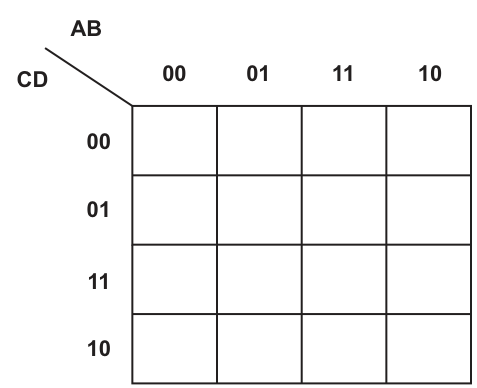
Answer
| CD \ AB | 00 | 01 | 11 | 10 |
|---|---|---|---|---|
| 00 | 0 | 1 | 1 | 0 |
| 01 | 0 | 0 | 0 | 0 |
| 11 | 1 | 0 | 0 | 1 |
| 10 | 1 | 0 | 0 | 1 |
See completed K-map
Background Concept
A Karnaugh map is a visual way to arrange truth-table values so that adjacent cells differ by only one variable. This makes simplification easier.
For a 4-variable K-map:
- two variables label the columns
- two variables label the rows
- the labels must be in Gray-code order, not ordinary binary order
Here the map uses:
- columns AB: 00, 01, 11, 10
- rows CD: 00, 01, 11, 10
Gray-code order matters because neighbouring cells must differ in exactly one bit.
Understanding the Question
You are not simplifying yet in part (b)(i). You only need to place the output values from the truth table into the correct K-map cells.
Each cell corresponds to one combination of A, B, C and D:
- the column tells you A and B
- the row tells you C and D
Then the cell entry is the value of Z for that combination.
Approach
Use the K-map headings exactly as given:
- find the correct AB column
- find the correct CD row
- copy the corresponding Z value from the truth table into that cell
A good way is to work row by row in the K-map rather than truth-table order, because the map order is Gray code.
Step-by-Step Reasoning
The column order is AB = 00, 01, 11, 10.
The row order is CD = 00, 01, 11, 10.
Now fill each row of the K-map.
Row CD = 00:
- AB = 00 gives A=0, B=0, C=0, D=0 so Z = 0
- AB = 01 gives 0,1,0,0 so Z = 1
- AB = 11 gives 1,1,0,0 so Z = 1
- AB = 10 gives 1,0,0,0 so Z = 0
So row CD = 00 is: 0, 1, 1, 0
Row CD = 01:
- 0001 gives 0
- 0101 gives 0
- 1101 gives 0
- 1001 gives 0
So row CD = 01 is: 0, 0, 0, 0
Row CD = 11:
- 0011 gives 1
- 0111 gives 0
- 1111 gives 0
- 1011 gives 1
So row CD = 11 is: 1, 0, 0, 1
Row CD = 10:
- 0010 gives 1
- 0110 gives 0
- 1110 gives 0
- 1010 gives 1
So row CD = 10 is: 1, 0, 0, 1
That completes the K-map.
Key Takeaways
- A K-map must be filled using Gray-code order.
- Columns and rows each represent a pair of variables.
- Every K-map cell comes directly from one truth-table row.
- Getting the cell positions correct is essential before any grouping can be done.
Common Mistakes
- Writing the columns or rows in binary order 00, 01, 10, 11 instead of Gray-code order 00, 01, 11, 10.
- Swapping the row variables and column variables.
- Copying the right Z value into the wrong cell because the map order is different from the truth-table order.
- Leaving blank cells; every cell must contain either 0 or 1.
Things to Be Careful About
- Read the headings carefully: columns are AB, rows are CD.
- The row label 10 means C=1 and D=0, not the other way round.
- Check the four corner-area 1s carefully, because they are often important for wrap-around groups later.
- Do not start grouping in this part; only complete the map accurately.
Draw loop(s) around appropriate group(s) in the K-map to produce an optimal sum-of-products.
Answer
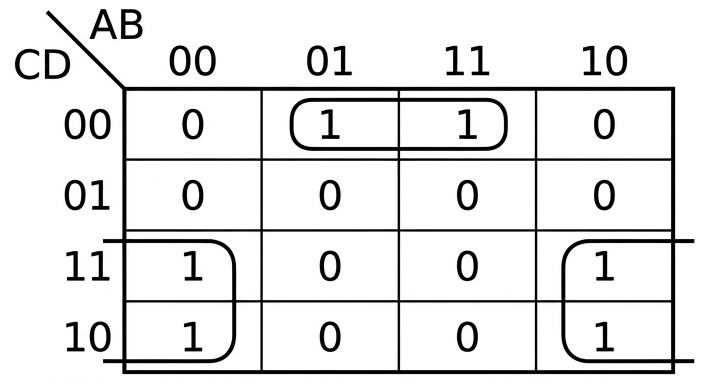
See K-map loops
Background Concept
In a Karnaugh map, you simplify a Boolean expression by grouping adjacent 1s.
Rules for grouping:
- each group must contain 1, 2, 4, 8, ... cells
- groups should be as large as possible
- cells in a group must be adjacent horizontally or vertically, not diagonally
- the map wraps around, so the left and right edges are adjacent, and the top and bottom edges are adjacent
- groups may overlap if that helps simplification
The purpose of each group is to remove any variable that changes within that group, keeping only the variables that stay the same.
Understanding the Question
This part asks you to draw loops on the completed K-map so that a simplified sum-of-products expression can be produced.
So the goal is not to write the expression yet. The task here is purely to choose and draw the correct groups of 1s.
The mark scheme diagram shows three 2-cell loops:
- one horizontal pair across the top middle
- one vertical pair on the lower left edge
- one vertical pair on the lower right edge
Approach
Look for adjacent 1s.
From the completed K-map, the 1s are at:
- row CD=00, columns AB=01 and AB=11
- row CD=11, columns AB=00 and AB=10
- row CD=10, columns AB=00 and AB=10
The top two 1s form a normal horizontal pair.
The lower left pair and lower right pair are vertical pairs.
Because K-maps wrap around horizontally, the outer columns are adjacent to each other, which is why edge-based grouping is valid.
Step-by-Step Reasoning
The completed map is:
- CD=00: 0 1 1 0
- CD=01: 0 0 0 0
- CD=11: 1 0 0 1
- CD=10: 1 0 0 1
Now identify valid adjacent pairs.
- Top horizontal pair
- Cells at CD=00 with AB=01 and AB=11 are both 1.
- These two columns are adjacent in Gray-code order.
- So draw one loop around those two cells.
- Left lower vertical pair
- Cells at AB=00 with CD=11 and CD=10 are both 1.
- These two rows are adjacent in Gray-code order.
- So draw one loop around those two cells.
- Right lower vertical pair
- Cells at AB=10 with CD=11 and CD=10 are both 1.
- These two rows are also adjacent.
- So draw one loop around those two cells.
That gives the set of loops shown in the mark scheme.
Key Takeaways
- Valid K-map groups are always powers of two.
- Adjacency depends on Gray-code ordering.
- Edge cells can be adjacent because the K-map wraps around.
- The loops you draw determine which literals remain in the simplified expression.
Common Mistakes
- Grouping diagonally placed 1s, which is never allowed.
- Forgetting wrap-around adjacency at the edges.
- Drawing groups that include a 0.
- Drawing groups with 3 cells or other sizes that are not powers of two.
Things to Be Careful About
- Use only horizontal or vertical adjacency.
- Check the map headings before deciding whether cells are adjacent.
- Make sure every loop encloses only cells containing 1.
- The exact loops matter because part (b)(iii) depends on reading the fixed variables from them correctly.
Write the Boolean logic expression from your answer to part (b)(ii) as the simplified sum-of-products.
Z = .....................................................................................................................................
.....................................................................................................................................
Answer
Z = A'.B'.C + A.B'.C + B.C'.D'
Z = A'.B'.C + A.B'.C + B.C'.D'
Background Concept
After grouping 1s in a K-map, each loop becomes one product term.
To get the term:
- keep only the variables that stay constant across all cells in that group
- remove any variable that changes value within the group
- if a constant variable is 0, write it complemented
- if a constant variable is 1, write it uncomplemented
Then OR the terms together to form the simplified sum-of-products expression.
Understanding the Question
This part uses the loops drawn in part (b)(ii). You must translate those loops into Boolean terms.
So you are not going back to the original truth table row by row. Instead, you look at each K-map group and ask:
- which variables do not change in this group?
- which variables change and therefore disappear?
Approach
Take one loop at a time.
For each loop:
- inspect the row labels and column labels covered by the loop
- decide which of A, B, C, D stay fixed
- write only those fixed literals as a product term
- combine all terms with OR
Step-by-Step Reasoning
Using the loops shown in part (b)(ii):
- Top horizontal loop
- This loop covers row CD=00 and columns AB=01 and 11.
- Across columns 01 and 11, B stays 1 but A changes from 0 to 1.
- In row CD=00, C=0 and D=0 stay fixed.
- So the term is B.C'.D'.
- Left lower vertical loop
- This loop covers column AB=00 and rows CD=11 and 10.
- In column AB=00, A=0 and B=0 stay fixed.
- Across rows 11 and 10, C stays 1 but D changes from 1 to 0.
- So the term is A'.B'.C.
- Right lower vertical loop
- This loop covers column AB=10 and rows CD=11 and 10.
- In column AB=10, A=1 and B=0 stay fixed.
- Across rows 11 and 10, C stays 1 but D changes.
- So the term is A.B'.C.
Now OR the three terms together:
Z = A'.B'.C + A.B'.C + B.C'.D'
That is the simplified sum-of-products expression corresponding to the drawn loops.
Key Takeaways
- A K-map loop removes any variable that changes inside that loop.
- Only fixed variables remain in the product term.
- Each loop gives one product term.
- The final simplified SOP is the OR of all loop terms.
Common Mistakes
- Keeping a variable that changes within the loop; that variable must be removed.
- Complementing a literal incorrectly, for example writing C instead of C' when the fixed value is 0.
- Reading row or column labels in the wrong order.
- Writing one term per cell instead of one term per group.
Things to Be Careful About
- For the top loop, A changes, so it must not appear in the term.
- For the vertical lower loops, D changes, so it must not appear.
- Use the same column order 00, 01, 11, 10 and row order 00, 01, 11, 10 when reading the groups.
- Write the result as sum-of-products: product terms joined by + signs.
The Internet layer and Link layer are two layers of the TCP/IP protocol suite.
Describe the purpose of the Internet layer and the purpose of the Link layer.
Purpose of Internet layer ..........................................................................................................
...................................................................................................................................................
...................................................................................................................................................
...................................................................................................................................................
...................................................................................................................................................
Purpose of Link layer ................................................................................................................
...................................................................................................................................................
...................................................................................................................................................
...................................................................................................................................................
...................................................................................................................................................
Answer
- Purpose of Internet layer: provides logical addressing and routing of packets between networks; it uses IP addresses to decide the path a packet should take from source to destination.
- Purpose of Link layer: handles transmission of data across the local network link; it puts packets into frames for the network hardware/media and delivers them to the next device on the local network.
Internet layer: logical addressing and routing between networks. Link layer: local transmission of frames across the network link.
Background Concept
The TCP/IP protocol suite is organised into layers. Each layer has a particular job, and together the layers allow data to move from one application on one computer to another application on another computer.
A layered approach is used because it separates responsibilities:
- higher layers deal with application data
- middle layers deal with end-to-end and network delivery
- lower layers deal with the actual local transmission on hardware
For this question, the two relevant layers are:
- Internet layer: responsible for getting packets across one or more networks to the correct destination
- Link layer: responsible for moving data across a single local link or network segment
The Internet layer is concerned with logical addressing and routing. Logical addressing means IP addresses are used so that devices can be identified across many connected networks.
The Link layer is concerned with local delivery. It deals with the way data is packaged for the local network technology and passed across the physical connection to the next device.
Understanding the Question
The question asks for the purpose of each layer, not a full explanation of every protocol inside the layer.
So you need to state what each layer is there to do:
- for the Internet layer, explain that it is about sending packets between networks using addressing and routing
- for the Link layer, explain that it is about sending data over the local network/media to the next device
A common trap is to describe both layers too vaguely as just "sending data". The key distinction is:
- Internet layer = across networks
- Link layer = across one local link/network segment
Approach
A good way to answer is to compare the two layers directly.
- Identify the scope of each layer.
- Internet layer: wider network-to-network delivery
- Link layer: immediate local transmission
- Name the main mechanism each one uses.
- Internet layer: IP addressing and routing
- Link layer: frames, network hardware, local delivery
- Phrase each as a purpose statement.
That gives a focused answer that matches what examiners want.
Step-by-Step Reasoning
For the Internet layer:
- Data must sometimes travel through many different networks before reaching its destination.
- A system is needed to identify where the data is going in a way that works beyond a single local network.
- This is done using IP addresses, which are logical addresses.
- The Internet layer uses these addresses to help decide how packets should travel.
- Routers work with this layer to move packets from one network to another.
- So the purpose of the Internet layer is to provide addressing and routing between networks.
For the Link layer:
- Once a packet is ready to travel on a particular network segment, it has to be sent using the local network technology.
- The data is prepared for the network hardware and the transmission medium.
- This often involves placing the data into frames suitable for that local network.
- The Link layer handles delivery from one device to the next on the same local network or direct connection.
- So the purpose of the Link layer is local transmission over the network link.
The difference can be thought of like this:
- Internet layer: "Which network should this packet go through next?"
- Link layer: "How do I actually send this frame across this local connection?"
Key Takeaways
- The Internet layer is responsible for logical addressing and routing across networks.
- The Link layer is responsible for local delivery over the physical/local network link.
- In layered protocols, different layers solve different parts of the communication problem.
Common Mistakes
- Saying both layers just transmit data: this is too vague and does not show the difference in purpose.
- Confusing IP addressing with hardware/MAC addressing: IP belongs to the Internet layer; local hardware delivery belongs to the Link layer.
- Describing the Physical layer: TCP/IP is being asked here, so keep the answer to the named TCP/IP layers, not generic OSI descriptions.
- Talking about applications like HTTP or SMTP: those belong to a different layer and do not answer this question.
Things to Be Careful About
- Use the wording between networks for the Internet layer.
- Use the wording local link or local network segment for the Link layer.
- Make sure the two purposes are clearly distinct.
- If you mention frames for the Link layer, that is helpful, but do not replace the main idea of local delivery with only a technical term.
Describe the function of a router in packet switching.
...................................................................................................................................................
...................................................................................................................................................
...................................................................................................................................................
...................................................................................................................................................
...................................................................................................................................................
...................................................................................................................................................
...................................................................................................................................................
.............................................................................................................................................
Answer
- A router receives a packet from one network.
- It reads the destination IP address in the packet header.
- It uses its routing table to choose the best next hop/path to the destination.
- It forwards the packet to the next router or destination network.
- In packet switching, different packets may be sent by different routes depending on traffic or network faults.
A router reads the destination IP address, chooses the next hop using its routing table, and forwards the packet between networks.
Background Concept
In packet switching, data is broken into packets. Each packet can be sent through the network independently. This means packets do not need a single fixed path for the whole message.
A router is the device that connects networks together and decides where packets should go next. Its job is not simply to pass data on blindly. It examines addressing information and makes a forwarding decision.
Routers mainly work with:
- the packet's destination IP address
- a routing table, which contains information about where to send packets next
- the idea of a next hop, meaning the next router or network on the route
Because packet-switched networks are flexible, different packets from the same message may sometimes follow different paths.
Understanding the Question
The question asks for the function of a router in packet switching.
That means you should explain what a router actually does when a packet arrives:
- receive the packet
- inspect the address information
- decide the route
- send it onward
It is not asking for a general definition of a router only, and it is not asking for a comparison with switches or hubs. The phrase in packet switching is the clue that you should mention routing packets individually and possibly different routes being used.
Approach
The clearest way to answer is to follow a packet through the router.
- A packet arrives.
- The router reads the destination address.
- The router checks its routing information.
- It decides the best next hop.
- It forwards the packet.
- In packet switching, this can happen separately for each packet.
This sequence naturally gives the explanation the examiner wants.
Step-by-Step Reasoning
- First, a packet reaches one of the router's interfaces.
- The router examines the header, especially the destination IP address.
- It compares that destination with entries in its routing table.
- The routing table tells the router which interface or neighbouring router should be used next.
- The router then forwards the packet to that next hop.
- This process repeats at other routers until the packet reaches the destination network.
Why this matters in packet switching:
- Packets are treated individually.
- The router can choose a route based on the network information it has.
- If a route is busy or unavailable, a different route may be used.
- This is one reason packet switching is flexible and robust.
So the router's function is essentially to direct packets between networks by reading their destination addresses and forwarding them along an appropriate route.
Key Takeaways
- A router connects networks and forwards packets between them.
- It makes decisions using the destination IP address and a routing table.
- In packet switching, packets can be routed independently, so different packets may take different paths.
Common Mistakes
- Saying a router just boosts or repeats signals: that describes other networking hardware, not a router's main function.
- Confusing routers with switches: switches mainly deal with local network forwarding, while routers forward between networks using IP addresses.
- Forgetting the routing table: the router does not guess; it uses stored routing information.
- Describing circuit switching instead: in packet switching there is no single permanently reserved path for the whole message.
Things to Be Careful About
- Mention destination IP address, not just "address" if you can be specific.
- Say the router chooses the next hop or best route, not necessarily the complete route all at once.
- Keep the focus on packet switching, where packets may travel separately.
- Do not drift into unrelated protocol details unless they support the routing explanation.
Complete the table by filling in the missing object-oriented programming (OOP) terms and descriptions.
| OOP term | Description |
|---|---|
| ...................................... | A method that accesses the value of a property. |
| ...................................... | A method that changes the value of a property. |
| Object | ................................................................................................. |
| ................................................................................................. | |
| ................................................................................................. | |
| Method | ................................................................................................. |
| ................................................................................................. | |
| ................................................................................................. |
Answer
| OOP term | Description |
|---|---|
| Accessor | A method that accesses the value of a property. |
| Mutator | A method that changes the value of a property. |
| Object | An instance of a class. It contains values for the properties defined by the class and can use the methods of that class. |
| Method | A procedure or function that belongs to a class and performs an operation on the object's data. |
Accessor; Mutator; Object = an instance of a class; Method = a procedure/function belonging to a class that operates on the object's data.
Background Concept
Object-oriented programming (OOP) organises programs around classes and objects.
A class is a template or blueprint. It defines:
- properties (also called attributes or data members), which store data
- methods, which are the operations that can be carried out
An object is an instance of a class. That means it is a real example created from the class blueprint, with its own set of property values.
Two common types of methods linked to encapsulation are:
- Accessor: a method used to read or return the value of a property
- Mutator: a method used to change or update the value of a property
These are often also called getter and setter methods.
Understanding the Question
The table has four missing entries:
- the OOP term for a method that reads a property's value
- the OOP term for a method that changes a property's value
- a description of an Object
- a description of a Method
So this is mainly a vocabulary question on core OOP terms. No code is needed; you just need the correct terminology and accurate short definitions.
Approach
Use standard OOP definitions:
- a method that gets or reads a value is an accessor
- a method that sets or changes a value is a mutator
- an object is an instance created from a class
- a method is a procedure/function attached to a class or object
The safest exam approach is to give brief, precise definitions that include the key words the examiner expects, especially instance of a class for object.
Step-by-Step Reasoning
The first description says: "A method that accesses the value of a property."
- In OOP, a method used to read a property's value is called an accessor.
- Some languages or textbooks use getter, but accessor is the formal syllabus term.
The second description says: "A method that changes the value of a property."
- In OOP, this is a mutator.
- Another common term is setter, because it sets a new value.
For Object, the description must explain what an object is.
- An object is not the same as a class.
- The class is the design; the object is a real created example.
- Therefore the key idea is: an object is an instance of a class.
- A strong definition can add that it holds actual values for the properties and can use the class methods.
For Method, the description must explain what a method is.
- A method is a routine associated with a class.
- It may be written as a procedure or function depending on the language.
- It performs some action, usually using or changing the object's properties.
So the completed entries are:
- Accessor
- Mutator
- Object = an instance of a class
- Method = a procedure/function belonging to a class that operates on object data
Key Takeaways
- An object is an instance of a class.
- A method is an operation belonging to a class/object.
- An accessor reads a property value.
- A mutator changes a property value.
- These terms are closely linked to encapsulation in OOP.
Common Mistakes
- Writing class instead of object. A class is the template; an object is the instance.
- Confusing accessor and mutator. Accessor reads, mutator changes.
- Giving a vague definition like "an object is data". That is too weak; it should mention instance of a class.
- Saying a method is just "code" without linking it to a class or object.
- Using only informal terms if the exam expects formal ones. For example, getter/setter may be accepted, but accessor/mutator is safer.
Things to Be Careful About
- Use the exact OOP term requested by the description.
- For definition questions, include the most important phrase first, such as instance of a class.
- Keep class and object clearly separate in your mind.
- A method can access properties, change them, or perform other tasks, so do not define it too narrowly unless the question asks for a specific type such as accessor or mutator.
The management and scheduling of processes are tasks carried out by an operating system.
Describe one reason why scheduling is necessary in process management.
...................................................................................................................................................
...................................................................................................................................................
...................................................................................................................................................
.............................................................................................................................................
Answer
- Scheduling is necessary because several processes may be ready to run at the same time but there is only one CPU/core available to execute a process.
- The operating system must decide which process gets processor time and when, so processor time is shared efficiently and one process does not monopolise the CPU.
Scheduling is needed because multiple processes compete for limited CPU time, so the OS must decide which runs next to share the processor efficiently and fairly.
Background Concept
Process scheduling is an operating system function that decides which process should use the CPU next. In a multitasking system, many processes can exist at once, but a single processor core can execute only one instruction stream at a time. Even with multiple cores, there are usually more runnable processes than available cores.
The operating system therefore keeps track of processes in states such as ready, running and waiting, and uses a scheduling algorithm to choose from the ready processes. Scheduling is needed to keep the system efficient, responsive and fair.
Understanding the Question
This part asks for one reason scheduling is necessary in process management. The key idea is not to name a scheduling method, but to explain why the operating system needs scheduling at all.
The clue is the phrase "necessary in process management". That means you should think about what problem exists if the OS does not schedule: multiple processes want to run, but processor time is limited.
Approach
A strong answer needs:
- the problem: several processes may need the CPU at the same time
- the consequence: the OS must choose which process runs and for how long
That gives both the reason and the explanation that earns the marks.
Step-by-Step Reasoning
The CPU is a limited resource. If many processes are active, they cannot all run on the same core simultaneously.
So the operating system must:
- decide which ready process gets the CPU next
- decide when that process should stop or be interrupted
- make sure CPU time is distributed sensibly
Without scheduling, one process could keep the CPU for too long, other processes would wait unnecessarily, and overall system performance and responsiveness would suffer.
That is why a valid answer says scheduling is necessary because processes compete for CPU time, and the OS must manage that competition.
Key Takeaways
- Scheduling is about allocating CPU time to processes.
- It is necessary because runnable processes outnumber available processor time.
- Good scheduling improves fairness, efficiency and responsiveness.
Common Mistakes
- Saying only "to make the computer faster". This is too vague and does not explain the scheduling need.
- Talking about memory management instead of CPU allocation. This question is specifically about process scheduling.
- Naming a scheduling method, such as round robin, without explaining why scheduling is needed in general.
Things to Be Careful About
- Focus on processor time, not storage or files.
- Mention that there can be multiple ready processes but limited CPU availability.
- For a "describe one reason" question, one clearly explained reason is better than several brief undeveloped points.
Explain the function of the round robin scheduling routine and give a benefit of this routine.
Function ....................................................................................................................................
...................................................................................................................................................
...................................................................................................................................................
...................................................................................................................................................
...................................................................................................................................................
...................................................................................................................................................
Benefit ......................................................................................................................................
...................................................................................................................................................
Answer
- Function: Round robin scheduling gives each ready process a fixed time slice in turn. When a process uses up its time slice, it is interrupted and moved to the back of the ready queue if it has not finished, and the next process is run.
- Benefit: It is fair because every process gets regular access to the CPU, so no process is left waiting indefinitely.
Round robin gives each ready process a fixed time slice in turn; if it is not finished it is pre-empted and placed at the back of the queue. Benefit: fair CPU sharing with no starvation.
Background Concept
Round robin is a pre-emptive scheduling algorithm used by operating systems. "Pre-emptive" means the operating system can interrupt a running process. In round robin, each process in the ready queue is given a fixed amount of CPU time called a time slice or time quantum.
The scheduler works through the ready queue in order:
- the first process runs for one time slice
- if it finishes, it leaves the queue
- if it does not finish, it is interrupted when the time slice ends
- it is then placed at the back of the queue
- the next ready process gets its turn
This continues repeatedly, forming a cycle or "round robin" pattern.
Understanding the Question
This part has two separate demands:
- explain the function of round robin scheduling
- give one benefit of using it
So the answer must say how it works, not just name it, and then add an advantage. The function needs the key operational details: fixed time slice, processes taken in turn, pre-emption, and rejoining the queue if unfinished.
Approach
To answer fully, describe the mechanism first:
- there is a ready queue
- each process gets a turn
- each turn lasts for a fixed time slice
- unfinished processes are moved to the back
Then give a benefit that follows directly from that mechanism. The clearest benefit is fairness: every process gets CPU time regularly, so starvation is avoided.
Step-by-Step Reasoning
Suppose several processes are waiting in the ready queue.
- The scheduler selects the process at the front of the queue.
- That process runs for a fixed time quantum.
- If the process completes before the time quantum ends, it leaves the system or moves to the appropriate finished/waiting state.
- If it is still not complete when the quantum ends, the OS interrupts it.
- The process is placed at the back of the ready queue.
- The next process at the front is then given the CPU.
This repeats again and again.
Why is this useful? Because every ready process gets a turn. That means:
- no single process can keep the CPU forever
- response time is better for interactive users
- starvation is avoided or greatly reduced because each process gets regular access
For this question, one clearly stated benefit is enough. The safest benefit is fairness or prevention of starvation.
Key Takeaways
- Round robin is a pre-emptive scheduling method.
- It uses a fixed time slice for each process.
- Unfinished processes go to the back of the ready queue.
- Its main benefit is fair CPU sharing and good responsiveness.
Common Mistakes
- Saying only "processes take turns" without mentioning the fixed time slice. The time slice is central to round robin.
- Forgetting that an unfinished process is pre-empted and returned to the queue.
- Giving a vague benefit such as "it is better" without explaining why.
- Confusing round robin with first come first served, where a process may keep the CPU until it finishes.
Things to Be Careful About
- Use the idea of a fixed time slice or time quantum explicitly.
- Make clear that the scheduler moves through the ready queue in turn.
- For the benefit, choose something directly caused by the algorithm, such as fairness, no starvation, or improved response time.
- Keep function and benefit separate, because the question labels them separately.
Secure Socket Layer (SSL) and Transport Layer Security (TLS) are two protocols.
Explain how SSL/TLS is used when client-server communication is initiated.
..........................................................................................................................................................
..........................................................................................................................................................
..........................................................................................................................................................
..........................................................................................................................................................
..........................................................................................................................................................
..........................................................................................................................................................
..........................................................................................................................................................
....................................................................................................................................................
Answer
- When a client connects to a secure server, the server sends its digital certificate containing its public key.
- The client checks the certificate is valid / trusted, for example that it has been signed by a trusted certificate authority.
- The client creates a session key and encrypts it using the server's public key, then sends it to the server.
- The server decrypts it with its private key, and then both client and server use the session key to encrypt and decrypt the rest of the communication.
The server sends a digital certificate with its public key; the client verifies it, encrypts a session key with that public key, the server decrypts it with its private key, and both then use the session key for encrypted communication.
Background Concept
SSL (Secure Sockets Layer) and TLS (Transport Layer Security) are protocols used to make communication between a client and a server secure. In practice, TLS is the newer standard, but exam questions often refer to them together as SSL/TLS.
Their job is to provide:
- confidentiality — data cannot easily be read by outsiders
- authentication — the client can check it is really communicating with the correct server
- integrity — data should not be altered without detection
A key idea in SSL/TLS is that it uses both asymmetric and symmetric encryption.
- Asymmetric encryption uses a public key and a private key. Data encrypted with the public key can only be decrypted with the matching private key. This is useful for securely sending a key to the server.
- Symmetric encryption uses one shared secret key for both encryption and decryption. This is much faster, so it is used for the actual data once the connection has been set up.
A digital certificate helps prove the identity of the server. It contains the server's public key and is signed by a trusted certificate authority (CA). The client can check that signature to decide whether the public key really belongs to that server.
Understanding the Question
The question is asking what happens when secure client-server communication is first started. So this is not mainly asking about what happens during the whole session, but about the setup stage: how the secure connection begins.
The important clues are:
- it specifically names SSL/TLS
- it says when client-server communication is initiated
That points directly to the handshake process. A good answer should describe the order of events:
- the server identifies itself
- the client checks that identity
- a shared session key is established securely
- communication then continues using that shared key
Approach
To answer this well, think of SSL/TLS as solving two problems in order:
-
How does the client know it is talking to the real server?
Answer: the server sends a certificate containing its public key. -
How do they get a shared secret key safely?
Answer: the client sends a session key encrypted with the server's public key, and only the server can unlock it using its private key.
After that, both sides already know the same session key, so they can switch to fast symmetric encryption for the rest of the communication.
Step-by-Step Reasoning
When the client begins a secure connection, the following happens:
-
The client contacts the server and requests a secure connection.
This starts the SSL/TLS handshake. -
The server sends its digital certificate.
This certificate includes the server's public key. The purpose is to let the client obtain the correct public key in a trustworthy way. -
The client validates the certificate.
This means checking that the certificate is trusted, typically because it has been signed by a certificate authority the client already trusts. The client may also check that it has not expired and that it matches the server it intended to contact. This step prevents an attacker from simply pretending to be the server and giving a fake key. -
The client creates a session key.
This is the symmetric key that will be used for the ongoing communication. -
The client encrypts the session key using the server's public key and sends it to the server.
Because the session key is encrypted with the public key, only the holder of the matching private key can recover it. -
The server decrypts the session key using its private key.
Now both client and server know the same session key. -
The rest of the communication uses the session key.
This means the actual data sent between client and server is encrypted symmetrically. This is preferred because symmetric encryption is much faster and more efficient than using asymmetric encryption for every message.
For a 4-mark answer, the core scoring points are usually the certificate/public key, validation, encrypted session-key exchange, and use of the session key afterwards.
Key Takeaways
- SSL/TLS secures client-server communication at the start of a connection.
- The server proves its identity using a digital certificate.
- Asymmetric encryption is used to transfer a shared session key securely.
- Symmetric encryption is then used for the main data transfer because it is faster.
Common Mistakes
-
Saying the whole communication uses only public/private key encryption.
This is not how SSL/TLS is normally described in the syllabus. Public-key encryption is mainly used during setup; the data transfer then uses a session key. -
Forgetting the certificate validation step.
The certificate is not just sent and accepted automatically; its trust must be checked. -
Mixing up public and private keys.
The client encrypts with the server's public key, and the server decrypts with its private key. -
Not mentioning the session key.
The session key is central to how SSL/TLS works efficiently after the initial handshake. -
Describing only encryption and not authentication.
SSL/TLS is also about confirming the server's identity.
Things to Be Careful About
- Use the term digital certificate correctly: it contains the public key and identity information and is trusted because of the certificate authority's signature.
- Do not say the client sends its own private key or the server sends its private key; private keys are never shared.
- Be precise about sequence: certificate first, validation next, session key exchange after that, then encrypted data transfer.
- If you mention SSL and TLS separately, remember TLS is effectively the newer replacement, but for this question they can be treated together.
- For exam answers, concise stepwise wording is best; do not get lost in low-level handshake message names unless the question specifically asks for them.
Explain the process of syntax analysis during program compilation.
..........................................................................................................................................................
..........................................................................................................................................................
..........................................................................................................................................................
..........................................................................................................................................................
..........................................................................................................................................................
..........................................................................................................................................................
..........................................................................................................................................................
....................................................................................................................................................
Answer
- Syntax analysis is the parsing stage after lexical analysis.
- The parser takes the stream of tokens produced by lexical analysis.
- It checks that the tokens are arranged in a valid structure according to the language grammar / BNF rules, for example the correct order of keywords, identifiers, operators and brackets.
- If the structure is valid, a parse tree / syntax tree is produced for later stages of compilation; if not, a syntax error is reported.
See explanation
Background Concept
Program compilation is usually described as a sequence of stages. Two important early stages are:
- Lexical analysis: the source code is broken into meaningful units called tokens such as identifiers, keywords, operators and literals.
- Syntax analysis: those tokens are checked to see whether they form valid program statements according to the programming language's grammar.
Syntax analysis is often called parsing, and the program component that performs it is the parser.
A programming language has formal grammar rules, often written in BNF or shown with syntax diagrams. These rules define legal structures such as:
- how an assignment statement must be written
- where brackets must appear
- what order parts of an
IFstatement must follow - which constructs can appear inside other constructs
So syntax analysis is not about the meaning of a variable or whether a calculation gives the right result. It is about whether the program is structurally well formed.
Understanding the Question
The question asks you to explain the process of syntax analysis during compilation. That means you need more than just a definition like "it checks syntax". You should describe:
- when it happens in the compilation process
- what input it works on
- what it checks
- what happens if the code is correct or incorrect
For 4 marks, the expected answer is usually a short sequence of points covering the full flow of this stage.
Approach
A good way to answer is to think of syntax analysis as a step-by-step process:
- State that it comes after lexical analysis.
- Say that it receives tokens from the lexer.
- Explain that it compares the token sequence against the language's grammar rules.
- State the result: either it builds a parse/syntax tree or it reports a syntax error.
That gives a complete explanation without drifting into later compiler stages such as code generation or optimisation.
Step-by-Step Reasoning
First, the source program has already gone through lexical analysis. At that earlier stage, the raw characters are grouped into tokens. For example, a line of code is no longer treated as individual letters, but as items such as:
- keyword
- identifier
- assignment operator
- number
- bracket
Syntax analysis then begins.
The parser reads this token stream. It does not care about the exact letters by themselves anymore; it cares about whether the sequence of token types fits the grammar of the language.
For example, if the grammar says an assignment statement must have the form:
- identifier
- assignment symbol
- expression
then the parser checks that this structure is present.
It also checks larger structures, such as whether:
- brackets are correctly matched
- keywords appear in the right order
- statements are formed correctly
- blocks begin and end properly
If the sequence matches the grammar rules, the parser can build a parse tree or syntax tree. This is an internal representation of the structure of the program, and it is used by later compilation stages.
If the token sequence does not fit the grammar, the compiler reports a syntax error. For example, a missing bracket or wrongly ordered tokens would be detected here.
So the essential process is:
- receive tokens from lexical analysis
- parse them using grammar rules
- confirm valid structure or report syntax errors
- produce a tree structure if successful
Key Takeaways
- Syntax analysis is the parsing stage of compilation.
- It works on tokens, not raw characters.
- It checks program structure against the language's formal grammar.
- A correct structure leads to a parse tree / syntax tree.
- An incorrect structure leads to a syntax error message.
Common Mistakes
- Confusing syntax analysis with lexical analysis: lexical analysis finds tokens; syntax analysis checks how those tokens are arranged.
- Talking about semantics instead of syntax: syntax analysis checks structure, not meaning. For example, type mismatches are usually semantic rather than syntactic.
- Missing the role of grammar rules: a strong answer should mention grammar, BNF or language rules, not just say "it checks the code".
- Forgetting the output: many students mention error detection but forget that successful parsing produces a parse tree or syntax tree.
Things to Be Careful About
- Use the term tokens accurately: these come from the lexical analyser.
- Do not say syntax analysis checks whether the program gives the correct answer; it only checks whether it is written in a valid form.
- If you mention BNF or syntax diagrams, make sure you link them to the parser checking the program against those rules.
- For full marks, include both outcomes: valid syntax and syntax error.
Several syntax diagrams are shown.
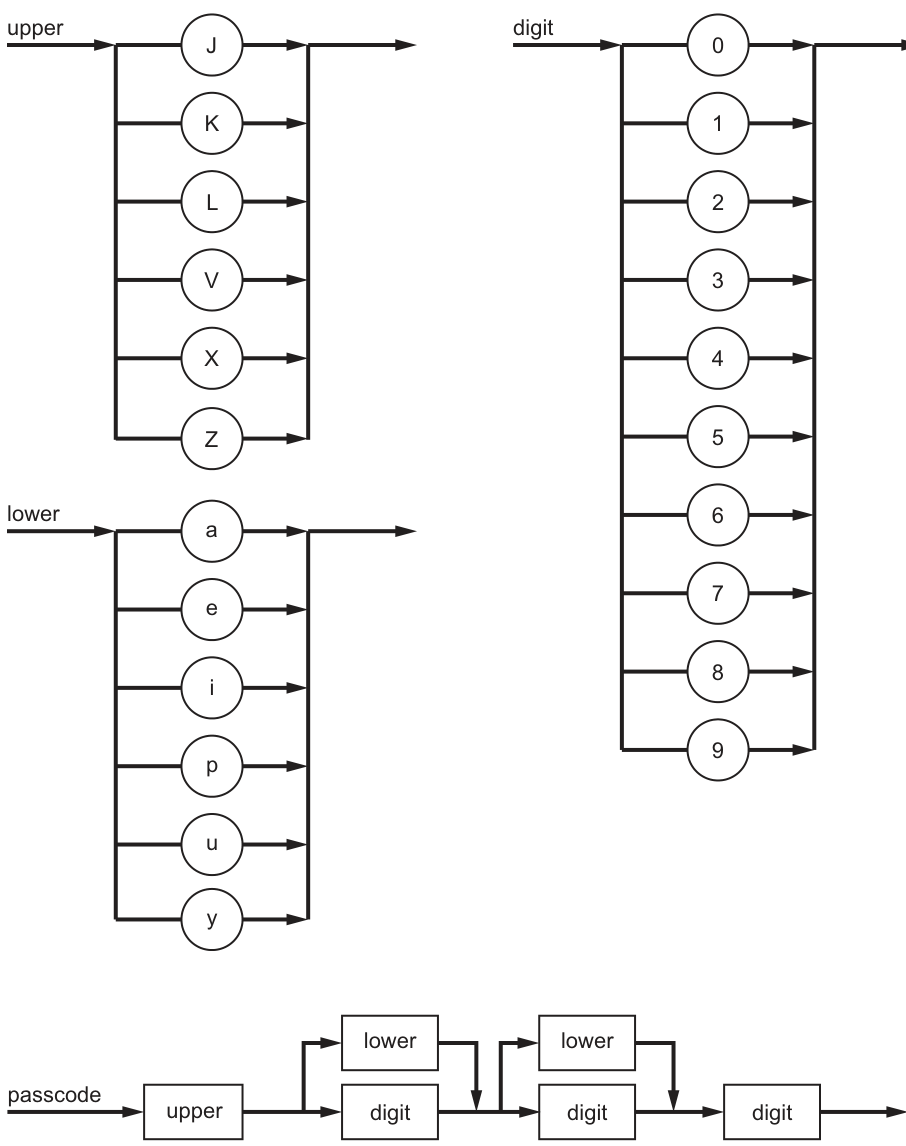
State why JJ90 is not a valid passcode for the given syntax diagrams.
...................................................................................................................................................
.............................................................................................................................................
Answer
JJ90is not valid because the second character isJ, but the second character must be eitherlowerordigit.
The second character is J, but it must be lower or digit.
Background Concept
A syntax diagram shows the valid structure of a string. You follow the path from left to right, and each box or choice tells you what kind of symbol is allowed at that position.
In this question:
uppermeans one character chosen from theupperdiagram.lowermeans one character chosen from thelowerdiagram.digitmeans one character chosen from thedigitdiagram.
A passcode is valid only if every character matches the rule at its position.
Understanding the Question
You are given the syntax diagram for passcode.
From the diagram, the passcode has four characters:
- first character:
upper - second character:
lowerordigit - third character:
lowerordigit - fourth character:
digit
The question asks why JJ90 is not valid. So we compare each character with the rule for its position.
Approach
Read the passcode from left to right and test each character against the syntax diagram:
- character 1 against
upper - character 2 against
lowerordigit - character 3 against
lowerordigit - character 4 against
digit
As soon as one position breaks the rule, the whole passcode is invalid.
Step-by-Step Reasoning
The passcode is JJ90.
- First character =
JJis in theupperdiagram, so this is valid.
- Second character =
J- The second position must be
lowerordigit. Jis uppercase, so it is not from thelowerset and it is not a digit.- Therefore this position is invalid.
- The second position must be
Once the second character fails, the whole passcode is not valid. You do not need any further reason.
Key Takeaways
- Follow a syntax diagram one position at a time.
- Each position has its own rule.
- One invalid character at any position makes the whole string invalid.
Common Mistakes
- Saying the first
Jis invalid. It is actually valid because the first position must beupper. - Saying the whole passcode is wrong without identifying which rule is broken.
- Forgetting that the second position allows either
lowerordigit, notupper.
Things to Be Careful About
- Check positions carefully; do not mix up second, third and fourth characters.
- Use the symbol classes exactly as defined by the diagram.
- A character being a letter is not enough; it must be the correct kind of letter for that position.
Complete the Backus-Naur Form (BNF) for <upper> and <passcode>.
<upper> ::= ..........................................................................................................................
...................................................................................................................................................
<passcode> ::= ...................................................................................................................
...................................................................................................................................................
...................................................................................................................................................
...................................................................................................................................................
Answer
<upper> ::= J | K | L | V | X | Z
<passcode> ::= <upper><lower><lower><digit>
             | <upper><lower><digit><digit>
             | <upper><digit><lower><digit>
             | <upper><digit><digit><digit>
See BNF script
Background Concept
Backus-Naur Form (BNF) is a way of writing grammar rules textually instead of drawing them as syntax diagrams.
In BNF:
- a non-terminal is written inside angle brackets, such as
<upper>or<passcode> ::=means “can be defined as”|means “or”- writing symbols next to each other means they occur in sequence
A syntax diagram and a BNF definition describe the same set of valid strings, just in different forms.
Understanding the Question
You are asked to convert parts of the syntax diagrams into BNF.
From the diagrams:
<upper>can be any one ofJ, K, L, V, X, Z<passcode>starts with<upper>- then the second character is either
<lower>or<digit> - then the third character is either
<lower>or<digit> - then the fourth character is
<digit>
So the main task is to write:
- one BNF rule for
<upper> - a BNF rule for
<passcode>covering all allowed combinations of the two branches
Approach
For <upper>, list every possible terminal using |.
For <passcode>, the diagram has two independent branch points:
- second character: 2 choices
- third character: 2 choices
That gives valid patterns. In BNF, the clearest way is to write all four alternatives explicitly.
Step-by-Step Reasoning
First convert the upper diagram.
The diagram shows a choice of six single terminals:
JKLVXZ
So:
<upper> ::= J | K | L | V | X | Z
Now convert passcode.
The structure is:
- first:
<upper> - second:
<lower>or<digit> - third:
<lower>or<digit> - fourth:
<digit>
List all combinations of the second and third positions:
- second
<lower>, third<lower><upper><lower><lower><digit>
- second
<lower>, third<digit><upper><lower><digit><digit>
- second
<digit>, third<lower><upper><digit><lower><digit>
- second
<digit>, third<digit><upper><digit><digit><digit>
So the full BNF rule is:
<passcode> ::= <upper><lower><lower><digit>
             | <upper><lower><digit><digit>
             | <upper><digit><lower><digit>
             | <upper><digit><digit><digit>
This matches the original syntax diagram exactly.
Key Takeaways
- A list of branches in a syntax diagram becomes alternatives using
|in BNF. - A route through several boxes becomes a sequence written side by side.
- If a diagram has multiple branch points, you often need to write all valid combinations.
Common Mistakes
- Writing only one or two passcode alternatives instead of all four.
- Using commas or words like “or” instead of the BNF symbol
|. - Forgetting that the last character must always be
<digit>. - Mixing terminal symbols and non-terminals incorrectly, for example writing
upperinstead of<upper>.
Things to Be Careful About
- Keep angle brackets around non-terminals such as
<upper>and<passcode>. - Do not miss any branch combination.
- Preserve the order of symbols exactly as shown by the diagram.
- Make sure
<upper>is the first symbol in every<passcode>alternative.
A character can be an upper, a lower or a digit.
The rules for passcode have been changed so that the third character may also be selected from upper and the final character may be repeated one or more times.
Complete the syntax diagram for passcode to show these changes.
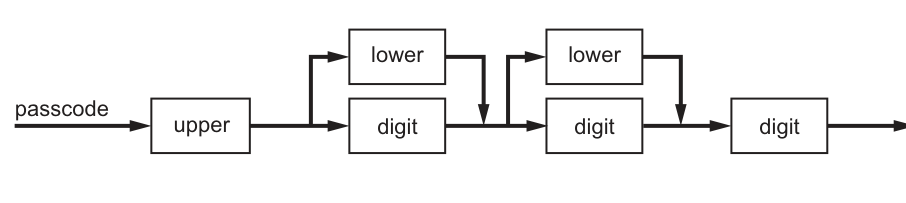
Answer
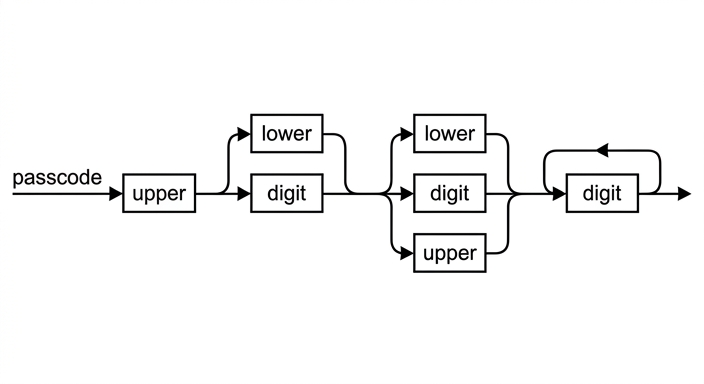
See syntax diagram
Background Concept
Syntax diagrams can show three important grammar ideas visually:
- sequence: items placed one after another on the main line
- choice: a branch where one of several paths may be taken
- repetition: a loop that returns to an earlier point so an item can occur again
If the rule says something may occur one or more times, the first occurrence stays on the main path and then a loop allows extra repetitions.
Understanding the Question
The original passcode diagram means:
- first character:
upper - second character:
lowerordigit - third character:
lowerordigit - final character:
digit
The question changes two rules:
- the third character may also be
upper - the final character may be repeated one or more times
So you must edit the original diagram, not redesign the whole thing from scratch.
Approach
Keep the parts that do not change:
- first
upper - second character branch between
loweranddigit
Then apply the two changes:
- at the third-character branch, add a third option:
upper - at the final
digit, add a feedback loop from its exit back to its entrance so at least one digit is present and more digits are allowed
Step-by-Step Reasoning
Start with the original structure:
upper- choice of
lowerordigit - choice of
lowerordigit digit
Change 1: third character may also be upper
The third character was originally a two-way choice:
lowerdigit
Now it becomes a three-way choice:
lowerdigitupper
So in the second branching section of the syntax diagram, add another parallel path labelled upper.
Change 2: final character may be repeated one or more times
The original final character was a single digit box.
“One or more times” means:
- there must be at least one
digit - after that, more
digitcharacters are allowed
In a syntax diagram, that is shown by leaving one digit on the main path and drawing a loop from the exit of that digit back to its input. Each time the loop is taken, another digit is matched.
So the completed passcode rule becomes, in effect:
- one
upper - then
lowerordigit - then
lowerordigitorupper - then at least one
digit
The completed diagram is:
Key Takeaways
- Add a new allowed symbol in a syntax diagram by adding another branch.
- Show “one or more” with a compulsory first item and a loop for extra copies.
- When modifying a grammar, change only the required parts and keep the rest unchanged.
Common Mistakes
- Adding
upperto the wrong character position, such as the second instead of the third. - Drawing the repetition loop around too much of the diagram instead of just the final
digit. - Showing zero-or-more digits by making the final
digitoptional. The rule says one or more, so at least onedigitmust remain compulsory. - Removing the original
loweranddigitoptions from the third position instead of addingupperas an extra choice.
Things to Be Careful About
- The second character is still only
lowerordigit. - The third character is the one that changes to
lower,digitorupper. - The repetition applies only to the final
digitsection. - The loop must return to the entrance of the final
digitbox so the extra repeated item is also a digit.
State the purpose of the A* and Dijkstra’s algorithms.
...................................................................................................................................................
.............................................................................................................................................
Answer
- To find the shortest / least-cost path through a graph between nodes.
To find the shortest / least-cost path through a graph between nodes.
Background Concept
A* and Dijkstra's are graph-search algorithms. A graph is made of nodes joined by edges, and the edges may have costs or weights. In many problems, we want the path from one node to another with the smallest total cost. This might mean the fewest distance units, the least time, or the lowest combined weight.
Dijkstra's algorithm solves the shortest-path problem by repeatedly choosing the unexplored node with the smallest known distance from the start. A* is also used for shortest-path search, but it adds a heuristic estimate of how far a node is from the goal so that the search is guided more directly toward the destination.
Understanding the Question
This part asks for the purpose of both A* and Dijkstra's. Since it is only 1 mark, the examiner is looking for the main shared purpose, not the difference between them. The key idea is shortest-path or least-cost path finding in a graph.
Approach
For a 1-mark "state" question, give one precise sentence that names what both algorithms are used for. Do not spend time describing how they work, because that belongs to a later part.
Step-by-Step Reasoning
The question names two algorithms:
- Dijkstra's
- A*
Although they work differently, they have the same broad purpose:
- they search a weighted graph
- they aim to find a path
- the path found is the one with minimum total cost
So the correct exam-style answer is that they are used to find the shortest or least-cost path between nodes in a graph.
Key Takeaways
- Both A* and Dijkstra's are path-finding algorithms.
- Their shared purpose is shortest-path or least-cost path search in a graph.
- In a 1-mark state question, focus on the central idea only.
Common Mistakes
- Saying only "they search graphs". That is too vague because many algorithms search graphs.
- Saying "they sort data" or "they search arrays". These algorithms are for graphs, not list searching or sorting.
- Describing only one algorithm instead of the shared purpose of both.
Things to Be Careful About
- Include the idea of shortest path, least-cost path, or minimum-cost route.
- Mention that the search is through a graph or between nodes.
- Do not drift into explaining heuristics here; that difference belongs in part (b).
Outline the difference between the A* and Dijkstra’s algorithms.
...................................................................................................................................................
...................................................................................................................................................
...................................................................................................................................................
.............................................................................................................................................
Answer
- A* uses a heuristic estimate of the remaining distance / cost to the goal to guide the search.
- Dijkstra's algorithm does not use a heuristic; it expands nodes in order of current shortest known distance from the start.
A* uses a heuristic estimate to the goal; Dijkstra's does not and expands nodes by current shortest known distance from the start.
Background Concept
The key difference between A* and Dijkstra's is how they decide which node to examine next.
Dijkstra's algorithm keeps track of the shortest known distance from the start node to every reachable node. At each step, it selects the unexplored node with the smallest current distance from the start. Because of this, it systematically spreads out from the source.
A* also keeps a cost from the start, but it combines this with a heuristic. A heuristic is an estimate of the remaining cost from the current node to the goal. This lets A* prefer nodes that seem likely to lead more directly to the destination.
A common way to describe A* is:
- = exact cost from the start to node
- = estimated cost from node to the goal
Dijkstra's effectively uses only the known cost from the start.
Understanding the Question
This part asks for the difference, not the purpose. So the answer must compare them. The most important distinction is the heuristic used by A*. A second useful contrast is that Dijkstra's explores based only on known distances from the source, while A* is guided toward a specific goal.
Approach
A 2-mark "outline the difference" question usually needs two concise points. The best structure is:
- say what A* uses
- say what Dijkstra's does not use and how it chooses nodes instead
That gives a direct side-by-side comparison.
Step-by-Step Reasoning
Start by asking: how does each algorithm choose the next node?
For Dijkstra's:
- It knows the current best distances from the start node.
- It picks the unexplored node with the smallest known distance.
- It does not try to guess which node is closer to the destination.
For A*:
- It also uses the cost already travelled from the start.
- But it adds a heuristic estimate of the remaining cost to the target.
- This means the search is goal-directed rather than just spreading outward uniformly.
So a strong answer is:
- A* uses a heuristic estimate to guide the search toward the goal.
- Dijkstra's does not use a heuristic and selects nodes only by shortest known distance from the start.
If you want to think of it intuitively, Dijkstra's is more general and methodical, while A* is more focused on reaching one destination efficiently.
Key Takeaways
- A* = shortest-path search with a heuristic.
- Dijkstra's = shortest-path search without a heuristic.
- A* is usually more goal-directed because it estimates how close a node is to the target.
Common Mistakes
- Saying A* is "faster" without explaining why. Speed alone is not the core difference.
- Saying Dijkstra's finds only one path. It can be used to determine shortest paths from the start to other nodes as well.
- Forgetting to mention the heuristic when describing A*.
- Claiming Dijkstra's uses a heuristic too. It does not.
Things to Be Careful About
- Use the word heuristic correctly: it is an estimate, not an exact distance.
- Do not say A* always gives a better answer; the difference is in the method of choosing nodes.
- Keep the comparison precise and paired: what A* uses, what Dijkstra's does not use.
Explain how unsupervised learning takes place in machine learning.
...................................................................................................................................................
...................................................................................................................................................
...................................................................................................................................................
...................................................................................................................................................
...................................................................................................................................................
.............................................................................................................................................
Answer
- Unsupervised learning uses training data that has no labelled or expected outputs.
- The system examines the data to find patterns, relationships or similarities for itself.
- It then groups / clusters items with similar features, without human guidance on the correct answers.
Unsupervised learning uses unlabelled data, finds patterns or similarities itself, and groups data into clusters without being told the correct outputs.
Background Concept
Machine learning is a method where a computer system improves its behaviour by learning from data instead of being given every rule explicitly.
There are two major contrasting ideas here:
- Supervised learning: the training data includes the correct answers, often called labels or target outputs.
- Unsupervised learning: the training data does not include correct answers.
In unsupervised learning, the system must inspect the data and discover structure by itself. Typical outcomes include:
- clustering similar items together
- finding patterns or associations
- identifying groups, trends or anomalies
So the defining feature is that the computer is not told what the right category or output should be.
Understanding the Question
The question asks how unsupervised learning takes place. That means it wants the process, not just a one-line definition. For 3 marks, a complete answer should include:
- the kind of data used
- what the system does with that data
- the kind of result produced
The key clues are the words "unsupervised learning", which strongly suggest no labelled outputs and no teacher telling the system the correct answer.
Approach
A good structure is to explain the process in three stages:
- start with unlabelled data
- analyse the data to detect patterns or similarities
- form groups or relationships without external guidance
That sequence naturally matches a 3-mark explanation.
Step-by-Step Reasoning
First, identify what makes this learning "unsupervised":
- The training data has no labels.
- There is no column saying what the correct class is.
- There is no human trainer marking each example as right or wrong during the learning stage.
Next, consider what the algorithm must do instead:
- It compares items in the data.
- It measures similarity, closeness, or related features.
- It searches for repeated patterns or underlying structure.
Then, think about the output:
- items with similar characteristics may be placed into the same cluster
- unusual items may stand out as anomalies
- relationships between attributes may be discovered
So the learning happens because the machine processes the raw unlabelled data and organises it based on patterns it finds internally, not because it is told the correct output.
A concise exam answer therefore says:
- unlabelled data is provided
- the system finds patterns or similarities itself
- it groups or clusters similar data without being given correct answers
Key Takeaways
- Unsupervised learning does not use labelled target outputs.
- The system discovers patterns, structure, or clusters for itself.
- A strong explanation should describe the data, the analysis, and the result.
Common Mistakes
- Confusing unsupervised learning with supervised learning by mentioning known correct answers.
- Saying the computer is "taught" the right category for each item. That is supervised learning, not unsupervised.
- Giving only the word "clustering" without explaining that it comes from analysing unlabelled data.
- Describing reinforcement learning instead, which involves rewards and penalties.
Things to Be Careful About
- Use "unlabelled data" or "no expected outputs" clearly.
- Make sure the answer explains that the machine finds patterns by itself.
- If you mention clusters, link them to similarity between data items.
- Do not imply a person is correcting the system during training, because that would not be unsupervised learning.
The pseudocode algorithm below allows a user to input a new stock item. The random file is searched for the next empty location in the file and the new item is inserted there.
A suitable message is displayed if the file is full.
Complete this pseudocode.
DECLARE Location : INTEGER
DECLARE NewStock : STRING
DECLARE CurrentStock : STRING
DECLARE Stored : BOOLEAN
DECLARE Max : INTEGER
Max ← 100000
Stored ← FALSE
Location ← 1
..........................................................................................................................
OUTPUT "Enter the new item you wish to store: "
INPUT NewStock
WHILE NOT Stored AND Location <= Max
 ....................................................................................................................
 GETRECORD "StockList.dat", ..........................................................................................
 IF CurrentStock = "" THEN
 ...................................................................................... "StockList.dat", NewStock
 Stored ← TRUE
 ELSE
 Location ← Location + 1
 ENDIF
ENDWHILE
................................................................................................................................................ THEN
 OUTPUT "The new item has not been stored as the file was full."
ENDIF
CLOSEFILE "StockList.dat"
Answer
DECLARE Location : INTEGER
DECLARE NewStock : STRING
DECLARE CurrentStock : STRING
DECLARE Stored : BOOLEAN
DECLARE Max : INTEGER
Max ← 100000
Stored ← FALSE
Location ← 1
OPENFILE "StockList.dat" FOR RANDOM
OUTPUT "Enter the new item you wish to store: "
INPUT NewStock
WHILE NOT Stored AND Location <= Max
   SEEK "StockList.dat", Location
   GETRECORD "StockList.dat", CurrentStock
   IF CurrentStock = "" THEN
      PUTRECORD "StockList.dat", NewStock
      Stored ← TRUE
   ELSE
      Location ← Location + 1
   ENDIF
ENDWHILE
IF NOT Stored THEN
   OUTPUT "The new item has not been stored as the file was full."
ENDIF
CLOSEFILE "StockList.dat"
See completed pseudocode
Background Concept
A random-access file stores records so that the program can go directly to a particular record location instead of reading every earlier record first. This is different from a serial or sequential file, where records are normally processed in order.
In pseudocode questions like this, the common operations are:
OPENFILEto open the file in the required mode.SEEKto move the file pointer to a specific record number.GETRECORDto read the record at the current position.PUTRECORDto write a record at the current position.CLOSEFILEwhen processing is finished.
A flag variable such as Stored is often used to control whether the search should continue. Here, an empty location is identified because the record read from the file is an empty string "".
Understanding the Question
The algorithm must add a new stock item into StockList.dat. It does not append automatically to the end. Instead, it searches for the next empty record position in a random file.
The given variables tell us the intended logic:
Locationstarts at1, so record locations are checked from the beginning.Max ← 100000gives the highest valid location.Stored ← FALSEmeans the item has not yet been written.CurrentStockwill hold the contents of the record currently being checked.
The question already provides most of the structure. The missing parts must:
- open the file correctly,
- move to the current record location each time through the loop,
- read that record,
- write the new item if the slot is empty,
- output a message if no empty location was found.
Approach
The best way to think about this is as a linear scan through the possible random-file record numbers.
For each location:
- move to that record with
SEEK, - read the record into
CurrentStock, - if the record is empty, write
NewStockthere and setStored ← TRUE, - otherwise move on to the next location.
The loop should stop when either:
- the item has been stored, or
- all locations up to
Maxhave been checked.
After the loop, if Stored is still FALSE, the file must have been full, so the error message is shown.
Step-by-Step Reasoning
The first missing line is:
OPENFILE "StockList.dat" FOR RANDOM
This is needed because the file is described as a random file, and the program must access specific record positions directly.
The loop is already given as:
WHILE NOT Stored AND Location <= Max
This is correct because both conditions matter:
NOT Storedmeans keep searching only while no space has yet been found.Location <= Maxprevents reading beyond the valid file range.
Inside the loop, the program must first move to the current location:
SEEK "StockList.dat", Location
Without this, GETRECORD would not necessarily read the required record number.
Next it reads the current record:
GETRECORD "StockList.dat", CurrentStock
This stores the content of the current record in CurrentStock so the program can test whether the location is empty.
The condition already given is:
IF CurrentStock = "" THEN
An empty string means this slot is unused. So the correct action is to write the new item into that record:
PUTRECORD "StockList.dat", NewStock
Then the program must set:
Stored ← TRUE
That ensures the loop ends, because the item has been successfully saved.
If the current record is not empty, the search continues with:
Location ← Location + 1
That moves on to the next possible storage location.
After the loop ends, the program must decide whether it ended because the item was stored or because there was no free space. If it was not stored, then the file was full, so the final missing condition is:
IF NOT Stored THEN
That matches the required message:
OUTPUT "The new item has not been stored as the file was full."
Finally, the file is closed with:
CLOSEFILE "StockList.dat"
So the full logic is:
- open file,
- ask for the new item,
- check record 1, then 2, then 3, and so on,
- stop when an empty slot is found and written,
- otherwise report that the file is full.
Key Takeaways
- Random files allow direct access to a chosen record number.
SEEKis used to position the file pointer before reading or writing a specific record.- A flag such as
Storedis a standard way to control a search loop. - Testing for an empty record is a common method for finding free space in a random file.
- Always handle the failure case as well as the success case.
Common Mistakes
- Omitting
SEEKbeforeGETRECORD. In a random file, you must move to the intended record position first. - Using
GETRECORD "StockList.dat", Location.Locationis the record number, not the variable that stores the record contents in this algorithm. - Forgetting
Stored ← TRUEafter writing. If this is missed, the loop would continue unnecessarily. - Writing
IF Stored THENfor the final message. The message is only shown when the item was not stored. - Incrementing
Locationeven after storing the item. That is unnecessary and can break the intended logic.
Things to Be Careful About
- Keep the file name exactly as given:
"StockList.dat". - Use CIE pseudocode syntax:
←for assignment, upper-case keywords, and properENDIFandENDWHILE. - The loop condition must include both the flag and the maximum location check.
- The empty record test is specifically
CurrentStock = ""; changing that condition may alter the meaning. - Since
Locationstarts at1, the algorithm is using 1-based record numbering here, so do not change it to start at0. - The file must be closed at the end regardless of whether storage succeeded.
An array is an Abstract Data Type (ADT).
Identify two other ADTs.
1 ................................................................................................................................................
2 ................................................................................................................................................
Answer
- Stack
- Queue
Stack, Queue
Background Concept
An Abstract Data Type (ADT) is a way of describing a data structure by its behaviour and operations rather than by its implementation details. In other words, an ADT defines what the structure does, not exactly how it is stored in memory.
Common ADTs include:
- stack
- queue
- list / linked list
- tree
- graph
- array
For example, a stack is defined by operations such as push, pop and peek, and its key rule is last in, first out (LIFO). A queue is defined by operations such as enqueue and dequeue, and its rule is first in, first out (FIFO).
Understanding the Question
The question tells you that an array is an ADT and asks you to identify two others. This is not asking for descriptions or operations, just names of two valid ADTs.
Because it is only worth 1 mark, the examiner is simply checking that you know examples of ADTs.
Approach
Use recall. Choose any two standard ADTs from the syllabus. The safest answers are very common ones such as stack and queue.
Step-by-Step Reasoning
The question asks for two other ADTs besides an array.
Valid examples include:
- stack
- queue
- linked list
- tree
- graph
So a full-mark answer can simply name any two of these. For example:
- Stack
- Queue
No explanation is needed because the command word is "Identify".
Key Takeaways
- An ADT describes a data structure in terms of its operations and behaviour.
- You should be able to recognise common ADTs such as stacks, queues, lists and trees.
- Short "identify" questions usually need only the correct term, not a full definition.
Common Mistakes
- Giving an operation instead of an ADT, such as
pushordequeue. - Naming a general programming feature rather than a data type, such as "loop" or "class".
- Repeating "array" even though the question asks for other ADTs.
Things to Be Careful About
- Only give examples that are actually data structures or ADTs.
- Do not waste time writing definitions unless the question asks for them.
- If asked for two, make sure you clearly provide two separate answers.
A 1D array DataArray holds up to 1000 elements of type integer and needs to be sorted in ascending order.
Write the pseudocode for an insertion sort to sort the array into ascending order.
Use the identifiers from the table in your algorithm.
You do not need to declare any arrays or variables for this algorithm. You may assume this has already been done.
| Identifier | Data type | Description |
|---|---|---|
| Index | INTEGER | counter for outer loop |
| Position | INTEGER | counter for inner loop – insertion position |
| DataArray | INTEGER | 1D array to store up to 1000 integers |
| Value | INTEGER | value to insert |
The first line has been written for you.
FOR Index ← 2 to 1000
...................................................................................................................................................
...................................................................................................................................................
...................................................................................................................................................
...................................................................................................................................................
...................................................................................................................................................
...................................................................................................................................................
...................................................................................................................................................
...................................................................................................................................................
...................................................................................................................................................
Answer
FOR Index ← 2 TO 1000
   Value ← DataArray[Index]
   Position ← Index
   WHILE Position > 1 AND DataArray[Position - 1] > Value
      DataArray[Position] ← DataArray[Position - 1]
      Position ← Position - 1
   ENDWHILE
   DataArray[Position] ← Value
NEXT Index
See completed pseudocode
Background Concept
Insertion sort builds a sorted section of the array from left to right. At each step, it takes the next unsorted value, compares it with earlier values, shifts any larger values one place to the right, and then inserts the saved value into the correct position.
The main idea is:
- treat the first element as already sorted
- take the next value
- move left through the sorted section
- shift larger items right
- insert the value into the gap left behind
For an ascending sort, smaller values must end up nearer the start of the array, so while moving left we keep shifting elements that are greater than the value being inserted.
Understanding the Question
The array DataArray contains integer values and must be sorted into ascending order. The question specifically asks for pseudocode for an insertion sort, not any other sorting algorithm.
Important clues:
- "insertion sort" tells you exactly which algorithm to write
- "ascending order" tells you the comparison must move larger values rightwards
- the identifiers
Index,Position,DataArrayandValuemust be used exactly as given - the first line
FOR Index ← 2 TO 1000is already provided, so the algorithm should continue from there - the question says declarations are not needed, so do not add
DECLAREstatements
Approach
Follow the standard insertion sort pattern:
- Start from the second element, because the first element on its own is already sorted.
- Save the current array value in
Value. - Set
Positionto the current index. - While the element before
Positionis larger thanValue, shift that element right. - Decrease
Positioneach time you shift. - When the correct place is found, insert
Value. - Repeat for every element from position 2 to 1000.
This matches the definition of insertion sort exactly.
Step-by-Step Reasoning
The given first line is:
FOR Index ← 2 TO 1000
Why start at 2? Because insertion sort assumes the first element is already in a sorted section of length 1.
Next:
Value ← DataArray[Index]
This saves the current element before any shifting happens. If you do not save it, it may be overwritten.
Then:
Position ← Index
This sets the insertion position to the current element's location. We will move it left if needed.
Now the inner loop:
WHILE Position > 1 AND DataArray[Position - 1] > Value
This condition does two jobs:
Position > 1stops the algorithm going beyond the start of the arrayDataArray[Position - 1] > Valuechecks whether the previous element is too large and therefore needs shifting right
Because the sort is ascending, only larger values should be shifted.
Inside the loop:
DataArray[Position] ← DataArray[Position - 1]
This copies the larger value one place to the right.
Then:
Position ← Position - 1
After shifting, the possible insertion point moves one place left.
When the WHILE loop finishes, one of two things is true:
- the start of the array has been reached, or
- the previous element is no longer larger than
Value
So the correct insertion statement is:
DataArray[Position] ← Value
This places the saved value into the gap created by the shifting.
Finally:
NEXT Index
This repeats the process for every remaining element.
The completed algorithm is therefore:
FOR Index ← 2 TO 1000
   Value ← DataArray[Index]
   Position ← Index
   WHILE Position > 1 AND DataArray[Position - 1] > Value
      DataArray[Position] ← DataArray[Position - 1]
      Position ← Position - 1
   ENDWHILE
   DataArray[Position] ← Value
NEXT Index
A common alternative version starts with Position ← Index - 1 and inserts into Position + 1. That is also a valid insertion sort pattern, but here the chosen version fits neatly with the given identifier meaning of "insertion position".
Key Takeaways
- Insertion sort grows a sorted section one item at a time.
- You must save the current value before shifting elements.
- For ascending order, shift elements while they are greater than the saved value.
- The inner loop needs a boundary check so the array is not accessed before its first element.
Common Mistakes
- Writing bubble sort instead of insertion sort.
- Forgetting to store the current element in
Valuebefore shifting. - Using the wrong comparison, such as
<instead of>for an ascending insertion sort. - Forgetting to decrease
Position, causing an infinite loop. - Forgetting the final insertion
DataArray[Position] ← Value. - Accessing
DataArray[0]by not checkingPosition > 1first.
Things to Be Careful About
- Use the exact identifiers from the table:
Index,Position,DataArray,Value. - Use CIE pseudocode conventions:
FOR,WHILE,ENDWHILE,NEXT, and the assignment arrow←. - The array here is treated as 1-indexed, so the first valid element is position 1.
- The outer loop starts at 2 because the first item alone is already sorted.
- Make sure the sort is ascending, so larger previous values move right.
Describe two ways in which the performance of a sort routine is affected by the data to be sorted.
1 ................................................................................................................................................
...................................................................................................................................................
2 ................................................................................................................................................
...................................................................................................................................................
Answer
- The number of items affects performance. More data items mean more comparisons and more moves, so the sort takes longer.
- The initial order of the data affects performance. If the data is already nearly sorted, fewer comparisons/moves are needed; if it is in reverse order or very unsorted, more comparisons/moves are needed.
Number of items; initial order of the data
Background Concept
The performance of a sorting routine means how efficiently it runs, usually measured by factors such as execution time, number of comparisons, and number of data moves or swaps.
A sorting algorithm's performance is not determined only by the algorithm itself. It is also affected by the data it is sorting. Two important data-related factors are:
- the size of the data set
- the initial arrangement of the values
For example, insertion sort is much faster when the array is already nearly sorted than when it is in reverse order, because fewer elements need to be shifted.
Understanding the Question
The question asks for two ways in which the performance of a sort routine is affected by the data to be sorted. So it is not asking you to name sorting algorithms or define Big O notation. It wants features of the input data that change how long the sort takes or how much work it must do.
The most standard answers are:
- how many items are being sorted
- how ordered or unordered the items already are
Approach
Choose two clear characteristics of the input data and explain how each changes the amount of work done by the sort.
A good exam answer should link each factor to performance by saying something like:
- more comparisons
- more swaps or shifts
- less time
- more time
That explanation is what turns a vague point into a mark-scoring description.
Step-by-Step Reasoning
First factor: number of items.
If the list contains more values, the sort routine must process more elements. In most sorts this means:
- more loop iterations
- more comparisons between values
- more swaps or shifts of data
- longer execution time
So larger input size reduces performance.
Second factor: initial order of the data.
Some sorts, especially insertion sort and bubble sort, are affected strongly by how sorted the data already is.
If the data is already sorted or nearly sorted:
- fewer comparisons may be needed
- fewer swaps or shifts are needed
- the algorithm finishes more quickly
If the data is in reverse order or highly unsorted:
- many more comparisons are needed
- many more swaps or shifts are needed
- the sort takes longer
That is why the "state" of the input data changes the routine's performance even when the same algorithm is used.
Key Takeaways
- Sorting performance depends on both the algorithm and the input data.
- More items usually means more work and longer run time.
- Data that is already nearly sorted can make some algorithms much faster.
- Strong answers explain why performance changes, not just what factor changes.
Common Mistakes
- Naming a sort method, such as "bubble sort", instead of describing a property of the data.
- Saying only "size" or "order" without explaining the effect on comparisons, swaps or time.
- Giving two answers that are really the same point written differently.
- Talking about storage space or memory when the question is clearly about performance of the sort routine.
Things to Be Careful About
- The question asks for ways the data affects performance, so focus on input characteristics.
- Make each point distinct: one about quantity of data, one about arrangement of data is a safe choice.
- Link each characteristic to a direct consequence such as more comparisons, more shifts, or longer time.
- Avoid vague statements like "it is less efficient" without saying why.
The recursive procedure Delete() is defined as follows:
PROCEDURE Delete(Index, Target)
 IF Numbers[Index] > 0 THEN
    IF Numbers[Index] >= Target THEN
       Numbers[Index] ← Numbers[Index + 1]
    ENDIF
    Index ← Index + 1
    CALL Delete(Index, Target)
 ENDIF
ENDPROCEDURE
An array Numbers is used to store a sorted data set of non-zero positive integers.
Unused cells contain zero.
The contents of the array at the start of the algorithm are:
| Numbers | |||||||||
|---|---|---|---|---|---|---|---|---|---|
| [1] | [2] | [3] | [4] | [5] | [6] | [7] | [8] | [9] | [10] |
| 2 | 3 | 7 | 11 | 15 | 17 | 19 | 23 | 0 | 0 |
Complete the trace table for the algorithm for the procedure call:
CALL Delete(1, 15)
| Numbers | |||||||||||
|---|---|---|---|---|---|---|---|---|---|---|---|
| Index | Target | [1] | [2] | [3] | [4] | [5] | [6] | [7] | [8] | [9] | [10] |
| 2 | 3 | 7 | 11 | 15 | 17 | 19 | 23 | 0 | 0 | ||
Working
Delete() keeps calling itself with Index + 1 until it reaches a cell containing 0.
For Target = 15, shifting starts when Index = 5 because Numbers[5] = 15.
So the recursive calls are made with Index = 1, 2, 3, 4, 5, 6, 7, 8, 9 and the array changes from Index = 5 onwards.
Answer
| Index | Target | [1] | [2] | [3] | [4] | [5] | [6] | [7] | [8] | [9] | [10] |
|---|---|---|---|---|---|---|---|---|---|---|---|
| 2 | 3 | 7 | 11 | 15 | 17 | 19 | 23 | 0 | 0 | ||
| 1 | 15 | 2 | 3 | 7 | 11 | 15 | 17 | 19 | 23 | 0 | 0 |
| 2 | 15 | 2 | 3 | 7 | 11 | 15 | 17 | 19 | 23 | 0 | 0 |
| 3 | 15 | 2 | 3 | 7 | 11 | 15 | 17 | 19 | 23 | 0 | 0 |
| 4 | 15 | 2 | 3 | 7 | 11 | 15 | 17 | 19 | 23 | 0 | 0 |
| 5 | 15 | 2 | 3 | 7 | 11 | 15 | 17 | 19 | 23 | 0 | 0 |
| 6 | 15 | 2 | 3 | 7 | 11 | 17 | 17 | 19 | 23 | 0 | 0 |
| 7 | 15 | 2 | 3 | 7 | 11 | 17 | 19 | 19 | 23 | 0 | 0 |
| 8 | 15 | 2 | 3 | 7 | 11 | 17 | 19 | 23 | 23 | 0 | 0 |
| 9 | 15 | 2 | 3 | 7 | 11 | 17 | 19 | 23 | 0 | 0 | 0 |
See completed trace table
Background Concept
This question is about tracing recursion on an array.
A recursive procedure is a procedure that calls itself. Each call works on a smaller or later part of the problem until a stopping condition is reached. Here, the stopping condition is:
Numbers[Index] > 0- recursion continues only while the current cell contains a positive value
- when a
0is reached, the procedure stops
The array stores a sorted list of positive integers, and unused cells contain 0. That 0 acts as a sentinel value marking the end of the used part of the array.
The procedure is performing a deletion by shifting values left:
- before the target position is reached, nothing in the array changes
- once
Numbers[Index] >= Target, the current value is replaced by the next value - because the data is sorted, once the target or a larger value is found, every later used value must also be shifted left
- eventually the first
0is copied left as well, shortening the used list by one element
So this is a recursive version of the standard array-deletion technique.
Understanding the Question
You are given:
- the recursive procedure
Delete(Index, Target) - the starting array contents:
[1]=2, [2]=3, [3]=7, [4]=11, [5]=15, [6]=17, [7]=19, [8]=23, [9]=0, [10]=0
- the call
CALL Delete(1, 15)
You must complete the trace table. That means you must show, for each recursive call, the current values of:
IndexTarget- the whole
Numbersarray
The key observation is that the recursive call always uses the next index:
- first call:
Delete(1, 15) - then
Delete(2, 15) - then
Delete(3, 15) - and so on
Because the array is sorted, the first element that satisfies Numbers[Index] >= 15 is exactly 15 at position [5]. That is where the shifting begins.
Approach
The safest method is:
- Start from
Index = 1. - For each call, check whether
Numbers[Index] > 0.- If yes, the procedure continues.
- If no, recursion stops.
- Check whether
Numbers[Index] >= Target.- If false, no array value changes.
- If true, copy
Numbers[Index + 1]intoNumbers[Index].
- Increase
Indexby 1. - Record the state for the next recursive call.
In this question, the trace table is most naturally filled by recording the state at each call:
- calls with
Index = 1to4do not change the array - from
Index = 5onward, one more value gets shifted left each time - when
Index = 9, the value is0, so recursion ends
Step-by-Step Reasoning
Start with the initial array:
[1]=2[2]=3[3]=7[4]=11[5]=15[6]=17[7]=19[8]=23[9]=0[10]=0
Now trace each call.
Call 1: Delete(1, 15)
Numbers[1] = 2, which is greater than0, so continue2 >= 15is false, so no shift happensIndexbecomes2- next call is
Delete(2, 15)
Array stays:
2, 3, 7, 11, 15, 17, 19, 23, 0, 0
Call 2: Delete(2, 15)
Numbers[2] = 3 > 03 >= 15is false- no change
Indexbecomes3
Array stays the same.
Call 3: Delete(3, 15)
Numbers[3] = 7 > 07 >= 15is false- no change
Indexbecomes4
Array stays the same.
Call 4: Delete(4, 15)
Numbers[4] = 11 > 011 >= 15is false- no change
Indexbecomes5
Array stays the same.
Call 5: Delete(5, 15)
Numbers[5] = 15 > 015 >= 15is true- so perform:
That means Numbers[5] becomes 17.
Array is now:
2, 3, 7, 11, 17, 17, 19, 23, 0, 0
Then:
Indexbecomes6- next call is
Delete(6, 15)
Call 6: Delete(6, 15)
Numbers[6] = 17 > 017 >= 15is true- so:
So Numbers[6] becomes 19.
Array is now:
2, 3, 7, 11, 17, 19, 19, 23, 0, 0
Then:
Indexbecomes7
Call 7: Delete(7, 15)
Numbers[7] = 19 > 019 >= 15is true- so:
So Numbers[7] becomes 23.
Array is now:
2, 3, 7, 11, 17, 19, 23, 23, 0, 0
Then:
Indexbecomes8
Call 8: Delete(8, 15)
Numbers[8] = 23 > 023 >= 15is true- so:
Since Numbers[9] = 0, Numbers[8] becomes 0.
Array is now:
2, 3, 7, 11, 17, 19, 23, 0, 0, 0
Then:
Indexbecomes9
Call 9: Delete(9, 15)
Numbers[9] = 0Numbers[9] > 0is false- recursion stops here
So the final array is:
2, 3, 7, 11, 17, 19, 23, 0, 0, 0
That means 15 has been removed and all later values have shifted left by one position.
Key Takeaways
- A recursive procedure repeatedly calls itself until a stopping condition is met.
- A sentinel value such as
0is often used to mark the end of valid data in an array. - Deleting from a sorted array usually means shifting later elements one place left.
- In a trace table, you must be very clear about when values actually change.
- Here, no array change happens until the first element that is greater than or equal to the target is found.
Common Mistakes
- Starting the shift too early: some students begin changing the array before reaching
15. The condition isNumbers[Index] >= Target, so shifting starts only at index 5. - Stopping at the deleted value: the procedure does not stop after removing
15; it continues shifting all later values left. - Forgetting to copy the
0left: this is essential because it marks the new end of the list. - Using
>instead of>=mentally: if you do that, the value15would not be removed at index 5. - Missing the final recursive call with
Index = 9: that call happens, but it immediately stops becauseNumbers[9] = 0.
Things to Be Careful About
- Keep the array indices correct: the pseudocode uses
Numbers[Index + 1], so each shift copies the next cell into the current one. - Do not invent a change to
Target; it stays15for every call. - Distinguish between the call with
Index = 5and the next call withIndex = 6: the array has already changed before the next call is made. - Remember that the array is sorted, which is why once shifting starts, it continues for every later used element.
- In a trace table, be consistent about the state you are recording. Here, each filled row represents the state for each recursive call, and from index 6 onward you must show the already-shifted array.