Computer Science 9618/32 — May/June 2025
Cambridge A-Level · Advanced Theory · worked solutions for every part, with the mark scheme
Topics Data Representation · System Software · Communication and Internet Technologies · Artificial Intelligence (AI) · Hardware and Virtual Machines · Security · +2 more
Data types can be defined using pseudocode.
The composite record data type, Departure, is used to represent flights from Cambridge Airport and is defined in pseudocode as:
TYPE Departure
  DECLARE FlightNumber : STRING
  DECLARE Destination : STRING
  DECLARE FlightDate : DATE
  DECLARE Gate : STRING
  DECLARE Airline : STRING
ENDTYPE
A variable, Flight1, is declared in pseudocode as:
DECLARE Flight1 : Departure
Write pseudocode to store the following details to Flight1:
| Field | Data |
|---|---|
| FlightNumber | SB2789 |
| Destination | Dublin |
| FlightDate | 30/07/2025 |
| Gate | N03 |
| Airline | Cambridge Airways |
...................................................................................................................................................
...................................................................................................................................................
...................................................................................................................................................
...................................................................................................................................................
...................................................................................................................................................
.............................................................................................................................................
Answer
Flight1.FlightNumber ← "SB2789"
Flight1.Destination ← "Dublin"
Flight1.FlightDate ← 30/07/2025
Flight1.Gate ← "N03"
Flight1.Airline ← "Cambridge Airways"
See completed pseudocode
Background Concept
A composite user-defined data type groups several related items together under one name. In this question, Departure is a record type because it contains multiple named fields: FlightNumber, Destination, FlightDate, Gate and Airline.
Once a variable has been declared using that type, each individual field is accessed using dot notation:
Flight1.FlightNumberFlight1.DestinationFlight1.FlightDate
This is how we store or read one part of the record at a time. The important idea is that Flight1 is one variable, but inside it are several separate named values.
Understanding the Question
The question gives the definition of the record type Departure and then declares:
DECLARE Flight1 : Departure
So Flight1 already exists as a variable of that record type. The task is not to declare it again. The task is to store the given flight details into its fields.
The table tells us exactly which value belongs in which field:
FlightNumbergetsSB2789DestinationgetsDublinFlightDategets30/07/2025GategetsN03AirlinegetsCambridge Airways
Approach
The correct method is to write one assignment statement per field. For each statement:
- Start with the record variable name
Flight1 - Use a dot followed by the field name
- Assign the given value with the assignment arrow
←
This is a direct mapping task: every field from the table becomes one assignment line.
Step-by-Step Reasoning
The first field is FlightNumber, so we write:
Flight1.FlightNumber ← "SB2789"
This stores the string SB2789 into the FlightNumber field of the record.
Next, Destination stores the city name:
Flight1.Destination ← "Dublin"
Then the date is stored in the FlightDate field:
Flight1.FlightDate ← 30/07/2025
The Gate field is currently declared as a STRING in the original record definition, so the gate code is stored as text:
Flight1.Gate ← "N03"
Finally, the airline name goes into Airline:
Flight1.Airline ← "Cambridge Airways"
Together, these five statements fully populate the record with the required data.
Key Takeaways
- A record is a composite data type made from named fields.
- A variable declared as a record type stores all those fields together.
- Individual fields are accessed with dot notation.
- To populate a record, assign each field separately.
Common Mistakes
- Re-declaring
Flight1instead of assigning to its fields. The variable is already declared in the question. - Writing just the values without field names. Each value must be stored in the correct field.
- Forgetting the record name and writing only
FlightNumber ← ...instead ofFlight1.FlightNumber ← .... - Using
=instead of←. In CIE pseudocode, assignment uses the arrow. - Missing some of the fields. Full marks require all the supplied details to be stored.
Things to Be Careful About
- Keep the field names exactly as given:
FlightNumber,Destination,FlightDate,Gate,Airline. - Use the correct record variable name:
Flight1. - Preserve values exactly, including spaces in
Cambridge Airways. - Do not change the type definition here; that is only done in part (b).
The data type for Gate is changed to an enumerated data type, GateID.
Write a pseudocode statement to declare GateID to hold the identity codes for the airport gates:
N01, N02, N03, W01, W02, W03, W04
...........................................................................................................................................
.....................................................................................................................................
Answer
TYPE GateID = (N01, N02, N03, W01, W02, W03, W04)
See completed pseudocode
Background Concept
An enumerated data type is a user-defined type whose value must be one item from a fixed list of allowed values. It is useful when a field should not contain any arbitrary text, but only one of a known set of valid options.
For example, if airport gates are only N01, N02, N03, W01, W02, W03 and W04, then an enumerated type is better than a string because it limits entries to those exact codes.
This is a non-composite user-defined type because it represents one value chosen from a set, rather than a collection of fields.
Understanding the Question
The question says the data type for Gate is changed from a string to an enumerated data type called GateID.
So this part is asking for the definition of the new type itself. That means we must write a statement that introduces GateID and lists every valid gate code it can hold.
Approach
To answer this, define a new type named GateID and place the allowed values in brackets, separated by commas. The order is not doing any processing here; it simply states the full set of valid enumeration members.
Step-by-Step Reasoning
We start with the new type name:
TYPE GateID
But because this is an enumerated type, the definition must also include the full list of possible values. So the completed statement is:
TYPE GateID = (N01, N02, N03, W01, W02, W03, W04)
This means a variable of type GateID can hold exactly one of those listed codes and nothing outside that set.
That is the whole purpose of the change: to constrain the gate field to valid gate identifiers.
Key Takeaways
- An enumerated type stores one value from a fixed list.
- It is useful for validation and for restricting entries to known valid options.
- Enumerated types are user-defined non-composite data types.
Common Mistakes
- Writing
DECLARE GateID : ...as ifGateIDwere a variable rather than a type name. - Omitting some of the listed gate codes.
- Putting the gate codes in quotes as strings when the intention is to define enumeration members.
- Defining
Gateinstead ofGateID. This part asks for the type definition, not the record field declaration.
Things to Be Careful About
- Use the exact type name
GateID. - Include all seven values:
N01,N02,N03,W01,W02,W03,W04. - Do not add extra values not given in the question.
- Keep this separate from part (ii), which uses the type inside the
Departurerecord.
Write the new pseudocode statement required to replace the declaration of Gate in Departure.
.....................................................................................................................................
Answer
DECLARE Gate : GateID
DECLARE Gate : GateID
Background Concept
Once a user-defined type has been created, it can be used in declarations just like built-in types such as STRING or INTEGER. In a record definition, each field is declared with the type of data it should hold.
Originally, the Gate field was declared as:
DECLARE Gate : STRING
After introducing the enumerated type GateID, that field should now use the new type instead.
Understanding the Question
This part does not ask for the full record again. It asks only for the one new line that replaces the old declaration of Gate in Departure.
So we need the exact declaration statement for the field using the new type name from part (i).
Approach
Take the original field declaration and change only the data type on the right-hand side of the colon:
- keep the field name
Gate - replace
STRINGwithGateID
Step-by-Step Reasoning
The original record had:
DECLARE Gate : STRING
Since GateID is now the correct type for gate codes, the new declaration becomes:
DECLARE Gate : GateID
This means the Gate field in each Departure record must now contain one of the allowed enumeration values, rather than any string.
Key Takeaways
- A field declaration uses the format
DECLARE FieldName : DataType. - User-defined types can replace built-in types in record fields.
- Changing from
STRINGto an enumerated type restricts values to valid options.
Common Mistakes
- Writing
DECLARE GateID : Gateor reversing the field name and type. - Rewriting the full
Departuretype when only one line is required. - Keeping
STRINGinstead of changing it toGateID. - Using a value such as
N03instead of the type nameGateID.
Things to Be Careful About
- The field name stays
Gate; only the type changes. - Use the exact type name defined in part (i):
GateID. - This is a declaration statement, not an assignment, so there is no
←here.
Numbers are stored in a computer using binary floating-point representation with:
• 12 bits for the mantissa
• 4 bits for the exponent
• two’s complement form for both the mantissa and the exponent.
Calculate the normalised binary floating-point representation of +124.4375 in this system.
Show your working.

Working .....................................................................................................................................
...................................................................................................................................................
...................................................................................................................................................
...................................................................................................................................................
...................................................................................................................................................
...................................................................................................................................................
Working
Normalised form:
Mantissa = 011111000111
Exponent = 0111
Answer
Mantissa: 011111000111
Exponent: 0111
Mantissa 011111000111, Exponent 0111
Background Concept
In this floating-point format, a number is stored as two parts:
- a mantissa
- an exponent
The value represented is:
For this syllabus, the mantissa is stored in two's complement with the binary point immediately after the sign bit. That means:
- a positive normalised mantissa begins
01... - a negative normalised mantissa begins
10...
Normalisation means shifting the binary point until the value is in the correct standard form for the mantissa. With this representation, a positive normalised mantissa must have the first two bits different, so the number starts 0.1....
The exponent is also stored in two's complement, but as an ordinary signed integer.
Understanding the Question
We are given:
- 12 bits for the mantissa
- 4 bits for the exponent
- both stored in two's complement
We must convert the denary number +124.4375 into this binary floating-point format and give the final 12-bit mantissa and 4-bit exponent.
So the task is not just “convert to binary”. We must:
- convert the denary value to binary
- normalise it into the required mantissa form
- fit the mantissa into 12 bits
- write the exponent as a 4-bit two's complement value
Approach
A reliable method is:
- Convert the integer part and fractional part separately.
- Combine them into one binary number.
- Shift the binary point until the mantissa is normalised as
0.1...for a positive number. - Count how many places the point moved; that count becomes the exponent.
- Write the mantissa bits and exponent bits in the required field sizes.
Because the number is positive, the mantissa sign bit will be 0.
Step-by-Step Reasoning
First convert 124 to binary.
124 = 64 + 32 + 16 + 8 + 4
So:
Now convert the fractional part 0.4375.
These are:
So:
Combine the integer and fractional parts:
Now normalise it. In this format, for a positive number the mantissa must begin 0.1..., so we shift the binary point left until there is exactly one non-sign bit before the point:
We moved the point 7 places to the left, so the exponent is +7.
Now fill the mantissa field.
The mantissa bits are the sign bit plus the fractional bits of the normalised form:
0.11111000111
Written as 12 bits, that is:
011111000111
This already fits exactly into 12 bits, so no rounding or truncation is needed.
Now write the exponent +7 in 4-bit two's complement.
Positive two's complement values are the same as ordinary binary with a leading 0, so:
So the final representation is:
- Mantissa:
011111000111 - Exponent:
0111
Key Takeaways
- In this format, the mantissa is a signed fraction with the binary point after the sign bit.
- A positive normalised mantissa begins
01.... - Always convert the denary number to binary first, then normalise.
- The number of places shifted becomes the exponent.
- The exponent is stored separately as a signed integer in two's complement.
Common Mistakes
- Using the wrong normalised form: writing something like
1.1111000111 × 2^6. That is a valid mathematical normalisation in some systems, but not the CIE mantissa format used here. - Forgetting the sign bit in the mantissa: the 12 bits include the sign bit, so the mantissa is not just 12 fractional bits.
- Wrong exponent: counting the binary-point shifts incorrectly gives the wrong power of 2.
- Writing the exponent in unsigned binary instead of two's complement: here
+7happens to look the same, but the method still matters. - Dropping or adding bits incorrectly: the mantissa must fit exactly into 12 bits.
Things to Be Careful About
- The binary point is after the sign bit, not at the far right of the mantissa field.
- For positive values, the mantissa should start
01when normalised. - Count the mantissa field size carefully: 12 bits total means
1sign bit and11more bits. - If the binary fraction were longer than the field, you would need to truncate or round according to the question's expectations, but here it fits exactly.
- Make sure the exponent width is exactly 4 bits:
0111, not111.
Calculate the denary value of the following normalised binary floating-point number.
Show your working.

Working .....................................................................................................................................
...................................................................................................................................................
...................................................................................................................................................
...................................................................................................................................................
...................................................................................................................................................
Denary value ............................................................................................................................
Working
Exponent:
Mantissa:
Invert and add 1:
So mantissa =
Therefore:
Answer
Denary value = -46.65625
-46.65625
Background Concept
To decode a floating-point number in this format, we treat the two fields separately:
- the mantissa is a two's complement fraction with the binary point after the sign bit
- the exponent is a two's complement integer
The overall value is:
For a negative mantissa in two's complement, a quick way to find its magnitude is:
- invert all bits
- add 1
- interpret the result as a positive mantissa
- apply the minus sign
A normalised negative mantissa usually begins 10... in this representation.
Understanding the Question
The question gives one floating-point number directly as bits:
- Mantissa:
101000101011 - Exponent:
0110
We must convert the complete floating-point value into denary.
So we need to:
- decode the exponent
- decode the mantissa correctly as a signed fraction
- combine them using the floating-point rule
- give the final denary value
Approach
The safest route is:
- Read the exponent first, because it is straightforward.
- Decode the mantissa carefully, because it is negative.
- Either multiply the mantissa by , or shift the binary point 6 places to the right.
- Convert the final binary value to denary.
Because the mantissa begins with 1, it is negative in two's complement.
Step-by-Step Reasoning
First decode the exponent:
0110 is positive, so as a 4-bit two's complement integer it is simply:
Now decode the mantissa 101000101011.
Since the first bit is 1, the mantissa is negative.
Find its positive magnitude by inverting and adding 1.
Invert:
010111010100
Add 1:
010111010101
So the positive magnitude is:
0.10111010101₂
Therefore the original mantissa is:
Now apply the exponent +6:
Multiplying by shifts the binary point 6 places to the right:
Now convert 101110.10101₂ to denary.
Integer part:
Fractional part:
So:
Apply the negative sign:
So the denary value is -46.65625.
Key Takeaways
- Decode the exponent and mantissa separately.
- The exponent is a normal signed integer in two's complement.
- The mantissa is a signed fraction in two's complement.
- For a negative mantissa, invert and add 1 to get the magnitude, then apply a minus sign.
- Multiplying by shifts the binary point right by places.
Common Mistakes
- Treating the mantissa as unsigned: this would give a completely wrong positive value.
- Forgetting the binary point position: the mantissa is not an integer bit pattern; it is a fraction with the point after the sign bit.
- Reading the exponent incorrectly:
0110is+6, not0.110or some fractional value. - Negating the wrong quantity: the sign belongs to the mantissa, so the whole floating-point value becomes negative.
- Shifting the point the wrong way: a positive exponent moves the binary point right, not left.
Things to Be Careful About
- When using invert-and-add-1, do it on the entire mantissa bit pattern.
- After finding the magnitude, remember that the original mantissa is still negative.
- Keep the exponent and mantissa roles separate: do not mix their bit meanings.
- When converting the final binary fraction to denary, include every fractional place value carefully.
- Because this is already a normalised floating-point value, you do not need to renormalise it before decoding; just interpret it correctly.
Identify two different layers of the TCP/IP protocol suite.
...................................................................................................................................................
.............................................................................................................................................
Answer
- Application layer
- Transport layer
Application layer; Transport layer
Background Concept
The TCP/IP protocol suite is a layered model used for communication over networks and the internet. A layered model breaks communication into levels, with each level handling a particular part of the overall process. In the Cambridge syllabus, the TCP/IP suite is usually given as four layers:
- Application
- Transport
- Internet
- Network Access
Some textbooks split the lowest layer differently, but for exam purposes, these named layers are the accepted ones.
Understanding the Question
This part only asks you to identify two different layers of the TCP/IP protocol suite. It does not ask for explanations, functions, or examples of protocols. So the task is simply to name any two valid layers.
Approach
Use direct recall. Think of the standard four-layer TCP/IP model and choose any two different layer names exactly.
Step-by-Step Reasoning
A correct answer can come from the set:
- Application
- Transport
- Internet
- Network Access
Any two different ones score the mark. For example:
- Application layer
- Transport layer
Key Takeaways
- Learn the standard TCP/IP layers by name.
- For short identify questions, only give the required names.
- Do not waste time adding explanations when they are not asked for.
Common Mistakes
- Giving only one layer when the question asks for two.
- Naming OSI layers instead of TCP/IP layers without care.
- Giving a protocol such as HTTP or FTP instead of a layer name.
Things to Be Careful About
- Make sure the two layers are different.
- Use the layer names, not devices or protocols.
- Keep the answer brief because this is only a one-mark recall item.
Describe how the TCP/IP protocol suite is applied when a message is sent through the internet from one host to another. Do not describe the function of individual layers of the TCP/IP protocol suite.
...................................................................................................................................................
...................................................................................................................................................
...................................................................................................................................................
...................................................................................................................................................
...................................................................................................................................................
...................................................................................................................................................
...................................................................................................................................................
...................................................................................................................................................
...................................................................................................................................................
...................................................................................................................................................
...................................................................................................................................................
.............................................................................................................................................
Answer
- At the sending host, the message is passed down through the layers of the TCP/IP protocol suite.
- At each layer, protocol information is added to the data, producing encapsulated data units.
- The encapsulated data is transmitted across the internet to the destination host.
- At the receiving host, the data passes up through the layers and the added protocol information is removed at each stage until the original message is obtained.
Message passes down the layers with protocol information added, is sent across the internet, then passes up the layers at the destination with that information removed to recover the original message.
Background Concept
The key idea here is layered communication. In a protocol stack, data does not move directly from an application on one computer to an application on another in one step. Instead, it moves through a sequence of layers.
When data is sent, each layer adds its own control information. This is called encapsulation. The added information is usually placed in a header, and sometimes a trailer may also be added depending on the model being described.
When data is received, the reverse happens. Each corresponding layer removes and interprets the control information added by the sender. This is called decapsulation.
So the important overall process is:
- original message created
- message passed down the stack
- headers added layer by layer
- data sent across the network
- data passed up the stack at the destination
- headers removed layer by layer
- original message recovered
Understanding the Question
This question is not asking you to describe what each individual TCP/IP layer does. In fact, it explicitly says not to describe the function of individual layers. That means you should avoid writing things like "the transport layer ensures..." or "the internet layer routes..." because that is not what is being assessed here.
Instead, the question asks how the protocol suite is applied when a message travels from one host to another. That points to the process of using the layered structure itself:
- down the layers at the sender
- across the network
- up the layers at the receiver
- adding and removing protocol information
Approach
The best strategy is to describe the message journey in order.
Start at the sending host, then explain what happens as the data moves through the protocol stack, then mention transmission over the internet, and finally explain what happens at the receiving host.
To earn the marks, include the ideas of:
- movement through layers
- encapsulation
- transmission
- decapsulation / reconstruction
Step-by-Step Reasoning
A full answer can be built as follows.
First, the sender has an original message. That message does not go straight onto the internet unchanged. It is passed from one layer of the TCP/IP stack to the next.
As it moves downward through the stack, each layer adds its own protocol information. This added information helps the matching layer at the destination interpret the data correctly. This wrapping process is called encapsulation.
Once the data has been encapsulated, it can be transmitted across the internet from the source host to the destination host.
At the destination, the reverse process happens. The received data moves upward through the TCP/IP layers. At each stage, the information that was added by the sender's corresponding layer is removed and processed. This is decapsulation.
After all necessary protocol information has been removed, the destination host is left with the original message.
That is why a concise four-point answer usually includes:
- passed down the layers at the sender
- information added at each layer
- transmitted over the internet
- passed up the layers at the receiver with information removed
If you want to phrase it slightly differently, you may also say that corresponding layers communicate according to agreed protocols, but the main mark-bearing idea is the encapsulation and decapsulation process.
Key Takeaways
- TCP/IP is a layered protocol suite.
- Sending uses encapsulation: data goes down the stack and headers are added.
- Receiving uses decapsulation: data goes up the stack and headers are removed.
- The end result is that the original message is reconstructed at the destination.
Common Mistakes
- Describing the function of each layer instead of the overall process. The question specifically tells you not to do this.
- Naming protocols such as HTTP or IP without explaining the layered movement of data.
- Forgetting one side of the journey, for example only describing sending and not receiving.
- Omitting encapsulation or decapsulation, which are the central ideas here.
Things to Be Careful About
- Focus on the process, not layer functions.
- Use correct sequencing: sender down the stack, then transmission, then receiver up the stack.
- Make it clear that information is added at the sender and removed at the receiver.
- For a 4-mark description, give enough separate points rather than one vague sentence.
Circuit switching may be used as a method of data transmission.
State two benefits and two drawbacks of circuit switching.
Benefit 1 ...........................................................................................................................................
..........................................................................................................................................................
Benefit 2 ...........................................................................................................................................
..........................................................................................................................................................
Drawback 1 ......................................................................................................................................
..........................................................................................................................................................
Drawback 2 ......................................................................................................................................
..........................................................................................................................................................
Answer
- Benefit 1: A dedicated path is established, so the available bandwidth is guaranteed for the whole transmission.
- Benefit 2: Data arrives in order with a predictable delay, so it is suitable for real-time communication.
- Drawback 1: Time is needed to set up the circuit before any data can be sent.
- Drawback 2: Bandwidth is reserved for the connection even when no data is being sent, so capacity is wasted.
See explanation
Background Concept
Circuit switching is a method of communication where a complete, dedicated path is set up between sender and receiver before data transmission begins. That path stays reserved for the whole session.
This is different from packet switching, where data is broken into packets and each packet may travel independently across shared network links.
Key ideas for circuit switching:
- a connection must be established first
- the route is fixed for the duration of the communication
- bandwidth on that route is reserved
- data usually arrives in sequence
- the service is continuous and predictable once the connection exists
Because the path is dedicated, circuit switching is often associated with traditional telephone systems and other real-time communication where steady delivery matters.
Understanding the Question
The question asks for exactly four separate points:
- two benefits of circuit switching
- two drawbacks of circuit switching
So the task is not to explain packet switching in general, but to identify advantages and disadvantages that come directly from the fact that the circuit is dedicated and reserved throughout the connection.
The strongest benefits usually come from the guaranteed path and predictable performance. The strongest drawbacks usually come from the need to set the path up first and the waste of reserved bandwidth when traffic is intermittent.
Approach
A good way to answer is to think:
- What becomes better because the path is dedicated?
- What becomes worse because that same path is locked for one user?
From that:
- dedicated path -> guaranteed bandwidth, correct order, low variation in delay
- reserved path -> inefficient use of capacity, connection setup needed
Then write two clear benefits and two clear drawbacks as separate points.
Step-by-Step Reasoning
A dedicated circuit gives the sender and receiver exclusive use of the path during the session.
That leads to the first benefit:
- Since no other transmission uses that reserved path, the bandwidth is available for that communication. This means the rate of transmission is predictable.
It also leads to another benefit:
- Because all data follows the same established route, it arrives in order. Delay is also more predictable, which is useful for voice or video calls where timing matters.
Now consider the disadvantages of needing that dedicated circuit.
First drawback:
- Before data can be sent, the connection must be established. That setup stage takes time, so transmission cannot begin immediately.
Second drawback:
- Even if the user pauses or sends nothing for a short time, the bandwidth remains reserved. That means network resources are not being shared efficiently, so capacity is wasted.
These four points directly match the common benefits and drawbacks examiners expect for circuit switching.
Key Takeaways
- Circuit switching uses a dedicated end-to-end path.
- Its main strengths are guaranteed bandwidth and predictable, ordered delivery.
- Its main weaknesses are setup time and inefficient use of bandwidth.
- Real-time communication often benefits from circuit switching because consistent delay matters.
Common Mistakes
- Giving packet-switching points instead of circuit-switching points. The question is specifically about circuit switching.
- Stating only features, not benefits or drawbacks. For example, saying "a path is set up" is incomplete unless linked to why that helps or causes a problem.
- Repeating the same idea twice, such as "bandwidth is guaranteed" and "speed is constant" if both are expressed as the same point.
- Giving vague statements like "it is faster" without explaining that the benefit is predictable bandwidth or predictable delay.
Things to Be Careful About
- The question asks for two benefits and two drawbacks, so make sure all four are present.
- Keep each point distinct.
- Use circuit-switching language such as dedicated path, reserved bandwidth, setup time, and predictable delay.
- Avoid overexplaining in the exam; one accurate sentence per line is enough if it clearly states the benefit or drawback.
The management and scheduling of processes are tasks carried out by an operating system.
Identify three process states.
1 ................................................................................................................................................
2 ................................................................................................................................................
3 ................................................................................................................................................
Answer
- Ready
- Running
- Blocked
Ready, Running, Blocked
Background Concept
An operating system manages processes, which are programs in execution. A process does not stay in one condition all the time; it moves between process states depending on what it is doing and what resources are available.
The standard states commonly used in Cambridge answers are:
- Ready: the process is loaded and able to run, but it is waiting for CPU time.
- Running: the process is currently being executed by the CPU.
- Blocked (or waiting): the process cannot continue yet because it is waiting for something, such as input/output completion or another event.
Some textbooks also include states such as new and terminated, but the most common core three are ready, running and blocked.
Understanding the Question
The question asks you to identify three process states. That means no explanation is needed; you just need to name three valid states used by an operating system when managing processes.
Because the command word is identify, the answer should be brief and accurate.
Approach
Use the standard three-state process model:
- a process waiting for CPU time,
- a process currently using the CPU,
- a process waiting for an event or I/O.
Translate those into the correct state names.
Step-by-Step Reasoning
The operating system scheduler keeps track of each process by state.
- If a process is prepared to run but is not currently on the CPU, that state is Ready.
- If the CPU is executing that process now, that state is Running.
- If the process has to wait, for example for a disk read or keyboard input, that state is Blocked.
Those are three valid process states, so they satisfy the question fully.
Key Takeaways
- A process state describes what stage of execution a process is in.
- The three most common states are Ready, Running and Blocked.
- For an identify question, correct names alone are enough.
Common Mistakes
- Giving fewer than three states.
- Describing the state instead of naming it.
- Writing unrelated operating system terms such as multitasking or interrupt instead of process states.
- Using informal wording like "waiting" when the accepted technical term is usually Blocked.
Things to Be Careful About
- Use actual state names, not long explanations.
- If you use an alternative accepted term such as Waiting for Blocked, make sure it is clearly a process state.
- Do not confuse Ready with Running: ready means able to run, but not currently executing.
Describe the function of the shortest job first scheduling routine and give a benefit of this routine.
Function ....................................................................................................................................
...................................................................................................................................................
...................................................................................................................................................
...................................................................................................................................................
...................................................................................................................................................
...................................................................................................................................................
Benefit ......................................................................................................................................
...................................................................................................................................................
Answer
- Function: Shortest job first selects the process with the shortest execution time / smallest CPU burst next, so shorter jobs are run before longer jobs.
- Benefit: It reduces the average waiting time for processes.
Shortest job first runs the process with the shortest execution time next; benefit: reduced average waiting time.
Background Concept
A scheduling routine is the rule the operating system uses to decide which ready process should get CPU time next. Different scheduling algorithms try to improve different things, such as fairness, response time, throughput or average waiting time.
Shortest Job First (SJF) is a scheduling algorithm in which the process expected to take the least amount of CPU time is chosen before longer processes. In simple terms, the operating system gives priority to the smallest job first.
This is based on the predicted or known CPU burst time, meaning how long the process is likely to need the processor before it finishes or blocks.
Understanding the Question
This question asks for two things:
- the function of shortest job first scheduling, so you must say what the routine actually does;
- one benefit of using it.
So the first part is about the mechanism: how the OS chooses the next process. The second part is about why that method is useful.
Approach
To answer the function, describe the selection rule clearly:
- look at the ready processes,
- choose the one with the shortest expected run time,
- run shorter jobs before longer ones.
To answer the benefit, link that behaviour to an outcome. The standard advantage is that average waiting time is reduced, because many small jobs finish quickly instead of being stuck behind long jobs.
Step-by-Step Reasoning
The key idea behind shortest job first is the word shortest.
- The operating system has a set of processes in the ready state.
- Each ready process has an estimated amount of CPU time it needs.
- The scheduler compares these times.
- It chooses the process with the smallest execution time first.
So if one process will take 2 ms and another will take 20 ms, the 2 ms one is scheduled first.
That is the function: it orders CPU access by shortest expected job length.
Now the benefit:
- If short jobs are run first, many jobs finish quickly.
- That means, on average, processes spend less time waiting in the ready queue.
- This improves average waiting time, and often average turnaround time as well.
A concise exam answer therefore says that SJF picks the shortest job next and that this reduces average waiting time.
Key Takeaways
- Shortest Job First schedules the ready process with the smallest expected CPU burst first.
- Its main advantage is lower average waiting time.
- When asked for function plus benefit, separate what it does from why it is useful.
Common Mistakes
- Saying it chooses the process that arrived first. That describes first come, first served, not SJF.
- Saying it gives every process an equal share. That is not how SJF works.
- Giving a vague benefit like "it is faster" without explaining in what sense.
- Confusing shortest job first with shortest remaining time, which is the pre-emptive version.
Things to Be Careful About
- Use the idea of shortest execution time or smallest CPU burst; that is the core marking point.
- The benefit should follow from the function. The safest accepted benefit is reduced average waiting time.
- Do not overcomplicate the answer with implementation details unless asked.
- If you mention turnaround time or throughput, make sure it is clearly linked to short jobs completing sooner.
Describe the structure of a graph as used in an Artificial Intelligence (AI) system.
...................................................................................................................................................
...................................................................................................................................................
...................................................................................................................................................
.............................................................................................................................................
Answer
- A graph is made of vertices (nodes), which represent items such as states, locations or objects.
- The vertices are joined by edges (arcs), which represent the connections or paths between them.
A graph consists of vertices (nodes) connected by edges (arcs).
Background Concept
In AI, a graph is a common way to represent a problem space. A graph has two main parts:
- Vertices (also called nodes)
- Edges (also called arcs)
A node represents something important in the problem, such as a location, a state, a person, or a possible situation. An edge represents a connection between two nodes. In AI search problems, that connection often means "it is possible to move from this state to that state".
Some graphs also have extra information:
- Directed edges show a one-way connection.
- Weighted edges show a cost, distance, or time.
But the core structure is always nodes plus edges.
Understanding the Question
The question asks for the structure of a graph used in AI. That means it is not asking for a search algorithm like A* or Dijkstra's, and it is not asking for a real-life example. It wants the basic building blocks of the data structure itself.
For 2 marks, the most likely marking points are:
- mention nodes/vertices
- mention edges/arcs and what they do
Approach
To answer this kind of question, state:
- what the graph contains
- what each part represents
A complete answer therefore names the two structural components and links them to meaning in AI.
Step-by-Step Reasoning
A graph is not just a random collection of data. It is a structure used to show relationships.
First, identify the objects in the graph:
- These are the nodes or vertices.
- In AI, each node may stand for a state, a place, or a possible condition.
Next, explain how those objects are linked:
- The links are the edges or arcs.
- Each edge shows that two nodes are connected.
- In an AI problem, that usually means one state can lead to another, or one location can be reached from another.
That is enough for full marks here. Mentioning weighted or directed edges would be acceptable extra detail, but it is not necessary unless the question specifically asks for it.
Key Takeaways
- A graph has nodes/vertices and edges/arcs.
- Nodes represent states, items or locations.
- Edges represent relationships, links or possible transitions.
- In AI, graphs are often used to model search spaces.
Common Mistakes
- Giving an algorithm instead of the structure: describing A* or Dijkstra's does not answer what a graph is made of.
- Mentioning only nodes: you need both nodes and edges for the structure.
- Mentioning only edges: edges connect nodes, so the nodes must also be identified.
- Confusing a graph with a chart/graph from maths: this is a data structure, not a bar chart or line graph.
Things to Be Careful About
- Use accepted terminology: vertices/nodes and edges/arcs.
- If you add examples, make sure they support the definition rather than replace it.
- Do not spend time on weights or directions unless needed; the key marks are for the basic structure.
Explain how supervised learning and unsupervised learning differ from each other.
...................................................................................................................................................
...................................................................................................................................................
...................................................................................................................................................
...................................................................................................................................................
...................................................................................................................................................
...................................................................................................................................................
...................................................................................................................................................
.............................................................................................................................................
Answer
- Supervised learning uses training data that is labelled, so the correct output is already known.
- The model's output can be compared with the known answer, and it is adjusted using the error.
- Unsupervised learning uses unlabelled data, so there is no known correct output provided.
- The system finds its own patterns, groupings or relationships in the data.
Supervised learning uses labelled data with known outputs and adjusts using error; unsupervised learning uses unlabelled data and finds patterns or groups itself.
Background Concept
Machine learning is about allowing a computer system to improve its behaviour by learning from data.
Two important types are supervised learning and unsupervised learning.
Supervised learning
In supervised learning, the training data includes:
- the input data
- the correct output or label
So the system is told what the right answer should be during training. It makes a prediction, compares that prediction with the correct answer, and then adjusts itself to reduce the error.
Typical uses include:
- classification
- prediction
- recognising known categories
Unsupervised learning
In unsupervised learning, the data is not labelled. The system is not given the correct answers. Instead, it looks for:
- patterns
- clusters
- similarities
- relationships
Typical uses include:
- grouping similar items
- discovering hidden structure in data
- identifying trends
So the big difference is whether the computer is learning from known answers or trying to discover structure without known answers.
Understanding the Question
The command word is Explain, so this needs more than simple definitions. The question asks how supervised and unsupervised learning differ from each other. That means a comparison is needed.
For 4 marks, the answer should usually cover several contrast points, such as:
- labelled vs unlabelled data
- known outputs vs unknown outputs
- correction using error vs pattern discovery
- classification/prediction vs grouping/clustering
Approach
A strong answer compares the two methods side by side.
The easiest structure is:
- say what supervised learning uses
- say how supervised learning learns
- say what unsupervised learning uses
- say how unsupervised learning learns
That gives a balanced explanation and makes the differences clear.
Step-by-Step Reasoning
Start with supervised learning.
The word "supervised" suggests guidance. In machine learning, that guidance comes from the labelled training data. The system is shown examples where the correct answer is already known.
For example:
- input: image of an animal
- label: "cat"
The model makes an output. If it says "dog" instead of "cat", that output can be compared against the known correct answer. The difference is the error. The model then changes its internal parameters to reduce that error next time.
Now compare this with unsupervised learning.
Here, the system is given data but no labels. So it is not told the correct category or answer. Because there is no correct answer supplied, it cannot learn by comparing its output with an expected value in the same way as supervised learning.
Instead, it examines the data and tries to discover structure itself. For example, it may:
- place similar items into the same cluster
- detect frequent associations
- find natural groupings
So the difference is not just the presence or absence of labels. It also changes the whole learning process:
- supervised learning is guided by correct answers
- unsupervised learning is guided by patterns in the data itself
That is why supervised learning is often used when categories are already known, while unsupervised learning is often used when the aim is to discover previously unknown groupings.
Key Takeaways
- Supervised learning uses labelled data.
- It learns by comparing predictions with known correct outputs.
- Unsupervised learning uses unlabelled data.
- It learns by finding patterns, clusters or relationships without being told the correct answers.
- The central distinction is guided learning vs pattern discovery.
Common Mistakes
- Saying supervised learning means a human watches every step: the key idea is labelled training data, not constant human observation.
- Saying unsupervised learning has no learning: it does learn, but by discovering structure rather than matching known answers.
- Only stating one side: the question asks for how they differ, so both methods must be described.
- Confusing unsupervised learning with random guessing: it still uses algorithms to detect patterns and similarities.
- Using vague wording like "one is better": the question is about difference, not quality.
Things to Be Careful About
- Use the precise terms labelled and unlabelled data.
- Make it clear that supervised learning has known outputs during training.
- Make it clear that unsupervised learning does not have target outputs.
- If giving examples, keep them short and accurate so they support the comparison.
- Avoid mixing this up with reinforcement learning, which is a different learning approach again.
The diagram shows a logic circuit.
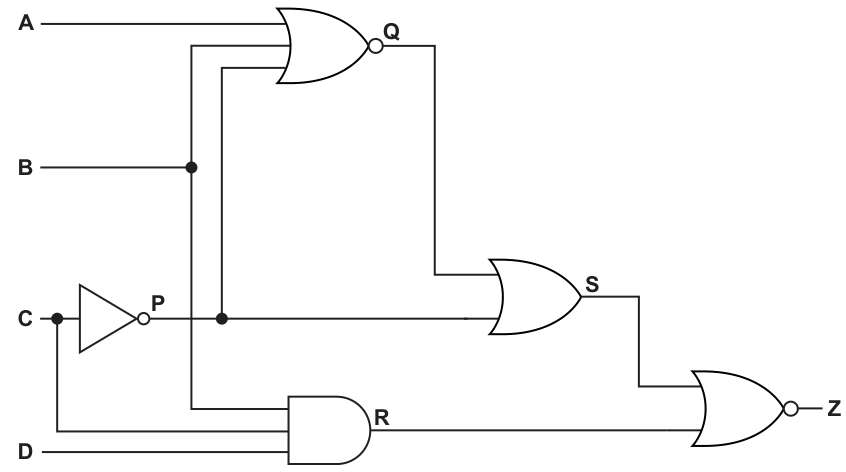
Complete the truth table for the given logic circuit.
Show your working.
| Working space | ||||||||
|---|---|---|---|---|---|---|---|---|
| A | B | C | D | P | Q | R | S | Z |
| 0 | 0 | 0 | 0 | |||||
| 0 | 0 | 0 | 1 | |||||
| 0 | 0 | 1 | 0 | |||||
| 0 | 0 | 1 | 1 | |||||
| 0 | 1 | 0 | 0 | |||||
| 0 | 1 | 0 | 1 | |||||
| 0 | 1 | 1 | 0 | |||||
| 0 | 1 | 1 | 1 | |||||
| 1 | 0 | 0 | 0 | |||||
| 1 | 0 | 0 | 1 | |||||
| 1 | 0 | 1 | 0 | |||||
| 1 | 0 | 1 | 1 | |||||
| 1 | 1 | 0 | 0 | |||||
| 1 | 1 | 0 | 1 | |||||
| 1 | 1 | 1 | 0 | |||||
| 1 | 1 | 1 | 1 |
Working
Answer
| A | B | C | D | P | Q | R | S | Z |
|---|---|---|---|---|---|---|---|---|
| 0 | 0 | 0 | 0 | 1 | 0 | 0 | 1 | 0 |
| 0 | 0 | 0 | 1 | 1 | 0 | 0 | 1 | 0 |
| 0 | 0 | 1 | 0 | 0 | 1 | 0 | 1 | 0 |
| 0 | 0 | 1 | 1 | 0 | 1 | 0 | 1 | 0 |
| 0 | 1 | 0 | 0 | 1 | 0 | 0 | 1 | 0 |
| 0 | 1 | 0 | 1 | 1 | 0 | 1 | 1 | 0 |
| 0 | 1 | 1 | 0 | 0 | 0 | 0 | 0 | 1 |
| 0 | 1 | 1 | 1 | 0 | 0 | 0 | 0 | 1 |
| 1 | 0 | 0 | 0 | 1 | 0 | 0 | 1 | 0 |
| 1 | 0 | 0 | 1 | 1 | 0 | 0 | 1 | 0 |
| 1 | 0 | 1 | 0 | 0 | 0 | 0 | 0 | 1 |
| 1 | 0 | 1 | 1 | 0 | 0 | 0 | 0 | 1 |
| 1 | 1 | 0 | 0 | 1 | 0 | 0 | 1 | 0 |
| 1 | 1 | 0 | 1 | 1 | 0 | 1 | 1 | 0 |
| 1 | 1 | 1 | 0 | 0 | 0 | 0 | 0 | 1 |
| 1 | 1 | 1 | 1 | 0 | 0 | 0 | 0 | 1 |
See completed truth table
Background Concept
A logic circuit can be analysed by working from the inputs through each gate to the final output. Each intermediate wire can be treated as a Boolean expression or as an extra column in a truth table.
For this circuit:
- is the output of a NOT gate, so .
- is the output of a 3-input NOR gate, so .
- is the output of a 3-input AND gate, so .
- is the output of an OR gate, so .
- is the output of a NOR gate, so .
A NOR gate means OR first, then invert. That is a very common source of errors, so it is important not to treat NOR as just OR.
Understanding the Question
You are given a logic circuit with four inputs , , and , and you must complete the truth table. The table already lists all 16 possible input combinations, so your job is to calculate the missing columns , , , and for each row.
The phrase "Show your working" is a clue that the examiner expects the intermediate gate outputs to be used properly, not just the final values guessed or skipped.
Approach
The best method is:
- Work out the expression for each labelled wire.
- Fill the table from left to right, because later outputs depend on earlier ones.
- Do one row at a time to avoid mixing values from different rows.
So here the safest order is:
- calculate from
- calculate from , ,
- calculate from , ,
- calculate from ,
- calculate from ,
Step-by-Step Reasoning
Start with the first intermediate output:
So whenever , , and whenever , .
Next:
A NOR output is 1 only if all its inputs are 0. Therefore only when , and . Since means , this happens only in the rows where , , .
Then:
An AND output is 1 only if all inputs are 1. So only when , and . Because means , this occurs only when , , .
Then:
This is an OR gate, so whenever either or .
Finally:
So is 1 only when both and .
A few sample rows show the process clearly:
-
Row
-
Row
-
Row
Repeating that process for all 16 rows gives the completed table in the solution.
Key Takeaways
- Complete logic-circuit truth tables by creating columns for intermediate outputs.
- NOR means OR followed by NOT.
- An AND gate gives 1 only when every input is 1.
- A final NOR output is 1 only when all its inputs are 0.
Common Mistakes
- Treating NOR as if it were just OR. This changes every or value.
- Forgetting that is the inverse of , so when , .
- Calculating from the wrong inputs. It must use , and .
- Filling directly from the inputs without using the intermediate columns.
Things to Be Careful About
- Keep the rows in the exact order given in the question.
- Do not skip the intermediate columns; later columns depend on them.
- Remember that a NOR output is 1 only when every input to that NOR gate is 0.
- Check rows where carefully, because that makes , which strongly affects and .
Write the Boolean logic expression that corresponds to the given logic circuit as the sum-of-products.
Z = ............................................................................................................................................
.............................................................................................................................................
Answer
A·C + B·C
Background Concept
A sum-of-products expression is a Boolean expression written as ORed product terms. In Boolean notation:
- product means AND, for example
- sum means OR, for example
So a sum-of-products answer must look like one or more AND terms joined by OR signs.
Understanding the Question
You are not being asked to redraw the circuit or to list all truth-table rows. You are being asked for the Boolean expression for the final output , specifically written in sum-of-products form.
That means the final answer should be an expression such as , not a factored form such as .
Approach
There are two sensible ways to do this:
- derive the expression from the gates and simplify it, or
- look at the rows in the truth table where and recognise the pattern.
From the completed truth table, exactly when:
- , and
- at least one of or is 1.
That is the pattern for:
To convert that to sum-of-products, distribute :
Step-by-Step Reasoning
From the truth table in part (a), the rows where are those with:
The common requirement is that and at least one of or is 1. That gives:
But the question asks for sum-of-products, so expand it:
This is the correct sum-of-products form.
Key Takeaways
- Sum-of-products means OR of AND terms.
- A factored expression like may be correct logically, but it is not written in sum-of-products form.
- Reading patterns from the truth table is often faster than writing every minterm.
Common Mistakes
- Writing and stopping. That is correct logic, but not the required form.
- Writing a product-of-sums form instead of sum-of-products.
- Including in the answer even though the final output does not depend on after simplification.
Things to Be Careful About
- The question asks for the expression for , not for an intermediate output.
- Keep the expression in SOP form: AND terms joined by OR.
- Do not overcomplicate it by writing a full canonical expansion when a simpler SOP is available.
Use Boolean algebra including De Morgan’s laws to simplify the following expression.
Show all working.
Working .....................................................................................................................................
...................................................................................................................................................
...................................................................................................................................................
...................................................................................................................................................
...................................................................................................................................................
...................................................................................................................................................
Simplified expression ................................................................................................................
...................................................................................................................................................
Working
Answer
A̅ · B̅
Background Concept
This question is about Boolean algebra, especially De Morgan's laws. The two key rules are:
These rules say that when you remove a bar from a bracketed Boolean expression, the operators flip:
- OR becomes AND
- AND becomes OR
You then continue simplifying using standard Boolean identities such as:
That last one is an absorption rule.
Understanding the Question
You are given the expression:
and asked to simplify it using Boolean algebra, including De Morgan's laws. The instruction "Show all working" means the examiner wants to see the transformation steps, not just the final simplified expression.
Approach
The natural strategy is:
- apply De Morgan's law to each complemented bracket
- expand any remaining complemented products
- simplify the resulting expression using Boolean identities
The first bracket is straightforward because it is the complement of a sum. The second bracket is the complement of a sum of two products, so De Morgan must be applied carefully in two stages.
Step-by-Step Reasoning
Start with:
Apply De Morgan's law to the first bracket:
Apply De Morgan's law to the second bracket. Since it is the complement of a sum:
Now the expression becomes:
Apply De Morgan again to each complemented product:
So now we have:
Because Boolean AND is associative, we can regroup. First combine
with .
Using absorption:
So the expression reduces to:
Apply absorption again:
Therefore:
So the simplified expression is:
Key Takeaways
- De Morgan's laws are essential whenever a bar covers a bracket.
- Removing a bar changes OR to AND, and AND to OR.
- After applying De Morgan, continue simplifying using identities such as absorption.
- A long Boolean expression can often collapse to a very short result.
Common Mistakes
- Writing . That is wrong because OR must change to AND.
- Writing . That is also wrong because AND must change to OR.
- Stopping too early at a partially simplified line such as .
- Losing brackets and changing the structure of the expression.
Things to Be Careful About
- Apply De Morgan to the whole barred bracket, not just part of it.
- Keep the operator changes correct every time a bar is removed.
- Use brackets carefully so that each transformation is logically equivalent.
- In the final answer, make sure the expression is genuinely simplified and not just rewritten.
Explain what is meant by lexical analysis during program compilation.
..........................................................................................................................................................
..........................................................................................................................................................
..........................................................................................................................................................
..........................................................................................................................................................
..........................................................................................................................................................
..........................................................................................................................................................
..........................................................................................................................................................
....................................................................................................................................................
Answer
- Lexical analysis is an early stage of compilation in which the source code is scanned character by character.
- The characters are grouped into lexemes and converted into tokens such as identifiers, keywords, operators and constants.
- Items such as spaces and comments are ignored or removed, and identifiers may be entered into a symbol table.
- The resulting stream of tokens is then passed to the next stage, such as syntax analysis.
See explanation
Background Concept
A compiler translates a high-level language program into machine code in a series of stages rather than all at once. One of the earliest stages is lexical analysis. The word lexical relates to the vocabulary of the programming language.
In lexical analysis, the compiler reads the source program as a sequence of characters and breaks it into meaningful units. These units are called lexemes, and each lexeme is classified as a token. Typical token types include:
- keywords, such as
IForWHILE - identifiers, such as variable names
- constants, such as numbers or string literals
- operators, such as
+,-,= - punctuation or separators, such as brackets, commas or semicolons
This stage may also ignore things that do not affect program meaning, such as extra spaces, line breaks and comments. It can also help build a symbol table, which stores information about identifiers used in the program.
After lexical analysis, later compiler stages such as syntax analysis use the token stream to check whether the program follows the grammar rules of the language.
Understanding the Question
The question asks what is meant by lexical analysis during program compilation. So it is not asking for all compiler stages, and it is not asking about syntax analysis or code generation in detail. It wants a clear explanation of:
- where lexical analysis fits in compilation
- what the compiler does in this stage
- what the output of this stage is
Because this is a 4-mark explanation, a full answer should give several linked points, not just a short definition like "it breaks code into tokens".
Approach
A good way to answer is to explain the process in order:
- state that it is a stage of compilation
- say that the source code is scanned/read character by character
- explain that characters are grouped into lexemes and turned into tokens
- mention what happens to spaces/comments or identifiers
- state that the token stream is passed to the next stage
That gives a complete description without drifting into other compiler stages too much.
Step-by-Step Reasoning
First, identify lexical analysis as part of the compiler. This matters because the question is specifically about compilation, so the answer should place it in that context.
Next, explain what the compiler reads. The source program starts as plain text, so the compiler initially sees individual characters. Lexical analysis scans through those characters in sequence.
Then explain what the compiler is looking for. It groups characters into meaningful chunks. For example:
- the characters
countmay be recognised as an identifier - the characters
:=or=may be recognised as an operator - the characters
100may be recognised as a numeric constant - the characters
WHILEmay be recognised as a keyword
These meaningful chunks are the lexemes. Once recognised, each lexeme is classified into a token type. So lexical analysis changes raw text into a more structured token stream that the rest of the compiler can work with.
It is also useful to mention that not every character sequence becomes an important token. Spaces, tabs, line breaks and comments are usually ignored or discarded because they are normally not needed for grammatical checking. Also, when identifiers are found, the compiler may record them in a symbol table for later stages.
Finally, explain the result of the stage. The output is not final machine code. Instead, it is a sequence of tokens that is sent to syntax analysis, where the compiler checks whether the arrangement of tokens follows the grammar of the language.
A concise full-mark explanation therefore says that lexical analysis scans source code, identifies lexemes, converts them to tokens, ignores unnecessary text such as whitespace/comments, and passes the tokens on for further analysis.
Key Takeaways
- Lexical analysis is one of the first stages of a compiler.
- It reads source code as characters and groups them into meaningful units.
- These units are converted into tokens such as keywords, identifiers and operators.
- The token stream is then used by later compiler stages, especially syntax analysis.
Common Mistakes
- Confusing lexical analysis with syntax analysis: lexical analysis finds tokens; syntax analysis checks grammatical structure.
- Saying it translates directly into machine code: lexical analysis is only an early stage, not the whole compilation process.
- Defining tokens without mentioning scanning/grouping: the answer needs the process, not just the term.
- Describing semantic checks instead: checking meaning, types or variable declarations belongs to later stages, not primarily lexical analysis.
Things to Be Careful About
- Use the term token correctly: it is the classified form of a piece of source code, not just any character.
- Do not say the compiler reads "line by line" if you mean lexical analysis specifically; more accurate wording is that it scans the source code as a stream of characters.
- If you mention the symbol table, present it as something that may be built or updated during this stage, not as the only purpose of lexical analysis.
- Keep the answer focused on compilation stages and avoid drifting into interpretation or execution.
Several syntax diagrams are shown.
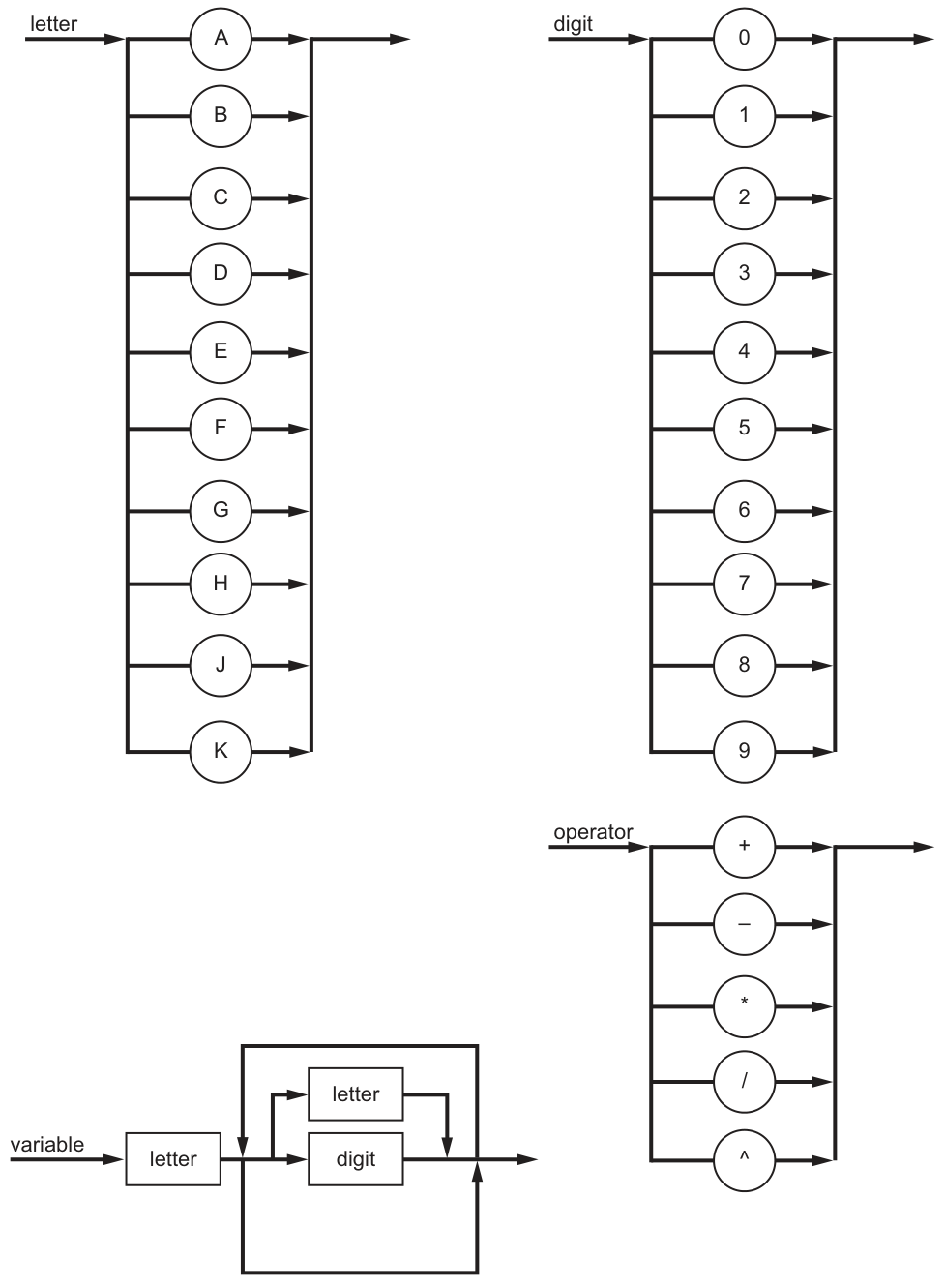
State why 9K is not a valid variable for the given syntax diagrams.
...................................................................................................................................................
.............................................................................................................................................
Answer
9Kis not valid because a variable must start with a letter, but9is a digit.
A variable must start with a letter, but 9K starts with a digit.
Background Concept
A syntax diagram shows the valid structure of a string. You follow the path from left to right, and every symbol or named box you pass through must match the characters in the string.
For the variable diagram here:
- the first character must be a
letter - after that, the loop allows more
letterordigitcharacters
So the first character has a special rule: it cannot be a digit.
Understanding the Question
The question asks why 9K is not a valid variable using the given syntax diagrams. From Fig. 9.1, a variable must begin with a letter, and only after that can letters or digits appear.
So we only need to inspect the first character of 9K.
Approach
Check the variable syntax diagram in order:
- Look at the first required item.
- Compare the first character of
9Kwith that rule. - State the mismatch clearly.
Step-by-Step Reasoning
The variable diagram begins with a box labelled letter.
That means the first character of any valid variable must come from the letter diagram.
The first character of 9K is 9.
9 appears in the digit diagram, not the letter diagram.
Therefore the string fails immediately at the first character, so it is not a valid variable.
A concise exam answer is: the variable must start with a letter, but 9K starts with a digit.
Key Takeaways
- In syntax diagrams, the order matters.
- The first symbol of a variable can have a different rule from later symbols.
- A string can be rejected as soon as one required stage is not matched.
Common Mistakes
- Saying
Kis invalid.Kis actually allowed in theletterset. - Saying digits are never allowed in variables. Digits are allowed after the first character here.
- Giving a vague answer such as "it does not follow the diagram" without identifying the exact broken rule.
Things to Be Careful About
- Read from the start of the syntax diagram, not just the looped part.
- Separate the rule for the first character from the rule for later characters.
- Use the exact terms
letteranddigitif possible, because those are the names used in the diagram.
Complete the Backus-Naur Form (BNF) for <operator>.
<operator> ::= ..................................................................................................................
.............................................................................................................................................
Answer
<operator> ::= "+" | "-" | "*" | "/" | "^"
::= "+" | "-" | "*" | "/" | "^"
Background Concept
Backus-Naur Form (BNF) is a textual way to describe grammar rules. A rule has:
- a non-terminal on the left, written in angle brackets, such as
<operator> ::=meaning "is defined as"- one or more possible alternatives on the right
The symbol | means "or".
A syntax diagram with several possible single choices converts naturally into BNF by listing each choice as an alternative.
Understanding the Question
The syntax diagram for operator allows exactly one of these symbols:
+-*/^
The question asks for the BNF definition of <operator>, so we must write all valid choices on the right-hand side separated by |.
Approach
Take each permitted operator from the diagram and place it into one BNF rule as an alternative.
Pattern:
<name> ::= choice1 | choice2 | choice3
Apply that to the five operator symbols shown.
Step-by-Step Reasoning
From the syntax diagram, the valid operator options are:
+-*/^
In BNF, these become alternatives after ::=.
So the complete rule is:
<operator> ::= "+" | "-" | "*" | "/" | "^"
This means an <operator> can be any one of those five symbols.
Key Takeaways
- A set of branches in a syntax diagram usually becomes
|alternatives in BNF. ::=introduces the definition.<operator>is a non-terminal; the symbols on the right are the valid terminals.
Common Mistakes
- Omitting one of the operators, especially
^. - Using commas instead of
|. - Writing words such as
plusorminusinstead of the actual symbols from the diagram. - Forgetting the angle brackets around
<operator>.
Things to Be Careful About
- Copy every symbol exactly.
- Do not invent extra operators.
- Keep the BNF structure correct: left-hand side,
::=, then alternatives.
An expression is defined as follows:
• A variable is assigned to a variable followed by an operator followed by another variable.
• The operator and final variable stage can be repeated as many times as necessary.
Complete the syntax diagram for an expression.
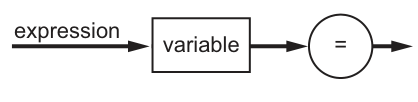
Answer
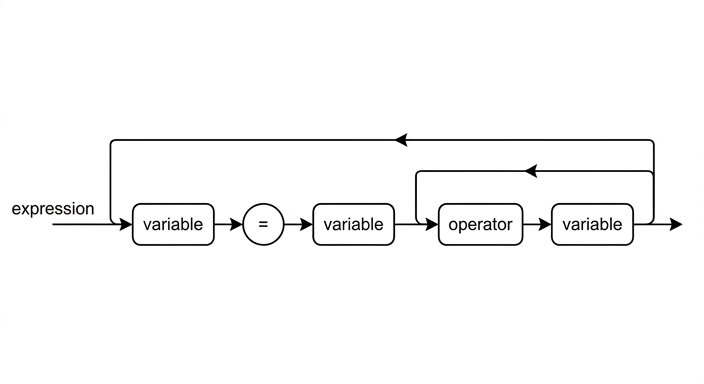
See syntax diagram
Background Concept
A syntax diagram can show both fixed order and repetition.
- A straight path shows symbols that must appear in that exact order.
- A loop shows a section that may repeat.
When a question says something like "can be repeated as many times as necessary", that is a strong clue that part of the syntax diagram must be placed inside a loop.
A key idea is to separate:
- the compulsory part that must appear at least once
- the repeated part that may appear again after that
Understanding the Question
We are told that an expression is formed as follows:
- a variable is assigned to a variable followed by an operator followed by another variable
- the operator and final variable stage can be repeated
So the basic expression is not just variable = variable.
It must be:
variable = variable operator variable
Then the operator variable part may repeat more times.
That means the fixed starting path must already include one operator and one variable, and only that pair should be looped.
Approach
Build the diagram in two stages:
- Write the compulsory sequence from left to right.
- Identify the repeatable section and make it a loop.
The compulsory sequence is:
variable=variableoperatorvariable
The repeatable section is only:
operatorvariable
So the loop must return to the point just before operator.
Step-by-Step Reasoning
Start with the incomplete diagram already given:
variable=
Now apply the rule from the question.
After the =, there must be a variable.
Then there must be an operator.
Then there must be another variable.
At this point, the minimum valid expression has been completed:
variable = variable operator variable
Next, the question says the "operator and final variable stage" can be repeated. That means the repeated pair is:
operatorvariable
So after the last variable, draw a loop back to the point before the operator. That lets the expression continue with another operator-variable pair, for example:
A=B+CA=B+C-DA=B+C-D*E
The first right-hand-side variable is not inside the loop, because it must appear once before any repetition can happen.
Key Takeaways
- Translate the wording into a pattern before drawing.
- "Repeated" usually means a loop.
- Be careful to loop only the part that repeats, not the whole expression.
- Distinguish between a compulsory first occurrence and later repeated occurrences.
Common Mistakes
- Drawing only
variable = variable, which misses the compulsoryoperator variablepart. - Putting the first right-hand-side
variableinside the loop, which changes the grammar. - Looping the entire right-hand side instead of just
operator variable. - Making the operator optional, even though the description requires one operator in the base expression.
Things to Be Careful About
- The order matters:
variable = variable operator variable. - The loop must return to just before
operator, not before=. - The symbol
=is a terminal, so it should appear as a circle in the diagram, whilevariableandoperatorare named boxes. - Make sure the base expression is valid even before the loop repeats.
A character can be a letter or a digit.
An additional constraint has been applied to the definition of variable. It must comply with the given syntax diagram, but it will only pass validation if it has at least four characters.
State one example of a valid variable.
...................................................................................................................................................
.............................................................................................................................................
Answer
AB12
AB12
Background Concept
A valid example must satisfy every rule that applies.
Here there are two layers of rules:
- the syntax diagram rules for
variable - an extra validation rule saying the variable must contain at least four characters
From the syntax diagram:
- the first character must be a
letter - later characters may be
letterordigit
From the extra condition:
- total length must be 4 or more
Understanding the Question
The question is not asking for the only possible answer. It asks for one example of a variable that passes both checks.
The allowed letters are limited to those shown in the letter diagram:
A, B, C, D, E, F, G, H, J, K
The allowed digits are 0 to 9.
So we need to build a string that:
- starts with one of the allowed letters
- uses only allowed letters or digits afterward
- has at least four characters
Approach
Construct a short valid example of exactly four characters, because that is the smallest length that satisfies the extra rule.
A simple pattern is:
- allowed letter
- allowed letter or digit
- allowed letter or digit
- allowed letter or digit
Step-by-Step Reasoning
Take AB12.
Check it against the syntax diagram:
- first character
Ais an allowed letter - second character
Bis an allowed letter - third character
1is a digit - fourth character
2is a digit
So every character is allowed in its position.
Now check the extra constraint:
AB12has 4 characters
Therefore it is a valid variable.
Many other answers would also work, such as A123, B7C8, or K000, provided the first character is one of the permitted letters and the total length is at least four.
Key Takeaways
- A valid test string must satisfy all constraints, not just the syntax diagram.
- Minimum length conditions are separate from grammatical structure.
- When asked for one example, choose the simplest string that clearly fits the rules.
Common Mistakes
- Giving fewer than four characters, such as
A1. - Starting with a digit, such as
1AB2. - Using a letter not listed in the diagram, such as
I. - Forgetting that later characters may be digits as well as letters.
Things to Be Careful About
- Use only letters that actually appear in the
letterdiagram. - Check the first character separately from the rest.
- Count the characters carefully to make sure there are at least four.
Identify the two main protocols that form Transport Layer Security (TLS) and state the purpose of each.
Protocol 1 .........................................................................................................................................
Purpose ............................................................................................................................................
..........................................................................................................................................................
Protocol 2 .........................................................................................................................................
Purpose ............................................................................................................................................
..........................................................................................................................................................
Answer
-
Protocol 1: Handshake protocol
Purpose: Establishes the secure session by authenticating the parties and agreeing the encryption method and keys. -
Protocol 2: Record protocol
Purpose: Transfers the application data securely by fragmenting the data and applying encryption and integrity checking.
Handshake protocol — authenticates and agrees keys/security settings; Record protocol — carries encrypted data with integrity checking.
Background Concept
Transport Layer Security (TLS) is the protocol suite used to secure communication between a client and a server, for example between a web browser and a web server. It provides confidentiality, integrity and, usually, authentication.
TLS is not just one single action. It is made up of protocol components that do different jobs:
- the Handshake protocol sets up the secure connection
- the Record protocol is used once the connection is established to send data securely
A useful way to think about TLS is:
- first, the two sides must agree how they will communicate securely
- then, they can actually send the protected data
The Handshake protocol handles the first part. The Record protocol handles the second part.
Understanding the Question
The question asks for the two main protocols that form TLS and the purpose of each.
So there are two things you must do for each protocol:
- give its name
- state what it does
Because it says two main protocols, the expected answers are the core TLS components:
- Handshake protocol
- Record protocol
You should not just write vague answers like "security" or "encryption". The purpose must be linked to the correct protocol.
Approach
Use a simple pairing approach:
- identify the protocol responsible for setting up security
- identify the protocol responsible for sending protected data
Then state each purpose clearly:
- Handshake protocol -> authenticates, negotiates settings, establishes keys
- Record protocol -> carries data securely, usually with encryption and integrity checks
That is enough for full marks in a short recall question.
Step-by-Step Reasoning
First protocol:
- In TLS, before any secure data can be exchanged, the client and server must agree things like:
- which cryptographic methods to use
- what session keys will be used
- whether the server (and sometimes the client) is authenticated
- The protocol that performs this setup is the Handshake protocol.
- Therefore its purpose is to establish the secure session by authenticating the communicating parties and negotiating security parameters such as keys and encryption methods.
Second protocol:
- After the secure session is set up, actual application data must be transmitted.
- The protocol that handles this is the Record protocol.
- Its job is to take data, prepare it for transmission, and protect it.
- In exam wording, this is usually described as:
- transferring data securely
- encrypting the data
- checking integrity
- sometimes fragmenting the data into manageable blocks
- Therefore its purpose is to send the application data securely.
So the completed answer is:
- Handshake protocol - sets up the secure connection by authentication and agreement of keys/settings
- Record protocol - transfers the data securely using protection such as encryption and integrity checking
Key Takeaways
- TLS is made of component protocols, not just one single process.
- The Handshake protocol is for establishing security.
- The Record protocol is for sending data securely after setup.
- In short:
- Handshake = agree and authenticate
- Record = protect and transmit
Common Mistakes
- Naming SSL instead of TLS protocols. SSL is the older predecessor; the question specifically asks about TLS.
- Giving only protocol names with no purposes. This would lose marks because the question asks for both.
- Saying the Handshake protocol sends the data. It does not mainly carry application data; it sets up the session.
- Saying the Record protocol negotiates keys. Key negotiation belongs to the Handshake protocol.
- Listing Alert or Change Cipher Spec as one of the two main protocols. These exist in TLS, but the usual "two main protocols" are Handshake and Record.
Things to Be Careful About
- Read the wording carefully: it asks for two protocols, so give exactly two main ones.
- Make sure each purpose matches the correct protocol.
- Use precise terms such as authenticate, negotiate keys, encrypt data, and integrity checking.
- Do not be too vague with phrases like "for security"; explain what kind of security function the protocol performs.
A linked list of nodes is used to store an ordered list of strings. Each node consists of the data, a left pointer and a right pointer.
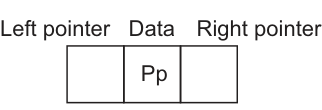
The linked list will be organised as a binary tree.
0 is used to represent a null pointer.
Complete the binary tree, including null pointers, to show how the data will be organised after the following strings have been added:
Aa, Mm, Ss, Xx
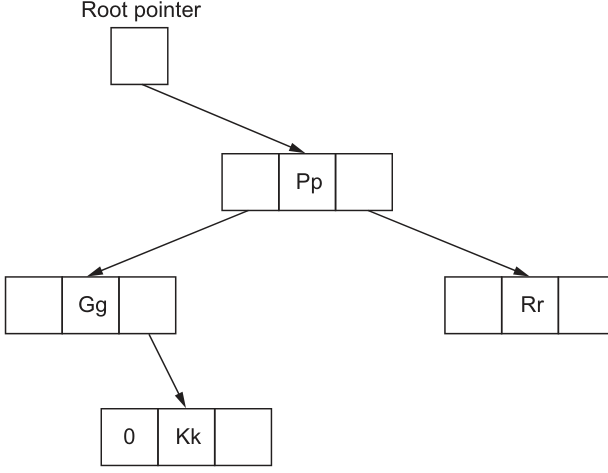
Answer
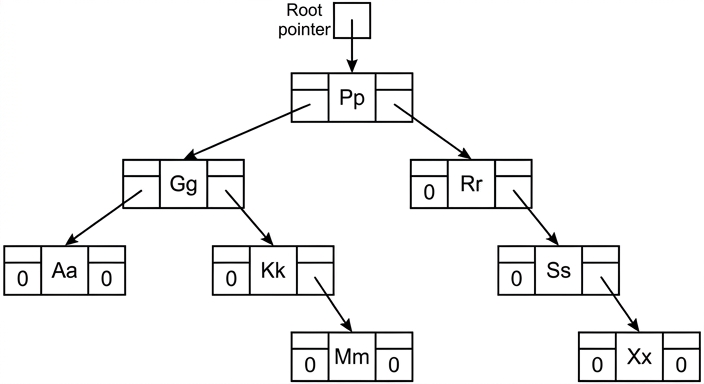
See binary tree diagram
Background Concept
A binary tree stores each item in a node with up to two links: a left pointer and a right pointer. In an ordered binary tree (binary search tree), smaller values are placed to the left and larger values are placed to the right.
To insert a new value:
- start at the root
- compare the new value with the current node
- go left if it is smaller
- go right if it is larger
- stop when you reach a null pointer and place the new node there
Here, 0 represents a null pointer, so every missing child link must be shown as 0.
Understanding the Question
The diagram already contains part of the tree:
- root node
Pp Ggon the left ofPpRron the right ofPpKkon the right ofGg
You must add the new strings Aa, Mm, Ss and Xx into this ordered binary tree, then complete every remaining empty pointer with either:
- an arrow to another node, or
0if there is no child there
So this is not just about placing the four new strings. You also need to show all null pointers correctly.
Approach
Treat it exactly like binary search tree insertion:
- Take one new string at a time.
- Begin at
Pp. - Compare alphabetically and move left or right.
- When a
0position is reached, insert the new node there. - After all insertions, fill every unused left/right pointer with
0.
Step-by-Step Reasoning
Insert Aa:
Aa < Pp, so go left toGgAa < Gg, so it becomes the left child ofGg
Insert Mm:
Mm < Pp, so go left toGgMm > Gg, so go right toKkMm > Kk, so it becomes the right child ofKk
Insert Ss:
Ss > Pp, so go right toRrSs > Rr, so it becomes the right child ofRr
Insert Xx:
Xx > Pp, so go right toRrXx > Rr, so go right toSsXx > Ss, so it becomes the right child ofSs
Now complete the null pointers:
Aahas no children, so left =0, right =0Kkalready has left =0, and right points toMmMmhas no children, so left =0, right =0Rrhas no left child, so left =0, and right points toSsSshas no left child, so left =0, and right points toXxXxhas no children, so left =0, right =0
The completed tree is:
Key Takeaways
- In an ordered binary tree, smaller values go left and larger values go right.
- Insertion is done by following comparisons from the root until a null position is found.
- A complete tree diagram must show null pointers as well as actual links.
- Every leaf node has both child pointers set to null.
Common Mistakes
- Putting
Ssto the left ofRr. SinceSsis alphabetically greater thanRr, it must go to the right. - Putting
Mmdirectly underGg. You must continue comparing withKkbefore deciding whereMmgoes. - Forgetting the
0null pointers. The question explicitly says to include null pointers. - Changing the existing structure. The given nodes stay where they are; only the new strings are inserted.
Things to Be Careful About
- Always start each insertion from the root, not from where the previous insertion ended.
- Follow the tree one comparison at a time; do not guess the final position.
- Remember that each node has two pointer fields, so both must be considered.
- Keep the root pointer pointing to
Pp; the root does not change here.
A binary tree can be used to implement recursion.
Identify one feature of an algorithm that makes it beneficial to use recursion.
Give one example of an application that could use a recursive algorithm.
Feature .....................................................................................................................................
...................................................................................................................................................
Example ....................................................................................................................................
Answer
- Feature: The problem can be split into smaller sub-problems of the same form, with a base case to stop the calls.
- Example: Traversing or searching a binary tree.
Feature: the problem breaks into smaller self-similar sub-problems with a base case; Example: traversing or searching a binary tree
Background Concept
Recursion is when an algorithm calls itself to solve a problem. A recursive solution usually has two essential parts:
- a base case that stops the recursion
- a recursive case that reduces the problem to a smaller version of the same problem
Recursion is especially useful when the problem has a repeated, self-similar structure. Trees are a classic example because each subtree is itself a smaller tree.
Understanding the Question
This question asks for two things only:
- one feature that makes recursion a good choice
- one application that could use recursion
Because the question mentions a binary tree, a tree-based example is a very natural answer. The feature should describe the kind of problem that recursion suits best.
Approach
Choose a feature that clearly describes when recursion is beneficial. The strongest answer is that the problem can be divided into smaller versions of itself. Then give a standard recursive application such as traversing or searching a binary tree.
Step-by-Step Reasoning
A good recursive problem has the same pattern repeated at smaller scales.
For example, when traversing a binary tree:
- process the current node
- traverse the left subtree
- traverse the right subtree
Each subtree is just another binary tree, so the same algorithm can be used again. The recursion stops when a null pointer is reached, which acts as the base case.
That is why this pair is valid:
- Feature: the problem breaks down into smaller sub-problems of the same form
- Example: traversing or searching a binary tree
Both points directly match what recursion is designed for.
Key Takeaways
- Recursion works well for self-similar problems.
- A valid recursive algorithm must have a base case.
- Hierarchical structures such as trees are common recursive applications.
Common Mistakes
- Giving an example without stating a feature, or vice versa. The question needs both.
- Saying only "it is easier" as the feature. That is too vague unless tied to self-similar sub-problems.
- Giving a non-recursive-style example that does not naturally break into smaller versions of itself.
- Forgetting the base case idea when describing the feature.
Things to Be Careful About
- The question asks for one feature and one example, so keep the answer focused.
- Make sure the feature describes the structure of the problem, not just a personal preference.
- If you choose a tree example, remember that recursion fits because each subtree can be handled in the same way as the whole tree.
A medical clinic uses objects of the class Patient to assign a priority and a doctor to a patient. Some of the attributes required in the class are listed in the table.
| Attribute | Data type | Description |
|---|---|---|
| PatientID | STRING | Unique identifier of the patient |
| Name | STRING | Patient’s full name, surname first |
| DoctorID | STRING | ID of doctor administering treatment |
Treatment is prioritised with a numeric scale of 1 to 5.
Complete the class diagram for Patient, to include:
• attribute and data type for the date of birth
• attribute and data type for the priority
• methods to assign the patient ID, priority and doctor ID
• methods to return the patient ID, patient date of birth and the priority.
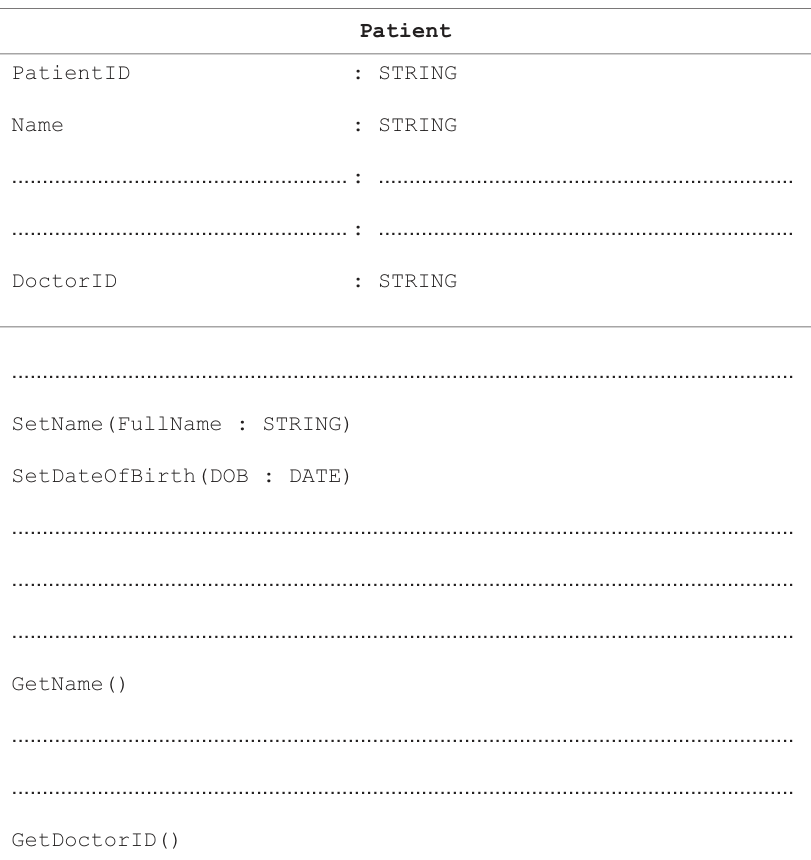
Answer
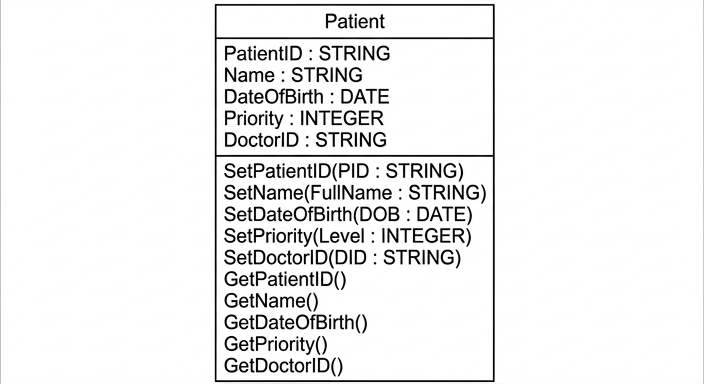
See completed class diagram
Background Concept
In object-oriented programming, a class is a blueprint for creating objects. A class normally shows:
- attributes (the data stored in each object)
- methods (the operations that can be carried out on that object)
A UML class diagram usually has three sections:
- the class name
- the attributes with their data types
- the methods
Methods that assign values are commonly called setter or mutator methods, for example SetName(...).
Methods that return values are commonly called getter or accessor methods, for example GetName().
The data type chosen must match the kind of data stored:
- a patient ID is text, so
STRING - a date of birth is a date, so
DATE - a priority from 1 to 5 is a whole number, so
INTEGER
Understanding the Question
You are given a partial class diagram for a class called Patient.
The diagram already includes:
PatientID : STRINGName : STRINGDoctorID : STRINGSetName(FullName : STRING)SetDateOfBirth(DOB : DATE)GetName()GetDoctorID()
The question asks you to complete the missing parts so that the class also includes:
- an attribute for date of birth
- an attribute for priority
- methods to assign patient ID, priority and doctor ID
- methods to return patient ID, date of birth and priority
So you must fill the blank lines with the missing attributes and methods that match the naming pattern already used.
Approach
The easiest approach is:
- Look at the existing attributes and decide the missing fields.
- Choose suitable data types.
- Follow the naming pattern already shown:
Set...for assigning valuesGet...for returning values
- Keep the method style consistent with the class diagram already given.
Because SetDateOfBirth(DOB : DATE) is already present, the matching attribute should be DateOfBirth : DATE.
Because priority is numeric from 1 to 5, the best type is INTEGER.
Step-by-Step Reasoning
First, complete the attributes section.
The question explicitly asks for:
- date of birth
- priority
So the two missing attributes are:
DateOfBirth : DATEPriority : INTEGER
These fit the information given:
- a date of birth is stored as a date
- a priority on a scale from 1 to 5 is a whole number
Next, complete the methods section.
The question asks for methods to assign:
- patient ID
- priority
- doctor ID
These should therefore be setter methods:
SetPatientID(...)SetPriority(...)SetDoctorID(...)
The question also asks for methods to return:
- patient ID
- patient date of birth
- priority
These should therefore be getter methods:
GetPatientID()GetDateOfBirth()GetPriority()
The completed class diagram is therefore:
Notice that the diagram style does not show return types for the getter methods, so you should follow the format already given rather than invent extra notation.
Key Takeaways
- A class diagram shows a class name, its attributes and its methods.
- Attributes need appropriate data types.
Set...methods assign values to attributes.Get...methods return values from attributes.- In exam questions like this, keep your additions consistent with the naming style already used in the diagram.
Common Mistakes
- Using the wrong data type for priority, such as
STRINGinstead ofINTEGER. - Writing
DOBas the attribute name instead of a proper attribute such asDateOfBirth. - Forgetting that the question asks for both attributes and methods.
- Adding unrelated methods such as a constructor when they were not requested.
- Changing the existing method names instead of only filling the blanks.
Things to Be Careful About
- Follow the exact class name already given:
Patient. - Keep to the existing method naming convention:
Set...andGet.... - Use
DATEfor date of birth, notSTRING, unless the question explicitly says otherwise. - Use a whole-number type for the 1 to 5 priority.
- Do not add extra UML symbols such as visibility markers (
+,-) if they are not already shown in the diagram.
Identify the object-oriented programming (OOP) term described as ‘an occurrence of an object’.
.....................................................................................................................................
Answer
- Instance
Instance
Background Concept
In object-oriented programming, a class is a template or blueprint, while an object is an actual item created from that class.
An instance is one specific occurrence of an object created from a class.
For example:
Patientmight be the class- one actual patient record created from it is an instance of
Patient
Understanding the Question
The question gives the description “an occurrence of an object” and asks for the OOP term.
This is really asking: what do we call one actual created example of a class/object type?
Approach
Match the definition to the standard vocabulary used in OOP.
The key word is occurrence or one actual example. The correct technical term for that is instance.
Step-by-Step Reasoning
A class defines what attributes and methods an object will have.
When a program creates one actual object from that class, that created object is called an instance.
So the correct answer is:
- Instance
Key Takeaways
- Class = blueprint
- Object = created entity
- Instance = one specific occurrence of an object/class
Common Mistakes
- Writing class. A class is the template, not the occurrence.
- Writing attribute or method. These are parts of an object, not the object itself.
- Writing object when the question specifically wants the technical term instance.
Things to Be Careful About
- For short definition questions, use the exact accepted OOP term.
- If the wording describes a single created example, think instance.
Describe what is meant by the OOP term polymorphism.
...........................................................................................................................................
...........................................................................................................................................
...........................................................................................................................................
.....................................................................................................................................
Answer
- Polymorphism is when the same method name or interface can be used with different classes or objects.
- The method call is the same, but each class can provide its own implementation, so different behaviour can occur.
The same method/interface can be used for different classes or objects, with different implementations producing different behaviour.
Background Concept
Polymorphism is an object-oriented programming feature where the same operation can be used with different objects, but the result or implementation can differ depending on the object involved.
The word literally means “many forms”.
A common example is where different subclasses all have a method with the same name, such as Display() or CalculateCost(), but each subclass performs that method in its own way.
This allows programs to:
- use a common interface
- keep code flexible
- treat related objects in a consistent way
Understanding the Question
The question asks you to describe what polymorphism means.
That means you should not just give the word “many forms”. You need to explain the programming meaning:
- the same method or interface name can appear across different classes
- the actual behaviour can differ depending on which object is used
Approach
To get full marks, include both parts of the idea:
- same method name / same interface
- different implementation or behaviour
If you only say “many forms” without explaining how methods behave, the answer is too vague.
Step-by-Step Reasoning
In OOP, classes can share method names.
For example, suppose several related classes each have a method called PrintDetails().
- one class might print patient details
- another might print doctor details
- another might print appointment details
The method call name is the same, but the code inside each class can be different.
That is the key idea of polymorphism:
- the same message or method call is used
- the object decides which version runs
So a good exam answer states that polymorphism allows the same method or interface to be used with different classes/objects, while producing different implementations or behaviour.
Key Takeaways
- Polymorphism means one interface, many possible behaviours.
- Different classes can respond differently to the same method call.
- It is closely linked to inheritance and overriding.
Common Mistakes
- Saying only “many forms” without any programming explanation.
- Confusing polymorphism with encapsulation or inheritance.
- Saying that polymorphism means all classes have exactly the same code. The point is that the code can differ.
- Describing overloading only, when the syllabus meaning usually focuses on same interface with different behaviour.
Things to Be Careful About
- Mention both the shared method/interface and the different behaviour.
- Use OOP language such as class, object, method and implementation.
- Keep the answer focused on what polymorphism does in programs, not just the dictionary meaning of the word.
The pseudocode algorithm below uses random file access to copy 50 records from a live file CurrentResults.dat to a stored file StoredResults.dat one record at a time. It uses the user-defined type StudentResult.
TYPE StudentResult
  DECLARE LastName : STRING
  DECLARE FirstName : STRING
  DECLARE ExamGrade : STRING
ENDTYPE
If any grades are missing in CurrentResults.dat, the text "Missing grade" is added to the ExamGrade field in StoredResults.dat
Complete this file handling pseudocode algorithm.
DECLARE Grade : StudentResult
DECLARE Position : INTEGER

..........................................................................................................................

OPENFILE "StoredResults.dat" FOR RANDOM

..........................................................................................................................

FOR Position ← 1 TO 50
  SEEK "CurrentResults.dat", Position
  GETRECORD "CurrentResults.dat", Grade
  IF Grade.ExamGrade = "" THEN
    .............................................................................................................
  ENDIF
  ....................................................................................................................
  ....................................................................................................................
NEXT Position
CLOSEFILE "CurrentResults.dat"
CLOSEFILE "StoredResults.dat"
Answer
DECLARE Grade : StudentResult
DECLARE Position : INTEGER

OPENFILE "CurrentResults.dat" FOR RANDOM
OPENFILE "StoredResults.dat" FOR RANDOM

FOR Position ← 1 TO 50
  SEEK "CurrentResults.dat", Position
  GETRECORD "CurrentResults.dat", Grade
  IF Grade.ExamGrade = "" THEN
    Grade.ExamGrade ← "Missing grade"
  ENDIF
  SEEK "StoredResults.dat", Position
  PUTRECORD "StoredResults.dat", Grade
NEXT Position
CLOSEFILE "CurrentResults.dat"
CLOSEFILE "StoredResults.dat"
See completed pseudocode
Background Concept
Random file access allows a program to jump directly to a specific record in a file instead of reading every earlier record first. In Cambridge pseudocode, this is typically done with SEEK, followed by GETRECORD to read a record or PUTRECORD to write one.
This question also uses a user-defined type:
TYPE StudentResult
  DECLARE LastName : STRING
  DECLARE FirstName : STRING
  DECLARE ExamGrade : STRING
ENDTYPE
A variable of this type, such as Grade, stores one whole record with named fields. That means when the program reads a record from the file into Grade, it can access fields such as Grade.ExamGrade directly.
Understanding the Question
The task is to complete a pseudocode algorithm that copies 50 records from CurrentResults.dat into StoredResults.dat, one record at a time.
The important details are:
- both files are accessed using random access
- each record is a
StudentResult - if the
ExamGradefield is empty, it must be replaced with"Missing grade"before storing the record in the destination file - the loop already goes from record position 1 to 50
So the missing steps must:
- open the source file
- check for a missing grade
- move to the matching position in the destination file
- write the updated record
Approach
Because this is random access, the correct pattern is:
- open both files for random access
- for each record position,
SEEKto that position in the source file - read the record into the
Gradevariable - if
ExamGradeis empty, change it SEEKto the same position in the destination file- write the whole record there
The destination record position should match the source record position, because this is a direct copy from one file to the other.
Step-by-Step Reasoning
First, the source file must be opened:
OPENFILE "CurrentResults.dat" FOR RANDOM
The destination file is already shown as being opened for random access:
OPENFILE "StoredResults.dat" FOR RANDOM
Then the loop processes all 50 records:
FOR Position ← 1 TO 50
For each value of Position, the algorithm goes to that record in the current-results file:
SEEK "CurrentResults.dat", Position
It then reads that record into the variable Grade:
GETRECORD "CurrentResults.dat", Grade
Now Grade.LastName, Grade.FirstName and Grade.ExamGrade all contain the values from that record.
The question says that if a grade is missing, the text "Missing grade" must be added to the ExamGrade field in the stored file. An empty string is written as "", so the condition is:
IF Grade.ExamGrade = "" THEN
If that condition is true, the field is updated:
Grade.ExamGrade ← "Missing grade"
This does not change the live file directly; it changes the copy held in the variable Grade. That updated record is then written to the stored file.
Before writing, the program must move to the correct record position in the destination file:
SEEK "StoredResults.dat", Position
Then it writes the whole record:
PUTRECORD "StoredResults.dat", Grade
This means:
- if
ExamGradeoriginally had a value, that value is copied unchanged - if
ExamGradewas empty, the written record contains"Missing grade"instead
After all 50 records have been processed, both files are closed.
Key Takeaways
- Random-access files use
SEEKto move directly to a required record number. GETRECORDreads a whole record into a variable of the matching user-defined type.PUTRECORDwrites a whole record back to a file.- To handle missing data, read the record, update the field in memory, then write the amended record.
- When copying between random files, source and destination positions usually match unless the question says otherwise.
Common Mistakes
- Forgetting to open
CurrentResults.dat. The program cannot read records from a file that was never opened. - Writing
Grade.ExamGrade = "Missing grade"instead ofGrade.ExamGrade ← "Missing grade". In pseudocode,=is comparison, while←is assignment. - Omitting
SEEK "StoredResults.dat", PositionbeforePUTRECORD. In a random file, the program must move to the correct position before writing. - Writing only the field instead of the whole record.
PUTRECORDwrites the entireStudentResultrecord held inGrade. - Checking for the wrong missing value, such as a space instead of the empty string
"".
Things to Be Careful About
- Use the exact file names and field name given:
CurrentResults.dat,StoredResults.dat, andExamGrade. - Keep the loop bounds exactly as given:
1 TO 50. - Use
FOR RANDOM, not sequential or serial file handling. - Preserve the order of operations: read the record first, then test and amend it, then seek and write to the stored file.
- Make sure the destination write uses the same
Position, so each copied record goes to the correct place.