Computer Science 9618/31 — May/June 2025
Cambridge A-Level · Advanced Theory · worked solutions for every part, with the mark scheme
Topics Data Representation · System Software · Communication and Internet Technologies · Computational Thinking and Problem-solving · Hardware and Virtual Machines · Security · +2 more
A programmer is writing a program to manage bookings for a small taxi company. The programmer requires some user-defined data types.
Write a pseudocode statement to declare the enumerated data type, Vehicle, to hold the identity code of each of the company’s taxis:
M100, M230, T101, T102, T120, T150
...................................................................................................................................................
.............................................................................................................................................
Answer
TYPE Vehicle = (M100, M230, T101, T102, T120, T150)
See completed pseudocode
Background Concept
An enumerated data type is a user-defined type whose values are limited to a fixed list of named items. It is a non-composite user-defined type because it stores one value chosen from a set, rather than several fields grouped together.
This is useful when only certain values are valid. Instead of storing any random string, the program can restrict the variable to one of the allowed taxi codes. That improves validation and makes the program design clearer.
Understanding the Question
The question gives six taxi identity codes:
M100M230T101T102T120T150
It asks for a pseudocode statement to declare an enumerated type called Vehicle that can hold only those codes.
So the task is not to declare a variable. It is to declare the type itself.
Approach
For an enumeration, the normal approach is:
- write the type name
- write the complete list of permitted values
- separate the values clearly inside brackets
The important idea is that every valid taxi code must appear in the declaration, and no extra values should be invented.
Step-by-Step Reasoning
We need a type called Vehicle.
Because the taxi can only be one of a small fixed set of codes, an enumerated type is appropriate.
The declaration therefore names the type and lists the allowed values:
TYPE Vehicle = (M100, M230, T101, T102, T120, T150)
This means any data item of type Vehicle can only take one of those six values.
Key Takeaways
- Use an enumerated type when the allowed values come from a fixed known list.
- An enumeration is a non-composite user-defined type.
- The declaration must include all allowed values exactly as given.
Common Mistakes
- Declaring a variable instead of a type: for example, writing something like
DECLARE Taxi : Vehicledoes not answer the question. - Missing one of the taxi codes: an incomplete list means the type does not match the given data.
- Changing the codes: for example, writing
m100instead ofM100may lose marks because the values should match exactly. - Using
STRINGinstead of an enumeration: that does not create the required user-defined enumerated type.
Things to Be Careful About
- The type name must be
Vehicle. - The values should be written exactly as supplied in the question.
- This is a type declaration, not an assignment.
- Keep to pseudocode style rather than using syntax from a specific programming language.
Write pseudocode statements to declare the composite data type, Booking, to hold data about taxi bookings. The data required includes:
- booking number (any combination of letters and numbers)
- destination
- client name
- client telephone number
- date of departure
- address for pick-up
- the identity code of the taxi used.
Use the most appropriate data type in each case, including the enumerated data type from part (a).
...................................................................................................................................................
...................................................................................................................................................
...................................................................................................................................................
...................................................................................................................................................
...................................................................................................................................................
...................................................................................................................................................
...................................................................................................................................................
.............................................................................................................................................
Answer
TYPE Booking
   DECLARE BookingNumber : STRING
   DECLARE Destination : STRING
   DECLARE ClientName : STRING
   DECLARE ClientTelephoneNumber : STRING
   DECLARE DateOfDeparture : DATE
   DECLARE PickupAddress : STRING
   DECLARE TaxiUsed : Vehicle
ENDTYPE
See completed pseudocode
Background Concept
A composite user-defined type groups several related data items into one structure. Instead of storing each booking detail separately, the program can store them together as one Booking record.
This is useful because all the information about one booking belongs together. A composite type makes data easier to organise, pass around, and process.
When designing a composite type, each field should use the most appropriate data type:
STRINGfor text or mixed letters and numbersDATEfor calendar dates- an enumerated type when only a fixed set of values is allowed
Understanding the Question
The question asks for pseudocode statements to declare a composite data type called Booking.
The booking must contain:
- booking number
- destination
- client name
- client telephone number
- date of departure
- address for pick-up
- taxi identity code
The question also specifically says to use the enumerated type from part (a), so the field storing the taxi code should be of type Vehicle.
Approach
The best way to answer is to define a type called Booking and then declare one field for each piece of required data.
For each field, choose the most suitable type:
- booking number:
STRING, because it may contain letters and numbers - destination:
STRING - client name:
STRING - client telephone number:
STRING, because telephone numbers are not used in arithmetic and may contain leading zeroes - date of departure:
DATE - pick-up address:
STRING - taxi used:
Vehicle
Then place all of these inside the composite type declaration.
Step-by-Step Reasoning
We start by naming the composite type Booking:
TYPE Booking
Now add each field.
BookingNumber must allow a combination of letters and numbers, so it should be a STRING:
DECLARE BookingNumber : STRING
Destination is text, so STRING is suitable:
DECLARE Destination : STRING
ClientName is also text:
DECLARE ClientName : STRING
ClientTelephoneNumber should be STRING, not INTEGER, because telephone numbers can begin with zero and are identifiers rather than numbers for calculation:
DECLARE ClientTelephoneNumber : STRING
DateOfDeparture is best stored as a DATE:
DECLARE DateOfDeparture : DATE
PickupAddress is text, so use STRING:
DECLARE PickupAddress : STRING
Finally, the taxi identity code must use the enumerated type from part (a), so the field type is Vehicle:
DECLARE TaxiUsed : Vehicle
Then close the type:
ENDTYPE
Putting it all together gives:
TYPE Booking
   DECLARE BookingNumber : STRING
   DECLARE Destination : STRING
   DECLARE ClientName : STRING
   DECLARE ClientTelephoneNumber : STRING
   DECLARE DateOfDeparture : DATE
   DECLARE PickupAddress : STRING
   DECLARE TaxiUsed : Vehicle
ENDTYPE
Key Takeaways
- A composite type groups several related fields into one structured item.
- Choose each field type based on the kind of data it stores.
- Use
STRINGfor values like phone numbers and booking references when arithmetic is not needed. - Reusing an enumerated type inside a composite type is good design because it restricts values to valid options.
Common Mistakes
- Using
INTEGERfor telephone number: this is poor design because leading zeroes could be lost. - Using
STRINGfor the taxi code instead ofVehicle: the question specifically asks to use the enumerated type from part (a). - Missing one of the required fields: every listed item must appear in the composite type.
- Confusing the type name with a variable name:
Bookingis the type being declared, not one booking record instance. - Putting the taxi codes directly into this type instead of referencing
Vehicle: that repeats data already defined in part (a).
Things to Be Careful About
- Match the required type name exactly:
Booking. - Ensure there are seven fields, one for each data item listed.
- Keep field types sensible: especially
STRINGfor booking number and telephone number. - Use the previously declared enumerated type exactly as
Vehicle. - Stay in pseudocode format and do not switch to syntax from Python, Java, or SQL.
Numbers are stored in a computer using binary floating-point representation with:
- 10 bits for the mantissa
- 6 bits for the exponent
- two’s complement form for both the mantissa and the exponent.
Write the normalised floating-point representation of the following binary number using this system.
0.00000011010111

Working
0.00000011010111 = 0.11010111 × 2^-6
Mantissa (10 bits) = 0110101110
Exponent -6 in 6-bit two's complement:
6 = 000110
Invert and add 1:
111001 + 1 = 111010
Answer
Mantissa: 0110101110
Exponent: 111010
Mantissa 0110101110, Exponent 111010
Background Concept
In binary floating-point representation, a number is stored as a mantissa and an exponent.
- The mantissa stores the significant bits of the number.
- The exponent tells you how far the binary point has been moved.
- In this question, both fields use two's complement.
For Cambridge 9618 floating-point questions of this type, the binary point is assumed to be immediately after the sign bit of the mantissa. A normalised mantissa must begin:
01for a positive number10for a negative number
That means the first two bits must be different. This makes the mantissa as large as possible in magnitude without changing the value of the number.
Understanding the Question
You are given a positive binary fraction:
0.00000011010111
You must write it in the computer's floating-point format using:
- a 10-bit mantissa
- a 6-bit exponent
- two's complement for both
Because the number is already in binary, the main job is to:
- normalise it
- find the exponent
- write both fields using the exact number of bits required
Approach
For a positive number, normalise by moving the binary point until the mantissa starts 01....
Then:
- count how many places the point moved
- if the point moved to the right, the exponent is negative
- if the point moved to the left, the exponent is positive
- write the exponent in 6-bit two's complement
- pad the mantissa with trailing zeros if needed so it fills all 10 bits
Step-by-Step Reasoning
Start with:
0.00000011010111
To normalise a positive number, we want the mantissa to begin 01.
Move the binary point 6 places to the right:
0.11010111 × 2^-6
Why is the exponent -6? Because moving the point right makes the mantissa bigger, so the exponent must be negative to keep the overall value unchanged.
Now write the mantissa.
The normalised mantissa is 0.11010111.
Since the mantissa field has 10 bits in total, and the sign bit is included, we need 10 stored bits:
0110101110
That is:
- sign bit
0 - fractional part
110101110
Now write the exponent.
Exponent = -6
First write +6 in 6 bits:
000110
Convert to two's complement:
- invert:
111001 - add 1:
111010
So the exponent field is:
111010
Therefore the final floating-point representation is:
- Mantissa:
0110101110 - Exponent:
111010
Key Takeaways
- In this format, a normalised positive mantissa starts
01. - The exponent records how many places the binary point moved.
- Moving the binary point right gives a negative exponent.
- Always pad the mantissa to the full required bit length.
- Two's complement must be used for the exponent because the question states that both fields use it.
Common Mistakes
- Using the wrong normalised form: for a positive number, the mantissa should not begin
00or11; it should begin01. - Getting the exponent sign wrong: moving the point right means a negative exponent, not positive.
- Forgetting the fixed field size: the mantissa must be exactly 10 bits and the exponent exactly 6 bits.
- Using sign-magnitude for the exponent: the exponent must be in two's complement.
Things to Be Careful About
- Count the point shifts carefully; one extra or one missing shift changes the exponent.
- Do not include an explicit binary point in the stored bit pattern unless the question asks for it; the point position is implied.
- When padding the mantissa, add zeros on the right, not the left.
- Check that the exponent uses 6 bits exactly:
-6must be111010, not a shorter form.
Calculate the normalised binary floating-point representation of –25.3125 in this system.
Show your working.

Working .....................................................................................................................................
...................................................................................................................................................
...................................................................................................................................................
...................................................................................................................................................
...................................................................................................................................................
...................................................................................................................................................
...................................................................................................................................................
...................................................................................................................................................
Working
25.3125 = 11001.0101
So:
-25.3125 = -11001.0101
Normalised form:
-0.110010101 × 2^5
Positive mantissa (10 bits): 0110010101
Two's complement mantissa for negative value:
1001101011
Exponent +5 in 6 bits:
000101
Answer
Mantissa: 1001101011
Exponent: 000101
Mantissa 1001101011, Exponent 000101
Background Concept
A binary floating-point number stores a value as:
mantissa × 2^exponent
In this question:
- the mantissa has 10 bits
- the exponent has 6 bits
- both use two's complement
The mantissa is normalised when the first two bits are different:
01for positive values10for negative values
This rule matters because the mantissa itself is stored in two's complement, not as a separate sign bit with magnitude.
You also need to convert the denary fraction correctly. Binary fractions use place values:
1/2 = 0.11/4 = 0.011/8 = 0.0011/16 = 0.0001
and so on.
Understanding the Question
You must convert -25.3125 into this floating-point system and show the working.
That means:
- convert the denary number to binary
- normalise it
- fit the mantissa into 10 bits
- fit the exponent into 6 bits
- make sure the negative mantissa is stored in two's complement
The question is testing several linked skills at once, not just one binary conversion.
Approach
A reliable method is:
- Convert the whole number part and fractional part separately.
- Combine them into one binary number.
- Write the normalised floating-point form.
- Write the positive normalised mantissa first.
- Since the number is negative, convert that mantissa into two's complement.
- Write the exponent in 6-bit two's complement.
Because the exponent here is positive, its two's complement form is just the ordinary 6-bit binary value.
Step-by-Step Reasoning
First convert 25.3125 to binary.
1. Convert the integer part
25 in binary is:
11001
because:
16 + 8 + 1 = 25
2. Convert the fractional part
0.3125 equals:
0.25 + 0.0625
which is:
1/4 + 1/16
So in binary:
0.3125 = 0.0101
3. Combine them
Therefore:
25.3125 = 11001.0101
So:
-25.3125 = -11001.0101
4. Normalise the value
To normalise, move the binary point left 5 places so the positive magnitude becomes:
0.110010101 × 2^5
So the negative number is:
-0.110010101 × 2^5
The exponent is +5 because we moved the binary point left 5 places.
5. Write the mantissa
The positive normalised mantissa is:
0110010101
This is already 10 bits long:
- sign bit
0 - fractional bits
110010101
But the original number is negative, so the mantissa must be stored as a negative two's complement value.
Take two's complement of 0110010101:
- invert ->
1001101010 - add 1 ->
1001101011
So the stored mantissa is:
1001101011
Notice that it begins 10, which is exactly what we expect for a normalised negative mantissa.
6. Write the exponent
Exponent = +5
In 6-bit binary:
000101
Since it is positive, this is also its 6-bit two's complement form.
So the final representation is:
- Mantissa:
1001101011 - Exponent:
000101
Key Takeaways
- Convert the integer and fraction separately when changing denary to binary.
- A normalised floating-point value is written as mantissa ×
2^exponent. - In two's complement floating-point, a normalised negative mantissa begins
10. - A positive exponent is written as ordinary binary, provided it fits in the field size.
- For a negative number, do not just put a
1at the front of the mantissa; you must use full two's complement.
Common Mistakes
- Converting
0.3125incorrectly: it is0.0101, not0.101. - Using the wrong exponent:
11001.0101becomes0.110010101 × 2^5, so the exponent is5, not4or-5. - Using sign-magnitude for the mantissa: writing something like
1110010101would be wrong because the mantissa must be in two's complement. - Forgetting to normalise:
11001.0101is not in the required stored mantissa form. - Not checking field widths: the mantissa must be 10 bits and the exponent 6 bits.
Things to Be Careful About
- Keep the mantissa and exponent roles separate: the mantissa stores the significant bits, the exponent stores the shift.
- When finding the negative mantissa, start from the positive 10-bit version and then take two's complement carefully.
- Do not lose bits when normalising; every significant binary digit matters.
- Check that the final negative mantissa still satisfies the normalisation rule for two's complement floating-point, starting
10. - For positive exponents in two's complement, do not unnecessarily invert or add 1;
+5is simply000101in 6 bits.
The Application Layer and Transport Layer are two layers of the TCP/IP protocol suite.
Describe the purpose of the Application Layer and the purpose of the Transport Layer.
Purpose of Application Layer ....................................................................................................
...................................................................................................................................................
...................................................................................................................................................
...................................................................................................................................................
...................................................................................................................................................
Purpose of Transport Layer ......................................................................................................
...................................................................................................................................................
...................................................................................................................................................
...................................................................................................................................................
...................................................................................................................................................
Answer
- Purpose of Application Layer: provides services and protocols for user applications to access the network, for example rules for web, email or file transfer communication.
- Purpose of Transport Layer: provides end-to-end communication between devices by splitting application data into segments/packets, using port numbers to deliver data to the correct application, and managing reliable delivery such as sequencing, error checking and retransmission if needed.
See explanation
Background Concept
The TCP/IP protocol suite is organised into layers. Each layer has a particular job and offers services to the layer above it. This layered approach makes communication easier to design, because each layer can focus on one part of the process.
The Application Layer is the layer closest to the user. It contains the protocols that applications use to communicate over a network, such as HTTP for web pages, SMTP for email and FTP for file transfer. Its purpose is to make network communication available to application software.
The Transport Layer sits below the Application Layer. Its job is to provide communication from one end device to another end device. It takes data from the Application Layer and manages how that data is transported. Important transport functions include splitting data into smaller units, numbering them, checking for errors, controlling the rate of transfer and making sure the data reaches the correct application through port numbers.
Understanding the Question
This question asks for the purpose of two TCP/IP layers, not just their names or examples of protocols. So the answer must explain what each layer is for.
For the Application Layer, you need to say that it supports application software using network services.
For the Transport Layer, you need to say that it handles end-to-end delivery of data, including how it is split up and managed during transfer.
A good answer separates the two clearly and avoids mixing their jobs together.
Approach
The best approach is:
- Name what the layer is responsible for.
- Add one or two key functions that show that purpose.
- Keep the Application Layer and Transport Layer distinct.
For Application Layer, think: user applications, network services, communication rules.
For Transport Layer, think: end-to-end delivery, segmentation, ports, sequencing, reliability.
Step-by-Step Reasoning
For the Application Layer:
- This is the layer used by software such as browsers, email clients and file transfer programs.
- It does not physically move the data itself; instead, it provides the protocols and rules that let applications communicate.
- So the purpose is to allow application programs to use network services.
- A strong description mentions that it defines the rules for services such as web access, email and file transfer.
For the Transport Layer:
- Once the application produces data, that data must be delivered from one device to another.
- The Transport Layer manages this end-to-end delivery.
- It may break large data into smaller segments or packets so that it can be transmitted efficiently.
- It uses port numbers so that, when data arrives, it can be passed to the correct application on the destination device.
- It may also provide reliability features such as sequencing the segments, checking for errors, acknowledging receipt and retransmitting missing data.
So the complete description should show that the Transport Layer is not just about moving data, but about managing the communication between applications running on different computers.
Key Takeaways
- The Application Layer provides network services to application software.
- The Transport Layer provides end-to-end delivery between devices and applications.
- Transport functions commonly include segmentation, port addressing, sequencing and reliability.
- In layered protocols, each layer has a specific role and passes work to adjacent layers.
Common Mistakes
- Saying the Application Layer is where the user types data. That is too vague; the key point is that it provides network services and protocols for applications.
- Confusing the Transport Layer with the Internet Layer. The Transport Layer handles end-to-end delivery, while the Internet Layer deals with addressing and routing between networks.
- Listing protocol names only, such as HTTP or TCP, without describing the purpose of the layer.
- Saying the Transport Layer sends signals across cables. That is the job of lower layers, not the Transport Layer.
Things to Be Careful About
- The question asks for the purpose of each layer, so focus on function, not just examples.
- Keep the two layers separate; do not describe routing under the Transport Layer.
- If you mention reliability, make clear it is part of transport management, not the only purpose of the layer.
- Use accurate terminology such as end-to-end communication, segments/packets, and port numbers where appropriate.
Describe packet switching as a method of transmitting messages across the internet.
...................................................................................................................................................
...................................................................................................................................................
...................................................................................................................................................
...................................................................................................................................................
...................................................................................................................................................
...................................................................................................................................................
...................................................................................................................................................
.............................................................................................................................................
Answer
- The message is divided into smaller packets before transmission.
- Each packet contains the data and a header with information such as the destination address and sequence number.
- Routers forward each packet independently across the network, and different packets may take different routes depending on traffic or availability.
- Packets can arrive out of order, and the destination device uses the sequence numbers to reorder and reassemble the original message; missing packets can be sent again if necessary.
See explanation
Background Concept
In packet switching, a complete message is not sent as one continuous block. Instead, it is broken into smaller pieces called packets. This is the main method used on the internet.
Each packet usually contains:
- the actual data
- a destination address
- often a source address
- a sequence number so packets can be put back in order
- error-checking information
Routers read the packet headers and decide where to send each packet next. Because the internet is a packet-switched network, there is no need to reserve one fixed path for the whole message.
Understanding the Question
The question asks you to describe packet switching as a method of transmitting messages across the internet. That means you should explain the process from start to finish:
- how the message begins
- what happens to it during transmission
- how routers are involved
- what happens when the packets arrive
This is not asking for a comparison with circuit switching, so the focus should stay on how packet switching works.
Approach
A clear way to answer is to describe the stages in order:
- Split the message into packets.
- Add addressing and control information to each packet.
- Send packets across the network.
- Explain that routers can send packets by different routes.
- Reassemble the packets at the destination.
That sequence matches how packet switching actually works and usually covers all marking points.
Step-by-Step Reasoning
- First, the original message is too large or inconvenient to send as one unit, so it is divided into smaller packets.
- Each packet needs more than just data. It also needs header information so the network knows where it is going and how it fits into the original message.
- The destination address tells routers where the packet should eventually go.
- A sequence number allows the receiving device to rebuild the message in the correct order.
- As the packets travel through the internet, routers examine the header of each one.
- A router chooses the next hop for that packet based on routing information and current network conditions.
- Because packets are handled separately, packet 1 and packet 2 do not have to follow the same path.
- This means some packets may arrive earlier than others, and they may arrive out of order.
- At the destination, the receiving device collects the packets, checks their sequence numbers and reassembles the original message.
- If a packet is lost or damaged, protocols can arrange for it to be retransmitted.
That is the essential description of packet switching on the internet.
Key Takeaways
- Packet switching sends data in small units called packets.
- Each packet carries both data and control information.
- Routers forward packets independently across the network.
- Different packets can take different routes.
- The destination reorders and reassembles the packets into the original message.
Common Mistakes
- Saying that all packets always follow the same route. In packet switching, they may take different routes.
- Forgetting to mention the header information such as destination address or sequence number.
- Confusing packet switching with circuit switching by saying a dedicated path is reserved first.
- Not explaining what happens at the destination after the packets arrive.
Things to Be Careful About
- Mention that packets are transmitted independently.
- Include the role of routers, since they are central to packet switching.
- Make clear that packets may arrive out of order.
- If you mention retransmission, treat it as something that happens when packets are lost or corrupted, not as the main definition of packet switching.
A linked list of nodes is used to store an ordered list of integers. Each node consists of the data, a left pointer and a right pointer, for example:
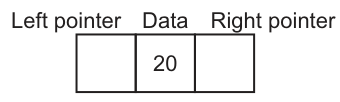
The linked list will be organised as a binary tree.
is used to represent a null pointer.
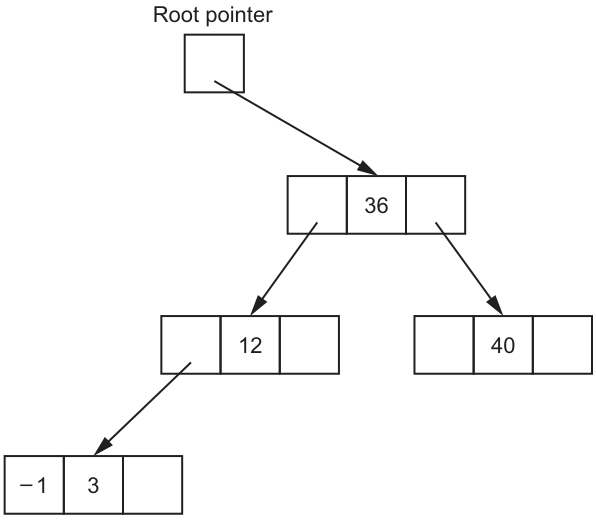
Complete the binary tree, including null pointers, to show how the data will be organised after the following integers have been added:
6, 15, 41, 66
Answer
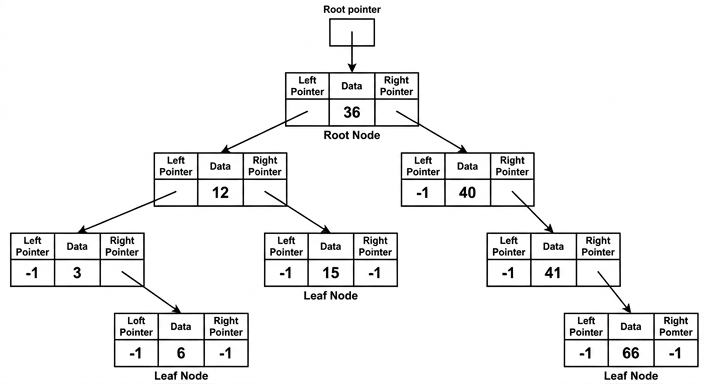
See binary tree diagram
Background Concept
A binary tree stores each item in a node. In this question, each node has three fields:
- a left pointer
- the data value
- a right pointer
Because the list is described as ordered, the tree is being used as a binary search tree. That means:
- values smaller than a node go into its left subtree
- values larger than a node go into its right subtree
To insert a new value, start at the root and compare:
- if the new value is smaller, move left
- if the new value is larger, move right
- keep doing this until you reach a null pointer
- place the new node there
A null pointer means there is no child in that position. In this question, null is shown by -1.
Understanding the Question
You are given part of an existing tree:
- root node
36 36has left child12and right child4012has left child3- the left pointer of
3is already shown as-1
You must add the integers 6, 15, 41, and 66 in that order, then complete the whole binary tree, including the missing -1 null pointers.
So this is not just about placing the four values. You must also show every empty left or right child pointer as -1.
Approach
Use the standard binary-search-tree insertion method for each new value:
- Start at the root.
- Compare the new value with the current node.
- Move left if smaller, right if larger.
- Stop when the required child pointer is null.
- Insert the new node there.
- After all insertions, fill every missing child pointer with
-1.
The key idea is that the insertion order matters. Each new value is inserted into the tree produced by the previous insertions.
Step-by-Step Reasoning
Start with the given tree.
- Root is
36. - Left child of
36is12. - Right child of
36is40. - Left child of
12is3.
Now insert 6.
- Compare
6with36:6 < 36, so go left to12. - Compare
6with12:6 < 12, so go left to3. - Compare
6with3:6 > 3, so go right. - The right pointer of
3is empty, so insert6as the right child of3.
Now insert 15.
- Compare
15with36:15 < 36, so go left to12. - Compare
15with12:15 > 12, so go right. - The right pointer of
12is empty, so insert15as the right child of12.
Now insert 41.
- Compare
41with36:41 > 36, so go right to40. - Compare
41with40:41 > 40, so go right. - The right pointer of
40is empty, so insert41as the right child of40.
Now insert 66.
- Compare
66with36:66 > 36, so go right to40. - Compare
66with40:66 > 40, so go right to41. - Compare
66with41:66 > 41, so go right. - The right pointer of
41is empty, so insert66as the right child of41.
Now complete all null pointers:
3already has left pointer-1.3has right child6, so only6needs both pointers as-1.15has no children, so left-1, right-1.40has no left child, so left pointer-1.41has no left child, so left pointer-1.66has no children, so left-1, right-1.
So the finished structure is exactly the tree shown here:
Key Takeaways
- A binary search tree places smaller values to the left and larger values to the right.
- Values are inserted one at a time by following comparisons from the root.
- The order of insertion affects the final shape of the tree.
- In pointer diagrams, every missing child must still be shown using the null value, here
-1.
Common Mistakes
- Putting
6as the left child of3. This is wrong because6is greater than3, so it must go to the right. - Putting
15under40. This ignores the first comparison with36; since15 < 36, it must stay in the left subtree. - Putting
66directly under40. You must continue comparing until the first null pointer is reached;66must go right of41. - Forgetting the null pointers. The question explicitly says to include them, so missing
-1values loses marks.
Things to Be Careful About
- Use the tree already formed after each insertion before placing the next value.
- Follow the comparison path all the way from the root each time.
- Make sure each node has both a left pointer and a right pointer accounted for, even when one or both are null.
- Do not confuse a general binary tree with a binary search tree here; the word ordered tells you the data must follow search-tree ordering.
Describe what is meant by recursion.
...................................................................................................................................................
...................................................................................................................................................
...................................................................................................................................................
.............................................................................................................................................
Answer
- Recursion is when a procedure or function calls itself.
- The repeated calls continue until a base case or stopping condition is reached.
A procedure or function calls itself, and the calls stop when a base case or stopping condition is reached.
Background Concept
Recursion is a programming technique where a procedure or function solves a problem by calling itself. Each call usually works on a smaller or simpler version of the same problem.
A recursive algorithm must have:
- a recursive call, where it calls itself
- a base case, where it stops calling itself
Without a base case, the calls would continue indefinitely and eventually cause a runtime failure such as stack overflow.
Recursion is often useful for problems that are naturally defined in terms of smaller versions of themselves, such as:
- traversing trees
- processing linked lists
- mathematical definitions like factorial
Understanding the Question
The question asks you to describe what recursion means. This is a theory definition question, so you do not need code or an example unless it helps your wording.
For full marks, the answer needs the two essential ideas:
- a routine calls itself
- there is some condition that ends the repeated calls
Approach
Give a short description with the two marking points:
- mention self-calling
- mention the stopping condition or base case
That is enough for a concise full-mark answer.
Step-by-Step Reasoning
The phrase procedure or function calls itself is the core definition.
However, that alone is not a complete description, because recursion only works correctly if there is a point where the self-calling stops. That point is called the base case.
So the full idea is:
- a routine calls itself
- each call moves toward a simpler case
- once the base case is reached, the recursion stops
In an exam answer worth 2 marks, the first and last of those points are usually the ones being rewarded.
Key Takeaways
- Recursion means self-calling.
- A recursive algorithm must have a base case.
- Recursive solutions are common for self-similar structures such as trees.
Common Mistakes
- Saying recursion is just repetition. Repetition could also describe iteration with loops, so that is too vague.
- Describing a loop instead of a self-calling routine. Recursion uses function or procedure calls, not just
FORorWHILE. - Forgetting to mention the stopping condition. That usually loses one of the marks.
Things to Be Careful About
- Use the word itself clearly, so the examiner can see you mean self-calling.
- Mention base case, stopping condition, or termination condition explicitly.
- Do not confuse recursion with iteration; they can solve similar problems, but they are different techniques.
A binary tree is a suitable Abstract Data Type (ADT) that a designer can implement using recursive algorithms.
Identify one other ADT that a designer can implement using recursive algorithms.
.............................................................................................................................................
Answer
- Linked list
Linked list
Background Concept
An Abstract Data Type (ADT) is a logical model of a data structure, defined by the operations it supports rather than by one specific implementation. Examples include stacks, queues, lists, trees, and graphs.
Some ADTs are especially suitable for recursive algorithms because their structure is naturally recursive. For example, a linked list can be viewed as:
- one node
- followed by the rest of the linked list
That self-similar structure makes recursive processing possible.
Understanding the Question
The question already gives binary tree as one ADT that can be implemented using recursive algorithms. You must name one different ADT.
You do not need to explain it here, just identify one valid example.
Approach
Think of ADTs whose structure can be broken into a smaller version of the same structure. A linked list is a strong choice because each node points to the remainder of the list, so recursive traversal is straightforward.
Step-by-Step Reasoning
A linked list is a valid answer because recursive algorithms can process it node by node:
- process the current node
- then call the same algorithm on the next node
- stop when the pointer is null
That makes it an appropriate ADT to name here.
Other ADTs may also be accepted in some contexts, but linked list is a clear and standard answer.
Key Takeaways
- An ADT describes what operations are supported, not just how data is stored.
- Recursive algorithms work well on self-similar structures.
- Linked lists are a common example of an ADT that can be processed recursively.
Common Mistakes
- Giving binary tree again. The question asks for one other ADT.
- Naming something that is not really an ADT, such as a programming language feature.
- Choosing an example with no clear recursive structure when a clearer answer was available.
Things to Be Careful About
- Read one other carefully; it must be different from binary tree.
- Give the name of the ADT, not an operation such as insert or search.
- Keep the answer brief for a 1-mark identify question.
This truth table represents a logic circuit.
| INPUT | OUTPUT | |||
|---|---|---|---|---|
| A | B | C | D | Z |
| 0 | 0 | 0 | 0 | 1 |
| 0 | 0 | 0 | 1 | 0 |
| 0 | 0 | 1 | 0 | 0 |
| 0 | 0 | 1 | 1 | 0 |
| 0 | 1 | 0 | 0 | 0 |
| 0 | 1 | 0 | 1 | 1 |
| 0 | 1 | 1 | 0 | 0 |
| 0 | 1 | 1 | 1 | 1 |
| 1 | 0 | 0 | 0 | 1 |
| 1 | 0 | 0 | 1 | 0 |
| 1 | 0 | 1 | 0 | 0 |
| 1 | 0 | 1 | 1 | 0 |
| 1 | 1 | 0 | 0 | 0 |
| 1 | 1 | 0 | 1 | 1 |
| 1 | 1 | 1 | 0 | 0 |
| 1 | 1 | 1 | 1 | 1 |
Write the Boolean logic expression that corresponds to the given truth table as the sum-of-products.
Z = ............................................................................................................................................
.............................................................................................................................................
Answer
Z = A'B'C'D' + A'BC'D + A'BCD + AB'C'D' + ABC'D + ABCD
Z = A'B'C'D' + A'BC'D + A'BCD + AB'C'D' + ABC'D + ABCD
Background Concept
A sum-of-products (SOP) expression is a Boolean expression made by OR-ing together several product terms. Each product term is an AND combination of all input variables, with a variable written complemented if its value is 0 in that row and uncomplemented if its value is 1.
For a truth table:
- look only at the rows where the output is 1
- write one product term for each such row
- OR all those terms together
This gives the canonical sum-of-products form, sometimes called the sum of minterms.
Using prime notation:
- A' means NOT A
- B' means NOT B
- and so on
Understanding the Question
You are given a complete truth table for inputs A, B, C and D, and output Z. Part (a) asks for the Boolean expression that exactly matches the table in sum-of-products form.
So the task is not to simplify yet. It is simply to find every row where Z = 1 and convert each of those rows into a product term.
From the table, Z = 1 for these input combinations:
- 0000
- 0101
- 0111
- 1000
- 1101
- 1111
Each of those becomes one term.
Approach
Use the standard minterm method:
- Scan the truth table.
- Keep only rows where Z = 1.
- For each such row:
- write the variable unchanged if its bit is 1
- write the variable with a prime if its bit is 0
- Join all terms with +, which means OR.
Because the question specifically says sum-of-products, this direct method is the safest and most exam-appropriate approach.
Step-by-Step Reasoning
Take each row with output 1.
-
Row A=0, B=0, C=0, D=0
- A becomes A'
- B becomes B'
- C becomes C'
- D becomes D'
- term: A'B'C'D'
-
Row A=0, B=1, C=0, D=1
- A becomes A'
- B stays B
- C becomes C'
- D stays D
- term: A'BC'D
-
Row A=0, B=1, C=1, D=1
- A becomes A'
- B stays B
- C stays C
- D stays D
- term: A'BCD
-
Row A=1, B=0, C=0, D=0
- A stays A
- B becomes B'
- C becomes C'
- D becomes D'
- term: AB'C'D'
-
Row A=1, B=1, C=0, D=1
- A stays A
- B stays B
- C becomes C'
- D stays D
- term: ABC'D
-
Row A=1, B=1, C=1, D=1
- A stays A
- B stays B
- C stays C
- D stays D
- term: ABCD
Now OR all six terms together:
Z = A'B'C'D' + A'BC'D + A'BCD + AB'C'D' + ABC'D + ABCD
That is the full canonical SOP expression.
Key Takeaways
- In canonical SOP, use only rows where output = 1.
- A 0 in the row gives a complemented variable.
- A 1 in the row gives an uncomplemented variable.
- Join all product terms with OR.
Common Mistakes
- Using rows where Z = 0 instead of Z = 1. That would give a product-of-sums style approach, not SOP.
- Missing one of the 1-rows. That makes the expression incomplete.
- Forgetting to complement variables that have value 0.
- Trying to simplify in part (a). The question asks for sum-of-products from the table, so the unsimplified canonical form is required.
Things to Be Careful About
- Check every row carefully; one missed 1 changes the whole answer.
- Keep the variables in a consistent order: A, then B, then C, then D.
- Do not mix prime notation incorrectly, for example writing B instead of B' when the row value is 0.
- Save simplification for the K-map parts, not this part.
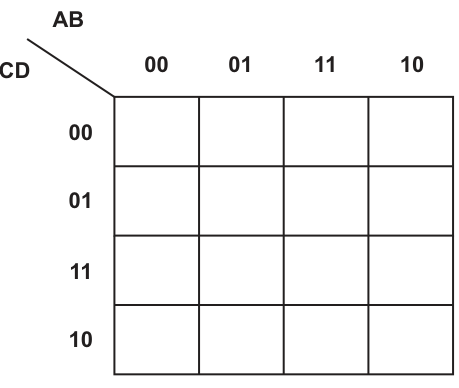
Answer
| CD/AB | 00 | 01 | 11 | 10 |
|---|---|---|---|---|
| 00 | 1 | 0 | 0 | 1 |
| 01 | 0 | 1 | 1 | 0 |
| 11 | 0 | 1 | 1 | 0 |
| 10 | 0 | 0 | 0 | 0 |
See completed K-map
Background Concept
A 4-variable Karnaugh map is a visual method for organising truth-table values so that adjacent cells differ by only one variable. This makes simplification easier.
For a 4-variable K-map:
- two variables label the columns
- two variables label the rows
- both must be written in Gray-code order
Gray-code order for two bits is:
- 00, 01, 11, 10
That order matters. It is what makes neighbouring cells differ by exactly one bit.
Understanding the Question
You are given a truth table for A, B, C, D and Z, and the blank K-map already shows:
- columns labelled AB in the order 00, 01, 11, 10
- rows labelled CD in the order 00, 01, 11, 10
This part asks only for the values to be entered into the K-map cells. You are not yet simplifying or drawing loops.
Approach
Match each K-map cell to the corresponding row of the truth table.
For each cell:
- read the column heading to get A and B
- read the row heading to get C and D
- find that input combination in the truth table
- copy the corresponding Z value into the cell
Work row by row to avoid missing any cells.
Step-by-Step Reasoning
The K-map uses columns AB = 00, 01, 11, 10 and rows CD = 00, 01, 11, 10.
Row CD = 00
- AB = 00 gives A=0, B=0, C=0, D=0, so Z=1
- AB = 01 gives 0,1,0,0, so Z=0
- AB = 11 gives 1,1,0,0, so Z=0
- AB = 10 gives 1,0,0,0, so Z=1
So row 00 is: 1 0 0 1
Row CD = 01
- AB = 00 gives 0,0,0,1, so Z=0
- AB = 01 gives 0,1,0,1, so Z=1
- AB = 11 gives 1,1,0,1, so Z=1
- AB = 10 gives 1,0,0,1, so Z=0
So row 01 is: 0 1 1 0
Row CD = 11
- AB = 00 gives 0,0,1,1, so Z=0
- AB = 01 gives 0,1,1,1, so Z=1
- AB = 11 gives 1,1,1,1, so Z=1
- AB = 10 gives 1,0,1,1, so Z=0
So row 11 is: 0 1 1 0
Row CD = 10
- AB = 00 gives 0,0,1,0, so Z=0
- AB = 01 gives 0,1,1,0, so Z=0
- AB = 11 gives 1,1,1,0, so Z=0
- AB = 10 gives 1,0,1,0, so Z=0
So row 10 is: 0 0 0 0
That gives the completed K-map.
Key Takeaways
- Always use Gray-code order, not ordinary binary order.
- A K-map is just the truth table rearranged for simplification.
- Filling the map accurately is essential before drawing loops.
Common Mistakes
- Using column order 00, 01, 10, 11 instead of 00, 01, 11, 10.
- Mixing up which pair of variables labels rows and which labels columns.
- Copying a value into the wrong cell because A,B and C,D were read in the wrong order.
- Starting to loop groups in this part before the map itself is correct.
Things to Be Careful About
- The headings are AB across the top and CD down the side.
- The row labels also use Gray-code order, so 11 comes before 10.
- Check all 16 cells; a single misplaced 1 can lead to the wrong simplified expression later.
- Keep the row and column headings visible while filling the map so each cell matches the correct truth-table entry.
Draw loop(s) around appropriate group(s) in the K-map to produce an optimal sum-of-products.
Answer
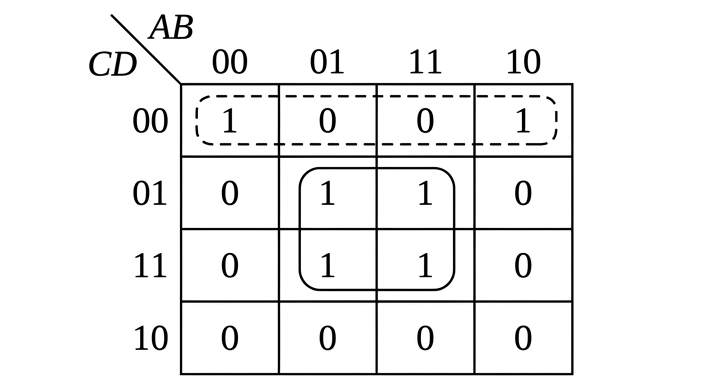
See K-map loops
Background Concept
In a Karnaugh map, simplification is done by drawing loops around adjacent 1s.
Important rules:
- loops must contain 1, 2, 4, 8, ... cells
- each loop should be as large as possible
- loops may overlap if that helps simplification
- edge cells are adjacent to the opposite edge, so wrap-around loops are allowed
- the goal is to cover all the 1s using the fewest and largest useful groups
Each loop removes variables that change inside the group and keeps only the variables that stay constant.
Understanding the Question
This part does not ask for the final expression yet. It asks you to draw the loop or loops on the completed K-map that will lead to the best simplified sum-of-products expression.
So you need to identify which 1s are adjacent and choose the largest sensible groups.
Approach
Look at the completed map and search for:
- any block of four 1s first, because larger loops simplify more
- remaining 1s that can be paired
- wrap-around opportunities across the left and right edges
For this map, there is a clear central block of four 1s, and the two corner-edge 1s on the top row can be paired using wrap-around.
Step-by-Step Reasoning
The completed map has 1s in these positions:
- row CD=00, column AB=00
- row CD=00, column AB=10
- row CD=01, column AB=01
- row CD=01, column AB=11
- row CD=11, column AB=01
- row CD=11, column AB=11
Now choose the best groups.
Group 1: central 2x2 block
The four 1s in the middle form a perfect 2x2 square:
- (AB=01, CD=01)
- (AB=11, CD=01)
- (AB=01, CD=11)
- (AB=11, CD=11)
This is better than making smaller pairs, because a group of 4 removes more changing variables.
Group 2: wrap-around pair on the top row
The two 1s at:
- (AB=00, CD=00)
- (AB=10, CD=00)
are adjacent because the K-map wraps around horizontally. The first and last columns are neighbours in a K-map.
So these two cells should be looped together as a pair.
This gives the optimal set of loops.
Key Takeaways
- Always look for the largest groups first.
- A 2x2 group is better than two separate pairs when possible.
- The left and right edges of a K-map are adjacent.
- Good loop choice leads directly to the simplest SOP expression.
Common Mistakes
- Forgetting wrap-around adjacency, so the top-left and top-right cells are not grouped.
- Drawing smaller loops than necessary, which gives a less simplified answer.
- Looping cells that contain 0.
- Drawing diagonal groups; diagonal cells are not adjacent in a K-map.
Things to Be Careful About
- Loops must be rectangular and contain 1, 2, 4, 8, ... cells.
- Adjacency is horizontal or vertical only, not diagonal.
- You may cross the map boundary because the edges wrap around.
- Every 1 must be covered by at least one loop, and all loops should help produce the simplest expression.
Write the Boolean logic expression from your answer to part (b)(ii) as the simplified sum-of-products.
Z = .....................................................................................................................................
.....................................................................................................................................
Answer
Z = BD + B'C'D'
Z = BD + B'C'D'
Background Concept
After drawing loops on a Karnaugh map, each loop produces one product term.
Rule for finding the term from a loop:
- keep only the variables that stay the same in every cell of the loop
- if a variable is always 1, write it uncomplemented
- if a variable is always 0, write it complemented
- if a variable changes within the loop, leave it out
Then OR the loop terms together to get the simplified SOP expression.
Understanding the Question
Part (b)(iii) asks you to convert the loops from part (b)(ii) into the final simplified Boolean expression.
So you do not go back to the full truth table. You read the constant variables from each loop.
Approach
For each loop:
- inspect the rows and columns it covers
- identify which input variables stay fixed
- write the product term from those fixed values
- OR the terms together
There are two loops here, so there will be two product terms.
Step-by-Step Reasoning
Term from the central 2x2 loop
This loop covers columns AB = 01 and 11, and rows CD = 01 and 11.
Look at each variable:
- A changes from 0 to 1, so omit A
- B stays 1, so keep B
- C changes from 0 to 1, so omit C
- D stays 1, so keep D
So this loop gives:
BD
Term from the wrap-around pair
This loop covers row CD = 00 and columns AB = 00 and 10.
Look at each variable:
- A changes from 0 to 1, so omit A
- B stays 0, so keep B'
- C stays 0, so keep C'
- D stays 0, so keep D'
So this loop gives:
B'C'D'
Combine the terms
OR the two terms together:
Z = BD + B'C'D'
That is the simplified sum-of-products expression.
Key Takeaways
- Each K-map loop becomes one product term.
- Variables that change inside a loop disappear from the term.
- Variables that stay fixed are the ones that remain.
- The simplified SOP is the OR of all loop terms.
Common Mistakes
- Keeping a variable that actually changes within the loop.
- Omitting a variable that stays constant.
- Writing B instead of B' when the constant value is 0.
- Copying the unsimplified SOP from part (a) instead of using the K-map loops.
Things to Be Careful About
- Read the loop from the map headings carefully: AB across columns, CD down rows.
- In the central group, B and D are the only variables that stay fixed.
- In the wrap-around pair, A changes, so it must not appear in the term.
- Keep the answer in sum-of-products form, so join the terms with +.
Describe the process of executing a program using an interpreter.
..........................................................................................................................................................
..........................................................................................................................................................
..........................................................................................................................................................
..........................................................................................................................................................
..........................................................................................................................................................
..........................................................................................................................................................
..........................................................................................................................................................
....................................................................................................................................................
Answer
- The interpreter reads one line or statement of the source program at a time.
- It translates that line into machine code or another form the processor can execute.
- The translated line is executed immediately before the next line is processed.
- This cycle repeats line by line until the end of the program, or until an error is found.
- If an error is found, execution stops and the error is reported at that point.
- No separate object/executable file is produced for the whole program.
The interpreter translates and executes the program one line at a time, stopping and reporting an error when one is found, and it does not produce a separate object code file.
Background Concept
An interpreter is a language translator that executes a program by handling it a small piece at a time, usually line by line or statement by statement. Unlike a compiler, which translates the whole source program before execution, an interpreter translates one instruction and then runs it straight away.
This means interpretation combines translation and execution into one ongoing process. The source code remains the main form of the program; there is usually no separate fully translated object code file saved for later execution.
A key consequence is how errors are handled. Because each line is translated just before it is run, an error is normally discovered when the interpreter reaches that line. The program then stops at that point, rather than completing translation of the whole program first.
Understanding the Question
The question asks for the process of executing a program using an interpreter. So it is not asking for advantages and disadvantages in general, and it is not asking for a comparison with a compiler unless that helps explain the process.
To answer well, you need to describe the sequence:
- the interpreter reads source code,
- translates a small part,
- executes it immediately,
- repeats this process,
- stops if an error is found.
A strong answer may also mention that no separate object code file is produced, because that is an important feature of interpreted execution.
Approach
For a 4-mark describe question like this, the safest approach is to give the steps in order. Think of it as a cycle:
- read a line,
- translate it,
- execute it,
- move to the next line,
- stop if there is an error or when the program ends.
That gives a process description rather than isolated facts. Keep each marking point as a separate clear statement.
Step-by-Step Reasoning
First, the interpreter takes the source program as input. It does not begin by translating the entire program in one go.
Next, it reads the first line or statement. In exam answers, “line by line” and “statement by statement” are both usually accepted descriptions of the same idea: only a small part is handled at once.
Then, that line is translated into a form the processor can execute, commonly described in school mark schemes as machine code. The important idea is that the source instruction is converted just before use.
Immediately after translation, that same line is executed. This is the key difference from compilation: execution happens during translation, not afterwards as a separate whole-program stage.
After that, the interpreter moves on to the next line and repeats the same cycle. So the program runs as a sequence of repeated read-translate-execute steps.
If the interpreter reaches a line containing an error, it reports the error and stops executing at that point. This means later lines are not executed unless the error is fixed and the program is run again.
Finally, because the interpreter is translating and executing directly from the source, it does not normally create a separate object code or executable file for the complete program.
So the whole process can be summarised as: read one statement, translate it, execute it, repeat until the end of the program or until an error is encountered.
Key Takeaways
- An interpreter works on one statement at a time.
- Translation and execution happen together.
- Errors are found when the interpreter reaches the faulty statement.
- Execution stops at the point of the error.
- A separate complete object code file is not usually produced.
Common Mistakes
- Saying the whole program is translated first. That describes a compiler, not an interpreter.
- Saying an executable file is produced. That is usually associated with compilation, not interpretation.
- Giving only advantages/disadvantages, such as “easier to debug” or “slower,” without actually describing the process.
- Missing the immediate execution step. Translation alone is not enough; the interpreted line is then run straight away.
- Forgetting error handling. For this topic, stopping at the line where the error occurs is an important point.
Things to Be Careful About
- Use process language such as “reads,” “translates,” “executes,” and “repeats.”
- Do not confuse “line by line” with “character by character”; the unit is a statement or line of code.
- If you mention machine code, make clear it is generated for the current line as part of execution, not for the whole program in advance.
- If you compare with a compiler, keep it brief and accurate so you still answer the actual question.
- For a 4-mark response, include enough ordered steps to show the full execution cycle, not just one or two isolated facts.
Several syntax diagrams are shown.
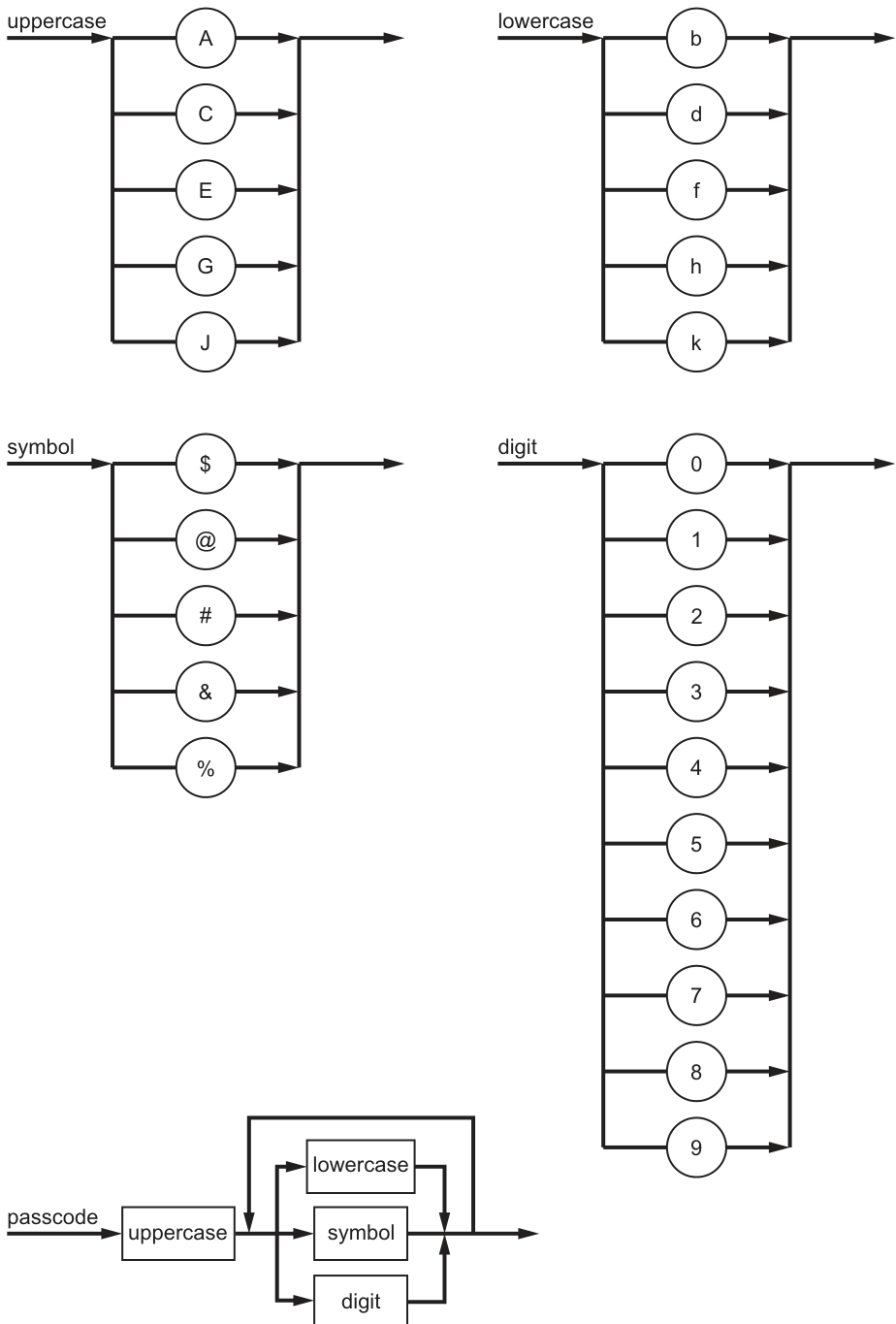
State why each passcode is invalid for the given syntax diagrams.
#Jd7
Reason .....................................................................................................................................
...................................................................................................................................................
C%6A
Reason .....................................................................................................................................
...................................................................................................................................................
Answer
#Jd7is invalid because apasscodemust start with anuppercasecharacter, and#is asymbol.C%6Ais invalid because after the firstuppercasecharacter, onlylowercase,symbolordigitare allowed, andAisuppercase.
Starts with a symbol; ends with an uppercase character.
Background Concept
A syntax diagram shows the valid structure of strings in a grammar. You follow the arrows from left to right. If there are branches, you choose one valid route. If there is a loop, that part may be repeated according to how the arrows reconnect.
In this question:
uppercasecan be one ofA,C,E,G,Jlowercasecan be one ofb,d,f,h,ksymbolcan be one of$,@,#,&,%digitcan be one of0to9
For passcode, the diagram shows:
- the first character must be
uppercase - after that, the next character must be one of
lowercase,symbolordigit - that choice can then repeat, so more characters of those three types may follow
- no more
uppercasecharacters are allowed after the first one
Understanding the Question
You are given two example passcodes and asked why each one is invalid. That means you do not need to rewrite the whole rule; you only need to identify the exact point where each string breaks the syntax diagram.
The key thing to inherit from the parent diagram is the structure of passcode: one starting uppercase character, followed by one or more characters that are lowercase letters, symbols or digits.
Approach
Take each passcode from left to right and compare it with the diagram:
- first, check whether the first character is a valid
uppercase - then check whether every later character is from the allowed sets:
lowercase,symbolordigit - as soon as one character breaks the rule, that gives the reason it is invalid
Step-by-Step Reasoning
For #Jd7:
- The first character is
#. - The syntax diagram says a
passcodemust begin withuppercase. #is not one ofA,C,E,G,J.- In fact,
#belongs to thesymbolset. - So the string is invalid immediately at the first character.
For C%6A:
- The first character is
C. Cis in theuppercaseset, so the start is valid.- The next characters
%and6are also valid because they are asymboland adigit. - The last character is
A. - After the first character, the diagram only allows
lowercase,symbolordigit. Ais anuppercasecharacter, so it is not allowed in that position.- Therefore the string is invalid because it contains an uppercase character after the first character.
Key Takeaways
- Read syntax diagrams from left to right.
- The first part of a diagram often fixes the first character or token very precisely.
- A loop means repetition of the section it returns to.
- To test validity, compare each character position with the part of the grammar that applies there.
Common Mistakes
- Saying
#Jd7is invalid because ofJ. The string is already invalid at#, so that is the clearest reason. - Missing that
C%6Astarts correctly. The problem is not theC; it is the finalA. - Assuming any uppercase or lowercase letter is allowed. Only the letters shown in the individual syntax diagrams are valid.
- Forgetting that the loop in
passcoderepeats onlylowercase,symbolordigit, notuppercase.
Things to Be Careful About
- Use the named sets exactly as defined by the diagrams.
- Do not treat
JandAthe same:Jis in the givenuppercaseset, butAis only allowed as the first character of a passcode. - The question asks why each passcode is invalid, so give one precise grammar-based reason for each string.
Complete the Backus-Naur Form (BNF) for <uppercase> and <passcode>.
<uppercase> ::= .................................................................................................................
...................................................................................................................................................
<passcode> ::= ...................................................................................................................
...................................................................................................................................................
...................................................................................................................................................
...................................................................................................................................................
...................................................................................................................................................
...................................................................................................................................................
Answer
<uppercase> ::= A | C | E | G | J

<passcode> ::= <uppercase><lowercase>
             | <uppercase><symbol>
             | <uppercase><digit>
             | <passcode><lowercase>
             | <passcode><symbol>
             | <passcode><digit>
See completed BNF
Background Concept
Backus-Naur Form (BNF) is a way of writing grammar rules textually. It describes how valid strings can be formed.
Important ideas:
- A non-terminal is written in angle brackets, for example
<passcode>. - A terminal is an actual symbol or character that can appear in the final string, for example
Aor#. ::=means “is defined as”.|means “or”.- Repetition in a syntax diagram is usually represented in BNF by recursion.
A syntax diagram and BNF are two different notations for the same grammar. So the task is to translate the picture into the formal text version.
Understanding the Question
You are asked to complete the BNF for two non-terminals:
<uppercase><passcode>
From the diagrams:
<uppercase>is simply one choice from five uppercase letters.<passcode>must begin with<uppercase>, then have at least one further character chosen from<lowercase>,<symbol>or<digit>, and that second stage can repeat.
The key challenge is the loop in the passcode diagram. In BNF, a loop is not shown with arrows, so you must recreate it using recursive rules.
Approach
Translate each diagram systematically.
For <uppercase>:
- it is just an OR-list of the five terminals shown
For <passcode>:
- first identify the base cases: an uppercase followed by exactly one allowed following character
- then add recursive cases to show that more allowed following characters can be appended
- make sure recursion only adds
lowercase,symbolordigit, so no extra uppercase can appear after the first character
Step-by-Step Reasoning
Start with <uppercase>.
The diagram has five parallel choices:
ACEGJ
So the BNF is:
<uppercase> ::= A | C | E | G | J
Now consider <passcode>.
The diagram says:
- start with
<uppercase> - then choose one of
<lowercase>,<symbol>or<digit> - then you may loop and choose one of those again
So first write the shortest valid passcodes. These are the base forms:
<uppercase><lowercase>
<uppercase><symbol>
<uppercase><digit>
These represent passcodes of length 2.
Next, represent the repetition. The loop means that after forming a valid <passcode>, you may add another:
<lowercase>- or
<symbol> - or
<digit>
So the recursive forms are:
<passcode><lowercase>
<passcode><symbol>
<passcode><digit>
Putting base cases and recursive cases together gives:
<passcode> ::= <uppercase><lowercase>
             | <uppercase><symbol>
             | <uppercase><digit>
             | <passcode><lowercase>
             | <passcode><symbol>
             | <passcode><digit>
Why this works:
- it guarantees the first character came from
<uppercase> - it guarantees every later character is from
<lowercase>,<symbol>or<digit> - it allows any number of later characters, because recursion can keep extending the passcode
For example, to form C%6:
- start with
<passcode> ::= <uppercase><symbol>to getC% - then use
<passcode> ::= <passcode><digit>to append6
So the grammar matches the diagram correctly.
Key Takeaways
- Parallel branches in a syntax diagram become
|alternatives in BNF. - A loop in a syntax diagram usually becomes recursion in BNF.
- Base cases are needed so the recursion can stop.
- Good BNF preserves the exact restrictions of the original diagram, not just the general idea.
Common Mistakes
- Writing only
<passcode> ::= <uppercase><lowercase> | <symbol> | <digit>. This is wrong because it does not keep the full sequence structure. - Allowing
<uppercase>to repeat later in the passcode. The diagram does not allow that. - Forgetting the base cases and writing only recursive rules. Then the grammar has no way to generate a complete string.
- Using a form like
<uppercase><lowercase><passcode>without thinking carefully. That would insert another uppercase later when<passcode>expands, which breaks the diagram.
Things to Be Careful About
- Keep non-terminals in angle brackets exactly, such as
<uppercase>and<passcode>. - Use
|for alternatives and::=for definition. - Make sure the recursive rule extends an already valid
<passcode>with one extra allowed character. - The diagram implies at least one character after the initial uppercase, so your BNF must not allow a one-character passcode.
Describe what is meant by multi-tasking and how it benefits process management.
...................................................................................................................................................
...................................................................................................................................................
...................................................................................................................................................
...................................................................................................................................................
.............................................................................................................................................
Answer
- Multi-tasking is when the operating system runs more than one process apparently at the same time by sharing processor time between them.
- It benefits process management because the CPU can switch to another ready process when one process is waiting, improving processor use and overall system responsiveness.
Multi-tasking is the OS running multiple processes apparently at the same time by sharing CPU time; it improves process management by switching to another ready process when one is waiting, so CPU use and responsiveness improve.
Background Concept
Multi-tasking is an operating system feature that allows several processes to make progress during the same overall period of time. On a single processor, this does not usually mean they all execute at the exact same instant. Instead, the OS rapidly switches the CPU from one process to another. This is called context switching, and it gives the user the impression that tasks are running simultaneously.
This matters for process management because the OS must decide which process is ready to run, which is waiting for input/output, and when to suspend one process and resume another. Good process management keeps the CPU busy and prevents the whole system from appearing to freeze while one process is waiting.
Understanding the Question
This part asks for two things:
- what multi-tasking means
- how it helps process management
So a full answer needs both the definition and the benefit. A definition alone would not be enough. The phrase "how it benefits process management" is asking you to connect the idea of multiple tasks with the OS's job of scheduling and controlling processes.
Approach
A good approach is:
- define multi-tasking as several processes sharing processor time
- mention that the switching is controlled by the operating system
- explain the benefit: if one process is waiting, another can use the CPU
That gives a clear link between the concept and the management advantage.
Step-by-Step Reasoning
First, identify the key idea behind multi-tasking: more than one process can be active during the same period.
Second, make the definition accurate. In exam wording, it is best to say that the processor time is shared between processes, or that the OS switches between processes quickly. This is better than just saying "many things happen at once", because on one CPU they are usually interleaved rather than truly simultaneous.
Third, explain the benefit to process management. Many processes spend time waiting for input/output, disk access, network data, or user input. If the OS can run another ready process during that wait, the CPU does not sit idle.
So the benefit is not just "it is faster" in a vague sense. The real process-management benefit is:
- better CPU utilisation
- smoother running of several processes
- improved responsiveness because ready tasks do not have to wait for one blocked task to finish completely
That is why the answer links multi-tasking with switching to another ready process when one cannot continue.
Key Takeaways
- Multi-tasking means multiple processes share CPU time.
- On a single processor, this is achieved by rapid switching, not true simultaneous execution.
- Its main benefit is better management of ready and waiting processes, leading to better CPU use and responsiveness.
Common Mistakes
- Saying multi-tasking means multiple users on one system. That is multi-user operation, not the definition of multi-tasking.
- Saying processes run "at the same time" without explaining time-sharing. That is incomplete on a single-CPU system.
- Giving a general benefit such as "it is efficient" without linking it to process management, scheduling, or CPU usage.
Things to Be Careful About
- Use the word process or task consistently; in this syllabus context, the OS is managing processes.
- Make sure you describe the OS sharing or switching CPU time.
- The benefit should be specifically about management of processes, such as improved utilisation or responsiveness, not an unrelated benefit like increased storage space.
Explain the function of the shortest remaining time scheduling routine and give a benefit of this routine.
Function ....................................................................................................................................
...................................................................................................................................................
...................................................................................................................................................
...................................................................................................................................................
...................................................................................................................................................
...................................................................................................................................................
Benefit ......................................................................................................................................
...................................................................................................................................................
Answer
- Function: Shortest remaining time scheduling always selects the ready process with the smallest amount of processing time left to complete.
- It is a pre-emptive method, so if a new process arrives with a shorter remaining time than the current process, the current process is interrupted and the new process is run.
- This continues until processes finish.
- Benefit: It can reduce the average waiting time or turnaround time, so short jobs are completed more quickly and the system responds better.
Shortest remaining time scheduling runs the ready process with the least time left and pre-empts the current process if a shorter one arrives; its benefit is lower average waiting/turnaround time and faster response for short jobs.
Background Concept
A scheduling routine is the rule an operating system uses to decide which ready process gets the CPU next. Shortest remaining time (SRT), also called shortest remaining time first, is a pre-emptive scheduling algorithm.
"Pre-emptive" means the OS is allowed to stop a running process before it finishes and give the CPU to another process. In SRT, the decision is based on how much CPU time each ready process still needs. The process with the shortest remaining execution time is chosen.
This is different from a non-pre-emptive method such as shortest job first, where the chosen process keeps the CPU until it finishes or blocks.
Understanding the Question
This question asks for two separate parts:
- the function of the shortest remaining time scheduling routine
- one benefit of using it
The word "function" means you must explain what the algorithm actually does, not just name it. So you should mention:
- it compares remaining times
- it chooses the process with the smallest remaining time
- it can interrupt the current process if a shorter one becomes ready
Then you need one clear benefit. A common accepted benefit is reduced average waiting time or turnaround time, especially for short tasks.
Approach
To answer this well:
- begin by stating the selection rule: shortest remaining time left
- add the important feature that it is pre-emptive
- then give one practical advantage such as faster completion of short jobs or lower average waiting time
This structure matches the wording of the question exactly.
Step-by-Step Reasoning
Start with the function.
Suppose several processes are in the ready queue. The scheduler examines how much processing time each still requires. It chooses the one with the least remaining time.
Now include the key SRT feature: pre-emption. Imagine one process is currently running, but a new process arrives that needs even less time than the current process still has left. Under shortest remaining time scheduling, the OS interrupts the current process, saves its state, and switches the CPU to the new shorter process.
That is why the phrase "remaining time" matters. The decision is not based on original job length alone. It is based on how much time is still needed from this point onward.
Then state the benefit. Because short processes are favoured, they usually finish quickly instead of sitting behind long jobs. This tends to reduce average waiting time and average turnaround time across the set of jobs. It can also improve responsiveness, because short interactive tasks get service sooner.
A strong exam answer therefore includes both the selection rule and the pre-emption rule, then one explicit benefit.
Key Takeaways
- Shortest remaining time is a pre-emptive scheduling algorithm.
- The ready process with the least CPU time left is chosen.
- If a shorter process arrives, the current process can be interrupted.
- A major benefit is lower average waiting or turnaround time, especially for short jobs.
Common Mistakes
- Describing shortest job first instead of shortest remaining time. SJF may be non-pre-emptive; SRT must include interruption of the running process when appropriate.
- Saying it chooses the process that arrived first. That describes FCFS, not SRT.
- Giving only a benefit without explaining the function, or only the function without a benefit.
- Saying simply "it is faster" without saying what is improved, such as waiting time, turnaround time, or response time.
Things to Be Careful About
- Use the word remaining, not just shortest, because the current amount of time left is what matters.
- Mention that it is pre-emptive if you are explaining the function fully.
- A valid benefit should be specific and scheduling-related, such as reduced average waiting time.
- Do not confuse waiting time with execution time: the scheduler affects when a process gets CPU access, not the actual amount of work the process itself must perform.
Secure Socket Layer (SSL) and Transport Layer Security (TLS) are two protocols.
State two functions of SSL/TLS.
1 ................................................................................................................................................
...................................................................................................................................................
2 ................................................................................................................................................
...................................................................................................................................................
Answer
- Encrypts data sent between client and server so it cannot be read if intercepted.
- Authenticates the server/client and helps ensure the connection is with the genuine party.
Encrypts transmitted data and authenticates the communicating parties.
Background Concept
SSL (Secure Sockets Layer) and TLS (Transport Layer Security) are protocols used to secure communication over a network, especially between a client and a server. TLS is the newer, more secure development of SSL, but exam questions often mention them together as SSL/TLS.
The main idea is that when data travels across the internet, it may pass through many devices and networks. Without protection, that data could be read, altered or sent to the wrong party. SSL/TLS helps prevent this by providing security services for the connection.
The key functions usually credited in exam answers are:
- Encryption: data is converted into a form that cannot be understood by someone who intercepts it.
- Authentication: confirms that the server, and sometimes the client, is genuine.
- Integrity: helps detect whether data has been changed in transit.
For a two-mark "state two functions" question, any two valid functions are usually enough.
Understanding the Question
This part asks for two functions of SSL/TLS, not examples of where it is used. So the answer should describe what the protocols do, not where they are found.
The safest response is to name two well-known security roles of SSL/TLS, such as:
- encrypting transmitted data
- authenticating the communicating parties
These are the clearest, most standard marking points.
Approach
A good strategy is to think of the main security goals for communication:
- Keep the message secret.
- Make sure it is the real server or user.
- Make sure the message was not altered.
Then choose any two of these that SSL/TLS provides. Since the question only needs two, keep each point short and exact.
Step-by-Step Reasoning
The first valid function is encryption.
- SSL/TLS encrypts the data sent over the connection.
- That means if someone captures the packets, they should not be able to read the contents.
- This protects confidential information such as passwords, account details and personal data.
The second valid function is authentication.
- SSL/TLS uses certificates and keys so that a client can check it is communicating with the genuine server.
- In some cases it can also authenticate the client.
- This reduces the risk of connecting to an impostor system.
A third valid idea, though not needed if two marks are available, is integrity.
- SSL/TLS can detect whether the data has been tampered with during transmission.
Because the question asks for two functions, the clean full-mark answer is to state encryption and authentication.
Key Takeaways
- SSL/TLS is used to secure data in transit.
- Its main roles are encryption, authentication and integrity checking.
- For short theory questions, give direct functions, not long descriptions.
Common Mistakes
- Giving examples of use instead of functions, such as "online banking". That answers part (b), not part (a).
- Saying only "it makes the internet safe". This is too vague.
- Naming just one function and then repeating it in different words.
- Confusing SSL/TLS with antivirus or firewall software. SSL/TLS secures communications, not the whole computer.
Things to Be Careful About
- The question says state two, so two separate points are needed.
- Use precise wording such as encrypts data and authenticates the server/client.
- Do not drift into setup details like handshakes unless they directly support the function you are stating.
- Keep the answer at protocol level: what it does for the connection.
Give two examples of situations where the use of SSL/TLS would be appropriate.
1 ................................................................................................................................................
...................................................................................................................................................
2 ................................................................................................................................................
...................................................................................................................................................
Answer
- Online banking.
- E-commerce websites when logging in or entering payment/card details.
Online banking; e-commerce websites when logging in or entering payment details.
Background Concept
SSL/TLS is appropriate whenever data sent between two systems needs protection while it is travelling across a network. The classic case is client-server communication over the internet.
If the data is sensitive, valuable or private, then using SSL/TLS is important because it can:
- hide the data from eavesdroppers through encryption
- verify the identity of the server
- help detect tampering with the transmitted data
In practice, this is often seen in secure web connections such as HTTPS, but the idea is broader than just websites.
Understanding the Question
This part asks for two examples of situations where SSL/TLS would be appropriate. So unlike part (a), this is asking for real-life contexts or applications, not technical functions.
The examiner wants places where confidential or important information is exchanged over a network. Strong examples are online banking and online shopping/payment systems.
Approach
Think of situations where someone sends data that should not be exposed or altered, for example:
- passwords
- bank details
- card details
- personal information
Then name two common activities where this happens. The best answers are familiar, clearly network-based, and obviously security-sensitive.
Step-by-Step Reasoning
A first strong example is online banking.
- A user logs in to a bank website or app.
- Account information and login credentials are sent across the network.
- This must be protected from interception and impersonation.
- Therefore SSL/TLS is appropriate.
A second strong example is e-commerce or online shopping.
- A user signs in, enters personal details, and submits card or payment information.
- This data is confidential and financially important.
- SSL/TLS helps secure the connection while it is transmitted.
Other valid examples could include secure email access, logging in to websites, submitting confidential forms, or any HTTPS-based service involving sensitive data. But for a two-mark question, two clear examples are enough.
Key Takeaways
- Use SSL/TLS wherever sensitive data is transmitted over a network.
- Good examples usually involve login details, personal data or payment information.
- In application questions, give concrete situations rather than technical definitions.
Common Mistakes
- Repeating the functions from part (a), such as "encryption" or "authentication", instead of giving situations.
- Giving something too vague like "the internet" or "websites" without saying what kind of use.
- Naming situations that do not obviously involve network communication.
- Giving two answers that are really the same example written differently.
Things to Be Careful About
- The question asks for examples of situations, so make them specific enough, such as online banking rather than just banking.
- Choose scenarios where the need for secure transmission is obvious.
- Avoid examples that focus on stored data security rather than data in transit.
- Two distinct examples are needed for full marks.
Describe the purpose of a graph when used in an Artificial Intelligence (AI) system.
...................................................................................................................................................
...................................................................................................................................................
...................................................................................................................................................
.............................................................................................................................................
Answer
- A graph is used to model a problem as nodes and edges, where nodes represent states/places and edges represent possible links or moves between them.
- This allows an AI system to search the graph to find a valid or best path/solution, for example the shortest or lowest-cost route.
A graph represents states/places as nodes and connections/moves as edges so an AI system can search for the best path or solution.
Background Concept
In AI, a graph is a data structure used to represent relationships between items. A graph is made up of:
- nodes (vertices), which represent things such as states, locations, situations or possible solutions
- edges, which represent the connections or allowed moves between those nodes
Sometimes edges also have weights, which represent a cost, distance or time. AI systems often use graphs when they need to search through many possibilities to reach a goal.
This is common in problems such as route finding, game playing, puzzle solving and planning. The AI can move from node to node along edges and evaluate which route gives the best outcome.
Understanding the Question
The question asks for the purpose of a graph in an AI system. So it is not asking for a long definition of graph theory. It wants the role the graph plays:
- how it represents a problem
- why that representation is useful to the AI
For 2 marks, the expected answer is usually one point about representation and one point about search/solution finding.
Approach
A good approach is:
- first say what the graph stands for in an AI problem
- then say what the AI does with that graph
That gives a complete answer: the graph is both a model of the problem and a search space the AI can work through.
Step-by-Step Reasoning
The first important idea is that a graph turns a real problem into a structure the computer can process.
- A node can stand for a location, a state in a puzzle, or a possible situation.
- An edge can stand for a path, transition, or legal move from one state to another.
So the graph is useful because it gives the AI a clear map of what choices exist.
The second important idea is what the AI does next.
- Once the problem is in graph form, the AI can search it.
- It can look for a route from a start node to a goal node.
- If edges have weights, it can look for the best route, such as the shortest distance or lowest cost.
That is why graphs are important in AI: they allow structured searching and problem solving.
Key Takeaways
- A graph represents a problem using nodes and edges.
- In AI, nodes often represent states or locations.
- Edges represent possible moves or relationships.
- The AI searches the graph to find a valid or optimal solution.
Common Mistakes
- Only defining a graph: saying a graph has nodes and edges is not enough on its own; the answer should also mention its purpose in AI.
- Talking about charts/graphs: this is not a bar chart or line graph; it is the computer science graph data structure.
- Missing the search idea: the key AI use is that the graph can be searched to solve problems.
Things to Be Careful About
- Use AI language such as states, moves, paths, costs or solutions.
- If you mention weights, link them to finding the best path, not just any path.
- Keep the answer focused on purpose rather than giving unrelated examples or algorithms in too much detail.
Explain the use of artificial neural networks in Deep Learning.
...................................................................................................................................................
...................................................................................................................................................
...................................................................................................................................................
...................................................................................................................................................
...................................................................................................................................................
...................................................................................................................................................
...................................................................................................................................................
.............................................................................................................................................
Answer
- Deep Learning uses artificial neural networks made up of interconnected nodes arranged in input, hidden and output layers.
- It uses many hidden layers, so the output from one layer becomes the input to the next.
- During training, the network is given large amounts of data and the connection weights are adjusted, for example by back propagation, to reduce error.
- The network learns patterns/features in the data so it can produce an output such as a classification or prediction without being explicitly programmed with rules.
Deep Learning uses multilayer artificial neural networks that are trained by adjusting weights so they learn features from data and can classify or predict outputs.
Background Concept
An artificial neural network (ANN) is a computing model inspired by the way biological neurons connect in the brain. It is built from many simple processing units called neurons or nodes.
These nodes are usually arranged in layers:
- an input layer to receive data
- one or more hidden layers to process the data
- an output layer to produce the final result
Each connection between nodes has a weight. The weight controls how strongly one node influences the next. During training, these weights are adjusted so that the network gives better answers.
Deep Learning is a form of machine learning that uses neural networks with many hidden layers. The word "deep" refers to this greater number of layers. Having many layers allows the system to learn more complex patterns by building up features step by step.
Understanding the Question
The question asks you to explain the use of artificial neural networks in Deep Learning. This means you should go beyond simply defining an ANN.
You need to explain:
- that Deep Learning is based on ANNs
- that these networks have multiple layers, especially many hidden layers
- that they are trained using data
- that weight adjustment allows the network to learn patterns and make decisions such as classifications or predictions
For 4 marks, the answer should contain several linked points, not just one sentence.
Approach
A strong structure is:
- state that Deep Learning uses ANNs
- describe the ANN structure in terms of layers and connected nodes
- explain that Deep Learning uses many hidden layers
- explain training by changing weights to reduce errors
- finish with what this achieves: learning features and producing outputs
This gives both the mechanism and the purpose.
Step-by-Step Reasoning
First, identify the basic tool used in Deep Learning:
- Deep Learning uses artificial neural networks.
- An ANN is a set of interconnected processing nodes.
Next, describe the structure:
- Data enters through the input layer.
- It is processed through one or more hidden layers.
- The final answer is produced at the output layer.
Why does Deep Learning specifically matter here?
- In Deep Learning, there are many hidden layers, not just one.
- Each layer processes the results from the previous layer.
- This means early layers can learn simple features, while later layers combine them into more complex patterns.
Now explain training:
- The network is trained using large amounts of example data.
- It produces an output.
- That output is compared with the correct answer.
- The error is used to adjust the connection weights.
- A standard method for this is back propagation.
- Over many training cycles, the weights improve so the network becomes more accurate.
Finally, explain the result of using the ANN:
- The network learns patterns in the training data.
- It does not need every rule to be programmed manually.
- After training, it can classify inputs, recognise objects, detect speech patterns, or make predictions.
So the ANN is the core structure that allows Deep Learning systems to learn increasingly complex representations from data.
Key Takeaways
- Deep Learning is built on artificial neural networks.
- ANNs consist of input, hidden and output layers.
- Deep Learning uses many hidden layers.
- Training adjusts weights to reduce error.
- The network learns patterns/features and can then classify or predict outputs.
Common Mistakes
- Only defining an ANN: saying it is based on the brain or made of neurons is not enough; you must connect it to Deep Learning.
- Forgetting the meaning of "deep": the important point is the presence of many hidden layers.
- Missing the training process: the network must learn by changing weights using data.
- Saying it is explicitly programmed with rules: neural networks learn from examples rather than being given every rule directly.
- Confusing neurons with layers: neurons are individual nodes; layers are groups of nodes.
Things to Be Careful About
- Make sure you mention many hidden layers, not just "layers" in general, because that is what makes it Deep Learning.
- If you mention back propagation, link it correctly to adjusting weights to reduce error.
- Use the term learn patterns/features from data rather than vague phrases like "thinks like a human brain".
- Keep the explanation practical: structure, training, and outcome are the three main marking areas.
A medical centre uses objects of the class Appointment to record treatments given and medication prescribed during each doctor’s appointment. Some of the attributes required in the class are listed in the table.
| Attribute | Data type | Description |
|---|---|---|
DateSeen | DATE | date of treatment |
Treatments | STRING | treatments given |
Medications | STRING | medications prescribed |
Patients are identified by a unique 8-digit number, beginning with the patient’s year of birth, for example, 20108989.
Doctors are identified by their name, for example, A N Other.
Complete the class diagram for Appointment, to include:
- attribute and data type for the identification of the patient
- attribute and data type for the identification of the doctor
- methods to assign date seen, treatments given and medications prescribed
- method to return the date seen and the attributes for the patient and the doctor.
+--------------------------------------------------------------------------+
|                               Appointment                                |
+--------------------------------------------------------------------------+
| DateSeen : DATE                                                          |
| .......................................................... : ............ |
| .......................................................... : ............ |
| Treatments : STRING                                                      |
| Medications : STRING                                                     |
+--------------------------------------------------------------------------+
| ........................................................................ |
| SetPatientID(PatientNumber : INTEGER)                                    |
| SetDoctor(DoctorID : STRING)                                             |
| ........................................................................ |
| ........................................................................ |
| ........................................................................ |
| ........................................................................ |
| ........................................................................ |
| GetTreatments()                                                          |
| GetMedications()                                                         |
+--------------------------------------------------------------------------+
Answer
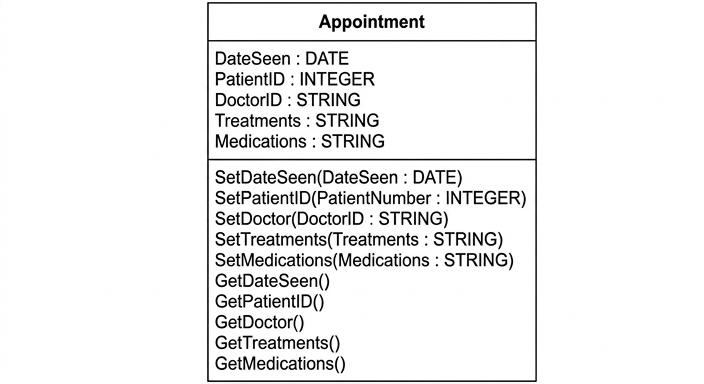
See class diagram
Background Concept
In object-oriented programming, a class is a template for creating objects. A class diagram shows the structure of that class: its attributes and its methods.
- Attributes are the data items stored in each object.
- Methods are the operations the object can perform.
- A common pattern is to use setter methods such as
SetDateSeen(...)to assign values to attributes. - Another common pattern is to use getter methods such as
GetDateSeen()to return values stored in the object.
In questions like this, you choose attribute names and data types that match the scenario, then add methods that fit the stated purpose.
Understanding the Question
The class Appointment already contains three attributes:
DateSeen : DATETreatments : STRINGMedications : STRING
The question says an appointment must also identify:
- the patient, using a unique 8-digit number, so this should be an
INTEGER - the doctor, identified by name, so this should be a
STRING
It also asks for methods to:
- assign date seen
- assign treatments given
- assign medications prescribed
- return the date seen
- return the patient identifier
- return the doctor identifier
Two setter methods are already given in the diagram:
SetPatientID(PatientNumber : INTEGER)SetDoctor(DoctorID : STRING)
So the blank method lines need to be filled with the remaining setters and getters.
Approach
A good way to tackle this is:
- Add the two missing attributes first.
- Match each required "assign" operation with a setter method.
- Match each required "return" operation with a getter method.
- Keep the style consistent with the class diagram already shown.
Because the question already gives method names beginning with Set... and getter names like GetTreatments(), we should continue using that pattern.
Step-by-Step Reasoning
First, the patient identifier:
- The patient is identified by an 8-digit number.
- A number of this kind is best stored as
INTEGERin this context. - So a suitable attribute is
PatientID : INTEGER.
Second, the doctor identifier:
- The doctor is identified by name.
- A name is text, so the data type should be
STRING. - So a suitable attribute is
DoctorID : STRING.
Now the methods.
The diagram already includes:
SetPatientID(PatientNumber : INTEGER)SetDoctor(DoctorID : STRING)GetTreatments()GetMedications()
The question also requires methods to assign:
- date seen
- treatments given
- medications prescribed
So we add three setter methods:
SetDateSeen(DateSeen : DATE)SetTreatments(Treatments : STRING)SetMedications(Medications : STRING)
Then it requires methods to return:
- date seen
- patient attribute
- doctor attribute
So we add three getter methods:
GetDateSeen()GetPatientID()GetDoctor()
That fills all the blank method lines exactly.
Key Takeaways
- A class diagram lists both attributes and methods.
- Choose data types from the meaning of the data: numeric identifiers often use
INTEGER, names useSTRING, dates useDATE. - Setter methods assign values to attributes.
- Getter methods return values from attributes.
- Keep naming style consistent with the given class design.
Common Mistakes
- Using the wrong data type for the doctor, for example
INTEGERinstead ofSTRING. - Forgetting that the question asks for both assign methods and return methods.
- Adding methods for
TreatmentsandMedicationsreturns even thoughGetTreatments()andGetMedications()are already provided. - Writing method bodies instead of just completing the class diagram entries.
- Omitting one of the required getter methods, especially
GetPatientID()orGetDoctor().
Things to Be Careful About
- Follow the style already used in the diagram.
- Do not change the given methods; only fill the blanks.
- Make sure each attribute has a matching sensible data type.
- Keep method names consistent with the given
Set...andGet...naming pattern. - In a diagram question, the examiner is usually crediting the class structure, not full program code.
Identify the object-oriented programming (OOP) feature whose function includes restricting external access to the data.
.....................................................................................................................................
Answer
- Encapsulation
Encapsulation
Background Concept
Encapsulation is an object-oriented programming feature where data and the methods that operate on that data are grouped together inside a class. A major purpose of encapsulation is to control access to the object's internal data.
Instead of allowing other parts of the program to change attributes directly, the class can provide methods such as setters and getters. This helps protect the data and ensures it is used correctly.
Understanding the Question
The question asks for the OOP feature whose function includes restricting external access to the data.
That wording is the key clue. The feature associated with hiding or protecting data inside the object is encapsulation.
Approach
This is a definition-recognition question. Match the phrase "restricting external access to the data" with the correct OOP term.
- Encapsulation = data hiding / controlled access
- Inheritance = one class taking features from another
- Polymorphism = same interface, different behaviour
So the correct term is encapsulation.
Step-by-Step Reasoning
The question does not ask for a description, only for identification.
- "restricting external access"
- "to the data"
This points directly to the idea that a class protects its internal state from direct outside interference.
That OOP feature is encapsulation.
Key Takeaways
- Encapsulation is the OOP feature linked to data hiding and controlled access.
- If a question mentions protecting data from direct external access, think encapsulation.
Common Mistakes
- Writing inheritance because it is another common OOP term, even though it is about deriving one class from another.
- Writing polymorphism, which is about different implementations sharing a common interface.
- Giving a description when the question only asks to identify the feature.
Things to Be Careful About
- Read the command word: "Identify" means the name only is enough.
- Do not confuse encapsulation with access modifiers themselves; the feature being tested is the broader OOP concept of encapsulation.
Describe what is meant by the OOP feature inheritance.
...........................................................................................................................................
...........................................................................................................................................
...........................................................................................................................................
.....................................................................................................................................
Answer
- Inheritance is when a new class is created from an existing class.
- The new class inherits the attributes and methods of the existing class and can add or override its own features.
A new class is created from an existing class and inherits its attributes and methods.
Background Concept
Inheritance is an object-oriented programming feature that allows one class to be based on another class.
- The original class is often called the base class, parent class or superclass.
- The new class is often called the derived class, child class or subclass.
The child class automatically gets the attributes and methods of the parent class. It can then:
- use them as they are
- add new attributes or methods
- override some inherited methods with specialised behaviour
Inheritance is useful because it supports code reuse and helps model real-world "is a" relationships.
Understanding the Question
The question asks for a description of what is meant by the OOP feature inheritance.
So the answer must do more than name it. It should explain:
- that one class is created from another existing class
- that the new class receives the existing class's attributes and methods
For full marks, both ideas should be present.
Approach
To describe inheritance clearly, include two core points:
- the relationship between an existing class and a new class
- what is passed from the existing class to the new class
A concise description is enough here; no example code is required.
Step-by-Step Reasoning
Start with the structural idea:
- Inheritance means creating a class using another class as a starting point.
Then explain what the new class gains:
- The child class inherits the parent class's data and behaviour.
- In practice, that means inheriting attributes and methods.
Finally, add the usual extension idea:
- The new class can still be specialised by adding or overriding features.
That gives a complete exam-style explanation.
Key Takeaways
- Inheritance links a new class to an existing class.
- The new class receives the parent's attributes and methods.
- It supports reuse and extension of code.
Common Mistakes
- Saying only that a class "copies" another class. Inheritance is not just copying; it establishes a parent-child relationship.
- Describing encapsulation instead, such as hiding data from external access.
- Mentioning only methods or only attributes, when inheritance can apply to both.
- Giving a real-world example without actually defining the concept.
Things to Be Careful About
- Use correct OOP vocabulary if possible: parent/base/superclass and child/derived/subclass.
- Make sure the explanation includes the idea of inheriting attributes and methods.
- Avoid vague statements like "classes are linked together" unless you explain how.
The pseudocode algorithm checks whether a location in a stock file StockList.dat is empty or not. The location is given by the user. If the location is empty, a suitable message is displayed, otherwise the item stored at that location is displayed.
Complete this file-handling pseudocode algorithm.
DECLARE Location : INTEGER
DECLARE Item : STRING
DECLARE Continue : BOOLEAN
DECLARE Answer : CHAR
Continue ← TRUE

OPENFILE .......................................................................................................................................
WHILE Continue
    OUTPUT "Enter a location between 1 and 500: "
    INPUT Location
    ....................................................................................................................................................
    GETRECORD ..............................................................................................................................
    IF Item = "" THEN
        OUTPUT "This record is missing."
    ELSE
        OUTPUT "The item in stock is ", ........................................................................
    ENDIF
    OUTPUT "Another location (Y or N)?"
    INPUT Answer
    IF Answer <> 'Y' THEN
        Continue ← FALSE
    ENDIF
ENDWHILE
..........................................................................................................................................................
OUTPUT "End of program"
Answer
DECLARE Location : INTEGER
DECLARE Item : STRING
DECLARE Continue : BOOLEAN
DECLARE Answer : CHAR
Continue ← TRUE

OPENFILE "StockList.dat" FOR RANDOM
WHILE Continue
    OUTPUT "Enter a location between 1 and 500: "
    INPUT Location
    SEEK "StockList.dat", Location
    GETRECORD "StockList.dat", Item
    IF Item = "" THEN
        OUTPUT "This record is missing."
    ELSE
        OUTPUT "The item in stock is ", Item
    ENDIF
    OUTPUT "Another location (Y or N)?"
    INPUT Answer
    IF Answer <> 'Y' THEN
        Continue ← FALSE
    ENDIF
ENDWHILE
CLOSEFILE "StockList.dat"
OUTPUT "End of program"
See completed pseudocode
Background Concept
A random-access file lets a program jump straight to a required record instead of reading every earlier record first. This is different from serial or sequential access, where records are processed in order.
In CIE-style pseudocode, the usual pattern for random-file access is:
OPENFILEthe file in random mode.- Use
SEEKto move the file pointer to the required record position. - Use
GETRECORDto read the record stored there. - Test the value that was read.
CLOSEFILEwhen finished.
Here, an empty location is represented by an empty string "". So after reading the chosen record, the program checks whether Item = "".
Understanding the Question
The question gives most of the algorithm already and asks you to fill in the missing file-handling statements.
The program:
- repeatedly asks the user for a location from 1 to 500
- checks that position in
StockList.dat - shows a message if the record is empty
- otherwise shows the item stored there
- asks whether the user wants to check another location
The missing parts are the file operations and the missing output value. Since the question says the user gives a location in a file and the program checks that location directly, this is a random-access file task.
Approach
The right approach is to follow the standard random-file sequence:
- open the file for random access
- each time the user enters a location, move to that exact record with
SEEK - read that record with
GETRECORD - if the record read is empty, output the missing-record message
- otherwise output the value stored in
Item - after the loop finishes, close the file
This is why READFILE would not be suitable here: READFILE is for sequential reading, but the question needs direct access to a chosen record number.
Step-by-Step Reasoning
The given declarations and loop-control code are already correct:
Locationstores the record number entered by the user.Itemstores the data read from the file.Continuecontrols the loop.Answerstores whether the user wants another search.
The first blank is the file opening statement:
OPENFILE "StockList.dat" FOR RANDOM
This must be random access, because the program needs to jump to a location chosen by the user.
Inside the loop, after INPUT Location, the next missing step is to move to that record:
SEEK "StockList.dat", Location
Without SEEK, the program would not know which record to read.
Then the program must actually read the record from that position:
GETRECORD "StockList.dat", Item
This places the contents of that file location into Item.
The IF statement is already mostly complete:
IF Item = "" THEN
    OUTPUT "This record is missing."
ELSE
    OUTPUT "The item in stock is ", Item
ENDIF
If Item is the empty string, the location contains no stored item. Otherwise, the item itself must be displayed, so the missing expression is Item.
At the end of the loop, the existing code asks whether to continue. If the user does not enter 'Y', Continue becomes FALSE and the loop ends.
After the loop, the final missing file-handling statement is:
CLOSEFILE "StockList.dat"
This is important because the file should be closed once all processing is finished.
So the completed algorithm has the correct random-access flow:
- open file
- ask for location
- seek to location
- read record
- test for empty or not
- repeat if needed
- close file
Key Takeaways
- Use
OPENFILE ... FOR RANDOMwhen direct record access is needed. - Use
SEEKbeforeGETRECORDto move to the required location. - An empty string
""is a common way to represent an unused record. GETRECORDis the random-access read operation, notREADFILE.- Always close the file after the loop ends.
Common Mistakes
- Using
READFILEinstead ofGETRECORD.READFILEimplies sequential reading, not direct access to a chosen record. - Forgetting
FOR RANDOMin theOPENFILEstatement. That would not match the file access method required. - Missing out
SEEKbefore reading. Then the program would not move to the user-selected record. - Outputting
Locationinstead ofItemin theELSEbranch. The question asks for the stored item, not the record number. - Forgetting to close the file at the end.
Things to Be Careful About
- Keep the commands in the correct order: open, seek, get record, close.
- The condition checks for an empty string exactly:
Item = "". - The loop continues only while
ContinueremainsTRUE. - Use the exact variable names already given in the question, especially
LocationandItem. - In exam pseudocode, use the CIE forms
SEEK,GETRECORD,OPENFILE, andCLOSEFILE, not language-specific file commands.