Computer Science 9618/43 — October/November 2024
Cambridge A-Level · Practical · worked solutions for every part, with the mark scheme
Topics Programming Paradigms (Procedural and Object-oriented) · File Processing and Exception Handling · Algorithms and Abstract Data Types
A program sorts string data using different sorting methods.
One source file is used to answer Question 1. The file is called Data.txt
The text file Data.txt stores string data items. Each data item is on a new line in the text file.
The function ReadData():
- has a local array of strings that can store 45 items
- reads each line of data and stores it in the array
- returns the array.
Write program code for the function ReadData().
Save your program as
Question1_N24.Copy and paste the program code into part 1(a) in the evidence document.
Answer
def ReadData():
    Data = [""] * 45
    Count = 0
    with open("Data.txt", "r") as File:
        for Line in File:
            Data[Count] = Line.strip()
            Count += 1
    return Data
See program code
Background Concept
A text file stores data as lines of characters. In Python, reading a file line by line is a standard way to process sequential data. For this task, each line in Data.txt contains one string, so the program must read one line, remove the end-of-line character, and store that value into the next free array position.
In Paper 4, an "array" in Python is usually represented using a list. If the question says the array can store 45 items, a common exam approach is to create a list with 45 elements already available, then fill them one by one.
Understanding the Question
The question says that ReadData() must:
- have a local array of strings with space for 45 items
- read each line from
Data.txt - store each line into the array
- return the array
So this is not just file reading on its own. The function must both create the local storage and return it for later use by the main program.
Approach
The simplest method is:
- Create a list of 45 empty strings.
- Open
Data.txtfor reading. - Use a counter to track the current array position.
- Read each line from the file.
- Remove the newline character using
.strip(). - Store the cleaned string into the list.
- Increase the counter.
- Return the completed list.
Using with open(...) is a good Python exam technique because it automatically closes the file when reading finishes.
Step-by-Step Reasoning
Data = [""] * 45 creates a local list with 45 positions. This matches the requirement that the function has a local array able to store 45 items.
Count = 0 sets up the first index. Python lists are 0-indexed, so the first item goes into position 0, then 1, then 2, and so on.
with open("Data.txt", "r") as File: opens the text file for reading. The file object is named File so that each line can be taken from it.
for Line in File: reads the file sequentially, one line at a time. Since each data item is on a new line, this matches the structure of the source file exactly.
Data[Count] = Line.strip() stores the line into the array position indicated by Count. The .strip() removes the newline at the end of each line, so only the colour word is stored.
Count += 1 moves to the next array position for the next item.
Finally, return Data sends the populated array back to wherever ReadData() was called.
Because Data.txt contains 45 lines, all 45 array positions will be filled.
Key Takeaways
- Sequential text files are commonly processed one line at a time.
- A Python list is used as the array structure in Paper 4.
- File data often needs cleaning with
.strip()before storage. - A function can create local data, fill it, and return it.
Common Mistakes
- Forgetting to remove the newline character, which would cause unwanted line breaks or failed comparisons later.
- Using
append()instead of creating the required local array of 45 items when the question explicitly asks for array storage. - Not returning the array at the end of the function.
- Starting the index at 1 in Python, which would leave the first position unused and risk an out-of-range error at the end.
Things to Be Careful About
- The file name must be exactly
Data.txt. - Python indexing starts at 0, not 1.
- The array must be local to
ReadData(). - The function should return the array, not print it.
- The newline character from each file line must not be stored as part of the string.
The function FormatArray() takes an array of strings as a parameter. It concatenates the contents of the array into one string with a space between each array element. The function returns the concatenated string.
Write program code for FormatArray().
Save your program.
Copy and paste the program code into part 1(b)(i) in the evidence document.
Answer
def FormatArray(Data):
    OutputString = ""
    for Index in range(len(Data)):
        OutputString = OutputString + Data[Index]
        if Index < len(Data) - 1:
            OutputString = OutputString + " "
    return OutputString
See program code
Background Concept
String concatenation means joining strings together into one larger string. When an array of strings must be displayed as one line, a common technique is to loop through the array and add each element to an accumulator string.
If the question says there must be a space between each array element, then the program must also insert separators in the correct places. That usually means adding a space after each item except the last one.
Understanding the Question
FormatArray() takes an array of strings as a parameter and must return one concatenated string. The output should contain all array elements, separated by single spaces.
So the function is not printing anything itself. Its job is only to build and return the string.
Approach
Use an accumulator variable such as OutputString.
Then:
- Start it as an empty string.
- Loop through every position in the array.
- Add the current string to
OutputString. - If this is not the last element, add a space.
- Return the finished string.
This avoids leaving an extra trailing space at the end.
Step-by-Step Reasoning
def FormatArray(Data): defines a function that receives the array as its parameter.
OutputString = "" creates the accumulator. At the beginning, nothing has been added yet.
for Index in range(len(Data)): loops through all valid positions in the array. If the array has 45 items, this runs from 0 to 44.
OutputString = OutputString + Data[Index] adds the current element.
The if statement checks whether the current element is the last one. If Index < len(Data) - 1, there are still more items to come, so a space should be added.
If it is the final element, no space is added, which keeps the result neat.
Finally, return OutputString sends the completed string back to the caller.
Key Takeaways
- Use an accumulator string when building output piece by piece.
- Loop through the whole array to include every element.
- Add separators carefully so the output format is correct.
- Functions can process data and return a result without printing directly.
Common Mistakes
- Printing inside the function instead of returning the string.
- Adding a space after the final item, which gives a trailing space.
- Forgetting to initialise the accumulator to an empty string.
- Looping over the wrong range and missing the last element.
Things to Be Careful About
- The function parameter should be the array to format.
- The returned value must be a single string.
- Make sure the separator is exactly one space.
- In Python,
len(Data) - 1is the index of the last element.
The main program:
- calls
ReadData()and stores the returned array - calls
FormatArray()with the returned array and outputs the returned string.
Write program code for the main program.
Save your program.
Copy and paste the program code into part 1(b)(ii) in the evidence document.
Answer
ArrayData = ReadData()
print(FormatArray(ArrayData))
See program code
Background Concept
The main program usually controls the overall sequence of a solution. In a structured program, separate functions each do one job, and the main program coordinates them by calling the right functions in the right order.
A function call can return a value. That returned value can be stored in a variable and then passed into another function.
Understanding the Question
This part says the main program must:
- call
ReadData()and store the returned array - call
FormatArray()with that array - output the returned string
So the required logic is a simple chain: file data is read first, then formatted, then displayed.
Approach
Use one variable to hold the array returned by ReadData(). Then pass that variable into FormatArray(). Since FormatArray() returns a string, print that returned value.
This is a standard example of functional decomposition: one function reads, one function formats, the main program controls the order.
Step-by-Step Reasoning
ArrayData = ReadData() calls the file-reading function. Because ReadData() returns the array, the result must be stored in a variable. Here that variable is ArrayData.
print(FormatArray(ArrayData)) does two things:
- calls
FormatArray(ArrayData)to turn the array into a single string - prints the returned string
This is valid because FormatArray() produces exactly the kind of value that print() can display.
An equally clear alternative would be to store the formatted string in another variable first and then print it, but the direct call is shorter and still correct.
Key Takeaways
- The main program coordinates the separate functions.
- Returned values can be stored and then reused.
- A program often follows the sequence input → process → output.
Common Mistakes
- Calling
ReadData()without storing the returned array. - Printing the array directly instead of formatting it first.
- Forgetting that
FormatArray()needs the array passed in as a parameter. - Writing the function definitions again instead of just the main-program code.
Things to Be Careful About
ReadData()must be called beforeFormatArray(), because the array is needed first.- The value printed should be the string returned by
FormatArray(), not the raw list structure. - Use the same variable consistently when passing data between function calls.
Test your program.
Take a screenshot of the output.
Save your program.
Copy and paste the screenshot into part 1(b)(iii) in the evidence document.
Answer
Using Data.txt in the same folder as the program, the expected output is:
beige green scarlet silver bronze slate yellow orange jade lavender magnolia magenta turquoise black grey russet maroon mango mint purple red pink white cream navy olive brown violet cyan amber aqua azure copper fawn fuschia gold indigo ivory mauve mulberry peach periwinkle plum rose sage
beige green scarlet silver bronze slate yellow orange jade lavender magnolia magenta turquoise black grey russet maroon mango mint purple red pink white cream navy olive brown violet cyan amber aqua azure copper fawn fuschia gold indigo ivory mauve mulberry peach periwinkle plum rose sage
Background Concept
A test run checks whether program output matches the data processing you intended. For a file-processing question, the expected output depends directly on the contents of the source file and the behaviour of the functions already written.
Here, ReadData() reads each line into the array in the same order as the file, and FormatArray() joins the items with spaces.
Understanding the Question
This part asks you to test the program and capture the output. Since the program from part (b)(ii) reads the file and then formats the array without sorting it, the output must be the contents of Data.txt in the original file order, with spaces instead of line breaks.
Approach
Take the 45 lines from Data.txt, keep them in the same sequence, and place a single space between each item. That gives the exact console output that should appear when the program is run successfully.
Step-by-Step Reasoning
ReadData() reads the first line beige, then green, then scarlet, and continues until the last line sage.
Because the file is read sequentially, no reordering happens.
FormatArray() then concatenates these values into one string. Instead of each word appearing on a new line, a space is inserted between neighbouring words.
So the output is a single long line containing all 45 colour names in the original order from the file.
Key Takeaways
- Test output must reflect both the input file contents and the exact program logic.
- If no sorting or filtering occurs, the order remains exactly the same as the file.
- Formatting functions change presentation, not the underlying data order.
Common Mistakes
- Showing the sorted output here instead of the unsorted output from part (b).
- Leaving line breaks between words instead of spaces.
- Missing one or more items from the middle of the file.
- Reordering the items accidentally.
Things to Be Careful About
- This part depends on the version of the main program from part (b)(ii), not the amended version from part (d)(ii).
- The expected output is one line of space-separated text.
- The word
fuschiashould be copied exactly as it appears in the provided file.
The function CompareStrings():
- takes two strings as parameters
- compares each string, one character at a time, to identify which string comes first alphabetically. If the first two characters are the same, the second character of each string is compared. This continues until the two characters are different.
The function:
- returns 1 if the first parameter comes before the second alphabetically
- returns 2 if the second parameter comes before the first alphabetically.
Write program code for CompareStrings().
Assume that all strings are in lower case.
Assume that a difference between two strings will always be identified before the end of one string is reached.
Do not use an in-built string comparison function.
The strings must be compared one character at a time.
Save your program.
Copy and paste the program code into part 1(c) in the evidence document.
Answer
def CompareStrings(String1, String2):
    Position = 0
    while String1[Position] == String2[Position]:
        Position += 1
    if ord(String1[Position]) < ord(String2[Position]):
        return 1
    else:
        return 2
See program code
Background Concept
Alphabetical comparison works by looking from left to right. The first position where two strings differ determines which one comes first. For example, when comparing black and bronze, the first letters are both b, so you move on. The second letters are l and r, and because l comes before r, black comes first alphabetically.
This is the principle used inside many sorting algorithms. The key rule is: compare one character at a time until a difference is found.
Understanding the Question
The function CompareStrings() must:
- take two strings as parameters
- compare them character by character
- return
1if the first string comes first alphabetically - return
2if the second string comes first alphabetically
Important clues in the wording are:
- do not use an in-built string comparison function
- compare one character at a time
- assume both strings are lower case
- assume a difference will be found before the end of either string
Those assumptions simplify the code because no extra end-of-string handling is needed.
Approach
Use an index variable starting at 0. While the characters at the current position are equal, move to the next position. As soon as the characters differ, compare them and return the correct code.
Using ord() makes the comparison explicit by converting each character to its code value.
Step-by-Step Reasoning
Position = 0 starts the comparison at the first character.
while String1[Position] == String2[Position]: keeps moving forward while the characters match. This covers cases where the strings share the same prefix, such as magenta and magnolia.
Position += 1 advances to the next character each time a match is found.
Eventually, the loop reaches the first position where the characters are different.
if ord(String1[Position]) < ord(String2[Position]): checks which differing character comes first alphabetically. Since the strings are lower case, normal character-code ordering matches alphabetical ordering.
If the first string's character is smaller, return 1.
Otherwise, return 2.
This exactly matches the required return codes for later use in bubble sort.
Key Takeaways
- Alphabetical order is decided by the first differing character.
- Character-by-character comparison is a standard string-processing technique.
- Returning codes such as
1and2can make a comparison function easy to reuse inside sorting code.
Common Mistakes
- Comparing the whole strings directly, which the question forbids.
- Returning
TrueandFalseinstead of the required values1and2. - Starting at the wrong index in Python.
- Forgetting to move to the next character inside the loop, causing an infinite loop.
Things to Be Careful About
- The assumptions mean you do not need to handle one string ending before the other.
- The function must compare characters one at a time, not call a built-in sort or comparison method.
- The return values must be exactly
1and2, because later code depends on those values.
The function Bubble() takes an array of strings as a parameter and sorts the data into ascending alphabetical order, using a bubble sort. The bubble sort uses CompareStrings() to compare each string.
The function returns the sorted list.
Write program code for Bubble().
Save your program.
Copy and paste the program code into part 1(d)(i) in the evidence document.
Answer
def Bubble(Data):
    for Pass in range(0, len(Data) - 1):
        for Index in range(0, len(Data) - 1 - Pass):
            if CompareStrings(Data[Index], Data[Index + 1]) == 2:
                Temp = Data[Index]
                Data[Index] = Data[Index + 1]
                Data[Index + 1] = Temp
    return Data
See program code
Background Concept
Bubble sort repeatedly passes through a list, comparing adjacent items. If a pair is in the wrong order, the two items are swapped. After one full pass, the largest remaining item has "bubbled" to the end. Repeating this process eventually sorts the whole list.
In this question, built-in string comparison is replaced by the custom function CompareStrings(), which decides whether one string should come before another.
Understanding the Question
Bubble() must:
- take an array of strings as a parameter
- sort the array into ascending alphabetical order
- use bubble sort
- use
CompareStrings()for the comparisons - return the sorted list
So the task is not just "sort the list". It must be specifically bubble sort, and it must specifically call the custom comparison function.
Approach
A standard bubble sort needs two loops:
- an outer loop for the number of passes
- an inner loop to compare neighbouring elements within that pass
On each comparison, call CompareStrings().
- If it returns
1, the pair is already in the correct order. - If it returns
2, the second item should come first, so the two items must be swapped.
Step-by-Step Reasoning
for Pass in range(0, len(Data) - 1): controls how many times the algorithm goes through the list. For 45 items, 44 passes are sufficient.
for Index in range(0, len(Data) - 1 - Pass): compares adjacent pairs. The - Pass part is an optimisation built into bubble sort: after each pass, the final section is already sorted, so it does not need to be checked again.
if CompareStrings(Data[Index], Data[Index + 1]) == 2: asks whether the second item should come before the first. If so, they are in the wrong order.
The three assignment statements with Temp perform the swap safely:
- save the first item in
Temp - move the second item into the first position
- move
Tempinto the second position
After all passes are complete, return Data returns the array, now sorted in ascending alphabetical order.
Key Takeaways
- Bubble sort works by repeated adjacent comparisons and swaps.
- Nested loops are the normal structure for bubble sort.
- A custom comparison function can be plugged into a standard sorting algorithm.
Common Mistakes
- Looping too far in the inner loop and trying to access
Data[Index + 1]past the end of the list. - Swapping when
CompareStrings()returns1instead of2. - Forgetting the temporary variable during the swap, which would overwrite a value.
- Returning nothing at the end.
Things to Be Careful About
- The sort must be ascending alphabetical order.
CompareStrings()returns codes, not Boolean values.- The inner loop limit must stop before the last compared pair goes out of range.
- Returning the sorted array makes it easy for the main program to store and print it.
Write program code to amend the main program to:
- call
Bubble()with the unsorted array as a parameter - call
FormatArray()with the sorted array and output the returned string.
Save your program.
Copy and paste the program code into part 1(d)(ii) in the evidence document.
Answer
ArrayData = ReadData()
SortedData = Bubble(ArrayData)
print(FormatArray(SortedData))
See program code
Background Concept
Once separate functions exist, the main program can be changed easily by altering the order of calls or by inserting an extra processing step. This is one advantage of modular programming: adding sorting does not require rewriting the file-reading or formatting functions.
Understanding the Question
This part says to amend the main program so that it:
- calls
Bubble()with the unsorted array - calls
FormatArray()with the sorted array - outputs the returned string
So compared with part (b)(ii), the new step is sorting the array before formatting and printing it.
Approach
Keep the initial file read. Then pass the unsorted data into Bubble() and store the sorted result in a second variable. Finally, format that sorted array and print it.
Step-by-Step Reasoning
ArrayData = ReadData() reads the original file contents into an array.
SortedData = Bubble(ArrayData) sends that array into the bubble sort function. The returned array is stored in SortedData so the main program has access to the sorted version.
print(FormatArray(SortedData)) formats the sorted array into one space-separated string and prints it.
This preserves a clear sequence:
- read data
- sort data
- format data
- output data
Key Takeaways
- Modular code is easy to extend by inserting another function call.
- It is good practice to store intermediate results in clearly named variables.
- Sorting is a processing step inserted between input and output.
Common Mistakes
- Printing
ArrayDatainstead ofSortedData, which would show the unsorted data again. - Calling
FormatArray()before callingBubble(). - Forgetting to store the value returned by
Bubble(). - Overwriting the wrong variable and then printing the unsorted version.
Things to Be Careful About
- The output now depends on the sorted array, not the original one.
- The function names and variable usage must stay consistent with the earlier parts.
- The amended main program should still begin by reading
Data.txt.
Test your program.
Take a screenshot of the output.
Save your program.
Copy and paste the screenshot into part 1(d)(iii) in the evidence document.
Answer
Using Data.txt in the same folder as the program, the expected output is:
amber aqua azure beige black bronze brown copper cream cyan fawn fuschia gold green grey indigo ivory jade lavender magenta magnolia mango maroon mauve mint mulberry navy olive orange peach periwinkle pink plum purple red rose russet sage scarlet silver slate turquoise violet white yellow
amber aqua azure beige black bronze brown copper cream cyan fawn fuschia gold green grey indigo ivory jade lavender magenta magnolia mango maroon mauve mint mulberry navy olive orange peach periwinkle pink plum purple red rose russet sage scarlet silver slate turquoise violet white yellow
Background Concept
The output of a sorting program is determined by the sorting algorithm and the comparison rule it uses. Here, bubble sort uses CompareStrings() to decide alphabetical order, so the final list must be the file contents rearranged from A to Z.
Understanding the Question
This test is for the amended main program from part (d)(ii), not the earlier unsorted version. That means the output should be the sorted array, formatted into one line with spaces between the words.
Approach
Take all 45 strings from Data.txt, order them alphabetically according to the character-by-character comparison, then write them as one space-separated line.
Step-by-Step Reasoning
The first items alphabetically are those beginning with a: amber, aqua, azure.
Then come the b items: beige, black, bronze, brown.
This continues through the full list until the final items violet, white, yellow.
A few comparisons need care:
magentacomes beforemagnoliabecause the first difference isebeforen.mangocomes beforemaroonbecausencomes beforerat the third differing position.pinkcomes beforeplumbecauseicomes beforel.
After sorting, FormatArray() places a single space between each adjacent item, so the final output is one line of text.
Key Takeaways
- A sorted output must reflect the exact comparison rule used by the program.
- Alphabetical order is determined left to right, character by character.
- Testing a sort should confirm both correct ordering and correct formatting.
Common Mistakes
- Giving the unsorted file order instead of the sorted order.
- Missing an item during the rewrite of the output line.
- Placing two close words in the wrong order, such as
magnoliabeforemagenta. - Using line breaks instead of spaces.
Things to Be Careful About
- This expected output depends on the amended main program that calls
Bubble(). - Keep the spelling exactly as it appears in the file, including
fuschia. - The result must be ascending alphabetical order, not reverse order.
A computer program is designed to simulate horses doing show jumping. In show jumping, horses jump over obstacles called fences. A horse successfully jumps a fence if it does not knock the fence down.
The program is written using Object-Oriented Programming (OOP).
The class Horse stores data about the horses.
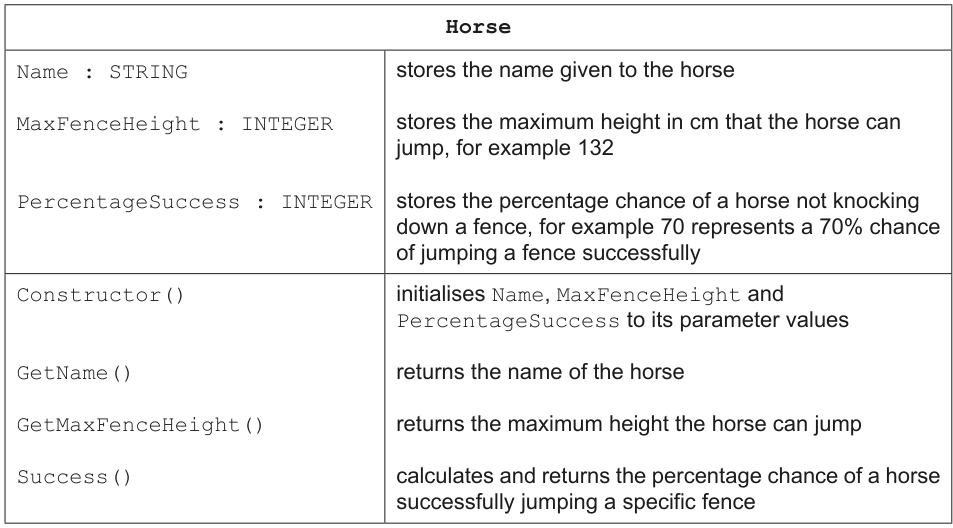
Write program code to declare the class Horse and its constructor.
Do not declare the other methods.
Use your programming language's appropriate constructor.
All attributes must be private. If you are writing in Python, include attribute declarations using comments.
Save your program as
Question2_N24.Copy and paste the program code into part 2(a)(i) in the evidence document.
Answer
class Horse:
    # __Name: str
    # __MaxFenceHeight: int
    # __PercentageSuccess: int

    def __init__(self, Name, MaxFenceHeight, PercentageSuccess):
        self.__Name = Name
        self.__MaxFenceHeight = MaxFenceHeight
        self.__PercentageSuccess = PercentageSuccess
See program code
Background Concept
In object-oriented programming, a class is a blueprint for creating objects. The class defines the data each object stores as attributes and the operations it can perform as methods. A constructor is the special method used when a new object is created. Its job is to initialise the object's attributes with the values passed in.
This question also requires the attributes to be private. In Python, the usual exam-accepted way to show this is to use double underscores at the start of the attribute names, for example __Name. This shows that the data should only be accessed through the class's own methods.
Understanding the Question
You are given the design of a Horse class. It must store three pieces of data:
- the horse's name
- the maximum fence height it can jump
- its percentage success rate
The task only asks for the class declaration and the constructor. It explicitly says not to declare the other methods yet. In Python, it also asks for attribute declarations using comments, because Python does not have separate formal attribute declarations in the same way some other languages do.
Approach
The simplest approach is:
- Declare the class
Horse. - Add comment lines showing the three private attributes.
- Write the constructor
__init__with three parameters. - Store each parameter in the matching private attribute using
self.
That fully satisfies the class-and-constructor requirement without adding methods that were not asked for.
Step-by-Step Reasoning
class Horse: starts the class definition.
The comment lines:
# __Name: str# __MaxFenceHeight: int# __PercentageSuccess: int
show the expected attributes and their types. The double underscore indicates the attributes are private.
The constructor in Python is def __init__(...). It must include self as the first parameter because it is an instance method. Then the three incoming values are listed as parameters:
NameMaxFenceHeightPercentageSuccess
Inside the constructor, each parameter is assigned to the corresponding attribute:
self.__Name = Nameself.__MaxFenceHeight = MaxFenceHeightself.__PercentageSuccess = PercentageSuccess
That means each time a Horse object is created, all three attributes are immediately set up correctly.
Key Takeaways
You should be able to:
- declare a class in Python
- write a constructor using
__init__ - initialise private attributes from parameters
- use comment-based attribute declarations when the exam asks for them in Python
Common Mistakes
A common mistake is to forget self in the constructor. Without self, the method is not written correctly for Python instance objects.
Another mistake is to write local variables such as Name = Name instead of assigning to attributes with self.__Name = Name. That does not store the values inside the object.
Some students also forget to make the attributes private and write self.Name instead of self.__Name. That would not meet the wording of the question.
Things to Be Careful About
Be careful to use the exact class name Horse and the exact attribute meanings from the class definition.
Do not add extra methods here, because the question specifically says not to declare the other methods.
If writing in Python, remember that the attribute declarations are shown as comments, not as separate formal variable declarations.
The get methods GetName() and GetMaxFenceHeight() each return the relevant attribute.
Write program code for the get methods.
Save your program.
Copy and paste the program code into part 2(a)(ii) in the evidence document.
Answer
    def GetName(self):
        return self.__Name

    def GetMaxFenceHeight(self):
        return self.__MaxFenceHeight
See program code
Background Concept
Getter methods are used in OOP to return the value of private attributes. This is part of encapsulation: the data is stored privately inside the object, and other parts of the program use methods to access it safely.
A getter normally does one simple thing: return the value of one attribute. It does not change the object.
Understanding the Question
The question says that GetName() and GetMaxFenceHeight() each return the relevant attribute. So you do not need to calculate anything. You only need to write two methods inside the Horse class:
- one to return the horse's name
- one to return the maximum fence height
Approach
Because the attributes are private, the methods must access them using self.__.... Each method needs:
- the method header
selfas the first parameter- a single
returnstatement for the correct attribute
Step-by-Step Reasoning
def GetName(self): defines a method called GetName for a Horse object.
return self.__Name sends the private attribute value back to the code that called the method.
Similarly, def GetMaxFenceHeight(self): defines the second getter.
return self.__MaxFenceHeight returns the private maximum jump height.
These methods do not need any extra parameters because they are simply reading data that is already stored inside the object.
Key Takeaways
You should recognise that getter methods:
- are short methods that return private data
- support encapsulation
- usually need no parameters other than
self
Common Mistakes
One mistake is returning the wrong attribute, such as returning __PercentageSuccess from GetMaxFenceHeight().
Another mistake is forgetting return. If you just write the attribute name, nothing is sent back to the caller.
Students also sometimes try to pass in Name or MaxFenceHeight as parameters, but getters do not need extra input values.
Things to Be Careful About
The method names must match the question exactly: GetName() and GetMaxFenceHeight().
Keep the code as methods inside the class, so they need to be indented accordingly in Python.
Use the private attribute names with double underscores, not public names.
The array Horses stores objects of type Horse.
The program has two horses:
- The horse named 'Beauty' can jump a maximum height of 150cm and has a success percentage rate of 72%.
- The horse named 'Jet' can jump a maximum height of 160cm and has a success percentage rate of 65%.
Write program code to:
- declare the array,
Horses, local to the main program with space for twoHorseobjects - store the two horses described in the array
- output the name of both
Horseobjects from the array.
Save your program.
Copy and paste the program code into part 2(b)(i) in the evidence document.
Answer
Horses = [None] * 2
Horses[0] = Horse("Beauty", 150, 72)
Horses[1] = Horse("Jet", 160, 65)

print(Horses[0].GetName())
print(Horses[1].GetName())
See program code
Background Concept
An array or list can store multiple items of the same kind. In this case, the array Horses stores objects of type Horse. Each array position holds a reference to one Horse object.
When using OOP, objects are created by calling the class constructor. After storing the objects in the array, their methods can be called using array indexing followed by dot notation.
Understanding the Question
You are told there are exactly two horses:
Beauty, maximum height150, success72Jet, maximum height160, success65
You must:
- declare the local array
Horseswith space for two objects - create and store both horse objects
- output the name of both horses from the array
So this is not just creating variables called Beauty and Jet; it specifically tests storing objects in an array.
Approach
A clear Python solution is:
- create a list of length 2 using
[None] * 2 - assign a new
Horseobject into index0 - assign a new
Horseobject into index1 - call
GetName()for each object and print the result
This matches the requirement for space for two objects and makes the array local to the main program.
Step-by-Step Reasoning
Horses = [None] * 2 creates a list with two spaces ready to hold object references.
Horses[0] = Horse("Beauty", 150, 72) creates a Horse object with the required values and stores it in the first position.
Horses[1] = Horse("Jet", 160, 65) does the same for the second horse.
To output the names from the array, the code uses the getter:
Horses[0].GetName()returnsBeautyHorses[1].GetName()returnsJet
The print statements then display these names.
Key Takeaways
You should be able to:
- create an array or list to store objects
- use constructors to create each object
- access an object from an array position
- call a method on that object
Common Mistakes
A common mistake is to store the horse data as strings or tuples instead of Horse objects. The question specifically says the array stores objects of type Horse.
Another mistake is to output the raw array element without calling GetName(). That may display an object reference rather than the horse's name.
Students also sometimes use only one array element by mistake, overwriting the first horse with the second.
Things to Be Careful About
Python list indexes start at 0, so the two valid positions are 0 and 1.
Use the constructor parameters in the correct order: name, maximum fence height, percentage success.
Make sure the output comes from the array, because that is what the question is testing.
Test your program.
Take a screenshot of the output.
Save your program.
Copy and paste the screenshot into part 2(b)(ii) in the evidence document.
Answer
Running the code from part 2(b)(i) produces:
Beauty
Jet
Beauty
Jet
Background Concept
Testing a small output section of a program means checking that the program displays the values you expect from the data stored in memory. In this case, the two Horse objects were created with known names, so the output should match those exact names.
For Paper 4 screenshot questions, the important thing is that the output shown matches what the program would actually display.
Understanding the Question
This part asks you to test the program from part 2(b)(i) and capture the output. The code created two horses and printed the name of each one using GetName().
So the required output is just the two horse names, one on each line.
Approach
Take the values used in part 2(b)(i):
- first horse name:
Beauty - second horse name:
Jet
Because each is printed on its own line, the expected output is two lines long.
Step-by-Step Reasoning
The first print statement outputs Horses[0].GetName(). The first object stored was Horse("Beauty", 150, 72), so that method returns Beauty.
The second print statement outputs Horses[1].GetName(). The second object stored was Horse("Jet", 160, 65), so that method returns Jet.
Therefore the screen should show:
BeautyJet
in that order.
Key Takeaways
You should be able to read a short piece of code and predict its console output exactly.
For object-based programs, test output often comes directly from constructor values and getter methods.
Common Mistakes
A common mistake is reversing the order and writing Jet before Beauty.
Another mistake is adding extra words such as Horse name: when the code itself only prints the raw names.
Things to Be Careful About
The screenshot should show what the program actually outputs, not what you think would be a nicer message.
If your own version used extra prompt or label text, your screenshot would include that, but for the model answer here the expected output is only the two names.
The class Fence stores data about the fences. Each fence has a height in cm and a risk number.
The risk is a whole number between 1 and 5 inclusive. A risk of 1 means the fence is the easiest type to jump. A risk of 5 means the fence is the hardest type to jump.
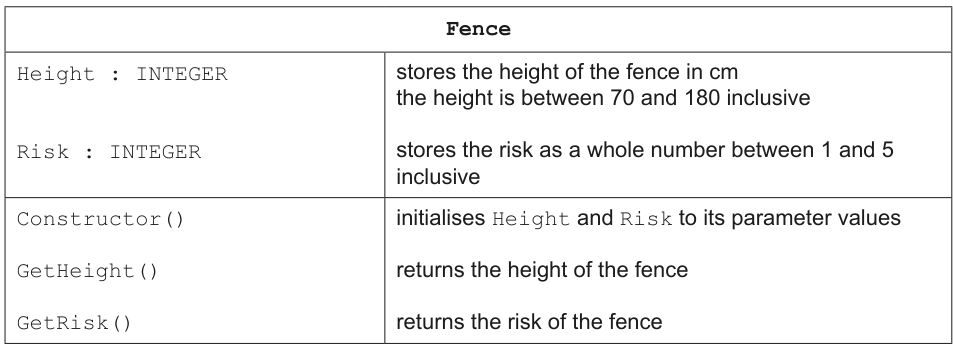
Write program code to declare the class Fence, its constructor and get methods.
Use your programming language's appropriate constructor.
All attributes must be private.
If you are writing in Python, include attribute declarations using comments.
Save your program.
Copy and paste the program code into part 2(c)(i) in the evidence document.
Answer
class Fence:
    # __Height: int
    # __Risk: int

    def __init__(self, Height, Risk):
        self.__Height = Height
        self.__Risk = Risk

    def GetHeight(self):
        return self.__Height

    def GetRisk(self):
        return self.__Risk
See program code
Background Concept
A class groups together related data and methods. Here, the Fence class is similar in structure to Horse: it stores private attributes and provides getter methods to read them.
Encapsulation is still important. Even though Height and Risk are simple values, the question requires them to be private, so the object should manage access through methods.
Understanding the Question
The Fence class must store:
Heightas an integer between 70 and 180 inclusiveRiskas an integer between 1 and 5 inclusive
This part only asks you to declare the class, constructor and get methods. Validation of the values is not part of this leaf; that happens in the next part before the object is created.
Approach
The class needs:
- a class header
class Fence: - comment declarations for the private attributes in Python
- a constructor
__init__that stores the parameter values GetHeight()andGetRisk()methods that return the correct private attributes
Step-by-Step Reasoning
class Fence: starts the new class.
The comments show the private attributes:
# __Height: int# __Risk: int
The constructor receives Height and Risk as parameters and stores them in:
self.__Heightself.__Risk
The getter GetHeight() returns self.__Height, and GetRisk() returns self.__Risk.
This means the rest of the program can ask a fence object for its height or risk without directly accessing the private data.
Key Takeaways
You should be able to build a simple class from a class-definition table:
- identify the attributes
- decide which are private
- write the constructor
- add getter methods where required
Common Mistakes
A common mistake is to try to validate the values inside this part even though the question for this leaf does not ask for that. It is not wrong in real programming, but it is extra and not the focus here.
Another mistake is mixing up the getters, for example returning __Risk from GetHeight().
Some students also forget to make the attributes private.
Things to Be Careful About
Use the exact method names GetHeight() and GetRisk().
Keep the constructor parameter names and attribute meanings clear so height is not accidentally stored in risk or vice versa.
Remember that the question asks for Python attribute declarations using comments.
The array Course stores four Fence objects. The user inputs the height and risk for each fence, and these are validated before each fence is created.
Amend the main program to:
- declare the local array
Course - take as input the data for four fences from the user
- loop the input until both the height and risk are valid for each fence
- create an instance of
Fencefor each of the four valid fences and store each instance in the array.
Save your program.
Copy and paste the program code into part 2(c)(ii) in the evidence document.
Answer
Course = [None] * 4
for Index in range(4):
    Valid = False
    while not Valid:
        Height = int(input())
        Risk = int(input())
        if 70 <= Height <= 180 and 1 <= Risk <= 5:
            Valid = True
    Course[Index] = Fence(Height, Risk)
See program code
Background Concept
Validation checks whether input data is sensible and within allowed limits before the program uses it. Here, both values must be valid before a Fence object is created. This is important because if invalid data is stored inside an object, later calculations may be wrong.
This task also uses an array of objects. Each valid pair of values is used to create one Fence object, and that object is stored in the Course array.
Understanding the Question
You need to amend the main program so that it stores four Fence objects in an array called Course. For each fence, the program must:
- input a height
- input a risk
- keep repeating input until both are valid
- only then create the
Fenceobject and store it in the array
The valid ranges are inherited from the class definition:
- height from 70 to 180 inclusive
- risk from 1 to 5 inclusive
Approach
A good pattern is:
- create
Coursewith space for four objects - use a
forloop to handle the four fences - inside that, use a
whileloop controlled by a Boolean flag such asValid - read
HeightandRisk - test both ranges in one condition
- if valid, stop the loop and create the object
This ensures every stored fence is valid.
Step-by-Step Reasoning
Course = [None] * 4 creates a list with four positions.
for Index in range(4): repeats exactly four times, once for each fence.
Valid = False sets up a flag so the program knows it still needs acceptable input.
while not Valid: keeps asking for data until the condition changes.
Inside the loop, the program reads the two values:
Height = int(input())Risk = int(input())
Then it checks both conditions together:
70 <= Height <= 1801 <= Risk <= 5
Using and means both must be true. Only then is Valid set to True.
After the validation loop finishes, the values are safe to use, so the code creates the object:
Course[Index] = Fence(Height, Risk)
That stores the newly created fence in the correct array position.
Key Takeaways
You should be able to combine:
- fixed-count loops
- validation loops
- range checking
- object creation
- array storage
This is a common Paper 4 pattern.
Common Mistakes
A very common mistake is using or instead of and in the validation test. That would allow one value to be invalid while the other is valid.
Another mistake is creating the Fence object before validation has finished. The question specifically says the data must be validated before each fence is created.
Students also sometimes forget that the ranges are inclusive, so 70, 180, 1 and 5 must all be accepted.
Things to Be Careful About
Make sure the while loop is inside the for loop, not the other way around.
Only store one object per array position.
If you later add prompts in your own code, that changes the console transcript, but it does not change the logic required here.
The chance of a horse jumping a fence without knocking it down is calculated as follows.
If the height of the fence is more than the maximum height a horse can jump, the success percentage is 20% of the horse's PercentageSuccess. The risk does not affect this value.
If the height of the fence is less than or equal to the maximum height a horse can jump, the risk gives a modifier value to multiply with the horse's PercentageSuccess.
The risk values and their modifiers are given in this table:
| Risk | Modifier |
|---|---|
| 5 | 0.6 |
| 4 | 0.7 |
| 3 | 0.8 |
| 2 | 0.9 |
| 1 | 1.0 |
For example:
- The horse Jet has
PercentageSuccessof 65 andMaxFenceHeightof 160. - A fence has a height of 140 and a risk of 3.
- The height of the fence is less than the horse's
MaxFenceHeight, therefore the risk is used. - The risk of 3 gives the modifier 0.8.
- The modifier 0.8 is multiplied by the horse's
PercentageSuccessof 65, which gives 52. - The chance of the horse successfully jumping this fence is 52%.
The method Success() in the Horse class:
- takes the height and risk of a fence as parameters
- calculates the percentage chance of success for that horse jumping the fence without knocking it down
- returns the calculated percentage chance of success as a real number.
Write program code for Success().
Save your program.
Copy and paste the program code into part 2(d) in the evidence document.
Answer
    def Success(self, Height, Risk):
        if Height > self.__MaxFenceHeight:
            return self.__PercentageSuccess * 0.2

        if Risk == 5:
            Modifier = 0.6
        elif Risk == 4:
            Modifier = 0.7
        elif Risk == 3:
            Modifier = 0.8
        elif Risk == 2:
            Modifier = 0.9
        else:
            Modifier = 1.0

        return self.__PercentageSuccess * Modifier
See program code
Background Concept
A method can calculate a value from both the object's stored data and extra parameters passed in when the method is called. Here, the method belongs to a Horse, so it uses the horse's own stored attributes such as __MaxFenceHeight and __PercentageSuccess, and combines them with the fence's Height and Risk.
This question is also about selection. Different rules apply depending on whether the fence is too high for the horse or not. If the fence is too high, the risk value is ignored completely.
Understanding the Question
The method Success() must take two parameters:
- the fence height
- the fence risk
It must return the horse's chance of success as a real number.
There are two cases:
- If the fence height is greater than the horse's maximum jump height, return
20%of the horse'sPercentageSuccess. - Otherwise, use the risk table to choose a modifier and multiply that by the horse's
PercentageSuccess.
The example with Jet and a risk of 3 shows exactly how the modifier system works.
Approach
The safest structure is:
- test the height first
- if the fence is too high, immediately return
self.__PercentageSuccess * 0.2 - otherwise use
if...elif...elseto convert the risk to a modifier - multiply the percentage success by that modifier and return the result
Testing height first is important because the question says risk does not affect the value when the fence is too high.
Step-by-Step Reasoning
def Success(self, Height, Risk): defines a method in the Horse class that receives the fence details.
The first condition is:
if Height > self.__MaxFenceHeight:
This checks whether the fence is beyond what the horse can normally jump. If so, the method returns:
self.__PercentageSuccess * 0.2
For example, if PercentageSuccess were 72, then the result would be 14.4.
If the height is not greater than the maximum, the method looks at the risk value.
The mapping is:
- risk 5 →
0.6 - risk 4 →
0.7 - risk 3 →
0.8 - risk 2 →
0.9 - risk 1 →
1.0
The code stores the correct modifier in Modifier, then returns:
self.__PercentageSuccess * Modifier
That produces the final percentage chance of success for that horse and fence.
Key Takeaways
You should be able to:
- write a method that uses both object data and parameter values
- implement two-case logic correctly
- convert a table of rules into code
- return a calculated real number
Common Mistakes
A common mistake is checking risk first and using it even when the fence is too high. The question explicitly says risk does not affect the value in that case.
Another mistake is using >= instead of > for the first test. If the fence height is exactly equal to the horse's maximum height, the risk-based rule should be used.
Students also sometimes use the wrong modifiers, especially mixing up 0.8 and 0.9.
Things to Be Careful About
Be careful that the method belongs inside the Horse class, so it must be indented as a class method in Python.
The returned value can be non-integer, such as 14.4, so do not force it to an integer.
Use the horse's stored __PercentageSuccess, not the fence risk itself, in the final multiplication.
Write program code to amend the main program to:
- calculate and output the chance of the first horse jumping each of the four fences without knocking each fence down
- calculate and output the chance of the second horse jumping each of the four fences without knocking each fence down.
All outputs must have appropriate messages including the name of the horse and the fence number.
An example output for one horse jumping two fences is:
"The horse Fox at fence 1 has a 68% chance of success
The horse Fox at fence 2 has a 72% chance of success"
Save your program.
Copy and paste the program code into part 2(e)(i) in the evidence document.
Answer
for HorseIndex in range(2):
    for FenceIndex in range(4):
        Chance = Horses[HorseIndex].Success(Course[FenceIndex].GetHeight(), Course[FenceIndex].GetRisk())
        print(f"The horse {Horses[HorseIndex].GetName()} at fence {FenceIndex + 1} has a {Chance:g}% chance of success")
See program code
Background Concept
When the same calculation must be repeated for every combination of items from two small collections, nested loops are often the clearest solution. Here, each horse must be tested against each fence.
Because the data is stored in objects, the program uses methods to get the fence data and the horse name, and uses the Success() method to do the actual calculation.
Understanding the Question
You must amend the main program so that it outputs the success chance:
- for the first horse at fences 1 to 4
- then for the second horse at fences 1 to 4
The output message must include:
- the horse name
- the fence number
- the calculated chance of success
This means eight separate calculations and eight separate output lines.
Approach
A nested loop fits perfectly:
- outer loop over the two horses
- inner loop over the four fences
- for each pair, call
Success()using the current fence's height and risk - print a full sentence with the horse name and fence number
This avoids writing eight nearly identical statements by hand.
Step-by-Step Reasoning
for HorseIndex in range(2): repeats once for each horse in Horses.
Inside it, for FenceIndex in range(4): repeats over the four fences in Course.
For each combination, the fence object's methods are used:
Course[FenceIndex].GetHeight()gets the heightCourse[FenceIndex].GetRisk()gets the risk
These are passed into the horse's Success() method:
Horses[HorseIndex].Success(...)
The result is stored in Chance.
The print statement then builds a message using:
Horses[HorseIndex].GetName()for the horse's nameFenceIndex + 1for fence number, because people count fences starting from 1, even though Python indexes start from 0Chance:gto display the number cleanly
Key Takeaways
You should be able to:
- use nested loops for repeated combinations
- combine object arrays with method calls
- convert zero-based indexes into human-readable numbering
- produce clear output messages from calculated data
Common Mistakes
A common mistake is printing fence numbers as 0 to 3 instead of 1 to 4.
Another mistake is forgetting to use the fence getter methods and trying to access private attributes directly.
Some students also loop over the fences first and horses second. That still calculates all values, but the question wants first horse across all four fences, then second horse across all four fences.
Things to Be Careful About
Make sure the outer loop is the horse loop so the output order matches the question.
Use the Success() method rather than repeating the success formula again in the main program.
Include all parts of the message: horse name, fence number and percentage chance of success.
Write program code to amend the main program to:
- calculate and output the average chance of success for each horse jumping over all four fences without knocking each fence down (the average is the total of values divided by the quantity of values). An example output for one horse jumping all of the fences is:
"The horse Fox has an average 70% chance of jumping over all four fences"
- output the name of the horse that has the highest average chance of success.
You can assume that each average will be different.
All outputs must have appropriate messages.
Save your program.
Copy and paste the program code into part 2(e)(ii) in the evidence document.
Answer
Average1 = 0
Average2 = 0
for HorseIndex in range(2):
    Total = 0
    for FenceIndex in range(4):
        Total += Horses[HorseIndex].Success(Course[FenceIndex].GetHeight(), Course[FenceIndex].GetRisk())
    Average = Total / 4
    print(f"The horse {Horses[HorseIndex].GetName()} has an average {Average:g}% chance of jumping over all four fences")
    if HorseIndex == 0:
        Average1 = Average
    else:
        Average2 = Average

if Average1 > Average2:
    print(f"The horse {Horses[0].GetName()} has the highest average chance of success")
else:
    print(f"The horse {Horses[1].GetName()} has the highest average chance of success")
See program code
Background Concept
An average is found by adding all values together and dividing by how many values there are. In programming, this is usually done with an accumulator variable such as Total.
After calculating summary values such as averages, the program may need to compare them to find the largest one. Since the question says the averages will be different, a simple if...else comparison is enough.
Understanding the Question
For each horse, you must calculate the average success chance across all four fences. Then you must output:
- a message showing each horse's average
- the name of the horse with the highest average
So the program needs two stages:
- compute the average for each horse
- compare the two averages
Approach
A practical way to do this is:
- loop through the two horses
- for each horse, add its four success values into
Total - divide by
4to get the average - print the average message
- store the average so it can be compared later
- after both averages are known, print the horse with the larger one
Step-by-Step Reasoning
Average1 = 0 and Average2 = 0 are set up to store the two horse averages.
The outer loop goes through each horse.
For each horse, Total = 0 resets the accumulator.
The inner loop goes through the four fences and adds each success value:
Total += Horses[HorseIndex].Success(...)
After the inner loop ends, Total holds the sum of four success chances for that horse.
Average = Total / 4 calculates the average because there are exactly four fences.
The program prints a message that includes the horse's name and average.
Then it stores the average in either Average1 or Average2, depending on which horse is being processed.
After both horses are finished, the final if compares the averages. If Average1 > Average2, the first horse is printed as the best. Otherwise, the second horse is printed. The question allows this simple logic because it states the averages will be different.
Key Takeaways
You should be able to:
- use an accumulator to total repeated values
- calculate an average correctly
- store calculated results for later use
- compare summary values and output the best one
Common Mistakes
A common mistake is forgetting to reset Total to 0 for the second horse. That would cause the second total to include the first horse's values as well.
Another mistake is dividing by 2 instead of 4. The average is over four fences, not two horses.
Students also sometimes compare totals instead of averages. Here it would give the same ranking because both totals are over four items, but the question specifically asks for averages, so you must calculate and output averages.
Things to Be Careful About
Make sure the average message says it is the average chance of jumping over all four fences.
Store both averages before the final comparison, otherwise you may lose one value.
The final comparison can assume no ties, because the question explicitly says the averages will be different.
Test your program with the following input data for four fences:
| Height | Risk |
|---|---|
| 152 | 5 |
| 121 | 1 |
| 130 | 3 |
| 145 | 4 |
Take a screenshot of the output.
Save your program.
Copy and paste the screenshot into part 2(e)(iii) in the evidence document.
Answer
Using the fence inputs (152, 5), (121, 1), (130, 3) and (145, 4), the output is:
Beauty
Jet
The horse Beauty at fence 1 has a 14.4% chance of success
The horse Beauty at fence 2 has a 72% chance of success
The horse Beauty at fence 3 has a 57.6% chance of success
The horse Beauty at fence 4 has a 50.4% chance of success
The horse Jet at fence 1 has a 39% chance of success
The horse Jet at fence 2 has a 65% chance of success
The horse Jet at fence 3 has a 52% chance of success
The horse Jet at fence 4 has a 45.5% chance of success
The horse Beauty has an average 48.6% chance of jumping over all four fences
The horse Jet has an average 50.375% chance of jumping over all four fences
The horse Jet has the highest average chance of success
See expected console output
Background Concept
Testing a completed program often means tracing known input data through all the calculations and predicting the exact output lines. For Paper 4, this is especially important when the later parts depend on classes, methods and loops built in earlier parts.
This question combines object data, selection, repeated processing and averages, so the final output is a summary of many smaller calculations.
Understanding the Question
You are told to test the program with four fences:
152, 5121, 1130, 3145, 4
The horses are still:
- Beauty: maximum height
150, success72 - Jet: maximum height
160, success65
You must work out what the whole completed program prints when using those inputs.
Approach
Work systematically:
- keep the early output from part 2(b)(i): the two horse names
- calculate Beauty's success at fences 1 to 4
- calculate Jet's success at fences 1 to 4
- calculate each average
- compare the averages to find the highest
- write the output lines in the same order the program prints them
Step-by-Step Reasoning
The program first prints the horse names stored in the Horses array:
BeautyJet
Now calculate Beauty's results.
Fence 1 is height 152, risk 5.
Beauty's maximum height is 150, and 152 > 150, so risk is ignored.
Success = 72 × 0.2 = 14.4
Fence 2 is height 121, risk 1.
121 <= 150, so use the modifier for risk 1, which is 1.0.
Success = 72 × 1.0 = 72
Fence 3 is height 130, risk 3.
Modifier for risk 3 is 0.8.
Success = 72 × 0.8 = 57.6
Fence 4 is height 145, risk 4.
Modifier for risk 4 is 0.7.
Success = 72 × 0.7 = 50.4
Beauty's average is:
Now calculate Jet's results.
Fence 1: 152 <= 160, so use risk 5 modifier 0.6.
Success = 65 × 0.6 = 39
Fence 2: risk 1 modifier 1.0.
Success = 65 × 1.0 = 65
Fence 3: risk 3 modifier 0.8.
Success = 65 × 0.8 = 52
Fence 4: risk 4 modifier 0.7.
Success = 65 × 0.7 = 45.5
Jet's average is:
Now compare the averages:
- Beauty:
48.6 - Jet:
50.375
Jet is higher, so Jet is printed as the horse with the highest average chance of success.
Key Takeaways
You should be able to:
- trace a complete OOP program from input to output
- apply the success rules accurately for each case
- calculate averages from multiple results
- keep the final output in the exact printed order
Common Mistakes
A common mistake is using the risk modifier for Beauty at fence 1. That is wrong because the fence is higher than Beauty's maximum jump height, so only the 20% rule applies.
Another mistake is forgetting the earlier output of Beauty and Jet from part 2(b)(i) when predicting the full program output.
Students also sometimes calculate Jet's fence 1 result as 13 by incorrectly using 0.2; that rule only applies when the fence is too high for the horse, and it is not too high for Jet.
Things to Be Careful About
Keep the order exactly as the program would print it: names first, then all fence outputs for Beauty, then all fence outputs for Jet, then the two averages, then the highest-average line.
Do not round values unless your actual print formatting rounds them. In this model answer, the values are printed as 14.4, 57.6, 50.4, 45.5, 48.6 and 50.375.
Make sure the final best horse is chosen from the averages, not from a single fence result.
A linked list stores positive integer data in a 2D array. The first dimension of the array stores the integer data. The second dimension of the array stores the pointer to the next node in the linked list.
A linked list node with no data is initialised with the integer -1. These nodes are linked together as an empty list. A pointer of -1 identifies that node as the last node.
The linked list can store 20 nodes.
The global 2D array LinkedList stores the linked list.
LinkedList is initialised as an empty list. The data in each node is initialised to -1. Each node's pointer stores the index of the next node. The last node stores the pointer value -1, which indicates it is the last node.
The global variable FirstEmpty stores the index of the first element in the empty list. This is the first node in the empty linked list when it is initialised, which is index 0.
The global variable FirstNode stores the index of the first element in the linked list. There is no data in the linked list when it is initialised, so FirstNode is initialised to -1.
This diagram shows the content of the initialised array.
FirstEmpty = 0
FirstNode = -1
| Index | Data | Pointer |
|---|---|---|
| 0 | -1 | 1 |
| 1 | -1 | 2 |
| 2 | -1 | 3 |
| 3 | -1 | 4 |
| 4 | -1 | 5 |
| ... | ... | ... |
| 19 | -1 | -1 |
Write program code for the main program to declare and initialise LinkedList, FirstNode and FirstEmpty.
Save your program as
Question3_N24.Copy and paste the program code into part 3(a) in the evidence document.
Answer
LinkedList = [[-1, i + 1] for i in range(20)]
LinkedList[19][1] = -1
FirstEmpty = 0
FirstNode = -1
See program code
Background Concept
A linked list stored in an array uses each row to represent one node. Here, each node has two fields:
LinkedList[index][0]stores the data value.LinkedList[index][1]stores the pointer to the next node.
This question also uses an empty list, sometimes called a free list. That means unused nodes are linked together as well. FirstEmpty points to the first available unused node, and FirstNode points to the first used node in the actual linked list.
A data value of -1 means the node is unused. A pointer of -1 means there is no next node.
Understanding the Question
You are asked only to declare and initialise the global structures before any insertions happen.
From the stem, the required starting state is:
- 20 nodes exist.
- Every data field is
-1. - Each pointer links to the next index.
- The last node points to
-1. FirstEmpty = 0because node 0 is the first unused node.FirstNode = -1because the actual linked list is empty at the start.
So the main job is to build the free list correctly.
Approach
The cleanest Python approach is to create a list of 20 rows, where each row starts as [-1, next_index].
For indices 0 to 18, the pointer should be the next index. For index 19, the pointer must be -1 because it is the end of the free list.
Then set the two head pointers exactly as described in the question.
Step-by-Step Reasoning
LinkedList = [[-1, i + 1] for i in range(20)]
- This creates 20 nodes.
- Every node gets data
-1. - Every node initially points to the next index.
- So row 0 becomes
[-1, 1], row 1 becomes[-1, 2], and so on.
After that, the final row still needs correcting:
LinkedList[19][1] = -1
- The last node must not point to index 20, because that does not exist.
- It must point to
-1to mark the end of the empty list.
Then initialise the list pointers:
FirstEmpty = 0means the first available unused node is index 0.FirstNode = -1means there is no first used node yet, so the linked list is empty.
This exactly matches the table given in the question stem.
Key Takeaways
- An array-based linked list stores data and next pointers in separate columns.
- A free list links together all unused nodes.
-1is being used here as a sentinel value for both no data and no next node.- Correct initialisation matters because every later insert and remove operation depends on these starting pointers.
Common Mistakes
- Forgetting to set the last pointer to
-1, which leaves an invalid pointer value. - Setting
FirstNodeto0instead of-1; that would wrongly suggest there is already a used node. - Initialising data fields to
0instead of-1, which does not match the specification. - Creating 20 references to the same inner list instead of 20 separate rows.
Things to Be Careful About
- The valid indices are
0to19, not1to20. FirstEmptyandFirstNodeare different: one tracks unused nodes, the other tracks the actual linked list.- In Python, each node must be its own list row.
- The question defines the exact sentinel values, so use
-1exactly.
The procedure InsertData() takes five positive integers as input from the user and inserts these into the linked list.
Each data item is inserted at the front of the linked list.
The table shows the steps to follow depending on the state of the linked list:
| Linked list state | Steps |
|---|---|
| not full | insert the data in the index pointed to by FirstEmptychange the pointer to the index pointed to by FirstNodechange the values of FirstNode and FirstEmpty |
| full | end the procedure |
Any node that is at the end of the linked list has a pointer of -1.
Write program code for InsertData().
Save your program.
Copy and paste the program code into part 3(b) in the evidence document.
Answer
def InsertData():
    global FirstEmpty, FirstNode
    values = list(map(int, input().split()))

    for DataValue in values[:5]:
        if FirstEmpty == -1:
            return

        NewNode = FirstEmpty
        FirstEmpty = LinkedList[NewNode][1]
        LinkedList[NewNode][0] = DataValue
        LinkedList[NewNode][1] = FirstNode
        FirstNode = NewNode
See program code
Background Concept
Insertion into a linked list means creating a new used node and adjusting pointers so that the list still forms a correct chain.
In this question, nodes are not created dynamically. Instead, they are taken from the empty list. So insertion has two linked-list operations inside it:
- remove one node from the free list
- add that node to the front of the used list
Because the new node is always inserted at the front, the algorithm is simpler than inserting into the middle:
- take the node at
FirstEmpty - move
FirstEmptyto the next empty node - store the new data in the taken node
- point that node at the current
FirstNode - move
FirstNodeto the new node
Understanding the Question
The procedure must read five positive integers from the user and insert each one at the front of the linked list.
The table in the question tells you exactly what happens when the list is not full:
- insert at the index pointed to by
FirstEmpty - change the pointer to the index pointed to by
FirstNode - change the values of
FirstNodeandFirstEmpty
If the list is full, the procedure must end. In this representation, the list is full when there are no free nodes left, so FirstEmpty == -1.
Approach
A good way to code this in Python is:
- read the five values
- loop through them
- before each insertion, test whether
FirstEmpty == -1 - if not full, store the index of the free node in a temporary variable
- advance
FirstEmptyto the next free node - fill the chosen node with the new data
- make that node point to the old
FirstNode - update
FirstNodeso the new node becomes the head of the list
The order matters. If you overwrite a pointer too early, you can lose part of the structure.
Step-by-Step Reasoning
global FirstEmpty, FirstNode
- These variables are changed inside the procedure, so Python needs them declared as global.
values = list(map(int, input().split()))
- This reads a line of integers and converts them to numbers.
- The question says there will be five positive integers.
for DataValue in values[:5]:
- Process the first five input values.
- Each pass inserts one new item.
if FirstEmpty == -1:
- If there is no free node, the list is full.
- The question says the procedure should end in that case.
NewNode = FirstEmpty
- Store the index of the free node that will become the new used node.
FirstEmpty = LinkedList[NewNode][1]
- Move the free-list head on to the next unused node.
- This removes
NewNodefrom the empty list.
LinkedList[NewNode][0] = DataValue
- Put the new integer into the data field.
LinkedList[NewNode][1] = FirstNode
- The new node must point to the current first used node.
- If the used list was empty,
FirstNodeis-1, so the new node correctly becomes the last node too.
FirstNode = NewNode
- Make the new node the head of the used list.
Suppose the inputs are 5 1 2 3 8.
- Insert
5: list becomes5 - Insert
1: list becomes1, 5 - Insert
2: list becomes2, 1, 5 - Insert
3: list becomes3, 2, 1, 5 - Insert
8: list becomes8, 3, 2, 1, 5
That is why output later appears in reverse input order.
Key Takeaways
- In an array-based linked list, insertion uses pointer updates rather than shifting values.
- A free list is how unused nodes are managed.
- Front insertion is efficient because only head pointers need changing.
- Pointer update order is crucial in linked-list questions.
Common Mistakes
- Changing
FirstEmptybefore saving its old value, which loses the node you meant to use. - Forgetting to set the new node's pointer to the old
FirstNode. - Appending at the end instead of inserting at the front.
- Testing the wrong condition for a full list.
- Reading five values but only inserting one of them.
Things to Be Careful About
FirstEmpty == -1means no free nodes remain.- The question says insert at the front, so the output order will be the reverse of the input order.
- Update
FirstEmptyfrom the chosen free node's pointer before you overwrite anything else in that node. - Use the exact global variable names from the stem so the procedures work together.
The procedure OutputLinkedList() outputs the data in the linked list in order by following the pointers from FirstNode.
Write program code for OutputLinkedList().
Save your program.
Copy and paste the program code into part 3(c)(i) in the evidence document.
Answer
def OutputLinkedList():
    CurrentNode = FirstNode
    while CurrentNode != -1:
        print(LinkedList[CurrentNode][0])
        CurrentNode = LinkedList[CurrentNode][1]
See program code
Background Concept
To output a linked list, you do not scan the whole array looking for data. Instead, you start at the head of the used list and follow the pointers.
That is the key idea of linked lists: the logical order of items is determined by links, not by physical position in the array.
In this question:
FirstNodegives the index of the first used node.- each node's pointer field gives the index of the next node.
-1means the end of the list.
Understanding the Question
You must write OutputLinkedList() so that it outputs the stored values in linked-list order.
The important phrase is "by following the pointers from FirstNode". That tells you the method exactly:
- start at
FirstNode - output the data
- move to the next pointer
- stop when the pointer becomes
-1
Approach
Use a traversal variable such as CurrentNode.
Initialise it to FirstNode, then loop while it is not -1. In each loop:
- print the node's data field
- update
CurrentNodeto the node's pointer field
This is the standard pattern for walking through a linked list.
Step-by-Step Reasoning
CurrentNode = FirstNode
- Begin at the head of the used list.
while CurrentNode != -1:
- Continue while there is still a valid node.
- If
FirstNodeis-1, the loop runs zero times, which is correct for an empty list.
print(LinkedList[CurrentNode][0])
- Output the data stored in the current node.
CurrentNode = LinkedList[CurrentNode][1]
- Follow the pointer to the next node.
- Eventually the last node points to
-1, which stops the loop.
For example, if the linked list chain is:
- index 4 stores
8, points to 3 - index 3 stores
3, points to 2 - index 2 stores
2, points to 1 - index 1 stores
1, points to 0 - index 0 stores
5, points to-1
then the procedure prints:
83215
in that order.
Key Takeaways
- Linked lists are traversed by pointers, not by array position.
- The head pointer is the entry point to the structure.
- A sentinel such as
-1is commonly used to mark the end.
Common Mistakes
- Looping through all 20 array positions instead of following the linked structure.
- Starting from
FirstEmptyinstead ofFirstNode. - Printing the pointer field instead of the data field.
- Forgetting to update the traversal variable, causing an infinite loop.
Things to Be Careful About
LinkedList[index][0]is data;LinkedList[index][1]is the pointer.- Stop when the current index is
-1, not when the data is-1. - Keep the procedure read-only: output should not change the list.
Amend the main program to call InsertData() and then OutputLinkedList().
Save your program.
Copy and paste the program code into part 3(c)(ii) in the evidence document.
Answer
InsertData()
OutputLinkedList()
See program code
Background Concept
A main program controls the order in which procedures run. In procedural programming, calling routines in the correct sequence is essential because later procedures often depend on data created or changed by earlier ones.
Understanding the Question
This part does not ask you to rewrite the procedures. It only asks you to amend the main program so that:
- the program inserts the five data items
- then it outputs the linked list
The order matters. If you output first, the list would still be empty.
Approach
Add the two procedure calls in the main program in the same order as the required actions:
- first
InsertData() - then
OutputLinkedList()
That is all this part needs.
Step-by-Step Reasoning
InsertData()
- This reads the five input values.
- It inserts them into the linked list.
- It updates
FirstNodeandFirstEmpty.
OutputLinkedList()
- This then traverses the now-populated linked list.
- The output reflects the items that were just inserted.
So the second procedure depends on the first one having already run.
Key Takeaways
- Main-program sequence matters.
- Procedure calls are often the only thing needed in an amendment question.
- Read the command words carefully: here you are only adding calls, not rewriting logic.
Common Mistakes
- Reversing the two calls.
- Writing the procedure definitions again instead of showing the main-program amendment.
- Forgetting the brackets on the procedure calls in Python.
Things to Be Careful About
- Use exactly the procedure names already defined.
- Place the calls in the main program, not inside another procedure unless the question says to.
- Keep the order exactly as stated in the question.
Test your program with the test data:
5 1 2 3 8
Take a screenshot of the output.
Save your program.
Copy and paste the screenshot into part 3(c)(iii) in the evidence document.
Answer
Input: 5 1 2 3 8
8
3
2
1
5
See expected output
Background Concept
When items are inserted at the front of a linked list, each new item becomes the new head. That means the logical order of the list becomes the reverse of the insertion order.
This is a common linked-list behaviour and is especially important when you are asked to predict output.
Understanding the Question
You are testing the program after it:
- reads five integers
- inserts each one at the front
- outputs the list by following pointers from
FirstNode
So the task is really to work out the final linked-list order after all five insertions.
Approach
Take the test data one value at a time and build the list from the front:
- start with an empty list
- after each insertion, write the new head at the front
- once all five are inserted, read the list from head to tail
That final sequence is exactly what OutputLinkedList() prints.
Step-by-Step Reasoning
Start with an empty list.
Insert 5:
- list becomes
5
Insert 1 at the front:
- list becomes
1, 5
Insert 2 at the front:
- list becomes
2, 1, 5
Insert 3 at the front:
- list becomes
3, 2, 1, 5
Insert 8 at the front:
- list becomes
8, 3, 2, 1, 5
Now OutputLinkedList() starts at FirstNode and follows the pointers, so it prints:
83215
Each value is on a separate line in this solution because print() is used once per node.
Key Takeaways
- Front insertion reverses the order of values.
- To predict linked-list output, trace the head pointer after each insertion.
- The array indices may vary internally, but the logical order is determined by pointers.
Common Mistakes
- Writing the values in the same order as the input.
- Forgetting that every new item is inserted at the front.
- Trying to output array-index order instead of linked-list order.
Things to Be Careful About
- Only the linked-list order matters, not where values are physically stored in the array.
- The final output format depends on the output routine; with one
print()per node, each value appears on its own line. - Do not include
-1values from unused nodes in the output.
The procedure RemoveData() removes a node from the linked list.
The procedure takes the data item to be removed from the linked list as a parameter.
The procedure checks each node in the linked list, starting with the node FirstNode, until it finds the node to be removed. This node is added to the empty list, and pointers are changed as appropriate. The procedure only removes the first occurrence of the parameter.
Assume that the data item being removed is in the linked list.
Write program code for RemoveData().
Save your program.
Copy and paste the program code into part 3(d)(i) in the evidence document.
Answer
def RemoveData(Item):
    global FirstNode, FirstEmpty
    CurrentNode = FirstNode
    PreviousNode = -1

    while LinkedList[CurrentNode][0] != Item:
        PreviousNode = CurrentNode
        CurrentNode = LinkedList[CurrentNode][1]

    if PreviousNode == -1:
        FirstNode = LinkedList[CurrentNode][1]
    else:
        LinkedList[PreviousNode][1] = LinkedList[CurrentNode][1]

    LinkedList[CurrentNode][0] = -1
    LinkedList[CurrentNode][1] = FirstEmpty
    FirstEmpty = CurrentNode
See program code
Background Concept
Removing a node from a linked list means changing links so that the node is skipped over. In an array-based linked list with a free list, removal has two parts:
- unlink the node from the used list
- add the removed node back to the empty list
To unlink a node from the middle of a singly linked list, you need the node before it, because that previous node's pointer must be changed. That is why removal usually uses two traversal variables:
CurrentNodefor the node being inspectedPreviousNodefor the node before it
There is also a special case when the node to remove is the first node, because then there is no previous node.
Understanding the Question
The procedure takes one data item as a parameter and removes the first occurrence of that value from the linked list.
Important clues in the wording are:
- start checking from
FirstNode - remove only the first occurrence
- assume the data item is in the linked list
- add the removed node to the empty list
That means you do not need error handling for "not found", but you do need correct pointer changes in both lists.
Approach
Use a standard search-and-remove pattern:
- begin at
FirstNode - keep moving through the list until the data matches the parameter
- remember the previous node while searching
- if the matching node is the head, move
FirstNodeon to the next node - otherwise, make the previous node point to the node after the one being removed
- reset the removed node's data to
-1 - attach the removed node to the front of the free list by pointing it to the current
FirstEmpty - update
FirstEmpty
This works for both removing the first node and removing a later node.
Step-by-Step Reasoning
global FirstNode, FirstEmpty
- The procedure changes both list head pointers, so they must be global.
CurrentNode = FirstNode
- Start searching at the head of the used list.
PreviousNode = -1
- There is no previous node yet because we are at the head.
- Using
-1here is a convenient way to detect the special case later.
while LinkedList[CurrentNode][0] != Item:
- Keep moving until the data matches the value to remove.
- Because the question says the item is definitely present, this loop will eventually stop.
- It stops at the first occurrence, which is exactly what is required.
Inside the loop:
PreviousNode = CurrentNoderemembers the current node before moving on.CurrentNode = LinkedList[CurrentNode][1]follows the next pointer.
After the loop, CurrentNode is the node to remove.
Now the used list must be repaired.
If PreviousNode == -1:
- the matching node was the first node
- so the head of the used list must move to the next node
FirstNode = LinkedList[CurrentNode][1]
Else:
- the node is somewhere after the head
- so the previous node must skip over it
LinkedList[PreviousNode][1] = LinkedList[CurrentNode][1]
At this point, the used list no longer includes CurrentNode.
Now the removed node is returned to the free list.
LinkedList[CurrentNode][0] = -1
- Mark the node as empty again.
LinkedList[CurrentNode][1] = FirstEmpty
- Point the removed node to the current front of the free list.
FirstEmpty = CurrentNode
- Make the removed node the new first empty node.
Example: if the used list is 6, 5, 8, 7, 10 and you remove 5:
- search finds
5as the second node - previous node is
6 - previous node's pointer is changed to point to
8 - the removed node is linked back into the free list
- final used list becomes
6, 8, 7, 10
If the used list is 5, 9, 8, 6, 5 and you remove 5:
- the first node already matches
FirstNodechanges to the second node- final used list becomes
9, 8, 6, 5
Key Takeaways
- Removing from a singly linked list usually needs both current and previous pointers.
- Head removal is a special case.
- In an array-based linked list with a free list, removed nodes are recycled rather than discarded.
- Stopping at the first match satisfies "remove first occurrence".
Common Mistakes
- Forgetting the head-node special case.
- Changing the wrong pointer, which can break the list chain.
- Removing every occurrence instead of only the first one.
- Forgetting to put the removed node back onto the free list.
- Not resetting the removed node's data to
-1.
Things to Be Careful About
- Do not move
CurrentNodeagain after finding the match; remove that node. PreviousNode == -1is the test for removing the first node in this solution.- Update the used list before linking the removed node into the free list.
- Because the question says the item exists, a simple search loop is acceptable here.
Amend the main program to:
- call
RemoveData()with the parameter 5 - output the word "After"
- call
OutputLinkedList().
Save your program.
Copy and paste the program code into part 3(d)(ii) in the evidence document.
Answer
InsertData()
OutputLinkedList()
RemoveData(5)
print("After")
OutputLinkedList()
See program code
Background Concept
Main-program logic controls the sequence of operations on a data structure. When a question says "amend the main program", you usually keep the existing steps and add new ones in the required place.
Understanding the Question
By this stage, the main program already needs to:
- insert the five values
- output the linked list
This new part says to amend it further so that it then:
- removes the value
5 - outputs the word
After - outputs the linked list again
So the final main sequence must show both the original output and the post-removal output.
Approach
Keep the earlier calls, then add the new statements underneath them in the exact order given.
That produces a before-and-after display:
- build the list
- show the list before removal
- remove
5 - print
After - show the list after removal
Step-by-Step Reasoning
InsertData()
- Reads and inserts the five items.
OutputLinkedList()
- Displays the list before anything is removed.
RemoveData(5)
- Removes the first occurrence of
5from the used list and returns that node to the free list.
print("After")
- Adds a clear label between the two outputs.
OutputLinkedList()
- Displays the list again after removal so the effect can be seen.
This order matches the wording of the task exactly.
Key Takeaways
- Amendment questions often require preserving earlier logic and extending it.
- The sequence of calls determines what the user sees.
- A small one-mark part usually expects only the essential added statements.
Common Mistakes
- Omitting the first
OutputLinkedList()call from the earlier part. - Printing
Afterbefore callingRemoveData(5). - Calling
RemoveData()without the parameter.
Things to Be Careful About
- The parameter must be
5exactly. - The output word is
Afterwith the same spelling and capital letter shown in the question. - The second output must happen after the removal.
Test your program with both sets of given test data:
Test data set 1: 5 6 8 9 5
Test data set 2: 10 7 8 5 6
Take a screenshot of each output.
Save your program.
Copy and paste the screenshot(s) into part 3(d)(iii) in the evidence document.
Answer
Test data set 1: 5 6 8 9 5
5
9
8
6
5
After
9
8
6
5
Test data set 2: 10 7 8 5 6
6
5
8
7
10
After
6
8
7
10
See expected output
Background Concept
This part tests whether you understand both front insertion and first-occurrence removal.
Two key ideas are involved:
- inserting at the front reverses the order of the entered values
- removal only deletes the first matching node reached from
FirstNode
So to predict the output, you must first build the linked list order, then remove the first 5, then traverse again.
Understanding the Question
The amended main program now does all of this:
- insert five input values
- output the linked list
- remove
5 - output
After - output the linked list again
You are given two test data sets, and the screenshots should show the corresponding before-and-after outputs.
Approach
For each test set:
- apply front insertion step by step
- write down the resulting linked-list order
- remove the first occurrence of
5from that order - write the second output
Because OutputLinkedList() prints one item per line, each sequence should be shown vertically.
Step-by-Step Reasoning
Test data set 1: 5 6 8 9 5
Insert at front one by one:
- insert
5->5 - insert
6->6, 5 - insert
8->8, 6, 5 - insert
9->9, 8, 6, 5 - insert
5->5, 9, 8, 6, 5
So the first output is:
59865
Now remove the first occurrence of 5.
- The first node already contains
5, so this is a head-removal case. - The new list becomes
9, 8, 6, 5.
Then the program prints After, followed by:
9865
Test data set 2: 10 7 8 5 6
Insert at front one by one:
- insert
10->10 - insert
7->7, 10 - insert
8->8, 7, 10 - insert
5->5, 8, 7, 10 - insert
6->6, 5, 8, 7, 10
So the first output is:
658710
Now remove the first occurrence of 5.
- This time
5is the second node, not the first. - The previous node (
6) is linked directly to8. - The new list becomes
6, 8, 7, 10.
Then the program prints After, followed by:
68710
Key Takeaways
- Front insertion reverses input order.
- "First occurrence" means the first match found while traversing from
FirstNode. - Removal can affect either the head node or a later node.
- To predict output correctly, always trace the logical linked-list order, not the array row order.
Common Mistakes
- Forgetting that the initial output happens before removal.
- Removing the last
5instead of the first5in test set 1. - Keeping the input order instead of reversing it through front insertion.
- Mixing up head removal and internal-node removal.
Things to Be Careful About
- In test set 1, the removed
5is the first node. - In test set 2, the removed
5is the second node. - The word
Afterappears between the two list outputs. - Show the values in traversal order, one per line, to match the given output routine.