Computer Science 9618/32 — October/November 2024
Cambridge A-Level · Advanced Theory · worked solutions for every part, with the mark scheme
Topics Data Representation · Communication and Internet Technologies · Hardware and Virtual Machines · System Software · Further Programming · Computational Thinking and Problem-solving
Answer
- The message is split into smaller packets before transmission.
- Each packet carries control information such as source/destination address and sequence number, and routers send packets independently across the network, possibly by different routes.
- At the destination the packets are reassembled in the correct order to recreate the original message.
See explanation
Background Concept
Packet switching is a method of sending data across a network by breaking a message into small units called packets. Instead of reserving one complete path for the whole communication, the network sends each packet separately.
A packet normally contains:
- the data payload
- a destination address
- a source address
- sequencing information so packets can be put back in order
- sometimes error-checking information
Routers examine the destination address in each packet and decide where to send it next. Because the network is shared, different packets from the same message can take different routes. When all packets reach the destination, they are reordered and reassembled to reconstruct the original message.
Understanding the Question
The question asks for the process of packet switching, not its advantages or disadvantages. So the answer should describe what happens to a message from start to finish:
- it is split up
- packets travel through the network
- they are rebuilt at the end
For 3 marks, the examiner is likely looking for three clear stages of this process.
Approach
A good way to answer is to follow the message chronologically:
- start with the sender
- describe what happens while packets travel
- finish with the receiver
That structure makes sure the answer is complete and avoids drifting into unrelated networking detail.
Step-by-Step Reasoning
First, the sender does not transmit the whole message as one large block. It divides the message into packets. This is the fundamental idea of packet switching.
Next, each packet must contain enough control information for the network to handle it properly. Common examples are the source address, destination address, and a sequence number. The sequence number matters because packets may not arrive in the same order they were sent.
Then, routers on the network read the address information and forward each packet towards its destination. Since packet switching uses the available network paths dynamically, one packet may go by one route and another may go by a different route.
Finally, when the packets arrive at the destination, the receiving device uses the sequence information to place them back in the correct order and reassemble the original message.
That gives the full transmission process expected by the question.
Key Takeaways
- Packet switching sends data as separate packets, not one continuous stream on a fixed path.
- Each packet carries addressing and sequencing information.
- Routers can send packets by different routes.
- The destination device reassembles the packets into the original message.
Common Mistakes
- Describing circuit switching instead: packet switching does not reserve one dedicated path for the whole message.
- Giving only benefits, such as "it is efficient": this question asks how it works, not why it is useful.
- Forgetting reassembly at the destination: this is an important final stage.
- Saying packets always take the same route: they may take different routes depending on network conditions.
Things to Be Careful About
- Use the word "packets", not vague terms like "parts" or "bits of data" on their own.
- Make clear that routers forward packets using address information.
- Mention that packets are reassembled in the correct order, usually using sequence numbers.
- Do not claim that packet switching guarantees in-order arrival during transmission; ordering is handled at the destination.
State two benefits and two drawbacks of packet switching as a method of transmitting messages across a network.
Benefit 1 ...................................................................................................................................
Benefit 2 ...................................................................................................................................
Drawback 1 ...............................................................................................................................
Drawback 2 ...............................................................................................................................
Answer
- Benefit 1: No dedicated communication line is needed, so bandwidth can be shared efficiently.
- Benefit 2: If one route is busy or fails, packets can be sent by an alternative route.
- Drawback 1: Packets may be delayed because they can take different routes or wait in queues.
- Drawback 2: Packets may arrive out of order or some packets may be lost, so they must be reordered or resent.
See explanation
Background Concept
Packet switching is designed for shared networks. Instead of giving one user exclusive use of a full connection, many users can share the same network resources. This often makes packet switching more efficient than circuit switching, but it also introduces uncertainty because packets are handled independently.
The key trade-off is:
- better use of bandwidth and more flexibility
- less predictable delivery time and order
So benefits usually come from efficiency and resilience, while drawbacks usually come from delay, loss, or reordering.
Understanding the Question
This question specifically asks for:
- two benefits
- two drawbacks
So a complete answer must include exactly both sides. The best response is four short, separate points. Each must clearly be about packet switching as a transmission method.
Approach
A useful strategy is to think in pairs:
- Benefits: why network managers and users like packet switching
- Drawbacks: what problems can happen because packets travel independently
Strong benefit ideas include efficient sharing of bandwidth and rerouting around failure.
Strong drawback ideas include delays, packets arriving out of order, and possible packet loss.
Step-by-Step Reasoning
For the first benefit, packet switching does not need a dedicated path to be kept open for the entire communication. That means bandwidth is shared only when needed, so network resources are used more efficiently.
For the second benefit, because packets are routed independently, the network can adapt. If one route is congested or unavailable, routers can send packets along another route. This makes the system more robust.
For the first drawback, independent routing means packets may experience different delays. Some may wait in queues at routers, and some may take longer routes. As a result, delivery time can be variable.
For the second drawback, packets may not arrive in order, and in some cases some may be lost completely. That means the receiving system must reorder packets and may need missing packets to be resent.
These four points are standard, distinct, and directly answer the question.
Key Takeaways
- Benefits of packet switching are mainly efficient bandwidth use and resilience.
- Drawbacks are mainly unpredictable timing and possible ordering/loss issues.
- Good exam answers separate each benefit and drawback clearly.
Common Mistakes
- Giving four benefits or four drawbacks: the question requires two of each.
- Repeating the same idea twice, for example "faster" and "less delay" as separate points when they mean almost the same thing.
- Giving vague statements like "it is better" without saying why.
- Confusing security issues with transmission-method issues unless the point is directly linked to packet switching.
Things to Be Careful About
- Make each point distinct so it can earn separate credit.
- Avoid overclaiming that packet switching is always faster; congestion can make it slower.
- If mentioning lost packets, make clear that this is a possible drawback of the method in practice, not that every packet is lost.
- If mentioning alternative routes as a benefit, link it to congestion or route failure so the advantage is clear.
Answer
- Records are stored one after another in the order they are added to the file.
- They are not stored in any sorted order of key field.
Records are stored one after another in the order added, with no sorting by key field.
Background Concept
File organisation means the way records are arranged within a file. In the syllabus, common organisations are serial, sequential and random.
A serial file stores records in the order they arrive or are entered. New records are usually appended to the end of the file. There is no attempt to keep the file sorted by a key value such as ID, name or date.
This is different from:
- Sequential file organisation, where records are kept in key order.
- Random/direct access organisation, where a record can be accessed via an address or hash calculation.
So the essential idea of serial organisation is: simple storage, insertion at the end, no key ordering.
Understanding the Question
The question asks you to describe serial file organisation as a method of storing data records. That means it wants the defining features of the storage method itself, not an example and not advantages/disadvantages.
For 2 marks, the safest approach is to give two separate points:
- records are stored one after another in the order they are received
- records are not sorted into key order
Those two points fully identify serial organisation.
Approach
To answer this kind of definition question:
- name the arrangement of records
- add the key distinguishing feature that separates it from other file organisations
Here, the distinguishing feature is that records are kept in arrival/input order rather than sorted order.
Step-by-Step Reasoning
A good answer starts from what happens when a new record is written.
- In a serial file, the first record is written first.
- The next record is placed after it.
- Each further record is added after the previous one.
- This means the file reflects the order in which records were entered.
Now compare that with sorting:
- If the file were organised by a key, such as customer number, the system would place each record in key order.
- But serial files do not do this.
- Therefore, the correct description must say that the records are not sorted by key field.
That is why the full answer is:
- records are stored one after another in the order they are added
- they are not stored in sorted key order
Key Takeaways
- Serial file organisation means records are stored in input/arrival order.
- New records are typically appended to the end.
- A serial file is not sorted by key.
- To define a file organisation clearly, state both the arrangement and what makes it different from the others.
Common Mistakes
- Confusing serial with sequential: sequential files are usually in key order; serial files are not.
- Saying only “records are stored in a file”: this is too vague and does not describe the organisation.
- Giving an example instead of a description: that would answer part (b), not part (a).
- Calling it random access: serial organisation does not describe direct addressing of records.
Things to Be Careful About
- Use the word order carefully: for serial files, it is the order of entry, not sorted order.
- If you mention a key field, make clear that the file is not arranged by it.
- For short definition questions, give separate precise points rather than a vague sentence.
- Do not drift into advantages such as “easy to add records” unless the question asks for them.
Answer
- A transaction file.
A transaction file.
Background Concept
Serial file organisation is useful when data is collected over time and simply stored in the order it arrives. Because records are appended one after another, it suits situations where immediate sorting is unnecessary.
Typical uses include:
- transaction files
- log files
- temporary data capture files
- sensor readings collected in time order
Understanding the Question
This part asks for one example of a use of serial file organisation. It does not want a definition here; it wants a practical situation where this storage method is appropriate.
A standard accepted example is a transaction file because transactions are often collected as they occur and stored in arrival order.
Approach
Pick a common real-world file where:
- records are added continuously
- sorting is not essential at the moment of storage
- data is often processed later
A transaction file fits that exactly.
Step-by-Step Reasoning
Think about what a transaction file does:
- it stores events such as sales, payments or bookings
- new transactions happen over time
- each transaction can simply be added to the end of the file
- the file can then be sorted or processed later if needed
That makes a transaction file a suitable example of serial file organisation.
Key Takeaways
- Serial files are often used for data captured in time order.
- A transaction file is a standard example.
- For a one-mark “state one example” question, one clear valid example is enough.
Common Mistakes
- Repeating the definition instead of giving a use.
- Giving more detail than needed and accidentally saying something incorrect.
- Choosing an example that relies on sorted access, which fits sequential rather than serial organisation.
Things to Be Careful About
- Only one example is needed, so keep the answer short.
- Make sure the example genuinely suits unsorted, append-at-end storage.
- If you choose a different example such as a log file, it must still clearly match serial organisation.
Answer
- A record is a user-defined composite data type.
- It stores a group of related data items together under one name.
- Each item in the record is a field and the fields can be of different data types.
A record is a user-defined composite data type that groups related fields under one name, and the fields may have different data types.
Background Concept
A record is a user-defined data type used when one item in a program naturally consists of several smaller pieces of information. Instead of storing each piece separately, a record groups them together as one structured item.
A record is a composite data type because it contains multiple components, usually called fields. Each field stores one attribute of the overall item. A key feature of records is that the fields do not all have to be the same type. For example, one field might be STRING, another INTEGER, and another REAL.
This makes records useful for modelling real-world entities such as a student, employee, customer, or order, where several related values belong together.
Understanding the Question
The question asks you to describe the user-defined data type record. That means you are not writing code here; you are explaining what a record is.
For full marks, the answer needs the important defining points:
- it is user-defined
- it is composite
- it groups related data items / fields
- the fields can be of different data types
A vague answer such as "it stores data" would not be enough.
Approach
For a definition-style question like this, the safest method is to give the essential characteristics in short, precise statements. Think:
- What kind of type is it?
- What does it do?
- What is special about its fields?
That structure produces a complete exam answer without unnecessary detail.
Step-by-Step Reasoning
Start with the classification:
- A record is user-defined, meaning the programmer creates it rather than it being one of the language's simple built-in types.
- It is composite, because it is made from several parts.
Then explain its purpose:
- It is used to store a set of related items together. For example, an order might need an order number, a date, and a price. These belong together as one order.
Then give the important distinguishing feature:
- Each part of the record is a field.
- Those fields can be of different types. That is one reason a record is useful. An order price might be
REAL, while an order number might beSTRINGorINTEGER.
Putting those points together gives a full description.
Key Takeaways
- A record is a user-defined composite type.
- It stores related fields together as one item.
- Its fields can have different data types.
- Records are used to model structured real-world data clearly.
Common Mistakes
- Saying a record is just "a variable". It is not a single simple variable; it is a structured type containing fields.
- Confusing a record with an array. An array usually stores many items of the same type, while a record stores a fixed set of fields that may be different types.
- Forgetting to mention that it is user-defined or composite. Those words are often what earn the marks.
- Saying it stores unrelated values. The values in a record should be logically connected.
Things to Be Careful About
- Use the term field when describing the parts of a record.
- Do not describe how to code the record here; this part asks for a description, not pseudocode.
- Keep the focus on what a record is and why it is useful, rather than giving a long example.
A programmer defines a record, Order, to store the following data:
- account number
- order number
- order price
- order date.
Write pseudocode statements to define this record.
Answer
TYPE Order
   DECLARE AccountNumber : STRING
   DECLARE OrderNumber : STRING
   DECLARE OrderPrice : REAL
   DECLARE OrderDate : DATE
ENDTYPE
See completed pseudocode
Background Concept
When a programmer needs to store several related values as one structured item, a record is a suitable user-defined type. In pseudocode, a record is usually defined with a TYPE ... ENDTYPE block. Inside that block, each field is declared with its name and data type.
For example, a record for a person might contain fields for name, age, and date of birth. Each of these fields can use a different type, such as STRING, INTEGER, or DATE.
The general pattern is:
TYPE RecordName
   DECLARE FieldName1 : DataType
   DECLARE FieldName2 : DataType
ENDTYPE
That defines the structure of the record. It does not yet store actual data values; it just defines what one record will look like.
Understanding the Question
The question gives four pieces of data that must belong to one Order record:
- account number
- order number
- order price
- order date
You are asked to write pseudocode statements to define this record. So the task is to create the record structure, not to assign values to it and not to declare an array of records.
The key clue is the word define. That means you should write a TYPE Order definition with four field declarations inside it.
Approach
The method is:
- Start the record definition with
TYPE Order. - Add one
DECLAREstatement for each field. - Choose sensible data types for each field.
- End the record definition with
ENDTYPE.
For the data types:
AccountNumberis suitably stored asSTRINGbecause identifiers such as account numbers may contain leading zeros and are not usually used in arithmetic.OrderNumberis also suitably stored asSTRINGfor the same reason.OrderPriceshould beREALbecause it may contain decimal values.OrderDateshould beDATE.
Step-by-Step Reasoning
First, write the record name:
TYPE Order
This tells the pseudocode that a new user-defined type called Order is being created.
Next, add the first field:
DECLARE AccountNumber : STRING
This creates a field called AccountNumber. STRING is a sensible choice because account numbers are identifiers, not values that need arithmetic.
Then the second field:
DECLARE OrderNumber : STRING
Again, an order number is normally an identifier, so STRING is appropriate.
Then the price:
DECLARE OrderPrice : REAL
A price may include digits after the decimal point, so REAL is the correct type.
Then the date:
DECLARE OrderDate : DATE
This field stores the date of the order.
Finally, close the definition:
ENDTYPE
That completes the record definition.
The full answer is therefore:
TYPE Order
   DECLARE AccountNumber : STRING
   DECLARE OrderNumber : STRING
   DECLARE OrderPrice : REAL
   DECLARE OrderDate : DATE
ENDTYPE
Key Takeaways
- A record definition in CIE-style pseudocode uses
TYPE ... ENDTYPE. - Each field inside the record is declared separately with
DECLARE. - The field names should match the data being stored.
- Choose data types based on the nature of the data, not just whether it looks numeric.
Common Mistakes
- Writing variable assignments instead of a type definition. The question asks to define the record, not fill it with values.
- Forgetting
TYPEorENDTYPE. Without these, the record structure is incomplete. - Using one declaration for all fields without clearly naming each field and its type.
- Choosing
INTEGERfor numbers that are really identifiers, such as account numbers or order numbers. - Using a real programming language instead of CIE pseudocode.
Things to Be Careful About
- Keep to pseudocode conventions: upper-case keywords and the format
DECLARE FieldName : DataType. - Use the record name exactly as given:
Order. - Include all four fields named in the question.
- Make sure
OrderPriceisREAL, since prices commonly need decimal places. - If a centre or mark scheme allows slightly different sensible types for the identifier fields, the structure and field declarations are still the most important part.
Numbers are stored in a computer using binary floating-point representation with:
- 12 bits for the mantissa
- 4 bits for the exponent
- two’s complement form for both the mantissa and the exponent.
Calculate the denary value of the given normalised binary floating-point number.
Show your working.

Working .....................................................................................................................................
Answer ......................................................................................................................................
Working
Mantissa = 0.10001110111
Exponent = 0111 = 7
Shift the binary point 7 places to the right:
Answer
71.4375
71.4375
Background Concept
In this floating-point system, the number is split into two parts:
- the mantissa: the significant digits of the number
- the exponent: how far the binary point moves
Here, both parts use two's complement.
For Cambridge-style binary floating-point questions, the mantissa is treated as a signed binary fraction with the binary point immediately after the sign bit. So a positive mantissa such as 010001110111 means:
- sign bit
0so the value is positive - mantissa value
0.10001110111
A normalised mantissa has:
01...for a positive number10...for a negative number
This ensures the number uses the available bits efficiently.
The exponent is also stored in two's complement. A positive exponent means move the binary point to the right. A negative exponent means move it to the left.
Understanding the Question
You are given:
- a 12-bit mantissa:
010001110111 - a 4-bit exponent:
0111 - both stored in two's complement
- the number is already normalised
The task is to find the denary value of that floating-point number.
So we must:
- interpret the mantissa correctly as a signed fraction
- convert the exponent to denary
- apply the exponent by shifting the binary point
- convert the final binary number to denary
Approach
The quickest reliable method is:
- write the mantissa with the binary point after the sign bit
- decode the exponent from two's complement
- use the exponent to shift the binary point
- convert the resulting binary number to decimal
Because the exponent here is positive, the shift will be to the right.
Step-by-Step Reasoning
The mantissa bits are:
010001110111
Since the first bit is 0, the mantissa is positive. With the binary point after the sign bit, this becomes:
0.10001110111
Now decode the exponent:
0111
This is a 4-bit two's complement positive value, so it is simply 7.
That means:
Multiplying by means shifting the binary point 7 places to the right:
0.10001110111 → 1000111.0111
Now convert 1000111.0111 to denary.
Integer part:
1000111=
Fraction part:
.0111=
So total value:
Therefore the denary value is 71.4375.
Key Takeaways
- In this representation, the mantissa is a signed binary fraction with the binary point after the sign bit.
- Decode the exponent separately using two's complement.
- A positive exponent shifts the binary point right; a negative exponent shifts it left.
- After shifting, convert the binary number to denary in the usual way.
Common Mistakes
- Treating the mantissa as an ordinary 12-bit integer instead of a binary fraction.
- Forgetting that the exponent is in two's complement.
- Moving the binary point the wrong way for a positive exponent.
- Converting only the integer part and ignoring the fractional part
.0111. - Assuming the binary point is at the far right of the mantissa instead of after the sign bit.
Things to Be Careful About
- The 12 mantissa bits already include the sign bit.
- The mantissa is normalised, so for a positive value it should begin
01. 0111in 4-bit two's complement is still+7; do not overcomplicate positive exponents.- When shifting the point, keep all remaining bits in order so the fraction is not lost.
Calculate the normalised binary floating-point representation of –49.1875 in this system.
Show your working.

Working .....................................................................................................................................
Working
Normalised form:
12-bit positive mantissa:
011000100110
Two’s complement mantissa for the negative value:
100111011010
Exponent 6 in 4-bit two’s complement:
0110
Answer
Mantissa: 100111011010
Exponent: 0110
Mantissa: 100111011010, Exponent: 0110
Background Concept
To store a number in binary floating-point form, you must separate it into:
- a mantissa: the significant binary digits
- an exponent: the power of 2 used to place the binary point correctly
In this question:
- the mantissa has 12 bits total
- the exponent has 4 bits total
- both use two's complement
For a normalised two's complement mantissa:
- positive numbers begin
01 - negative numbers begin
10
That is the binary floating-point equivalent of making sure the number is written in a standard compact form.
A negative mantissa is not written by simply putting a minus sign in front. It must be stored as a proper two's complement bit pattern.
Understanding the Question
You must store -49.1875 in this specific floating-point system.
That means you need to produce:
- a 12-bit mantissa
- a 4-bit exponent
- both in two's complement
- with the mantissa normalised
So the job is not just converting to binary. You must also:
- normalise the number
- fit it into the required number of bits
- encode the negative mantissa correctly in two's complement
Approach
A safe step-by-step method is:
- convert the denary number to binary
- ignore the sign for a moment and normalise the positive magnitude
- choose the exponent from the number of shifts used
- write the positive mantissa to the required 12-bit width
- convert that mantissa into two's complement to make it negative
- encode the exponent in 4-bit two's complement
This avoids a very common mistake: trying to invent the negative floating-point bit pattern directly without first finding the correct normalised magnitude.
Step-by-Step Reasoning
First convert the magnitude to binary.
1. Convert the integer part
in binary is:
2. Convert the fractional part
in binary is:
So:
3. Normalise the binary number
We want the mantissa to be a signed fraction with the binary point after the sign bit.
So:
Why exponent 6?
Because the binary point has moved 6 places left to turn 110001.0011 into 0.1100010011.
4. Fit the positive mantissa into 12 bits
The mantissa must contain:
- 1 sign bit
- 11 fractional bits
The positive normalised mantissa is:
0.1100010011
Pad it with one extra 0 at the end to make 11 fractional bits:
0.11000100110
As 12 bits total, that is:
011000100110
5. Make the mantissa negative using two's complement
Now convert 011000100110 to its negative two's complement form.
Invert the bits:
100111011001
Add 1:
100111011010
So the 12-bit mantissa is:
100111011010
This is correctly normalised for a negative value because it begins with 10.
6. Encode the exponent
The exponent is .
In 4-bit two's complement, positive 6 is:
0110
7. Final representation
So the floating-point representation of is:
- Mantissa:
100111011010 - Exponent:
0110
Key Takeaways
- Convert the denary number to binary first.
- Normalise before worrying about fixed bit widths.
- In this system, the mantissa is a signed fraction, not an integer.
- Negative mantissas must be stored using two's complement.
- Check normalisation at the end:
01for positive,10for negative.
Common Mistakes
- Writing the mantissa as sign-and-magnitude instead of two's complement.
- Forgetting to pad the mantissa to the full 12 bits before taking two's complement.
- Using the wrong exponent because of miscounting the point shift.
- Writing
110001.0011 × 2^0or1.100010011 × 2^5, which does not match this mantissa format. - Encoding the exponent incorrectly, especially if treating
0110as something other than positive 6. - Producing a negative mantissa that does not begin
10, so it is not normalised.
Things to Be Careful About
- The mantissa length is 12 bits total, not 12 fractional bits.
- The binary point is understood to be after the sign bit.
- Pad the positive mantissa to the correct width before taking two's complement.
- Do not trim trailing zeros if they are needed to make the full bit length.
- Always recheck that the final mantissa is normalised and the exponent fits in 4-bit two's complement.
Name and describe two protocols used by the Application Layer of the TCP/IP protocol suite.
Protocol 1 .................................................................................................................................
Description ................................................................................................................................
Protocol 2 .................................................................................................................................
Description ................................................................................................................................
Answer
- Protocol 1: HTTP
Description: Used to transfer web pages and other web resources between a web browser and a web server. - Protocol 2: FTP
Description: Used to transfer files between a client and a server.
HTTP and FTP
Background Concept
The TCP/IP protocol suite is organised into layers. Each layer has a different role, and the Application Layer is the top layer that provides services directly to user applications.
A protocol is a set of rules that defines how data is formatted, transmitted and interpreted. At the Application Layer, different protocols are used for different kinds of user activity. For example:
- HTTP is used for web page transfer.
- FTP is used for file transfer.
- SMTP is used to send email.
- POP3 and IMAP are used to receive or manage email.
So, if a question asks for Application Layer protocols, it wants named examples of these end-user communication rules, not lower-layer protocols such as IP or TCP.
Understanding the Question
This part asks for two protocols used at the Application Layer of TCP/IP, and for each one you must give a short description of what it does.
That means each answer needs two parts:
- the name of a valid Application Layer protocol
- a description of its use
Because the question says "two protocols", giving only one protocol with a very detailed description would not be enough. Also, the description must match the named protocol correctly.
Approach
The safest approach is:
- Choose two well-known Application Layer protocols.
- For each one, state the main service it provides.
- Keep the description precise and linked to the protocol's purpose.
Common safe choices are HTTP, FTP, SMTP, POP3 or IMAP. In the solution, HTTP and FTP were chosen because they are standard and easy to describe accurately.
Step-by-Step Reasoning
First, identify protocols that definitely belong to the Application Layer.
- HTTP qualifies because it is the protocol used when a browser requests and receives web pages from a web server.
- FTP qualifies because it is the protocol used to upload or download files between systems.
Then add a clear description for each:
- For HTTP, the key idea is web communication. A browser sends a request and the server returns a web page or other web resource.
- For FTP, the key idea is file transfer. It exists specifically to move files between a client and a server.
These short descriptions are enough because they identify the protocol's function accurately.
Other valid answers could also have been used, for example:
- SMTP — sends email messages between mail servers or from a client to a mail server.
- POP3 — retrieves email from a mail server, usually downloading it to the client.
- IMAP — accesses and manages email while keeping it on the server.
Key Takeaways
- Application Layer protocols provide network services directly to applications used by people.
- You should be able to name standard examples such as HTTP, FTP, SMTP, POP3 and IMAP.
- In exam questions, always pair the protocol name with its correct function.
Common Mistakes
- Naming TCP or IP instead of an Application Layer protocol. These are lower-layer protocols, not Application Layer protocols.
- Giving only the protocol name with no description.
- Mixing up email protocols, for example saying SMTP is for receiving email rather than sending it.
- Writing vague descriptions such as "used on the internet" without saying what service it provides.
Things to Be Careful About
- The description must match the named protocol exactly.
- Choose protocols that are clearly in the syllabus list for the Application Layer.
- If the question asks for two, give two separate protocol-description pairs.
- Keep descriptions focused on purpose, such as web access, file transfer, or email handling.
Explain the purpose and function of the Application Layer in the TCP/IP protocol suite.
Answer
- The Application Layer provides the interface between user applications and the network.
- It allows software such as web browsers, email clients and file transfer programs to use network services.
- It uses application protocols to define how messages are formatted and exchanged, and passes data to the Transport Layer for transmission.
The Application Layer provides network services to user applications using protocols such as HTTP, SMTP and FTP, and passes data to the Transport Layer.
Background Concept
In a layered network model, each layer has a specific responsibility and communicates with the layer above and the layer below it. The Application Layer is the highest layer in the TCP/IP protocol suite.
Its job is not to deal with the electrical signal or the routing of packets. Instead, it provides the services that application software needs in order to communicate over a network. This is the layer that supports activities such as:
- viewing web pages
- sending and receiving email
- transferring files
- sharing data between applications
The Application Layer relies on protocols such as HTTP, FTP, SMTP, POP3 and IMAP. These protocols define the rules for communication for a particular service.
Understanding the Question
This question asks for both the purpose and the function of the Application Layer.
- Purpose means why the layer exists.
- Function means what it actually does.
So the answer needs more than just "it is used for applications". It should explain that the layer provides network services to user programs, uses application protocols, and passes data into the rest of the TCP/IP stack for transmission.
Approach
A good structure is:
- state that it is the interface between applications and the network
- explain that it provides services to user programs such as web, email and file transfer
- explain that it uses protocols and passes data to the Transport Layer
This gives a complete answer covering both purpose and function.
Step-by-Step Reasoning
The first important point is the interface role.
When a user opens a browser or email program, that software does not directly manage packets or routing. Instead, it uses the Application Layer. So this layer acts as the point where application software accesses network communication.
The second important point is service provision.
Different applications need different network services:
- a browser needs to request and receive web pages
- an email client needs to send or retrieve messages
- a file transfer program needs to upload or download files
The Application Layer supports these by providing suitable protocols.
The third important point is protocol rules and data handling.
The Application Layer uses protocols such as:
- HTTP for web resources
- SMTP for sending email
- FTP for file transfer
These protocols define how requests and responses are structured, so both ends understand the communication.
Finally, once the application data has been prepared according to the correct protocol, it is passed down to the Transport Layer so that the lower layers can handle delivery across the network.
So a complete explanation is that the Application Layer lets user applications access network services, applies the correct application protocol, and hands the data to lower layers for transmission.
Key Takeaways
- The Application Layer is the top layer of TCP/IP.
- It provides network services directly to user applications.
- It uses protocols such as HTTP, FTP and SMTP.
- It passes prepared data to the Transport Layer for onward transmission.
Common Mistakes
- Saying the Application Layer is responsible for routing packets. Routing is not its main role.
- Confusing the Application Layer with the physical transmission of data.
- Naming protocols without explaining the layer's actual purpose.
- Giving only examples of applications, but not explaining that protocols define the communication rules.
Things to Be Careful About
- Mention both applications and protocols in the answer.
- Make clear that this layer is the user-facing layer of the TCP/IP suite.
- Do not confuse the Application Layer with lower-layer tasks such as addressing, routing or signal transmission.
- If asked about TCP/IP specifically, keep the answer in terms of layered communication and protocol-based services.
The truth table for a logic circuit is shown.
| INPUT | OUTPUT | |||
|---|---|---|---|---|
| A | B | C | D | X |
| 0 | 0 | 0 | 0 | 0 |
| 0 | 0 | 0 | 1 | 1 |
| 0 | 0 | 1 | 0 | 1 |
| 0 | 0 | 1 | 1 | 0 |
| 0 | 1 | 0 | 0 | 0 |
| 0 | 1 | 0 | 1 | 1 |
| 0 | 1 | 1 | 0 | 1 |
| 0 | 1 | 1 | 1 | 0 |
| 1 | 0 | 0 | 0 | 0 |
| 1 | 0 | 0 | 1 | 1 |
| 1 | 0 | 1 | 0 | 1 |
| 1 | 0 | 1 | 1 | 0 |
| 1 | 1 | 0 | 0 | 0 |
| 1 | 1 | 0 | 1 | 1 |
| 1 | 1 | 1 | 0 | 1 |
| 1 | 1 | 1 | 1 | 0 |
Write the Boolean logic expression that corresponds to the given truth table as the sum-of-products.
X = ............................................................................................................................
Working
Rows where are:
0001, 0010, 0101, 0110, 1001, 1010, 1101, 1110
So:
Answer
X = A'B'C'D + A'B'CD' + A'BC'D + A'BCD' + AB'C'D + AB'CD' + ABC'D + ABCD'
Background Concept
A sum-of-products (SOP) expression is built by adding together product terms, also called minterms. For a truth table, each row where the output is 1 contributes one minterm.
To write a minterm:
- if an input is
0, write that variable complemented - if an input is
1, write that variable uncomplemented - AND the four inputs together for that row
Then OR all those minterms together.
For example, the row A=0, B=1, C=0, D=1 gives the minterm .
Understanding the Question
This part asks for the Boolean expression that matches the truth table exactly, written as a sum-of-products. At this stage, the question is not asking for simplification. It wants the full canonical SOP directly from the rows where the output equals 1.
The given truth table has four inputs, so each product term must contain all four variables: , , and .
Approach
The method is:
- Scan the truth table and pick out every row where .
- Convert each of those rows into a minterm.
- Join the minterms with plus signs to make the SOP.
Because this is a direct conversion from a truth table, there is no need to guess a pattern first. Just systematically translate the 1 rows.
Step-by-Step Reasoning
From the table, for these input combinations:
00010010010101101001101011011110
Now convert each one.
0001gives0010gives0101gives0110gives1001gives1010gives1101gives1110gives
OR them together:
That is the canonical sum-of-products for the table.
Key Takeaways
- Canonical SOP comes from the rows where the output is
1. - Each minterm must include every input variable.
- A
0in the row means the variable is complemented; a1means it is not. - Do not simplify unless the question asks you to.
Common Mistakes
- Using rows where instead of rows where .
- Complementing the wrong variables, for example writing when the row has
A=0. - Missing one of the eight valid rows.
- Giving a simplified expression here instead of the full SOP when the question specifically asks for the expression corresponding to the truth table.
Things to Be Careful About
- Every term here must have all four variables because this is a canonical SOP.
- Keep the variable order consistent as , , , .
- Use plus for OR and adjacency for AND.
- Check carefully that each minterm matches one and only one row of the truth table.
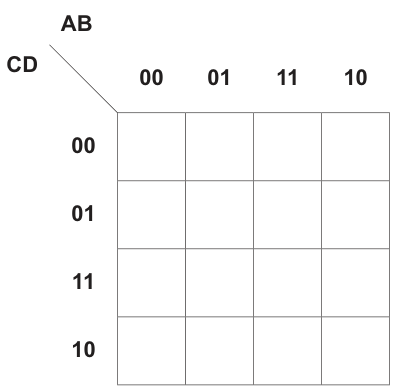
Answer
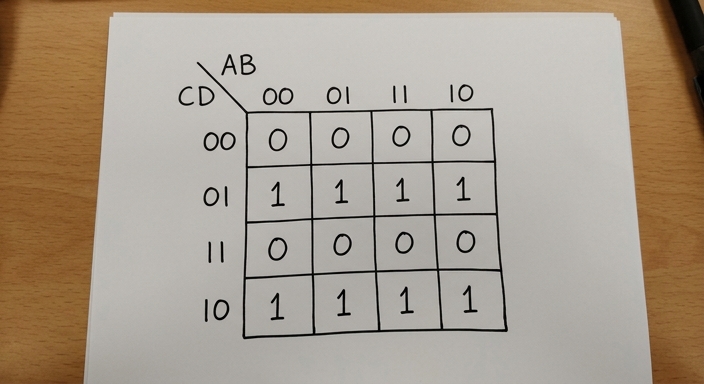
See completed K-map
Background Concept
A Karnaugh map (K-map) is a grid used to organise Boolean outputs so that adjacent cells differ by only one input bit. For four variables, the map has 16 cells.
The row and column labels must be in Gray-code order, not ordinary binary counting order. Gray code changes only one bit at a time, so the correct order is:
00,01,11,10
That ordering is what makes adjacency work properly for later simplification.
Understanding the Question
This part is not asking for simplification yet. It only asks you to complete the K-map using the truth table values.
The diagram shows:
- columns labelled
ABin the order00, 01, 11, 10 - rows labelled
CDin the order00, 01, 11, 10
You must place each output value into the cell matching its AB column and CD row.
Approach
The safest method is to work by row labels of the K-map:
- Take a fixed
CDrow, such as00. - Read the truth-table outputs for all four
ABcombinations. - Fill those four cells.
- Repeat for the remaining
CDrows.
Because the truth table here shows the same pattern for all values of A and B, the map will form complete horizontal rows of 1s and 0s.
Step-by-Step Reasoning
The K-map rows are labelled by CD.
Row CD = 00
Check the truth table entries where C=0 and D=0.
For all AB combinations, the output is 0.
So the first row is:
0 0 0 0
Row CD = 01
Check the truth table entries where C=0 and D=1.
For all AB combinations, the output is 1.
So the second row is:
1 1 1 1
Row CD = 11
Check the truth table entries where C=1 and D=1.
For all AB combinations, the output is 0.
So the third row is:
0 0 0 0
Row CD = 10
Check the truth table entries where C=1 and D=0.
For all AB combinations, the output is 1.
So the fourth row is:
1 1 1 1
That gives the completed map shown in the answer.
Key Takeaways
- A 4-variable K-map uses Gray-code order:
00, 01, 11, 10. - Fill the K-map from the truth table before trying to simplify.
- Matching row and column labels correctly is essential for later loop formation.
Common Mistakes
- Using binary order
00, 01, 10, 11instead of Gray-code order. - Swapping the variables, for example treating rows as
ABand columns asCD. - Copying the truth table into the grid in straight counting order instead of matching each cell label.
Things to Be Careful About
- Read the map headers carefully: here
ABare across the top andCDare down the side. - The bottom row is
10, not11again. - Even if a whole row looks identical, still verify it from the truth table rather than assuming the pattern.
Draw loop(s) around appropriate group(s) in the K-map to produce an optimal sum-of-products.
Answer
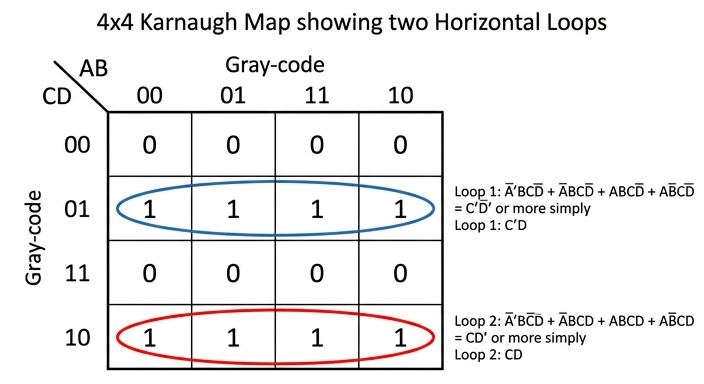
See K-map with loops
Background Concept
In a K-map, loops are drawn around adjacent 1s to simplify a sum-of-products expression. Valid groups must:
- contain cells
- be rectangular
- contain only
1s - be as large as possible
A larger group removes more variables from the final expression. Adjacency is based on Gray-code ordering, and the left and right edges wrap around, as do the top and bottom edges.
Understanding the Question
This part asks you to draw loops that produce an optimal sum-of-products. That means you should use the fewest and largest valid groups.
From the completed K-map, there are two full rows of 1s:
- row
CD = 01 - row
CD = 10
The task is to loop them in the best way.
Approach
Look for the largest rectangular groups first.
Each of those rows contains four adjacent 1s across all columns, so each row can form one group of 4. That is already optimal for each row.
You cannot combine the two rows into a single group of 8, because 01 and 10 are not adjacent row labels in Gray-code order.
Step-by-Step Reasoning
The completed K-map is:
- row
00: all0 - row
01: all1 - row
11: all0 - row
10: all1
First loop
Take all four 1s in row CD = 01.
This forms one horizontal group of 4.
Second loop
Take all four 1s in row CD = 10.
This forms another horizontal group of 4.
Why not one loop of 8?
Because the rows 01 and 10 are not adjacent in Gray-code sequence. The row order is 00, 01, 11, 10, so:
01is adjacent to00and1110is adjacent to11and00
So those two rows must stay as separate groups.
That is why the optimal answer has exactly two loops, each covering a whole row of four 1s.
Key Takeaways
- Always try to make loops as large as possible.
- Adjacency in a K-map depends on Gray-code order, not visual similarity alone.
- A full row of four
1s should be grouped as one loop of 4, not split into smaller pairs.
Common Mistakes
- Drawing several small pairs instead of one large group of 4.
- Trying to combine the
01row and the10row into a group of 8 even though they are not adjacent. - Including any
0cells inside a loop.
Things to Be Careful About
- Remember the wraparound rule, but use it only where the Gray-code labels are actually adjacent.
- A valid loop must be rectangular and contain a power-of-two number of cells.
- Since the question asks for an optimal SOP, avoid unnecessary extra loops.
Write the Boolean logic expression from your answer to part (c) as the simplified sum-of-products.
X = ............................................................................................................................
Working
From row :
From row :
Answer
X = C'D + CD'
Background Concept
After forming loops in a K-map, you write one product term per loop.
To get the term for a loop:
- keep only the variables that stay constant throughout that loop
- if a variable is always
0, write it complemented - if a variable is always
1, write it uncomplemented - ignore any variable that changes within the loop
This is why K-maps simplify Boolean expressions: changing variables disappear.
Understanding the Question
This part uses the loops from part (c) and asks for the simplified sum-of-products expression.
There are two loops:
- the entire row where
CD = 01 - the entire row where
CD = 10
Because each loop stretches across all four AB columns, both A and B change and therefore will not appear in the simplified terms.
Approach
Read each loop separately.
- For each loop, identify which variables stay fixed.
- Write one product term from those fixed values.
- OR the two terms together.
Since these are whole-row groups, only C and D remain relevant.
Step-by-Step Reasoning
Loop on row CD = 01
Across this whole row:
C = 0always, so writeD = 1always, so writeAchanges across the columns, so omit itBchanges across the columns, so omit it
So this loop gives:
Loop on row CD = 10
Across this whole row:
C = 1always, so writeD = 0always, so writeAchanges, so omit itBchanges, so omit it
So this loop gives:
Now OR the two terms:
That is the simplified SOP expression.
Key Takeaways
- One loop produces one product term.
- Variables that change inside a loop are removed.
- Whole-row groups in a 4-variable K-map often eliminate the column variables entirely.
- The final answer must still be written as a sum-of-products when the question asks for SOP.
Common Mistakes
- Including or in the final expression even though they vary across the loop.
- Reversing complements, for example writing instead of for row
10. - Writing only one term and forgetting the second loop.
- Writing XOR notation instead of SOP form when the question explicitly asks for sum-of-products.
Things to Be Careful About
- Read the row label in the correct variable order:
CD, notDC. 01means , not .- Even though the expression is equivalent to XOR, the required form here is .
Several syntax diagrams are shown.
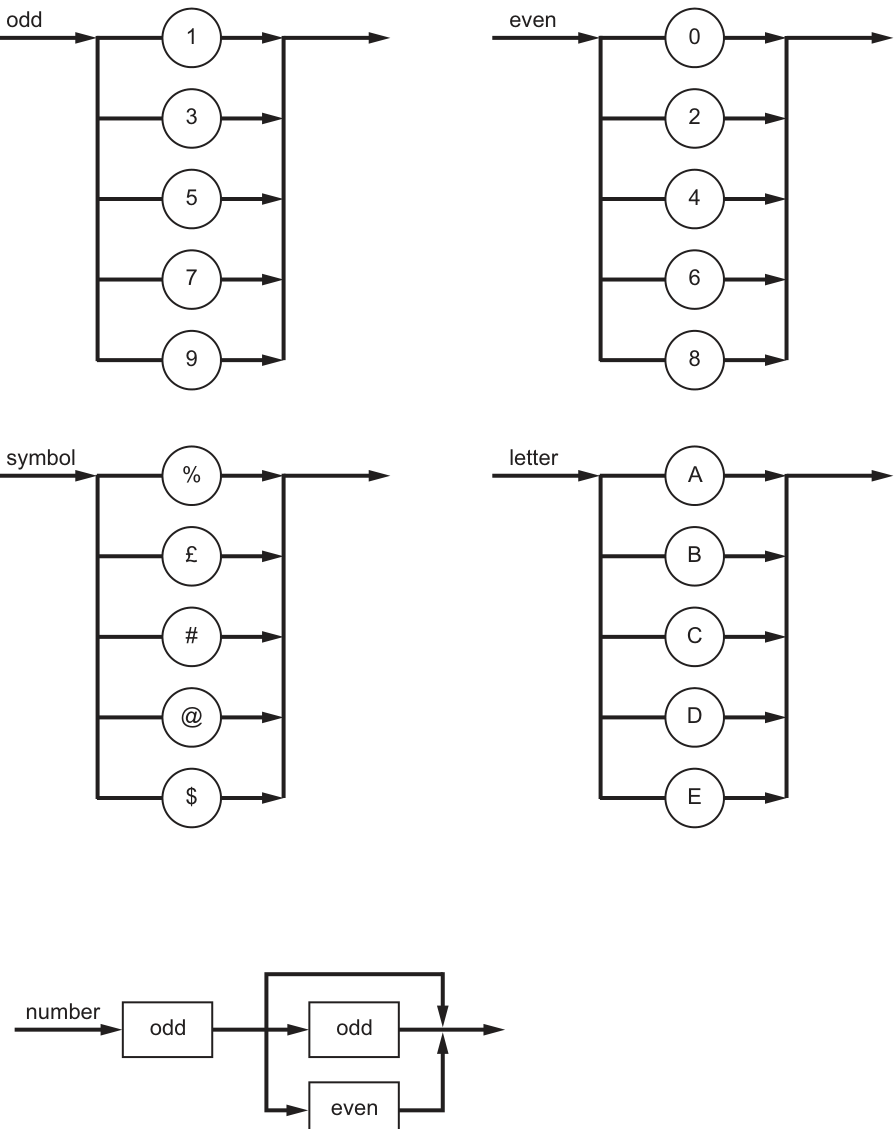
State why each number is invalid for the given syntax diagrams.
21
Reason .....................................................................................................................................
123
Reason .....................................................................................................................................
Answer
21— invalid because the first digit must be odd.123— invalid becausenumbermust contain exactly 2 digits.
21: first digit must be odd; 123: number must contain exactly 2 digits
Background Concept
A syntax diagram shows the valid structure of a string. You follow the arrow from left to right. If there is a choice, you may take one valid path. A string is valid only if:
- every symbol matches the rule at each stage, and
- the whole string is used up exactly when the diagram finishes.
Here, the named rules are:
odd= one of1, 3, 5, 7, 9even= one of0, 2, 4, 6, 8number= anoddfollowed by either anoddor aneven
So number must be exactly 2 digits long, and its first digit must be odd.
Understanding the Question
You are given two values, 21 and 123, and asked why each is invalid according to the syntax diagrams.
The important diagram is number. It says:
- the first digit must match
odd - the second digit must match either
oddoreven - then the rule ends
So the question is not asking you to invent a new rule. It is asking you to test each given value against the existing number rule and state the exact reason it fails.
Approach
For each value:
- check the first digit against
odd - if that passes, check the second digit against
oddoreven - make sure there are no extra digits left over
This gives a specific reason rather than just saying "it is invalid".
Step-by-Step Reasoning
For 21:
- The first digit is
2. - The rule says the first digit must be
odd. 2is not in theoddset1, 3, 5, 7, 9.- So it fails immediately.
Therefore the correct reason is: the first digit must be odd.
For 123:
- The first digit is
1, which is valid forodd. - The second digit is
2, which is valid foreven. - At this point the
numberrule has finished, because it allows exactly two digits. - But there is still a third digit,
3, left over. - That means the whole string does not fit the diagram.
Therefore the correct reason is: number must contain exactly 2 digits.
Key Takeaways
- A syntax diagram must match the entire string, not just the beginning.
- If extra characters remain after the diagram ends, the string is invalid.
- In this question,
numbermeans exactly two digits starting with an odd digit.
Common Mistakes
- Saying
21is invalid because it is "an even number". The issue is not the value of the whole number; it is that the first digit is not from theoddrule. - Saying
123is invalid because the last digit is odd. That is not the problem. The problem is that there is a third digit at all. - Forgetting that a syntax rule must consume the whole string.
Things to Be Careful About
- Read
oddandevenas named grammar rules, not as comments about the whole number. - Do not stop checking once the start of the string matches; you must also check the length.
- Use a precise reason tied to the diagram, such as "first digit must be odd" or "must contain exactly 2 digits".
Complete the Backus-Naur Form (BNF) for the given syntax diagrams.
<symbol> ::= ........................................................................................................................
<number> ::= ........................................................................................................................
Answer
<symbol> ::= "%" | "£" | "#" | "@" | "$"
<number> ::= <odd><odd> | <odd><even>
See BNF
Background Concept
Backus-Naur Form (BNF) is a way of writing grammar rules in text form.
Important BNF ideas:
- a non-terminal is written in angle brackets, for example
<number> ::=means "is defined as"|means "or"- writing symbols next to each other means they occur in sequence
- literal terminal symbols such as
%or@are written directly, often in quotes
A syntax diagram and a BNF rule describe the same grammar, just in different forms.
Understanding the Question
You need to convert two of the given syntax diagrams into BNF:
symbolnumber
From the diagrams:
symbolis a choice of%,£,#,@,$numberstarts withodd, then has a choice ofoddoreven
So you are translating choice into |, and sequence into items written one after another.
Approach
For each rule:
- identify whether the diagram shows sequence, choice, or both
- write the non-terminal name on the left of
::= - on the right, use BNF alternatives with
| - keep the structure faithful to the diagram
For number, because the branch happens after the first odd, the clean BNF is to write two full alternatives.
Step-by-Step Reasoning
For <symbol>:
- The diagram shows five possible terminals.
- In BNF, that becomes one production with five alternatives.
So:
<symbol> ::= "%" | "£" | "#" | "@" | "$"
For <number>:
- The first item is always
<odd>. - Then there is a choice between
<odd>and<even>. - In BNF, the simplest standard form is to expand that into two alternatives.
So:
<number> ::= <odd><odd> | <odd><even>
This matches the syntax diagram exactly: two digits, first odd, second odd or even.
Key Takeaways
- Syntax-diagram branches become
|in BNF. - Boxes followed one after another become concatenation in BNF.
- When a choice happens after a fixed prefix, it is often clearest to write separate alternatives.
Common Mistakes
- Writing only one possibility for
<number>, such as<odd><even>, and forgetting<odd><odd>. - Writing
<number> ::= <odd> | <even>, which would mean one digit only, not two. - Using terminal symbols where the diagram uses named rules, for example replacing
<odd>with a random digit without following the given structure.
Things to Be Careful About
- Keep the non-terminal names exactly as given:
<symbol>,<number>,<odd>,<even>. - Do not forget that
numberhas two components in sequence. - Use
|only for alternatives, not for sequence.
A new syntax rule, code, is required. It must begin with a letter, followed by one or two numbers, and end with a symbol.
Answer
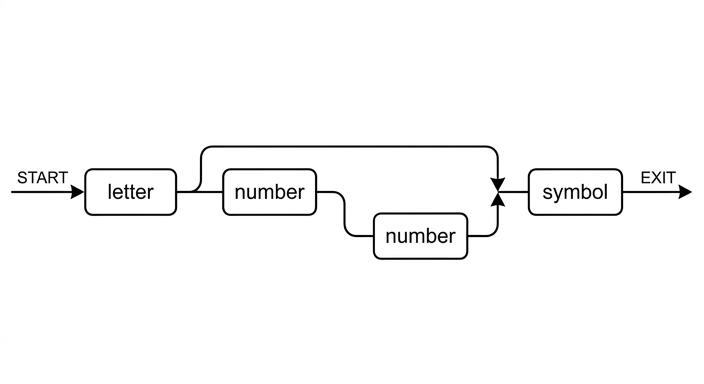
See syntax diagram
Background Concept
A syntax diagram is a graphical way to define a grammar rule.
Key ideas:
- a straight line means items must appear in sequence
- a branch means there is a choice
- if one path bypasses an item, that item is optional
- named boxes such as
letter,number, andsymbolrefer to previously defined rules
In grammar questions, you often build a new rule by combining existing rules in the correct order.
Understanding the Question
You must create a new rule called code.
The rule says it must:
- begin with a
letter - be followed by one or two
numberitems - end with a
symbol
The important point is that number is already an existing rule, so in the new syntax diagram you use a box labelled number, not separate digit circles.
Approach
Break the verbal description into structure:
letteris mandatory- the first
numberis mandatory - the second
numberis optional symbolis mandatory at the end
So the diagram should be:
- a straight sequence for the required parts
- a branch after the first
number - one branch goes directly to
symbol - the other branch goes through a second
numberand then tosymbol
That is the standard way to show "one or two" occurrences in a syntax diagram.
Step-by-Step Reasoning
Start with the first required item:
- The rule says the code must begin with a
letter. - So the first box after the start arrow is
letter.
Next comes the mandatory number:
- The wording says "followed by one or two numbers".
- That means there must definitely be one
number. - So after
letter, place anumberbox.
Now show that a second number is optional:
- After the first
number, split into two paths. - One path goes straight on, meaning stop at one
number. - The other path passes through another
numberbox, meaning there are twonumberitems. - The two paths then join again.
Finally add the ending:
- The rule says it must end with a
symbol. - So after the two paths rejoin, place a
symbolbox, then the exit arrow.
This produces the required syntax diagram.
Key Takeaways
- To show "one or two" items in a syntax diagram, make one mandatory and one optional.
- Use existing rule names in boxes when the grammar already defines them.
- Convert verbal grammar carefully into sequence plus branching.
Common Mistakes
- Drawing only one
numberand forgetting the optional second one. - Allowing zero
numberitems, which would break the phrase "followed by one or two numbers". - Placing
symbolbefore the optional secondnumber. - Expanding
numberinto individual digits instead of using the existingnumberrule box.
Things to Be Careful About
- The order matters:
letterfirst,symbollast. - There must be at least one
number, so the firstnumbercannot be bypassed. - The optional branch applies only to the second
number, not tosymbol. - Use the exact labels
letter,number, andsymbol.
Answer
<code> ::= <letter><number><symbol> | <letter><number><number><symbol>
See BNF
Background Concept
BNF writes grammar rules as productions.
Useful reminders:
- non-terminals go in angle brackets, such as
<code> ::=means "is defined as"- sequence is written by placing items next to each other
- alternatives are separated by
|
When a description says "one or two" in plain English, standard BNF usually expresses this by writing two alternatives explicitly.
Understanding the Question
You are asked to write the BNF for the new rule code.
The verbal rule is:
- start with a
letter - then have one or two
numberitems - finish with a
symbol
So there are exactly two valid forms:
letter number symbolletter number number symbol
Approach
Because this is BNF, the clearest method is to write two alternatives:
- one for the case with one
number - one for the case with two
numberitems
This avoids using EBNF-style optional brackets, which are not standard BNF.
Step-by-Step Reasoning
Start from the left:
- every
codebegins with<letter>
Then consider the number section:
- one valid form has one
<number> - the other valid form has two consecutive
<number>items
Finally:
- both forms end with
<symbol>
So the complete production is:
<code> ::= <letter><number><symbol> | <letter><number><number><symbol>
This exactly matches the requirement "one or two numbers".
Key Takeaways
- In BNF, optional extra parts are often written as separate alternatives.
- Always preserve the exact order given in the verbal description.
- Reuse existing non-terminals instead of redefining them.
Common Mistakes
- Writing only
<letter><number><symbol>and forgetting the two-number version. - Writing only the two-number version and forgetting the one-number version.
- Using square brackets or braces, which are usually EBNF notation rather than plain BNF.
- Changing the order to put
<symbol>in the middle.
Things to Be Careful About
- Use the exact non-terminal names:
<code>,<letter>,<number>,<symbol>. - Make sure both alternatives end with
<symbol>. - Remember that one or two numbers means at least one and at most two, not any number of repetitions.
Complex Instruction Set Computer (CISC) is a type of processor.
Identify four features of a CISC processor.
1 .......................................................................................................................................................
2 .......................................................................................................................................................
3 .......................................................................................................................................................
4 .......................................................................................................................................................
Answer
- Large instruction set with many complex instructions.
- A single instruction can perform several low-level operations.
- Instructions are often variable in length.
- Many different addressing modes are available.
Large instruction set; one instruction can perform several low-level operations; variable-length instructions; many addressing modes.
Background Concept
A CISC processor is a Complex Instruction Set Computer. The main idea is that the processor provides a large set of instructions, including more complicated ones, so that individual assembly-language instructions can do more work.
Historically, CISC designs aimed to reduce the number of instructions needed in a program. Instead of breaking a task into many simple operations, the processor could offer one more powerful instruction to carry out that task. This often means:
- more instructions in the instruction set
- more complex decoding of instructions
- several addressing modes
- instructions that may take different numbers of clock cycles
- instruction formats that are not all the same size
This contrasts with RISC, where instructions are usually simpler, more uniform, and designed to execute quickly.
Understanding the Question
The question asks for four features of a CISC processor. That means it is testing recognition of the typical architectural characteristics of CISC, not asking for advantages, disadvantages, or a comparison with RISC in full.
Because it says identify, the answer should be brief and point-based. Each line should give one valid feature of CISC architecture.
Approach
To answer this kind of question, think of the most standard textbook properties of CISC:
- the instruction set is large
- the instructions can be complex
- one instruction may do several low-level tasks
- instruction formats are often variable
- there are many addressing modes
Any four distinct valid features are enough. The safest approach is to choose widely accepted, clearly different features rather than vague statements.
Step-by-Step Reasoning
A strong way to build the answer is to start from what the term Complex Instruction Set implies.
- Complex instruction set means there are many instructions, not just a small core set.
- Those instructions are more complicated than in a RISC design, so a single instruction may do more than one basic operation. For example, instead of separate load, process, and store instructions, a CISC instruction may combine more of that work.
- Because the architecture supports many different ways to access data, CISC processors usually provide many addressing modes.
- CISC instructions are often variable length, because simple instructions and more complex instructions may need different amounts of information encoded inside them.
These are all direct features of the processor design itself, so they match the wording of the question well.
Key Takeaways
- CISC stands for Complex Instruction Set Computer.
- CISC processors typically have a large instruction set.
- A single instruction may perform several low-level operations.
- CISC commonly uses many addressing modes.
- CISC instructions are often variable in length.
Common Mistakes
- Giving advantages instead of features: for example, saying "programs are shorter" is more of a consequence than a processor feature.
- Repeating the same idea twice: for example, "large instruction set" and "many instructions" are the same point.
- Describing RISC instead: such as saying all instructions are fixed length or all execute in one cycle.
- Being too vague: statements like "it is complicated" are not precise enough to earn credit.
Things to Be Careful About
- The question asks for four features, so give four separate points.
- Make sure each point is a feature of CISC architecture, not just a general statement about processors.
- Avoid mixing in RISC features unless you are explicitly contrasting them.
- Use precise terminology such as instruction set, addressing modes, and variable-length instructions.
The kernel is the central component of an Operating System (OS).
Outline how the kernel of an OS acts as an interrupt handler.
Answer
- When an interrupt occurs, the kernel stops the current process and saves its state/register contents.
- The kernel runs the appropriate interrupt service routine to deal with the interrupt, then restores the saved state or schedules the next process to continue.
The kernel saves the current process state, services the interrupt using the appropriate routine, then restores or reschedules execution.
Background Concept
The kernel is the core part of the Operating System that stays in memory and manages the hardware and system resources. One of its key jobs is interrupt handling.
An interrupt is a signal that tells the processor that something needs attention immediately or very soon. Interrupts can come from hardware, such as a keyboard press or disk completion, or from software.
When an interrupt happens, the CPU cannot just forget what it was doing. The current process must be paused safely. This usually means saving the current context, such as the program counter, register values and other state information. The Operating System can then run code to deal with the event. That code is the interrupt service routine, often called an ISR. After the interrupt has been handled, the system either resumes the interrupted process or allows the scheduler to choose another process.
Understanding the Question
This question asks specifically how the kernel acts as an interrupt handler. So the answer is not just "the kernel handles interrupts"; it needs the sequence of what it does.
For 2 marks, the likely credit points are the main stages:
- pause the current activity and save its state
- run the correct routine to handle the interrupt, then continue normal execution
The word "outline" means a concise description is enough. A long explanation of all interrupt types is not needed.
Approach
Use the standard interrupt-handling sequence:
- an interrupt occurs
- the kernel gains control
- the current process state is saved
- the correct interrupt routine is executed
- the saved process is restored, or another process is scheduled
For a 2-mark answer, write two clear bullet points covering save state and service/restore.
Step-by-Step Reasoning
When the interrupt occurs, the current program cannot continue uninterrupted because the processor must respond to the new event. The kernel therefore takes control.
First, it stops the currently running process at a safe point and saves its state. This matters because without saving the state, the process would not be able to continue correctly later. The saved state typically includes register contents and the address of the next instruction.
Next, the kernel identifies which interrupt has occurred and runs the appropriate interrupt service routine. That routine might read input, acknowledge a device, move data, or signal that an I/O operation has finished.
After the interrupt has been dealt with, the kernel restores the saved state so the interrupted process can continue as if it had only been paused briefly. In some cases, instead of immediately resuming the same process, the kernel may pass control to the scheduler so that another ready process runs.
Those are the exact ideas the short exam answer needs.
Key Takeaways
- The kernel is responsible for low-level control of the computer.
- Interrupt handling means pausing current execution safely, dealing with the event, then continuing execution.
- Saving and restoring context is essential in Operating System process control.
Common Mistakes
- Saying only "the kernel handles interrupts" without explaining how. That is too vague for full marks.
- Confusing an interrupt with an error. Interrupts are not necessarily faults; they are signals needing attention.
- Forgetting to mention saving the current process state. This is a key part of correct interrupt handling.
- Forgetting what happens after servicing the interrupt. The system must resume or reschedule execution.
Things to Be Careful About
- Keep the answer focused on the kernel, not on general CPU design.
- Use correct terminology such as "save state", "interrupt service routine" and "restore" or "schedule".
- Do not drift into a long explanation of scheduling unless it directly supports the final step after the interrupt is serviced.
Answer
- Multi-tasking is when an Operating System allows more than one process/program to appear to run at the same time by sharing processor time.
Multi-tasking is when an Operating System allows more than one process/program to appear to run at the same time by sharing processor time.
Background Concept
Multi-tasking is an Operating System feature that lets a computer deal with multiple tasks during the same period of time. In a single-processor system, the CPU is still only executing one instruction stream at any instant, but the Operating System switches between tasks so quickly that users experience them as running together.
A task is usually thought of as a process or program in execution. The Operating System manages these tasks by deciding which one gets the processor and for how long.
Understanding the Question
This part asks only for the meaning of the term "multi-tasking". Because it is a 1-mark "state" question, the answer should be a short, exact definition.
The important idea is not true simultaneity on one CPU, but the appearance of multiple programs running at once because the OS shares processor time between them.
Approach
Give a one-sentence definition that includes:
- more than one task/process/program
- apparently at the same time
- under control of the Operating System
That is enough for a 1-mark response.
Step-by-Step Reasoning
The term breaks down naturally:
- "multi" means more than one
- "tasking" refers to handling tasks or processes
So the definition must say that the OS manages multiple tasks. To make the definition accurate, it helps to mention that the processor time is shared, so tasks appear to run at the same time.
A strong exam definition is therefore: the OS allows more than one process or program to appear to run simultaneously by sharing CPU time.
Key Takeaways
- Multi-tasking is an Operating System feature.
- It means managing several tasks within the same time period.
- On one processor, the effect is usually apparent simultaneous running rather than true simultaneous execution.
Common Mistakes
- Saying only "running many programs" without mentioning that this is controlled by the OS.
- Saying tasks actually run at the same instant on a single CPU. That is not normally true.
- Giving an example instead of a definition.
Things to Be Careful About
- Use the term "process" or "program" correctly.
- For a definition question, keep it short and precise.
- "At the same time" is often accepted, but "appear to run at the same time" is safer and more accurate for a single-processor OS.
Answer
- The OS gives each process a small time slice of CPU time.
- At the end of the time slice, a timer interrupt causes the OS to save the current process state and load another ready process, switching rapidly between processes so they appear to run simultaneously.
The OS uses time slicing and context switching: each process gets a short CPU time slice, then the OS saves its state and switches to another process.
Background Concept
Multi-tasking is implemented by the Operating System scheduler. The scheduler decides which process should run next. In a typical single-processor system, the CPU is shared using time slicing.
A time slice, also called a time quantum, is a short amount of CPU time allocated to one process. When that time expires, the Operating System can stop that process and run another.
To do this safely, the OS performs a context switch. A context switch means saving the current process state and loading the state of the next process. The state includes enough information for each process to resume later from the correct point.
A timer interrupt is often what triggers this switching regularly.
Understanding the Question
This part asks how multi-tasking is implemented, not just what it means. So the answer must explain the mechanism.
For 2 marks, the expected ideas are usually:
- the CPU is divided into time slices between processes
- the OS saves one process state and loads another, repeating quickly
This is about scheduling and context switching.
Approach
Answer with the standard sequence:
- several processes are kept ready
- the OS gives one process a short time slice
- a timer interrupt occurs when the slice ends
- the OS saves that process state
- the OS loads the next ready process
- rapid repetition creates the effect of simultaneous running
A concise two-bullet answer is enough for the marks.
Step-by-Step Reasoning
The Operating System cannot let one program keep the processor forever if it wants multiple tasks to make progress. So it shares the CPU.
First, the scheduler selects a process from the ready queue. That process is given a short time slice.
While that process runs, the timer counts down. When the allocated time slice ends, the timer generates an interrupt.
The Operating System kernel then takes control. It saves the state of the current process, including values needed to continue later.
The scheduler then chooses another ready process. The OS loads that process state into the CPU and allows it to run for its own time slice.
This switching happens very quickly, many times per second. Because the switching is so fast, users perceive that several programs are running at once, even though one CPU is only running one process at any moment.
That is the implementation idea the mark scheme is looking for.
Key Takeaways
- Multi-tasking depends on scheduling, time slicing and context switching.
- Timer interrupts are important because they let the OS regain control regularly.
- The illusion of simultaneous execution comes from very rapid switching between processes.
Common Mistakes
- Repeating the definition of multi-tasking instead of explaining the mechanism.
- Omitting time slicing and saying only "the OS runs many programs".
- Forgetting that the process state must be saved before another process is loaded.
- Saying the CPU truly runs all tasks at once on a single-core processor.
Things to Be Careful About
- Mention both parts: allocation of time slices and switching between processes.
- Use accurate terms such as "scheduler", "timer interrupt" and "context switch" where appropriate.
- Do not overcomplicate the answer with unnecessary details about process states unless they support the main explanation.
Objects and classes form the basic structure of Object-Oriented Programming (OOP).
Answer
- A class is a template/definition for objects.
- It contains attributes/data fields to store the state of the object.
- It contains methods/procedures/functions to define the operations the object can perform.
See explanation
Background Concept
In object-oriented programming, a class is the definition used to create objects. It describes two main things:
- the data an object will hold
- the behaviour an object will have
The data held by a class is usually called attributes, fields or properties. These represent the state of an object, such as a name, age, balance or position.
The behaviour is defined by methods. A method is a procedure or function that belongs to the class and operates on that object's data.
So, when we talk about the structure of a class, we normally mean that it contains:
- a class name
- attributes
- methods
Some languages also include constructors and access modifiers such as public and private, but the core exam idea is that a class groups together data and the operations on that data.
Understanding the Question
The question asks you to outline the structure of a class. The word outline means a brief description is enough. You do not need to write code, and you do not need to explain inheritance or polymorphism.
For 3 marks, the examiner is likely looking for the main structural parts of a class, not a long essay. The safest high-value points are:
- a class is a template for objects
- it contains attributes/data items
- it contains methods/operations
Approach
To answer this type of OOP theory question, think of a class as a "container of definition".
Ask yourself:
- What is a class for?
- What information does it store?
- What actions does it define?
That naturally gives the three key marking points:
- purpose: template/blueprint
- state: attributes
- behaviour: methods
Step-by-Step Reasoning
A strong answer starts by stating what a class is.
- A class is not a single usable item by itself in the same way an object is. It is the definition or template from which objects are created.
Then identify the first structural component:
- A class contains attributes (also called data fields or properties).
- These define what data each object created from the class will store.
- For example, if the class were
Car, attributes might include registration number, colour and speed.
Then identify the second structural component:
- A class contains methods.
- These define what operations can be carried out by objects of that class.
- For example, methods for
Carmight increase speed, brake, or display details.
That is enough for a full-mark outline because it covers the essential structure: the class defines both the data and the operations for its objects.
Key Takeaways
- A class is a template used to create objects.
- A class contains attributes to store state.
- A class contains methods to define behaviour.
- In OOP, classes group related data and operations together.
Common Mistakes
- Saying a class is an object. This is wrong because an object is an instance created from a class.
- Describing only attributes and forgetting methods. That gives an incomplete structure.
- Writing vague statements such as "a class contains code" without naming attributes or methods.
- Explaining inheritance, polymorphism or encapsulation instead of the actual structure of the class.
Things to Be Careful About
- Use correct OOP terminology: class, object, attribute, method.
- Do not confuse data stored in the class definition with actual values held by an object.
- If the question asks for structure, focus on the main components, not on language-specific syntax.
- Keep the answer brief because this is an outline question, not a full explanation.
Give three differences between an object and a class.
1 ................................................................................................................................................
2 ................................................................................................................................................
3 ................................................................................................................................................
Answer
- A class is a blueprint/template; an object is an instance of that class.
- A class defines attributes and methods; an object contains actual values for those attributes and can use those methods.
- One class can be used to create many objects; each object is a separate entity.
See explanation
Background Concept
A common source of confusion in OOP is the difference between a class and an object.
A class is the definition. It says what data should exist and what methods should be available. You can think of it as a blueprint.
An object is a real instance created from that class. It is the usable thing in memory, with its own values stored in its attributes.
For example:
Studentcould be a class- one object could represent Aisha
- another object could represent Ben
Both objects come from the same class, so they have the same kind of attributes and methods, but their stored values can be different.
Understanding the Question
The question asks for three differences between a class and an object. That means you must give three distinct contrasts, not three ways of saying the same thing.
The easiest safe contrasts are:
- blueprint/template versus instance
- definition versus actual values/entity
- one class can produce many objects
Because the question says give three, it is best to write them as three separate numbered points.
Approach
To build good comparison points, compare class and object side by side.
Useful comparison categories are:
- what each one is
- what each one contains
- how many there can be
This produces clear, non-overlapping differences and makes it easy for the examiner to award marks.
Step-by-Step Reasoning
First difference:
- A class is the template or blueprint.
- An object is an instance created from that template.
This is the most basic distinction. The class describes; the object exists as a created item.
Second difference:
- A class defines the attributes and methods.
- An object has actual data values stored in those attributes and can use the methods defined by the class.
For example, the class may define an attribute called Name, but an object would store a specific value such as Aisha.
Third difference:
- A single class can be used to create many objects.
- Each object is a separate entity, even if created from the same class.
So if the class is Car, one object could represent a blue car and another object a red car. Same class, different instances.
These are three distinct differences, which is exactly what the question asks for.
Key Takeaways
- A class is the definition; an object is the instance.
- A class specifies attributes and methods.
- An object stores actual values and uses the class's methods.
- Many objects can be created from one class.
Common Mistakes
- Saying "an object is a class" or "a class is an object". They are related, but they are not the same thing.
- Repeating the same idea three times, such as "a class is a blueprint", "a class is a design", and "a class is a template". That may only count as one difference.
- Forgetting to contrast both sides. A valid point should mention both class and object.
- Giving examples only, without stating the actual difference.
Things to Be Careful About
- Make each difference clearly separate from the others.
- Use exact OOP terms such as instance, attribute and method.
- Do not drift into unrelated OOP ideas like inheritance or encapsulation unless they directly help the comparison.
- If you number the answers, ensure each line contains one complete contrast so the examiner can see the three mark points easily.
This binary tree shows an ordered list of integers.
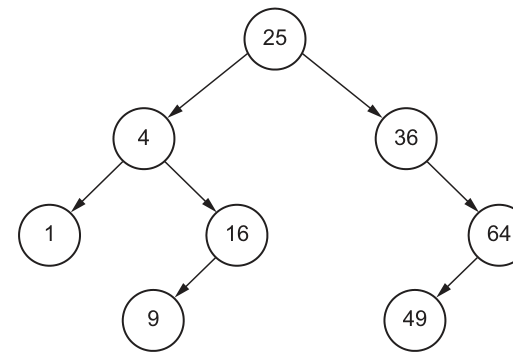
A linked list of nodes is used to store the data. Each node consists of a left pointer, the data and a right pointer.
is used to represent a null pointer.
Complete this linked list to represent the given binary tree organisation.
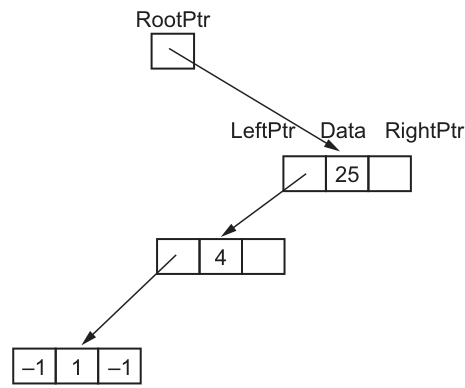
Answer
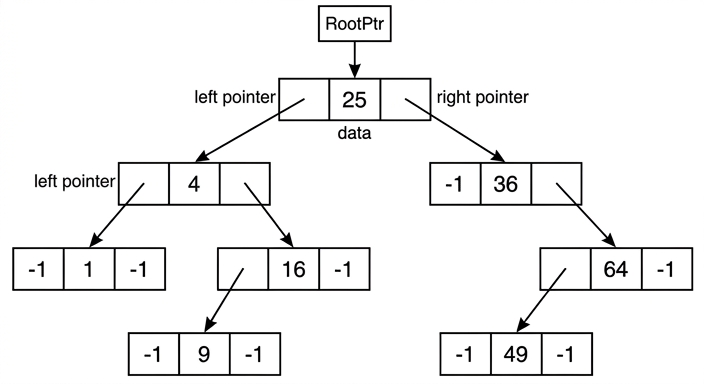
See linked-list diagram
Background Concept
A binary tree can be stored using linked nodes instead of storing values in one continuous array position after another. In this representation, each node has three fields:
LeftPtr— points to the left child nodeData— stores the value in the nodeRightPtr— points to the right child node
If a node does not have a left or right child, that pointer must store a null value. In this question, the null pointer is represented by -1.
Because this is a binary search tree, values smaller than a node are in its left subtree and values larger than a node are in its right subtree. However, for this part, you do not need to search the tree. You only need to copy its structure correctly into linked-node form.
Understanding the Question
The question gives a binary tree with root 25 and asks you to complete a linked-list style diagram where each node is shown as three boxes: left pointer, data, right pointer.
Some of the structure is already started for you:
RootPtralready points to the node containing25- the left pointer from
25already goes to the node containing4 - the left pointer from
4already goes to the node containing1 - node
1is already shown as[-1 | 1 | -1]
You must add the missing nodes and pointers so that the whole linked structure matches the original binary tree exactly.
Approach
The best approach is to read the tree one node at a time and decide, for each node:
- what its left child is
- what its right child is
- whether either side is missing, in which case you write
-1
Start at the root and work outward:
- root
25 - its children
4and36 - then children of those nodes
- then leaf nodes, which have
-1on both sides
Step-by-Step Reasoning
From the given tree:
25is the root.- Left child is
4 - Right child is
36
- Left child is
So the root node must be:
[ptr to 4 | 25 | ptr to 36]
Next, node 4:
- Left child is
1 - Right child is
16
So node 4 must be:
[ptr to 1 | 4 | ptr to 16]
Node 1 has no children, so it is a leaf:
[-1 | 1 | -1]
Node 16:
- Left child is
9 - Right child is missing
So node 16 must be:
[ptr to 9 | 16 | -1]
Node 9 is a leaf:
[-1 | 9 | -1]
Now move to the right subtree of 25.
Node 36:
- Left child is missing
- Right child is
64
So node 36 must be:
[-1 | 36 | ptr to 64]
Node 64:
- Left child is
49 - Right child is missing
So node 64 must be:
[ptr to 49 | 64 | -1]
Node 49 is a leaf:
[-1 | 49 | -1]
When these are all connected, the linked list representation exactly matches the binary tree.
Key Takeaways
- A linked binary tree node stores two pointers and one data item.
- Use
-1whenever a child does not exist. - A leaf node always has both pointers set to null.
- To convert a tree diagram into linked storage, process one node at a time and identify its two children.
Common Mistakes
- Forgetting the right child of
25is36. - Writing
36with both pointers as-1; it still points right to64. - Forgetting that
16has a left child9. - Missing one null pointer on nodes such as
16or64where only one child exists. - Treating the diagram as a linear linked list rather than a binary tree with two pointers per node.
Things to Be Careful About
- The left pointer must point to the smaller child and the right pointer to the larger child, matching the given tree.
- Do not invent extra nodes or extra links.
- Every absent child must be shown explicitly as
-1. - Keep the arrows correct: each pointer field must connect to the correct child node, not just to a nearby box.
A 2D array is used to store the nodes of the linked list in part (a).
Complete the diagram using your answer for part (a).
| RootPtr | Index | LeftPtr | Data | RightPtr | |
|---|---|---|---|---|---|
| 0 | 0 | 25 | |||
| 1 | 4 | ||||
| 2 | 36 | ||||
| 3 | 1 | ||||
| 4 | 16 | ||||
| 5 | 64 | ||||
| FreePtr | 6 | 9 | |||
| 7 | 49 | ||||
| 8 |
Answer
RootPtr = 0FreePtr = 8
| Index | LeftPtr | Data | RightPtr |
|---|---|---|---|
| 0 | 1 | 25 | 2 |
| 1 | 3 | 4 | 4 |
| 2 | -1 | 36 | 5 |
| 3 | -1 | 1 | -1 |
| 4 | 6 | 16 | -1 |
| 5 | 7 | 64 | -1 |
| 6 | -1 | 9 | -1 |
| 7 | -1 | 49 | -1 |
| 8 |
See completed table
Background Concept
A binary tree can also be stored in a 2D array instead of drawing separate linked nodes. Each row represents one node, and the columns store:
LeftPtr— the index of the left child rowData— the value stored in that nodeRightPtr— the index of the right child row
So instead of a pointer arrow going directly to another box, the pointer stores the row number where that child node is found.
If there is no child, the null pointer value is stored. In this question, the null pointer value is -1.
RootPtr stores the index of the root node. FreePtr stores the index of the first unused row.
Understanding the Question
The question has already fixed the array positions for each data value:
- index
0stores25 - index
1stores4 - index
2stores36 - index
3stores1 - index
4stores16 - index
5stores64 - index
6stores9 - index
7stores49 - index
8is unused
You must fill in the pointer columns by converting the tree connections into index numbers.
Approach
Use the tree from part (a), then for each node:
- find the index where that child value is stored
- write that index into the correct pointer field
- write
-1if the child does not exist
At the end, identify:
RootPtras the index of the root value25FreePtras the first unused row, which is8
Step-by-Step Reasoning
The root node is 25, and 25 is stored at index 0.
So:
RootPtr = 0
Now fill each row.
Row 0: data 25
From the tree:
- left child of
25is4 - right child of
25is36
From the table:
4is at index136is at index2
So row 0 is:
LeftPtr = 1RightPtr = 2
Row 1: data 4
Children of 4 are:
- left child
1 - right child
16
From the table:
1is at index316is at index4
So row 1 is:
LeftPtr = 3RightPtr = 4
Row 2: data 36
Children of 36 are:
- no left child
- right child
64
From the table:
64is at index5
So row 2 is:
LeftPtr = -1RightPtr = 5
Row 3: data 1
1 is a leaf node, so:
LeftPtr = -1RightPtr = -1
Row 4: data 16
Children of 16 are:
- left child
9 - no right child
From the table:
9is at index6
So row 4 is:
LeftPtr = 6RightPtr = -1
Row 5: data 64
Children of 64 are:
- left child
49 - no right child
From the table:
49is at index7
So row 5 is:
LeftPtr = 7RightPtr = -1
Row 6: data 9
9 is a leaf node, so:
LeftPtr = -1RightPtr = -1
Row 7: data 49
49 is also a leaf node, so:
LeftPtr = -1RightPtr = -1
Free pointer
Rows 0 to 7 are occupied. The next free row is 8.
So:
FreePtr = 8
Key Takeaways
- In an array-based linked structure, pointers are stored as index values.
RootPtrgives the index of the root node.FreePtrgives the next available unused row.- Leaf nodes always have both child pointers set to
-1.
Common Mistakes
- Writing child data values instead of child index numbers.
- Forgetting that
36has no left child, so its left pointer must be-1. - Mixing up left and right pointers for
16and64. - Giving
FreePtras7instead of8; index7is already used.
Things to Be Careful About
- The pointer fields must store indices, not arrows and not data values.
- Check each value against the table before writing the pointer.
- Do not change the given data values or their row positions.
- Only row
8is free, soFreePtrmust point there.
The linked list in part (a) is implemented using a 1D array of records. Each record contains a left pointer, data and a right pointer.
The following pseudocode represents a function that searches for an element in the array of records LinkList. It returns the index of the record if the element is found, or it returns a null pointer if the element is not found.
Complete the pseudocode for the function.
FUNCTION SearchList(Item : INTEGER) RETURNS ....................................................
   NullPtr ← -1
   .................................................................... ← RootPtr
   WHILE NowPtr <> NullPtr
      IF LinkList[NowPtr].Data < Item THEN
         NowPtr ← LinkList[NowPtr].RightPtr
      ELSE
         IF .............................................................................................................. THEN
            NowPtr ← .....................................................................................................
         ELSE
            RETURN NowPtr
         ENDIF
      ENDIF
   ENDWHILE
   RETURN NullPtr
ENDFUNCTION
Answer
FUNCTION SearchList(Item : INTEGER) RETURNS INTEGER
   NullPtr ← -1
   NowPtr ← RootPtr
   WHILE NowPtr <> NullPtr
      IF LinkList[NowPtr].Data < Item THEN
         NowPtr ← LinkList[NowPtr].RightPtr
      ELSE
         IF LinkList[NowPtr].Data > Item THEN
            NowPtr ← LinkList[NowPtr].LeftPtr
         ELSE
            RETURN NowPtr
         ENDIF
      ENDIF
   ENDWHILE
   RETURN NullPtr
ENDFUNCTION
See completed pseudocode
Background Concept
Searching a binary search tree is efficient because each comparison tells you which side of the tree to ignore.
For any node in a binary search tree:
- smaller values are in the left subtree
- larger values are in the right subtree
- if the value matches, the search is complete
When the tree is stored as an array of records, each record still behaves like a tree node. The difference is that LeftPtr and RightPtr store array indices rather than direct memory links.
A typical iterative search algorithm therefore:
- starts at the root
- compares the current node data with the item being searched for
- moves left or right depending on the result
- stops when the item is found or when a null pointer is reached
Understanding the Question
The function SearchList must search the array of records LinkList.
It should:
- return the index of the record if the item is found
- return the null pointer value if the item is not found
The skeleton already includes most of the search:
- if current data is less than
Item, move right - otherwise, another test is needed
- if neither less than nor greater than, the current node must match the item
So the missing pieces are:
- the return type
- the starting pointer
- the comparison for moving left
- the left-pointer assignment
Approach
Because the tree is a binary search tree, use the standard three-way comparison at each node:
- current data
< Item→ go right - current data
> Item→ go left - otherwise → current data
= Item, so return the current index
The search must begin at RootPtr because that is the entry point to the tree.
If the pointer eventually becomes -1, the item is not present, so return NullPtr.
Step-by-Step Reasoning
1. Return type
The function returns either:
- the index of a record, or
-1for null
Both are integer values, so the function must be:
RETURNS INTEGER
2. Start the search at the root
To search a tree, you begin at the root node. The root index is stored in RootPtr.
So the missing assignment is:
NowPtr ← RootPtr
NowPtr means "the node currently being checked".
3. Move right when the current data is smaller
This part is already given:
IF LinkList[NowPtr].Data < Item THEN
   NowPtr ← LinkList[NowPtr].RightPtr
That is correct because if the target item is larger than the current node, it can only be in the right subtree.
4. Decide when to move left
The ELSE branch means the current data is not less than Item. There are now only two possibilities:
- current data is greater than
Item - current data is equal to
Item
If it is greater, the item can only be in the left subtree. So the missing condition is:
LinkList[NowPtr].Data > Item
5. Follow the left pointer
If that condition is true, move to the left child:
NowPtr ← LinkList[NowPtr].LeftPtr
6. Otherwise the item has been found
If the current data is neither less than nor greater than Item, it must be equal to Item.
So:
RETURN NowPtr
7. Stop when a null pointer is reached
The loop continues while NowPtr <> NullPtr.
If the search falls off the tree and reaches -1, the loop ends and the function returns:
RETURN NullPtr
That correctly signals "not found".
Key Takeaways
- Binary search tree searching uses repeated comparison to choose left or right.
- Start at the root every time.
- In an array-of-records implementation, left and right child links are stored as indices.
- If the pointer becomes null, the item is not in the tree.
Common Mistakes
- Reversing the directions, for example going left when the current data is smaller.
- Returning the data value instead of the index.
- Starting at index
0directly instead of usingRootPtr; in other questions the root may not be at index0. - Using
=instead of a greater-than comparison in the missingIF, which would stop correct left traversal.
Things to Be Careful About
- The function returns an
INTEGER, not a Boolean value. NullPtris-1, so the loop condition must check forNowPtr <> NullPtr.- The left move uses
LeftPtrand the right move usesRightPtr; mixing them up breaks the algorithm. - Because this is CIE pseudocode, use
←for assignment and keep keywords such asFUNCTION,WHILE,IF,ENDIFin upper case.