Computer Science 9618/31 — October/November 2024
Cambridge A-Level · Advanced Theory · worked solutions for every part, with the mark scheme
Topics Data Representation · Hardware and Virtual Machines · Communication and Internet Technologies · System Software · Further Programming · Computational Thinking and Problem-solving
Numbers are stored in a computer using binary floating-point representation with:
• 10 bits for the mantissa
• 6 bits for the exponent
• two’s complement form for both the mantissa and the exponent.
Calculate the normalised binary floating-point representation of +201.125 in this system.
Show your working.

Working .....................................................................................................................................
Working
Normalised form:
Mantissa (10 bits) = 0110010010
Exponent in 6-bit two's complement = 001000
Answer
Mantissa: 0110010010
Exponent: 001000
Mantissa 0110010010, Exponent 001000
Background Concept
In this floating-point format, a number is stored as:
- a mantissa (also called significand), and
- an exponent.
The value represented is:
Here, both mantissa and exponent use two's complement.
For Cambridge 9618 floating-point questions, the mantissa is treated as a signed binary fraction with the binary point immediately after the sign bit. So a 10-bit mantissa has:
- 1 sign bit
- 9 fractional bits
A normalised mantissa must begin:
01for a positive number10for a negative number
This makes the first two bits different, so the value is stored in standard form and the available precision is used efficiently.
Understanding the Question
You are given:
- 10 bits for the mantissa
- 6 bits for the exponent
- two's complement for both
You must convert the denary number +201.125 into this exact floating-point form.
So the task is:
- convert
201.125to binary - normalise it
- fit the mantissa into 10 bits
- store the exponent in 6-bit two's complement
Because the mantissa length is fixed, you must be careful about how many bits can be kept.
Approach
The standard method is:
- Convert the whole-number part and fractional part separately into binary.
- Combine them into one binary number.
- Shift the binary point until the mantissa is normalised.
- Count how many places the point moved; that gives the exponent.
- Write the exponent in 6-bit two's complement.
- Keep only the number of mantissa bits available.
Since the number is positive, the mantissa should start with 01 after normalisation.
Step-by-Step Reasoning
First convert 201 to binary:
Now convert the fractional part .125 to binary:
So:
Now normalise it. In this syllabus format, the binary point is placed immediately after the sign bit, so for a positive value we want:
Why exponent 8? Because the binary point has moved 8 places to the left from 11001001.001 to 0.11001001001.
Now fit this into the 10-bit mantissa field.
The mantissa must contain 10 bits total. Since the number is positive, the sign bit is 0, then we keep the next 9 bits of the fractional part:
- normalised mantissa bits:
0 110010010... - 10-bit stored mantissa:
0110010010
The remaining bits do not fit, so they are dropped.
Now encode the exponent +8 in 6-bit two's complement. Positive numbers are written as ordinary binary padded with leading zeros:
So the final stored floating-point number is:
- Mantissa:
0110010010 - Exponent:
001000
Key Takeaways
- Convert the denary number to binary before normalising.
- In 9618 floating-point, the mantissa is a signed fraction with the point after the sign bit.
- A normalised positive mantissa begins
01; a normalised negative mantissa begins10. - The exponent records how many places the binary point moved.
- If the mantissa is too long, only the bits that fit can be stored.
Common Mistakes
- Writing the number as ordinary scientific notation like
1.1001001001 × 2^7instead of the syllabus mantissa form with the point after the sign bit. In this course, the mantissa is stored as a signed fraction. - Forgetting that the mantissa is only 10 bits total, not 10 bits after the sign bit.
- Using sign-magnitude instead of two's complement for the exponent.
- Giving exponent
7instead of8by counting the binary-point shift incorrectly. - Keeping too many mantissa bits and producing more than 10 bits.
Things to Be Careful About
- Count the mantissa bits exactly: 10 bits means the sign bit is included.
- For positive exponents in two's complement, just write the binary value with leading zeros to the correct width.
- Do not forget the fractional binary part
.001from.125; losing it changes the represented value. - If extra mantissa bits remain, the stored value may be truncated because the field has fixed length.
- Make sure the stored mantissa is actually normalised: for a positive number, the first two bits must be
01.
Calculate the denary value of the given normalised binary floating-point number.
Show your working.

Working .....................................................................................................................................
Answer ......................................................................................................................................
Working
Exponent 000101 =
Mantissa 1010110011 =
Value:
Answer
-20.8125
-20.8125
Background Concept
To decode a floating-point number in this format, remember that the value is:
The exponent is a signed integer in two's complement.
The mantissa is also in two's complement, but it represents a fraction, not a whole number. With the binary point immediately after the sign bit, the place values are:
- sign bit =
-1 - next bit =
\frac{1}{2} - next bit =
\frac{1}{4} - next bit =
\frac{1}{8} - and so on
So for a 10-bit mantissa, the weights are:
If the first bit is 1, the mantissa is negative.
Understanding the Question
You are given the floating-point number directly:
- Mantissa:
1010110011 - Exponent:
000101
You must find the denary value.
That means:
- decode the exponent as a signed 6-bit integer
- decode the mantissa as a signed binary fraction
- multiply the mantissa by
Approach
There are two valid ways to decode the mantissa:
- use the bit weights directly, or
- take the two's complement to find the magnitude and then apply the negative sign
The cleanest method here is direct bit weights, because the place values are easy to apply.
Step-by-Step Reasoning
First decode the exponent.
Exponent is 000101. Since the first bit is 0, it is positive. So:
So the exponent is +5.
Now decode the mantissa 1010110011.
Because the first bit is 1, it is a negative mantissa. Using the place values:
corresponds to:
Now add them:
Convert to decimals:
So the mantissa value is:
Now multiply by :
Therefore the denary value represented is:
Key Takeaways
- Decode the exponent as an ordinary two's complement integer.
- Decode the mantissa as a two's complement fraction with the point after the sign bit.
- For the mantissa, the sign bit has weight
-1, then the fractional weights halve each time. - The final value is always mantissa multiplied by .
Common Mistakes
- Treating the mantissa as an integer instead of a fraction. That gives a completely wrong answer.
- Forgetting that the sign bit in a two's complement mantissa has weight
-1. - Reading exponent
000101as something other than+5. - Using base 10 place values instead of binary fractional place values.
- Forgetting the final multiplication by after decoding the mantissa.
Things to Be Careful About
- The mantissa and exponent are both two's complement, but they are interpreted differently: one is a fraction, one is an integer.
- When using bit weights, start immediately with
-1, 1/2, 1/4, ...; do not place the binary point somewhere else. - If you use the two's complement method to find magnitude, be careful with the fixed bit length.
- Keep the arithmetic accurate when adding the fractional values.
- A normalised negative mantissa usually starts
10, which this one does, so it is consistent with the format.
Reduced Instruction Set Computers (RISC) is a type of processor.
Identify four features of a RISC processor.
1 .......................................................................................................................................................
2 .......................................................................................................................................................
3 .......................................................................................................................................................
4 .......................................................................................................................................................
Answer
- Uses a small, simple instruction set.
- Instructions are usually fixed length.
- Most instructions execute in a single clock cycle.
- Uses many general-purpose registers.
Small/simple instruction set; fixed-length instructions; most execute in one clock cycle; many general-purpose registers.
Background Concept
RISC stands for Reduced Instruction Set Computer. It is a processor design philosophy based on using a smaller set of simple instructions rather than a very large set of complex ones.
The idea is that if instructions are simple and regular, the processor can decode and execute them faster. This often allows:
- quicker execution of individual instructions
- simpler control circuitry
- more efficient pipelining
- better use of registers instead of repeated memory access
Typical RISC characteristics include:
- a small, simple instruction set
- fixed-format or fixed-length instructions
- few addressing modes
- many general-purpose registers
- load/store design, where memory is accessed mainly by specific load and store instructions
- many instructions completing in one clock cycle
Understanding the Question
The question asks for four features of a RISC processor. It does not ask for advantages, explanations, or a comparison with CISC, although knowing the contrast helps you remember the points.
Because it says identify four features, each answer should be a separate characteristic of RISC architecture. The safest approach is to give short, standard textbook features that are widely accepted.
Approach
Use recall of core RISC design properties. Choose four features that are distinct from each other, not four ways of saying the same thing.
A good set is:
- small/simple instruction set
- fixed-length instructions
- most instructions take one clock cycle
- many general-purpose registers
These are all classic RISC features and are clearly separate points.
Step-by-Step Reasoning
A RISC processor is designed to reduce the complexity of each instruction.
- Small, simple instruction set: RISC avoids having a huge number of specialised instructions. Instead, it has fewer instructions, each doing a simple task.
- Fixed-length instructions: if every instruction has the same size, instruction fetch and decode are simpler and faster. This also helps pipelining because each stage handles a predictable instruction format.
- Most instructions execute in one clock cycle: since the instructions are simple, the processor can often complete them quickly, sometimes in a single cycle.
- Many general-purpose registers: RISC processors try to keep data in registers rather than repeatedly reading from or writing to main memory, because register access is faster.
Other features that are often accepted in similar questions include:
- few addressing modes
- hardwired control unit
- load/store architecture
- well suited to pipelining
But since only four are needed, the chosen four are enough for full marks if accepted by the mark scheme.
Key Takeaways
- RISC uses a reduced set of simple instructions.
- Simplicity of instruction design makes execution and decoding faster.
- Fixed instruction format and simple operations support pipelining.
- Registers are heavily used to improve speed.
Common Mistakes
- Giving advantages instead of features: for example, saying "it is faster" is not as strong as naming the feature that causes the speed, such as single-cycle instructions or fixed-length instructions.
- Repeating the same idea: "simple instructions" and "small instruction set" may be treated as overlapping if not clearly separated.
- Confusing RISC with CISC: CISC is more associated with complex instructions and a larger instruction set.
- Writing vague answers: for example, "better performance" is too general unless the question asks for benefits.
Things to Be Careful About
- Make sure each of the four points is distinct.
- Use standard architecture terms such as "fixed-length instructions" and "general-purpose registers".
- Do not drift into explanation unless needed; this question only asks you to identify features.
- If unsure, avoid controversial wording and use the most widely accepted textbook characteristics of RISC.
Describe circuit switching as a method of data transmission.
...................................................................................................................................................
Answer
- A dedicated communication path is established between the sender and receiver before any data is sent.
- The path remains reserved for the whole communication session, so the available bandwidth is dedicated to that connection.
- All data travels along the same route until transmission is complete, then the circuit is disconnected.
A dedicated path is set up before transmission, reserved for the whole session, and released when communication ends.
Background Concept
Circuit switching is a method of data transmission where a complete end-to-end connection is established before the actual data transfer begins. This connection is often called a dedicated path or circuit.
The important idea is that the route and resources are reserved in advance. That means the devices and links along the path are committed to that one communication for the duration of the session. Because of this, the transmission behaves like a continuous connection rather than lots of separate independent packets.
This is different from packet switching, where data is broken into packets that may travel by different routes and share the network with other traffic.
Understanding the Question
The question asks you to describe circuit switching as a transmission method. So the examiner is looking for how it works, not just a definition in one short phrase.
For full marks, you should mention the key stages or features:
- a path is set up first
- that path is dedicated or reserved
- the same path is used throughout the communication and then released at the end
Those are the core ideas that make circuit switching distinct.
Approach
A good way to answer this kind of question is to think in time order:
- What happens before data is sent?
- What is true while data is being sent?
- What happens when the transmission finishes?
For circuit switching, the answer is:
- establish a connection
- keep it reserved and use that one route
- disconnect it afterwards
That structure naturally gives the description the examiner wants.
Step-by-Step Reasoning
Start with the setup stage. In circuit switching, sender and receiver do not immediately start sending data. First, the network creates a complete route between them.
Next, note the special property of that route: it is dedicated to that communication. In other words, the network resources on that path are reserved. This is why people often describe circuit switching as using a dedicated line or dedicated channel.
Then describe the transmission stage. Since the route is already fixed, all data goes along the same path. It does not need to be independently routed each time like separate packets in packet switching.
Finally, include the end of the session. Once communication is complete, the circuit is terminated or released, so those network resources can be used elsewhere.
That sequence gives a complete description:
- setup first
- reserved path during transmission
- release afterwards
Key Takeaways
- Circuit switching requires an end-to-end connection to be set up before transmission.
- The path is dedicated to one communication session.
- All data uses the same route until the connection is closed.
- Describing networking methods usually means explaining how they operate, not just naming them.
Common Mistakes
- Saying only "a connection is made" without explaining that it is dedicated or reserved. That is too vague.
- Confusing circuit switching with packet switching by saying data is split into packets that may take different routes.
- Forgetting to mention that the connection is established before sending data.
- Forgetting that the circuit is released after the communication ends.
Things to Be Careful About
- Use the word dedicated or reserved to show that the route is not being shared in the same way as packet-switched traffic.
- Do not describe error checking, packet headers, or reassembly unless the question asks for comparison with packet switching.
- Keep the answer focused on the method of transmission itself: setup, reserved route, same route, disconnect at the end.
State one benefit and one drawback of circuit switching as a method of data transmission.
Benefit ......................................................................................................................................
Drawback ..................................................................................................................................
Answer
- Benefit: Bandwidth is dedicated to the connection, so transmission is continuous and predictable.
- Drawback: The circuit remains reserved even when no data is being sent, so network capacity is used inefficiently.
Benefit: dedicated bandwidth gives predictable transmission. Drawback: reserved circuit wastes capacity when idle.
Background Concept
A benefit of circuit switching usually comes from the fact that the connection is dedicated. Because the path is reserved, the sender does not have to compete with other traffic for that part of the connection in the same way as in packet switching.
A drawback usually comes from the same feature. If the path is reserved, then those network resources cannot be used efficiently by others during that time, even if the connection is temporarily idle.
This is a classic trade-off in networking: predictability versus efficiency.
Understanding the Question
The question asks for exactly one benefit and exactly one drawback of circuit switching.
That means you should not describe circuit switching again in general terms. You must give:
- one good point
- one bad point
A strong answer keeps each point short and specific.
Approach
Think about the effect of a dedicated connection.
From that, derive:
- a positive consequence: guaranteed or predictable transmission
- a negative consequence: inefficient use of resources
This is the clearest and most standard pair of answers.
Step-by-Step Reasoning
For the benefit, start with the fact that the path is reserved. Since other users are not sharing that reserved portion of the route for this communication, the connection has dedicated bandwidth. That makes the data flow steady and predictable. It also means there is no need for packets to arrive out of order and be reassembled, but the simplest credited benefit is the guaranteed or predictable bandwidth.
For the drawback, use the same reserved-path idea. Because the circuit stays allocated for the whole session, it cannot be used by others during that time. If the sender pauses or sends nothing for a while, the capacity is still tied up. That makes circuit switching less efficient.
So the chosen pair is:
- benefit: dedicated bandwidth gives predictable transmission
- drawback: reserved capacity may be wasted when idle
Key Takeaways
- The main strength of circuit switching is predictable, dedicated communication.
- The main weakness is inefficiency, because resources stay reserved.
- Many networking questions test whether you can turn one feature into both an advantage and a disadvantage.
Common Mistakes
- Giving two benefits or two drawbacks instead of one of each.
- Writing vague points such as "it is faster" without explaining why.
- Saying "cheaper" as a benefit, which is usually not accepted for circuit switching.
- Repeating the description of circuit switching instead of evaluating it.
Things to Be Careful About
- Keep each point distinct: one must clearly be positive and one clearly negative.
- Make sure the benefit and drawback relate to circuit switching itself, not to packet switching.
- Since the question says one benefit and one drawback, concise single-sentence answers are best.
- Good accepted wording often includes terms like dedicated bandwidth, predictable transmission, reserved line, or inefficient use of capacity.
The TCP/IP protocol may be viewed as a stack that contains four layers: Application, Transport, Internet, Link.
Describe how the layers of the TCP/IP protocol stack interact with each other.
....................................................................................................................................................
Answer
- Each layer uses the services of the layer below it and provides services to the layer above it.
- When data is sent, it passes down through the layers from Application to Link.
- At each lower layer, control information such as headers is added to the data before it is passed on.
- At the receiving device, the data passes back up the stack, with each layer reading and removing its own control information before passing the data to the layer above.
- Each layer communicates logically with the corresponding layer on the other device using its own protocol.
Each layer uses the layer below and provides services to the layer above; data moves down the stack with headers added, then up the receiving stack with headers removed, while each layer communicates logically with its peer layer.
Background Concept
A protocol stack is a set of networking layers arranged one above another. Each layer has a specific job, so the full task of communication is split into manageable parts.
In the TCP/IP model, the four layers are:
- Application
- Transport
- Internet
- Link
The key idea is that a layer does not try to do everything itself. Instead:
- it provides a service to the layer above
- it uses the service of the layer below
This is what makes layered networking modular. For example, the Application layer does not need to know exactly how bits move across a network cable. It simply passes data down to the lower layers.
Another important idea is encapsulation. As data travels down the stack at the sender, each layer adds its own control information, usually in the form of a header. This information helps the matching layer at the destination understand how to process the data.
At the receiving end, the reverse happens. This is called decapsulation. Each layer removes or reads the part meant for it, then passes the remaining data upward.
A final principle is peer-to-peer logical communication. Although data physically travels up and down layers within one machine, each layer behaves as if it is communicating with the same layer on the other machine. For example, the Transport layer on one computer follows Transport-layer rules that match the Transport layer on the receiving computer.
Understanding the Question
The question asks how the TCP/IP layers interact with each other. That means it is not asking for the names of the layers alone, and not asking for the detailed function of each one separately. Instead, it wants the relationship between layers.
The important clues are:
- "stack" means layers arranged in order
- "interact with each other" means explain how one layer depends on adjacent layers
- for full marks, you should describe both directions of travel: sending and receiving
So the answer should cover:
- service relationship between layers
- data moving downward when sending
- data moving upward when receiving
- adding and removing control information
- logical communication between matching layers
Approach
A good way to answer this kind of networking question is to describe the process in sequence.
- State the basic rule: each layer serves the one above and uses the one below.
- Explain what happens when sending data: it moves down the stack.
- Mention encapsulation: each layer adds its own control information.
- Explain what happens at the receiver: the data moves up the stack.
- Mention decapsulation: each layer removes or interprets its own control information.
- Add the idea of peer-layer communication if marks allow.
This gives a complete description of interaction without needing to go into protocol names such as TCP or IP unless the question asks for them.
Step-by-Step Reasoning
Start with the general relationship.
- The Application layer is at the top. It creates or receives data for the user or software.
- It cannot send the data directly across the network, so it passes the data to the Transport layer.
- That shows the first interaction: a higher layer depends on a lower layer to perform part of the communication.
Now continue down the stack.
- The Transport layer takes the application data and prepares it for end-to-end delivery.
- It then passes the data to the Internet layer.
- The Internet layer handles addressing and routing decisions and passes the data to the Link layer.
- The Link layer deals with the local network transmission.
This shows the "uses the layer below" idea all the way down the stack.
Next, explain encapsulation.
- As the data moves from one layer to the next lower layer, extra control information is added.
- This might include addressing, sequencing, error-checking or other protocol information depending on the layer.
- The important exam point is not the exact field names, but that each layer adds information needed for its own job.
Then explain the receiver.
- The data arrives first at the Link layer of the destination device.
- That layer processes the information meant for it, then passes the remaining data upward.
- The Internet layer does the same.
- Then the Transport layer does the same.
- Finally, the Application layer receives the original user data.
This is decapsulation.
- Each layer removes, or at least reads and acts on, the information that was added by the corresponding layer at the sender.
- After doing so, it passes the rest upward.
Finally, explain logical peer communication.
- Even though the data physically moves between adjacent layers inside a device, each layer is designed to follow rules that match the same layer at the other end.
- So the sender's Transport layer creates control information that the receiver's Transport layer can understand.
- The same idea applies to the Internet layer and so on.
That is why a layered protocol stack works: each layer has a defined role and a defined interface to the layers above and below.
Key Takeaways
- In a protocol stack, each layer provides services upward and uses services downward.
- Data goes down the stack when being sent and up the stack when being received.
- Encapsulation means adding control information at each layer.
- Decapsulation means reading/removing that information at the destination.
- Matching layers on different devices communicate logically using the same protocol rules.
Common Mistakes
- Only listing the four layers. The question asks how they interact, so naming them alone is not enough.
- Describing the role of each layer in isolation. That misses the relationship between layers, which is the main point here.
- Forgetting sending or receiving. A complete answer should usually mention both downward and upward movement.
- Not mentioning headers or control information. This is a standard part of how layers interact.
- Saying layers communicate directly only with adjacent layers across the network. Across the network, the usual idea is logical communication with the corresponding peer layer; inside a device, actual passing is between adjacent layers.
Things to Be Careful About
- Use the exact TCP/IP layer names given in the question: Application, Transport, Internet, Link.
- Be clear about direction:
- sender: down the stack
- receiver: up the stack
- Do not confuse physical transfer with logical peer communication.
- If you mention headers, keep it general unless the question specifically asks for packet, segment or frame terminology.
- Focus on interaction between layers rather than unrelated networking facts such as IP addresses, routers or specific application protocols unless they directly support your explanation.
Explain what is meant by a hashing algorithm in the context of file access.
.............................................................................................................................................
Answer
- A hashing algorithm uses a record's key field as input to a formula or function.
- The result of the function gives the storage location or address where the record should be stored or found.
- This allows direct/random access to the record without searching through the whole file.
A hashing algorithm uses a record key in a function to calculate the storage address, allowing direct/random access to the record.
Background Concept
Hashing is a technique used mainly with direct or random-access files. Instead of reading records one after another until the correct one is found, the system applies a hash function to a key value from the record, such as an account number or student ID.
The hash function produces a number that is used as the address, index, or storage location for that record. This means the computer can go straight to the likely location of the record rather than performing a serial search.
In file access terms:
- key field: the part of the record used to identify it uniquely
- hash function / hashing algorithm: the rule or calculation applied to the key
- storage location / address: where the record is stored in the file
- direct/random access: jumping straight to a location rather than reading sequentially
Understanding the Question
The question asks what a hashing algorithm means specifically in the context of file access. So the answer must not just say "it is an algorithm using a key". It needs to connect three ideas:
- it takes a key value from the record
- it calculates a storage location or address
- this is used to access the file directly
That final point is important, because the question is about file access, not just about number manipulation.
Approach
A full-mark answer should define hashing by describing its input, its output, and its purpose.
A clear structure is:
- state that the algorithm uses the key field
- state that it calculates the address/location
- state that this supports direct/random access without searching every record
Step-by-Step Reasoning
Suppose a file stores student records, and each student has an ID. A hashing algorithm might take that ID and apply a rule such as a modulus calculation.
For example, if the key were 12345, the hash function might do something like 12345 MOD 100. The result would be 45, so the system would use location 45 as the place to store or look up the record.
That means:
- the input is the record's key
- the processing is the hash calculation
- the output is the storage address
Why is that useful? Because the computer does not need to start at the beginning of the file and check each record one by one. It can jump straight to the calculated position. That is why hashing is associated with random/direct file access.
A strong exam answer therefore says more than "it uses a formula". It must mention what the formula is used for and how it improves access.
Key Takeaways
- Hashing uses a key field to calculate a record's storage location.
- The calculated value is used as an address or index.
- Hashing supports direct/random access, avoiding a full sequential search.
Common Mistakes
- Saying only that hashing "encrypts data". Hashing for file access is not encryption.
- Saying only that it "stores data in a file" without mentioning the key and address.
- Forgetting to mention that hashing is used for direct/random access.
- Confusing hashing with sorting. Sorting arranges records in order; hashing calculates a location.
Things to Be Careful About
- Use the phrase key field or equivalent, because the address is calculated from a record identifier.
- Mention storage location, address, or index explicitly.
- Tie the explanation to file access, not just to a generic mathematical function.
- Do not drift into collision handling here; that belongs to part (b).
The use of a hashing algorithm can result in the same storage location being identified for more than one record.
Outline two methods of overcoming this issue.
1 ................................................................................................................................................
2 ................................................................................................................................................
Answer
- Use an overflow area / chaining, where records that hash to the same location are stored in linked overflow locations.
- Use probing / rehashing, where another storage location is calculated or checked until an empty location is found.
Overflow area/chaining; probing/rehashing to another location.
Background Concept
When two different records produce the same hash value, a collision occurs. This means both records are trying to use the same storage location.
Because only one record can normally occupy that exact slot, the system needs a collision-resolution method. Two common approaches are:
- overflow area / chaining
- probing / rehashing
These methods allow the file system to keep storing and retrieving records even when the hash function does not give a unique address every time.
Understanding the Question
The question already tells you the problem: more than one record may be assigned the same storage location by the hashing algorithm. It asks for two methods of overcoming this.
So you should name two valid collision-resolution techniques and briefly outline how each works. Since this is only 2 marks, the answer should be short and direct.
Approach
The best strategy is to give two clearly different methods:
- a method where colliding records are kept in extra linked storage
- a method where the system searches for or computes another free location
This shows the examiner you know more than one standard solution.
Step-by-Step Reasoning
A collision means something like this:
- record A has key that hashes to location 25
- record B has a different key but also hashes to location 25
Now both cannot simply be placed in the same single slot, so we need a workaround.
Method 1: Overflow area / chaining
With this method, the original slot still points to the records that belong there, but extra colliding records are placed somewhere else, often in an overflow area.
This may be implemented by linking the records together, so the main location holds one record and a pointer to the next colliding record.
The idea is:
- keep the original hashed location
- store additional collided records in extra space
- link them so they can still be found from the original location
This is often called chaining.
Method 2: Probing / rehashing
Instead of using an overflow list, the system looks for another empty slot.
This can be done by:
- checking the next location, then the next, and so on (linear probing)
- using another rule to calculate a different location (rehashing or a second hash function)
The idea is:
- if the first hashed slot is full
- search or compute an alternative slot
- store the record in that new location
Both methods solve the collision problem, but in different ways.
Key Takeaways
- A collision happens when two keys hash to the same address.
- Overflow area/chaining stores extra colliding records elsewhere but linked to the original location.
- Probing/rehashing finds a different empty slot for the second record.
Common Mistakes
- Giving only one method when the question asks for two.
- Repeating the same idea twice, such as giving two forms of probing without making them distinct.
- Saying "sort the file" as a solution; sorting does not resolve a hash collision.
- Describing hashing again instead of explaining how to deal with collisions.
Things to Be Careful About
- Use collision-resolution terminology accurately: overflow area, chaining, probing, or rehashing.
- Make sure your second method actually moves or redirects the record to another place.
- Keep the answer brief: this is an outline question, so a clear one-line explanation for each method is enough.
- Do not confuse rehashing with recalculating the entire file structure; here it means using another rule or position to resolve the clash.
Describe the user-defined data type set.
.............................................................................................................................................
Answer
- A set is a collection of data items of the same data type.
- The items are unordered, so they are not stored by position or index.
- Each item can appear only once; duplicate values are not allowed.
A set is an unordered collection of unique values of the same data type.
Background Concept
A user-defined data type lets the programmer describe data in a way that matches the problem. One example is a set.
A set is a collection of values where:
- all members are of the same underlying type
- the members are unordered
- each member is unique
This means a set is different from an array or list. In an array, order matters and each item has a position such as index 1, 2, 3, and so on. In a set, we care only whether a value is a member of the set, not where it is stored.
For example, the set {'+', '-', '*', '/', '^'} contains five distinct operator symbols. If + were written twice, it would still only count once as a member of the set.
Understanding the Question
This part asks you to describe the user-defined data type set. That means the examiner wants the main defining features, not an example program.
The safest scoring points are the standard properties:
- it stores a collection of items
- the items are all of the same type
- the collection is unordered
- duplicates are not allowed
For 3 marks, three clear properties are enough.
Approach
When a question says "Describe the user-defined data type set", think of the features that make a set different from other structures.
A strong answer should mention:
- what it stores
- that order is not important
- that repeated values are not allowed
These are the core characteristics examiners usually reward.
Step-by-Step Reasoning
Start from the basic idea: a set groups together multiple values.
Next, add the type rule: the values should be from the same type. For example, a set of characters or a set of integers.
Then explain the ordering rule: unlike an array, the values are not kept in a meaningful sequence, so there is no index position to refer to.
Finally, state the uniqueness rule: if a value is already in the set, adding it again does not create a second copy. That is why sets are useful for membership testing and for representing a collection of distinct items.
So the full description becomes:
- collection of same-type values
- unordered
- no duplicates
That directly matches what the question is asking.
Key Takeaways
- A set is a user-defined data type for storing a collection of values.
- Set elements are unordered.
- Set elements are unique.
- Sets are about membership, not position.
Common Mistakes
- Saying a set is "in order" like an array. This is wrong because sets are unordered.
- Forgetting to mention that duplicates are not allowed. This is one of the key defining properties.
- Describing a set as if it uses indexes. That describes an array or list, not a set.
- Giving only an example, such as
{1,2,3}, without explaining the actual properties.
Things to Be Careful About
- Use the word unordered explicitly if possible.
- Make it clear that repeated values are not stored twice.
- Do not confuse "same data type" with "same value". Members must be of the same type, but they are usually different values.
- For a short theory question, concise, accurate properties score better than a long vague paragraph.
Write pseudocode statements to declare the set data type, SymbolSet, to hold the following set of mathematical operators, using the variable Operators.
+ – * / ^
.............................................................................................................................................
Answer
TYPE SymbolSet = SET OF CHAR
DECLARE Operators : SymbolSet
Operators ← {'+', '-', '*', '/', '^'}
See completed pseudocode
Background Concept
A user-defined data type can be given a name and then used to declare variables of that type. Here, the required type is a set.
A set declaration normally needs two ideas:
- the base type of the members, for example
CHAR - the fact that the collection is a SET
Because the values here are mathematical operator symbols such as + and *, each item is a single character, so CHAR is appropriate.
Once the type has been named, a variable can be declared using that new type name. After that, the variable can be assigned the set of required values.
Understanding the Question
The question asks for pseudocode statements to:
- declare a set data type called
SymbolSet - use a variable called
Operators - make it hold the set
+ - * / ^
So there are really three jobs:
- create the type name
SymbolSet - declare
Operatorsusing that type - assign the five operator symbols into the set
Because each operator is one symbol, the members should be treated as characters.
Approach
The simplest complete approach is:
- define
SymbolSetasSET OF CHAR - declare
Operators : SymbolSet - assign the set literal containing the five distinct operators
This matches the wording of the question exactly and shows both the type and the variable.
Step-by-Step Reasoning
First, define the named type:
TYPE SymbolSet = SET OF CHAR
This says that SymbolSet is a set whose members are characters.
Why CHAR? Because +, -, *, /, and ^ are all single symbols, so each one is a single character rather than a word or longer string.
Second, declare the variable:
DECLARE Operators : SymbolSet
This creates Operators as a variable of that set type.
Third, store the required members in the set:
Operators ← {'+', '-', '*', '/', '^'}
This initialises the set with exactly the five operator symbols named in the question.
Notice the important properties:
- the items are enclosed as a set
- each symbol appears once
- the order is not important because it is a set
So the full answer is the three pseudocode statements together.
Key Takeaways
- To use a user-defined type, first give the type a name.
- A set declaration must identify the member type, such as
CHAR. - Then declare variables using that type name.
- Set values should contain distinct members only.
Common Mistakes
- Declaring
Operatorsas an array or string instead of a set. That changes the data structure completely. - Using
STRINGinstead ofCHARfor single-symbol members. Each operator here is one character. - Forgetting to declare the named type
SymbolSetand only declaring the variable. The question specifically asks for the set data type to be declared. - Writing duplicate symbols in the set. A set should contain unique members.
- Using
=for assignment in pseudocode instead of the correct assignment arrow←.
Things to Be Careful About
- Keep the identifier names exactly as given:
SymbolSetandOperators. - Use pseudocode style, not a real programming language.
- Make sure the variable is declared after the type is defined.
- Since this is a set, the collection is not meant to imply any sequence.
- Even if some pseudocode styles vary slightly in punctuation, the essential marking points are: named set type, correct member type, variable declaration, and the correct five symbols.
The truth table for a logic circuit is shown.
| INPUT | OUTPUT | |||
|---|---|---|---|---|
| A | B | C | D | T |
| 0 | 0 | 0 | 0 | 0 |
| 0 | 0 | 0 | 1 | 1 |
| 0 | 0 | 1 | 0 | 0 |
| 0 | 0 | 1 | 1 | 1 |
| 0 | 1 | 0 | 0 | 0 |
| 0 | 1 | 0 | 1 | 0 |
| 0 | 1 | 1 | 0 | 0 |
| 0 | 1 | 1 | 1 | 0 |
| 1 | 0 | 0 | 0 | 0 |
| 1 | 0 | 0 | 1 | 1 |
| 1 | 0 | 1 | 0 | 0 |
| 1 | 0 | 1 | 1 | 1 |
| 1 | 1 | 0 | 0 | 0 |
| 1 | 1 | 0 | 1 | 1 |
| 1 | 1 | 1 | 0 | 0 |
| 1 | 1 | 1 | 1 | 1 |
Write the Boolean logic expression that corresponds to the given truth table as the sum-of-products.
T = ............................................................................................................................................
Answer
A'B'C'D + A'B'CD + AB'C'D + AB'CD + ABC'D + ABCD
Background Concept
A sum-of-products (SOP) expression is built directly from a truth table by looking only at the rows where the output is 1.
Each such row gives one minterm:
- if an input is
0, that variable is complemented - if an input is
1, that variable is written uncomplemented - all variables in that row are joined by AND
Then all those minterms are joined by OR.
So for a 4-variable truth table, every minterm must contain exactly four literals: one each of A, B, C and D.
Understanding the Question
You are given the full truth table for inputs A, B, C and D, with output T.
This part does not ask for simplification yet. It asks for the Boolean expression as the sum-of-products, so the task is simply to:
- find every row where
T = 1 - convert each of those rows into a minterm
- OR all of them together
Approach
Scan the output column and pick out every row where the output is 1.
For each of those rows:
- write a bar over any variable whose value is
0 - leave any variable whose value is
1unchanged - multiply the literals together to make the product term
Finally, add the product terms.
Step-by-Step Reasoning
The rows where T = 1 are:
A B C D = 0 0 0 1A B C D = 0 0 1 1A B C D = 1 0 0 1A B C D = 1 0 1 1A B C D = 1 1 0 1A B C D = 1 1 1 1
Now convert each row into a minterm.
For 0 0 0 1:
For 0 0 1 1:
For 1 0 0 1:
For 1 0 1 1:
For 1 1 0 1:
For 1 1 1 1:
Now OR them together:
Key Takeaways
- SOP comes from the rows where the output is
1. - Each row with output
1becomes one minterm. - A
0in the row means the variable is complemented; a1means it is not. - In a full minterm, every variable must appear exactly once.
Common Mistakes
- Missing one of the rows where
T = 1, which loses a product term. - Complementing the wrong variable, for example writing
Ainstead of\overline{A}when the row contains0. - Leaving a variable out of a minterm. In SOP from a truth table, each minterm must contain all four variables here.
- Simplifying too early. This part asks for the unsimplified sum-of-products.
Things to Be Careful About
- Check the output column carefully; only rows with
T = 1are used. - Keep the variable order consistent as
A, B, C, D. - Use OR between minterms and AND within each minterm.
- Do not mix this up with the simplified answer from the K-map in later parts.
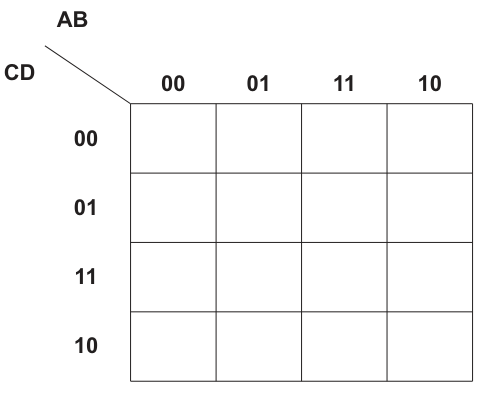
Answer
| CD/AB | 00 | 01 | 11 | 10 |
|---|---|---|---|---|
| 00 | 0 | 0 | 0 | 0 |
| 01 | 1 | 0 | 1 | 1 |
| 11 | 1 | 0 | 1 | 1 |
| 10 | 0 | 0 | 0 | 0 |
See completed K-map
Background Concept
A Karnaugh map (K-map) is a visual way of arranging truth-table outputs so that adjacent cells differ by only one variable. This makes simplification easier.
For a 4-variable K-map:
- one pair of variables labels the columns
- the other pair labels the rows
- the labels must be in Gray-code order, not ordinary binary order
Gray-code order for two bits is:
00011110
This order is essential because neighbouring cells must differ by one bit only.
Understanding the Question
You are given a blank 4-by-4 K-map with:
- columns labelled
ABas00, 01, 11, 10 - rows labelled
CDas00, 01, 11, 10
You must place the output T from the truth table into the correct cell for each input combination.
Approach
Take each truth-table row and match:
AandBto the columnCandDto the row
Then place the corresponding value of T in that cell.
A quick way is to fill the map row by row using the given Gray-code row and column headings.
Step-by-Step Reasoning
The K-map columns are:
AB = 00, 01, 11, 10
The K-map rows are:
CD = 00, 01, 11, 10
Now fill each row.
For CD = 00:
AB = 00gives0000, soT = 0AB = 01gives0100, soT = 0AB = 11gives1100, soT = 0AB = 10gives1000, soT = 0
So row 00 is:
0 0 0 0
For CD = 01:
AB = 00gives0001, soT = 1AB = 01gives0101, soT = 0AB = 11gives1101, soT = 1AB = 10gives1001, soT = 1
So row 01 is:
1 0 1 1
For CD = 11:
AB = 00gives0011, soT = 1AB = 01gives0111, soT = 0AB = 11gives1111, soT = 1AB = 10gives1011, soT = 1
So row 11 is:
1 0 1 1
For CD = 10:
AB = 00gives0010, soT = 0AB = 01gives0110, soT = 0AB = 11gives1110, soT = 0AB = 10gives1010, soT = 0
So row 10 is:
0 0 0 0
This gives the completed K-map.
Key Takeaways
- A K-map must use Gray-code order.
- Each cell stores the output for one input combination.
- Filling the K-map correctly is the foundation for correct grouping and simplification.
Common Mistakes
- Using binary order
00, 01, 10, 11instead of Gray-code order00, 01, 11, 10. - Swapping rows and columns, for example using
CDas columns by mistake. - Copying a truth-table value into the wrong cell because the variable order was not tracked carefully.
Things to Be Careful About
- Match the exact headings given on the diagram: columns are
AB, rows areCD. - Keep the Gray-code order exactly as printed.
- Check every
1against the original truth table before moving on to looping. - A correct K-map in part (b) is needed for the later simplification parts.
Draw loop(s) around appropriate group(s) in the K-map to produce an optimal sum-of-products.
Answer
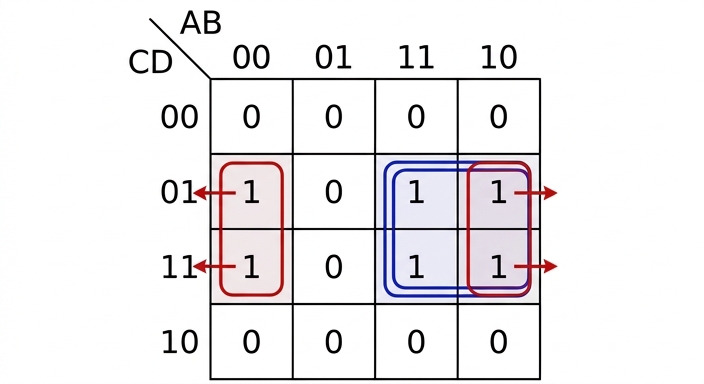
See K-map loops
Background Concept
In a Karnaugh map, loops are drawn around groups of 1s to simplify a Boolean expression.
The key rules are:
- groups must contain cells
- groups should be as large as possible
- cells in a group must be adjacent horizontally or vertically
- adjacency wraps around the edges of the map
- overlapping groups are allowed if they give a simpler result
A larger group removes more changing variables, so it usually gives a shorter product term.
Understanding the Question
You already have the completed K-map from part (b). This part asks you to draw the best loop or loops to produce an optimal sum-of-products.
That means the groups should be chosen to give the fewest and simplest product terms, not just any valid grouping.
Approach
Look for the largest valid groups of 1s first.
In this K-map, the 1s appear in two middle rows and in columns 00, 11 and 10. Because the first and last columns are adjacent in a K-map, a wrap-around group is possible.
The best simplification comes from two groups of four:
- one ordinary 2-by-2 block
- one wrap-around 2-by-2 block across the left and right edges
Step-by-Step Reasoning
The completed K-map with the optimal loops is:
Why these groups are chosen:
-
Group of four in columns
11and10, rows01and11- this is a normal 2-by-2 block
- grouping four cells removes two changing variables
- it is better than making two smaller pairs
-
Wrap-around group of four in columns
00and10, rows01and11- the first and last columns are adjacent in a K-map
- this allows a second group of four
- this loop overlaps with the first group in the
10column, which is allowed
These two groups are optimal because they cover all the 1s using only groups of four. That gives the shortest sum-of-products form.
Key Takeaways
- Always try to make the largest possible groups.
- K-map edges wrap around, so the first and last rows or columns can be adjacent.
- Overlapping groups are allowed when they help produce a simpler expression.
- Good grouping in the K-map leads directly to fewer literals in the Boolean expression.
Common Mistakes
- Missing the wrap-around adjacency between the leftmost and rightmost columns.
- Drawing pairs instead of a larger group of four, which gives a less simplified answer.
- Grouping diagonally; diagonal cells are not adjacent in a K-map.
- Refusing to overlap groups, even when overlap is needed for the optimal simplification.
Things to Be Careful About
- Groups must contain powers of two only.
- Only group cells containing
1for a sum-of-products simplification. - Make sure every
1is covered by at least one loop. - Do not include any
0inside a loop. - The grouping here is chosen to support the simplified expression needed in part (d).
Write the Boolean logic expression from your answer to part (c) as the simplified sum-of-products.
T = ......................................................................................................................................
Answer
AD + B'D
Background Concept
After loops have been drawn on a K-map, each loop is converted into one product term.
The rule is:
- any variable that stays the same throughout the loop remains in the term
- any variable that changes within the loop is eliminated
For a group of four cells, two variables usually remain constant and two change, so the resulting product term has two literals.
Understanding the Question
This part asks you to use the loops from part (c) and write the corresponding simplified sum-of-products expression.
So you are not going back to the truth table. You are reading the answer directly from the K-map groups.
Approach
Take each loop separately.
For each loop:
- check which row and column values are included
- identify which variables stay fixed
- write those fixed variables as a product term
- OR the two product terms together
Step-by-Step Reasoning
From part (c), there are two groups.
Group 1: rows 01 and 11, columns 11 and 10
- rows
01and11meanD = 1stays constant, whileCchanges - columns
11and10meanA = 1stays constant, whileBchanges
So the fixed variables are A and D.
This gives:
Group 2: rows 01 and 11, columns 00 and 10
- rows
01and11again meanD = 1stays constant, whileCchanges - columns
00and10meanB = 0stays constant, whileAchanges
So the fixed variables are \overline{B} and D.
This gives:
Now join the two product terms with OR:
That is the simplified sum-of-products.
Key Takeaways
- A loop turns into a term containing only the variables that stay constant.
- Variables that change inside the loop are removed.
- The final SOP expression is the OR of the terms from all loops.
Common Mistakes
- Keeping a variable that changes inside the group, which makes the term too long.
- Reading the rows and columns in the wrong variable order.
- Writing
Binstead of\overline{B}for the second group, even though the grouped columns haveB = 0.
Things to Be Careful About
- For rows
01and11,Dis constant at1, notC. - For columns
00and10,Bis constant at0, so it becomes\overline{B}. - Keep the answer in SOP form for this part; the further factorisation happens in part (ii).
Use Boolean algebra to write your answer to part (d)(i) in its simplest form.
T = ...............................................................................................................................
Answer
D(A + B')
Background Concept
Boolean algebra uses laws similar to ordinary algebra. One useful law here is the distributive law:
This allows a common factor to be taken out of two terms.
In logic design, factoring an expression can show a simpler implementation, because a common input may be shared.
Understanding the Question
The previous part gave the simplified sum-of-products:
This part asks for the simplest form using Boolean algebra, so you should look for a common factor and rewrite the expression more compactly.
Approach
Both terms contain D, so factor D out.
That leaves the remaining terms inside brackets joined by OR.
Step-by-Step Reasoning
Start with:
Both terms contain D, so use the distributive law:
This is simpler because the common factor D is written once instead of twice.
Key Takeaways
- Look for common factors in Boolean expressions.
- The distributive law can reduce repetition.
- A factored form may be simpler than the SOP form, even though it is no longer a sum-of-products.
Common Mistakes
- Leaving the answer as
A\cdot D + \overline{B}\cdot Dwithout simplifying. - Factoring incorrectly, for example writing
D\cdot (A\cdot \overline{B}), which changes the logic. - Forgetting that
\overline{B}must stay complemented inside the bracket.
Things to Be Careful About
- Only factor out what is common to both terms; here that common factor is
D. - Keep the plus sign inside the bracket, because the original two terms were ORed.
- Do not change
\overline{B}toBduring factorisation.
Describe the process of segmentation for memory management.
.............................................................................................................................................
Answer
- Memory is divided into segments of variable size, based on logical parts of a program such as code, data or stack.
- Each segment is stored separately and does not need to be placed in one contiguous block with the other segments.
- A segment table is used to store information about each segment, such as its base address and length/limit.
- The logical address contains a segment number and an offset; the segment table is used to find the start of the segment and the offset is added to access the required location.
See explanation
Background Concept
Segmentation is a memory-management technique in which a program is split into meaningful logical sections called segments. Unlike paging, which uses fixed-size blocks, segmentation uses variable-size blocks. Typical segments include the program code, global data, stack, heap, or procedures.
The key idea is that a program is not treated as one single continuous block. Instead, each logical part can be managed separately. Because segment sizes differ, segmentation matches the natural structure of a program better than paging.
To make this work, the operating system keeps a segment table. For each segment, this table stores where that segment begins in main memory and how large it is. When the processor is given a logical address, that address is usually split into:
- a segment number
- an offset within that segment
The segment number selects the correct table entry, and the offset tells the system how far into that segment to go.
Understanding the Question
This question asks for the process of segmentation, not just a definition. So the answer needs to describe how memory is organised and how an address is used.
The important points are:
- memory/program is split into segments
- segments are variable sized
- segments are logical parts of the program
- they can be stored separately in memory
- a segment table is used
- the final address is found using segment number plus offset
A good answer therefore explains both the structure and the address translation step.
Approach
To answer this kind of question clearly, think in this order:
- State what segmentation does to the program.
- State the important property: segments are variable size and based on logical divisions.
- Explain that segments can be placed separately in memory.
- Explain how the segment table and offset are used to find the physical address.
That gives a complete process rather than isolated facts.
Step-by-Step Reasoning
First, the program is broken into separate segments. These are not random blocks; they are logical sections such as code, data and stack.
Second, the segments are variable in size. This is an important distinction from paging. One segment might be small and another much larger, depending on what that part of the program needs.
Third, these segments are stored separately in main memory. They do not have to sit next to each other. So the program is logically divided even if its physical storage in RAM is not one continuous area.
Fourth, the operating system stores details of each segment in a segment table. The most important values are:
- the base address, which is where the segment starts in physical memory
- the length or limit, which is how big the segment is
Finally, when the CPU wants to access an item, it uses a logical address made of two parts:
- the segment number
- the offset within that segment
The segment number is used to look up the correct table entry. The offset is then added to the base address to find the actual memory location. The limit is also useful for checking that the offset does not go beyond the size of the segment.
So the full process is: split program into logical variable-size segments, store them separately, keep their details in a segment table, then translate segment number plus offset into a physical address.
Key Takeaways
- Segmentation divides a program into logical parts.
- Segments are variable size, unlike pages.
- A segment table stores where each segment is and how large it is.
- Address translation uses segment number plus offset.
Common Mistakes
- Saying segments are fixed size. That describes paging, not segmentation.
- Describing pages instead of logical program sections such as code and data.
- Forgetting the segment table. Without it, the address translation process is incomplete.
- Saying the whole program must be stored contiguously. In segmentation, different segments can be stored in different memory areas.
Things to Be Careful About
- Use the word variable-sized for segments if comparing with paging.
- Make it clear that segmentation is based on logical divisions of a program, not equal-sized blocks.
- If you mention addresses, refer to segment number and offset, not just one address value.
- Do not confuse segmentation with virtual memory generally; segmentation is one specific memory-management method.
Explain what is meant by disk thrashing.
.............................................................................................................................................
Answer
- Disk thrashing happens when the system spends most of its time swapping pages or segments between main memory and secondary storage.
- It is usually caused by insufficient RAM or too many processes competing for memory.
- Very little useful processing is done, so system performance becomes extremely slow.
See explanation
Background Concept
Disk thrashing is a serious performance problem in virtual-memory systems. Virtual memory allows programs to use more memory than is physically available in RAM by moving pages or segments between main memory and disk storage.
Disk access is much slower than RAM access. So if the operating system has to keep moving memory contents between disk and RAM too often, the CPU spends a lot of time waiting. Instead of running programs efficiently, the system becomes busy with memory transfers.
This repeated transfer activity is called thrashing.
Understanding the Question
The question asks what is meant by disk thrashing. That means you should explain:
- what is happening
- why it happens
- what effect it has
A strong answer is not just "too much swapping". It should also mention that the system is spending most of its time doing that swapping because there is not enough main memory available, and that this causes very poor performance.
Approach
Use a simple cause-process-effect structure:
- Define the process: frequent swapping of pages or segments between RAM and disk.
- Give the cause: insufficient RAM or too many active processes.
- Give the effect: little real execution and major slowdown.
This directly matches the marks usually available for this kind of explanation.
Step-by-Step Reasoning
In a virtual-memory system, not all of a program has to stay in RAM all the time. Some parts can be kept on disk and loaded when needed.
This works well until memory pressure becomes too high. For example, if:
- there is too little RAM
- too many programs are running at once
- the active parts of programs cannot all fit in memory
then the operating system repeatedly removes one page or segment from RAM and loads another from disk.
If this swapping becomes excessive, the system spends most of its time handling these transfers rather than executing instructions. That is disk thrashing.
The result is a dramatic drop in performance. Programs respond slowly because disk operations are far slower than memory access. So even though the CPU is available, the overall system feels stalled because it is constantly waiting for data to be brought in from disk.
Key Takeaways
- Disk thrashing is excessive swapping between RAM and disk.
- It happens when main memory is insufficient for the workload.
- It causes severe slowdown because disk access is much slower than RAM access.
Common Mistakes
- Describing ordinary swapping as thrashing. Thrashing means the swapping is excessive and dominates system activity.
- Forgetting to mention the cause, such as lack of RAM or too many processes.
- Forgetting to mention the effect on performance.
- Saying the CPU is processing faster during thrashing. In reality, useful processing is reduced.
Things to Be Careful About
- Use wording like most of its time or excessive time swapping, because that captures the severity.
- Mention pages or segments, since either may be moved depending on the memory-management method.
- Do not confuse thrashing with fragmentation; fragmentation is about memory layout, while thrashing is about repeated disk-memory transfers.
- Keep the explanation tied to virtual memory and performance, not just "the disk is busy".
A veterinary surgery wants to create a class for individual pets.
Some of the attributes required in the class are listed in the table.
| Attribute | Data type | Description |
|---|---|---|
| PetID | STRING | unique ID assigned at registration |
| PetType | STRING | type of pet assigned at registration |
| OwnerTelephone | STRING | telephone number of owner assigned at registration |
| DateRegistered | DATE | date of registration |
State one reason why the attributes would be declared as PRIVATE.
.............................................................................................................................................
Answer
- To provide encapsulation/data hiding, so the attributes cannot be accessed or changed directly from outside the class.
To provide encapsulation/data hiding so the attributes cannot be accessed directly from outside the class.
Background Concept
In object-oriented programming, attributes store the data belonging to an object. A common design rule is to make attributes PRIVATE. This is part of encapsulation.
Encapsulation means:
- the data inside an object is hidden from outside code
- access to that data is controlled through the class's methods
- the class can protect its own data from invalid or accidental changes.
If attributes were public, any part of the program could change them directly. That makes it harder to control correctness. For example, an object might be given an invalid telephone number or its registration date might be changed inappropriately.
Understanding the Question
The question asks for one reason why the attributes in the Pet class would be declared as PRIVATE.
So this is not asking how to write code. It is asking for the OOP principle behind using private attributes. The strongest answer is about data hiding / encapsulation.
Approach
For a one-mark theory question like this, the best approach is:
- identify the key OOP idea being tested
- state it directly
- link it to the effect on the attributes.
A concise full-mark answer is that private attributes stop other parts of the program accessing or changing the data directly.
Step-by-Step Reasoning
- The word
PRIVATEin OOP points to visibility or access control. - Private members are only accessible from within the class itself.
- Therefore outside code cannot directly read or overwrite those attributes.
- This is called encapsulation or data hiding.
- Since the question asks for one reason, stating that it prevents direct external access is enough.
A good exam answer therefore is:
- the attributes are private so they are hidden from outside the class and can only be accessed through methods.
Key Takeaways
PRIVATEattributes support encapsulation.- Encapsulation protects object data from direct outside access.
- Exam answers should link
PRIVATEwith data hiding or controlled access.
Common Mistakes
- Saying only "for security" with no OOP context. That is too vague.
- Talking about inheritance instead of encapsulation. These are different OOP ideas.
- Saying private means the data cannot be accessed at all. It can still be accessed by methods inside the class.
Things to Be Careful About
- The question asks for one reason, so one clear point is enough.
- Use the correct OOP terminology: encapsulation or data hiding.
- Make sure your reason is specifically about restricting direct access to attributes, not a general statement about classes.
Complete the class diagram for Pet, to include:
• an attribute and data type for the name of the pet
• an attribute and data type for the name of the owner
• a method to create a Pet object and set attributes at the time of registration
• a method to assign a pet ID
• a method to assign the date of registration
• a method to return the pet name
• a method to return the owner’s telephone number.
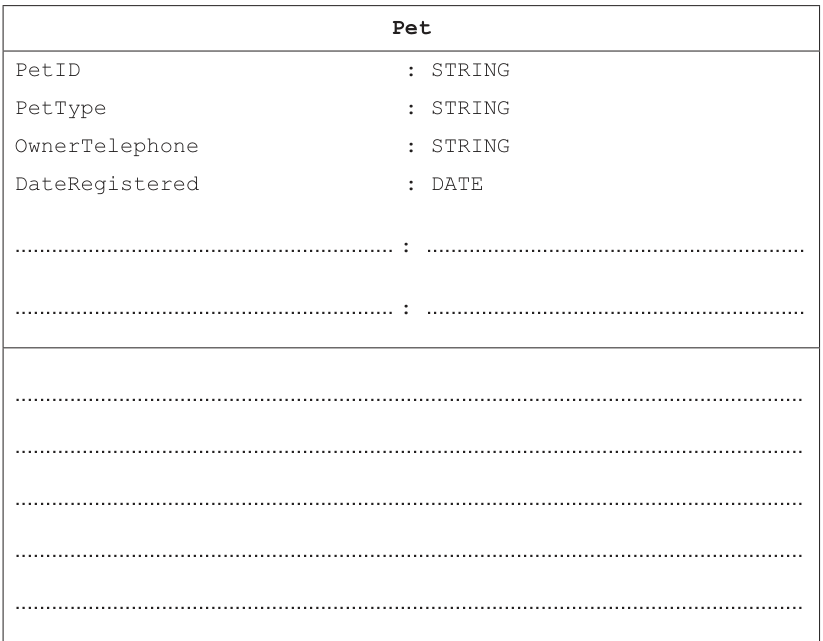
Answer
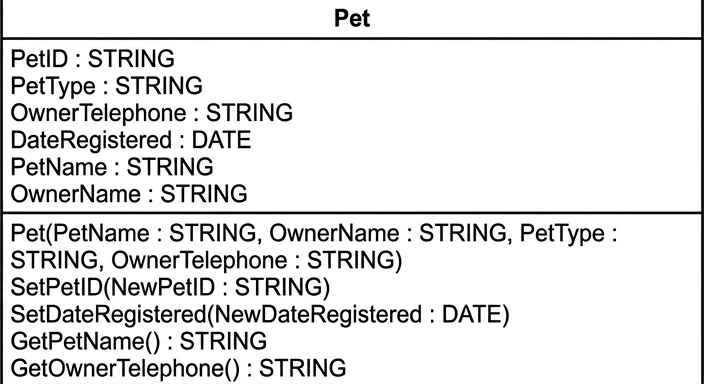
See class diagram
Background Concept
A class diagram shows the design of a class in object-oriented programming. It usually has three sections:
- Class name
- Attributes
- Methods
Attributes are the pieces of data stored by each object. Methods are the operations the object can perform.
For this syllabus, you should be comfortable with these common method types:
- constructor: used to create an object and initialise its attributes
- mutator/setter: used to assign or change an attribute
- accessor/getter: used to return the value of an attribute.
A good class design matches the real-world object. Here, each Pet object stores details about one registered pet and its owner.
Understanding the Question
The question already gives four attributes for the Pet class:
PetID : STRINGPetType : STRINGOwnerTelephone : STRINGDateRegistered : DATE
It then asks you to complete the class diagram by adding:
- an attribute for the pet's name
- an attribute for the owner's name
- a method to create the object and set attributes at registration
- a method to assign a pet ID
- a method to assign the registration date
- a method to return the pet name
- a method to return the owner's telephone number.
So this is a class-design task. You are not writing full program code; you are showing the structure of the class in UML-style form.
Approach
The safest approach is to map each bullet point in the question to one line in the class diagram.
- For the two new pieces of stored data, add two attributes of type
STRING. - For creating the object, add a constructor.
- For assigning values later, add setter methods.
- For returning values, add getter methods with return type
STRING.
A sensible naming pattern is:
- attributes:
PetName,OwnerName - setter methods:
Set... - getter methods:
Get...
There can be other valid names, but they must clearly perform the required job.
Step-by-Step Reasoning
First, add the two missing attributes.
The pet's name is text, so:
PetName : STRING
The owner's name is also text, so:
OwnerName : STRING
Next, add the method to create a Pet object and set attributes at registration.
A constructor normally has the same name as the class. At registration, the known values are likely to be:
- pet name
- owner name
- pet type
- owner telephone.
So a suitable constructor is:
Pet(PetName : STRING, OwnerName : STRING, PetType : STRING, OwnerTelephone : STRING)
Then add a method to assign a pet ID.
Because this method gives a value to PetID, it is a setter/mutator. It needs a STRING parameter:
SetPetID(NewPetID : STRING)
Then add a method to assign the date of registration.
This is another setter and needs a DATE parameter:
SetDateRegistered(NewDateRegistered : DATE)
Now add the accessor to return the pet name.
Because it returns the stored pet name, it needs no parameter and returns STRING:
GetPetName() : STRING
Finally, add the accessor to return the owner's telephone number:
GetOwnerTelephone() : STRING
That gives all five required methods and both required extra attributes.
Note that the exact method names may vary between candidates, but they must clearly indicate:
- object creation
- assignment of
PetID - assignment of
DateRegistered - returning the pet name
- returning the owner's telephone number.
Key Takeaways
- A class diagram separates attributes from methods.
- A constructor initialises an object when it is created.
- Setter methods assign or update attribute values.
- Getter methods return attribute values and usually include a return type.
- Choose attribute types that match the data being stored, such as
STRINGfor names andDATEfor dates.
Common Mistakes
- Forgetting to add the data types for the two new attributes.
- Writing ordinary prose instead of class-diagram entries.
- Omitting parameters from setter methods such as
SetPetID()andSetDateRegistered(). - Forgetting the return type on getter methods.
- Using a getter when the question asked for an assign/set method, or vice versa.
- Including
PetIDandDateRegisteredinside the constructor when the question separately asks for methods to assign them. That may be less well matched to the wording.
Things to Be Careful About
- Use
STRINGfor names and telephone number, andDATEfor the registration date. - Keep attributes in the attributes section and methods in the methods section.
- A constructor usually does not show a return type.
- Getter methods should normally show
: STRINGhere because they return text. - Since the question says "complete the class diagram", your answer should be diagram-style rather than full code.
- Sensible alternative names are often acceptable, but they must be unambiguous and match the required purpose.
Several syntax diagrams are shown.
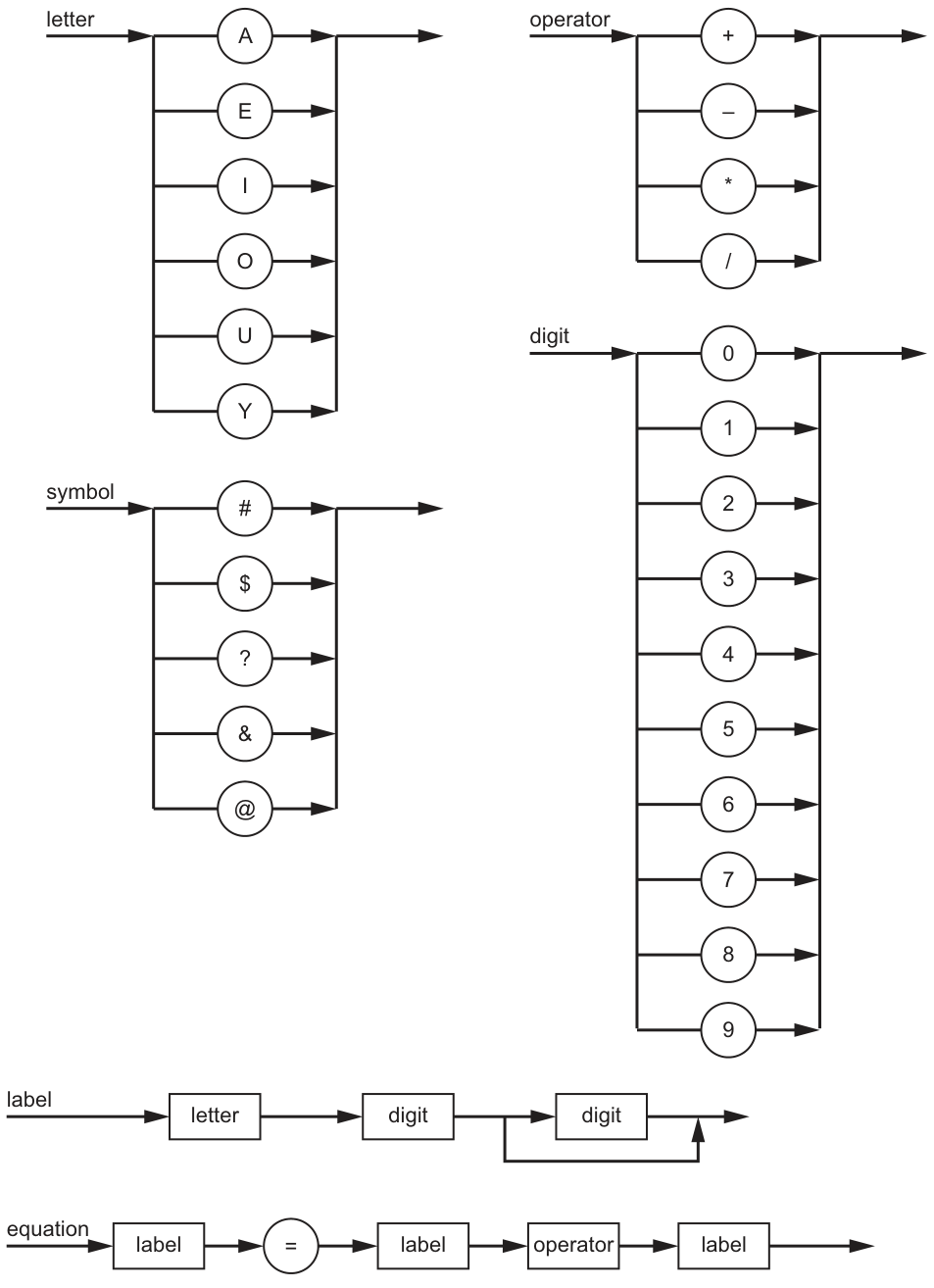
Complete the Backus-Naur Form (BNF) for the given syntax diagrams.
<operator> ::= ..................................................................................................................

<label> ::= .........................................................................................................................

<equation> ::= ..................................................................................................................
Answer
<operator> ::= + | - | * | /

<label> ::= <letter><digit><digit> | <label><digit>

<equation> ::= <label> = <label><operator><label>
See completed BNF
Background Concept
A syntax diagram and BNF are two different ways of describing the same grammar rule.
- A terminal is an actual symbol that appears in the final string, such as
+,=or7. - A non-terminal is a named rule that can be expanded further, such as
<label>or<digit>. - In BNF, alternatives are written using
|. - If a syntax diagram shows that something can be repeated, BNF often represents that using recursion.
For example, a diagram with several branches means “choose one of these alternatives”, so in BNF we write them separated by |.
Understanding the Question
You are given six syntax diagrams in the parent figure, but in this part you only need to write BNF for three of them:
<operator><label><equation>
The important point is that you must read each diagram carefully:
operatoris just a choice of four symbols.labelstarts with aletter, then digits follow, with the final digit position able to repeat.equationis a sequence of existing rules and one literal=sign.
So this is mainly a grammar-translation task: turn branching into |, turn a sequence into symbols written one after another, and turn repetition into recursion.
Approach
Work through each syntax rule one by one.
- For
operator, list the four possible terminals. - For
label, identify the minimum valid form first, then add a recursive rule to allow extra digits. - For
equation, copy the sequence exactly as the diagram shows it: label, equals sign, label, operator, label.
This avoids guessing and keeps the BNF matched closely to the diagram.
Step-by-Step Reasoning
1. <operator>
The operator syntax diagram shows four possible choices:
+-*/
In BNF, a choice becomes alternatives separated by |:
<operator> ::= + | - | * | /
2. <label>
The label syntax diagram begins with:
- one
letter - then one
digit - then another
digit
After that, the second digit position can repeat, so the label can continue with more digits.
The shortest possible valid label therefore has:
- one letter
- two digits
So the base case is:
<letter><digit><digit>
To allow more digits, add a recursive alternative that says an existing <label> can be followed by another <digit>:
<label> ::= <letter><digit><digit> | <label><digit>
This generates strings such as:
A12E347U9086
3. <equation>
The equation syntax diagram shows this exact sequence:
<label>=<label><operator><label>
So the BNF is written directly as:
<equation> ::= <label> = <label><operator><label>
That matches examples like:
A12=E34+U56Y99=O10/A88
Key Takeaways
- A syntax-diagram branch becomes
|in BNF. - A sequence in a diagram becomes a sequence written directly in BNF.
- Repetition in a syntax diagram is commonly represented in BNF using recursion.
- Terminals stay literal; non-terminals stay inside angle brackets.
Common Mistakes
- Leaving out angle brackets for rule names:
labelis not the same as<label>in BNF notation. - Treating terminals as non-terminals:
=and+are literal symbols, not grammar rule names. - Missing the recursive part of
<label>: that would only allow the minimum form and not longer labels. - Making
<equation>the wrong order: the diagram is exactly<label> = <label><operator><label>, not any other sequence. - Using commas or words like THEN: BNF uses
::=and|, not programming syntax.
Things to Be Careful About
- Read the parent figure precisely; one small loop or branch changes the grammar.
- Keep the spacing and symbols clear so the examiner can see each terminal and non-terminal.
- Do not invent new grammar rules unless needed; here the required rules can be written directly.
- When using recursion, make sure there is also a valid base case, otherwise the rule could never terminate.
A new syntax rule, password, is required. It must begin with a letter or a symbol, followed by a digit and end with one or two symbols.
Answer
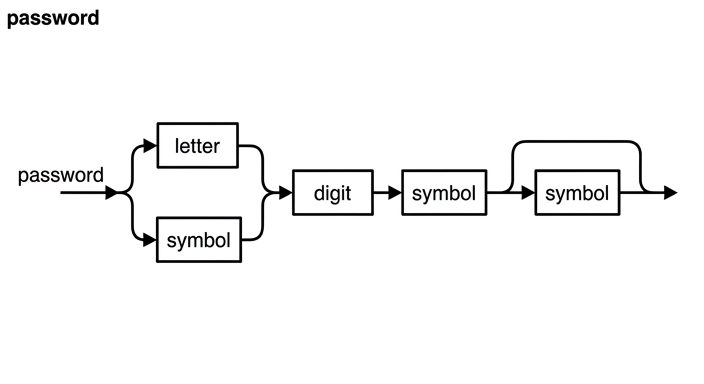
See syntax diagram
Background Concept
A syntax diagram shows how a valid string can be built by following a path from left to right.
Common diagram features are:
- Boxes for non-terminals such as
letter,digitandsymbol - Circles for literal terminals
- Branches for alternatives, meaning “one of these choices”
- Loops or bypass paths for repetition or optional parts
So when a rule says “letter or symbol”, the syntax diagram needs a branch. When a rule says “one or two symbols”, the diagram needs one compulsory symbol and then a way to include a second symbol optionally.
Understanding the Question
The new rule is password.
It must:
- begin with a letter or a symbol
- then have a digit
- then end with one or two symbols
That means there are two structural features to show clearly:
- an alternative at the beginning
- an optional second symbol at the end
The middle digit is compulsory in every valid password.
Approach
Build the diagram in three sections.
- Start with a branch for the first character: either
letterorsymbol. - Merge both branches back into one path, then place the compulsory
digit. - After the digit, place one compulsory
symbol, then make a bypass/optional path for a secondsymbol.
This directly mirrors the English description without overcomplicating it.
Step-by-Step Reasoning
The rule says the password must begin with either a letter or a symbol.
So from the start point, the path splits into two branches:
- upper branch through
letter - lower branch through
symbol
These branches must then rejoin, because after either choice the next part is the same.
The next compulsory part is a digit, so after the merge the path goes through a digit box.
After that, the rule says the password must end with one or two symbols.
That means:
- the first ending
symbolis compulsory - the second ending
symbolis optional
In a syntax diagram, the cleanest way to show that is:
- one
symbolbox on the main path - then a bypass around another
symbolbox so the second one may be included or skipped
That produces exactly these valid shapes:
letter digit symbolletter digit symbol symbolsymbol digit symbolsymbol digit symbol symbol
and it prevents invalid forms such as:
- starting with a digit
- missing the digit
- ending with no symbol
- having three ending symbols
Key Takeaways
- Use a branch for “either/or”.
- Use a main path plus optional bypass for “one or two”.
- Keep compulsory items on the main route so every valid path includes them.
- A good syntax diagram should match the wording of the rule exactly.
Common Mistakes
- Putting the digit before the opening choice: the rule says it begins with a letter or symbol, not a digit.
- Making both ending symbols compulsory: that would disallow passwords ending with just one symbol.
- Making the first ending symbol optional: that would allow passwords not ending with a symbol, which is wrong.
- Not merging the first two branches properly: both choices must continue into the same required
digit. - Allowing two starting characters: only one starting item is allowed before the digit.
Things to Be Careful About
- The first branch is an alternative, not a sequence. A password starts with either
letterorsymbol, not both. - The digit is always present and comes immediately after that first character.
- “End with one or two symbols” means the final part must be
symbolorsymbol symbolonly. - In the diagram, make the optional second symbol visually clear by using a bypass path around that box.
Write the BNF for password.
.....................................................................................................................................
Answer
<password> ::= <letter><digit><symbol> | <letter><digit><symbol><symbol> | <symbol><digit><symbol> | <symbol><digit><symbol><symbol>
See BNF
Background Concept
BNF describes all valid strings that a grammar rule can produce.
When a rule contains:
- a choice, use alternatives separated by
| - a fixed sequence, write the parts in order
- an optional extra item, either use recursion/helper rules or list the valid alternatives explicitly
Because this question asks only for the BNF of password, the simplest valid method is to list all forms directly.
Understanding the Question
The rule for password is:
- first character:
letterorsymbol - second character:
digit - ending: one
symbolor twosymbols
So there are two independent choices:
- how it starts
- whether it ends with one or two symbols
Two choices for the start and two choices for the end give four total valid patterns.
Approach
List every valid pattern produced by combining:
- start with
letterorsymbol - end with
symbolorsymbol symbol
Then join those four patterns using |.
This is straightforward and avoids the need for extra helper non-terminals.
Step-by-Step Reasoning
Start with the first choice.
Start option 1
If the password begins with a letter, the start is:
<letter><digit>
Now add the two possible endings:
- one symbol:
<letter><digit><symbol> - two symbols:
<letter><digit><symbol><symbol>
Start option 2
If the password begins with a symbol, the start is:
<symbol><digit>
Again add the two possible endings:
- one symbol:
<symbol><digit><symbol> - two symbols:
<symbol><digit><symbol><symbol>
Combine all valid forms
Join the four valid patterns with |:
<password> ::= <letter><digit><symbol> | <letter><digit><symbol><symbol> | <symbol><digit><symbol> | <symbol><digit><symbol><symbol>
That exactly matches the rule.
Key Takeaways
- Break a grammar rule into separate choices, then combine them systematically.
- Explicit alternatives are often the easiest way to write BNF for a short rule.
- Check that every allowed form appears and every disallowed form is excluded.
Common Mistakes
- Missing one of the four alternatives: for example, including only the versions that start with a letter.
- Allowing a password to end with no symbol: the rule says it must end with one or two symbols.
- Putting the digit in the wrong position: it must come after the first letter/symbol.
- Using only one alternative for the ending: that would ignore either the one-symbol or two-symbol case.
Things to Be Careful About
- Keep
letter,digitandsymbolas non-terminals in angle brackets. - Make sure the order is exact: first character, then digit, then ending symbol(s).
- Do not confuse “letter or symbol” with “letter and symbol”.
- If you choose explicit alternatives, ensure all four valid combinations are covered.
The following diagram shows an ordered binary tree.
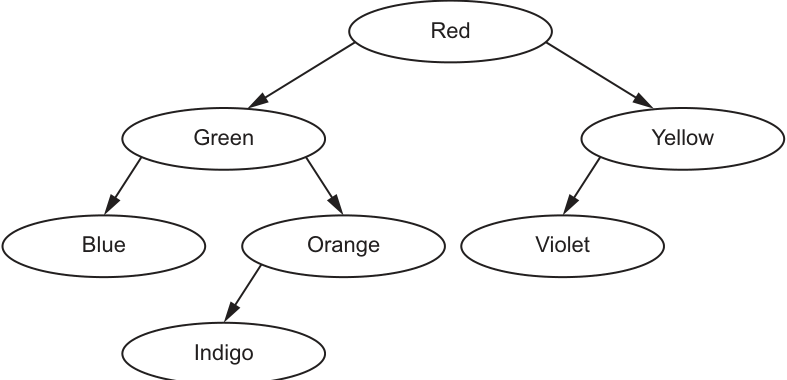
A linked list of nodes is used to store the data. Each node consists of a left pointer, the data and a right pointer.
–1 is used to represent a null pointer.
Complete this linked list to represent the given binary tree.
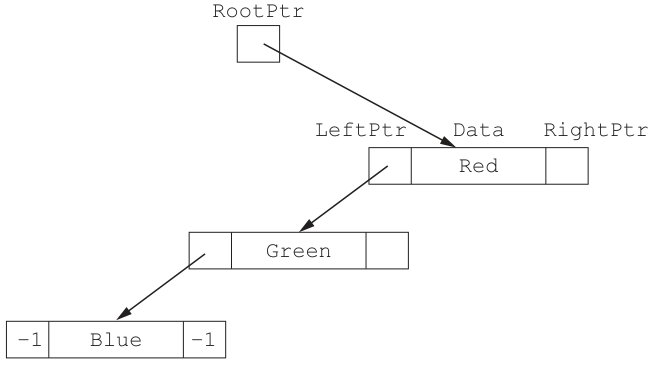
Answer
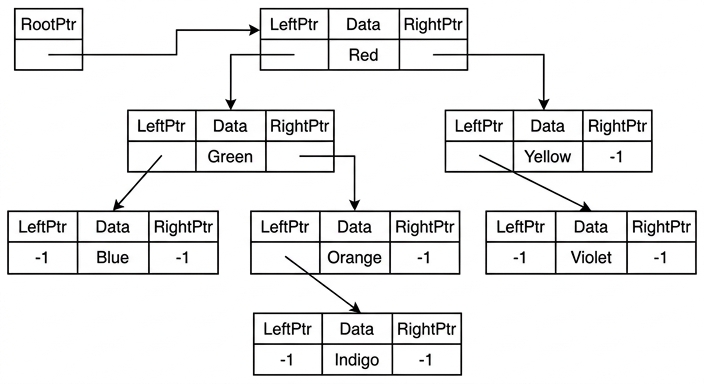
See linked-list diagram
Background Concept
A binary tree can be stored using linked nodes. Each node contains three fields:
- a
LeftPtrto the left child - the data item
- a
RightPtrto the right child
If a node does not have a left or right child, that pointer must contain a null value. In this question, the null pointer is written as -1.
So, to convert a tree into a linked representation, you inspect each node and decide:
- what its left child is
- what its right child is
- whether either side is empty
Understanding the Question
You are given the ordered binary tree with root Red. The partially completed linked-list diagram already shows:
RootPtrpointing toRedRed.LeftPtrpointing toGreenGreen.LeftPtrpointing toBlueBlue.LeftPtr = -1andBlue.RightPtr = -1
You must complete all the missing pointers so that the linked structure exactly matches the tree in Fig. 11.1.
Approach
Start from the tree and examine each node one by one.
For each node:
- write the left pointer to its left child, if it has one
- write the right pointer to its right child, if it has one
- write
-1wherever a child does not exist
This is easier if you read the tree level by level and turn each branch into a pointer.
Step-by-Step Reasoning
From the tree:
Redhas left childGreenand right childYellowGreenhas left childBlueand right childOrangeBluehas no children, so both pointers are-1Orangehas a left childIndigoand no right childIndigohas no children, so both pointers are-1Yellowhas a left childVioletand no right childViolethas no children, so both pointers are-1
So the missing parts of the linked structure are:
Red.RightPtrpoints toYellowGreen.RightPtrpoints toOrangeOrange.LeftPtrpoints toIndigoOrange.RightPtr = -1Yellow.LeftPtrpoints toVioletYellow.RightPtr = -1Indigo.LeftPtr = -1,Indigo.RightPtr = -1Violet.LeftPtr = -1,Violet.RightPtr = -1
That gives the completed linked-list diagram.
Key Takeaways
- A linked binary tree stores child relationships using pointers.
-1is used here as the null pointer for a missing child.- Every node must be checked separately for both left and right children.
Common Mistakes
- Putting a child on the wrong side, for example making
Yellowthe left child ofRedinstead of the right child. - Forgetting to fill in
-1for missing children. - Attaching
Indigoto the wrong node; it is the left child ofOrange, not ofGreen. - Assuming every non-leaf node has two children;
OrangeandYelloweach have only one.
Things to Be Careful About
- Follow the tree exactly; do not reorder nodes just because it is an ordered tree.
- A pointer field must either point to a child node or contain
-1. RootPtrpoints to the root node only; it does not point to every top-level branch.- Make sure leaves such as
Blue,IndigoandViolethave both pointer fields set to-1.
A user-defined record structure is used to store the nodes of the linked list in part (a).
Complete the diagram, using your answer for part (a).
| RootPtr | Index | LeftPtr | Data | RightPtr |
|---|---|---|---|---|
| 0 | 0 | Red | ||
| 1 | Green | |||
| 2 | Yellow | |||
| 3 | Blue | |||
| 4 | Orange | |||
| 5 | Indigo | |||
| FreePtr | 6 | Violet | ||
| 7 |
Answer
RootPtr = 0
FreePtr = 7
| Index | LeftPtr | Data | RightPtr |
|---|---|---|---|
| 0 | 1 | Red | 2 |
| 1 | 3 | Green | 4 |
| 2 | 6 | Yellow | -1 |
| 3 | -1 | Blue | -1 |
| 4 | 5 | Orange | -1 |
| 5 | -1 | Indigo | -1 |
| 6 | -1 | Violet | -1 |
Index 7 is the free record.
See completed table
Background Concept
A linked structure does not have to use actual memory addresses. In an array of records, each pointer can instead store the index of another record.
For a binary tree stored this way:
RootPtrstores the index of the root node- each record stores
LeftPtr,DataandRightPtr LeftPtrandRightPtrcontain the index of the child record-1means there is no childFreePtrstores the index of the first unused record
This is sometimes called a static linked structure because the links are represented by array positions rather than true dynamic pointers.
Understanding the Question
The colours have already been placed into array records at fixed indices:
- 0 =
Red - 1 =
Green - 2 =
Yellow - 3 =
Blue - 4 =
Orange - 5 =
Indigo - 6 =
Violet - 7 = unused
You must use the tree structure from part (a) and convert each child relationship into the correct index value.
Approach
Work in two stages:
- identify which index stores each colour
- replace every left or right child name with that index
After that:
RootPtris the index of the root nodeRedFreePtris the unused record index
Step-by-Step Reasoning
First map the nodes to indices:
Redis at index 0Greenis at index 1Yellowis at index 2Blueis at index 3Orangeis at index 4Indigois at index 5Violetis at index 6
Now convert the tree links.
Red:
- left child is
Green, soLeftPtr = 1 - right child is
Yellow, soRightPtr = 2
Green:
- left child is
Blue, soLeftPtr = 3 - right child is
Orange, soRightPtr = 4
Yellow:
- left child is
Violet, soLeftPtr = 6 - no right child, so
RightPtr = -1
Blue is a leaf:
LeftPtr = -1RightPtr = -1
Orange:
- left child is
Indigo, soLeftPtr = 5 - no right child, so
RightPtr = -1
Indigo is a leaf:
LeftPtr = -1RightPtr = -1
Violet is a leaf:
LeftPtr = -1RightPtr = -1
Now the pointer variables:
- the root is
Red, at index 0, soRootPtr = 0 - the only unused record is index 7, so
FreePtr = 7
Key Takeaways
- In an array implementation, pointers are usually record indices.
- To complete the table, translate each child node into its index.
RootPtridentifies the root record andFreePtridentifies the next available record.
Common Mistakes
- Writing the child data values instead of the child indices in pointer fields.
- Forgetting that
Yellowhas no right child, so itsRightPtrmust be-1. - Mixing up index 5 (
Indigo) and index 6 (Violet). - Forgetting to set
FreePtrto the unused record.
Things to Be Careful About
- Use the given record order exactly; do not invent your own indices.
- Check left and right separately for every node.
RootPtris not the data valueRed; it is the index0.- If a child does not exist, write
-1, not a blank, in the pointer field.
The linked list in part (a) is implemented using a 1D array of records. Each record contains a left pointer, data and a right pointer.
The following pseudocode represents a function that searches for an element in the array of records BinTree. It returns the index of the record if the element is found, or it returns a null pointer if the element is not found.
Complete the pseudocode for the function.
FUNCTION SearchTree(Item : STRING) ........................................................................
    NowPtr ← .........................................................................................................................
    WHILE NowPtr <> -1
        IF ..................................................................................................................... THEN
            NowPtr ← BinTree[NowPtr].LeftPtr
        ELSE
            IF BinTree[NowPtr].Data < Item THEN
                .........................................................................................................................
            ELSE
                RETURN NowPtr
            ENDIF
        ENDIF
    ENDWHILE
    RETURN NowPtr
ENDFUNCTION
Answer
FUNCTION SearchTree(Item : STRING) RETURNS INTEGER
    NowPtr ← RootPtr
    WHILE NowPtr <> -1
        IF BinTree[NowPtr].Data > Item THEN
            NowPtr ← BinTree[NowPtr].LeftPtr
        ELSE
            IF BinTree[NowPtr].Data < Item THEN
                NowPtr ← BinTree[NowPtr].RightPtr
            ELSE
                RETURN NowPtr
            ENDIF
        ENDIF
    ENDWHILE
    RETURN NowPtr
ENDFUNCTION
See completed pseudocode
Background Concept
An ordered binary tree stores smaller values in the left subtree and larger values in the right subtree. Because of that ordering, searching is efficient:
- if the item is smaller than the current node, go left
- if the item is larger than the current node, go right
- if the item is equal to the current node, the item has been found
- if the pointer becomes
-1, the item is not in the tree
This is similar in idea to binary search: each comparison tells you which half of the structure can be ignored.
Understanding the Question
You are given an incomplete function that searches the array-of-records tree BinTree.
The function must:
- start at the root
- move left or right depending on the comparison
- return the index of the matching record if found
- return the null pointer
-1if the item is not found
The missing parts are:
- the return type of the function
- the initial value of
NowPtr - the first comparison
- the statement used when moving to the right child
Approach
Use the standard iterative ordered-binary-tree search pattern:
- set the current pointer to
RootPtr - repeat while the current pointer is not null
- compare the current node's data with
Item - go left if
Itemis smaller - go right if
Itemis larger - return the current pointer if they are equal
- if the loop ends, return
-1
Step-by-Step Reasoning
The function returns a record index or -1, so the return type must be INTEGER.
The search must begin at the root of the tree, so:
NowPtr ← RootPtr
The loop condition is already given:
- continue while
NowPtr <> -1
Now decide the first comparison.
The inner ELSE already handles:
BinTree[NowPtr].Data < Item
That means the current node is alphabetically smaller than the item, so the item must be in the right subtree if it exists. Therefore the missing statement there is:
NowPtr ← BinTree[NowPtr].RightPtr
So the first IF must be the opposite case:
BinTree[NowPtr].Data > Item
If that is true, the item is smaller than the current node, so move left:
NowPtr ← BinTree[NowPtr].LeftPtr
If neither greater nor less is true, the two values are equal, so the item has been found and the function returns NowPtr.
If the loop eventually reaches NowPtr = -1, the search has fallen off the tree without finding the item, so the final RETURN NowPtr correctly returns -1.
Key Takeaways
- Ordered binary tree search depends on comparing the target with the current node.
- Smaller values go left; larger values go right.
- A null pointer means the search path has ended and the item is absent.
- Returning the current index is appropriate when the tree is stored in an array of records.
Common Mistakes
- Reversing the comparison and moving left when the item is larger.
- Starting the search at index 0 automatically instead of using
RootPtr. - Returning the data value instead of the record index.
- Forgetting that
-1is the null pointer used to signal "not found".
Things to Be Careful About
- Keep the comparison direction consistent with an ordered binary tree.
- The existing inner test is
BinTree[NowPtr].Data < Item, so the missing outer test must be the greater-than case. - Use
NowPtr ← BinTree[NowPtr].RightPtrwhen moving right, notLeftPtr. - The function returns an
INTEGER, because it returns an index or-1.