Computer Science 9618/42 — May/June 2024
Cambridge A-Level · Practical · worked solutions for every part, with the mark scheme
Topics Programming Paradigms (Procedural and Object-oriented) · Algorithms and Abstract Data Types · File Processing and Exception Handling · Recursion
A program outputs a main word. The program asks the user to enter the different words of 3 or more letters that can be made from the letters in the main word. These are called the answers.
There are 3 files: Easy.txt, Medium.txt and Hard.txt. Each file has the main word on the first line. For example, the main word in Easy.txt is house.
The answers are stored in the file. Each answer is on a new line after the main word. For example, Easy.txt has 14 answers that can be made from the letters in house.
The words read from the text file are stored in the global array WordArray. The number of words that can be made from the letters in the main word is stored in the global variable NumberWords.
The procedure ReadWords():
- takes a file name as a parameter
- opens the file and reads in the data
- stores the main word in the first element in
WordArray - stores each answer in a new element in
WordArray - counts and stores the number of answers.
Write program code for the procedure ReadWords().
Save your program as Question1_J24.
Copy and paste the program code into part 1(a) in the evidence document.
Answer
def ReadWords(FileName):
    global WordArray, NumberWords
    WordArray = []

    with open(FileName, "r") as FileHandle:
        for Line in FileHandle:
            WordArray.append(Line.strip())

    NumberWords = len(WordArray) - 1
See program code
Background Concept
A text file stores data line by line. In Python, reading a file with a for loop gives each line as a string, usually ending with a newline character \n. If we want to store just the word, we remove that end-of-line character using .strip().
This question also uses global data. WordArray is a list that must contain the main word first, followed by every valid answer in the same order as the file. NumberWords stores only the number of answers, so it must not include the first line.
Understanding the Question
The file structure is fixed:
- line 1 = the main word
- every later line = one valid answer
So the procedure must:
- receive a filename
- open that file
- read every line into
WordArray - keep the main word at element 0
- count only the answer words and store that in
NumberWords
Because the question already says the array and count are global, the procedure must update those global variables.
Approach
The cleanest approach is:
- reset
WordArrayto an empty list - open the file
- loop through every line
- remove the newline and append the word to the list
- after the file is fully read, set
NumberWordstolen(WordArray) - 1
Using with open(...) is helpful because the file closes automatically when the block ends.
Step-by-Step Reasoning
def ReadWords(FileName): defines the procedure with one parameter, the file name.
global WordArray, NumberWords means the procedure changes the global list and global count, not temporary local versions.
WordArray = [] clears any previous file contents so the new game starts with fresh data.
with open(FileName, "r") as FileHandle: opens the text file for reading.
for Line in FileHandle: reads one line at a time from top to bottom.
Line.strip() removes the newline character, so storing house gives house, not house\n.
WordArray.append(...) keeps the file order exactly:
- first append = main word at index 0
- later appends = answers at indices 1, 2, 3, ...
Finally, NumberWords = len(WordArray) - 1 subtracts 1 because the first element is the main word, not an answer.
For example, if Easy.txt has 15 lines total, then len(WordArray) becomes 15 and NumberWords becomes 14.
Key Takeaways
- How to read all lines from a text file into a list.
- Why
.strip()is needed when storing file input. - How to count answer records separately from a header or first line.
- How to update global variables from inside a procedure.
Common Mistakes
- Forgetting
global, which creates local variables and leaves the real globals unchanged. - Not using
.strip(), so comparisons later fail because stored words include hidden newline characters. - Setting
NumberWords = len(WordArray), which wrongly counts the main word as an answer. - Reading only the first line instead of the whole file.
Things to Be Careful About
- In Python, the first list element is index 0, so the main word will be
WordArray[0]. - The file name passed in must match the actual file name exactly, such as
Easy.txt. - If you reuse the program, always clear
WordArraybefore loading a different file. with open(...)is safer than opening the file and forgetting to close it.
The main program asks the user to enter "easy", "medium" or "hard" and calls ReadWords() with the filename that matches the user’s input. For example, if the user enters "easy", the parameter is "Easy.txt".
Write program code for the main program.
Save your program.
Copy and paste the program code into part 1(b) in the evidence document.
Answer
Difficulty = input("Enter difficulty (easy, medium or hard): ").lower()

if Difficulty == "easy":
    ReadWords("Easy.txt")
elif Difficulty == "medium":
    ReadWords("Medium.txt")
elif Difficulty == "hard":
    ReadWords("Hard.txt")
See program code
Background Concept
A main program often controls the overall flow of a solution. It gets input from the user, makes a decision, and then calls the correct procedure. In Python, selection is done with if, elif and else.
Using .lower() on user input is a common way to make checking easier, because Easy, EASY and easy can all be treated as easy.
Understanding the Question
The user types one of three difficulty levels: easy, medium or hard. The program must convert that choice into the matching file name and then call ReadWords().
So this part is not about reading the file itself. That is already handled by ReadWords(). This part just chooses which filename to pass.
Approach
The simplest approach is:
- prompt the user for the difficulty
- convert the reply to lower case
- use
if / elifto match the value - call
ReadWords()with the correct file name
This directly matches the wording of the task.
Step-by-Step Reasoning
Difficulty = input(...).lower() reads the user's choice and normalises it.
If the user enters easy, the program calls:
ReadWords("Easy.txt")
If the user enters medium, it calls:
ReadWords("Medium.txt")
If the user enters hard, it calls:
ReadWords("Hard.txt")
That is enough to satisfy the task because the question guarantees these are the valid choices.
Key Takeaways
- How to take console input in Python.
- Why normalising input with
.lower()helps. - How to use selection to decide which procedure call to make.
Common Mistakes
- Passing
"easy.txt"instead of"Easy.txt"if the actual file name uses a capital letter. - Forgetting
.lower(), then only one exact capitalisation works. - Printing the file name instead of actually calling
ReadWords().
Things to Be Careful About
- The string passed to
ReadWords()must match the real file name exactly. - This part assumes
ReadWords()has already been written elsewhere in the program. - If you add an
else, make sure it does not prevent valid cases from working correctly.
The procedure Play():
- outputs the main word from the array and the number of answers
- allows the user to enter words until they enter the word ‘no’ to indicate they want to stop
- outputs whether each word the user enters is an answer or not an answer
- counts the number of answers the user gets correct
- replaces each answer that the user gets correct with a null value in the array.
Write program code for the procedure Play().
Save your program.
Copy and paste the program code into part 1(c)(i) in the evidence document.
Answer
def Play():
    global WordArray, NumberWords

    print("Main word:", WordArray[0])
    print("Number of answers:", NumberWords)

    Correct = 0
    Guess = input("Enter a word or 'no' to stop: ").lower()

    while Guess != "no":
        Found = False
        for Index in range(1, NumberWords + 1):
            if WordArray[Index] == Guess:
                print(Guess, "is an answer")
                Correct += 1
                WordArray[Index] = None
                Found = True
                break

        if not Found:
            print(Guess, "is not an answer")

        Guess = input("Enter a word or 'no' to stop: ").lower()
See program code
Background Concept
This task uses three very common programming patterns:
- A sentinel-controlled loop: the loop continues until a special value is entered. Here, that sentinel is
no. - A linear search: each guess is compared with the answers one by one until a match is found or the list ends.
- State update: when a correct answer is found, it is replaced so it cannot be counted again.
In Python, None is commonly used as a null-like value.
Understanding the Question
The procedure must:
- show the main word and total number of answers
- keep asking for words until the user types
no - say whether each word is a valid answer
- count how many valid answers were found
- replace any correct answer in
WordArraywith a null value
A key clue is that the main word is stored separately in the first array element, so the search must start from the next element, not from index 0.
Approach
Use this structure:
- print
WordArray[0]andNumberWords - set a
Correctcounter to 0 - read a guess
- while the guess is not
no, search the answers from index 1 onward - if found, print success, increment the counter and replace that array element with
None - if not found, print failure
- read the next guess
A Boolean flag such as Found is useful so the program knows whether to print the "not an answer" message after the search.
Step-by-Step Reasoning
print("Main word:", WordArray[0]) outputs the main word. Because the file was loaded in order, the first element is always the main word.
print("Number of answers:", NumberWords) outputs how many valid answers exist.
Correct = 0 starts the correct-answer count.
Guess = input(...).lower() gets the first word from the user. Using lowercase helps comparisons because the file data is in lowercase.
while Guess != "no": creates the sentinel loop. As soon as the user enters no, the procedure stops asking for more words.
Found = False assumes the current guess is not present until the search proves otherwise.
for Index in range(1, NumberWords + 1): searches only the answer section of the array:
- index 0 = main word
- indices 1 to
NumberWords= answers
If WordArray[Index] == Guess, then:
- the guess is a valid answer
Correctincreases by 1WordArray[Index] = Noneremoves that answer from future useFound = Truerecords successbreakstops the search early because the answer has already been found
If the loop finishes without a match, Found stays False, so the program prints that it is not an answer.
Finally, the program asks for the next guess and repeats.
Key Takeaways
- How to write a loop that ends on a sentinel value.
- How to search a list linearly.
- Why a flag variable helps after a search.
- How replacing found data prevents duplicate scoring.
Common Mistakes
- Searching from index 0 and accidentally treating the main word as an answer.
- Forgetting to reset
FoundtoFalsefor each new guess. - Not using
break, which can cause unnecessary searching or repeated handling. - Forgetting to replace the correct answer, so the same word can be scored twice.
Things to Be Careful About
range(1, NumberWords + 1)is correct because Python excludes the top value.- Use
Noneconsistently as the null-like marker if you choose it. - If you later compare against array contents, remember that replaced entries are no longer strings.
- The variable
Correctis local here, which is fine unless another part needs it outside the procedure.
Amend the procedure Play() so that when the user enters the command to stop, the procedure:
- outputs the percentage of answers the user entered from the array
- outputs all the answers that the user did not enter.
Write program code to amend Play().
Save your program.
Copy and paste the program code into part 1(c)(ii) in the evidence document.
Answer
def Play():
    global WordArray, NumberWords

    print("Main word:", WordArray[0])
    print("Number of answers:", NumberWords)

    Correct = 0
    Guess = input("Enter a word or 'no' to stop: ").lower()

    while Guess != "no":
        Found = False
        for Index in range(1, NumberWords + 1):
            if WordArray[Index] == Guess:
                print(Guess, "is an answer")
                Correct += 1
                WordArray[Index] = None
                Found = True
                break

        if not Found:
            print(Guess, "is not an answer")

        Guess = input("Enter a word or 'no' to stop: ").lower()

    print(f"Percentage correct: {Correct / NumberWords * 100:.2f}%")
    print("Answers not entered:")
    for Index in range(1, NumberWords + 1):
        if WordArray[Index] is not None:
            print(WordArray[Index])
See program code
Background Concept
Once a program has been updating data during play, it can use that changed data to produce a summary. Here there are two summary tasks:
- calculate a percentage
- output the answers still left in the array
The percentage formula is:
Because correct answers were replaced with a null-like value, the unanswered ones are exactly the elements that are still not null.
Understanding the Question
This part does not replace Play() with a completely different idea. It says to amend it so that when the user stops:
- the percentage of answers entered is shown
- all answers not entered are shown
So the new code must happen after the sentinel value no ends the loop.
Approach
Keep the original Play() structure. Then, after the while loop finishes:
- calculate and print the percentage using
CorrectandNumberWords - print a heading
- loop through the answer elements again
- print any element that is not
None
Formatting the percentage to 2 decimal places makes the output neat and predictable.
Step-by-Step Reasoning
The loop body from part (c)(i) stays the same. It still searches for guesses, counts correct answers and replaces each correct answer with None.
When the user finally enters no, the condition Guess != "no" becomes false, so program control moves to the code after the loop.
Correct / NumberWords * 100 finds the percentage of valid answers entered.
Using:
print(f"Percentage correct: {Correct / NumberWords * 100:.2f}%")
means:
- divide to get the fraction correct
- multiply by 100 to convert to a percentage
- show exactly 2 decimal places
Then the program prints Answers not entered: as a heading.
The loop:
for Index in range(1, NumberWords + 1):
checks every stored answer.
If WordArray[Index] is not None, then that answer was never entered correctly, so it must be printed.
If the value is None, that answer was already found and should not be shown in the leftover list.
Key Takeaways
- How to add end-of-process summary code after a loop.
- How to calculate percentages from counts.
- How changed array contents can be reused to find what remains.
Common Mistakes
- Printing the percentage inside the loop instead of after the user stops.
- Using
NumberWords - 1in the percentage, which makes the total wrong. - Printing
Nonevalues because the code does not test before output. - Forgetting that the main word is at index 0 and should not be listed as an unanswered answer.
Things to Be Careful About
- If you use
Noneas the replacement value, test withis not Nonerather than comparing to a normal string. - The percentage should use the original total number of answers, not the number still left in the array.
- Keep the output loop over indices 1 to
NumberWordsonly.
The procedure ReadWords() calls Play() after the data in the file has been read.
Write program code to amend ReadWords().
Save your program.
Copy and paste the program code into part 1(d)(i) in the evidence document.
Answer
def ReadWords(FileName):
    global WordArray, NumberWords
    WordArray = []

    with open(FileName, "r") as FileHandle:
        for Line in FileHandle:
            WordArray.append(Line.strip())

    NumberWords = len(WordArray) - 1
    Play()
See program code
Background Concept
Programs are often built from procedures that each do one job, then call the next procedure when their work is complete. This is procedural decomposition: one part loads the data, another part uses the data.
Understanding the Question
After ReadWords() has finished reading the file and counting the answers, the game should start automatically. That means ReadWords() must call Play() once the array and count are ready.
The important detail is the position of the call. Play() depends on WordArray and NumberWords, so it must not be called before those are fully set.
Approach
Keep the file-reading code the same. Add one extra line:
- call
Play()after the file has been read and afterNumberWordshas been calculated
That is the only required amendment.
Step-by-Step Reasoning
The procedure still:
- clears
WordArray - opens the file
- reads all lines into the array
- sets
NumberWords
Only then is Play() called.
If Play() were called earlier, it could try to output a main word or search answers before they existed. By placing the call at the end, the procedure guarantees the data is ready.
Key Takeaways
- A procedure call should happen only after all required data has been prepared.
- Order matters in procedural programs.
Common Mistakes
- Putting
Play()inside the file-reading loop, which would start the game before the whole file is loaded. - Calling
Play()beforeNumberWordsis calculated. - Forgetting that the call must be inside
ReadWords(), not just in the main program for this amendment.
Things to Be Careful About
- Keep
Play()aligned with the rest of the code so it is outside thewithblock's loop body. - The file should be fully read before gameplay begins.
Test your program by inputting these words in the order shown:
easy
she
out
no
Take a screenshot of the output(s).
Save your program.
Copy and paste the screenshot into part 1(d)(ii) in the evidence document.
Answer
With inputs easy, she, out, no, the console output is:
Enter difficulty (easy, medium or hard): easy
Main word: house
Number of answers: 14
Enter a word or 'no' to stop: she
she is an answer
Enter a word or 'no' to stop: out
out is not an answer
Enter a word or 'no' to stop: no
Percentage correct: 7.14%
Answers not entered:
hues
hose
hoes
shoe
sou
ohs
ose
oes
sue
use
hue
hoe
hes
See expected console output
Background Concept
A test run checks whether a complete program behaves correctly with specific inputs. For an interactive program, you trace:
- the chosen file
- the loaded data
- each user entry
- any updates to stored values
- the final summary output
Because correct answers are replaced with a null-like value, they will not appear later in the unanswered list.
Understanding the Question
The required test inputs are given in order:
easysheoutno
So the program must load Easy.txt, play one short game, then stop and show the summary.
From the reference file, the main word is house and there are 14 answers.
Approach
Trace the program exactly:
- choose
Easy.txt - load all words into
WordArray - set
NumberWords = 14 - test
she - test
out - stop on
no - calculate the percentage and print remaining answers
Step-by-Step Reasoning
The first input is easy, so the main program calls ReadWords("Easy.txt").
ReadWords() loads:
WordArray[0] = house- 14 answer words after that
So Play() begins by outputting:
Main word: houseNumber of answers: 14
The next input is she.
That word appears in the file, so the program outputs she is an answer, increases Correct to 1 and replaces she in the array with None.
The next input is out.
That word does not appear in the stored answers, so the program outputs out is not an answer.
The next input is no, so the loop ends.
Now the percentage is calculated:
Finally, the program prints every answer still left in the array. Since she was removed, the remaining answers are all the original easy answers except she.
Key Takeaways
- How to dry-run an interactive file-based program.
- How previous updates to an array affect later output.
- How to derive percentage output from a test case.
Common Mistakes
- Counting 15 total words instead of 14 answers by accidentally including the main word.
- Forgetting that
sheis removed and should not appear in the leftover list. - Treating
outas valid even though it is not in the file.
Things to Be Careful About
- Different consoles may display prompts slightly differently, but the logical output must match the program.
- The percentage here is based on correct answers only, not all guesses entered.
- The unanswered list remains in the original file order.
Test your program by inputting these words in the order shown:
hard
fine
fined
idea
no
Take a screenshot of the output(s).
Save your program.
Copy and paste the screenshot into part 1(d)(iii) in the evidence document.
Answer
With inputs hard, fine, fined, idea, no, the console output is:
Enter difficulty (easy, medium or hard): hard
Main word: fainted
Number of answers: 97
Enter a word or 'no' to stop: fine
fine is an answer
Enter a word or 'no' to stop: fined
fined is an answer
Enter a word or 'no' to stop: idea
idea is an answer
Enter a word or 'no' to stop: no
Percentage correct: 3.09%
Answers not entered:
defiant
detain
fadein
nidate
anted
fated
tined
defat
feint
teind
entia
fetid
tenia
faint
fiend
tinea
adit
daft
defi
diet
dite
fain
fend
neif
tend
aide
date
deft
dine
edit
fane
feta
nide
tide
ante
deaf
deni
dint
fate
fiat
naif
nite
tied
anti
dean
dent
dita
fade
feat
find
neat
tain
tine
aft
and
ate
die
eat
fad
fen
fin
nit
tea
tin
aid
ane
dan
dif
eft
fan
fet
fit
tad
ted
ain
ani
def
din
end
fat
fid
nae
tae
ten
ait
ant
den
dit
eta
fed
fie
net
tan
tie
See expected console output
Background Concept
When testing a larger data set, the same program logic still applies, but you must be more careful about counts and the exact order of remaining values. A dry run means following the state changes exactly as the program would.
Here, each correct answer is removed from the stored list. So after several correct guesses, the final unanswered list is simply the original list minus those removed items.
Understanding the Question
The required inputs are:
hardfinefinedideano
So the program loads Hard.txt, which has main word fainted and a large set of answer words. All three guesses before no must be checked against that stored answer list.
Approach
Trace the run in order:
- load
Hard.txt - count answers
- check each guess with a linear search
- replace each found word with
None - stop on
no - compute the percentage
- print all answers not removed
Because the file is large, keeping the original order is important.
Step-by-Step Reasoning
The first input is hard, so ReadWords("Hard.txt") is called.
From the reference file:
- main word =
fainted - number of answers = 97
So Play() prints those two values first.
Next guess: fine
fineis in the answer list- output:
fine is an answer Correctbecomes 1- the stored
fineentry is replaced withNone
Next guess: fined
finedis also in the answer list- output:
fined is an answer Correctbecomes 2- the stored
finedentry is replaced withNone
Next guess: idea
ideais in the answer list- output:
idea is an answer Correctbecomes 3- the stored
ideaentry is replaced withNone
Next input: no
- loop ends
Now calculate the percentage:
Finally, output every remaining non-None answer in the original file order. Since fine, fined and idea were removed, they do not appear in the final list.
Key Takeaways
- Larger test runs still rely on the same basic tracing method.
- Accurate counting matters when calculating a percentage.
- Removing items during play changes the final summary output.
Common Mistakes
- Miscounting the hard file and using the wrong total instead of 97 answers.
- Forgetting to remove one of the correct answers from the final list.
- Changing the order of the leftover answers when printing them.
Things to Be Careful About
fineandfinedare different words; both must be found separately.- The main word
faintedis not part of the answers count. - If you format the percentage to 2 decimal places in code, your expected output should use that same format consistently.
A binary tree stores data in ascending order. For example:
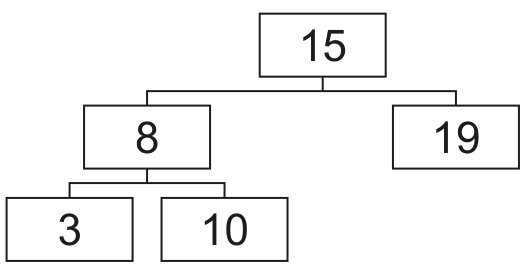
A computer program stores integers in a binary tree in ascending order. The program uses Object-Oriented Programming (OOP).
The binary tree is stored as a 1D array of nodes. Each node contains a left pointer, a data value and a right pointer.
The class Node stores the data about a node.
| Node | |
|---|---|
LeftPointer : INTEGER | stores the index of the node to the left in the binary tree |
Data : INTEGER | stores the node’s data |
RightPointer : INTEGER | stores the index of the node to the right in the binary tree |
Constructor() | initialises Data to its parameter valueinitialises LeftPointer and RightPointer to -1 |
GetLeft() | returns the left pointer |
GetRight() | returns the right pointer |
GetData() | returns the data value |
SetLeft() | assigns the parameter to the left pointer |
SetRight() | assigns the parameter to the right pointer |
SetData() | assigns the parameter to the data |
Write program code to declare the class Node and its constructor.
Do not declare the other methods.
Use the appropriate constructor for your programming language.
If you are writing in Python, include attribute declarations using comments.
Save your program as Question2_J24.
Copy and paste the program code into part 2(a)(i) in the evidence document.
Answer
class Node:
    # LeftPointer: int
    # Data: int
    # RightPointer: int

    def __init__(self, Data):
        self.Data = Data
        self.LeftPointer = -1
        self.RightPointer = -1
See program code
Background Concept
In this question, each tree node is represented as an object. In Object-Oriented Programming, a class is a blueprint and an object is one instance created from that blueprint. The Node class needs attributes to store the node's data and the links to its left and right children.
Because this tree is stored in a 1D array, the "pointers" are not memory addresses. They are integer indexes into the array. A pointer value of -1 is used to mean "no child". That is a common sentinel value in array-based linked structures.
A constructor is the special method that runs when an object is created. Its job is to put the object into a valid starting state.
Understanding the Question
You are asked only for the Node class declaration and its constructor. The table in the question tells you exactly what the class must contain:
LeftPointeras an integerDataas an integerRightPointeras an integer- a constructor that stores the parameter in
Data - both pointers initialised to
-1
The question explicitly says not to declare the other methods here, so this part should contain only the class and constructor.
Approach
The simplest correct Python solution is:
- Declare
class Node: - Add Python comment lines to show the attributes, because the question asks Python candidates to include attribute declarations using comments.
- Write
__init__with one parameter for the data value. - Set
self.Datato that parameter. - Set
self.LeftPointerandself.RightPointerto-1.
That fully matches the specification.
Step-by-Step Reasoning
class Node: starts the class definition.
The three comment lines are included because Python does not require separate attribute declarations, but Cambridge expects Python answers to show them as comments when asked.
def __init__(self, Data): is the Python constructor. self refers to the current object, and Data is the value passed in when the node is created.
self.Data = Data stores the constructor parameter in the object's data field.
self.LeftPointer = -1 and self.RightPointer = -1 mean the node starts with no left child and no right child.
That is exactly what a newly created node should look like before it is linked into the tree.
Key Takeaways
- A constructor initialises an object into a valid starting state.
- In an array-based tree, pointers are usually integer indexes.
-1is commonly used as a sentinel meaning "no link".- Python attribute declarations can be shown with comments when required by the exam.
Common Mistakes
- Forgetting to set one or both pointers to
-1. - Setting
Datato-1instead of to the constructor parameter. - Writing the other methods in this part even though the question says not to.
- Omitting the attribute comments for a Python answer.
Things to Be Careful About
- Use the exact attribute names from the question:
LeftPointer,Data,RightPointer. - The constructor parameter should become the node's data value immediately.
- Do not confuse a null pointer with
0; this question uses-1for no child. - Keep the answer limited to the constructor for this part.
The get methods GetLeft(), GetRight() and GetData() each return the relevant attribute.
Write program code for the three get methods.
Save your program.
Copy and paste the program code into part 2(a)(ii) in the evidence document.
Answer
class Node:
    def GetLeft(self):
        return self.LeftPointer

    def GetRight(self):
        return self.RightPointer

    def GetData(self):
        return self.Data
See program code
Background Concept
Getter methods are accessor methods. They allow other parts of a program to read an object's data in a controlled way. In OOP, this supports encapsulation: the object manages access to its own attributes instead of exposing them carelessly.
A getter does not change anything. It simply returns the current value of one attribute.
Understanding the Question
This part tells you that GetLeft(), GetRight() and GetData() each return the relevant attribute. So the task is very direct: write three methods, each of which returns exactly one stored value from the Node object.
The important word is "relevant". Each method name tells you which attribute it must return.
Approach
For each method:
- Use the exact method name given.
- Give it only the
selfparameter in Python. - Return the matching attribute.
No parameters are needed because getters read from the current object only.
Step-by-Step Reasoning
def GetLeft(self): defines the first accessor.
return self.LeftPointer returns the left pointer stored in the current Node object.
def GetRight(self): defines the second accessor.
return self.RightPointer returns the right pointer.
def GetData(self): defines the third accessor.
return self.Data returns the integer data value.
These methods are intentionally short. That is normal for getters.
Key Takeaways
- A getter returns one attribute without modifying it.
- Method names must match the specification exactly in exam questions.
- Encapsulation often uses getters and setters even when the code seems simple.
Common Mistakes
- Returning the wrong attribute, such as
GetLeft()returningself.RightPointer. - Forgetting
return. - Adding unnecessary parameters to the getters.
- Using attribute names with the wrong capital letters.
Things to Be Careful About
GetLeft()must returnLeftPointer, notData.GetRight()must returnRightPointer.GetData()must returnData.- In Python, use
self.before each attribute name.
The set methods SetLeft(), SetRight() and SetData() each take a parameter and then store this in the relevant attribute.
Write program code for the three set methods.
Save your program.
Copy and paste the program code into part 2(a)(iii) in the evidence document.
Answer
class Node:
    def SetLeft(self, Value):
        self.LeftPointer = Value

    def SetRight(self, Value):
        self.RightPointer = Value

    def SetData(self, Value):
        self.Data = Value
See program code
Background Concept
Setter methods are mutator methods. They change the state of an object by assigning a new value to one attribute. Together with getters, setters are a standard OOP technique used to control how attributes are updated.
A setter usually takes one parameter: the new value to store.
Understanding the Question
This part states that SetLeft(), SetRight() and SetData() each take a parameter and then store this in the relevant attribute. So you need three short methods, each doing a single assignment.
The key requirement is that the value passed in becomes the new value of the matching attribute.
Approach
For each setter:
- Use the exact method name.
- Include
selfand one extra parameter. - Assign that parameter to the correct attribute.
That is all that is required.
Step-by-Step Reasoning
def SetLeft(self, Value): creates a method that receives the new left pointer.
self.LeftPointer = Value stores that value in the node.
def SetRight(self, Value): receives the new right pointer.
self.RightPointer = Value stores it.
def SetData(self, Value): receives a replacement data value.
self.Data = Value stores it.
The parameter name can be any sensible identifier, but the destination attributes must match the specification exactly.
Key Takeaways
- A setter changes one attribute of an object.
- The setter parameter is the new value being written.
- Short methods can still be important because they support encapsulation.
Common Mistakes
- Assigning to the wrong attribute.
- Forgetting
self.in Python. - Returning a value from a setter even though none is needed.
- Changing more than one attribute inside a single setter.
Things to Be Careful About
SetLeft()updates onlyLeftPointer.SetRight()updates onlyRightPointer.SetData()updates onlyData.- Keep the method names and attribute names exactly as given.
The class TreeClass stores the data about the binary tree.
| TreeClass | |
|---|---|
Tree[0:19] : Node | an array of 20 elements of type Node |
FirstNode : INTEGER | stores the index of the first node in the tree |
NumberNodes : INTEGER | stores the quantity of nodes in the tree |
Constructor() | initialises FirstNode to -1 and NumberNodes to 0initialises each element in Tree to a Node object with the data value of -1 |
InsertNode() | takes a Node object as a parameter, inserts it in the array and updates the pointer for its parent node |
OutputTree() | outputs the left pointer, data and right pointer of each node in Tree |
Nodes cannot be deleted from this tree.
Write program code to declare the class TreeClass and its constructor.
Do not declare the other methods.
Use the appropriate constructor for your programming language.
If you are writing in Python, include attribute declarations using comments.
Save your program.
Copy and paste the program code into part 2(b)(i) in the evidence document.
Answer
class TreeClass:
    # Tree: list of Node
    # FirstNode: int
    # NumberNodes: int

    def __init__(self):
        self.FirstNode = -1
        self.NumberNodes = 0
        self.Tree = []
        for Index in range(20):
            self.Tree.append(Node(-1))
See program code
Background Concept
TreeClass is the class that manages the whole binary tree. Instead of using dynamically linked node references, this question stores the tree in an array. Each array element is a Node object, and the left and right pointers store array indexes.
Two extra attributes manage the structure:
FirstNodestores the index of the root nodeNumberNodesstores how many nodes have been inserted so far
The constructor must also prepare the array so that positions 0 to 19 already contain Node objects.
Understanding the Question
You must declare TreeClass and write only its constructor. The specification tells you exactly what the constructor must do:
- set
FirstNodeto-1 - set
NumberNodesto0 - initialise each element of
Tree[0:19]to aNodecontaining-1
That means the tree starts empty, but the storage space already exists.
Approach
The Python solution needs:
- A class called
TreeClass - Attribute comments for Python
- A constructor
__init__ - Initial values for
FirstNodeandNumberNodes - A list called
Tree - A loop that appends 20 separate
Node(-1)objects
The loop is important because each position must hold its own Node object.
Step-by-Step Reasoning
class TreeClass: begins the class.
The comment lines document the required attributes.
Inside __init__, self.FirstNode = -1 means there is no root yet.
self.NumberNodes = 0 means no inserted nodes are in use.
self.Tree = [] creates the empty list.
The for loop runs 20 times, once for each valid index from 0 to 19.
self.Tree.append(Node(-1)) creates a new placeholder Node object whose data is -1 and whose left and right pointers are already -1 from the Node constructor.
At the end, the tree has storage ready for 20 nodes.
Key Takeaways
- A constructor may initialise both simple values and object collections.
- Array-based trees use indexes rather than memory references.
- Preparing the storage in advance is common in fixed-size exam questions.
Common Mistakes
- Forgetting to set
FirstNodeto-1. - Forgetting to set
NumberNodesto0. - Creating fewer than 20 elements.
- Using one
Nodeobject repeatedly instead of 20 separate objects.
Things to Be Careful About
- In Python, avoid using
[Node(-1)] * 20because that would repeat the same object reference 20 times. - The indexes are
0to19, so the total size is 20. - Keep the class name and attribute names exactly as given in the question.
The method InsertNode() takes a Node object, NewNode, as a parameter and inserts it into the array Tree.
InsertNode() first checks if the tree is empty.
If the tree is empty, InsertNode():
- stores
NewNodein the arrayTreeat indexNumberNodes - increments
NumberNodes - stores 0 in
FirstNode.
If the tree is not empty, InsertNode():
- stores
NewNodein the arrayTreeat indexNumberNodes - accesses the data in the array
Treeat indexFirstNodeand compares it to the data inNewNode - repeatedly follows the pointers until the correct position for
NewNodeis found - once the position is found,
InsertNode()sets the left or right pointer of its parent node - increments
NumberNodes.
Write program code for InsertNode().
Save your program.
Copy and paste the program code into part 2(b)(ii) in the evidence document.
Answer
class TreeClass:
    def InsertNode(self, NewNode):
        if self.NumberNodes == 0:
            self.Tree[self.NumberNodes] = NewNode
            self.NumberNodes += 1
            self.FirstNode = 0
        else:
            self.Tree[self.NumberNodes] = NewNode
            CurrentNode = self.FirstNode
            while CurrentNode != -1:
                PreviousNode = CurrentNode
                if NewNode.GetData() < self.Tree[CurrentNode].GetData():
                    CurrentNode = self.Tree[CurrentNode].GetLeft()
                else:
                    CurrentNode = self.Tree[CurrentNode].GetRight()
            if NewNode.GetData() < self.Tree[PreviousNode].GetData():
                self.Tree[PreviousNode].SetLeft(self.NumberNodes)
            else:
                self.Tree[PreviousNode].SetRight(self.NumberNodes)
            self.NumberNodes += 1
See program code
Background Concept
A binary search tree stores values so that:
- smaller values go to the left subtree
- larger values, or equal values if that is the chosen rule, go to the right subtree
In this question, the tree is stored in an array, so each node's left and right links are array indexes. Insertion works by starting at the root and repeatedly comparing the new value with the current node's value:
- if smaller, follow the left pointer
- otherwise, follow the right pointer
When a -1 pointer is reached, that empty position is where the new node belongs. Then the parent's left or right pointer is updated to point to the new node's index.
Understanding the Question
You must write InsertNode(NewNode) for TreeClass. The question gives the algorithm in words:
- if the tree is empty, place the new node at index
NumberNodes, incrementNumberNodes, and setFirstNodeto0 - otherwise, store the new node at index
NumberNodes, then search fromFirstNodedown the tree until the correct empty left or right link is found - update the parent node's pointer
- increment
NumberNodes
So this is both a tree traversal task and a pointer update task.
Approach
Use two cases.
Empty tree
If NumberNodes is 0, there are no inserted nodes yet. The new node goes at index 0, and that becomes the root.
Non-empty tree
- Save the new node at index
NumberNodes. - Start
CurrentNodeatFirstNode. - Keep a
PreviousNodevariable so you remember the parent. - Compare
NewNode.GetData()with the current node's data. - Move left or right until
CurrentNodebecomes-1. - Use
PreviousNodeto update the correct pointer toNumberNodes. - Increment
NumberNodes.
Step-by-Step Reasoning
if self.NumberNodes == 0: checks whether the tree is empty.
In the empty case, self.Tree[self.NumberNodes] = NewNode stores the node at index 0 because NumberNodes is 0.
self.NumberNodes += 1 records that one node is now in use.
self.FirstNode = 0 makes index 0 the root of the tree.
In the non-empty case, the new node is first stored in the next free array position: self.Tree[self.NumberNodes] = NewNode.
CurrentNode = self.FirstNode starts searching from the root.
The while CurrentNode != -1: loop continues while there is still a real node to inspect.
PreviousNode = CurrentNode remembers the parent before moving down a level.
If the new value is smaller than the current node's data, the search moves to the left child using GetLeft().
Otherwise, it moves to the right child using GetRight().
Eventually CurrentNode becomes -1. That means the search has gone past an existing child link and found where the new node should be attached.
The final if compares the new value with the parent node's data one more time. If smaller, the parent gets a left pointer to self.NumberNodes; otherwise, the parent gets a right pointer to self.NumberNodes.
Finally, self.NumberNodes += 1 moves the next free index forward.
Key Takeaways
- Binary search tree insertion is driven by repeated comparison.
- In an array-based tree, links are indexes, not object references.
- You often need both a current pointer and a previous pointer when inserting.
- Pointer updates happen only after the empty position has been found.
Common Mistakes
- Incrementing
NumberNodestoo early, which changes the index of the new node. - Forgetting to keep track of the parent node.
- Updating
CurrentNodebefore savingPreviousNode. - Attaching the new node to the wrong side of the parent.
- Forgetting the empty-tree case.
Things to Be Careful About
- The question says to store
NewNodeinTreeat indexNumberNodesfirst. FirstNodestores the root index, not the data value.-1means "no child", so the search stops when a pointer becomes-1.- The insertion rule here uses
elsefor the right branch, so equal values would also go right.
The method OutputTree() outputs the left pointer, the data and the right pointer for each node that has been inserted into the tree. The outputs are in the order they are saved in the array.
If there are no nodes in the array, the procedure outputs ‘No nodes’.
Write program code for OutputTree().
Save your program.
Copy and paste the program code into part 2(b)(iii) in the evidence document.
Answer
class TreeClass:
    def OutputTree(self):
        if self.NumberNodes == 0:
            print("No nodes")
        else:
            for Index in range(self.NumberNodes):
                print(self.Tree[Index].GetLeft(), self.Tree[Index].GetData(), self.Tree[Index].GetRight())
See program code
Background Concept
An output routine for a data structure must know two things:
- when the structure is empty
- how much of the storage is actually in use
Here, Tree always has 20 elements, but not all 20 are valid inserted nodes. NumberNodes tells you how many positions from the start of the array are currently occupied by inserted nodes.
The question also states that the output must be in the order the nodes are saved in the array, not in sorted order and not by tree traversal order.
Understanding the Question
OutputTree() must print the left pointer, data value and right pointer for every inserted node. If there are no inserted nodes, it must print No nodes.
That means the method does not walk the tree from the root. It simply outputs array positions 0 up to NumberNodes - 1.
Approach
Use a simple two-part structure:
- If
NumberNodesis0, printNo nodes. - Otherwise, loop through the used section of the array and print three values from each
Nodeobject.
Using the getter methods keeps the method consistent with the OOP design already established.
Step-by-Step Reasoning
if self.NumberNodes == 0: checks whether any nodes have been inserted.
If true, print("No nodes") produces the required message and the procedure ends.
If false, the tree contains inserted nodes. The for Index in range(self.NumberNodes): loop runs from 0 up to the last used index.
On each iteration, the code outputs:
GetLeft()for the left pointerGetData()for the stored integerGetRight()for the right pointer
This matches the exact order required by the question: left pointer, data, right pointer.
Because the loop only goes up to NumberNodes, unused placeholder nodes are not displayed.
Key Takeaways
- Use a counter like
NumberNodesto process only valid data. - Output order in a question may be array order rather than logical tree order.
- An empty-structure check is often a separate first case.
Common Mistakes
- Looping through all 20 array elements instead of just the inserted nodes.
- Printing
DatabeforeLeftPointereven though the required order is left, data, right. - Traversing the tree recursively instead of printing in stored array order.
- Forgetting the
No nodescase.
Things to Be Careful About
range(self.NumberNodes)stops beforeself.NumberNodes, which is correct.- Do not output unused
Node(-1)placeholders. - The required empty message is exactly
No nodes. - Keep the output order exactly as specified.
The main program declares an instance of TreeClass with the identifier TheTree.
Write program code for the main program.
Save your program.
Copy and paste the program code into part 2(c)(i) in the evidence document.
Answer
TheTree = TreeClass()
TheTree = TreeClass()
Background Concept
To use a class in a program, you create an instance of it. Instantiation calls the class constructor and returns a new object. That object can then store its own data and use its own methods.
In Python, this is done by writing the class name followed by parentheses.
Understanding the Question
The question is extremely specific: declare an instance of TreeClass with the identifier TheTree.
So there are only two important details:
- the class name must be
TreeClass - the variable name must be
TheTree
Approach
Call the constructor for TreeClass and assign the resulting object to TheTree.
That single line both declares the identifier and creates the tree object.
Step-by-Step Reasoning
TreeClass() calls the constructor of the TreeClass class.
The constructor sets up:
FirstNodeNumberNodes- the
Treearray of 20 placeholder nodes
TheTree = ... stores that new object reference in the variable named TheTree.
Once this line has run, TheTree can be used to call methods such as InsertNode() and OutputTree().
Key Takeaways
- Instantiating a class creates an object ready for use.
- The identifier name matters in exam questions when it is specified.
- Constructors run automatically when the object is created.
Common Mistakes
- Using the wrong identifier, such as
treeinstead ofTheTree. - Forgetting the parentheses after
TreeClass. - Writing only the class name without creating an instance.
Things to Be Careful About
- Match the capital letters exactly:
TheTreeandTreeClass. - This line belongs in the main program, not inside a class definition.
The main program inserts the following integers into the binary tree in the order given:
10
11
5
1
20
7
15
The main program then calls the method OutputTree().
Write program code to amend the main program.
Save your program.
Copy and paste the program code into part 2(c)(ii) in the evidence document.
Answer
TheTree = TreeClass()
TheTree.InsertNode(Node(10))
TheTree.InsertNode(Node(11))
TheTree.InsertNode(Node(5))
TheTree.InsertNode(Node(1))
TheTree.InsertNode(Node(20))
TheTree.InsertNode(Node(7))
TheTree.InsertNode(Node(15))
TheTree.OutputTree()
See program code
Background Concept
The main program is the part that creates objects and coordinates method calls. In OOP, you often:
- create an instance of a class
- create any needed data objects
- call methods in the required order
For a binary search tree, insertion order matters because it determines the final shape of the tree. Even with the same set of values, a different insertion order can produce a different structure.
Understanding the Question
You must amend the main program so that it:
- uses the existing
TheTreeobject - inserts the integers
10, 11, 5, 1, 20, 7, 15in exactly that order - then calls
OutputTree()
The important detail is that InsertNode() takes a Node object, not a raw integer. So each value must be wrapped in Node(...) first.
Approach
Start with the object created in part (c)(i):
TheTree = TreeClass()
Then call InsertNode() once for each value, using Node(value) as the parameter. Finally call TheTree.OutputTree().
The method calls must stay in the order given by the question.
Step-by-Step Reasoning
TheTree = TreeClass() creates the tree object.
TheTree.InsertNode(Node(10)) creates a Node containing 10 and inserts it. This becomes the root.
TheTree.InsertNode(Node(11)) inserts 11, which goes to the right of 10.
TheTree.InsertNode(Node(5)) inserts 5, which goes to the left of 10.
TheTree.InsertNode(Node(1)) inserts 1, which goes left of 10, then left of 5.
TheTree.InsertNode(Node(20)) inserts 20, which goes right of 10, then right of 11.
TheTree.InsertNode(Node(7)) inserts 7, which goes left of 10, then right of 5.
TheTree.InsertNode(Node(15)) inserts 15, which goes right of 10, right of 11, then left of 20.
Finally, TheTree.OutputTree() prints the stored nodes in array order.
Key Takeaways
- Main programs often construct objects and then call methods on them.
- If a method expects an object parameter, pass an object, not just a primitive value.
- Insertion order matters for trees.
Common Mistakes
- Calling
InsertNode(10)instead ofInsertNode(Node(10)). - Changing the order of insertions.
- Forgetting the final
OutputTree()call. - Recreating
TheTreemidway through the program.
Things to Be Careful About
- The question asks for the integers in the order given; do not sort them first.
- Keep the identifier as
TheTree. - Each insertion needs a new
Nodeobject. - The output is produced only after all seven insertions.
Test your program.
Take a screenshot of the output(s).
Save your program.
Copy and paste the screenshot into part 2(c)(iii) in the evidence document.
Answer
After inserting 10, 11, 5, 1, 20, 7 and 15, the output is:
2 10 1
-1 11 4
3 5 5
-1 1 -1
6 20 -1
-1 7 -1
-1 15 -1
See console output
Background Concept
When values are inserted into a binary search tree, each new value is placed by comparing it with existing nodes and moving left for smaller values or right for larger values. In this question, the tree is stored in an array, so the output does not show a diagram of the tree directly. Instead, it shows for each stored node:
- the index of the left child
- the data value
- the index of the right child
Because OutputTree() prints nodes in array order, the output rows correspond to the order of insertion, not to an in-order traversal.
Understanding the Question
The exam task says to test the program and capture the output. Since the inserted values are fixed, there is one expected result. You need the final three-column output after inserting:
10, 11, 5, 1, 20, 7, 15
The important point is that the printed rows show the internal array-based representation of the tree.
Approach
Work through the insertions one at a time, keeping track of the array index used for each new node:
- index
0gets10 - index
1gets11 - index
2gets5 - index
3gets1 - index
4gets20 - index
5gets7 - index
6gets15
Then update the left or right pointer of the correct parent each time.
Step-by-Step Reasoning
Insert 10 at index 0. It is the first node, so FirstNode = 0.
Insert 11 at index 1. Since 11 > 10, it becomes the right child of index 0. So node 0 gets right pointer 1.
Insert 5 at index 2. Since 5 < 10, it becomes the left child of index 0. So node 0 gets left pointer 2.
Insert 1 at index 3. Compare with 10 then 5: it goes left of 5. So node 2 gets left pointer 3.
Insert 20 at index 4. Compare with 10 then 11: it goes right of 11. So node 1 gets right pointer 4.
Insert 7 at index 5. Compare with 10 then 5: it goes right of 5. So node 2 gets right pointer 5.
Insert 15 at index 6. Compare with 10, then 11, then 20: it goes left of 20. So node 4 gets left pointer 6.
Now print each used array entry in order:
- index
0: left2, data10, right1 - index
1: left-1, data11, right4 - index
2: left3, data5, right5 - index
3: left-1, data1, right-1 - index
4: left6, data20, right-1 - index
5: left-1, data7, right-1 - index
6: left-1, data15, right-1
That gives the required console output.
Key Takeaways
- You can represent a tree using array indexes instead of direct links.
- Tree insertion order affects the final internal structure.
- Output order here is insertion/storage order, not sorted order.
Common Mistakes
- Assuming the output should be numerically sorted.
- Forgetting that
15becomes the left child of20. - Printing all 20 array elements instead of only the 7 inserted nodes.
- Mixing up child indexes with the data values.
Things to Be Careful About
-1means no child exists.- The first column is
LeftPointer, the second isData, and the third isRightPointer. - The row order is index order from
0toNumberNodes - 1. - A screenshot in the real exam can show spacing differences, but the values themselves must match exactly.
A program sorts an array of integers and searches the array for a particular value.
The array of integers, NumberArray, stores the following data in the order given:
100 85 644 22 15 8 1
The array is declared and initialised local to the main program.
Write program code to declare and initialise the array.
Save your program as Question3_J24.
Copy and paste the program code into part 3(a) in the evidence document.
Answer
NumberArray = [100, 85, 644, 22, 15, 8, 1]
See program code
Background Concept
In Python, an array-like structure is normally represented by a list. To declare and initialise it, you give the variable name and assign a list literal containing the values in square brackets. The order matters because the program will later sort and search the data starting from this original arrangement.
Understanding the Question
You are given the exact integers that must be stored in NumberArray: 100 85 644 22 15 8 1. The task is only to write the program code that creates that array in the main program. No sorting or searching is needed yet.
Approach
Use one Python list assignment. Put the numbers into the list in exactly the order shown in the question. Use the identifier NumberArray exactly as given.
Step-by-Step Reasoning
The variable name must be NumberArray because later parts refer to that same name.
The values must be integers, so they are written without quotes.
The list is initialised in one statement:
- opening
[starts the list - the integers are separated by commas
- closing
]ends the list
So the final line is:
NumberArray = [100, 85, 644, 22, 15, 8, 1]
That creates a list with 7 elements, ready for the sort and search functions in later parts.
Key Takeaways
- A Python list can be used to represent an array for this syllabus.
- Initialising an array means giving it its starting values immediately.
- The order of values matters when the question says "in the order given".
Common Mistakes
- Changing the order of the numbers, which would alter the test data.
- Writing the numbers as strings such as
"100", which changes the data type. - Using a different variable name, so later code referring to
NumberArraywould fail.
Things to Be Careful About
- Keep the identifier as
NumberArray, with the same capital letters. - Include all 7 values.
- Separate elements with commas in Python list syntax.
The following recursive pseudocode function sorts the array into ascending order using an insertion sort and returns the sorted array.
DECLARE LastItem : INTEGER
DECLARE CheckItem : INTEGER
DECLARE LoopAgain : BOOLEAN
FUNCTION RecursiveInsertion(IntegerArray : ARRAY[] OF INTEGER,
                            NumberElements : INTEGER) RETURNS ARRAY[] OF INTEGER
   IF NumberElements <= 1 THEN
      RETURN IntegerArray
   ELSE
      CALL RecursiveInsertion(IntegerArray, NumberElements - 1)
      LastItem ← IntegerArray[NumberElements - 1]
      CheckItem ← NumberElements - 2
   ENDIF
   LoopAgain ← TRUE
   IF CheckItem < 0 THEN
      LoopAgain ← FALSE
   ELSE
      IF IntegerArray[CheckItem] < LastItem THEN
         LoopAgain ← FALSE
      ENDIF
   ENDIF
   WHILE LoopAgain
      IntegerArray[CheckItem + 1] ← IntegerArray[CheckItem]
      CheckItem ← CheckItem - 1
      IF CheckItem < 0 THEN
         LoopAgain ← FALSE
      ELSE
         IF IntegerArray[CheckItem] < LastItem THEN
            LoopAgain ← FALSE
         ENDIF
      ENDIF
   ENDWHILE
   IntegerArray[CheckItem + 1] ← LastItem
   RETURN IntegerArray
ENDFUNCTION
Write the program code for the pseudocode function RecursiveInsertion().
Save your program.
Copy and paste the program code into part 3(b)(i) in the evidence document.
Answer
def RecursiveInsertion(IntegerArray, NumberElements):
    if NumberElements <= 1:
        return IntegerArray
    else:
        RecursiveInsertion(IntegerArray, NumberElements - 1)
        LastItem = IntegerArray[NumberElements - 1]
        CheckItem = NumberElements - 2

    LoopAgain = True
    if CheckItem < 0:
        LoopAgain = False
    else:
        if IntegerArray[CheckItem] < LastItem:
            LoopAgain = False

    while LoopAgain:
        IntegerArray[CheckItem + 1] = IntegerArray[CheckItem]
        CheckItem = CheckItem - 1
        if CheckItem < 0:
            LoopAgain = False
        else:
            if IntegerArray[CheckItem] < LastItem:
                LoopAgain = False

    IntegerArray[CheckItem + 1] = LastItem
    return IntegerArray
See program code
Background Concept
Recursive insertion sort works by solving a smaller version of the same problem first. The base case is when the list has one element or fewer, because that is already sorted. The recursive step sorts the first n - 1 elements, then inserts the last element into its correct position within that sorted section.
A recursive routine must always have:
- a base case, so it stops calling itself
- a recursive call on a smaller problem
- logic after the recursive call to combine the result
Here, the combination step is the insertion process.
Understanding the Question
The question gives you pseudocode for RecursiveInsertion() and asks you to write the equivalent program code. So this is mainly a translation task. You are not inventing a new algorithm; you are converting the given logic into Python while keeping the same behaviour.
The function must:
- take an integer array and a count of how many elements to consider
- recursively sort the array into ascending order
- return the sorted array
Approach
Follow the pseudocode structure closely:
- If there is only 1 element or fewer, return immediately.
- Otherwise, recursively sort the first
NumberElements - 1items. - Store the last item from the current section in
LastItem. - Move left through the sorted section using
CheckItem. - While elements are greater than or equal to
LastItem, shift them one place right. - Put
LastIteminto the gap that is left. - Return the array.
In Python, the list is mutable, so the recursive call changes the same list in place.
Step-by-Step Reasoning
The function header is:
def RecursiveInsertion(IntegerArray, NumberElements):
This matches the two parameters from the pseudocode.
The base case is:
if NumberElements <= 1:
    return IntegerArray
If there is only one element, no sorting is needed.
Otherwise, the function sorts the earlier part first:
RecursiveInsertion(IntegerArray, NumberElements - 1)
That means when the function returns from this call, the first NumberElements - 1 items are already sorted.
Now the current last item is saved:
LastItem = IntegerArray[NumberElements - 1]
CheckItem = NumberElements - 2
LastItem is the element to insert. CheckItem starts at the element just before it.
The pseudocode uses a Boolean called LoopAgain to decide whether shifting should continue. The first test checks whether CheckItem has gone before the start of the array. If not, it checks whether the current value is smaller than LastItem. If it is smaller, insertion should stop.
While LoopAgain is true, the larger item is shifted right:
IntegerArray[CheckItem + 1] = IntegerArray[CheckItem]
CheckItem = CheckItem - 1
Then the same stopping test is repeated.
When the loop ends, the correct insertion position is CheckItem + 1, so:
IntegerArray[CheckItem + 1] = LastItem
Finally, return the array.
This produces ascending order because values larger than LastItem are moved right until the correct position is found.
Key Takeaways
- Recursive insertion sort sorts a smaller prefix first, then inserts one item.
- The base case prevents infinite recursion.
- Careful index handling is essential:
NumberElements - 1is the last item in the current section. - Python lists can be modified in place and still returned.
Common Mistakes
- Using
IntegerArray[NumberElements]instead ofIntegerArray[NumberElements - 1], which causes an index error. - Forgetting the base case, which would cause infinite recursion.
- Returning nothing, even though the function is supposed to return the array.
- Moving
CheckItemthe wrong way, for example increasing instead of decreasing it.
Things to Be Careful About
- Python uses zero-based indexing, so the last valid position is one less than the number of elements.
- The loop must stop if
CheckItem < 0before trying to readIntegerArray[CheckItem]. - Keep the function name exactly
RecursiveInsertionso later calls work correctly. - The question wants ascending order, so the insertion logic must place smaller values earlier in the array.
Amend the main program to:
- call
RecursiveInsertion()with the initialised arrayNumberArrayand the number of elements as parameters - output the word ‘Recursive’
- output the content of the returned array.
Save your program.
Copy and paste the program code into part 3(b)(ii) in the evidence document.
Answer
SortedRecursive = RecursiveInsertion(NumberArray.copy(), len(NumberArray))
print("Recursive")
print(SortedRecursive)
See program code
Background Concept
After a function is written, the main program must call it with the correct parameters and then use the returned result. In Python, len(...) gives the number of elements in a list. Also, because lists are mutable, a sort function may change the original list. Using .copy() creates a separate list so the original values are still available later.
Understanding the Question
This part asks you to amend the main program so that it:
- calls
RecursiveInsertion() - passes in
NumberArrayand the number of elements - outputs the word
Recursive - outputs the returned sorted array
The earlier part already created NumberArray, and part (b)(i) already created the function.
Approach
Make one function call and store its returned value. Then print the label and the sorted result. Using NumberArray.copy() is a good choice because later parts still need the original unsorted list.
Step-by-Step Reasoning
The function needs two parameters:
- the array itself
- the number of elements
In Python, the number of elements is found using:
len(NumberArray)
The call is:
SortedRecursive = RecursiveInsertion(NumberArray.copy(), len(NumberArray))
This does three things:
- makes a copy of the original list
- sorts that copied list recursively
- stores the returned sorted list in
SortedRecursive
Then the label is printed exactly as required:
print("Recursive")
Finally, the returned array is displayed:
print(SortedRecursive)
That shows the sorted contents in Python list format.
Key Takeaways
- Always pass the right number and type of parameters to a function.
len(...)is the normal way to get a list size in Python..copy()is useful when you want to keep the original list unchanged.- Store returned data in a variable before using or printing it.
Common Mistakes
- Passing only the array and forgetting the number of elements.
- Printing
NumberArrayinstead of the returned sorted array. - Omitting the word
Recursive. - Sorting the original array directly and then not having the unsorted version available for later tasks.
Things to Be Careful About
- Keep the output word exactly
Recursivewith a capitalR. - Use
len(NumberArray), not a hard-coded number unless you are certain the size will never change. - If you do not use
.copy(), later parts may work on an already sorted list instead of the original initialised one.
Test your program.
Take a screenshot of the output(s).
Save your program.
Copy and paste the screenshot into part 3(b)(iii) in the evidence document.
Answer
Using NumberArray = [100, 85, 644, 22, 15, 8, 1]:
Recursive
[1, 8, 15, 22, 85, 100, 644]
See expected console output
Background Concept
Testing a sort means checking that the output is in the required order and that all original values are still present. For an ascending insertion sort, the smallest value should appear first and the largest last.
Understanding the Question
This part asks for the output screenshot after testing the program from part (b). At this stage, the main program prints the word Recursive and then prints the sorted array returned by RecursiveInsertion().
Approach
Take the original values and arrange them from smallest to largest:
1, 8, 15, 22, 85, 100, 644
Then place that under the label that the program prints.
Step-by-Step Reasoning
The original array is:
100, 85, 644, 22, 15, 8, 1
Sorting into ascending order gives:
- smallest:
1 - then
8 - then
15 - then
22 - then
85 - then
100 - largest:
644
So the sorted array is:
[1, 8, 15, 22, 85, 100, 644]
Because part (b)(ii) prints the label first, the full console output is:
Recursive
[1, 8, 15, 22, 85, 100, 644]
Key Takeaways
- A successful sort keeps the same values but changes their order correctly.
- Testing output should reflect exactly what the program prints.
- For Python, printing a list shows square brackets and commas.
Common Mistakes
- Forgetting the label
Recursivein the screenshot. - Writing the numbers in descending order instead of ascending order.
- Missing a value or duplicating one during the manual check.
Things to Be Careful About
- The screenshot should match your own program's formatting.
- If you printed items one per line instead of as a list, your screenshot would differ, but it still must show the correct sorted sequence.
- Make sure
644remains in the output; sorting should not remove any data.
The function RecursiveInsertion() can be changed to use iteration instead of recursion.
Write program code for the function IterativeInsertion() to perform the same processes as RecursiveInsertion() but using iteration instead of recursion.
Save your program.
Copy and paste the program code into part 3(c)(i) in the evidence document.
Answer
def IterativeInsertion(IntegerArray):
    for Pointer in range(1, len(IntegerArray)):
        LastItem = IntegerArray[Pointer]
        CheckItem = Pointer - 1

        while CheckItem >= 0 and IntegerArray[CheckItem] > LastItem:
            IntegerArray[CheckItem + 1] = IntegerArray[CheckItem]
            CheckItem = CheckItem - 1

        IntegerArray[CheckItem + 1] = LastItem

    return IntegerArray
See program code
Background Concept
Iterative insertion sort builds a sorted section from left to right. At each pass, one value is taken from the unsorted part and inserted into the correct place in the sorted part. Unlike the recursive version, the iterative version uses a loop to repeat this process for each position.
Understanding the Question
You must write IterativeInsertion() so that it performs the same sorting job as RecursiveInsertion(), but without recursion. The result still needs to be an ascending sort of the integer array.
Approach
Use the standard insertion sort pattern:
- Start from the second element.
- Treat the earlier part as already sorted.
- Store the current element in a temporary variable.
- Move left while earlier items are larger.
- Shift those larger items right.
- Insert the stored value into the gap.
- Repeat until the list is fully sorted.
Step-by-Step Reasoning
The function header is:
def IterativeInsertion(IntegerArray):
Only the array is needed because the function can find its own length using len(IntegerArray).
The outer loop is:
for Pointer in range(1, len(IntegerArray)):
This starts at index 1, because a single first element at index 0 is already sorted by itself.
For each pass:
LastItem = IntegerArray[Pointer]
CheckItem = Pointer - 1
LastItem is the value to insert. CheckItem begins at the item immediately to its left.
The inner loop is:
while CheckItem >= 0 and IntegerArray[CheckItem] > LastItem:
This means:
- stay within the array
- keep shifting while earlier values are too large
Inside that loop:
IntegerArray[CheckItem + 1] = IntegerArray[CheckItem]
CheckItem = CheckItem - 1
This creates room for LastItem.
Once the correct position is found, insert the saved value:
IntegerArray[CheckItem + 1] = LastItem
Finally, after all passes, return the array.
This produces the same final result as the recursive version, but the repetition is controlled by a for loop rather than repeated function calls.
Key Takeaways
- Iteration can replace recursion when the repeated pattern is easy to express as a loop.
- In insertion sort, the left side of the list grows into a sorted section.
- The temporary variable is essential so the current value is not lost during shifting.
Common Mistakes
- Starting the outer loop at index 0 instead of 1.
- Using the wrong comparison in the while condition, which can sort in the wrong order.
- Forgetting to insert
LastItemafter shifting finishes. - Returning nothing from the function.
Things to Be Careful About
- Python is zero-indexed, so
range(1, len(IntegerArray))is the correct set of passes. - The condition must check
CheckItem >= 0before readingIntegerArray[CheckItem]. - Use
>for ascending order, because only larger earlier values need to shift right.
Write program code to amend the main program to also:
- call
IterativeInsertion()with the original initialised arrayNumberArray - output the word ‘iterative’
- output the content of the returned array.
Save your program.
Copy and paste the program code into part 3(c)(ii) in the evidence document.
Answer
SortedIterative = IterativeInsertion(NumberArray.copy())
print("iterative")
print(SortedIterative)
See program code
Background Concept
When two different sorting functions must be tested on the same starting data, it is good practice to preserve the original list. Otherwise, the second sort may simply receive an already sorted list, which is not what the question intends by saying the original initialised array.
Understanding the Question
This part extends the main program again. It must now also:
- call
IterativeInsertion() - use the original initialised
NumberArray - output the word
iterative - output the returned array
The word also means the earlier recursive output should still remain in the program.
Approach
Make a second function call, again using a copy of the original list. Store the returned list in a new variable, then print the required label and list.
Step-by-Step Reasoning
The call is:
SortedIterative = IterativeInsertion(NumberArray.copy())
This sends a fresh copy of the original unsorted values into the iterative insertion sort.
Then print the exact required label:
print("iterative")
Finally, print the result:
print(SortedIterative)
Because the list is sorted into ascending order, this will show the same sequence as the recursive version.
Key Takeaways
- Reuse of the same original data is important when comparing algorithms.
- Separate variables such as
SortedRecursiveandSortedIterativemake the program easier to follow. - Output labels help distinguish which algorithm produced which result.
Common Mistakes
- Calling
IterativeInsertion()onSortedRecursiveinstead of the original data. - Printing
IterativeInsertionwithout parentheses, which prints the function object rather than calling it. - Using the wrong label case, for example
Iterativeinstead ofiterative.
Things to Be Careful About
- The question says
also, so this code is added to the existing main program rather than replacing the recursive section. - Keep the output word exactly
iterativein lower case. - Passing
NumberArray.copy()avoids changing the original list.
Test your program.
Take a screenshot of the output(s).
Save your program.
Copy and paste the screenshot into part 3(c)(iii) in the evidence document.
Answer
Using NumberArray = [100, 85, 644, 22, 15, 8, 1]:
Recursive
[1, 8, 15, 22, 85, 100, 644]
iterative
[1, 8, 15, 22, 85, 100, 644]
See expected console output
Background Concept
If two algorithms are intended to perform the same sort, a simple test is to run both on the same input and compare their outputs. If both produce the same correctly sorted sequence, that is strong evidence that both implementations are working.
Understanding the Question
At this stage, the main program now includes both the recursive sort output and the iterative sort output. The screenshot should therefore show both sections of output, not just the new one.
Approach
Work out the sorted order once, then show it twice: once after the Recursive label and once after the iterative label.
Step-by-Step Reasoning
The original values are:
100, 85, 644, 22, 15, 8, 1
Sorted in ascending order, they become:
[1, 8, 15, 22, 85, 100, 644]
Both sorting methods should produce exactly that same list.
So the full output at this point is:
Recursive
[1, 8, 15, 22, 85, 100, 644]
iterative
[1, 8, 15, 22, 85, 100, 644]
Key Takeaways
- Different implementations of the same algorithm should give the same final sorted data.
- Testing with identical input is important when comparing results.
- Console output must include everything printed by the current version of the program.
Common Mistakes
- Showing only the iterative section and forgetting the earlier recursive output.
- Printing different orders because one function was run on already changed data.
- Misspelling or changing the case of
iterative.
Things to Be Careful About
- Use the original data for both sorts, not the output of one sort as the input to the other.
- If your program prints list formatting with brackets and commas, your screenshot should reflect that exactly.
- The two sorted lines should be identical in content.
The recursive function BinarySearch() takes the parameters:
IntegerArray– an array of integersFirst– the index of the first array elementLast– the index of the last array elementToFind– an integer to search for in the array.
The function uses recursion to perform a binary search for ToFind in IntegerArray.
The function returns the index where ToFind is stored or returns -1 if ToFind is not in the array.
Write program code for the recursive function BinarySearch().
Save your program.
Copy and paste the program code into part 3(d)(i) in the evidence document.
Answer
def BinarySearch(IntegerArray, First, Last, ToFind):
    if First > Last:
        return -1

    Middle = (First + Last) // 2

    if IntegerArray[Middle] == ToFind:
        return Middle
    elif ToFind < IntegerArray[Middle]:
        return BinarySearch(IntegerArray, First, Middle - 1, ToFind)
    else:
        return BinarySearch(IntegerArray, Middle + 1, Last, ToFind)
See program code
Background Concept
Binary search is an efficient searching algorithm for sorted data. It works by repeatedly checking the middle element of the current search range:
- if the middle value matches, the search is finished
- if the target is smaller, search the left half
- if the target is larger, search the right half
A recursive binary search expresses this by calling itself on a smaller half each time. The stopping condition is when the search range becomes empty.
Understanding the Question
You need to write a recursive function called BinarySearch() that takes:
- the sorted integer array
First, the first index in the current search rangeLast, the last index in the current search rangeToFind, the value being searched for
It must return the index where the value is found, or -1 if the value is not present.
Approach
Use the standard recursive binary search structure:
- If
First > Last, the range is empty, so return-1. - Find the middle index using integer division.
- Compare the middle element with
ToFind. - Return the middle index if it matches.
- Otherwise, recurse into the appropriate half.
Step-by-Step Reasoning
The function header is:
def BinarySearch(IntegerArray, First, Last, ToFind):
The empty-range base case is:
if First > Last:
    return -1
This is essential. Without it, the function would keep calling itself even when there is nowhere left to search.
The middle position is calculated as:
Middle = (First + Last) // 2
// is integer division in Python, which is what is needed for an index.
Next compare the middle value with the target:
if IntegerArray[Middle] == ToFind:
    return Middle
If the target is smaller than the middle value, the correct half is the left side:
elif ToFind < IntegerArray[Middle]:
    return BinarySearch(IntegerArray, First, Middle - 1, ToFind)
If not, the target must be larger, so search the right side:
else:
    return BinarySearch(IntegerArray, Middle + 1, Last, ToFind)
Each recursive call reduces the search range, so the search eventually finds the value or reaches the base case.
Key Takeaways
- Binary search only works correctly on sorted data.
- The recursive search range must shrink each time.
-1is a common sentinel value meaning "not found".- Integer division is needed to produce a valid middle index.
Common Mistakes
- Trying to use binary search on the original unsorted array.
- Forgetting the base case
First > Last. - Using
len(array)as the last index instead oflen(array) - 1when calling the function. - Recursing with
Middleinstead ofMiddle - 1orMiddle + 1, which can cause an infinite loop.
Things to Be Careful About
- Python lists are zero-indexed.
- The function must return the recursive call result; otherwise the found index is lost.
- The search value and the array elements are integers, so comparisons are numeric, not string-based.
Write program code to amend the main program to:
- call
BinarySearch()with the sorted array and the integer 644 as the search value - output ‘Not found’ if 644 is not found in the array
- output the index if 644 is found in the array.
Save your program.
Copy and paste the program code into part 3(d)(ii) in the evidence document.
Answer
FoundIndex = BinarySearch(SortedRecursive, 0, len(SortedRecursive) - 1, 644)
if FoundIndex == -1:
    print("Not found")
else:
    print(FoundIndex)
See program code
Background Concept
A search function often returns a sentinel value to indicate failure. Here, -1 means the item was not found. The main program must therefore examine the returned value and decide what to print.
Understanding the Question
You must amend the main program so that it:
- calls
BinarySearch()with the sorted array - searches for
644 - prints
Not foundif the result is-1 - otherwise prints the index returned by the function
The phrase "the sorted array" means you should use the already sorted version, not the original unsorted NumberArray.
Approach
Call the function using the correct first and last index values for the whole list. Store the returned value in a variable. Then use an if statement to choose between the message and the index.
Step-by-Step Reasoning
For a Python list of length n, the first valid index is 0 and the last valid index is n - 1.
So the correct call is:
FoundIndex = BinarySearch(SortedRecursive, 0, len(SortedRecursive) - 1, 644)
This searches the whole sorted list for the integer 644.
Next, test for the sentinel value:
if FoundIndex == -1:
    print("Not found")
else:
    print(FoundIndex)
If the item does not exist, the function returns -1, so the program prints Not found.
If the item does exist, the returned index is printed.
Key Takeaways
- A sentinel like
-1is a standard way to indicate failure in a search. - Binary search must be called with correct boundary indices.
- The main program, not the function, decides how to present the result to the user.
Common Mistakes
- Calling the search on
NumberArraybefore sorting it. - Using
len(SortedRecursive)as the last index instead oflen(SortedRecursive) - 1. - Printing
FoundIndexwithout first checking whether it is-1.
Things to Be Careful About
- The question asks to output
Not foundexactly if the value is missing. - In Python,
0is a valid index, so you must not treat0as meaning not found. - Use the sorted array variable, such as
SortedRecursive, not the original unsorted list.
Test your program.
Take a screenshot of the output(s).
Save your program.
Copy and paste the screenshot into part 3(d)(iii) in the evidence document.
Answer
Using NumberArray = [100, 85, 644, 22, 15, 8, 1] and search value 644:
Recursive
[1, 8, 15, 22, 85, 100, 644]
iterative
[1, 8, 15, 22, 85, 100, 644]
6
See expected console output
Background Concept
A full program test checks that all parts work together: data setup, sorting, second sorting method, and searching. When a binary search finds a value in a Python list, it returns the zero-based index of that value.
Understanding the Question
This final screenshot is for the fully amended program. That means the console output now includes:
- the recursive sort result
- the iterative sort result
- the output from the binary search for
644
Because 644 is present in the sorted array, the program should print its index rather than Not found.
Approach
Use the sorted array already obtained:
[1, 8, 15, 22, 85, 100, 644]
Then determine the position of 644 using Python's zero-based indexing.
Step-by-Step Reasoning
After sorting, both methods give:
[1, 8, 15, 22, 85, 100, 644]
Now number the indices:
- index 0 ->
1 - index 1 ->
8 - index 2 ->
15 - index 3 ->
22 - index 4 ->
85 - index 5 ->
100 - index 6 ->
644
So 644 is found at index 6.
The complete output is therefore:
Recursive
[1, 8, 15, 22, 85, 100, 644]
iterative
[1, 8, 15, 22, 85, 100, 644]
6
Key Takeaways
- Final testing should reflect the whole current state of the program, not just the newest part.
- Binary search returns an index, not the value itself.
- Python uses zero-based indexing, so the seventh item is at index 6.
Common Mistakes
- Writing
7because of counting positions from 1 instead of indices from 0. - Showing
Not foundeven though644is clearly in the array. - Omitting the earlier recursive and iterative outputs from the screenshot.
Things to Be Careful About
- The screenshot should match your exact print statements.
- If you changed the output format in your own code, your display may look slightly different, but it must still clearly show both sorted arrays and the found index.
- For Python, the index of
644in this sorted list is6, not7.