Computer Science 9618/33 — May/June 2024
Cambridge A-Level · Advanced Theory · worked solutions for every part, with the mark scheme
Topics Data Representation · Hardware and Virtual Machines · Communication and Internet Technologies · System Software · Security · Further Programming · +2 more
Real numbers are stored in a computer system using floating-point representation with:
• 10 bits for the mantissa
• 6 bits for the exponent
• two’s complement form for both the mantissa and the exponent.
Calculate the denary value of the given normalised floating-point number.
Show your working.
| Mantissa | Exponent | ||||||||||||||
|---|---|---|---|---|---|---|---|---|---|---|---|---|---|---|---|
| 0 | 1 | 0 | 0 | 1 | 1 | 1 | 1 | 0 | 0 | 0 | 0 | 1 | 0 | 0 | 1 |
Working .....................................................................................................................................
...................................................................................................................................................
Answer ......................................................................................................................................
Working
Mantissa = 0.100111100
Exponent = 001001 = 9
So:
0.100111100 × 2^9 = 100111100.0
100111100 = 316
Answer
316
316
Background Concept
In this floating-point system, the number is stored as two separate signed binary values:
- a mantissa: the significant digits of the number
- an exponent: how far the binary point moves
Here:
- the mantissa uses 10 bits
- the exponent uses 6 bits
- both use two's complement
For Cambridge-style floating point, the mantissa is a signed binary fraction, so the binary point is taken to be immediately after the sign bit. That means a positive mantissa such as 0100111100 is read as 0.100111100.
The exponent is an ordinary signed integer in two's complement. A positive exponent means move the binary point to the right. A negative exponent means move it to the left.
A normalised mantissa has no unnecessary leading repeated sign bits:
- positive normalised mantissas begin
01... - negative normalised mantissas begin
10...
Understanding the Question
You are given one complete floating-point value split into:
- mantissa:
0100111100 - exponent:
001001
The question asks for the denary value of this stored number, and it says to show working. So we must:
- decode the mantissa correctly as a signed binary fraction
- decode the exponent correctly as a two's complement integer
- apply the exponent to the mantissa
- convert the final binary value to denary
Approach
The quickest reliable method is:
- Put the binary point in the mantissa after the first bit.
- Convert the exponent from two's complement to denary.
- Shift the binary point by that many places.
- Convert the resulting binary number to denary.
Because the exponent here starts with 0, it is positive, so it can be read directly.
Step-by-Step Reasoning
The 10-bit mantissa is:
0100111100
Because the binary point is after the sign bit, this becomes:
0.100111100
This is already normalised because it starts 01.
Now decode the 6-bit exponent:
001001
The first bit is 0, so this is a positive two's complement value. Therefore:
001001 = 9
So the number stored is:
0.100111100 × 2^9
Multiplying by 2^9 means moving the binary point 9 places to the right:
0.100111100 -> 100111100.0
Now convert 100111100 to denary:
1 × 2^8 = 2561 × 2^5 = 321 × 2^4 = 161 × 2^3 = 81 × 2^2 = 4
Total:
256 + 32 + 16 + 8 + 4 = 316
So the denary value is 316.
Key Takeaways
- In this syllabus, the mantissa is treated as a signed binary fraction.
- The exponent is a signed integer in two's complement.
- A positive exponent shifts the binary point right; a negative exponent shifts it left.
- For a normalised mantissa, positive numbers start
01and negative numbers start10.
Common Mistakes
- Treating the mantissa as an integer instead of a fraction. The point must be after the sign bit.
- Forgetting that the exponent is also in two's complement.
- Moving the binary point the wrong direction for a positive exponent.
- Converting the mantissa to denary first but then applying the exponent incorrectly.
- Ignoring normalisation and reading the stored bits in the wrong format.
Things to Be Careful About
- Count the mantissa bits exactly: with 10 bits, there is 1 sign bit and 9 fractional bits.
- Do not put the binary point at the far right; in this format it is after the first bit.
- Check the sign of the exponent from its first bit before converting it.
- When shifting by 9 places, move the point 9 positions, not 8 or 10.
- Keep binary and denary steps separate so you do not lose marks for working.
Calculate the normalised floating-point representation of –102.75 in this system.
Show your working.
| Mantissa | Exponent | ||||||||||||||
|---|---|---|---|---|---|---|---|---|---|---|---|---|---|---|---|
Working .....................................................................................................................................
...................................................................................................................................................
Working
102.75 = 1100110.11
Normalised positive form:
0.110011011 × 2^7
Positive mantissa in 10 bits: 0110011011
Negative mantissa in two's complement:
0110011011 -> 1001100101
Exponent 7 in 6-bit two's complement = 000111
Answer
Mantissa: 1001100101
Exponent: 000111
Mantissa 1001100101, Exponent 000111
Background Concept
To store a real number in floating-point form, we split it into:
- a mantissa: the signed significant part
- an exponent: the signed power of 2
In this question, the mantissa is 10 bits and the exponent is 6 bits, both in two's complement.
For the mantissa, the binary point is immediately after the sign bit. So a 10-bit mantissa represents a value in the range approximately -1 to just under +1.
A floating-point number is normalised when the mantissa has no redundant sign bits at the start:
- positive normalised mantissa starts
01 - negative normalised mantissa starts
10
This ensures the stored bits use the available precision efficiently.
Understanding the Question
You must represent -102.75 in this floating-point system.
That means you need to:
- convert
102.75to binary - write it in normalised form
- fit the mantissa into 10 bits
- make the mantissa negative using two's complement
- store the exponent in 6-bit two's complement
Because the value is negative, the exponent does not become negative automatically. The exponent depends only on how far the point moves during normalisation.
Approach
A safe method is:
- Convert the magnitude
102.75to binary. - Normalise it first as a positive value.
- Write the positive mantissa in 10 bits.
- Take the two's complement of that mantissa to make it negative.
- Convert the exponent to 6-bit two's complement.
This avoids mistakes that often happen when students try to normalise the negative bit pattern directly.
Step-by-Step Reasoning
First convert 102.75 to binary.
1. Convert the integer part
102 in binary is:
64 + 32 + 4 + 2
So:
102 = 1100110
2. Convert the fractional part
0.75 in binary is:
0.75 × 2 = 1.5-> first bit10.5 × 2 = 1.0-> second bit1
So:
0.75 = .11
Therefore:
102.75 = 1100110.11
3. Normalise the positive value
We need the mantissa to be a signed fraction, so move the binary point left until the value is between 0.5 and 1 for a positive number:
1100110.11 = 0.110011011 × 2^7
Check this:
- the mantissa
0.110011011is between0.5and1 - it starts
01, so it is normalised - the point moved 7 places, so exponent =
7
4. Fit the positive mantissa into 10 bits
The mantissa must have 10 bits total, including the sign bit.
0.110011011 as a 10-bit mantissa is:
0110011011
That is 1 sign bit plus 9 fractional bits.
5. Make the mantissa negative
Now take the two's complement of 0110011011:
Invert:
1001100100
Add 1:
1001100101
So the negative mantissa is:
1001100101
This is normalised because it begins 10.
6. Convert the exponent
The exponent is 7.
In 6-bit two's complement, positive 7 is simply:
000111
Final representation
So the floating-point representation of -102.75 is:
- Mantissa:
1001100101 - Exponent:
000111
Key Takeaways
- Convert the denary number to binary before normalising.
- Normalisation for this format means the mantissa is a signed fraction.
- Positive normalised mantissas start
01; negative ones start10. - To store a negative mantissa, take the two's complement of the positive mantissa bit pattern.
- The exponent records how many places the binary point moved, not the sign of the original number.
Common Mistakes
- Using the wrong binary for
102.75, especially forgetting.75 = .11. - Writing the mantissa as
1100110.11instead of as a signed fraction. - Using the wrong exponent because the point movement is miscounted.
- Making the exponent negative because the number is negative. That is incorrect here.
- Forgetting to convert the negative mantissa into two's complement.
- Giving a mantissa that is not normalised, such as one beginning
11for a negative number.
Things to Be Careful About
- The mantissa length is exactly 10 bits, so do not add extra trailing bits.
- Here the binary value terminates exactly, so no rounding is needed.
- Count the exponent from the original binary point to the normalised point carefully: it is
7. - When taking two's complement, invert all 10 mantissa bits and then add 1.
- Check the final negative mantissa starts
10; that confirms normalisation in this format.
The TCP/IP protocol suite has four layers:
Transport, Application, Link, Internet
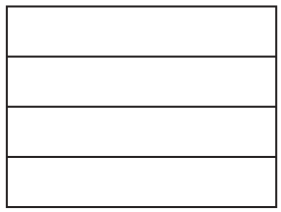
Answer
Top to bottom:
- Application
- Transport
- Internet
- Link
Application, Transport, Internet, Link (top to bottom)
Background Concept
A protocol suite is a set of related communication protocols organised into layers. Each layer has a specific job and provides services to the layer above it. In the TCP/IP model, the four layers are:
- Application
- Transport
- Internet
- Link
The idea of layering is important because it breaks communication into manageable parts. For example, the Application layer deals with services such as web or email, while lower layers deal with delivery and the physical network.
Understanding the Question
This part gives the four layer names but not in the correct order. You must place them in the correct order in the vertical stack shown in the diagram.
The key point is that the layers must be arranged from highest level to lowest level. In a stack diagram, that normally means top to bottom.
Approach
Recall the standard TCP/IP order:
- Application
- Transport
- Internet
- Link
Then write them into the boxes from top to bottom in that sequence.
Step-by-Step Reasoning
The TCP/IP layers are not interchangeable, so the order matters.
- The Application layer is the top layer because it is closest to the user and to application software such as browsers and email clients.
- The Transport layer sits below it because it manages end-to-end communication between applications.
- The Internet layer is below the Transport layer because it handles addressing and routing across networks.
- The Link layer is the lowest of these four because it deals with the local network connection and access to the physical network.
So the completed stack, from top box to bottom box, is:
- Application
- Transport
- Internet
- Link
Key Takeaways
- Learn the standard TCP/IP layer order exactly.
- In a stack diagram, think from top layer down to lower-level network handling.
- The TCP/IP four-layer model is different from the seven-layer OSI model, so do not mix them.
Common Mistakes
- Reversing the order and writing from bottom to top.
- Confusing the Internet layer with the Application layer because of the word "Internet".
- Mixing in OSI layer names such as Session, Presentation, or Network, which are not part of the four-layer TCP/IP model named here.
Things to Be Careful About
- Use exactly the four names given in the question.
- Do not rename Link as "Data Link" unless the question specifically uses that term.
- Make sure the order is top to bottom, not just a list in random order.
Describe the function of the Transport layer.
...................................................................................................................................................
...................................................................................................................................................
Answer
- It provides end-to-end delivery of data between applications on different devices.
- It breaks data into segments/packets and reassembles them at the destination, with checks to help ensure reliable delivery.
Provides end-to-end delivery between applications, splitting data into segments/packets and reassembling them with reliability checks.
Background Concept
The Transport layer in the TCP/IP suite is responsible for communication between applications running on different devices. It sits below the Application layer and above the Internet layer.
Its main jobs include:
- end-to-end communication between applications
- dividing data into smaller units for transmission
- reassembling the data at the destination
- supporting reliable transfer, depending on the protocol used
- using port numbers so data reaches the correct application
A common example is TCP, which belongs to the Transport layer and provides reliable delivery.
Understanding the Question
This question asks for the function of the Transport layer. That means you should explain what it does, not just where it is in the stack.
For 2 marks, two clear functions are usually enough. Strong answers mention both:
- end-to-end delivery between applications
- splitting and reassembling data, often with reliability or error checking
Approach
Think about what happens after an application wants to send data:
- The Application layer creates the data.
- The Transport layer prepares it for transmission.
- Lower layers move it across the network.
- The Transport layer at the other end rebuilds it for the receiving application.
So the best answer focuses on the Transport layer as the manager of application-to-application delivery.
Step-by-Step Reasoning
A good 2-mark description can be built from two points.
First point:
- The Transport layer provides end-to-end communication. This means it manages the transfer from the sending application on one computer to the receiving application on another computer.
Second point:
- It breaks data into smaller pieces (commonly called segments) before sending.
- At the destination, it reassembles those pieces into the original message.
A further useful detail is reliability:
- The Transport layer can include checks, acknowledgements, or sequencing so data arrives correctly and in the right order.
That is why the concise full-mark answer says it provides end-to-end delivery and splits/reassembles data with checks for reliable delivery.
Key Takeaways
- The Transport layer is about application-to-application communication.
- It prepares data for transmission by splitting it up.
- It rebuilds data at the destination.
- Reliability is an important Transport-layer function, especially with TCP.
Common Mistakes
- Saying it "routes packets". Routing is mainly the job of the Internet layer, not the Transport layer.
- Saying it "sends web pages" or "handles email". Those are Application-layer services.
- Describing only one vague idea such as "it transports data" without explaining how.
Things to Be Careful About
- Do not confuse end-to-end delivery with path selection through the network.
- If you mention packets, segments, or reassembly, make sure the description still clearly refers to the Transport layer's role.
- For a short-answer question, two precise functions score better than one long but unclear paragraph.
Outline one protocol that is associated with the Application layer.
...................................................................................................................................................
...................................................................................................................................................
Answer
- HTTP — used to transfer web pages/web content between a web server and a web browser.
HTTP — transfers web pages/web content between a web server and a web browser.
Background Concept
The Application layer is the top layer of the TCP/IP protocol suite. It provides protocols that application software uses directly. These protocols define the rules for particular services such as web browsing, file transfer, or email.
Examples include:
- HTTP for web pages
- FTP for file transfer
- SMTP for sending email
- POP3 or IMAP for receiving email
- BitTorrent for peer-to-peer file sharing
Understanding the Question
The question asks for one protocol associated with the Application layer and an outline of it. So you must do two things:
- name a valid Application-layer protocol
- say what it is used for
Just naming the protocol is not enough for a complete answer if the question says "outline".
Approach
Choose a familiar Application-layer protocol, then give its function in one sentence. A safe choice is HTTP because it is very well known and easy to explain.
Step-by-Step Reasoning
A complete response needs both the protocol name and its purpose.
Chosen protocol:
- HTTP
What it does:
- HTTP is used when a web browser requests web content from a web server.
- The server then sends back the webpage or other web resources.
So a clear answer is:
- HTTP — used to transfer web pages or web content between a web server and a web browser.
Other answers could also have been valid, such as:
- FTP — used to transfer files
- SMTP — used to send email
- IMAP/POP3 — used to retrieve email
Key Takeaways
- Application-layer protocols provide specific user-level services.
- To "outline" a protocol, always say what it is used for.
- Learn a few standard examples and their purposes.
Common Mistakes
- Giving a protocol from the wrong layer, such as IP or TCP.
- Naming a valid protocol but not explaining its purpose.
- Giving a general phrase like "used on the internet" without saying the specific service.
Things to Be Careful About
- Make sure the protocol you choose is actually in the Application layer.
- Keep the function specific: web pages, email sending, file transfer, and so on.
- One protocol is enough, but it must be correctly described.
Explain what is meant by non-composite and composite data types.
...................................................................................................................................................
...................................................................................................................................................
Answer
- A non-composite data type holds a single item/value and cannot be broken down into smaller parts of different meanings.
- A composite data type is made up of a number of items grouped together as one structure.
- The items in a composite type may be of the same type or of different types, for example an array or a record.
A non-composite type stores one single value; a composite type groups several data items together, possibly of different types, for example a record or array.
Background Concept
A data type tells us what kind of data is being stored and, usually, what operations are valid on that data. In this topic, the key distinction is between data that is treated as one single value and data that is built from several pieces.
A non-composite data type is an atomic type. It stores one value as a single item. Typical examples are INTEGER, REAL, BOOLEAN or CHAR. Even if the value itself may contain several digits or characters when displayed, the program still treats it as one item of that type.
A composite data type is formed by combining multiple data items into one larger structure. The whole structure is one variable, but inside it are several component parts. Common examples are arrays, records, lists and classes. Some composite types contain many items of the same type, such as an array. Others can contain fields of different types, such as a record.
Understanding the Question
This part asks for the meaning of both terms: non-composite and composite data types. So the answer must do more than just name examples. It needs to explain the difference.
The important idea is:
- non-composite = one single item
- composite = several items grouped together
Because this is a 3-mark explanation question, a full answer should usually include:
- what a non-composite type is
- what a composite type is
- an extra clarifying point or example
Approach
The best approach is to define each term directly and contrast them.
Start by describing a non-composite type as a single value that is not divided into meaningful subparts. Then describe a composite type as a structure containing multiple components. Finally, strengthen the explanation by adding an example such as a record or array.
Step-by-Step Reasoning
First, identify what the examiner wants: the distinction between the two categories.
For non-composite:
- “Non-composite” means not made up from smaller component fields.
- So the type stores one value only.
- Examples like
INTEGERorBOOLEANhelp show this.
For composite:
- “Composite” means composed from parts.
- So the type contains multiple data items under one overall structure.
- A record is a very good example because it groups different fields such as a name, number and date.
- An array is also valid, because it groups many values together, usually of the same type.
To earn full credit, the wording must show the contrast clearly. Saying only “composite has many values” is a bit weak unless you also make clear that they are grouped into one structure. Saying only “non-composite is simple” is also weak unless you explain that it stores a single item.
That is why the solution states:
- non-composite holds a single item/value
- composite is made up of a number of items grouped together
- those items may be of the same or different types
Key Takeaways
- A non-composite type stores one value as a single item.
- A composite type groups several data items into one structure.
- Records and arrays are standard examples of composite types.
- In exam answers, always define the idea, not just list examples.
Common Mistakes
- Saying a non-composite type is “small” instead of saying it stores one value. Size is not the real distinction.
- Saying a composite type is “more complicated” without explaining that it contains multiple components.
- Giving only examples with no definition.
- Saying composite types must contain different data types. That is not always true: arrays are composite and usually contain items of the same type.
Things to Be Careful About
- Use the word “single” or “one” for non-composite.
- Use the idea of “grouped together” or “made up of several items” for composite.
- If you include examples, make sure they actually fit:
INTEGERis non-composite; record and array are composite. - Do not confuse a long string of characters with a composite type unless the syllabus context specifically treats it that way; in exam theory, the safer distinction is atomic built-in types versus structured grouped types.
Write pseudocode statements to declare the record data type FootballClub to hold data about football clubs in a league, to include:
• name of team
• date team joined the league
• main telephone number
• name of the manager
• number of members
• current position in the league.
...................................................................................................................................................
...................................................................................................................................................
Answer
TYPE FootballClub
   DECLARE TeamName : STRING
   DECLARE DateJoined : DATE
   DECLARE TelephoneNumber : STRING
   DECLARE ManagerName : STRING
   DECLARE NumberOfMembers : INTEGER
   DECLARE LeaguePosition : INTEGER
ENDTYPE
See completed pseudocode
Background Concept
A record is a composite user-defined data type. It is used when one real-world object needs several pieces of related information to be stored together. Each piece of information is stored in a field.
For example, a football club is not described by one value. It has a team name, a joining date, a telephone number, a manager, and numerical values such as membership count and league position. A record lets all of these be grouped under one type name.
In CIE pseudocode, a user-defined type is normally declared using TYPE ... ENDTYPE. Inside that block, each field is declared with a name and a data type.
Choosing field types matters:
- names are usually
STRING - counts and positions are usually
INTEGER - dates may be stored as
DATEif that type is allowed in the pseudocode context - telephone numbers are usually safest as
STRING, because they may contain leading zeroes and are not used for arithmetic
Understanding the Question
The question asks for pseudocode statements to declare the record data type FootballClub.
That means you are not being asked to declare one variable called FootballClub. You are being asked to define a type template named FootballClub that could later be used to create variables of that type.
The record must include fields for:
- name of team
- date joined league
- main telephone number
- manager name
- number of members
- current league position
So the answer needs:
TYPE FootballClub- one field for each bullet point
- suitable data types for each field
ENDTYPE
Approach
The correct method is:
- Start a user-defined type with
TYPE FootballClub. - Add one
DECLAREline per required field. - Assign a sensible type to each field.
- Close the declaration with
ENDTYPE.
This is a record-style declaration, not an array declaration and not a class definition. Since this is Paper 3 style pseudocode, the answer should use CIE pseudocode conventions, not Python, Java or VB.
Step-by-Step Reasoning
Start with the outer structure:
TYPE FootballClub
   ...fields...
ENDTYPE
That tells the examiner you are defining a new composite type called FootballClub.
Now choose fields.
-
Team name
- This is text.
- So
STRINGis appropriate. - Example field name:
TeamName.
-
Date joined the league
- This is a date value.
DATEis a sensible type here.- Example field name:
DateJoined.
-
Main telephone number
- Telephone numbers should usually not be stored as
INTEGER. - A phone number can begin with
0, and arithmetic is never performed on it. - So
STRINGis the safest choice. - Example field name:
TelephoneNumber.
- Telephone numbers should usually not be stored as
-
Manager name
- This is text, so
STRING. - Example field name:
ManagerName.
- This is text, so
-
Number of members
- This is a whole-number count.
- So
INTEGERis appropriate. - Example field name:
NumberOfMembers.
-
Current position in the league
- This is also a whole number.
- So
INTEGER. - Example field name:
LeaguePosition.
Putting those together gives a complete record declaration.
The exact field names may vary between candidates, but they must clearly correspond to the required items. The important thing is that all six required pieces of data are included and the overall declaration is clearly a record/user-defined type.
Key Takeaways
- A record is used to group related fields about one entity.
TYPE ... ENDTYPEis the standard way to declare a user-defined composite type in CIE pseudocode.- Choose field data types carefully based on how the value is used.
- Phone numbers are usually best stored as
STRING, notINTEGER.
Common Mistakes
- Declaring six separate variables instead of one record type. That does not answer the question fully.
- Using a real programming language such as Python
classsyntax instead of pseudocode. - Omitting
TYPEorENDTYPE. - Storing the telephone number as
INTEGER; this can lose leading zeroes. - Forgetting one of the required fields, especially
current position in the league.
Things to Be Careful About
- This is a type declaration, not an instance declaration.
- Keep pseudocode keywords in upper case:
TYPE,DECLARE,ENDTYPE. - Use the assignment of data types with a colon, for example
DECLARE TeamName : STRING. - Make sure every bullet point from the question appears exactly once as a field.
- Sensible alternatives for field names are acceptable, but they must clearly show the same meaning as the question.
Describe the sequential method of file access.
...................................................................................................................................................
...................................................................................................................................................
Answer
- Records are accessed one after another in sequence, starting at the beginning of the file.
- To reach a particular record, all earlier records must be read or skipped first, so there is no direct access to a chosen record.
Records are read one after another from the start of the file; earlier records must be passed before a required record can be accessed.
Background Concept
File access method means the way records are retrieved from storage. In sequential access, the file is processed in order, record by record. The system starts at the beginning of the file and moves forward through it.
This is different from random access, where the program can jump straight to a specific record location. With sequential access, if the required record is near the end, the earlier records still have to be passed first.
A record is one complete item of stored data, such as one employee or one student entry. A file is a collection of these records.
Understanding the Question
This part asks only for the sequential method of file access itself, not for the different file organisations. So the answer needs to describe how the access happens:
- records are handled in order
- access begins at the start
- you cannot directly jump to the required record
For 2 marks, the examiner is usually looking for the ordered nature of the access and the fact that earlier records must be processed before later ones.
Approach
A good way to answer is to define the method first, then state its key consequence.
So:
- Say that records are accessed one after another in sequence.
- Say that the file is read from the beginning and the required record cannot be reached directly.
That gives a complete exam-style description without unnecessary detail.
Step-by-Step Reasoning
The phrase "sequential method of file access" tells you the important word is sequential.
Sequential means:
- first record, then second record, then third record, and so on
- movement is forward through the file in order
If a program wants record 50, it cannot jump straight to record 50 using this method. It must pass through records 1 to 49 first. Even if those earlier records are not the target, they still come before it in the access path.
So the two core marking points are:
- records are read in order from the start of the file
- direct access to an individual chosen record is not possible
That is exactly what the short solution states.
Key Takeaways
- Sequential access processes file records in order.
- Access starts at the beginning and moves through the file one record at a time.
- To reach a later record, earlier ones must be passed first.
- Sequential access is different from random access, which allows direct jumping.
Common Mistakes
- Confusing sequential access with sequential organisation. Access method is how records are retrieved; organisation is how they are stored.
- Saying records are accessed in key order in every case. That is not always true; it depends on the file organisation.
- Describing random access instead, such as "go straight to the record." That is the opposite of sequential access.
- Giving only one idea, such as "records are in order," without saying that access starts at the beginning or that direct access is not possible.
Things to Be Careful About
- Use the word access correctly: it is about retrieving records, not storing them.
- Do not assume anything about sorted keys in this part; that belongs to the next part about serial and sequential organisation.
- Keep the answer general and concise, because this part is only asking for the method itself.
Explain how the sequential method of file access is applied to files with serial organisation and to files with sequential organisation.
...................................................................................................................................................
...................................................................................................................................................
Answer
- With serial organisation, records are stored in the order they were added, with no key order. Sequential access reads each record in that stored order until the required record is found or the end of the file is reached.
- With sequential organisation, records are stored in key order. Sequential access still reads records one by one, but in sorted order, so the search can stop once the required key is found or once the key has been passed.
Sequential access on a serial file reads records in the order stored until found or end of file; on a sequential file it reads records in key order and can stop when the key is found or passed.
Background Concept
File organisation and file access are related, but they are not the same thing.
- File organisation describes how records are arranged in the file.
- File access method describes how the records are read.
In this syllabus, two important organisations are:
- Serial organisation: records are stored one after another, usually in the order they were added. They are not necessarily sorted by key.
- Sequential organisation: records are stored in sequence of a key field, such as employee number or account number.
The sequential access method means records are read one at a time from the start and the program moves forward through the file.
Understanding the Question
This part asks how the same access method, sequential access, works when applied to two different types of file organisation.
So the answer must mention both:
- what happens for a serially organised file
- what happens for a sequentially organised file
The key difference is the order of storage:
- in a serial file, there is no key order
- in a sequential file, records are already sorted by key
That difference changes how useful the sequential search is and when it can stop.
Approach
Treat the answer as a comparison.
For serial organisation:
- State that records are stored in input/addition order, not sorted.
- Explain that sequential access therefore reads each record in turn until the target is found or the file ends.
For sequential organisation:
- State that records are stored in key order.
- Explain that sequential access reads in that sorted order.
- Because the keys are sorted, once the program passes the target key, it knows the record is not present and can stop.
That gives the contrast the examiner wants.
Step-by-Step Reasoning
First, consider serial organisation.
Suppose records were added in this order of key values: 42, 15, 91, 30. That is not sorted. If we want key 30, sequential access must read:
- 42
- then 15
- then 91
- then 30
If the required record is absent, the search continues until the end of the file. Because the records are not ordered by key, you cannot safely stop early just because you have seen a larger or smaller key.
Now consider sequential organisation.
Suppose the key values are stored as: 15, 30, 42, 91. If we want key 30, sequential access reads:
- 15
- then 30
and stops when it is found.
If we want key 31, the search reads:
- 15
- then 30
- then 42
At that point, because the file is sorted, passing 31 means the record cannot appear later. So the search can stop early.
That is the important advantage of sequential access on a sequentially organised file: the ordering of records makes the search more meaningful and sometimes more efficient.
So the complete explanation is:
- for a serial file, sequential access reads records in the order they were stored until found or end of file
- for a sequential file, sequential access reads records in key order and may stop when the key is found or has been passed
Key Takeaways
- Serial organisation means records are stored in arrival/input order.
- Sequential organisation means records are stored in key order.
- Sequential access always reads one record after another from the start.
- Sequential access is less efficient on a serial file because there is no sorted order to help the search.
- Sequential access on a sequential file can stop once the target key has been passed.
Common Mistakes
- Saying serial and sequential organisation are the same. They are different: serial is unsorted, sequential is key ordered.
- Describing random access instead of sequential access.
- Forgetting to explain one of the two organisations. This question specifically needs both.
- Claiming that a serial file can stop when the key is passed. That only makes sense if the file is sorted.
- Talking only about how the file is stored and not how it is accessed.
Things to Be Careful About
- Use precise wording: serial files are typically stored in the order records are added, not in key order.
- For sequential organisation, mention the key order explicitly, because that is the reason the search can stop early.
- Do not overstate efficiency. Sequential access is still one-by-one reading; the benefit in a sequential file comes from the sorted order, not from direct access.
- If you mention "found or end of file," that fits serial organisation well. If you mention "found or key passed," that fits sequential organisation well.
Write this Reverse Polish Notation (RPN) in infix form:
5 2 + 9 3 - / 3 *
...................................................................................................................................................
Working
5 2 + gives (5 + 2)
9 3 - gives (9 - 3)
So the expression becomes ((5 + 2) / (9 - 3)) * 3
Answer
((5 + 2) / (9 - 3)) * 3
((5 + 2) / (9 - 3)) * 3
Background Concept
Reverse Polish Notation (RPN), also called postfix notation, places each operator after its two operands. So instead of writing (5 + 2), RPN writes 5 2 +.
The main advantage of RPN is that brackets are not needed during evaluation, because the order is determined by position. To convert RPN into infix form, a common method is to use a stack of partial expressions:
- when you see an operand, push it
- when you see an operator, pop the most recent two expressions
- combine them as
(left operator right) - push the new combined expression back
The left operand is the one popped second, and the right operand is the one popped first. This matters especially for - and /.
Understanding the Question
You are given the RPN expression 5 2 + 9 3 - / 3 * and asked to rewrite it in normal infix form.
That means you must reconstruct where the brackets go and which operations happen first. Since the question is only asking for infix form, you do not need to calculate a final numeric value.
Approach
Work from left to right through the RPN tokens:
- turn
5 2 +into one infix subexpression - turn
9 3 -into another infix subexpression - divide the first subexpression by the second
- multiply the result by
3
Adding brackets around intermediate results is the safest way to preserve the exact order intended by the RPN expression.
Step-by-Step Reasoning
Start with the tokens:
5 2 + 9 3 - / 3 *
- Read
5: this is an operand, so it stands alone. - Read
2: also an operand. - Read
+: combine the two most recent operands as(5 + 2).
So far you have one subexpression:
(5 + 2)
Continue:
- Read
9: operand. - Read
3: operand. - Read
-: combine them as(9 - 3).
Now you have two subexpressions:
(5 + 2)(9 - 3)
Next token is /, so divide the earlier subexpression by the later one:
((5 + 2) / (9 - 3))
Finally read 3, then *, so multiply the existing result by 3:
((5 + 2) / (9 - 3)) * 3
That is the correct infix form.
Key Takeaways
- RPN places operators after operands.
- To convert RPN to infix, combine the two most recent items each time you meet an operator.
- Brackets are useful to preserve the exact order of operations.
- For subtraction and division, operand order must be kept correct.
Common Mistakes
- Reversing the operands for
-or/. For example, turning9 3 -into(3 - 9)is wrong. - Omitting necessary brackets, which can change the meaning of the expression.
- Treating the final
* 3as if it happened before the division. - Evaluating the expression numerically instead of rewriting it in infix form.
Things to Be Careful About
- Read strictly from left to right.
- Each operator works on the two most recent complete operands or subexpressions, not just the two most recent numbers.
- Keep compound parts such as
(5 + 2)together when later operators are applied. - Use the order
left operand operator right operand, where the left operand is the older item in the stack.
Write this infix expression in RPN:
((7 + 3) - (2 * 8)) / 6
...................................................................................................................................................
Working
(7 + 3) becomes 7 3 +
(2 * 8) becomes 2 8 *
So ((7 + 3) - (2 * 8)) becomes 7 3 + 2 8 * -
Then divide by 6:
Answer
7 3 + 2 8 * - 6 /
7 3 + 2 8 * - 6 /
Background Concept
In infix notation, the operator is written between its operands, such as 7 + 3. In Reverse Polish Notation (RPN), the operator is written after its operands, so the same expression becomes 7 3 +.
To convert infix to RPN:
- write operands in the order they are used
- delay writing each operator until after both of its operands have appeared
- use brackets and precedence to decide which subexpression is completed first
Because this expression is fully bracketed, the conversion is simpler: each set of brackets tells you exactly which operation to write first.
Understanding the Question
You are given the infix expression ((7 + 3) - (2 * 8)) / 6 and asked to rewrite it in RPN.
The brackets tell you the exact order:
- do
7 + 3 - do
2 * 8 - subtract the second result from the first
- divide that result by
6
Approach
Convert each bracketed section into RPN first, then combine them:
- convert
(7 + 3) - convert
(2 * 8) - place
-after those two results - place
/after the combined result and6
This is easier than trying to convert the whole expression in one jump.
Step-by-Step Reasoning
Start with the first bracketed expression:
(7 + 3)
In RPN, this is:
7 3 +
Now the second bracketed expression:
(2 * 8)
In RPN, this is:
2 8 *
Now combine these two results using subtraction:
((7 + 3) - (2 * 8))
becomes:
7 3 + 2 8 * -
Finally divide that result by 6. In RPN, the 6 is written before the /:
7 3 + 2 8 * - 6 /
That is the complete postfix form.
Key Takeaways
- In RPN, an operator comes after both operands.
- Fully bracketed infix expressions are easiest to convert because the order is explicit.
- Build the RPN form one subexpression at a time.
- The final operator for the whole expression appears last.
Common Mistakes
- Writing the operator too early, for example
7 + 3instead of7 3 +. - Forgetting that the subtraction joins the two bracketed results, not just the numbers nearest it.
- Putting
/before6instead of after it. - Changing the order of operands in subtraction or division.
Things to Be Careful About
- Keep the original left-to-right operand order.
- Do not lose the structure of the brackets while converting.
- The RPN for the whole numerator must be completed before you attach the final
6 /. - Since the expression is fully bracketed, follow the brackets rather than relying only on normal precedence rules.
Evaluate this RPN expression:
a b - c d + * e /
when
a = 17, b = 5, c = 7, d = 3 and e = 10
Show the changing contents of the stack as the RPN expression is evaluated.
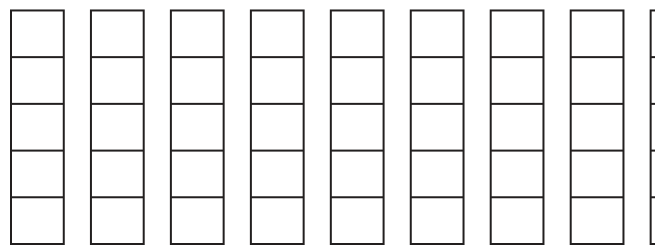
Working
Substitute the values:
17 5 - 7 3 + * 10 /
Answer
Final value = 12
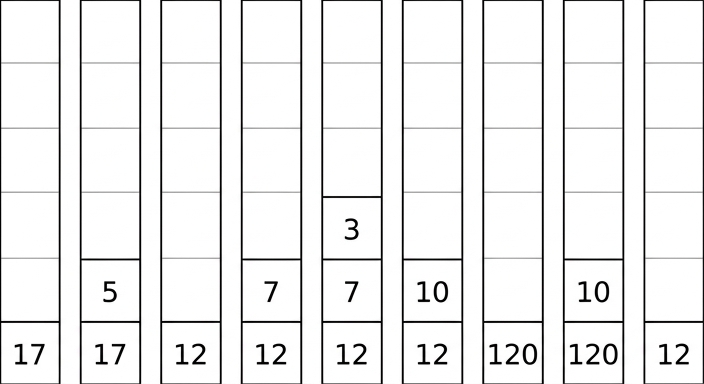
12
Background Concept
RPN expressions are usually evaluated using a stack.
A stack is a Last In, First Out (LIFO) structure:
PUSHadds an item to the topPOPremoves the item from the top
For RPN evaluation:
- when you read an operand, push it onto the stack
- when you read an operator, pop the top two values
- apply the operator as
left operator right - push the result back onto the stack
The order of the two popped values is very important:
- for
a b -, the calculation isa - b - for
a b /, the calculation isa / b
So if the top of the stack is b and the value below it is a, then b is the right operand and a is the left operand.
Understanding the Question
You are given the RPN expression a b - c d + * e / and the values:
a = 17b = 5c = 7d = 3e = 10
You must do two things:
- evaluate the expression
- show how the contents of the stack change as each token is processed
So this is not just a final-answer question. The intermediate stack states are part of what earns the marks.
Approach
First replace each variable with its number:
17 5 - 7 3 + * 10 /
Then process the tokens from left to right. After each push or operation, record the stack contents from bottom to top.
The structure is:
- calculate
17 - 5 - calculate
7 + 3 - multiply those two results
- divide by
10
Step-by-Step Reasoning
Substitute the values:
a b - c d + * e /
becomes:
17 5 - 7 3 + * 10 /
Now evaluate it using a stack.
- Read
17→ push it- stack:
[17]
- stack:
- Read
5→ push it- stack:
[17, 5]
- stack:
- Read
-→ pop5and17, calculate17 - 5 = 12, push12- stack:
[12]
- stack:
- Read
7→ push it- stack:
[12, 7]
- stack:
- Read
3→ push it- stack:
[12, 7, 3]
- stack:
- Read
+→ pop3and7, calculate7 + 3 = 10, push10- stack:
[12, 10]
- stack:
- Read
*→ pop10and12, calculate12 * 10 = 120, push120- stack:
[120]
- stack:
- Read
10→ push it- stack:
[120, 10]
- stack:
- Read
/→ pop10and120, calculate120 / 10 = 12, push12- stack:
[12]
- stack:
Only one value is left on the stack at the end, so that is the final answer.
Final value: 12
The stack evolution is shown here:
Key Takeaways
- RPN is naturally evaluated with a stack.
- Operands are pushed; operators pop two values, calculate, then push the result.
- The final answer is the single value left on the stack.
- Operand order matters for subtraction and division.
Common Mistakes
- Reversing the operands when applying
-or/, for example doing5 - 17instead of17 - 5. - Forgetting to push the result of an operation back onto the stack.
- Showing only the final answer and not the intermediate stack contents.
- Treating variables like letters instead of substituting their given numeric values first.
Things to Be Careful About
- Read the expression strictly from left to right.
- Record the stack from bottom to top consistently.
- After every operator, the stack gets smaller by one item overall because two values are removed and one result is added.
- Check that exactly one value remains at the end; if more than one value is left, something has gone wrong in the evaluation.
The diagram shows a logic circuit.
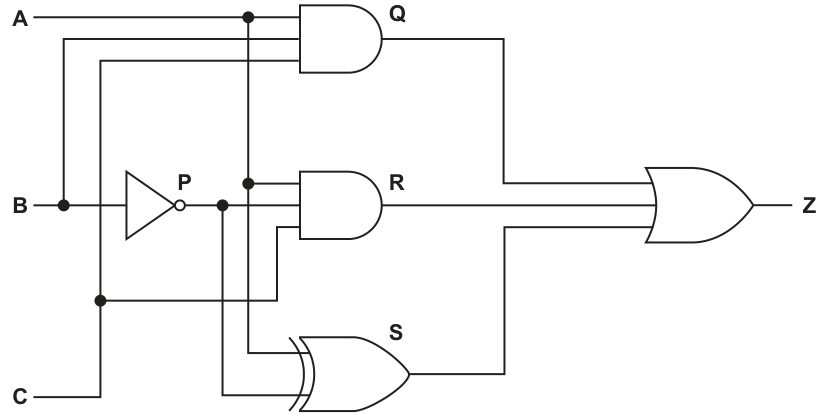
Complete the truth table for the given logic circuit.
Show your working.
| Working space | |||||||
|---|---|---|---|---|---|---|---|
| A | B | C | P | Q | R | S | Z |
| 0 | 0 | 0 | |||||
| 0 | 0 | 1 | |||||
| 0 | 1 | 0 | |||||
| 0 | 1 | 1 | |||||
| 1 | 0 | 0 | |||||
| 1 | 0 | 1 | |||||
| 1 | 1 | 0 | |||||
| 1 | 1 | 1 |
Working
Answer
| A | B | C | P | Q | R | S | Z |
|---|---|---|---|---|---|---|---|
| 0 | 0 | 0 | 1 | 0 | 0 | 1 | 1 |
| 0 | 0 | 1 | 1 | 0 | 0 | 0 | 0 |
| 0 | 1 | 0 | 0 | 0 | 0 | 0 | 0 |
| 0 | 1 | 1 | 0 | 0 | 0 | 1 | 1 |
| 1 | 0 | 0 | 1 | 0 | 0 | 0 | 0 |
| 1 | 0 | 1 | 1 | 0 | 1 | 1 | 1 |
| 1 | 1 | 0 | 0 | 0 | 0 | 1 | 1 |
| 1 | 1 | 1 | 0 | 1 | 0 | 0 | 1 |
See completed truth table
Background Concept
A truth table lists every possible combination of input values and shows the resulting output. For a logic circuit with intermediate signals, you usually work from left to right: first calculate any inverted input, then the outputs of the smaller gates, then the final gate.
A NOT gate flips its input, so if then , and if then . An AND gate only gives 1 if all its inputs are 1. An OR gate gives 1 if at least one input is 1. A three-input XOR gate gives 1 when an odd number of its inputs are 1.
Understanding the Question
You are given a circuit with inputs , and , and you must complete the working columns , , , and the final output for all 8 input combinations.
The important shared information from the diagram is:
- is the output of the NOT gate on , so
- is the output of the top AND gate, so
- is the output of the middle AND gate, so
- is the output of the XOR gate using , and
- is the OR of , and
So the task is really a careful dry run of the circuit for each row.
Approach
Start by filling column because every later part that uses the inverted depends on it. Then compute and from the AND gates. After that evaluate using XOR parity. Finally, apply the OR rule to get .
This order matters because it mirrors the flow of signals through the circuit and reduces mistakes.
Step-by-Step Reasoning
For each row:
- Find .
- Find . This is 1 only when , and are all 1.
- Find . This is 1 only when , and .
- Find . Count how many 1s appear among , and . If the count is odd, ; if even, .
- Find . If any of , or is 1, then .
Example rows:
- For , , : , , , and , so .
- For , , : , , , and , so .
- For , , : , , , and , so .
Working this through for all 8 rows gives the completed table in the solution.
Key Takeaways
- In a circuit truth table, calculate signals in the order they are produced.
- A NOT output often becomes a working column used by later gates.
- A three-input XOR is best handled by checking whether the number of 1s is odd.
- The final OR output is easy once all intermediate columns are correct.
Common Mistakes
- Forgetting to invert before using it in other gates.
- Treating XOR like OR. XOR is not "at least one 1"; it is "an odd number of 1s".
- Writing or as 1 when only some of the AND inputs are 1. AND needs all inputs to be 1.
- Calculating directly from , and without first finding , and .
Things to Be Careful About
- Keep the rows in the exact order given by the table.
- Use the working columns properly; they are there to prevent errors.
- Do not mix up and . They are opposites.
- For XOR, check all three inputs to the XOR gate, not just two of them.
Write the Boolean expression that corresponds to the logic circuit as a sum-of-products.
Z = ............................................................................................................................................
Answer
Z = A.B.C + A.(NOT B).C + (NOT A).B.C + (NOT A).(NOT B).(NOT C) + A.B.(NOT C) + A.(NOT B).C
Background Concept
A sum-of-products expression is a Boolean expression written as several AND terms added together with OR. Each product term is a combination of literals such as , , or .
To convert a circuit into Boolean algebra, write an expression for each gate. AND becomes multiplication or a dot, OR becomes , and NOT becomes an overline. XOR is more awkward because it is not itself a sum-of-products, so if the question asks specifically for sum-of-products, the XOR branch must be expanded.
Understanding the Question
You are not being asked to simplify the expression. You are being asked to write the Boolean expression that matches the circuit, but in sum-of-products form.
From the diagram:
So the main extra step is turning the XOR part into AND terms joined by OR.
Approach
Write the direct expressions for and first. Then expand the three-input XOR into the rows where it outputs 1. A three-input XOR is 1 when there is an odd number of 1s, so its sum-of-products has four terms.
Finally OR the three branches together. If a term appears twice, that is still logically correct.
Step-by-Step Reasoning
The easy branches are:
and
Now expand the XOR branch. For inputs , and , a three-input XOR is 1 for these cases:
Substitute , so :
Now combine all three branches:
so
Notice that appears twice. That is allowed here because the question asked for the expression corresponding to the circuit as a sum-of-products. Repeating the same product term does not change the logic value.
Key Takeaways
- Convert a circuit one gate at a time.
- Sum-of-products means OR of product terms.
- XOR usually needs expanding if a sum-of-products answer is required.
- Duplicate product terms do not change the logic result.
Common Mistakes
- Leaving XOR written as XOR when the question explicitly asks for sum-of-products.
- Forgetting that and writing terms using instead of replacing it.
- Missing one of the four odd-parity cases for the three-input XOR.
- Simplifying too far when the question only asks for the expression corresponding to the circuit.
Things to Be Careful About
- Keep complements on the correct variables.
- Make sure the final expression is a sum of AND terms, not a mixture of gate symbols and algebra.
- If you use the intermediate signal while working, replace it with in the final answer.
- Repeated terms are acceptable, but missing a required term is not.
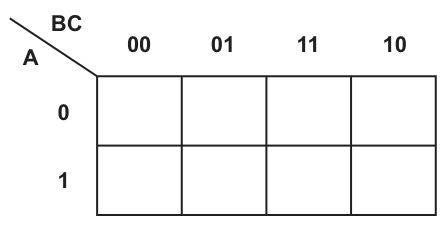
Working
Use Gray-code column order: .
Answer
| A \ BC | 00 | 01 | 11 | 10 |
|---|---|---|---|---|
| 0 | 1 | 1 | 0 | 0 |
| 1 | 1 | 1 | 1 | 1 |
See completed K-map
Background Concept
A Karnaugh map is a visual method for organising truth-table values so that adjacent cells differ by only one variable. For three variables, the map has 2 rows and 4 columns. The columns must be in Gray-code order, usually , , , , so that neighbouring cells differ by just one bit.
To complete a K-map from a Boolean expression, put a 1 in every cell whose minterm appears in the expression, and put 0 in the remaining cells.
Understanding the Question
You are given a sum-of-products expression and asked to complete the K-map. The figure already tells you the layout: rows are and , while columns are .
The official completed map for this question has 1s in the first two columns of the top row and all four columns of the bottom row. That is the pattern followed in the solution.
Approach
Read each product term as one minterm, identify the values of , and , and then place a 1 in the matching K-map cell.
A useful way to think about it is: row comes from , column comes from the pair .
Step-by-Step Reasoning
The finished K-map is:
- Row :
- Row :
Using the Gray-code column labels:
- column means ,
- column means ,
- column means ,
- column means ,
So the completed map places 1s in:
and 0s in the two remaining top-row cells.
Key Takeaways
- K-map columns must stay in Gray-code order.
- Each product term maps to one cell.
- A completed K-map is really a rearranged truth table.
Common Mistakes
- Using binary order instead of Gray-code order .
- Putting the right values into the wrong columns because of that ordering mistake.
- Forgetting to fill unused cells with 0.
- Mixing up which variable labels the rows and which label the columns.
Things to Be Careful About
- Always check the map headings before placing values.
- Keep row separate from row .
- Only one cell changes between adjacent columns in Gray-code order.
- If your printed expression seems inconsistent with the official map, the completed map used here follows the mark scheme pattern.
Draw loop(s) around appropriate group(s) in the K-map to produce an optimal sum-of-products.
Answer
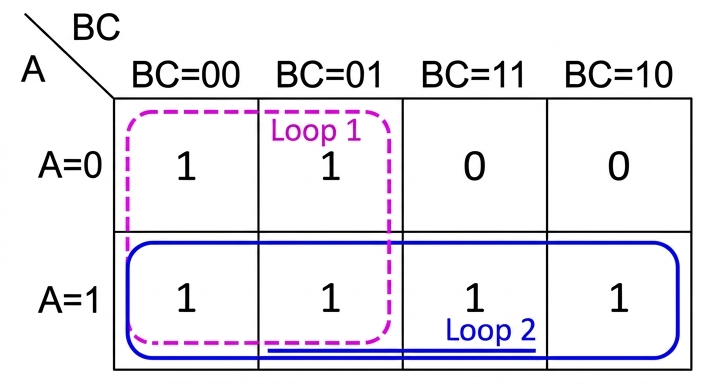
See K-map loops
Background Concept
In a Karnaugh map, you simplify a Boolean expression by drawing loops around adjacent 1s. Each loop must contain a power-of-two number of cells: 1, 2, 4, 8 and so on. The aim is to cover all the 1s using the fewest and largest possible loops, because larger loops remove more variables and give a simpler expression.
Loops can wrap around edges, and loops are allowed to overlap if that leads to a simpler final answer.
Understanding the Question
You already have the completed K-map from part (c)(i). Now the task is not to write the expression yet, but to draw the loop or loops that give the optimal simplified sum-of-products.
"Optimal" means the grouping should produce the simplest correct expression, not just any valid grouping.
Approach
Look for the largest rectangular groups of 1s first. In this map there are two obvious large groups:
- a group of four covering the whole bottom row
- another group of four covering the first two columns across both rows
Those two groups cover all the 1s and produce the simplest result.
Step-by-Step Reasoning
The completed map is shown with the required loops here:
Why these loops are chosen:
-
Bottom row loop
- All four cells in row are 1.
- A group of 4 is larger than two groups of 2, so it is better.
- Across this loop, and change, but stays fixed at 1.
- So this loop will give the term .
-
First two columns loop
- The cells in columns and are all 1 across both rows.
- This is another group of 4.
- Across this loop, changes and changes, but stays fixed at 0.
- So this loop will give the term .
These loops overlap in the two bottom-left cells, and that is completely allowed. In fact, the overlap helps produce the simplest pair of terms.
Key Takeaways
- Always try to make groups as large as possible.
- Overlapping loops are allowed if they help simplify further.
- Each loop corresponds to one product term.
- Variables that change within a loop disappear from that term.
Common Mistakes
- Drawing many small loops instead of the fewest largest loops.
- Refusing to overlap loops even when overlap gives a better simplification.
- Drawing diagonal groups, which are not allowed.
- Grouping cells that are not adjacent in K-map terms.
Things to Be Careful About
- Groups must be rectangular and contain 1, 2, 4, 8... cells.
- Adjacency is based on K-map layout, not on normal left-to-right binary order.
- The whole row of four is valid and better than splitting it.
- Make sure every 1 is covered by at least one loop.
Write the Boolean expression from your answer to part (c)(ii) as a simplified sum-of-products.
...........................................................................................................................................
Answer
A + (NOT B)
Background Concept
After drawing loops on a Karnaugh map, you translate each loop into a product term by keeping only the variables that stay constant throughout that loop. Any variable that changes within the loop is eliminated.
The final simplified sum-of-products is the OR of the terms from all the loops.
Understanding the Question
This part uses your loops from part (c)(ii). You are now turning those visual groups into the simplified Boolean expression.
So the task is not to re-fill the K-map, but to read off the fixed variables from each selected loop.
Approach
Take one loop at a time:
- identify which variable values stay the same for every cell in that loop
- write the term for that loop
- OR the loop terms together
Because the grouping is already optimal, the resulting expression is the simplified sum-of-products.
Step-by-Step Reasoning
From the loop over the whole bottom row:
- is always 1
- changes
- changes
So that loop gives:
From the loop over the first two columns:
- is always 0
- changes
- changes
So that loop gives:
Now OR the two loop terms together:
That is the simplified sum-of-products.
Key Takeaways
- A variable stays in the term only if it is constant across the whole loop.
- If the constant value is 1, use the variable uncomplemented.
- If the constant value is 0, use the complemented form.
- The simplified expression is the OR of the loop terms.
Common Mistakes
- Keeping variables that actually change within the loop.
- Forgetting to complement a variable that is fixed at 0.
- Writing a product term for each individual 1 instead of for each loop.
- Using too many variables, which means the expression is not simplified.
Things to Be Careful About
- Read the loop from the map headings, not from memory.
- For the row loop, only is fixed.
- For the first-two-columns loop, only is fixed, and it is fixed at 0, so use .
- Keep the final answer in sum-of-products form: terms joined by OR.
Describe what is meant by a digital certificate.
...................................................................................................................................................
...................................................................................................................................................
Answer
- A digital certificate is an electronic document used to verify the identity of a user, organisation or website.
- It is issued and authenticated by a trusted Certificate Authority (CA).
- It contains identifying details and the owner's public key.
An electronic document issued by a trusted CA that verifies identity and contains the owner's public key.
Background Concept
A digital certificate is part of public key infrastructure. In asymmetric encryption, a person or organisation has a public key and a private key. The public key can be shared, but there must be some reliable way for other people to know that the public key really belongs to the claimed owner.
That is the purpose of a digital certificate. It is an electronic document that links an identity to a public key. A trusted third party, called a Certificate Authority (CA), checks the identity of the owner and then issues the certificate. The certificate typically includes the owner's name or organisation, the public key, and other details such as validity dates.
So the key ideas are:
- it is digital, not a paper certificate
- it proves identity
- it binds that identity to a public key
- it is trusted because a CA issues it
Understanding the Question
This part asks for what is meant by a digital certificate. That means you are being asked for a definition, not a full explanation of encryption steps.
To score well, the answer needs the main features of the definition:
- what it is: an electronic document
- what it does: verifies identity / proves ownership of a public key
- why it can be trusted: it is issued by a Certificate Authority
If you only say "it is used for security" or "it contains a key", that is too vague for full marks.
Approach
For a definition question like this, give three precise points:
- identify the object
- state its purpose
- state who issues it or what it contains
That structure matches the likely marking points and avoids unnecessary detail.
Step-by-Step Reasoning
Start with the basic definition:
- A digital certificate is an electronic document or file.
Then state its role:
- Its job is to verify the identity of a person, organisation or server.
- More specifically, it shows that a particular public key belongs to that owner.
Then explain why others trust it:
- A Certificate Authority issues it.
- Because the CA is trusted, users can trust the certificate it creates.
Finally, mention its contents:
- It includes identifying information and the public key.
- Some certificates also include dates and the CA's own signature, but for a short 3-mark answer the identity, CA and public key are the most important points.
Putting those together gives a complete exam definition.
Key Takeaways
- A digital certificate links an identity to a public key.
- It is issued by a trusted Certificate Authority.
- Its purpose is to let others trust that a public key really belongs to the named owner.
Common Mistakes
- Saying it contains the private key. This is wrong because private keys must remain secret and are not distributed in certificates.
- Describing it as just "a password" or "an encryption key". A certificate is not the key itself; it is a document containing the public key and identity details.
- Forgetting the Certificate Authority. Without mentioning the trusted issuer, the definition is incomplete.
- Confusing a digital certificate with a digital signature. A certificate proves identity and public-key ownership; a digital signature is used to verify a message or file.
Things to Be Careful About
- Use the term public key, not private key.
- Make clear that the certificate is issued by a trusted third party, usually called a CA.
- Focus on identity verification, since that is the core purpose.
- For a "describe what is meant by" question, concise accurate points score better than a long general paragraph about internet security.
Explain the role of a digital certificate in creating a digital signature.
...................................................................................................................................................
...................................................................................................................................................
Answer
- The digital certificate confirms that the public key used with the digital signature belongs to the claimed sender.
- Because the certificate is validated by a trusted CA, the receiver can trust that public key and use it to verify the digital signature.
It confirms that the sender's public key is genuine, so the receiver can trust that key and use it to verify the digital signature.
Background Concept
A digital signature is used to prove that a message or file came from a particular sender and has not been changed. It is created using the sender's private key. The receiver then uses the sender's public key to check the signature.
That creates an important problem: how does the receiver know that the public key really belongs to the claimed sender? If an attacker substituted a fake public key, the receiver could be fooled.
A digital certificate solves that trust problem. It contains the sender's public key and identity details, and it is signed or issued by a trusted Certificate Authority. Because of that, the receiver can trust that the public key is genuine.
Understanding the Question
This part is not asking you to describe every step of how a digital signature is mathematically formed. It is asking for the role of the digital certificate in that process.
The key idea is trust. A digital signature only has value if the public key used to check it is known to belong to the right person. The certificate provides that assurance.
So the answer should explain:
- what the certificate does in relation to the sender's public key
- why that matters when verifying the signature
Approach
The simplest route is:
- state that a digital signature depends on a public key for checking
- explain that the certificate proves whose public key it is
- conclude that this allows the receiver to trust the signature verification
That directly links certificate and signature, which is what the question wants.
Step-by-Step Reasoning
A digital signature is associated with a sender.
- The sender creates the signature using their private key.
- The receiver needs the matching public key to verify it.
But a public key on its own is not enough.
- Anyone could claim "this is my public key".
- If the receiver accepted a false key, the signature check would be meaningless.
The digital certificate provides the missing trust.
- It contains the sender's public key.
- It also contains identity information about the sender.
- It is issued or validated by a trusted CA.
Because of this:
- the receiver can check the certificate
- the receiver can trust that the public key really belongs to the claimed sender
- the receiver can then use that public key to verify the digital signature
So the certificate does not replace the signature. Instead, it supports the signature by authenticating the public key used in the verification process.
Key Takeaways
- A digital signature is checked with a public key.
- A digital certificate proves that this public key belongs to the claimed sender.
- The CA's trust makes the signature verification meaningful.
Common Mistakes
- Saying the certificate creates the signature itself. It does not; the sender's private key is used to create the signature.
- Saying the certificate contains the private key. It should contain the public key, not the private key.
- Explaining only encryption and not mentioning identity or trust. This question is about authentication of the public key.
- Saying the receiver uses the certificate to decrypt the message. That is not the role being tested here.
Things to Be Careful About
- Use verify rather than create if you are describing what the receiver does with the public key.
- Keep the roles clear: private key for creating the signature, public key for checking it.
- Mention the CA, because that is what makes the certificate trustworthy.
- Do not confuse confidentiality with authenticity. Digital signatures and certificates are mainly about proving origin and integrity, not hiding the data.
A declarative programming language is used to represent the features that are available and the features that are unavailable on different body styles of a car.
01 feature(sunroof).
02 feature(automatic_tailgate).
03 feature(heated_seats).
04 feature(extra_seats).
05 feature(reversing_camera).
06 feature(dashboard_camera).
07 feature(air_conditioning).
08 feature(heated_windscreen).
09 feature(satnav).
10 bodystyle(saloon).
11 bodystyle(hatchback).
12 bodystyle(estate).
13 bodystyle(minivan).
14 bodystyle(convertible).
15 available(sunroof, hatchback).
16 available(sunroof, minivan).
17 available(reversing_camera, hatchback).
18 available(extra_seats, minivan).
19 available(reversing_camera, saloon).
20 unavailable(sunroof, convertible).
21 unavailable(automatic_tailgate, saloon).
22 unavailable(extra_seats, hatchback).
These clauses have the meanings:
| Clause | Meaning |
|---|---|
| 01 | Sunroof is a feature. |
| 10 | Saloon is a body style. |
| 15 | Sunroof is available on a hatchback. |
| 20 | Sunroof is unavailable on a convertible. |
Sliding doors is a feature that is available on a minivan but unavailable on a hatchback.
Write additional clauses to represent this information.
23 .............................................................................................................
24 .............................................................................................................
25 .............................................................................................................
Answer
feature(sliding_doors).
available(sliding_doors, minivan).
unavailable(sliding_doors, hatchback).
See clauses
Background Concept
In declarative programming, knowledge is represented as facts and rules.
- A fact states something that is true, for example
feature(sunroof). - A rule states that something is true if other conditions are true.
- A goal is a query asked against the facts and rules.
Here, the program is using predicates such as:
feature(...)for things that are car featuresbodystyle(...)for types of car bodyavailable(feature, bodystyle)for a feature that is available on a body styleunavailable(feature, bodystyle)for a feature that is not available on a body style
A fact must follow the same predicate structure already used in the existing knowledge base.
Understanding the Question
The question adds a new feature: sliding doors.
It tells you three separate pieces of information:
- sliding doors is a feature
- sliding doors is available on a minivan
- sliding doors is unavailable on a hatchback
So you need three new facts, one for each of those statements, written in the same style as the existing clauses.
Approach
Match each English statement to the correct predicate:
- “is a feature” becomes
feature(...) - “is available on ...” becomes
available(..., ...) - “is unavailable on ...” becomes
unavailable(..., ...)
Then substitute the new values:
- feature name:
sliding_doors - body styles:
minivanandhatchback
Step-by-Step Reasoning
The first statement is:
- “Sliding doors is a feature”
- This matches the pattern already used by lines such as
feature(sunroof). - So the new fact is
feature(sliding_doors).
The second statement is:
- “Sliding doors is available on a minivan”
- This matches facts such as
available(sunroof, minivan). - So the new fact is
available(sliding_doors, minivan).
The third statement is:
- “Sliding doors is unavailable on a hatchback”
- This matches facts such as
unavailable(extra_seats, hatchback). - So the new fact is
unavailable(sliding_doors, hatchback).
Each clause ends with a full stop, following declarative language fact syntax.
Key Takeaways
- A fact is written by choosing the correct predicate and supplying the correct argument values.
- English statements should be mapped directly to the predicate patterns already present.
- In declarative programming, consistency of predicate names and argument order matters.
Common Mistakes
- Writing
sliding_doors(feature).instead offeature(sliding_doors).— the predicate name must come first. - Reversing the arguments in
available(...)orunavailable(...)— the feature comes first, then the body style. - Forgetting one of the three facts — the question gives three distinct pieces of information.
- Omitting the final full stop on each clause.
Things to Be Careful About
- Use exactly the same predicate names already given:
feature,available,unavailable. - Keep the identifier style consistent with the rest of the program, using underscores in
sliding_doors. - Do not invent extra facts such as
bodystyle(minivan).because those already exist in the stem and are not what this part asks for.
Using the variable Options, the goal:
available(Options, saloon)
returns
Options = reversing_camera
Write the result returned by the goal:
available(Options, hatchback)
Options = ........................................................................................................................
Answer
Options = sunroof
Options = reversing_camera
sunroof, reversing_camera
Background Concept
A goal in declarative programming is a question asked of the fact base. If a goal contains a variable, the system tries to find values that make the goal true.
For example, with a goal like available(Options, hatchback), the system looks for all facts of the form:
available(something, hatchback)
Each matching fact gives one possible value for Options.
Understanding the Question
You are given the goal:
available(Options, hatchback)
This means:
- find every feature that is available on a hatchback
- put each matching feature into the variable
Options
You are not being asked about may_choose_option here, and you are not being asked to use the unavailable facts. You are only matching against the existing available(...) facts.
Approach
Scan the list of available(...) clauses and keep only those whose second argument is hatchback.
Then read off the first argument from each of those clauses. That first argument becomes the value of Options.
Step-by-Step Reasoning
The available(...) facts in the question are:
available(sunroof, hatchback).available(sunroof, minivan).available(reversing_camera, hatchback).available(extra_seats, minivan).available(reversing_camera, saloon).
Now compare each one with the goal available(Options, hatchback):
-
available(sunroof, hatchback).- second argument matches
hatchback - so
Options = sunroof
- second argument matches
-
available(sunroof, minivan).- second argument is
minivan, so it does not match
- second argument is
-
available(reversing_camera, hatchback).- second argument matches
hatchback - so
Options = reversing_camera
- second argument matches
-
available(extra_seats, minivan).- does not match
-
available(reversing_camera, saloon).- does not match
So there are two returned values.
Key Takeaways
- A goal with a variable returns every value that makes the predicate true.
- Matching is done by comparing the fixed arguments and extracting the variable argument.
- The order of the arguments matters when reading declarative facts.
Common Mistakes
- Giving only one answer when two facts match the goal.
- Looking at
unavailable(...)facts instead of onlyavailable(...)facts. - Reversing the meaning of the arguments and trying to return a body style instead of a feature.
Things to Be Careful About
- The query is against
available, notmay_choose_option. - Return the feature names exactly as written in the facts:
sunroofandreversing_camera. - If multiple facts match, all valid bindings should be recognised.
F may be available for B if F is a feature and B is a body style and F is not unavailable for that body style.
Write this as a rule:
may_choose_option(F, B)
IF .............................................................................................................
...................................................................................................................
Answer
may_choose_option(F, B)
IF feature(F)
AND bodystyle(B)
AND NOT unavailable(F, B)
may_choose_option(F, B)
IF feature(F)
AND bodystyle(B)
AND NOT unavailable(F, B)
Background Concept
A rule in declarative programming defines when a new statement can be considered true.
A typical rule has:
- a head: the fact you want to conclude
- a body: the conditions that must be true
So a rule has the general meaning:
- head is true if body is true
In this question, the body uses three logical tests:
Fmust be a valid featureBmust be a valid body styleFmust not be unavailable forB
The word not is important because it introduces negation.
Understanding the Question
The question tells you the exact meaning of the rule in words:
“F may be available for B if F is a feature and B is a body style and F is not unavailable for that body style.”
So you must translate that English sentence directly into a formal declarative rule for may_choose_option(F, B).
The clue is that the question already gives the rule head:
may_choose_option(F, B)
and the keyword IF, so you only need to supply the conditions after it.
Approach
Take each phrase in the English description and convert it to the predicate already used in the knowledge base:
- “
Fis a feature” becomesfeature(F) - “
Bis a body style” becomesbodystyle(B) - “
Fis not unavailable for that body style” becomesNOT unavailable(F, B)
Then join them using AND because the wording says all three conditions must be true.
Step-by-Step Reasoning
The head of the rule is already given:
may_choose_option(F, B)
Now translate the first condition:
- “if
Fis a feature” - write this as
feature(F)
Translate the second condition:
- “and
Bis a body style” - write this as
bodystyle(B)
Translate the third condition:
- “and
Fis not unavailable for that body style” - the existing predicate is
unavailable(feature, bodystyle) - using the same arguments gives
unavailable(F, B) - because the wording says “not unavailable”, apply negation:
NOT unavailable(F, B)
Now combine the three conditions with AND:
may_choose_option(F, B)
IF feature(F)
AND bodystyle(B)
AND NOT unavailable(F, B)
This rule means that any valid feature may be chosen for any valid body style unless there is a specific fact saying it is unavailable for that body style.
Key Takeaways
- A rule is built by translating the English condition into predicates and logical operators.
- The head states what is concluded; the body states what must be true.
- Negation is often used to exclude disallowed cases.
Common Mistakes
- Writing
available(F, B)instead ofNOT unavailable(F, B)— that changes the meaning of the rule. - Leaving out
feature(F)orbodystyle(B)— the rule then does not fully match the wording given. - Writing the arguments in the wrong order, such as
unavailable(B, F). - Using true Prolog symbols like
:-or\+when the question has clearly set up the rule usingIF,ANDandNOTnotation.
Things to Be Careful About
- Follow the notation style used in the question, not a different Prolog dialect.
- Keep the variables exactly as given:
FandB. - The logic is about not being unavailable, which is broader than explicitly being listed as available.
- Make sure all three conditions are included, because each one contributes to the rule's meaning.
Explain what is meant by Deep Learning in relation to Artificial Intelligence (AI).
..........................................................................................................................................................
..........................................................................................................................................................
Answer
- Deep Learning is a form of machine learning in which a computer learns from data rather than being explicitly programmed for every rule.
- It uses artificial neural networks with many layers / hidden layers.
- During training, the network adjusts connection weights using large amounts of data so it can recognise patterns and make decisions such as classification or prediction.
Deep learning is a type of machine learning that uses artificial neural networks with many hidden layers, trained on large amounts of data by adjusting weights so the system can learn patterns and make predictions or classifications.
Background Concept
Deep Learning is a branch of Artificial Intelligence, more specifically a branch of machine learning. In traditional programming, a human writes the rules the computer follows. In machine learning, the computer is given data and learns patterns from that data.
Deep Learning uses an artificial neural network. A neural network is made of interconnected nodes, often compared to neurons. These nodes are arranged in layers:
- an input layer
- one or more hidden layers
- an output layer
What makes it "deep" is the use of many hidden layers, not just one. These extra layers allow the system to learn more complex features step by step. For example, in image recognition, early layers might detect edges, later layers might detect shapes, and deeper layers might identify whole objects.
During training, the network processes many examples and adjusts the weights on the connections between nodes. This lets it gradually improve its outputs. A common training idea is that errors are measured and then used to change the weights so future answers are better.
Understanding the Question
The question asks what is meant by Deep Learning in relation to AI. This means you are not being asked for a long example or a comparison with other AI methods. You need a short definition with the key features.
For 3 marks, the examiner is likely looking for a few core ideas:
- it is a type of machine learning
- it uses neural networks with many layers
- it learns patterns from large amounts of data by training / changing weights
So the answer should define the term clearly rather than describing a specific application in detail.
Approach
A good way to answer this kind of definition question is:
- Start by placing Deep Learning in the correct category: machine learning within AI.
- State the main technical feature: many-layered artificial neural networks.
- Explain briefly how it works: training on data so that weights change and patterns are learned.
- If space allows, mention the outcome: prediction, classification, or decision making.
That structure gives precise, mark-worthy points without unnecessary detail.
Step-by-Step Reasoning
First, identify the broad area. Deep Learning is not a completely separate field from AI; it sits inside machine learning, which itself sits inside AI. So a strong answer begins by saying it is a form of machine learning.
Second, explain what makes it "deep". A basic neural network may have only a small number of layers, but deep learning specifically refers to networks with multiple hidden layers. This layered structure is the defining feature, so it should be included.
Third, explain learning. The system is trained using data. It does not simply follow hand-written rules for every case. Instead, it looks at many examples, produces outputs, measures error, and adjusts weights in the network connections. That is how it improves.
Finally, link that learning to a purpose. After training, the model can recognise patterns and use them for tasks such as classification, speech recognition, image recognition, or prediction. For this question, one short phrase such as "recognise patterns and make predictions" is enough.
So the complete idea is:
- Deep Learning is a kind of machine learning.
- It uses artificial neural networks with many hidden layers.
- These networks are trained on large datasets and adjust weights to learn patterns for tasks such as classification or prediction.
Key Takeaways
- Deep Learning is a subset of machine learning in AI.
- Its key feature is the use of many hidden layers in an artificial neural network.
- It learns from training data by changing weights between nodes.
- Its purpose is to detect complex patterns and make outputs such as classifications or predictions.
Common Mistakes
- Saying only "it is AI that learns by itself". This is too vague and misses the neural network idea.
- Describing any machine learning as deep learning. Deep learning specifically involves multilayer neural networks.
- Forgetting the role of training data. Learning comes from exposure to many examples.
- Saying the computer is fully programmed with all rules. That describes traditional programming, not deep learning.
- Confusing deep learning with reinforcement learning. Reinforcement learning learns from rewards and penalties; deep learning refers to the network structure and training approach.
Things to Be Careful About
- Include the word "machine learning" somewhere, because deep learning is a type of it.
- Include "many layers" or "multiple hidden layers"; otherwise the answer may describe a neural network generally but not deep learning specifically.
- Do not overcomplicate the answer with unnecessary mathematics or detailed training algorithms unless the question asks for them.
- Keep the wording focused on learning patterns from data and adjusting weights, since those are the central ideas most likely to gain credit.
State a condition that must be true for an array to be searchable for a binary search.
...................................................................................................................................................
Answer
- The array must be sorted into order.
The array must be sorted into order.
Background Concept
A binary search does not look through every item one by one. Instead, it repeatedly checks the middle item and then discards half of the remaining data. That only works if the data is already arranged in order, because the algorithm must be able to decide whether the item being searched for would be to the left or to the right of the middle item.
If the array is not sorted, comparing with the middle item tells you nothing useful about where the target could be, so binary search would fail.
Understanding the Question
This part asks for one condition that must be true before an array can be searched using binary search. The key clue is the phrase "for a binary search". That tells you the question is not asking how binary search works, only what must already be true about the data.
Approach
Recall the fundamental rule for binary search: it requires ordered data. A one-mark answer should be short and direct.
Step-by-Step Reasoning
Binary search works by:
- Looking at the middle item.
- Comparing the target with that middle item.
- Deciding whether to continue in the lower half or upper half.
That decision is only valid if smaller items are on one side and larger items are on the other side. Therefore, the array must be sorted.
Key Takeaways
- Binary search has a precondition: ordered data.
- Without sorting, binary search cannot correctly eliminate half the array each step.
Common Mistakes
- Saying "the array must be full" - this is not required.
- Saying "the array must contain unique items" - duplicates may make position handling more awkward, but uniqueness is not the core condition.
- Describing the algorithm instead of stating the condition - this can waste time in a one-mark question.
Things to Be Careful About
- Use the word sorted or ordered explicitly.
- Do not say "searched from the middle" as your condition; that is a method, not a requirement.
- Keep the answer brief, because the mark is for the key condition only.
Complete the given pseudocode to find an item in a 1D array Names of type STRING using a binary search.
DECLARE Names : ARRAY[1:100000] OF STRING
DECLARE TopOfList : INTEGER
DECLARE EndOfList : INTEGER
DECLARE CurrentItem : INTEGER
DECLARE ToFind : STRING
DECLARE Found : BOOLEAN
DECLARE NotInList : BOOLEAN
TopOfList ← 1
EndOfList ← 100000

OUTPUT "Which name do you wish to find? "
INPUT ToFind

...................................................................................................................

NotInList ← FALSE

WHILE ................................................ AND ................................................
   CurrentItem ← (TopOfList + EndOfList) DIV 2

   IF ........................................................................................................... THEN
      Found ← TRUE
   ELSE
      IF TopOfList >= EndOfList THEN
         ...........................................................................................................
      ELSE
         IF ToFind > Names[CurrentItem] THEN
            ...........................................................................................................
         ELSE
            EndOfList ← CurrentItem – 1
         ENDIF
      ENDIF
   ENDIF
ENDWHILE

IF Found = TRUE THEN
   OUTPUT "Item found at position ", CurrentItem, " in array"
ELSE
   OUTPUT "Item not in array"
ENDIF
Answer
DECLARE Names : ARRAY[1:100000] OF STRING
DECLARE TopOfList : INTEGER
DECLARE EndOfList : INTEGER
DECLARE CurrentItem : INTEGER
DECLARE ToFind : STRING
DECLARE Found : BOOLEAN
DECLARE NotInList : BOOLEAN
TopOfList ← 1
EndOfList ← 100000

OUTPUT "Which name do you wish to find? "
INPUT ToFind

Found ← FALSE

NotInList ← FALSE

WHILE Found = FALSE AND NotInList = FALSE
   CurrentItem ← (TopOfList + EndOfList) DIV 2

   IF ToFind = Names[CurrentItem] THEN
      Found ← TRUE
   ELSE
      IF TopOfList >= EndOfList THEN
         NotInList ← TRUE
      ELSE
         IF ToFind > Names[CurrentItem] THEN
            TopOfList ← CurrentItem + 1
         ELSE
            EndOfList ← CurrentItem - 1
         ENDIF
      ENDIF
   ENDIF
ENDWHILE

IF Found = TRUE THEN
   OUTPUT "Item found at position ", CurrentItem, " in array"
ELSE
   OUTPUT "Item not in array"
ENDIF
See completed pseudocode
Background Concept
A binary search is a search algorithm for a sorted 1D array. Instead of checking each item in turn, it repeatedly checks the middle item of the current search range.
The main idea is:
- Keep a lower bound and an upper bound for the part of the array still being searched.
- Find the middle item using integer division.
- If the target matches the middle item, the search is complete.
- If the target is greater, search the upper half.
- If the target is smaller, search the lower half.
- Stop when the item is found or when there is no valid search range left.
In this pseudocode, the variables TopOfList and EndOfList mark the current section of the array still being considered. The Boolean variables Found and NotInList control when the loop should stop.
Understanding the Question
You are given an almost-complete binary search algorithm for a sorted array Names containing 100000 strings. The question asks you to fill the missing lines.
The given code already sets:
TopOfList ← 1EndOfList ← 100000- input of the string to search for
- calculation of the midpoint
- output after the loop
So the missing pieces must complete the normal binary search logic:
- initialise the
Foundflag - write the loop condition
- compare the target with the current array item
- mark when the item is definitely not present
- move the lower bound upward when the target is greater
Approach
The easiest way to complete this is to think about the standard binary-search pattern.
Before the loop:
Foundmust start asFALSEbecause we have not found anything yet.NotInListmust also start asFALSEbecause we have not yet proved the item is absent.
The loop continues while both conditions are still false.
Inside the loop:
- Compare
ToFindwithNames[CurrentItem]. - If equal, set
Found ← TRUE. - Otherwise, if the bounds have crossed or collapsed so no more search is possible, set
NotInList ← TRUE. - Otherwise, decide whether to move the lower bound up or the upper bound down.
Step-by-Step Reasoning
The first missing line is:
Found ← FALSE
This is necessary because the program later tests Found in the WHILE condition and again in the final IF. It must therefore be initialised before use.
The next missing part is the loop condition:
WHILE Found = FALSE AND NotInList = FALSE
This means continue searching only while:
- the item has not been found, and
- the program has not yet concluded that the item is absent.
If either becomes true, the loop stops.
Inside the loop, the midpoint is already given:
CurrentItem ← (TopOfList + EndOfList) DIV 2
DIV is important because array indices are integers, so the midpoint must also be an integer index.
The next missing comparison is:
IF ToFind = Names[CurrentItem] THEN
This is the equality test. If the target exactly matches the middle item, the search is successful, so:
Found ← TRUE
is already provided.
If the target does not match, the code checks:
IF TopOfList >= EndOfList THEN
This means there is no longer a useful search range left. At that point, the search must stop with failure, so the missing line is:
NotInList ← TRUE
If there is still a valid range left, the algorithm decides which half to search next.
The question already gives:
IF ToFind > Names[CurrentItem] THEN
If the target is alphabetically after the current middle name, it must lie in the upper half, so the lower bound moves up to one place after the midpoint:
TopOfList ← CurrentItem + 1
The + 1 is essential. If you wrote only TopOfList ← CurrentItem, the midpoint could be checked again and the search might not progress.
Otherwise, the target is smaller, so the upper bound moves down:
EndOfList ← CurrentItem - 1
which was already supplied.
At the end, the program outputs either the position if Found = TRUE, or the message that the item is not in the array.
Key Takeaways
- Binary search needs lower and upper bounds that shrink each iteration.
- The midpoint is calculated with integer division.
- After comparing with the middle item, only one half of the array remains possible.
- Flags such as
FoundandNotInListare a common way to control loop termination.
Common Mistakes
- Forgetting to initialise
Found- this leaves the loop condition undefined. - Using
ORinstead ofANDin theWHILEcondition - that can keep the loop running when it should stop. - Writing
ToFind > CurrentIteminstead ofToFind > Names[CurrentItem]- the comparison must be with the array value, not the index. - Setting
TopOfList ← CurrentIteminstead ofTopOfList ← CurrentItem + 1- this can cause an infinite loop. - Setting
EndOfList ← CurrentIteminstead ofEndOfList ← CurrentItem - 1- same problem: the same midpoint may be checked again. - Writing
Found = FALSEas an assignment - in CIE pseudocode, assignment must use the arrow←.
Things to Be Careful About
- Use the exact identifier names given:
TopOfList,EndOfList,CurrentItem,ToFind,Found,NotInList. - Keep
DIV, not real-number division. - Remember the array is indexed from 1 to 100000, not from 0.
- The array stores
STRINGvalues, so comparisons such as>are alphabetical string comparisons. - The stopping condition
TopOfList >= EndOfListis part of this given algorithm structure, so your missing line there must be the failure flag, not a different redesign of the algorithm.
Describe the performance of a binary search in relation to the number of data items in the array being searched. Refer to Big O notation in your answer.
...................................................................................................................................................
...................................................................................................................................................
Answer
- Binary search has time complexity .
- As the number of items increases, the number of comparisons increases only logarithmically because each comparison halves the remaining search area.
O(log n)
Background Concept
Big O notation describes how the running time of an algorithm grows as the amount of input data, usually written as n, becomes larger. It does not give an exact time in seconds; instead, it shows the general pattern of growth.
For binary search, the key observation is that each comparison removes half of the remaining items from consideration. That gives logarithmic growth, written as .
For example:
- 1 comparison can distinguish between 2 possibilities
- 2 comparisons can distinguish between about 4 possibilities
- 3 comparisons can distinguish between about 8 possibilities
- 10 comparisons can distinguish between about 1024 possibilities
So even when the array becomes much larger, the number of extra comparisons rises slowly.
Understanding the Question
This part asks you to describe how the performance of binary search changes as the number of data items increases, and it specifically says to refer to Big O notation. That means the answer must include both:
- the notation , and
- a plain-language description of what that means for larger arrays.
Approach
State the Big O class first, then explain why. The reason is that binary search repeatedly halves the search space. Linking the halving process to logarithmic growth is the key mark-winning idea.
Step-by-Step Reasoning
Suppose there are n items.
After one comparison, about n / 2 items remain.
After two comparisons, about n / 4 remain.
After three comparisons, about n / 8 remain.
Continuing this pattern, after k comparisons the remaining items are about:
The search finishes when this becomes about 1 item, so:
which means:
Therefore:
That is why the performance is written as .
In plain language, if the array size doubles, binary search does not take twice as long. It usually needs only about one extra comparison. That is why binary search is much faster than linear search for large sorted arrays.
Key Takeaways
- Binary search halves the remaining search area each step.
- Halving repeatedly leads to logarithmic time complexity.
- The Big O for binary search is .
- Logarithmic growth is very efficient for large datasets.
Common Mistakes
- Writing - that is the usual complexity of linear search, not binary search.
- Saying "fast" without giving Big O notation - the question explicitly asks for it.
- Saying it gets faster as
nincreases - it does not get faster; it gets slower, but only slowly. - Confusing Big O with exact comparison counts - Big O describes the growth pattern, not the exact number for one specific
n.
Things to Be Careful About
- Include the word logarithmic or explain that the list is halved each time.
- Write correctly; do not write just "log" without the Big O.
- Avoid claiming constant time , because the number of comparisons still depends on
n, even though it grows slowly. - The efficient performance only applies when binary search is valid to use, which means the data must be sorted.
Reduced Instruction Set Computers (RISC) and Complex Instruction Set Computers (CISC) are two types of processor.
State two features of RISC processors.
...................................................................................................................................................
...................................................................................................................................................
Answer
- Uses a small, simple instruction set.
- Instructions are usually fixed length.
See explanation
Background Concept
RISC stands for Reduced Instruction Set Computer. A RISC processor is designed around a smaller set of simple instructions that can be executed very quickly, often in a single clock cycle. The idea is that simpler instructions make the processor easier to pipeline and can improve overall performance.
Typical RISC features include:
- a small, simple instruction set
- fixed-length instructions
- few addressing modes
- many general-purpose registers
- a load/store design, where only load and store instructions access main memory directly
These are contrasted with CISC processors, which usually have a larger and more complex instruction set.
Understanding the Question
The question only asks you to state two features of RISC processors. That means no long explanation is needed. You just need two correct characteristics that are commonly associated with RISC design.
Because it says state, the answer should be short and factual.
Approach
Recall the standard textbook features of RISC and choose any two clear ones. The safest approach is to use very widely accepted features rather than something more debatable.
Good choices are:
- small/simple instruction set
- fixed-length instructions
- few addressing modes
- large number of registers
Step-by-Step Reasoning
To answer this, think: what makes a processor "reduced instruction set"?
- The processor does not try to provide a huge number of complex instructions.
- Instead, it uses simple instructions.
- RISC processors also commonly use fixed-length instructions, which makes instruction decoding easier and helps pipelining.
So two valid features are:
- small, simple instruction set
- fixed-length instructions
Other answers might also be accepted if they are genuine RISC features.
Key Takeaways
- RISC processors are based on simplicity of instructions.
- Fixed instruction formats are a common RISC characteristic.
- In short-answer questions, choose the most standard features.
Common Mistakes
- Giving features of processors in general rather than RISC specifically.
- Describing performance outcomes, such as "faster", without stating the architectural feature that causes it.
- Giving two versions of the same idea, for example "simple instructions" and "reduced instruction set", which may be treated as one point.
Things to Be Careful About
- The question asks for two features, so make sure they are distinct.
- Keep the answer brief; do not waste time on long comparisons with CISC.
- Use architecture features, not vague claims such as "better" or "more efficient".
Outline the process of interrupt handling as it could be applied to RISC or CISC processors.
...................................................................................................................................................
...................................................................................................................................................
Answer
- The processor finishes the current instruction, then checks for an interrupt.
- The address of the next instruction and other relevant register/status values are saved.
- Control is transferred to the interrupt service routine.
- When the routine finishes, the saved values are restored and the original program continues.
See explanation
Background Concept
An interrupt is a signal that causes the processor to temporarily stop its normal program so that it can deal with some urgent event. Examples include input/output completion, hardware signals, or error conditions.
Interrupt handling is the sequence the processor follows when such a signal occurs. The main idea is:
- pause normal execution safely
- save enough information to return later
- run a special routine called an interrupt service routine (ISR)
- restore the saved state
- resume the original program
This basic process applies to both RISC and CISC processors.
Understanding the Question
The question asks you to outline the process of interrupt handling. That means you are expected to give the main steps in the correct order, not just define what an interrupt is.
The wording "as it could be applied to RISC or CISC processors" tells you the answer should be generic, not tied to one architecture.
Approach
Use the standard interrupt lifecycle:
- finish the current instruction or reach a safe point
- save the current context
- jump to the ISR
- service the interrupt
- restore context and continue
This gives a logical sequence and covers the usual marking points.
Step-by-Step Reasoning
When an interrupt occurs, the processor does not usually abandon the current instruction halfway through. Instead, it reaches a safe point, commonly after the current instruction completes.
Then it must preserve the state of the interrupted program. This typically includes:
- the address of the next instruction, held in the program counter
- status or flag registers
- sometimes other register contents
Saving this information matters because the processor must be able to continue later exactly where it left off.
After saving the context, the processor transfers control to the interrupt service routine. The ISR is a small program written to deal with that particular interrupt.
The ISR runs and handles the event. For example, it may read data from a device or acknowledge a hardware request.
When the ISR finishes, the saved register values and next instruction address are restored. The processor then resumes the interrupted program as though execution had only been temporarily paused.
That is why a good exam answer lists the sequence in order rather than giving isolated facts.
Key Takeaways
- Interrupt handling is about temporarily suspending one task and then returning safely.
- The crucial idea is saving and restoring the processor state.
- The ISR is the special routine that deals with the interrupt event.
Common Mistakes
- Saying the processor immediately stops in the middle of an instruction. Normally it completes the current instruction first or reaches a safe state.
- Forgetting to mention that the current context must be saved.
- Forgetting that execution returns to the original program after the ISR finishes.
- Describing polling instead of interrupt handling.
Things to Be Careful About
- Use the correct order: save state before executing the ISR.
- Mention resuming the original program; otherwise the process is incomplete.
- Do not get lost in unnecessary detail such as naming specific registers unless it helps the sequence.
- Since this is an outline question, keep the steps clear and concise.
Explain how pipelining affects interrupt handling for RISC processors.
...................................................................................................................................................
...................................................................................................................................................
Answer
- In a pipelined RISC processor, several instructions are at different stages of execution at the same time.
- If an interrupt occurs, instructions already in the pipeline may need to be completed or discarded, so the pipeline is flushed.
- After the interrupt service routine, the pipeline must be filled again, causing a delay and reducing performance.
See explanation
Background Concept
Pipelining is a technique used by many RISC processors to improve throughput. Instead of waiting for one instruction to pass through all stages before starting the next, the processor overlaps instruction stages. For example, while one instruction is being executed, another may be decoded and another fetched.
This works especially well in RISC systems because instructions are often simple and of fixed length, making the stages regular.
Interrupt handling becomes more complicated in a pipelined processor because the processor is no longer dealing with only one instruction at a time. Several instructions may already be partly processed when the interrupt arrives.
Understanding the Question
The question is not asking you to define pipelining on its own. It asks how pipelining affects interrupt handling in a RISC processor.
So the key is to connect these two facts:
- pipelining means multiple instructions are active at once
- an interrupt needs the processor to switch to an ISR safely
You must explain what happens to the instructions already inside the pipeline and why that creates extra work or delay.
Approach
A strong approach is to explain three linked ideas:
- several instructions are in flight at once in the pipeline
- an interrupt creates a problem because some of those instructions are only partly processed
- the processor must clear or manage the pipeline, then refill it afterward, causing overhead
That gives a full explanation for the effect.
Step-by-Step Reasoning
In a non-pipelined processor, interrupt handling is simpler because normally only one instruction is being dealt with at a time. The processor can finish it, save the state, and branch to the ISR.
In a pipelined RISC processor, the situation is different. At the moment an interrupt occurs:
- one instruction may be in execution
- another may be in decode
- another may be in fetch
So several instructions are at different stages simultaneously.
This creates a problem: the processor must decide what to do with the instructions already in the pipeline. It cannot just ignore them, because some may be partly completed.
A common response is to let the current instruction reach a safe completion point, then flush the remaining instructions from the pipeline. Flushing means discarding instructions that have been fetched or decoded but should not continue before the interrupt is serviced.
The interrupt service routine then runs.
After the ISR finishes, the processor resumes the original program. But the pipeline is now empty or partly emptied, so it must be filled again with the next instructions. During this refill period, throughput drops, so interrupt handling causes a performance penalty.
So the overall effect of pipelining is:
- interrupts are more complex to manage
- some in-progress work may be wasted
- there is a delay while the pipeline is flushed and then refilled
Key Takeaways
- Pipelining improves throughput by overlapping instruction stages.
- Interrupts are harder in pipelined processors because multiple instructions may be active at once.
- Flushing and refilling the pipeline adds delay and can reduce performance.
Common Mistakes
- Saying pipelining has no effect on interrupt handling.
- Explaining pipelining only in general terms without mentioning interrupts.
- Forgetting that partly processed instructions may need to be discarded.
- Saying the processor always completes every instruction in the pipeline before the ISR; often the pipeline is flushed to remove later instructions.
Things to Be Careful About
- Link the answer specifically to RISC pipelining, not just to interrupts in general.
- Make it clear that the issue is multiple instructions being in different stages at once.
- Mention both the immediate effect on the pipeline and the later need to refill it.
- Avoid overcomplicating the answer with stage names if the basic idea is already clear.