Computer Science 9618/32 — May/June 2024
Cambridge A-Level · Advanced Theory · worked solutions for every part, with the mark scheme
Topics Data Representation · System Software · Hardware and Virtual Machines · Communication and Internet Technologies · Security · Computational Thinking and Problem-solving · +2 more
Describe the effect of changing the allocation of bits used for the mantissa and for the exponent in a floating-point number with a fixed total number of bits.
Answer
- Using more bits for the mantissa gives greater precision, but fewer bits remain for the exponent so the range of values is reduced.
- Using more bits for the exponent gives a greater range of values, but fewer bits remain for the mantissa so precision is reduced.
More mantissa bits increase precision but reduce range; more exponent bits increase range but reduce precision.
Background Concept
A floating-point number stores a value in two parts:
- the mantissa (sometimes called the significand), which holds the significant digits of the number
- the exponent, which shows how far the binary point is shifted
This is similar to scientific notation. In binary, a number is stored in the form:
The mantissa controls how accurately the number itself is stored. More mantissa bits means more binary digits of the value can be kept, so the stored number is closer to the real value.
The exponent controls how large or small the overall number can be. More exponent bits means more possible exponent values, so a wider range of magnitudes can be represented.
With a fixed total number of bits, increasing one part must decrease the other. So there is always a trade-off between precision and range.
Understanding the Question
The question is not asking for a calculation. It is asking what happens if, in a floating-point format with the same overall size, you change how many bits go to the mantissa and how many go to the exponent.
So you must describe both directions of the trade-off:
- more mantissa bits
n- more exponent bits
For 2 marks, the examiner will expect both effects, not just one.
Approach
Think separately about the job of each field:
- What does the mantissa affect? → precision.
- What does the exponent affect? → range.
- Because the total number of bits is fixed, giving more bits to one field means taking bits away from the other.
That gives the two required statements.
Step-by-Step Reasoning
If more bits are allocated to the mantissa:
- the mantissa can store more binary digits of the value
- this means the number can be represented more accurately
- so precision increases
- but fewer bits are left for the exponent
- so there are fewer possible exponent values
- therefore the range decreases
If more bits are allocated to the exponent:
- more exponent values can be stored
- so much larger and much smaller numbers can be represented
- therefore the range increases
- but fewer bits are left for the mantissa
- so fewer significant binary digits are stored
- therefore precision decreases
That is exactly the trade-off the question wants.
Key Takeaways
- The mantissa mainly affects precision.
- The exponent mainly affects range.
- In a fixed-size floating-point format, improving one usually worsens the other.
Common Mistakes
- Saying only that "more bits is better" without stating what improves.
- Mixing up the roles of mantissa and exponent.
- Forgetting that the total number of bits is fixed, so one field only grows by shrinking the other.
- Using the word "accuracy" loosely without linking it clearly to the mantissa.
Things to Be Careful About
- Use the term precision for the mantissa and range for the exponent.
- Make sure both halves of the trade-off are given, because one statement alone would not usually gain full marks.
- Do not describe normalisation here; this part is about bit allocation, not the normalising process itself.
Real numbers are stored in a computer, using floating-point representation with:
- 12 bits for the mantissa
- 4 bits for the exponent
- two’s complement form for both the mantissa and exponent.
Calculate the normalised floating-point representation of in this system.
Show your working.

Working .....................................................................................................................................
Working
Normalised form:
12-bit mantissa:
011011011010
4-bit exponent for +6 in two's complement:
0110
Answer
Mantissa: 011011011010
Exponent: 0110
Mantissa = 011011011010, Exponent = 0110
Background Concept
In this floating-point system, the number is stored using:
- a 12-bit mantissa
- a 4-bit exponent
- two's complement for both parts
For Cambridge floating-point questions, the mantissa is treated as a signed binary fraction, so the binary point is immediately after the sign bit. A positive normalised mantissa therefore begins 01..., while a negative normalised mantissa begins 10....
A floating-point value is stored in the form:
To normalise the mantissa, the value must be shifted so that it uses the largest possible place value without wasting leading bits. In two's complement floating-point, this means the first two bits of the mantissa should be different:
- positive normalised numbers start
01 - negative normalised numbers start
10
The exponent records how many places the binary point was shifted.
Understanding the Question
The question gives a real number, , and asks for its normalised floating-point representation in a very specific format.
You are told:
- 12 bits must be used for the mantissa
- 4 bits must be used for the exponent
- both are in two's complement
So you must:
- convert to binary
- normalise it into mantissa and exponent form
- make the mantissa exactly 12 bits long
- write the exponent as a 4-bit two's complement integer
The figure with the empty bit boxes is just where the final mantissa and exponent bits would be written.
Approach
The safest method is:
- Convert the integer part and fractional part separately to binary.
- Combine them into one binary number.
- Shift the binary point left until the mantissa is in normalised form beginning
01. - Count the shift amount to get the exponent.
- Pad the mantissa with trailing zeros if needed so it fills all 12 bits.
- Convert the exponent to 4-bit two's complement.
Because the value is positive, the mantissa sign bit will be 0.
Step-by-Step Reasoning
First convert the integer part:
Now convert the fractional part :
So the full binary value is:
Now normalise it. We want the binary point immediately after the sign bit in the mantissa, so for a positive number the mantissa should look like 0.1....
Move the binary point 6 places left:
That gives the correct normalised value. Since the mantissa must have 12 bits total, and one of those bits is the sign bit, we need 11 bits after the binary point.
At the moment we have:
- sign bit
0 - fractional bits
1101101101
That is only 10 fractional bits, so add one trailing zero:
Now write the mantissa as 12 stored bits, without showing the binary point explicitly:
- sign bit:
0 - remaining 11 bits:
11011011010
So the mantissa is:
011011011010
Next the exponent is . In 4-bit two's complement, positive values are written as ordinary binary with leading zero:
So the exponent is:
0110
Therefore the final floating-point representation is:
- Mantissa:
011011011010 - Exponent:
0110
Key Takeaways
- Convert the denary number to binary before trying to normalise it.
- In two's complement floating-point, a positive normalised mantissa starts
01. - The exponent is the number of places the binary point is shifted.
- Always fit the answer exactly into the stated bit lengths by padding if necessary.
Common Mistakes
- Writing the unnormalised binary number directly into the mantissa boxes.
- Using the wrong normalisation rule, for example trying to make the mantissa start
1.instead of using the two's complement fractional format. - Forgetting that the mantissa must contain exactly 12 bits.
- Using the wrong exponent because the number of shifts was miscounted.
- Converting the exponent incorrectly from denary to two's complement.
Things to Be Careful About
- The mantissa and exponent are separate values, each with its own bit width.
- The binary point in the mantissa is not stored as a bit; it is assumed to be after the sign bit.
- Positive two's complement exponents still need the correct number of bits, so
6must be0110, not just110. - Add trailing zeros to fill the mantissa if the binary fraction ends early; do not change the value by shifting again.
- Check normalisation visually: for a positive value, the stored mantissa bits should begin
01.
Answer
- Protocols are a standard set of rules for communication between devices.
- They ensure data is sent, received and interpreted in the same way by both computers.
See explanation
Background Concept
A protocol is an agreed set of rules used when computers communicate. These rules cover things such as how data is formatted, when it is sent, how errors are handled and how the receiver knows what the data means.
Protocols are essential because two devices cannot communicate reliably if each one uses different rules. In the same way that human conversation depends on a shared language, computer communication depends on shared protocols.
At a higher level, different protocols may handle different jobs, but the basic reason they are needed is always the same: they make communication predictable and understandable.
Understanding the Question
This question asks why protocols are essential, not for examples of protocols. So the answer should focus on the reason protocols are needed.
For 2 marks, the safest approach is to give two clear points:
- protocols are rules or standards for communication
- they make sure both computers can exchange and understand data correctly
Approach
Start with the definition of a protocol, then connect that definition to successful communication. That gives the full idea:
- a protocol provides agreed rules
- those rules allow sender and receiver to work in the same way
That is enough for a concise full-mark answer.
Step-by-Step Reasoning
The first key idea is that a protocol is not a physical device and not the data itself. It is the rule set followed during communication.
The second key idea is why that matters. If one computer sends data in one format or sequence and the other expects something different, the message may be corrupted, rejected or misunderstood.
So a good answer states:
- protocols define the rules for communication
- these rules let both computers send, receive and interpret data consistently
That directly addresses both the meaning and the purpose.
Key Takeaways
- A protocol is a set of communication rules.
- Protocols are needed so that different devices use the same standards.
- Without protocols, data exchange would not be reliable or understandable.
Common Mistakes
- Naming examples only, such as HTTP or SMTP, without explaining why protocols are needed.
- Saying protocols "connect computers" without mentioning rules or standards.
- Giving very vague statements like "they help communication" with no explanation of how.
Things to Be Careful About
- The question says "why protocols are essential", so explain purpose, not just give names.
- Include the idea of both ends of the communication following the same rules.
- Keep the answer general; it is not asking about one specific protocol.
State the names of two different protocols associated with the sending and receiving of emails between computers.
Sending ....................................................................................................................................
Receiving ..................................................................................................................................
Answer
- Sending: SMTP
- Receiving: POP3
Sending: SMTP; Receiving: POP3
Background Concept
Different Internet services use different application-layer protocols. Email uses specific protocols depending on whether the message is being sent or retrieved.
SMTP stands for Simple Mail Transfer Protocol. It is used to send email.
POP3 stands for Post Office Protocol version 3. It is used to receive email, usually by downloading messages from the mail server.
IMAP is another valid receiving protocol. It allows email to be accessed and managed while it remains stored on the server.
Understanding the Question
The question gives one line for sending and one line for receiving. So you must supply:
- one protocol for sending email
- one protocol for receiving email
The standard answer for sending is SMTP. For receiving, POP3 is acceptable, and IMAP is also commonly accepted.
Approach
Match each task to its protocol:
- sending email -> SMTP
- receiving email -> POP3 or IMAP
Then write just the names, because the question says "State the names".
Step-by-Step Reasoning
To send an email from a client to a mail server, or between mail servers, the protocol used is SMTP.
To receive email from a mail server to a client, one common protocol is POP3.
So the completed response is:
- Sending: SMTP
- Receiving: POP3
If a candidate wrote IMAP instead of POP3 for receiving, that would also usually be correct because IMAP is also a receiving protocol.
Key Takeaways
SMTPis for sending email.POP3andIMAPare for receiving email.- Application-layer protocols are associated with specific tasks.
Common Mistakes
- Writing
POP3orIMAPfor sending. - Writing
SMTPfor receiving. - Giving a non-email protocol such as
HTTPorFTP.
Things to Be Careful About
- The question asks for protocol names, so abbreviations like
SMTPandPOP3are fine. - Make sure the sending and receiving protocols are not swapped.
- If only one receiving protocol is asked for, give just one, not a list.
Explain the meaning of the phrase:
BitTorrent protocol provides peer-to-peer file sharing.
Answer
- BitTorrent is a protocol, so it is a set of rules for transferring files between computers.
- Peer-to-peer means computers communicate directly with other computers, not through one central server.
- Each peer can both send and receive parts of the file.
See explanation
Background Concept
BitTorrent is an application-layer protocol used for file distribution. A protocol is a rule set, so BitTorrent defines how devices request, send and receive file data.
The phrase peer-to-peer means that the computers involved are treated as equals, called peers. Instead of one central server doing all the sending, many computers in the network can share data directly with each other.
In peer-to-peer file sharing, a file is often divided into smaller pieces. A computer can download different pieces from different peers and can also upload pieces it already has to others.
Understanding the Question
The question is asking you to explain the meaning of the whole phrase, not just define BitTorrent alone.
So you should break the phrase into its important parts:
BitTorrent protocolpeer-to-peerfile sharing
A full answer should explain all three ideas clearly.
Approach
Take the phrase section by section:
- explain that BitTorrent is a protocol, meaning a set of communication rules
- explain that peer-to-peer means direct sharing between computers rather than one central server
- explain that file sharing means the file data is uploaded and downloaded between those peers
This produces three distinct marking points.
Step-by-Step Reasoning
First, BitTorrent protocol means there is an agreed method for communication. Computers using BitTorrent follow the same rules so they can exchange file data properly.
Second, peer-to-peer tells you about the structure of the communication. The computers are peers, so they connect to one another directly. There is not just one machine acting as the only source of the file.
Third, file sharing explains what is being done. The peers exchange file data. In practice, this often means each peer downloads parts of the file from others and uploads parts it already has.
That is why a strong answer says:
- BitTorrent is a set of rules for file transfer
- computers share directly with other computers
- each computer can both send and receive parts of the file
Key Takeaways
- BitTorrent is a protocol, not just a program name.
- Peer-to-peer means direct communication between equal devices.
- In peer-to-peer file sharing, each peer may act as both downloader and uploader.
Common Mistakes
- Saying only that BitTorrent is "used to download files" without explaining protocol or peer-to-peer.
- Describing peer-to-peer as communication through a central server.
- Forgetting that peers can both send and receive data.
Things to Be Careful About
- Do not confuse
peer-to-peerwith client-server. They are different models. - Mention the idea of rules or standards when explaining
protocol. - For full marks, explain the meaning of the full phrase, not just one word from it.
Explain what is meant by the term non-composite data type and give an example of a non-composite data type.
Example ....................................................................................................................................
Answer
- A non-composite data type stores a single value and is not made up of smaller component data items.
- It cannot be subdivided into separate fields or elements.
- Example:
INTEGER.
A non-composite data type stores a single value and is not made up of smaller component parts. Example: INTEGER.
Background Concept
A data type defines what kind of value can be stored and what operations are valid on it. In this topic, data types are often grouped into two broad categories:
- Non-composite data types: hold one single value.
- Composite data types: are built from multiple components, fields, or elements.
A non-composite type is sometimes called a simple type. It is treated as one whole item, not as a structure made from smaller named parts. Examples include INTEGER, REAL, CHAR, and BOOLEAN.
By contrast, a composite type such as an array, record, or class contains multiple pieces of data inside it.
Understanding the Question
This question asks for two things:
- an explanation of what the term non-composite data type means
- one example of such a type
So the answer needs both a definition and an example. A definition on its own would not be enough, and just naming a type would also not be enough.
Approach
The quickest way to answer is to focus on the key distinction:
- non-composite = one value only
- composite = made from several parts
Then give a standard example that examiners will accept, such as INTEGER or BOOLEAN.
Step-by-Step Reasoning
To explain the term clearly, you should say that the type:
- stores a single item of data
- is not built from smaller component parts
That directly addresses the word non-composite. "Composite" means formed from parts, so "non-composite" means not formed from parts.
A good example is INTEGER because:
- it stores one whole number value at a time
- it is not split into fields or elements
So INTEGER is a clear example of a non-composite type.
Other examples that are commonly acceptable are REAL, BOOLEAN, or CHAR, provided they are written as data types rather than as values.
Key Takeaways
- A non-composite data type stores just one value.
- It is not made from smaller component items.
- Typical examples are
INTEGER,REAL,BOOLEAN, andCHAR. - Composite types are things like arrays and records, which contain multiple parts.
Common Mistakes
- Giving a value instead of a type: writing
7orTRUEinstead ofINTEGERorBOOLEANis not as strong, because the question asks for a data type. - Describing storage size instead of structure: non-composite is about whether the type has components, not about how many bits it uses.
- Using a composite example: an array or record would be wrong because those are made from multiple elements or fields.
- Only saying "simple" without explaining why: the mark comes from explaining that it is a single value and not made of parts.
Things to Be Careful About
- Make sure your example is a type name, not just an example value.
- Include the idea of single value or not split into components in the definition.
- Do not confuse non-composite with primitive if your course materials use different terminology; in this syllabus, the important distinction is simple versus made of components.
Write pseudocode statements to declare the set data type EvenNumbers to hold this set of even numbers between 2 and 12:
2, 4, 6, 8, 10, 12
Answer
DECLARE EvenNumbers : SET OF INTEGER
EvenNumbers ← {2, 4, 6, 8, 10, 12}
See completed pseudocode
Background Concept
A set data type stores a collection of values where:
- each item is unique
- the order of items is not important
This makes a set different from a list or array, where position matters. In a set, {2, 4, 6} and {6, 4, 2} represent the same group of values.
When declaring a set in pseudocode, you normally need to show:
- the identifier name
- that the structure is a
SET - the type of values stored in it, such as
INTEGER
If the question also gives the values to be stored, then you initialise the set with those members.
Understanding the Question
The question asks for pseudocode statements to declare EvenNumbers so that it can hold this exact set:
2, 4, 6, 8, 10, 12
So there are really two tasks:
- declare
EvenNumbersas a set - assign the required even integer values to it
Because all the values are whole numbers, the element type should be INTEGER.
Approach
Use normal pseudocode style:
- first declare the identifier and its type
- then initialise it using set notation
The natural declaration is SET OF INTEGER because each member of the set is an integer.
Then use braces to list the members of the set exactly as given.
Step-by-Step Reasoning
First, decide what kind of structure is needed.
The question explicitly says it is a set, so the declaration must show that. The items are 2, 4, 6, 8, 10, and 12, all of which are integers, so the declaration should use INTEGER as the element type.
That gives:
DECLARE EvenNumbers : SET OF INTEGER
Next, place the required members into the set. Since the question gives the full set, initialise it directly:
EvenNumbers ← {2, 4, 6, 8, 10, 12}
This is suitable because:
- every member is listed
- all members are integers
- there are no duplicates
- the structure is clearly shown as a set
Putting both statements together gives the complete answer.
Key Takeaways
- A set stores unique values with no meaningful order.
- In pseudocode, you should declare both the structure and the element type.
- For numeric members like these,
SET OF INTEGERis appropriate. - If the members are already given, initialise the set directly.
Common Mistakes
- Using an array instead of a set: the question specifically asks for a set, so
ARRAYwould be wrong. - Forgetting the element type:
DECLARE EvenNumbers : SETis incomplete because it does not say what kind of values the set stores. - Using duplicate values: sets should not contain repeated members.
- Treating order as important: the order shown is fine to copy, but a set is not about position.
- Writing real program code instead of pseudocode: this is a pseudocode task, so the style should stay language-neutral.
Things to Be Careful About
- Keep the identifier exactly as given:
EvenNumbers. - Use
INTEGER, notREAL, because all given values are whole numbers. - Use the assignment arrow
←, not=. - Make sure all six values are included:
2, 4, 6, 8, 10, 12. - Do not add extra values such as
0or omit12.
Sheila has a customer called Fred. Fred wants to send Sheila a confidential document as part of a transaction.
Explain how Fred uses asymmetric encryption to send his document securely.
Answer
- Sheila has a pair of keys: a public key and a private key.
- Fred obtains Sheila’s public key.
- Fred encrypts the document using Sheila’s public key and sends the encrypted document.
- Sheila decrypts it using her private key, so only Sheila can read the document.
Fred encrypts the document with Sheila’s public key and Sheila decrypts it with her private key.
Background Concept
Asymmetric encryption uses two different but mathematically related keys:
- a public key, which can be shared openly
- a private key, which is kept secret by its owner
If a message is encrypted with one key, it can only be decrypted with the matching other key. For confidentiality in normal client-server or person-to-person communication, the sender encrypts the data using the recipient’s public key. Only the recipient’s private key can decrypt it.
This is different from symmetric encryption, where the same shared secret key is used for both encryption and decryption. The advantage of asymmetric encryption here is that Fred does not need to know Sheila’s private key, and he must never have access to it.
Understanding the Question
The question asks specifically how Fred sends a confidential document to Sheila using asymmetric encryption.
The important clue is the word confidential. That means the explanation should focus on privacy of the message, not on proving identity or verifying that the message has not been changed. So the key idea is:
- Fred must use Sheila’s public key to encrypt the document
- Sheila must use her private key to decrypt it
The scenario is about keeping the contents secret while the document is being transmitted.
Approach
To answer this well, give the process in the correct order:
- State that Sheila owns a public/private key pair.
- Say that Fred gets Sheila’s public key.
- Say that Fred encrypts the document with that public key.
- Say that Sheila decrypts it with her private key, so only she can read it.
That sequence directly explains how asymmetric encryption provides confidentiality.
Step-by-Step Reasoning
First, Sheila must already have generated or been given an asymmetric key pair:
- public key: available to other people
- private key: secret and known only to Sheila
Fred wants to send a confidential document. He therefore needs the key that is meant for encryption by others, which is Sheila’s public key.
Fred does not use his own private key for confidentiality, and he does not use Sheila’s private key because that key must remain secret.
Fred then takes the original document, called the plaintext, and encrypts it using Sheila’s public key. After encryption, the document becomes ciphertext, which cannot be read in its original form by someone intercepting it.
Fred sends this encrypted document to Sheila.
When Sheila receives it, she uses the matching private key to decrypt it and recover the original document.
The reason this is secure is that although many people may know Sheila’s public key, only Sheila should know her private key. Therefore, only Sheila can decrypt the message successfully.
Key Takeaways
- Asymmetric encryption uses a public key and a private key.
- For confidentiality, the sender encrypts with the recipient’s public key.
- The recipient decrypts with their private key.
- The private key must remain secret, because it is what protects the message from being read by others.
Common Mistakes
- Using Fred’s private key to encrypt for confidentiality: this does not describe the standard confidentiality method required here.
- Saying Sheila decrypts with her public key: this is wrong; decryption is done with the matching private key.
- Confusing confidentiality with authentication: the question is about keeping the document secret, not proving Fred’s identity.
- Saying both keys are secret: only the private key is secret; the public key is intended to be shared.
Things to Be Careful About
- Make sure the owner of the key pair is Sheila, the recipient.
- For this type of question, the safest wording is: Fred encrypts with Sheila’s public key; Sheila decrypts with her private key.
- Do not bring in digital signatures unless the question asks about verification, identity, or message integrity.
- Keep the direction of the keys correct, because reversing them loses the confidentiality explanation the mark scheme is looking for.
Working
Left bracket:
(7 - 2 + 8) → 7 2 - 8 +
Right bracket:
(9 - 5) → 9 5 -
Combine with division:
7 2 - 8 + 9 5 - /
Answer
7 2 - 8 + 9 5 - /
7 2 - 8 + 9 5 - /
Background Concept
Reverse Polish Notation (RPN), also called postfix notation, writes each operator after its operands. In ordinary infix notation, we write something like 7 - 2; in RPN, that becomes 7 2 -.
The benefit of RPN is that brackets are usually not needed, because the order of evaluation is built into the position of the operators. When converting from infix to RPN, the main things to preserve are:
- the grouping caused by brackets
- operator precedence
- left-to-right order when operators have the same precedence
For example, A + B * C becomes A B C * + because multiplication must happen before addition.
Understanding the Question
You are given the infix expression:
(7 - 2 + 8) / (9 - 5)
and asked to rewrite it in RPN.
The brackets are important here. They show that the numerator and denominator must each be evaluated first, and only then is the division carried out. So the task is really:
- convert the left bracketed part into RPN
- convert the right bracketed part into RPN
- place the
/at the end, because division happens after both sides are ready
Approach
Treat each bracketed part as its own small infix expression.
- For
(7 - 2 + 8), subtraction and addition have equal precedence, so we follow the left-to-right order shown by the infix expression. - For
(9 - 5), it is just a single subtraction. - Once both subexpressions are in postfix form, append the division operator to the end.
That gives the full RPN expression.
Step-by-Step Reasoning
Start with the numerator:
(7 - 2 + 8)
Because - and + have the same precedence, evaluate from left to right:
7 - 2becomes7 2 -- Then add
8, so append8 +
So the numerator becomes:
7 2 - 8 +
Now the denominator:
(9 - 5)
This becomes simply:
9 5 -
Now combine the two parts. In RPN, an operator comes after its two operands. The two operands for division are:
7 2 - 8 +9 5 -
So place / after them:
7 2 - 8 + 9 5 - /
That is the complete postfix form.
Key Takeaways
- In RPN, operators come after operands.
- Convert each bracketed subexpression separately if that makes the structure clearer.
- When two operators have equal precedence, keep the original left-to-right order.
- The final outer operator is written after the RPN for both of its operands.
Common Mistakes
- Writing the division too early, for example
7 2 - / 8 + ..., which breaks the original structure. - Ignoring the left-to-right order in
(7 - 2 + 8)and treating it as if the+ 8came first. - Forgetting that the whole numerator must be completed before the denominator and
/are added. - Mixing infix and RPN, such as writing
7 2 - + 8.
Things to Be Careful About
- Keep the operands in the same order as the original expression.
- Do not add unnecessary brackets in RPN; postfix notation does not use them here.
- Make sure the final operator
/comes last, because it acts on the complete numerator and denominator, not on just the nearest numbers.
Evaluate this RPN expression:
a d + a b + c - *
when
a = 6, b = 3, c = 7 and d = 9
Show the changing contents of the stack as the RPN expression is evaluated.

Working
Substitute the values:
6 9 + 6 3 + 7 - *
6→[6]9→[6, 9]+→[15]6→[15, 6]3→[15, 6, 3]+→[15, 9]7→[15, 9, 7]-→[15, 2]*→[30]
Answer
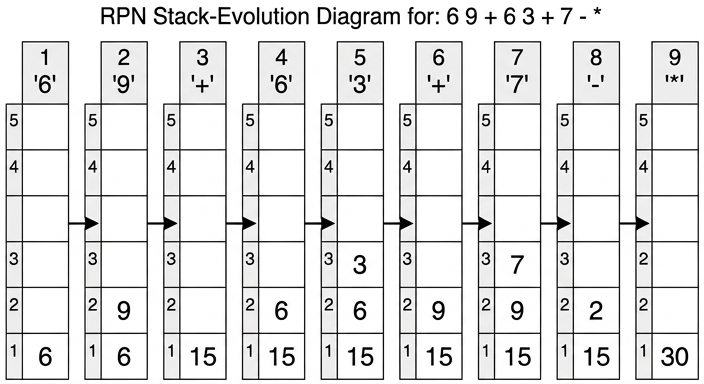
Final value = 30
30
Background Concept
RPN expressions are evaluated using a stack. A stack is a Last In, First Out (LIFO) structure:
- when you read an operand, you push it onto the top of the stack
- when you read an operator, you pop the top two items, apply the operator, then push the result back
This works because, in postfix notation, each operator appears only after its required operands are already available.
The order of popping matters for subtraction and division:
- if the stack top is
7and below it is9, then-means9 - 7, not7 - 9 - similarly,
/would mean the lower value divided by the top value
So the first popped item is the right-hand operand, and the second popped item is the left-hand operand.
Understanding the Question
You are asked to evaluate the RPN expression:
a d + a b + c - *
using the values:
a = 6, b = 3, c = 7, d = 9
The question also asks you to show the changing contents of the stack as the expression is evaluated. That means you should not only give the final answer, but also show what is in the stack after each token is processed.
The blank stack diagram in the question is there for exactly that purpose: one stack snapshot per step.
Approach
First replace the variables with their values:
6 9 + 6 3 + 7 - *
Then scan from left to right.
- Numbers are pushed.
- Operators combine the top two stack items.
- After each token, record the new stack contents.
This is the standard stack algorithm for evaluating RPN.
Step-by-Step Reasoning
Substitute first:
a d + a b + c - *
becomes:
6 9 + 6 3 + 7 - *
Now process one token at a time.
-
Read
6- push
6 - stack:
[6]
- push
-
Read
9- push
9 - stack:
[6, 9]
- push
-
Read
+- pop
9, then pop6 - calculate
6 + 9 = 15 - push
15 - stack:
[15]
- pop
-
Read
6- push
6 - stack:
[15, 6]
- push
-
Read
3- push
3 - stack:
[15, 6, 3]
- push
-
Read
+- pop
3, then pop6 - calculate
6 + 3 = 9 - push
9 - stack:
[15, 9]
- pop
-
Read
7- push
7 - stack:
[15, 9, 7]
- push
-
Read
-- pop
7, then pop9 - calculate
9 - 7 = 2 - push
2 - stack:
[15, 2]
- pop
-
Read
*- pop
2, then pop15 - calculate
15 * 2 = 30 - push
30 - stack:
[30]
- pop
So the final value is 30.
The finished stack snapshots are shown here:
Key Takeaways
- RPN is evaluated from left to right using a stack.
- Operands are pushed; operators pop two values, combine them, and push the result.
- For
-and/, operand order matters: second pop is the left operand, first pop is the right operand. - If one value remains at the end, that value is the result of the whole expression.
Common Mistakes
- Doing subtraction in the wrong order, for example
7 - 9instead of9 - 7. - Forgetting to substitute the variable values before evaluating.
- Removing only one value for an operator instead of two.
- Recording the stack in the wrong order, with the top and bottom reversed.
- Skipping intermediate stack states and giving only the final value.
Things to Be Careful About
- Read the RPN tokens strictly left to right.
- For each operator, pop exactly two items.
- Keep the stack order clear: bottom at the bottom, most recently pushed item at the top.
- In a drawn stack, leave unused cells blank rather than inventing extra values.
- The final answer here is not just the number
30; the changing stack contents must also be shown to gain all the marks.
Working
a c - → (a - c)
b ... + → b + (a - c)
d b + → (d + b)
Multiply, then divide by c:
((b + (a - c)) * (d + b)) / c
Answer
((b + (a - c)) * (d + b)) / c
((b + (a - c)) * (d + b)) / c
Background Concept
Converting RPN back into infix is the reverse idea of evaluating it. Instead of pushing numbers and calculating immediately, you push symbols or partial expressions.
The rule is:
- when you read an operand, push it
- when you read an operator, pop the top two expressions, combine them as
(left operator right), then push the new expression back
Again, order matters:
- first pop gives the right-hand side
- second pop gives the left-hand side
Parentheses are often added to make the grouping explicit and to avoid ambiguity.
Understanding the Question
You are given the RPN expression:
b a c - + d b + * c /
and asked to write it in infix form.
So the task is not to evaluate any values. Instead, you must rebuild the ordinary algebraic expression that would produce this postfix form. Because there are several operators, it is safest to reconstruct it step by step using a stack of partial expressions.
Approach
Process the RPN expression from left to right.
- Push operands such as
b,a,c,d. - When an operator appears, pop the top two expressions and combine them.
- Put brackets around the new combined expression before pushing it back.
By the time you reach the final token, the stack will contain one complete infix expression.
Step-by-Step Reasoning
Start with an empty stack of expressions.
-
Read
b- push
b
- push
-
Read
a- push
a
- push
-
Read
c- push
c
- push
-
Read
-- pop
canda - combine as
(a - c) - push
(a - c)
Stack now contains
b,(a - c) - pop
-
Read
+- pop
(a - c)andb - combine as
b + (a - c) - push
(b + (a - c))
- pop
-
Read
d- push
d
- push
-
Read
b- push
b
- push
-
Read
+- pop
bandd - combine as
(d + b) - push
(d + b)
- pop
-
Read
*- pop
(d + b)and(b + (a - c)) - combine as
((b + (a - c)) * (d + b)) - push that result
- pop
-
Read
c
- push
c
- Read
/
- pop
cand((b + (a - c)) * (d + b)) - combine as
((b + (a - c)) * (d + b)) / c
So the infix form is:
((b + (a - c)) * (d + b)) / c
You could omit some outer brackets in some contexts, but keeping them makes the evaluation order completely clear and matches the RPN structure safely.
Key Takeaways
- To convert RPN to infix, use a stack of partial expressions.
- Each operator combines the two most recent expressions.
- The first item popped becomes the right operand; the second becomes the left operand.
- Brackets help preserve the exact structure of the original postfix expression.
Common Mistakes
- Reversing operand order, for example turning
a c -intoc - a. - Forgetting to bracket a combined expression, which can change the meaning when it is used in a larger expression.
- Treating the expression as if operators act on the nearest visible letters only, rather than the top two stack expressions.
- Stopping too early and not combining the final
/ c.
Things to Be Careful About
- Keep the pop order correct for
-and/. - Do not lose earlier combined expressions when a new operator appears.
- Parentheses are especially useful when
+,-,*, and/are mixed. - The final answer must be a single complete infix expression, not a list of intermediate fragments.
The diagram shows a logic circuit.
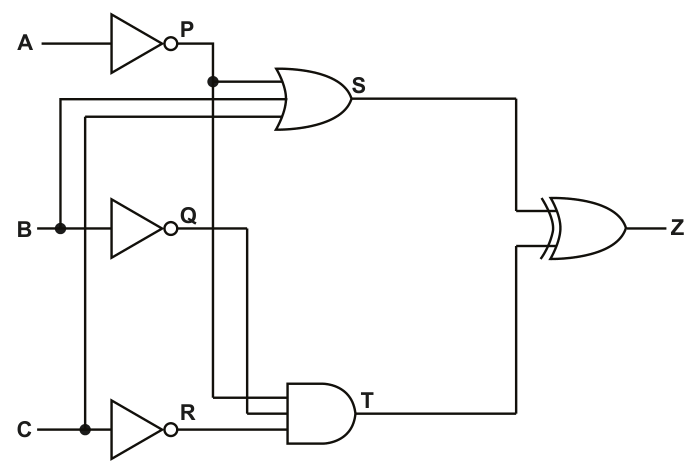
Complete the truth table for the given logic circuit.
Show your working.
| Working space | ||||||||
|---|---|---|---|---|---|---|---|---|
| A | B | C | P | Q | R | S | T | Z |
| 0 | 0 | 0 | ||||||
| 0 | 0 | 1 | ||||||
| 0 | 1 | 0 | ||||||
| 0 | 1 | 1 | ||||||
| 1 | 0 | 0 | ||||||
| 1 | 0 | 1 | ||||||
| 1 | 1 | 0 | ||||||
| 1 | 1 | 1 |
Working
, ,
Answer
| A | B | C | P | Q | R | S | T | Z |
|---|---|---|---|---|---|---|---|---|
| 0 | 0 | 0 | 1 | 1 | 1 | 1 | 1 | 0 |
| 0 | 0 | 1 | 1 | 1 | 0 | 1 | 0 | 1 |
| 0 | 1 | 0 | 1 | 0 | 1 | 1 | 0 | 1 |
| 0 | 1 | 1 | 1 | 0 | 0 | 1 | 0 | 1 |
| 1 | 0 | 0 | 0 | 1 | 1 | 0 | 1 | 1 |
| 1 | 0 | 1 | 0 | 1 | 0 | 1 | 0 | 1 |
| 1 | 1 | 0 | 0 | 0 | 1 | 1 | 0 | 1 |
| 1 | 1 | 1 | 0 | 0 | 0 | 1 | 0 | 1 |
See completed truth table
Background Concept
A truth table shows the output of a logic circuit for every possible combination of its inputs. With three inputs, , and , there are possible rows.
To complete a truth table for a circuit like this, work from left to right through the circuit:
- a NOT gate inverts its input
- an OR gate outputs 1 if at least one input is 1
- an AND gate outputs 1 only if all inputs are 1
- an XOR gate outputs 1 only when its two inputs are different
Using intermediate columns such as , , , and is good practice because it mirrors the structure of the circuit and reduces mistakes.
Understanding the Question
You are given a logic circuit with three original inputs and several internal points labelled , , , and . The question asks you to complete the whole truth table, not just the final output .
From the diagram:
- is the output of NOT on , so
- is the output of NOT on , so
- is the output of NOT on , so
- the gate labelled is an OR gate in the diagram, taking inputs , and
- the gate labelled is an AND gate taking inputs and
- is the XOR of and
A key point here is to trust the gate symbols shown in the circuit when deciding the logic.
Approach
The safest method is:
- write the eight combinations of , ,
- calculate , , using the NOT gates
- calculate from its three inputs
- calculate from its two inputs
- compare and to get using XOR
This avoids trying to jump straight to , which often causes errors.
Step-by-Step Reasoning
First write the inverted inputs:
- if , then ; if , then
- if , then ; if , then
- if , then ; if , then
Now evaluate each row.
For , , :
- , ,
For , , :
- , ,
For , , :
- , ,
For , , :
- , ,
For , , :
- , ,
For , , :
- , ,
For , , :
- , ,
For , , :
- , ,
So only the first row gives .
Key Takeaways
- Complete logic-circuit truth tables in stages using the internal labels.
- Work gate by gate rather than trying to guess the final output.
- XOR gives 1 when its two inputs are different, not simply when at least one is 1.
Common Mistakes
- Treating XOR as OR. OR would make the final column wrong when both inputs are 1.
- Forgetting to invert , or before using , or .
- Misreading the gate at . The symbol shown is OR, so is not an AND expression.
- Copying one wrong intermediate value into several later columns.
Things to Be Careful About
- Use the rows in the order given and do not miss any combination.
- Keep the internal columns linked to the diagram: , , first, then and , then .
- For XOR, remember , , but and .
- Check whether a 3-input gate needs all inputs examined; for , one 1 is enough because it is OR.
Write the Boolean expression that corresponds to the logic circuit as a sum-of-products.
Z = ............................................................................................................................................
Working
for all input combinations except 000.
Answer
A + B + C
Background Concept
A sum-of-products expression is a Boolean expression made from:
- product terms: ANDed literals such as
- sums: ORing those product terms together
A standard way to form a sum-of-products expression is from a truth table:
- for every row where the output is 1, write one product term
- if an input is 1 in that row, use the plain variable
- if an input is 0 in that row, use the complemented variable
- OR all those terms together
After that, if possible, simplify the expression.
Understanding the Question
This part asks for the Boolean expression corresponding to the circuit, specifically as a sum-of-products. The most direct route is to use the truth table from part (a).
From part (a), the final output is 1 for every input combination except , , .
That means you can either:
- write the canonical sum-of-products from the seven rows where , then simplify it, or
- recognise directly that the output is 1 whenever at least one of , or is 1.
Approach
Start from the rows where . Each such row gives one minterm. Then simplify.
Because only 000 gives 0, the function behaves exactly like a 3-input OR. So the simplified sum-of-products is just .
Step-by-Step Reasoning
Using the truth table, for:
001010011100101110111
Now turn each row into a product term.
001gives010gives011gives100gives101gives110gives111gives
OR them together:
Now observe the pattern: the only missing row is 000. So the function is 0 only when all three inputs are 0, and 1 otherwise. That is exactly the behaviour of:
This is still a valid sum-of-products expression, because each single variable is a product term of one literal.
Key Takeaways
- A truth table can be converted directly into a canonical sum-of-products expression.
- If the output pattern is obvious, you can often simplify quickly.
- means the output is 1 whenever at least one input is 1.
Common Mistakes
- Writing only the unsimplified minterms and stopping, when the pattern clearly simplifies.
- Missing one of the seven rows where .
- Using the wrong complemented form for a 0 input in a minterm.
- Confusing sum-of-products with product-of-sums.
Things to Be Careful About
- In sum-of-products, each product term must match one 1-row exactly.
- Use OR between the terms, not XOR.
- A simplified expression must still produce the same truth table as the original circuit.
- Do not forget that a single variable, such as , is allowed as a product term in a simplified SOP expression.
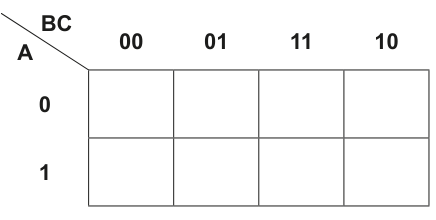
Answer
| A \ BC | 00 | 01 | 11 | 10 |
|---|---|---|---|---|
| 0 | 1 | 0 | 1 | 1 |
| 1 | 1 | 0 | 1 | 1 |
See completed K-map
Background Concept
A Karnaugh map is a visual method for organising the values of a Boolean expression so that adjacent 1s can later be grouped and simplified.
For a 3-variable K-map:
- one variable usually labels the rows
- the other two label the columns
- the column order must be Gray code, not ordinary binary order
Here the row variable is and the column variables are , so the columns are:
00011110
Gray-code order is important because adjacent columns must differ by only one bit.
Understanding the Question
You are given a Boolean expression already written as a sum of minterms:
Your job in this part is only to place 1s and 0s in the correct K-map cells.
Approach
Take each product term one at a time and convert it to a specific row and column.
- means row
- means row
- means column
00 - means column
01 - means column
11 - means column
10
Put 1 in each matching cell. Any cell not represented by a product term gets 0.
Step-by-Step Reasoning
Now place each term.
-
- ,
- put 1 in row 0, column
00
-
- ,
- put 1 in row 0, column
10
-
- ,
- put 1 in row 0, column
11
-
- ,
- put 1 in row 1, column
00
-
- ,
- put 1 in row 1, column
10
-
- ,
- put 1 in row 1, column
11
No term matches column 01, so both cells in that column are 0.
That gives:
- row :
1 0 1 1 - row :
1 0 1 1
Key Takeaways
- Each minterm maps to exactly one K-map cell.
- Gray-code ordering
00, 01, 11, 10must be used. - Any cell not represented by the expression is 0.
Common Mistakes
- Using ordinary binary order
00, 01, 10, 11for the columns. - Putting a term with into column
11instead of10. - Forgetting that complemented variables correspond to 0 values.
- Filling only the 1s and forgetting to mark the other cells as 0.
Things to Be Careful About
- Read each product term fully before placing it.
- Keep row and column variables separate: chooses the row, chooses the column.
- Check that the number of 1s placed equals the number of minterms given.
- Make sure the K-map layout matches the figure exactly.
Draw loop(s) around appropriate group(s) in the K-map to produce an optimal sum-of-products.
Answer
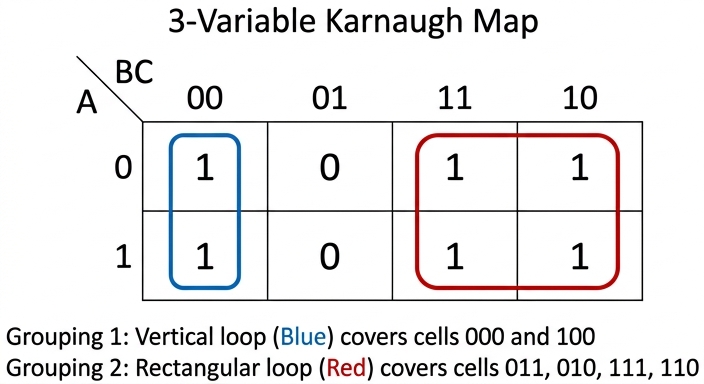
See K-map loops
Background Concept
After a K-map has been filled, the next step is to group adjacent 1s into rectangles whose sizes are powers of 2:
- 1
- 2
- 4
- 8
The aim is to make groups as large as possible, because larger groups remove more variables and give a simpler Boolean expression.
A valid group:
- must contain only 1s
- must be rectangular
- must contain cells
- may overlap another group if that helps simplification
In K-maps, edges wrap around, so left and right edges are adjacent as well.
Understanding the Question
This part does not ask you to write the expression yet. It asks you only to draw the loop or loops around the 1s in the completed K-map.
From part (c)(i), the map is:
- row :
1 0 1 1 - row :
1 0 1 1
So the 1s appear in columns 00, 11 and 10 for both rows.
Approach
Look for the largest groupings first.
- The four 1s in columns
11and10across both rows form a valid 4-cell group. - The two 1s in column
00form a valid 2-cell vertical group.
These loops cover all 1s.
Step-by-Step Reasoning
Start with the block on the right of the map.
Columns 11 and 10 both contain 1s in row 0 and row 1, so together they form a 2-by-2 rectangle of four 1s. That is the largest obvious group and should definitely be used.
Next, look at the remaining uncovered 1s in column 00.
There is a 1 in row 0, column 00 and a 1 in row 1, column 00. These two are vertically adjacent, so they form a valid 2-cell group.
With those two loops, every 1 is covered.
The mark scheme drawing shows exactly these two groups:
- one vertical loop around the
00column - one 4-cell loop around columns
11and10across both rows
Key Takeaways
- K-map loops must cover all 1s using valid power-of-2 group sizes.
- Larger loops usually produce simpler expressions.
- Overlap is allowed if it helps produce a simpler result.
Common Mistakes
- Drawing diagonal groups. Diagonal cells are not adjacent in a K-map.
- Using a 3-cell group. Group sizes must be 1, 2, 4, 8, and so on.
- Missing a possible 4-cell group and using only smaller loops.
- Looping through a 0 cell, which makes the group invalid.
Things to Be Careful About
- Columns are adjacent in Gray-code order, so
11is adjacent to10. - Every 1 must be included in at least one loop.
- Do not include any 0 in a loop just to make it bigger.
- If you later write the expression, each loop gives one product term based only on variables that stay constant inside that loop.
Write the Boolean expression from your answer to part c(ii) as a simplified sum-of-products.
Answer
B + C̄
Background Concept
Each K-map group translates into one product term:
- include only the variables that stay constant within the whole group
- if a variable is always 1, write it uncomplemented
- if a variable is always 0, write it complemented
- if a variable changes within the group, omit it
Then OR the terms together.
Sometimes the expression read from the drawn groups can be simplified a little further using Boolean algebra.
Understanding the Question
This part asks for the simplified sum-of-products expression from the loops in part (c)(ii).
The loops used are:
- the 2-cell vertical group in column
00 - the 4-cell group covering columns
11and10across both rows
You now convert those groups into Boolean terms.
Approach
Find the variables that remain fixed in each loop.
- For the
00column loop, and stay constant, while changes. - For the 4-cell loop across
11and10, stays constant, while and change.
Then combine the terms and simplify.
Step-by-Step Reasoning
First loop: column 00 across both rows.
00means and- so the term is
- is not included because it changes from 0 to 1 within the loop
Second loop: columns 11 and 10 across both rows.
- in both columns,
- changes from 1 to 0, so is omitted
- also changes between the two rows, so is omitted
- so the term is
Combine them:
Now simplify using absorption/distribution:
So the simplified sum-of-products expression is:
Key Takeaways
- A K-map loop becomes a product term using only the variables that stay fixed.
- Variables that change within a group are removed.
- Boolean algebra can sometimes simplify the K-map result even further.
Common Mistakes
- Including in the first loop even though it changes between the two rows.
- Writing the first loop as just instead of when using that exact 2-cell group.
- Forgetting to simplify to .
- Using AND instead of OR between the loop terms.
Things to Be Careful About
- Read the loop, not the individual cells separately.
- Only keep variables that are constant throughout the group.
- In a simplified sum-of-products answer, write the final reduced expression, not just the unsimplified loop terms.
- Keep the notation clear: complement bars matter, and omitting a variable is deliberate when it changes within the loop.
Answer
- Direct access means a required record can be reached immediately by using its address or a value derived from its key.
- The file does not have to be read record by record from the beginning to reach that record.
A record is accessed immediately using its address or a value from its key, without reading all previous records first.
Background Concept
A file access method is the way records are located and retrieved from a file. The main idea in this question is the difference between sequential access and direct access.
With sequential access, records are read one after another in order, so if the required record is near the end, many earlier records may need to be read first.
With direct access, the system can go straight to the required record's position. This is possible when the storage location is known, or can be calculated from the key field, or when the record number/address can be used directly.
So the essential feature of direct access is jumping straight to a location rather than stepping through every earlier record.
Understanding the Question
This part asks for the meaning of direct access as a method of file access. It is not asking for examples of particular file organisations yet, and it is not asking for the detailed process for sequential or random files. That happens in part (b).
For full marks, the answer needs two ideas:
- the record can be reached directly using an address or key-derived value
- previous records do not need to be read first
Approach
For a 2-mark “outline” question, the safest approach is to give two short, precise points:
- say how the record is located
- contrast it with reading through the file from the start
That covers both the definition and the important distinguishing feature.
Step-by-Step Reasoning
The phrase direct access means the access method does not depend on reading all earlier records.
A good answer therefore mentions that:
- each record can be found from a known position, address, or calculated location
- the computer can move straight to that record
The second marking point usually comes from making the contrast explicit:
- no need to process the file sequentially from the beginning
That is why the solution states both the direct jump and the absence of step-by-step reading.
Key Takeaways
- Direct access means going straight to a required record.
- It relies on an address, record number, or value derived from the key.
- It avoids reading every preceding record in turn.
Common Mistakes
- Saying only “records are stored in order.” That describes file organisation, not direct access itself.
- Saying “direct access is faster” without explaining why. Speed alone is not the definition.
- Confusing direct access with random files only. Direct access is an access method; it can be used in more than one context.
Things to Be Careful About
- Use the word access correctly: this question is about how a record is reached, not how records are arranged physically.
- Include both points for full marks: immediate access and no need to read previous records.
- Avoid vague phrases like “the computer just finds it”; say it uses an address or key-derived location.
Explain how direct access is used to locate a specific record in sequential files and random files.
Answer
- In a sequential file the records are stored in key order.
- Direct access can jump to a selected record position, compare the key, and then jump earlier or later until the required record is found.
In a sequential file, records are in key order, so direct access can jump to a record position, compare the key, and then jump earlier or later until the required record is found.
Background Concept
A sequential file stores records in a defined sequence, usually in ascending order of a key field. Because the records are ordered, the computer can use that order to reduce the search area.
Direct access in this context does not mean the file is unordered. Instead, it means the system can move straight to a particular position in the file rather than reading every record one by one from the start.
For ordered data, this supports a method like a binary search idea: jump to a position, compare the key, then decide whether the target must be before or after that point.
Understanding the Question
This part asks specifically how direct access helps to locate a record in a sequential file.
The key clue is that the file is sequential, so the records are in order. That order is what makes the search efficient. A full answer should therefore mention:
- the records are in key order
- the system can jump to positions and compare keys to narrow down where the record must be
Approach
The best way to answer is to connect direct access with the ordering of the file:
- state that records are stored in key order
- explain that the computer can move directly to a chosen position
- compare the key there with the target key
- then continue in the earlier or later section until the record is found
That explains both the mechanism and why it works.
Step-by-Step Reasoning
In a sequential file, records are sorted by a key such as an ID.
Suppose the computer wants one specific record:
- It does not need to start at the first record and read every record in turn.
- Because the file is ordered, it can jump directly to some record position.
- It compares the key in that record with the target key.
- If the target key is smaller, the required record must be earlier in the file.
- If the target key is larger, the required record must be later in the file.
- The search area is reduced and the process repeats until the record is found.
This is why the answer says the system can jump to a position, compare the key, and then jump earlier or later.
Key Takeaways
- Sequential files are usually ordered by key.
- Direct access can use that order to avoid reading all earlier records.
- The search works by jumping to a position, comparing the key, and narrowing the search.
Common Mistakes
- Saying that a sequential file must be read from the beginning every time. That describes pure sequential access, not the direct access method asked here.
- Describing hashing. Hashing is the usual explanation for random files, not sequential files.
- Forgetting to mention that the file is ordered by key. Without order, this method would not work properly.
Things to Be Careful About
- Keep the file type and the access method separate in your mind: the file is sequentially organised, but direct access is still possible.
- Mention key comparison explicitly, because that is what tells the system whether to move earlier or later.
- Do not overcomplicate the answer with implementation details unless needed; for 2 marks, the ordered-file search idea is enough.
Answer
- In a random file, a hashing algorithm is applied to the record key to calculate the storage address.
- The system then goes directly to that address to access the required record.
Apply a hash function to the key to calculate the record address, then access that address directly.
Background Concept
A random file does not rely on records being kept in key order. Instead, records are placed so that their location can be determined directly, usually by applying a hashing algorithm to the key field.
A hash function takes a key and produces an address or relative record number. That means the computer can calculate where the record should be stored and jump straight there.
This is a classic use of direct access, because there is no need to examine surrounding records first.
Understanding the Question
This part asks how direct access is used with random files. The clue here is the word random, which points to hashing rather than searching through ordered data.
So the answer should mention:
- using the key value
- applying a hash function or similar calculation
- obtaining an address
- going straight to that address
Approach
A clear 2-mark structure is:
- calculate the location from the key
- access that calculated location directly
That is the essential method for random file access.
Step-by-Step Reasoning
In a random file, the computer wants a particular record.
- It takes the record's key, such as an ID.
- A hash function is applied to that key.
- The result of the hash function gives the address, or the record position, where that record should be stored.
- The system moves straight to that address.
- It can then read the record from that location.
This is much more direct than scanning records one at a time. That is why the solution focuses on a hashing algorithm and direct movement to the computed address.
If a fuller answer were needed in another question, collisions or overflow locations might also matter, but for a short 2-mark explanation the main idea is enough.
Key Takeaways
- Random files commonly use hashing.
- The key is transformed into an address.
- Direct access means jumping straight to that address.
Common Mistakes
- Saying the records are searched in order. That is not the normal method for random files.
- Describing binary search instead of hashing. Binary search fits ordered sequential files, not random files.
- Saying only “use the key” without stating that the key is converted into an address.
Things to Be Careful About
- Mention the hashing algorithm or calculated address explicitly.
- Do not say the record is found by chance because the file is called random; “random” here refers to access pattern, not guessing.
- For precise exam wording, say the system goes directly to the address produced from the key.
Complete the pseudocode to find an item in a 1D array Widgets of type STRING, using a linear search.
DECLARE Widgets : ARRAY[1:50000] OF STRING
DECLARE TopOfList : INTEGER
DECLARE EndOfList : INTEGER
DECLARE Count : INTEGER
DECLARE ToFind : STRING
DECLARE Found : BOOLEAN
DECLARE NotInList : BOOLEAN
TopOfList ← 1
EndOfList ← 50000
OUTPUT "Enter the name of the item you wish to find "
INPUT ToFind

.....................

NotInList ← FALSE
Count ← TopOfList

WHILE ..................... AND .....................
    IF ..................... THEN
        Found ← TRUE
    ENDIF
    Count ← Count + 1
    IF ..................... THEN
        NotInList ← TRUE
    ENDIF
ENDWHILE

IF Found = TRUE THEN
    OUTPUT "Item found at position ", Count - 1, " in array"
ELSE
    OUTPUT "Item not in array"
ENDIF
Answer
Found ← FALSE

NotInList ← FALSE
Count ← TopOfList

WHILE Found = FALSE AND NotInList = FALSE
    IF Widgets[Count] = ToFind THEN
        Found ← TRUE
    ENDIF
    Count ← Count + 1
    IF Count > EndOfList THEN
        NotInList ← TRUE
    ENDIF
ENDWHILE
See completed pseudocode
Background Concept
A linear search looks through a list one item at a time, starting at the beginning and moving forward until either:
- the target item is found, or
- the search reaches the end of the list.
This is the simplest searching method. It works whether the array is sorted or not, because it does not rely on any ordering.
In pseudocode, a linear search often uses:
- a counter, to track the current array position
- a Boolean flag such as
Found, to record whether the item has been found - sometimes another Boolean flag such as
NotInList, to record that the end has been reached without success
The loop condition usually continues while the item has not been found and the end has not been reached.
Understanding the Question
You are given most of a linear-search algorithm and must fill in the missing lines.
The array is Widgets, indexed from 1 to 50000. The user enters a string in ToFind. The code already sets:
TopOfList ← 1EndOfList ← 50000
The missing parts must make the search work correctly.
So the blanks need to do four jobs:
- initialise
Found - give the
WHILEloop condition - compare the current array element with
ToFind - detect when the counter has moved beyond the last valid position
Approach
Because this is a standard linear search, the structure is:
- set
FoundtoFALSEbefore searching starts - start
Countat the first valid index - repeat while the item has not been found and we are still within the list
- compare
Widgets[Count]withToFind - if equal, set
FoundtoTRUE - otherwise move to the next item
- if the counter goes past
EndOfList, setNotInListtoTRUE
The given output line uses Count - 1, so the program is designed so that Count is increased after each check. That means the end-of-list test must happen after incrementing Count.
Step-by-Step Reasoning
The first missing line is:
Found ← FALSE
This is needed because before the search begins, we must assume the item has not yet been found.
The next relevant lines already given are:
NotInList ← FALSE
Count ← TopOfList
So the search starts at the first position in the array.
The WHILE condition must allow the search to continue only while both of these are true:
- the item has not been found
- the search has not reached beyond the array
So the loop condition is:
WHILE Found = FALSE AND NotInList = FALSE
Inside the loop, the program must check whether the current array element matches the user's input. The current element is Widgets[Count], so the comparison is:
IF Widgets[Count] = ToFind THEN
If this is true, then:
Found ← TRUE
After that, the code increments:
Count ← Count + 1
Then it must decide whether the search has gone past the last valid index. Since valid positions are 1 to 50000, once Count becomes greater than EndOfList, there are no more elements left to test. So the final blank is:
IF Count > EndOfList THEN
and then:
NotInList ← TRUE
That matches the given program structure exactly.
A useful detail here is why the final output says Count - 1. If the item is found at position 200, the program sets Found ← TRUE, then still executes Count ← Count + 1, so Count becomes 201. Therefore the correct position to output is Count - 1.
Key Takeaways
- A linear search checks items one by one from the start of the array.
- It needs a current position variable, usually a counter.
- A flag such as
Foundis often used to stop the search once the item is located. - End-of-list checking is essential to avoid moving beyond valid array bounds.
- You must match your stopping condition to the exact order of statements in the algorithm.
Common Mistakes
- Setting
Found ← TRUEat the start. That would stop the loop immediately. - Using
IF Widgets[TopOfList] = ToFindinstead ofWidgets[Count]. The search must check the current position, not always the first element. - Writing
IF Widgets[Count] <> ToFind THEN NotInList ← TRUE. One mismatch does not mean the item is absent; it only means the current element is not the one wanted. - Using
IF Count = EndOfList THEN NotInList ← TRUEafter incrementing. This would stop too early and may miss checking the last item properly. - Forgetting that the output uses
Count - 1, which depends on the counter being incremented before the loop ends.
Things to Be Careful About
- The array is indexed from
1, not0. - The loop condition must use both flags with
AND, notOR. Foundmust be initialised before the loop starts.- The comparison must be against
Widgets[Count], becauseCountchanges each iteration. - The boundary test is
Count > EndOfListbecauseCountis increased before checking whether the end has been passed.
Compare the methods used by the linear and binary search algorithms to find an item in an array. Refer to Big O notation in your answer.
Answer
- Linear search checks each item in the array in sequence from the start until the item is found or the end of the array is reached.
- Linear search can be used on an unsorted array.
- In the worst case, linear search may need to check all items, so it is .
- Binary search checks the middle item of a sorted array and repeatedly discards half of the remaining items; in the worst case it is .
Linear search is O(n); binary search is O(log n) and requires a sorted array.
Background Concept
Searching algorithms are used to find whether a target item exists in a collection and, if so, where it is.
Two important search methods are:
- Linear search: examine items one after another
- Binary search: repeatedly split the search area in half
Linear search works by starting at the first element and comparing each value with the target. If the current value is not the target, the algorithm moves to the next element.
Binary search works only when the data is already sorted. It compares the target with the middle element:
- if they are equal, the search is complete
- if the target is smaller, search the lower half
- if the target is larger, search the upper half
This halving continues until the item is found or no items remain.
Big O notation describes how the running time grows as the number of items, , increases.
- means the time grows roughly in direct proportion to the number of items.
- means the time grows much more slowly, because the problem size is repeatedly reduced by a factor of 2.
Understanding the Question
The question asks you to compare the methods used by linear and binary search, not just define them. It also specifically says to refer to Big O notation, so you must include their efficiencies.
That means a full answer needs both:
- how each algorithm works
- the complexity of each one
A strong comparison should also mention the key condition for binary search: the array must be sorted.
Approach
A clear way to answer is:
- explain the method used by linear search
- state its Big O
- explain the method used by binary search
- state its Big O and the need for sorted data
This covers both the practical difference in how they search and the theoretical difference in efficiency.
Step-by-Step Reasoning
Start with linear search.
It begins at the first element of the array and compares that element with the target.
- If the item matches, the search stops.
- If it does not match, the algorithm checks the next item.
- This continues until the item is found or the end of the array is reached.
Because the search may need to inspect every element, the worst-case number of comparisons is proportional to .
So linear search is:
Now compare that with binary search.
Binary search does not look at every item one by one. Instead, it uses the fact that the array is sorted.
- First, it checks the middle item.
- If the target is smaller than the middle item, the entire top half can be ignored.
- If the target is larger, the entire bottom half can be ignored.
- The same process is repeated on the remaining half.
So each comparison cuts the search space roughly in half.
For example, if there are 64 items:
- after 1 comparison, at most 32 remain
- after 2 comparisons, at most 16 remain
- after 3 comparisons, at most 8 remain
This is why the growth is logarithmic rather than linear.
So binary search is:
This makes binary search much faster than linear search for large arrays, but only if the array is sorted first. If the array is unsorted, binary search cannot correctly discard half the items.
Therefore the comparison is:
- linear search: sequential checking, works on unsorted data,
- binary search: repeated halving, needs sorted data,
Key Takeaways
- Linear search checks items one at a time from the start.
- Binary search repeatedly checks the middle and halves the remaining search area.
- Binary search requires the data to be sorted.
- In Big O terms, linear search is and binary search is .
- For large sorted arrays, binary search is usually far more efficient.
Common Mistakes
- Saying binary search is always better without mentioning that the array must be sorted.
- Giving only the Big O values without explaining how the algorithms work.
- Saying linear search is . It is only constant time in a lucky best-case situation, not in general or worst-case comparison.
- Writing that binary search removes one item at a time. It removes half of the remaining items each step.
- Confusing with $O(n \log n)`, which is a different complexity used for some sorting algorithms.
Things to Be Careful About
- In this syllabus, when comparing search efficiency, the expected Big O is normally the general or worst-case performance.
- Do not forget the word sorted when describing binary search.
- Since the question says "compare", make sure both algorithms are discussed, not just one.
- Keep the method descriptions accurate: linear is sequential, binary is divide-and-conquer by halving.
- Use correct Big O notation: for linear search and for binary search.
Outline two benefits and two limitations of a virtual machine.
Benefit 1 ...................................................................................................................................
Benefit 2 ...................................................................................................................................
Limitation 1 ...............................................................................................................................
Limitation 2 ...............................................................................................................................
Answer
- Benefit 1: More than one operating system can be run on the same physical computer.
- Benefit 2: Software or operating systems can be tested safely in isolation without affecting the host system.
- Limitation 1: Performance is slower because system resources are shared and there is virtualization overhead.
- Limitation 2: A large amount of RAM, storage and processor capacity may be needed.
Two benefits: run multiple operating systems on one computer; safe isolated testing. Two limitations: slower performance; high resource requirements.
Background Concept
A virtual machine is a software-based imitation of a computer system. It allows one physical computer to behave like several separate computers. Each virtual machine is given virtual hardware such as virtual memory, a virtual disk and virtual network hardware, and it can run its own operating system.
Virtualisation is useful because it separates software environments from the physical machine. This makes it possible to run different operating systems, keep environments isolated, and make better use of hardware. However, this extra layer also introduces overhead because the real hardware is being shared and managed through software.
Understanding the Question
This part asks for exactly four points: two benefits and two limitations of using a virtual machine. The wording says "outline", so each point should be short but clear. The marks are usually awarded for distinct valid points, so repeating the same idea in different words would not gain extra credit.
You need to think about what virtual machines are good for in practice, and what disadvantages come from not running directly on the physical hardware.
Approach
A good way to answer is to split your thinking into two sides:
-
What advantages does virtualisation give?
- flexibility
- isolation
- testing
- running multiple systems on one machine
-
What problems does it cause?
- slower execution
- more memory/storage/CPU needed
- limited direct hardware access
- dependence on the host machine
Then choose two strong benefits and two strong limitations that are clearly different from each other.
Step-by-Step Reasoning
The first benefit chosen is that multiple operating systems can run on one physical computer. This is a standard benefit because each VM behaves like a separate machine, so one device can host different environments.
The second benefit is safe isolation for testing. If a new operating system, patch or program is tested inside a VM and fails, the host system is not directly affected. This is why VMs are widely used for development, training and cybersecurity testing.
The first limitation is reduced performance. A VM does not usually have direct, unrestricted use of the real hardware. The host system has to manage resources, and the virtualisation layer adds overhead, so execution is typically slower than on a physical machine.
The second limitation is high resource usage. If several VMs are running, each one needs memory, storage and processor time. A machine with limited RAM or CPU power may struggle.
These four points are distinct and match the question requirement exactly.
Key Takeaways
- A virtual machine is a software-based computer running on real hardware.
- Key benefits include flexibility and isolation.
- Key limitations include performance overhead and resource demands.
- For short theory questions, give separate points rather than repeating one idea.
Common Mistakes
- Giving two benefits that are really the same point, such as "can test safely" and "mistakes do not affect the real system" without adding a different idea.
- Writing vague statements like "it is good" or "it is bad" with no explanation of why.
- Confusing a virtual machine with a simulator or emulator.
- Giving features of an operating system in general rather than benefits or limitations of virtualisation.
Things to Be Careful About
- The question asks for two benefits and two limitations, so make sure all four are present.
- Each point should be distinct.
- Keep the focus on virtual machines, not just on computers in general.
- If you mention testing or isolation, make it clear that the VM is separated from the host system.
Explain the roles of the host operating system and the guest operating system as used in a computer system running a virtual machine.
Answer
- The host operating system runs on the physical computer and manages the real hardware resources.
- The host operating system runs the virtual machine software and allocates resources such as processor time, memory, storage and devices to each virtual machine.
- The guest operating system runs inside the virtual machine, manages the virtual hardware it is given, and runs the applications inside that virtual machine.
Host OS manages the real hardware and runs the VM software; guest OS runs inside the VM, manages the virtual hardware and runs the VM's applications.
Background Concept
In a virtualised system there are two operating-system levels to think about.
The host operating system is the operating system installed directly on the physical computer. It has access to the real CPU, RAM, storage and peripherals. It is responsible for controlling these hardware resources.
The guest operating system is an operating system installed inside a virtual machine. To the guest, the VM appears to be a normal computer, but the hardware it sees is virtual rather than physical.
This separation is fundamental to virtualisation: the host manages the actual machine, while the guest manages the virtual environment presented to it.
Understanding the Question
This question asks you to explain the roles of both the host OS and the guest OS. So you must not just define them; you must say what each one does.
The key distinction is:
- host OS = responsible for the real machine
- guest OS = responsible for the virtual machine environment
Because the question says "as used in a computer system running a virtual machine", the answer should stay in the context of virtualisation rather than giving general operating-system functions only.
Approach
A simple approach is to answer in three linked points:
- State where the host OS runs and what it controls.
- State that the host OS supports or runs the VM software and shares out resources.
- State where the guest OS runs and what it controls inside the VM.
That gives a complete comparison while staying concise enough for a 3-mark answer.
Step-by-Step Reasoning
First, identify the host OS. This is the operating system on the actual physical computer. Since it is installed directly on the machine, it is the layer that deals with the real processor, main memory, disk drives and external devices.
Next, explain its virtualisation role. The host OS runs the virtual machine software, or supports the hypervisor layer, and allocates hardware resources to the VMs. For example, it decides how much RAM a VM can use, gives it processor time, and allows access to storage or network devices.
Then identify the guest OS. This is the operating system installed inside one of those virtual machines. It does not control the real hardware directly. Instead, it controls the virtual hardware presented to it by the VM.
Finally, explain its job. The guest OS runs user applications inside that VM and manages files, memory and processes within the virtual environment, just as if it were running on a separate physical computer.
So the host OS is concerned with the real machine and resource sharing, while the guest OS is concerned with the operation of the virtual machine itself.
Key Takeaways
- The host OS is the operating system on the real hardware.
- The guest OS is the operating system inside the virtual machine.
- The host manages physical resources and provides the VM environment.
- The guest manages the virtual environment and runs its own applications.
Common Mistakes
- Saying the guest OS controls the physical hardware directly. It normally does not; it sees virtual hardware.
- Describing only the host OS and forgetting the guest OS, or vice versa.
- Confusing the host OS with the hypervisor. In exam answers, it is usually enough to say the host runs or supports the virtual machine software.
- Giving a general definition of an operating system without linking it to virtual machines.
Things to Be Careful About
- Use the words physical or real hardware for the host OS and virtual hardware for the guest OS.
- Make the contrast clear; examiners are looking for different roles, not two similar descriptions.
- Do not overcomplicate the answer with unnecessary detail about hardware drivers or boot loaders unless it directly supports the role explanation.
- Keep the focus on what each operating system is responsible for in a VM setup.
A declarative programming language is used to allow clients to choose daily activities at the beach.
01 activity(paddleboarding).
02 activity(sailing).
03 activity(rowing).
04 activity(kayaking).
05 activity(jetskiing).
06 client(stevie).
07 client(antonio).
08 client(henry).
09 client(eliza).
10 client(rebeka).
11 client(danny).
12 client(erik).
13 client(simone).
14 client(petra).
15 client(frankie).
16 choice(petra, rowing).
17 choice(frankie, sailing).
18 choice(erik, sailing).
19 choice(eliza, rowing).
20 choice(stevie, jetskiing).
21 choice(henry, sailing).
22 done(henry, jetskiing).
23 done(rebeka, jetskiing).
24 done(antonio, kayaking).
These clauses have the meanings:
| Clause | Meaning |
|---|---|
| 01 | Paddle boarding is an activity. |
| 06 | Stevie is a client. |
| 16 | Petra has chosen rowing. |
| 22 | Henry has already done jet skiing. |
Jane is a client who would like to choose the activity surfing and she has already done sailing.
Write additional clauses to represent this information.
25 .............................................................................................................................................
26 .............................................................................................................................................
27 .............................................................................................................................................
28 .............................................................................................................................................
Answer
25 activity(surfing).
26 client(jane).
27 choice(jane, surfing).
28 done(jane, sailing).
See clauses
Background Concept
In declarative programming, knowledge is stored as facts and rules.
- A fact states something that is true, for example
client(stevie). - A rule states that something is true if certain conditions are true.
- A goal is a query used to ask the system to find values that satisfy facts and rules.
This part only needs facts. Each clause represents one true statement about the world:
activity(...)says something is an activity.client(...)says someone is a client.choice(person, activity)says that person has chosen that activity.done(person, activity)says that person has already done that activity.
Understanding the Question
The question gives a short English description about Jane and asks you to add clauses to represent it.
The description contains four separate pieces of information:
- Jane is a client.
- Surfing is an activity.
- Jane would like to choose surfing.
- Jane has already done sailing.
Since the program stores information as facts, each of these must become one clause.
Approach
The best approach is to break the sentence into separate facts, then match each fact to the predicate already used in the program.
- "Jane is a client" matches
client(...) - "surfing is an activity" matches
activity(...) - "would like to choose surfing" matches
choice(...) - "has already done sailing" matches
done(...)
Then write each one using the same style as the existing clauses: lowercase atoms inside brackets, ending with a full stop.
Step-by-Step Reasoning
Look at the existing examples:
activity(paddleboarding).shows how an activity is stored.client(stevie).shows how a client is stored.choice(petra, rowing).shows how a chosen activity is stored.done(henry, jetskiing).shows how a completed activity is stored.
Now convert Jane's information.
-
Jane is a client:
- predicate needed:
client - clause:
client(jane).
- predicate needed:
-
Surfing is an activity:
- predicate needed:
activity - clause:
activity(surfing).
- predicate needed:
-
Jane would like to choose surfing:
- predicate needed:
choice - first item is the client, second is the activity
- clause:
choice(jane, surfing).
- predicate needed:
-
Jane has already done sailing:
- predicate needed:
done - first item is the client, second is the activity
- clause:
done(jane, sailing).
- predicate needed:
The order of these clauses is usually not important for the meaning here, as long as all four correct facts are present.
Key Takeaways
- Translate each separate English statement into one declarative fact.
- Reuse the same predicate names and argument order already established in the knowledge base.
- Facts in this style are written with lowercase names and a full stop at the end.
Common Mistakes
- Writing
janeorsurfingwith capitals. In declarative languages, capitalised words are often treated as variables, not fixed values. - Using the wrong predicate, such as
done(jane, surfing)instead ofchoice(jane, surfing). - Reversing the argument order, for example
choice(surfing, jane). - Forgetting one of the four facts, especially the new activity
surfing.
Things to Be Careful About
- Keep the same style as the given clauses.
- Use
choice(jane, surfing)because she wants to choose it now. - Use
done(jane, sailing)because sailing is the activity she has already done. - End each clause with a full stop.
Using the variable List, the goal:
choice(List, rowing)
returns
List = petra, eliza
Write the result returned by the goal:
choice(List, sailing)
List = ..............................................................................................................................
Answer
List = frankie, erik, henry
frankie, erik, henry
Background Concept
A goal in declarative programming asks the system to find values that make a statement true.
For example, the goal choice(List, rowing) means:
- find every value of
Listsuch that a factchoice(List, rowing)exists.
The variable gets substituted with each matching value. If several facts match, all corresponding values are returned.
Understanding the Question
You are given one example:
choice(List, rowing)returnspetra, eliza
That example shows the method. You must now do the same for:
choice(List, sailing)
So you need to scan the facts and find every choice fact where the second item is sailing.
Approach
Search only the choice(...) clauses, because the goal uses the predicate choice.
Then keep the ones with activity sailing and take the first item from each matching fact as the value of List.
Step-by-Step Reasoning
Relevant choice facts are:
choice(petra, rowing).choice(frankie, sailing).choice(erik, sailing).choice(eliza, rowing).choice(stevie, jetskiing).choice(henry, sailing).
Now compare each one with choice(List, sailing):
choice(petra, rowing)does not match because the activity isrowing.choice(frankie, sailing)matches, soList = frankie.choice(erik, sailing)matches, soList = erik.choice(eliza, rowing)does not match.choice(stevie, jetskiing)does not match.choice(henry, sailing)matches, soList = henry.
Therefore the returned values are:
frankieerikhenry
These are usually written in the order the matching facts appear.
Key Takeaways
- A goal matches only facts with the same predicate name.
- Variables are filled with values from matching facts.
- If several facts match, the result contains all successful substitutions.
Common Mistakes
- Including clients from
done(...)facts instead of onlychoice(...)facts. - Missing one of the sailing choices.
- Changing the order of names when the normal return order follows the fact order.
Things to Be Careful About
- Only
choicefacts matter here. - The second argument must be exactly
sailing. Listis a variable, so you return the first argument from each matching fact.
C is a client who would like to choose A if A is an activity and C has not already done A.
Write this as a rule:
may_choose_activity(C, A)
IF ............................................................................................................................................
Answer
may_choose_activity(C, A) IF client(C) AND activity(A) AND NOT(done(C, A))
may_choose_activity(C, A) IF client(C) AND activity(A) AND NOT(done(C, A))
Background Concept
A rule in declarative programming defines when a statement is true.
A rule has:
- a head: the statement being defined
- a body: the conditions that must be true
So a rule means:
- the head is true if all the body conditions are true.
This question also uses negation. Negation means a condition is true only when a matching fact cannot be found. Here, a client may choose an activity only if there is no fact showing that the client has already done it.
Understanding the Question
You are asked to define the rule may_choose_activity(C, A).
The question already tells you the exact meaning:
Cis a clientAis an activityChas not already doneA
So the body of the rule must contain those three conditions.
Approach
Take the English conditions one by one and convert each into a predicate:
- "C is a client" becomes
client(C) - "A is an activity" becomes
activity(A) - "C has not already done A" becomes
NOT(done(C, A))
Then join them with AND because all of them must be true at the same time.
Step-by-Step Reasoning
Start with the rule head:
may_choose_activity(C, A)
Now add the conditions.
-
Cmust be a client:client(C)
-
Amust be an activity:activity(A)
-
Cmust not already have doneA:NOT(done(C, A))
Because the wording says "if A is an activity and C has not already done A" and the first sentence says "C is a client", all conditions are required together.
So the complete rule is:
may_choose_activity(C, A) IF client(C) AND activity(A) AND NOT(done(C, A))
This means the system can prove may_choose_activity(C, A) only when:
Cis known as a client,Ais known as an activity,- and there is no matching
done(C, A)fact.
For example:
may_choose_activity(henry, sailing)would fail because there is nodone(henry, sailing)issue? Actually Henry has donejetskiing, notsailing, so this rule would allow sailing as long assailingis an activity and Henry is a client.may_choose_activity(henry, jetskiing)would fail becausedone(henry, jetskiing)exists.
Key Takeaways
- A declarative rule is built from a head and a set of conditions.
- Each English condition should map directly to an existing predicate.
- Negation is used to block results when an unwanted fact exists.
Common Mistakes
- Omitting
client(C), even though the question saysCis a client. - Writing
done(C, A)instead ofNOT(done(C, A)), which reverses the meaning. - Using OR instead of AND, which would make the rule far too permissive.
- Swapping the arguments and writing
done(A, C).
Things to Be Careful About
- Keep the variables consistent: use
Cfor the client andAfor the activity throughout. - The condition is about activities already done, not activities already chosen.
- Use negation on
done(C, A), not onactivity(A)orclient(C). - Follow the style given in the question, which uses
IFto introduce the rule body.
Explain what is meant by Reinforcement Learning in relation to Artificial Intelligence.
Answer
- Reinforcement learning is a method where an AI system learns by trial and error while interacting with its environment.
- It receives feedback on its actions in the form of rewards or penalties.
- It changes its future actions to maximise reward and improve its performance towards a goal.
Learning by trial and error using rewards or penalties to improve future actions and maximise reward.
Background Concept
Reinforcement Learning is one of the main machine learning approaches used in Artificial Intelligence. The central idea is that an intelligent system, often called an agent, learns what to do by taking actions in an environment and observing the results.
Unlike supervised learning, there is usually not a complete set of correct answers given in advance. Instead, the system gets feedback after acting. That feedback is typically:
- a reward for a good action or useful outcome
- a penalty for a poor action or undesirable outcome
Over time, the agent tries to discover which actions lead to the best overall result. Its goal is not just one good move, but a pattern of behaviour that gives the greatest total reward.
Understanding the Question
This question asks for the meaning of Reinforcement Learning in the context of AI. So the answer should define the learning method, not describe a specific program or algorithm.
For 3 marks, the examiner is usually looking for about three clear ideas:
- the AI learns by trying actions
- it gets feedback from the environment
- it uses that feedback to improve future decisions or maximise reward
So a full answer needs more than just saying "it learns from experience". It should explain how that experience is measured and used.
Approach
A good way to answer this kind of definition question is to structure it as:
- state what the learning method is
- explain the form of feedback
- state the goal of the learning process
For Reinforcement Learning, that becomes:
- learning by trial and error
- rewards and penalties are given
- the system adapts to choose better actions in future
Step-by-Step Reasoning
First, identify the core feature of Reinforcement Learning: the AI is not simply told the correct answer. Instead, it has to act and find out what works.
So the first marking point is that the system learns through interaction and trial and error.
Second, explain what information the system gets back. The environment responds to the action, and this response is simplified into feedback such as a reward or a penalty. That is what "reinforces" behaviour.
So the second marking point is that the AI receives rewards/penalties or positive/negative feedback.
Third, explain why this matters. The AI uses the feedback to adjust its later choices. Actions that lead to reward become more likely; actions that lead to poor outcomes become less likely. The purpose is to improve performance and achieve the best overall outcome.
So the third marking point is that it changes behaviour to maximise reward or improve performance towards a goal.
Putting these together gives a strong exam answer:
- learns by trial and error
- receives reward/penalty feedback
- uses this to choose better future actions and maximise reward
Key Takeaways
- Reinforcement Learning is learning by doing rather than by being given all correct answers.
- The AI receives feedback in the form of rewards or penalties.
- The aim is to develop behaviour that gives the highest total reward.
- In exam definitions, include both the feedback mechanism and the goal of improvement.
Common Mistakes
- Confusing it with supervised learning: supervised learning uses labelled correct answers; reinforcement learning usually does not.
- Saying only "the computer learns from experience": this is too vague unless you explain rewards/penalties.
- Missing the optimisation goal: reinforcement learning is not just random trying; it is trying to maximise reward.
- Describing punishment only: the method uses both positive and negative feedback, not just penalties.
Things to Be Careful About
- Use the idea of an AI agent interacting with an environment if you want to be precise.
- Mention reward or penalty explicitly, because that is the key distinguishing feature.
- Do not drift into unrelated AI areas such as neural network structure unless the question asks for them.
- For a short-mark question, keep the answer focused on definition and purpose rather than giving a long real-world example.