Computer Science 9618/31 — May/June 2024
Cambridge A-Level · Advanced Theory · worked solutions for every part, with the mark scheme
Topics Data Representation · Hardware and Virtual Machines · Communication and Internet Technologies · System Software · Security · Further Programming · +2 more
Real numbers are stored in a computer system using floating-point representation with:
• 10 bits for the mantissa
• 6 bits for the exponent
• two’s complement form for both the mantissa and the exponent.
Calculate the denary value of the given normalised floating-point number.
Show your working.

Working .....................................................................................................................................
...................................................................................................................................................
...................................................................................................................................................
...................................................................................................................................................
...................................................................................................................................................
Answer ......................................................................................................................................
Working
Exponent:
001001 = 9
Mantissa:
0100111100 = 0.100111100₂
Value:
Answer
316
316
Background Concept
Floating-point representation stores a real number in two parts:
- a mantissa (sometimes called the significand), which holds the significant digits
- an exponent, which tells us the power of 2 to multiply by
In this question:
- the mantissa uses 10 bits
- the exponent uses 6 bits
- both are stored in two's complement
For Cambridge International questions of this type, the mantissa is treated as a binary fraction with the binary point immediately after the sign bit. So a 10-bit mantissa such as 0100111100 means:
- sign bit
0so the mantissa is positive - value
0.100111100₂
A normalised two's complement mantissa has its first two bits different:
- positive normalised numbers begin
01... - negative normalised numbers begin
10...
Once the mantissa and exponent are known, the real value is:
Understanding the Question
You are given one floating-point number already stored in this system:
- mantissa:
0100111100 - exponent:
001001
The task is to convert that stored bit pattern into an ordinary denary value and show the working. That means:
- decode the exponent from 6-bit two's complement
- decode the mantissa as a binary fraction
- multiply the mantissa by
Approach
Because both fields are already given, this is a direct decode question.
- The exponent is positive because its first bit is
0, so it can be read normally. - The mantissa is also positive because its sign bit is
0. - Convert the mantissa fraction by adding the place values of the
1bits. - Then apply the exponent.
This is the standard way to handle any floating-point denary conversion question in this syllabus.
Step-by-Step Reasoning
First decode the exponent.
The 6-bit exponent is 001001.
Because the leading bit is 0, it is a positive two's complement number, so its value is simply:
So the exponent is .
Now decode the mantissa.
The 10-bit mantissa is 0100111100.
The binary point is placed after the sign bit, so this means:
Now convert that binary fraction to denary by adding the values of the 1 bits:
So:
Now apply the exponent:
So the denary value represented is:
Key Takeaways
- In these questions, the mantissa is a binary fraction with the binary point immediately after the sign bit.
- A positive two's complement exponent can be read directly as ordinary binary.
- Floating-point value is always found using:
- For normalised two's complement mantissas, positive values begin
01and negative values begin10.
Common Mistakes
- Treating the mantissa as an ordinary integer instead of a fraction. That gives a completely wrong answer.
- Putting the binary point in the wrong place. In this format it goes after the sign bit, not at the end.
- Forgetting that the exponent is in two's complement.
- Reading
0100111100as0.0100111100₂instead of0.100111100₂. - Multiplying by the exponent itself instead of by .
Things to Be Careful About
- Count the mantissa bits carefully: after the sign bit, each place is a negative power of 2.
- Make sure you use the exact field sizes given: 10 bits for mantissa, 6 bits for exponent.
- If the exponent had started with
1, you would need to decode it as a negative two's complement number rather than ordinary binary. - Write enough working to show both the mantissa value and the exponent value, because the question specifically asks for working.
Calculate the normalised floating-point representation of –102.75 in this system.
Show your working.

Working .....................................................................................................................................
...................................................................................................................................................
...................................................................................................................................................
...................................................................................................................................................
...................................................................................................................................................
...................................................................................................................................................
Working
Normalised form:
Positive mantissa: 0110011011
Two’s complement negative mantissa:
0110011011 → 1001100100 → 1001100101
Exponent in 6-bit two’s complement:
000111
Answer
Mantissa: 1001100101
Exponent: 000111
Mantissa 1001100101, Exponent 000111
Background Concept
To store a denary real number in floating-point form, we usually do four things:
- convert the number to binary
- normalise it
- fit the mantissa into the given mantissa field
- encode the exponent in the given exponent field
In this question the system uses:
- a 10-bit mantissa
- a 6-bit exponent
- two's complement for both
For this syllabus, the mantissa is a signed binary fraction with the binary point immediately after the sign bit.
Examples:
0110000000means1001100101is a negative two's complement fraction
A normalised two's complement mantissa must begin:
01for positive values10for negative values
That rule matters, because the question specifically asks for the normalised floating-point form.
Understanding the Question
You must store the denary value −102.75 in this floating-point system.
So you need to produce two bit patterns:
- the 10-bit mantissa
- the 6-bit exponent
The value is negative, so you should expect:
- a negative mantissa in two's complement
- a positive exponent, because a number as large as 102.75 must be shifted to become a fraction between −1 and 1
The key clue is the word normalised. That tells you not to use just any mantissa/exponent pair; you must shift the number so the mantissa begins with the correct leading bits for a normalised two's complement value.
Approach
A reliable method is:
- Convert to binary.
- Write it in normalised form as a binary fraction times a power of 2.
- Create the positive normalised mantissa first.
- Convert that mantissa to its 10-bit two's complement negative version.
- Encode the exponent in 6-bit two's complement.
Doing the positive form first is much safer than trying to guess the negative bit pattern directly.
Step-by-Step Reasoning
First convert to binary.
1. Convert the integer part
in binary is:
2. Convert the fractional part
in binary is:
So:
Because the number is negative:
3. Normalise the value
Now write the magnitude as a fraction with the binary point after the sign bit position.
Why exponent ? Because the binary point has been moved 7 places left.
So the positive normalised mantissa is:
This already fits exactly into 10 bits total:
- 1 sign bit
- 9 fractional bits
So the 10-bit positive mantissa is:
0110011011
4. Make the mantissa negative using two's complement
The number to be stored is negative, so now convert the 10-bit positive mantissa to a 10-bit negative two's complement mantissa.
Start with:
0110011011
Invert all bits:
1001100100
Add 1:
1001100101
So the required mantissa is:
1001100101
This is also normalised, because it begins 10, which is the correct pattern for a negative normalised two's complement mantissa.
5. Encode the exponent
The exponent is .
In 6-bit two's complement, a positive 7 is just ordinary binary with leading zeros:
000111
So the exponent is:
000111
Final representation
- Mantissa:
1001100101 - Exponent:
000111
That is the normalised floating-point representation of in this system.
Key Takeaways
- Convert the denary number to binary before trying to store it.
- Normalise by shifting so the mantissa is a fraction with the binary point after the sign bit.
- For two's complement normalised mantissas:
- positive starts
01 - negative starts
10
- positive starts
- A negative mantissa is usually easiest to get by taking the positive mantissa and applying invert and add 1.
- Always check the exact bit lengths required by the question.
Common Mistakes
- Forgetting to convert the fractional part
.75into binary.11. - Using an unnormalised mantissa, for example storing too much of the value in the mantissa and too little in the exponent.
- Writing the negative mantissa as sign-and-magnitude instead of two's complement.
- Taking two's complement of the whole number
1100110.11directly instead of first forming the correctly sized 10-bit mantissa. - Using the wrong exponent because of counting the binary-point shifts incorrectly.
- Forgetting that the exponent also has a fixed width of 6 bits.
Things to Be Careful About
- The mantissa must be exactly 10 bits, not 9 or 11.
- The exponent must be exactly 6 bits.
- When normalising in this syllabus, the binary point is understood to be immediately after the sign bit of the mantissa.
- If the positive normalised mantissa had needed more than 9 fractional bits, you would have had to round or truncate to fit; here it fits exactly, so no rounding issue arises.
- After producing a negative mantissa, check that it still looks normalised by beginning
10.
The TCP/IP protocol suite has four layers:
Transport, Application, Link, Internet

Answer
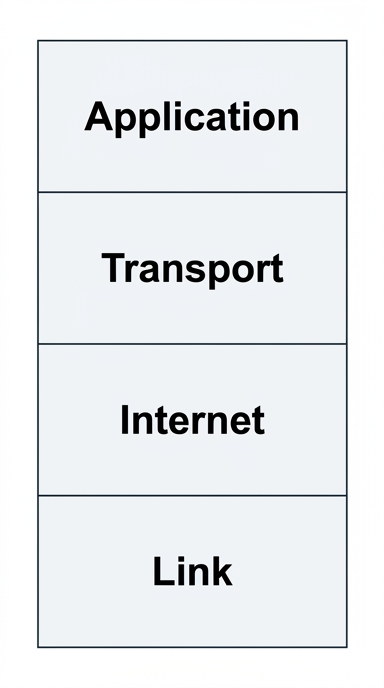
Application, Transport, Internet, Link
Background Concept
A protocol suite is a set of related communication protocols organised into layers. In the TCP/IP model, each layer has a different responsibility, and each layer uses the services of the layer below it.
The four layers in the TCP/IP protocol suite are usually ordered from top to bottom as:
- Application
- Transport
- Internet
- Link
The top layer is closest to the user and application software. The bottom layer is closest to the physical network hardware and actual transmission of data.
Layering is useful because it breaks communication into manageable parts. Each layer can be designed separately, and a change in one layer does not require the whole system to be redesigned.
Understanding the Question
The question gives the four TCP/IP layer names, but not in the correct order. The diagram is a vertical stack of four boxes, so you must place the layers in the standard order from top to bottom.
Because it says "complete the diagram to show the correct order", this is not asking for functions or examples of protocols yet. It is only testing whether you know the correct sequence of the layers in the TCP/IP model.
Approach
Recall the TCP/IP stack in descending order:
- Application
- Transport
- Internet
- Link
Then place them into the four boxes from the top box down to the bottom box.
Step-by-Step Reasoning
The four given layer names are:
- Transport
- Application
- Link
- Internet
We now arrange them in the standard TCP/IP order.
- Application is at the top because it provides services to user applications such as web browsing and email.
- Transport comes below Application because it manages end-to-end delivery between applications.
- Internet comes below Transport because it handles addressing and routing across networks.
- Link is at the bottom because it deals with the local network connection and transmission over the hardware.
So the finished stack from top to bottom is:
- Application
- Transport
- Internet
- Link
Key Takeaways
- The TCP/IP model has four layers.
- The correct order from top to bottom is Application, Transport, Internet, Link.
- In layered models, higher layers depend on services provided by lower layers.
Common Mistakes
- Reversing the order and writing the layers from bottom to top.
- Confusing the Internet layer with the Application layer because of the word "Internet".
- Mixing TCP/IP with the OSI model and trying to include extra layers such as Session or Presentation.
Things to Be Careful About
- The question asks for the order, not the function of each layer.
- Use the exact layer names given in the question.
- If using a vertical stack, read it carefully: unless stated otherwise, the expected convention is top to bottom from highest layer to lowest layer.
Describe the function of the Transport layer.
...................................................................................................................................................
...................................................................................................................................................
...................................................................................................................................................
.............................................................................................................................................
Answer
- Provides end-to-end communication between applications on the source and destination devices.
- Splits data into segments and reassembles it at the destination, with checks for reliable delivery.
Provides end-to-end communication between applications and handles segmentation/reassembly with reliable delivery.
Background Concept
The Transport layer in TCP/IP sits below the Application layer and above the Internet layer. Its job is to provide communication between application processes running on different devices.
This is often called end-to-end communication. That means it is not just sending data from one network to another; it is making sure the correct application on one device can communicate with the correct application on another device.
Typical Transport-layer responsibilities include:
- breaking data into smaller units such as segments
- reassembling those units at the destination
- supporting reliable delivery in protocols such as TCP
- using port numbers to identify the correct application process
Not every exam answer needs all of those points. For a short 2-mark answer, two accurate functions are usually enough.
Understanding the Question
The question asks for the function of the Transport layer, not its position in the stack and not the name of a protocol. So the focus should be on what this layer does.
A strong answer should mention the idea of communication between applications and one extra detail such as segmentation, reassembly or reliability.
Approach
To answer, think of the Transport layer as the part of the TCP/IP model that manages communication from one application to another.
A concise full-mark answer can be built from two points:
- it provides end-to-end communication between applications
- it handles the data during transfer, such as splitting and reassembling it, and supporting reliable delivery
Step-by-Step Reasoning
First, identify what kind of communication this layer manages.
The Application layer deals with services like web and email, but the Transport layer sits underneath and supports those services by moving data between the correct programs on the two devices. That is why "end-to-end communication between applications" is a key phrase.
Second, explain one of the mechanisms it uses.
Large data is usually not sent as one huge block. The Transport layer breaks data into smaller pieces so that they can be transmitted more efficiently. At the receiving end, these pieces are put back together. That is the segmentation and reassembly role.
In many cases, especially with TCP, this layer also helps ensure reliable delivery by checking whether data arrives correctly and in the right order. For a 2-mark answer, mentioning reliability is acceptable when paired with the main role.
So the answer is correctly expressed as:
- it provides end-to-end communication between applications
- it splits data into segments and reassembles it at the destination, with checks for reliable delivery
Key Takeaways
- The Transport layer supports application-to-application communication.
- It commonly performs segmentation and reassembly.
- It may also support reliability and correct delivery.
Common Mistakes
- Describing the Internet layer instead, for example talking only about routing.
- Giving the name of a protocol such as TCP without explaining its function.
- Saying only "it transports data". That is too vague on its own for a good descriptive answer.
Things to Be Careful About
- Use the term end-to-end rather than just "network to network".
- Do not confuse the Transport layer with the Link layer, which is concerned with local network transmission.
- For a short answer, choose two precise points rather than listing many vague statements.
Outline one protocol that is associated with the Application layer.
...................................................................................................................................................
...................................................................................................................................................
...................................................................................................................................................
.............................................................................................................................................
Answer
- HTTP
- Used to transfer web pages and other web resources between a web server and a web browser.
HTTP — used to transfer web pages and other web resources between a web server and a web browser.
Background Concept
The Application layer is the top layer of the TCP/IP protocol suite. It provides protocols that allow software applications to communicate over a network.
Examples of Application-layer protocols include:
- HTTP for web pages
- FTP for file transfer
- SMTP for sending email
- POP3 or IMAP for receiving email
- BitTorrent for peer-to-peer file sharing
When a question asks for one protocol associated with the Application layer, you must give both the protocol name and what it does.
Understanding the Question
This question says "Outline one protocol that is associated with the Application layer." That means you should:
- name one valid Application-layer protocol
- briefly describe its purpose
Just writing the protocol name may not be enough for full marks, because "outline" usually requires at least a short explanation.
Approach
Choose any standard Application-layer protocol from the syllabus, then state its role in one sentence.
A very safe choice is HTTP, because it is widely known and easy to describe accurately: it is used to transfer web pages and related resources between browsers and web servers.
Step-by-Step Reasoning
First, choose a correct protocol.
Valid examples include HTTP, FTP, SMTP, POP3, IMAP or BitTorrent. Since only one is needed, we pick HTTP.
Next, explain its purpose.
HTTP stands for HyperText Transfer Protocol. It is used when a browser requests a web page from a server and the server sends the page back. More generally, it transfers web pages and web resources between the browser and the web server.
That gives a complete answer:
- HTTP
- used to transfer web pages and other web resources between a web server and a web browser
Key Takeaways
- The Application layer contains protocols used directly by user applications.
- A protocol name alone is often not enough; include its function.
- HTTP is a standard example used for web communication.
Common Mistakes
- Naming a protocol from the wrong layer, such as IP or TCP.
- Giving only the expanded form of the acronym without saying what it does.
- Confusing sending email and receiving email protocols, for example mixing SMTP with POP3 or IMAP.
Things to Be Careful About
- Make sure the protocol is definitely an Application-layer protocol.
- Keep the function specific: for HTTP, mention web pages/resources and browser/server.
- If you choose a different valid protocol, its purpose must match exactly, for example SMTP for sending email, POP3/IMAP for receiving email, FTP for file transfer.
Explain what is meant by non-composite and composite data types.
...................................................................................................................................................
...................................................................................................................................................
...................................................................................................................................................
...................................................................................................................................................
...................................................................................................................................................
.............................................................................................................................................
Answer
- A non-composite data type holds a single value and cannot be divided into smaller parts, for example
INTEGERorCHAR. - A composite data type is made up of more than one data item grouped together as one structure.
- The items in a composite type can be separate fields, often of different data types, for example a record.
Non-composite data types hold one single value; composite data types group multiple data items/fields together as one structure.
Background Concept
A data type tells the computer what kind of value is being stored and how it should be handled. In this topic, the important distinction is between values that are simple and values that are built from several parts.
A non-composite data type is a single, indivisible value from the programmer's point of view. Typical examples are INTEGER, REAL, CHAR and BOOLEAN. Even if the computer stores the value internally in bits, the program treats it as one item.
A composite data type is a structure formed from multiple items. These items are grouped together because they belong to the same real-world entity or because they need to be processed as one structure. Examples include records, arrays and classes. A record is especially important here because it can hold several different fields, and those fields may have different data types.
Understanding the Question
The question asks for the meaning of both terms: non-composite and composite. So a full answer must define each one and make the difference clear.
A strong answer should not just say "simple" and "complex". It should explain that non-composite means one single value, while composite means several component parts grouped together. Including an example helps make the distinction precise.
Approach
The best approach is:
- Define non-composite.
- Define composite.
- Add a clear contrast or example.
Because this is a 3-mark explain question, you should aim for three distinct marking points rather than one vague sentence.
Step-by-Step Reasoning
First, identify what non-composite means. The key idea is that the data item is treated as one value. For example, an INTEGER contains one number, and a CHAR contains one character. You do not refer to internal named parts of that item.
Second, identify what composite means. The key idea is that the data item is built from multiple components. For example, a record for a student could contain a name, date of birth and mark. Those are separate fields, but together they describe one student.
Third, make the contrast explicit. Examiners usually reward the difference itself: one value versus several grouped values. If you also mention that composite fields may be of different types, that strengthens the explanation because records commonly mix STRING, INTEGER, DATE, and so on.
So the answer earns credit by covering:
- single value for non-composite
- several grouped items for composite
- example or note that composite fields can be different data types
Key Takeaways
- A non-composite type stores one value.
- A composite type groups several values into one structure.
- Records are a common example of composite data types because they model real-world entities with multiple fields.
Common Mistakes
- Saying a composite type is just a "large" data type. Size is not the point; structure is.
- Forgetting to define one of the two terms. The question asks for both.
- Giving only examples without explaining the difference.
- Confusing composite with array only. Arrays are composite, but records are the more relevant example here because their fields can be different types.
Things to Be Careful About
- Use the phrase "single value" or "cannot be divided into smaller parts" for non-composite.
- Use the phrase "made up of several fields/items" for composite.
- If you give an example, make sure it matches the definition. For example,
INTEGERis non-composite, while a record is composite.
Write pseudocode statements to declare the record data type FootballClub to hold data about football clubs in a league, to include:
• name of team
• date team joined the league
• main telephone number
• name of the manager
• number of members
• current position in the league.
...................................................................................................................................................
...................................................................................................................................................
...................................................................................................................................................
...................................................................................................................................................
...................................................................................................................................................
...................................................................................................................................................
...................................................................................................................................................
...................................................................................................................................................
...................................................................................................................................................
.............................................................................................................................................
Answer
TYPE FootballClub
   DECLARE TeamName : STRING
   DECLARE DateJoined : DATE
   DECLARE MainTelephoneNumber : STRING
   DECLARE ManagerName : STRING
   DECLARE NumberOfMembers : INTEGER
   DECLARE CurrentPosition : INTEGER
ENDTYPE
See completed pseudocode
Background Concept
A record is a composite user-defined data type. It is used when one real-world thing needs several pieces of related data stored together. Each piece of data is stored in a field, and each field has its own data type.
This is useful because many real entities are not described by one value alone. A football club, for example, has a name, a date, a phone number, a manager, a member count and a league position. Storing these together in one record makes the program more organised and meaningful.
When designing a record, you choose:
- the name of the record type
- the field names
- the most suitable data type for each field
Typical choices include:
STRINGfor textINTEGERfor whole numbersDATEfor dates, where the pseudocode or language supports it
Telephone numbers are usually stored as STRING, not INTEGER, because they are identifiers rather than values used in arithmetic, and they may contain leading zeroes.
Understanding the Question
The question asks you to declare the record data type FootballClub. That means you are not declaring one individual variable; you are defining the structure itself.
The structure must include fields for:
- team name
- date joined the league
- main telephone number
- manager name
- number of members
- current league position
So the task is to write pseudocode that defines a record called FootballClub and lists all of those fields with appropriate data types.
Approach
The method is:
- Start the user-defined type with
TYPE FootballClub. - Add one
DECLAREline for each field. - Choose an appropriate type for each field.
- Finish with
ENDTYPE.
The key design decision is field types:
- names are
STRING - member count and league position are
INTEGER - telephone number is best as
STRING - date joined is best as
DATEif supported
Step-by-Step Reasoning
Start with the record name:
TYPE FootballClub
This tells the examiner you are defining a new composite type called FootballClub.
Now add the team name field:
DECLARE TeamName : STRING
A club name is text, so STRING is appropriate.
Next, the date joined:
DECLARE DateJoined : DATE
A date field should be stored as DATE if that type is available in the pseudocode being used. It represents a date more accurately than plain text.
Then the main telephone number:
DECLARE MainTelephoneNumber : STRING
This is an important design point. A telephone number may begin with 0, and no arithmetic is normally performed on it, so STRING is safer than INTEGER.
Then the manager's name:
DECLARE ManagerName : STRING
Again, a name is text.
Then the number of members:
DECLARE NumberOfMembers : INTEGER
This is a count, so it should be a whole number.
Then the current position in the league:
DECLARE CurrentPosition : INTEGER
League position is also a whole-number ranking.
Finally, close the type definition:
ENDTYPE
That completes the record declaration. The finished record now defines a reusable structure for storing one football club's data.
Key Takeaways
- A record is used to group related fields about one entity.
- Each field should have a sensible data type based on what the value represents.
STRINGis often the correct choice for phone numbers and names.TYPE ... ENDTYPEis the standard way to define a user-defined composite type in CIE-style pseudocode.
Common Mistakes
- Using
INTEGERfor the telephone number. This can lose leading zeroes and treats the number as arithmetic data. - Forgetting one of the required fields.
- Declaring a single variable instead of defining the type itself.
- Omitting
ENDTYPE. - Using vague field names such as
Data1orFieldAinstead of meaningful names.
Things to Be Careful About
- Keep to CIE pseudocode style:
TYPE,DECLARE, andENDTYPEin upper case. - Use the assignment arrow only for executable statements; declarations use
DECLARE Name : TYPE. - Make sure count values such as members and position are
INTEGER. - If an exam board or mark scheme allows
STRINGfor the date, that may still gain credit, butDATEis the best match when available. - The question asks for the record data type itself, not an array of clubs and not an instance of one club.
Describe the sequential method of file access.
...................................................................................................................................................
...................................................................................................................................................
...................................................................................................................................................
.............................................................................................................................................
Answer
- Records are read one after another in order, starting from the beginning of the file.
- Each record is checked until the required record is found or the end of the file is reached.
Records are read in order from the start of the file, one after another, until the required record is found or end of file is reached.
Background Concept
A file access method is the way records are retrieved from a file. In sequential access, the computer processes records in sequence, beginning at the first record and then moving to the next, then the next, and so on.
This means there is no direct jump to an arbitrary record. If the required record is near the end, the earlier records must still be read first. Sequential access is therefore simple, and it is especially suitable when records are being processed in order, such as producing reports or scanning an entire file.
Understanding the Question
This part asks only for a description of the sequential method of file access. It is not yet asking about different file organisations such as serial or sequential organisation in detail; that comes in part (b).
So the answer needs the general idea:
- access starts at the beginning
- records are read one by one in order
- the process continues until the needed record is found, or until the end of the file is reached
Approach
For a short "describe" question like this, the best approach is to give the essential characteristics of the method rather than examples or comparisons.
The key points to include are:
- start at the first record
- read records in sequence
- stop when the target is found or when there are no more records
Those points are enough for full credit in a concise definition-style answer.
Step-by-Step Reasoning
The phrase sequential method of file access tells you that the records are accessed in a sequence.
So:
- The file pointer begins at the start of the file.
- The first record is read.
- If it is not the required record, the next record is read.
- This continues record by record.
- The search stops either when the correct record is found or when the end of file is reached.
A strong exam answer does not need to discuss sorting, keys, or file organisation here unless the question asks for it. Those ideas belong more naturally in part (b).
Key Takeaways
- Sequential access means reading records in order.
- Access begins at the start of the file.
- You continue until the record is found or EOF is reached.
- It does not mean jumping directly to a record location.
Common Mistakes
- Saying it is the same as random access. It is not; random access allows direct access to a chosen record location.
- Describing file organisation instead of file access. Organisation is how records are stored; access is how they are read.
- Forgetting to mention that records are read from the beginning and one after another.
Things to Be Careful About
- Use the word access correctly: this question is about the method of retrieval, not the storage structure.
- Do not overcomplicate a 2-mark definition. A brief, precise description is better than a long vague explanation.
- If you mention searching, make clear that records are checked sequentially, not by direct address.
Explain how the sequential method of file access is applied to files with serial organisation and to files with sequential organisation.
...................................................................................................................................................
...................................................................................................................................................
...................................................................................................................................................
...................................................................................................................................................
...................................................................................................................................................
.............................................................................................................................................
Answer
- With serial organisation, records are not stored in key order, so sequential access means reading each record from the start and checking them one by one until the required record is found or end of file is reached.
- With sequential organisation, records are stored in key order, so records are still read one after another from the start, but the key values can be compared in order.
- Therefore the search can stop when the record is found or when the current key has passed the required key, because no later record can match.
Serial files are searched record by record from the start because they are unordered; sequentially organised files are also read in order, but because they are ordered by key the search can stop once the key has been found or passed.
Background Concept
There are two related ideas here:
- File organisation: how records are stored in the file
- File access method: how records are read or searched
A file with serial organisation stores records in the order they were added. They are not arranged by key field.
A file with sequential organisation stores records in key order. For example, records may be sorted by customer ID or employee number.
The sequential access method can be used with both, because in both cases the file is read record by record. However, the effect is different because one file is unordered and the other is ordered.
Understanding the Question
This question is asking you to connect the access method from part (a) to two different storage organisations.
You must explain:
- what happens when sequential access is used on a serial file
- what happens when sequential access is used on a sequentially organised file
The important clue is that the question says applied to files with serial organisation and to files with sequential organisation. So it is not enough to define the terms separately; you must explain how the same access method behaves in each case.
Approach
A good approach is to compare the two cases directly.
For serial organisation:
- the records are not ordered by key
- therefore the only safe method is to check each record in turn
- the required record could be anywhere
For sequential organisation:
- the records are stored in key order
- sequential access still reads one record after another
- but because the keys are ordered, once you pass the target key you know it cannot appear later
That final point is the main advantage you should mention.
Step-by-Step Reasoning
Start with serial organisation.
In a serial file, records are stored in arrival order or insertion order, not sorted by key. Suppose you want the record with key 50. If the records are unordered, key 50 could be at the start, middle, end, or might not exist at all.
So with sequential access:
- read the first record
- compare its key with the target
- if it does not match, read the next record
- continue until a match is found or the end of file is reached
Because the file is unordered, you usually cannot stop early just because a record's key is larger than the target; a later record could still contain the required key.
Now consider sequential organisation.
Here the records are already arranged in ascending or descending order of a key field. Suppose again that you want key 50, and the keys are in ascending order.
With sequential access:
- start at the first record
- read records in order
- compare each key with the required key
- if the key matches, the record has been found
- if the current key becomes greater than 50, the search can stop
Why can it stop? Because all later records will have even larger keys, so the required record cannot appear after that point.
This is the important difference:
- serial organisation: sequential access may require checking the whole file
- sequential organisation: sequential access may stop earlier because the sorted order gives useful information
If the file is used for batch processing or report generation, sequential organisation also works well because the records are already in a useful order.
Key Takeaways
- Serial organisation means unordered storage; sequential access must check records one by one from the start.
- Sequential organisation means sorted-by-key storage; sequential access still reads in order, but the ordering helps the search.
- In a sequentially organised file, the search can stop when the target key has been passed.
- File organisation affects the efficiency of sequential access.
Common Mistakes
- Saying serial and sequential organisation are the same. They are not; serial is unordered, sequential is ordered by key.
- Forgetting that the question is about how sequential access is applied. A definition of serial and sequential on their own is not enough.
- Claiming that a serial file search can stop when the key has been passed. That is wrong because the records are not ordered.
- Confusing sequential organisation with sequential access. One is storage order; the other is the access method.
Things to Be Careful About
- Use the phrase key order when explaining sequential organisation; that is usually the crucial marking point.
- Make it clear that both file types can be read sequentially, but the consequences differ.
- Do not imply direct access or random access here; this question is specifically about reading records in sequence.
- If you discuss stopping conditions, be precise: in a sequentially organised file you can stop when the current key has passed the required key, not merely when it is different.
Write this Reverse Polish Notation (RPN) in infix form:
5 2 + 9 3 - / 3 *
...................................................................................................................................................
...................................................................................................................................................
...................................................................................................................................................
.............................................................................................................................................
Working
5 2 + → (5 + 2)
9 3 - → (9 - 3)
(5 + 2) (9 - 3) / → ((5 + 2) / (9 - 3))
((5 + 2) / (9 - 3)) 3 * → ((5 + 2) / (9 - 3)) * 3
Answer
((5 + 2) / (9 - 3)) * 3
((5 + 2) / (9 - 3)) * 3
Background Concept
Reverse Polish Notation (RPN) writes each operator after its operands. For example, infix 5 + 2 becomes RPN 5 2 +. A big advantage of RPN is that it does not need brackets during evaluation, because the order is determined by position. To convert RPN back to infix, we usually imagine a stack of partial expressions: push operands, and when an operator appears, take the most recent two expressions, combine them with the operator, and put the new expression back.
Understanding the Question
You are given the RPN expression 5 2 + 9 3 - / 3 * and must rewrite it in normal infix form. The key requirement is to preserve the correct order of calculation, so brackets are needed around grouped subexpressions.
Approach
Read the expression from left to right.
- When you see a number, treat it as an operand and store it.
- When you see an operator, combine the two most recent stored items.
- Put the new combined expression back and continue.
Because / and * are applied to results of earlier calculations, brackets are important to show exactly what is being divided and multiplied.
Step-by-Step Reasoning
Start with the tokens in order:
5 2 + 9 3 - / 3 *
- Read
5and2.- These are operands.
- Read
+.- Combine the previous two operands:
(5 + 2).
- Combine the previous two operands:
- Read
9and3.- These are another pair of operands.
- Read
-.- Combine them as
(9 - 3).
- Combine them as
- Read
/.- Divide the earlier result by the later result:
((5 + 2) / (9 - 3))
- Read
3.- This is the next operand.
- Read
*.- Multiply the previous whole result by
3: ((5 + 2) / (9 - 3)) * 3
- Multiply the previous whole result by
That is the completed infix expression.
Key Takeaways
- RPN places operators after operands.
- Converting RPN to infix is easiest by combining the most recent two expressions each time an operator appears.
- For infix answers, add brackets where needed to preserve the original order.
- Operand order matters, especially for
-and/.
Common Mistakes
- Reversing the operands, for example writing
(2 + 5)is harmless here, but reversing subtraction or division would change the meaning. - Writing
(9 - 3) / (5 + 2)instead of((5 + 2) / (9 - 3)). - Omitting brackets, which can make the order ambiguous.
- Forgetting the final
* 3and stopping too early.
Things to Be Careful About
- When an operator appears in RPN, it applies to the two most recent items.
- The older of those two items becomes the left operand, and the newer becomes the right operand.
- Extra brackets are usually acceptable if the meaning stays correct.
- Check that only one full expression remains at the end.
Write this infix expression in RPN:
((7 + 3) - (2 * 8)) / 6
...................................................................................................................................................
...................................................................................................................................................
...................................................................................................................................................
.............................................................................................................................................
Working
(7 + 3) → 7 3 +
(2 * 8) → 2 8 *
((7 + 3) - (2 * 8)) → 7 3 + 2 8 * -
((7 + 3) - (2 * 8)) / 6 → 7 3 + 2 8 * - 6 /
Answer
7 3 + 2 8 * - 6 /
7 3 + 2 8 * - 6 /
Background Concept
In infix notation, the operator is written between operands, such as 7 + 3. In RPN, the operator comes after its operands, so the same calculation becomes 7 3 +. For a larger infix expression, each smaller subexpression is converted first, then the outer operator is placed after the converted left and right parts.
Understanding the Question
You are given the infix expression ((7 + 3) - (2 * 8)) / 6 and need to write it in RPN. The brackets already show the exact order of evaluation, so the task is mainly to translate each bracketed part into postfix form.
Approach
Work from the inside out:
- Convert each bracketed calculation first.
- For a form like
(A + B), writeA B +. - For a form like
(A - B), writeA B -. - For a form like
(A / B), writeA B /.
Because the expression is fully bracketed, you do not need to guess precedence; the brackets tell you the structure directly.
Step-by-Step Reasoning
Start with the expression:
((7 + 3) - (2 * 8)) / 6
- Convert
(7 + 3):- RPN:
7 3 +
- RPN:
- Convert
(2 * 8):- RPN:
2 8 *
- RPN:
- Now convert
((7 + 3) - (2 * 8)):- Put the left RPN first, then the right RPN, then
- 7 3 + 2 8 * -
- Put the left RPN first, then the right RPN, then
- Finally divide by
6:- Put the current RPN, then
6, then/ 7 3 + 2 8 * - 6 /
- Put the current RPN, then
So the final RPN expression is 7 3 + 2 8 * - 6 /.
Key Takeaways
- To convert infix to RPN, write each operator after its two operands.
- Fully bracketed expressions are easiest because the structure is explicit.
- Build the answer from inner subexpressions to the outermost one.
Common Mistakes
- Putting the operator in the middle, which keeps it as infix instead of RPN.
- Reversing operands for subtraction or division.
- Writing
/ 6too early instead of after the entire numerator has been converted. - Forgetting that the whole numerator
((7 + 3) - (2 * 8))must be complete before the final/is written.
Things to Be Careful About
- Keep the left operand's RPN before the right operand's RPN.
- Only place an operator after both of its operands have appeared.
- For subtraction and division, order is critical.
- Since the expression is already bracketed, follow the brackets exactly rather than relying only on operator precedence rules.
Evaluate this RPN expression:
a b - c d + * e /
when
a = 17, b = 5, c = 7, d = 3 and e = 10
Show the changing contents of the stack as the RPN expression is evaluated.

Working
17 5 - → 12
7 3 + → 10
12 * 10 → 120
120 / 10 → 12
Answer
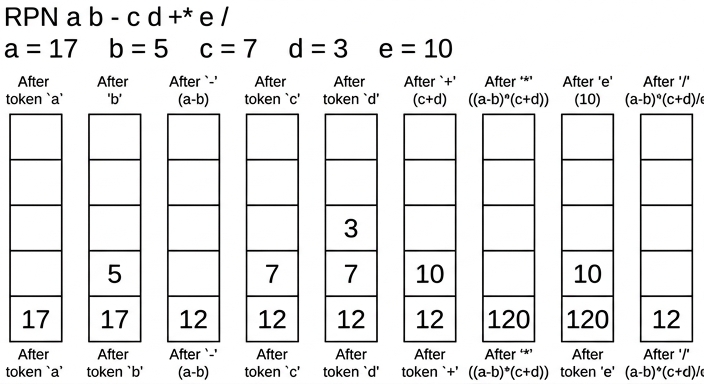
Final value = 12
12
Background Concept
RPN expressions are evaluated using a stack. A stack is a last-in, first-out structure.
The evaluation rule is:
- If the next item is an operand, push it onto the stack.
- If the next item is an operator, pop the top two values, apply the operator, then push the result.
The order of popping matters:
- First popped value = right operand
- Second popped value = left operand
So for a b -, the result is a - b, not b - a.
Understanding the Question
You must evaluate a b - c d + * e / using the values a = 17, b = 5, c = 7, d = 3, e = 10. The question also asks you to show the changing contents of the stack at each step, so this is not just about the final value. You need a full trace of how the stack changes as each token is processed.
Approach
First substitute the values:
17 5 - 7 3 + * 10 /
Then process the expression from left to right.
- Push each number.
- When an operator appears, pop the top two values.
- Calculate the result in the correct order.
- Push the result back.
- Record the stack after every token.
A visual stack sequence is the clearest way to show this.
Step-by-Step Reasoning
After substitution, the tokens are:
17, 5, -, 7, 3, +, *, 10, /
The changing stack contents are:
| Token | Action | Stack bottom → top |
|---|---|---|
17 | push 17 | 17 |
5 | push 5 | 17, 5 |
- | pop 5 and 17, calculate 17 - 5 = 12, push 12 | 12 |
7 | push 7 | 12, 7 |
3 | push 3 | 12, 7, 3 |
+ | pop 3 and 7, calculate 7 + 3 = 10, push 10 | 12, 10 |
* | pop 10 and 12, calculate 12 * 10 = 120, push 120 | 120 |
10 | push 10 | 120, 10 |
/ | pop 10 and 120, calculate 120 / 10 = 12, push 12 | 12 |
The final stack has one value left, so the value of the whole expression is 12.
Key Takeaways
- RPN evaluation is naturally done with a stack.
- Operands are pushed; operators pop two values and push one result.
- For subtraction and division, pop order matters.
- When the whole expression is finished, one final value should remain on the stack.
Common Mistakes
- Doing subtraction or division in the wrong order, for example using
5 - 17instead of17 - 5. - Forgetting to push the intermediate result back onto the stack.
- Skipping stack states, even though the question asks for the changing contents.
- Leaving more than one value on the stack at the end and still treating the evaluation as finished.
Things to Be Careful About
- Always read the RPN expression from left to right.
- The first value popped is the right operand.
- Replace the variables with their numeric values before tracing if that makes the stack easier to follow.
- Make sure each stack snapshot matches exactly one processed token.
- The final answer is only valid if one value remains on the stack after the last operator.
The diagram shows a logic circuit.
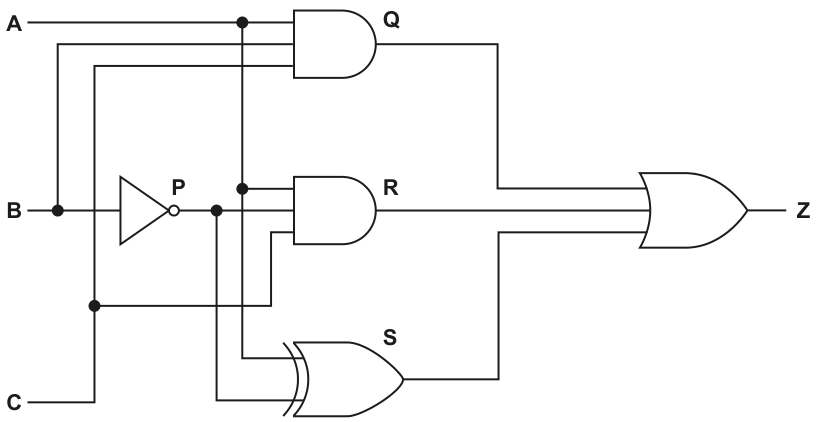
Complete the truth table for the given logic circuit.
Show your working.
| Working space | |||||||
|---|---|---|---|---|---|---|---|
| A | B | C | P | Q | R | S | Z |
| 0 | 0 | 0 | |||||
| 0 | 0 | 1 | |||||
| 0 | 1 | 0 | |||||
| 0 | 1 | 1 | |||||
| 1 | 0 | 0 | |||||
| 1 | 0 | 1 | |||||
| 1 | 1 | 0 | |||||
| 1 | 1 | 1 |
Working
Answer
| A | B | C | P | Q | R | S | Z |
|---|---|---|---|---|---|---|---|
| 0 | 0 | 0 | 1 | 0 | 0 | 1 | 1 |
| 0 | 0 | 1 | 1 | 0 | 0 | 0 | 0 |
| 0 | 1 | 0 | 0 | 0 | 0 | 0 | 0 |
| 0 | 1 | 1 | 0 | 0 | 0 | 1 | 1 |
| 1 | 0 | 0 | 1 | 0 | 1 | 1 | 1 |
| 1 | 0 | 1 | 1 | 0 | 1 | 0 | 1 |
| 1 | 1 | 0 | 0 | 1 | 0 | 0 | 1 |
| 1 | 1 | 1 | 0 | 1 | 0 | 1 | 1 |
See completed truth table
Background Concept
A truth table shows the output of a logic circuit for every possible combination of its inputs. Here there are three inputs, A, B and C, so there are rows.
For each gate:
- NOT inverts its input:
0becomes1,1becomes0. - AND gives
1only if both inputs are1. - OR gives
1if at least one input is1. - XOR gives
1only when its two inputs are different.
A good way to complete a logic-circuit truth table is to work through the circuit from left to right, filling the intermediate columns first, then the final output.
Understanding the Question
You are given a circuit with intermediate points labelled P, Q, R and S, and you must complete every missing value in the truth table, including the working columns.
From the circuit:
Pis the output of the NOT gate onBQis the output of an AND gateRis the output of another AND gateSis the output of an XOR gateZis the OR ofQ,RandS
So the question is testing whether you can follow signals through a circuit and evaluate each stage correctly.
Approach
The safest strategy is:
- Write expressions for each intermediate point.
- For each row of
A,B,C, calculatePfirst. - Use
Pto calculateQ,RandS. - Use
Q,RandSto calculateZ.
That avoids trying to jump straight to the final answer and reduces mistakes.
Step-by-Step Reasoning
From the circuit:
Now evaluate each row.
Row 1: A=0, B=0, C=0
Row 2: A=0, B=0, C=1
Row 3: A=0, B=1, C=0
Row 4: A=0, B=1, C=1
Row 5: A=1, B=0, C=0
Row 6: A=1, B=0, C=1
Row 7: A=1, B=1, C=0
Row 8: A=1, B=1, C=1
That gives the completed table.
Key Takeaways
- Always calculate intermediate gate outputs before the final output.
- XOR is
1only when the two inputs are different. - For three inputs, a complete truth table has eight rows.
- Working left to right through the circuit is the most reliable method.
Common Mistakes
- Treating XOR like OR. XOR is not "one or both"; it is "one but not both".
- Forgetting that
Pis the inverse ofBin every row. - Using the original
Binstead ofPwhen calculatingRorS. - Writing
Zbefore calculatingQ,RandScorrectly.
Things to Be Careful About
- Keep the row order exactly as given in the question.
- Recalculate every intermediate value for every row; do not assume patterns without checking.
- Be precise with NOT: if
B=0, thenP=1; ifB=1, thenP=0. - When OR-ing
Q,RandS, the final output is1if any one of them is1.
Write the Boolean expression that corresponds to the logic circuit as a sum-of-products.
Z = ............................................................................................................................................
...................................................................................................................................................
...................................................................................................................................................
.............................................................................................................................................
Answer
Z = A.B + A.¬B + B.C + ¬B.¬C
Background Concept
A sum-of-products expression is a Boolean expression written as:
- several AND terms (products)
- joined together by ORs (sums)
For example, is sum-of-products.
When turning a circuit into Boolean algebra:
- NOT becomes an overline
- AND becomes multiplication or
\cdot - OR becomes
+ - XOR must usually be expanded if the question specifically asks for sum-of-products
The standard expansion is:
Understanding the Question
You are not being asked to simplify the expression. You are being asked to write the Boolean expression that matches the circuit, specifically in sum-of-products form.
That means you should:
- identify the output from each gate,
- write those as Boolean terms,
- expand the XOR so the final answer is an OR of AND terms.
Approach
Start with the intermediate points from the circuit:
P = \overline{B}Q = A.BR = A.\overline{B}S = C \text{ XOR } \overline{B}
Then expand the XOR output S into two product terms. Finally OR together Q, R and S to get Z.
Step-by-Step Reasoning
From the circuit:
For the XOR stage:
Using the XOR expansion rule:
Since :
Now combine the three inputs to the final OR gate:
Substitute each term:
That is already in sum-of-products form.
Key Takeaways
- A logic circuit can be translated gate by gate into Boolean algebra.
- Sum-of-products means OR of product terms.
- XOR usually needs expansion when a sum-of-products answer is required.
- Double negation simplifies: .
Common Mistakes
- Leaving the XOR unexpanded. That would not be full sum-of-products form.
- Writing
Ras instead of . - Forgetting that the NOT gate changes
Bto before it is used elsewhere. - Trying to simplify the expression when the question only asks for the expression corresponding to the circuit.
Things to Be Careful About
- Use only the circuit structure given; do not invent extra simplification steps unless asked.
- In XOR expansion, make sure one term uses the first input true and the second false, and the other term uses the first false and the second true.
- Keep the final answer in proper sum-of-products format: each term should be a product, and the products should be joined by
+.
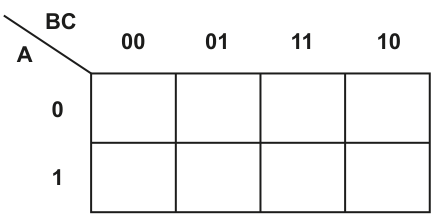
Answer
| A \ BC | 00 | 01 | 11 | 10 |
|---|---|---|---|---|
| 0 | 1 | 1 | 0 | 0 |
| 1 | 1 | 1 | 1 | 1 |
See completed K-map
Background Concept
A Karnaugh map is a visual method for organising Boolean values so that adjacent cells differ by only one variable. This makes it easier to spot groups and simplify expressions.
For a 3-variable K-map:
- one variable labels the rows
- two variables label the columns
- the column order must be Gray code, not normal binary order
So for BC, the correct column order is:
00011110
Each cell stores either 1 or 0 depending on whether that input combination is included in the expression.
Understanding the Question
You are asked only to complete the K-map values at this stage, not to simplify yet.
The map has:
- rows labelled by
A(0then1) - columns labelled by
BCin Gray-code order (00,01,11,10)
Your job is to place 1s in the cells represented by the accepted expression and put 0s everywhere else.
Approach
The simplest approach is:
- Read the row from
A. - Read the column from the pair
BC. - Put a
1in every matching cell. - Fill the remaining cells with
0.
For this accepted answer, the completed map has two 1s on the top row and four 1s on the bottom row.
Step-by-Step Reasoning
Using the accepted K-map arrangement:
- When
A = 0, the1s go in columns00and01. - When
A = 1, all four columns are1.
So the map becomes:
- Row
A = 0:1 1 0 0 - Row
A = 1:1 1 1 1
Written as a table:
| A \ BC | 00 | 01 | 11 | 10 |
|---|---|---|---|---|
| 0 | 1 | 1 | 0 | 0 |
| 1 | 1 | 1 | 1 | 1 |
This completed map is then used in part (ii) for looping.
Key Takeaways
- K-maps use Gray-code ordering so neighbouring cells differ by only one bit.
- A completed K-map is just a systematic layout of truth-table outputs.
- The bottom row in this map contains four
1s, which is a strong hint for a large loop later.
Common Mistakes
- Using column order
00, 01, 10, 11instead of Gray-code order00, 01, 11, 10. - Putting
1s in the right values but the wrong columns. - Forgetting to fill unused cells with
0. - Mixing up row labels and column labels.
Things to Be Careful About
- Always check the order printed on the K-map, not the order you expect.
- Read
BCas a pair; do not treatBandCindependently when choosing a column. - Follow the accepted cell placements exactly, because later simplification depends on them.
Draw loop(s) around appropriate group(s) in the K-map to produce an optimal sum-of-products.
Answer
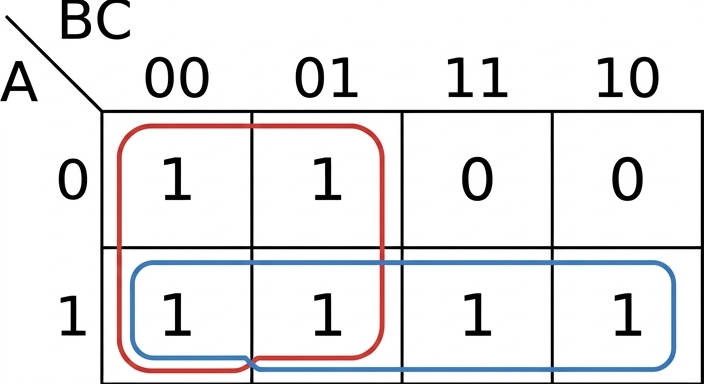
See K-map loops
Background Concept
In a K-map, simplification is done by drawing loops around adjacent 1s.
The key rules are:
- each loop must contain cells
- loops should be as large as possible
- every loop must contain only
1s - all
1s must be covered - overlapping is allowed if it gives a simpler answer
Larger loops remove more variables, so they usually produce a simpler expression.
Understanding the Question
Now that the K-map has been filled, you must draw the loop or loops that give the best simplified sum-of-products expression.
The word "optimal" matters. It means not just any correct looping, but the grouping that gives the simplest final expression.
Approach
Look for the biggest groups first.
In this map:
- the entire bottom row is all
1s, so that is one group of 4 - the left two columns form a 2 by 2 block of
1s, so that is another group of 4
These two groups overlap, and that is fine because overlapping often gives the simplest expression.
Step-by-Step Reasoning
Start from the completed K-map:
- top row:
1 1 0 0 - bottom row:
1 1 1 1
Now choose the largest valid groups.
-
Bottom row loop
- Cover all four cells in row
A = 1. - This is a group of 4.
- Cover all four cells in row
-
Left 2 by 2 loop
- Cover the cells in columns
00and01across both rows. - This is also a group of 4.
- Cover the cells in columns
These are the optimal loops because they cover all 1s using large groups and lead to the shortest simplified expression.
Key Takeaways
- Always try to make loops as large as possible.
- A group of 4 is better than two groups of 2.
- Overlapping groups are allowed if they help produce a simpler answer.
- The goal is not just coverage, but the simplest final Boolean expression.
Common Mistakes
- Drawing many small loops instead of one larger loop.
- Refusing to overlap loops even when overlap is useful.
- Grouping cells that are not adjacent in Gray-code order.
- Missing the full bottom row group of 4.
Things to Be Careful About
- Only group
1s, never0s. - Loop sizes must be powers of two.
- Adjacency in a K-map follows the Gray-code layout, not ordinary left-to-right binary sequence.
- The chosen loops here must match the accepted optimal grouping, because the next part depends on them.
Write the Boolean expression from your answer to part (c)(ii) as a simplified sum-of-products.
...........................................................................................................................................
.....................................................................................................................................
Answer
A + ¬B
Background Concept
After looping a K-map, each loop gives one simplified term.
To form the term:
- keep only the variable or variables that stay the same throughout the loop
- drop any variable that changes within the loop
If a variable is always 1, write it uncomplemented.
If a variable is always 0, write it complemented.
The final simplified expression is the OR of the terms from all loops.
Understanding the Question
This part asks you to convert the loops from part (ii) into a simplified sum-of-products expression.
So you are not re-reading the original long expression. You are reading the constant variables from each loop and writing the shortest Boolean form.
Approach
Take each loop separately:
- Find which variable stays fixed in the loop.
- Write that as the product term.
- OR the loop terms together.
For these loops, each group simplifies to just one variable term.
Step-by-Step Reasoning
From part (ii), there are two loops.
Loop across the whole bottom row
In the bottom row, A = 1 for every cell.
Astays constantBchangesCchanges
So this loop gives the term:
Left 2 by 2 loop
This loop covers columns 00 and 01 across both rows.
In both of those columns:
B = 0all the timeCchanges from0to1Achanges from0to1
So the only constant variable is B = 0, which gives:
Combine the loop terms
OR the two terms together:
That is the simplified sum-of-products expression.
Key Takeaways
- Each loop gives one simplified term.
- Only keep variables that do not change inside the loop.
- A whole row or whole column often simplifies to a single variable.
- The final simplified result here is very short because both loops are groups of 4.
Common Mistakes
- Keeping variables that change within a loop.
- Writing
Binstead of for the left 2 by 2 group. - Multiplying the two loop terms instead of OR-ing them.
- Going back to the unsimplified expression instead of using the loops.
Things to Be Careful About
- If a variable is fixed at
0, it must be complemented. - If it is fixed at
1, it is written normally. - Ignore any variable that changes within the loop.
- The expression is a sum-of-products, so the loop terms are joined with
+, giving .
Describe what is meant by a digital certificate.
...................................................................................................................................................
...................................................................................................................................................
...................................................................................................................................................
...................................................................................................................................................
...................................................................................................................................................
.............................................................................................................................................
Answer
- A digital certificate is an electronic document used to prove the identity of a user, device or website.
- It contains identifying details and the owner's public key.
- It is issued and digitally signed by a trusted certificate authority (CA).
An electronic document that proves identity, contains the owner's public key and identifying details, and is issued/signed by a trusted certificate authority.
Background Concept
A digital certificate is part of public key cryptography. In asymmetric encryption, each user or server has a public key and a private key. The public key can be shared openly, but there is an important problem: how do you know that a public key really belongs to the person or website claiming to own it?
A digital certificate solves this trust problem. It is an electronic document that links an identity to a public key. Typically, it includes details such as the owner name, organisation or website, the owner's public key, and validity information such as dates. Crucially, it is issued and digitally signed by a trusted third party called a certificate authority, or CA.
Because the CA signs the certificate, other people can check that the certificate is genuine and has not been altered.
Understanding the Question
This part asks for the meaning of a digital certificate, so the answer must define it rather than describe how encryption works in general.
To score well, the answer needs the main ideas:
- it is an electronic document,
- it proves or confirms identity,
- it contains the public key,
- and it is validated by a trusted certificate authority.
The question says "describe", so a short definition with a few clear points is better than a one-word answer.
Approach
A good way to answer is to break the definition into three pieces:
- what it is,
- what it contains,
- who makes it trustworthy.
That structure matches the usual mark scheme points for digital certificates.
Step-by-Step Reasoning
First, identify the object itself: a digital certificate is not the key itself, and it is not the signature itself. It is a document or data file.
Second, explain its purpose: it is used to confirm identity. For example, it can show that a website really is the genuine website, or that a message sender really owns a particular public key.
Third, state its contents: one of the most important items inside the certificate is the owner's public key. It also usually contains identifying information such as the owner's name or domain name.
Finally, explain why anyone should trust it: the certificate is issued and digitally signed by a certificate authority. The CA acts as a trusted organisation that verifies identities before issuing certificates.
Putting those ideas together gives a full definition.
Key Takeaways
- A digital certificate links an identity to a public key.
- It is used to establish trust in public key systems.
- Its trust comes from being issued and signed by a certificate authority.
Common Mistakes
- Saying it is "a private key": this is wrong because the certificate normally contains the public key, not the private key.
- Describing only encryption and not the certificate itself: the question is asking what the certificate means, not how asymmetric encryption works generally.
- Forgetting the certificate authority: without mentioning the trusted issuer, the explanation is incomplete.
- Confusing a digital certificate with a digital signature: they are related but different. A certificate proves ownership of a public key; a signature proves a message came from the private key owner and was not altered.
Things to Be Careful About
- Use the term public key correctly.
- Make clear that the certificate proves identity or ownership of the key, not secrecy of the message.
- Do not say the certificate is created by the message sender alone; the trust comes from the CA issuing/signing it.
- For exam answers, concise points are best: identity, public key, trusted CA.
Explain the role of a digital certificate in creating a digital signature.
...................................................................................................................................................
...................................................................................................................................................
...................................................................................................................................................
.............................................................................................................................................
Answer
- The digital certificate provides the signer's public key and confirms that this key belongs to that signer.
- The recipient uses that verified public key to check the digital signature, so the sender's identity can be trusted.
It provides a trusted copy of the signer's public key and confirms who owns it, allowing the recipient to verify the digital signature.
Background Concept
A digital signature is used to prove two important things:
- the message really came from the claimed sender, and
- the message has not been changed.
Typically, the sender creates a hash of the message and encrypts that hash with their private key. That encrypted hash is the digital signature. The recipient then uses the sender's public key to decrypt the signature and compare the result with a newly calculated hash of the received message.
However, this only works if the recipient trusts that the public key really belongs to the sender. That is where the digital certificate is used. The certificate contains the sender's public key and is signed by a trusted certificate authority, so it can be trusted as evidence of key ownership.
Understanding the Question
This question is not asking for the full process of generating a digital signature. It asks specifically for the role of the digital certificate in that process.
So the focus should be on what the certificate contributes:
- it supplies the correct public key,
- and it proves that this public key belongs to the claimed sender.
Those two ideas explain why digital signatures are trustworthy.
Approach
To answer this well, connect the certificate to signature verification.
A simple chain is:
- the certificate contains the sender's public key,
- the certificate proves that key belongs to the sender,
- the recipient can therefore use that trusted public key to verify the signature.
Even though the question says "creating a digital signature", exam mark schemes usually reward the practical role the certificate plays in making the signature usable and trustworthy.
Step-by-Step Reasoning
A sender signs using their private key. On its own, that is not enough for trust, because anyone receiving the message needs the matching public key.
If the recipient simply accepts any public key sent with the message, an attacker could substitute a different key and pretend to be the sender. So the system needs a trusted way to distribute the sender's public key.
The digital certificate does exactly that:
- it contains the sender's public key,
- it identifies the sender,
- and it is signed by a certificate authority.
Because the certificate authority is trusted, the recipient can trust that the public key in the certificate really belongs to the named sender.
The recipient then uses that verified public key to check the digital signature. If the signature verifies correctly, the recipient has confidence that the message came from the genuine sender and was not altered.
So the certificate's role is not to replace the signature. Its role is to make the public key trustworthy, which makes the signature trustworthy too.
Key Takeaways
- A digital signature depends on a trusted public key.
- A digital certificate provides that public key and links it to the sender's identity.
- Without the certificate, signature verification could be vulnerable to impersonation.
Common Mistakes
- Saying the certificate contains the private key: this is wrong; it contains the public key.
- Saying the certificate creates the signature: the signature is created using the sender's private key, not by the certificate itself.
- Ignoring identity: the important role of the certificate is not just storing the key, but proving whose key it is.
- Describing only hashing: hashing is part of digital signatures, but the question here is specifically about the certificate's role.
Things to Be Careful About
- Distinguish clearly between creating the signature and verifying it.
- Use the correct key names: private key for signing, public key for checking.
- Mention trust or authentication of the public key, because that is the key role of the certificate.
- Keep the answer focused on certificates, not a full essay on all of asymmetric encryption.
A declarative programming language is used to represent the features that are available and the features that are unavailable on different body styles of a car.
01 feature(sunroof).
02 feature(automatic_tailgate).
03 feature(heated_seats).
04 feature(extra_seats).
05 feature(reversing_camera).
06 feature(dashboard_camera).
07 feature(air_conditioning).
08 feature(heated_windscreen).
09 feature(satnav).
10 bodystyle(saloon).
11 bodystyle(hatchback).
12 bodystyle(estate).
13 bodystyle(minivan).
14 bodystyle(convertible).
15 available(sunroof, hatchback).
16 available(sunroof, minivan).
17 available(reversing_camera, hatchback).
18 available(extra_seats, minivan).
19 available(reversing_camera, saloon).
20 unavailable(sunroof, convertible).
21 unavailable(automatic_tailgate, saloon).
22 unavailable(extra_seats, hatchback).
These clauses have the meanings:
| Clause | Meaning |
|---|---|
| 01 | Sunroof is a feature. |
| 10 | Saloon is a body style. |
| 15 | Sunroof is available on a hatchback. |
| 20 | Sunroof is unavailable on a convertible. |
Sliding doors is a feature that is available on a minivan but unavailable on a hatchback.
Write additional clauses to represent this information.
23 .............................................................................................................................................
24 .............................................................................................................................................
25 .............................................................................................................................................
Answer
feature(sliding_doors).
available(sliding_doors, minivan).
unavailable(sliding_doors, hatchback).
See clauses
Background Concept
In declarative programming, knowledge is stored as facts and rules.
- A fact states something that is true.
- A rule states that something is true if some other conditions are true.
- A goal is a query asked against the knowledge base.
Here, the program uses predicates such as:
feature(...)for featuresbodystyle(...)for body stylesavailable(feature, bodystyle)for available combinationsunavailable(feature, bodystyle)for unavailable combinations
A fact like feature(sunroof). means “sunroof is a feature”. A fact like available(sunroof, hatchback). means “sunroof is available on a hatchback”.
Understanding the Question
You are told three pieces of information about sliding doors:
- it is a feature
- it is available on a minivan
- it is unavailable on a hatchback
The question asks you to write additional clauses to represent these facts in the same style as the existing knowledge base.
So this is not asking for a rule or an explanation. It is asking for three separate declarative facts.
Approach
Match each English statement to the predicate pattern already used in the question:
- “X is a feature” becomes
feature(X). - “X is available on Y” becomes
available(X, Y). - “X is unavailable on Y” becomes
unavailable(X, Y).
Then substitute sliding_doors, minivan, and hatchback into those patterns.
Step-by-Step Reasoning
The first statement is:
- “Sliding doors is a feature.”
The existing program represents features using facts such as feature(sunroof). and feature(satnav).
So the matching clause is:
feature(sliding_doors).
The second statement is:
- “Sliding doors is available on a minivan.”
The existing program represents this using available(feature, bodystyle), for example available(extra_seats, minivan).
So the clause is:
available(sliding_doors, minivan).
The third statement is:
- “Sliding doors is unavailable on a hatchback.”
The existing program represents this using unavailable(feature, bodystyle), for example unavailable(extra_seats, hatchback).
So the clause is:
unavailable(sliding_doors, hatchback).
Those three facts fully represent the new information.
Key Takeaways
- Facts in declarative programming directly encode true statements.
- You must choose the predicate that matches the meaning exactly.
- Unary predicates like
feature(X)describe one thing; binary predicates likeavailable(X, Y)describe a relationship between two things.
Common Mistakes
- Writing
bodystyle(sliding_doors).— this is wrong because sliding doors is a feature, not a body style. - Reversing the arguments, for example
available(minivan, sliding_doors).— the existing clauses useavailable(feature, bodystyle). - Forgetting one of the three facts — all three are needed for full marks.
- Using spaces inside an identifier such as
sliding doorsinstead of the atomsliding_doors.
Things to Be Careful About
- Follow the exact predicate names already used:
feature,available,unavailable. - Keep the argument order consistent with the original clauses.
- End each clause with a full stop.
- Use the exact atom names from the question, especially
minivanandhatchback.
Using the variable Options, the goal:
available(Options, saloon)
returns
Options = reversing_camera
Write the result returned by the goal:
available(Options, hatchback)
Options = ........................................................................................................................
Answer
Options = sunroofOptions = reversing_camera
sunroof; reversing_camera
Background Concept
A declarative query, or goal, asks the system to find values that make a statement true.
For a goal such as available(Options, hatchback), the system tries to match it against all facts of the form:
available(something, hatchback)
Whenever it finds a match, it binds the variable Options to the value in the first position.
If more than one fact matches, there can be more than one answer.
Understanding the Question
You are given the goal:
available(Options, hatchback)
You need to look through the facts in the knowledge base and find every clause where the second argument is hatchback and the predicate is available.
The question already shows that for available(Options, saloon), the result is reversing_camera, so you must do the same kind of matching for hatchback.
Approach
Scan only the available(...) facts, not the unavailable(...) ones.
From the given clauses:
available(sunroof, hatchback).available(reversing_camera, hatchback).
Both satisfy the goal, so Options can take both values.
Step-by-Step Reasoning
The goal is:
available(Options, hatchback)
Check each available fact:
available(sunroof, hatchback).matches, soOptions = sunroofavailable(sunroof, minivan).does not match because the body style is nothatchbackavailable(reversing_camera, hatchback).matches, soOptions = reversing_cameraavailable(extra_seats, minivan).does not matchavailable(reversing_camera, saloon).does not match
So there are two valid bindings for Options.
The unavailable(extra_seats, hatchback). fact is not part of the available predicate, so it is irrelevant to this exact query.
Key Takeaways
- A goal is matched against facts with the same predicate name and compatible arguments.
- Variables are bound to values that make the goal true.
- A query can return more than one answer.
Common Mistakes
- Including
extra_seatsbecause hatchback appears inunavailable(extra_seats, hatchback)— this is wrong because the goal usesavailable, notunavailable. - Giving only one answer — there are two matching facts.
- Looking at all clauses containing
hatchbackinstead of only theavailableclauses.
Things to Be Careful About
- Keep the predicate name exact:
available. - Notice that the variable is in the first position, so you are finding features, not body styles.
- If multiple facts match, list all valid results.
- The order of answers usually follows the order of matching facts in the knowledge base.
F may be available for B if F is a feature and B is a body style and F is not unavailable for that body style.
Write this as a rule:
may_choose_option(F, B)
IF .............................................................................................................................................
...................................................................................................................................................
...................................................................................................................................................
.............................................................................................................................................
Answer
may_choose_option(F, B) IF
   feature(F) AND
   bodystyle(B) AND
   NOT unavailable(F, B)
See rule
Background Concept
A rule in declarative programming defines when a new statement is true.
It has:
- a head: the statement being defined
- a body: the conditions that must all be true
In plain logic, this means:
head IF condition1 AND condition2 AND condition3
This question also uses negation. The statement “F is not unavailable for B” means that the knowledge base must not contain a matching unavailable(F, B) fact.
So the rule describes a body style and a feature combination that may be chosen if:
Freally is a featureBreally is a body styleFis not marked unavailable forB
Understanding the Question
The question gives the logic in English:
Fmay be available forBifFis a feature- and
Bis a body style - and
Fis not unavailable for that body style
You must translate that directly into a declarative rule called may_choose_option(F, B).
A key clue is that the rule is not asking whether there is already an available(F, B) fact. It asks whether the option may be chosen based on the absence of an unavailable fact.
Approach
Turn each English condition into the predicate already used in the knowledge base:
- “
Fis a feature” becomesfeature(F) - “
Bis a body style” becomesbodystyle(B) - “
Fis not unavailable forB” becomesNOT unavailable(F, B)
Then join them using logical AND under the head may_choose_option(F, B).
Step-by-Step Reasoning
Start with the rule head:
may_choose_option(F, B)
This is what will be true when the conditions below it are satisfied.
Now translate the first condition:
- “
Fis a feature” - This becomes
feature(F)
Translate the second condition:
- “
Bis a body style” - This becomes
bodystyle(B)
Translate the third condition:
- “
Fis not unavailable for that body style” - The existing predicate is
unavailable(F, B) - So the negated condition is
NOT unavailable(F, B)
Now combine them with AND:
feature(F) AND bodystyle(B) AND NOT unavailable(F, B)
Placed into rule form, this gives:
may_choose_option(F, B) IF
   feature(F) AND
   bodystyle(B) AND
   NOT unavailable(F, B)
This means the system can infer that an option may be chosen whenever it is a valid feature, the body style is valid, and there is no explicit fact saying that combination is unavailable.
An important subtle point is that this rule can make may_choose_option true even when there is no available(F, B) fact. It is based on “not unavailable”, not on “explicitly available”.
Key Takeaways
- A declarative rule expresses logic, not step-by-step instructions.
- Each English condition usually maps directly to one predicate.
- Negation is often used to exclude cases rather than to prove a positive fact directly.
- The head of the rule is the new relationship you are defining.
Common Mistakes
- Writing
available(F, B)instead ofNOT unavailable(F, B)— that changes the meaning of the rule. - Forgetting either
feature(F)orbodystyle(B)— both are part of the stated condition. - Using OR instead of AND — all three conditions must be true together.
- Negating the wrong predicate, for example
NOT feature(F).
Things to Be Careful About
- Use the exact head name:
may_choose_option(F, B). - Keep the variable names consistent as
FandBthroughout the rule. - The negated part must apply to the whole predicate
unavailable(F, B). - Read the wording precisely: “may be available” here is defined by the rule the question gives, not by existing
available(...)facts alone.
Explain what is meant by Deep Learning in relation to Artificial Intelligence (AI).
..........................................................................................................................................................
..........................................................................................................................................................
..........................................................................................................................................................
..........................................................................................................................................................
..........................................................................................................................................................
....................................................................................................................................................
Answer
- Deep Learning is a type of machine learning that uses artificial neural networks.
- It is called "deep" because the network has many layers, especially multiple hidden layers between the input and output.
- The network is trained using large amounts of data and adjusts its weights to learn patterns/features so it can make decisions or predictions.
See explanation
Background Concept
Deep Learning is a branch of Artificial Intelligence within machine learning. In machine learning, a computer system improves its performance by learning from data rather than being told every rule explicitly.
Deep learning does this using artificial neural networks. These are computing models inspired by the way biological neurons connect together. A neural network is made of layers:
- an input layer to receive data
- one or more hidden layers to process it
- an output layer to produce a result
The word deep means there are many hidden layers, not just one. These extra layers allow the system to learn more complex patterns. For example, in image recognition, earlier layers might detect edges, later layers might detect shapes, and deeper layers might recognise full objects.
During training, the network compares its output with the correct answer and changes the connection weights to reduce error. This is how it gradually improves.
Understanding the Question
The question asks what is meant by Deep Learning in AI. This means you are not being asked for an example program or a comparison with another method. You need a short explanation of the idea itself.
For 3 marks, the likely expected points are:
- it is a form of machine learning / AI
- it uses neural networks
- the networks are "deep" because they contain many hidden layers
- it learns patterns from large amounts of training data by adjusting weights
So the answer should define the term and include what makes it different from a simpler neural network.
Approach
A good way to answer this kind of definition question is:
- State the broader category: deep learning is a type of machine learning.
- State the method used: artificial neural networks.
- State why it is called deep: multiple hidden layers.
- State what those networks do: learn patterns from training data by changing weights.
That gives a complete exam-style explanation without going off into unnecessary detail.
Step-by-Step Reasoning
Start with the classification:
- Deep learning is not a completely separate area from machine learning; it is a subset of it.
- So saying it is a type of machine learning is an important first marking point.
Then explain the structure it uses:
- Deep learning systems are based on artificial neural networks.
- A neural network is made of connected nodes arranged in layers.
- Each connection has a weight, and the weighted values are processed to produce outputs.
Next explain the meaning of deep:
- A simple neural network might have very few layers.
- A deep neural network has many layers, particularly several hidden layers between input and output.
- Those extra layers allow the system to represent more complicated relationships in the data.
Finally explain how it learns:
- The system is trained on lots of example data.
- It produces an output, compares that with the expected output, and updates the weights.
- Repeating this process lets it learn useful patterns or features automatically.
- Once trained, it can use what it has learned to classify, predict, recognise speech, identify images, and so on.
That is why the concise full-mark answer includes all of these ideas: machine learning, neural networks, multiple hidden layers, and learning from training data.
Key Takeaways
- Deep learning is a type of machine learning.
- It uses artificial neural networks.
- It is called deep because it has multiple hidden layers.
- It learns by adjusting weights from training data to detect patterns and make predictions.
Common Mistakes
- Saying deep learning is just "AI" without mentioning machine learning or neural networks. That is too vague.
- Describing any neural network and forgetting to explain what makes it deep. The key idea is the presence of many hidden layers.
- Saying it is simply "programmed with lots of rules". Deep learning usually learns patterns from data rather than relying only on hand-written rules.
- Giving only examples such as self-driving cars or facial recognition without defining the concept.
Things to Be Careful About
- Use the term artificial neural network accurately; do not confuse it with a general algorithm or database.
- Make sure you explicitly mention multiple hidden layers because that is the defining feature behind the word "deep".
- If you mention learning, tie it to training data and changing weights rather than saying it learns "by itself" with no explanation.
- For a short-mark question like this, keep the answer focused on definition rather than writing a long description of all AI methods.
State a condition that must be true for an array to be searchable for a binary search.
...................................................................................................................................................
.............................................................................................................................................
Answer
- The array must be sorted into order.
The array must be sorted into order.
Background Concept
A binary search only works when the data is already in a known sorted order, such as ascending alphabetical order or ascending numerical order. The reason is that binary search repeatedly looks at the middle item and decides whether to continue searching the lower half or the upper half. That decision is only valid if all smaller items are on one side and all larger items are on the other.
If the array is not sorted, comparing with the middle item tells you nothing reliable about where the target might be, so binary search would fail.
Understanding the Question
This question asks for one condition that must be true before a binary search can be used on an array. It is not asking how binary search works, only what must already be true about the array.
The key word is "must". That means a necessary precondition, not just something helpful.
Approach
Recall the fundamental rule for binary search:
- compare with the middle item
- eliminate half the remaining data
That elimination step is only possible if the array is ordered. So the required condition is that the array is sorted.
Step-by-Step Reasoning
Suppose you are searching for Mia in an array of names.
- If the array is sorted alphabetically and the middle item is
Liam, thenMiamust be to the right ofLiam. - If the middle item is
Noah, thenMiamust be to the left.
That logic depends completely on the array being in order.
If the names were in random order, seeing Liam in the middle would not tell you whether Mia is left or right, so you could not discard half the array safely.
Therefore the correct condition is that the array is sorted.
Key Takeaways
- Binary search has a compulsory precondition: ordered data.
- The array can be sorted ascending or descending, as long as the program logic matches that order.
- Without sorting, binary search is not valid.
Common Mistakes
- Saying "the array must be full" — binary search does not require that.
- Saying "the array must be one-dimensional" — binary search can be adapted to other structures; that is not the key condition.
- Saying only "the data must be searchable" — that is too vague and does not state the actual condition.
Things to Be Careful About
- Use the word "sorted" or "in order" explicitly.
- Do not confuse binary search with linear search: linear search does not require sorted data.
- If you mention the type of order, make sure it is consistent, for example alphabetical or ascending order.
Complete the given pseudocode to find an item in a 1D array Names of type STRING using a binary search.
DECLARE Names : ARRAY[1:100000] OF STRING
DECLARE TopOfList : INTEGER
DECLARE EndOfList : INTEGER
DECLARE CurrentItem : INTEGER
DECLARE ToFind : STRING
DECLARE Found : BOOLEAN
DECLARE NotInList : BOOLEAN
TopOfList ← 1
EndOfList ← 100000

OUTPUT "Which name do you wish to find? "
INPUT ToFind

...................................................................................................................................................

NotInList ← FALSE

WHILE ................................................ AND ................................................
   CurrentItem ← (TopOfList + EndOfList) DIV 2

   IF ........................................................................................................... THEN
      Found ← TRUE
   ELSE
      IF TopOfList >= EndOfList THEN
         ...........................................................................................................
      ELSE
         IF ToFind > Names[CurrentItem] THEN
            ...........................................................................................................
         ELSE
            EndOfList ← CurrentItem – 1
         ENDIF
      ENDIF
   ENDIF
ENDWHILE

IF Found = TRUE THEN
   OUTPUT "Item found at position ", CurrentItem, " in array"
ELSE
   OUTPUT "Item not in array"
ENDIF
Answer
DECLARE Names : ARRAY[1:100000] OF STRING
DECLARE TopOfList : INTEGER
DECLARE EndOfList : INTEGER
DECLARE CurrentItem : INTEGER
DECLARE ToFind : STRING
DECLARE Found : BOOLEAN
DECLARE NotInList : BOOLEAN
TopOfList ← 1
EndOfList ← 100000

OUTPUT "Which name do you wish to find? "
INPUT ToFind

Found ← FALSE

NotInList ← FALSE

WHILE Found = FALSE AND NotInList = FALSE
   CurrentItem ← (TopOfList + EndOfList) DIV 2

   IF ToFind = Names[CurrentItem] THEN
      Found ← TRUE
   ELSE
      IF TopOfList >= EndOfList THEN
         NotInList ← TRUE
      ELSE
         IF ToFind > Names[CurrentItem] THEN
            TopOfList ← CurrentItem + 1
         ELSE
            EndOfList ← CurrentItem - 1
         ENDIF
      ENDIF
   ENDIF
ENDWHILE

IF Found = TRUE THEN
   OUTPUT "Item found at position ", CurrentItem, " in array"
ELSE
   OUTPUT "Item not in array"
ENDIF
See completed pseudocode
Background Concept
Binary search is an efficient searching algorithm for a sorted list or array. Instead of checking each item one by one, it repeatedly checks the middle item.
There are three possible outcomes after comparing the target with the middle item:
- they are equal, so the item has been found
- the target is greater, so search continues in the upper half
- the target is smaller, so search continues in the lower half
To make this work, the algorithm keeps two boundaries:
TopOfListfor the first possible positionEndOfListfor the last possible position
On each pass, it calculates the middle position:
DIV is integer division, so the result is a valid array index.
The algorithm also needs control variables here:
FoundbecomesTRUEwhen the item is matchedNotInListbecomesTRUEwhen there are no positions left to search
Understanding the Question
You are given a mostly complete pseudocode algorithm for searching a 1D array Names of strings using binary search. The question asks you to fill in the missing lines only.
From the skeleton, we can see:
- the array is called
Names - the search range starts from
1to100000 - the item to search for is stored in
ToFind - the program already outputs the final result using
Found
So the missing lines must do four jobs:
- initialise
Found - make the
WHILEloop continue only while the item is neither found nor ruled out - test whether the current middle item matches the target
- update either
NotInListorTopOfListwhen appropriate
Approach
The safest approach is to follow the standard binary search pattern exactly.
- Start with both flags set to show that the search has not yet finished.
- Loop while the search is still active.
- Calculate the middle index.
- If the target equals the middle value, set
FoundtoTRUE. - Otherwise, check whether the search interval has collapsed.
- If it has, set
NotInListtoTRUE. - If not, move either the top boundary upward or the end boundary downward.
Because the array contains strings, the comparison ToFind > Names[CurrentItem] means alphabetical comparison.
Step-by-Step Reasoning
The missing line after INPUT ToFind must be:
Found ← FALSE
Why? Because before the search begins, the item has not been found yet.
The next flag is already partly given:
NotInList ← FALSE
So both control variables start as FALSE.
The WHILE condition must keep searching only while both of these are still false:
WHILE Found = FALSE AND NotInList = FALSE
If either one becomes TRUE, the search is finished.
Inside the loop, the program calculates the middle position:
CurrentItem ← (TopOfList + EndOfList) DIV 2
Then it must check whether the middle item is the one being searched for:
IF ToFind = Names[CurrentItem] THEN
If that condition is true, the correct action is:
Found ← TRUE
If it is not equal, the algorithm has to decide whether there is any search space left.
The given test is:
IF TopOfList >= EndOfList THEN
That means there is no valid half left to continue searching, so the missing line is:
NotInList ← TRUE
If there is still a range left, the program compares alphabetically:
IF ToFind > Names[CurrentItem] THEN
If the target is greater than the middle string, the target must be in the upper half. So the lower boundary moves up past the current middle item:
TopOfList ← CurrentItem + 1
Otherwise, the target must be in the lower half, and that final line is already given:
EndOfList ← CurrentItem - 1
That is the complete search logic.
Key Takeaways
- Binary search always works by repeatedly halving the search range.
- You need lower and upper boundaries and a middle index.
- Exact match sets a found flag.
- If the target is larger, move the lower boundary up.
- If the target is smaller, move the upper boundary down.
- A flag such as
NotInListis useful to stop the loop cleanly when the item is absent.
Common Mistakes
- Forgetting to initialise
FoundtoFALSEbefore the loop. - Writing
WHILE Found = FALSE OR NotInList = FALSE, which is wrong because the loop would continue even after one stopping condition becomes true. - Using
CurrentItem / 2instead of(TopOfList + EndOfList) DIV 2. - Writing
TopOfList ← CurrentIteminstead ofTopOfList ← CurrentItem + 1, which can cause the same middle item to be checked repeatedly. - Writing
EndOfList ← CurrentIteminstead ofEndOfList ← CurrentItem - 1, which causes the same problem. - Using a real programming language syntax instead of CIE pseudocode.
Things to Be Careful About
- Use the assignment arrow
←, not=. - Use
DIV, not ordinary division, because the index must be an integer. - Keep the variable names exactly as given:
TopOfList,EndOfList,CurrentItem,ToFind,Found,NotInList. - The array is indexed from
1to100000, so the bounds are inclusive. - Because these are strings,
>means alphabetical order, so the array must already be sorted alphabetically for the search to work.
Describe the performance of a binary search in relation to the number of data items in the array being searched. Refer to Big O notation in your answer.
...................................................................................................................................................
...................................................................................................................................................
...................................................................................................................................................
.............................................................................................................................................
Answer
- Binary search has time complexity .
- Each comparison halves the remaining section of the array to be searched.
- Therefore, as the number of items increases, the number of comparisons increases only logarithmically, not linearly.
O(log n)
Background Concept
Big O notation describes how the running time of an algorithm grows as the amount of data, usually written as , increases. It does not usually count exact seconds; instead, it shows the pattern of growth.
For searching:
- linear search is because, in the worst case, it may check every item
- binary search is because it cuts the remaining search space in half each time
The base of the logarithm is usually not written in Big O notation, so we simply write .
Understanding the Question
The question asks you to describe the performance of binary search as the number of data items increases, and it specifically says to refer to Big O notation. That means the answer must include the notation itself, not just a vague statement like "it is fast".
To get full credit, you need both:
- the correct Big O notation:
- an explanation of why: because each step halves the number of remaining items
Approach
State the complexity first, then justify it using the core behaviour of binary search.
A strong concise answer is:
- binary search is
- each comparison removes half the remaining values
- so the number of steps rises slowly as gets larger
Step-by-Step Reasoning
Suppose the array has:
- 16 items: at most about 4 comparisons
- 32 items: at most about 5 comparisons
- 64 items: at most about 6 comparisons
This shows an important pattern: doubling the amount of data does not double the number of comparisons. It usually adds only one extra comparison.
That happens because the search works like this:
- check the middle item
- discard half the array
- check the middle of what remains
- discard half again
So after each step, the remaining number of possible items becomes smaller very quickly.
That shrinking by repeated halving is exactly why the running time is logarithmic:
This is much more efficient than checking items one by one.
Key Takeaways
- Binary search has time complexity .
- Its efficiency comes from halving the search range on each comparison.
- As the data set grows, the number of extra comparisons grows very slowly.
Common Mistakes
- Writing , which is the complexity of linear search, not binary search.
- Saying only "it is faster" without giving Big O notation.
- Confusing the number of data items with the number of comparisons.
- Thinking that doubling the array size doubles the search time; with binary search it does not.
Things to Be Careful About
- Write the notation exactly as .
- Explain the reason for the logarithmic growth: halving the remaining search space.
- Do not claim binary search is always usable; it depends on the data being sorted first.
Reduced Instruction Set Computers (RISC) and Complex Instruction Set Computers (CISC) are two types of processor.
State two features of RISC processors.
...................................................................................................................................................
...................................................................................................................................................
...................................................................................................................................................
.............................................................................................................................................
Answer
- Uses a small, simple instruction set.
- Instructions are usually fixed length and many execute in a single clock cycle.
Small, simple instruction set; fixed-length instructions with many completing in one clock cycle.
Background Concept
RISC stands for Reduced Instruction Set Computer. A RISC processor is designed around a smaller set of simple instructions rather than a very large set of complex ones. The idea is that simpler instructions can be decoded and executed more quickly, and this often makes the processor easier to pipeline.
Typical RISC features include:
- a small, simple instruction set
- simple addressing modes
- fixed-format or fixed-length instructions
- many general-purpose registers
- instructions designed to execute quickly, often in one clock cycle
By contrast, CISC processors usually have a larger instruction set with more complex instructions, and some instructions may take several clock cycles.
Understanding the Question
This part asks for two features of RISC processors only. It does not ask for a comparison with CISC, and it does not ask for advantages. So the best response is to state two standard design characteristics of RISC clearly and separately.
Approach
The safest approach is to choose features that are universally recognised in the syllabus. The clearest ones are:
- small and simple instruction set
- fixed-length, fast-executing instructions
These are specific enough to gain marks and avoid vague answers such as "faster" on its own.
Step-by-Step Reasoning
A strong answer needs two distinct points.
- First point: RISC uses a reduced set of instructions. That means the processor has fewer instructions to decode and each instruction tends to do a simpler job.
- Second point: RISC instructions are commonly fixed length and are designed so that many can be executed in one clock cycle. Fixed length helps the fetch and decode stages stay regular and efficient.
Either of those statements is a valid feature in its own right. Together they provide two separate marking points.
Key Takeaways
- RISC is recognised by simplicity of instruction design.
- Fixed-format, fast instructions are a core reason RISC processors work well with pipelining.
- In short recall questions, give clear architecture features rather than vague benefits.
Common Mistakes
- Saying only "RISC is faster". That is too vague and not a defining feature by itself.
- Giving CISC features by mistake, such as "large instruction set".
- Repeating the same idea twice, for example "simple instructions" and "small instruction set" without making them clearly distinct enough.
Things to Be Careful About
- The question asks for features, not advantages.
- You need two separate points.
- Make sure the features are specifically about RISC architecture, not about software or general system performance.
Outline the process of interrupt handling as it could be applied to RISC or CISC processors.
...................................................................................................................................................
...................................................................................................................................................
...................................................................................................................................................
...................................................................................................................................................
...................................................................................................................................................
.............................................................................................................................................
Answer
- The processor finishes the current instruction and detects that an interrupt needs attention.
- The current state is saved, for example the program counter and any required registers/flags.
- Control is transferred to the interrupt service routine.
- When the routine is complete, the saved state is restored and execution resumes with the next instruction.
Finish current instruction, save context, branch to ISR, restore context and resume.
Background Concept
An interrupt is a signal that tells the processor that some event needs attention. This event might come from hardware, such as an input device or a timer, or from software. Instead of constantly checking every device, the processor can be interrupted when something important happens.
Interrupt handling is the process the processor follows to pause the current program, deal with the event, and then continue the original program. The code that deals with the interrupt is called an interrupt service routine, often shortened to ISR.
The key idea is context switching at the processor level:
- preserve enough information about the current program
- execute the ISR
- restore the preserved information
- continue as if the interruption had not happened
Understanding the Question
This part asks for the process of interrupt handling and says it could apply to either RISC or CISC processors. That means the answer should be the general interrupt sequence, not differences between the two architectures.
So the examiner is looking for the main stages:
- when the interrupt is recognised
- what gets saved
- where control goes
- how execution resumes afterwards
Approach
The easiest way to answer is to describe the interrupt lifecycle in order.
- Finish or reach a safe point in the current instruction.
- Save the processor's current state.
- Jump to the ISR.
- Run the ISR.
- Restore the state and continue the interrupted program.
For a short question, the most creditworthy terms are current instruction, saved state, interrupt service routine, and resume execution.
Step-by-Step Reasoning
Here is the sequence in detail:
-
Interrupt occurs or is detected
A device or event raises an interrupt request. The processor checks for interrupts, typically at a defined point such as after completing the current instruction. -
Current execution is paused safely
The processor should not usually abandon an instruction halfway through. It normally completes the current instruction first, then responds to the interrupt. -
Processor state is saved
The processor must remember where it was in the interrupted program. This usually includes the program counter and may include registers and status flags. Without this, the processor would not know how to resume correctly. -
Control transfers to the ISR
The processor loads the address of the appropriate interrupt service routine, often using an interrupt vector or stored address, and starts executing that routine. -
ISR handles the event
The service routine carries out the required task, such as reading input data, acknowledging hardware, or updating some state. -
Saved state is restored
When the ISR is finished, the processor reloads the saved program counter and other saved register values. -
Original program resumes
Execution continues from the next instruction of the interrupted program.
For a 3-mark outline, not every tiny detail is needed, but the answer must clearly show save, service, and resume.
Key Takeaways
- Interrupt handling lets the processor respond to events without constant polling.
- The essential pattern is save context, service interrupt, restore context.
- The interrupted program can continue correctly only if the processor state was preserved.
Common Mistakes
- Saying the processor immediately stops in the middle of an instruction. Usually it completes the current instruction first.
- Forgetting to mention that the state must be saved.
- Mentioning the ISR but not explaining how the original program resumes.
- Confusing an interrupt with a normal procedure call. An interrupt is triggered by an event, not by ordinary program flow.
Things to Be Careful About
- Use the term interrupt service routine accurately.
- If you mention saved data, the safest examples are the program counter, registers, and status flags.
- Keep the answer as a process in the correct order, because this question asks to outline what happens.
Explain how pipelining affects interrupt handling for RISC processors.
...................................................................................................................................................
...................................................................................................................................................
...................................................................................................................................................
...................................................................................................................................................
...................................................................................................................................................
.............................................................................................................................................
Answer
- In a pipelined RISC processor, several instructions are being processed at the same time in different stages.
- If an interrupt occurs, instructions already in the pipeline may need to be completed or discarded, so the pipeline is stalled or flushed before the interrupt service routine starts.
- After the interrupt has been handled, the pipeline must be refilled, causing a delay before full execution resumes.
An interrupt may require the RISC pipeline to be stalled or flushed, then refilled after the ISR, causing delay.
Background Concept
Pipelining is a processor technique where instruction processing is split into stages such as fetch, decode, execute, and write back. Different instructions can occupy different stages at the same time. For example, while one instruction is being executed, the next may be decoded and another may be fetched.
This is especially associated with RISC processors because their simple, regular instruction formats make pipelining easier and more efficient.
Interrupt handling, however, temporarily changes the normal flow of instructions. That creates a complication in a pipelined processor, because the processor is not dealing with just one instruction at a time. Several instructions may already be part-way through the pipeline.
Understanding the Question
This part is not asking what pipelining is on its own, and it is not asking for the general interrupt process again. It asks specifically how pipelining affects interrupt handling in a RISC processor.
So you need to connect two ideas:
- RISC processors often use pipelining.
- An interrupt disrupts the normal flow of pipelined instructions.
The key issue is that, at the moment of an interrupt, multiple instructions may already be "in flight".
Approach
The best approach is to explain the effect in three linked steps:
- In pipelining, several instructions are active at once.
- When an interrupt happens, the processor must deal with those partly processed instructions.
- This creates overhead because the pipeline may need to be stalled, flushed, and then refilled.
That gives a complete explanation with cause and effect.
Step-by-Step Reasoning
Start with the normal pipelined state.
In a RISC processor, instruction 1 might be executing, instruction 2 decoding, and instruction 3 fetching. So although the processor appears to be following one program, internally several instructions are being processed simultaneously.
Now suppose an interrupt occurs.
The processor cannot simply jump to the interrupt service routine without considering the other instructions already in the pipeline. Some may have:
- completed safely
- partly completed
- not yet affected the machine state
Because of that, the processor must bring the pipeline to a safe state.
This is usually done by one of these actions:
- stalling the pipeline, meaning later stages wait
- flushing the pipeline, meaning partially queued instructions are discarded
- allowing certain instructions already far enough along to complete before servicing the interrupt
The exact implementation can vary, but the important effect is the same: interrupt handling becomes more complicated because more than one instruction is involved.
After the interrupt service routine finishes, normal instruction flow resumes. But the pipeline is no longer full. The processor must fetch and feed new instructions back into the stages. That refill time causes a performance penalty or delay.
So pipelining improves performance in normal execution, but when an interrupt occurs it adds overhead because the pipeline has to be managed carefully.
Key Takeaways
- Pipelining means several instructions are active at once.
- Interrupts are harder to handle in pipelined processors because there may be partially processed instructions.
- The pipeline often has to be stalled or flushed, then refilled afterwards.
- This causes interrupt overhead and a short loss of performance.
Common Mistakes
- Saying pipelining makes interrupts impossible. It does not; it just makes them more complex to handle.
- Repeating the general interrupt sequence without mentioning what happens to instructions already in the pipeline.
- Forgetting the performance cost after the ISR, when the pipeline has to fill again.
- Assuming every instruction in the pipeline is always completed. Some may be discarded depending on the design.
Things to Be Careful About
- The question is specifically about RISC processors, so it is useful to mention that RISC commonly uses pipelining.
- Use terms like stalled, flushed, and refilled correctly.
- Focus on the interaction between pipelining and interrupts, not on unrelated RISC features such as register count or instruction set size.